The 10 Best Children's Book Planning Tools in 2026 (We Tested Them All)
You are not writing 500 words. You are writing 13 page turns. Ten picture book planning tools ranked by whether they can hold a spread and let you reorder it cheaply.

Category
Creative Process
Author

Sara de Klein
Head of Product at Storyflow
Topics
2026-08-14
•
18 min read
•
Creative ProcessTable of Contents
- Key Takeaways
- The Fourteen Turns
- At a Glance: The 10 Tools Compared
- How I Ranked These
- Quick Picks by Job Type
- 1. The Paper Dummy
- 2. Storyflow
- 3. Affinity Publisher
- 4. Milanote
- 5. Procreate
- 6. Book Creator
- 7. Scrivener
- 8. Canva
- 9. Miro
- 10. Kitaboo
- What to Actually Pay For
- Tools to Avoid for This Job
- What No Tool on This List Does
- The Bottom Line
- FAQ: Children's Book Planning Tools
- Related Reading
Templates to check out for this topic


- children's book planning tools
- picture book dummy
- picture book spreads
- 32 page picture book
- picture book software
- children's book writing tools
What are the best children's book planning tools in 2026?
Picture books are the only book form where the physical object is part of the writing, and almost every tool sold to authors ignores that. The folded paper dummy ranks first here because it is the only tool that actually performs a page turn, which is the thing you are designing. Storyflow ranks second because fourteen spreads laid out on one canvas is the closest a screen gets to a wall of pinned paper, and you can drag a spread from position nine to position four without renumbering anything. Affinity Publisher ranks third because it is where the book becomes printable, with real facing pages, bleed and trim. Milanote, Procreate, Book Creator, Scrivener, Canva, Miro and Kitaboo each own a narrower slice, and this post says exactly which one.

Full disclosure: Storyflow is our product. It ranks second here on one narrow ground: fourteen spreads sit on a single canvas and moving one costs nothing, which is what makes restructuring keep happening. It genuinely cannot do the rest. There is no page spread primitive that keeps two facing pages paired, no bleed, trim or CMYK setup, no page numbering that reflows when you reorder, no print ready PDF export and no illustration tools. Real time co-editing with permissions and roles requires Max at $39 per month billed annually, and Storyflow is paid only during early access. The folded paper dummy ranks above it and Affinity Publisher beats it outright on every print capability.
Quick Comparison
Ten tools ranked on two questions: can it hold a spread as one object, and can you move spread 9 to position 4 without renumbering the rest of the book.
| Tool | Best For | AI Features | Price |
|---|---|---|---|
| Paper dummy | Testing the actual page turn | None, and it still outperforms every screen on the turn | Eight sheets and a stapler |
| Storyflow | All 14 spreads visible at once, cheap reordering | AI reads the full active board plus 1 Tactic and 3 Documents | $7.99 mo annual (free plan late 2026) |
| Affinity Publisher | Facing pages, bleed, trim and press ready PDF | None | One time purchase, around $70 |
| Milanote | Reference and the illustrator's visual brief | None meaningful for structure | Free plan, paid from about $12.50 mo annual |
Key Takeaways
- The standard picture book is 32 pages because books print in signatures, usually multiples of 8. After front matter you typically have 28 to 30 pages of story, which is roughly 14 spreads.
- A spread is two facing pages seen at once. The reader never sees a single interior page in isolation, so planning in single pages plans a book nobody will ever experience.
- You are not writing 500 words. You are writing 13 page turns. The turn is the unit of suspense, and it is the only structural device unique to this form.
- Picture book text commonly runs under 1,000 words and often under 500, which means the manuscript is not where most of the craft decisions live.
- Text and illustration are expected to do different jobs. A line that describes what the picture already shows is a line the book does not need.
- A dummy book, folded and stapled from ordinary paper, remains the standard test. Nothing on a screen reproduces the specific reveal of lifting a corner.
- Rank tools by two questions: can it hold a spread as one object, and can you reorder spreads without renumbering everything downstream.
- Storyflow has no spread primitive, no bleed or trim setup, no reflowing page numbers and no print ready export. It plans the book. It does not make the book.
Lay your 14 spreads out where you can see all of them
Put the whole book on one canvas, drag a spread from position nine to position four without renumbering anything, and ask the AI which turns are doing no work. Storyflow will not print your book, and it will stop you avoiding the restructure. Paid-only during early access; the Free plan lands before the end of 2026.

The Fourteen Turns
Ask a picture book author what they are working on and they will not say chapter three. They will say spread nine.
Here is the arithmetic that governs the whole form. Books are printed on large sheets that are folded and cut into signatures, usually in multiples of 8 pages. That is why 32 pages is the standard picture book: it is four signatures of 8, and it is what printers, publishers and distributors have organized themselves around. Some books run 24, some 40, some 48. All of them are multiples of 8, and none of them are 35.
Of those 32 pages, front matter takes a share: a half title, a title page, the copyright and dedication page. What is left for the story is commonly 28 to 30 pages. Since interior pages are always seen in facing pairs, that is roughly 14 spreads.
Fourteen spreads means thirteen turns inside the story, plus the turn from the title page into spread one. You are not writing 500 words. You are writing 13 page turns.
Each of those turns is a hinge, and the craft sits entirely in what the reader does not yet know when they lift the corner. A turn can deliver a surprise, a reversal, a punchline, a change of scale, a silence. It can also deliver nothing, which is what happens when a spread simply continues the previous one, and a book with four dead turns feels flat no matter how good the sentences are.
This is why the unit is the spread and not the page. Nobody reading a picture book has ever seen page 14 alone. They saw pages 14 and 15 together, as one image with a gutter running through it, and then they turned. A tool that presents your book as a scrolling list of single pages is describing an object that does not exist.
The second half of the framework is reordering. Picture book structure changes late and changes often. You cut a spread, you split one into two, you move the reveal a spread earlier because it was landing too soon. In a well shaped tool that is a drag. In a badly shaped tool it means renaming a document, renumbering everything after it, and updating the art notes that referenced spread numbers. Teams give up on restructuring not because the structure was right but because restructuring was expensive.
So the ranking axis for all ten tools below is narrow and testable: does it hold a spread as one object, and can you reorder spreads without renumbering the book.
At a Glance: The 10 Tools Compared
| Tool | Best for | Holds a spread as one unit | Print ready output |
|---|---|---|---|
Paper dummy | Testing the actual page turn | Yes, physically | It is the artifact |
Storyflow | Planning 14 spreads on one canvas | By convention, not by feature | No |
Affinity Publisher | Making the printable book | Yes, native facing pages | Yes, PDF X with bleed |
Milanote | Reference, notes and the visual brief | Board per spread, manual | No |
Procreate | Painting the illustrations | Single canvas at spread size | Layered files only |
Book Creator | A finished readable book, fast | Page based, not spread based | Print PDF, limited control |
Scrivener | The words and the research | No | Manuscript formats only |
Canva | Marketing and quick mockups | Page pairs, loosely | PDF print with bleed |
Miro | Team review of the spread sequence | Frame per spread, manual | No |
Kitaboo | Digital distribution to schools | Fixed layout ePub | Digital only |
How I Ranked These
I come from documentary, where the constraint is runtime: a 52 minute slot does not care that your assembly runs 71 minutes, and every planning decision changes once the container is fixed. A picture book has the same shape of problem with a harder container, because 32 pages is not a target, it is a printing fact. Over the past two years I have built spread plans, dummies and art note passes in every tool listed here.
Five criteria, in order.
1. Does it hold a spread as one object? The test: put two facing pages on screen with a gutter between them, then move both at once. If the tool makes you drag two things and hope they stay together, it does not model the form.
2. Can you reorder without renumbering? The test: move spread 9 to position 4. Count how many things you have to rename afterward. Zero is the target. In most tools the answer is between six and fourteen.
3. Can you see all 14 spreads at once? The test: fit the whole book on one screen and look at it as a shape. Pacing, the run of quiet spreads, the position of the climax and the balance of wide and close are visual properties. A scrolling list hides all of them.
4. Does it keep text and art doing different jobs? The test: put the words and the art note on the same spread, then cover the words. If the picture still carries the beat, the pairing is working. A tool that only holds one of the two makes this test impossible.
5. Does it reach a physical artifact? The test: can you get to something you fold, staple and hand to a six year old, or to a PDF a printer will accept with bleed, trim and CMYK. Planning that never reaches paper stays a theory.
Pricing is as of August 2026 and changes frequently. Verify with each vendor.
Quick Picks by Job Type
- Best overall test of the book: the paper dummy. Fold, staple, read it aloud, watch where the turns die.
- Best digital spread plan: Storyflow. Fourteen spreads visible at once, drag to reorder, AI that can read the whole board.
- Best print production: Affinity Publisher. Facing pages, bleed, trim, CMYK, one time purchase.
- Best reference and visual brief: Milanote. The board where the art direction gets decided.
- Best illustration: Procreate. Where the pictures are actually painted.
- Best fast finished book: Book Creator. For classrooms, gifts and getting a readable object into a child's hands this week.
- Best manuscript work: Scrivener. For author illustrator teams whose text needs real drafting.
- Best team review: Miro. When six people need to comment on spread order at once.
1. The Paper Dummy
The verdict. The only tool on this list that performs a page turn, which makes it the only one that can tell you whether your turns work.
Best for. Testing structure, pacing and the reveal, at any stage from first idea to final art.
Pricing. Eight sheets of A4 or letter paper, a long arm stapler and fifteen minutes. As of August 2026 the paper has gone up and it still costs less than one month of anything else here.
Why it ranks here. Fold eight sheets in half and staple the spine and you have a 32 page book. Number the pages and you will immediately see the thing that trips up every first time author: page 1 sits alone against the inside cover, and every interior page after it is paired. Spread order, front matter placement and the position of the final turn all become obvious in a way no diagram makes them.
Then you write the text in, roughly, in pencil, and thumbnail the pictures as boxes with three lines in them. Nothing needs to be good. The dummy is a structural instrument, not a portfolio piece.
What it reveals is specific and hard to get any other way. Read it aloud to a child and watch their hand. A turn that works produces a small pause and a reach. A turn that does not produces a flat continuation, and you will feel it as an absence in the room. Four of those in a row is the diagnosis every picture book manuscript needs and none of them get from a word processor.
It also enforces the word count naturally. Writing the text by hand into the spreads makes an overlong manuscript physically obvious, because the words will not fit in the space the picture needs. Picture book text commonly sits under 1,000 words and often under 500, and the dummy shows you why before an editor has to.
It ranks first because every other tool on this list is a way of getting closer to what a dummy tells you in fifteen minutes. It is not a nostalgic recommendation. It is the control experiment.
Strengths.
- Reproduces the exact reading experience, including the turn.
- Forces correct pagination and spread pairing with no software to learn.
- Immediate read aloud testing with real children.
- Makes an overwritten manuscript physically visible.
- Free, portable, and the artifact agents and editors already recognize.
Limitations.
- Not shareable remotely without photographing every spread.
- Restructuring means rewriting the whole dummy by hand.
- No version history, so an earlier structure is gone once you rebuild.
- Handwriting and rough thumbnails are not a submission asset on their own.
The trade off. It answers the hardest question fastest and the easiest questions slowest. Make one early, then plan digitally.
2. Storyflow
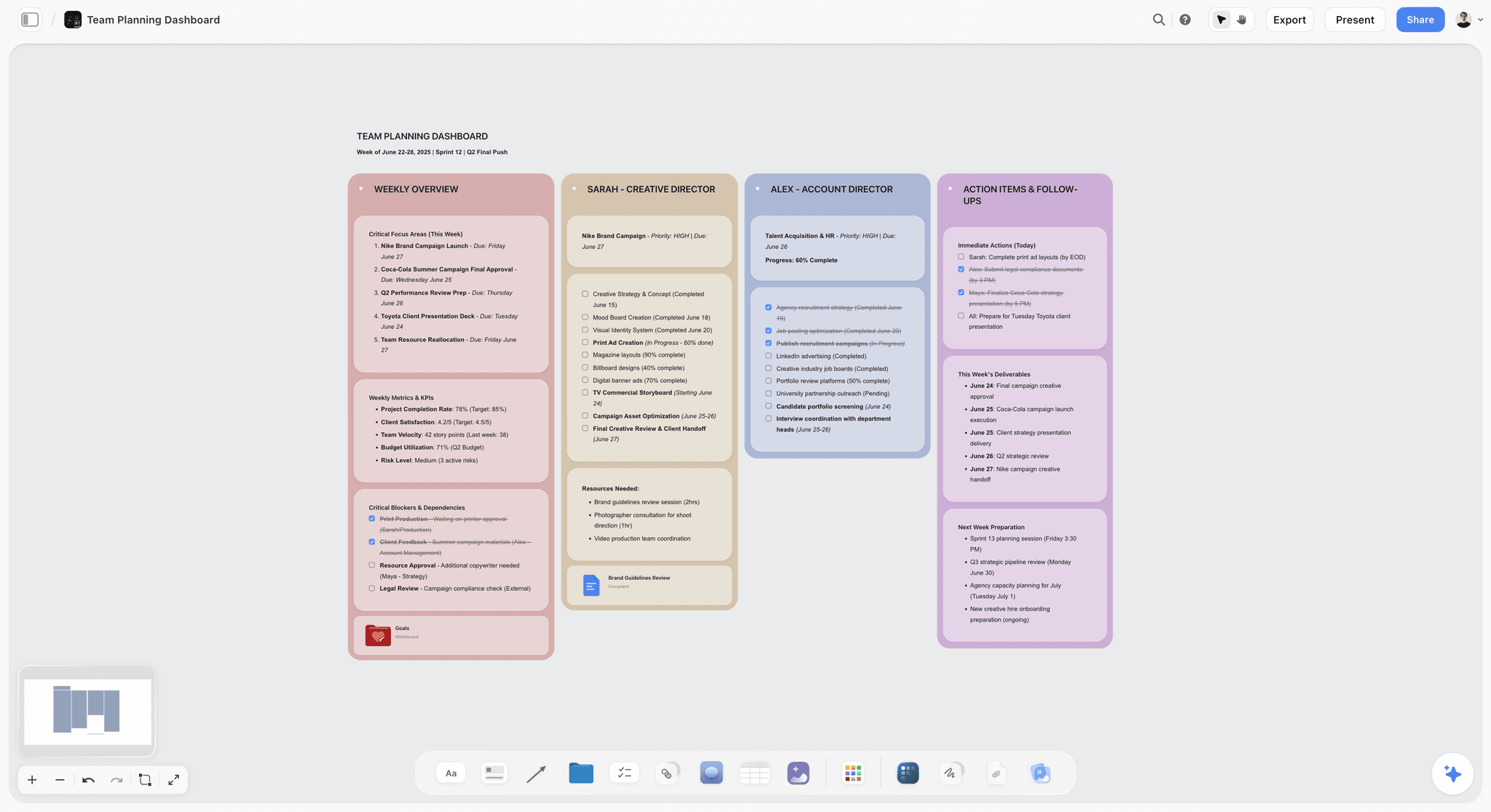
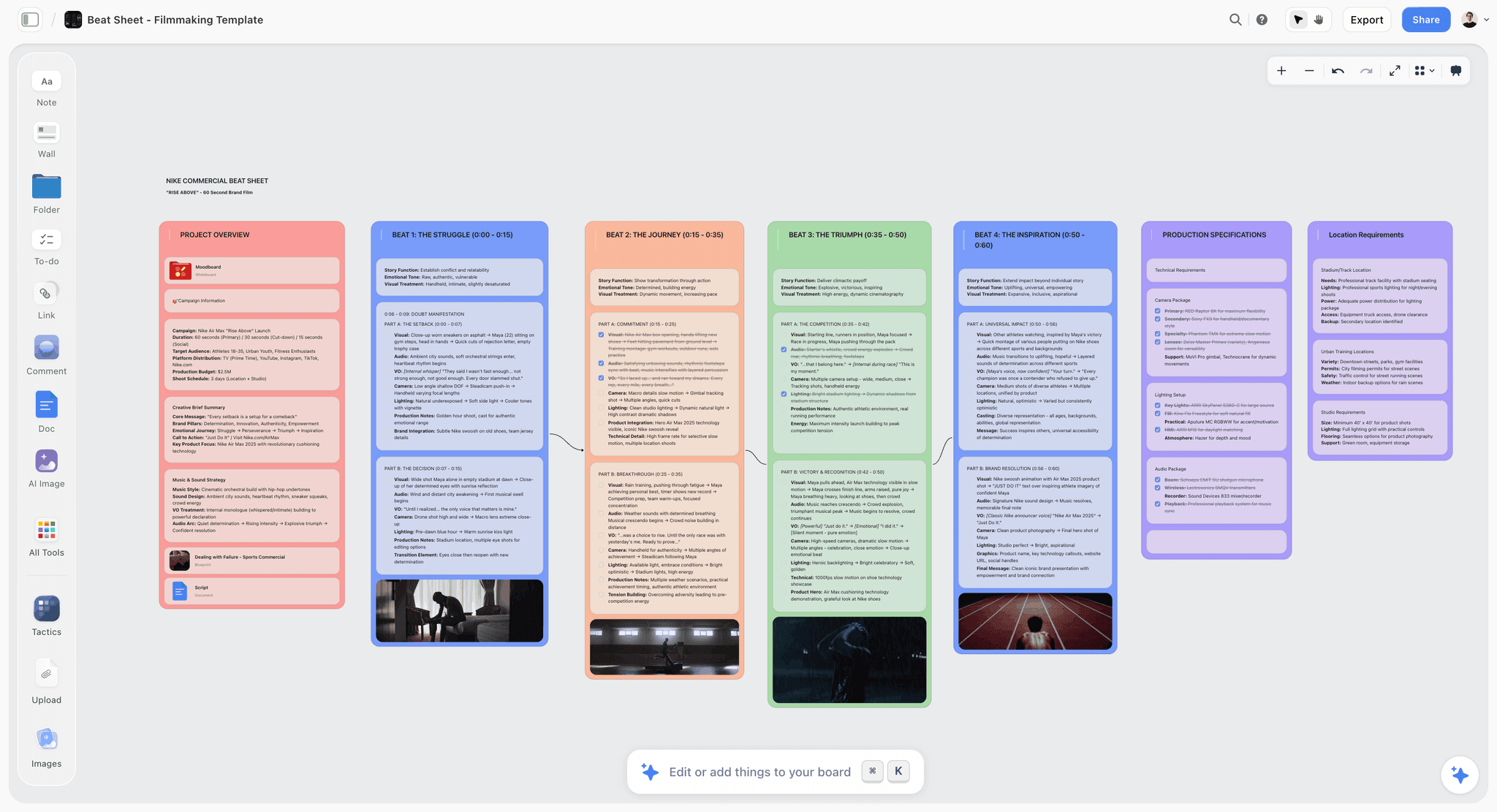
The verdict. The closest a screen gets to a wall of pinned spreads, and the only digital tool here where dragging spread 9 to position 4 costs nothing.
Best for. Holding all 14 spreads at once while the structure is still moving.
Pricing. Paid only during early access. Plus is $7.99 per month billed annually or $9.99 monthly, adding 200 plus Story blueprints and unlimited file uploads. Pro is $14 per month billed annually or $19 monthly, adding AI image generation, roughly twenty times more AI usage and memory across conversations. Max is $39 per month billed annually or $49 monthly, adding forty times more AI and Team Workspace with permissions and roles. Pricing is flat per account rather than per seat, and anyone a paid member invites joins free. The Free plan launches before the end of 2026. Pricing as of August 2026.
Why it ranks here. The two questions from the framework are the whole argument. Can you see all 14 spreads at once, and can you reorder them cheaply.
A canvas answers both. Lay out fourteen cards in two rows of seven, each card carrying the spread text and the art note, and the book is a shape you can look at rather than a document you scroll. That view is where pacing problems surface: three consecutive quiet spreads, a climax sitting at spread 11 with three spreads of falling action after it, a reveal that arrives before the reader has had time to want it. None of those are visible in a manuscript.
Reordering is the part that changes behaviour. Because the cards are spatial objects rather than numbered sections, moving one is a drag and nothing downstream breaks. That sounds small until you notice how many authors stop restructuring after the fourth attempt because each attempt costs twenty minutes of renaming. Cheap reordering means more attempts, and more attempts is how structure gets found.
The AI reads your full active canvas board, plus up to one Tactic and up to three Documents you @-mention, so you can ask whole book questions: which spreads carry no change of state, where the text is describing what the art note already covers, whether the turn out of spread 6 is doing any work. Those are exactly the questions that require seeing the whole book at once, which is why a chat window pasted with a manuscript answers them badly.
The counterpoint discipline also lives well here. Putting the words and the art note side by side on the same card makes it visible when they are saying the same thing twice, which is the single most common failure in unpublished picture book manuscripts.
It ranks second, not first, because it is a planning surface and not a book. The dummy still beats it on the only test that matters at the end.
Strengths.
- All 14 spreads visible at once, so pacing is a shape rather than an inference.
- Reordering is a drag, with no renumbering and no downstream renaming.
- Text and art note sit together on one card, which makes counterpoint checkable.
- AI reads the whole board, so it answers structural questions rather than line level ones.
- Invited collaborators join free, so an illustrator or editor costs nothing to add.
- Flat per account pricing rather than per seat.
Limitations.
- No page spread primitive. A spread is a card you agree to treat as a spread, and nothing stops the two halves drifting apart.
- No bleed, trim or CMYK setup, so nothing here is print aware.
- No page numbering that reflows when you reorder. Numbers are text you maintain.
- No export to a print ready PDF. The book has to be rebuilt elsewhere.
- No illustration tools. There are no brushes, no layers and no painting.
- Real time co-editing with permissions and roles requires Max at $39 per month billed annually.
- Paid only during early access, so there is no free tier to test with today.
The trade off. Storyflow holds the plan and makes restructuring cheap. Affinity Publisher makes the book, Procreate makes the pictures, and the dummy still decides whether the turns work.
3. Affinity Publisher
The verdict. The tool that genuinely implements the framework in software: real facing pages, real spreads, and page numbers that reflow when you move things.
Best for. Turning a finished plan into a file a printer will accept.
Pricing. Affinity is a one time purchase, historically around $70 per app with a universal licence covering the full suite, as of August 2026. Adobe InDesign is roughly $23 per month as a single app or around $60 per month for full Creative Cloud.
Why it ranks here. Publisher and InDesign are the only tools here where a spread is a first class object. Turn on facing pages and the document shows two pages joined at a gutter. Drag a page in the pages panel and everything after it renumbers itself. Set up bleed at 3mm, place your trim and safety guides, and the file knows where the paper will be cut.
That matters more in picture books than in almost any other book form, because illustrations routinely cross the gutter. A picture that spans both pages needs to survive the binding, and text placed too close to the spine disappears into it. Publisher shows you that risk while you are working. A canvas tool cannot, because it has no concept of a spine.
Master pages carry the folio and any repeated furniture, and the preflight pass catches the RGB image or the missing link before a printer charges you to catch it instead.
It ranks third rather than higher only because it is the wrong place to think. Restructuring in Publisher is possible but it is heavy, and the temptation once a layout looks good is to stop questioning the order. Do the questioning on a canvas or in a dummy, then bring a settled sequence here.
The honest comparison against Storyflow is straightforward: Publisher beats it outright on spreads, numbering, bleed, trim, CMYK and export. Storyflow beats it on seeing the whole book at once and on the cost of changing your mind.
Strengths.
- Native facing pages, so a spread is one object rather than a convention.
- Automatic page numbering that reflows on reorder.
- Bleed, trim, safety margins and CMYK, with press ready PDF export.
- One time purchase, which suits a project based author illustrator.
- Preflight catches the expensive mistakes before press.
Limitations.
- A layout application, not a thinking surface. Structural questions get expensive here.
- Real learning curve, particularly around colour management and export presets.
- Collaboration is file based, so simultaneous work is awkward.
- Overkill if your book will only ever be a digital read aloud.
The trade off. Non negotiable if you are printing. Bring it a sequence you have already stopped arguing about.
4. Milanote
The verdict. The best place to decide what the book looks like, and a workable place to hold spreads if you accept the manual bookkeeping.
Best for. Reference gathering, colour and character direction, and the visual brief an illustrator actually needs.
Pricing. Free plan with a limit on the number of notes, images and links. Paid plans start around $12.50 per month billed annually as of August 2026.
Why it ranks here. Picture books are an art direction problem before they are a layout problem. Palette, character consistency, environment, the visual register of the whole book: those decisions get made from reference, and Milanote is built for holding reference in a considered way rather than a dumped folder.
For structure, a board per spread works. Each board holds the spread text, the art note, three reference images and the turn question, and the boards sit in an ordered column you can rearrange. That satisfies criterion three loosely and criterion two well enough for a solo author.
Where it falls short of the framework is criterion one. A Milanote board is a container, not a pair of facing pages, so nothing in the interface tells you the gutter exists or that this card is the left page. You are keeping the spread structure in your head and asking the tool to store the contents.
It ranks fourth because it does the art direction job better than anything else here, including Storyflow, and does the structural job second best. For an author working with an illustrator for the first time, the visual brief is the artifact that prevents the most expensive kind of rework.
Strengths.
- Best in class reference and moodboard organization.
- Boards per spread give an ordered, rearrangeable structure.
- Genuinely useful free plan for a single book.
- Share a read only board with an illustrator without an account.
- Clean enough that the board stays legible at fourteen spreads.
Limitations.
- No spread primitive and no awareness of pages, gutters or trim.
- No AI reading of the whole board, so structural questions stay manual.
- Free plan limits bite quickly once reference images accumulate.
- No export toward anything printable.
The trade off. Use it for the look of the book. Keep the sequence somewhere you can see all of it at once.
5. Procreate
The verdict. Where the pictures get made, and no part of the planning problem gets solved.
Best for. Illustrating spreads on an iPad, from thumbnails through to final art.
Pricing. One time purchase, historically around $13 for Procreate on iPad as of August 2026. Procreate Dreams for animation is a separate one time purchase.
Why it ranks here. For illustration, the iPad and Procreate combination has become the default for a large share of working picture book illustrators, and for good reason: the brush engine is excellent, the file sizes are manageable, and the learning curve is short compared to desktop painting software.
The practical setup for picture books is to work at full spread dimensions with bleed included, at 300 dpi, rather than painting single pages and hoping they meet at the gutter. Painting the spread as one image is the only way a cross gutter illustration reads as one picture, and it aligns with the framework: the spread is the unit, so the canvas should be the spread.
The limitation is structural and worth being blunt about. Procreate is a single canvas painting app. It has no multi page document, no page order, no reordering, no way to view fourteen spreads as a sequence. Your book lives as fourteen separate files in a gallery folder, and the order is whatever you named them.
That is why it ranks fifth despite being the tool most illustrators spend the most hours in. It is superb at criterion four's picture half and absent on every other criterion.
Strengths.
- Excellent brush engine and colour handling at a one time price.
- Canvas can be set to exact spread dimensions with bleed.
- Time lapse recording is genuinely useful for social and for process posts.
- Layered PSD export moves cleanly into Publisher or InDesign.
Limitations.
- No multi page or spread aware document at all.
- No sequence view, so pacing is invisible.
- iPad only, with canvas size and layer limits tied to device memory.
- Colour management for CMYK print requires a separate step elsewhere.
The trade off. The pictures happen here. The book happens somewhere else.
6. Book Creator
The verdict. The fastest route from an idea to a readable book a child can actually turn the pages of, which is why classrooms adopted it and authors overlook it.
Best for. Teachers, school projects, and authors who want a shareable digital book this week.
Pricing. Free tier with a small library limit. Education plans run roughly $10 per teacher per month billed annually as of August 2026, with school pricing quoted separately.
Why it ranks here. Book Creator gives you a page based book with a real page turn in the reader, drag and drop images, drawing tools, text and recorded audio, and publishes to a link in about a minute. For a child author or a classroom cohort, that loop is the entire value: they make a book, it turns, other people read it.
For a picture book professional it is more limited. The editor works page by page rather than spread by spread, so a cross gutter illustration is not something the tool models. Reordering pages is supported and cheap, which satisfies criterion two, but criterion one fails outright.
It ranks sixth because it is the only tool here besides the dummy where a finished, turnable book exists at the end without a production step. The audio recording feature is also underrated for read aloud testing when you cannot get the child in the room.
Strengths.
- A genuinely turnable book at the end, publishable to a link.
- Page reordering is trivial, so structure stays cheap to change.
- Recorded narration per page makes read aloud pacing testable.
- Free tier is enough to make one complete book.
Limitations.
- Page based, not spread based, with no gutter or facing page concept.
- Print output exists but with limited control over bleed and colour.
- Design ceiling is low, and template aesthetics show.
The trade off. Unbeatable for getting a book into a child's hands quickly. Not a production tool for a trade picture book.
7. Scrivener
The verdict. Built for the 90,000 word problem, applied to a 500 word one, which is the mismatch that defines it here.
Best for. Author illustrator teams whose text needs real drafting, and authors juggling research across several books.
Pricing. One time purchase, roughly $60 for macOS or Windows and around $24 for iOS as of August 2026.
Why it ranks here. Scrivener's binder and corkboard are close to the right idea. One document per spread, dragged into order on the corkboard, with the synopsis card carrying the art note, gets you a workable structural view and cheap reordering.
The problem is scale mismatch in both directions. Scrivener's strengths, the compile engine, the research folder, snapshots and the ability to hold a novel's worth of drafts, are largely wasted on a manuscript that fits on two sheets of paper. Meanwhile it has no image handling worth the name for spread thumbnails and no way to see words and pictures together.
It ranks seventh because for text heavy longer children's books, chapter books and middle grade, it would rank far higher. For a 32 page picture book it is a powerful tool aimed at the wrong shape of problem.
Strengths.
- Corkboard gives an orderable card view with synopsis text.
- Snapshots preserve earlier versions of every spread's text.
- Research folder keeps sources beside the draft.
- One time purchase with a long free trial.
Limitations.
- No spread concept and no meaningful image or thumbnail handling.
- Compile and outlining power is irrelevant at picture book length.
- Corkboard cards are text only, so counterpoint cannot be checked.
The trade off. Right tool, wrong book length. Keep it for the chapter book.
8. Canva
The verdict. The marketing layer and a decent mockup surface, sold hard as a book design tool it is not quite.
Best for. Promotional assets, submission mockups and self published books with modest design ambitions.
Pricing. Free tier is substantial. Pro is roughly $15 per month for one person as of August 2026, with team pricing above that.
Why it ranks here. Canva does have print output with bleed and crop marks, and its book presets get you a correctly sized document faster than Publisher does. For a self publisher producing a simple, text light book, that is a real path to a printable PDF without learning a layout application.
Where it fails the framework is spreads. Canva's editor is page by page, and while you can place two pages side by side in a document sized as a spread, nothing in the tool understands facing pages, the gutter or reflowing numbering. Reordering is easy, which is genuine.
It ranks eighth because it is excellent at the job around the book, cover reveals, social assets, a pitch mockup, and mediocre at the book itself. It is also where template look creeps in, a real risk in a form where visual distinctiveness is the product.
Strengths.
- Print PDF with bleed and crop marks, no production knowledge required.
- Fast, good looking promotional and submission assets.
- Free tier covers a first project comfortably.
- Brand kit keeps a series visually consistent.
Limitations.
- No facing page or gutter model, so cross spread art is guesswork.
- Colour management for print is shallow compared with Publisher.
- Template aesthetics undercut a book whose selling point is its art.
The trade off. Great for everything you make about the book. Weak for the book.
9. Miro
The verdict. The right shape for spread review and the wrong shape for living with, because the board never stops being a workshop.
Best for. Getting an editor, an illustrator and an author commenting on spread order at the same time.
Pricing. Free plan with three editable boards. Paid plans start around $8 per member per month billed annually as of August 2026.
Why it ranks here. Miro satisfies criterion three well. Frames laid out in two rows of seven give you the whole book at once, reordering is a drag, and comments attach to specific spreads, which is exactly what a structural review needs.
Two things push it down. Pricing is per member, so adding a freelance illustrator and a freelance editor for a two month project costs real money on a per seat basis. And Miro boards sprawl. Without discipline the fourteen frames end up surrounded by reference images, sticky note debris and three abandoned versions of the sequence, which defeats the purpose of a view whose value is legibility.
It ranks ninth because Storyflow and Milanote both deliver the whole book view with less overhead, and because Miro's collaboration advantage matters only if you genuinely have several people reviewing at once.
Strengths.
- Whole book view with frames, and cheap reordering.
- Strong simultaneous multi user commenting.
- Free plan covers a single book at three boards.
- Frames export to PDF for a rough share.
Limitations.
- Per member pricing punishes adding freelancers.
- Boards sprawl fast, and the sequence view degrades with them.
- No spread primitive, no page numbering, no print awareness.
The trade off. Borrow it for the review session. Do not make it the home of the book.
10. Kitaboo
The verdict. A distribution platform for schools that has nothing to do with planning, included because authors keep being pitched it as one.
Best for. Publishers delivering fixed layout digital books to schools and institutions.
Pricing. Enterprise, quoted per project or per title as of August 2026. There is no self serve tier.
Why it ranks here. Kitaboo is a digital publishing and distribution platform: fixed layout ePub delivery, DRM, offline reading, analytics on how students use a title, and integration with school systems. For a children's educational publisher with a catalogue, that is a legitimate product.
For an individual author it is the wrong end of the pipeline entirely. You arrive at Kitaboo with a finished book. It will not help you decide whether spread 9 earns its turn.
It ranks tenth because it touches no part of the framework. It is on the list because children's publishing tool searches surface it constantly, and authors deserve a plain answer about what it is.
Strengths.
- Fixed layout ePub delivery that preserves picture book design.
- DRM, offline access and school system integration.
- Reading analytics that print distribution cannot provide.
Limitations.
- Enterprise sales and pricing, with nothing for individual authors.
- No planning, structural or authoring capability at all.
- Digital only, so a printed edition needs a separate production path.
The trade off. A distribution decision, made after the book exists.
What to Actually Pay For
Pay for paper first. A stapler and eight sheets test the thing every subscription here is an approximation of. Make a dummy before you buy anything.
Pay for a spread view once you have restructured twice. The trigger is not the first draft, it is the moment you notice you are avoiding a restructure because it is annoying. That avoidance costs more than $7.99 per month, and Storyflow or Milanote both remove it.
Pay for Affinity Publisher only when you are printing. A one time purchase around $70 beats a subscription for a project based author, and there is no reason to own it while the sequence is still moving.
Do not pay per seat for a two month collaboration. Miro at roughly $8 per member and Canva Teams both scale by head count, which is the wrong shape for an author plus one illustrator plus one freelance editor. Flat per account pricing wins at that size.
Do not buy an enterprise publishing platform as an individual. Kitaboo and its competitors are sold to publishers with catalogues. No part of them helps a single book.
Tools to Avoid for This Job
A word processor as the book. A picture book manuscript in Word is a page of text with no structure visible in it. Authors submit them because the format is standard, then discover in revision that they have no way to see the fourteen spreads at all.
A slide deck as the spread plan. Slides look tempting because they are already rectangles in a sequence, but a slide is a single page, and building a spread from two slides means every reorder breaks a pair. It fails criterion one and criterion two simultaneously.
A page numbered document you maintain by hand. The instant you renumber manually, restructuring acquires a cost, and structure stops changing. That is how a mediocre sequence survives to submission.
Illustration software as the planning surface. Painting spread 3 before the sequence is settled is the most expensive possible way to discover that spread 3 should be spread 7.
A shared folder of image files as the book. Order lives in filenames, so order is not really recorded anywhere and nobody can see the book as a shape.
What No Tool on This List Does
None of them will tell you whether the story is worth 32 pages. Length in this form is a judgment about whether an idea has enough turns in it, and no software has an opinion.
None of them will write the counterpoint for you. Deciding that the text says the boy was brave and the picture shows him shaking is an authorial choice, and a tool can only make the two visible next to each other.
None of them, including Storyflow, will hold a spread as a real object. Storyflow has no spread primitive, no gutter, no bleed or trim, no page numbers that reflow when you reorder, and no print ready export. It makes restructuring cheap and the whole book visible, and then hands the file to Affinity Publisher. That is a real gap and it is why the paper dummy ranks above it.
None of them will replace reading it aloud to a child. You are not writing 500 words. You are writing 13 page turns, and the only reliable instrument for a page turn is a reader's hand reaching for the corner.
The Bottom Line
The reason children's book tooling advice is usually wrong is that it treats a picture book as a short manuscript. It is not. It is a physical object with a fixed page count, seen in facing pairs, whose only unique structural device is what happens between one spread and the next.
Fold eight sheets of paper and staple them. That fifteen minute artifact will tell you more about your book than any subscription, and it will keep telling you as the structure changes.
Then pick one digital surface for the sequence, on the narrow test of whether all fourteen spreads are visible at once and whether moving one costs nothing. Storyflow ranks second here on exactly that ground and nothing wider: it has no spreads, no bleed, no reflowing numbers and no print export. Take the settled sequence to Affinity Publisher, paint the pictures in Procreate, and remember what you are actually making. You are not writing 500 words. You are writing 13 page turns.
FAQ: Children's Book Planning Tools
How many pages should a children's picture book be?
Thirty two pages is the standard, because books are printed on folded sheets that produce signatures in multiples of 8. Twenty four, 40 and 48 page books are also common for the same reason. After front matter such as the half title, title page and copyright, you typically have 28 to 30 pages of story, which works out at roughly 14 spreads.
What is a spread and why does it matter more than a page?
A spread is two facing pages seen together, joined at the gutter. Apart from the first interior page, a reader never sees an interior page alone, so the spread is what the book actually shows. Planning in single pages plans a reading experience that does not exist, and it hides the one structural device unique to the form, which is the turn between spreads.
What is a dummy book and do I need to make one?
A dummy is a mock up of the book made by folding sheets of paper in half and stapling the spine, then writing the text in and sketching rough thumbnails. Yes, make one. It is the only way to feel where the page turns are working, it forces correct pagination immediately, and it shows an overwritten manuscript physically. It takes about fifteen minutes.
How many words should a picture book be?
Picture book manuscripts commonly sit under 1,000 words and often under 500. Some published books run to a few dozen words. The number matters less than the reason for it: the illustrations carry a large share of the storytelling, so text that describes what the picture already shows is text competing with the art rather than working with it.
What is the best software for planning a picture book?
For seeing all 14 spreads at once and reordering them cheaply, a canvas is the right shape, and Storyflow ranks highest among digital tools for that reason. For the visual brief and reference, Milanote is stronger. For turning a settled sequence into a printable book, Affinity Publisher or InDesign. No single tool covers all three, and a paper dummy still outperforms every one of them on testing the turns.
Can Storyflow lay out and print a children's book?
No. Storyflow has no page spread primitive, no bleed, trim or CMYK setup, no page numbering that reflows when you reorder, and no print ready PDF export. It also has no illustration tools. It is a planning surface where the fourteen spreads are visible at once and restructuring costs nothing, and the actual book gets built in Affinity Publisher or InDesign afterwards.
Do I need to illustrate my own picture book?
No. If you are submitting text only, publishers generally prefer to pair the manuscript with an illustrator themselves, and unsolicited art can narrow your options. What you do need is a manuscript where the art has room to work, which usually means art notes for the few moments where the picture must contradict or extend the text, and silence everywhere else.
What are art notes and how many should I include?
Art notes are brief bracketed indications of what the illustration needs to show when the text alone would mislead. Use them sparingly. The general convention is to include them only where the story breaks without them, for example when the words say one thing and the picture must show another. A manuscript dense with art notes reads as distrust of the illustrator.
How do I test whether my page turns are working?
Build a dummy, read it aloud to a child, and watch their hands. A working turn produces a small pause and a reach for the corner. A dead turn produces flat continuation. Then go through the spreads and ask what changes between each one. Any spread that only continues the previous one without adding a question is a candidate for cutting or merging.
Is Procreate good for children's book illustration?
Yes for the illustration itself, and not at all for planning. Set the canvas to full spread dimensions with bleed at 300 dpi so cross gutter art reads as one picture, and export layered files into your layout application. Procreate has no multi page document, no page order and no sequence view, so your book exists as separate files in a gallery folder.
What is the cheapest way to plan a children's book properly?
Paper, a stapler and Milanote's free plan will do the whole job for a single book. That gets you a dummy for testing turns and an ordered set of boards for the spreads and reference. The only unavoidable spend is layout software if you are printing, and Affinity Publisher as a one time purchase around $70 is cheaper than a year of any subscription here.
Can I use Canva to make a children's book?
For a simple self published book, yes, and it will produce a printable PDF with bleed and crop marks without you learning a layout application. The limits show up in facing pages: Canva has no gutter model, so illustrations crossing the spread are guesswork, and its colour handling for print is shallower than Publisher's. It is stronger for the cover reveal and the promotional assets than for the book.
Templates you can use in Storyflow
Every Storyflow board starts from real structure and an AI that reads the whole canvas. Open one of these templates and make it yours.


See Storyflow in Action
A visual AI workspace where every feature lives inside one canvas. No tab-switching, no context lost.
Build your entire board from a single message
Type what you need in the AI chat at the bottom of your canvas. The AI adds cards, headings, and structure directly onto your board.
Use expert frameworks as AI context
Type @ in the AI chat and choose any Tactic. The AI tailors every response to that framework instead of giving generic advice.
Turn your board into a mind map in seconds
Ask the AI to restructure your canvas as a mindmap. It connects your ideas into a visual hierarchy so you can see how everything relates.
Why Storyflow Exists
Storyflow actually began as a personal tool while working on creative and research projects.
We kept running into the same problem: ideas were scattered everywhere: notes, documents, and whiteboards.
Nothing helped us see how everything connected.
So we started building a workspace designed around how ideas actually grow.
→ Read how Storyflow was createdSara de Klein
Head of Product at Storyflow
Published: 2026-08-14
Start creating with AI and become more productive
Transform your creative workflow with AI-powered tools. Generate ideas, create content, and boost your productivity in minutes instead of hours.