
Category
Podcasting Tools
Author

Justkay
Documentary Filmmaker & Founder at Storyflow
Topics
2026-05-17
•
Updated July 2, 2026
•
13 min read
•
Podcasting Tools- best AI tools for podcasters 2026
- AI podcasting tools
- AI tools for podcasting
- Descript alternative
- podcast planning tool
- Storyflow podcast
What are the best AI tools for podcasters in 2026?
The best AI tools for podcasters in 2026 are Descript (best AI text-based editing), Riverside (best AI remote recording), Storyflow (best planning canvas for episodes and season arcs), and Castmagic (best repurposing). Podcasts die from the workload between episodes, so tool the Plan and Multiply stages, not just the editor.

All 12 AI Podcasting Tools, Ranked
- Descript: best AI text-based editing
- Riverside: best AI-enhanced remote recording
- Storyflow: best podcast planning and season arcs on an AI canvas
- Castmagic: best for repurposing one episode into a week of content
- Adobe Podcast: best free audio cleanup
- Podcastle: best all-in-one browser studio
- ChatGPT / Claude: best flexible drafting for scripts and show notes
- Cleanvoice: best automated filler and silence removal
- Auphonic: best automated loudness and mastering
- Capsho: best marketing copy generated from audio
- Alitu: best beginner episode builder
- Buzzsprout: best hosting with AI extras
Full disclosure: Storyflow is our own product, and we rank it #3 here behind Descript and Riverside. Descript is the stronger tool for editing (you cut the episode by editing the transcript), and Riverside is stronger for remote recording with local-quality capture. We rank Storyflow #1 for one narrower job: planning episodes and season arcs on one canvas the AI reads, so the next episode does not start from a blank page. Storyflow does not record or edit audio at all, so it sits beside a recorder and an editor rather than replacing them. We link to every tool so you can judge the fit.
Quick Comparison: Best AI Tools for Podcasters
These four cover the podcast pipeline: text-based editing, remote recording, planning and season arcs, and repurposing one episode into a week of content.
| Tool | Best For | AI Features | Price |
|---|---|---|---|
| Descript | Text-based editing | Filler removal and show notes | Free / $12 mo |
| Riverside | Remote recording | Local capture and Magic Clips | Free / $15 mo |
| Storyflow | Planning and season arcs | Canvas-wide context AI | $7.99 mo annual (free plan late 2026) |
| Castmagic | Repurposing one episode | Audio-to-content generation | From ~$29 mo |
1) Quick Answer: The Best AI Tools for Podcasters in 2026
The best AI tools for podcasters in 2026 are Descript (best for AI text-based editing), Riverside (best for AI-enhanced remote recording), Storyflow (best for podcast planning and season arcs on a canvas), and Castmagic (best for turning one episode into a week of content). The right pick depends on which stage of the pipeline is costing you the most time: planning, recording, editing, polishing, or repurposing.
Podcasts do not die from bad audio. They die from the workload between episodes. Most shows stop publishing before episode 10. The industry calls it podfade, and it is rarely a quality problem. It is a workload problem. The episode is recorded, then the editing, the show notes, the clips, the titles, the next-episode planning all stack up, and the gap to the next release grows until it never closes.
I have produced long-form documentary audio and interview-led video for years, and I have watched the same pattern in podcasting: the tool that records cleanly is not the tool that keeps the show alive. The Podcast Pipeline framework in section 3 splits production into five stages and ranks each tool by how much load it removes, with extra weight on the two stages where shows actually die.
For the planning side of the workflow, see How to Plan a Podcast with AI and The 12 Best Podcast Planning Tools in 2026.
2) Comparison Table: 12 AI Podcasting Tools at a Glance
Pricing reflects publicly listed plans as of early 2026 and changes often. Ratings weigh pipeline-stage fit, AI quality, podcaster workflow fit, collaboration support, and pricing for solo and small-team shows.
3) The Podcast Pipeline
Every episode moves through five stages. Most tool roundups only review one of them.
Plan. Deciding the episode topic, the guest, the questions, the arc of the season. This is where the show's direction lives. It is also where podfade starts: when planning the next episode feels like starting from zero every time, the gap between episodes grows.
Record. Capturing the audio or video. Remote recording, local backups, multi-track separation.
Edit. Cutting the recording into the published episode. Removing filler words, dead air, tangents, mistakes.
Polish. Making the audio sound professional. Loudness normalization, noise reduction, mastering.
Multiply. Turning one episode into everything else: show notes, titles, chapters, transcripts, audiograms, social clips, newsletter copy. One recording should produce a week of content. For most podcasters, it produces an episode and nothing else.
Here is the split that decides which tools matter. Record, Edit, and Polish are solved problems. The tools are mature and most of them are good. Plan and Multiply are where shows live or die. Planning fatigue is the leading cause of podfade. Repurposing failure is why podcasts with good episodes still do not grow.
So the ranking weights stages unevenly. A tool that de-loads Plan or Multiply earns more than a tool that de-loads Edit, because Edit was never the thing killing the show. Most podcast tool lists rank a great editor as the number one tool. A great editor keeps you from quitting only if you were going to quit over editing, and almost nobody does.
The tool that records cleanly is not the tool that keeps the show alive. Most podcasters need one tool per stage, and the two stages they under-tool are the two that matter most.
4) How We Evaluated These Tools
Five criteria, weighted in this order:
- Pipeline-stage fit. Which of the five stages does the tool de-load, and how completely? Tools serving Plan and Multiply are weighted higher.
- AI quality, not AI presence. Many tools added an AI label to a thin feature. We rated the output: are the show notes usable as written, or do they need a full rewrite?
- Podcaster workflow fit. Solo host, co-hosted, interview-led, and narrative shows have different needs. Tools were tested across all four formats.
- Collaboration support. Co-hosts, editors, and guests need shared access. Per-seat pricing penalizes small shows.
- Pricing for solo and small-team shows. Most podcasts are one or two people. Tools priced for media companies were marked down.
Testing covered an interview show, a solo narrative show, and a co-hosted conversational show, each run through the full pipeline for at least six episodes.
5) Quick Picks by Podcasting Need
Best for editing without learning an audio editor: Descript. Edit the transcript, the audio follows.
Best for recording remote guests at studio quality: Riverside. Local capture means a dropped connection does not ruin the take.
Best for planning episodes and season arcs: Storyflow. The canvas holds episode topics, guest research, and the season map together, with AI that reads all of it.
Best for repurposing one episode into a week of content: Castmagic. Upload the audio, get titles, show notes, clips, and social posts.
Best free audio cleanup: Adobe Podcast Enhance Speech. It removes room noise and improves clarity at no cost.
Best all-in-one for beginners: Podcastle or Alitu. Record, edit, and publish without stitching tools together.
Best cheapest working stack: Storyflow Plus ($7.99/month annual) for planning, Adobe Podcast Free for cleanup, ChatGPT Free for show notes.
Plan the season before it plans your podfade
Lay out the episode topics, guest research, and release calendar as cards on one board, and let the AI draft interview questions from the research already on it. The next episode stops starting from zero.

6) Detailed Reviews: 12 AI Podcasting Tools
1. Storyflow
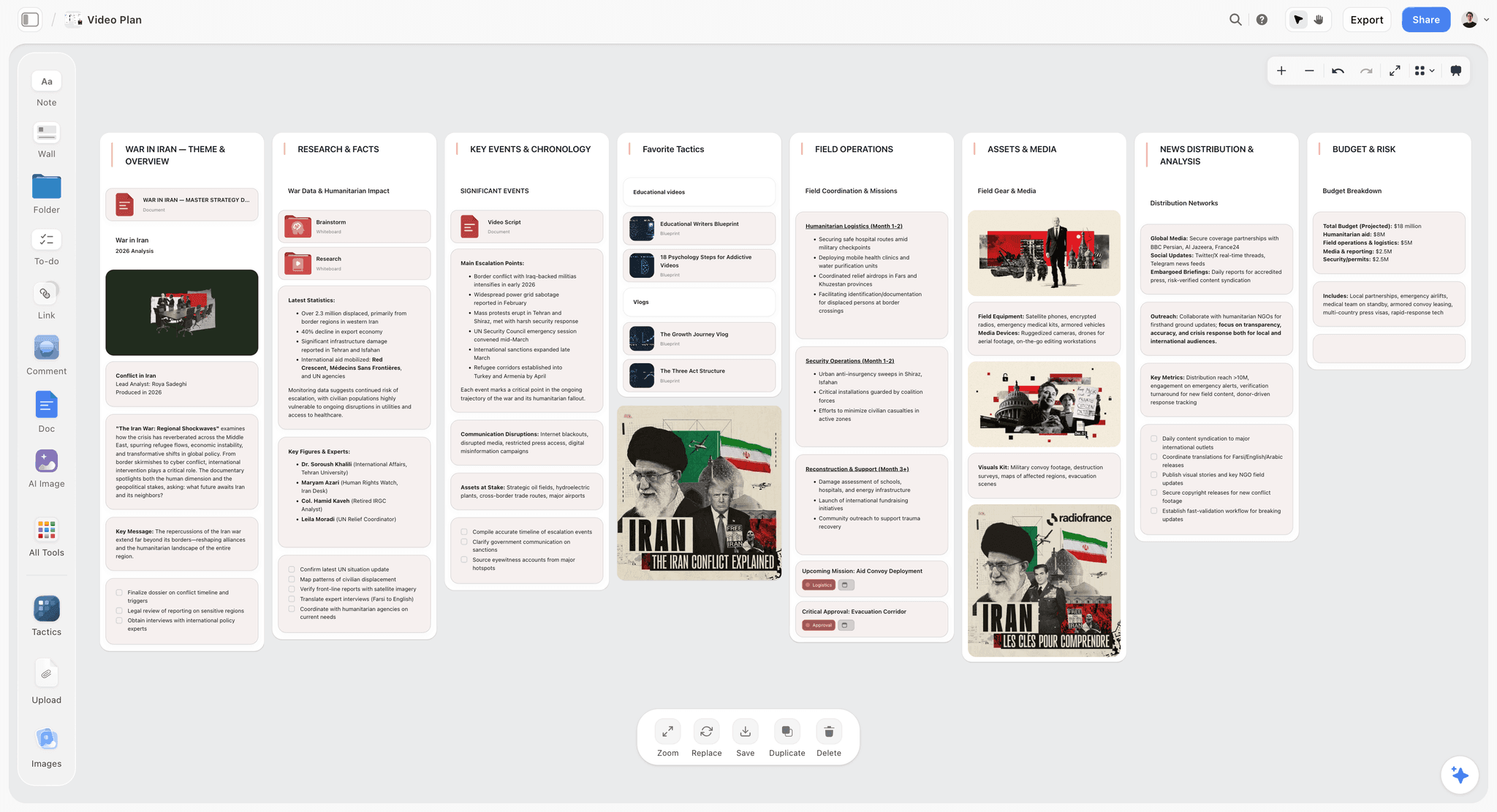
Storyflow is a visual canvas where podcast planning lives in one place: episode topics, guest research, interview questions, the season arc, and recurring segment ideas as movable cards. The AI reads the full canvas, so you can ask it to draft interview questions from the guest research already on the board, or check whether two planned episodes overlap. This is the Plan stage of the pipeline, the stage most tool lists skip. The fastest start is the Video Research template for guest and topic research, with the Posting Schedule template holding the release calendar on the same board, so the AI can see both when you ask what to record next.
Best for: Podcasters who plan seasons rather than one episode at a time, and interview shows that research guests heavily.
Verdict: The strongest tool for the Plan and Multiply stages. It does not record or edit audio, so it pairs with Descript or Riverside, not replaces them.
Key features
- Visual canvas for episode topics, season arcs, and guest research as cards.
- AI reads the full canvas plus up to 1 Tactic and 3 Documents you @-mention.
- Story Blueprints library with content-planning and interview-prep templates.
- Unlimited collaboration on every plan for co-hosts and producers (invited collaborators join free today).
- Repurposing planning: map one episode into clips, posts, and newsletter angles.
Pricing
Paid-only during early access. Plus: $7.99/mo annual. Unlimited boards and cards, unlimited collaboration, basic AI, full Story Blueprints, unlimited uploads. Pro: $14/mo annual. AI image generation, 20x AI usage. Max: $39/mo annual. 40x more AI, team workspace with roles. Free: launches before the end of 2026 with unlimited boards and cards, unlimited collaboration, basic AI, and 20 file uploads.
Pros
- De-loads the Plan stage, where podfade starts.
- AI reads the whole canvas, so guest research informs question drafts.
- Unlimited collaboration on the free tier for co-hosts.
Cons
- No audio recording or editing; it is a planning canvas, not a studio.
- Cloud-only, with no local-first option.
- Newer platform with a smaller template library than older planning tools.
2. Descript
Descript turned podcast editing into word processing. It transcribes the recording, and you edit the audio by editing the text: delete a sentence in the transcript and the audio cuts with it. Its AI removes filler words across an entire episode in one click, generates show notes, and its Studio Sound feature cleans up rough recordings. For podcasters who never wanted to learn a waveform editor, it is the most direct path from recording to published episode.
Best for: Solo and co-hosted podcasters who want fast editing without an audio-engineering learning curve.
Verdict: The strongest AI editor for podcasting in 2026. Pair with a planning tool, because Descript starts at the recording.
Key features
- Text-based editing: edit audio by editing the transcript.
- One-click filler-word and dead-air removal across a full episode.
- Studio Sound AI for cleaning up rough audio.
- AI-generated show notes, summaries, and chapter markers.
- Multitrack editing and screen recording for video podcasts.
Pricing
Free with limited transcription. Creator: $12/mo (annual). Pro: $24/mo. Higher tiers for teams.
Pros
- Fastest path from raw recording to finished episode.
- Filler removal alone saves hours per episode.
- Show notes are usable with light editing.
Cons
- Text-based editing can over-cut natural pauses if you trust it blindly.
- No planning stage; the workflow begins after recording.
- Studio Sound can flatten the character of a good microphone.
3. Riverside
Riverside records each participant locally in high resolution, then uploads the files, so a guest's shaky internet does not degrade the recording. Its Magic Clips AI scans an episode and pulls shareable short clips automatically. For interview shows with remote guests, recording quality is the single biggest variable, and Riverside removes it as a worry.
Best for: Interview-led and co-hosted shows recording remote guests.
Verdict: The strongest AI-enhanced remote recording tool. Pair with Descript if you want deeper editing.
Key features
- Separate local recording for each participant, up to 4K video.
- Magic Clips AI for automatic short-form clip extraction.
- AI transcription and show-note generation.
- Live call-in and audience features.
- Text-based editor built in.
Pricing
Free with up to 70 minutes per recording. Standard: $15/mo. Pro: $24/mo.
Pros
- Local recording protects against connection drops.
- Magic Clips de-loads the Multiply stage directly.
- Records video and audio in one session.
Cons
- Built-in editor is lighter than Descript's.
- Free tier's 70-minute cap is short for long interviews.
- Upload of local files can be slow on weak connections.
4. Castmagic
Castmagic takes a finished recording and produces the entire Multiply stage from it: titles, show notes, timestamps, social posts, newsletter copy, and quote cards. For podcasters whose episodes are good but whose shows do not grow, the missing piece is usually distribution content, and Castmagic generates a week of it from one upload.
Best for: Podcasters who record consistently but struggle to turn episodes into marketing content.
Verdict: The strongest repurposing tool in the list. The output needs editing, but it removes the blank page.
Key features
- Upload audio, get titles, show notes, timestamps, and summaries.
- Social posts and newsletter copy generated per episode.
- Custom prompt templates for repeat formats.
- Transcript and quote-card extraction.
Pricing
Subscription tiers from roughly $29/mo, scaling by hours of audio processed.
Pros
- De-loads the Multiply stage in one step.
- Custom templates keep voice consistent across episodes.
- Saves hours of post-episode writing.
Cons
- Generated copy needs a human edit before publishing.
- Pricing scales with audio volume.
- Quality depends heavily on transcript accuracy.
5. Adobe Podcast
Adobe Podcast's Enhance Speech tool is the best free audio cleanup available in 2026. It removes room echo and background noise and makes a phone or laptop recording sound close to a treated studio. For podcasters recording in untreated rooms, it is the single highest-impact free tool.
Best for: Podcasters recording in untreated rooms who need professional-sounding audio for free.
Verdict: The best free Polish-stage tool. Use it on every episode regardless of what else is in your stack.
Key features
- Enhance Speech AI for noise and echo removal.
- Browser-based recording and basic editing.
- Microphone-check tools before recording.
Pricing
Free. Some features tie into an Adobe account.
Pros
- Best-in-class noise removal at no cost.
- No software install needed.
- Dramatic quality lift for poor recording environments.
Cons
- Aggressive enhancement can introduce artifacts on music or laughter.
- Editing tools are basic.
- Not a full production environment.
6. Podcastle
Podcastle is a browser-based studio that covers recording, editing, and AI voice work in one place. Its AI features include voice cloning for fixing flubbed lines and Magic Dust audio enhancement. For solo podcasters who want one tool from record to publish, it removes the need to stitch a stack together.
Best for: Solo podcasters who want recording and editing in a single browser tool.
Verdict: A strong all-in-one for solo shows. Specialized tools beat it stage by stage, but the convenience is real.
Key features
- Browser-based recording and editing.
- AI voice cloning for line corrections.
- Magic Dust audio enhancement.
- Text-based editing and transcription.
Pricing
Free tier with caps. Paid plans from roughly $15/mo.
Pros
- One tool covers Record, Edit, and Polish.
- Voice cloning fixes mistakes without re-recording.
- Browser-based, no install.
Cons
- Each stage is good, none is best-in-class.
- Voice cloning raises disclosure questions for guests.
- Heavier projects can strain the browser.
7. ChatGPT / Claude
General AI chat tools handle the writing-heavy parts of the pipeline: episode topic brainstorms, interview question drafts, show notes, episode titles, and newsletter copy. They are not podcast-specific, so they have no project memory across episodes, but for drafting from a prompt they are fast and cheap.
Best for: Podcasters who want a flexible drafting assistant for scripts, questions, and show notes.
Verdict: A strong thinking partner for Plan and Multiply. Pair with a workspace tool that holds the show across episodes.
Key features
- Episode topic and angle brainstorming.
- Interview question generation from a guest brief.
- Show notes, titles, and summaries from a transcript.
- Newsletter and social copy drafting.
Pricing
ChatGPT Free or Plus ($20/mo). Claude Free or Pro ($20/mo).
Pros
- Fast, flexible drafting for any writing task.
- Cheap relative to dedicated tools.
- Strong for stress-testing episode angles.
Cons
- No memory of the show across episodes or sessions.
- Output is generic without careful prompting.
- Not built for the podcast workflow specifically.
8. Cleanvoice
Cleanvoice does one job: it strips filler words, stutters, mouth sounds, and dead air from a recording automatically. Upload the file, get a cleaned version. For editors who want the cleanup done before they open the editor, it removes the most tedious part of the Edit stage.
Best for: Podcasters who want automated filler and silence removal before manual editing.
Verdict: A focused Edit-stage tool that does its single job well.
Key features
- Automated filler-word, stutter, and mouth-sound removal.
- Dead-air and long-silence trimming.
- Multi-language support.
Pricing
Pay-per-hour credits from roughly $10 for 10 hours, plus subscription options.
Pros
- Removes the most tedious editing task automatically.
- Pay-per-use pricing suits irregular schedules.
- Fast turnaround.
Cons
- Single-purpose; not an editor.
- Can over-trim natural conversational pauses.
- Best used as a pre-edit pass, not a final edit.
9. Auphonic
Auphonic is automated audio post-production. It handles loudness normalization, noise reduction, and level balancing so every episode meets broadcast loudness standards without manual mastering. It is the Polish stage for podcasters who care about consistent, professional audio across a back catalog.
Best for: Podcasters who want consistent, broadcast-standard loudness without learning audio mastering.
Verdict: The most reliable automated mastering tool. Quiet, technical, and dependable.
Key features
- Automated loudness normalization to broadcast standards.
- Noise and hum reduction.
- Multitrack level balancing.
- Direct publishing to hosting platforms.
Pricing
Free for 2 hours of processing per month. Paid credit and subscription options above that.
Pros
- Consistent loudness across every episode.
- Set-and-forget automation.
- Generous free tier for short shows.
Cons
- Not an editor; mastering only.
- Interface is technical and dated.
- Free tier's 2-hour cap is tight for weekly shows.
10. Capsho
Capsho focuses on the marketing copy a podcast needs to grow: episode descriptions, social captions, email copy, and quote graphics, generated from the recording. It overlaps with Castmagic but leans harder into marketing-team-style output.
Best for: Podcasters who specifically want marketing copy generated from each episode.
Verdict: A solid Multiply-stage tool. Castmagic is broader; Capsho is marketing-focused.
Key features
- Episode descriptions and titles from audio.
- Social captions and email copy.
- Quote extraction for graphics.
- Marketing-angle suggestions per episode.
Pricing
Subscription plans from roughly $29/mo.
Pros
- Marketing copy is its core focus, not an add-on.
- Reduces the post-episode promotion workload.
- Consistent output format.
Cons
- Overlaps with broader tools like Castmagic.
- Output needs editing for brand voice.
- Subscription cost adds up for occasional shows.
11. Alitu
Alitu is built for podcasters who do not want to edit at all. It cleans audio automatically, adds intro and outro music, and assembles the episode through a guided process. It trades flexibility for simplicity, which is exactly right for beginners.
Best for: Beginner podcasters who want episode assembly without an editor.
Verdict: The friendliest beginner tool. Experienced podcasters will outgrow it.
Key features
- Automated audio cleanup and leveling.
- Guided episode builder with music and segments.
- Built-in recording and hosting options.
Pricing
Subscription from roughly $38/mo (lower on annual billing).
Pros
- Removes the editing learning curve entirely.
- Guided workflow prevents beginner mistakes.
- Cleanup and assembly in one place.
Cons
- Limited control for experienced editors.
- Pricing is high for a beginner tool.
- You outgrow it as the show matures.
12. Buzzsprout
Buzzsprout is a podcast host that has added AI extras: automatic transcripts, AI-generated episode chapters, and Cohost AI for show notes and titles. It is reviewed here for those features, not as a pure host. For podcasters already hosting on Buzzsprout, the AI tools are a useful, no-extra-tool bonus.
Best for: Podcasters who want hosting and basic AI episode tools in one platform.
Verdict: A capable host with useful AI extras. The AI is convenience, not best-in-class.
Key features
- Podcast hosting and distribution.
- Automatic transcripts and AI chapters.
- Cohost AI for show notes, titles, and summaries.
- Analytics and episode insights.
Pricing
Free tier with limits. Paid hosting plans from $12/mo.
Pros
- AI tools bundled with hosting at no extra tool cost.
- Reliable, well-established host.
- Clean analytics.
Cons
- AI features are lighter than dedicated tools.
- Tied to using Buzzsprout for hosting.
- Not a replacement for an editing or planning tool.
7) Recommended Podcaster Stacks
Stack 1: Interview Show. Storyflow (plan episodes and guest research) + Riverside (record remote guests) + Descript (edit) + Castmagic (repurpose). Covers all five pipeline stages.
Stack 2: Solo Narrative Show. Storyflow (script and season arc, starting from the Video Script template, which maps cleanly to a narrated episode) + Adobe Podcast (record and clean) + Descript (edit) + ChatGPT (show notes). Strong for scripted, story-led shows.
Stack 3: Beginner Show. Alitu or Podcastle (record, edit, assemble) + Adobe Podcast (cleanup) + Buzzsprout (host). One or two tools, minimal learning curve.
Stack 4: Cheapest Working Stack. Storyflow Plus ($7.99/month annual) for planning + Adobe Podcast Free (record and clean) + ChatGPT Free (show notes).
The pattern across every stack: one tool for Plan, one for Record and Edit, and one for Multiply. The shows that survive are the ones that tooled all three, not just the middle.
8) Honorable Mentions
- Spotify for Podcasters. Free hosting with basic AI transcription and audience tools.
- Transistor. Strong host for podcasters running multiple shows.
- NotebookLM. Useful for researching guests and topics from source documents.
- Opus Clip. Video-clip generation for podcasters publishing on YouTube and short-form.
- Veed. Video editing and subtitling for video-first podcasts.
9) Tools to Avoid for Podcasting
- General video editors for audio-only shows. Premiere or DaVinci Resolve are overkill and slow for an audio podcast.
- Generic note apps for season planning. A flat document cannot hold a season arc, guest research, and episode topics in a way you can actually see.
- AI voice clones used without guest consent. Cloning a guest's voice to fix lines without telling them is an ethics problem, not a feature.
- Hosting-only platforms treated as production tools. A host distributes the episode; it does not plan, edit, or repurpose it.
11) The Bottom Line
The best AI tools for podcasters in 2026 are the ones that de-load the stage of the pipeline costing you the most time. Descript owns editing. Riverside owns recording. Storyflow owns planning and season arcs. Castmagic owns repurposing. Adobe Podcast handles cleanup for free.
Podcasts do not die from bad audio. They die from the workload between episodes. The shows that survive are the ones that tooled the Plan and Multiply stages, not just the editor. If your episodes are good but your show is not growing, the gap is repurposing. If the next episode keeps slipping, the gap is planning.
Pick one tool per pipeline stage. For the planning stage, try Storyflow's free canvas and rebuild your next season as a board of episode cards instead of a blank document.
10) FAQ: AI Podcasting Tools
What is the best AI tool for podcasters in 2026?
There is no single best tool, because podcasting has five stages. Descript is the best AI editor, Riverside the best AI recorder, Storyflow the best planning canvas, and Castmagic the best repurposing tool. Most podcasters need one tool per stage.
What causes podfade and can tools prevent it?
Podfade is when a podcast stops publishing, usually before episode 10. It is almost always a workload problem, not a quality problem. Tools that de-load planning and repurposing prevent it better than editing tools, because editing is rarely the reason hosts quit.
Can AI edit a podcast automatically?
Partly. AI removes filler words, dead air, and noise reliably, which is most of the tedious work. Descript and Cleanvoice handle this well. AI cannot yet make the editorial judgment calls that shape a good episode, so a human pass is still needed.
What is the cheapest way to start a podcast with AI tools?
Storyflow is paid-only during early access, so the cheapest stack pairs Plus ($7.99/month annual) for planning with Adobe Podcast Free for recording and cleanup and ChatGPT Free for show notes. You only need to pay more once volume or quality demands grow.
Do I need a separate planning tool for a podcast?
If you plan one episode at a time, a document works. If you run seasons, research guests, or manage recurring segments, a canvas tool like Storyflow holds the season arc and episode topics in a way a flat document cannot. Planning fatigue is the leading cause of podfade.
What is the best AI tool for podcast show notes?
Descript and Castmagic both generate strong show notes from a recording. Descript is built into the editing workflow; Castmagic produces a broader set of marketing assets. Both need a light human edit before publishing.
How does AI help repurpose a podcast episode?
AI repurposing tools take one recording and generate titles, timestamps, social clips, quote cards, and newsletter copy. Castmagic and Capsho specialize in this. Riverside's Magic Clips pulls short video clips automatically. One episode should produce a week of content.
Is Descript or Riverside better for podcasting?
They solve different stages. Riverside is the better recorder, with local capture that protects against connection drops. Descript is the better editor, with text-based editing and filler removal. Many podcasters use Riverside to record and Descript to edit.
Can AI improve bad podcast audio?
Yes. Adobe Podcast's Enhance Speech removes room noise and echo and makes untreated-room recordings sound close to studio quality. Auphonic handles loudness consistency. Neither replaces a decent microphone, but both meaningfully lift poor audio.
What AI tools do interview podcasters need most?
Interview shows need a recorder that protects against guest connection drops (Riverside), a planning tool to research guests and draft questions (Storyflow), and a repurposing tool to turn long interviews into clips (Castmagic or Riverside Magic Clips).
Should I use AI-generated voices in my podcast?
For fixing your own flubbed lines without re-recording, voice cloning is reasonable if disclosed. Cloning a guest's voice without consent is not. AI voices for a fully synthetic show are possible but rarely match the connection of a real host.
How many AI tools does a podcaster actually need?
Three to four. One for planning, one for recording and editing, and one for repurposing. Beginners can compress this to one all-in-one tool like Podcastle or Alitu, but most shows end up with a small stack covering the five pipeline stages.
Table of Contents
- Quick Answer: The Best AI Tools for Podcasters in 2026
- Comparison Table: 12 AI Podcasting Tools at a Glance
- The Podcast Pipeline
- How We Evaluated These Tools
- Quick Picks by Podcasting Need
- Detailed Reviews: 12 AI Podcasting Tools
- Recommended Podcaster Stacks
- Honorable Mentions
- Tools to Avoid for Podcasting
- FAQ: AI Podcasting Tools
- The Bottom Line
- Author
- Related Reading
Templates to check out for this topic


Content and video templates you can use in Storyflow
Plan a channel, a script, and a content pipeline on the same board. Open one of these templates and let the AI build on the structure instead of starting from a blank doc.


See Storyflow in Action
A visual AI workspace where every feature lives inside one canvas. No tab-switching, no context lost.
Build your entire board from a single message
Type what you need in the AI chat at the bottom of your canvas. The AI adds cards, headings, and structure directly onto your board.
Use expert frameworks as AI context
Type @ in the AI chat and choose any Tactic. The AI tailors every response to that framework instead of giving generic advice.
Turn your board into a mind map in seconds
Ask the AI to restructure your canvas as a mindmap. It connects your ideas into a visual hierarchy so you can see how everything relates.
Why Storyflow Exists
Storyflow actually began as a personal tool while working on creative and research projects.
We kept running into the same problem: ideas were scattered everywhere: notes, documents, and whiteboards.
Nothing helped us see how everything connected.
So we started building a workspace designed around how ideas actually grow.
→ Read how Storyflow was createdJustkay
Documentary Filmmaker & Founder at Storyflow
Published: 2026-05-17
Extremely simple, seriously capable


See how easy it is to get started
Watch a real project come together, from a blank board to a finished plan, clicked through step by step.
Start creating with AI and become more productive
Transform your creative workflow with AI-powered tools. Generate ideas, create content, and boost your productivity in minutes instead of hours.