The 12 Best Podcast Planning Tools in 2026 (We Tested Them All)
The 12 best podcast planning tools in 2026, tested by an indie podcaster. Show concept, season planning, episode outlines, and guest research compared honestly.

Category
Podcasting
Author

Justkay
Documentary Filmmaker & Founder at Storyflow
Topics
2026-05-14
•
15 min read
•
Podcasting- best podcast planning tools 2026
- podcast planning software
- podcast season planning
- podcast episode outline tool
What are the best podcast planning tools in 2026?
The best podcast planning tools in 2026 are Storyflow (best all-in-one canvas for season arcs), Notion (best episode databases), Riverside Magic (best recording plus planning), and Castmagic (best AI post-production). Podcasts die in the plan, not the edit. The show that reaches season three is almost never the one with the best microphone. It is the one that treated planning as its own workstream, in its own workspace, from episode one.

Full disclosure: Storyflow is our own product, and we rank it first here because podcast planning is a planning problem and its canvas holds the season arc, episode cards, guest research, and production checklist on one board its AI can read. We still kept the ranking honest about scope. Storyflow does no recording, editing, or RSS hosting, so you pair it with a recording tool. Riverside Magic is the stronger pick if you want recording and planning in one tool, and Castmagic leads on AI post-production. We link to every tool so you can judge the fit.
Quick Comparison
These four cover what podcasters actually choose between: an all-in-one planning canvas, a structured episode database, a recording-plus-planning tool, and an AI post-production tool.
| Tool | Best For | AI Features | Price |
|---|---|---|---|
| Storyflow | All-in-one canvas workspace | Canvas AI reads the whole board | $7.99 mo annual (free plan late 2026) |
| Notion | Structured guest and episode databases | Notion AI (Business tier) | From $10 user mo |
| Riverside Magic | Recording plus AI planning | AI episode briefs and talking points | From $19 user mo |
| Castmagic | AI post-production with planning | AI transcripts, show notes, clips | From $49 mo |
All 12 Podcast Planning Tools, Ranked
Podcast planning is where most podcasts quietly die. Not in recording. Not in editing. In the season-planning phase between episode four and episode eight, when the first burst of enthusiasm has worn off and the structural work has not yet become routine. I tested twelve podcast planning tools across three real projects this spring: a solo founder interview show in season two, a narrative documentary podcast with archival research, and an internal company podcast with quarterly arcs. Ranked by planning depth and workflow fit:
- Storyflow: best all-in-one canvas workspace for seasons and arcs
- Notion: best structured guest and episode databases
- Riverside Magic: best recording plus AI planning in one tool
- Castmagic: best AI post-production with planning
- Descript: best for text-edited podcasts with light planning
- Perplexity Spaces: best guest and topic research
- Milanote: best visual mood board planning
- Trello: best lightweight episode kanban
- Airtable: best relational episode database
- Podlove Publisher: best open-source podcast workflow
- ClickUp: best project management for podcast networks
- Google Docs: best free episode outlining
The rankings reflect what each tool felt like during real planning, not what the marketing page promises. Storyflow is the tool I build, so read its review with that in mind: the honest limitations sit in the same block as the strengths.
The Podcast Production Pipeline: Where Planning Actually Sits
Before the rankings, one framework that makes the whole category legible. Every podcast that ships moves through five stages. Call it the podcast production pipeline.
- Plan. Show concept, season arc, episode outlines, guest research, release calendar. The structural work before anyone hits record.
- Record. Capturing the audio, remote or in-person, host and guests.
- Edit. Cutting, mixing, mastering, removing filler, adding music.
- Publish. RSS hosting, distribution to Apple and Spotify, show notes, episode art.
- Grow. Clips, cross-posting, audience analytics, sponsor outreach.
Almost every tool in this list is strong at one stage and thin everywhere else. Riverside and Descript own record and edit; Castmagic owns the back half of edit plus publish; hosting platforms own publish. The stage most tools treat as an afterthought, the stage that decides whether the show survives, is stage one. Podcasts die in the plan, not the edit. Storyflow's honest lane is that first stage, the planning canvas, and nothing downstream of it. Read every review below through this lens: which stage does this tool actually own, and which stages will you still need another tool for?
Quick Picks: Best Podcast Planning Tools 2026 by Use Case
Best All-in-One Podcast Workspace: Storyflow The project canvas where the show concept, the season arc blueprint, episode cards, and guest research live on one board, with AI that reads the full active canvas plus any blueprint or Documents you @-mention. Plus from $7.99/month billed annually. The honest friction: no recording, no editing, no RSS hosting. Storyflow owns the plan stage and nothing downstream of it.
Best Dedicated Podcast Planning Tool: Riverside Magic Recording plus AI episode planning in one tool: episode briefs, talking-point generation, and a guest research summary next to the recorder. From $19/user/month. Recording-first, so the planning is less deep than canvas tools.
Best for Narrative Podcast Storyboarding: Storyflow or Milanote Storyflow's canvas matches script-plus-visual work; Milanote is the lighter mood-board alternative. Storyflow Plus from $7.99/month billed annually. Milanote from $9.99/month.
Best Free Podcast Planning Tool: Notion Free Notion is free for individuals and functional for real work today. Storyflow's Free plan, which launches before the end of 2026, will add unlimited shared boards, basic AI usage, and unlimited collaboration; anyone a paid member invites to a board joins free now.
Best for Solo Podcasters: Storyflow or Castmagic Storyflow handles the plan stage, and its Viral Content Planner template maps one episode into the clips that promote it; Castmagic handles AI post-production. Pair both.
Best for Team Podcast Planning: Storyflow or Notion A shared canvas (Storyflow) or shared database (Notion) for host, producer, researcher, and editor. Storyflow's Max tier adds a team workspace with roles and permissions.
Podcast planning is multi-stage (show concept, season arcs, episodes, guests, scripts) and no single tool does all five well. The right toolkit usually pairs a planning tool (Storyflow or Notion) with a recording tool (Riverside or Descript) and a research tool (Perplexity or NotebookLM). See if Storyflow fixes your season-arc planning bottleneck.
Comparison Table: Best Podcast Planning Tools 2026
| Tool | Best For | Pipeline Stage | Starting Price | Free Plan | Planning Depth (★/5) | Rating (/10) |
|---|---|---|---|---|---|---|
Storyflow | All-in-one canvas workspace | Plan | $7.99/month annual | Coming late 2026 (invited collaborators join free now) | ★★★★★ | 9.0/10 |
Notion | Structured guest and episode databases | Plan | $10/user/month | Yes (individuals) | ★★★★☆ | 8.6/10 |
Riverside Magic | Recording plus AI planning | Plan + Record | $19/user/month | Yes (limited) | ★★★★☆ | 8.4/10 |
Castmagic | AI post-production with planning | Edit + Publish | $49/month | 7-day trial | ★★★☆☆ | 8.2/10 |
Descript | Recording, editing, planning | Record + Edit | $19/user/month | Yes (limited) | ★★★☆☆ | 8.0/10 |
Perplexity Spaces | Guest and topic research | Plan (research) | $20/month | Yes (limited) | ★★★☆☆ | 7.9/10 |
Milanote | Visual mood board planning | Plan (visual) | $9.99/month | Yes (limited) | ★★★★☆ | 7.7/10 |
Trello | Lightweight episode kanban | Plan (tracking) | $5/user/month | Yes (unlimited) | ★★☆☆☆ | 7.5/10 |
Airtable | Structured episode database | Plan (tracking) | $10/user/month | Yes (limited) | ★★★★☆ | 7.4/10 |
Podlove Publisher | Open-source podcast workflow | Publish | Free | Yes | ★★★☆☆ | 7.3/10 |
ClickUp | Project management for podcast teams | Plan (tracking) | $7/user/month | Yes (limited) | ★★★☆☆ | 7.1/10 |
Google Docs | Free episode outlining | Plan (outlining) | Free with Workspace | Yes | ★★☆☆☆ | 6.9/10 |
Rating criteria: Planning depth (25%), AI depth (20%), workflow fit (20%), pricing and value (15%), team collaboration (20%). Planning depth and team collaboration are weighted high because the plan stage is the actual work this tool category supports, and team podcasts have specific collaboration needs.

Storyflow canvas holding podcast season arc, episode cards, guest research, and Tactic Blueprints in one workspace
Make season three easier than season one
Lay the season arc, episode cards, and guest research out on one board the AI can read, so the next episode starts from the show's structure instead of a blank page.

Best Podcast Planning Tools 2026: Market Context
The market split into three groups in 2024-2026: dedicated podcast workspaces that own record, edit, and publish and bolt planning onto the front (Riverside Magic, Castmagic, Podlove); general workspaces that own the plan stage with depth podcast-specific tools do not match and hand off everything downstream (Storyflow, Notion, Airtable, ClickUp); and single-purpose tools that nail one slice of one stage (Perplexity Spaces for research, Milanote for mood boards, Descript for editing).
The pattern across the shows I have watched survive is consistent: the podcasts that reach a second and third season treat planning as its own workstream in its own workspace, separate from the recording tool. A recording tool starts fresh every episode; a planning canvas remembers the arc, and that compounding is the leverage. The right podcast planning tool is the one that makes season three of your show easier than season one was, not the tool that gets episode one out.
How We Evaluated the Best Podcast Planning Tools 2026
Five criteria determined the rankings.
Planning depth. Show concept, season arc, episode outlining, guest research, production checklist. Tools that held all five of the plan stage without a second app scored highest.
AI depth. Generic AI that treats every prompt as a blank page scored lower than AI that reads the surrounding plan for talking points, guest research, and episode flow.
Workflow fit. Three real podcasts: solo founder interview, narrative documentary, internal company show. Tools that fit one shape but not the others got split scores.
Pricing and value. Annual cost at solo and team tiers, plus the free-tier reality that decides whether a new, no-budget show adopts the tool at all.
Team collaboration. Shared canvas or database, comment threads, and role-based permissions for host, producer, researcher, and editor. Every tool was tested with real podcast planning over four weeks, not on a synthetic feature checklist.
Detailed Reviews: Best Podcast Planning Tools 2026
1. Storyflow (Best All-in-One Canvas Workspace)
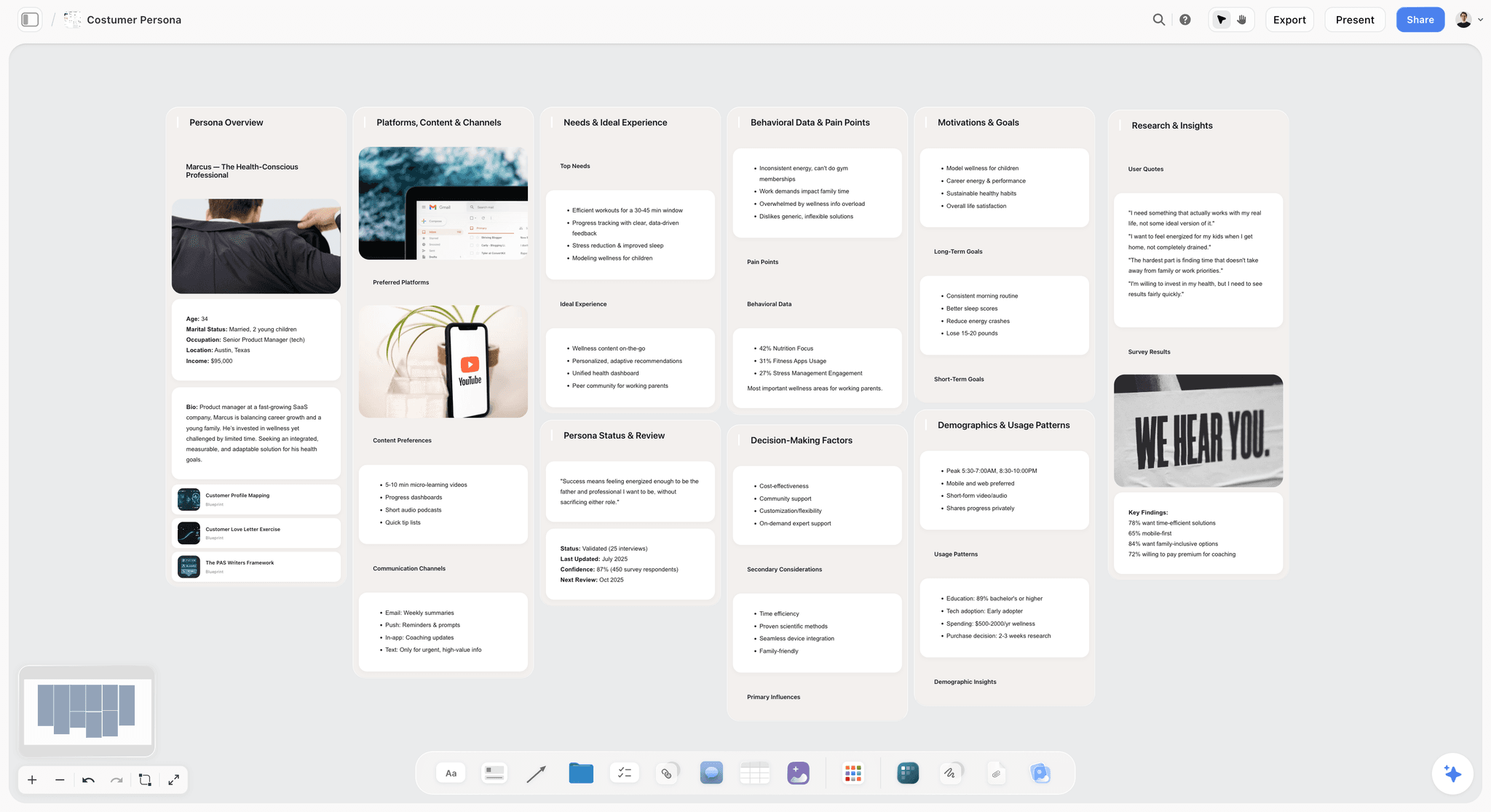
Storyflow is the project canvas where podcast planning fits as one connected board: the show concept Document, the season arc built on a narrative blueprint like the Hero's Journey or Story Spine, the episode cards arranged spatially, the guest research, and the rough script Documents all in one place. The AI reads everything on the active board by default, plus up to one blueprint and three Documents you @-mention, so when you ask which episodes touch a recurring theme, it answers from the cards actually on your canvas rather than a blank prompt. You move cards around until the arc emerges instead of committing to a linear order before you have one. The fastest start is the Video Research template for guests and topics, with the Posting Schedule template holding the release calendar on the same board. In pipeline terms, Storyflow owns the plan stage completely and hands off everything after it.
Best for: Podcasters who plan in seasons and arcs. Also great for: solo podcasters planning a single episode, since the canvas scales down as easily as it scales up.
Pricing: Paid-only early access today; the Free plan (unlimited shared boards, basic AI usage, unlimited collaboration, 20 file uploads) launches before the end of 2026, and anyone a paid member invites to a board joins free now. Plus: $7.99/month billed annually or $9.99/month billed monthly. Pro: $14/month billed annually or $19/month billed monthly. Max: $39/month billed annually ($49 monthly).
Pros: Canvas paradigm matches podcast planning, 200+ Story Blueprints include narrative frameworks like Story Spine and Hero's Journey, the AI reads the entire active board plus @-mentioned context, collaborators invited by a paid member join free with no seat limit.
Cons: Not a recording tool (no audio capture). No editing (no waveform editing, mixing, or noise removal). No RSS hosting or distribution to Apple and Spotify. Cloud-only, so no local-first or offline mode for privacy-strict workflows. Newer than Notion, so the podcast-specific integration ecosystem is thinner. Pair it with Riverside or Descript for recording and editing, and a hosting platform for publishing.
Verdict: Storyflow is the right pick for podcasters who plan in arcs and want one board that holds the whole show. It owns the plan stage and nothing downstream, so pair it with Riverside, Castmagic, or Descript for recording and post-production. See How to Plan a Podcast with AI in 2026 for the full workflow.
2. Notion (Best Structured Database)
Notion handles structured podcast planning with databases for episodes, guests, and topics. For teams who think in databases (status, due dates, properties, filtered views), it is the established choice. An episode database with a status property gives a clean view of which episode is at which stage, and a linked guest database keeps track of who you have booked, recorded, or still owe a reschedule. Notion AI can draft show notes, bundled at the Business tier. The tradeoff is that the database paradigm is wonderful for tracking and wrong for anything visual: a narrative arc laid out as table rows loses the shape that made it an arc. Notion owns the plan stage for teams who track rather than sketch.
Best for: Podcast teams who want database-shaped planning and status tracking. Not for: podcasters who prefer canvas or visual planning.
Pricing: Free for individuals. Plus from $10/user/month. Business from $15/user/month with Notion AI.
Pros: Mature database paradigm, multiple views (table, kanban, calendar), Notion AI bundled at Business, large template and integration ecosystem.
Cons: Database paradigm is wrong for visual or narrative work, real-time collaboration on the same row can feel sluggish, per-user pricing adds up for larger teams.
Verdict: Notion is the right pick for database-shaped podcast planning where tracking matters more than spatial layout.
3. Riverside Magic (Best Recording Plus Planning)
Riverside Magic combines remote recording with AI-driven episode planning. Episode briefs, talking-point generation, and a guest research summary live next to the recorder, so a host can prep and record in one place without exporting a brief from another app. The recording quality is why most people are there: local capture at up to 4K video with separate tracks per participant is genuinely industry-grade, and the planning is a convenience layered on top rather than a reason to switch planning tools. In pipeline terms, Riverside owns record and reaches back into plan, but the season-level structure that keeps a show alive past episode eight is thin here.
Best for: Podcasters who want recording and light episode planning in one tool. Not for: podcasters with complex multi-season planning needs.
Pricing: Free with limits (2 hours). Standard from $19/user/month. Pro from $29/user/month.
Pros: Recording quality is industry-grade, integrated AI planning is convenient, the workflow is podcast-specific end to end.
Cons: Planning features are less deep than canvas tools, the tool surface is mostly recording, season-level planning is light and per-episode rather than arc-shaped.
Verdict: Riverside Magic is the right pick for podcasters who want recording plus light planning in one tool.
4. Castmagic (Best AI Post-Production with Planning)
Castmagic is the AI post-production tool with planning features added through 2024-2025. Drop in a finished recording and it returns a transcript, timestamped chapters, a show-notes draft, quote cards, and social clips, which is hours of manual work compressed into minutes. In pipeline terms, Castmagic owns the back half of edit and most of publish and grow. The planning it advertises is really structured prompting over an existing episode, not the season-arc work that happens before recording, which matters if your bottleneck is the plan stage rather than the turnaround.
Best for: Podcasters who want AI-driven post-production with light planning. Not for: podcasters with deep season-arc planning needs.
Pricing: Cast from $49/month. Pro from $99/month. 7-day trial.
Pros: Best AI post-production in this list, mature integration with recording tools, industry-grade show notes and clip generation.
Cons: Planning features are lighter than canvas tools and mostly post-recording, price point is high for hobbyists, does nothing for the plan stage before you record.
Verdict: Castmagic is the right pick for AI post-production with light planning bolted on.
5. Descript (Best Recording, Editing, Planning)
Descript combines recording, transcription, and audio editing with light project management. Its core trick is editing audio by editing the transcript (delete a word, delete the audio), and features like filler-word removal, Overdub, and Studio Sound genuinely save time in the edit stage. Drafting an outline in the same document you will edit is convenient for episodes in production, but the planning is episode-level, not season-level. In pipeline terms, Descript owns record and edit: a phenomenal editor that holds a light outline, not a planning tool.
Best for: Podcasters who use Descript's text-based editing and want a light outline next to it. Not for: podcasters who edit in a separate DAW or need season-level planning.
Pricing: Free with limits. Hobbyist from $19/user/month. Creator from $35/user/month.
Pros: Text-based editing is unique and fast, integrated planning works for episodes in production, AI editing tools are mature.
Cons: Season-level planning is light, the editing-first paradigm keeps planning secondary, pricing scales with transcription hours.
Verdict: Descript is the right pick for text-edited podcasts that want light planning attached to the editor.
6. Perplexity Spaces (Best Guest and Topic Research)
Perplexity Spaces is the source-grounded research tool with persistent project context. For interview podcasts where guest research is critical, build a Space per guest, drop in their book, past interviews, and a few articles, and the assistant answers questions about them from those sources with clickable citations that persist between sessions, without inventing a bio. In pipeline terms, this is one slice of the plan stage done exceptionally well: there is no episode board, no arc, no calendar, so you research here and plan somewhere else.
Best for: Interview podcasts that need source-grounded guest research. Not for: general planning beyond research.
Pricing: Free with limits. Pro from $20/month.
Pros: Best source-grounded research in this list, live web integration with clickable citations, project context persists between sessions.
Cons: Not a planning tool beyond research, no episode board or arc, you still need a second tool to hold the plan. Pair with Storyflow or Notion. See The 12 Best NotebookLM Alternatives in 2026 for a broader research tool comparison.
Verdict: Perplexity Spaces is the right pick for the guest-research slice of the plan stage.
7. Milanote (Best Visual Mood Board)
Milanote is the lightweight visual mood board tool for creative projects. For narrative podcasts that need tone boards or a loose spatial layout alongside script work, dragging images, notes, and links onto an open board feels closer to a physical pinboard than a document does, which suits the early phase where you are still finding the tone. The tradeoff is that Milanote stops where structure begins: no AI, no episode database, no way to query the board, so once you need to track a full season through production you graduate to another tool. It covers the inspirational front edge of the plan stage and nothing systematic after it.
Best for: Narrative podcasts that need visual mood boards early. Not for: structured episode tracking or guest research.
Pricing: Free with limits. Pro from $9.99/month.
Pros: Lightweight visual paradigm, mature mood board features, very easy to start.
Cons: No AI, no episode database, planning depth is thin beyond mood boards, no way to query the board.
Verdict: Milanote is the right pick for the mood-board front edge of narrative podcast planning.
8. Trello (Best Lightweight Episode Kanban)
Trello is the established lightweight kanban tool. A single board with columns for Idea, Booked, Recorded, Editing, and Published gives a small team an at-a-glance production pipeline in about five minutes, and the free tier is genuinely usable rather than a trap. The simplicity that makes it fast is also its ceiling: no AI, no integrated research, no canvas for arcs, and nothing connecting one episode's plan to the next. It tracks where episodes are; it does not help you decide what they should be. Trello is the tracking slice of the plan stage, and only that slice.
Best for: Small teams who want lightweight episode kanban with zero setup. Not for: larger teams or anyone who needs planning depth.
Pricing: Free with limits. Standard from $5/user/month.
Pros: Simple kanban paradigm, functional free tier, fast to start.
Cons: No AI, no integrated research, no canvas paradigm, no arc-level structure.
Verdict: Trello is the right pick for lightweight episode tracking and nothing heavier.
9. Airtable (Best Structured Episode Database)
Airtable handles structured podcast planning with relational tables (episodes, guests, topics, sponsors) that link to each other. Linking a guest record to the episodes they appeared in, then filtering to every episode with an outstanding sponsor read, is the kind of relational query Airtable does effortlessly and Trello cannot do at all, with grid, kanban, and calendar views over the same data. The costs are the usual database costs: per-user pricing climbs quickly, and the relational rigor that helps tracking fights a narrative or visual workflow. Airtable is a powerful tracking slice of the plan stage for data-shaped shows.
Best for: Podcast teams who want relational database tracking across episodes, guests, and sponsors. Not for: narrative or visual podcasts that need a canvas.
Pricing: Free with limits. Team from $10/user/month.
Pros: Mature relational database, multiple views (grid, kanban, calendar), strong integrations.
Cons: Per-user pricing scales fast, real-time collaboration is lighter than dedicated tools, no AI for podcast-specific work.
Verdict: Airtable is the right pick for database-shaped podcast tracking. See The 12 Best Airtable Alternatives in 2026.
10. Podlove Publisher (Best Open-Source Workflow)
Podlove Publisher is the open-source WordPress plugin that handles podcast workflow with light planning features. It manages episode metadata, chapters, contributors, and the feed itself, which puts it further down the pipeline than most tools here: a publish-stage workhorse with some episode-planning fields attached. The appeal is control and cost (you own the stack, no per-seat pricing, active development); the catch is that everything runs through WordPress, the setup is technical, and the planning is basic metadata rather than season-arc work. Podlove owns publish for the self-hosted crowd.
Best for: Self-hosted WordPress podcasters who want an open-source publishing workflow. Not for: podcasters who do not use WordPress.
Pricing: Free.
Pros: Free, open-source, mature WordPress integration, active development.
Cons: Requires WordPress, planning features are basic metadata, no AI.
Verdict: Podlove Publisher is the right pick for WordPress-hosted podcasters who want to own their publishing stack.
11. ClickUp (Best Project Management for Podcast Teams)
ClickUp is the cross-functional project management tool that handles podcast teams with depth. Custom statuses, dependencies, assigned tasks, and dashboards let a network run several shows through the same pipeline with clear ownership at every step. That depth is also the catch: the configuration overhead is significant, the interface feels busy for a two-person show, and there are no podcast-specific features, so you build the workflow yourself out of generic PM parts. ClickUp is a heavy tracking layer over the plan stage that pays off only at network scale.
Best for: Podcast networks or shows with multiple producers and editors. Not for: solo podcasters who do not need PM depth.
Pricing: Free with limits. Unlimited from $7/user/month.
Pros: Cross-functional depth, multiple view types, mature integrations.
Cons: Configuration overhead is significant, the interface can feel busy for small shows, no podcast-specific features.
Verdict: ClickUp is the right pick for multi-person podcast networks that need real PM depth.
12. Google Docs (Best Free Episode Outlining)
Google Docs is the free document tool that a large share of podcasts use for episode outlines and interview questions. There is no shame in it: a shared doc with a running outline and comment threads is enough structure for many interview shows, the collaboration is mature, and the price is zero. The ceiling is the document itself: no episode database, no board, no AI tuned to podcast work, and no way to see a season as anything other than a very long scroll. Google Docs covers the outlining slice of the plan stage and stops there.
Best for: Budget-conscious podcasters who outline in documents. Not for: team or multi-season planning.
Pricing: Free with Workspace.
Pros: Free, mature collaboration, effortless sharing.
Cons: No planning structure beyond documents, no AI for podcast work, no canvas or database.
Verdict: Google Docs is the right pick for free episode outlining and nothing more structured.
The Bottom Line
The best podcast planning tool depends on how you think about planning, and every choice comes back to one stage of the pipeline. For arc-based planning on a canvas, Storyflow. For database-shaped planning, Notion. For recording plus planning in one tool, Riverside Magic. For post-production with planning, Castmagic. For guest research, Perplexity Spaces.
If you are not sure which fits, ask which stage of the pipeline has been the actual bottleneck. If you cannot keep season-level structure clear, a canvas tool fixes the plan stage. If you cannot find which episode is at which production stage, a database fixes tracking. If you cannot keep up with post-production, an AI tool fixes the edit stage. The wrong move is to switch tools repeatedly when the real problem is that planning is multi-stage and one tool rarely handles all of it well. Podcasts die in the plan, not the edit, so tool that stage first and pair the rest.
FAQ: Best Podcast Planning Tools 2026
What is the best podcast planning tool in 2026?
The best podcast planning tool depends on your show shape. For arc-based planning on a canvas, Storyflow. For database-based planning, Notion. For recording plus light planning, Riverside Magic. For post-production with planning, Castmagic. The common thread among shows that survive is treating the plan stage as its own workstream in its own workspace, separate from the recording tool, from episode one.
How do you plan a podcast?
You plan a podcast by working through the plan stage in order: define the show concept, map the season arc, outline episodes, research guests, and set a release calendar. A planning workspace like Storyflow or Notion holds all five in one place so the structure compounds across episodes. The mistake most new podcasters make is jumping straight to recording, which is why so many shows stall between episode four and eight.
What is the best podcast planning software?
For a dedicated planning workspace, Storyflow (canvas) and Notion (database) are the strongest picks, because both own the plan stage without forcing you into a recording-first tool. If you want recording bundled in, Riverside Magic is the most integrated. The best software matches whether you think spatially, in tables, or want recording attached.
How do you outline a podcast episode?
You outline a podcast episode by breaking it into a repeatable structure: cold open or hook, intro, main segments, guest questions or talking points, and a close with a call to action. Storyflow's Documents handle this with AI that reads the surrounding board, so an outline can pull context from your season arc and guest research. Notion and Google Docs handle the same outline as blocks or a shared document if you prefer a linear format.
Is there a free podcast planning tool?
Yes. Notion is free for individuals, Trello has a generous free tier for episode tracking, Google Docs is free with Workspace, and Podlove Publisher is free open-source for WordPress. Storyflow is paid-only during early access; its Free plan (unlimited shared boards, unlimited collaboration, basic AI usage) launches before the end of 2026, and anyone a paid member invites to a board joins free now. All are functional for a real show; the choice comes down to canvas, database, kanban, or document.
What is the best podcast planning tool for solo podcasters?
For solo podcasters, Storyflow handles the plan stage and Castmagic handles post-production, so pairing both covers the front and back of the pipeline. An all-in-one planning canvas matters more for solo creators because there is no producer to hold the structure in their head. Alternative pairing: Notion plus Descript for database-shaped planning with text-based editing.
What is the best podcast planning tool for teams?
For podcast teams, Storyflow's collaborative canvas or Notion's database-plus-pages handle multi-person planning across host, producer, researcher, and editor. Storyflow's Max tier adds a team workspace with roles and permissions, and ClickUp adds heavier PM depth for networks running several shows.
Does any tool combine podcast planning with recording?
Riverside Magic combines recording with planning, and Descript combines recording, editing, and light planning. For one tool across the plan and record stages, these lead. The tradeoff is that recording-first tools keep planning shallow, so for deep season-arc work, pair a planning tool (Storyflow or Notion) with a recording tool rather than expecting one app to own both stages well.
What is the best tool for podcast guest research?
Perplexity Spaces is the leading source-grounded research tool, with clickable citations and persistent project context per guest. NotebookLM handles deeper corpus-level research when you have a large source set. Storyflow's canvas can hold the research alongside the rest of the plan so it does not live in a separate silo. The pick depends on whether you want focused research (Perplexity) or research integrated into the plan (Storyflow).
What is the best tool for narrative podcast planning?
For narrative podcasts that mix script work with visual references, Storyflow's canvas paradigm handles the mix, with narrative blueprints like Story Spine and the Hero's Journey available in its library. Milanote is the lighter mood-board-first alternative for the early tone-setting phase.
Which tool has the best AI for podcast planning?
Storyflow's AI reads your full active canvas board plus up to one blueprint and three Documents you @-mention, so it answers from your actual plan rather than a blank prompt. Riverside Magic's AI is podcast-specific for episode briefs. Castmagic's AI is best for post-production. The right pick depends on which pipeline stage you want AI to help with: plan (Storyflow), record (Riverside), or edit (Castmagic).
Can I plan a podcast in ChatGPT?
You can plan a podcast in ChatGPT, but the conversation forgets structure between sessions and has no board to hold the arc. For one-off episode brainstorming, it works fine. For multi-season planning where the show context compounds, a dedicated workspace (Storyflow, Notion, Riverside) holds the structure across sessions instead of making you rebuild context in every new chat.
Table of Contents
- All 12 Podcast Planning Tools, Ranked
- The Podcast Production Pipeline: Where Planning Actually Sits
- Quick Picks: Best Podcast Planning Tools 2026 by Use Case
- Comparison Table: Best Podcast Planning Tools 2026
- Best Podcast Planning Tools 2026: Market Context
- How We Evaluated the Best Podcast Planning Tools 2026
- Detailed Reviews: Best Podcast Planning Tools 2026
- The Bottom Line
- Author
- FAQ: Best Podcast Planning Tools 2026
- Related Reading
Templates to check out for this topic


Content and video templates you can use in Storyflow
Plan a channel, a script, and a content pipeline on the same board. Open one of these templates and let the AI build on the structure instead of starting from a blank doc.


See Storyflow in Action
A visual AI workspace where every feature lives inside one canvas. No tab-switching, no context lost.
Build your entire board from a single message
Type what you need in the AI chat at the bottom of your canvas. The AI adds cards, headings, and structure directly onto your board.
Use expert frameworks as AI context
Type @ in the AI chat and choose any Tactic. The AI tailors every response to that framework instead of giving generic advice.
Turn your board into a mind map in seconds
Ask the AI to restructure your canvas as a mindmap. It connects your ideas into a visual hierarchy so you can see how everything relates.
Why Storyflow Exists
Storyflow actually began as a personal tool while working on creative and research projects.
We kept running into the same problem: ideas were scattered everywhere: notes, documents, and whiteboards.
Nothing helped us see how everything connected.
So we started building a workspace designed around how ideas actually grow.
→ Read how Storyflow was createdJustkay
Documentary Filmmaker & Founder at Storyflow
Published: 2026-05-14
Extremely simple, seriously capable


See how easy it is to get started
Watch a real project come together, from a blank board to a finished plan, clicked through step by step.
Start creating with AI and become more productive
Transform your creative workflow with AI-powered tools. Generate ideas, create content, and boost your productivity in minutes instead of hours.