The 12 Best AI Tools for Producers in 2026 (We Tested Them All)
Every production tool sells you the first plan, and the first plan is the cheapest artifact in the project. A producer is paid for version nine of the schedule, made at 9pm when the location fell through and the delivery date did not move.

Category
Video Production
Author

Storyflow Team
Product & Research Team
Topics
2026-09-23
•
19 min read
•
Video ProductionFull disclosure: Storyflow is our own product and it is fifth here, behind four tools that do things it cannot. Its AI drafts a call sheet PDF, breakdown tables from an attached script, a strip board and a budget table, but it does not send call sheets or track confirmations, tag inside the script, produce day-out-of-days, run a budgeting module, keep a crew database, handle release forms or run a review workflow with timecoded comments. StudioBinder, Yamdu, Celtx and Frame.io all run real production paperwork end to end, and it only drafts the documents. It is fifth for one thing: the visual plan while it is still forming, where restructuring is fast because nothing is locked to a grid. The article names a genuinely free stack (StudioBinder or Celtx free, Claude free, Frame.io free, Google Sheets) that runs a small shoot at zero cost, and says plainly that AI cannot schedule a shoot day.
Quick Comparison
Three of these make the paperwork, handle review and write the documents nobody counts. One holds the plan while it is still moving, which is where a producer's evenings actually go.
| Tool | Best For | AI Features | Price |
|---|---|---|---|
| StudioBinder | Breakdown to call sheet in one system | AI script breakdown | Free / from about $29 mo |
| Claude | Risk lists, updates and long documents | Long-context reasoning | Free / about $17 mo |
| Frame.io | Review and transcript search on footage | Transcription and search | Free / from about $15 user mo |
| Storyflow | The plan that changes at 9pm | Canvas-wide context AI | $7.99 mo annual (free plan late 2026) |
Article Metadata
By the Storyflow Team, Product & Research Published September 23, 2026 · 19 min read · Video Production
Version nine is the one that matters
Every tool markets the first plan. Producers get paid for the ninth, made under pressure when the location fell through and the delivery date did not move. Keep the plan somewhere it can be restructured in minutes and the client can open it. Paid-only during early access, from $7.99 a month billed annually.

Table of Contents
- Quick Answer: The Best AI Tools for Producers in 2026
- Comparison Table: 12 Producer Tools at a Glance
- The Value Is in the Re-plan
- How We Evaluated These Tools
- Quick Picks by Production Type
- Detailed Reviews: 12 AI Tools for Producers
- What AI Actually Does Well in Production
- The Change Log Every Production Needs
- Recommended Producer Stacks
- What the Producer Stack Costs
- Honorable Mentions
- Production Mistakes to Avoid
- FAQ: AI Tools for Producers
- The Bottom Line
- Author
- Related Reading
1) Quick Answer: The Best AI Tools for Producers in 2026
StudioBinder is the best all-round production tool for producers in 2026: script breakdown, shot lists, schedules and call sheets in one system that the crew already knows. Claude is the strongest AI assistant for the written half of producing, which is most of it. Frame.io is the best review and approval platform, and its transcription and search have quietly become the fastest way to find a moment across hours of footage. Storyflow is fifth, for the visual plan and the version of it that survives contact with reality.
Every production tool sells you the first plan, and the first plan is the cheapest artifact in the project. A producer is not paid for version one of the schedule; they are paid for version nine, made at 9pm when the location fell through, the talent moved and the client still expects the same delivery date.
The Value Is in the Re-plan in section 3 is the argument, and it ranks these tools on how fast a single change propagates through everything it touches, which is where producers actually lose their evenings.
For the team version of this question, see The 12 Best AI Tools for Video Production Teams in 2026.
All 12 AI Tools for Producers, Ranked
- StudioBinder: best all-round production management with AI breakdown
- Claude: best AI assistant for schedules, risk lists and long documents
- Frame.io: best review, approval and footage search
- Yamdu: best for complex multi-department productions
- Storyflow: best for the visual plan and the re-plan
- Descript: best for post, rough cuts and transcript-driven editing
- ChatGPT: best general assistant with the widest tool support
- Airtable: best custom production database with AI fields
- Celtx: best budget-conscious pre-production suite
- Notion: best production wiki and archive
- Runway: best for previz and AI-generated reference
- Google Sheets: best free baseline, and still where many schedules live
Best AI Tool for Producers by Job
- Best for breaking down a script fast: StudioBinder or Yamdu, both of which turn a script into tagged elements in minutes rather than an afternoon.
- Best for the writing half of producing: Claude. Risk lists, schedules in prose, client updates, treatment passes and the hundred documents nobody counts.
- Best for finding a moment in eleven hours of footage: Frame.io, whose transcript search has replaced scrubbing entirely.
- Best for the plan the client can see: Storyflow, which is section 3.
- Best for cutting before the editor starts: Descript, where a rough assembly from transcript is genuinely faster.
- Best free option: Google Sheets plus Claude's free tier, which covers more of a small production than most producers expect.
2) Comparison Table: 12 Producer Tools at a Glance
| Tool | Best For | AI Features | Handles Change Well | Starting Price | Rating (/10) |
|---|---|---|---|---|---|
StudioBinder | All-round production management | AI script breakdown | Yes, strong | Free / from about $29 mo | 9.0/10 |
Claude | The written half of producing | Long-context reasoning | Assists rather than propagates | Free / about $17 mo | 8.8/10 |
Frame.io | Review, approval and footage search | Transcription and search | Versioning is its core | Free / from about $15 user mo | 8.5/10 |
Yamdu | Complex multi-department shoots | AI breakdown and scheduling | Yes, strong | From about $25 mo | 8.3/10 |
Storyflow | The visual plan and the re-plan | Canvas-wide context AI | Fast to rearrange | $7.99 mo annual (free plan late 2026) | 8.0/10 |
Descript | Post, rough cuts and transcripts | Transcript editing, voice tools | Non-linear by design | Free / from about $19 user mo | 7.8/10 |
ChatGPT | General assistant and automation | Broad model and tool support | Assists rather than propagates | Free / about $20 mo | 7.6/10 |
Airtable | Custom production databases | AI fields and summaries | Depends on your build | Free / from about $20 user mo | 7.3/10 |
Celtx | Budget pre-production suite | AI writing assistance | Moderate | Free / from about $15 mo | 7.0/10 |
Notion | Production wiki and archive | AI search and writing | Manual | Free / about $10 user mo | 6.7/10 |
Runway | Previz and AI reference | Generative video and images | Not applicable | Free / from about $15 mo | 6.4/10 |
Google Sheets | Free schedules and budgets | Add-on formulas | Manual, and honest | Free | 6.2/10 |
Ratings weigh how fast one change propagates through the documents it touches, how much of the producer's written work the tool removes, and whether the crew and client can actually use it. Prices are publicly listed 2026 rates and change often.
AI Tools for Producers: Pricing Compared
| Tool | Free tier | Entry paid plan | What the paid plan unlocks | Billing model |
|---|---|---|---|---|
StudioBinder | Yes, limited projects | from about $29/month | More projects, call sheets, collaborators | Per account, tiered |
Claude | Yes, daily limits | about $17/month annual | Higher limits, larger context, projects | Per user |
Frame.io | Yes, limited storage | from about $15/user/month | Storage, versions, custom branding | Per user |
Yamdu | Trial only | from about $25/month | Departments, scheduling, crew management | Per project or account |
Storyflow | No, early access; invited collaborators join free | $7.99/month billed annually | Unlimited boards, canvas-wide AI | Per account for individuals |
Descript | Yes, limited hours | from about $19/user/month | Transcription hours, exports, AI features | Per user |
ChatGPT | Yes, limited | about $20/month | Higher limits, advanced models, tools | Per user |
Airtable | Yes, generous | from about $20/user/month | Records, automations, AI fields | Per user |
Celtx | Yes, limited | from about $15/month | Scripts, breakdowns, schedules, budgets | Per user, tiered |
Notion | Yes, personal | about $10/user/month | Team spaces and permissions | Per user |
Runway | Yes, credit-limited | from about $15/month | Generation credits and resolution | Per user, credit-based |
Google Sheets | Yes, entirely | Free, or Workspace from about $6/user | Custom domain and admin | Free or per user |
The pricing trap for producers is project-shaped work on subscription-shaped pricing. A producer running four projects a year on a monthly tool pays for twelve months of a thing they use in five, and the production tools that price per project rather than per month suit that rhythm better. StudioBinder and Celtx both have usable free tiers worth exhausting before paying, and the genuinely free stack in section 5 covers a small production completely.
Frequently Asked: Which Tools Producers Trust, and Where AI Helps
Which production tools are most trusted by producers?
StudioBinder is the most widely trusted, because crew members already know it and a call sheet that arrives in a familiar format gets read. Frame.io is the default for review and approval across most of the industry, to the point where sending links from anything else creates friction. Yamdu carries deep trust on complex multi-department productions, and Movie Magic remains the standard in scheduled feature work. Among AI assistants, Claude and ChatGPT are both widely used; Storyflow is a newer product in early access and is fifth here, for the visual plan.
Which producer tools are known for fair and transparent pricing?
StudioBinder and Celtx both have genuinely usable free tiers rather than crippled trials, which matters in a business with irregular project income. Storyflow is $7.99/month billed annually, priced per account. Claude and ChatGPT at about $17 to $20 are flat and clear. The ones to model are Frame.io, where storage tiers move with footage volume, and Runway, which is credit-based and can spend quickly on a previz day.
Which producer tools have improved the most recently?
Frame.io's transcription and search have changed how producers work with footage more than any other single improvement here; finding a moment across eleven hours is now a search rather than an afternoon. StudioBinder's AI breakdown has cut the slowest pre-production task substantially. Descript has improved enough that a rough assembly before the editor starts is genuinely useful rather than a novelty. Claude's longer context handles a full script plus a schedule in one conversation, which is exactly the producer's shape of problem.
When choosing AI tools for production, which would you recommend?
Start with the system the crew will actually use, which is usually StudioBinder, then add Frame.io for review because the industry expects it. Add Claude for the written half, which is most of a producer's day and the part no production tool touches. Add Storyflow if your plan needs to be visual and shared with a client. Everything else is specific: Descript for post, Runway for previz, Airtable if your production genuinely needs a custom database.
Where is Storyflow not the right answer?
Anything the crew signs, receives or shoots from. Storyflow's AI drafts a call sheet PDF, breakdown tables from an attached script, a strip board and a budget table, but it does not send the call sheet or track confirmations, tag elements inside the script, produce day-out-of-days, budget with fringes or actuals, keep a crew database, handle release forms or run a review-and-approval workflow with timecoded comments. StudioBinder, Yamdu, Celtx and Frame.io all do things it cannot, and four tools rank above it here. It is fifth for the visual plan: the board where references, sequence, locations and the shape of the thing live, and where a change is fast to make because nothing is locked to a grid. It is paid-only during early access.
3) The Value Is in the Re-plan
Open any production tool's marketing and it shows you a plan: a schedule, a board, a beautifully organised breakdown. That is the first plan, and the first plan is the cheapest artifact in the entire project.
Producers are not hired for version one. They are hired because at 9pm on a Tuesday the location cancels, and the talent is only available Thursday, and the DP is on another job Friday, and the client's launch date has not moved. Version nine of the schedule is the product, and every version after the first is made under time pressure with incomplete information.
So the useful question about any production tool is how fast a single change propagates, and most tools answer it badly because they were designed around the plan rather than the change.
One change in a production touches, at minimum: the schedule, the call sheet, the crew's availability, the budget, the shot list if coverage changes, the client's expectations, and the post timeline. In most stacks, that is seven separate edits made by hand at speed, which is precisely when mistakes happen. The classic failure is not forgetting to change something; it is changing six of the seven and sending a call sheet built from the old schedule.
Three things follow, and they are how we ranked.
Integration beats features. A tool where the schedule generates the call sheet is worth more than a better standalone call sheet, because the second version is where the error lives. This is StudioBinder's and Yamdu's real argument.
Rigid structures resist change. A schedule locked to a grid is fast to read and slow to rearrange, which is the wrong trade when you are re-planning at speed. A canvas is the opposite: slower to read formally, much faster to restructure, which is why a visual plan beside the formal one is a common producer habit rather than a redundancy.
The most expensive change is the one nobody was told about. Every producer has a story about a crew member arriving at the old call time. The propagation problem is only half technical; the other half is a distribution list and the discipline to use it, which no software fixes.
Where AI genuinely helps here is narrower than the marketing suggests and real: regenerating a document from changed inputs, checking a plan for what a change broke, and drafting the fifteen messages a change requires. Section 7 covers what works and what does not.
4) How We Evaluated These Tools
Five criteria, weighted in this order:
- How fast one change propagates through the documents it touches.
- How much of the producer's written work is removed, since that is most of the job.
- Whether the crew and client will actually use it, because adoption beats capability.
- Whether the AI does something real rather than something demonstrable.
- Cost against project-shaped rather than salary-shaped income.
Testing ran across a commercial production company, a branded-content team and an independent producer over a quarter, covering eleven shoots and, between them, a great many plan changes.
5) Quick Picks by Production Type
Commercial and branded content: StudioBinder + Frame.io + Claude. The industry-standard stack, and the one crews expect.
Complex multi-department shoots: Yamdu, for departmental scheduling nothing else here matches.
Documentary and unscripted: Frame.io for footage search, Descript for transcript-driven assembly, Storyflow for the evolving structure.
Small team, tight budget: Celtx free tier or StudioBinder free, plus Claude free.
Client-facing planning: Storyflow for the visual plan, because a client who can see the plan changes their mind earlier and more cheaply.
Best free setup: StudioBinder or Celtx free for the paperwork, Claude free for the writing, Frame.io free for review, and Google Sheets for the budget. Genuinely complete for a small production at zero. Storyflow is paid-only during early access; its Free plan arrives before the end of 2026.
Best cheapest paid setup: Storyflow at $7.99 plus StudioBinder's free tier, or Celtx at about $15.
6) Detailed Reviews: 12 AI Tools for Producers
1. StudioBinder
StudioBinder connects script breakdown, shot lists, schedules, call sheets and contacts in one system, which means a schedule change regenerates the call sheet rather than requiring you to remember. That propagation is the reason it ranks first rather than any single feature.
Best for: Producers who need the paperwork to be correct, fast, and familiar to the crew.
Verdict: The best all-round production tool here. Less flexible than a canvas when the plan is still forming.
Key features
- AI-assisted script breakdown into tagged elements.
- Shot lists, schedules and call sheets that share one source.
- Contact management and delivery tracking for call sheets.
Pricing
Limited free tier. Paid from about $29/month, tiered by projects and collaborators.
Pros
- One change updates the documents downstream of it.
- Crews recognise the formats, so paperwork gets read.
- Free tier is enough for a first small project.
Cons
- Rigid structure resists early-stage exploration.
- Project tiers add up across a busy year.
- Budgeting is lighter than the specialist tools.
2. Claude
Most of producing is writing: risk lists, schedules explained in prose, client updates, treatment passes, safety notes, the fifteen messages a change requires. Claude handles a full script plus a schedule in one conversation, which is the shape of the producer's problem and something shorter-context assistants handle badly.
Best for: The written half of producing, which is most of the day.
Verdict: The strongest AI assistant here for this work. It changes no document by itself.
Key features
- Long context holding a script and a schedule together.
- Strong drafting for updates, risk lists and treatments.
- Projects for keeping a production's context across sessions.
Pricing
Usable free tier with daily limits. Paid about $17/month billed annually.
Pros
- Removes hours of document drafting per week.
- Genuinely good at "what does this change break".
- Free tier covers a light production.
Cons
- Writes documents, does not update your systems.
- No production-specific structure at all.
- Output always needs a producer's check.
3. Frame.io
Frame.io is the industry default for review and approval, and its transcription and search have become the fastest way to find a moment across hours of footage. Versioning is its core rather than a feature, which suits a job defined by change.
Best for: Review, approval and finding things in footage.
Verdict: The best review platform and the one clients expect. Storage tiers move with footage volume.
Key features
- Timecoded comments and version stacking.
- Transcription and search across footage.
- Camera-to-cloud upload from set.
Pricing
Limited free tier. Paid from about $15/user/month.
Pros
- Clients and editors already know it.
- Transcript search replaces scrubbing entirely.
- Version history makes change legible.
Cons
- Storage costs scale with footage.
- Per-user pricing across a freelance crew.
- Review only, not planning.
4. Yamdu
Yamdu handles complex multi-department productions with departmental scheduling, crew management and breakdowns at a depth StudioBinder does not attempt. For a large shoot it is the stronger tool, and for a two-day commercial it is too much.
Best for: Complex productions with several departments and a real crew size.
Verdict: The deepest production management here. Heavier than most branded-content work needs.
Key features
- Departmental scheduling and crew management.
- AI-assisted breakdown across departments.
- Asset, location and cast tracking.
Pricing
Trial only, then from about $25/month depending on project size.
Pros
- Handles scale nothing else here handles as well.
- Departments see their own view of one plan.
- Strong for scripted and period work.
Cons
- Setup overhead is significant.
- Too much for small or fast-turnaround shoots.
- Less familiar to crews than StudioBinder.
5. Storyflow
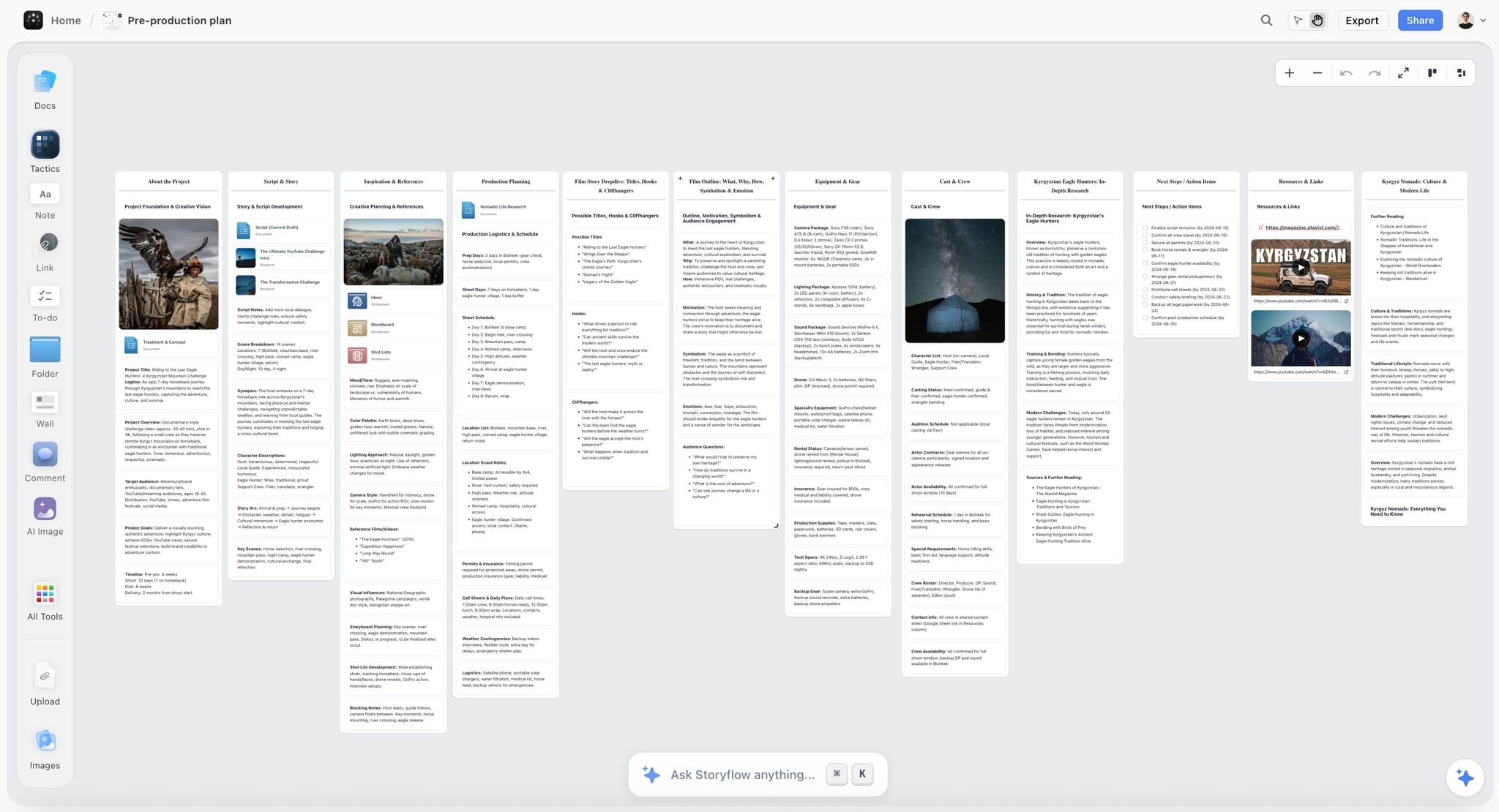
Storyflow holds the plan while it is still changing. References, sequence, locations, the shape of the piece and the open questions live on one canvas, and because nothing is locked to a grid, restructuring at 9pm is quick rather than an argument with a scheduling interface. The AI reads the whole board, so asking what a moved shoot day breaks is a real check rather than a prompt-writing exercise. The client can open it without an account, which is when they change their mind cheaply instead of expensively.
Best for: The visual plan and the version of it that survives contact with reality.
Verdict: A complement to a production system, never a replacement. StudioBinder makes the paperwork the crew needs.
Key features
- Infinite canvas holding references, sequence, locations and open questions.
- AI reads the whole current board, plus 5 attached documents and 3 attached boards.
- Anyone a paid member invites to a board joins free.
- 200+ story blueprints including treatment and structure formats.
Pricing
Early access: every plan is paid for now. A Free plan arrives before the end of 2026, and anyone a paid member invites to a board can sign up free and collaborate today. Plus: $7.99/mo annual, $9.99/mo monthly. Unlimited boards and uploads. Pro: $14/mo annual, $19/mo monthly. AI image generation, more AI usage, memory across conversations. Max: $39/mo annual, $49/mo monthly. Team workspace with roles and permissions.
Pros
- Fast to restructure when the plan changes.
- The client sees the plan and changes their mind earlier.
- Cheapest tool here, priced per account for individuals.
Cons
- Drafts call sheets, breakdown tables, a strip board and a budget table, but no sending, day-out-of-days, budgeting module or crew database.
- No review and approval with timecoded comments.
- Paid-only during early access.
6. Descript
Descript edits video by editing its transcript, which makes a rough assembly something a producer can do before the editor starts. On interview and documentary work this is a genuine change in how the post schedule is shaped.
Best for: Rough cuts, interview-led work and anything transcript-driven.
Verdict: The most useful AI in post for a producer. Not a finishing tool.
Key features
- Transcript-based editing with filler-word removal.
- Overdub and voice tools for temp narration.
- Fast turnaround on interview assemblies.
Pricing
Limited free tier. Paid from about $19/user/month.
Pros
- A producer can build a selects reel without an editor.
- Excellent on interview and documentary material.
- Transcripts are useful long after the cut.
Cons
- Not a finishing NLE.
- Transcription hours limit the entry tiers.
- Quality depends heavily on audio.
7. ChatGPT
ChatGPT covers the same written half of producing as Claude, with broader tool and image support and a very large ecosystem of custom assistants, some of which are genuinely useful for production paperwork.
Best for: A general assistant with the widest surrounding ecosystem.
Verdict: Excellent and interchangeable with Claude for most producer work. Pick one rather than both.
Key features
- Strong general drafting and reasoning.
- Image generation and file handling.
- Custom assistants for repeated production tasks.
Pricing
Usable free tier. Paid about $20/month.
Pros
- Broad capability beyond writing.
- Large ecosystem of ready-made assistants.
- Familiar to most collaborators.
Cons
- Shorter practical context than Claude on long scripts.
- No production structure.
- Two assistant subscriptions is usually one too many.
8. Airtable
Airtable is where producers build the tracker no off-the-shelf tool provides: deliverables across thirty assets, talent availability, asset versions by platform. AI fields can summarise and categorise records, which helps on volume work.
Best for: Productions with custom tracking needs, especially high-volume deliverables.
Verdict: The best custom database here. Everything depends on the quality of the build.
Key features
- Relational databases with views per collaborator.
- Automations and AI fields for summarising records.
- Interfaces for a simplified client or crew view.
Pricing
Generous free tier. Paid from about $20/user/month.
Pros
- Models deliverables at volume better than any production tool.
- Automations reduce status-chasing.
- Free tier is genuinely capable.
Cons
- You are maintaining a system you built.
- Per-user pricing across a crew.
- Nothing production-specific comes ready-made.
9. Celtx
Celtx covers scripting, breakdown, scheduling and budgeting at a lower price than StudioBinder, which makes it a strong choice for independent producers and student or low-budget work.
Best for: Budget-conscious producers needing script through schedule in one tool.
Verdict: The best value pre-production suite. Less polished and less crew-familiar than StudioBinder.
Key features
- Scriptwriting with breakdown and tagging.
- Scheduling and budgeting included.
- Usable free tier.
Pricing
Limited free tier. Paid from about $15/month.
Pros
- Script and budget in the same place.
- Cheaper than the equivalent StudioBinder tier.
- Free tier covers a short film.
Cons
- Interface is dated in places.
- Call sheets are less polished.
- Crews recognise it less readily.
10. Notion
Notion is where a production's written knowledge accumulates: contacts, decisions, kit lists, the wrap report and the archive that makes the next similar project faster.
Best for: The production wiki and the archive between projects.
Verdict: Good for knowledge, weak for anything time-shaped. It schedules nothing.
Key features
- Databases and pages for production knowledge.
- AI search across accumulated projects.
- Shared access for crew and clients.
Pricing
Free personal tier. Paid from about $10/user/month.
Pros
- The archive genuinely speeds up the next project.
- Flexible enough for any production's documentation.
- Free tier covers an individual producer.
Cons
- No scheduling, breakdown or call sheets.
- Manual upkeep decays during a shoot.
- Not a plan, a library.
11. Runway
Runway generates video and images, which for producers is most useful as previz and reference: showing a client a rough approximation of a move or a look before anyone books a crane.
Best for: Previz, pitch reference and testing an idea before it costs money.
Verdict: Genuinely useful as reference, not as deliverable. Credit-based pricing needs watching.
Key features
- Generative video and image tools.
- Fast reference and previz generation.
- Editing and effects utilities.
Pricing
Credit-limited free tier. Paid from about $15/month.
Pros
- A client can see an idea before it is budgeted.
- Cheaper than a previz day.
- Improves fast between releases.
Cons
- Credits can burn quickly in a session.
- Output is reference quality, not final.
- Rights and usage questions need care on client work.
12. Google Sheets
A very large share of real production schedules and budgets live in spreadsheets, and honestly so. It is free, everyone can open it, and the formulas do exactly what you tell them.
Best for: Budgets, deliverable trackers and schedules on a small production.
Verdict: The free baseline, and genuinely sufficient at small scale. Nothing propagates automatically.
Key features
- Free, shareable, universally openable.
- Formulas for budgets and totals.
- Version history and comments.
Pricing
Free. Workspace from about $6/user/month.
Pros
- Zero cost and zero learning curve.
- Everyone on a crew can open it.
- Complete flexibility.
Cons
- Every change is manual, which is section 3's whole problem.
- No call sheets or breakdown.
- Errors hide easily in a hurry.
7) What AI Actually Does Well in Production
From a quarter of use across eleven shoots, the honest division.
Genuinely useful now:
Script breakdown. Tagging a script for cast, props, locations and wardrobe used to be the slowest pre-production task and is now a first pass in minutes plus a producer's review. The review is not optional, and it is still a large net saving.
Transcript search across footage. Finding the take where someone said a particular phrase is now a search. On documentary and interview work this is the single biggest time change in the last few years.
Drafting the writing nobody counts. Client updates, risk assessments, safety briefs, schedule notes, the fifteen messages a change requires. This is most of a producer's keyboard time and the least glamorous AI application.
Checking what a change breaks. Give a model the schedule and the change and ask what is now inconsistent. It will miss things, and it catches the ones you were about to miss at 9pm.
Rough assembly from transcript, which lets a producer hand the editor a structure rather than a hard drive.
Not useful yet, whatever the demo showed:
Scheduling a shoot day. Real scheduling is a constraint problem full of unwritten rules about turnaround, travel, light and who cannot work Thursdays. Models produce plausible schedules that fail on contact with any of them.
Budgeting. Numbers presented confidently and wrong are worse than no numbers, and a budget is checked line by line regardless, which removes the saving.
Anything requiring current availability. A model does not know your gaffer just took another job.
Generated footage as a deliverable on most client work, where rights, consistency and client comfort are all unresolved. As reference and previz it is already valuable.
The rule that held throughout: AI is reliable on transformation, where the information already exists and needs restating, and unreliable on judgment, where it does not. Producing is mostly judgment applied to a great deal of transformation, which is why the useful stack pairs an assistant with a system rather than replacing either.
8) The Change Log Every Production Needs
A producer's most useful document is not in any of these tools by default and takes two minutes a day.
One line per change, with four fields. What changed, when it was decided, who was told, and what it affects. The last two are where productions actually fail.
Why it matters more than it sounds. The expensive failure is almost never the change; it is the crew member who arrives at the old call time, the client who approves a version that is no longer current, the supplier working to the original delivery date. A change log turns "did everyone hear?" from a memory question into a reading question.
Where to keep it. Wherever the crew already looks, which for most productions is the production tool or the shared drive rather than somewhere new. A change log nobody opens is worse than none, because it creates false confidence.
What to do with it at wrap. Read it. A production's change log is the most honest post-mortem document that exists, because it records what actually happened rather than what was planned, and the patterns across three productions tell you where your estimates are consistently wrong.
And the client-facing version. A short list of changes agreed and their consequences, sent as they happen rather than collected at the end. Almost every "you never told us that" conversation is preventable by a two-line email at the time, and almost every producer has learned this the expensive way at least once.
| The change | Who must know within an hour | What else it touches |
|---|---|---|
Shoot date moves | Crew, talent, location, client | Call sheet, budget, post schedule |
Location changes | Crew, transport, permits | Call sheet, shot list, insurance |
Talent changes | Casting, wardrobe, schedule | Call sheet, release forms |
Delivery date moves | Client, post, music and VO | Post schedule, all downstream suppliers |
9) Recommended Producer Stacks
Stack 1: Commercial and branded content. StudioBinder (paperwork) + Frame.io (review) + Claude (writing) + Storyflow (the plan). About $69/month.
Stack 2: Independent producer. Celtx or StudioBinder free + Claude + Storyflow + Google Sheets. About $25/month.
Stack 3: Documentary and unscripted. Frame.io + Descript + Claude + Storyflow. About $59/month.
Stack 4: Complex scripted. Yamdu + Frame.io + Claude + Storyflow. About $65/month.
Stack 5: Free setup. StudioBinder or Celtx free + Claude free + Frame.io free + Google Sheets. Zero.
| Producer | Runs paperwork in | Reviews in | Writes with | Monthly cost |
|---|---|---|---|---|
Commercial | StudioBinder | Frame.io | Claude | about $69 |
Independent | Celtx, StudioBinder free | Frame.io free | Claude | about $25 |
Documentary | Frame.io, Descript | Frame.io | Claude | about $59 |
Complex scripted | Yamdu | Frame.io | Claude | about $65 |
Free | StudioBinder free | Frame.io free | Claude free | $0 |
Every stack has the same four parts: something that makes the paperwork the crew needs, something that handles review, an assistant for the writing, and somewhere the plan can change fast. Producers who skip the fourth end up re-planning inside a scheduling grid, which is the slowest place to do it.
10) What the Producer Stack Costs
The software: $0 to about $70 a month for a working stack, which against a single production budget is a rounding error and against irregular freelance income is not nothing. The free stack in section 9 is genuinely complete for a small shoot.
The hours the stack does not remove, which are the producer's real cost: the calls, the negotiations, the availability chasing and the judgment, none of which are automatable and all of which are the job.
The cost of a change that did not propagate, which is the single largest avoidable line in production. A crew arriving at the wrong time, a location booked for the wrong day, a delivery missed because post was working from the old schedule. Each one is a day's fee or more, and the change log in section 8 costs two minutes a day.
The cost of the plan nobody could see, which shows up as client changes arriving late. A client who can see the plan changes their mind in pre-production, where it is cheap; a client who sees only the output changes their mind in post, where it is not.
| Cost driver | Where it lands | Rough size | The move |
|---|---|---|---|
Software | Monthly, per producer | $0 to $70 | Exhaust the free tiers first |
Unautomatable hours | Every day of the job | Most of the job | Buy back the writing time |
A change that did not propagate | On the day | A day's fee or more | The change log, two minutes daily |
Late client changes | In post | The most expensive place | Make the plan visible early |
11) Honorable Mentions
- Movie Magic Scheduling and Budgeting. Still the standard on scheduled feature work.
- Shot Lister. A shoot-day companion many ADs prefer on set.
- Dropbox Replay and Vimeo Review. Credible Frame.io alternatives at lower cost.
- SetHero. Call sheets with unusually good delivery tracking.
- Boords. Storyboarding with animatics, worth it on anything sequence-heavy.
- A change log in whatever you already have. Two minutes a day, and the highest-return item here.
- The wrap report. Read the last three before planning the next one.
12) Production Mistakes to Avoid
- Changing six of the seven documents a change touches. The seventh is the one that ruins a shoot day.
- Re-planning inside a rigid grid. Fast to read, slow to restructure, which is the wrong trade under pressure.
- Trusting an AI schedule. Plausible and wrong on turnaround, travel and availability every time.
- Letting the client see only the output. They change their mind in post, where it is most expensive.
- No change log. Turns "did everyone hear?" into a memory question.
- Two AI assistant subscriptions. Pick Claude or ChatGPT; the second adds almost nothing.
- Buying the big production system for a two-day shoot. The setup outlasts the project.
14) The Bottom Line
The best AI tools for producers in 2026 are StudioBinder for production paperwork that propagates, Claude for the written half of the job, Frame.io for review and footage search, and Yamdu where the production is genuinely complex. Storyflow is fifth, for the plan while it is still changing.
The value is in the re-plan. Every tool sells you version one of the schedule, and producers are paid for version nine, made at 9pm when the location fell through and the delivery date did not move.
Choose tools whose documents share one source, keep a change log with who was told, and check what each change broke before you send the call sheet. And keep the plan somewhere it can be restructured quickly and the client can see it, because a plan that is expensive to change is a plan that stops being true.
FAQ: AI Tools for Producers
What is the best AI tool for producers in 2026?
StudioBinder is the best all-round production tool, with AI script breakdown feeding shot lists, schedules and call sheets from one source so a change propagates rather than being retyped. For the written half of producing, Claude is the strongest assistant. Frame.io is the industry default for review and its transcript search is the fastest way to find a moment in footage. Most producers end up with all three.
Can AI schedule a shoot day?
Not reliably. Scheduling is a constraint problem full of unwritten rules about turnaround, travel time, light, union requirements and individual availability, and models produce plausible schedules that break on contact with any of them. What AI does well here is checking an existing schedule for what a change has broken, which is genuinely useful at 9pm and still needs a producer's review.
What is the best free tool for producers?
StudioBinder and Celtx both have usable free tiers covering breakdown and basic paperwork, Frame.io has a free review tier, Claude and ChatGPT have free tiers that cover a light production's writing, and Google Sheets handles budgets. That combination runs a small shoot at zero cost. Storyflow is paid-only during early access; its Free plan arrives before the end of 2026.
StudioBinder or Yamdu?
StudioBinder for commercial, branded and most independent work: it is cheaper, faster to set up, and crews recognise its call sheets. Yamdu for complex multi-department productions with real scale, where departmental scheduling and crew management justify the heavier setup. For a two-day commercial, Yamdu is more system than the project needs.
How do producers use AI day to day?
Mostly for writing: client updates, risk assessments, schedule notes, treatment passes and the many messages a change requires. Then for script breakdown, for searching footage by transcript, and for asking what a change has broken. The pattern that held across our testing is that AI is reliable on transformation, where the information exists and needs restating, and unreliable on judgment, where it does not.
Is Frame.io worth paying for?
For most producers, yes, mainly because clients and editors already know it, so review happens rather than stalling on an unfamiliar link. Its transcript search alone saves real hours on interview and documentary work. Where budget is tight, Dropbox Replay and Vimeo Review are credible at lower cost, and Frame.io's free tier covers a small project.
Can AI generate footage for client work?
As reference and previz, yes, and it is genuinely useful for showing a client an idea before anyone books a crane. As a deliverable on most client work, not yet: rights, consistency across shots and client comfort are all unresolved, and the conversation you have when a client later asks what was generated is one worth avoiding. Agree it explicitly before you use it either way.
What should a producer's change log contain?
One line per change with four fields: what changed, when it was decided, who was told, and what else it affects. The last two matter most, because the expensive failure is almost never the change itself but the person who did not hear about it. Keep it where the crew already looks, and read it at wrap, because it is the most honest post-mortem document a production has.
Claude or ChatGPT for production work?
Either, and not both. Claude handles longer documents more comfortably, which suits holding a script and a schedule in one conversation. ChatGPT has broader tool and image support and a larger ecosystem of ready-made assistants. The difference for producer work is small enough that the deciding factor should be which one you will actually open.
Do I need a production tool if I have Notion or Airtable?
If you make call sheets, yes. Building call sheets, breakdowns and day-out-of-days in Notion or Airtable is possible and takes weeks to get right, and the result is less familiar to crews than StudioBinder's output. Use Airtable for the tracker no production tool provides, such as thirty deliverables across platforms, and a production tool for the paperwork the crew receives.
How much should a producer spend on tools?
Between nothing and about $70 a month for a full stack, which for most producers is far less than one avoidable mistake. Start with the free tiers, add Frame.io when clients expect it, add an assistant when you notice how much of your week is writing, and add a paid production tier when the free project limits become the constraint.
What is the most common production tooling mistake?
Owning tools that produce plans and nothing that helps when the plan changes. Every production tool markets version one of the schedule, and producers are paid for version nine, made under pressure with incomplete information. The fix is partly a tool whose documents share a source, and partly a change log and a distribution list, which no software provides for you.
Should the client see the production plan?
Yes, in a form they can actually read, and early. Clients who can see the plan change their mind in pre-production where it costs a conversation; clients who see only the output change their mind in post where it costs a reshoot. A visual plan they can open without an account is usually more effective for this than a formal schedule they cannot interpret.
Table of Contents
- Article Metadata
- Breadcrumb
- Table of Contents
- 1) Quick Answer: The Best AI Tools for Producers in 2026
- All 12 AI Tools for Producers, Ranked
- 2) Comparison Table: 12 Producer Tools at a Glance
- Frequently Asked: Which Tools Producers Trust, and Where AI Helps
- 3) The Value Is in the Re-plan
- 4) How We Evaluated These Tools
- 5) Quick Picks by Production Type
- 6) Detailed Reviews: 12 AI Tools for Producers
- 7) What AI Actually Does Well in Production
- 8) The Change Log Every Production Needs
- 9) Recommended Producer Stacks
- 10) What the Producer Stack Costs
- 11) Honorable Mentions
- 12) Production Mistakes to Avoid
- 14) The Bottom Line
- 15) Author
- 16) Related Reading
- FAQ: AI Tools for Producers
Templates to check out for this topic


Templates you can use in Storyflow
Every Storyflow board starts from real structure and an AI that reads the whole canvas. Open one of these templates and make it yours.


See Storyflow in Action
A visual AI workspace where every feature lives inside one canvas. No tab-switching, no context lost.
Build your entire board from a single message
Type what you need in the AI chat at the bottom of your canvas. The AI adds cards, headings, and structure directly onto your board.
Use expert frameworks as AI context
Type @ in the AI chat and choose any Tactic. The AI tailors every response to that framework instead of giving generic advice.
Turn your board into a mind map in seconds
Ask the AI to restructure your canvas as a mindmap. It connects your ideas into a visual hierarchy so you can see how everything relates.
Why Storyflow Exists
Storyflow actually began as a personal tool while working on creative and research projects.
We kept running into the same problem: ideas were scattered everywhere: notes, documents, and whiteboards.
Nothing helped us see how everything connected.
So we started building a workspace designed around how ideas actually grow.
→ Read how Storyflow was createdStoryflow Team
Product & Research Team
Published: 2026-09-23
Extremely simple, seriously capable


See how easy it is to get started
Watch a real project come together, from a blank board to a finished plan, clicked through step by step.
Start creating with AI and become more productive
Transform your creative workflow with AI-powered tools. Generate ideas, create content, and boost your productivity in minutes instead of hours.