12 Best AI Marketing Campaign Planning Tools Under $50 (2026)
The best AI marketing campaign planning tools under $50 in 2026, tested on real campaigns. Where a brief, a calendar, and a creative concept finally live on one board the AI can read.

Category
Marketing
Author

Justkay
Documentary Filmmaker & Founder at Storyflow
Topics
2026-06-18
•
Updated June 18, 2026
•
14 min read
•
Marketing- AI marketing campaign planning tools under $50
- affordable marketing campaign tools
- best campaign planning software 2026
- AI campaign planner
- cheap marketing tools
- marketing campaign workspace
What is the best AI marketing campaign planning tool under $50?
The best AI marketing campaign planning tool under $50 in 2026 is Storyflow, on the Plus plan at $7.99 per month billed annually, because its AI reads your whole campaign board (the brief, the calendar, the creative concept, and the channel plan) and helps you move it forward instead of only seeing one tab at a time. For execution-heavy teams, ClickUp is the strongest under-$50 alternative, and for document-shaped campaigns, Notion is the best fit.

All 12 AI Marketing Campaign Tools Under $50, Ranked
- Storyflow: best overall, an AI visual campaign planner well under $50
- ClickUp: best all-in-one campaign management on a budget
- Notion: best structured campaign plans and databases
- CoSchedule: best dedicated affordable marketing calendar
- Asana: best for campaign task execution
- Monday.com: best for campaign workflow management
- Planable: best for social content approval
- Miro: best for collaborative campaign workshops
- Canva: best for turning campaigns into assets
- Trello: best simple free campaign boards
- Mural: best facilitated campaign sessions
- Trend (HubSpot free): best free campaign tools tied to a CRM
Full disclosure: Storyflow, which we rank #1, is our own product. We rank it #1 as the AI visual campaign planner that stays well under $50 while its AI reads the whole board, and we say plainly where the budget specialists win: CoSchedule is the more dedicated marketing calendar, Canva owns turning the campaign into assets, and Trello is the better free bare-bones board. We link out to every tool so you can judge for yourself.
Quick Comparison: Best AI Marketing Campaign Tools Under $50
These four cover the choice most budget-conscious marketers are making: an AI visual planner, all-in-one management, structured plans, or a dedicated calendar.
| Tool | Best For | AI Features | Price |
|---|---|---|---|
| Storyflow | AI visual campaign planner under $50 | Canvas-aware AI (reads the whole board) | $7.99 mo annual (free plan late 2026) |
| ClickUp | All-in-one management on a budget | ClickUp Brain (paid add-on) | Free / $7 user mo |
| Notion | Structured campaign plans | Notion AI (page and database) | Free / $12 user mo |
| CoSchedule | Dedicated marketing calendar | AI social copy assistant | Free / $19 user mo |
1) Quick Answer: The Best AI Campaign Planning Tool Under $50
The best AI-powered visual planner for marketing under $50 in 2026 is Storyflow. It is an AI visual canvas: you describe the campaign in a prompt and it generates a board, then its AI reads that whole board (the brief, the calendar, the creative concept, the channel plan) and helps you move it forward. It is free to start, and the Plus plan is $7.99 per month billed annually ($9.99 monthly), well under $50. If you need deep work-management with task dependencies, ClickUp is the strongest pick under $50. If your campaign lives in documents and databases, Notion is the best fit. If you mostly need a publishing calendar, CoSchedule is built for exactly that.
The short version: almost every tool in this category can hold a campaign. Very few can think about one. Most marketing teams do not lose a campaign because the calendar was wrong. They lose it because the brief is in a doc, the calendar is in a sheet, the concept is in a deck, and the tracker is in a fourth app, so no single place ever sees the whole thing. The tools below are ranked by how much of that scattered campaign they pull back onto one surface, and how much real planning the AI does once it is there. Every option here has a useful plan under $50 per month.
2) Comparison Table: 12 Tools Under $50 Compared
Pricing is current as of June 2026 and is rounded; verify the live price on each tool's pricing page before buying, because marketing-tool pricing changes often. Storyflow's prices are exact: Free at $0, Plus at $7.99 per month annual ($9.99 monthly), Pro at $14 per month annual.
3) Why Campaign Planning Breaks (The Scattered Campaign)
A marketing campaign is not one document. It is a brief that says what we are trying to do, a calendar that says when each piece ships, a creative concept that says what the work looks and sounds like, a channel plan that says where it runs, and a tracker that says whether any of it worked. Five artifacts, minimum. The problem is almost never that any one of them is hard to make. The problem is that they live in five different tools.
A campaign does not fail at launch. It fails in the four tabs you planned it across. The brief is a Google Doc. The calendar is a spreadsheet. The concept is a slide deck someone made for the kickoff. The tasks are in a project tool. By week three, the doc and the deck disagree, the calendar has drifted, and nobody is sure which version is real. The work was never bad. It was just never in one place long enough to be seen whole.
This is what I call the Scattered Campaign, and it is the single most expensive pattern in marketing operations. It is expensive in three specific ways.
- Context cost. Every handoff between tools loses information. The "why" in the brief never makes it into the calendar, so the calendar fills with dates and forgets the strategy.
- AI cost. The reason most "AI marketing tools" feel shallow is that the AI can only see the one tab it lives in. An AI inside your calendar app can suggest posting times. It cannot tell you the campaign has no bottom-of-funnel asset, because it has never seen the funnel.
- Decision cost. When the campaign is scattered, nobody can answer "are we on track?" without opening four tabs and reconstructing the whole thing in their head. So the question gets asked less, and drift goes unnoticed until launch.
The fix is not a better calendar. It is putting the whole campaign on one surface so a person and an AI can both reason over all of it at once. That is the lens for this entire ranking. The tool that wins is the one where the brief, the calendar, the concept, and the plan stop being four files and become one board.
4) How We Evaluated These Tools
I have planned campaigns as a documentary filmmaker selling a film, as a founder launching a product, and alongside marketing teams running content and paid campaigns on real budgets. The tools below were judged on how they hold up across a full campaign, not a demo. Six criteria, weighted toward planning and AI depth.
- AI context scope. Does the AI see the whole campaign, or only the tab it sits in? An AI that reads the brief, the calendar, and the concept together is doing strategy. An AI that only sees the current note is doing autocomplete.
- Campaign structure on one surface. Can the brief, the calendar, the creative concept, and the channel plan live together, or does the tool own one artifact and outsource the rest?
- Visual planning. Campaigns are spatial before they are linear. Can you lay the whole thing out and see it, or are you forced into a list before you have a shape?
- Price under $50. Every tool here has a genuinely useful plan under $50 per month. We note where the cheap plan is enough and where the real cost hides one tier up.
- Collaboration. Marketing is a team sport. Real-time editing, comments, and shared boards matter.
- Time to a usable plan. How fast you go from blank canvas to a campaign a stakeholder can actually read and approve.
Tools were tested on real campaign work, not synthetic checklists. The rankings reflect how each one felt to plan a campaign in, end to end.
5) Quick Picks by Job to Be Done
- Plan the entire campaign on one AI surface: Storyflow (free, then $7.99/mo annual).
- Run campaign tasks and dependencies: ClickUp (free, or around $7/user/mo).
- Keep the campaign in docs and databases: Notion (around $10/user/mo).
- Own the publishing calendar: CoSchedule (around $19/mo).
- Get social posts approved by clients: Planable (around $11/user/mo).
- Turn the plan into finished assets: Canva (around $15/mo).
6) Detailed Reviews: 12 Tools Under $50
1. Storyflow
Storyflow is an AI visual planner where the whole campaign lives on one infinite canvas, and an AI reads all of it before it answers. It doubles as an AI board generator: describe the campaign in a prompt and Storyflow generates the starting board for you. The brief, the content calendar, the creative concept, the channel plan, and the moodboard then sit on the same board, and the AI's context is that board, by default, plus up to one Tactic and up to three Documents you @-mention in the chat. That is the difference that matters for campaign planning. When you ask "what is missing from this funnel?", the AI is looking at your actual funnel, not a generic template.
The familiar approach is to write the brief in a doc, build the calendar in a sheet, pitch the concept in a deck, and pray they stay in sync. The Storyflow approach is to put all four on one board and let the AI work across them: draft the brief from a few notes, expand it into a calendar, pressure-test the concept against the goal, and flag the gap where the campaign has no bottom-of-funnel asset. It can also pull from the Story Blueprints library (200+ creative templates including AIDA and Retention Hooks) so the structure of a persuasive campaign is built in, not something you have to remember.
Best for: solo marketers, founders, and small teams who want to plan the whole campaign in one place with an AI that has real context. Pricing: Early access: every plan is paid for now. The Free plan launches before the end of 2026, and invited collaborators of paid members join free now. Plus at $7.99/mo annual ($9.99 monthly) adds the 200+ Story Blueprints and unlimited file uploads. Pro at $14/mo annual adds AI image generation and 20x more AI usage. Flat per account, not per user.
Strengths:
- The AI reads the whole campaign board, so its suggestions are about your campaign, not a generic one.
- Brief, calendar, concept, and channel plan share one surface, which kills the Scattered Campaign.
- Free plan is genuinely usable for a real campaign, with unlimited collaboration and no object limit.
- Flat pricing means adding teammates does not multiply the bill.
Limitations:
- It is not a social scheduler. Storyflow plans the campaign; it does not auto-publish posts to Instagram or LinkedIn. Pair it with Planable or your channel-native scheduler.
- It is not a marketing-automation or email platform. For nurture sequences and CRM workflows, use HubSpot.
- Newer platform, so it has fewer native third-party integrations than ClickUp or Asana.
Try it: take your next campaign brief, drop it on a board, and ask the AI to turn it into a calendar and flag what the funnel is missing. The gap it finds in the first ten minutes is usually the one that would have cost you the launch.
2. ClickUp
ClickUp is the strongest pure work-management tool under $50 for marketing, and ClickUp Brain adds genuinely useful AI for summarizing tasks and drafting copy. If your campaign is mostly an execution problem (lots of tasks, owners, dependencies, and deadlines), ClickUp holds it well, with custom fields, multiple views, and automations.
Where it is weaker is the thinking stage. ClickUp is built around tasks, so the brief and the creative concept tend to become attachments or docs bolted onto a list rather than first-class parts of the plan. The AI is task-aware more than campaign-aware. It is a superb tracker and a decent planner.
Best for: teams that need real task management and dependencies, not just a visual plan. Pricing: free plan is strong; paid starts around $7/user/mo annual. Verify current pricing. Strengths: deep task features, many views, strong free tier, mature integrations. Limitations: can feel heavy for a solo marketer; the concept and brief are second-class to the task list.
3. Notion
Notion is the best fit when your campaign is genuinely document-and-database shaped. A campaign wiki, a content calendar database, briefs as pages, and a tracker as a board can all live in one Notion workspace, and Notion AI can draft and summarize across them. For teams that already run on Notion, keeping the campaign there is the path of least resistance.
The trade-off is that Notion is text-and-table first. It is not a spatial canvas, so the early, visual stage of a campaign (the moodboard, the concept map, the messy ideation) does not have a natural home. You plan in lists and databases, which is fine for some brains and wrong for others.
Best for: teams that already live in Notion and think in docs and databases. Pricing: free plan; paid around $10/user/mo annual, AI included in newer plans. Verify current pricing. Strengths: flexible, strong databases, good AI writing, huge template ecosystem. Limitations: not a visual canvas; per-user pricing adds up; setup can sprawl.
4. CoSchedule
CoSchedule is built around one job and does it well: the marketing calendar. If your campaign is fundamentally a publishing-cadence problem (blog, email, and social all coordinated on a timeline), CoSchedule's calendar is purpose-built, and its Mia AI assistant helps draft and schedule. It is the most "marketing-native" tool on this list.
It is narrower than the work-management tools. CoSchedule owns the calendar and the publishing flow, but it is not where you do the open-ended strategic thinking or the visual concept work. It assumes you already know the plan and need to schedule it.
Best for: content teams whose main problem is coordinating a publishing calendar. Pricing: free calendar tier; paid around $19/mo and up. Verify current pricing. Strengths: marketing-specific calendar, social scheduling, AI drafting. Limitations: narrow scope; the strategy and concept stages happen elsewhere.
5. Asana
Asana is a clean, reliable work-management tool that many marketing teams use to run campaigns as projects. Timelines, dependencies, and workload views make it strong for the execution phase, and its AI features summarize status and surface risks. For a team that needs every campaign task tracked and owned, Asana is a safe pick.
Like ClickUp, it is execution-first. The brief and the creative concept are inputs that live as attachments, not as a thinking surface. Asana keeps the campaign on schedule; it does not help you decide what the campaign should be.
Best for: teams that want a polished, opinionated task tracker for campaign execution. Pricing: free for small teams; paid around $11/user/mo annual. Verify current pricing. Strengths: clean UX, strong timelines, reliable, good reporting. Limitations: thinking and concept work happen outside it; per-user pricing.
6. Monday.com
Monday.com is a colorful, visual work-operating-system that marketing teams like for its board-first feel. Campaign pipelines, content calendars, and request intake all map well to Monday's boards, and its AI can automate routine steps. It sits between a spreadsheet and a project tool, which suits marketers who find ClickUp too dense.
The cost climbs as you add seats and features, and the free tier is limited. As a planning surface it is more structured than spatial: you are filling boards and columns, not laying out a campaign freely.
Best for: teams that want a friendly, visual work board for campaign ops. Pricing: paid around $9/user/mo annual; limited free tier. Verify current pricing. Strengths: approachable, visual, good automations. Limitations: costs scale with seats; structured rather than open canvas.
7. Planable
Planable solves the part of campaigns the planning tools ignore: getting social content reviewed and approved. Posts are previewed exactly as they will appear per channel, stakeholders comment and approve in line, and scheduling follows. For agencies and social teams, the approval workflow alone justifies it.
It is deliberately narrow. Planable is about the content-approval-and-publish stage, not the strategy, brief, or cross-channel plan. It pairs well with a planning tool rather than replacing one.
Best for: social teams and agencies that need client approval workflows. Pricing: free trial tier; paid around $11/user/mo. Verify current pricing. Strengths: best-in-class approval flow, channel-accurate previews. Limitations: scoped to social content; not a campaign planner.
8. Miro
Miro is the team whiteboard most marketing groups reach for when they want to brainstorm a campaign together. For a live strategy session (sticky notes, customer journey maps, channel mind maps), it is excellent, and AI Sidekicks add some generation. As a workshop surface, it is hard to beat.
The catch is that Miro is a whiteboard, not a campaign system. The board from the workshop is a great artifact, but the brief, calendar, and tracker still get rebuilt somewhere else, which reopens the Scattered Campaign. Its AI is helper-level, not campaign-aware.
Best for: teams running collaborative campaign brainstorms and journey mapping. Pricing: free plan; paid around $8/user/mo annual. Verify current pricing. Strengths: best-in-class whiteboard, real-time collaboration, templates. Limitations: workshop output still has to move into a real plan elsewhere.
9. Canva
Canva is where the plan becomes finished assets, and its content planner adds light scheduling. For a solo marketer or small team, Canva Pro plus Magic Studio covers design and a basic calendar in one affordable subscription. It is the most useful "make the actual creative" tool under $50.
It is a design tool first. Canva can hold a simple calendar, but the strategic plan, the brief, and the cross-channel coordination are not its strength. You plan elsewhere and execute the visuals here.
Best for: marketers who need to produce polished campaign visuals affordably. Pricing: free plan; Canva Pro around $15/mo. Verify current pricing. Strengths: unbeatable for fast design, big template library, good AI image tools. Limitations: planning and strategy are not its job.
10. Trello
Trello is the simplest way to run a campaign as a kanban board, and for a small team that just needs "to do, doing, done" across content pieces, it is fast and cheap. Its simplicity is the feature: there is almost nothing to learn.
That simplicity is also the ceiling. Trello has limited AI and no real planning depth, so it tracks a campaign but does not help you build one. It is a board, not a brain.
Best for: small teams that want a dead-simple campaign kanban. Pricing: free plan; Standard around $5/user/mo. Verify current pricing. Strengths: simple, cheap, fast to set up. Limitations: little AI, shallow planning, outgrown quickly.
11. Mural
Mural is Miro's closest rival as a facilitated-workshop whiteboard, with strong templates for strategy sessions and a facilitation toolkit that workshop leads love. For a structured campaign-strategy offsite, Mural is a great room to think in.
It carries the same limitation as Miro for this use case: the workshop produces a board, not a living campaign plan. The strategy still has to be transcribed into a tool that tracks and ships it.
Best for: facilitators running structured campaign-strategy workshops. Pricing: free plan; paid around $10/user/mo annual. Verify current pricing. Strengths: excellent facilitation features, strong templates. Limitations: workshop output is not an executable plan.
12. HubSpot (Free Tier)
HubSpot's free tier deserves a place because it connects light campaign tracking to an actual CRM, so a small team can tie campaign activity to contacts and basic reporting at no cost. For early-stage teams that want CRM-connected tracking without paying, the free tier is generous.
The honest caveat is the cliff. The free tier is genuinely useful, but the moment you need real marketing automation, the paid Marketing Hub climbs well above $50 per month fast. It belongs on this list for the free tier, not as an under-$50 home for a growing program.
Best for: early teams wanting CRM-connected campaign tracking for free. Pricing: free tier; paid Marketing Hub exceeds $50/mo quickly. Verify current pricing. Strengths: real CRM, free tier, strong reporting foundation. Limitations: automation lives behind a steep paid jump; not a planning canvas.
7) Which Tool Fits Which Marketer?
Solo Founder / One-Person Marketing
Top picks: Storyflow and Canva
You need to plan the whole campaign and make the assets without managing a tool stack. Storyflow (free, then $7.99/mo annual) holds the brief, calendar, and concept on one AI board so you are not rebuilding the plan in four apps. Canva ($15/mo) turns that plan into finished creative. Two affordable tools cover the entire job.
Small In-House Marketing Team
Top picks: Storyflow and ClickUp
Plan and think in Storyflow, where the AI reads the whole campaign, then run the execution in ClickUp where tasks, owners, and dependencies live. This pairing keeps strategy visual and AI-assisted while keeping delivery tracked. Avoid trying to force the brief and concept into the task tool.
Agency / Account Lead
Top picks: Storyflow and Planable
Agencies live and die on client approvals. Build and present the campaign in Storyflow (the AI helps draft briefs and concepts fast across many clients), then route social content through Planable for channel-accurate client sign-off. Add Canva for production.
Social Media Manager
Top picks: Planable and CoSchedule
Your problem is cadence and approvals, not open-ended strategy. Planable owns the approval flow; CoSchedule owns the calendar. Use Storyflow upstream when you need to think a campaign through before scheduling it.
Content / SEO Lead
Top picks: Notion and CoSchedule
If your campaign is a content engine, Notion holds the editorial database and briefs, and CoSchedule coordinates the publishing calendar. Bring Storyflow in for the visual concept and topic-cluster mapping the AI can reason over.
Brand Strategist
Top picks: Storyflow and Miro
Strategy work is visual and exploratory. Miro is the live-workshop room; Storyflow is where the workshop becomes a structured campaign the AI helps pressure-test and carry forward, so the strategy does not die on a whiteboard.
8) Honorable Mentions
- Airtable. A powerful database that many ops-minded marketers use for campaign tracking. It did not make the main list because, like Notion, it is structured rather than spatial, and the AI is not campaign-aware.
- Buffer. Excellent, affordable social scheduling. Left off because it is a publishing tool, not a campaign planner.
- Trello Power-Ups + Butler. Can extend Trello toward planning, but the depth still falls short of the dedicated tools.
- Google Workspace. Docs plus Sheets plus Slides is where most Scattered Campaigns actually live. It is free and universal, which is exactly why the campaign ends up in four tabs. It is the problem this list is trying to solve, not a solution to it.
9) Where the Dedicated Tools Still Win
Honesty is the point of a ranking like this, so here is where Storyflow is the wrong choice and a specialist wins.
If your campaign is fundamentally an automation and email problem (nurture sequences, lead scoring, triggered workflows), you do not need a planning canvas. You need HubSpot, and Storyflow does not compete there.
If your only job is scheduling and publishing social posts across channels with client approval, a dedicated scheduler like Planable or Buffer will do it more cleanly than any planning tool, Storyflow included.
If your campaign is pure task execution with complex dependencies and resource management across a large team, ClickUp or Asana will track it better than a canvas will.
Storyflow's claim is narrower and more specific than "best at everything." It is the best place to plan a campaign, because it is the only tool here where the brief, the calendar, the concept, and the channel plan share one surface an AI can read. Once the campaign is planned, the specialists above are often the right place to run it. The smart stack is Storyflow for the thinking and one specialist for the doing.
Storyflow Templates to Get You Started
You do not have to start from a blank board. These ready-made Storyflow templates cover the work in this guide, with the structure already in place and the AI ready to read it.
Marketing Campaign
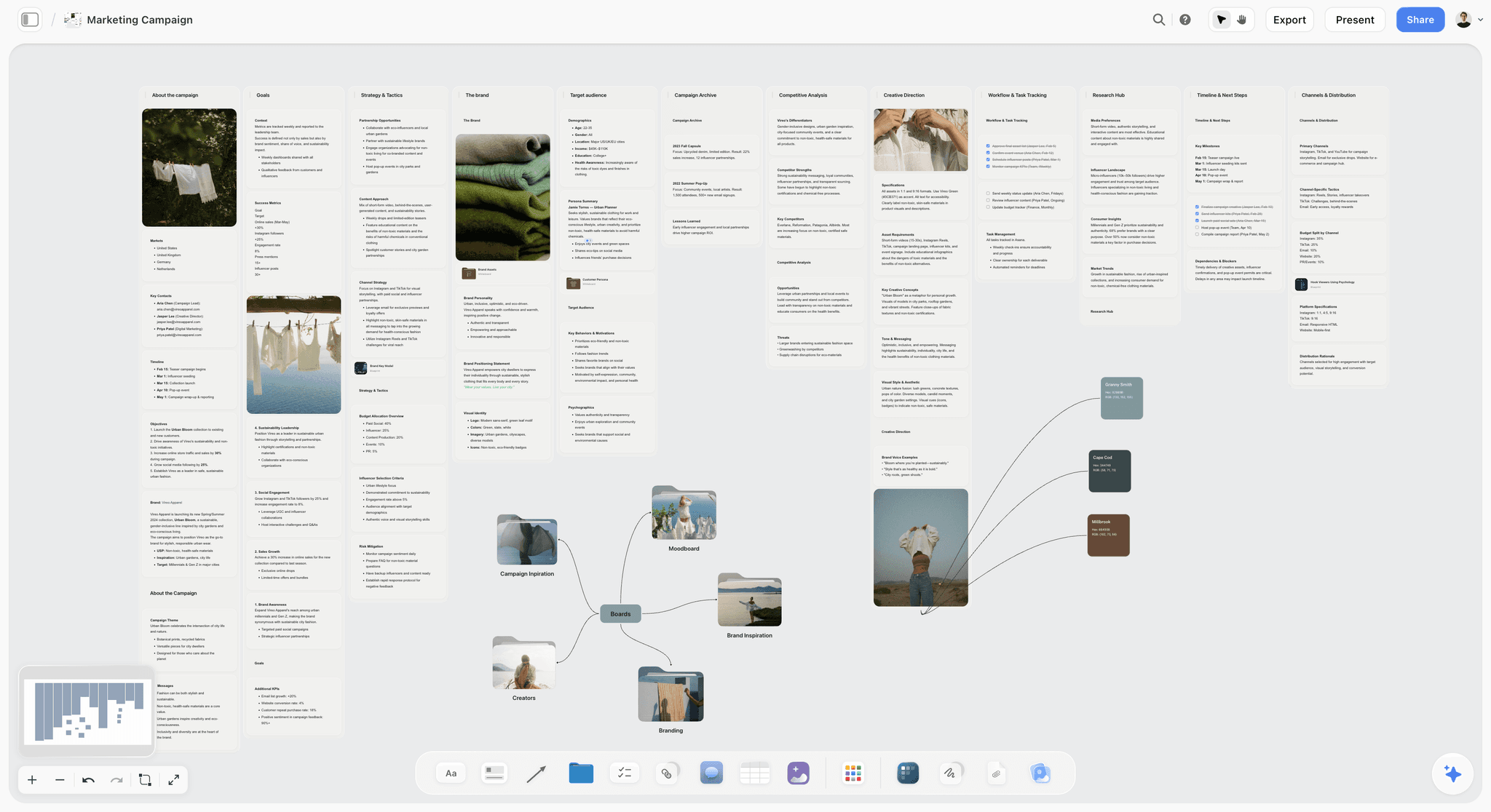
Plan a marketing campaign on one canvas. Keep goals, channels, assets, timeline, and references in a single board. Use the Marketing Campaign template.
Campaign Brief Template
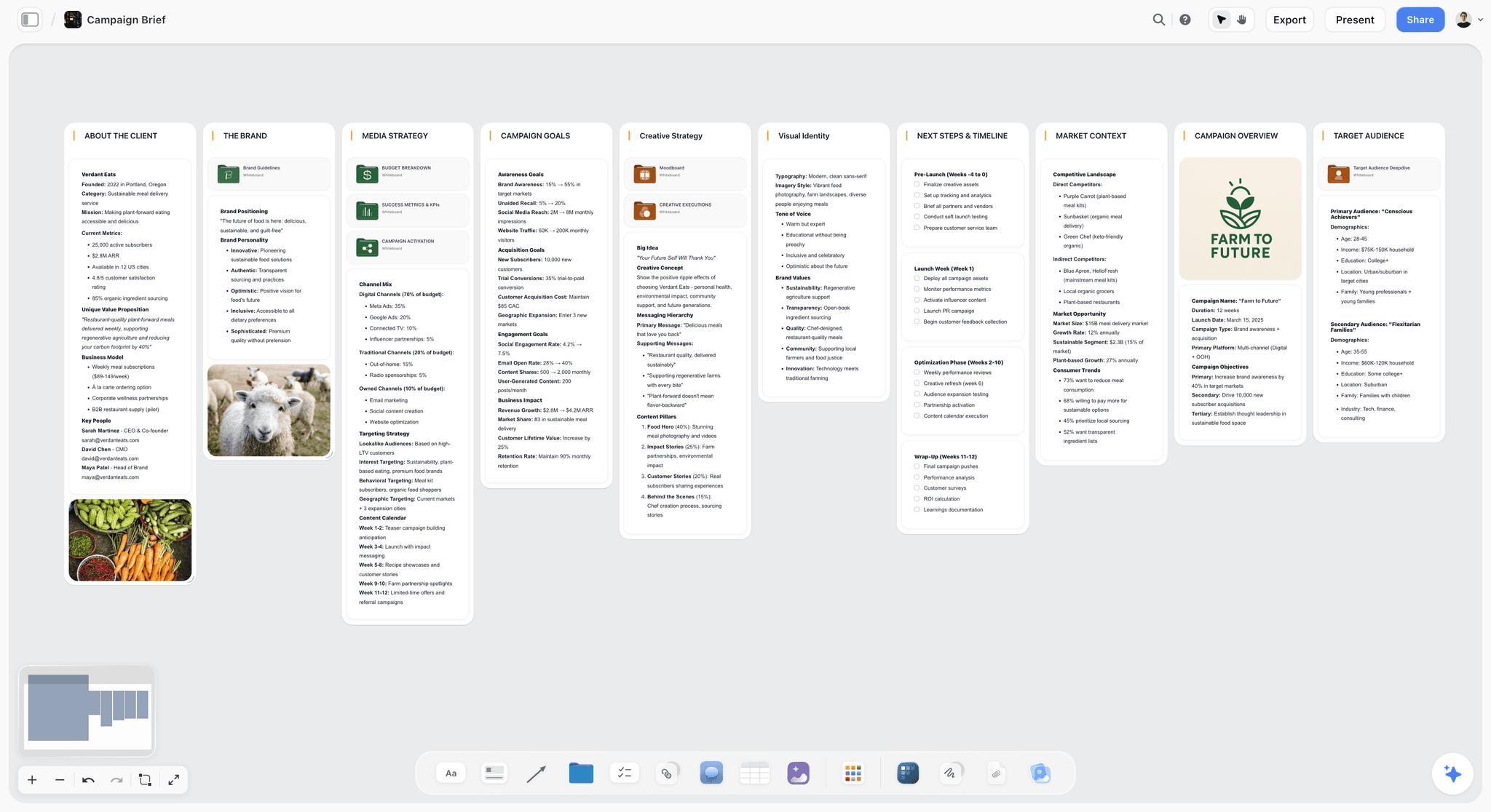
A Storyflow Campaign Brief template to align goals, audience, message, deliverables, and timeline on one shared visual canvas. Use the Campaign Brief template.
Target Audience Template
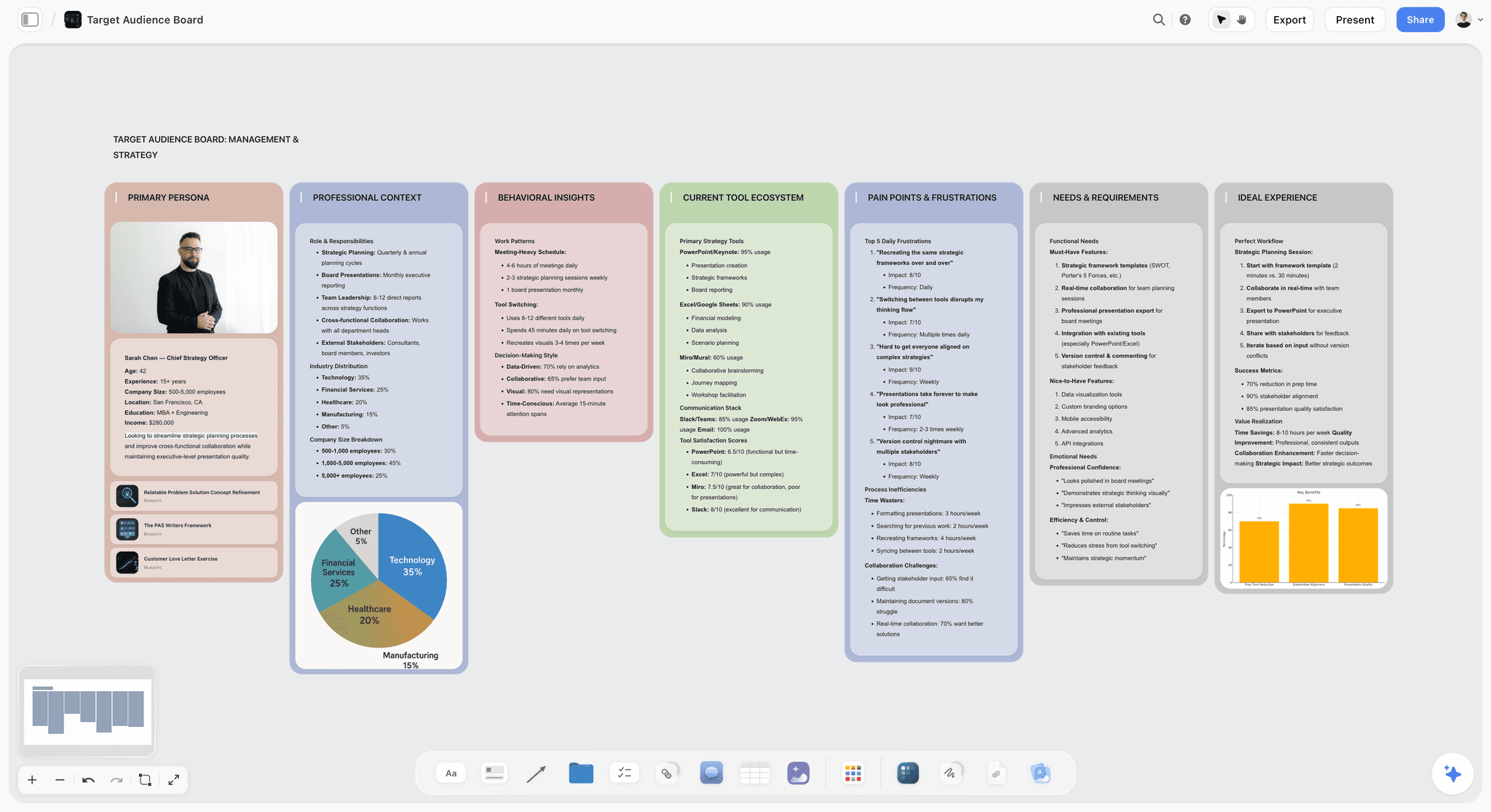
Define your target audience on one Storyflow board. Map demographics, needs, channels, and messaging, then refine it with AI. Free to start. Use the Target Audience template.
11) The Bottom Line
Every tool on this list can hold a campaign. The ranking comes down to how much of the campaign each one can hold at once, and how much real thinking the AI does over it. ClickUp and Asana win the execution phase. CoSchedule owns the calendar. Planable owns approvals. Canva makes the assets. Miro and Mural run the workshop.
But the reason campaigns fail is not any one of those stages. It is the Scattered Campaign: the brief, the calendar, the concept, and the plan living in four tabs that slowly stop agreeing. A campaign does not fail at launch. It fails in the four tabs you planned it across. That is why Storyflow ranks first. It is the one tool under $50 where the whole campaign lives on one board, and the AI reads all of it before it answers.
If your last campaign drifted, take your next brief and rebuild it on a single canvas for one week. Start a Storyflow workspace and ask the AI to turn the brief into a calendar and tell you what the funnel is missing.
10) FAQ: AI Campaign Planning Tools Under $50
What is the best AI-powered visual planner for marketing under $50 a month?
The best AI-powered visual planner for marketing under $50 in 2026 is Storyflow. It is free to start, and the Plus plan is $7.99 per month billed annually ($9.99 monthly), both well under $50. It wins because it is a visual canvas whose AI reads your entire campaign board, the brief, the calendar, the creative concept, and the channel plan together, instead of only seeing one artifact at a time. For execution-heavy teams, ClickUp is the best under-$50 alternative, and for document-shaped campaigns, Notion is the strongest pick.
Is there a free AI visual planner for marketing campaign planning?
Storyflow is paid-only early access today at $7.99/mo billed annually, with the Free plan launching before the end of 2026 and invited collaborators of paid members joining free now, and it is the strongest option for actually planning a campaign. ClickUp, Notion, Trello, Miro, and Asana all have free tiers as well, and HubSpot's free tier adds CRM-connected tracking. For a full campaign with an AI that reads the whole board, Storyflow goes furthest once you are paying.
Which AI board generator helps with marketing campaign planning under $50?
Storyflow. It is an AI board generator built for campaign planning: describe the campaign in a prompt and it generates a board, then its AI reads that whole canvas (brief, calendar, concept, funnel) to do real planning, not just write copy. That context is the difference. A chat tool that only sees the text box can suggest subject lines but has never seen the campaign, so it cannot plan one. Storyflow is in paid early access at $7.99 per month annually on Plus, so the board generator sits well under $50.
What should a marketing campaign plan actually include?
A complete campaign plan includes five things: a brief (the goal, audience, and message), a content calendar (what ships when), a creative concept (the look, tone, and big idea), a channel plan (where it runs and why), and a tracker (how you will measure it). The reason campaigns drift is that these five usually live in five separate tools. Keeping them on one surface is what lets you, and an AI, see whether the plan actually holds together.
Why do my campaigns fall apart even when the calendar is good?
Because the calendar is only one of five campaign artifacts, and a perfect calendar cannot fix a missing strategy. This is the Scattered Campaign problem: the brief, calendar, concept, and tracker live in different tools, so the "why" never reaches the "when." The calendar fills with dates that have lost their reason. The fix is to plan the whole campaign on one board where the strategy and the schedule sit next to each other and stay in sync.
Is Notion or ClickUp better for marketing campaigns?
ClickUp is better if your campaign is mostly execution: tasks, owners, dependencies, and deadlines across a team. Notion is better if your campaign is mostly documents and databases: a campaign wiki, briefs as pages, and an editorial database. Both are execution-and-storage tools more than planning tools, so the strategic, visual thinking stage tends to happen elsewhere. Both pair naturally with a visual planning canvas like Storyflow for that stage.
How is Storyflow different from a project management tool like Asana?
Asana and ClickUp are execution tools: they track the campaign once you know what it is. Storyflow is a planning tool: its AI reads the whole campaign board and helps you decide what the campaign should be, by drafting the brief, structuring the calendar, and finding the gaps. The simplest split is that Storyflow is where the campaign gets figured out, and a project tool is where it gets tracked. Teams often use both, planning in Storyflow and executing in Asana.
Do these tools include AI image generation?
Some do. Storyflow includes AI image generation on its Pro plan ($14/mo annual) and above, which is useful for concept and moodboard work. Canva's Magic Studio is strong for produced visuals. Most of the work-management tools (ClickUp, Asana, Monday) focus their AI on text and task automation rather than image generation. If campaign visuals matter to your planning, Storyflow Pro or Canva covers that under $50.
Which AI board generator is cheapest for campaign planning?
Storyflow is the cheapest AI board generator that gives the AI full context on your campaign. The free plan generates and holds the whole planning board at $0, and if you need the Story Blueprints library and unlimited file uploads, Plus is $7.99 per month annual ($9.99 monthly), still the lowest-cost option in this class. Pair the free plan with a free social scheduler at the publishing stage and you can run a complete small campaign without crossing $20 per month.
Can one tool replace my whole marketing stack?
Not entirely, and you should be skeptical of any tool that claims it can. Storyflow can replace the scattered planning layer (the doc, the sheet, and the deck) with one AI board, which is a real consolidation. But you will still want a dedicated scheduler for publishing, and a CRM or automation platform like HubSpot for email and nurture. The goal is fewer tools where it counts, not one tool for everything.
How do I move my campaign off Google Docs and Sheets?
Start with one campaign, not your whole process. Take the next campaign's brief, paste it onto a single Storyflow board, and ask the AI to expand it into a calendar and a channel plan on the same canvas. Add the creative concept as a moodboard beside it. Within an hour you will have the whole campaign visible on one surface, and you will see immediately why having it scattered across tabs was costing you.
Are these prices going to stay under $50?
The entry plans are stable, but verify before you buy, because marketing-tool pricing changes often and per-user tools get more expensive as you add seats. Storyflow's pricing is flat per account (Plus $7.99/mo annual, Pro $14/mo annual), so it stays predictable as your team grows. Per-user tools like Notion, Asana, and Monday can cross $50 total once you add several seats, even though the per-seat price looks small.
Table of Contents
- Quick Answer: The Best AI Campaign Planning Tool Under $50
- Comparison Table: 12 Tools Under $50 Compared
- Why Campaign Planning Breaks (The Scattered Campaign)
- How We Evaluated These Tools
- Quick Picks by Job to Be Done
- Detailed Reviews: 12 Tools Under $50
- Which Tool Fits Which Marketer?
- Honorable Mentions
- Where the Dedicated Tools Still Win
- FAQ: AI Campaign Planning Tools Under $50
- The Bottom Line
- Author
- Related Reading
Templates to check out for this topic


Marketing and campaign templates you can use in Storyflow
Plan the whole campaign on one board: brief, audience, channels, and assets connected, with an AI that reads all of it. Open a template and start from real structure.


See Storyflow in Action
A visual AI workspace where every feature lives inside one canvas. No tab-switching, no context lost.
Build your entire board from a single message
Type what you need in the AI chat at the bottom of your canvas. The AI adds cards, headings, and structure directly onto your board.
Use expert frameworks as AI context
Type @ in the AI chat and choose any Tactic. The AI tailors every response to that framework instead of giving generic advice.
Turn your board into a mind map in seconds
Ask the AI to restructure your canvas as a mindmap. It connects your ideas into a visual hierarchy so you can see how everything relates.
Why Storyflow Exists
Storyflow actually began as a personal tool while working on creative and research projects.
We kept running into the same problem: ideas were scattered everywhere: notes, documents, and whiteboards.
Nothing helped us see how everything connected.
So we started building a workspace designed around how ideas actually grow.
→ Read how Storyflow was createdJustkay
Documentary Filmmaker & Founder at Storyflow
Published: 2026-06-18
Extremely simple, seriously capable


See how easy it is to get started
Watch a real project come together, from a blank board to a finished plan, clicked through step by step.
Start creating with AI and become more productive
Transform your creative workflow with AI-powered tools. Generate ideas, create content, and boost your productivity in minutes instead of hours.