The Video Team Workflow Checklist (2026): Five Handoffs, Five Ways to Lose a Project
A video project passes through five handoffs and loses something at each, none of them in the creative work. The most expensive is edit to review, where feedback arrives unranked and contradictory and the editor is asked to adjudicate.

Category
Video Production
Author

Justkay
Documentary Filmmaker & Founder at Storyflow
Topics
2026-09-02
•
15 min read
•
Video Production- video team workflow
- video review process
- video project handoffs
- managing a video project with a team
- video production workflow checklist
Where do video projects lose time, and what is the workflow checklist?
A video project passes through five handoffs and it loses something at each one, none of them in the creative work: brief to concept, concept to production, production to edit, edit to review, and review to delivery. The handoff that costs the most is the fourth, edit to review, because that is where feedback arrives as forty unstructured comments from six people with no ranking and no authority attached, and an editor has to guess which of the contradictory notes to act on. The fix is not a better tool; it is one named approver per round and feedback that names the timecode. Frame.io owns the review handoff and is the single highest-value purchase for most video teams. Monday.com and Asana run the coordination, StudioBinder owns production, and no tool fixes the brief handoff, which is a writing problem. Below is each handoff, what it loses, the checklist that closes it, and the two rules that make review rounds finite.
Full disclosure: Storyflow is our product. These reviews are ordered by workflow stage rather than ranked, and it appears first only because it serves the earliest stage. The article states that it closes none of the five handoffs on its own, that it has no review, timecoded comments, approvals, task tracking or call sheet sending (it only drafts the call sheet PDF), and that Frame.io, Monday, Asana and StudioBinder should own the workflow.
How the video team workflow tools compare on trust, innovation, ratings and pricing
Which video workflow tools are the most trusted?
Frame.io for review and approval, which is the standard and closes the most expensive handoff. Monday.com and Asana for coordination across producer, crew, editor and client. StudioBinder for the production handoff, where its call sheets and shot lists are the best in the category. Google Drive is widely used for review and is the worst option in this list for it.
Which video workflow tools have fair and transparent pricing?
Asana's free tier for up to ten users is unusually generous for a small video team. Frame.io publishes clear per-user pricing from around $15 with a usable free tier. Monday bands seats with a three-seat minimum. StudioBinder is the most expensive of these. Storyflow is flat per account rather than per seat and is paid-only during early access from $7.99 per month billed annually.
Which video workflow practices are underrated?
Naming one approver per review round, which removes most review pain because the editor stops adjudicating between stakeholders. And sending the editor one paragraph the same evening as the shoot covering which takes were good and why, what is missing and what surprised you, which is the highest return-per-minute action in the whole workflow.
Why does review feedback in email cause problems?
Because it has no timecode, so a note like the middle feels slow has to be interpreted rather than acted on, and because versions proliferate as filenames until nobody knows which cut is current. Approval becomes a message in a thread rather than a recorded state against a version, which makes the later argument about what was signed off unwinnable.
When choosing tools for a video team, which would you recommend?
Frame.io first, because it closes the handoff that costs the most and its camera-to-cloud also improves the production-to-edit handoff. Then Monday or Asana for coordination, and StudioBinder if your losses are happening on the shoot day. Most video teams need two of those rather than one, and no tool fixes the brief handoff, which is a writing problem.
Quick Comparison
Four tools, and which of the five handoffs each one actually closes.
| Tool | Best For | AI Features | Price |
|---|---|---|---|
| Frame.io | Timecoded review and approvals | Light AI | Free / from $15 mo |
| Monday.com | Cross-functional coordination | Monday AI | From $9 seat mo |
| StudioBinder | Shot lists, call sheets, schedule | Light AI | Free / from $29 mo |
| Storyflow | Concept and the reasoning | AI reads the whole board | $7.99 mo annual (free plan late 2026) |
Article Metadata
By Justkay, Documentary Filmmaker and Founder of Storyflow Published September 2, 2026 · 15 min read · Video Production
Table of Contents
- Five Handoffs
- Handoff 1: Brief to Concept
- Handoff 2: Concept to Production
- Handoff 3: Production to Edit
- Handoff 4: Edit to Review
- Handoff 5: Review to Delivery
- Making Review Rounds Finite
- 8 Tools for a Video Team
- How We Evaluated These Tools
- Tool Reviews
- FAQ: Video Team Workflow
- The Bottom Line
- Author
- Related Reading
Key Takeaways
- Five handoffs, and the creative work is not where projects fail.
- Edit to review is the most expensive handoff and the least instrumented.
- One named approver per round, and feedback with a timecode. Those two rules end most review spirals.
- Declare the number of rounds in the brief, and what an extra one costs.
- Delivery specs belong in the brief, not discovered at export.
Five Handoffs
Brief to concept. The client or stakeholder says what they want; the team turns it into an idea. Loses: the constraint nobody stated, and the thing that has already been rejected internally.
Concept to production. The idea becomes a shoot. Loses: why a shot is on the list, which shots are load-bearing, and what the concept was actually for.
Production to edit. Footage arrives with an editor. Loses: which take was good and why, what is missing, what happened on the day. This is the handoff whose loss is most complete, because the people who knew are not the people cutting.
Edit to review. A cut goes to stakeholders. Loses: authority. Forty comments from six people, unranked, some contradictory, and an editor guessing.
Review to delivery. Approval becomes files. Loses: specs. The wrong aspect ratio, the wrong loudness standard, the missing caption file, discovered on the day it is due.
Each handoff has a cheap fix and none of them is a tool. They are all a document or a rule.
Handoff 1: Brief to Concept
- The objective, with a number and a date, not "raise awareness"
- Who watches it, where, and in what state of attention
- Runtime and aspect ratio, decided now rather than at the edit
- The one thing it must communicate
- What has already been tried or rejected, and why
- Mandatories: legal lines, brand rules, anything that must appear
- Who approves the concept, by name
- The budget, or at least the shape of it
- Deadline, and what is driving it
The item that saves the most: what has already been rejected. Without it a team proposes the thing the client's boss killed last quarter, and nobody in the room knows why the idea died.
Handoff 2: Concept to Production
- The concept, in one line, that the crew can repeat
- The shot list in shooting order, with a why column
- The three shots the edit cannot survive without, marked
- The schedule with honest turnaround
- A one-page captioned look reference
- Location notes including anything discovered on a recce
- Contributor context: hard outs, sensitivities, what they were promised
- The cut list: what goes first if you lose two hours
- Anything the edit will need that must be captured on the day (clean plates, room tone, cutaways)
That last item is the one production forgets and post cannot fix. An editor needs room tone, cutaways and often a clean plate, and none of those are in the concept.
Handoff 3: Production to Edit
- Media on two verified destinations before anyone leaves
- File and card naming consistent
- A paragraph written the same evening: which takes were good and why, what is missing, what surprised you
- Anything needing a pickup, flagged now
- The shot list marked up with what was actually captured
- Sync and timecode notes
- Room tone confirmed present per location
- Releases collected
- The look reference passed on, so the grade has a target
The paragraph is the highest return-per-minute action in the whole workflow and it is skipped because at 6pm everyone wants to leave. The person who knew which take was good does not open the footage for three weeks and by then does not remember either.
Handoff 4: Edit to Review
The expensive one. What goes wrong is not that feedback is bad, it is that it is unranked, unattributed and contradictory, and the editor is asked to resolve a disagreement between stakeholders that the stakeholders have not had.
The checklist:
- One named approver for this round. Others may comment; one person decides. This single rule removes most of the pain.
- Feedback given on the review platform with a timecode, never in an email thread
- A stated deadline for feedback, after which the round closes
- The round's purpose stated: is this a structure review or a detail review? Asking for detail notes on a rough cut wastes everybody
- The version number visible, and only one version in circulation
- Contradictions resolved by the approver before they reach the editor, not after
- Anything out of scope named as out of scope when it arrives, rather than silently done
- A written summary of what will change before the next version is cut
On fidelity, same rule as design: a rough cut with temp music and no grade gets structural feedback. A polished cut gets colour notes. Send a polished cut when you needed structural feedback and you will get the wrong notes and have to redo the polish.
Handoff 5: Review to Delivery
- Every deliverable listed, with aspect ratio, length and platform
- Specs confirmed against the destination's current requirements, not last year's
- Loudness standard checked for each platform
- Captions and subtitles produced, and checked for accuracy rather than assumed
- Alt text or descriptions where the platform takes them
- Filenames to the convention the client asked for
- Masters archived somewhere findable in two years
- Project files and assets archived, not just the export
- Music and footage licences confirmed to cover the actual usage and territory
- Final approval recorded against a version, with a date
Delivery specs belong in the brief. Discovering at export that the client needed a 9:16 version and a 60-second cut is a brief failure that presents as a delivery emergency.
Making Review Rounds Finite
The single most common way a video project loses money, and it is fixable with two sentences in the brief.
Declare the number of rounds. Two or three, stated up front, with what each is for: round one for structure, round two for detail, round three for polish. Unbounded review is the default and it is nobody's decision.
Price an extra round. Not as a threat, as information. When an extra round has a cost, stakeholders consolidate their feedback, which is the behaviour you actually want.
Then hold the line on purpose. A structure note in round three is a scope change, not feedback, and naming it as such at the time is far easier than absorbing it and resenting it.
And consolidate at source. One approver collecting and resolving their side's comments before they reach the editor is worth more than any tool, because the editor should never be the person deciding which of two stakeholders is right.
8 Tools for a Video Team
| Tool | Best for | Review | Coordination | Production | Starting price | Rating (/10) |
|---|---|---|---|---|---|---|
Frame.io | The review handoff | Best | Weak | Weak | Free / from ~$15 mo | 9.0/10 |
Monday.com | Coordinating the whole path | Weak | Excellent | Fair | From $9 seat mo | 8.5/10 |
StudioBinder | The production handoff | Weak | Good | Excellent | Free / from $29 mo | 8.4/10 |
Asana | Dependencies and approvals | Weak | Excellent | Fair | Free / $10.99 mo | 8.3/10 |
Wipster or Ziflow | Review, if not Frame.io | Very good | Weak | Weak | From ~$15 mo | 7.8/10 |
Notion | The brief and the decisions | Weak | Fair | Weak | Free / $10 seat mo | 7.7/10 |
Storyflow | Concept and the reasoning | None | None | Weak | $7.99 mo annual (free plan late 2026) | 7.0/10 |
Google Drive | Files, and nothing else | Poor | None | None | Free tier | 6.6/10 |
Prices are publicly listed plans as of early 2026 and change often. Ratings weigh which of the five handoffs each tool closes, cost for a team of three to ten, and whether the tool is used by the people who need to use it.
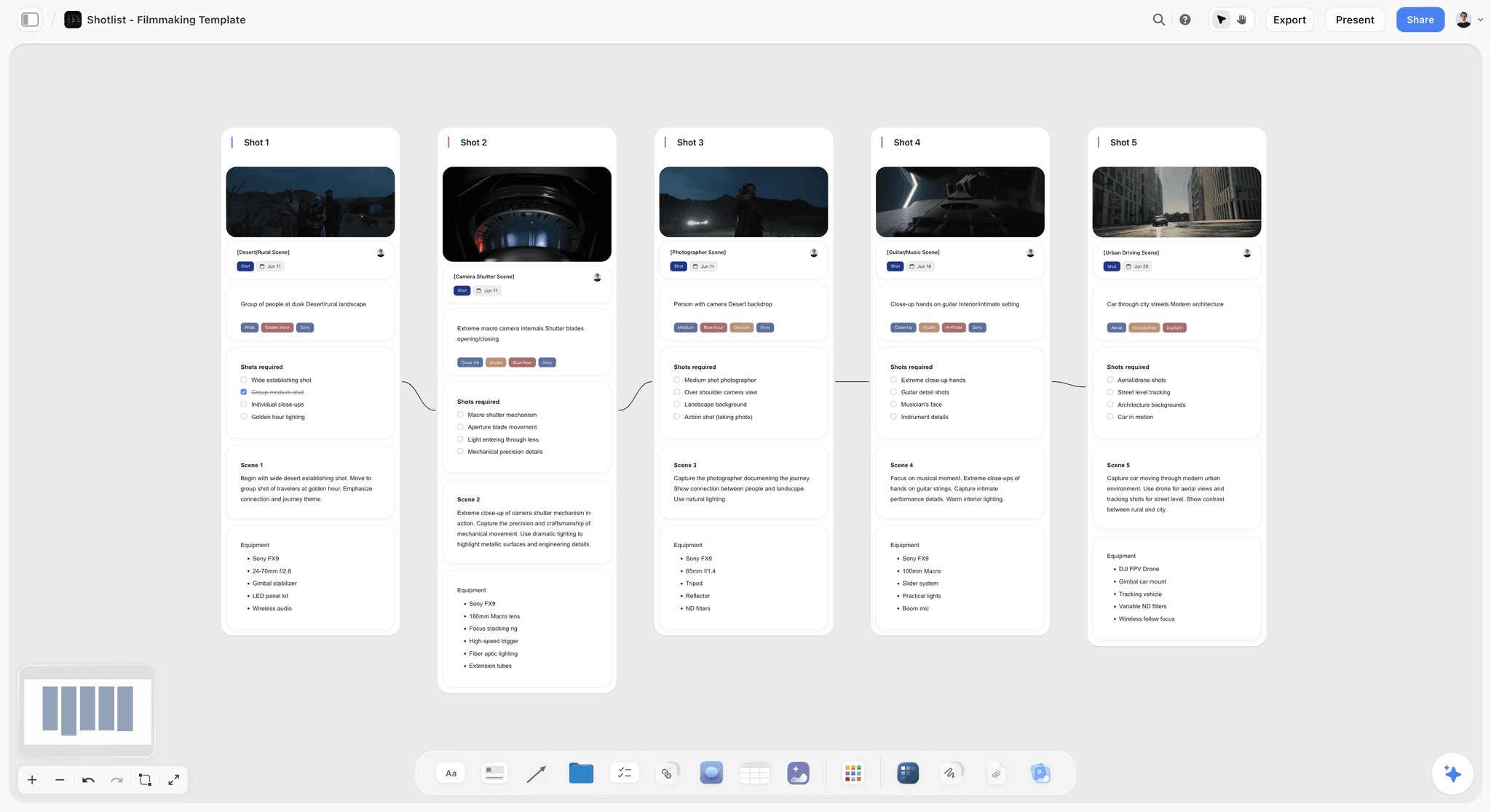
A Storyflow shot list with five shots, each card holding a reference frame, the shots required, scene notes and the equipment
One named approver per round
Others may comment; one person decides. That single rule removes most of the pain of review, because the editor stops adjudicating a disagreement the stakeholders have not had with each other.

How We Evaluated These Tools
Four criteria:
- Which handoff does it close? A tool that partly helps with three is worth less than one that closes the one that costs you.
- Does a stakeholder actually use it? Review tools fail when the client will not log in, which is the deciding practical question.
- Cost at three to ten people, including clients and freelancers who need access briefly.
- Whether feedback lands with a timecode, since that is the difference between actionable and not.
Tool Reviews
1. Frame.io
The single highest-value purchase for most video teams, because it closes the most expensive handoff. Timecoded comments turn "the middle is slow" into a note at 01:14. Version stacking means one version is in circulation. Approvals are recorded against a version, which ends the argument about what was signed off. Camera-to-cloud also improves the production-to-edit handoff by making the second verified copy exist before anyone drives home.
It does not coordinate a project and has nothing for the brief.
Pricing: Free tier; paid from around $15 per user per month.
Pros: the best review workflow; timecoded comments; recorded approvals; camera-to-cloud.
Cons: no project coordination; per-user cost; stakeholders sometimes need an account.
2. Monday.com
The strongest coordinator across a video team's cross-functional shape: producer, crew, editor, client, and often freelancers. Automations chase, dashboards get read, and typed columns let each stage look like its own work.
Nothing for review, so pair it with Frame.io. Seat banding is awkward below ten people.
Pricing: from $9 per seat per month billed annually, three-seat minimum.
Pros: excellent coordination; automations; dashboards clients will look at.
Cons: no review; seat minimums; poor home for the brief's reasoning.
3. StudioBinder
Owns the concept-to-production handoff better than anything else: shot lists, call sheets, schedules and contacts, all linked and readable on a phone. If your losses are happening on the shoot day, this is the purchase.
Weak on review and on post entirely.
Pricing: Free tier; paid from $29 per month, commonly used tier around $42.
Pros: the best production handoff; excellent call sheets; strong mobile.
Cons: nothing after wrap; weak budgeting; costly for occasional shoots.
4. Asana
Better than Monday where the project has real gates: a legal review, a client approval that blocks, a platform deadline. Its free tier for up to ten users is unusually generous for a small video team.
Pricing: Free for up to 10 users; Starter $10.99 per user per month billed annually.
Pros: real dependencies and approvals; generous free tier; workload view.
Cons: no review; no production features.
5. Wipster or Ziflow
Credible review alternatives if Frame.io does not suit, particularly Ziflow where the team also reviews stills and documents rather than only video. Both do timecoded comments and version control competently.
Pricing: from around $15 per user per month.
Pros: solid timecoded review; Ziflow handles non-video assets well.
Cons: smaller ecosystems than Frame.io; fewer editor integrations.
6. Notion
The best home for the brief, the decisions and what was already rejected, which is the material handoff one loses. Not a coordinator and not a review tool.
Pricing: Free for personal use; Plus $10 per user per month billed annually.
Pros: the brief and its reasoning in one place; good for the rejected-ideas log.
Cons: closes only part of one handoff; no review; per-seat cost.
7. Storyflow

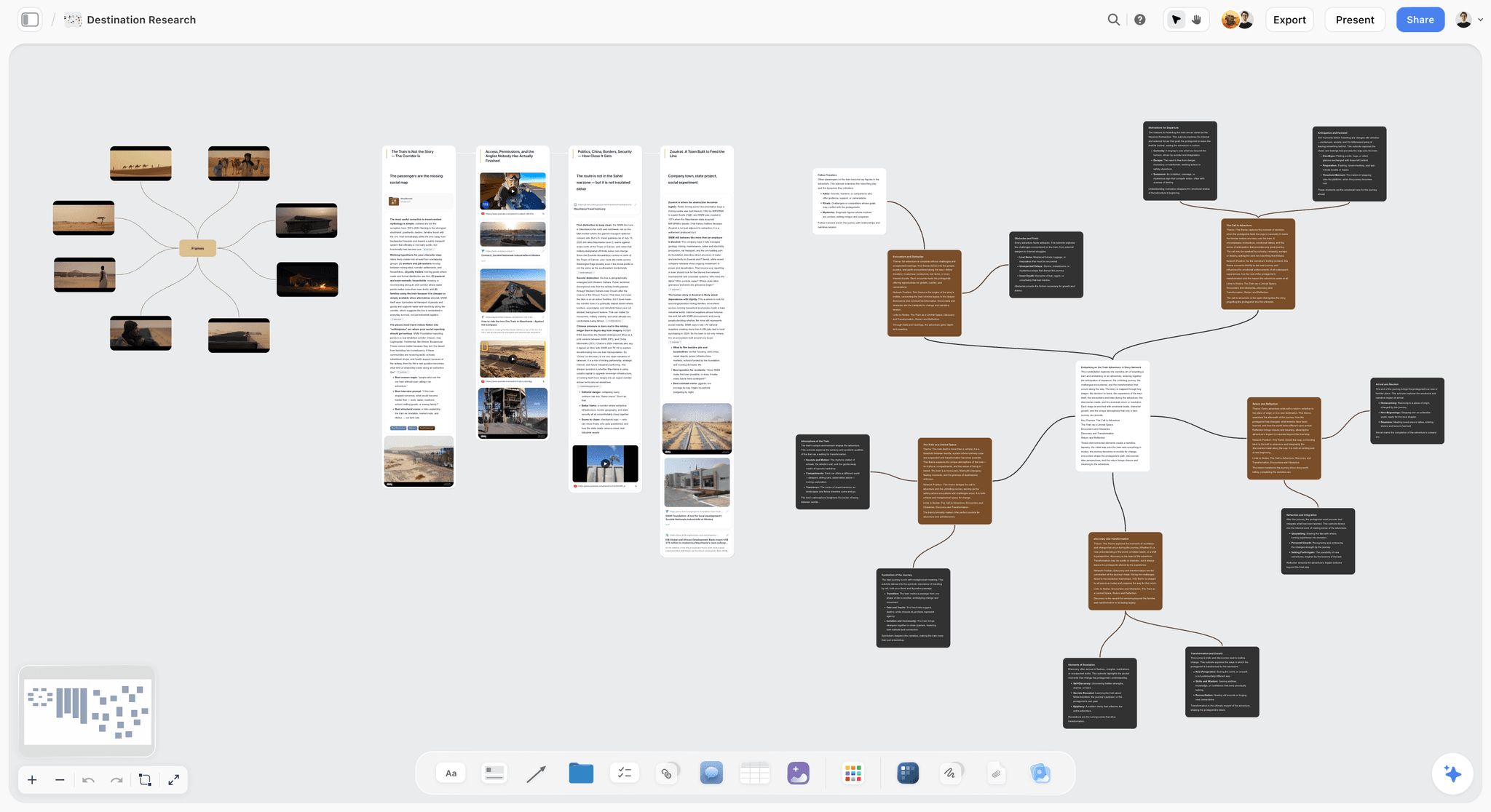
Storyflow is our product and it is ranked seventh, which is honest for this article. It closes none of the five handoffs on its own. It has no review, no timecoded comments, no approvals, no task tracking and no call sheet sending (its AI drafts the call sheet PDF, nothing more), so the four tools above should own the workflow and this article recommends them.
Its narrow contribution is the concept stage and the reasoning that handoffs two and three lose: why each shot is on the list, what the concept is for, what was rejected and why, on a board the AI reads in full. That material has no field in any tool above, which is exactly why it ends up in an inbox.
Storyflow is paid-only during early access; its Free plan launches before the end of 2026, and anyone a paid member invites to a board joins free now.
Pricing: Plus $7.99 per month billed annually ($9.99 monthly); Pro $14; Max $39.
Pros: holds the concept and the reasoning; flat per-account pricing so clients and freelancers cost nothing.
Cons: no review, approvals, tracking or production documents. It closes no handoff by itself.
8. Google Drive
Where a lot of video review still happens, and it is the worst option in this list for it. Comments have no timecode, versions proliferate as filenames, and approval is a message in a thread. It is fine as file storage and it is not a review tool, and treating it as one is the direct cause of the fourth handoff's cost.
Pricing: free tier; paid via Workspace.
Pros: free; universal; everyone has it.
Cons: no timecoded comments; version chaos; no recorded approval.
The Bottom Line
Instrument the handoffs rather than the work. Write down what was already rejected in the brief, put a why column on the shot list, send the editor a paragraph the same evening, name one approver per review round with a timecode requirement, and confirm delivery specs before anyone exports. Buy Frame.io for the fourth handoff and something to coordinate the rest, and accept that the first handoff is a writing problem no tool solves.
FAQ: Video Team Workflow
Where do video projects actually lose time?
At five handoffs, none of them in the creative work: brief to concept, concept to production, production to edit, edit to review, and review to delivery. The most expensive is edit to review, where feedback arrives unranked, unattributed and contradictory and the editor is asked to resolve a disagreement the stakeholders have not had themselves.
How do you stop endless review rounds?
Two sentences in the brief and one rule in each round. Declare the number of rounds and what each is for, structure then detail then polish, and price an extra round so that stakeholders consolidate. Then name one approver per round: others may comment, one person decides. That single rule removes most of the pain, because the editor stops adjudicating between stakeholders.
What is the best tool for a video team?
Frame.io first, because it closes the most expensive handoff with timecoded comments, version stacking and recorded approvals, and its camera-to-cloud also improves the production-to-edit handoff. Then Monday.com or Asana for coordination, and StudioBinder if your losses are happening on the shoot day. Most video teams need two of those, not one.
Why is feedback in email or Google Drive a problem?
Because it has no timecode, so "the middle feels slow" is a note the editor has to interpret rather than act on, and because versions proliferate as filenames until nobody knows which cut is current. Approval becomes a message in a thread rather than a recorded state against a version, which is what makes the six-week argument about what was signed off unwinnable.
What should be handed to an editor after a shoot?
Media on two verified destinations, consistent naming, the shot list marked with what was actually captured, sync and timecode notes, confirmation that room tone exists per location, and one paragraph written the same evening covering which takes were good and why, what is missing and what surprised you. That paragraph is the highest return-per-minute action in the workflow and it is the one most often skipped.
Is Storyflow a video project management tool?
No. Storyflow has no review, no timecoded comments, no approvals, no task tracking and no call sheet sending (it drafts the PDF only), so it closes none of the five handoffs on its own and this article recommends Frame.io, Monday, Asana and StudioBinder. Its contribution is the concept stage and the reasoning that handoffs two and three lose, which has no field in any of those tools.
Is Storyflow free?
Not during early access. It is paid-only today from $7.99 per month billed annually on Plus, and its Free plan launches before the end of 2026. Anyone a paid member invites to a board signs up free and can invite others, so clients and freelancers on a concept board cost nothing extra.
What should be in a video brief?
An objective with a number and a date, who watches it and where, runtime and aspect ratio decided now rather than at the edit, the one thing it must communicate, what has already been tried or rejected, mandatories, the named approver, the budget shape and the deadline with what is driving it. Add the full delivery spec list, because discovering a 9:16 requirement at export is a brief failure presenting as a delivery emergency.
How many review rounds should a video project have?
Two or three, declared in the brief with a purpose for each: structure, then detail, then polish. Unbounded review is the default and it is nobody's decision, which is why it happens. A structure note arriving in round three is a scope change rather than feedback, and naming it as such at the time is far easier than absorbing it silently.
What does production forget that the edit needs?
Room tone, cutaways and clean plates. None of them appears in the concept, all of them are needed in the edit, and none can be created afterwards. Add an explicit line to the concept-to-production handoff listing what the edit will need captured on the day, because the person shooting is optimising for the shot list and the editor's needs are invisible from there.
Should the client be in the review tool?
Yes, and the practical obstacle is that they will not create an account, which is why so much review falls back to email. Check the review link behaviour before you choose a tool: whether a reviewer can comment without signing up decides whether the system is actually used, and a review tool nobody logs into is worse than none because it splits the feedback in two.
When should delivery specs be confirmed?
In the brief, and again against the destination's current requirements before the final export rather than from memory. Aspect ratios, lengths, loudness standards and caption formats all change, and each platform has its own. Every deliverable should be listed with its ratio, length and platform at brief stage, because the count is what drives the edit schedule.
Table of Contents
- Article Metadata
- Breadcrumb
- Table of Contents
- Key Takeaways
- Five Handoffs
- Handoff 1: Brief to Concept
- Handoff 2: Concept to Production
- Handoff 3: Production to Edit
- Handoff 4: Edit to Review
- Handoff 5: Review to Delivery
- Making Review Rounds Finite
- 8 Tools for a Video Team
- How We Evaluated These Tools
- Tool Reviews
- 1. Frame.io
- 2. Monday.com
- 3. StudioBinder
- 4. Asana
- 5. Wipster or Ziflow
- 6. Notion
- 7. Storyflow
- 8. Google Drive
- The Bottom Line
- Author
- FAQ: Video Team Workflow
- Related Reading
Templates to check out for this topic


Templates you can use in Storyflow
Every Storyflow board starts from real structure and an AI that reads the whole canvas. Open one of these templates and make it yours.


See Storyflow in Action
A visual AI workspace where every feature lives inside one canvas. No tab-switching, no context lost.
Build your entire board from a single message
Type what you need in the AI chat at the bottom of your canvas. The AI adds cards, headings, and structure directly onto your board.
Use expert frameworks as AI context
Type @ in the AI chat and choose any Tactic. The AI tailors every response to that framework instead of giving generic advice.
Turn your board into a mind map in seconds
Ask the AI to restructure your canvas as a mindmap. It connects your ideas into a visual hierarchy so you can see how everything relates.
Why Storyflow Exists
Storyflow actually began as a personal tool while working on creative and research projects.
We kept running into the same problem: ideas were scattered everywhere: notes, documents, and whiteboards.
Nothing helped us see how everything connected.
So we started building a workspace designed around how ideas actually grow.
→ Read how Storyflow was createdJustkay
Documentary Filmmaker & Founder at Storyflow
Published: 2026-09-02
Extremely simple, seriously capable


See how easy it is to get started
Watch a real project come together, from a blank board to a finished plan, clicked through step by step.
Start creating with AI and become more productive
Transform your creative workflow with AI-powered tools. Generate ideas, create content, and boost your productivity in minutes instead of hours.