How to Write a Video Script (Step-by-Step, 2026)
A step-by-step guide to writing a video script in 2026. Nail the hook, structure the spine, write for the ear, and tighten it so every line earns its place on screen.

Category
Content Creation
Author

Justkay
Documentary Filmmaker & Founder at Storyflow
Topics
2026-07-21
•
13 min read
•
Content Creation- how to write a video script
- video script
- how to write a script for a video
- video script structure
- video script hook
- how to write a youtube script
How do you write a video script?
To write a video script, start from the one thing the video must make a viewer think, feel, or do, open with a hook that earns the first ten seconds, structure the middle as a spine of hook, promise, payoff, and ask, write every line the way it will be spoken rather than read, and then cut until every sentence earns its place on screen. A video script is not an essay with a camera pointed at it. It is a plan for what someone says and shows, written so the viewer never has a reason to leave. A video script is written to be heard, not read. That single fact changes everything about how you write it. The sentences are shorter. The structure is more repetitive on purpose. The first line does more work than any other line in the piece, because on every platform the viewer is one small motion away from leaving, and the script is the only thing standing between your idea and that motion. Most videos that underperform were not shot badly or edited badly. They were scripted in a way that gave the viewer permission to go. I have written and structured documentary and brand video for years, and the pattern holds at every length: the videos that held people were the ones where the script decided, before a camera turned on, exactly what the hook was, what it promised, and where it paid that promise off. Below is the full method, the spine every script needs, the tools, where AI genuinely helps, and the parts that stay yours.

Full disclosure: Storyflow is our own product, so weigh its placement here with the skepticism you would apply to any tool a company recommends on its own blog. We rank it first for one specific job, writing the script beside the plan on a board the AI can read, and we are explicit about where Google Docs, Final Draft, ChatGPT, and a real teleprompter and editor beat it.
Quick Comparison
The tools writers actually use to script a video, and the one thing each is best at.
| Tool | Best For | AI Features | Price |
|---|---|---|---|
| Storyflow | Script beside the plan | Reads the whole board + brief | $7.99 mo annual (free plan late 2026) |
| Google Docs | Simple, shareable default | Limited | Free |
| Final Draft | Narrative screenplays | None | Verify |
| ChatGPT | Fast first drafts | Generation | Free / ~$20 mo |
What a Video Script Actually Is (and Is Not)
A video script is the written plan for everything a video says and, in most formats, a guide to what it shows. For a talking-head YouTube video it is mostly the words. For an explainer or ad it is words plus a rough visual column. For a short narrative film it is a formatted screenplay. The through-line is that the script is the decision layer: it is where you decide what is said, in what order, and why, before the expensive work of shooting and editing begins.
Here is what a video script is not. It is not a blog post read aloud. Writing that works on a page (long sentences, dense clauses, information stacked for a reader who can re-read) actively fails when spoken, because the listener cannot go back. It is also not a transcript you write after the fact. A real script is written to be performed, which means it is built around how attention actually moves through a video: fast at the start, fragile in the middle, rewarded at the end.
The distinction sounds small until you read a script out loud. A page-shaped script sounds like someone reading. A video-shaped script sounds like someone talking to you. The first loses the viewer in the middle; the second keeps them because it never stops feeling like a conversation aimed at them specifically.
The Video Script Spine: Hook, Promise, Payoff, Ask
The fastest way to write a script that holds is to stop thinking in paragraphs and start thinking in four beats. Almost every video that works, from a thirty-second ad to a twenty-minute deep dive, runs on the same spine.
- Hook. The first five to fifteen seconds. Its only job is to make leaving feel like a mistake. It states the payoff, the stakes, or the surprise up front, and it never warms up.
- Promise. Immediately after the hook, tell the viewer what they get if they stay: what they will learn, see, or feel by the end. This is the contract. It is why they keep watching.
- Payoff. The body. This is where you actually deliver the promise, in the order that keeps tension alive: each section should open a small loop and close it, so the viewer always has a reason to stay for the next part.
- Ask. The end. One clear thing you want the viewer to do or take away. Not five. One.
Get these four right and the middle mostly writes itself, because every section of the payoff is measured against the promise. A video keeps attention when every part of the middle is visibly paying off the promise the hook made. The spine is how you keep that promise in view from the first line to the last.
Quick Picks: Best Tools to Write a Video Script
Best for a script that sits beside the outline, beats, and brief: Storyflow. The canvas where the script lives next to the hook, the structure, and the brief, and the AI reads all of it, so a draft reflects your actual angle. Plus is $7.99/month billed annually. The honest limit: it is not a teleprompter or a video editor, and for formatted narrative screenplays a dedicated screenwriting app is better.
Best for a simple, shareable default: Google Docs. Free, universal, easy to comment on. The catch is that it is a document, so the outline, references, and script live in separate files that drift apart.
Best for narrative screenplays: Final Draft (or a screenwriting app). If you are writing a short film or scripted piece that needs industry formatting, use a real screenwriting tool. Verify current pricing.
Best for fast first drafts: an AI writer. ChatGPT and similar tools are useful for generating a rough draft or breaking a block, as long as you rewrite in your own voice. Free tier, paid from around $20/month.
Best for a script-plus-notes database: Notion. Strong when you want the script alongside a content database. Free tier, paid plans per user.
The honest split: most non-narrative video scripts get written in a document, and the writing is only as good as the thinking that came before it. If the script sits on the same board as the hook, the structure, and the brief, and an AI can read the whole thing, the draft starts from your actual plan instead of a blank page. Try Storyflow to write your script.
Comparison Table: Video Scripting Tools at a Glance
| Tool | Best for | AI on the script | Free tier | Starting price |
|---|---|---|---|---|
Storyflow | Script beside outline, beats, and brief | Reads the whole board and your brief | Coming late 2026 (invited collaborators join free now) | $7.99/mo annual |
Google Docs | Simple, shareable default | Limited (Gemini) | Yes | Free |
Final Draft | Formatted narrative screenplays | None | No | Verify |
ChatGPT | Fast first drafts | Yes (generation) | Yes | ~$20/mo |
Notion | Script plus content database | Limited | Yes | Per user |
Pricing checked July 2026. Competitor prices move often and are quoted per plan, so verify on each vendor's page. Storyflow is paid-only during early access, and its Free plan (which will run the whole method) launches before the end of 2026; the paid tier adds the 200+ Story Blueprints and unlimited file uploads.
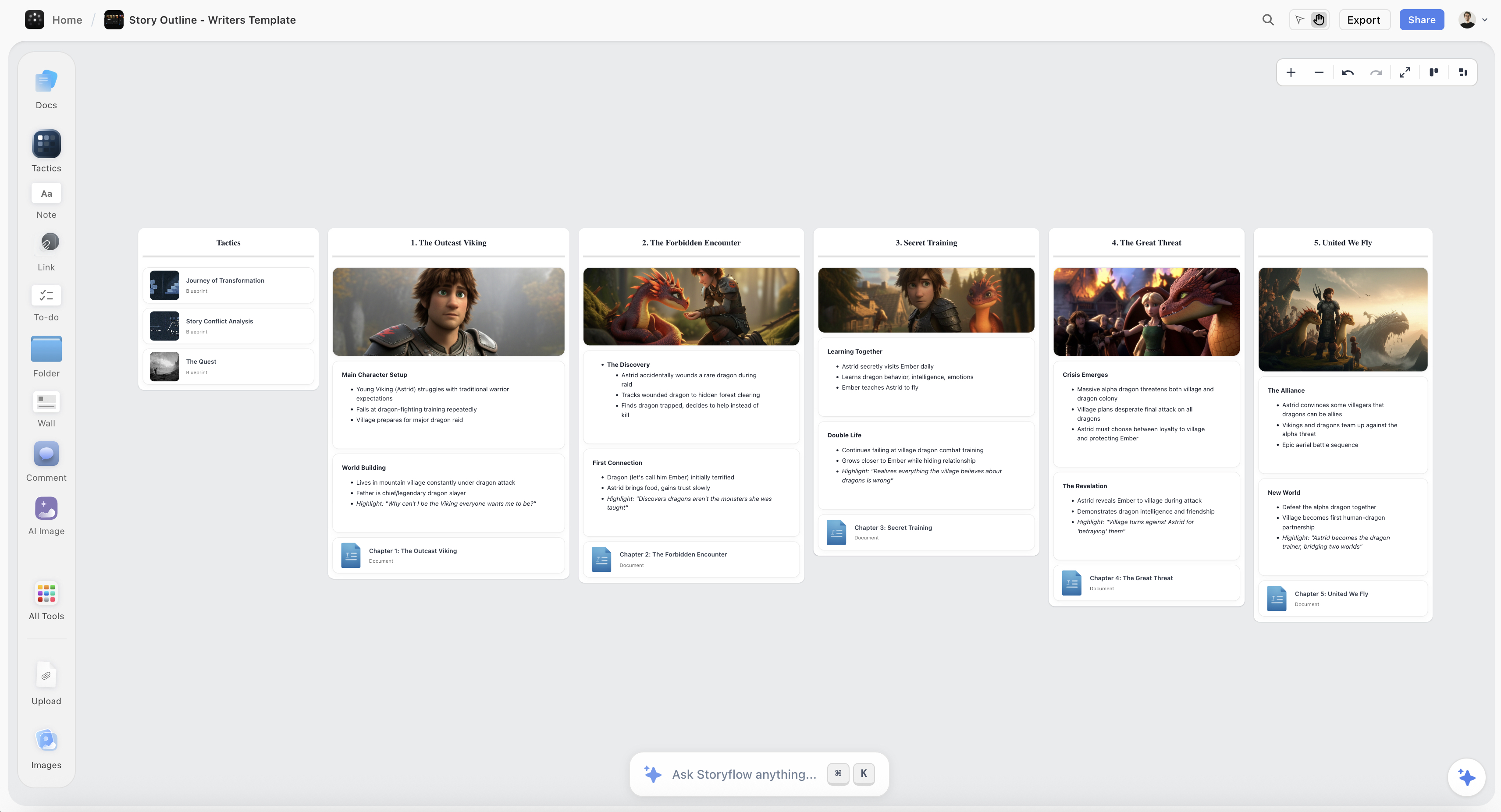
A video script on the Storyflow canvas, sitting beside the hook, the structure, and the brief so the AI can read the whole plan
Write your script beside your plan
Keep the hook, the structure, the brief, and the script on one board, and let the AI draft from your actual angle instead of a blank page.

How I Write a Script: The Approach Behind This Guide
Before the steps, the three rules the method comes from.
Decide the one thing before you write a line. Every video is about one idea, one change you want in the viewer. If I cannot say it in a sentence, the script will wander, because I have given myself nothing to cut against. The one thing is the ruler every later line gets measured with.
Write for the ear, always. I write the way the line will be said, then I read it out loud, and if it sounds like writing, I rewrite it until it sounds like talking. A script is written to be heard, not read, so the page is a rehearsal, not the destination.
The first draft is for saying everything; the second is for cutting. The draft that keeps attention is almost always the shorter one. I write long to find the idea, then I cut hard, because on screen every unearned sentence is a place the viewer leaves.
Those three rules run under all seven steps.
Step-by-Step: How to Write a Video Script
Here is the full workflow for a single video, from blank page to shootable script. It assumes a short-to-medium video (three to fifteen minutes); scale the beats up or down for length.
Step 1: Name the one thing and the audience
Write one sentence: what this video is for and who it is for. "Teach beginner filmmakers the one lighting mistake that makes footage look amateur." This is the ruler. Every line you write later either serves this sentence or gets cut. Skipping this step is why scripts wander: with no single idea, there is nothing to cut against, so everything feels like it belongs.
Step 2: Write the hook first
Do not write the intro. Write the hook. The first ten seconds decide whether the rest of the script matters, so they get written first and rewritten most. State the payoff, the stakes, or the surprise immediately. Cut every word of warm-up ("Hey guys, so before we jump in..."), because warm-up is where viewers leave. A strong hook makes staying feel like the smart choice and leaving feel like a mistake.
Step 3: Make the promise explicit
Right after the hook, tell the viewer what they get if they stay. "By the end of this you will know exactly how to fix it in thirty seconds." This is the contract that carries them through the middle. Without a promise, the viewer has no reason to endure the parts that are not immediately rewarding. With one, they will wait, because you told them the payoff is coming.
Step 4: Structure the payoff as a chain of loops
Now build the body. Break the one thing into three to five sections, and structure each as a small open-and-close: raise a question or tension, then resolve it, and let the resolution open the next one. This is what keeps a middle alive. Order the sections by momentum, not by logic alone: the most interesting or surprising material should not all be saved for the end, because the viewer has to still be there to see it. Every section is measured against the promise from Step 3.
Step 5: Write it the way it will be said
Now write the actual lines, out loud in your head. Short sentences. One idea per line. Contractions. The occasional fragment for rhythm. Read each paragraph aloud and cut anything that trips the tongue or sounds like an essay. This is where a script becomes watchable or not: written-to-be-read prose makes even good information feel like a lecture, while written-to-be-heard prose feels like a person talking to one person. For a visual video, add a rough second column noting what is on screen for each block.
Step 6: Land one clear ask
End with a single thing you want the viewer to do or remember. Subscribe, try the technique, click the next video, hold one idea. One ask, not five, because a stacked ending ("like, subscribe, comment, check the link, follow me everywhere") splits attention and gets none of it. Tie the ask back to the promise you paid off, so it feels earned rather than tacked on.
Step 7: Cut until every line earns its place
Now do the pass that most people skip. Read the whole script out loud, start to finish, and cut every sentence that does not move the video forward. Restatements, throat-clearing, the second example when one made the point, the transition that just says "so anyway." Most scripts are twenty to thirty percent too long, and on screen that twenty percent is where viewers drop. The cut is not damage. It is the edit that makes the rest land.
Where AI Actually Helps Write a Video Script (and Where It Does Not)
AI is genuinely useful for scripting, but for specific jobs, and it helps to be precise so you do not hand it the part that is actually the work.
Where it helps. An AI that can read your brief, your outline, and your beats can do real work. It can draft a first version of a section from your structure, so you rewrite instead of starting blank. It can generate ten hook options to react to when you are stuck on the open. It can flag where the script wanders from the one thing, tighten a bloated paragraph, or suggest where a loop stays open too long. Used this way, it removes the friction of the blank page without taking over the voice.
This is the workflow Storyflow is built for: the script sits on the canvas beside the hook, the structure, and the brief, and the AI reads all of it at once, including up to one Tactic and up to three Documents you @-mention in the chat. Because the script shares a surface with the plan, what it drafts reflects your actual angle and audience, not a generic template.
Where it does not help. AI does not have your voice, and a video that sounds like AI is a video people click away from. It cannot make the specific, lived point that makes your video worth watching instead of the ten others on the topic. And it over-writes: AI drafts are almost always too long and too smooth, so the real work becomes cutting them back to something a person would actually say. AI drafts and unblocks. You write the hook, the voice, and the one point only you can make.
A Worked Example: A Five-Minute Explainer
Make it concrete. The one thing: "Show small business owners why their website loses customers at checkout, and the one fix." The audience: non-technical founders.
The hook does not warm up. It opens on the number: "Sixty-nine percent of the people who add something to your cart never buy it. Here is the one reason, and how to fix it this afternoon." The promise is baked into the hook: one reason, one fix, today. The payoff runs three loops: what actually happens at checkout (tension: it is not what you think), the specific friction that causes the drop (resolution, and the surprise), and the thirty-minute fix (the reward). Each section opens a question and closes it before opening the next.
The lines are written to be said: "Watch what happens when I try to buy this. See that? Five form fields I never asked for." The ask is single: "Go open your own checkout right now and count the fields. That is your afternoon." Then the cutting pass removes a second example that repeated the first, and a thirty-second tangent about analytics that the one thing did not need. The result is five tight minutes that keep a non-technical viewer to the end, because every part visibly pays off the promise the hook made.
Common Mistakes That Kill a Video Script
- Warming up. "Hey everyone, before we get into it..." is where viewers leave. Cut straight to the hook.
- No promise. Without telling the viewer what they get, you give them no reason to endure the middle.
- Writing for the page. Long, dense, re-readable sentences that sound like a lecture when spoken.
- Saving everything good for the end. The viewer has to still be there to see it. Spread the interesting parts through the middle.
- A stacked ask. Five calls to action at the end split attention and get none. Land one.
- Skipping the cut. The first draft is always too long. The video that holds is the one you tightened.
- Sounding like AI. A smooth, voiceless draft is a video people scroll past. The specific, human point is the whole reason to watch.
The Bottom Line
Writing a video script is the work of turning one idea into a plan for what someone says and shows, built so the viewer never has a reason to leave. Name the one thing, write the hook first, make the promise explicit, structure the payoff as a chain of loops, write every line to be spoken, land one clear ask, and cut until each sentence earns its place.
The honest boundary matters. A writing tool holds and organizes the script; the voice, the point, and the edit are yours. AI can draft from your plan and unblock the blank page, but the hook and the human point stay with you. A video script is written to be heard, not read.
If your script, outline, and brief are living in three different files that drift apart, write your script on one canvas in Storyflow and let the AI draft from the structure and brief you already built.
FAQ: Writing a Video Script
How do you write a video script step by step?
Name the one thing the video is for and who it is for. Write the hook first, before anything else, because the first ten seconds decide the rest. Make the promise explicit right after the hook. Structure the body as a chain of small open-and-close loops, ordered by momentum. Write every line the way it will be spoken, reading it aloud as you go. End on one clear ask. Then cut the whole thing until every sentence earns its place. The order matters: writing the hook first and cutting last is what separates a script that holds from one that reads like an article.
How do you start a video script?
Start with the hook, not the intro. The first line should state the payoff, the stakes, or the surprise, and give the viewer a reason to stay in the first five to ten seconds. Cut any warm-up ("Hey guys, welcome back"), because that is exactly where people leave. A good test: if you deleted your first three sentences, would the video be worse or just faster? On most scripts, faster. Write the version that opens on the most interesting thing you have.
How long should a video script be?
Long enough to deliver the one thing and no longer. As a rough guide, a spoken script runs about 130 to 150 words per minute, so a five-minute video is roughly 700 to 750 words. But length should follow the idea, not a target: write everything the video needs, then cut twenty to thirty percent in the tightening pass, because the version that holds attention is almost always the shorter one. Padding a script to hit a runtime is how you lose the viewer in the middle.
What is the difference between a video script and a screenplay?
A video script is the plan for what a video says and shows, usually for non-narrative formats like YouTube, explainers, or ads, and it can be as simple as spoken words with a rough visual column. A screenplay is a formatted document for narrative film and television, with industry-standard scene headings, action lines, and dialogue formatting. If you are making a talking-head or explainer video, a simple script is right. If you are writing a short film, use screenwriting software that handles the formatting, because the format itself carries meaning in narrative work.
Can AI write a video script?
AI can draft one, but it should not be the final writer. A capable AI can generate a first draft from your outline, produce hook options when you are stuck, and tighten bloated sections. What it cannot do is supply your voice or the specific, lived point that makes the video worth watching over the many others on the topic. AI drafts also run long and smooth, so the real work becomes cutting them back to something a person would actually say. Use it to unblock and draft, and rewrite in your own voice.
How do you write a hook for a video?
Open on the most interesting thing you have: the payoff, the stakes, a surprising number, or a bold claim. Say it in the first line, with no warm-up. A strong hook makes staying feel smart and leaving feel like missing out. Write several versions and read them aloud, because the hook is the highest-leverage sentence in the whole script and deserves the most rewrites. If the hook only makes sense after thirty seconds of setup, it is not a hook yet.
What tool is best for writing a video script?
It depends on the format. For a simple, shareable script, Google Docs is the default. For a narrative screenplay, use a dedicated screenwriting app that handles formatting. For fast first drafts, an AI writer helps. Storyflow is best when you want the script to sit beside the outline, the beats, and the brief on one board that an AI can read, so the draft starts from your actual plan instead of a blank page. Match the tool to the job: the script is only as good as the thinking that came before it.
How do you make a video script sound natural?
Write it the way you would say it, then read it out loud and fix anything that sounds like writing. Use short sentences, contractions, and the occasional fragment for rhythm. Talk to one viewer, not an audience, so the tone stays personal. The single best test is the read-aloud: if a line trips your tongue or sounds like an essay, rewrite it until it sounds like a person talking. A script is written to be heard, not read, and the page is just a rehearsal for the voice.
Is Storyflow free for writing a video script?
Not during early access. Storyflow's Free plan, which launches before the end of 2026, will include unlimited notes and links, unlimited shared boards, unlimited collaboration, and basic AI, which covers the whole method here: the one thing, the hook, the structure, and the script on one board. Paid tiers start at Plus for $7.99/month billed annually, which adds the 200+ Story Blueprints and unlimited file uploads. Once it launches, the Free plan will be genuinely enough to plan and write a full script, so you'll be able to run the workflow before deciding whether you need the extras.
Where does Storyflow lose for scripting?
In three places worth naming. It is not a teleprompter, so you still record from a real teleprompter app or off-screen notes. It is not a video editor, so the actual cut happens in your editing software. And it is not formatted screenwriting software, so a narrative short film that needs industry formatting is better written in a dedicated screenwriting tool. Storyflow is the place to think, structure, and write the script beside your plan, not to prompt it on set or format it as a screenplay.
Table of Contents
- What a Video Script Actually Is (and Is Not)
- The Video Script Spine: Hook, Promise, Payoff, Ask
- Quick Picks: Best Tools to Write a Video Script
- Comparison Table: Video Scripting Tools at a Glance
- How I Write a Script: The Approach Behind This Guide
- Step-by-Step: How to Write a Video Script
- Where AI Actually Helps Write a Video Script (and Where It Does Not)
- A Worked Example: A Five-Minute Explainer
- Common Mistakes That Kill a Video Script
- The Bottom Line
- Author
- FAQ: Writing a Video Script
- Related Reading
Templates to check out for this topic


Templates you can use in Storyflow
Every Storyflow board starts from real structure and an AI that reads the whole canvas. Open one of these templates and make it yours.


See Storyflow in Action
A visual AI workspace where every feature lives inside one canvas. No tab-switching, no context lost.
Build your entire board from a single message
Type what you need in the AI chat at the bottom of your canvas. The AI adds cards, headings, and structure directly onto your board.
Use expert frameworks as AI context
Type @ in the AI chat and choose any Tactic. The AI tailors every response to that framework instead of giving generic advice.
Turn your board into a mind map in seconds
Ask the AI to restructure your canvas as a mindmap. It connects your ideas into a visual hierarchy so you can see how everything relates.
Why Storyflow Exists
Storyflow actually began as a personal tool while working on creative and research projects.
We kept running into the same problem: ideas were scattered everywhere: notes, documents, and whiteboards.
Nothing helped us see how everything connected.
So we started building a workspace designed around how ideas actually grow.
→ Read how Storyflow was createdJustkay
Documentary Filmmaker & Founder at Storyflow
Published: 2026-07-21
Extremely simple, seriously capable


See how easy it is to get started
Watch a real project come together, from a blank board to a finished plan, clicked through step by step.
Start creating with AI and become more productive
Transform your creative workflow with AI-powered tools. Generate ideas, create content, and boost your productivity in minutes instead of hours.