How to Plan an Album Rollout (Step-by-Step, 2026)
A step-by-step guide to planning an album or EP rollout: set the goal and the timeline, choose the singles, map the phases from tease to post-release, build the asset checklist, plan content per platform, then distribute and schedule in the right tools.

Category
Marketing
Author

Justkay
Documentary Filmmaker & Founder at Storyflow
Topics
2026-07-22
•
18 min read
•
Marketing- how to plan an album rollout
- album rollout
- music release campaign
- album rollout timeline
- album rollout phases
- how to release an album
How do you plan an album rollout?
To plan an album rollout, plan the campaign before you plan the upload: pick a release date and work backward eight to twelve weeks, decide what a successful launch actually means for this record, and choose your singles and the order you will release them. Then lay the phases onto the timeline, a tease that builds curiosity, an announcement that reveals the album and opens the pre-save, one or two singles with their videos, a pre-save push in the final weeks, a release-week peak, and a post-release stretch that keeps the record alive. Build the asset checklist so nothing is missing at the moment it is needed, cover art, the streaming canvas, press photos, a one-sheet, lyric and music videos, then plan the content each phase needs across each platform, and only then hand the finished plan to the tools that execute it. An album rollout is not the day the music goes live. It is the weeks of coordinated attention on either side of that day, and that campaign is won or lost in the plan, not in the distributor's dashboard. I should be straight about where I stand. I am a documentary storyteller and the founder of Storyflow, not a label marketer, not an A&R, and not a career music publicist, and I am not going to pretend I have shipped a hundred records or broken an artist on TikTok. What I do know cold is how to plan a campaign that carries an audience across time, the discipline of taking a story and a set of people and finding the sequence that moves them, week by week, from indifference to attention to action. The more rollouts I looked at, planned alongside artists, and pulled apart to see why some records landed and others vanished the day they dropped, the more obvious it became that an album rollout is exactly that problem: a story told across a timeline, with a running clock counting down to a release date, an audience whose attention you have to earn over and over, and a single week near the end where the whole campaign either pays off or gets buried. The medium is streams and short-form video instead of a film or an edit, but the core move is identical. You design the sequence before you commit it to the calendar, because a release happens on a fixed day whether you are ready or not, and the sequence is where it works or fails. That is the whole argument of this guide. The records that break through are rarely the ones with the biggest budget or the most polished single. They are the ones where someone decided exactly what the audience would see, in what order, over the weeks before and after release, so that by the time the album arrived there was already a room of people waiting for it. This is how you build that plan, honestly, including the point where you close the board and open your distributor and your scheduling tool.

Full disclosure: Storyflow is our own product, so weigh its placement with the skepticism you would apply to any tool a company recommends on its own blog. We rank it first for one job, holding the rollout timeline, content calendar, and asset plan on one AI-readable canvas, and we are explicit that DistroKid, TuneCore, and your label distribute the music, and Later, Buffer, and Metricool schedule the posts it does not.
Quick Comparison
Where artists actually plan an album rollout, and the one job each tool is best at.
| Tool | Best For | AI Features | Price |
|---|---|---|---|
| Storyflow | Timeline, calendar, assets | Reads the whole board | $7.99 mo annual (free plan late 2026) |
| DistroKid / TuneCore | Distribution + pre-save | Limited | Paid yearly |
| Later / Buffer / Metricool | Post scheduling | Some caption AI | Free / paid |
| Notion / Google Docs | Rollout checklist doc | Notion AI | Free / paid |
Why an Album Rollout Is a Campaign, Not a Release Date
Watch a record disappear on release day and it is almost never the music. The songs were good, the mix was clean, the cover art looked right. What was broken was everything around it. There was no rollout, so the album arrived to an audience that did not know it was coming, on a Friday when forty thousand other tracks also went live, and it sank without a ripple. Or there was a single, but it dropped a week before the album with no runway, no tease, no reason for anyone to care, so it played to the same few hundred people who already followed the artist and reached no one new. Or the artist did everything at once, announcement, single, video, and album in a single frantic week, spending all their attention in one burst instead of building it, and then went silent the moment the record was out, letting it die in the exact window when a rollout is supposed to keep it alive. None of that is a distribution problem. It is a planning problem, and the planning happens in the weeks before anyone uploads a file.
Here is the distinction that changes how you build. A rollout has three jobs across three phases, and most failed rollouts do only one of them, in only one phase. Before release, it has to build anticipation, turn a record nobody is waiting for into one that has a room of people counting down. During release week, it has to concentrate attention, get as many of those people as possible to stream, save, and share in the short window the algorithms and the culture are paying attention. And after release, it has to sustain, keep the album in front of people for the months that actually determine whether it becomes part of anyone's life or a one-day blip. The mistake is treating a release as a single event, a day you flip the switch, instead of a campaign with a shape. A record with no pre-release has no launch. A record with no post-release sustain has no life. The rollout is the thing that gives a release a before and an after, and both of those are planned long before the music is live.
There is a second reason the plan decides everything, and it is about the fixed clock. A release date is a wall you are running toward, and unlike almost anything else in an artist's control, it does not move easily once it is announced, once the pre-save is live, once the single is out. If the cover art is not ready when the announcement needs it, if the music video slips past the single date, if you realize in release week that you never shot the behind-the-scenes content that phase needed, there is no re-edit and no second launch. The record comes out on the day, ready or not. So you plan the campaign and the assets and the content backward from that date, because a rollout improvised in the last two weeks is a rollout that launches half-built, tells no story, and wastes the one release the album gets.
The Anatomy of an Album Rollout
Every rollout that built anticipation and sustained it was built on the same two layers, whether the artist named them or not. The first layer is the phase timeline, the sequence of moments the audience experiences over the weeks around release. The second is the asset and content plan, the concrete things that have to exist and get posted to make each phase happen. You need both. The timeline without the assets is a good plan that stalls the first time a phase needs a video that was never shot; the assets without a timeline are a pile of content with no sense of when anything goes out or why.
The phase timeline has seven beats for a full record, and each one does a job the others cannot.
- The tease. The weeks before you announce anything concrete, where you seed curiosity without giving the game away. A changed profile photo, a cryptic caption, a snippet with no title, a countdown that explains nothing. The tease exists to make people lean in and ask what is coming, so that when you announce, there is already an audience primed to care instead of a cold reveal to people scrolling past.
- The announcement. The reveal, where the album gets a title, a cover, and a release date, and the pre-save goes live. This is the moment the record becomes real and public, and it is the anchor the whole rollout hangs from. A strong announcement gives the audience everything they need to commit, the name, the date, the art, and one clear action, save it or pre-save it now.
- Single one. The lead single, usually with a music video, released weeks before the album as the first real taste. This is the flagship of the campaign, the song that has to work hardest, because it is the record's first impression and the thing that pulls new listeners in. It gets its own mini-rollout inside the larger one.
- Single two. A second single, and sometimes a third, that sustains momentum through the middle weeks so the campaign does not go quiet between the announcement and release. Each additional single is another reason to reach people again, another video, another wave of content, without spending the whole record before it is out.
- The pre-save push. A concentrated drive in the final weeks before release to convert everyone who has been paying attention into a pre-save or pre-add, so the record launches with momentum on day one. Pre-save runs in the background from the announcement, but it gets a dedicated push here, because a pre-save is a promise to stream that pays off in the release-week window that matters most.
- Release week. The peak, where the full album goes live and you concentrate every bit of attention you have built into the short window when it counts. The full record, the campaign's biggest content push, the ask to stream and share, and whatever live moment, a listening session, a stream, a show, marks the record actually arriving.
- The post-release sustain. The weeks and months after release, where you keep the album alive instead of abandoning it. More videos from album tracks, live sessions, sync and playlist work, fan content, a deluxe edition or a remix down the line. This is the phase most artists skip and the one that decides whether the record has a life or a single day.
The asset and content plan is how those phases survive contact with reality. It is the checklist of everything the rollout physically needs and when each item is due, and it splits into two kinds of things. The core assets are the deliverables a professional rollout cannot go without: the cover art and single artwork, the streaming canvas (the looping visual on Spotify), press photos, a press kit or one-sheet for pitching, lyric videos, and the music video or videos. Each of these has a deadline set by the phase that needs it, the cover art by the announcement, the single video by the single date, and missing that deadline stalls the phase. The content is the steady stream of posts each phase runs on: the short-form video that does most of the work now, the behind-the-scenes footage that makes fans feel close to the record, the visualizers, the snippets, the live sessions, and the fan-facing posts that carry the phase between the big moments. The asset plan is what keeps a rollout from arriving at single-one week with no video, or at release with no canvas, because the thing that sinks most independent rollouts is not a bad idea, it is a deadline nobody tracked.
Quick Picks: Where to Plan an Album Rollout
Best for planning the rollout timeline, content calendar, and assets on one canvas: Storyflow. The surface where the phase timeline, every single, the asset checklist, and the content calendar live together on one infinite canvas, so you can see the whole campaign at once, drag phases and posts into a working order, and catch the missing video before it becomes a missed deadline, with AI that reads the entire board to help draft the plan and flag a rollout that goes silent at exactly the wrong week. Plus is $7.99 per month billed annually. The honest limit: it plans and coordinates the rollout, it does not distribute the music or schedule the posts.
Best for distributing the music and running pre-save: DistroKid, TuneCore, or your label. Once the plan is set, these are where the record actually goes live on Spotify, Apple Music, and the rest, and where the pre-save and pre-add campaigns are set up. This is distribution, not planning, and it is where you go once the timeline and assets are locked.
Best for scheduling the posts: Later, Buffer, Metricool, or Meta Business Suite. Once the content calendar is planned, the individual posts get scheduled and published from a social tool with a posting queue and analytics. This is execution of the calendar, not the calendar itself, and it happens after the rollout is planned, not instead of it.
Best for a plain rollout checklist or one-sheet doc: Notion or Google Docs. If you prefer the timeline and the asset list as a document you can reorder and share with a manager or a publicist, a doc holds a rollout checklist well, though it does not let you see the whole campaign spatially. Free to paid tiers.
The honest split: plan the timeline, the content calendar, and the assets on a board, then distribute the music through a distributor and schedule the posts in a social tool. Try Storyflow to plan your rollout.
Comparison Table: Where to Plan an Album Rollout
| Tool | Best for | AI on the plan | Visual planning | Free tier | Starting price |
|---|---|---|---|---|---|
Storyflow | Timeline, content calendar, assets | Reads the whole board | Yes, infinite canvas | Coming late 2026 (invited collaborators join free now) | $7.99/mo annual |
DistroKid / TuneCore | Distribution, pre-save | Limited | No | No | Paid yearly |
Later / Buffer / Metricool | Scheduling the posts | Some caption AI | Calendar view | Yes | Free or paid |
Notion / Google Docs | Rollout checklist doc | Notion AI or limited | Limited | Yes | Free + paid |
Google Sheets | Timeline spreadsheet | Add-ons | No | Yes | Free |
Pricing checked July 2026. Competitor prices move and are quoted per plan, so verify on each vendor's page. Storyflow is paid-only during early access, and its Free plan (which will run the whole planning method) launches before the end of 2026; the paid tier adds the 200-plus Story Blueprints, including narrative frameworks like AIDA and the Hero's Journey that map cleanly onto the arc of a rollout, and unlimited file uploads. No single tool does the whole job, so most artists plan the campaign on a board and then distribute and schedule it in dedicated tools.
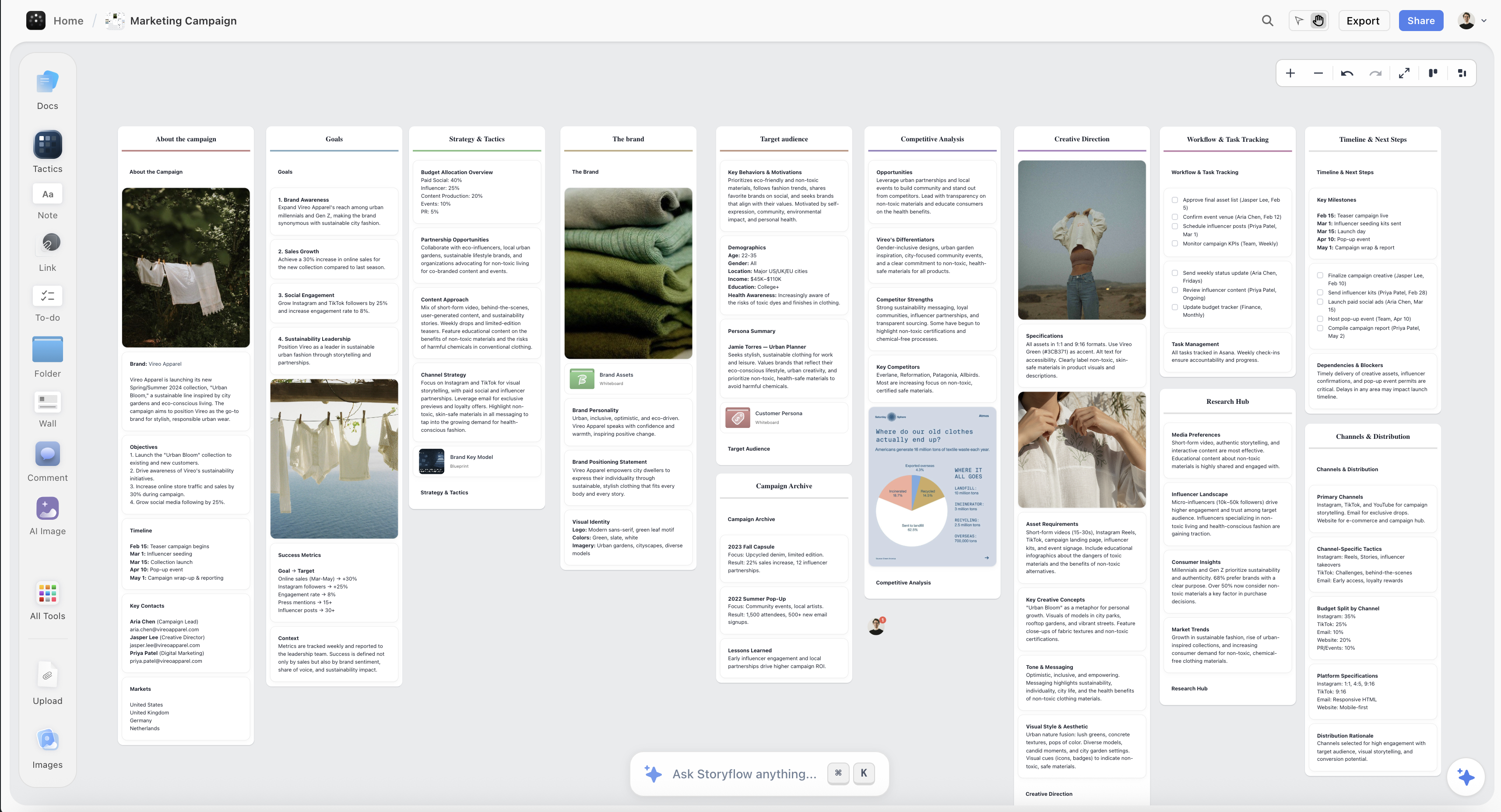
An album rollout planned on the Storyflow canvas, with the phase timeline, the singles, and the asset checklist laid out as cards on one board
Plan your album rollout on one canvas
The phase timeline, the content calendar, and the asset checklist live in one place, and the AI reads the whole board to draft the campaign and flag a rollout that goes silent at the wrong week, so you launch already knowing it builds, peaks, and sustains.

How to Plan an Album Rollout, Step by Step
Here is the full method, from a release date to a phase timeline and asset plan you can hand to a manager, a bandmate, or a publicist and actually run. It assumes an independent artist, a small team, or a small label planning one album or EP rollout over roughly eight to twelve weeks. Scale it up for a bigger release with a bigger budget, but keep the order, because the value is in planning the campaign and the assets before you open the distributor, not in uploading the record and hoping attention assembles itself.
Step 1: Set the goal and work backward from release day
Before anything else, write down two things: the release date, and what a successful launch actually means for this record. Pick the date first, ideally a Friday to line up with how streaming charts and new-music playlists work, and then count backward eight to twelve weeks to find the day the rollout actually starts. Eight weeks is tight but workable for an EP or a lean campaign; twelve gives a full record room to breathe across two singles and a proper tease. Then define success honestly and specifically, because "do well" is not a goal you can plan toward. It might be a target of first-week streams, a number of pre-saves, a playlist placement, a jump in monthly listeners, a sold-out release show, or simply reaching a defined new audience beyond your existing fans. The goal shapes every later choice: a rollout built to convert existing fans looks different from one built to reach new listeners. Write the release date and the goal at the top of your board, put the eight-to-twelve-week countdown beneath it, and measure every phase against that goal, because a rollout with no defined win is a rollout you cannot tell is working until it is over.
Step 2: Choose the singles and the release order
Now decide which songs lead the campaign and in what order, because the singles are the spearpoints of the whole rollout and choosing them is a strategic decision, not a favorite-song contest. Pick the lead single for its job, to make the strongest possible first impression and pull in new listeners, which is not always the song you personally love most or the one that best represents the record's quieter corners. Then decide how many singles the timeline supports, usually one to three for an album and one for an EP, and sequence them so each one reaches people again without spending the whole record before release. A common shape is a strong, accessible lead single to open the campaign, a second single that shows a different side to keep it interesting, and the album holding back its deepest material as the reward for showing up on release day. Be honest about which songs can carry a video and a wave of content, because a single is not just a song, it is a mini-campaign that needs its own assets. Write the singles and their release dates on the board against the countdown, and pressure-test the order: does the lead single earn attention from someone who has never heard you, and does the sequence build toward the album rather than giving everything away before it arrives.
Step 3: Lay out the phases on the timeline
With the date, goal, and singles fixed, lay the seven phases onto the countdown so you can see the whole campaign at once: the tease, the announcement, single one, single two, the pre-save push, release week, and the post-release sustain. Place the anchors first. Release week sits at the end, single one usually lands three to five weeks before the album, the announcement opens the campaign and the pre-save a week or two before the lead single, and the tease runs in the couple of weeks before the announcement. Then space the middle so the campaign never goes silent for more than a few days, because dead air between phases is where momentum leaks out. Slot single two, if you have one, into the gap between the lead single and release so the middle weeks stay alive. Mark the pre-save push as a concentrated drive in the final two weeks even though pre-save has been available since the announcement. Lay it all out spatially on the board and check the shape: does the campaign build, is there a reason for the audience to pay attention in every week of the timeline, and does everything concentrate toward release week rather than peaking too early and coasting into the launch.
Step 4: Build the asset checklist and the production deadlines
This is the step that separates a rollout that runs smoothly from one that stalls, and most independent artists underbuild it. Build the full asset checklist and give every item a deadline set by the phase that needs it. The core list: cover art and single artwork, the streaming canvas (the looping visual on Spotify), press photos, a press kit or one-sheet for pitching to playlists and press, lyric videos, and the music video or videos. Then work backward from each phase to set the real deadline. The cover art has to be finished by the announcement, not the release, because the announcement is where it goes public. The lead single's music video has to be done by the single date, which means it has to be shot weeks earlier, which means it has to be planned and booked before that. The canvas and single artwork are due when the single goes live. Lay each asset on the board next to the phase that needs it, with its due date and who is responsible, and you will immediately see the crunch points, the video that needs to be shot in week three to be edited by week five, the photos you need before the announcement. This is also where you catch the expensive misses early, the music video nobody scheduled, the one-sheet nobody wrote, while there is still time to fix them cheaply on the board instead of expensively in the final week.
Step 5: Plan the content per phase and per platform
With the phases and assets mapped, plan the steady stream of content each phase runs on, because the big assets are the tentpoles and the content is what fills the days between them. For each phase, decide what the audience sees and hears: the tease might be cryptic snippets and a changed profile, the announcement a reveal video and the cover drop, single weeks a mix of the video, short clips, behind-the-scenes footage, and reaction content, and release week the biggest push of all. Short-form video does most of the work now, so plan the clips deliberately, the snippet that hooks, the studio footage, the story behind a song, the lyric moment that travels. Then plan across platforms honestly, because the same record shows up differently on each, a vertical clip for TikTok and Reels, a canvas and the pre-save on Spotify, stories and a countdown on Instagram, longer behind-the-scenes on YouTube, and adapt rather than cross-posting one asset everywhere identically. Lay the content calendar on the board beneath the phase timeline so you can see, week by week, what goes out where, and check for the two failure modes: a week with nothing planned, and a week where you have crammed in more content than you can actually make. The behind-the-scenes footage is worth planning early, because it has to be captured while the work is happening, in the studio and on the video shoot, not manufactured in release week when the moment has passed.
Step 6: Coordinate the music-video timing and the pre-save push
Two moving parts in a rollout need their own coordination pass, because they have the longest lead times and the highest stakes: the music video and the pre-save. Music videos have to be planned, booked, shot, and edited weeks before the single they belong to, so work backward from each single date and put the shoot, the edit, and the delivery on the timeline early, because a video that slips past its single date is a phase with its spearpoint missing. If the budget only allows one video, put it behind the lead single where it does the most work, and cover the other singles with cheaper visualizers or lyric videos you plan in the same pass. For the pre-save, remember it does its real job in release week: every pre-save is a stream queued up for day one, and day-one momentum is what the release-week window rewards. So plan the pre-save as a campaign, not a link you post once, live from the announcement, pushed steadily through the singles, and driven hard in the final two weeks with a clear, repeated ask. Put the video deliverables and the pre-save push on the board against the timeline so their long lead times are visible next to everything else, because these are the two things that, left to the last minute, quietly wreck an otherwise good rollout.
Step 7: Plan release week and the fan ask
Release week is the peak the whole campaign has been building toward, so plan it as its own concentrated push rather than assuming the momentum will carry itself. The album goes live, and everything you have built converges: the biggest wave of content, the full record finally available, and a clear, direct ask to the audience you have spent weeks gathering. Plan that ask explicitly, because a rollout that builds anticipation and then forgets to tell people exactly what to do wastes it. Ask them to stream the album, save it, add it to their playlists, and share it, and make the action concrete and repeated across the week, not a single polite post on Friday. Plan a moment that marks the record actually arriving, a listening session, a live stream, a release show, an Q&A, something that turns a file going live into an event people show up for. Line up the practical release-week pieces too: the playlist pitches submitted in advance through your distributor, the press or creators you want to reach, the day-one posts written and ready. Lay the whole week out hour by hour if you have to, on the board next to the rest of the campaign, so that the moment the record is out you are executing a plan, not scrambling to invent a launch in the window where attention is highest and time is shortest.
Step 8: Plan the post-release sustain and measure
The rollout does not end on release day, and planning as if it does is the most common way a good record gets one day of attention and then vanishes. Plan the post-release sustain as a real phase, the weeks and months where you keep the album alive: more videos and visualizers from album tracks, live and acoustic sessions, continued short-form content pulling from the record, playlist and sync pitching that keeps paying off, fan content and reactions, and, later, a deluxe edition, a remix, or a re-release moment to reset attention. Decide in advance what you will release into that window so the board does not go blank the week after launch, because the artists who build a lasting audience are the ones who treat a record as a campaign that runs for months, not a day. This is also where you measure against the goal you set in step one, the streams, the pre-saves, the new listeners, the playlist adds, so you learn what worked for the next rollout. Lay the sustain phase on the board as deliberately as the pre-release phases, review the numbers against your defined win, and you finish the campaign with both a record that kept living and a plan you can run better next time, instead of a launch that peaked on Friday and was forgotten by the following week.
Where AI Helps (and Where the Artist Is Irreplaceable)
AI is genuinely useful for planning a rollout, but for specific jobs, and it is worth being precise so you do not hand it the parts that have to be yours.
Where it helps. An AI that reads your release date, your goal, your singles, and your phases can draft a timeline backward from release day, suggest a content idea for a week you left blank, propose a shape for the tease, flag a rollout that goes silent in the middle weeks or spends all its content before release, and help you turn a rough set of ideas into a structured campaign fast. Because Storyflow's AI reads your full board, plus up to 1 Tactic and 3 Documents you point it at, it works from your actual rollout rather than a generic template, so the plan it suggests fits the record you are actually releasing. The 200-plus Story Blueprints on the paid tiers are the useful shortcut here: frameworks like AIDA and the Hero's Journey are narrative structures, and a rollout is a narrative that carries an audience from awareness to action over time, so dropping one onto the board gives you a proven arc to adapt instead of a blank canvas. You can even pull reference frames from a YouTube or Vimeo video of a rollout you admire, a campaign, a music video, an announcement, straight onto the canvas to study how it was structured. It is a fast way to get a real plan down so you have something concrete to react to.
Where it does not. AI has not heard your record, has not met your fanbase, and cannot feel the culture the album is landing in or judge which song is the single. It will cheerfully draft a plausible rollout that pushes the wrong track and pitches an audience that will never care. And the parts that actually move people are entirely yours: the music itself, the taste that picks the lead single, the relationship with fans that makes a tease land, the behind-the-scenes moments that are real because you lived them, and the judgment of what is honest to your work and what is a gimmick that will read as one. Storyflow's AI image generation on the Pro and Max tiers is the wrong tool for this stage too, because planning a rollout is about the campaign and the sequence, not generated art, and your cover art, canvas, and video visuals are made elsewhere by you or the artists you work with. Use AI to draft the plan and catch the gaps, and bring your own ears, taste, and relationship with your audience to everything that matters. AI drafts the campaign. You make the record and earn the fans.
Common Album Rollout Mistakes
- No pre-release runway. Dropping the album with no tease and no announcement means it arrives to an audience that did not know it was coming, on the busiest release day of the week. Build a runway of weeks, not days.
- Spending everything at once. Announcing, releasing the single, dropping the video, and putting out the album in one frantic week burns all your attention in a single burst. Sequence it so each phase reaches people again.
- Going silent after release. Treating release day as the finish line lets a record die in the exact window a rollout is supposed to keep it alive. Plan the post-release sustain as a real phase.
- Missing an asset deadline. Arriving at single week with no video, or at release with no canvas, stalls the phase that needed it. Put every asset on the timeline with a deadline set by the phase, and track it.
- Picking the wrong single. Leading with the song you love most instead of the one that makes the strongest first impression on new listeners wastes the campaign's most important slot. Choose the lead single for its job.
- Treating pre-save as a link. Posting a pre-save link once and forgetting it wastes the one mechanism that turns pre-release attention into day-one streams. Run it as a campaign from the announcement to release.
- No content between the tentpoles. Planning the big moments but leaving the weeks between them empty lets momentum leak out. Plan the content calendar week by week, not just the singles and the album.
- Confusing distribution with a rollout. Uploading the record to DistroKid is not a rollout. The campaign, the timeline, the assets, and the content are the work; the distributor just puts the music on the platforms.
The Bottom Line
Planning an album rollout is not the busywork you do after the music is finished. It is the real work that decides whether the record lands: setting the release date and the goal, working backward eight to twelve weeks, choosing the singles that will carry the campaign, laying out the phases from tease to post-release, building the asset checklist so nothing arrives late, and planning the content that fills the weeks between the big moments. Get that right and the release becomes execution, because the campaign already knows what goes out, in what order, on which platform, and why. Skip it and you drop the record into the busiest day of the week and hope an audience you never gathered happens to find it.
The honest boundary holds. Plan the timeline, the content calendar, and the assets on a board, because a rollout is a campaign across time and a campaign has to be seen whole, with AI and Story Blueprints that help you draft the arc and catch the silent weeks. Distribute the music through DistroKid, TuneCore, or your label, and schedule the posts in a social tool, because those are different jobs and those tools are built for them. I came to rollouts from documentary storytelling and campaign planning, not from a career in the music business, and the one thing that work taught me transfers cleanly: design the sequence before you commit it to a fixed date, because the sequence is where a release works or fails, and it is free to fix on the board and impossible to fix once the record is out.
If your next release is still a finished record and a hope that attention will find it on release day, plan the whole rollout on one canvas in Storyflow and launch already knowing the campaign builds, peaks, and sustains.
FAQ: Album Rollouts
How do you plan an album rollout?
Plan the campaign before you plan the upload. Pick a release date, work backward eight to twelve weeks, and define what a successful launch means for this record. Choose your singles and the order you will release them, then lay the phases onto the timeline: a tease that builds curiosity, an announcement that reveals the album and opens the pre-save, one or two singles with their videos, a concentrated pre-save push in the final weeks, a release-week peak, and a post-release stretch that sustains the record. Build the asset checklist so nothing is missing when a phase needs it, cover art, canvas, press photos, a one-sheet, lyric and music videos, and give each item a deadline set by its phase. Plan the content each phase runs on across each platform, then hand the finished plan to the tools that execute it, a distributor for the music and a social tool for the posts. The reason to plan the campaign first is that a release lands on a fixed day, ready or not, and the sequence is almost free to fix on a board and impossible to fix once the date arrives.
How far in advance should you plan an album rollout?
Most rollouts run eight to twelve weeks from the first tease to release day, and the bigger the record and the audience you are trying to reach, the more runway you want. Eight weeks is workable for an EP or a lean campaign with a single lead track; twelve weeks gives a full album room for two singles, a proper tease, and a music video that needs weeks of lead time to shoot and edit. Some campaigns start even earlier, with months of quiet teasing, but the eight-to-twelve-week window is where most independent rollouts live because it is long enough to build real anticipation and short enough to sustain without the audience losing interest. Whatever window you choose, set the release date first and count backward from it, because the assets with the longest lead times, especially the music video, are what determine how early you actually have to start.
What are the phases of an album rollout?
A full rollout has seven phases. The tease builds curiosity in the weeks before you announce anything concrete. The announcement reveals the album title, cover, and release date and opens the pre-save. Single one, the lead single, usually with a music video, is the first real taste and the campaign's flagship. Single two, and sometimes a third, sustains momentum through the middle weeks. The pre-save push is a concentrated drive in the final weeks to convert attention into day-one streams. Release week is the peak, where the full album goes live and you concentrate every bit of attention you have built. And the post-release sustain keeps the record alive for the months after launch with more videos, live sessions, and playlist work. An EP or a smaller campaign compresses this, often to a tease, an announcement, one single, and release, but the shape is the same: build anticipation, concentrate it at release, and sustain it afterward.
What assets do you need for an album rollout?
A professional rollout needs a core set of assets, each due by the phase that uses it. Cover art and single artwork, finished by the announcement rather than the release, because that is where the art goes public. The streaming canvas, the looping visual on Spotify, due when the single or album goes live. Press photos and a press kit or one-sheet for pitching to playlists and press. Lyric videos and the music video or videos, with the lead single's video the highest priority since it does the most work. Beyond those core assets, you need a steady stream of content for each phase: short-form video, behind-the-scenes footage captured while the work is happening, snippets, visualizers, and live sessions. The trick is not just listing the assets but putting each one on the timeline with a real deadline and an owner, because the thing that sinks most independent rollouts is not a missing idea, it is an asset nobody scheduled arriving late to the phase that needed it.
Do I still need a distributor and a scheduling tool?
Yes, and that is the honest boundary. Storyflow plans and coordinates the rollout, the timeline, the content calendar, and the asset checklist; it does not distribute your music or schedule your posts. DistroKid, TuneCore, or your label is where the record actually goes live on Spotify, Apple Music, and the rest, and where the pre-save and pre-add campaigns are set up. Later, Buffer, Metricool, or Meta Business Suite is where the individual posts from your content calendar get scheduled and published. Storyflow is the layer before both of those, the place you decide the phases, the singles, the assets, and the content so that distribution and scheduling become execution instead of a scramble to invent a launch. Used for planning, which is what it is built for, it is where a rollout gets its shape; used as a distributor or a scheduler, it is the wrong tool, and this guide is honest about that split because pretending one tool does every job helps no one.
How do you plan the content for an album rollout?
Plan the content phase by phase and platform by platform, on top of the timeline you have already built. For each phase, decide what the audience sees: cryptic snippets in the tease, a reveal video at the announcement, a mix of the music video, behind-the-scenes, and short clips through the single weeks, and the biggest push of all in release week. Short-form video does most of the work now, so plan the clips deliberately rather than hoping they materialize, and plan the behind-the-scenes footage early because it has to be captured in the studio and on the shoot, not faked in release week. Then adapt across platforms instead of cross-posting one asset everywhere, a vertical clip for TikTok and Reels, a canvas and pre-save on Spotify, a countdown on Instagram, longer footage on YouTube. Lay the content calendar beneath the phase timeline so you can see week by week what goes out where, and check for the two failure modes: a week with nothing planned, and a week with more content than you can actually make.
Can AI help plan an album rollout?
Yes, for drafting and gap-checking, not for the music or the taste. Once your date, goal, singles, and phases are on a board, AI can draft a timeline backward from release day, suggest a content idea for a blank week, propose a shape for the tease, and flag a rollout that goes silent in the middle or spends its content too early. Because Storyflow's AI reads your full board, plus up to 1 Tactic and 3 Documents you point it at, it works from your actual rollout rather than a generic template, and the 200-plus Story Blueprints give you proven narrative frameworks to adapt to the arc of a campaign. What AI cannot do is hear your record, know your fanbase, feel the culture it is landing in, or judge which song is the single. Use it to get a real plan down fast so you have something to react to, and keep the music, the taste, and the relationship with your audience, the things that actually break a record, in your own hands.
Is Storyflow free for planning an album rollout?
Not during early access. Storyflow is paid-only right now, with a Free plan launching before the end of 2026 that will include unlimited objects and boards, unlimited collaboration, basic AI, and 20 file uploads, enough to cover planning a real rollout: the release date and goal, the singles, the seven-phase timeline, the asset checklist, and the content calendar laid out on one canvas. Paid tiers start at Plus for $7.99 per month billed annually, which is $9.99 monthly, and add the 200-plus Story Blueprints, including narrative frameworks that map onto the arc of a campaign, and unlimited file uploads, with Pro at $14 per month billed annually, $19 monthly, and Max at $39 per month billed annually, $49 monthly, for more AI and, on Pro and Max, AI image generation, which planning a rollout does not need since the work is the campaign and the sequence, not generated art. There is no separate Team plan; Max is the team tier. Anyone a paid member invites to a board joins free today, and you still distribute the music and schedule the posts in dedicated tools.
Table of Contents
- Why an Album Rollout Is a Campaign, Not a Release Date
- The Anatomy of an Album Rollout
- Quick Picks: Where to Plan an Album Rollout
- Comparison Table: Where to Plan an Album Rollout
- How to Plan an Album Rollout, Step by Step
- Where AI Helps (and Where the Artist Is Irreplaceable)
- Common Album Rollout Mistakes
- The Bottom Line
- Author
- FAQ: Album Rollouts
- Related Reading
Templates to check out for this topic


Templates you can use in Storyflow
Every Storyflow board starts from real structure and an AI that reads the whole canvas. Open one of these templates and make it yours.


See Storyflow in Action
A visual AI workspace where every feature lives inside one canvas. No tab-switching, no context lost.
Build your entire board from a single message
Type what you need in the AI chat at the bottom of your canvas. The AI adds cards, headings, and structure directly onto your board.
Use expert frameworks as AI context
Type @ in the AI chat and choose any Tactic. The AI tailors every response to that framework instead of giving generic advice.
Turn your board into a mind map in seconds
Ask the AI to restructure your canvas as a mindmap. It connects your ideas into a visual hierarchy so you can see how everything relates.
Why Storyflow Exists
Storyflow actually began as a personal tool while working on creative and research projects.
We kept running into the same problem: ideas were scattered everywhere: notes, documents, and whiteboards.
Nothing helped us see how everything connected.
So we started building a workspace designed around how ideas actually grow.
→ Read how Storyflow was createdJustkay
Documentary Filmmaker & Founder at Storyflow
Published: 2026-07-22
Extremely simple, seriously capable


See how easy it is to get started
Watch a real project come together, from a blank board to a finished plan, clicked through step by step.
Start creating with AI and become more productive
Transform your creative workflow with AI-powered tools. Generate ideas, create content, and boost your productivity in minutes instead of hours.