How to Plan a Webinar (Step-by-Step, 2026)
A step-by-step guide to planning a webinar that educates and converts: choose the topic your audience wants, build the content arc and run of show, script the open and the transition to the offer, plan promotion, then rehearse.

Category
Marketing
Author

Justkay
Documentary Filmmaker & Founder at Storyflow
Topics
2026-07-22
•
18 min read
•
Marketing- how to plan a webinar
- webinar planning
- webinar content arc
- webinar run of show
- how to structure a webinar
- webinar that converts
How do you plan a webinar?
To plan a webinar, plan the content and the run of show before you touch the streaming platform: choose a topic your audience actually wants and name the one outcome attending will give them, then build the content arc, a hook that earns the first two minutes, a clear promise of what they will walk away with, three to five teaching beats that deliver genuine value, a soft transition into your offer, a strong Q&A, and a single clear call to action. Turn that arc into a run of show that times every segment, assigns who speaks when, and marks the slide cues, the poll and chat moments, the demo, the pitch, and the buffer, then script the two hardest moments, the open and the transition to the offer, promote the registration, and rehearse against the run of show with a full tech check. A webinar is not a presentation you happen to stream. It is a live event that has to teach something real, earn trust while it teaches, and convert without feeling like a bait and switch, and all three of those jobs are won or lost in the plan, not in the broadcast software. I should be straight about where I stand. I am a documentary storyteller and the founder of Storyflow, not a career webinar marketer, and I am not going to pretend I have run a thousand funnels. What I do know cold is narrative structure and how to plan a live event that carries an audience somewhere, the discipline of taking a subject and a room full of people and finding the sequence that moves them from not caring to acting. The more webinars I planned, watched, and helped founders build, the more obvious it became that a webinar is exactly that problem: a live, unrepeatable event with a running clock, an audience whose attention you have to keep earning, and a single moment near the end where the whole thing either pays off or falls apart. The medium is a screen share instead of a stage or an edit, but the core move is identical. You design the sequence before you commit it to the expensive, live medium, because a webinar happens once in real time, and the sequence is where it works or fails. That is the whole argument of this guide. The webinars that convert are not the ones with the slickest streaming setup or the most polished slides. They are the ones where someone decided exactly what the audience would learn, in what order, and how the teaching would earn the right to make an offer at the end. This is how you build that plan, honestly, including the point where you close the board and open your streaming tool and your slide software.

Full disclosure: Storyflow is our own product, so weigh its placement with the skepticism you would apply to any tool a company recommends on its own blog. We rank it first for one job, holding the content arc and run of show on one AI-readable canvas, and we are explicit that Zoom, Riverside, and StreamYard stream the webinar and Canva and PowerPoint design the slides it does not.
Quick Comparison
Where hosts actually plan a webinar, and the one job each tool is best at.
| Tool | Best For | AI Features | Price |
|---|---|---|---|
| Storyflow | Content arc, run of show | Reads the whole board | $7.99 mo annual (free plan late 2026) |
| Zoom / Livestorm | Streaming + registration | Some automation | Free / paid |
| Canva / PowerPoint | Slide design | Templates + AI | Free / paid |
| Notion / Google Docs | Run-of-show doc | Notion AI | Free / paid |
Why a Webinar Lives or Dies on Planning
Watch a webinar fall flat and it is rarely the technology. The audio worked, the screen shared, the slides advanced. What was broken was underneath. There was no clear promise, so people who registered because a title intrigued them spent 20 minutes waiting to find out why they were there, and half of them left. Or the teaching was thin, 40 minutes of throat-clearing and definitions that never delivered the specific thing the title promised, so by the time the offer came the audience felt they had been sold to, not taught. Or the transition to the pitch was a hard, graceless swerve, the speaker going from generous teacher to salesperson in one sentence, and the trust that the teaching had built evaporated in the turn. None of that is a streaming problem. It is a planning problem, and planning happens long before anyone hits go live.
Here is the distinction that changes how you build. A webinar has three jobs at once, and most bad webinars do only one of them. It has to educate, deliver something the audience can actually use, not a teaser. It has to build trust, prove through the quality of the teaching that you know what you are talking about and that you are on the audience's side. And it has to convert, move some fraction of the room to take a next step, buy, book a call, sign up, start a trial. The mistake is treating those as three separate segments stacked in a row, teach for a while, then trust me, then buy. They are not stacked. They are the same thing done well. The teaching is how you build the trust, and the trust is what makes the conversion feel like a natural next step instead of an ambush. A webinar that only presents information is a lecture nobody will act on. A webinar that only pitches is an infomercial people leave. A webinar that teaches so well the offer feels obvious is the one that works, and you can only build that on purpose, in the plan.
There is a second reason planning decides everything, and it is about the live clock. A webinar is unrepeatable in the moment. You cannot pause the room and rethink your structure while 200 people watch you stall. If the pacing is wrong, if a teaching beat runs long and the offer gets rushed into the last two minutes, if the Q&A eats the CTA, there is no re-edit and no second take. The registrants gave you a specific slice of their day, and what you do with it is decided by the run of show you built in advance. So you plan the flow and time it before you go live, because a webinar improvised from a rough deck is a webinar that runs long, buries its promise, and fumbles the one moment it was all building toward.
The Anatomy of a Webinar
Every webinar that taught well and converted was built on the same two layers, whether the host named them or not. The first layer is the content arc, the shape of what the audience experiences. The second is the run of show, the timed operational plan that makes the arc happen live. You need both. The arc without a run of show is a good idea that overruns and collapses; the run of show without an arc is a well-timed sequence of nothing in particular.
The content arc has six parts, and each one does a job the others cannot.
- The hook. The first two minutes, where you earn the right to the next 45. Not a slow "we will get started once everyone joins," not five minutes of housekeeping, not your full biography. A sharp opening that names the problem the audience came for and promises to solve it, so a distracted registrant who joined with another tab open decides to close it.
- The promise. The explicit statement of what they will walk away able to do. "By the end of the next 40 minutes, you will have a repeatable way to plan a webinar that converts." The promise frames everything that follows and gives the audience a reason to stay through the teaching to the end, which is exactly where your offer lives.
- The teaching beats. Three to five segments that deliver real, usable value, the core of the webinar. Each beat teaches one thing the audience can act on, and it has to be genuinely good, because the teaching is not the warm-up act for the pitch. It is the pitch. The quality of what you teach for free is the strongest evidence the audience will ever get about what you sell.
- The soft transition to the offer. The bridge from teaching to offering, and the single most delicate moment in the whole event. Done well, it grows naturally out of the teaching: "I have shown you the method, and here is the tool that does it faster, or the program that walks you through it." Done badly, it is a jarring swerve that makes the audience feel the whole thing was a setup.
- The Q&A. Not a throwaway at the end but a trust-building segment in its own right, where answering real questions live proves you know the material and care about the audience's specific situation. A strong Q&A often converts more people than the pitch, because it is where hesitation gets answered in real time.
- The call to action. One clear, specific next step, stated plainly and more than once near the end. Not "let me know if you are interested," but "here is the link, here is what happens when you click it, here is the deadline." A vague CTA is the most common way a webinar that taught brilliantly converts nobody.
The run of show is how that arc survives contact with a live clock. It is the minute-by-minute plan that takes the six parts of the arc and turns them into a timed, staffed sequence you can actually run. For each segment it fixes the timing (how many minutes the hook gets, how long each teaching beat runs, when the offer starts, how much time the Q&A gets), who is speaking (the host, a co-presenter, a demo driver), and the operational cues that happen alongside the talk: which slide is up, when a poll opens to keep the room engaged, when to read the chat, when the demo goes live, when the offer slide appears, and, critically, the buffer, the deliberate slack you leave so that one beat running long does not cannibalize your close. The run of show is what keeps a webinar from becoming a great first half and a rushed, missed ending. It is the difference between teaching that lands and an offer that gets its full two minutes, and a webinar where the Q&A ran away and the CTA got 15 rushed seconds nobody acted on.
Quick Picks: Where to Plan a Webinar
Best for planning the content arc and run of show on one canvas: Storyflow. The surface where the hook, the promise, every teaching beat, the transition, and the run of show live together on one infinite canvas, so you can see the whole event at once and drag segments into a working order, with AI that reads the entire board to help draft the arc and flag a webinar that is all pitch and no value. Plus is $7.99 per month billed annually. The honest limit: it plans the content and the run of show, it does not stream the webinar or design the slides.
Best for running the webinar live: Zoom Webinars, Riverside, StreamYard, or a dedicated platform like Livestorm or Demio. Once the plan is locked, these are where the webinar is actually broadcast, with registration, streaming, polls, and recording. This is the broadcast stage, not the planning stage, and it is where you go after the run of show is done.
Best for designing the slides: Canva, PowerPoint, or Keynote. Once the content arc is set, each teaching beat becomes a designed slide. This is the design stage, and it happens after the flow is planned, not instead of it.
Best for a plain outline or run-of-show doc: Notion or Google Docs. If you prefer the arc and the timings as a list you can reorder and annotate, a document holds a run of show well, though it does not let you see the whole event spatially. Free to paid tiers.
The honest split: plan the content arc and run of show on a board, then run the webinar live on a streaming platform and design the slides in a slide tool. Try Storyflow to plan your webinar.
Comparison Table: Where to Plan a Webinar
| Tool | Best for | AI on the plan | Visual planning | Free tier | Starting price |
|---|---|---|---|---|---|
Storyflow | Content arc, run of show | Reads the whole board | Yes, infinite canvas | Coming late 2026 (invited collaborators join free now) | $7.99/mo annual |
Zoom / Livestorm / Demio | Streaming, registration | Some automation | No | Varies | Free or paid |
Canva / PowerPoint | Slide design | Templates and AI | Slide by slide | Yes | Free + paid |
Notion / Google Docs | Outline, run-of-show doc | Notion AI or limited | Limited | Yes | Free + paid |
Google Sheets | Timed run sheet | Add-ons | No | Yes | Free |
Pricing checked July 2026. Competitor prices move and are quoted per plan, so verify on each vendor's page. Storyflow is paid-only during early access, and its Free plan (which will run the whole planning method) launches before the end of 2026; the paid tier adds the 200-plus Story Blueprints, including narrative frameworks like AIDA and the Hero's Journey that map cleanly onto a webinar arc, and unlimited file uploads. No single tool does the whole job, so most hosts plan the content on a board and then stream and present it in dedicated tools.
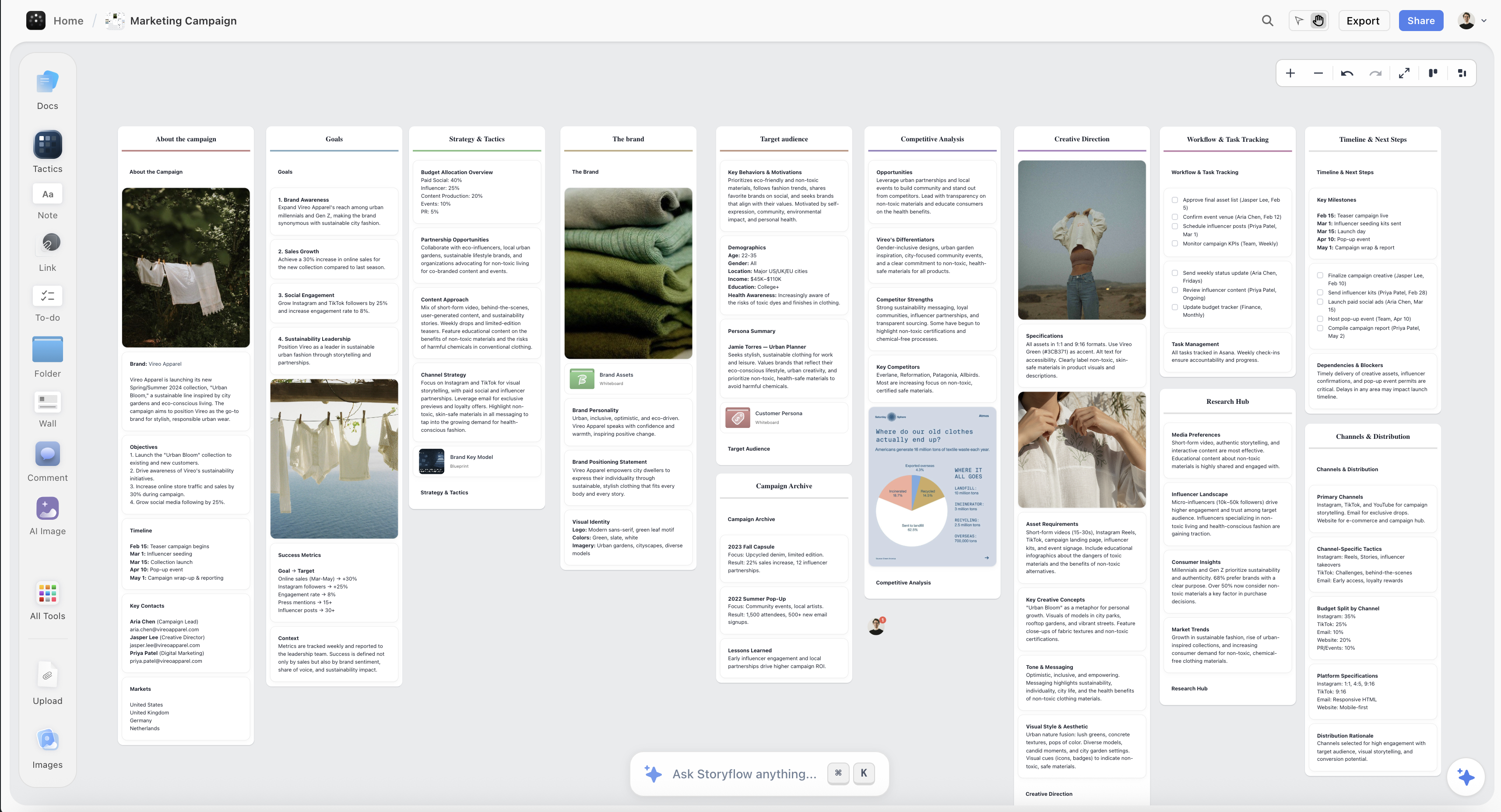
A webinar planned on the Storyflow canvas, with the content arc and the timed run of show laid out as cards on one board
Plan your webinar on one canvas
The content arc and the run of show live in one place, and the AI reads the whole board to draft the arc and flag a webinar that is all pitch and no value, so you go live already knowing it teaches, earns trust, and converts.

How to Plan a Webinar, Step by Step
Here is the full method, from a topic you want to teach to a run of show you can hand to a co-host and follow live. It assumes one host, or a host and a co-presenter, building one webinar of roughly 45 to 60 minutes for a live audience. Scale it up for a bigger production, but keep the order, because the value is in planning the content and the sequence before you open the streaming tool, not in booking a Zoom Webinar and hoping the content assembles itself.
Step 1: Define the outcome and the audience
Before anything else, write down two things: the outcome, and who it is for. The outcome is the specific change the webinar produces in the people who attend, stated as something they can do or decide afterward, not a topic you will cover. "Email marketing" is a topic and it converts nobody; "you will leave with a three-email welcome sequence you can send this week" is an outcome, and you can build a webinar that delivers it. Then define the audience precisely: who they are, what they already know, what they have already tried, what they are stuck on, and what they secretly worry about. A webinar moves an audience from where they are to where the outcome takes them, so you have to know exactly where they are starting. The clearer the audience, the sharper every later choice, because a webinar that tries to serve beginners and experts at once bores both. Write the outcome and the audience at the top of your board and measure every teaching beat against them: if a beat does not move this specific audience toward this specific outcome, it is filler, and filler is what makes a webinar drag toward the exit.
Step 2: Choose the topic and the one promise
Now choose the topic your audience actually wants, which is not always the topic you most want to teach. The reliable move is to pick the single most painful, most specific problem your audience has that your product or expertise genuinely solves, because a webinar that solves a real, urgent problem earns attention that a broad "overview" never will. Narrow beats broad every time: "how to plan a webinar that converts" pulls a more motivated, more qualified audience than "webinar best practices." Once the topic is set, write the promise, the single sentence that states what attending will give them, and make it specific and believable. The promise is what goes on the registration page, so it is doing double duty: it decides who signs up, and it sets the bar the teaching has to clear. Be honest here, because the fastest way to lose a room is to promise a transformation and deliver a definition. Write the topic and the promise on the board, and pressure-test the promise against a skeptical registrant: would a busy person give you an hour of their day for this exact promise, and will the teaching you are planning actually deliver it. If either answer is no, the promise is not ready.
Step 3: Build the content arc
With the outcome, audience, and promise fixed, build the arc: hook, promise, three to five teaching beats, soft transition, Q&A, and CTA, laid out in order on the board so you can see the whole event at once. Start with the hook and the promise as the opening, because the first two minutes decide how many people stay. Then design the teaching beats, the heart of the webinar, as three to five segments that each teach one usable thing and build on the last, so the audience feels themselves getting somewhere. Sequence them as a journey, not a list: each beat should earn the next, and the last teaching beat should leave the audience at exactly the point where your offer becomes the obvious next step. Then place the soft transition, the Q&A, and the CTA as the closing movement. Lay it all out spatially and check the shape: is there a clear promise up front, do the teaching beats actually deliver it, and does the offer grow out of the teaching rather than interrupting it. You are looking, before you build a single slide, at whether the event has a real arc or just a pile of segments in a plausible order.
Step 4: Design the teaching beats to actually deliver value
This is the step most webinars skimp on, and it is the one that decides everything. The teaching beats have to be genuinely valuable, good enough that someone could attend, take only the free teaching, act on it, and get a real result. That feels counterintuitive if you are worried about giving away too much, but it is the mechanism the whole webinar runs on: the quality of what you teach for free is the only evidence the audience has for what you sell, and generous teaching is the most persuasive thing in the entire event. So for each teaching beat, decide the one specific, actionable thing it delivers, and make it concrete, a method, a framework, a live example, a demo the audience can see working, not an abstract principle they cannot use. Show your work. Walk through a real example on screen. The rule that keeps a webinar from becoming a 45-minute ad is that the teaching stands on its own, and the offer is simply the faster or fuller way to get what the teaching just proved is possible. Lay each beat's core takeaway on the board next to the beat, and if you cannot write a concrete, valuable takeaway for a beat, that beat is filler and it comes out.
Step 5: Script the open and the transition to the offer
Two moments in a webinar are hard enough that you script them word for word, even if you improvise the rest: the open and the transition to the offer. The open, because the first two minutes decide retention, and most hosts waste them on dead air and housekeeping. Write the first thing you will say so it lands the hook and the promise fast, before the room drifts: name the problem, promise the outcome, and tell them to stay to the end where you will show them the fastest way to get there. The transition to the offer, because it is the moment trust is most easily lost. A hard swerve from teacher to salesperson makes the audience feel the teaching was bait, so script a bridge that grows out of the teaching itself. The reliable pattern is to earn the turn: acknowledge what you just taught, note that it works but takes time or effort to do manually, and offer the thing that does it faster or walks them through it, framed as a genuine help rather than a pivot. Write both moments as real spoken sentences on the board, read them out loud, and make sure the transition would feel natural to someone who trusted you a moment earlier. These are the two sentences that a whole webinar can turn on.
Step 6: Build the run of show
Now turn the arc into a run of show, the timed, staffed plan you follow live. Down one side, list every segment in order, from the pre-start hold through the hook, each teaching beat, the transition, the offer, the Q&A, and the CTA. For each segment, fix three things: the timing (how many minutes it gets and the running clock it ends at), who is speaking (the host, a co-presenter, whoever drives the demo), and the operational cues that fire alongside the talk, which slide is up, when a poll opens to keep the room active, when to pause and read the chat, when the demo goes live, when the offer slide appears, and when you drop the CTA link. Build in buffer deliberately: leave slack so that a teaching beat running two minutes long does not eat your Q&A or rush your close, because live talks always run longer than they read. Protect the ending above all, a webinar that runs out of clock at the offer has wasted the entire event. Lay the run of show on the board next to the arc so the content and the timing are visible together, and read it through at speaking pace to catch the places where the clock will betray you before the live audience does.
Step 7: Plan promotion and registration
A webinar with a perfect plan and no audience is a rehearsal. So plan the promotion and registration alongside the content, because they feed each other: the promise you wrote in step two is exactly what the registration page and the promotion emails sell. Plan the registration page around that promise, the specific outcome, who it is for, when it happens, and make signing up frictionless. Then plan the reminder sequence, because the gap between registering and showing up is where most webinars lose their audience: a confirmation, a reminder the day before, and a reminder an hour before all measurably lift the show-up rate, and a live webinar with a low show-up rate is a room you spent weeks filling and then let leak. Decide your promotion channels honestly based on where your audience actually is, email list, social, a partner's audience, paid ads, and map the timeline backward from the event date so the promotion has time to work. Put the funnel on the board next to the content plan so the whole event, from first promotion to the CTA, is one connected picture rather than a great talk nobody was invited to.
Step 8: Rehearse and run the tech check
Only now, with the arc built, the two hard moments scripted, and the run of show timed, do you rehearse. Run the webinar out loud against the run of show, start to finish, at least once, because a dry run is where you discover the beat that runs long, the transition that still feels like a swerve, and the demo that takes twice the time you budgeted. Rehearse the open and the close the most, because those are the moments that decide retention and conversion. Then run a full tech check on the actual platform you will broadcast on, not in theory: test the screen share, the audio, the slide advancing, the poll launching, the demo environment, the chat, and the CTA link, ideally with a colleague joined as an attendee so you see what the audience sees. Live webinars die on preventable tech failures, a muted mic for the first five minutes, a screen share that will not start, a demo that breaks, so the tech check is not optional polish, it is the difference between the plan you built and the webinar the audience actually experiences. Rehearse the content against the structure, verify the technology against reality, and you walk into the live event knowing both the talk and the tools will hold.
Where AI Helps (and Where the Live Room Is Yours)
AI is genuinely useful for planning a webinar, but for specific jobs, and it is worth being precise so you do not hand it the parts that have to be yours.
Where it helps. An AI that reads your outcome, your promise, and your teaching beats can draft an arc from a topic, suggest a hook you had not considered, propose a soft transition that does not feel like a swerve, flag a webinar that is all pitch and no value, and help you time the run of show so the offer and the Q&A both survive the clock. Because Storyflow's AI reads your full board, plus up to 1 Tactic and 3 Documents you point it at, it works from your actual webinar rather than a generic template, so the structure it suggests fits the event you are actually building. The 200-plus Story Blueprints on the paid tiers are the useful shortcut here: frameworks like AIDA and the Hero's Journey are narrative structures, and a webinar is a narrative that carries a room to a decision, so dropping one onto the board gives you a proven arc to adapt instead of a blank canvas. You can even pull reference frames from a YouTube or Vimeo recording of a webinar you admire straight onto the canvas to study its structure. It is a fast way to get a rough plan down so you have something concrete to react to.
Where it does not. AI has not met your audience, has not felt the energy of a live room, and cannot judge whether a teaching beat will actually land for the specific people who registered or whether your offer is honest. It will cheerfully generate a plausible webinar that teaches something your audience already knows and pitches something they will never buy. And the live event itself, reading the chat, answering the real question behind a question in the Q&A, sensing when the room is with you and when you have lost them, feeling the moment the trust is high enough to make the offer, is entirely yours. Storyflow's AI image generation on the Pro and Max tiers is the wrong tool for this stage too, because planning a webinar is about the content and the sequence, not generated art, and the slide visuals come later in a slide tool anyway. Use AI to draft the plan and catch the gaps, and bring your own judgment and presence to the live room. AI drafts the flow. You earn the trust.
Common Webinar Planning Mistakes
- No clear promise. A webinar people registered for out of vague curiosity, with no explicit statement of what they will walk away with, loses the room in the first ten minutes. Write the promise, put it on the registration page, and deliver it.
- Thin teaching. Forty minutes of definitions and throat-clearing before a pitch makes the audience feel sold to, not taught. The free teaching has to be genuinely valuable on its own, because it is the strongest evidence for your offer.
- A hard swerve to the pitch. Going from generous teacher to salesperson in one graceless sentence torches the trust the teaching built. Script a soft transition that grows out of the teaching.
- Burying the offer or the CTA. A brilliant teaching webinar with a vague, rushed, or missing call to action converts nobody. State one clear next step, plainly, more than once, near the end.
- No run of show. Improvising the timing live means a beat runs long, the Q&A runs away, and the CTA gets 15 rushed seconds. Time every segment and build in buffer.
- Ignoring the show-up rate. Filling registrations and then sending no reminders means a half-empty live room. Plan the reminder sequence, not just the promotion.
- Skipping the tech check. A muted mic, a broken screen share, or a demo that will not launch can sink a webinar in its first five minutes. Test everything on the real platform before you go live.
- Treating the streaming tool as the plan. Booking a Zoom Webinar is not planning a webinar. The content and the run of show are the work; the platform just broadcasts them.
The Bottom Line
Planning a webinar is not the busywork you do before booking the Zoom link. It is the real work: deciding the outcome and the audience, choosing a topic they actually want, building a content arc that teaches something genuinely valuable and earns the right to make an offer, timing it all in a run of show that protects the ending, and rehearsing it against reality with a full tech check. Get that right and the live event becomes execution, because the webinar already knows what it is teaching, in what order, and how the offer follows from the teaching. Skip it and you try to discover the webinar live, in front of a room you spent weeks filling, in the one medium you cannot re-edit.
The honest boundary holds. Plan the content and the run of show on a board, because a webinar is a live sequence and a sequence has to be seen whole, with AI and Story Blueprints that help you draft the arc and catch the gaps. Stream the event on Zoom, Riverside, or StreamYard, and design the slides in Canva or PowerPoint, because those are different jobs and those tools are built for them. I came to webinars from documentary storytelling and live-event planning, not from a career in webinar marketing, and the one thing that work taught me transfers cleanly: design the sequence before you commit it to the expensive, live medium, because the sequence is where it works or fails, and it is free to fix on the board and painful to fix anywhere else.
If your next webinar is still a topic and a hope that the flow will sort itself out once you are live, plan the whole event on one canvas in Storyflow and go live already knowing it teaches, earns trust, and converts.
FAQ: Webinar Planning
How do you plan a webinar?
Plan the content and the run of show before you touch the streaming platform. Define the outcome the webinar produces and the exact audience it is for, choose a topic your audience genuinely wants, and write a specific promise. Build the content arc, a hook, the promise, three to five teaching beats that deliver real value, a soft transition to the offer, a strong Q&A, and a clear call to action, then turn it into a run of show that times every segment, assigns who speaks when, and marks the slide, poll, chat, demo, and offer cues with buffer built in. Script the open and the transition to the offer word for word, plan the promotion and the registration reminders, and rehearse against the run of show with a full tech check. The reason to plan the content first is that a webinar happens once, live, and its sequence is almost free to fix on a board and impossible to fix mid-broadcast.
What is the structure of a webinar?
A strong webinar has a two-layer structure. The content arc is what the audience experiences: a hook that earns the first two minutes, a clear promise of the outcome, three to five teaching beats that each deliver one usable thing, a soft transition into the offer, a Q&A that builds trust by answering real questions, and a single clear call to action. The run of show is the operational layer underneath: the timing of each segment, who speaks when, and the cues for slides, polls, chat, the demo, the offer, and the buffer. The arc decides whether the webinar teaches and converts; the run of show decides whether it survives the live clock so the ending gets its full time. You need both, because a great arc that overruns fumbles its offer, and a well-timed run of show with a weak arc times a sequence of nothing worth attending.
How long should a webinar be?
Most live webinars run 45 to 60 minutes, with roughly 30 to 40 minutes of teaching, a short transition and offer, and 10 to 15 minutes of Q&A, though a focused webinar can work well in 30. The exact length matters less than fitting the time you promised and structuring for it, because a webinar that overruns loses people before the offer and the CTA, which is the one moment it was all building toward. Whatever your slot, time the whole run of show out loud at speaking pace, remember it will run longer live than it reads, and build in buffer so a teaching beat that runs long does not eat your close. Protect the ending above all: a tight webinar that lands its offer and Q&A cleanly beats a sprawling one that runs out of clock every time.
How do you make a webinar convert without being pushy?
You teach so well that the offer becomes the obvious next step, and you script the transition so it grows out of the teaching instead of interrupting it. The mechanism is trust: the quality of what you teach for free is the strongest evidence the audience has for what you sell, so generous, genuinely useful teaching does most of the persuading before you ever mention the offer. When you do transition, earn the turn, acknowledge what you just taught, note that it works but takes time or effort to do manually, and present your offer as the faster or fuller way to get the result the teaching just proved is possible. Then make the call to action clear and specific, and treat the Q&A as a conversion moment where you answer the real hesitations live. Pushy webinars pitch early and teach little; webinars that convert teach generously and offer honestly.
What is a run of show for a webinar?
A run of show is the timed, staffed plan that turns your content arc into something you can follow live. It lists every segment in order, from the pre-start hold through the hook, each teaching beat, the transition, the offer, the Q&A, and the CTA, and for each one it fixes the timing and running clock, who is speaking, and the operational cues that fire alongside the talk: which slide is up, when a poll opens, when to read the chat, when the demo goes live, when the offer slide appears, and when the CTA link drops. Crucially, it builds in buffer, deliberate slack so one segment running long does not cannibalize the close. The run of show is what keeps a webinar from becoming a strong first half and a rushed ending, because it makes sure the offer and the Q&A both get their full time no matter how the live clock behaves.
How do you promote a webinar and get people to show up?
Plan the promotion and the registration around the promise you wrote for the content, because that specific outcome is what makes people sign up and show up. Build a registration page around the promise, keep signup frictionless, and choose promotion channels honestly based on where your audience actually is, your email list, social, a partner's audience, or paid ads, mapping the timeline backward from the event date so the promotion has time to work. Then plan the reminder sequence, which is where most webinars leak their audience: a confirmation on signup, a reminder the day before, and a reminder an hour before all measurably lift the show-up rate. Registrations are not attendees, and the gap between the two is closed by reminders, so plan the funnel from first promotion to live attendance as one connected system, not just a great talk you forgot to invite anyone to.
Can AI help plan a webinar?
Yes, for drafting and gap-checking, not for the live room. Once your outcome, promise, and teaching beats are on a board, AI can draft an arc from your topic, suggest a hook, propose a soft transition that does not feel like a swerve, flag a webinar that is all pitch and no value, and help time the run of show so the offer and Q&A both survive the clock. Because Storyflow's AI reads your full board, plus up to 1 Tactic and 3 Documents you point it at, it works from your actual webinar rather than a generic template, and the 200-plus Story Blueprints give you proven narrative frameworks to adapt. What AI cannot do is know your audience, feel a live room, judge whether your teaching lands or your offer is honest, or answer the real question behind a question in the Q&A. Use it to get a rough plan down fast so you have something to react to, and keep the live event, and the judgment about what genuinely helps your audience, in your own hands.
Is Storyflow free for planning a webinar?
Not during early access. Storyflow is paid-only right now, with a Free plan launching before the end of 2026 that will include unlimited objects and boards, unlimited collaboration, basic AI, and 20 file uploads, enough to cover planning a real webinar: the outcome, the promise, the content arc, and the run of show laid out on one canvas. Paid tiers start at Plus for $7.99 per month billed annually, which is $9.99 monthly, and add the 200-plus Story Blueprints, including narrative frameworks that map onto a webinar arc, and unlimited file uploads, with Pro at $14 per month billed annually, $19 monthly, and Max at $39 per month billed annually, $49 monthly, for more AI and, on Pro and Max, AI image generation, which planning a webinar does not need since the work is the content and the sequence, not generated art. There is no separate Team plan; Max is the team tier. Anyone a paid member invites to a board joins free today, and you still stream the webinar and design the slides in dedicated tools.
Do I still need Zoom or a webinar platform?
Yes, and that is the honest boundary. Storyflow plans the content and the run of show; it does not stream the webinar, host registration, or design the slides. Zoom Webinars, Riverside, StreamYard, Livestorm, and Demio are where the event is actually broadcast, with registration, streaming, polls, and recording, and Canva or PowerPoint is where each teaching beat becomes a designed slide. Storyflow is the layer before all of that, the place you decide the outcome, the arc, the teaching, and the timing so the broadcast is a matter of execution instead of a search for what the webinar should be. Used for planning, which is what it is built for, it is where a webinar gets its shape; used as a streaming or slide tool, it is the wrong tool, and this guide is honest about that split because pretending one tool does every job helps no one.
Table of Contents
- Why a Webinar Lives or Dies on Planning
- The Anatomy of a Webinar
- Quick Picks: Where to Plan a Webinar
- Comparison Table: Where to Plan a Webinar
- How to Plan a Webinar, Step by Step
- Where AI Helps (and Where the Live Room Is Yours)
- Common Webinar Planning Mistakes
- The Bottom Line
- Author
- FAQ: Webinar Planning
- Related Reading
Templates to check out for this topic


Templates you can use in Storyflow
Every Storyflow board starts from real structure and an AI that reads the whole canvas. Open one of these templates and make it yours.


See Storyflow in Action
A visual AI workspace where every feature lives inside one canvas. No tab-switching, no context lost.
Build your entire board from a single message
Type what you need in the AI chat at the bottom of your canvas. The AI adds cards, headings, and structure directly onto your board.
Use expert frameworks as AI context
Type @ in the AI chat and choose any Tactic. The AI tailors every response to that framework instead of giving generic advice.
Turn your board into a mind map in seconds
Ask the AI to restructure your canvas as a mindmap. It connects your ideas into a visual hierarchy so you can see how everything relates.
Why Storyflow Exists
Storyflow actually began as a personal tool while working on creative and research projects.
We kept running into the same problem: ideas were scattered everywhere: notes, documents, and whiteboards.
Nothing helped us see how everything connected.
So we started building a workspace designed around how ideas actually grow.
→ Read how Storyflow was createdJustkay
Documentary Filmmaker & Founder at Storyflow
Published: 2026-07-22
Extremely simple, seriously capable


See how easy it is to get started
Watch a real project come together, from a blank board to a finished plan, clicked through step by step.
Start creating with AI and become more productive
Transform your creative workflow with AI-powered tools. Generate ideas, create content, and boost your productivity in minutes instead of hours.