Best AI Tools for Music Video Production (2026)
The best AI tools for music video production in 2026, tested on real projects. Generative video, mood boards, storyboards, beat maps, and connected planning compared.

Category
Filmmaking
Author

Justkay
Documentary Filmmaker & Founder at Storyflow
Topics
2026-06-11
•
Updated July 2, 2026
•
18 min read
•
Filmmaking- best AI tools for music video production 2026
- AI music video generator
- AI music video tools
- music video planning tools
- Runway music video
- Kaiber music video
- AI storyboard music video
- Storyflow music video
What are the best AI tools for music video production in 2026?
The best AI tools for music video production in 2026 split by job. For generating the footage, the leading generative video models own the work: Runway (the Gen-series) and Luma Dream Machine for control and motion, Kaiber for music-reactive video built for this use case, Krea for fast frames, Pika for short stylized shots, and OpenAI Sora for high-fidelity clips where you can get access. For the planning layer that ties them together (concept, treatment, mood board, storyboard, shot list, and a song-section beat map on one canvas an AI can read), the best pick is Storyflow. Storyflow does not generate or edit video; it plans the video so the generated footage matches the song.

Full disclosure: Storyflow is our own product, and we rank it #1 for the planning layer that ties a music video together (concept, treatment, mood board, storyboard, and a song-section beat map on one canvas the AI can read). Storyflow does not generate or edit a single frame of video; for the footage itself Runway and Luma Dream Machine are the benchmark, and Kaiber is built for music-reactive clips. We link to every tool so you can judge the fit.
Quick Comparison: Best AI Tools for Music Video Production
These four cover the jobs people decide between: planning the whole video on one canvas, generative footage with motion control, high-motion filmic clips, and music-reactive video.
| Tool | Best For | AI Features | Price |
|---|---|---|---|
| Storyflow | Planning the whole video on one canvas | AI reads the full board and beat map | $7.99 mo annual (free plan late 2026) |
| Runway | Generative footage with motion control | Gen-series video generation | Around $15 mo |
| Luma Dream Machine | High-motion filmic clips | Video generation | Around $10 mo |
| Kaiber | Music-reactive AI music videos | Music-synced video generation | Around $5 mo |
Storyboard the music video to the track, on one canvas
Storyflow drafts frames from your concept and keeps references and timing beside each shot, so the visuals are locked to the song before the shoot.

1) Quick Answer: The Best AI Tools for Music Video Production
A music video is the one short-form project where you can generate a hundred gorgeous shots and still not have a video, because none of them are timed to the song. That is the trap of 2026: generation got fast, planning did not, and the gap between them is where projects die.
The best AI tools for music video production in 2026 split cleanly by job. For the actual footage, the generative AI video models own the work: Runway (the Gen-series) and Luma Dream Machine for the broadest control, Kaiber for music-reactive visuals built for this exact use case, Krea for fast real-time frames, Pika for short stylized shots, and OpenAI Sora for high-fidelity clips where you can get access. For the planning layer that ties them together (concept, treatment, mood board, storyboard, shot list, and a song-section beat map on one canvas an AI can read), the best pick is Storyflow. Storyflow does not generate or edit video. It plans the video so the generated footage actually matches the song.
The short version: the music video splits into three tracks (the song, the look, and the cut), and no single tool covers all three. The generative models make the look move. The editors make the cut. A music video is not footage looking for a song. It is a song looking for footage, and the planning that decides which footage the song needs lives in notes, slides, Pinterest, and a spreadsheet at the same time. That is the gap Storyflow closes.
All 11 Music Video Tools, Ranked
- Storyflow: best connected planning layer (concept, treatment, mood board, storyboard, beat map on one canvas)
- Runway: best generative footage with real control over motion and style
- Luma Dream Machine: best high-motion, filmic generative clips
- Kaiber: best music-reactive AI video for independent artists
- OpenAI Sora: best high-fidelity generative clips where you have access
- Frame.io: best review and approval of the cut
- Boords: best timed storyboard animatic
- Milanote: best calm treatment and mood board surface
- Krea: best fast real-time concept frames
- Pika: best short stylized shots for social-first cuts
- Canva: best lyric videos and vertical social edits
I am a documentary filmmaker and the founder of Storyflow, and every tool below was tested on real music-video pre-production between 2024 and 2026, not a 30-second demo. For the wider categories, see The Best AI Tools for Filmmakers in 2026 and The Best Mood Board Tools in 2026.
2) Comparison Table: 11 Music Video Tools Compared
Ratings come from real music-video pre-production between 2024 and 2026. Generative-tool features and pricing change monthly; confirm every "verify" price on that tool's official site before buying. Storyflow pricing is exact and current as of June 2026.
3) The Three Tracks of a Music Video
Most "best tools" lists pretend a music video is one job. It is three, and the right tool depends on which track you are working.
Track one is the song. The song is fixed before a single frame exists. Its structure (intro, verse, pre-chorus, chorus, bridge, outro) is the timeline the whole video hangs on, and every cut and location change is timed against a section. Mapping visuals to song sections is the spine of the project, and almost no tool treats it as a first-class object.
Track two is the look. The palette, references, wardrobe, locations, and style of every shot. This is the mood board and the treatment, and in 2026 it is also where the generative AI video models live, because the look is what they generate. Runway, Kaiber, Luma, Krea, Pika, and Sora all work this track. They make the look move.
Track three is the cut. The assembled footage timed to the song, reviewed and approved. This is the editor and the review tool: Frame.io for sign-off, Canva for fast lyric and social cuts.
The taxonomy is simple: plan it, generate it, cut it. Storyflow plans it. The generative models generate it. The editors cut it. A music video is not footage looking for a song. It is a song looking for footage, and the project breaks at the seams between the three tracks. Creators who feel the workflow is chaotic are rarely bad at any one track; they are losing the handoffs between them.
4) Why the Music Video Workflow Breaks
The friction is rarely the tool you are using right now. It is the gap between tools.
The scatter problem. The concept is in your Notes app, the treatment is in Google Slides, the mood board is in Pinterest, the storyboard is in Boords, and the shot list is in a spreadsheet. When the artist reworks the chorus concept, six artifacts have to change, and none of them know about each other. The most common state of a music-video project is five tabs that disagree.
The song-section blind spot. The song is the timeline, but almost no planning tool lets you map visuals to song sections natively. You write "0:48 chorus, switch to neon rooftop" in a doc, draw the rooftop frame in a separate board, then prompt it in a generator, with nothing connecting the three. The beat map exists only in your head.
Generation outran planning. Faster generation makes the planning gap worse, not better, because now you can produce a hundred shots that have nothing to do with the song structure. Speed without a plan produces a pile of pretty clips that do not cut into a video. Related is the consistency tax: the generators still struggle to keep a character, location, or wardrobe consistent across shots, and managing that consistency is a planning job (reference sheets, a look bible) they do not do for you.
5) How We Evaluated These Tools
Every tool here was tested on real music-video pre-production between 2024 and 2026: a performance-driven video for an independent artist, a narrative concept video, and a lyric video. No synthetic benchmarks. Six criteria, weighted in this order.
- Which track does it own? Does the tool plan the video, generate the footage, or cut it? A tool that pretends to do all three usually does none well.
- Connected to the rest of the project, or an island? Can the concept, treatment, mood board, storyboard, and song-section beat map live together, or does each sit in its own app and force manual syncing?
- AI context scope. If there is an AI, what can it actually see? The whole project, the active board, or only the single frame you are generating?
- Generative quality and control. For the tools that make footage, how good is the output and how much control do you have over motion, style, and consistency across shots?
- Song and timing awareness. Can the tool reason about song structure and time visuals to it, or is timing something you track by hand elsewhere?
- Free tier and price. Is there a usable free plan, and does the paid price match how much of the video the tool actually moves?
The rankings reflect how each tool felt once the plan, the generated footage, and the cut all had to agree with the song.
6) Quick Picks by Job to Be Done
If you want the short list, organize by the job, not the brand.
- Plan the whole video on one canvas: Storyflow. Concept, treatment, mood board, storyboard, and beat map together, with an AI that reads all of it.
- Generate the footage with the most control: Runway (Gen-series for image-to-video, motion, and style).
- Generate a music-reactive video fast: Kaiber, built for music videos with visuals that move to the track.
- High-motion generative clips: Luma Dream Machine for fluid motion, OpenAI Sora for high-fidelity shots where you can get access.
- Fast real-time frames and short stylized shots: Krea for rapid iteration, Pika for short stylized clips.
- Storyboard and animatic: Boords for timed panel-by-panel previsualization.
- Treatment and mood board: Milanote for references and the treatment on one calm board.
- Lyric and social cuts: Canva for presentable lyric videos and vertical edits.
- Review and approval of the cut: Frame.io for timestamped feedback on the edit.
Map the video to the song before you generate
Lay the song sections, the look, and the planned shots on one board, so every clip you generate lands on the right beat instead of joining a pile of pretty footage.
7) Detailed Reviews: 11 AI Tools for Music Video Production
1. Storyflow
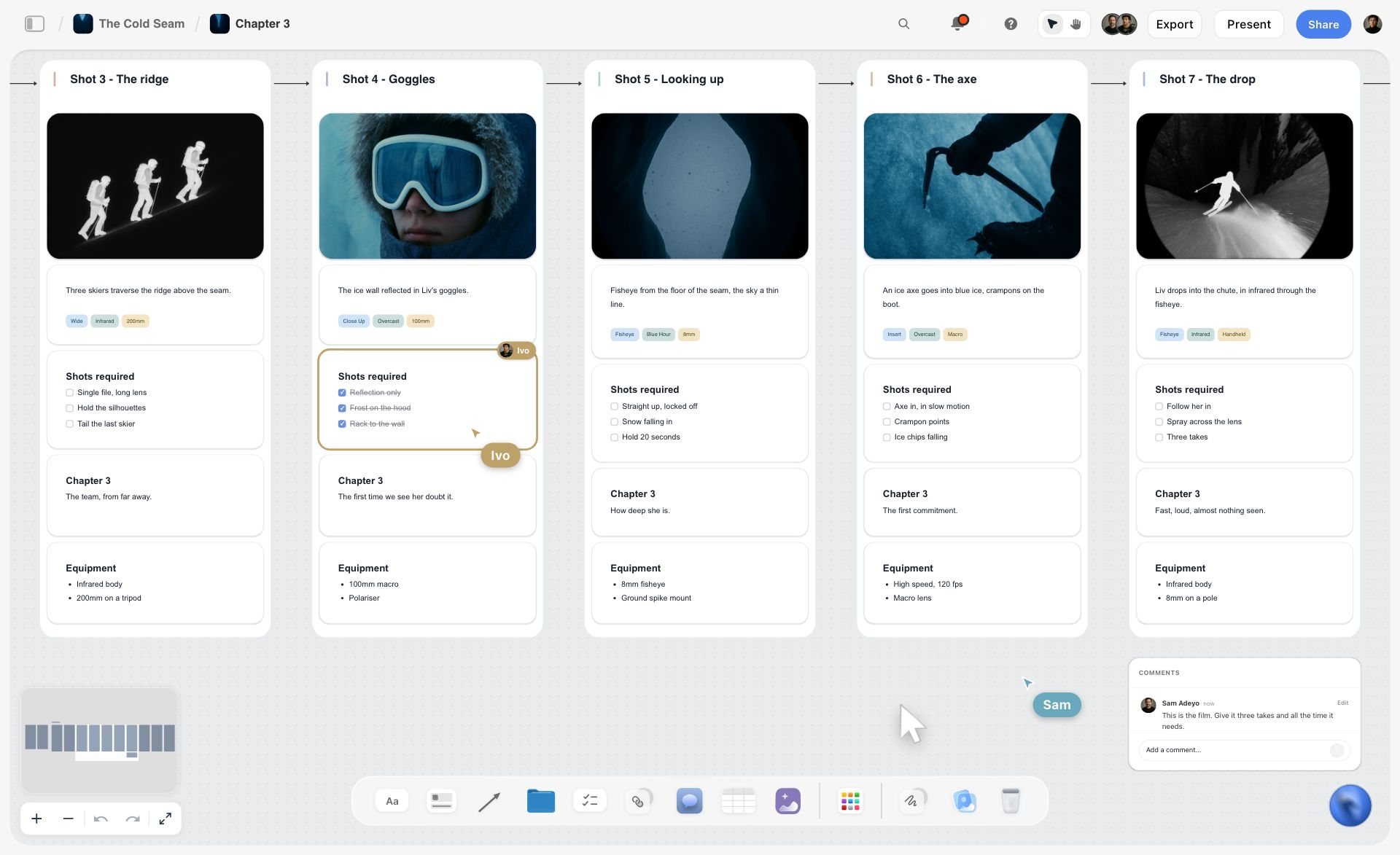
Storyflow is the tool to pick when the problem is not generating footage but planning it. It is an AI-powered visual workspace: one infinite canvas where the concept, the treatment, the mood board, the storyboard frames, the shot list, and a song-section beat map all sit together, and the AI reads the whole board. It does not generate a single frame and it does not edit video. What it does is close the gap between the song in your head and the footage you are about to generate, so the generation matches the structure of the track.
The difference shows up the moment the song drives the visuals. Put the verse, the chorus, the bridge, the matching mood-board frames, and the planned shots on one canvas, and when you ask the AI to "re-plan the bridge as a single locked-off rooftop shot," it reads the treatment, the frames, and the beat map together and moves all of them at once, instead of leaving you to re-edit five disconnected files by hand. The same logic applies to building a music video storyboard that stays mapped to the song sections. A music video is not footage looking for a song. It is a song looking for footage, and Storyflow keeps the song and the footage plan on the same board so they stop disagreeing.
Best for: Music video directors and artists who lose the thread between the concept, the treatment, the mood board, the storyboard, and the song structure because each one lives in a different app.
Verdict: The strongest planning layer for music video, and the place to organize everything the generative tools will then produce. It is not a generative video tool and it is not an editor, so for the footage itself you still reach for Runway, Kaiber, Luma, or Sora, and for the cut you reach for an editor. Storyflow earns its place the moment the plan has to agree with the song.
Key features
- Canvas-aware AI by default. The AI reads your full active canvas board (every card, frame, note, image, and link on it). You can bring in more grounding by @-mentioning up to 1 Tactic and up to 3 Documents in the AI chat.
- The whole plan on one surface. The concept, the treatment, the mood board, the storyboard frames, the shot list, and a song-section beat map are cards on the same canvas, so the music video is one connected artifact instead of five disconnected files.
- 200+ Story Blueprints. An expert-built template library covering creative and structural frameworks, including the Hero's Journey, included on the Plus tier and above.
- Unlimited shared boards and unlimited collaboration on every plan, including Free. The Max plan adds a team workspace with permissions and roles, useful when the artist, the director, and the editor all plan together.
Pricing
Paid-only during early access; the Free plan (unlimited notes, images, links, shared boards, and collaboration, basic AI, and 20 file uploads, no Story Blueprints library) launches before the end of 2026, and anyone a paid member invites to a board joins free now. Plus: $7.99/mo annual or $9.99/mo monthly (adds the 200+ Story Blueprints, unlimited uploads). Pro: $14/mo annual or $19/mo monthly (adds AI image generation and 20x more AI than Plus). Max: $39/mo annual or $49/mo monthly (adds 40x more AI and a team workspace with roles). Pricing current as of June 2026.
Pros
- The concept, treatment, mood board, storyboard, shot list, and song-section beat map live on one canvas, so the plan stops being five disagreeing tabs.
- The AI reads the whole board and re-plans a section across the treatment, the frames, and the beat map at once.
- The Free plan, launching before the end of 2026, will be genuinely usable: unlimited boards, cards, and collaboration, which will suit an independent artist with no budget.
Cons
- It does not generate AI video. The footage itself comes from Runway, Kaiber, Luma, Krea, Pika, or Sora; Storyflow only plans which footage the song needs.
- It does not edit video. There is no timeline, no cut, and no timed animatic player, so the assembly and the final edit happen in a separate editor.
- Cloud-only; there is no local-first or offline desktop mode, and the music-video-specific template library is smaller than a dedicated film tool's stock library.
Take your next track and rebuild the whole plan on a Storyflow canvas with the song sections, the mood board, and the planned shots side by side. The Storyboard template and the Filmmaking Moodboard template open with the frames and the look already structured, so the beat map has something to read from the first minute. Start a Storyflow workspace and ask the AI to re-plan one section across the treatment and the frames at once. The difference is usually obvious within an hour.
2. Runway
Runway is the generative tool to reach for when you want the most control over the footage itself. Its Gen-series models turn prompts, images, and reference clips into video with motion brushes, camera-style controls, and a wider editing and VFX suite, the closest thing to a generative cinematography toolkit a music video director has.
Best for: Directors who want generative shots with real control over motion, style, and camera movement.
Verdict: The most capable generative video tool here, and the one that rewards a director who knows what shot they want. It generates footage; it does not plan or time the video to the song, consistency across shots still takes management, and there is no treatment, beat map, or approval workflow inside it. Limited free use, then paid plans starting around $15 per month. Pricing current as of June 2026.
3. Kaiber
Kaiber is the generative tool built for music videos specifically. It became popular for generating visuals that react to an audio track, turning a song into a stream of evolving, stylized imagery, exactly the lyric-video and performance-backdrop use case independent artists need.
Best for: Independent musicians and DIY artists who want a music-reactive AI video fast and on a small budget.
Verdict: The most music-native generative tool here, and the fastest path to a stylized, audio-reactive video. The trade-off is control: the output leans abstract rather than precise narrative shots, consistency across a longer video is hard, and it does not plan or storyboard the video for you. Limited free use, then paid plans starting around $5 per month. Pricing current as of June 2026.
4. Luma Dream Machine
Luma Dream Machine is the generative tool for high-quality motion. It generates fluid, realistic clips from text and image prompts, with a strength in natural camera movement that makes shots feel less like animated stills and more like filmed footage.
Best for: Directors who want fluid, filmic generative motion for performance and narrative shots.
Verdict: One of the strongest generative options for natural motion. Like every generator here, it makes footage rather than planning the video, shot-to-shot consistency takes management, and timing to the song happens in your editor. Limited free use, then paid plans around $10 per month. Pricing current as of June 2026.
5. Krea
Krea is the generative tool for fast, real-time iteration. It turns prompts and reference images into frames and short clips quickly, with style control and upscaling, useful for exploring a look and pulling concept frames before you commit to a controlled generation in Runway or Luma.
Best for: Directors and artists rapidly exploring a visual style and pulling concept frames.
Verdict: A strong, fast generative source for look exploration and concept frames. The speed is the point and the limit: great for iteration and pitch frames, less suited to a finished, consistent video on its own, with no song or planning workflow inside it. Limited free use, then paid plans around $10 per month. Pricing current as of June 2026.
6. Pika
Pika is the generative tool for short, stylized shots. It generates brief clips from text and image prompts with a playful set of effects and style controls, which suits the punchy, fast-cut, social-first sections of a music video more than long takes.
Best for: Performance and social-first music creators who need short, stylized, attention-grabbing clips.
Verdict: A nimble generator for short stylized shots and social cuts. Built around brevity, it is less suited to longer continuous sequences, consistency across many shots is still hard, and it does not plan or time the video to the song. Limited free use, then paid plans around $8 per month. Pricing current as of June 2026.
7. OpenAI Sora
Sora is OpenAI's generative video model, reached for when you want the highest-fidelity individual clips. It generates detailed, coherent video from text prompts and is bundled into OpenAI's consumer plans rather than sold standalone, so availability and usage limits depend on your ChatGPT subscription and region.
Best for: Directors who want high-fidelity generative clips and already have OpenAI access.
Verdict: A high-fidelity generator when you can get access, and strong for individual hero shots. Access is gated and varies by plan and region, longer multi-shot consistency is still maturing, and it is a generation model, not a planning or editing tool. Verify current availability and limits on openai.com before relying on it. Pricing current as of June 2026.
8. Boords
Boords is the tool for a dedicated storyboard with a timed animatic. It is a panel-first app with clean frame layout, numbering, and an animatic player that lets you previsualize pacing, which matters for the sequence-driven, tightly timed nature of a music video.
Best for: Directors who want a dedicated storyboard and a timed animatic to previsualize pacing.
Verdict: The cleanest dedicated storyboard-and-animatic workflow here, and genuinely useful for timing a sequence. The limit is the island: the storyboard lives apart from the treatment, the mood board, the song-section plan, and the generated footage, so a concept change means re-syncing by hand. Limited free use, then paid plans around $12 per month. Pricing current as of June 2026.
9. Milanote
Milanote is the tool for arranging the treatment and the mood board on one calm surface. It is an elegant visual workspace where references, notes, frames, and links share a single board, with treatment and mood-board templates and clean sharing.
Best for: Directors and artists arranging the treatment and visual references in one calm place.
Verdict: The most pleasant surface here for the treatment and the mood board, where references sit beside notes instead of in a separate app. It is not a dedicated music-video tool: no AI doing real lifting, no song-section timeline, no generation, so the board arranges the look but does not help the video progress against the track. Free tier, with paid plans around $12.50 per month. Pricing current as of June 2026.
10. Canva
Canva is the tool for fast, presentable lyric videos and social cuts. It is not music-video-specific, but its video templates, asset library, text animation, and Magic Studio AI tools make a clean lyric video or vertical social edit fast, and almost everyone already knows it.
Best for: DIY artists and social-first creators who need a lyric video or vertical cut quickly.
Verdict: The fastest path to a presentable lyric or social edit, and weak as a real production tool for a cinematic video. It is template-driven, with no song-structure planning or generative cinematography, and it does not connect to a treatment or storyboard. Canva Pro starts around $15 per month, with a usable free tier. Pricing current as of June 2026.
11. Frame.io
Frame.io is not a planning or generation tool, but it is the one people reach for when the real need is review and approval of the cut. It is the standard for frame-accurate, timestamped feedback on edits, with version stacking, approval workflows, and deep Premiere and After Effects integration, which matters once the artist, the label, and the editor all need to sign off.
Best for: Teams reviewing and approving the edit with timestamped comments.
Verdict: The clearest review-and-approval workflow for the cut, and the wrong tool for planning or generating the video. It is post-production review, not pre-production, and per-user pricing adds up for bigger teams. Paid plans start around $15 per user per month, with a limited free tier. Pricing current as of June 2026.
8) Which Tool Fits Which Music Video Creator?
1. Music Video Director
Top picks: Storyflow + Runway
Directors carry the whole vision and need it to survive contact with the artist, the budget, and the schedule. Use Storyflow to keep the concept, treatment, mood board, storyboard, and beat map on one canvas the AI can read, then Runway to generate the controlled hero shots once the plan is locked. The Shotlist template keeps the planned shots structured before you hand them to the generators.
2. Indie Musician / DIY Artist
Top picks: Storyflow + Kaiber
With no budget and no crew, the artist needs cheap and fast. Storyflow keeps the concept, lyrics, mood board, and shot ideas on one canvas (Plus starts at $7.99/month annual; the Free plan launches before the end of 2026), and Kaiber generates a music-reactive video cheaply. Still one of the lowest-cost paths from a song to a finished, stylized video without a production company.
3. Production Company Producer
Top picks: Storyflow + Frame.io
Producers care that the treatment, schedule, budget, and deliverables agree, and that the client signs off cleanly. Use Storyflow to keep pre-production connected on one canvas the whole team can see (the Max plan adds a team workspace with roles for the wider crew), and Frame.io for timestamped review once there are cuts.
4. Performance / Social-First Music Creator
Top picks: Pika + Canva
Social-first creators live on short, punchy, vertical clips cut fast. Use Pika to generate short stylized shots and Canva to assemble lyric overlays and vertical edits. Add Storyflow (paid-only during early access, Plus at $7.99/month annual) to plan a batch of clips against the song instead of improvising each one.
5. Lyric / Animation Video Creator
Top picks: Kaiber + Storyflow
Lyric and animation videos are look-and-rhythm projects. Use Kaiber for audio-reactive generative visuals, and Storyflow to map the lyrics and visual beats to the song sections so the imagery changes where the song changes. The beat map keeps the visuals timed to the track instead of drifting.
6. Emerging / Student Director
Top picks: Storyflow + Krea
Students want to work like a connected production on a tight budget. Storyflow keeps the concept, treatment, and storyboard on one canvas (Plus starts at $7.99/month annual; the Free plan launches before the end of 2026), and Krea lets you explore a style and pull concept frames cheaply. One of the cheapest ways to plan and look-dev a real video from day one.
9) Honorable Mentions
A few tools that came close but did not make the main eleven.
- CapCut and DaVinci Resolve: Editors for the cut and the grade; excellent at track three, but they edit rather than plan or generate the video.
- Suno and Udio: AI music generators; relevant if you are also making the track, but out of scope for a workflow built around an existing song.
- Pinterest: Where most mood boards actually start; great for reference gathering, but the board never connects to the treatment, the storyboard, or the song.
- StudioBinder: A strong production-management suite with scheduling and call sheets; useful for a crewed shoot, heavier than an independent artist needs.
These are not weak tools. Their job is simply narrower or sits outside the plan-generate-cut spine of this list.
10) Where Storyflow Loses (An Honest Accounting)
A list that pretended the planning tool beats the generators would not be worth reading. Here is where Storyflow is the wrong tool and something else wins.
The generators own the footage. Storyflow does not generate a single frame. If your bottleneck is producing the actual shots, Runway, Kaiber, Luma, Krea, Pika, and Sora do the work. Storyflow plans which shots the song needs; it never makes them.
The editors own the cut. Storyflow has no timeline, no edit, and no timed animatic player. The assembly, the timing, and the final grade happen in CapCut, Premiere, DaVinci Resolve, or a generative tool's own export.
It is cloud-only with a smaller music-video template library. There is no local-first or offline mode, and the music-video-specific blueprint library is thinner than a dedicated film tool's stock library. If your whole need is a timed animatic, Boords is more purpose-built; if it is fast generative footage, the generators win outright.
This article does not claim Storyflow makes music videos. It does not. It claims the plan-generate-cut workflow scatters the plan across five apps, and that scatter is the part Storyflow is built to fix.
12) The Bottom Line
The best AI tools for music video production in 2026 depend on which of the three tracks you are working. The generative models (Runway, Kaiber, Luma, Krea, Pika, Sora) own the footage. Canva and Frame.io own the cut and the sign-off. Boords owns the timed animatic; Milanote owns the calm treatment board.
But the most common reason a music-video project feels like chaos is not a weak tool on any one track. It is the scatter: the concept in Notes, the treatment in Slides, the mood board in Pinterest, the storyboard in one app, the beat map only in your head. A music video is not footage looking for a song. It is a song looking for footage. That is why Storyflow ranks first for the planning layer. It does not generate or edit a frame, but it keeps the concept, treatment, mood board, storyboard, and song-section beat map on one canvas the AI can read, so the footage you generate matches the track.
If your music video plan keeps scattering across five apps, take your next track and rebuild the whole plan on a canvas for a week. Try the AI storyboard generator to turn each section into a first board, then start a Storyflow workspace and ask the AI to re-plan one section across the treatment and the frames at once.
11) FAQ: AI Tools for Music Video Production in 2026
What is the best AI tool for music video production in 2026?
There is no single best tool, because a music video is three jobs. For generating the footage, Runway, Kaiber, Luma Dream Machine, Krea, Pika, and OpenAI Sora are the leading models. For planning the video (concept, treatment, mood board, storyboard, and song-section beat map on one canvas an AI can read), Storyflow is the strongest pick. For the cut, Canva handles lyric and social edits and Frame.io handles review. Pick by the job, not one tool for everything.
Can AI generate a full music video by itself?
Not yet, not well. Models like Runway, Kaiber, Luma, and Sora produce excellent individual clips and stylized sequences, but stitching them into a coherent video that stays consistent across shots and times to the song still needs a human plan and a human edit. The realistic workflow is to plan the video, generate the shots against the plan, then cut them in an editor. Generation speed has outrun the consistency and structure a full video needs.
Which AI tool is best for an independent musician with no budget?
Pair Storyflow with Kaiber. Storyflow is paid-only during early access, with Plus at $7.99/month billed annually, and keeps the concept, lyrics, mood board, and shot ideas on one canvas; anyone a paid member invites to a board joins free. Kaiber generates a music-reactive video cheaply, around $5 per month. That combination gets you from a song to a finished, stylized video without a crew or a full production budget.
What is the best AI tool for making a lyric video?
For a lyric video, Canva is the fastest path to a clean, presentable result with text animation and templates, and Kaiber is the strongest for an audio-reactive, generative-visual lyric video. To keep the visuals timed to the song, plan the lyric-to-section mapping on a Storyflow canvas first so the imagery changes where the song changes. Canva makes it, Storyflow times it.
Does Storyflow generate or edit music videos?
No. Storyflow does not generate AI video and it does not edit video. It is a planning workspace where the concept, treatment, mood board, storyboard, shot list, and song-section beat map live on one canvas the AI can read. The footage comes from generative tools like Runway, Kaiber, Luma, Krea, Pika, or Sora, and the cut happens in an editor like CapCut, Premiere, or DaVinci Resolve. Storyflow plans the video so the generated footage matches the song.
How do I keep a character consistent across AI-generated shots?
Character and location consistency is the hardest problem in AI music video, and the generators do not solve it for you. Build a reference sheet (a look bible) with the artist's appearance, wardrobe, and key locations, then feed those references into each generation; tools like Runway support image references that help. Keeping the look bible on a connected canvas like Storyflow, so every shot is generated against the same references, reduces drift more than prompts alone.
What is a song-section beat map and why does it matter?
A song-section beat map lays the song's structure (intro, verse, pre-chorus, chorus, bridge, outro) along a timeline and maps a visual idea to each section. It matters because the song is the fixed timeline a music video hangs on, and most planning tools ignore it. Mapping visuals to sections keeps the cuts, location changes, and energy shifts landing on the right beats instead of drifting. Storyflow lets you build that beat map on the same canvas as the storyboard and mood board.
Is Runway or Sora better for music video?
They serve different needs. Runway gives a director the most control: motion brushes, camera-style controls, image-to-video, and a wider VFX suite, which suits a planned, shot-specific approach. Sora produces very high-fidelity clips but is gated behind OpenAI's consumer plans, with availability that varies by plan and region. For control and a repeatable workflow, Runway is usually the safer pick; for a single high-fidelity hero shot when you have access, Sora is strong. Verify current access and pricing on each site.
How much does it cost to make an AI music video?
It can cost almost nothing or scale up fast. On the low end, Storyflow (Plus at $7.99 per month annual) for planning plus Kaiber (around $5 per month) for generation produces a stylized video for well under $15 a month. A controlled production might add Runway (around $15 per month) or Luma (around $10 per month) for footage and Frame.io for review. Generative-tool pricing changes monthly, so verify each on its official site. Storyflow pricing is exact: Plus $7.99 per month annual, Pro $14 per month annual, Max $39 per month annual, with a Free plan launching before the end of 2026.
Do I need a planning tool if the generators are this fast?
More than ever. Faster generation makes the planning gap worse, not better, because you can now produce a hundred shots that have nothing to do with the song structure. A plan is what turns generation from a pile of pretty clips into a video that cuts. The plan is the cheap part of the project, and the part that decides whether the expensive footage is usable.
Table of Contents
- Quick Answer: The Best AI Tools for Music Video Production
- Comparison Table: 11 Music Video Tools Compared
- The Three Tracks of a Music Video
- Why the Music Video Workflow Breaks
- How We Evaluated These Tools
- Quick Picks by Job to Be Done
- Detailed Reviews: 11 AI Tools for Music Video Production
- Which Tool Fits Which Music Video Creator?
- Honorable Mentions
- Where Storyflow Loses (An Honest Accounting)
- FAQ: AI Tools for Music Video Production in 2026
- The Bottom Line
- Author
- Related Reading
Templates to check out for this topic


Filmmaking templates you can use in Storyflow
Skip the blank canvas. Open one of these filmmaking boards in Storyflow and the AI builds on the structure that is already there, from research through the shot list.


See Storyflow in Action
A visual AI workspace where every feature lives inside one canvas. No tab-switching, no context lost.
Build your entire board from a single message
Type what you need in the AI chat at the bottom of your canvas. The AI adds cards, headings, and structure directly onto your board.
Use expert frameworks as AI context
Type @ in the AI chat and choose any Tactic. The AI tailors every response to that framework instead of giving generic advice.
Turn your board into a mind map in seconds
Ask the AI to restructure your canvas as a mindmap. It connects your ideas into a visual hierarchy so you can see how everything relates.
Why Storyflow Exists
Storyflow actually began as a personal tool while working on creative and research projects.
We kept running into the same problem: ideas were scattered everywhere: notes, documents, and whiteboards.
Nothing helped us see how everything connected.
So we started building a workspace designed around how ideas actually grow.
→ Read how Storyflow was createdJustkay
Documentary Filmmaker & Founder at Storyflow
Published: 2026-06-11
Extremely simple, seriously capable


See how easy it is to get started
Watch a real project come together, from a blank board to a finished plan, clicked through step by step.
Start creating with AI and become more productive
Transform your creative workflow with AI-powered tools. Generate ideas, create content, and boost your productivity in minutes instead of hours.