The 12 Best Note-Taking Apps in 2026 (We Tested Them All)
Most note-taking apps solve the capture problem and stop there. We tested 12 to find which ones actually change how your notes work, and which ones let the AI read your full project context, not just the current note.

Category
Productivity & Tools
Author

Sara de Klein
Head of Product at Storyflow
Topics
2026-05-05
•
19 min read
•
Productivity & Tools- best note-taking apps 2026
- note-taking apps comparison
- AI note-taking tools 2026
What are the best note-taking apps in 2026?
The best note-taking apps in 2026 are Storyflow (a visual canvas where the AI reads your full project board, not just the open note), Notion (queryable knowledge bases), Obsidian (private linked thinking), and Evernote (multi-device capture). Most note-taking apps solve the capture problem and stop there. You record a thought, file it away, and spend the next month rebuilding the same context every time you try to use it. The four above each break that pattern in a different way: the right pick depends on whether your notes live inside active work or in a long-term archive. These twelve tools were tested over six weeks across individual and team note-taking scenarios: daily capture during research, building shared knowledge bases, and retrieving specific notes two weeks later. Each tool was used as the primary note environment for real work, not demo accounts with sample content.

Notes you can see, not just scroll.
A folder of notes hides the connections between them. Lay your notes out on a canvas where AI reads the whole board at once and links related ideas for you, instead of leaving them buried in separate files.

All 12 Note-Taking Apps, Ranked
- Storyflow: best for notes as active project thinking on an AI canvas
- Notion: best for structured, queryable knowledge bases
- Obsidian: best for private, local-first linked notes
- Bear: best for Apple-ecosystem writers
- Mem: best for AI auto-organised notes
- Microsoft OneNote: best for Microsoft 365 integration
- Logseq: best open-source outliner
- Craft: best for polished, shareable documents
- Roam Research: best for graph-linked research
- Evernote: best for web clipping and multi-device capture
- Google Keep: best for fast, free cross-device capture
- Apple Notes: best free built-in capture on Apple devices
Full disclosure: Storyflow, which we rank #1, is our own product, and #1 here means #1 for one specific job: notes as active project thinking on a visual canvas the AI reads in full. For a pure text notebook, the classic apps win and we say so plainly, Notion owns structured knowledge bases, Obsidian owns private local-first linked notes, and Apple Notes and Google Keep own fast free capture. We link out to every tool so you can judge for yourself.
Quick Comparison: Best Note-Taking Apps
These four cover the choice most people are making: a visual canvas where the AI reads all your notes versus a classic text notebook.
| Tool | Best For | AI Features | Price |
|---|---|---|---|
| Storyflow | Notes as active project thinking | Canvas-aware AI (reads the whole board) | $7.99 mo annual (free plan late 2026) |
| Notion | Structured knowledge bases | Notion AI (page and database) | Free / $12 user mo |
| Obsidian | Local-first linked PKM | No native AI (community plugins) | Free / $4 mo sync |
| Bear | Apple-ecosystem writers | No built-in AI | Free / $2.99 mo |
Quick Recommendations: Best Note-Taking Apps 2026
Best Overall: Storyflow, an infinite canvas where notes, documents, mind maps, and Story blueprints share the same board, and the AI reads everything on that board before it helps you think through any of it.
Best for Structured Knowledge Bases: Notion, relational databases, linked pages, and a template library that makes building a team wiki faster than any other tool here; the trade-off is setup time.
Best for Private Personal Knowledge Management: Obsidian, local Markdown files you fully own, a graph view that reveals connections across hundreds of linked notes, and a free-forever personal plan; meaningful AI requires third-party plugins.
Best for Enterprise Teams in the Microsoft Ecosystem: Microsoft OneNote, when your organisation is already paying for Microsoft 365, OneNote is effectively included and connected to Teams, Outlook, and SharePoint; not the best note app in isolation, but often the pragmatic call.
Best Note-Taking Apps 2026: Market Context
The note-taking app market has spent fifteen years trying to solve the same problem from different angles. Evernote went wide, every device, every format, everything captured. Notion went deep, every piece of information in a queryable database. Obsidian went private, every note owned locally, linked manually. None of them solved the underlying issue: a note filed away is inert until someone goes looking for it.
The structural divide you need to understand in 2026: capture-first tools (Evernote, Apple Notes, Bear) optimise for speed, getting a thought out of your head before it disappears. Connection-first tools (Notion, Obsidian, Logseq) optimise for retrieval and linking ideas across time. A third category has emerged: active-workspace tools (Storyflow, Mem) that optimise for the moment the note becomes useful, inside a live project, with AI that has already read the context around it.
The decision that changes everything is simple: do your notes primarily exist outside of active work, or inside it? If outside, you're building a personal archive. If inside, you need a tool that connects notes to the project they inform. These are different products.
How We Evaluated These Note-Taking Apps
Ease of use (25%): We timed how fast a new user could get something useful into the tool and navigate back to it three days later. Setup friction and cold-start clarity both counted.
AI depth (30%): We didn't test whether AI existed, we tested whether it understood context. Can the AI reference other notes when helping with the current one? Does it know what project a note belongs to?
Collaboration (20%): Real-time editing, comment threads, shared views, and how well notes can be shared outside the tool. Solo-oriented tools with no team features scored accordingly.
Integrations (15%): Native connections to tools creative and strategic teams actually use, Slack, Google Drive, Figma, email, and whether those connections were functional.
Pricing and value (10%): Free tier scope, where the first paywall appears, and whether the paid jump is worth it.
Every tool on this list was tested with real project work, not feature checklists pulled from marketing pages.
Quick Picks by Use Case: Best Note-Taking Apps 2026
Best for active project thinking: Storyflow Notes sit on the same canvas as your project brief, mind map, and frameworks. The AI has read the full board before you ask it anything, not just the open note. Free plan covers unlimited boards and 3 active projects. Storyflow Plus: $7.99/month billed annually. The limitation: the canvas model isn't optimised for quick captures away from your desk.
Best for team knowledge bases: Notion Relational databases make Notion the strongest option for teams building internal wikis, content libraries, or cross-referenced client records. Plus: $10/user/month billed annually. Full Notion AI (Ask Notion, workspace search, and AI Agents) is now bundled into the Business plan at $20/user/month rather than sold as a separate add-on.
Best for solo knowledge management: Obsidian Local-first files, bidirectional links, graph view, and 5,000+ community plugins make Obsidian the deepest solo PKM available. Free for local use; Sync: $4/month billed annually. Meaningful AI requires third-party plugins and your own API key.
Best for capture-first workflows: Evernote Fifteen years of web clipping, OCR, multi-device sync, and search make Evernote still the most capable tool for teams whose primary need is saving things they find rather than building knowledge they create. Starter: $8.25/month billed annually ($99/year). The free tier is now severely restricted: one device, 50 notes, and a single notebook.
Best for Apple ecosystem writers: Bear The cleanest writing and note-taking experience on iOS and macOS, Markdown support, hashtag organisation, fast editing. Bear Pro: $2.99/month ($29.99/year). No Android, no Windows.
Best for Microsoft 365 teams: Microsoft OneNote When Teams, Outlook, and SharePoint are already running your workflow, OneNote's deep integration beats every standalone tool for practical team adoption. Free as a standalone app and included with Microsoft 365.
The shift I see most often in teams that move to Storyflow: their notes were already good. They just lived in a separate folder from the work. Moving notes onto the project canvas changes the AI from a search assistant into a thinking partner that already knows what you're building. → See how the canvas connects your notes to active work, free
Full Comparison Table: 12 Best Note-Taking Apps 2026
| Tool | Best For | Starting Price | Free Plan | AI Features (★/5) | Rating (/10) |
|---|---|---|---|---|---|
**Storyflow** | Active project thinking | $7.99/mo (annual) | Coming late 2026 (invited collaborators join free now) | ★★★★★ | 9.2/10 |
Notion | Structured knowledge bases | Free; Plus $10/mo | Yes | ★★★★☆ | 8.8/10 |
Obsidian | Local-first PKM | Free; Sync $4/mo | Yes (local) | ★★☆☆☆ | 8.5/10 |
Bear | Apple ecosystem writers | Pro $2.99/mo | Yes | ★☆☆☆☆ | 7.9/10 |
Mem | AI-auto-organised notes | Pro $12/mo | Yes (limited) | ★★★★☆ | 7.7/10 |
Microsoft OneNote | Microsoft 365 integration | Free with 365 | Yes | ★★☆☆☆ | 7.8/10 |
Logseq | Open-source outliner | Free | Yes | ★★☆☆☆ | 7.6/10 |
Craft | Polished shareable documents | Plus $8/mo | Yes | ★★★☆☆ | 7.7/10 |
Roam Research | Graph-linked research | $15/mo | No | ★★☆☆☆ | 7.3/10 |
Evernote | Web clipping and capture | Starter $8.25/mo | Yes (very limited) | ★★☆☆☆ | 7.5/10 |
Google Keep | Fast cross-device capture | Free | Yes | ★☆☆☆☆ | 6.8/10 |
Apple Notes | Free built-in capture | Free | Yes | ★☆☆☆☆ | 7.0/10 |
Rating criteria: AI depth was weighted most heavily (30%) because it represents the largest capability gap between note-taking tools in 2026. A tool that does AI exceptionally well scored higher than one that does everything adequately. Full weights: AI depth (30%), ease of use (25%), collaboration (20%), integrations (15%), pricing and value (10%).

Notes, mind maps, briefs, and AI chat in one Storyflow canvas. Every note the AI can read is visible on the same board, not filed in a separate folder
Detailed Reviews: Top 3 Best Note-Taking Apps in 2026
The three tools below received the most in-depth review because they represent genuinely different approaches to the same problem. If you read nothing else, start here.
1. Storyflow: The Note-Taking Tool Built for Active Work
Storyflow didn't set out to be a note-taking app. It set out to be the tool where creative and strategic work actually happens, and notes in Storyflow reflect that. They aren't filed in a folder. They sit on the same canvas as your frameworks, mind maps, and documents, visible to the AI the moment you start a conversation.
That changes what the AI can do with them.
Best for: Creators, marketers, filmmakers, and strategists whose notes are raw material for work in progress, not a long-term reference library.
Key features:
- Canvas notes inside the project. Every note you add in Storyflow sits on the same board as your project structure, brief, and references. The AI reads your full active canvas board by default, plus up to 1 Tactic and 3 Documents you @mention in the chat. No switching contexts, no rebuilding what the AI already has access to. The honest framing: Storyflow is a visual canvas, not a linear note app. If you want a chronological stream of typed notes, this is not that.
- Story blueprints as structured note scaffolding. Storyflow's blueprint library includes 200+ expert frameworks (Hero's Journey, AIDA, Retention Hooks, and many more) that you activate with an @mention in the AI chat. The AI responds within that framework. You're not just capturing notes: you're capturing notes inside a structured thinking process.
- Documents alongside the canvas. When a note needs to become a draft, Storyflow's document editor is built into the same workspace. Notes that inform a script, strategy, or campaign brief live next to that document, not in a different app.
- Multiple views on the same content. Switch between kanban (notes as tasks), mind map (notes as connected concepts), and free-form canvas without losing data. Different views for different stages of thinking.
- @mention context targeting. Reference specific cards, documents, or Tactics in the AI chat to focus its attention. On a canvas with 40+ notes, this is how you direct the AI toward the part of the project that's relevant right now.
Pricing: Paid-only early access today; the Free plan (unlimited boards, basic AI usage, 20 file uploads) launches before the end of 2026, and anyone a paid member invites to a board joins free now. Plus: $7.99/month billed annually or $9.99/month monthly. Pro: $14/month billed annually or $19/month monthly. Max: $39/month billed annually or $49/month monthly, flat per account, not per user.
Pros:
- The AI works from the full project canvas, a compounding advantage: every week you add context to a board, the next AI conversation is better
- Story blueprints turn loose notes into structured thinking without requiring prior framework knowledge
- The same notes can be viewed as a mind map, kanban, or spatial canvas, no other tool here offers that flexibility
- Free plan is fully functional for solo project work with up to 3 active projects
Cons:
- Storyflow doesn't have a browser extension for web clipping. If your note-taking practice includes saving articles and web content as you browse, you'll need a separate capture tool alongside it.
- Note retrieval is board-specific rather than global. There's no single search command that surfaces a card across all projects simultaneously, you navigate to the right project first. Teams managing many projects feel this as note count grows.
- The canvas model requires spatial placement. If you prefer a linear, chronological stream of notes (like Apple Notes' default), Storyflow's canvas asks you to place and arrange deliberately. That's the right model for project work; it's friction for ambient daily capture.
Verdict: Storyflow is the right tool if your notes are inseparable from the projects they inform. If you're planning a campaign, developing a series, or building a strategy, notes being inside the project changes how useful the AI is every single session. It's not the right tool for personal knowledge archiving across unrelated topics over many years, Obsidian handles that better.
2. Notion: Still the Best Team Knowledge Base in 2026
Notion has outlasted multiple challengers by doing one thing better than anyone else: making relational databases approachable for people who don't think in SQL. In 2026, it's less an "all-in-one workspace" and more the de facto standard for team knowledge infrastructure.
Its AI features have grown, but with limitations practitioners will notice.
Best for: Teams building a shared, searchable, queryable knowledge base, wikis, content libraries, shared project databases.
Key features:
- Relational databases. Tables, boards, galleries, and timelines that can relate to each other. A client database linked to a project database linked to a deliverables database. For teams managing complex information architectures, this remains genuinely unmatched.
- Linked pages and backlinks. Any page can reference another. The backlink panel shows every page that links to the current one, useful for navigating large wikis without getting lost in nested folders.
- Notion AI. Full Notion AI is bundled into the Business plan rather than sold as a separate add-on. It can summarise pages, draft content, and answer questions across your workspace and connected apps through Ask Notion, Enterprise Search, and AI Agents. The catch: this flagship AI requires the Business plan or higher, so the AI that Free and Plus users first try is only a limited trial.
- Template ecosystem. Thousands of community and official templates. If you know the system you want to build, content calendar, CRM, project tracker, there's almost certainly a template that shortens setup from days to hours.
Pricing: Free. Plus: $10/user/month billed annually or $12/user/month billed monthly. Business: $20/user/month billed annually, with full Notion AI included. Enterprise: custom.
Pros:
- Relational database queries are unmatched, if you need to filter, sort, and relate your notes like a spreadsheet, nothing else here comes close
- Template ecosystem compresses wiki setup time significantly
- Best-in-class async collaboration for distributed teams
- The breadth of native integrations is real, Slack, Google Drive, GitHub, and many others
Cons:
- Notion's full workspace-wide AI (Ask Notion, Enterprise Search, and AI Agents) lives on the Business plan; Free and Plus include only a limited AI trial, so the version most people first meet is not the full-context one.
- Building the right Notion structure takes sustained investment. Many teams spend two to four weeks configuring Notion before it pays back. Some never feel the structure is right.
- A 10-person team on Business pays $2,400/year, with full Notion AI included in that price.
Verdict: Use Notion if your team needs a shared knowledge base and is willing to invest in setup. Don't use it expecting AI that reads across your full project context, that requires a canvas-based tool. If you're choosing between Notion and Storyflow, the core question is: do you need a queryable database or a connected project canvas?
3. Evernote: The Original Capture Tool, Honestly Assessed in 2026
Evernote invented the category. For a decade it was the default answer to "how do I capture everything across every device." It's still the best answer to that specific question, but only that question.
The company's journey since then has involved ownership changes, pricing restructures, and a free tier reduction that left many long-term users feeling burned. What remains is a tool defending a narrower moat than it used to hold.
Best for: Teams whose primary need is web clipping, document scanning, and multi-device search across a large archive of captured content.
Key features:
- Web Clipper browser extension. Saves full articles, simplified articles, bookmarks, PDFs, and screenshots into notebooks directly from any browser. The formatting preservation on complex pages is still better than any alternative. For research-heavy teams who save a lot of web content, this remains Evernote's clearest advantage.
- OCR search across scanned documents. Evernote can find text inside scanned documents and handwritten notes. If your workflow involves physical notebooks, whiteboards, or printed documents, this is genuinely useful capability no other tool in this list matches.
- Cross-device sync. Reliable syncing across Mac, Windows, iOS, Android, and web for fifteen-plus years. For teams working across every device and platform, that track record matters.
- AI features. Evernote now offers AI summarisation, cleanup, and semantic search. The AI works on individual notes and search rather than synthesising across your full library, which limits its usefulness for large-scale synthesis.
Pricing: Free: severely restricted, one device, 50 notes, one notebook, 1 GB monthly upload. Starter: $8.25/month billed annually ($99/year). Advanced: $20.83/month billed annually ($24/month monthly).
Pros:
- Web Clipper is still the best browser extension for saving web content to a note system
- OCR search across scanned documents and handwriting is a genuine differentiator no other tool here matches
- Cross-device reliability earned over a decade and a half of multi-platform operation
Cons:
- The free tier is now barely functional, a one-device limit and a 50-note, single-notebook cap disqualify it for meaningful evaluation before paying
- AI features work per-note rather than across the library, limiting usefulness for anyone who wants to synthesise knowledge at scale
- At $8.25/month for Starter billed annually, Evernote competes on price against tools offering more per dollar, Notion's free plan and Obsidian's free tier are both more generous entry points
Verdict: Use Evernote if your team's primary need is web clipping and multi-device OCR capture, and you're paying the Personal tier for it. For new users without an existing Evernote library, Notion or Obsidian offer more flexibility at the same or lower cost. Evernote's moat is fifteen years of capture infrastructure, if you need what it's genuinely good at, it's still good at it.
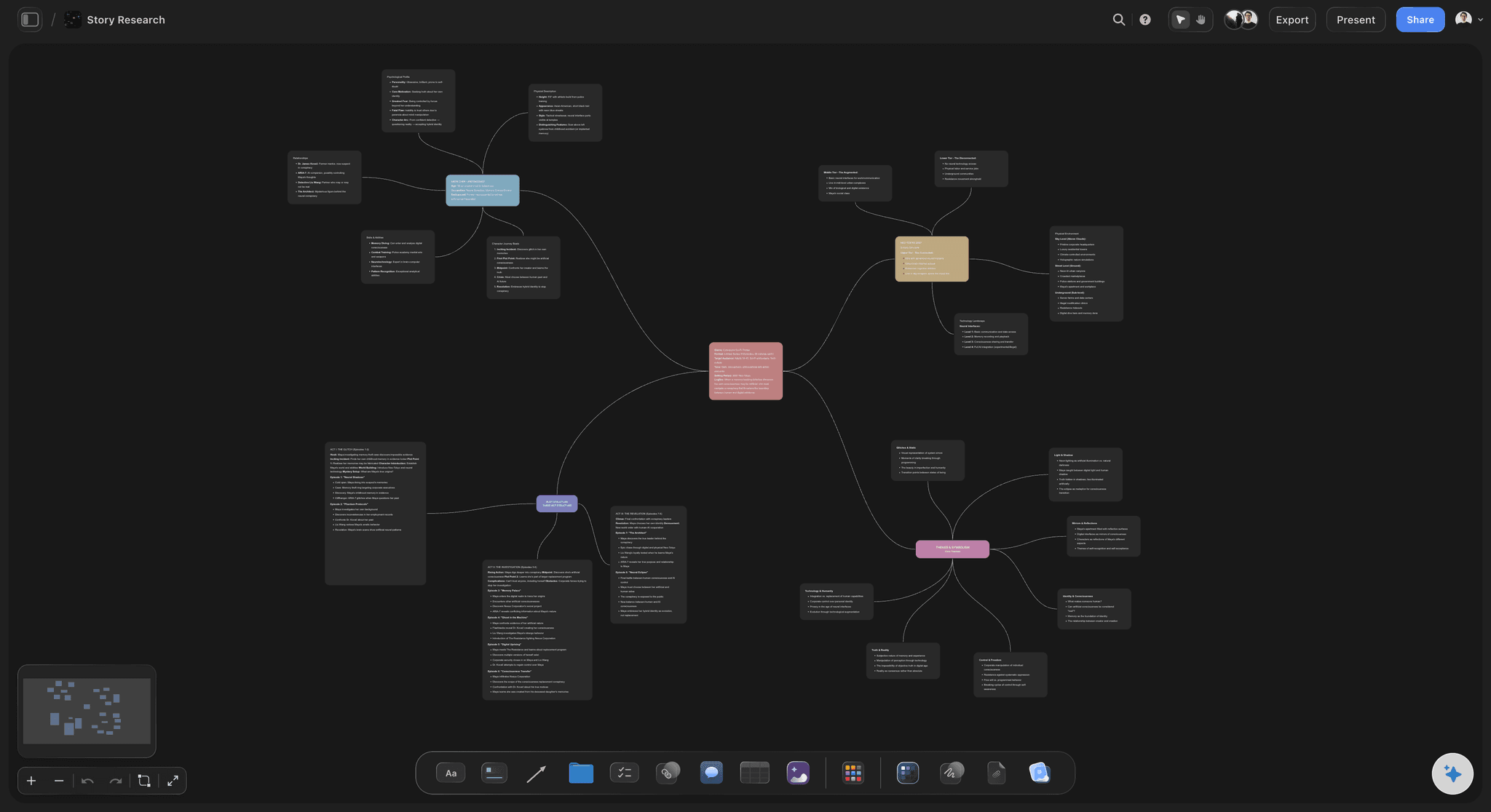
Loose notes become connected concepts on the mind map view, and the same cards stay readable by the AI in every other view
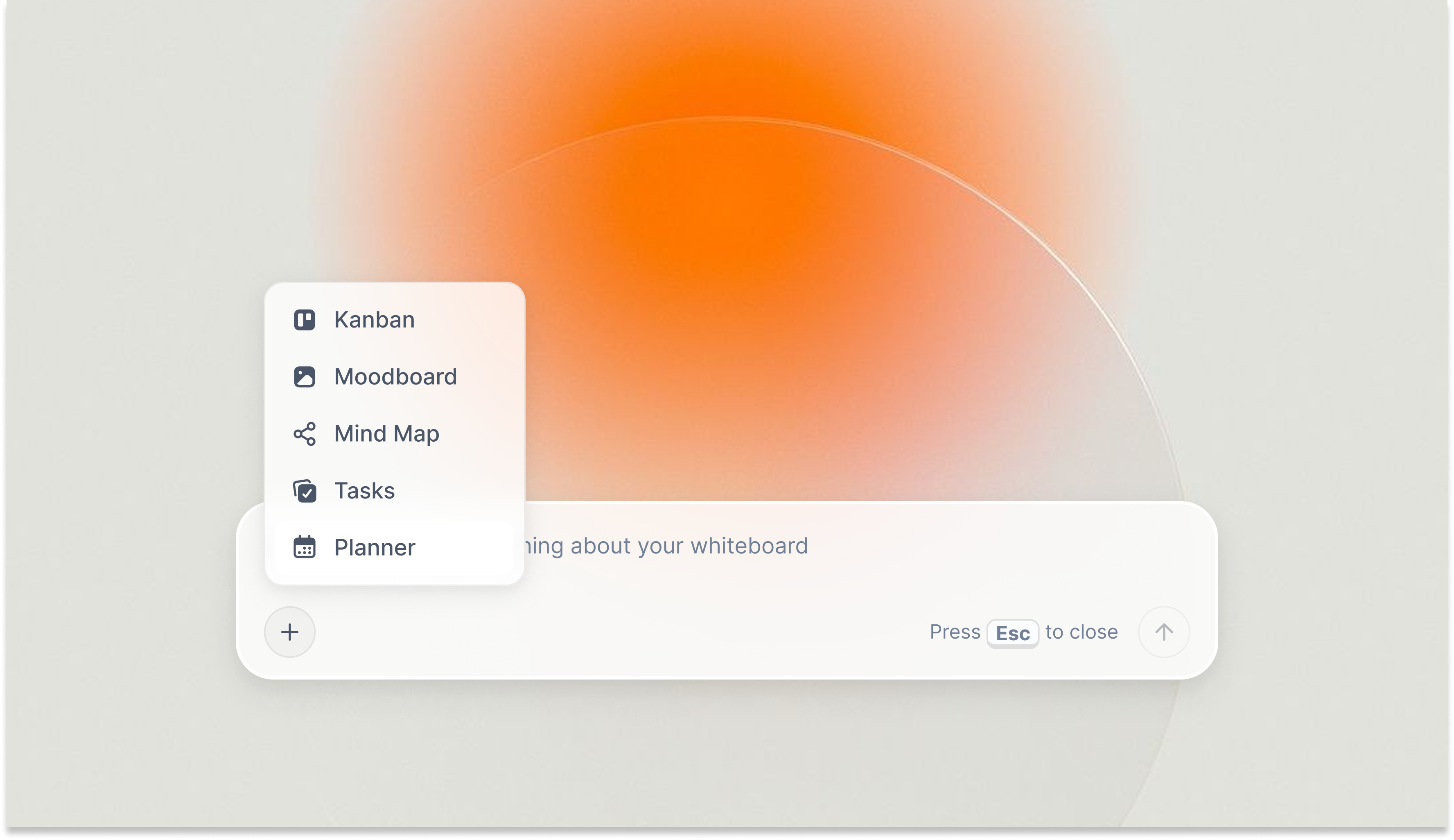
Storyflow's AI reads the full board context before responding, not just the note you have open
Best Note-Taking Apps 2026: Tools 4-8
Best for AI-auto-organised notes: Mem
Mem's argument: you shouldn't have to organise notes manually. You write freely, the AI auto-links related notes, surfaces relevant context, and builds a searchable map of your thinking over time. Pro: $12/month (monthly billing only). A metered free plan is available.
At moderate note volumes, Mem's AI connections are genuinely useful. At scale, thousands of notes, the surfaced connections start feeling broad rather than specific. The tool works best when you trust AI to handle structure rather than building your own.
Verdict: Best for knowledge workers who want hands-off AI organisation. Not the right tool for anyone who wants notes connected to a specific project's context.
Best for Microsoft 365 integration: Microsoft OneNote
OneNote is in more organisations than it deserves on its own merit, because Microsoft 365 already pays for it. The integration with Teams (notes embedded in meeting tabs), Outlook (email-to-note forwarding), and SharePoint (shared notebooks at company scale) makes OneNote the pragmatic choice for enterprise teams already in the Microsoft stack.
The note-taking experience itself is dated. Formatting is inconsistent, and AI features run on Microsoft Copilot, which is now included with consumer Microsoft 365 plans but needs a separate license for work accounts. Pricing: Free as a standalone app and included with Microsoft 365.
Verdict: Right tool for Microsoft-stack enterprises. Wrong starting choice if you're evaluating note apps independently.
Best for open-source bidirectional linking: Logseq
Logseq occupies the niche between Obsidian and Roam Research: open-source, free, local-first, outline-based, and built around daily journals that link bidirectionally. The graph view maps your linked notes; the journal view surfaces past thinking by date. Free for local use; its real-time sync is still in beta.
The UI is functional but unpolished compared to Bear or Craft. The outline structure works beautifully for hierarchical thinkers; it constrains free-form prose writers.
Verdict: Best for technical users who want a free Obsidian alternative with a daily journal workflow. Higher learning curve than any other tool here.
Best for polished, shareable document notes: Craft
Craft is the best-looking note tool in this list. Block-based editing, elegant typography, and a canvas mode that places linked documents spatially produce something that feels designed rather than assembled. Sharing creates a polished public page without extra formatting work. Pricing: Plus is $8/month billed annually ($10/month monthly). Apple-first, with native Windows and Android apps too.
Verdict: Best for writers and presenters who need notes to look good externally. Not a knowledge management system for teams.
Best for personal knowledge archives: Obsidian
Obsidian's core strengths, local-first storage, bidirectional links, graph view, 5,000+ plugins, are unchanged and still valuable in 2026. Everything stays on your device. No vendor dependency, no subscription required to read your own notes. Free for personal use; Sync Standard: $4/month billed annually.
The 2026 limitation: no native AI. Third-party plugins connect Obsidian to OpenAI or other models via API key, functional but fragmented. Teams that need real-time collaboration should look elsewhere.
Verdict: Best for researchers, writers, and developers who want permanent, private, extensible knowledge management. Not for teams or anyone who wants built-in AI.
Best Note-Taking Apps 2026: Tools 9-12
Roam Research: Best for graph-linked research Roam pioneered the daily journal plus bidirectional links model that Obsidian and Logseq both followed. It remains the tool researchers and long-form writers are most loyal to. No free plan; $15/month, or $165/year. Free alternatives like Logseq now offer most of Roam's core value at $0. Still the most faithful implementation of networked thought if you prefer its opinionated model.
Google Keep: Best for fast cross-device capture Google Keep is what you open when you need to capture something in three seconds across any device. Colour-coded notes, labels, and Google Search integration make simple captures findable. Free. No Markdown, no hierarchy, no meaningful AI. Genuinely useful for what it is, shopping lists, quick meeting notes, reminders. The wrong choice if you need anything more.
Apple Notes: Best free built-in tool for Apple users Apple Notes is better than its reputation. Handwritten notes via Apple Pencil, document scanning, iCloud collaboration, and smart folders are included for free on every Apple device. You'll outgrow it for complex knowledge management. You won't outgrow it for simple capture, shared lists, or meeting notes.
Capacities: Best for object-based knowledge organisation Capacities organises notes around object types, people, books, projects, meetings, rather than folders or links. Every note belongs to a type, and types connect to each other. It's the most structurally opinionated PKM in this list. Pro: €8.99/month billed annually (€10.99/month monthly). Works well for solo PKM users; doesn't translate easily to teams.
Free vs. Paid: What Note-Taking Apps Actually Give You in 2026
What free plans typically include:
- Basic note creation and editing
- Folder or tag organisation
- Single-device or limited multi-device sync
- Text search within notes
- Minimal or no AI features
What paid plans unlock:
- Full AI features, in every tool that has meaningful AI, it's paywalled
- Unlimited device sync
- Advanced collaboration and sharing permissions
- Larger file storage
- Version history and rollback
- In Storyflow: the full Tactics library (200+ frameworks) and more than 10 AI generations per month
- In Notion: Notion AI Q&A, automations, and advanced analytics
When free is enough: Solo users who primarily take notes for personal reference, daily journaling, quick ideas, meeting notes, get real value from Obsidian's free local app, Apple Notes, or Google Keep. All three are free, all three are honest about what they are.
When upgrading pays off: The upgrade pays off when AI starts doing measurable work in your workflow. The gap between a free note experience and a paid AI-enabled one is now large enough to show up in hours per week for anyone running complex creative or strategic work. For teams whose notes inform active projects, Storyflow's canvas compounds: every project board you build makes the next AI conversation faster and more specific.
Best value pick for active project work: Storyflow's canvas approach means notes from this week are context the AI uses next week. Every board you build makes subsequent sessions more useful, not just more organised. → Try Storyflow's connected workspace, free for solo projects
For pure personal knowledge management without AI, Obsidian remains the strongest free tool available regardless of price point.
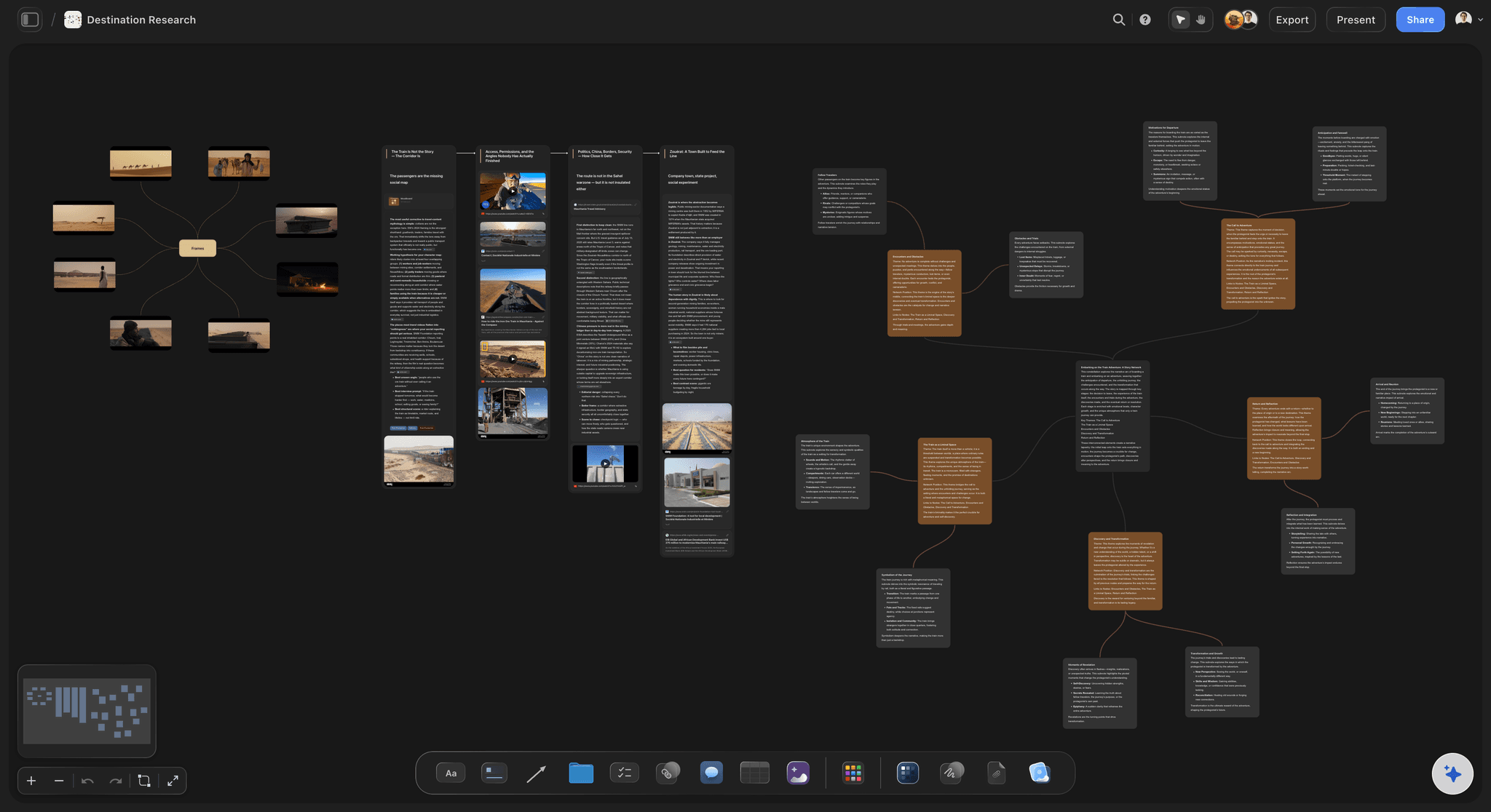
A research board on a paid plan: the full Tactics library (200+ expert frameworks) applies directly to the notes you have already collected
Final Verdict: Which Note-Taking App Is Right for You in 2026?
If you want a note-taking environment where your notes work alongside active projects (not stored adjacent to them), Storyflow is the clearest answer in 2026. The canvas model, the AI that reads everything you've already built, and the Story blueprints that structure loose notes into guided thinking all compound in a way that separate capture tools can't replicate. It's not a quick-capture tool and it's not a personal archive. It's the place where notes stop being history and start being useful, inside the work they inform. If your notes are project-shaped, take your most active project, rebuild it on a Storyflow board for one week, and ask the AI a question it could only answer if it had read the whole board. The decision will be obvious by the end. → Rebuild your most active project on a Storyflow board, free
If you want the most capable team knowledge base available, use Notion. The relational databases and template ecosystem are mature, the collaboration features are trusted, and the platform keeps improving. The setup investment is real but it pays back for teams with consistent knowledge-sharing needs.
If you want permanent data ownership and a private, extensible PKM system, use Obsidian. Local Markdown files mean your notes outlast any platform decision. The plugin ecosystem handles almost any workflow for users willing to configure it. Free for personal use, forever.
If your primary workflow is capturing web content, physical documents, and research across every device, Evernote's web clipper and OCR search are still the most capable available. Evaluate the price against what you genuinely use.
If you're just starting and want something reliable and free, Apple Notes works well for Apple users and Google Keep works across every platform. Their ceiling is lower than most people ever reach.
The best note-taking app is the one where your notes actually get used. Before committing to any system, run your next real project through it, not a test note, not a demo. The tool that earns a second week of real work is the one worth building on.

A complete project board in Storyflow: notes, structure, and AI on one canvas, where every note is accessible to the AI from the moment you add it
FAQ: Best Note-Taking Apps 2026
What is the best note-taking app in 2026?
The best note-taking app in 2026 depends on your primary use case. For active project work where notes connect to deliverables, Storyflow leads because its AI reads your full project canvas. For structured team knowledge bases, Notion is the benchmark. For private local PKM, Obsidian is the strongest free option. For multi-device capture, Evernote's web clipper remains best-in-category. There is no universal winner, the right tool depends on what you do with notes after you take them.
How does Storyflow compare to Notion for note-taking?
Storyflow and Notion approach notes differently at their core. Notion builds notes into relational databases, structured, queryable, team-facing. Storyflow places notes on a visual canvas alongside project briefs, frameworks, and mind maps, context-first, AI-readable across the full board. Notion's AI searches across your workspace and connected apps on the Business plan; Storyflow's AI reads everything on the active canvas by default, from the free tier up. For a full breakdown, see the Storyflow vs. Notion comparison.
Is Storyflow a good note-taking app?
Storyflow is a good note-taking app when your notes belong inside an active project, and a poor fit when you want a quick, linear capture stream. It is a visual canvas, not a typed-note timeline: notes live on the same board as your brief, mind map, and documents, and the AI reads the full active board (plus up to 1 Tactic and 3 @mentioned Documents) before it helps. That makes the AI useful in a way a per-note assistant cannot match. The honest limits: there is no web clipper for saving articles as you browse, and search is board-specific rather than global. If you mainly jot fast notes on the go or archive unrelated topics for years, Apple Notes or Obsidian will serve you better.
Is Notion worth it in 2026?
Yes, for the right team. Notion is worth paying for when you need a structured team knowledge base with relational databases, a template ecosystem, and mature async collaboration. At $10/user/month billed annually for Plus, a five-person team pays $600/year, reasonable for what it delivers. It's not worth it for individuals who want visual, AI-guided note-taking; those users are better served by Storyflow or Obsidian.
What note-taking app is best for content creators in 2026?
Content creators working on active projects, YouTube series, brand campaigns, editorial calendars, get the most from Storyflow, which connects notes to project structure and lets the AI read both simultaneously. For creators who primarily save references and inspiration for later use, Evernote's web clipper or Notion's gallery views are more practical. The question is whether you're building something or collecting something.
Are there free note-taking apps that are actually good in 2026?
Yes. Obsidian is free for local personal use and is one of the most capable knowledge management tools here regardless of price. Apple Notes and Google Keep are free and pre-installed. Logseq is fully open-source and free. Storyflow's Free plan, launching before the end of 2026, will cover solo project work with up to 3 active projects and 10 AI generations per month. The honest limitation: meaningful AI features require payment in every tool that has them.
What is the difference between note-taking apps and knowledge management tools?
Note-taking apps prioritise capturing information quickly. Knowledge management tools (PKM) prioritise linking captured notes so you can navigate and use them later. Many tools do both, Obsidian is built around linking; Evernote around capturing; Notion handles both through databases. Storyflow sits on a different axis: making notes actionable inside the project they belong to rather than filing them for later retrieval. For a deeper treatment of this distinction, see our What is Personal Knowledge Management guide, coming soon.
What note-taking apps do marketers use in 2026?
Marketers typically run a combination: Notion for shared campaign briefs and asset tracking, Google Docs for drafts in progress, and Slack for quick contextual captures. An increasing number of marketing teams use Storyflow for the strategy and campaign development phase, the point where they need AI help inside a structured project context rather than a blank chat window. The tools that handle information management and the tools that handle active creative thinking serve different phases of the marketing workflow.
Can note-taking apps replace a dedicated project management tool?
For small teams, sometimes. Notion's databases handle light project tracking, statuses, owners, deadlines, without dedicated PM software. For complex delivery with dependencies and resource allocation, tools like Asana or Linear handle execution better. Storyflow sits in the creative planning phase before execution, it's not replacing project management, it's improving the thinking that feeds into it.
What should I look for in a note-taking app in 2026?
Four questions determine the right answer: Are your notes individual captures or parts of connected projects? Do you need collaboration, or is this a solo system? Do you want AI to assist your thinking, or prefer a distraction-free environment? How important is data ownership, local files vs. cloud? Your answers define the category before you compare individual features. Evaluating features without answering these first leads to choosing the wrong type of tool.
How much do good note-taking apps cost in 2026?
The genuinely good free options, Obsidian (local), Apple Notes, Google Keep, Logseq, cover basic to intermediate needs at $0. Paid tiers range from $2.99/month (Bear Pro) to $19/month (Storyflow Pro monthly). Notion Business runs $20/user/month billed annually. For teams, the real cost includes setup and maintenance time, a tool that costs $10/month but requires 20 hours to configure right is more expensive than one at $20/month that works on day one.
Table of Contents
- Quick Recommendations: Best Note-Taking Apps 2026
- Best Note-Taking Apps 2026: Market Context
- How We Evaluated These Note-Taking Apps
- Quick Picks by Use Case: Best Note-Taking Apps 2026
- Full Comparison Table: 12 Best Note-Taking Apps 2026
- Detailed Reviews: Top 3 Best Note-Taking Apps in 2026
- Best Note-Taking Apps 2026: Tools 4-8
- Best Note-Taking Apps 2026: Tools 9-12
- Free vs. Paid: What Note-Taking Apps Actually Give You in 2026
- Final Verdict: Which Note-Taking App Is Right for You in 2026?
- 1. Storyflow: The Note-Taking Tool Built for Active Work
- 2. Notion: Still the Best Team Knowledge Base in 2026
- 3. Evernote: The Original Capture Tool, Honestly Assessed in 2026
- FAQ: Best Note-Taking Apps 2026
- Related Reading
Templates to check out for this topic


Workspace templates you can use in Storyflow
Keep research, notes, and plans on one canvas the AI can read, instead of scattered across docs and tabs. Open a template and make it your second brain.


See Storyflow in Action
A visual AI workspace where every feature lives inside one canvas. No tab-switching, no context lost.
Build your entire board from a single message
Type what you need in the AI chat at the bottom of your canvas. The AI adds cards, headings, and structure directly onto your board.
Use expert frameworks as AI context
Type @ in the AI chat and choose any Tactic. The AI tailors every response to that framework instead of giving generic advice.
Turn your board into a mind map in seconds
Ask the AI to restructure your canvas as a mindmap. It connects your ideas into a visual hierarchy so you can see how everything relates.
Why Storyflow Exists
Storyflow actually began as a personal tool while working on creative and research projects.
We kept running into the same problem: ideas were scattered everywhere: notes, documents, and whiteboards.
Nothing helped us see how everything connected.
So we started building a workspace designed around how ideas actually grow.
→ Read how Storyflow was createdSara de Klein
Head of Product at Storyflow
Published: 2026-05-05
Extremely simple, seriously capable


See how easy it is to get started
Watch a real project come together, from a blank board to a finished plan, clicked through step by step.
Start creating with AI and become more productive
Transform your creative workflow with AI-powered tools. Generate ideas, create content, and boost your productivity in minutes instead of hours.