The 10 Best Series Bible Software Tools in 2026 (Tested)
We tested 10 series bible tools for TV, web series, and novels. Storyflow ranks #1 for visual, canvas-first work. Plus from $7.99/mo.

Category
Screenwriting
Author

Justkay
Documentary Filmmaker & Founder at Storyflow
Topics
2026-07-21
•
18 min read
•
Screenwriting- best series bible software
- series bible software
- series bible template
- tv series bible tool
- worldbuilding software
- story bible software
- showrunner bible tool
- series bible app
What is the best series bible software in 2026?
The best series bible software in 2026 is Storyflow for visual, canvas-first work, World Anvil for deep encyclopedic worldbuilding, Notion for a relational writers'-room database, and Scrivener for a bible that lives beside the manuscript. Storyflow ranks first when your bible is more than text: characters, world lore, story arcs, episode cards, timelines, and reference images sit on one infinite canvas, and the AI reads the full active board at once instead of one page at a time. It is paid-only during early access, starting at $7.99 per month billed annually on Plus, with unlimited objects and no time limit; its Free plan launches before the end of 2026. The right pick depends on whether your bible is mostly encyclopedia, mostly database, mostly manuscript, or mostly canvas. No single tool wins for everyone, which is why this guide sorts them by the shape of the work. Two ideas run through the whole list. A series bible has two readers, the buyer who needs to be sold and the writers' room that needs to stay consistent, and almost no tool serves both equally well. And a series bible is not a document you write once. It is a canon you maintain. I have built and kept bibles for long-form and series documentary work, where the canon is real people, real timelines, and hundreds of research fragments that have to agree with each other across parts, so I tested each tool on that job, not on a demo file.

Full disclosure: Storyflow is our own product, so weigh its placement with the skepticism you would apply to any tool a company recommends on its own blog. We rank it first for one job, keeping a visual, canvas-first series bible the AI can read whole, and we are explicit about where World Anvil (deep lore), Notion (relational database), and Scrivener (drafting the manuscript) beat it.
Quick Comparison
Where series writers actually build a bible, and the one job each tool is best at.
| Tool | Best For | AI Features | Price |
|---|---|---|---|
| Storyflow | Visual canvas bible | Reads the whole board | $7.99 mo annual (free plan late 2026) |
| World Anvil | Encyclopedic worldbuilding | Some AI | Free / paid |
| Notion | Relational database | Notion AI (page-level) | Free / paid |
| Scrivener | Bible beside the manuscript | None native | ~$59.99 one-time |
All 10 Series Bible Tools, Ranked
- Storyflow: best visual, canvas-first bible where the AI reads the whole board
- World Anvil: best deep encyclopedic worldbuilding and interlinked wiki
- Campfire: best modular novel and worldbuilding suite
- Notion: best relational writers'-room database and team canon
- Scrivener: best when the bible lives beside the manuscript
- Plottr: best timeline-first outlining across books and seasons
- Milanote: best lightweight visual board for tone and light structure
- StudioBinder: best production bible once you reach the shooting stage
- Obsidian: best local-first, plain-text canon you fully own
- Google Docs: best free starting point for a small series
Keep the two-readers idea in mind as you read. Document tools make a beautiful pitch bible and a weak writers'-room bible. Wiki and database tools make a strong writers'-room bible and a plain pitch. The rankings reward the tools that narrow that gap.
Why a Series Bible Needs Its Own Tool
By episode six, the timeline no longer agrees with itself. A character who died in the season-one bible is giving notes in the season-two outline. An eye color changes twice. A town is a three-hour drive from the city in one script and a short train ride in another. None of this is carelessness. It is the predictable result of holding a growing world inside a growing pile of documents.
A single film has one bible-sized problem. A series has that problem multiplied by every episode, every season, and every writer who joins the room. The reason people search for series bible software is not that a document cannot hold character notes. It is that a document cannot keep a hundred interlocking facts consistent while several people change them at once.
Three specific failures push writers off documents and toward a dedicated tool.
- Continuity drifts as the canon grows. Every new episode adds facts that must agree with old facts, and in a document nothing enforces that agreement. You find the contradiction at the table read, not before.
- The bible has two readers with opposite needs. The pitch bible has to be persuasive for a buyer. The writers'-room bible has to be queryable and current for the team. One document rarely does both well.
- Nobody can hold a series in their head. Cowan's research (Behavioral and Brain Sciences, 2001) established that human working memory holds roughly four chunks of information at once. A series has hundreds, so the tool is not a luxury; it is the external memory the work requires.
There is a cost underneath all three. As the canon grows, the time spent hunting for the one fact you need grows with it, and the McKinsey Global Institute (2012) estimated that knowledge workers already spend about 19 percent of the workweek just searching for information. A bible spread across docs, spreadsheets, and folders quietly adds to that tax every time a writer asks a continuity question.
Zoom out and the market splits into camps. Worldbuilding-wiki tools (World Anvil, Campfire, Obsidian, Notion) treat the bible as an encyclopedia of interlinked records. Visual-canvas tools (Storyflow, Milanote) treat it as a space you arrange, where characters, arcs, and mood live side by side and you can see the whole series at once. Manuscript tools (Scrivener) keep the bible next to the writing. Production tools (StudioBinder) take over once you are shooting. None is strictly better. Each matches a different shape of series work.
When do you not need one? If your project is a single short, a one-off pilot with three characters, or a self-contained novel you will finish before the world grows complex, a good document is enough. A series bible earns its keep the moment your world outgrows your memory, and not one day before.
How We Evaluated the Best Series Bible Software
We tested each tool on the same real workloads: a serialized drama bible (characters, arcs, and an episode grid), a fantasy world with deep lore and a timeline, and a documentary series bible built from real research fragments that had to stay consistent across parts. Tools were not scored on feature lists. They were scored on whether the canon stayed coherent as it grew.
Six criteria set the rankings, in this order of weight. Continuity support: when a fact changes, how easily does the tool keep every related record honest, and can you catch contradictions before a reader does. Structure fit: does the tool's shape (canvas, wiki, database, outline, or manuscript) match how a series bible wants to be organized across characters, world, arcs, episodes, and timelines. The two-reader test: can one tool produce a persuasive pitch bible and a working writers'-room bible, or does it force you to keep two. AI usefulness: holding the substrate constant, how much does the AI help you build, question, and expand the canon rather than just autocomplete a sentence. Collaboration: how well several writers work in the same bible without stepping on each other. Pricing transparency: what you actually pay as the bible and the team grow.
Every tool was used hands-on for at least two weeks on genuine series work. Where a competitor's pricing has shifted recently, we write "verify current pricing" rather than quote a number that may already be stale.
Quick Picks by Use Case
Best overall series bible software: Storyflow. The pick when your bible is visual and project-shaped, with characters, arcs, and reference images that benefit from board-aware AI. Plus is $7.99/month billed annually ($9.99 monthly). The honest limit: it is not a manuscript editor and it is cloud-only.
Best for deep worldbuilding: World Anvil. For epic fantasy and science fiction with encyclopedic lore, maps, family trees, and a timeline you treat as a database. Free tier available; paid annual memberships.
Best modular suite for novelists: Campfire. Purpose-built character, relationship, and worldbuilding modules you can buy piece by piece. Limited free access; modular or subscription pricing.
Best relational writers'-room bible: Notion. Episodes linked to characters linked to arcs in a true database, ideal for a team that already lives in Notion. Free for personal use; paid from about $10/user/month.
Best bible next to the manuscript: Scrivener. Character and setting sketches, a corkboard, and a research folder in the same tool where you write the book. About $59.99 one-time.
Best free starting point: Google Docs. Sketch a first pitch bible for free; move to Storyflow (paid-only during early access, from $7.99/mo annual; Free plan launching before the end of 2026) when the doc starts to strain, for unlimited objects and no time limit.
The honest split: most writers build the pitch bible in a document or a canvas and keep the working canon in a wiki, database, or board. Try Storyflow to build a visual bible.
Comparison Table: Best Series Bible Software
| Tool | Best For | Starting Price | Free Plan | Rating (/10) |
|---|---|---|---|---|
Storyflow | Visual, canvas bible (AI reads the whole board) | $7.99/mo (annual) | Coming late 2026 (invited collaborators join free now) | 9.4/10 |
World Anvil | Deep encyclopedic worldbuilding and wiki | Free tier; paid annual | Yes (Freeman tier) | 9.0/10 |
Campfire | Modular novel and worldbuilding suite | Modular / subscription | Yes (limited free) | 8.7/10 |
Notion | Relational writers'-room database | Free; from about $10/user/mo | Yes (free personal) | 8.6/10 |
Scrivener | Bible next to the manuscript | About $59.99 one-time | Trial only | 8.5/10 |
Plottr | Timeline-based series outlining | Paid; free trial | Trial only | 8.3/10 |
Milanote | Visual mood plus light structure | Free (100 items); Pro | Yes (100-item free) | 8.2/10 |
StudioBinder | Production bible for film and TV | Free tier; paid | Yes (limited) | 8.0/10 |
Obsidian | Local-first plain-text canon | Free (personal); Sync extra | Yes (free personal) | 7.9/10 |
Google Docs | Simple first-draft bible | Free | Yes (free) | 7.4/10 |
Prices above are the published rates at the time of writing and move often, so check the vendor's own page before you commit. The shape of each plan (free tier, subscription, or one-time licence) is more stable than the number. Rating criteria: we weighted continuity support, structure fit, and the two-reader test more heavily than raw feature count. Tools that do one job cleanly outranked tools that do five jobs at half depth. Prices checked July 2026; competitor pricing marked "verify current pricing" moves often, so confirm on each vendor's page.
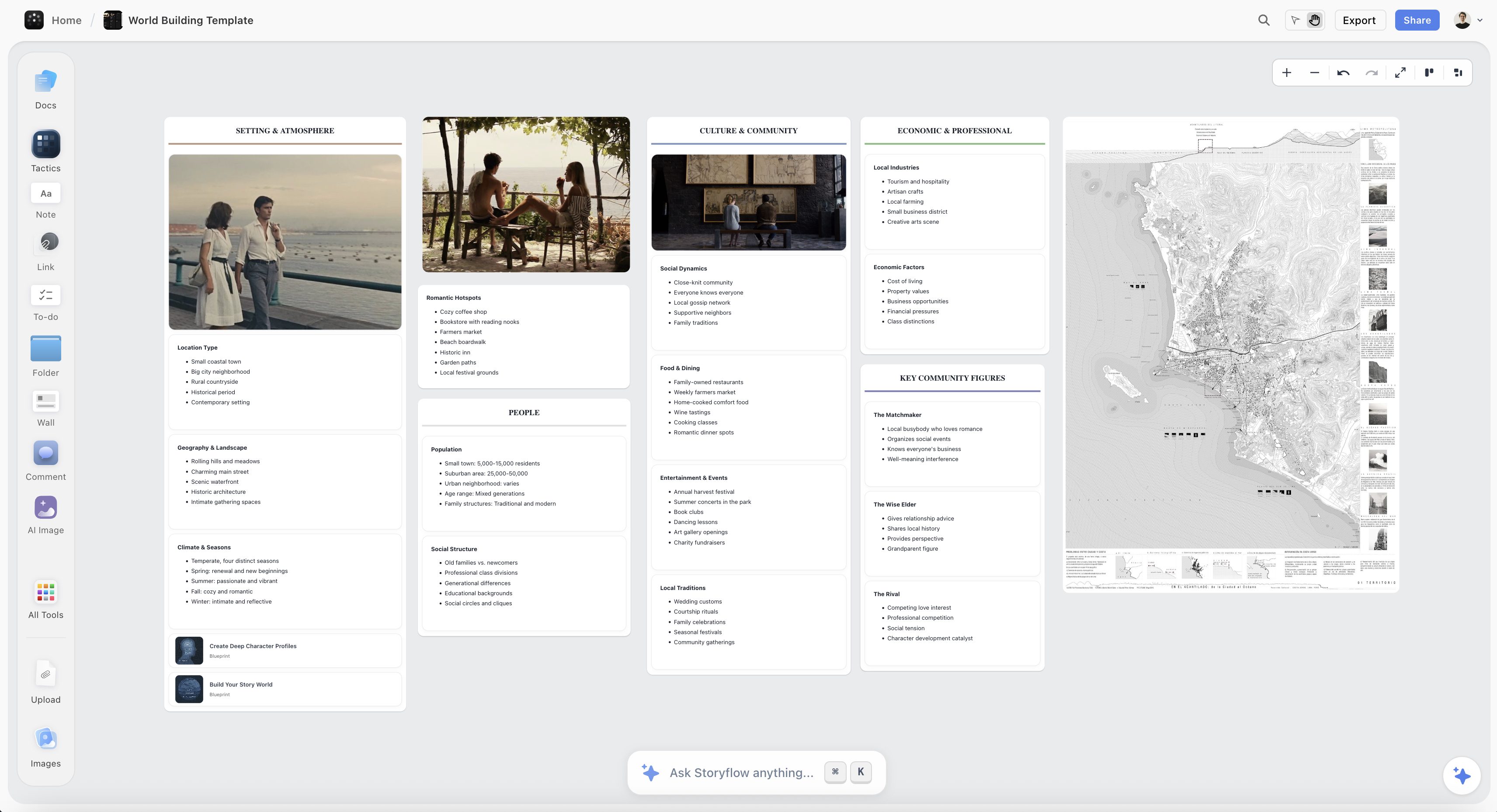
A series bible on the Storyflow canvas, with character profiles, world lore, story arcs, an episode grid, and a timeline on one board
Build your series bible on one canvas
Characters, world lore, story arcs, episode cards, and a timeline live on one board, and the AI reads the whole thing, so the pitch bible and the writers'-room canon finally stay in sync as the series grows.

Detailed Reviews: Best Series Bible Software
1. Storyflow (Best Visual, Canvas-First Bible)
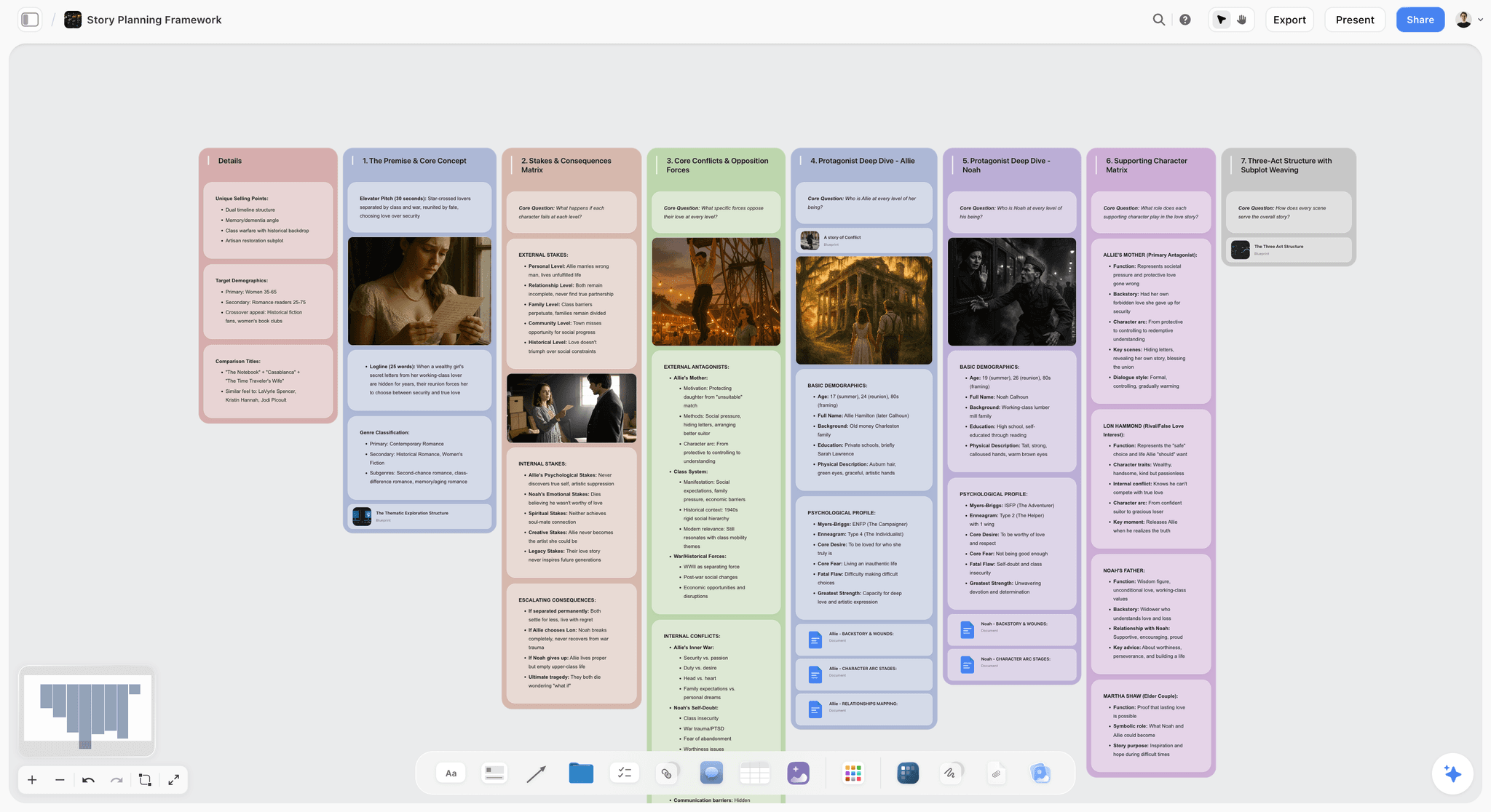
Storyflow is a visual workspace where your entire series bible lives on one infinite canvas and the AI reads the full active board by default. Character profiles, world lore, story arcs, episode cards, timelines, and reference images sit next to each other instead of buried in separate pages, so you can see the whole series at a glance while an AI grounds its answers in everything on the board. You can add up to 1 Tactic (a Story Blueprint) and up to 3 Documents by @-mention when you want to pull a specific arc or character dossier in as extra grounding. You can even grab a frame from a YouTube or Vimeo reference video straight onto the canvas, so tone lives inside the bible rather than in a separate mood folder. It is the one tool here that serves both readers of a bible, the buyer and the writers' room, on the same surface.
Best for: TV, web-series, and novel writers whose bible is visual and project-shaped, and showrunners who want the pitch bible and the working canon in one place.
Pricing: Paid-only early access today; the Free plan (unlimited objects, unlimited shared boards, unlimited collaboration, 3 starter blueprints, 20 file uploads) launches before the end of 2026, and anyone a paid member invites to a board joins free now. Plus is $7.99/month billed annually or $9.99 monthly (full 200+ Story Blueprints, more AI, unlimited uploads). Pro is $14/month annual or $19 monthly (adds AI image generation and far more AI). Max is $39/month annual or $49 monthly (adds 40x more AI plus a team workspace with permissions and roles). Max is the team-targeted tier; there is no separate Team plan. Pricing is flat per account at the solo tiers, not per seat.
Pros: The canvas matches how a series bible wants to be organized, spatial and visible at once. Board-aware AI answers continuity and arc questions from the whole board, not one page, which is the difference that matters for a series. The free tier is genuinely usable for a full bible, and grabbing reference frames keeps tone in the same place as canon.
Cons: It is canvas-card-shaped, not encyclopedia-shaped, so for an 800-article interlinked wiki with maps and family trees, World Anvil goes deeper. It is cloud-only, with no local-first mode for privacy-strict work. And it is not a manuscript tool, so you draft the actual script or novel in a dedicated writing app.
Verdict: The strongest series bible tool when your canon is more than text, and the one pick that keeps the pitch and the writers'-room bible on one surface. If your series is visual and growing, rebuild your most active bible on a board for one week and the fit becomes obvious.
2. World Anvil (Best Deep Worldbuilding)
World Anvil is the deepest worldbuilding platform available, built for writers whose lore rivals the story itself. It treats the bible as an interlinked encyclopedia: articles for characters, locations, organizations, and history, plus interactive maps, family trees, and a timeline you manage like structured data. Where Storyflow wins on visual canvas, World Anvil wins on encyclopedic depth and cross-linking.
Best for: Epic fantasy and science fiction writers, tabletop RPG world creators, and anyone whose series lives or dies on lore depth.
Pricing: Free Freeman tier with limits; paid memberships billed annually unlock private worlds, more articles, and maps.
Pros: No tool goes deeper on lore, interlinking, and reference structure. Maps, timelines, and family trees are first-class, not bolt-ons. The worldbuilding community and template library are large and active.
Cons: The interface is dense and can feel like data entry rather than storytelling. The learning curve is steep, and it is wiki-first, so seeing the whole series visually at a glance is harder than on a canvas.
Verdict: The strongest pure worldbuilding tool on the list. Choose it when your bible is lore-first and encyclopedic.
3. Campfire (Best Modular Suite for Novelists)
Campfire is a modular suite where you assemble a bible from purpose-built pieces: Characters, Worldbuilding, Timeline, Relationships, Maps, and Manuscript. You add only the modules your project needs, which keeps a novelist's bible from turning into a full wiki. It sits between Scrivener's manuscript focus and World Anvil's encyclopedic depth.
Best for: Novelists and worldbuilders who want structured character and relationship tools without committing to an encyclopedia.
Pricing: Limited free access, with modular purchases or a subscription for the full suite.
Pros: The character and relationship tools are genuinely strong, and the relationship web maps how a cast connects across a series. Modular pricing lets a solo writer keep costs down. It is friendlier than World Anvil for story-first writers.
Cons: Buying many modules adds up, and the pricing model takes a minute to understand. Collaboration is lighter than Notion or Storyflow, and it is less suited to a fast, visual, whole-series overview.
Verdict: The most flexible modular option, best for novelists who want structure they can buy piece by piece.
4. Notion (Best Relational Writers'-Room Bible)
Notion is the flexible database most writers' rooms already run on. Build relational databases where episodes link to characters link to arcs, and you get a queryable canon that stays honest as long as the team keeps it current. Where Storyflow wins on visual overview, Notion wins on true database relationships and team wiki structure.
Best for: Writers' rooms and teams who want a relational, queryable bible and already live in Notion.
Pricing: Free for personal use. Paid plans start around $10/user/month with Notion AI as an add-on. Pricing is per seat, so it scales with team size.
Pros: Relational databases are exactly right for episode-character-arc linking. Filtered views let each writer see the slice of canon they need. The template ecosystem is huge, including ready-made series bible templates.
Cons: It is doc-and-database-shaped, not a visual canvas, so the whole-series overview is a table, not a space. You build the structure yourself before it becomes useful, and the AI reads the current page or database rather than a full project board.
Verdict: The strongest relational writers'-room bible, best for database-minded teams.
5. Scrivener (Best Bible Beside the Manuscript)
Scrivener is the long-form writing tool that keeps the bible beside the manuscript. Its binder holds character and setting sketches, a research folder, and a corkboard, so the canon sits one click from the scene you are drafting. Where Storyflow separates the bible from drafting, Scrivener fuses them.
Best for: Novelists and long-form writers who want their series bible in the same tool where they write the book.
Pricing: About $59.99 one-time for macOS or Windows, with a separate iOS app. Free trial available.
Pros: The bible and the manuscript live together, which cuts context-switching. A one-time price is rare and welcome in a subscription world. It is deeply capable for long-form structure and drafting.
Cons: It is not cloud-native or built for real-time team collaboration. The interface feels dated, and the bible is a set of side folders rather than a first-class structured or visual system.
Verdict: The best pick when writing and world-tracking should live in one tool.
6. Plottr (Best Timeline-First Outliner)
Plottr is a timeline-first outlining tool built to visualize plot threads across a whole series. You lay out beats on a timeline, run multiple storylines in parallel, and see how arcs move across books or seasons at a glance. It is an outliner with bible features rather than a full canon system.
Best for: Writers who think in timelines and need a series-spanning outline across multiple installments.
Pricing: Paid, with a free trial and periodic lifetime options.
Pros: The timeline view is the clearest way to see arcs across installments. It is purpose-built for series-length plotting, and it is approachable for writers who find full wikis overwhelming.
Cons: It is outline-and-timeline-shaped, so deep lore and reference live elsewhere. Collaboration is lighter than team-first tools, and it is not where you build a persuasive pitch bible.
Verdict: The best timeline visualization on the list, best for plotters who see a series as parallel threads.
7. Milanote (Best Lightweight Visual Board)
Milanote is a clean visual board tool for arranging notes, images, and cards. For a series bible it shines on the mood-and-tone side: drag references, character cards, and loose structure onto a board that looks good in a pitch. Where Storyflow adds board-aware AI and deeper structure, Milanote keeps things simple and elegant.
Best for: Writers who want a simple, attractive visual board for tone and light structure.
Pricing: Free plan capped at 100 notes and images; paid Pro unlocks unlimited items.
Pros: It is one of the most pleasant visual tools to actually use, excellent for the tone and reference layer of a bible, and fast to start with no setup.
Cons: It is lighter on AI and structured, linkable data than Storyflow or Notion. The 100-item free cap arrives quickly on a real series, and there is no methodology layer to scaffold arcs.
Verdict: A strong, lightweight visual option, best for the mood layer of a bible.
8. StudioBinder (Best Production Bible)
StudioBinder is production management software, not a story tool, and that is exactly its role here. Once the story bible is locked, StudioBinder takes over for script breakdowns, shot lists, storyboards, call sheets, and scheduling. It is a different bible than the one this guide is mostly about, and it is worth knowing where the handoff happens.
Best for: Film and TV teams who need a production bible after the story bible is written.
Pricing: Free tier with limits, plus paid plans for larger productions.
Pros: It is best-in-class for breakdowns, call sheets, and scheduling, purpose-built for the realities of a shoot, with clean output for a crew.
Cons: It is a production bible, not a story or world bible, so characters, lore, and arcs are not its job. It is overkill before you reach production, and its pricing targets productions, not solo writers.
Verdict: The best tool for the production side of a series, once the story bible is done.
9. Obsidian (Best Local-First Canon)
Obsidian is a local-first, plain-text notes tool with backlinks and a graph view. Writers use it to build a wiki-style canon that lives entirely on their own device, with every fact linked to every related fact. Where Storyflow is cloud-native and visual, Obsidian is local, text-first, and endlessly customizable.
Best for: Privacy-first solo writers who want a plain-text canon they fully own and control.
Pricing: Free for personal use. Sync is an add-on subscription, and commercial use has its own license.
Pros: Full data ownership and offline access, with zero vendor lock-in. The backlink and graph model suits an interlinked canon, and the plugin ecosystem is deep.
Cons: You assemble the entire bible structure yourself. Native collaboration is weak, and there is minimal native AI, with a text-first rather than visual surface.
Verdict: The strongest local-first bible, best for solo writers who want to own their data.
10. Google Docs (Best Free Starting Point)
Google Docs is the universal document, and it is where most series bibles are born. For a small project it can be all you need: free, collaborative, and familiar to everyone on the team. It is honest about what it is, a document rather than a canon system.
Best for: Writers starting a small series or drafting a first pitch bible before investing in a dedicated tool.
Pricing: Free with a Google account. Paid Workspace tiers add storage and admin features.
Pros: It is free, universal, and frictionless for collaboration, perfect for a first-draft pitch bible, with no learning curve at all.
Cons: There is no structure or linking, so continuity is only as good as your search bar. It breaks down once you pass a handful of characters and episodes, and there is no visual canvas or continuity enforcement.
Verdict: The best free starting point, and the tool most series eventually outgrow.
Persona-Based Recommendations
TV / Web-Series Showrunner
Top picks: Storyflow or Notion. Storyflow if you want the pitch bible and the writers'-room canon on one visual canvas the AI can read end to end. Notion if your room prefers a relational database and already works there. Avoid Google Docs past the pilot; it will not hold a room together.
Epic Fantasy or Sci-Fi Novelist
Top picks: World Anvil or Campfire. World Anvil for encyclopedic lore, maps, and family trees. Campfire for strong character and relationship modules without a full wiki. Storyflow is the wrong pick here if your bible is 800 interlinked articles; the canvas is for seeing a series, not indexing an encyclopedia.
Solo Novelist Writing a Series
Top picks: Scrivener or Storyflow. Scrivener if you want the bible one click from the manuscript. Storyflow if you think visually and want board-aware AI to question your canon. Both beat a lone document once the series passes book two.
Documentary Series Maker
Top picks: Storyflow and Obsidian. Storyflow for the visual research canvas where subjects, timelines, and footage references live together and the AI reads the whole board. Obsidian if you need a private, local, plain-text archive of sensitive research. This is the workflow I run for multi-part documentary work.
Writers' Room or Team
Top picks: Notion or Storyflow Max. Notion for a relational, filtered canon each writer can slice. Storyflow Max ($39/month annual) for a shared visual bible with a team workspace, permissions, and roles. Pick by whether your room thinks in databases or in space.
Budget or Just Starting
Top picks: Google Docs, then Storyflow. Google Docs to sketch the first pitch bible for free. Storyflow (paid-only during early access, from $7.99/mo annual) when the doc starts to strain, for unlimited objects and no time limit. Its Free plan launches before the end of 2026.
Honorable Mentions
A few tools that came close but did not make the main ten.
- Dabble: A clean novel-writing app with a Story Notes bible and a plot grid, lighter on deep worldbuilding than Campfire.
- LivingWriter: A cloud writing tool with story-element tracking and structure templates, narrower than Scrivener on long-form control.
- Miro or FigJam: Excellent infinite whiteboards for a visual bible, but without a story or AI layer built for canon.
- Airtable: A powerful relational database for an episode-character-arc grid, though you build every view from scratch.
- A self-hosted wiki: Genuinely good for a public, interlinked canon, but built for readers, not for a working writers' room.
These are not weak tools. Their fit for a series bible is just narrower than the ten above.
When a Simple Doc Wins
For some projects, a single document is the correct tool and buying software is unnecessary friction. A doc wins when your project is a single film, a short, or a self-contained novel with a small cast; when you are drafting a first pitch bible you will hand to one buyer and then rework; when your whole team is two people who talk every day; and when the continuity genuinely fits in your head and your search bar.
If three or more of those match, stay in the document and write. A series bible tool is external memory for a world too big to hold, so if your world is not that big yet, the tool is overhead, not leverage. The moment the doc starts contradicting itself is the moment to graduate, and not before.
The Bottom Line
The best series bible software in 2026 depends on the shape of your bible. If it is visual and project-shaped, with characters, arcs, and references you want to see at once, Storyflow is the strongest canvas-first pick, and its AI reads the whole board by default. If it is lore-first fantasy or science fiction, World Anvil goes deepest on encyclopedic worldbuilding. If it is a relational team canon, Notion links episodes, characters, and arcs cleanly. If it should live beside the manuscript, Scrivener fuses the bible and the draft.
Remember the two ideas that run through the list. A series bible has two readers, the buyer and the writers' room, and Storyflow is the rare tool that serves both on one surface. And a series bible is not a document you write once; it is a canon you maintain, which is why structure beats a blank page the moment your world outgrows your memory. If your series is visual and growing, start a Storyflow workspace and rebuild your most active bible on a board for one week.
FAQ: Series Bible Software in 2026
What is a series bible?
A series bible is the reference document that keeps a show, web series, or book series consistent over time. It typically holds character profiles, world and lore rules, story arcs, episode or season outlines, and a timeline. It serves two readers: buyers who need to be sold on the series, and the writers' room that needs to keep the canon straight.
What is the best series bible software in 2026?
Storyflow is the best series bible software for visual, canvas-first work, because characters, arcs, episodes, and references sit on one board the AI reads in full. World Anvil is best for deep encyclopedic worldbuilding, Notion for a relational team database, and Scrivener when the bible should live beside the manuscript. Storyflow is paid-only during early access, starting at $7.99/month billed annually on Plus, with its Free plan launching before the end of 2026.
Is Notion good for a series bible?
Yes, Notion is strong for a series bible when you want a relational database that links episodes to characters to arcs. It suits writers' rooms that already work in Notion and think in tables and filtered views. Its limits are that it is doc-and-database-shaped rather than a visual canvas, and its AI reads the current page rather than a full project board.
What do TV writers use for series bibles?
TV writers use a mix, depending on the room. Many build the pitch bible in a document or a design tool, then keep the working canon in Notion, Storyflow, or a shared wiki. Once production starts, the story bible hands off to a production tool like StudioBinder for breakdowns and scheduling.
Is there an AI tool for building a series bible?
Yes. Storyflow is the strongest AI-native option, because its AI reads your full active canvas board (plus up to 1 Tactic and 3 Documents you @-mention) rather than one page at a time. That whole-board grounding is what lets it answer continuity and arc questions across the series. Notion AI and other page-level assistants help with drafting, but they see a narrower slice of the canon.
What is the best free series bible software?
Obsidian is the best free local-first option, and Google Docs is the simplest free starting point. Storyflow will have the strongest free tier for a visual bible once it launches before the end of 2026 (unlimited objects, no time limit, unlimited collaboration, 3 starter blueprints, and 20 file uploads); today it is paid-only during early access, from $7.99/mo annual. Pick by shape: plain text points to Obsidian, a quick draft points to Docs, and canvas points to Storyflow once its free tier is out.
World Anvil vs Storyflow: which is better for worldbuilding?
World Anvil is better for encyclopedic worldbuilding, with interlinked wiki articles, maps, family trees, and a database-style timeline. Storyflow is better when you want to see the whole series visually and have an AI read the entire board, but it does not match World Anvil's article depth. Choose World Anvil for lore-first fantasy and science fiction; choose Storyflow for visual, project-shaped bibles.
Do novelists need series bible software?
Novelists writing a standalone book usually do not, but novelists writing a series eventually do. Once you pass two or three books, continuity across characters, timelines, and world rules outgrows memory and a single document. Scrivener suits novelists who want the bible beside the manuscript, while Campfire and Storyflow suit those who want structured or visual canon tracking.
How is a series bible different from a treatment or outline?
A treatment sells one story and an outline sequences one plot, but a series bible maintains a whole world across many stories. The treatment and outline are written once and largely fixed; the bible is a living canon you update as the series grows. Put simply, an outline answers what happens next, and a bible answers what is true.
Table of Contents
- All 10 Series Bible Tools, Ranked
- Why a Series Bible Needs Its Own Tool
- How We Evaluated the Best Series Bible Software
- Quick Picks by Use Case
- Comparison Table: Best Series Bible Software
- Detailed Reviews: Best Series Bible Software
- Persona-Based Recommendations
- Honorable Mentions
- When a Simple Doc Wins
- The Bottom Line
- Author
- FAQ: Series Bible Software in 2026
- Related Reading
Templates to check out for this topic


Templates you can use in Storyflow
Every Storyflow board starts from real structure and an AI that reads the whole canvas. Open one of these templates and make it yours.


See Storyflow in Action
A visual AI workspace where every feature lives inside one canvas. No tab-switching, no context lost.
Build your entire board from a single message
Type what you need in the AI chat at the bottom of your canvas. The AI adds cards, headings, and structure directly onto your board.
Use expert frameworks as AI context
Type @ in the AI chat and choose any Tactic. The AI tailors every response to that framework instead of giving generic advice.
Turn your board into a mind map in seconds
Ask the AI to restructure your canvas as a mindmap. It connects your ideas into a visual hierarchy so you can see how everything relates.
Why Storyflow Exists
Storyflow actually began as a personal tool while working on creative and research projects.
We kept running into the same problem: ideas were scattered everywhere: notes, documents, and whiteboards.
Nothing helped us see how everything connected.
So we started building a workspace designed around how ideas actually grow.
→ Read how Storyflow was createdJustkay
Documentary Filmmaker & Founder at Storyflow
Published: 2026-07-21
Extremely simple, seriously capable


See how easy it is to get started
Watch a real project come together, from a blank board to a finished plan, clicked through step by step.
Start creating with AI and become more productive
Transform your creative workflow with AI-powered tools. Generate ideas, create content, and boost your productivity in minutes instead of hours.