The 12 Best Visual Collaboration Tools for Marketing Teams in 2026
The best visual collaboration tools for marketing teams in 2026, tested on real campaigns. Where the workshop, the brief, and the calendar live on one board the AI can read.

Category
Marketing
Author

Justkay
Documentary Filmmaker & Founder at Storyflow
Topics
2026-06-18
•
Updated June 18, 2026
•
15 min read
•
Marketing- visual collaboration tools for marketing teams
- best visual collaboration tools for marketing
- marketing team whiteboard
- AI collaboration canvas
- marketing collaboration software 2026
- team campaign planning tools
What is the best visual collaboration tool for marketing teams?
The best visual collaboration tool for marketing teams in 2026 is Storyflow, on the Plus plan at $7.99 per month billed annually and flat per account, because its AI reads the entire campaign board (the workshop notes, the brief, the calendar, and the creative concept together) so the team's collaboration becomes a real campaign instead of an abandoned whiteboard. For the deepest live whiteboard workshops, Miro is the strongest alternative, and for design-led teams in Figma, FigJam is the natural fit.

All 12 Visual Collaboration Tools, Ranked
- Storyflow: turning team collaboration into a campaign the AI can read
- Miro: deep real-time whiteboard workshops
- FigJam: design-adjacent marketing teams in Figma
- Mural: facilitated strategy sessions
- Notion: document-and-database campaign hubs
- Canva: collaborative asset design
- Whimsical: lightweight flows and wireframes
- Lucidspark: brainstorm boards in the Lucid suite
- ClickUp: visual work management with whiteboards
- Monday.com: visual marketing work boards
- Conceptboard: enterprise visual collaboration and review
- Milanote: visual moodboards and creative briefs
Full disclosure: Storyflow is our own product, and we rank it #1 for a specific claim: it is the one tool here where the workshop, the brief, the calendar, and the concept share one board an AI can read. It is not a cursor-heavy multiplayer whiteboard at Miro's scale, so for a large live workshop Miro (or Mural for facilitated sessions) is the stronger room. The smart stack is often Miro for the big workshop and Storyflow for everything it should become. We link to every tool so you can judge the fit.
Quick Comparison: Best Visual Collaboration Tools for Marketing Teams
These four split by the job to be done: turning collaboration into a campaign, the deepest live room, design-team proximity, and facilitated strategy.
| Tool | Best For | AI Features | Price |
|---|---|---|---|
| Storyflow | Collaboration that becomes a campaign | Reads the full campaign board | $7.99 mo annual (free plan late 2026) |
| Miro | Deep real-time whiteboard workshops | AI Sidekicks (generate + cluster) | Free / ~$8 user mo |
| FigJam | Design-adjacent teams in Figma | Jambot AI | Free / ~$5 user mo |
| Mural | Facilitated strategy sessions | In-session AI | Free / ~$10 user mo |
1) Quick Answer: The Best Visual Collaboration Tool for Marketing Teams
The best visual collaboration tool for marketing teams in 2026 is Storyflow, because its AI reads the entire campaign board (the workshop notes, the brief, the calendar, and the creative concept) and helps the team move it forward, all on the Plus plan at $7.99 per month billed annually, flat per account rather than per seat. If your team needs the deepest real-time multiplayer whiteboard for live workshops, Miro is the strongest pick. If you live inside Figma, FigJam is the natural fit. If you run facilitated strategy sessions, Mural is built for exactly that.
The short version: almost every tool here can get a marketing team drawing on the same board at the same time. Very few can do anything with what the team drew. Most marketing teams do not lose a campaign because the workshop was bad. They lose it because the sticky notes from the workshop never become a brief, the brief never becomes a calendar, and three days later nobody can find the board. The tools below are ranked by one question: after the team collaborates, does the work turn into a campaign, or does it stay a picture of a campaign. Visual collaboration for a marketing team is not the meeting. It is what survives the meeting.
2) Comparison Table: 12 Tools Compared
Pricing is current as of June 2026 and is rounded; verify the live price on each tool's pricing page before buying, because marketing-tool pricing changes often. Storyflow's prices are exact: Free at $0, Plus at $7.99 per month annual ($9.99 monthly), Pro at $14 per month annual ($19 monthly), Max at $39 per month annual ($49 monthly).
3) Why Marketing Teams Need More Than a Whiteboard
A marketing team does not have a collaboration problem. It has an after-collaboration problem. The brainstorm is the easy part. Get six people in a room (or a Zoom) with sticky notes, and ideas appear. The expensive failure happens in the 48 hours after, when those ideas are supposed to become a brief, a calendar, and a set of assets, and instead they become a screenshot in a Slack thread that nobody opens again.
Visual collaboration for a marketing team is not the meeting. It is what survives the meeting. A pure whiteboard is brilliant at the meeting. Everyone draws, everyone reacts, the energy is real. Then the meeting ends, and the board sits there. Someone has to read 200 sticky notes, decide which ones matter, write them up in a doc, build the calendar in a sheet, and brief the designers in a deck. The board does not do any of that. It captured the thinking and then quietly let it scatter.
This is the gap that defines the category. There are two kinds of tools in this list, and the distinction matters more than any feature.
- The room. Tools built for the live session: real-time cursors, infinite canvas, sticky-note voting, timers, facilitation. They are optimized for the hour the team is together. Miro and Mural are the best rooms in the world.
- The record. Tools built for what the work becomes after the session: the brief that holds the decision, the calendar that schedules it, the AI that reads the whole thing and tells you what is missing. The record is where campaigns are actually won or lost.
Most marketing stacks are all room and no record. The team has a great whiteboard and a great meeting, and then the output gets manually rebuilt in four other tools, losing context at every handoff. A campaign does not fail in the workshop. It fails in the gap between the workshop and the plan. The right visual collaboration tool for a marketing team is not the one with the best cursors. It is the one where the cursors lead somewhere.
This is also why the AI question matters so much for marketing teams specifically. An AI bolted onto a whiteboard can generate sticky notes and cluster them. That is helper-level. An AI that can read the whole board (the workshop, the brief that came out of it, the calendar, the concept) can do strategy: it can tell you the campaign has no bottom-of-funnel asset, that two channels are doing the same job, that the brief promises something the calendar never ships. The shallow AI sees the room. The useful AI sees the record. Most marketing teams do not need a better brainstorm. They need the brainstorm to become a plan without a human rebuilding it from scratch.
4) How We Evaluated These Tools
I have run collaborative planning sessions as a documentary filmmaker selling a film to an audience, as a founder launching a product, and alongside in-house marketing teams and agencies running content and paid campaigns on real budgets. The tools below were judged on how they hold up across a full campaign with a team, not on how good the demo whiteboard looks. Six criteria, weighted toward what survives the meeting.
- AI context scope. Does the AI read the whole campaign the team built, or only the sticky notes in front of it? An AI that reads the workshop, the brief, and the calendar together is doing strategy. An AI that only generates more sticky notes is doing autocomplete.
- Real-time collaboration depth. How good is the live session itself: multiplayer cursors, comments, voting, the feel of a team working together on one surface in the same minute.
- From board to plan. After the team collaborates, does the board become a real campaign (a brief, a calendar, a concept) inside the same tool, or does it have to be rebuilt somewhere else?
- Pricing model. Marketing teams add people. Per-user pricing that looks cheap at three seats gets expensive at fifteen. We note where the bill multiplies with the team and where it stays flat.
- Visual structure for marketing work. Can the team lay out a funnel, a content calendar, a customer journey, a moodboard, the actual shapes marketing thinks in, or is it a generic blank canvas?
- Time to a shareable plan. How fast you go from a messy team board to something a stakeholder or client can read and approve.
Tools were tested on real team campaign work, not synthetic checklists. The rankings reflect how each one felt to plan and run a campaign with a group of people, from the first workshop to the approved plan.
5) Quick Picks by Job to Be Done
- Turn team collaboration into a campaign the AI reads: Storyflow ($7.99/mo annual, flat per account).
- Run the deepest live whiteboard workshop: Miro (free, or around $8/user/mo).
- Collaborate where your designers already are: FigJam (around $5/user/mo).
- Facilitate a structured strategy session: Mural (around $10/user/mo).
- Keep the campaign in docs and databases the team shares: Notion (around $10/user/mo).
- Design the actual assets together: Canva (around $15/mo).
6) Detailed Reviews: 12 Visual Collaboration Tools
1. Storyflow
Storyflow is a visual workspace where a marketing team collaborates on one infinite canvas, and an AI reads all of it before it answers. The workshop notes, the brief, the content calendar, the creative concept, the channel plan, and the moodboard sit on the same board, and the AI's context is that board, by default, plus up to one Tactic and up to three Documents you @-mention in the chat. That is the difference that matters for a marketing team. The brainstorm does not get screenshotted and abandoned. It stays on the board and becomes the campaign, and the AI can reason over the whole thing as it grows.
The familiar approach is to run the workshop on a whiteboard, then have one person rebuild the output as a brief in a doc, a calendar in a sheet, and a concept in a deck, losing context at every step. The Storyflow approach is to keep all of it on one board and let the AI work across it: draft the brief from the workshop notes, expand it into a calendar, pressure-test the concept against the goal, and flag the gap where the campaign has no bottom-of-funnel asset. It can also pull from the Story Blueprints library (200+ creative templates including AIDA and Retention Hooks) so the structure of a persuasive campaign is built in, not something a teammate has to remember. Collaboration is unlimited even on the free plan, with unlimited shared boards, so the whole team can be on the board before anyone pays.
Best for: in-house marketing teams, content teams, and agencies that want the team's collaboration to become a campaign the AI can read, not a whiteboard that gets abandoned. Pricing: Paid-only early access today; the Free plan (unlimited boards, unlimited collaboration, unlimited shared boards, basic AI, 20 file uploads) launches before the end of 2026, and anyone a paid member invites to a board joins free now. Plus at $7.99/mo annual adds the 200+ Story Blueprints and unlimited file uploads. Pro at $14/mo annual adds AI image generation and 20x more AI usage. Max at $39/mo annual adds a team workspace with roles and permissions. Flat per account, not per user, so adding teammates does not multiply the bill.
Strengths:
- The AI reads the whole campaign board, so its suggestions are about your team's actual campaign, not a generic one.
- The workshop, brief, calendar, concept, and channel plan share one surface, which closes the gap between the meeting and the plan.
- Flat per-account pricing means a fifteen-person marketing team pays the same as a three-person one, unlike every per-user tool on this list.
- The free plan includes unlimited collaboration and unlimited shared boards, so the team can work together before paying.
Limitations:
- It is not a real-time multiplayer cursor-heavy whiteboard at Miro's scale. For a fast live workshop with a large group all drawing at once, Miro and Mural feel more purpose-built.
- It is not a social scheduler. Storyflow plans the campaign; it does not auto-publish posts. Pair it with a channel-native scheduler.
- Newer platform, so it has fewer native third-party integrations than Miro, Notion, or ClickUp.
Try it: take your team's next campaign workshop, run it on a Storyflow board, and ask the AI to turn the sticky notes into a brief and a calendar before everyone leaves the call. The plan that exists by the end of the meeting is the one that usually never got built before.
2. Miro
Miro is the deepest real-time whiteboard most marketing teams reach for, and for a live workshop it is hard to beat. Multiplayer cursors, infinite canvas, sticky-note voting, timers, an enormous template library, and AI Sidekicks make it the gold standard for the room. When a marketing team wants twelve people brainstorming a campaign on one surface in the same minute, Miro is the tool that handles it without flinching. Its integration ecosystem is also the broadest in the category.
Where it is weaker for a marketing team is the record. Miro is a whiteboard, not a campaign system. The board from the workshop is a great artifact, but the brief, the calendar, and the tracker still get rebuilt somewhere else, which reopens the gap. The AI is helper-level (generate and cluster), not campaign-aware. It is the best room in the world, and it stops at the door of the room.
Best for: teams that run frequent, large, live whiteboard workshops and want the deepest real-time experience. Pricing: free plan; paid around $8/user/mo annual. Verify current pricing. Strengths: best-in-class real-time whiteboard, huge template library, broad integrations, deep facilitation features. Limitations: per-user pricing scales with the team; the workshop output still has to become a real plan elsewhere; AI is helper-level, not campaign-aware.
3. FigJam
FigJam is Figma's whiteboard, and for a marketing team that lives next to its design team, it is the natural place to collaborate. It is fast, friendly, and visually clean, with sticky notes, voting, stamps, and Jambot AI for quick generation. The killer feature is proximity: if your designers are in Figma all day, the marketing team running its workshops in FigJam means the creative handoff happens in the same ecosystem with no context lost crossing tools.
The catch for marketing specifically is that FigJam is built for design collaboration, not campaign planning. It is a wonderful room, but it has no concept of a brief, a calendar, or a funnel as first-class objects. The AI is light. Like Miro, the board is where the thinking happens and the plan gets built elsewhere. For a design-adjacent team, the trade-off is often worth it.
Best for: marketing teams that work tightly with designers already living in Figma. Pricing: free plan; paid around $5/user/mo annual. Verify current pricing. Strengths: clean and fast, excellent for design-adjacent collaboration, tight Figma integration. Limitations: no native campaign structure; light AI; per-user pricing; the plan still lives outside it.
4. Mural
Mural is Miro's closest rival for the live session, and it leans harder into facilitation. Strong templates for strategy frameworks, a facilitation toolkit (timers, private mode, summon, voting) that workshop leads genuinely love, and a structured feel make Mural the best tool on this list for a guided strategy offsite. If a facilitator is running a marketing team through a customer-journey map or a campaign-strategy session, Mural is a great room to do it in.
It carries the same limitation as Miro for marketing work: the workshop produces a board, not a living campaign plan. The strategy still has to be transcribed into a tool that briefs, schedules, and ships it. The AI helps inside the session but does not reason over the campaign as a whole.
Best for: facilitators and teams running structured, guided campaign-strategy workshops. Pricing: free plan; paid around $10/user/mo annual. Verify current pricing. Strengths: excellent facilitation features, strong strategy templates, structured workshop feel. Limitations: workshop output is not an executable plan; per-user pricing; AI is session-level.
5. Notion
Notion is where a lot of marketing teams keep the campaign once it is decided, and it is genuinely good at it. A campaign wiki, a content calendar database, briefs as pages, and a tracker as a board can all live in one shared workspace, and Notion AI can draft and summarize across them. For teams that already run on Notion, it is the path of least resistance for the record, and collaboration on shared pages is solid.
The trade-off for visual collaboration specifically is that Notion is text-and-table first. It is not a spatial canvas, so the early, visual, messy stage of a campaign (the moodboard, the concept map, the live brainstorm) does not have a natural home. You think in lists and databases, which suits some teams and frustrates others. Notion is a strong record and a weak room.
Best for: marketing teams that already live in Notion and think in docs and databases. Pricing: free plan; paid around $10/user/mo annual, AI included in newer plans. Verify current pricing. Strengths: flexible, strong databases, good AI writing, huge template ecosystem. Limitations: not a visual canvas for live workshops; per-user pricing adds up; setup can sprawl.
6. Canva
Canva is where a marketing team turns the plan into finished assets together, and its real-time collaboration on designs is excellent. Multiple people can work on the same campaign visuals at once, comment, and version, and Magic Studio adds AI generation. Canva also has whiteboards and a basic content planner, so a small team can brainstorm, design, and lightly schedule in one affordable subscription. It is the most useful tool on this list for collaborative creative production.
It is a design tool first. Canva can hold a simple board and a basic calendar, but the strategic plan, the brief, and the cross-channel coordination are not its strength. The whiteboard is a courtesy feature, not the core. A marketing team plans elsewhere and produces the visuals here, together.
Best for: marketing teams that need to design polished campaign assets collaboratively. Pricing: free plan; Canva Pro around $15/mo, Teams pricing scales. Verify current pricing. Strengths: unbeatable for collaborative design, big template library, strong AI image tools. Limitations: planning and strategy are not its job; the whiteboard is shallow.
7. Whimsical
Whimsical is a clean, fast visual collaboration tool that marketing teams like for flowcharts, mind maps, and lightweight wireframes. It is opinionated and tidy where Miro is sprawling, which makes it pleasant for smaller, structured collaboration: mapping a customer journey, diagramming a funnel, or wireframing a landing page together. Real-time collaboration is smooth and the learning curve is short.
Its tidiness is also its ceiling. Whimsical is deliberately narrow, so it is not a full campaign system, and its AI is limited. It does a few visual jobs beautifully and leaves the brief, the calendar, and the heavy planning to other tools. For a team that wants a focused diagramming surface rather than an everything-board, it is a strong pick.
Best for: teams that want clean, focused visual collaboration for flows and journey maps. Pricing: free plan; paid around $10/user/mo. Verify current pricing. Strengths: clean and fast, great for flows and mind maps, low learning curve. Limitations: narrow scope; limited AI; not a campaign planner.
8. Lucidspark
Lucidspark is the brainstorming whiteboard in the Lucid suite, and it is a capable room for collaborative ideation: sticky notes, freehand drawing, voting, and Collaborative AI that clusters and summarizes. For teams already using Lucidchart for diagrams, Lucidspark is the natural companion for the messy brainstorm stage, and the handoff between the two is smooth.
For a marketing team, the same pattern applies as with the other rooms: the board is the brainstorm, not the campaign. Lucidspark is built to generate and organize ideas, then hand them off. It does not become the brief or the calendar, and its AI is session-focused rather than campaign-aware. It is a solid room, strongest for teams already invested in the Lucid ecosystem.
Best for: teams already in the Lucid suite who want a brainstorming companion to Lucidchart. Pricing: free plan; paid around $8/user/mo annual. Verify current pricing. Strengths: strong brainstorming features, good AI clustering, integrates with Lucidchart. Limitations: board does not become a plan; per-user pricing; AI is session-level.
9. ClickUp
ClickUp is a work-management platform that happens to include whiteboards, and for a marketing team that wants visual collaboration connected to actual task tracking, that connection is the appeal. You can brainstorm on a ClickUp whiteboard, then convert sticky notes directly into tasks with owners and dates, and ClickUp Brain adds AI for summarizing and drafting. For execution-heavy teams, the link between the board and the work is genuinely useful.
The trade-off is that ClickUp is task-first, so the whiteboard is a feature inside a dense project tool, not a best-in-class collaboration surface. The brief and the creative concept tend to become attachments on tasks rather than first-class parts of a visual plan, and the tool can feel heavy for the messy thinking stage. It is a superb tracker with a decent whiteboard, not the reverse.
Best for: teams that want visual collaboration wired directly into task management. Pricing: free plan; paid around $7/user/mo annual. Verify current pricing. Strengths: whiteboard-to-task conversion, deep work management, strong free tier. Limitations: whiteboard is secondary; can feel heavy; per-user pricing.
10. Monday.com
Monday.com is a colorful, visual work-operating-system that marketing teams like for its board-first feel, with WorkCanvas adding a whiteboard for the brainstorming stage. Campaign pipelines, content calendars, and request intake all map well to Monday's boards, and its AI can automate routine steps. It sits between a spreadsheet and a project tool, which suits teams that find ClickUp too dense and want something friendlier to collaborate in.
The cost climbs as you add seats and features, and the free tier is limited. As a visual collaboration surface it is more structured than spatial: you are filling boards and columns together, not laying out a campaign freely on an open canvas. It is a friendly shared work board more than a true whiteboard.
Best for: teams that want a friendly, visual shared work board for campaign ops. Pricing: paid around $9/user/mo annual; limited free tier. Verify current pricing. Strengths: approachable, visual, good automations, decent for shared ops. Limitations: costs scale with seats; structured rather than open canvas; whiteboard is an add-on.
11. Conceptboard
Conceptboard is an enterprise-leaning visual collaboration tool built around shared boards and structured review. Its strength for marketing teams is the review-and-approval flow: stakeholders can comment, annotate, and sign off on creative directly on the board, with security and compliance features that larger organizations need. For a team whose collaboration is as much about feedback and approval as ideation, it is a serious option.
It is less of a fast, playful brainstorm room than Miro or FigJam, and its AI is limited compared with the leaders. The interface prioritizes structure and control over speed and delight, which is exactly right for enterprise review and a little heavy for a scrappy creative session. It earns its place for teams that need governance, not for teams that need a quick whiteboard.
Best for: larger teams that need structured visual review and approval with compliance. Pricing: free plan; paid around $7/user/mo. Verify current pricing. Strengths: strong review and annotation, enterprise security, structured collaboration. Limitations: limited AI; less fluid for fast brainstorming; per-user pricing.
12. Milanote
Milanote is the most beautiful place on this list to collaborate on the early, visual, creative stage of a campaign. Moodboards, references, brief notes, and concept directions arrange themselves elegantly on a shared board, and for a team deciding what a campaign should look and feel like, Milanote is a joy. It is the tool a creative team reaches for when the work is about taste and direction.
The honest limit is that Milanote is built for inspiration, not execution, and its AI is light. The board is gorgeous and then the campaign stalls right there: the calendar, the channel plan, and the actual scheduling all happen elsewhere, and the team rebuilds the structured plan in another tool. It is the best room for the look of a campaign and not a place the campaign gets run.
Best for: creative teams collaborating on the look, mood, and direction of a campaign. Pricing: free plan; paid around $10/mo per account. Verify current pricing. Strengths: beautiful moodboards, elegant creative collaboration, account-based pricing. Limitations: limited AI; built for inspiration not execution; the structured plan lives elsewhere.
7) Which Tool Fits Which Marketing Team?
In-House Marketing Team
Top picks: Storyflow and Miro
Plan and think in Storyflow, where the AI reads the whole campaign and the workshop becomes a brief and a calendar on the same board. Use Miro when you need a deep, large live whiteboard session. This pairing keeps the team's collaboration spatial and AI-assisted while giving you a best-in-class room for the big brainstorms. Storyflow's flat per-account price also keeps the bill steady as the team grows.
Content Team
Top picks: Storyflow and Notion
If your team's job is a content engine, collaborate on the strategy and topic-cluster map in Storyflow, where the AI can reason over the whole calendar and flag gaps, then hold the editorial database and briefs in Notion if you already live there. Storyflow handles the visual, exploratory stage Notion is weak at; Notion handles the structured database the team maintains day to day.
Brand Team
Top picks: Storyflow and Milanote
Brand work is visual and exploratory before it is structured. Use Milanote (or Storyflow's canvas) for the moodboard and direction, then build the actual campaign in Storyflow where the AI helps turn the brand direction into a brief, a message hierarchy, and a plan. The look does not get stranded as a pretty board, because the next stage lives on the same canvas.
Demand-Gen Team
Top picks: Storyflow and ClickUp
Demand-gen is a funnel problem, and the funnel is exactly what shallow tools cannot see. Map and pressure-test the whole funnel in Storyflow, where the AI can tell you which stage has no asset, then run the execution in ClickUp where tasks, owners, and dependencies live. Plan where the AI has context; track where the work gets done.
Social Team
Top picks: Storyflow and FigJam
Use Storyflow's free plan upstream to think a campaign through before scheduling it, then collaborate on the actual creative in FigJam if your designers are in Figma. The strategy gets a board the whole team can reason over; the assets get made next to the design system. Add a dedicated scheduler for the publishing stage, which neither tool is built for.
Marketing Leader
Top picks: Storyflow and Mural
If you run the team and need to see whether a campaign actually holds together, Storyflow gives you one board where the brief, calendar, and concept sit together and the AI flags what is missing, which is what a leader needs to approve fast. Use Mural for the facilitated strategy offsites where you guide the team through a framework. One tool to judge the plan, one to run the room.
8) Honorable Mentions
- Figma. The design platform itself, beyond FigJam, is where serious creative collaboration happens. It is left off the main list because it is a design tool, not a marketing campaign collaboration surface, but design-led teams will live in it.
- Airtable. A powerful shared database many ops-minded marketing teams use for campaign tracking. It did not make the main list because it is structured rather than spatial, and the AI is not campaign-aware.
- Stormboard. A capable structured-brainstorming whiteboard with strong templates. It is a solid room, but it sits in the same room-not-record bucket as the bigger whiteboards without their ecosystem.
- Google Workspace. Docs plus Sheets plus Slides plus Jamboard's successor is where most scattered campaigns actually live. It is free and universal, which is exactly why the campaign ends up in four tabs. It is the problem this list is trying to solve, not a solution to it.
9) Where the Specialists Still Win
Honesty is the point of a ranking like this, so here is where Storyflow is the wrong choice and a specialist wins.
If your team's core need is a deep, large, real-time multiplayer whiteboard with the best cursors, the widest template library, and the broadest integrations for fast live workshops, Miro is built for exactly that and Storyflow does not match it at that scale. Storyflow is a canvas with an AI that reads it, not a cursor-heavy multiplayer room.
If your collaboration is fundamentally facilitated strategy sessions where a leader guides the team through a framework with timers, private voting, and summon, Mural is purpose-built and a better room than Storyflow for that job.
If your team lives inside Figma and the collaboration is design-led, FigJam keeps everything in one ecosystem in a way Storyflow cannot.
And if the job is collaborative asset production, designing the actual creative together, Canva is the right tool and Storyflow does not compete.
Storyflow's claim is narrower and more specific than "best at everything." It is the best place for a marketing team's collaboration to become a campaign, because it is the only tool here where the workshop, the brief, the calendar, and the concept share one surface an AI can read. The deepest live room is Miro. The best record is Storyflow. The smart stack is often Miro (or your favorite room) for the big workshop and Storyflow for everything the workshop is supposed to become.
Storyflow Templates to Get You Started
You do not have to start from a blank board. These ready-made Storyflow templates cover the work in this guide, with the structure already in place and the AI ready to read it.
Marketing Campaign
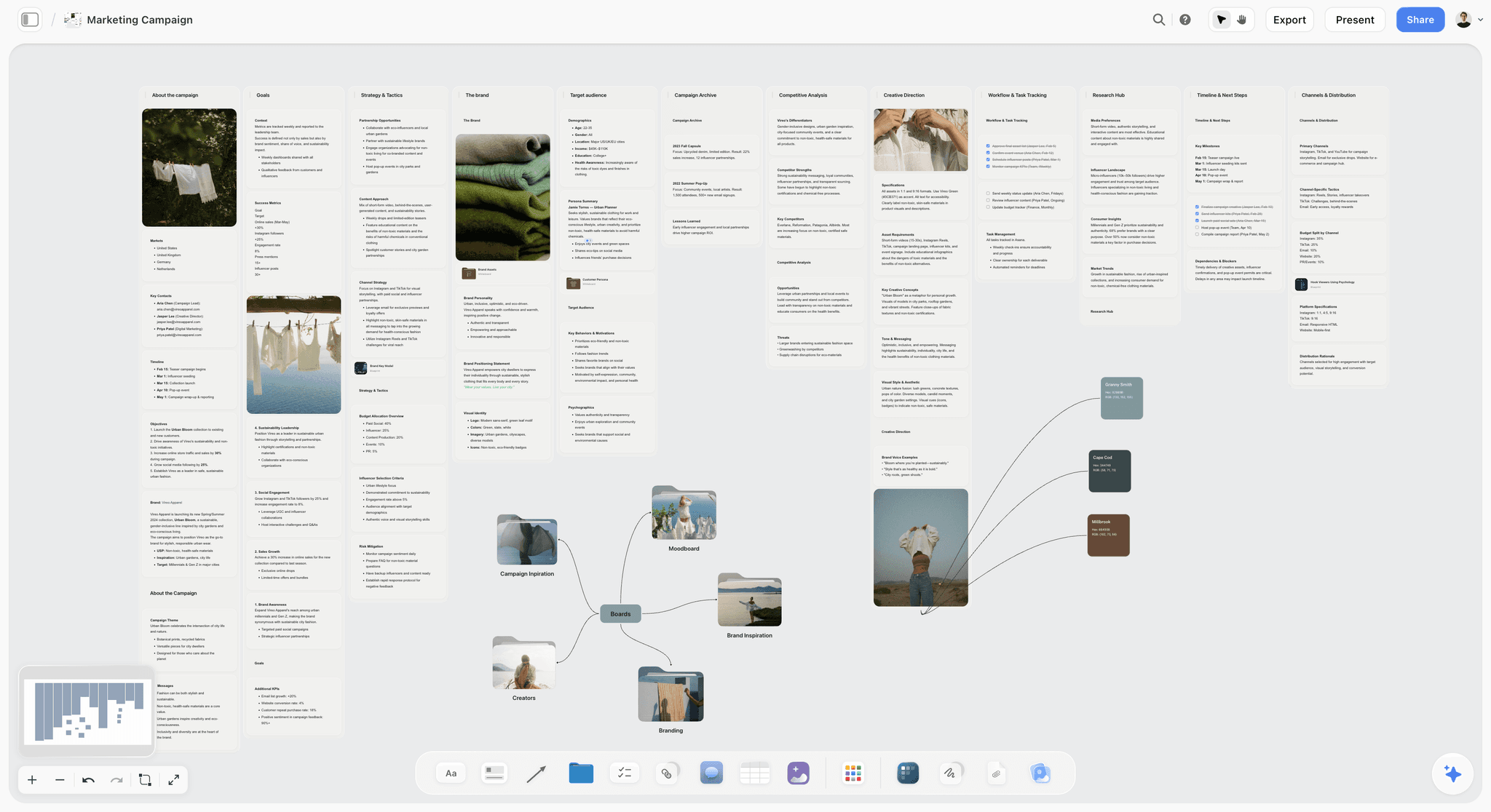
Plan a marketing campaign on one canvas. Keep goals, channels, assets, timeline, and references in a single board. Use the Marketing Campaign template.
Campaign Brief Template
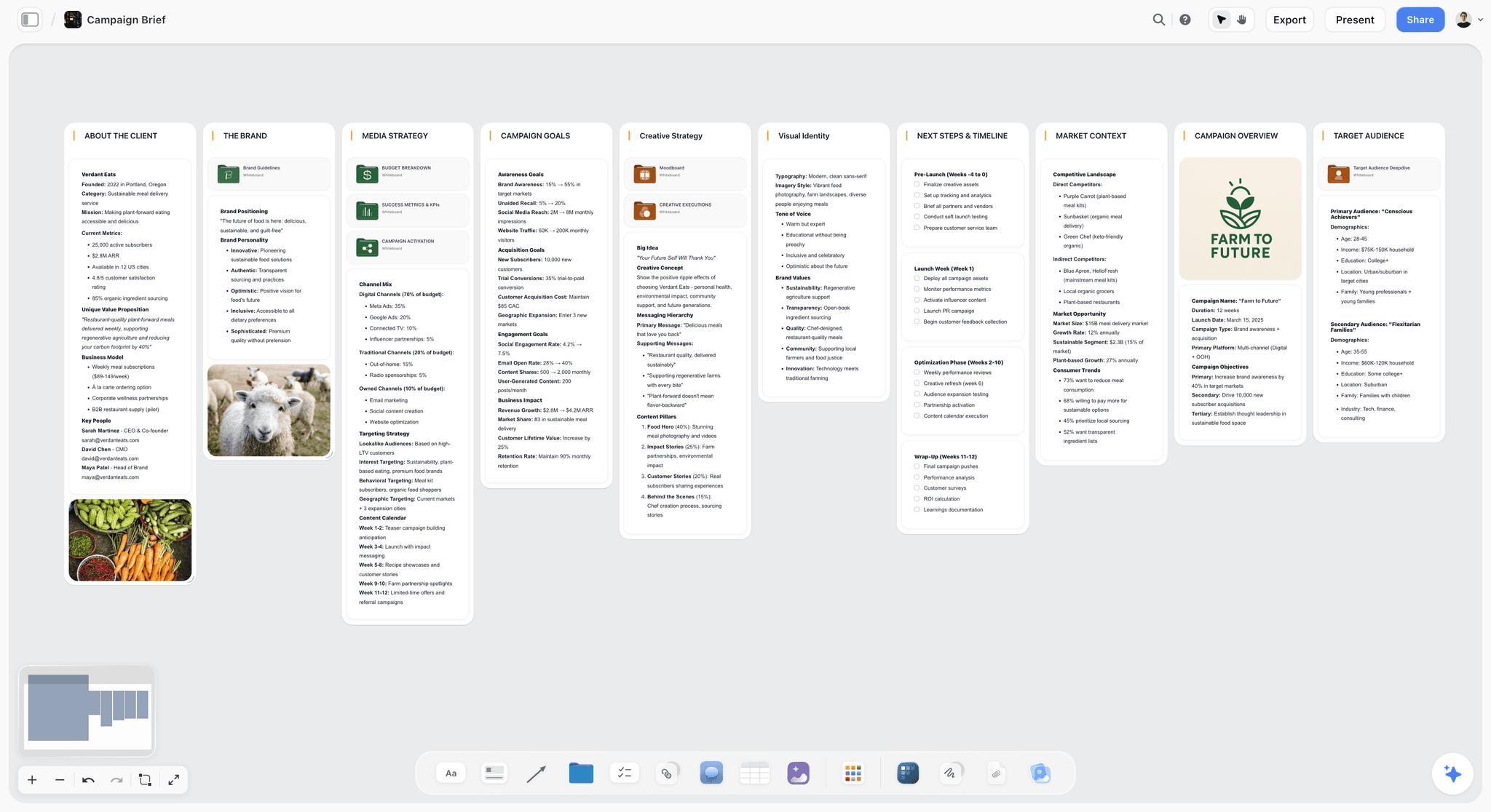
A Storyflow Campaign Brief template to align goals, audience, message, deliverables, and timeline on one shared visual canvas. Use the Campaign Brief template.
Team Planning Dashboard Template
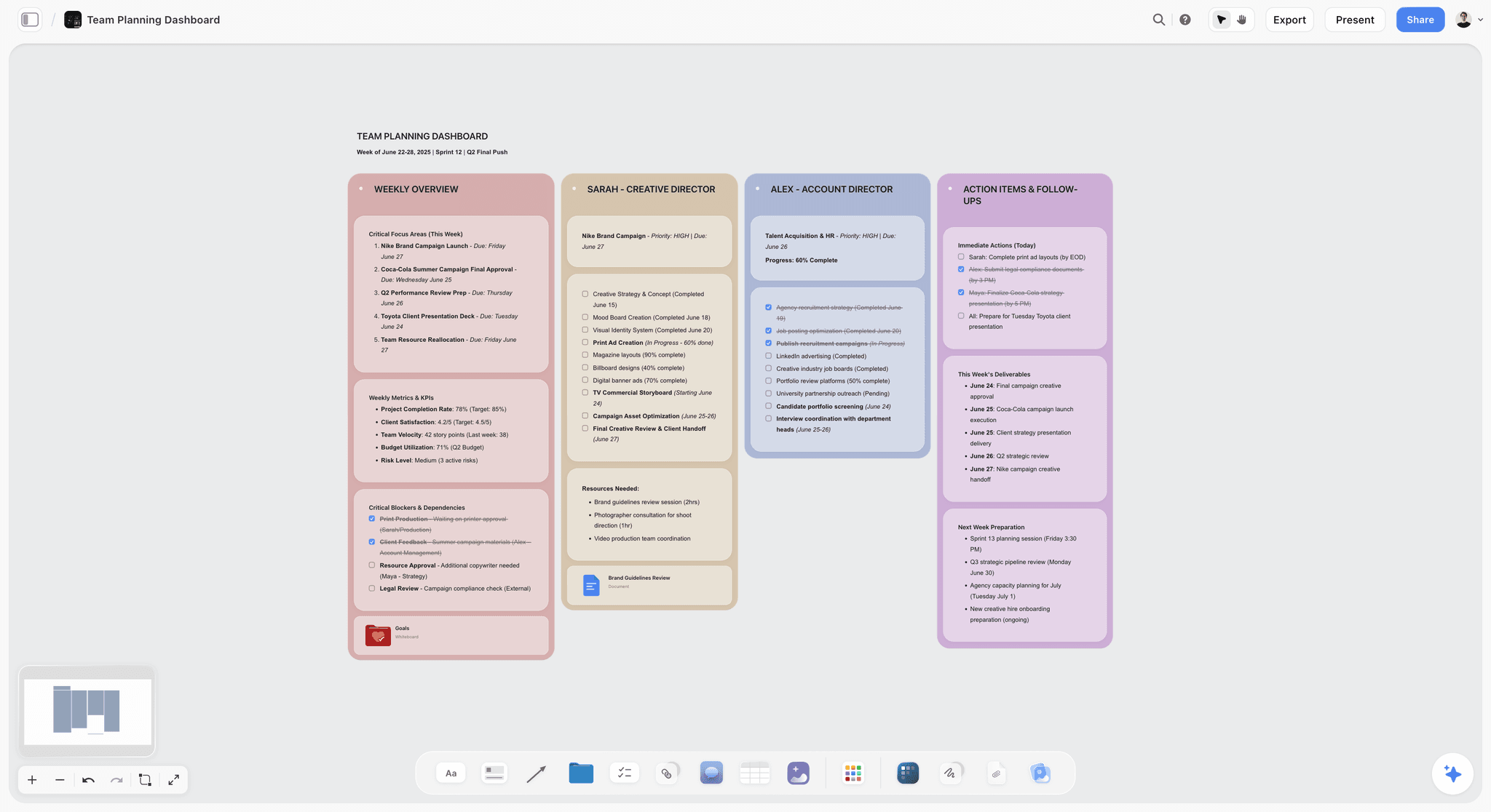
A free Team Planning Dashboard template for Storyflow. Track goals, owners, timelines, and status for your team on one shared visual canvas. Use the Team Planning Dashboard template.
11) The Bottom Line
Every tool on this list can get a marketing team collaborating on the same board. The ranking comes down to one question: after the team collaborates, does the work become a campaign, or does it stay a picture of a campaign. Miro and Mural win the live room. FigJam wins for design-led teams. Canva wins for collaborative production. Notion holds the database.
But the reason campaigns fail is not the workshop. It is the gap between the workshop and the plan, where 200 sticky notes are supposed to become a brief, a calendar, and a concept and instead become a screenshot nobody opens again. Visual collaboration for a marketing team is not the meeting. It is what survives the meeting. That is why Storyflow ranks first. It is the one tool here where the workshop, the brief, the calendar, and the concept share one board, and the AI reads all of it before it answers, so the team's collaboration carries forward instead of scattering.
If your team's last great brainstorm never became a campaign, take your next workshop and run it on one canvas for a week. Start a Storyflow workspace and ask the AI to turn the sticky notes into a brief and a calendar before everyone logs off.
10) FAQ: Visual Collaboration Tools for Marketing Teams
What is the best visual collaboration tool for marketing teams?
The best visual collaboration tool for marketing teams in 2026 is Storyflow, on the Plus plan at $7.99 per month billed annually and flat per account. It wins because its AI reads the entire campaign board (the workshop notes, the brief, the calendar, and the creative concept together) so the team's collaboration becomes a real campaign instead of an abandoned whiteboard. For the deepest live whiteboard workshops, Miro is the strongest alternative, and for design-led teams in Figma, FigJam is the natural fit.
What is the difference between a whiteboard and a visual collaboration tool for marketing?
A whiteboard is optimized for the live meeting: cursors, sticky notes, and voting in the same minute. A visual collaboration tool for a marketing team has to also handle what survives the meeting: the brief, the calendar, and the concept the workshop is supposed to produce. The strongest whiteboards (Miro, Mural, FigJam) are the best rooms, but the board still has to be rebuilt as a plan elsewhere. Tools like Storyflow keep the collaboration and the resulting campaign on one surface, so nothing gets lost in the handoff.
Is there a free visual collaboration tool for marketing teams?
Not during early access. Storyflow's Free plan, which launches before the end of 2026, will be the strongest for actually turning team collaboration into a campaign: unlimited boards, unlimited collaboration, unlimited shared boards, basic AI, and 20 file uploads. Miro, FigJam, Mural, Notion, ClickUp, and Lucidspark all have free tiers as well, usually capped on the number of boards or editors. For a full campaign where the AI reads the whole board and the whole team can collaborate without paying, the Storyflow free plan goes furthest.
How is Storyflow different from Miro for a marketing team?
Miro is the deepest real-time whiteboard: the best room for a live workshop with a large team. Storyflow is an AI canvas where the workshop becomes the campaign: its AI reads the whole board (workshop, brief, calendar, concept) and helps build the plan, not just the brainstorm. Miro is stronger for the live session and integrations; Storyflow is stronger for turning collaboration into a structured campaign and for flat per-account pricing. A common setup is Miro for the big workshop and Storyflow for everything it should become.
Does AI actually help with marketing collaboration, or just generate sticky notes?
It depends entirely on how much the AI can see. An AI bolted onto a whiteboard can generate and cluster sticky notes, which is helper-level. An AI that reads the whole campaign board (the workshop output, the brief, the calendar, the funnel) can do strategy: draft the brief, build the calendar from it, and flag the funnel stage with no asset. Storyflow's AI reads the full active canvas plus up to one Tactic and three Documents you @-mention, which is why its help is about your actual campaign rather than generic suggestions.
Why does my marketing team's brainstorm never turn into a campaign?
Because the whiteboard captures the thinking and then lets it scatter. The workshop produces 200 sticky notes, and someone has to manually rebuild them as a brief in a doc, a calendar in a sheet, and a concept in a deck, losing context at every step. The board does not do any of that. The fix is to run the collaboration on a surface where the brainstorm stays put and becomes the brief and the calendar on the same board, ideally with an AI that can reason over the whole thing as it grows.
How much do visual collaboration tools cost for a marketing team?
Most charge per user, so the price scales with the team: Miro and Lucidspark around $8 per user per month, Mural and Notion around $10, FigJam around $5, ClickUp around $7. A fifteen-person team on a $10-per-user tool pays $150 per month. Storyflow is the exception, with flat per-account pricing (Plus $7.99/mo annual, Pro $14, Max $39), so the same plan covers the whole team. Always verify current pricing, because these change often.
Which visual collaboration tool is best for a small marketing team?
For a small team, Storyflow's free or Plus plan ($7.99/mo annual, flat per account) covers the most ground: the whole team collaborates, the AI reads the board, and the campaign gets built in one place without per-seat costs. If the team's main need is a quick live whiteboard, FigJam (around $5/user/mo) is cheap and clean, especially if your designers use Figma. Miro's free plan is also strong for occasional workshops. Small teams benefit most from flat pricing, since per-user bills bite hardest when every seat counts.
Can one tool replace my marketing team's whole collaboration stack?
Not entirely, and you should be skeptical of any tool that claims it can. Storyflow can replace the scattered planning layer (the abandoned whiteboard, the doc, the sheet, and the deck) with one AI board, which is a real consolidation. But you will still want a dedicated scheduler for publishing and probably a design tool like Canva or Figma for finished assets. The goal is fewer tools where it counts, not one tool for everything.
What is the best visual collaboration tool for a remote marketing team?
For a remote team, real-time collaboration and a single shared source of truth matter most. Miro and Mural are the strongest for the live remote workshop, with deep multiplayer features. Storyflow is the strongest for keeping the remote team's work in one place the AI can read, so a distributed team is not rebuilding the campaign across four tools in different time zones. A common remote setup is Miro for the synchronous workshop and Storyflow for the asynchronous campaign that follows.
How do I move my marketing team off scattered tools and onto one board?
Start with one campaign, not your whole process. Take the next campaign's workshop and run it on a single Storyflow board, then ask the AI to turn the notes into a brief, a calendar, and a channel plan on the same canvas. Add the creative concept as a moodboard beside it. Within an hour the whole team can see the campaign on one surface, and you will see immediately why having it scattered across a whiteboard, a doc, and a sheet was costing you.
Do these tools support real-time collaboration for the whole team?
Yes, all twelve support multiple people working together, but the depth varies. Miro, Mural, FigJam, and Lucidspark are built for cursor-heavy, same-minute live whiteboarding with large groups. Storyflow, Notion, ClickUp, and Monday support shared real-time work but are built around the campaign and the plan rather than the live drawing session. For the deepest synchronous whiteboard, choose a dedicated room; for collaboration that becomes a campaign, choose a tool built around the record.
Table of Contents
- Quick Answer: The Best Visual Collaboration Tool for Marketing Teams
- Comparison Table: 12 Tools Compared
- Why Marketing Teams Need More Than a Whiteboard
- How We Evaluated These Tools
- Quick Picks by Job to Be Done
- Detailed Reviews: 12 Visual Collaboration Tools
- Which Tool Fits Which Marketing Team?
- Honorable Mentions
- Where the Specialists Still Win
- FAQ: Visual Collaboration Tools for Marketing Teams
- The Bottom Line
- Author
- Related Reading
Templates to check out for this topic


Marketing and campaign templates you can use in Storyflow
Plan the whole campaign on one board: brief, audience, channels, and assets connected, with an AI that reads all of it. Open a template and start from real structure.


See Storyflow in Action
A visual AI workspace where every feature lives inside one canvas. No tab-switching, no context lost.
Build your entire board from a single message
Type what you need in the AI chat at the bottom of your canvas. The AI adds cards, headings, and structure directly onto your board.
Use expert frameworks as AI context
Type @ in the AI chat and choose any Tactic. The AI tailors every response to that framework instead of giving generic advice.
Turn your board into a mind map in seconds
Ask the AI to restructure your canvas as a mindmap. It connects your ideas into a visual hierarchy so you can see how everything relates.
Why Storyflow Exists
Storyflow actually began as a personal tool while working on creative and research projects.
We kept running into the same problem: ideas were scattered everywhere: notes, documents, and whiteboards.
Nothing helped us see how everything connected.
So we started building a workspace designed around how ideas actually grow.
→ Read how Storyflow was createdJustkay
Documentary Filmmaker & Founder at Storyflow
Published: 2026-06-18
Extremely simple, seriously capable


See how easy it is to get started
Watch a real project come together, from a blank board to a finished plan, clicked through step by step.
Start creating with AI and become more productive
Transform your creative workflow with AI-powered tools. Generate ideas, create content, and boost your productivity in minutes instead of hours.