The 11 Best Tools for Nonfiction Book Research in 2026
Research notes have to answer three questions later: where did this come from, what did I think about it, and where does it go. Eleven tools ranked by which they answer.

Category
Writing
Author

Sara de Klein
Head of Product at Storyflow
Topics
2026-08-11
•
17 min read
•
Writing- best tool to organize research for writing a book
- nonfiction book research software
- Scrivener vs Obsidian for nonfiction
- Zotero citation manager
- how to structure a nonfiction book
- research note taking system
What are the best tools for organizing nonfiction book research in 2026?
The best tool for organizing nonfiction book research is Scrivener, and after twenty years it is still the answer for an unglamorous reason: it is the only application where your research and your draft live in the same binder, so the note and the paragraph it becomes are never in different programs. Storyflow ranks second for the problem Scrivener handles least well, which is deciding where a piece of research goes when the book's structure is still unsettled. Zotero owns citation and provenance and nothing here replaces it. Obsidian is the strongest choice if your book is an argument that emerges from connections rather than one you already have. This ranking judges all 11 tools on one question: which of the three questions your notes must answer does each one answer well.

Full disclosure: Storyflow is our own product and we rank it #2 here, behind Scrivener, because writing a nonfiction book is a writing and citation problem before it is a structure problem. Storyflow has no bibliography generation, no citation styles, no PDF annotation, no reference library, no highlight import and no manuscript compilation. Zotero is required alongside it for any book with endnotes, and Zotero is free. We rank Storyflow second for one job: seeing the whole shape of the book at once, which outliners structurally cannot do.
Quick Comparison
These four cover the jobs nonfiction research actually splits into: keeping the note beside the paragraph it becomes, seeing the whole structure at once, making every claim sourceable, and letting an argument emerge from the material.
| Tool | Best For | AI Features | Price |
|---|---|---|---|
| Scrivener | Research binder plus manuscript in one project | None | One-time ~$59.99 licence |
| Storyflow | Spatial structure when the outline is hiding the shape | Canvas-wide context AI | $7.99 mo annual (free plan late 2026) |
| Zotero | Citations and bibliographies in any style | None | Free (paid storage tiers) |
| Obsidian | Linked notes in plain files you own | Via plugins | Free personal / from ~$4 mo sync |
Key Takeaways
- Nonfiction research notes have to answer three questions later, and a note that answers only one is close to worthless when you sit down to write.
- Question one: where did this come from. Question two: what did I think about it. Question three: where does it go in the book.
- Question two is the one most people skip, and skipping it is why a folder of highlights produces no book. A quote with no response attached is somebody else's thought sitting in your file.
- Scrivener ranks first because research and draft share one binder, which removes the single most common friction in the entire process.
- Storyflow ranks second for question three specifically. It is not a citation manager, has no bibliography generation, no PDF annotation and no manuscript compilation.
- Zotero is not optional for a book with endnotes, and it is free. Anything you do about provenance that is not a reference manager is a decision to redo the work later.
- The structure of most nonfiction books is decided by the order the author happened to read things in, and almost nobody notices this happening.
See the book you already have
Most stuck authors are not short of material. They cannot see its shape, because an outline is a list and the decisions are about proximity and weight. Storyflow puts every claim and its evidence on one canvas the AI can read end to end. Paid-only during early access; the Free plan lands before the end of 2026.

The Three Questions Your Notes Must Answer
A nonfiction book is two years of reading and eight months of writing, and the join between them is where books die.
Nonfiction research notes have to answer three questions later, and a note that answers only one is close to worthless when you sit down to write.
Question one: where did this come from. The page number, the edition, the interview date, the archive box. If a note cannot answer this, it is unusable, because you cannot publish a claim you cannot source and you will not find it again by searching your memory. This is the question everybody knows about and most people still get wrong, usually by trusting that they will remember.
Question two: what did I think about it. This is the question people skip, and skipping it is the single largest cause of the folder-full-of-highlights problem. A highlighted passage records that something struck you. It does not record why, or what it contradicted, or what you suspected when you read it. Eighteen months later you have four hundred highlights and no thoughts, because the thought was the ephemeral part and you did not write it down. A quote with no response attached is somebody else's thinking sitting in your file, and a book made of those is a literature review.
Question three: where does it go in the book. Every piece of research eventually needs a home in a chapter, or it needs to be cut. The trap is that this question gets answered accidentally. You read three books on one theme in March, so that theme becomes chapter two, because by April you had more material on it than anything else. The structure of most nonfiction books is decided by the order the author happened to read things in, and almost nobody notices this happening.
The three questions want different things from a tool. Question one wants a database with strict fields. Question two wants a writing surface where a note and a response sit together. Question three wants a spatial view where you can see the whole shape and move things.
Almost no tool does all three, and the ones that claim to usually do one properly.
The tools below are ranked by which questions they answer well.
At a Glance: The 11 Tools Compared
| Tool | Best for | Questions it answers | Pricing shape |
|---|---|---|---|
Scrivener | Research and draft in one binder | Two, three | One-time licence |
Storyflow | Seeing and moving the book's shape | Three | Flat per account |
Zotero | Citations, sources and provenance | One | Free plus storage |
Obsidian | Notes that connect and an argument that emerges | Two | Free or per user |
DEVONthink | Large document archives with real search | One | One-time licence |
Readwise | Getting highlights out of where you read them | One | Per month |
Notion | A structured research database with your own fields | One, three | Per user |
Heptabase | Cards on an infinite canvas with notes attached | Two, three | Per user |
Logseq | Outliner-first daily notes and linking | Two | Free or per user |
Google Docs | The universally available baseline | Two, badly | Free or per user |
Airtable | Interview and source tracking with required fields | One | Per seat |
How I Ranked These
I research documentaries, which is nonfiction book research with a camera at the end, and I have made the folder-of-highlights mistake at a scale I would rather not describe. I have also interviewed enough authors about their systems to notice that almost all of them run two tools and are slightly embarrassed about it.
Every tool below has been used on real long-form projects.
Five criteria, weighted in this order.
1. Does a note keep its source automatically? Not "can you record the source" but "does it happen without discipline". Every system that depends on the author remembering to attach a citation will fail somewhere in month fourteen, and you will not know which note it failed on.
2. Is there somewhere for your response to live next to the material? The physical adjacency matters. Systems where your thought about a quote lives in a different file than the quote produce fewer thoughts, reliably.
3. Can you see the whole shape at once? Not an outline, which is a shape with a dimension removed. The ability to see two hundred pieces of material arranged and to move them is what turns a pile into a book.
4. Does it survive two years? Long projects outlive software fashions. File formats you can read without the vendor, and export paths that produce something usable, are worth more than any feature.
5. Does it get out of the way when you are writing? In the writing phase, most research tooling becomes friction. The tools that survive to the end are the ones you can ignore.
Pricing below is as of August 2026. Verify with each vendor.
Quick Picks by Job Type
- Best overall for nonfiction book research: Scrivener. Research and draft in one binder, a corkboard for structure, and a one-time price.
- Best for finding the book's shape: Storyflow. Spatial arrangement of material where you can see the whole argument and move it.
- Best for citations: Zotero. Free, open, and the only responsible answer if your book has endnotes.
- Best for an emergent argument: Obsidian. Linked notes where the structure appears from the connections rather than being imposed.
- Best for a large document archive: DEVONthink. When you have four thousand PDFs and need search that actually works.
- Best for collecting highlights: Readwise. Getting what you marked out of Kindle and articles into somewhere you own.
- Best for interview-heavy books: Airtable. Sources, consent, dates and follow-ups with required fields.
- Best free stack: Zotero plus Obsidian. Genuinely capable, costs nothing, used by a lot of working authors.
1. Scrivener
The verdict. Still the best tool for writing a nonfiction book, because it is the only one where the research and the draft never separate.
Best for. The whole arc from research binder to compiled manuscript.
Pricing. One-time licence, historically around $59.99 for macOS or Windows, with a separate iOS app around $23.99 and education discounts. Verify on literatureandlatte.com.
Why it ranks here. The single highest-friction moment in writing a nonfiction book is having your research in one application and your draft in another. Every reference means a context switch, and context switches at the sentence level are how afternoons disappear.
Scrivener's binder holds both. Your chapter drafts and your research PDFs, interview transcripts, images and notes sit in the same project, and split-screen puts the source next to the paragraph it is becoming. That is not a flashy feature and it is the reason the application has outlasted a dozen prettier competitors.
For question three it has the corkboard and the outliner, which are genuinely useful and are also its weakest area, for a specific reason: the corkboard is a grid inside a folder, so you are seeing one level of your structure at a time. That works well once you know roughly what the chapters are, and works poorly during the phase where you do not.
For question one it is adequate rather than good. You can store sources and write your own citation notes, but it is not a reference manager and it will not generate a bibliography. Pair it with Zotero.
Strengths.
- Research and draft in one project, which removes the largest friction in the process.
- Corkboard and outliner for structure, with synopses that keep chapter intent visible.
- Compile produces genuinely usable manuscript output for agents and publishers.
- One-time purchase, no subscription, and the project format is a readable folder of files.
- Snapshots let you rewrite fearlessly.
Limitations.
- Not a citation manager and will not generate a bibliography.
- The corkboard shows one folder level at a time, so the whole shape is hard to see.
- Collaboration is essentially absent, which matters for co-authored or researched-with-an-assistant books.
- Interface is dense and dated, with a real learning curve.
- Sync between desktop and iOS depends on Dropbox and is a known source of frustration.
The trade off. Buy it, learn it properly once, and accept that you will need a reference manager alongside it. That is the standard working setup for a reason.
2. Storyflow
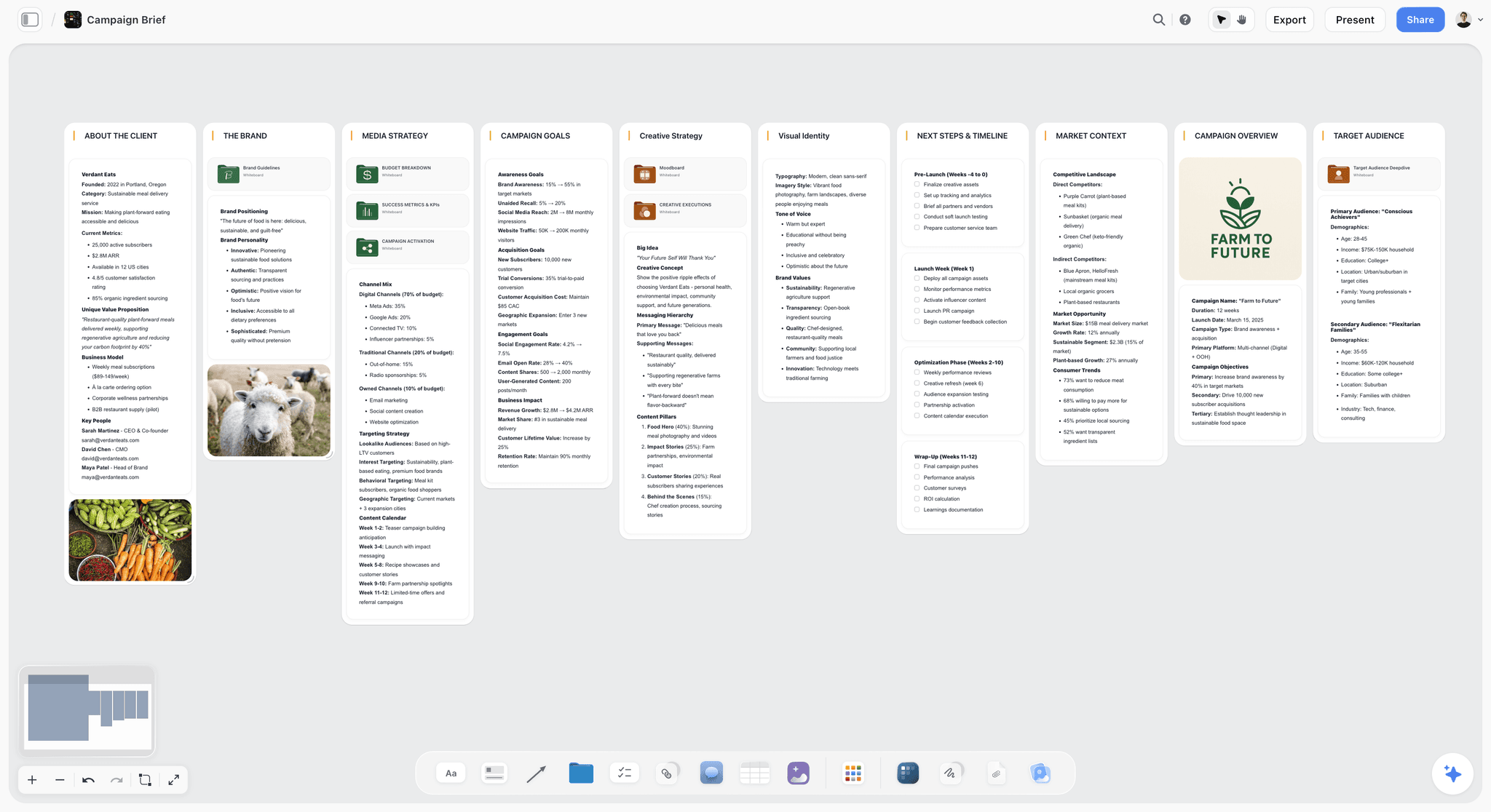
The verdict. The tool for the phase where you have the material and do not yet have the book.
Best for. Seeing two hundred pieces of research at once and moving them until a structure appears.
Pricing. Paid-only during early access. Plus is $7.99 per month billed annually or $9.99 monthly. Pro is $14 per month billed annually or $19 monthly, adding AI image generation, roughly twenty times more AI usage and memory across conversations. Max is $39 per month billed annually or $49 monthly and adds the Team Workspace with permissions and roles. Pricing is flat per account rather than per seat, and anyone a paid member invites to a board joins free. The Free plan launches before the end of 2026.
Why it ranks here. Question three is the one that decides whether a book gets written, and it is the question every research tool handles worst.
The reason is dimensional. An outline is a list, and a list can only express sequence and nesting. But the decisions you are actually making are about proximity and weight: this argument needs to sit next to that evidence, this thread runs underneath three chapters, this material is a fascinating cul-de-sac that belongs in a footnote or nowhere. Those are spatial relationships and a list cannot hold them, which is why so many authors end up with index cards on a floor.
Storyflow is that floor, with the material attached. Each card holds a claim and the evidence for it, arranged so you can see the whole book. When chapter four has nine pieces of evidence and chapter six has one, you can see it in a second, and you have learned that chapter six is not yet a chapter.
The second value is catching the reading-order problem. When the structure is laid out spatially with dates or sources visible, it becomes noticeable that three chapters correspond to the three books you read in March. That is very hard to notice inside an outline.
The AI reads your full active canvas board by default, plus up to one Tactic and up to three Documents you @-mention. Asking a structure board what argument it currently makes returns something grounded in the whole surface, which is a useful mirror when you have been inside the material too long.
Strengths.
- Whole-shape visibility, which outliners structurally cannot provide.
- Proximity and weight are expressible, so structural imbalance is visible immediately.
- Helps catch structure that was determined by reading order rather than argument.
- Flat per-account pricing, and collaborators join free, which matters for a researcher or co-author.
- Canvas-wide AI context for summarizing what a structure board currently argues.
Limitations.
- Not a citation manager. No bibliography generation, no citation styles, no PDF annotation, no library sync. Zotero is required alongside it and this post says so plainly.
- Not a writing environment. No manuscript compilation, no word count targets, no export to a format an agent expects.
- No full-text search across a large PDF archive, which DEVONthink does properly.
- No highlight import from Kindle or articles.
- Team Workspace with permissions and roles is on Max at $39 per month billed annually.
The trade off. Storyflow answers one of the three questions and answers it better than anything else here. It answers neither of the others. Used as the structure layer alongside Scrivener and Zotero it is genuinely useful; used alone it will leave you with a beautiful shape and no citations.
3. Zotero
The verdict. Not optional for a book with endnotes, and free.
Best for. Sources, citations, bibliographies and provenance.
Pricing. Free and open source. Paid cloud storage tiers from around $20 per year for 2GB. Verify on zotero.org.
Why it ranks here. Question one is solved. It has been solved for years, the solution is free, and the number of authors who discover this in month twenty is remarkable.
The browser connector captures a source with its metadata in one click. PDFs attach to their records. Notes attach to sources. And when the manuscript is done, the bibliography generates in whatever style the publisher wants, which is a job that takes a fortnight by hand and produces errors either way.
Third rather than higher only because it does nothing for questions two and three. A Zotero library is an excellent record of what you read and contains no book.
Strengths.
- Free, open source, and not going away.
- One-click capture with correct metadata from most sources.
- Bibliography generation in any citation style.
- Notes and annotations attached to source records.
- Group libraries for co-authors and researchers.
Limitations.
- Not a thinking or writing environment.
- Storage beyond the free tier costs money, and PDFs add up fast.
- The interface is functional rather than pleasant.
- Organizing a large library still requires discipline.
The trade off. Install it in week one of the project. There is no argument on the other side of this.
4. Obsidian
The verdict. The best choice when the book's argument is going to emerge from the material rather than being known in advance.
Best for. Linked notes where connections between ideas are the point.
Pricing. Free for personal use. Sync from around $4 per month, Publish from around $8 per month, with a commercial licence around $50 per user per year. Verify on obsidian.md.
Why it ranks here. Obsidian answers question two better than anything else on this list. A note per idea, in your own words, linked to the notes it relates to, produces a structure where your responses are first-class objects rather than annotations on somebody else's text.
For a certain kind of book, the kind where the thesis is discovered rather than proven, this is transformative. The backlinks show you that four unrelated readings all touched the same idea, which is often where the actual book is.
Fourth because it requires real discipline, because the graph view is more seductive than useful, and because plain-text files with a large research archive can become unwieldy.
Strengths.
- Plain markdown files you own, readable in fifty years.
- Backlinks that surface connections you did not consciously make.
- Enormous plugin ecosystem, including strong Zotero integration.
- Free for personal use, with local-first storage.
- Canvas plugin gives a rough spatial view.
Limitations.
- Requires sustained discipline; without it you have a folder of markdown files.
- The graph view looks impressive and is rarely useful.
- No compilation to manuscript format.
- Plugin dependency means your setup can break on updates.
- Not built for very large PDF archives.
The trade off. Superb if you write by connecting. Frustrating if you write by outlining.
5. DEVONthink
The verdict. The right tool when your problem is four thousand documents and finding anything in them.
Best for. Large archives of PDFs, scans and documents with search that works.
Pricing. One-time licence with tiers, historically from around $99 to $499 depending on edition, plus an iOS app. Verify on devontechnologies.com.
Why it ranks here. For archive-heavy nonfiction, historical work, investigative books, anything with a lot of primary documents, DEVONthink's search and its "see also" concordance are genuinely better than anything else here. It finds documents related to the one you are reading by content rather than by tags you remembered to add.
Fifth because it is expensive, macOS-centric, and overkill unless your archive is genuinely large.
Strengths.
- Best-in-class search across large document collections.
- AI-assisted concordance that surfaces genuinely related material.
- OCR for scans, which archive work requires.
- One-time purchase and local storage.
- Handles archives that make other tools slow.
Limitations.
- Expensive, with confusing edition tiers.
- macOS and iOS only.
- Steep learning curve and an interface only its users love.
- Not a writing or structuring tool.
The trade off. Necessary above a certain archive size. Unnecessary below it.
6. Readwise
The verdict. Solves one narrow problem completely: getting your highlights out of the places they are trapped.
Best for. Consolidating Kindle, article and PDF highlights into somewhere you control.
Pricing. Around $8 to $10 per month with an annual discount, plus a Reader tier. Verify on readwise.io.
Why it ranks here. Highlights made on a Kindle live in Amazon's silo, and highlights from articles live nowhere. Readwise pulls them into one place with sources attached and syncs them into Obsidian, Notion or wherever you work.
Sixth because it also enables the failure mode this post warns about. A perfectly synced library of four hundred highlights with no responses attached is exactly the folder that produces no book, and Readwise makes that library easier to accumulate.
Strengths.
- Reliable capture from Kindle, articles and PDFs.
- Sync into Obsidian, Notion and others with sources preserved.
- Daily review resurfaces old highlights, which sometimes genuinely helps.
- Reader app is a good read-later tool in its own right.
Limitations.
- Subscription for what is fundamentally a sync service.
- Encourages collecting over thinking.
- The review feature is easy to ignore into uselessness.
- Adds another service to a long project's dependency list.
The trade off. Worth it if you read on Kindle. Pair it with a rule that every synced highlight gets a sentence of response, or you are building a museum.
7. Notion
The verdict. A good research database if you build it well, and a poor writing environment.
Best for. A structured table of sources, interviews and themes with your own fields.
Pricing. Generous free plan for individuals. Paid plans around $10 per user per month billed annually. Verify on notion.so.
Why it ranks here. For books with a lot of categorizable material, a Notion database with fields for source, theme, chapter and status is genuinely useful, and the different views let you look at the same material by theme or by chapter.
Seventh because it is slow with large content, because it flattens everything into documents, and because a Notion database of research is an inventory rather than an argument.
Strengths.
- Flexible database with your own fields and multiple views.
- Good free tier for an individual author.
- Everything in one place including project management.
- Easy to share with an editor or researcher.
Limitations.
- Performance degrades noticeably with large databases.
- No citation management.
- Cloud-dependent, which is a real consideration for a two-year project.
- Configuration is a time sink that feels like work.
The trade off. Fine as a source inventory. Not where the book gets made.
8. Heptabase
The verdict. The closest thing here to a purpose-built spatial thinking tool for research.
Best for. Cards on a canvas with full notes attached, for visual thinkers.
Pricing. Around $8 to $12 per month depending on billing. Verify on heptabase.com.
Why it ranks here. Heptabase's core idea is exactly right for question three: notes as cards on an infinite whiteboard, where the card is the note rather than a link to it. For researchers who think spatially it clicks immediately.
Eighth because it is a smaller product with a smaller ecosystem, has no citation management, and its PDF handling is lighter than DEVONthink's or Zotero's.
Strengths.
- Cards on a canvas where the card holds the full note.
- Genuinely good for spatial thinkers.
- Solid PDF annotation for its size.
- Clean, focused product with a clear idea.
Limitations.
- Subscription-only with no free tier worth using.
- No citation management or bibliography.
- Small ecosystem and integration list.
- Not a writing or compilation environment.
The trade off. A real alternative to Storyflow for the structure layer if you want annotation in the same tool and do not need collaborators.
9. Logseq
The verdict. An outliner-first take on linked notes, free and local.
Best for. Authors who think in bullets and want daily notes to accumulate into structure.
Pricing. Free and open source. Optional paid sync. Verify on logseq.com.
Why it ranks here. Logseq's block-level linking is genuinely powerful: you can reference a single bullet from anywhere, which for research means a specific claim rather than a whole note becomes the unit.
Ninth because the outliner-first model suits some minds and actively resists others, and because development has been less predictable than Obsidian's.
Strengths.
- Block-level references, which is a finer grain than most tools offer.
- Free, open source and local-first.
- Daily notes model suits ongoing research.
- Good Zotero integration.
Limitations.
- Outliner-first structure is polarizing.
- Performance issues on large graphs.
- Less predictable development pace.
- Smaller plugin ecosystem than Obsidian.
The trade off. Try it if Obsidian's file-per-note model feels too coarse.
10. Google Docs
The verdict. What a surprising number of published books were actually written in.
Best for. Writing and sharing with an editor without any setup.
Pricing. Free with a personal account. Business tiers from around $8 per user per month. Verify on workspace.google.com.
Why it ranks here. Honesty requires it. Google Docs is where a great deal of nonfiction actually gets written, because it is free, universal, and the comment thread with your editor is genuinely the best in the business.
Tenth because it answers question one not at all, question three not at all, and becomes painful past about a hundred pages.
Strengths.
- Free, universal, zero setup.
- Best-in-class commenting for editorial collaboration.
- Version history that has saved many manuscripts.
- Works everywhere, including on a phone.
Limitations.
- Performance degrades badly on long documents.
- No research organization of any kind.
- No citation management.
- No structural view beyond the document outline.
The trade off. A fine writing surface for the final draft, especially with an editor. Not a research system.
11. Airtable
The verdict. The right tool if your book is built on interviews rather than reading.
Best for. Source tracking, interview logistics, consent and follow-ups.
Pricing. Free tier with record limits. Team plans from around $20 per seat per month billed annually. Verify on airtable.com.
Why it ranks here. Interview-based nonfiction has an administrative layer that reading-based nonfiction does not: who has been approached, who consented, on what terms, who needs a follow-up, who asked to review quotes. That is a database with required fields, and getting it wrong has consequences beyond inconvenience.
Eleventh because most nonfiction books are reading-based, and for those Airtable is ceremony.
Strengths.
- Required fields for consent status and terms, which matters legally.
- Automations for follow-ups and scheduling.
- Linked records connecting sources, interviews and themes.
- Forms for collecting details from subjects.
Limitations.
- Overkill for reading-based research.
- Per-seat pricing.
- Nothing for thinking or writing.
- Needs setup effort before it pays off.
The trade off. Essential for reporting-heavy books, unnecessary otherwise.
What to Actually Pay For
Install Zotero in week one, because it is free and retrofitting it is miserable. Every book with endnotes needs it, and adding it in month twenty means re-finding sources you already had.
Buy Scrivener once, and learn it properly in a weekend. It is a one-time cost roughly equal to two hardbacks, and it removes the friction that costs you the most hours across two years.
Add a structure layer when you feel stuck rather than at the start. Most authors do not need one in the first six months of reading. The moment you notice you cannot see the book, that is when spatial arrangement earns its price.
Do not buy a highlight-syncing subscription without a response rule. Readwise is good and it makes accumulating easier, which is the direction you are already failing in.
Skip DEVONthink unless your archive is genuinely large. Below a few hundred documents, Zotero's search plus a good folder structure is sufficient.
Tools to Avoid for This Job
A folder of highlights as your research system. The most common setup and the least productive one. Highlights record that something struck you and not why, and eighteen months later the why is gone.
Writing the book in your note-taking app. Obsidian, Logseq and Notion are all poor writing environments for long-form, and their export produces something no publisher wants. Think in one, write in another.
Two citation systems. A book with citations in Zotero and a second list in a document will produce a bibliography with errors in it, and the errors will be found by a reviewer.
A cloud-only tool with no export path. Two years is long enough for a service to change its pricing, its terms or its existence. Whatever you use, confirm you can get everything out in a format you can read.
Reorganizing your system instead of writing. The most seductive procrastination available to a nonfiction author is redesigning the research system. If you have changed tools twice this year, the tool is not the problem.
What No Tool on This List Does
None of these will tell you what the book is about.
That sounds like a platitude and it is the practical crux. Most nonfiction books have a moment, usually in year two, when the author realizes the book they have been researching is not the book they are going to write. That realization comes from writing badly for a while and noticing what keeps insisting on itself. No amount of organization produces it, and elaborate organization can delay it, because a beautifully arranged research system feels like progress while the actual progress is unwritten prose.
None of them will tell you what to cut, either. Every nonfiction book contains a chapter the author loves that the book does not need, and it is almost always the one that took the most research. The tool will faithfully preserve every card. The judgment is yours, and an editor's, and it is the most valuable thing an editor does.
And none of them will make the material honest. Question one, provenance, is a technical problem with a technical solution. But the deeper version, whether a claim is actually supported by the source or merely adjacent to it, is a discipline. It is entirely possible to have a perfectly cited book full of claims the citations do not quite support, and no reference manager catches that.
The Bottom Line
Nonfiction research notes have to answer three questions later, and a note that answers only one is close to worthless when you sit down to write.
Choose by the question you keep failing. If you cannot find things or cannot source them, install Zotero today and stop discussing it. If you have four hundred highlights and no thoughts, the fix is a response rule rather than a tool. If your archive is large and unsearchable, DEVONthink is worth its price.
But if the recurring experience is that you have the material, you know it is good, and you cannot see what the book is, that is question three, and outlines are structurally incapable of answering it. That is the narrow case where Storyflow ranks second here, behind Scrivener, and it is the only claim this post makes for it.
FAQ: Tools for Nonfiction Book Research
What is the best tool to organize research for writing a book?
Scrivener, because research and draft live in one binder and you can put the source beside the paragraph it is becoming. Add Zotero for citations, which is free and not optional if your book has endnotes. Add a spatial tool such as Storyflow when you reach the phase where you have the material and cannot see the book.
What is the best free tool for book research?
Zotero plus Obsidian, and it is genuinely capable. Zotero handles sources and bibliographies, Obsidian holds your notes and responses in plain files you own, and the Zotero integration connects them. A lot of working authors run exactly this stack. Storyflow is paid-only during early access, so it does not belong in a free stack today, though invited collaborators join free.
Is Storyflow a citation manager?
No. Storyflow has no bibliography generation, no citation styles, no PDF annotation, no reference library and no manuscript compilation. It ranks second on this list for one job: seeing the whole shape of the book at once and moving material until a structure appears. Zotero is required alongside it for any book with endnotes.
Is Storyflow free for authors?
Not during early access. Storyflow is paid-only right now, starting at $7.99 per month billed annually on the Plus plan. The Free plan launches before the end of 2026. The genuinely free path today is that anyone a paid member invites to a board joins free, which is useful if you work with a researcher or co-author.
Scrivener or Obsidian for a nonfiction book?
Scrivener if you know roughly what the book argues and need to write it. Obsidian if the argument is going to emerge from the material and you want the connections to show you where it is. Many authors use Obsidian during research and Scrivener during writing, which is a slightly awkward but very common arrangement.
How do I stop collecting highlights and start writing?
Attach a response to every piece of material at capture time, even one sentence. The rule that works is simple: no quote enters your system without a line saying why it matters or what it contradicts. This converts a highlight into a thought, and a book can be made of thoughts.
How do I know if my book's structure came from my reading order?
Lay the chapters out with the dates or sources visible and look for clustering. If three chapters correspond to the three books you read in one month, the structure is an artifact of sequence rather than argument. This is very difficult to notice in an outline and fairly obvious on a spatial board.
Do I need DEVONthink?
Only if your archive is genuinely large, roughly a few thousand documents, and heavy on scans and primary sources. Below that, Zotero's search plus sensible folders does the job. Historical and investigative books cross the threshold; most memoir, essay and argument-led books do not.
When should I switch from researching to writing?
Earlier than feels comfortable. The most reliable signal is not that you have enough material, because you will never feel that, but that you have started re-encountering things you already know. Writing badly for two weeks reveals what the book is about faster than two more months of reading.
How much should book research tools cost?
Under $200 in total for most authors: Scrivener as a one-time purchase, Zotero free, and a structure tool at under $10 a month during the year you need it. Compared with two years of your working time this is negligible, which is why the tool choice matters less than the habits.
Can AI help with book research?
For summarizing and for interrogating material you have already gathered, meaningfully. Storyflow's AI reads your full active canvas board plus up to one Tactic and three Documents you @-mention, so asking a structure board what it currently argues gives you a useful outside view. For finding sources or verifying claims, treat every AI output as an unverified lead, because fabricated citations remain a real and well-documented failure mode.
How do I handle interview material?
Track the administrative layer in a database with required fields: who was approached, who consented, on what terms, and who asked to review quotes. Keep transcripts in your main research system with the interview date attached. The consent and terms data is not organizational tidiness, it is a legal record.
What should I do first if I am six months in and lost?
Stop reading for a fortnight and lay everything you have on one surface where you can see it all. Not an outline, a spatial arrangement. Most authors who feel lost at month six are not short of material, they are unable to see the shape of what they have, and the outline format is actively hiding it from them.
What is the single change worth making this week?
Add a one-sentence response to the last twenty things you saved. It will take an hour, it will be uncomfortable, and about a third of them will turn out to have no reason for being in your files, which is itself the most useful finding available to you right now.
Table of Contents
- Key Takeaways
- The Three Questions Your Notes Must Answer
- At a Glance: The 11 Tools Compared
- How I Ranked These
- Quick Picks by Job Type
- 1. Scrivener
- 2. Storyflow
- 3. Zotero
- 4. Obsidian
- 5. DEVONthink
- 6. Readwise
- 7. Notion
- 8. Heptabase
- 9. Logseq
- 10. Google Docs
- 11. Airtable
- What to Actually Pay For
- Tools to Avoid for This Job
- What No Tool on This List Does
- The Bottom Line
- FAQ: Tools for Nonfiction Book Research
- Related Reading
Templates to check out for this topic


Research templates you can use in Storyflow
Gather sources, personas, and findings on one canvas, then let the AI read across all of it. Open any of these research boards to start.


See Storyflow in Action
A visual AI workspace where every feature lives inside one canvas. No tab-switching, no context lost.
Build your entire board from a single message
Type what you need in the AI chat at the bottom of your canvas. The AI adds cards, headings, and structure directly onto your board.
Use expert frameworks as AI context
Type @ in the AI chat and choose any Tactic. The AI tailors every response to that framework instead of giving generic advice.
Turn your board into a mind map in seconds
Ask the AI to restructure your canvas as a mindmap. It connects your ideas into a visual hierarchy so you can see how everything relates.
Why Storyflow Exists
Storyflow actually began as a personal tool while working on creative and research projects.
We kept running into the same problem: ideas were scattered everywhere: notes, documents, and whiteboards.
Nothing helped us see how everything connected.
So we started building a workspace designed around how ideas actually grow.
→ Read how Storyflow was createdSara de Klein
Head of Product at Storyflow
Published: 2026-08-11
Extremely simple, seriously capable


See how easy it is to get started
Watch a real project come together, from a blank board to a finished plan, clicked through step by step.
Start creating with AI and become more productive
Transform your creative workflow with AI-powered tools. Generate ideas, create content, and boost your productivity in minutes instead of hours.