
Category
Strategy Tools
Author

Justkay
Documentary Filmmaker & Founder at Storyflow
Topics
2026-05-17
•
Updated May 17, 2026
•
13 min read
•
Strategy Tools- best strategic planning tools 2026
- strategic planning software
- strategy planning tools
- strategy execution platform
- Cascade alternative
- Storyflow strategic planning
What are the best strategic planning tools in 2026?
Storyflow is the best strategic planning tool in 2026 for connecting strategy to the work: the goals, the bets and the reasoning stay on one canvas its AI reads, so the plan does not decay into a slide nobody reopens. Notion is the best for keeping strategy and execution in one workspace, Cascade the best dedicated strategy execution platform, and Miro the best for collaborative strategy sessions. Strategy and execution usually run in two different tools, and that gap is where plans die.

All 12 Strategic Planning Tools, Ranked
- Storyflow: best AI canvas for connecting strategy to the work
- Notion: best for keeping strategy and execution in one workspace
- Cascade: best dedicated strategy execution platform
- Miro: best for collaborative strategy sessions
- Asana: best for strategy linked to team goals
- Aha!: best for strategy-led product planning
- Tability: best for OKR-driven strategy tracking
- ClickUp: best all-in-one for strategy and execution
- Monday.com: best for customizable strategy workflows
- AchieveIt: best for enterprise strategy execution
- Airtable: best for a relational strategy database
- Mooncamp: best for OKR and goal management
Full disclosure: Storyflow is our own product, so we did not rank it #1 here. For holding strategy and execution in one flexible workspace, Notion is the stronger pick, and for enterprise strategy scorecards and formal reporting, Cascade goes deeper than we do. Storyflow ranks #2, and it wins one job: keeping the strategy and the work on one AI-readable canvas so the AI can flag when the work stops serving the strategy. Storyflow has no enterprise scorecards and no deep task tracking, so most teams pair it with a tool like Asana for granular execution. We link to every tool so you can judge the fit.
Quick Comparison: Best Strategic Planning Tools
Strategy dies in the gap between the plan and the work. These four cover closing that gap: one connected workspace, an AI strategy canvas, a dedicated execution platform, and collaborative strategy sessions.
| Tool | Best For | AI Features | Price |
|---|---|---|---|
| Notion | Strategy and execution in one workspace | Standard AI features | Free / $10 mo |
| Storyflow | Connecting strategy to the work | Reads full board + @-docs and Tactics | $7.99 mo annual (free plan late 2026) |
| Cascade | Dedicated strategy execution | AI assistant | Custom pricing |
| Miro | Collaborative strategy sessions | Standard AI features | Free / $8 mo |
1) Quick Answer: The Best Strategic Planning Tools in 2026
The best strategic planning tools in 2026 are Storyflow (best AI canvas for connecting strategy to the work), Notion (best for keeping strategy and execution in one workspace), Cascade (best dedicated strategy execution platform), and Miro (best for collaborative strategy sessions). The right pick depends on whether your problem is making the strategy or keeping it alive.
Strategy and execution run in two different tools at two different speeds, and the gap between them is where the strategy dies. The strategy is built at an offsite, captured in a 40-slide deck, and presented. Then it goes into a drive. Execution runs in task trackers, sprints, and standups, daily and fast. The deck never updates. Within a quarter the company runs on one reality and the strategy describes another. Nobody decided to abandon it. It just decayed in the gap.
I have watched strategies built with real care become irrelevant within a quarter, every time for the same reason: the strategy and the work lived in separate places. The Strategy-Execution Gap framework in section 3 ranks all 12 tools by whether they close the gap or widen it.
For project-level planning, see The 12 Best Project Planning Tools in 2026. For the AI-canvas angle, see The Collaborative AI Canvas for Strategic Planning.
2) Comparison Table: 12 Strategic Planning Tools at a Glance
Pricing reflects publicly listed plans as of early 2026 and changes often. Ratings weigh whether the tool closes the strategy-execution gap, strategy-making capability, collaboration, AI support, and pricing for teams and organizations.
3) The Strategy-Execution Gap
A strategy has two halves, and they almost never live in the same place. The distance between them is the single biggest reason strategies fail.
The strategy half. The vision, the goals, the bets, the priorities, the reasoning. It is made in concentrated bursts: an offsite, a planning week, a board session. It is captured in decks, documents, and OKR sheets. Its natural rhythm is annual or quarterly. It is slow, considered, and high-altitude.
The execution half. The actual work: the tasks, the sprints, the projects, the standups. It runs in task trackers and project tools. Its rhythm is daily. It is fast, granular, and ground-level.
Here is the rule that decides tool choice. The strategy and the execution run in different tools at different speeds, and the gap between them is where the strategy dies. The strategy deck is finished and frozen. Execution moves every day. With nothing connecting them, they drift. After a few weeks the daily work is no longer visibly tied to the quarterly bets, and after a quarter the strategy deck describes a company that no longer exists. The strategy did not fail on its merits. It failed because it lost contact with the work.
Closing the gap means two things. The strategy has to stay live, revisited and adjusted as reality moves, not frozen in a deck. And it has to connect down to execution, so every team can see which strategic bet their work serves, and leadership can see whether the work still adds up to the strategy. A tool that does only strategy-making produces a beautiful, decaying deck. A tool that does only execution runs a fast company with no idea where it is going.
The 12 tools below are ranked by whether they close the strategy-execution gap. Tools that keep strategy live and connected to the work sit at the top.
4) How We Evaluated These Tools
Five criteria, weighted in this order:
- Closes the gap. Does the tool connect the strategy to execution and keep the strategy live, or produce a static plan that drifts from the work?
- Strategy-making capability. Can the tool actually hold a strategy: vision, goals, bets, priorities, and the reasoning behind them?
- Execution connection. Can teams see which strategic bet their work serves, and can leadership see whether the work still adds up?
- Collaboration. Strategy is built and adjusted by a group. Tools that keep leadership and teams aligned rank higher.
- Pricing for teams and organizations. Strategic planning spans startups to enterprises. Enterprise-only pricing is marked down for smaller teams.
Testing covered a startup's annual strategy, a scale-up's quarterly OKR cycle, and a department's strategic plan, each followed for a quarter to see how well it held.
5) Quick Picks by Strategic Planning Need
Best AI canvas for connecting strategy to the work: Storyflow. The strategy and the execution share one canvas the AI reads.
Best for strategy and execution in one workspace: Notion. The strategy and the work databases live together.
Best dedicated strategy execution platform: Cascade. Purpose-built to connect strategy to delivery.
Best for collaborative strategy sessions: Miro. Run the offsite and the strategy workshop visually.
Best for strategy linked to team goals: Asana. Goals connect down to the tasks that serve them.
Best OKR-driven strategy tracking: Tability. Lightweight, focused on keeping OKRs live.
Best cheapest working stack: Storyflow Plus ($7.99/month annual) for the live strategy canvas plus Asana's free tier for execution. Total: $7.99/month.
6) Detailed Reviews: 12 Strategic Planning Tools
1. Storyflow
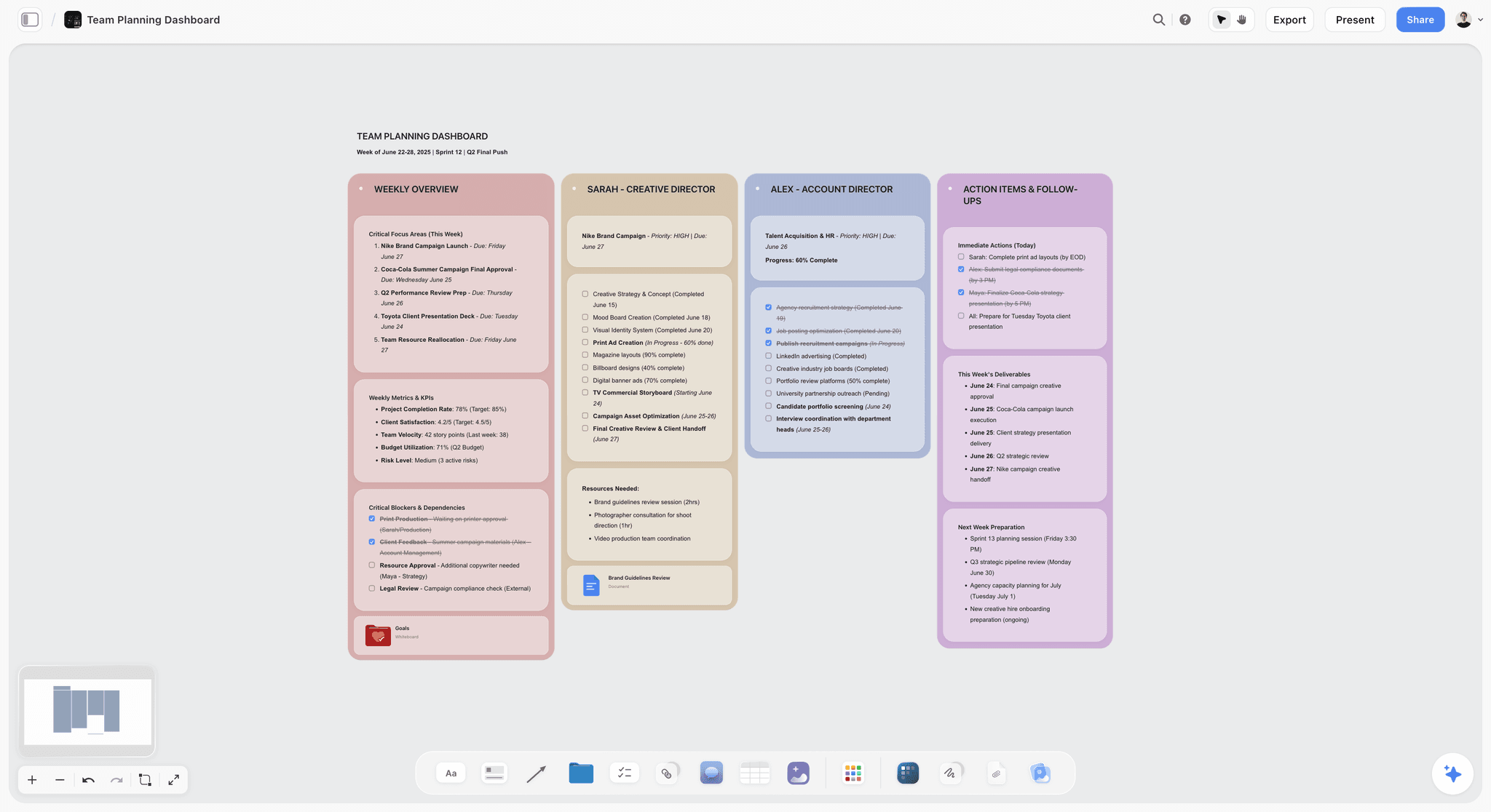
Storyflow holds the strategy on a canvas connected to the execution work: the vision, the bets, the priorities, and the initiatives that serve them, all visible together. The AI reads the full canvas, so you can ask whether the current work still serves the strategy, or whether a bet has quietly lost its initiatives. Because the strategy and the work share one board, the gap is closed by design, and the strategy stays live because revisiting it is just opening the board.
Best for: Teams who want the strategy and the work on one AI-readable canvas, with the gap closed by design.
Verdict: The strongest AI canvas for closing the gap. For enterprise strategy scorecards and reporting, Cascade goes deeper.
Key features
- Canvas holding the strategy and the execution work together.
- AI reads the full canvas plus up to 1 Tactic and 3 Documents you @-mention.
- AI checks whether current work still serves the strategy.
- Story Blueprints library with strategy and planning frameworks.
- Every collaborator a paid member invites to the board joins free.
Pricing
Paid-only during early access. Plus: $7.99/mo annual. Full Story Blueprints, unlimited uploads. Pro: $14/mo annual. AI image generation, 20x AI usage. Max: $39/mo annual. 40x more AI, team workspace with roles. Free plan (unlimited boards and cards, unlimited collaboration, basic AI, 20 file uploads) launches before the end of 2026.
Pros
- Strategy and execution share one canvas, closing the gap.
- AI checks whether the work still serves the strategy.
- Collaborators invited by a paid member join free, with no seat limit.
Cons
- No enterprise strategy scorecards or formal reporting like Cascade.
- No deep task tracking; pair with Asana for granular execution.
- Newer platform with a smaller template library than Notion.
2. Notion
Notion keeps the strategy and the execution in one workspace: a strategy doc with the vision and bets, an OKR database, and project databases that link to the goals they serve. Because they share a workspace, the gap is narrow. The strategy can be revisited as easily as any page, which keeps it live.
Best for: Teams who want the strategy and the daily work to live in one connected workspace.
Verdict: The strongest general tool for closing the gap. Add a revisit ritual so the strategy stays live.
Key features
- Strategy docs alongside OKR and project databases.
- Linked databases connecting work to goals.
- Multiple views for leadership and teams.
- Templates for strategic planning.
- Standard AI features.
Pricing
Free for personal use. Plus: $10/mo. Business: $18/mo.
Pros
- Strategy and execution share one workspace.
- The strategy is as easy to revisit as any page.
- Large template community.
Cons
- Setup-heavy before it is useful.
- No strategy-specific scorecards or reporting.
- The connection depends on disciplined linking.
3. Cascade
Cascade is a dedicated strategy execution platform. It is built specifically to close the gap: strategy maps connect to goals, goals to projects, projects to progress, with dashboards that show leadership whether the strategy is being delivered. It is the most purpose-built tool here for keeping strategy and execution connected.
Best for: Organizations that want a dedicated platform to connect strategy to delivery.
Verdict: The strongest dedicated strategy execution platform. Built for the gap; priced for organizations.
Key features
- Strategy maps connecting vision to goals to projects.
- Progress dashboards and reporting.
- Alignment views across the organization.
- AI assistant.
Pricing
Custom pricing, aimed at organizations.
Pros
- Purpose-built to close the gap.
- Strong strategy-to-delivery connection.
- Leadership dashboards.
Cons
- Custom pricing suits larger budgets.
- Heavier than a small team needs.
- Strategy-making is more structured than freeform.
4. Miro
Miro is the collaborative canvas for the strategy-making half: the offsite, the strategy workshop, the SWOT and the bets mapped out as a team. It is excellent for building the strategy. It is weaker at connecting that strategy to execution, so the board can become a strategy that was made and then left behind.
Best for: Teams who want to build the strategy collaboratively in workshops.
Verdict: Strong for making the strategy. Pair it with an execution-connected tool to close the gap.
Key features
- Infinite canvas for strategy workshops.
- Strategy templates: SWOT, OKR, business model.
- Real-time collaboration.
- Standard AI features.
Pricing
Free for 3 boards. Starter: $8/mo annual. Business: $16/mo.
Pros
- Excellent for collaborative strategy-making.
- Strong strategy templates.
- Familiar to most teams.
Cons
- Weak connection to execution.
- The 3-board free limit is tight.
- The strategy board can be made and abandoned.
5. Asana
Asana's Goals feature connects strategy to execution from the execution side: company goals link down to team goals and to the tasks that serve them. It is strong at showing which work serves which goal. The strategy-making itself, the reasoning and the bets, lives lighter, usually in a linked doc.
Best for: Teams who want strategic goals connected down to the daily tasks.
Verdict: A strong execution-side tool for closing the gap. Strategy-making is lighter than dedicated tools.
Key features
- Goals connecting company to team to tasks.
- Progress roll-up to leadership.
- Portfolios and timeline views.
- Standard AI features.
Pricing
Free for small teams. Starter: roughly $11/user/mo. Higher tiers above.
Pros
- Strong goal-to-task connection.
- Progress rolls up to leadership.
- Mature and reliable.
Cons
- Strategy-making is light.
- Per-user pricing adds up.
- The reasoning behind the strategy lives elsewhere.
6. Aha!
Aha! is a strategy-led product planning platform. It connects product strategy, vision, goals, and initiatives, to roadmaps and delivery. For product organizations, it closes the gap well within the product domain. It is product-focused, less suited to whole-company strategy.
Best for: Product organizations that want strategy connected to the roadmap.
Verdict: A strong strategy-to-roadmap tool for product teams. Product-focused, and priced for it.
Key features
- Product strategy and vision tools.
- Goals and initiatives linked to roadmaps.
- Delivery connection.
- AI assistant.
Pricing
Per-user pricing from roughly $59/user/mo.
Pros
- Strong strategy-to-roadmap connection.
- Purpose-built for product strategy.
- Comprehensive feature set.
Cons
- Product-focused, not whole-company.
- Pricing is steep.
- Heavier than smaller teams need.
7. Tability
Tability is a lightweight OKR and strategy tracking tool. It keeps goals live with regular check-ins, progress tracking, and nudges, which is exactly what fights strategy decay. It connects strategy to execution through OKRs rather than tasks, and it is affordable.
Best for: Teams who want a lightweight tool to keep OKRs and strategy live.
Verdict: A strong, affordable OKR tracker that fights decay. Connects through OKRs, not tasks.
Key features
- OKR and goal tracking.
- Regular check-ins and nudges.
- Progress dashboards.
- AI assistant.
Pricing
Free tier. Paid plans from roughly $5/user/mo.
Pros
- Keeps OKRs live with check-ins.
- Affordable.
- Fights strategy decay directly.
Cons
- Connects through OKRs, not tasks.
- Lighter on strategy-making.
- Best paired with a project tool.
8. ClickUp
ClickUp is an all-in-one work platform with Goals that connect to tasks. A team can hold the strategy in docs and link goals to the work, all in one tool. It closes the gap moderately well, with the same all-in-one trade-off of breadth over depth.
Best for: Teams who want strategy and execution in one all-in-one platform.
Verdict: A capable all-in-one for the gap. Moderate depth on the strategy side.
Key features
- Goals linked to tasks.
- Docs for strategy.
- Multiple views and dashboards.
- Standard AI features.
Pricing
Free tier. Paid plans from roughly $7/user/mo.
Pros
- Strategy and execution in one tool.
- Affordable entry pricing.
- Goals connect to work.
Cons
- Breadth over depth.
- Strategy-making is light.
- Setup time for the right configuration.
9. Monday.com
Monday.com is a customizable work platform that teams shape into a strategy-and-execution system: high-level boards for goals, linked boards for the work. It can close the gap with setup, with the same trade-off as other customizable platforms.
Best for: Teams who want to customize a strategy-to-execution workflow.
Verdict: A flexible platform that closes the gap with setup. Customization-dependent.
Key features
- Customizable goal and work boards.
- Linking between strategy and execution boards.
- Dashboards and automations.
- Standard AI features.
Pricing
Per-seat pricing from roughly $9/seat/mo.
Pros
- Highly customizable.
- Can link strategy to work boards.
- Strong automations.
Cons
- Gap-closing depends on custom setup.
- Per-seat pricing adds up.
- Strategy-making is light.
10. AchieveIt
AchieveIt is an enterprise strategy execution platform focused on tracking and reporting on strategic plans across large organizations. It is built to keep big, distributed strategies connected to execution and visible to leadership.
Best for: Large organizations tracking distributed strategic plans.
Verdict: A capable enterprise strategy execution tool. Built for scale and reporting.
Key features
- Strategic plan tracking across the organization.
- Progress reporting and dashboards.
- Accountability and alignment views.
- Light AI.
Pricing
Custom enterprise pricing.
Pros
- Built for large, distributed strategies.
- Strong reporting and accountability.
- Leadership visibility.
Cons
- Enterprise-only pricing.
- Heavy for smaller teams.
- Strategy-making is structured, not freeform.
11. Airtable
Airtable runs a strategy as a relational database: goals linked to initiatives linked to projects. The relations connect strategy to execution, and views give leadership a roll-up. It is powerful and flexible, with the usual setup cost and non-visual feel.
Best for: Teams who want a relational strategy database linking goals to work.
Verdict: A powerful relational option for the gap. Setup-heavy and non-visual.
Key features
- Relational tables for goals, initiatives, projects.
- Views for leadership and teams.
- Templates for strategic planning.
- Standard AI features.
Pricing
Free tier. Team: roughly $20/user/mo. Higher tiers above.
Pros
- Relations connect strategy to execution.
- Powerful and flexible.
- Strong views.
Cons
- Setup-heavy and technical.
- Non-visual for strategy-making.
- Per-user pricing adds up.
12. Mooncamp
Mooncamp is an OKR and goal management platform focused on alignment: connecting company objectives down through teams and keeping them visible. Like Tability, it fights decay through OKR check-ins, with a stronger alignment-mapping emphasis.
Best for: Organizations that want OKR-driven alignment from company to team.
Verdict: A capable OKR alignment platform. Connects through OKRs, like Tability.
Key features
- OKR and goal management.
- Alignment maps from company to team.
- Check-ins and progress tracking.
- Light AI.
Pricing
Custom pricing.
Pros
- Strong OKR alignment mapping.
- Fights decay through check-ins.
- Clear company-to-team connection.
Cons
- Connects through OKRs, not tasks.
- Custom pricing.
- Lighter on strategy-making.
7) Recommended Strategic Planning Stacks
Stack 1: Startup. Miro Free (the collaborative strategy canvas) + Asana Free (execution). A complete strategy-and-execution setup at no cost. Storyflow is paid-only during early access; swap it in once the Free plan launches, or pay $7.99/month for Plus now (see Stack 4).
Stack 2: Scale-Up. Notion or Storyflow (strategy and reasoning) + Tability (keep OKRs live with check-ins) + Asana (task execution). The strategy stays live and connected.
Stack 3: Enterprise. Cascade or AchieveIt (dedicated strategy execution and reporting) + Miro (strategy-making workshops) + the team's existing project tools for delivery.
Stack 4: Cheapest Working Stack. Storyflow Plus, $7.99/month annual (live strategy canvas) + Asana Free (execution). Total: $7.99/month.
The pattern across every stack: keep the strategy live, and connect it to the work. The strategies that survive a quarter are the ones that never lost contact with execution. The ones that decayed are the ones left in a deck.
8) Honorable Mentions
- ClearPoint Strategy. A balanced-scorecard-focused strategy platform.
- Quantive (formerly Gtmhub). An OKR and strategy execution platform.
- Workboard. An enterprise OKR and strategy execution tool.
- PowerPoint or Google Slides. Where most decaying strategy decks are born.
- Lucidchart. Useful for strategy maps and diagrams.
9) Tools to Avoid for Strategic Planning
- A slide deck as the strategy. A deck is finished and frozen. The strategy needs to stay live, and a deck cannot.
- An execution tool with no strategy layer. A fast company with no visible strategy executes hard in an unknown direction.
- A strategy tool with no execution connection. A beautiful strategy disconnected from the work decays within a quarter.
- An annual planning ritual with no revisit cadence. A strategy set once a year and never revisited is a strategy decaying for 11 months.
11) The Bottom Line
The best strategic planning tools in 2026 are the ones that close the strategy-execution gap. Storyflow is the best AI canvas for connecting strategy to the work. Notion is the strongest for keeping strategy and execution in one workspace. Cascade is the best dedicated strategy execution platform. Miro is the best for collaborative strategy sessions.
Strategy and execution run in two different tools at two different speeds, and the gap between them is where the strategy dies. Keep the strategy live, and connect it to the work, so the daily execution never loses contact with the quarterly bets. The strategies that survive are the ones that never decayed in the gap.
For your next planning cycle, hold the strategy on a Storyflow canvas connected to the work, so it stays live instead of decaying in a deck.
10) FAQ: Strategic Planning Tools
What is the best strategic planning tool in 2026?
Storyflow is the best AI canvas for connecting strategy to the work. Notion is the strongest for keeping strategy and execution in one workspace. Cascade is the best dedicated strategy execution platform. Miro is the best for collaborative strategy sessions. The right pick depends on whether your problem is making the strategy or keeping it alive.
Why do strategic plans fail?
Most strategic plans fail not on their merits but in the gap between strategy and execution. The strategy is captured in a deck and frozen; execution runs daily and fast in separate tools. With nothing connecting them, they drift, and within a quarter the strategy describes a company that no longer exists.
What is the strategy-execution gap?
The strategy-execution gap is the distance between the strategy (made in bursts, captured in decks, annual rhythm) and execution (the daily work, in task trackers, fast rhythm). They run in different tools at different speeds. The gap is where the strategy quietly decays, because the work loses visible contact with the plan.
What should a strategic planning tool do?
It should let you make the strategy (vision, goals, bets, reasoning), keep it live (easy to revisit and adjust as reality moves), and connect it to execution (so teams see which bet their work serves and leadership sees whether the work still adds up). A tool that does only one of these leaves the gap open.
What is the cheapest strategic planning tool?
Asana's free tier handles execution, and Tability has a free tier for OKR tracking. Miro's free tier is the cheapest way to hold a shared strategy canvas alongside them today. Storyflow is paid-only during early access; its Free plan (a live strategy canvas connected to the work) launches before the end of 2026, and anyone a paid member invites joins free now.
Can AI help with strategic planning?
Yes. AI can draft strategy options, pressure-test bets, and, most usefully, check whether current execution still serves the strategy. Storyflow's canvas AI reads the strategy and the work together and can flag a bet that has lost its initiatives. The AI keeps the gap visible; the strategic judgment stays human.
How do I keep a strategy from becoming outdated?
Keep it live: hold it in a tool you revisit, not a frozen deck, and set a regular cadence, monthly or quarterly, to adjust it as reality moves. Connect it to execution so drift is visible early. A strategy decays when it is set once and never touched; a living strategy is adjusted continuously.
Is Notion or Cascade better for strategic planning?
Notion is better for smaller teams who want strategy and execution in one flexible workspace at low cost. Cascade is better for organizations that need a dedicated strategy execution platform with formal dashboards and reporting. Notion is flexible and affordable; Cascade is purpose-built and enterprise-priced.
What is the difference between strategic planning and project planning?
Strategic planning sets the direction: the vision, goals, and bets, at a quarterly or annual altitude. Project planning organizes the execution: the tasks and timelines to deliver specific work. Strategic planning answers where to go; project planning answers how to do the next thing. The gap between them is what strategic planning tools must close.
How often should a strategy be reviewed?
Most teams benefit from a light monthly check and a deeper quarterly review. An annual-only strategy spends 11 months decaying. Reviewing means adjusting as reality moves, not just reporting on progress against a frozen plan. A living strategy is reviewed often enough that it never loses contact with the work.
Do small teams need strategic planning tools?
Yes. A small team without a connected strategy executes hard with no shared direction. A low-cost tool like Storyflow (Plus starts at $7.99/month billed annually, with a Free plan launching before the end of 2026) lets a small team hold a live strategy connected to the work, without an enterprise strategy-platform budget.
How do I connect strategy to daily execution?
Use a tool where the strategy and the work share a space, or are explicitly linked: every initiative or task traces up to a strategic bet, and every bet shows the work serving it. Storyflow's canvas holds both; Asana links goals to tasks. The connection is what stops the strategy from drifting.
Table of Contents
- Quick Answer: The Best Strategic Planning Tools in 2026
- Comparison Table: 12 Strategic Planning Tools at a Glance
- The Strategy-Execution Gap
- How We Evaluated These Tools
- Quick Picks by Strategic Planning Need
- Detailed Reviews: 12 Strategic Planning Tools
- Recommended Strategic Planning Stacks
- Honorable Mentions
- Tools to Avoid for Strategic Planning
- FAQ: Strategic Planning Tools
- The Bottom Line
- Author
- Related Reading
Templates to check out for this topic


Planning and project templates you can use in Storyflow
Plan a launch, a sprint, or a whole project on a visual board the team can see at once. Open one of these templates and start from real structure.


See Storyflow in Action
A visual AI workspace where every feature lives inside one canvas. No tab-switching, no context lost.
Build your entire board from a single message
Type what you need in the AI chat at the bottom of your canvas. The AI adds cards, headings, and structure directly onto your board.
Use expert frameworks as AI context
Type @ in the AI chat and choose any Tactic. The AI tailors every response to that framework instead of giving generic advice.
Turn your board into a mind map in seconds
Ask the AI to restructure your canvas as a mindmap. It connects your ideas into a visual hierarchy so you can see how everything relates.
Why Storyflow Exists
Storyflow actually began as a personal tool while working on creative and research projects.
We kept running into the same problem: ideas were scattered everywhere: notes, documents, and whiteboards.
Nothing helped us see how everything connected.
So we started building a workspace designed around how ideas actually grow.
→ Read how Storyflow was createdJustkay
Documentary Filmmaker & Founder at Storyflow
Published: 2026-05-17
Extremely simple, seriously capable


See how easy it is to get started
Watch a real project come together, from a blank board to a finished plan, clicked through step by step.
Start creating with AI and become more productive
Transform your creative workflow with AI-powered tools. Generate ideas, create content, and boost your productivity in minutes instead of hours.