
Category
Writing Tools
Author

Justkay
Documentary Filmmaker & Founder at Storyflow
Topics
2026-05-12
•
Updated May 12, 2026
•
11 min read
•
Writing Tools- best tools for character development 2026
- character development software
- character profile tools
- character creator for writers
- novelist character tool
- Storyflow character development
What are the best tools for character development in 2026?
The best tools for character development in 2026 are Storyflow (best for character profiles alongside beat sheet and story bible on one canvas), Campfire Writing (best modular character module for novelists), Storyist (best Mac-native character templates), and World Anvil (best for character development inside a wiki-shaped world). Characters are not biographies. They are contradictions in motion. The mistake most character tool roundups make is treating character development as biographical entry. The five fields that decide what a character does are want, need, contradiction, voice, and red lines. Pick by approach: inside-out (backstory first) or outside-in (plot need first). Canvas tools like Storyflow serve both approaches.

All 12 Character Development Tools, Ranked
- Storyflow: character profiles on a canvas beside the beat sheet and bible, with AI that reads it all
- Campfire Writing: a dedicated modular character module for inside-out novelists
- Storyist: Mac-native per-character profile templates
- World Anvil: characters built inside a wiki-shaped world
- Plottr: plot-timeline cards that tie characters to the beats they serve
- Scrivener: character notes held in the binder beside the manuscript
- Notion: database-backed character tables with custom fields
- Obsidian: connected, local-first character notes with backlinks
- Character.AI: stress-testing a character's voice through dialogue
- NovelCrafter: an AI-assisted novel tool with a character codex
- ChatGPT / Claude: fast character-variant scaffolding from a logline
- NovelAI: AI fiction generation with character lorebook entries
Full disclosure: Storyflow is our own product, and we rank it #1 for one job: holding character profiles on a canvas beside the beat sheet and bible, where the AI reads the whole project for cross-character coherence. For deep single-character inside-out work Campfire Writing's dedicated module goes deeper, and for stress-testing how a character actually talks Character.AI is stronger. Storyflow is not a long-form prose editor, so pair it with Scrivener for chapter writing. We link to every tool so you can judge the fit.
Quick Comparison: Best Character Development Tools
These four cover the ways writers build characters: canvas profiles beside the plot, a deep novelist module, Mac-native templates, and characters inside a wiki-shaped world.
| Tool | Best For | AI Features | Price |
|---|---|---|---|
| Storyflow | Canvas profiles beside beat sheet + bible | Reads full canvas for cross-character checks | $7.99 mo annual (free plan late 2026) |
| Campfire Writing | Modular novelist character module | Light AI character generation | Free / $9 mo |
| Storyist | Mac-native character templates | No AI | $59 one-time |
| World Anvil | Characters inside a wiki-shaped world | Light AI | Free / $4.99 mo |
Build characters that stay consistent across the whole story
Keep every character profile on one Storyflow board beside your plot, and let AI draft backstories and arcs, then flag where a character acts out of character.

1) Quick Answer: The Best Character Development Tools in 2026
The best tools for character development in 2026 are Storyflow (best for character profiles alongside beat sheet and story bible on one canvas), Campfire Writing (best modular character module for novelists), Storyist (best Mac-native character templates), and World Anvil (best for character development inside a wiki-shaped world). The pick depends on whether you build characters from the inside out (backstory first, plot later) or the outside in (plot need first, backstory backward).
Characters are not biographies. They are contradictions in motion. The mistake most character tool roundups make is treating character development as biographical entry: name, age, hair color, favorite food. None of those decide what the character does on page 47. The five fields that do are want (the external goal), need (the internal thing they lack), contradiction (the tension between the two that makes choosing painful), voice (how they sound), and red lines (what they would never do). Call them the Five Load-Bearing Fields. The 12 tools below are ranked by how many of the five they hold by default, not by how many biographical boxes they let you fill. A tool that surfaces four or five does more for your writing than one with fifty biographical fields and no contradiction prompt.
I have built character profiles for documentary subjects and consulted on serialized YouTube formats where characters carry across episodes. The pattern that has held is that biographical character tools produce flat characters, and contradiction-first character tools produce characters readers remember. If you want the step-by-step build rather than the tool comparison, see How to Develop a Character with AI in 2026, which walks the same five fields through a seven-step workflow.
For the story bible context characters live in, see What is a Story Bible? The Complete Guide for Writers and Showrunners (2026). For the structural document characters move through, see What is a Beat Sheet?.
2) Comparison Table: 12 Character Development Tools at a Glance
Rating criteria: which character development approach the tool serves, AI context for character work, holding the five load-bearing fields (want, need, contradiction, voice, red lines), and pricing for solo writers.
3) Inside-out vs Outside-in Character Development
Character development splits into two approaches. Most writers use one without naming it. Tools serve one approach better than the other.
Inside-out development. The writer starts with the character's interior (backstory, the wound that defines them, the want, the need) and lets the plot emerge from who the character is. A character with a fear of abandonment reacts one way to the inciting incident, and the plot follows from the reaction. This is the default for literary fiction, character-driven film, and most novel writing.
Outside-in development. The writer starts with the plot (what does the story need a character to do at this beat?) and builds the character backward to make that action believable. The character fears abandonment because the plot requires her to abandon someone at the All Is Lost beat. This is the default for plot-heavy genre fiction, commercial film, and most TV writing-room work.
Neither is correct in the abstract. Both produce great characters when done well. The split maps onto tool choice. Inside-out tools (Storyist, Campfire Writing, Scrivener, World Anvil) hold deep biographical and emotional material in multi-page profiles. Outside-in tools (Plottr, NovelCrafter, Character.AI) keep a shorter profile tied to the beats the character serves. Canvas tools like Storyflow serve both, because the profile lives next to the plot threads and you can start from either end.
The split even shapes the AI. Inside-out AI asks "given this backstory, what does this character want?". Outside-in AI asks "what character does this beat need?". The best character AI in 2026 does both.
4) How We Evaluated These Tools
Five criteria, weighted in this order:
- Hold the five load-bearing fields. Want, need, contradiction, voice, red lines. Tools that surface these five rate higher than tools that ask for hair color and favorite food.
- Approach fit. Does the tool serve inside-out, outside-in, or both? Tools that pretend to serve both but really only serve one were rated against the approach they actually serve.
- AI context for character work. Can the AI read the surrounding project (plot, theme, other characters) when working on a character? Most AI character tools work in isolation.
- Cross-character coherence. Can the writer surface inconsistencies across characters (two characters with the same defining trait, no character who carries the theme)?
- Pricing fit for solo writers. Character development is usually solo work. Per-user pricing penalizes solo workflows.
Tested workflows included a documentary character profile set (real subjects), a fantasy novel character ensemble, and a YouTube serialized format with recurring characters. Tools were tested over weeks of sustained character work.
5) Quick Picks by Character Development Approach
Inside-out novel ensemble: Campfire Writing or Storyist, both pre-structured for deep biographical work.
Outside-in, TV writers' room style: Plottr (character + plot) plus Storyflow (canvas to hold both alongside the beat sheet).
Writers who use both approaches: Storyflow. The canvas holds profiles next to plot threads, so you work either direction without switching tools.
Worldbuilders whose characters live in a wiki: World Anvil for the character-in-world view.
Character voice and dialogue: Character.AI for stress-testing how a character talks. Pair with a primary profile tool.
Cheapest working stack today: Obsidian Free. Add Storyflow, from $7.99/mo (Free plan coming before the end of 2026), for the canvas layer.
AI-augmented drafting: Storyflow canvas-AI plus ChatGPT or Claude for variants. The hybrid beats either alone.
6) Detailed Reviews: 12 Character Development Tools
1. Storyflow
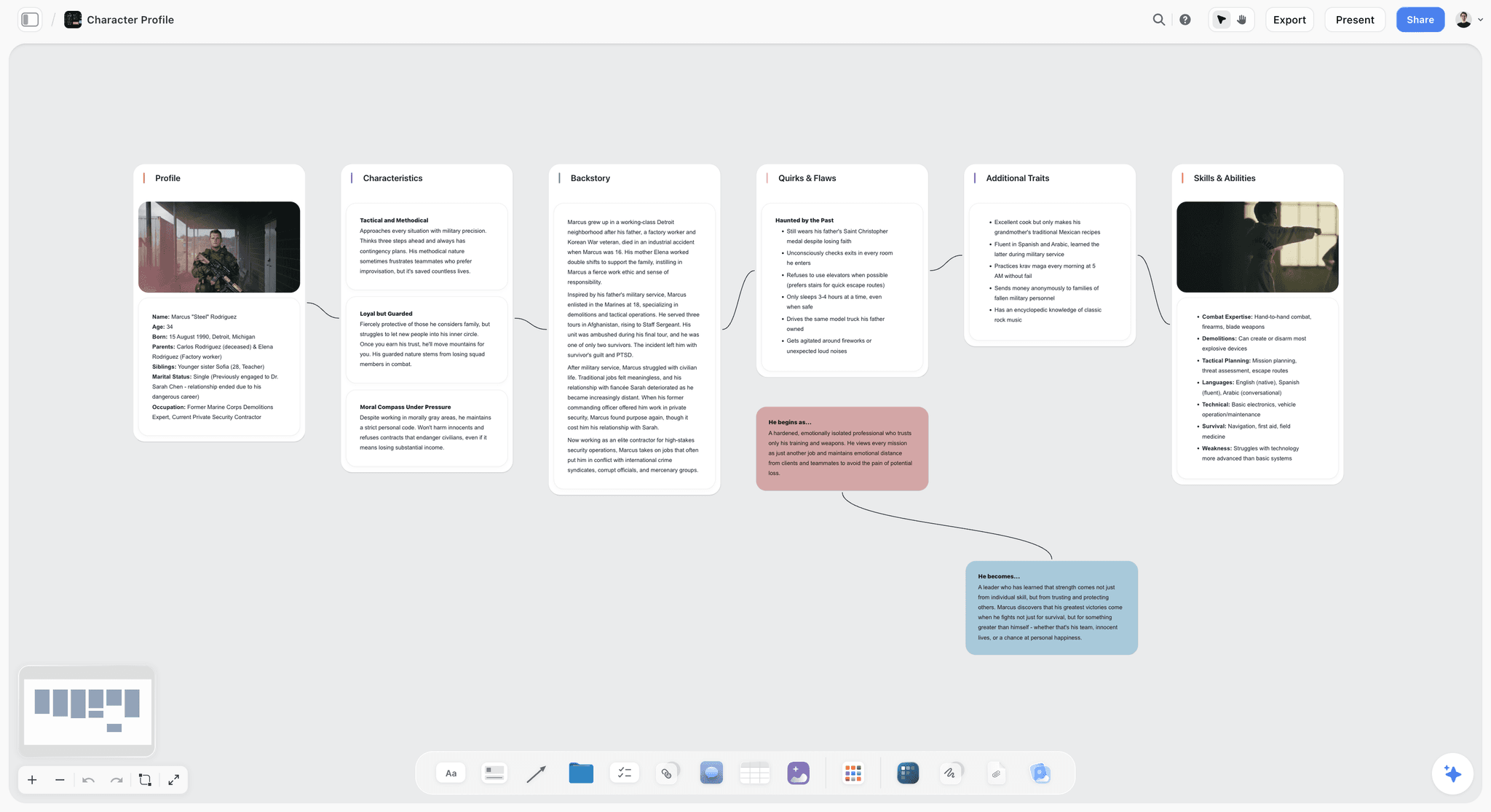
Storyflow holds character profiles on a canvas alongside the beat sheet, story bible, plot threads, and visual references. Its Story Blueprints templates are structured around the Five Load-Bearing Fields rather than biographical filler, and the AI reads the full canvas, so a writer can ask "does this character's want conflict with this one's?" and get an answer grounded in the actual project.
Fields held by default: all five. It is the only tool here whose starter template prompts for the contradiction explicitly, the field every other tool leaves to the writer to remember. It ranks first because the profile sits next to the beat sheet it has to survive: a want you wrote on Monday stays visible against the All Is Lost beat you wrote on Friday. Most tools store the character in one place and the plot in another, and that gap is where flat characters hide.
Best for: Writers who work in both approaches, documentary character builders, and serialized writers who need character continuity across episodes.
Verdict: The strongest canvas tool for character development in 2026. Pair with Campfire or Storyist if your process is single-character deep-dive heavy.
Key features
- Canvas where character profiles live alongside plot, theme, mood board.
- AI reads the full active canvas plus up to 1 Tactic and 3 Documents you @-mention.
- Story Blueprints library includes character profile templates calibrated around want, need, contradiction, voice, red lines.
- Cross-character continuity checks via the canvas-AI.
Pricing
Paid-only during early access; anyone a paid member invites to a board joins free today. The Free plan, launching before the end of 2026, will include unlimited boards, basic AI, and 20 file uploads. Plus: $7.99/mo annual ($9.99 monthly). Full Story Blueprints. Pro: $14/mo annual ($19 monthly). AI image generation (visual character references). Max: $39/mo annual ($49 monthly). 40x more AI, team workspace. Pricing is flat per account, not per seat.
Pros
- Only tool here that prompts for the contradiction by default.
- AI checks coherence across every character on the board.
- Flat per-account pricing, no per-seat penalty for solo writers.
Cons
- Not a long-form prose writing surface; pair with Scrivener for chapter writing.
- Cloud-only; local-first writers should pair with Obsidian.
- Newer platform; deeper genre-specific character templates (e.g., RPG stat blocks, romance archetypes) are thinner than dedicated tools.
2. Campfire Writing
Campfire Writing has a dedicated character module with deep biographical fields, relationships, arcs, and timelines. Strongest for inside-out novelists who want to spend real time inside the character before plot.
Fields held by default: four of five. Campfire captures want, need, voice, and a relationships-driven read on red lines cleanly, and its arc timeline is the best here for tracking how a character changes across a long novel. The one it leaves to you is the contradiction, the field that matters most, though that is an industry-wide gap rather than a Campfire failing. It earns its rank on depth without clutter: modular pricing lets a novelist buy the character and relationships modules and skip the manuscript and worldbuilding ones they do not need.
Best for: Novelists doing inside-out character development with depth.
Verdict: The strongest dedicated novelist character module.
Key features
- Character module with biographical and arc fields.
- Relationship mapping between characters.
- Lightweight AI for character generation.
- Modular; pick what you need.
Pricing
Free with caps. Modules from $9/mo.
Pros
- Deep character module pre-structured for novelists.
- Modular pricing avoids paying for unused features.
- Active development.
Cons
- Character work happens in isolation from the plot.
- AI is light compared to canvas-AI tools.
- Smaller community than Scrivener or World Anvil.
3. Storyist (Mac)
Storyist is the Mac-native novel-writing tool with per-character profile templates and plot sheets. Loved by Mac novelists who want integrated character templates.
Fields held by default: three of five. The per-character template covers want, voice, and backstory-as-need well, and the plot sheets keep characters tied to the scenes they appear in, the outside-in half most inside-out tools drop. Contradiction and red lines are yours to add. It earns its rank because template and manuscript live in one Mac-native document, so you are not exporting profiles between apps mid-draft. The trade-off is platform lock: that payoff only exists if your whole writing life is already on Mac and iOS.
Best for: Mac-only novelists.
Verdict: Strong for Mac-native inside-out novelists.
Key features
- Per-character profile templates.
- Plot sheets that reference characters.
- Mac + iOS sync.
- One-time purchase.
Pricing
$59 one-time (Mac). iOS sold separately.
Pros
- Mac-native polish.
- Per-character templates pre-structured.
- One-time purchase.
Cons
- Mac and iOS only.
- No AI.
- Smaller community.
4. World Anvil
World Anvil is the dedicated worldbuilding tool with strong character profiles inside a wiki-shaped world. Characters cross-reference locations, organizations, and history.
Fields held by default: three of five, with a worldbuilding tilt. World Anvil is strongest at the fields a world touches (want and red lines often trace back to a character's culture, faction, or history), so the cross-referencing does real character work rather than just cataloguing. Voice and contradiction get less scaffolding. It ranks here because no other tool situates a character inside their world this thoroughly. The cost is that the wiki structure is slow for an in-progress story, exactly wrong for early drafting and exactly right for a world you will live in for years.
Best for: Fantasy and SF novelists building characters inside an elaborate world.
Verdict: Strong for characters who live inside a larger wiki.
Key features
- Wiki-structured character articles.
- Cross-references between characters, locations, organizations.
- Timeline integration.
Pricing
Free with caps. Journeyman: $4.99/mo. Master: $7.99/mo.
Pros
- Characters live inside the world they inhabit.
- Strong fantasy and SF conventions.
- Cross-referencing is best-in-class.
Cons
- Wiki-heavy; not strong for in-progress story alongside characters.
- AI features lag canvas tools.
- Templates are genre-specific.
5. Plottr
Plottr is plot-timeline-focused with character profile cards tied to plot threads. Strongest for outside-in writers who decide what a character does at each beat first.
Fields held by default: two of five, but the right two for its job. Plottr is light on interior fields, which is fine because its whole premise is that character emerges from function: you place what the character does at each beat, and the profile grows backward from the pattern. For a thriller or mystery writer, that is the correct order of operations, and it makes Plottr the cleanest outside-in tool here.
Best for: Outside-in writers, plot-heavy genre fiction, multi-thread narratives.
Verdict: Strong for outside-in character work tied to plot.
Key features
- Visual timeline with character threads.
- Character profile templates.
- Series management.
Pricing
$25/year basic, $39/year pro.
Pros
- Best visual timeline.
- Character + plot held together.
- Affordable.
Cons
- Light biographical depth.
- No AI.
6. Scrivener
Scrivener holds character notes in the binder alongside the manuscript. Strong for long-form prose writers who keep biographical character files.
Fields held by default: zero prompted, all five possible. Scrivener hands you a blank character-sheet template and a binder, and you build whatever fields you want. That freedom is the appeal and the weakness: a disciplined writer holds all five fields beautifully, an undisciplined one fills the sheet with hair color. It ranks on writing-surface strength, not character structure. If you draft chapters in Scrivener already, keeping character files in the same project beats bolting on a second tool.
Best for: Long-form novelists who write character notes inside the same tool as the manuscript.
Verdict: Strong for the writing layer; weak for cross-character coherence.
Key features
- Binder for hierarchical character notes.
- Corkboard view of character cards.
- One-time purchase.
Pricing
$59.99 one-time.
Pros
- One-time purchase.
- Character files live in the same project as the manuscript.
Cons
- No AI.
- Cross-character checks are manual.
7. Notion
Notion's database lets you build character tables with custom fields and relationships. Generic but workable with setup.
Fields held by default: none until you build them. The Five Load-Bearing Fields exist only if you make each one a database property yourself. Once you do, the relational database is genuinely strong: link characters to scenes, filter by arc stage, roll up who appears where. But the setup work is real, and the AI is a general assistant with no story awareness, so it cannot tell you two characters share a contradiction. It ranks as an adequate generalist for writers already living in Notion. For serious character work, a purpose-built tool wins.
Best for: Writers already in Notion who want character work alongside their existing setup.
Verdict: Adequate generalist. Lose to specialized tools for serious character work.
Key features
- Database-backed character tables.
- Custom field types.
- Standard AI features.
Pricing
Free for personal use. Plus: $10/mo.
Pros
- Strong general database.
- Generous free tier.
Cons
- Setup-heavy; character-specific templates often need customization.
- AI is generic, not story-aware.
8. Obsidian
Obsidian holds character notes as connected markdown files. Backlinks show every mention of a character across the project.
Fields held by default: none prompted, but the connected-note model does something no other tool here does. Every time you mention a character in a scene note, the backlink surfaces it on the character's page, so the profile accretes from actual usage rather than upfront invention, a quietly powerful way to catch a character drifting out of voice across a long project. It ranks for local-first writers who own their files and want that graph. The five fields, the AI, and any structure are yours to assemble from plugins.
Best for: Solo writers who want local-first character notes with connected references.
Verdict: Strong for connected character notes; setup-heavy.
Key features
- Local-first markdown.
- Backlinks and graph view.
- Plugin ecosystem.
Pricing
Free for personal use.
Pros
- Local-first; full file ownership.
- Free indefinitely.
- Connected-note model surfaces character mentions.
Cons
- Setup-heavy.
- AI requires plugins.
9. Character.AI
Character.AI lets writers chat with AI versions of their characters to stress-test voice and dialogue. Use as a voice tool, not as the primary character development surface.
Fields held by default: one, but the deepest treatment of it anywhere. Character.AI does nothing for want, need, contradiction, or red lines and holds no profile. What it does is let you talk to the character until you hear the voice, the one field a static form can never really capture.
Best for: Dialogue and voice testing for characters whose voices the writer has not yet fully heard.
Verdict: Useful for the voice layer; not a primary character development tool.
Key features
- Conversational AI with custom characters.
- Voice stress-testing through dialogue.
- Free with caps.
Pricing
Free with caps. C.AI+: $9.99/mo.
Pros
- Best-in-class for character voice testing.
- Free tier usable.
- Stress-tests dialogue.
Cons
- Not a profile tool; pair with a primary character development tool.
- Output quality varies.
- Character context is conversational, not project-aware.
10. NovelCrafter
NovelCrafter is an AI-assisted novel-writing tool with character codex and AI-generated drafts.
Fields held by default: two, plus AI that can draft the rest. The codex stores want and voice, and the scene-level AI will generate a backstory or contradiction on request, though the generated contradiction stays competent and forgettable until a writer replaces it. The codex keeps the character consistent scene to scene, which is its real strength.
Best for: Outside-in novelists who want AI scaffolding throughout the writing process.
Verdict: Strong AI integration; thin character profile depth compared to dedicated tools.
Key features
- Character codex.
- Scene-level AI drafting.
- Affordable.
Pricing
$4/mo basic, $10/mo full.
Pros
- Strong AI scaffolding.
- Affordable pricing.
Cons
- Character depth thinner than dedicated tools.
- Newer platform.
11. ChatGPT / Claude (AI Chat)
AI chat tools scaffold character drafts from a logline. The output is rarely the final character; the value is variant generation.
Fields held by default: all five on request, none held across sessions. Ask ChatGPT or Claude for a character and it returns all five fields in seconds. The problem is memory: close the chat and the character is gone unless you paste it somewhere with structure. Treat these as a variant generator that feeds a real profile tool, not as the tool itself.
Best for: Generating character variants, stress-testing character contradictions.
Verdict: Strong as a partner; weak as the primary tool because it cannot hold the character across sessions.
Key features
- Generate character profiles from a logline.
- Critique existing characters for consistency.
- Draft individual scenes from a character POV.
Pricing
ChatGPT Free or Plus ($20/mo). Claude Free or Pro ($20/mo).
Pros
- Fast variant generation.
- Free tiers usable.
Cons
- No project context across sessions.
- Output is rarely usable as final character.
12. NovelAI
NovelAI is the AI-assisted fiction generation tool. For outside-in writers who want AI to draft scenes with characters in them.
Fields held by default: one, via the lorebook. NovelAI's character depth is limited to lorebook entries the generator reads for consistency, so a character is more a style anchor than a developed profile. It ranks last on character work because its strength is prose generation, not character structure. Bring the character in developed from another tool.
Best for: Outside-in writers comfortable with AI drafting scenes.
Verdict: Strong AI text generation; thin character profile depth.
Key features
- AI-assisted prose generation.
- Character lorebook entries.
- Tablet UI focused.
Pricing
$10/mo paper tier.
Pros
- Strong AI generation tuned for fiction.
- Subscription includes prose generation.
Cons
- Character depth limited compared to dedicated tools.
- Output quality varies by genre.
7) Recommended Character Development Stacks
Stack 1: Inside-out Literary Novelist. Campfire Writing or Storyist (character module) plus Scrivener (manuscript). Optional ChatGPT for variant generation.
Stack 2: Outside-in Genre Novelist. Plottr (plot + character timeline) plus Storyflow (canvas to hold characters next to beats) plus ChatGPT for AI character drafts.
Stack 3: Worldbuilder Whose Characters Live in a World. World Anvil (character + world wiki) plus Storyflow (canvas for the story-in-progress).
Stack 4: Documentary or Brand Storyteller. Storyflow (canvas with character profiles plus interview transcripts plus research) plus Otter.ai for transcription.
Stack 5: Cheapest Working Stack. Obsidian Free, plus Storyflow (from $7.99/mo, Free plan coming before the end of 2026) for the canvas layer.
The pattern across every stack: pair a character profile tool with a plot or story tool, and add AI where it accelerates first drafts.
8) Honorable Mentions
- Roam Research. Connected-note alternative to Obsidian, stronger at the graph, weaker at local-first ownership.
- Tana. Object-based notes where a character can be a typed object with fields; promising but early.
- WonderUnit Storyteller. Free open-source character development tool with a screenwriting bent.
- Sudowrite. AI-assisted novel writing with character support, closer to NovelCrafter than to a dedicated profile tool.
9) Tools to Avoid for Character Development
- Generic spreadsheets. Acceptable for character lists; fails at relational character work.
- Microsoft Word. Long-form character notes work, cross-character checks break.
- Pure AI chat without a workspace. Generates fast, holds nothing.
- Trello or Asana as a character tool. Cards do not hold character depth.
11) The Bottom Line
The best tools for character development in 2026 are the ones that hold the five load-bearing fields (want, need, contradiction, voice, red lines) and serve the writer's approach (inside-out or outside-in). Storyflow is the strongest canvas tool, serving both approaches. Campfire Writing and Storyist are the strongest inside-out tools. Plottr is the strongest outside-in tool. World Anvil is the strongest character-in-world tool.
Characters are not biographies. They are contradictions in motion. Pick the tool that surfaces the contradiction first.
The strongest 2026 character development stack is Storyflow for the canvas, paired with one specialized tool that matches the writer's approach. Try Storyflow's Story Blueprints for the canvas layer, paid-only during early access with a Free plan coming before the end of 2026.
10) FAQ: Character Development Tools
What is the best tool for character development?
The best tool depends on whether you work inside-out (Campfire, Storyist, Scrivener) or outside-in (Plottr, NovelCrafter, Storyflow). Storyflow serves both because the canvas holds character profiles alongside plot threads. World Anvil is strongest for characters who live in elaborate worlds.
What is "inside-out" vs "outside-in" character development?
Inside-out development starts with the character's interior (backstory, want, need) and lets the plot emerge from who they are. Outside-in development starts with what the plot needs a character to do and builds the character backward. Most literary fiction is inside-out; most genre and TV is outside-in. Neither is correct in the abstract.
How long should a character profile be?
A working character profile fits on one page for supporting characters and two to three pages for principals. Profiles longer than five pages tend to be biographical filler that does not surface in the writing. The five load-bearing fields (want, need, contradiction, voice, red lines) compress to one page when written tightly.
Can AI write character profiles?
AI scaffolds character profiles quickly from a logline. The output is rarely the final profile because AI tends to write competent-but-flat character contradictions. The strongest workflow is AI-scaffolded draft, writer-revised contradiction. The contradiction is where the character becomes a character.
What are the five load-bearing fields for character development?
Want, need, contradiction, voice, red lines. Want is the external goal. Need is the internal goal. Contradiction is the defining tension that makes the character a character. Voice is how they talk. Red lines are what they would never do. Tools that hold these five rate higher than tools that ask for biographical filler.
Should I develop characters before or after the plot?
Both. Develop the lead character and antagonist before the plot. Supporting characters often develop more easily after the plot reveals what they need to do. Outside-in writers do this naturally; inside-out writers benefit from the discipline of writing the antagonist's profile before the plot.
What is the difference between a character profile and a character arc?
A profile describes who the character is. An arc describes how the character changes across the story. A profile fits on a page; an arc is plotted across the beat sheet. Plottr is strong for arcs; Storyflow holds both profiles and arcs on the same canvas.
How do you develop characters for documentary?
Documentary characters are real people, so the work is research-driven rather than invention-driven. The same five fields apply: want, need, contradiction, voice, red lines. Profiles get built from interviews, archival material, and observation. Storyflow's canvas holds documentary character profiles alongside interview transcripts and source material.
Can character development tools handle ensemble casts?
Yes, with caveats. Cross-character coherence (avoiding two characters with the same defining trait, ensuring at least one character carries the theme) is the hard problem with ensembles. Canvas tools with AI (Storyflow) surface cross-character issues automatically. Document-based tools require manual checks.
What is the best AI tool for character voice?
Character.AI for stress-testing dialogue. ChatGPT or Claude for variant generation. Storyflow's canvas-AI for voice consistency checks across the project. Most working writers use a combination, not a single tool.
How do I avoid flat characters?
Make the contradiction load-bearing. A character who wants X but needs Y, with a defining contradiction that makes choosing between them painful, is the formula for a character who feels real. Tools that surface the contradiction field (Storyflow, Campfire) help; tools that ask for hair color and favorite food do not.
Should solo writers use AI for character development?
AI accelerates the first-draft phase of character development substantially. What it cannot do is invent the specific contradiction that makes the character a character. The strongest workflow is AI for scaffolding, writer for the contradiction, AI again for stress-testing the contradiction against the plot.
Table of Contents
- Quick Answer: The Best Character Development Tools in 2026
- Comparison Table: 12 Character Development Tools at a Glance
- Inside-out vs Outside-in Character Development
- How We Evaluated These Tools
- Quick Picks by Character Development Approach
- Detailed Reviews: 12 Character Development Tools
- Recommended Character Development Stacks
- Honorable Mentions
- Tools to Avoid for Character Development
- FAQ: Character Development Tools
- The Bottom Line
- Author
- Related Reading
Templates to check out for this topic


Story and writing templates you can use in Storyflow
Start your next script, novel, or world from a ready-made Storyflow board instead of an empty page. The AI reads the whole canvas, so every suggestion is grounded in your story.


See Storyflow in Action
A visual AI workspace where every feature lives inside one canvas. No tab-switching, no context lost.
Build your entire board from a single message
Type what you need in the AI chat at the bottom of your canvas. The AI adds cards, headings, and structure directly onto your board.
Use expert frameworks as AI context
Type @ in the AI chat and choose any Tactic. The AI tailors every response to that framework instead of giving generic advice.
Turn your board into a mind map in seconds
Ask the AI to restructure your canvas as a mindmap. It connects your ideas into a visual hierarchy so you can see how everything relates.
Why Storyflow Exists
Storyflow actually began as a personal tool while working on creative and research projects.
We kept running into the same problem: ideas were scattered everywhere: notes, documents, and whiteboards.
Nothing helped us see how everything connected.
So we started building a workspace designed around how ideas actually grow.
→ Read how Storyflow was createdJustkay
Documentary Filmmaker & Founder at Storyflow
Published: 2026-05-12
Extremely simple, seriously capable


See how easy it is to get started
Watch a real project come together, from a blank board to a finished plan, clicked through step by step.
Start creating with AI and become more productive
Transform your creative workflow with AI-powered tools. Generate ideas, create content, and boost your productivity in minutes instead of hours.