The 12 Best NotebookLM Alternatives in 2026 (We Tested Them All)
The 12 best NotebookLM alternatives in 2026, tested on real research projects. Source-grounded AI tools compared on PDF analysis, audio overviews, citations, and project structure.

Category
AI Workflows
Author

Justkay
Documentary Filmmaker & Founder at Storyflow
Topics
2026-05-14
•
16 min read
•
AI Workflows- best NotebookLM alternatives 2026
- NotebookLM alternative
- source-grounded AI research
- Perplexity Spaces vs NotebookLM
What are the best NotebookLM alternatives in 2026?
NotebookLM did something the rest of the AI category had not figured out by 2024. It grounded every answer in the sources you uploaded, refused to hallucinate outside that corpus, and added an audio overview that turned a stack of research into a fifteen minute podcast you could listen to on a walk. By 2026 the limits show. The fifty source cap matters on serious projects. The chat interface forgets the structure of your thinking between sessions. There is nowhere to draw a connection between two ideas other than asking the model to write a paragraph about both. I tested twelve NotebookLM alternatives across three real research projects this spring: a 73 source Kashgar documentary corpus, a competitive analysis pulling from 41 PDFs, and a literature review of 60 academic papers. The rankings sort the tools that genuinely solve the same problem from the ones that share a vocabulary but a different paradigm. Storyflow is on this list even though it is not a notebook tool, because the right answer for a lot of readers is a canvas where research lives next to the thing you are building from it.

Full disclosure: Storyflow is our own product and is listed first in the reviews and the comparison table: our pick first, then the rest by job. The ranked list places it second. Perplexity Spaces leads that list because it keeps the source-grounded chat most people want from NotebookLM, with citations on every claim, a higher source cap, and live web grounding, which is exactly the half leavers want kept. Storyflow is not a notebook tool: it has no audio overview, no citation engine that traces sentences to source pages, and looser source-grounded guardrails, so for interrogating a fixed corpus Perplexity or NotebookLM fit better. Storyflow earns the second slot only when your research feeds a creative or strategic deliverable and belongs on a canvas. We link to every tool so you can judge the fit.
Quick Comparison
These four cover the main reasons to leave NotebookLM: a higher source cap with live web, a canvas for research that feeds a deliverable, systematic literature review, and team research with citations.
| Tool | Best For | AI Features | Price |
|---|---|---|---|
| Perplexity Spaces | Source-grounded research with live web | Citations on every claim | $20/month |
| Storyflow | Canvas where research feeds a deliverable | AI reads the whole board | $7.99 mo annual (free plan late 2026) |
| Elicit | Systematic literature review | Structured extraction across papers | $12/month |
| Humata | Team research with citations | Citation-grade source accuracy | $15/user/month |
All 12 NotebookLM Alternatives, Ranked
- Perplexity Spaces: best source-grounded research with live web
- Storyflow: best canvas where research feeds a deliverable
- Elicit: best for academic literature review at scale
- Humata: best team research with citation depth
- Glasp: best capture-first web research
- ChatPDF: best single-PDF deep work
- Open-NotebookLM: best open-source self-hostable
- PodGenie: best audio-first research overviews
- Claude Projects: best long-context research conversation
- ChatGPT Projects: best general research conversation
- Mem: best personal AI notebook
- Anara: best academic research workspace
Best NotebookLM Alternative by Job
The overall ranking is not the answer to every question. Match the tool to the job you actually have:
- Best source-grounded research with live web: Perplexity Spaces. Citations you can follow.
- Best canvas where research feeds an actual deliverable: Storyflow. Sources, notes, and the plan they support sit on one board the AI reads, instead of a research silo.
- Best for academic literature review at scale: Elicit.
- Best team research with citation depth: Humata.
Quick Picks: Best NotebookLM Alternatives 2026 by Use Case
Best Source-Grounded Research Alternative: Perplexity Spaces Perplexity Spaces grounds answers in your uploaded files plus the live web in a way NotebookLM cannot. Citations on every claim, no hallucination outside the corpus, and Spaces persist your project context between sessions. From $20/month for Pro, with a free tier for individuals. The honest limitation: the source cap of 50 to 1,000 files (depending on plan) matters at the academic end, and there is no canvas to lay sources out spatially.
Best for Academic Research with Citations: Elicit Elicit is purpose-built for systematic literature review. You can extract data from 25 to 1,000 papers at once into a structured table, run multi-paper comparisons, and trace every claim back to the source paragraph. From $12/month for Plus. The limitation: it is academic-research-shaped, so commercial or creative research feels forced into the wrong template.
Best for Visual Canvas Research (Different Shape): Storyflow Storyflow is not a notebook tool. It is a project canvas where uploaded PDFs, web articles, transcripts, and notes live as cards on the same board as the thing you are building. The AI reads everything on the active board plus @-mentioned Documents and Tactic Blueprints. For research that feeds into a deliverable (a documentary outline, a strategy memo, a feature spec), the canvas shape is categorically different. Plus from $7.99/month billed annually. The honest friction: there is no built-in audio overview, no citation engine that traces specific sentences to source pages, and the source-grounded guardrails are looser than NotebookLM's.
Best Open-Source Self-Hostable: Open-NotebookLM (PrivateLM) Open-NotebookLM and PrivateLM are open-source projects that replicate NotebookLM's core source-grounded chat on your own infrastructure. Free for self-hosting. The limitation: setup requires engineering capacity and the audio overview feature is meaningfully behind Google's.
Best for Single-PDF Deep Work: ChatPDF ChatPDF is the focused tool for working with one document at a time. Faster than NotebookLM for single source questions, with strong citation accuracy. Free with limits; Pro from $5/month. The limitation: this is a different category. Multi-source research is not where ChatPDF fits.
Best for Audio-First Research: PodGenie PodGenie is the closest competitor to NotebookLM's audio overview feature. Turn a stack of sources into a podcast format, with deeper voice options and longer outputs. From $15/month. The limitation: audio is the whole product, so the research depth around it is shallower than NotebookLM.
Best for Source-Grounded Long Documents: Glasp Glasp captures and annotates web sources, then lets AI reason across them. For readers building research libraries from articles and YouTube videos, Glasp is the most-frictionless capture layer. Free for basic use; Pro from $5/month. The limitation: the AI layer is lighter than NotebookLM.
Best for Team Research with Citations: Humata Humata is the team-oriented document AI with citation accuracy as the differentiator. Upload up to 200 documents per project on Pro, with seat-based collaboration. From $15/user/month. The limitation: the interface feels enterprise compared to NotebookLM's lightness.
The honest split is this: NotebookLM is the right tool when your job is to understand a finite corpus and answer questions inside it. Most of the alternatives below win when your job is to do something with the research, not just to interrogate it. Try Storyflow if your research feeds into a creative or strategic deliverable.
Comparison Table: Best NotebookLM Alternatives 2026
| Tool | Best For | Starting Price | Free Plan | Source Grounding (★/5) |
|---|---|---|---|---|
Storyflow | Canvas where research feeds a deliverable | $7.99/month annual | Coming late 2026 (invited collaborators join free now) | ★★★★☆ (different shape) |
Perplexity Spaces | Source-grounded research with live web | $20/month | Yes (limited) | ★★★★★ |
Elicit | Academic literature review at scale | $12/month | Yes (limited) | ★★★★★ |
Humata | Team research with citation depth | $15/user/month | Yes (limited) | ★★★★★ |
Glasp | Capture-first web research | $5/month | Yes | ★★★★☆ |
ChatPDF | Single-PDF deep work | $5/month | Yes | ★★★★☆ |
Open-NotebookLM | Open-source self-hostable | Free (self-host) | Yes | ★★★★☆ |
PodGenie | Audio-first research overviews | $15/month | Yes (limited) | ★★★☆☆ |
Claude Projects | Long-context research conversation | $20/month | Yes (chat only) | ★★★★☆ |
ChatGPT Projects | General research conversation | $20/month | Yes (chat only) | ★★★☆☆ |
Mem | Personal AI notebook | $10/month | Yes (limited) | ★★★☆☆ |
Anara | Academic research workspace | $12/month | Yes (limited) | ★★★☆☆ |

Storyflow canvas holding research sources, transcripts, and outline together with Tactic Blueprints
Best NotebookLM Alternatives 2026: Market Context
The NotebookLM alternative market splits cleanly in 2026, and the choice between groups matters more than the choice between specific tools.
The first group is direct competitors trying to do what NotebookLM does better. Perplexity Spaces, Humata, ChatPDF, Open-NotebookLM, and PodGenie sit here. Their pitch is source-grounded chat with some improvement on the source cap, the citation accuracy, the team features, or the audio output. For most readers whose only complaint with NotebookLM is a specific limit or a missing feature, one of these is the answer.
The second group is research-shaped tools that solve a slightly different problem. Elicit for systematic literature review, Glasp for capture-heavy web research, Anara for academic workspaces, Mem for personal AI notebooks. Their pitch is that research is not generic and the right tool is specialised for the shape of research you actually do.
The third group is paradigm shifts away from the notebook itself. Storyflow (project canvas), Claude Projects (long-context conversation), ChatGPT Projects (light containerised chat). The pitch is that the notebook was the wrong primitive for what you were doing, and a canvas or a project-scoped conversation fits better.
A Stanford HAI 2024 study on AI-assisted research found that the highest gains were among researchers who paired source-grounded AI with structured output. The pattern was not "ask the AI questions" but "use the AI to extract structure that you then re-organise." NotebookLM is excellent at the first half of that loop. The second half is where most readers are actually stuck, and where the alternatives below earn their spot.
How We Evaluated the Best NotebookLM Alternatives 2026
Five criteria determined the rankings. Each test was a specific scenario, not a feature checklist.
Source grounding accuracy. I uploaded the same 41 PDF competitive analysis corpus to each tool and asked twenty questions across three categories: simple lookups, multi-source synthesis, and edge-case extraction. Tools that hallucinated outside the corpus scored lowest. Tools that traced each claim to a specific source page scored highest.
Workflow fit. Three real projects: a documentary corpus of 73 sources, a competitive analysis from 41 PDFs, and a literature review of 60 academic papers. Tools that felt native for one project type but forced for the others got a split score.
AI depth. Beyond grounding, I tested cross-source synthesis, structural extraction (timelines, comparisons, frameworks), and ability to revisit the same research with a different angle three weeks later.
Pricing and value. I compared what an academic researcher, a journalist, and a strategist would each pay annually. Free tiers were judged on what real work they unlocked, not on existence.
Output options. Chat answers, structured tables, audio overviews, exports to other tools. NotebookLM's audio overview is the standout output that few alternatives match.
Every tool was tested over a two week window on real research, not on synthetic prompts.
Detailed Reviews: Best NotebookLM Alternatives 2026
1. Storyflow (Best Visual Canvas, Not a Notebook)
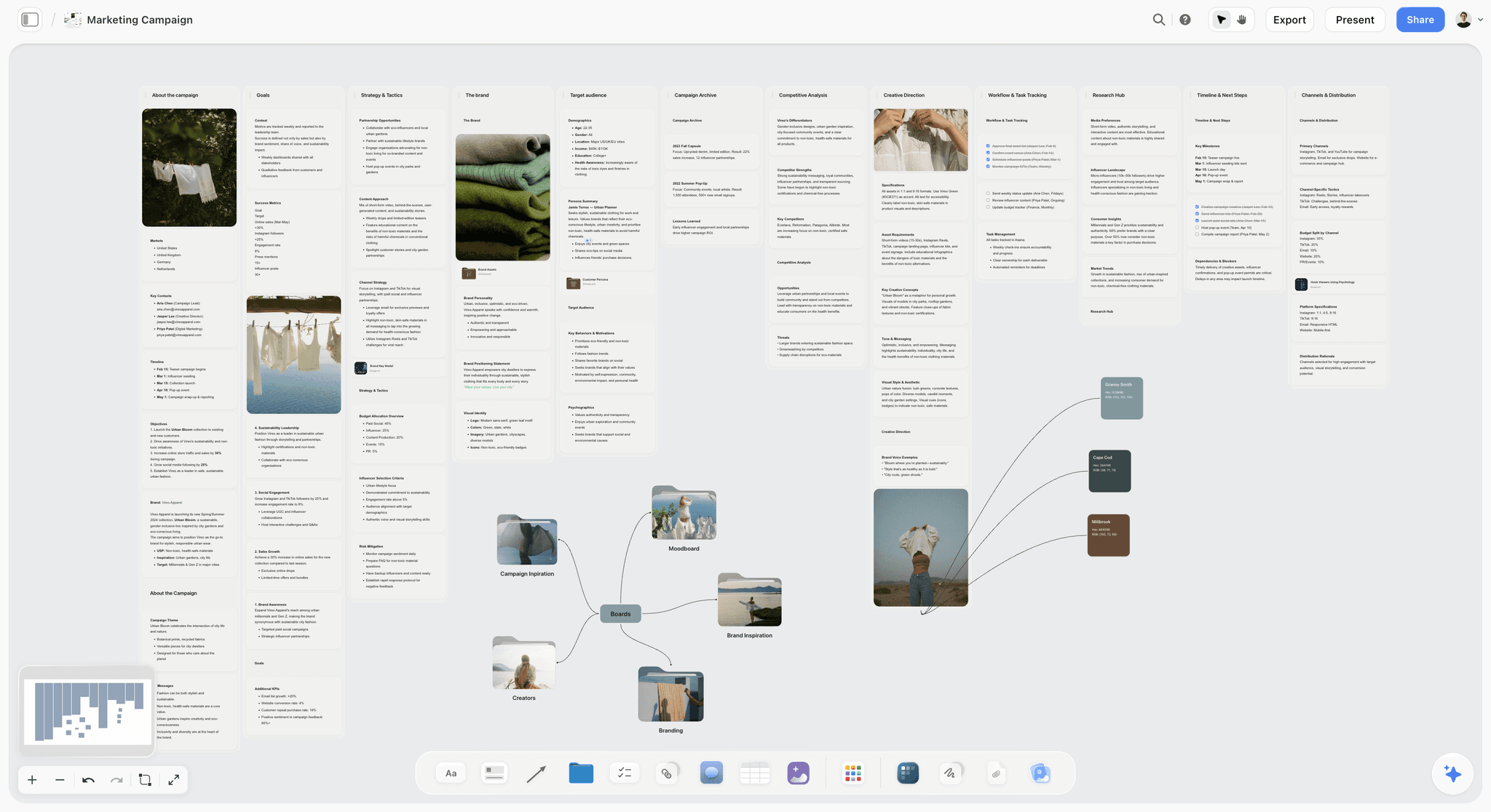
I want to lead with the friction. Storyflow is not a notebook tool. There is no audio overview, no built-in citation engine that traces specific sentences to source page numbers, and the source-grounded guardrails are looser than NotebookLM's. If your job is to interrogate a fixed corpus and answer questions inside it, NotebookLM or Perplexity Spaces are the right tools.
Now the strength. For research that feeds into a deliverable, Storyflow's canvas paradigm is categorically different. The unit of organisation is the project, not the question. A Kashgar documentary board holds 73 source cards (PDFs, articles, transcripts), the Hero's Journey Blueprint Tactic, the working outline document, and the rough scene panels all visible at once. The AI reads everything on the active board plus any Document or Tactic I @-mention. The output is not just answers. It is a working canvas where research and creation share the same surface.
Best for: Research that feeds a creative or strategic deliverable (documentary outlines, brand strategy memos, product specs, course curricula). Also great for: quick-question research. Storyflow's AI answers questions about your sources too, then keeps every answer on a canvas you can build on.
Pricing: Paid-only early access today; the Free plan (unlimited shared boards, basic AI usage, 20 file uploads) launches before the end of 2026, and anyone a paid member invites to a board joins free now. Plus: $7.99/month billed annually or $9.99/month billed monthly (full 200+ Blueprint Tactics). Pro: $14/month billed annually or $19/month billed monthly (AI image generation, 20× more AI than Plus). Max: $39/month billed annually for power users.
Pros: Canvas paradigm matches creative and strategic project work, the AI reads the entire board plus @-mentioned context, Blueprint Tactics like Hero's Journey, AIDA, and Marketing Campaign give the research a structural target, and invited collaborators join a paid member's board free.
Cons: No audio overview feature, citation accuracy is weaker than NotebookLM or Perplexity, no built-in academic export formats, and the canvas paradigm has a learning curve if you arrive expecting a notebook.
Verdict: Storyflow is the right pick when your NotebookLM use was always shoehorning a research-into-deliverable workflow into a Q&A tool. For broader project canvas comparisons, see The 12 Best AI Second Brain Apps in 2026 and The 12 Best AI Research Tools in 2026.
2. Perplexity Spaces (Best Source-Grounded Research)
Perplexity Spaces is the closest direct competitor to NotebookLM in 2026, and it wins on the source limit, the live web grounding, and the persistence of project context between sessions. A Space holds your uploaded PDFs, your starred web sources, and the conversation history together. The model grounds every answer in the corpus and links to the specific source for each claim. Where NotebookLM caps at 50 sources, Perplexity Pro Spaces accept hundreds and Enterprise plans accept thousands.
Best for: Researchers who want NotebookLM's source-grounded chat with a higher source cap and live web integration. Not for: anyone who relies on NotebookLM's audio overview as a primary feature.
Pricing: Free with limits (3 Pro searches/day). Pro from $20/month. Enterprise pricing on request.
Pros: Excellent source grounding with citation accuracy on every claim, live web grounding alongside uploaded corpus, higher source limits than NotebookLM, Spaces persist project context cleanly between sessions.
Cons: No audio overview feature, the interface is more search-engine than notebook, and the focus on individual queries means the workspace feels less like a research environment and more like a smarter search bar.
Verdict: Perplexity Spaces is the right pick when your only complaint with NotebookLM is the source cap or the missing live-web grounding, and you can live without the audio overview.
3. Elicit (Best Academic Literature Review)
Elicit is purpose-built for systematic literature review at scale. You can extract structured data from up to 1,000 papers in a single project, run multi-paper comparisons across specific properties (methods, sample sizes, findings), and trace every claim to the source paragraph. For PhD students, postdocs, and any researcher running a real literature review, Elicit is the most-leveraged tool in this list.
Best for: Academic researchers running systematic literature reviews, meta-analyses, or any multi-paper synthesis project. Not for: non-academic research that does not benefit from structured paper extraction.
Pricing: Free with limits (5 paper extractions/month). Plus from $12/month. Pro from $42/month. Institutional pricing on request.
Pros: Best-in-class for systematic literature review, structured extraction across hundreds of papers at once, citation accuracy is academic-grade, integrates with Zotero and other reference managers.
Cons: The interface assumes academic research workflows, so commercial or creative research feels forced, and the price point is high for individuals outside an institution.
Verdict: Elicit is the right pick for any researcher who needs to extract structured data across hundreds of papers. For broader academic workflows, see The Best AI Second Brain for PhD Students.
4. Humata (Best Team Research with Citations)
Humata is the team-oriented document AI with citation depth as the differentiator. Every answer cites the specific source page and the specific sentence. Up to 200 documents per project on the Pro plan, with seat-based collaboration that matters for research teams.
Best for: Research teams who need citation-grade accuracy with multi-user collaboration. Not for: solo researchers who do not need the team layer.
Pricing: Free with limits (60 pages, 10 questions). Pro from $15/user/month. Team and Enterprise pricing on request.
Pros: Citation accuracy is the best in this list after Elicit, multi-user collaboration works for research teams, document organisation features are mature.
Cons: Interface feels enterprise compared to NotebookLM, no audio overview, and the source cap of 200 still limits larger projects.
Verdict: Humata is the right pick for research teams who need citation accuracy with collaboration features.
5. Glasp (Best Capture-First Web Research)
Glasp captures and annotates web sources, then lets AI reason across them. For readers whose research lives in browser tabs (articles, YouTube transcripts, Twitter threads), Glasp is the most-frictionless capture layer in this list. Highlight in the browser, the highlight syncs to the Glasp library, AI can answer questions across the library.
Best for: Knowledge workers and creators whose research is web-first rather than PDF-first. Not for: academic literature review or PDF-heavy corpora.
Pricing: Free for basic use. Pro from $5/month for advanced AI features and unlimited highlights.
Pros: Best capture layer for web-based research, YouTube transcript integration is mature, the social discovery layer surfaces relevant sources from other researchers.
Cons: AI layer is lighter than NotebookLM, PDF support exists but is not the primary use case, and the social layer can feel like a distraction.
Verdict: Glasp is the right pick for web-first researchers and content creators who capture across articles and videos.
6. ChatPDF (Best Single-PDF Deep Work)
ChatPDF is the focused tool for working with one document at a time. Faster than NotebookLM for single source questions, with strong citation accuracy and a simpler interface. For students reading a textbook chapter, lawyers reading a contract, or analysts reading a single annual report, ChatPDF is more direct than NotebookLM.
Best for: Single-PDF analysis where multi-source synthesis is not the goal. Not for: multi-source research projects.
Pricing: Free with limits (3 PDFs, 50 questions/day). Plus from $5/month. Pro from $20/month.
Pros: Fastest for single-PDF interrogation, citation accuracy is strong, free tier is functional, simpler than NotebookLM for one-document tasks.
Cons: Multi-source synthesis is weak, no canvas or structured output, and the audio overview is not present.
Verdict: ChatPDF is the right pick when your work is mostly single-PDF analysis.
7. Open-NotebookLM (Best Open-Source)
Open-NotebookLM and PrivateLM are open-source projects that replicate NotebookLM's source-grounded chat on your own infrastructure. For teams that need data sovereignty (legal, medical, classified research) or want to avoid sending sources to Google, this is the cleanest path.
Best for: Researchers and teams with strict data sovereignty requirements who have engineering capacity to self-host. Not for: individuals without self-hosting capability.
Pricing: Free for self-hosting. Hardware costs vary.
Pros: Full data sovereignty, no per-seat costs, customisable models, active open-source development.
Cons: Self-hosting requires engineering capacity, audio overview feature is meaningfully behind Google's, polish lags behind commercial tools.
Verdict: Open-NotebookLM is the right pick for self-hosting requirements with engineering capacity.
8. PodGenie (Best Audio-First Research)
PodGenie is the closest dedicated competitor to NotebookLM's audio overview feature. Turn a stack of sources into a podcast format with deeper voice options, longer outputs, and more host-pairing variations. For creators who use NotebookLM mostly for the audio output, PodGenie is the focused tool.
Best for: Creators who use audio overviews as the primary research output. Not for: anyone whose primary use is chat-based research interrogation.
Pricing: Free with limits. Pro from $15/month.
Pros: Deeper audio customisation than NotebookLM, longer outputs supported, mature voice options.
Cons: Research depth around the audio is shallower than NotebookLM, and the focused product means you lose the broader notebook environment.
Verdict: PodGenie is the right pick for audio-first research workflows.
9. Claude Projects (Best Long-Context Conversation)
Claude Projects gives you a long-context conversation with persistent project memory, including uploaded files. The 200,000 token context window means a small research corpus can sit inside the prompt itself, and Claude's reasoning quality on synthesis tasks is among the strongest available.
Best for: Conversational research synthesis where the corpus fits inside the context window. Not for: large research corpora or work that benefits from a canvas surface.
Pricing: Free for basic chat. Pro from $20/month for Projects. Team from $25/user/month.
Pros: Excellent reasoning quality, large context window for inline corpora, project memory persists between sessions.
Cons: Source limit is the context window rather than a file count, no built-in citation engine, no audio overview, and the conversational interface is not a research environment.
Verdict: Claude Projects is the right pick for high-quality conversational synthesis on a manageable corpus.
10. ChatGPT Projects (Best General Research Conversation)
ChatGPT Projects is the lighter-weight version of Claude Projects with broader ecosystem integration (DALL-E images, voice mode, custom GPTs). For general research conversation where the project memory and uploaded files are useful but not critical, ChatGPT Projects is the most-flexible option.
Best for: General research conversation across diverse use cases. Not for: rigorous source-grounded research where citation accuracy matters.
Pricing: Free with limits. Plus from $20/month. Team and Enterprise plans available.
Pros: Broad ecosystem, easy to use, integrations with custom GPTs, mature mobile app.
Cons: Citation accuracy is weaker than NotebookLM, project memory is lighter than Claude's, and hallucination risk is higher than purpose-built research tools.
Verdict: ChatGPT Projects is the right pick for general research conversation rather than rigorous interrogation.
11. Mem (Best Personal AI Notebook)
Mem is the personal AI notebook that combines note-taking with AI retrieval. Less rigorous than NotebookLM on source grounding, but stronger as a daily-use notebook that learns from your own writing over time.
Best for: Knowledge workers who want a daily notebook with AI retrieval rather than a research-specific tool. Not for: rigorous source-grounded research.
Pricing: Free with limits. Plus from $10/month.
Pros: Mature mobile app, fast capture, AI retrieval improves with use, integrations with calendar and communications.
Cons: Not designed for source-grounded research, citation depth is shallow, and the personal-notebook framing means it does not handle multi-source projects well.
Verdict: Mem is the right pick for personal daily notebooks with AI, not multi-source research.
12. Anara (Best Academic Workspace)
Anara is an academic research workspace that combines source-grounded chat with a paper management layer. Lighter than Elicit on systematic extraction, but more flexible as a general academic environment.
Best for: Academic researchers who want a single workspace rather than separate tools for sources, chat, and notes. Not for: non-academic research.
Pricing: Free with limits. Pro from $12/month.
Pros: Integrated paper management with source-grounded chat, citation accuracy is academic-grade, the workspace shape matches PhD and postdoc workflows.
Cons: Smaller community than Elicit or Zotero, fewer integrations, and the academic shape forces non-academic research into the wrong template.
Verdict: Anara is the right pick for academic researchers who want a single integrated workspace.
How to Choose the Right NotebookLM Alternative for Your Research
Five decision rules:
If your only complaint with NotebookLM is the source cap, use Perplexity Spaces. The 50 source ceiling disappears, and the live web integration is a real upgrade. Lose the audio overview.
If your research feeds into a creative or strategic deliverable, use Storyflow. The canvas paradigm matches the work better than a notebook. Lose the audio overview and the citation engine.
If you are running a systematic literature review, use Elicit. The structured extraction across hundreds of papers is the differentiator. Lose the audio overview.
If your research is web-first rather than PDF-first, use Glasp. The capture layer is the leverage point. Pair with Claude or NotebookLM for deeper synthesis.
If your team needs citation accuracy with collaboration, use Humata. The seat-based research environment is the differentiator. Lose the audio overview.
For broader research workflow alternatives, see The 12 Best AI Research Tools in 2026 and The 12 Best AI Second Brain Apps in 2026.
The Bottom Line
The best NotebookLM alternative depends on which part of the NotebookLM bundle matters most to your work.
For source-grounded chat with a higher source cap, Perplexity Spaces is the cleanest upgrade. For systematic literature review, Elicit. For research that feeds a creative or strategic deliverable, Storyflow's canvas paradigm matches the work better than a notebook. For team research with citation accuracy, Humata. For audio-first output, PodGenie. For self-hosting, Open-NotebookLM.
If you are not sure which category fits, take your most-active NotebookLM project and ask what you actually do with the answers it gives you. If you mostly cite them inside a longer document, an alternative that integrates with your writing tool will save you time. If you mostly use them to fuel a creative deliverable, a canvas-based tool will save you the export step. If you mostly answer questions for understanding, NotebookLM (or Perplexity) is already the right tool and the upgrade is about source cap rather than category.
The wrong move is to switch to another tool with the same shape as NotebookLM and expect a different result. Pick by paradigm, not by feature list.
FAQ: Best NotebookLM Alternatives 2026
What is the best NotebookLM alternative in 2026?
The best NotebookLM alternative depends on what you actually used NotebookLM for. For source-grounded chat with more sources and live web, Perplexity Spaces. For research that feeds a deliverable, Storyflow. For systematic literature review, Elicit. For web-first research, Glasp. For audio-only output, PodGenie. There is no single best alternative because NotebookLM bundles several use cases that different specialised tools handle better.
Why do people leave NotebookLM?
People leave NotebookLM mostly because the 50 source cap is too small for serious research, the chat interface forgets the structure of thinking between sessions, there is no canvas to lay sources out spatially, and the workflow ends at Q&A rather than at a deliverable. Some researchers also leave because Google has changed the product several times since launch and they want a tool with a clearer roadmap.
Is there a free NotebookLM alternative?
Yes. NotebookLM itself is free during the current preview. Beyond NotebookLM: Perplexity has a generous free tier with limited Pro searches. ChatPDF offers free single-PDF chat. Glasp is free for basic web capture. Storyflow is paid-only during early access; its Free plan, with unlimited shared boards and 20 file uploads, launches before the end of 2026. The right free option depends on whether you need source grounding, capture, or canvas as the primary need.
What is the best open-source NotebookLM alternative?
Open-NotebookLM and PrivateLM are the leading open-source projects that replicate NotebookLM's core source-grounded chat. Both require self-hosting and engineering capacity. The audio overview feature is meaningfully behind Google's commercial product. For teams with strict data sovereignty requirements (legal, medical, classified), either is the right pick.
Is Perplexity better than NotebookLM?
For source-grounded chat with a higher source cap and live web integration, Perplexity Spaces is meaningfully better than NotebookLM. For the audio overview feature and the simpler notebook UI, NotebookLM still wins. The decision hinges on which side of that trade-off matters more to your work.
What is the best NotebookLM alternative for students?
For students, NotebookLM itself is hard to beat at the free tier. If the source cap is an issue, Perplexity Spaces (paid) or Elicit (free tier) are the right next steps. For students whose research feeds into a thesis or a creative project, Storyflow's canvas handles the layer NotebookLM does not; Plus starts at $7.99/month annual, with a Free plan arriving before the end of 2026. See The 12 Best AI Tools for Students in 2026 for the broader comparison.
What is the best NotebookLM alternative for academic researchers?
For academic researchers, Elicit is the clearest upgrade for systematic literature review. Anara is a strong academic workspace. Perplexity Spaces handles general research with live web integration. NotebookLM remains useful for finite corpora but the alternatives win on scale and on output options.
Does any alternative match NotebookLM's audio overview?
PodGenie comes closest, with deeper voice customisation and longer outputs. Several other tools (including ChatGPT and Claude) can generate text that you then convert to audio, but the integrated experience NotebookLM offers is not yet matched by any single alternative in this list.
Which NotebookLM alternative has the best citation accuracy?
Elicit and Humata have the strongest citation accuracy in this list, both at academic-grade depth. Perplexity Spaces is close behind for general research. NotebookLM itself is strong on citation accuracy but the 50 source cap limits the projects where this matters.
What is the difference between NotebookLM and a notebook app like Notion or Obsidian?
NotebookLM is a research interrogation tool where AI grounds answers in your uploaded sources. Notion and Obsidian are knowledge management tools where you author and organise your own notes, with AI features added on. The difference matters: NotebookLM is excellent for understanding a corpus you did not write; Notion and Obsidian are excellent for building a knowledge base of your own thinking. Most readers actually need both, with NotebookLM (or one of its alternatives) feeding into Notion or Obsidian for long-term storage.
Table of Contents
- All 12 NotebookLM Alternatives, Ranked
- Quick Picks: Best NotebookLM Alternatives 2026 by Use Case
- Comparison Table: Best NotebookLM Alternatives 2026
- Best NotebookLM Alternatives 2026: Market Context
- How We Evaluated the Best NotebookLM Alternatives 2026
- Detailed Reviews: Best NotebookLM Alternatives 2026
- How to Choose the Right NotebookLM Alternative for Your Research
- The Bottom Line
- Author
- FAQ: Best NotebookLM Alternatives 2026
- Related Reading
Templates to check out for this topic


Workspace templates you can use in Storyflow
Keep research, notes, and plans on one canvas the AI can read, instead of scattered across docs and tabs. Open a template and make it your second brain.


See Storyflow in Action
A visual AI workspace where every feature lives inside one canvas. No tab-switching, no context lost.
Build your entire board from a single message
Type what you need in the AI chat at the bottom of your canvas. The AI adds cards, headings, and structure directly onto your board.
Use expert frameworks as AI context
Type @ in the AI chat and choose any Tactic. The AI tailors every response to that framework instead of giving generic advice.
Turn your board into a mind map in seconds
Ask the AI to restructure your canvas as a mindmap. It connects your ideas into a visual hierarchy so you can see how everything relates.
Why Storyflow Exists
Storyflow actually began as a personal tool while working on creative and research projects.
We kept running into the same problem: ideas were scattered everywhere: notes, documents, and whiteboards.
Nothing helped us see how everything connected.
So we started building a workspace designed around how ideas actually grow.
→ Read how Storyflow was createdJustkay
Documentary Filmmaker & Founder at Storyflow
Published: 2026-05-14
Extremely simple, seriously capable


See how easy it is to get started
Watch a real project come together, from a blank board to a finished plan, clicked through step by step.
Start creating with AI and become more productive
Transform your creative workflow with AI-powered tools. Generate ideas, create content, and boost your productivity in minutes instead of hours.