
Category
Knowledge Management
Author

Justkay
Documentary Filmmaker & Founder at Storyflow
Topics
2026-05-18
•
Updated May 18, 2026
•
15 min read
•
Knowledge Management- best OneNote alternatives 2026
- OneNote alternatives
- OneNote replacement
- free OneNote alternative
- OneNote alternative for visual thinkers
- Notion vs OneNote
What is the best OneNote alternative in 2026?
The best OneNote alternative in 2026 depends on which half of OneNote you cannot give up. Notion is the strongest pick for structured databases and an all-in-one workspace. Storyflow is the strongest pick for people who loved OneNote's free-form canvas and want an AI that reads the whole board. Obsidian is best for local-first privacy, and Apple Notes is the best free option inside the Apple ecosystem. Most people who leave OneNote land on one of these four.

All 12 OneNote Alternatives, Ranked
- Notion: an all-in-one structured workspace with databases and wikis
- Storyflow: OneNote's free-form canvas plus an AI that reads the whole board
- Obsidian: a local-first, permanent personal knowledge base
- Apple Notes: friction-free free capture in the Apple ecosystem
- Capacities: an object-based personal knowledge graph
- Craft: polished, document-style notes
- Bear: beautiful Markdown writing on Apple
- Evernote: web clipping and deep search
- Logseq: outliner-based networked thought
- Amplenote: notes fused with task management
- Joplin: open-source, private note storage
- Google Keep: quick capture inside Google
Full disclosure: Storyflow is our own product, and we did not rank it #1 here. Notion is the stronger all-in-one pick for structured databases and wikis, and for strict local-first privacy Obsidian wins. We rank Storyflow #2, as the best pick for the half of OneNote that was the free-form canvas, where an AI reads the whole board instead of one page. Storyflow is not a Microsoft 365 app and is cloud-only, so for deep Outlook and Teams integration OneNote itself stays convenient. We link to every tool so you can judge the fit.
Quick Comparison: Best OneNote Alternatives
These four are where most people who leave OneNote land: an all-in-one structured workspace, a free-form canvas with canvas-aware AI, a local-first knowledge base, and a free Apple-ecosystem option.
| Tool | Best For | AI Features | Price |
|---|---|---|---|
| Notion | All-in-one structured workspace | Notion AI, Ask Notion | Free / $10 user mo |
| Storyflow | Free-form canvas with canvas-aware AI | Reads full board + @-docs and Tactics | $7.99 mo annual (free plan late 2026) |
| Obsidian | Local-first knowledge base | Plugin-dependent | Free / Sync $5 mo |
| Apple Notes | Apple-ecosystem capture | Apple Intelligence | Free |
1) Quick Answer: The Best OneNote Alternative in 2026
The best OneNote alternative in 2026 depends on which half of OneNote you cannot give up: the freedom or the structure. Notion is the strongest pick for people who want database structure and want to run their whole life from one app. Storyflow is the strongest pick for people who loved OneNote's free-form, put-anything-anywhere canvas but want an AI that can actually read the whole canvas back and help connect it. Obsidian is the strongest pick for local-first privacy and a permanent personal knowledge base. Apple Notes is the strongest free pick if you live entirely inside Apple's ecosystem.
The short version: if you want structured databases, Notion. If you want a free-form visual canvas with AI that reads the whole board, Storyflow. If you want local files you own forever, Obsidian. If you want zero friction and zero cost on Apple devices, Apple Notes. Most people who leave OneNote land on one of these four.
For the wider category view, see The 12 Best Note-Taking Apps in 2026 and The 12 Best AI Note-Taking Apps in 2026.
2) Comparison Table: 12 OneNote Alternatives Compared
Rating criteria: tested on real knowledge work between 2024 and 2026, including documentary research, project planning, and a long-running personal knowledge base. Tools were rated on how well they replace OneNote for actual daily use, not on feature counts.
3) Why People Leave OneNote
OneNote is genuinely good software. It is free, it syncs across Microsoft accounts, and its free-form pages let you click anywhere and start typing. For people deep in Microsoft 365, nothing else feels as native. Search the OneNote subreddit and you find committed long-term users who have no intention of moving.
But three structural frictions push people out, and they show up over and over in user threads.
Notes pile up faster than OneNote can hand them back. OneNote's freedom is real: you can put a text box anywhere, paste an image anywhere, draw anywhere. The problem is the other direction. Two years in, you have hundreds of pages across dozens of sections, and OneNote gives you a flat search box and nothing else. There is no backlinking, no graph, no AI that reads across the notebook. The most common complaint in OneNote alternative threads is some version of "I can put anything in, but I can never find it again."
The freedom has no second layer. A OneNote page is a canvas, and that is where it stops. There are no databases, no structured properties, no relations between pages. For quick capture this is fine. For running a project or a research base, you eventually want structure that OneNote does not provide, and you end up rebuilding it by hand every time.
The AI is shallow. Microsoft has wired Copilot into OneNote, but the OneNote integration is thin compared to what Copilot does in Word or Outlook. It can summarize a page. It cannot read your whole notebook and tell you which four pages touch the same theme. The AI sits next to your notes, not inside the connective tissue of them.
The familiar approach is to keep tolerating it. You have years of notebooks in OneNote, so you stay, search the flat box, and accept that half your notes are effectively write-only. The better approach is to name which half of OneNote you actually need (the free-form freedom or the structure you wish it had) and pick the tool built for that half. That single decision sorts the entire list below.
This is the Free-Form Trap. OneNote gives you the freedom to put anything anywhere, then gives you no way to read the result back. Every tool in this list either fixes the read-back problem with AI and links, or trades the freedom for rigid structure. Knowing which trade you want is the whole game.
The category itself is large and growing. One 2026 market estimate from Business Research Insights values the note-taking app market at 13.3 billion dollars, projected to reach 28 billion by 2030. The reason the category keeps growing is not that people need more places to type. It is that capture got easy and retrieval stayed hard.
4) How We Evaluated These Tools
Every tool here was used on real knowledge work between 2024 and 2026: documentary research projects, product planning, and a personal knowledge base that has run continuously for over two years. No synthetic note-taking. Six criteria, weighted in this order.
- Capture freedom. Can you put anything anywhere the way OneNote lets you, or does the tool impose a shape before you are ready? This is the freedom half of the Free-Form Trap.
- Read-back and retrieval. Once notes pile up, can you find and connect them? Backlinks, graph view, search quality, and AI that reads across the workspace all count here. This is the half OneNote fails.
- AI depth. Does the AI actually read your content and help connect it, or is it a summarize-this-page bolt-on?
- Structure when you want it. Can the tool add databases, properties, or relations when a project needs them, without forcing structure on quick notes?
- Cross-platform and portability. Does it work everywhere you work, and can you get your notes out if you leave?
- Pricing honesty. What does it actually cost at real usage, and what does the free tier genuinely include?
Tested workflows included: migrating a two-year OneNote notebook, running a documentary research base, planning a multi-month product roadmap, and a daily quick-capture habit. Rankings reflect how each tool felt across weeks of real use, not a demo.
5) Quick Picks by Use Case
If you want the short list, sort by job.
Best all-in-one OneNote replacement: Notion. Databases, docs, and wikis in one workspace if you want structure to do the heavy lifting.
Best for free-form visual thinkers: Storyflow. The infinite canvas keeps OneNote's put-anything-anywhere feel, and the AI reads the whole board so notes do not go write-only.
Best for local-first privacy: Obsidian. Plain Markdown files on your own disk, no cloud required.
Best free option on Apple devices: Apple Notes. Fast, free, and now with Markdown import and export plus an Apple Watch app.
Best for web clipping and search: Evernote. Still the strongest web clipper, though the free tier is now heavily limited.
Best for object-based knowledge: Capacities. Treats every note as a typed object, which gives structure without databases.
Best for beautiful writing: Bear. The nicest Markdown writing experience on Apple, light on knowledge-base features.
Best for notes that double as tasks: Amplenote. Notes and a task engine fused into one tool.
Best open-source and private: Joplin. End-to-end encrypted, free, self-hostable.
Best for quick capture inside Google: Google Keep. Fast notes that live next to Gmail and Calendar.
6) Detailed Reviews: 12 OneNote Alternatives in 2026
1. Storyflow
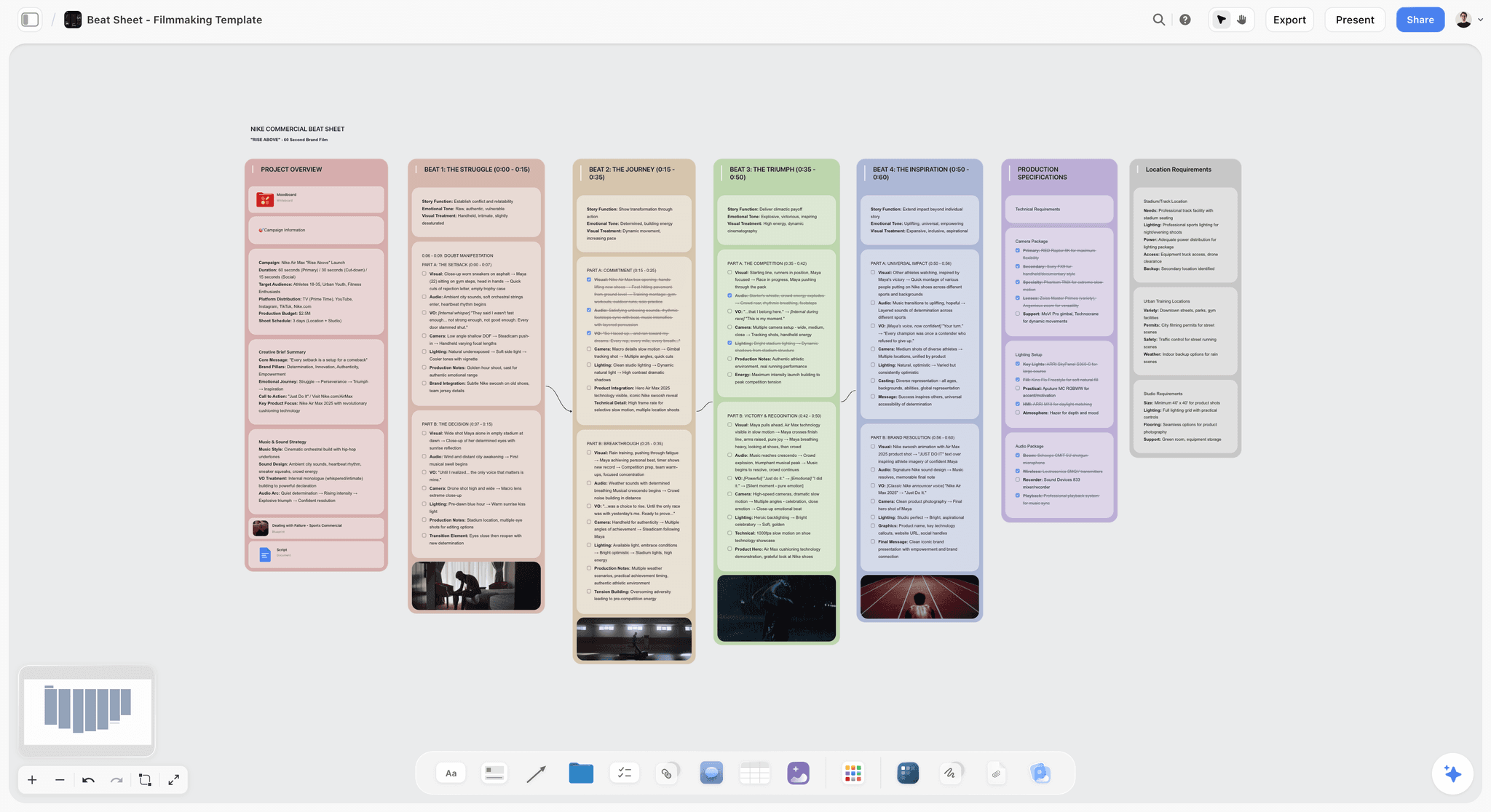
Storyflow is a visual creative workspace built on an infinite canvas, where structured cards, documents, and a context-aware AI live together on one board. It is the OneNote alternative to pick when you loved OneNote's put-anything-anywhere freedom but were tired of notes going write-only.
Best for: Visual thinkers, researchers, creators, project planners, and anyone who left OneNote because they could capture anything but never connect it.
Verdict: The strongest pick for OneNote refugees who want to keep the free-form feel and finally get an AI that reads the whole canvas. It fixes the read-back half of the Free-Form Trap without forcing you into databases.
Key features
- An infinite canvas that keeps OneNote's freedom. Drop notes, images, links, and documents anywhere, cluster them by hand, draw connections. The anything-anywhere feel of a OneNote page, without the page boundary.
- Canvas-aware AI by default. The AI reads your full active board, so it can answer questions across everything you put down. You can bring in up to 1 Story Blueprint and up to 3 @-mentioned Documents for extra grounding. This is the layer OneNote's Copilot does not have: an AI that reads the connective tissue, not one page.
- 200+ Story Blueprints on Plus and above. A library of expert framework templates for research, planning, and creative work, so you can start structured instead of from a blank canvas.
- Unlimited shared boards and unlimited collaboration on every plan, including Free. The Max plan adds a team workspace with permissions and roles.
Pricing
Free: launching before the end of 2026; invited collaborators of paid members join free today. Unlimited notes, images, and links, unlimited shared boards, basic AI usage, 20 file uploads, and unlimited collaboration. The Free plan does not include the 200+ Story Blueprints library. Plus: $7.99/mo annual or $9.99/mo monthly, which adds the 200+ Story Blueprints. Pro: $14/mo annual or $19/mo monthly, which adds AI image generation and 20x more AI than Plus. Max: $39/mo annual or $49/mo monthly, which adds 40x more AI and a team workspace with permissions and roles.
Pros
- Keeps the free-form, anything-anywhere feel that made OneNote worth using.
- The AI reads the whole canvas, so notes stay connected instead of going write-only.
- The free tier is genuinely generous: unlimited boards, unlimited cards, unlimited collaboration.
- 200+ Story Blueprints give you a structured starting point when you want one.
Cons
- Storyflow is a canvas, not a Microsoft 365 app. For deep Outlook, Teams, and Word integration, OneNote itself stays more convenient.
- It is canvas-and-card shaped, not database shaped. If you specifically want relational tables, Notion fits better.
- It is cloud-based, so for strict local-first privacy, Obsidian or Joplin are the safer pick.
If you left OneNote because capture was easy but retrieval was impossible, the test is concrete: take your most active OneNote section, rebuild it on a Storyflow canvas, and ask the AI a question that spans the whole thing. Start a Storyflow workspace and run that test in an afternoon.
2. Notion
Notion is the all-in-one workspace that turns notes into a structured system of pages, databases, and wikis. It is the OneNote alternative to pick when you want structure to do the work that OneNote leaves to you.
Best for: People who want one app for notes, projects, docs, and wikis, and who think in lists and tables.
Verdict: The strongest structured replacement for OneNote in 2026. It trades OneNote's free-form freedom for database power, and for most people that trade is worth it.
Key features
- Pages that nest infinitely, with databases, properties, and relations layered on top.
- Notion AI, including AI Agents and Ask Notion, which can answer questions across your workspace.
- Strong collaboration: shared workspaces, comments, real-time editing.
- A large template ecosystem for almost any workflow.
Pricing
Free plan for individuals and small teams. Plus is $10/user/mo annual or $12/user/mo monthly. Business is $20/user/mo annual or $24/user/mo monthly. As of 2026, full Notion AI (AI Agents and Ask Notion) is bundled into Business and Enterprise rather than sold as a separate add-on. Verify current pricing at notion.com/pricing.
Pros
- The most complete structured workspace in this list.
- Databases and relations give you the second layer OneNote never had.
- Massive template and integration ecosystem.
Cons
- It is document-and-database shaped, not free-form canvas shaped. If you loved clicking anywhere on a OneNote page, Notion will feel rigid.
- Full AI now requires the Business tier, which raises the real cost.
- The blank-page flexibility can become its own kind of overwhelm.
For the Notion-specific deep dive, see The 12 Best Notion Alternatives in 2026.
3. Obsidian
Obsidian is the local-first knowledge base that stores every note as a plain Markdown file on your own disk. It is the OneNote alternative to pick when ownership and privacy matter more than anything.
Best for: People building a permanent personal knowledge base who want to own their files outright.
Verdict: The strongest local-first OneNote alternative in 2026. The files are yours forever, and as of February 2026 the app is free for commercial use too.
Key features
- Plain Markdown files stored locally, with no lock-in.
- Bidirectional links, a graph view, and the new Bases feature for lightweight structure.
- Over 2,600 community plugins, so the app bends to almost any workflow.
- Canvas mode for spatial arrangement of notes.
Pricing
The core app is free for personal and, as of February 2026, commercial use. Optional add-ons: Sync at $5/mo (or $4/mo annual) and Publish at $10/mo (or $8/mo annual). Verify current pricing at obsidian.md/pricing.
Pros
- You own every note as a portable file. No service can take them away.
- Backlinks and graph view solve the read-back problem OneNote ignores.
- Endlessly extensible through community plugins.
Cons
- The AI story is plugin-dependent and uneven. There is no first-party canvas-wide AI like Storyflow's.
- The plugin setup has a real learning curve, which is the opposite of OneNote's click-and-type simplicity.
- Built-in sync is a paid add-on.
For the Obsidian-specific comparison, see The 12 Best Obsidian Alternatives in 2026.
4. Apple Notes
Apple Notes is the free, built-in note app that ships on every Apple device. It is the OneNote alternative to pick when you live inside the Apple ecosystem and want zero friction and zero cost.
Best for: Apple-only users who want fast capture without thinking about apps or subscriptions.
Verdict: The strongest free OneNote alternative if all your devices are Apple. It is genuinely good now, and it costs nothing.
Key features
- Free, built in, and synced through iCloud across iPhone, iPad, Mac, and now Apple Watch.
- As of iOS 26, Markdown import and export, so notes are more portable than before.
- Strong handwriting, scanning, tags, and locked notes.
- New calligraphy and drawing tools that close part of OneNote's inking gap.
Pricing
Free with any Apple device. iCloud storage costs apply only if you exceed the free 5GB tier.
Pros
- Zero cost and zero setup. It is already on your devices.
- Fast capture and reliable iCloud sync.
- Markdown export in iOS 26 means you are no longer locked in.
Cons
- Apple-only. There is no real Windows or Android client, which is a hard stop for cross-platform users.
- No backlinks, no graph, no database structure. Retrieval is search-only, same as OneNote.
- AI features are tied to Apple Intelligence and lag dedicated tools.
5. Capacities
Capacities is an object-based note app that treats every note as a typed object (a person, a book, a meeting) inside a personal knowledge graph. It is the OneNote alternative to pick when you want structure without building databases.
Best for: People who want their knowledge base to organize itself by object type rather than by folder.
Verdict: A strong middle path between OneNote's freedom and Notion's databases. The object model gives you structure that emerges instead of structure you impose.
Key features
- Every note is a typed object, and objects of the same type share properties automatically.
- Backlinks and a daily note for capture.
- AI assistant for drafting and querying.
- A clean, calm interface that rewards daily use.
Pricing
Free tier with limits. Pro is $9.99/mo annual or $11.99/mo monthly. The Believer tier is $12.49/mo annual or $14.99/mo monthly and adds early access and influence on the roadmap. Verify current pricing at capacities.io/pricing.
Pros
- The object model solves OneNote's read-back problem in an elegant way.
- Backlinks and typed objects make connections surface on their own.
- A genuinely pleasant daily-use experience.
Cons
- The object-first model takes a mental adjustment if you are used to free pages.
- Smaller ecosystem and integration set than Notion or Obsidian.
- It is cloud-based, with no local-first option.
6. Craft
Craft is a document-style note app built around beautiful, block-based pages. It is the OneNote alternative to pick when you want notes that look polished enough to share as-is.
Best for: People who write notes meant to become shareable documents, and who care about visual polish.
Verdict: The most visually refined note app in this list. It leans document-shaped, so it is a freedom-to-polish trade rather than a freedom-to-structure one.
Key features
- Block-based documents with strong typography and layout.
- Nested pages and a clean folder structure.
- AI assistant with access to advanced models on paid plans.
- Polished sharing and export, including web publishing.
Pricing
Free plan with 1,500 blocks, 1GB storage, and 15 AI credits. Plus is around 8 EUR/mo annual (roughly $8) and adds unlimited content, more AI credits, and advanced AI models. Family and Team plans are available. Verify current pricing at craft.do/pricing.
Pros
- The best-looking notes of any tool here.
- Block-based editing is fast and pleasant.
- Sharing and publishing are well executed.
Cons
- Document-shaped, so it does not replace OneNote's free-form canvas feel.
- No backlinks or graph, so it is weaker as a long-term knowledge base.
- The free tier's block limit is easy to hit.
7. Evernote
Evernote is the original capture-everything note app, still strongest at web clipping and search. It is the OneNote alternative to pick when clipping and retrieving web content is the core job.
Best for: People whose main need is saving articles, receipts, and web pages and finding them later.
Verdict: Still the best web clipper in 2026, but the free tier is now heavily limited, which weakens it as a OneNote replacement for casual users.
Key features
- The strongest web clipper in the category.
- Powerful search, including text inside images and PDFs.
- AI-powered features including AI Edit and Transcribe.
- Cross-platform clients on every major OS.
Pricing
Evernote retired its Personal and Professional plans. The current lineup is Free (heavily limited), Starter at $8.25/mo, Advanced at $14.17/mo, and Teams at $24.99/mo. Verify current pricing at evernote.com/compare-plans.
Pros
- Web clipping and search remain best in class.
- Mature, stable, and available on every platform.
- AI transcription and edit features are genuinely useful.
Cons
- The free tier is now capped at 1,000 notes and 3 devices, which makes it a weak free OneNote alternative.
- Years of pricing and ownership changes have eroded user trust.
- No backlinks or graph, so retrieval is still search-driven.
For the Evernote-specific comparison, see The 12 Best Evernote Alternatives in 2026.
8. Bear
Bear is a Markdown note app built for beautiful, distraction-free writing on Apple devices. It is the OneNote alternative to pick when the writing experience matters more than the knowledge-base machinery.
Best for: Apple users who write a lot of notes and want the act of writing to feel good.
Verdict: The nicest pure writing experience here. It is a focused tool, not a full OneNote replacement for heavy organizers.
Key features
- Clean Markdown editor with a flexible tag system.
- Over 20 themes and a focus mode.
- Cross-device sync, encryption, and OCR search on Bear Pro.
- Fast, lightweight, and a pleasure to type in.
Pricing
Free tier with no sync. Bear Pro is $2.99/mo or $29.99/yr and adds sync, encryption, advanced export, and OCR. Verify current pricing at bear.app.
Pros
- The best writing feel of any app in this list.
- One of the cheapest paid tiers here.
- Tags give a light, flexible structure.
Cons
- Apple-only, with no Windows or Android client.
- No backlinks, graph, or database structure for a real knowledge base.
- AI features are minimal compared to the rest of the list.
9. Logseq
Logseq is an open-source, outliner-based tool for networked thought, where every note is a block in a hierarchy. It is the OneNote alternative to pick when you think in bullet outlines and want a local-first knowledge graph.
Best for: Outliner thinkers who want a free, private, networked note system.
Verdict: A strong free and open-source choice for people who think in outlines. The block-outliner model is divisive: you will love it or bounce off it.
Key features
- Block-based outliner with bidirectional links and a graph view.
- Local-first: notes are stored as Markdown or Org files on your disk.
- Daily journal as the default capture surface.
- Open-source under AGPL-3.0.
Pricing
The core app is free and open-source. Logseq Sync is in beta for Open Collective supporters at a $5-15/mo donation, and a paid Logseq Pro with real-time collaboration is in testing with no public pricing yet. You can sync free via iCloud, Dropbox, Git, or Syncthing.
Pros
- Completely free and open-source, with files you own.
- Backlinks and graph view fix OneNote's read-back gap.
- Outliner structure suits people who think in bullets.
Cons
- The block-outliner model is a big shift from OneNote's free pages.
- Official sync is still in beta with unclear pricing.
- AI is plugin-dependent, with no first-party canvas-wide assistant.
10. Amplenote
Amplenote is a note app that fuses note-taking with a real task-management engine. It is the OneNote alternative to pick when your notes constantly turn into to-dos.
Best for: People who want notes and tasks in one tool, with scheduling built in.
Verdict: A solid choice for the notes-become-tasks workflow. It is a productivity tool first and a knowledge base second.
Key features
- Notes with a built-in task engine, including scheduling and priority scoring.
- Calendar integration to slot tasks into your day.
- Graph view for connecting notes.
- Cross-platform with encrypted notes on higher tiers.
Pricing
Free Personal plan. Pro is $5.84/mo annual ($7/mo monthly), Unlimited is $10/mo annual ($12/mo monthly), and Founder is $20/mo annual ($25/mo monthly). Verify current pricing at amplenote.com.
Pros
- The notes-plus-tasks fusion is genuinely useful for action-oriented people.
- Calendar integration turns notes into a real plan.
- One of the cheaper paid tiers here.
Cons
- The interface is denser and less polished than Craft or Bear.
- Weaker as a pure knowledge base than Obsidian or Capacities.
- Smaller community and ecosystem.
11. Joplin
Joplin is an open-source note app focused on private, portable, end-to-end-encrypted note storage. It is the OneNote alternative to pick when privacy and zero lock-in are non-negotiable.
Best for: Privacy-focused users who want an open-source note app they can self-host.
Verdict: The most private option here. It trades polish and AI for full ownership and encryption.
Key features
- Open-source, with end-to-end encryption.
- Markdown notes, web clipper, and cross-platform clients.
- Sync via Joplin Cloud, Dropbox, OneDrive, or self-hosted.
- Notebooks, tags, and full-text search.
Pricing
The app is free and open-source. Joplin Cloud Basic is 2.40 EUR/mo annual, Pro is 4.79 EUR/mo annual, and Teams is 6.69 EUR/mo per user annual. You can sync free with your own storage. Verify current pricing at joplinapp.org/plans.
Pros
- Open-source and end-to-end encrypted.
- You can self-host and own everything.
- A genuine web clipper, which most privacy tools lack.
Cons
- The interface is utilitarian compared to the polished tools here.
- AI is minimal.
- No backlinks or graph, so it is more storage than knowledge graph.
12. Google Keep
Google Keep is the free, lightweight note app that lives inside the Google ecosystem. It is the OneNote alternative to pick when you want fast capture next to Gmail and Calendar and nothing heavier.
Best for: Google-ecosystem users who want quick notes, lists, and reminders, not a knowledge base.
Verdict: A fine free quick-capture tool, but it is not a real OneNote replacement for anyone with a serious note habit.
Key features
- Free, with simple notes, checklists, labels, and color-coding.
- Reminders and location-based alerts.
- Tight integration with Gmail, Calendar, and Google Docs.
- Growing Gemini integration across the Google suite in 2026.
Pricing
Free with a Google account.
Pros
- Free, fast, and frictionless for quick notes.
- Lives right next to the rest of Google Workspace.
- Gemini integration is expanding across Google's ecosystem.
Cons
- Far too lightweight to replace OneNote for structured note-taking.
- No backlinks, no folders beyond labels, no real organization at scale.
- Best treated as a capture inbox, not a knowledge home.
7) Recommendations by Persona
13. Solo Founder / One-Person Business
Top picks: Notion or Storyflow
Notion if you want one structured app for notes, projects, and a lightweight CRM. Storyflow if you think visually and want a canvas where research, planning, and AI live together. Most solo founders pick by brain type: lists and tables lean Notion, spatial thinking leans Storyflow.
14. Documentary Filmmaker / Video Creator
Top picks: Storyflow + Obsidian
Storyflow for the visual research canvas, where interview notes, references, and a film plan sit on one board and the AI reads across all of it. Obsidian as a permanent, local-first archive of every project once it wraps. This is the stack I use for my own documentary work.
15. Student / Academic Researcher
Top picks: Obsidian or Capacities
Obsidian for a permanent local knowledge base of reading notes and literature, with backlinks doing the connecting. Capacities if you want each source treated as a typed object so structure emerges without manual work. Both fix the read-back problem a OneNote notebook never solves.
16. Apple-Only Casual Note-Taker
Top picks: Apple Notes + Bear
Apple Notes for free, frictionless capture across iPhone, iPad, Mac, and Watch. Bear when you want a longer note to feel good to write. Neither builds a knowledge graph, but for light Apple-ecosystem use neither needs to.
17. Privacy-First User
Top picks: Joplin or Obsidian
Joplin for end-to-end-encrypted, self-hostable note storage. Obsidian for local Markdown files with optional encrypted sync. If no note may ever sit unencrypted on someone else's server, this is the pair.
18. Creative Team / Agency
Top picks: Storyflow Max + Notion
Storyflow Max for the shared visual canvas with a team workspace, permissions, and roles, where research and planning happen together. Notion for structured project tracking and the team wiki. The two cover the visual half and the structured half of agency work.
8) Honorable Mentions
A few tools that came close but did not make the main twelve.
- Anytype: Open-source, local-first, object-based. A strong privacy pick that overlaps heavily with Capacities and Joplin.
- AppFlowy: Open-source Notion-style workspace. Promising, but less mature than Notion itself.
- Microsoft Loop: Microsoft's own newer canvas-and-component tool. Worth a look if you are staying inside Microsoft 365 but want something fresher than OneNote.
- GoodNotes: Excellent if your real need is handwriting and PDF annotation on an iPad rather than typed notes.
- Reflect: A fast, networked note app with built-in AI. Narrower than the main list, but polished.
- UpNote: A simple, affordable cross-platform note app with a one-time purchase option.
These are not weak tools. Their use case is just narrower than the twelve above.
9) Where OneNote Still Wins
Honest accounting matters, so here is where leaving OneNote is the wrong move.
- Deep Microsoft 365 integration. If your work runs through Outlook, Teams, and Word every day, OneNote's native ties to that suite are genuinely convenient. No tool on this list matches it for Microsoft-centric workflows.
- Free-form inking on a Surface. OneNote's pen and ink experience on Windows tablets is mature and well-tuned. If handwriting on a Surface is your core habit, OneNote is hard to beat.
- Cost. OneNote is free with no meaningful limits. If budget is the only consideration, OneNote and Apple Notes and Google Keep are all free, and OneNote is the most capable of the three.
- An existing two-year notebook that works. If your OneNote setup genuinely works and you can find what you need, migration is a cost with no payoff. Switch when the friction is real, not because a list told you to.
The point of this article is not that OneNote is bad. It is that OneNote solves the freedom half of note-taking and leaves the read-back half to you. If that gap is costing you time, the tools above close it. If it is not, stay.
11) The Bottom Line
The best OneNote alternative in 2026 comes down to one decision: which half of OneNote do you actually need. OneNote gives you the freedom to put anything anywhere and then gives you no real way to read the result back. That is the Free-Form Trap, and every tool here either fixes the read-back problem or trades the freedom for structure.
Notion is the strongest pick if you want database structure to do the organizing for you. Storyflow is the strongest pick if you loved OneNote's free-form canvas and want an AI that reads the whole board so notes stay connected instead of going write-only. Obsidian is the strongest pick for local-first ownership. Apple Notes is the best free pick inside the Apple ecosystem. For deep Microsoft 365 and Outlook integration, OneNote itself stays the convenient choice, and that is a fair reason to stay.
If you are a OneNote refugee whose real complaint was "I can capture anything but never find it again," the smallest test that settles it: take your single most active OneNote section, rebuild it on a Storyflow canvas, and ask the AI one question that spans the whole thing. Start a Storyflow workspace and you will know within an afternoon whether the Free-Form Trap was your problem all along.
10) FAQ: OneNote Alternatives in 2026
What is the best OneNote alternative in 2026?
It depends on which half of OneNote you cannot give up. For structured databases and an all-in-one workspace, Notion. For OneNote's free-form canvas feel plus an AI that reads the whole board, Storyflow. For local-first privacy, Obsidian. For a free Apple-ecosystem option, Apple Notes. Most people who leave OneNote land on one of these four.
Is there a free OneNote alternative?
Yes, several. Apple Notes and Google Keep are fully free. Obsidian, Logseq, and Joplin are free and open-source for the core app. Storyflow has a free plan with unlimited notes, unlimited shared boards, basic AI, and unlimited collaboration, though the 200+ Story Blueprints library is reserved for paid tiers. Notion's free plan is generous for individuals.
Why do people switch away from OneNote?
The three most common reasons in user threads are: notes pile up faster than OneNote's flat search can hand them back, the free-form pages have no second layer of structure like databases or backlinks, and the Copilot AI is shallow inside OneNote compared to Word or Outlook. OneNote nails capture freedom and leaves retrieval to you.
What is the best OneNote alternative for visual thinkers?
Storyflow. It keeps OneNote's put-anything-anywhere freedom on an infinite canvas, then adds the layer OneNote lacks: an AI that reads your full active board, so notes you capture stay connected and findable instead of going write-only.
Can I keep my OneNote notes if I switch?
Usually yes, though it takes work. Most tools import via Markdown or copy-paste. Some, like the OneNote-to-Notion path, have dedicated importers. Exporting from OneNote can be fiddly for pages with complex layouts, so plan to migrate one notebook at a time rather than all at once.
Is Notion or Obsidian a better OneNote replacement?
Notion if you want structured databases, collaboration, and an all-in-one workspace. Obsidian if you want local-first files you own forever and a permanent personal knowledge base. Notion trades freedom for structure, Obsidian trades polish for ownership. Pick by which one matters more to you.
What is the best OneNote alternative on Apple devices?
Apple Notes for free, frictionless capture across iPhone, iPad, Mac, and now Apple Watch, with Markdown export added in iOS 26. Bear for a nicer writing experience. Storyflow if you want a visual canvas with AI and need it on the web and other platforms too.
Does any OneNote alternative have better AI than OneNote?
Yes. Storyflow's AI reads your full active canvas plus up to 1 Story Blueprint and 3 @-mentioned Documents, which is deeper than OneNote's page-level Copilot. Notion's AI Agents and Ask Notion query across a whole workspace. Capacities and Craft both have capable AI assistants. OneNote's AI is summarize-this-page; these read across your notes.
What is the cheapest paid OneNote alternative?
Bear at $2.99/mo or $29.99/yr is one of the cheapest paid tiers. Joplin Cloud Basic is around 2.40 EUR/mo annual. Amplenote Pro is $5.84/mo annual. Storyflow's paid Plus tier starts at $7.99/mo annual. Obsidian and Logseq are free for the core app, with sync as an optional paid add-on.
Is OneNote being discontinued?
No. OneNote is not being discontinued. Microsoft retired the older OneNote 2016 desktop app in favor of the unified OneNote app, but OneNote itself remains a supported, free part of Microsoft 365. People leave OneNote by choice over the frictions above, not because it is going away.
What is the best OneNote alternative for teams?
Notion for structured team wikis, projects, and collaboration. Storyflow Max for a shared visual canvas with a team workspace, permissions, and roles. Both replace the awkward shared-notebook experience OneNote offers. A common setup is one tool for structured docs and the other for visual planning.
How do I choose between all these OneNote alternatives?
Name which half of OneNote you actually use. If it is the free-form freedom, look at Storyflow, Apple Notes, or Capacities. If it is structure you wish OneNote had, look at Notion or Amplenote. If it is privacy, look at Obsidian or Joplin. The Free-Form Trap framework in this article sorts the whole list once you know your answer.
Table of Contents
- Quick Answer: The Best OneNote Alternative in 2026
- Comparison Table: 12 OneNote Alternatives Compared
- Why People Leave OneNote
- How We Evaluated These Tools
- Quick Picks by Use Case
- Detailed Reviews: 12 OneNote Alternatives in 2026
- Recommendations by Persona
- Honorable Mentions
- Where OneNote Still Wins
- FAQ: OneNote Alternatives in 2026
- The Bottom Line
- Author
- Related Reading
Templates to check out for this topic


Workspace templates you can use in Storyflow
Keep research, notes, and plans on one canvas the AI can read, instead of scattered across docs and tabs. Open a template and make it your second brain.


See Storyflow in Action
A visual AI workspace where every feature lives inside one canvas. No tab-switching, no context lost.
Build your entire board from a single message
Type what you need in the AI chat at the bottom of your canvas. The AI adds cards, headings, and structure directly onto your board.
Use expert frameworks as AI context
Type @ in the AI chat and choose any Tactic. The AI tailors every response to that framework instead of giving generic advice.
Turn your board into a mind map in seconds
Ask the AI to restructure your canvas as a mindmap. It connects your ideas into a visual hierarchy so you can see how everything relates.
Why Storyflow Exists
Storyflow actually began as a personal tool while working on creative and research projects.
We kept running into the same problem: ideas were scattered everywhere: notes, documents, and whiteboards.
Nothing helped us see how everything connected.
So we started building a workspace designed around how ideas actually grow.
→ Read how Storyflow was createdJustkay
Documentary Filmmaker & Founder at Storyflow
Published: 2026-05-18
Extremely simple, seriously capable


See how easy it is to get started
Watch a real project come together, from a blank board to a finished plan, clicked through step by step.
Start creating with AI and become more productive
Transform your creative workflow with AI-powered tools. Generate ideas, create content, and boost your productivity in minutes instead of hours.