
Category
Knowledge Management
Author

Justkay
Documentary Filmmaker & Founder at Storyflow
Topics
2026-05-18
•
Updated May 18, 2026
•
15 min read
•
Knowledge Management- best Evernote alternatives 2026
- Evernote alternatives
- Evernote replacement
- free Evernote alternative
- Notion vs Evernote
- note-taking apps 2026
What is the best Evernote alternative in 2026?
The best Evernote alternative in 2026 for most people is Notion, with a generous free plan, strong databases, and a real Evernote importer. Obsidian is better for privacy-focused users because notes are local Markdown files you own. Microsoft OneNote is the strongest fully free option with no note cap. The right pick depends on which kind of Evernote user you were.

All 12 Evernote Alternatives, Ranked
- Notion: best all-around Evernote replacement with a real ENEX importer
- Storyflow: best for visual, project-shaped notes with AI that reads the whole canvas
- Obsidian: best for local-first, privacy-aware note-takers
- Microsoft OneNote: best fully free freeform note capture
- Apple Notes: best simple notes inside the Apple ecosystem
- Capacities: best for object-based networked notes
- Bear: best for Markdown notes with a clean tag system
- Joplin: best open-source, self-hostable, encrypted notes
- Upnote: best low-cost cross-platform notes
- NotebookLM: best for AI research from your own sources
- Amplenote: best for notes plus task management
- Google Keep: best for quick capture and reminders
Full disclosure: Storyflow is our own product, and this is an Evernote-alternatives guide, so we did not put ourselves first. For a straight Evernote replacement Notion is the better all-around pick, with a real ENEX importer and mature databases, and if you left Evernote over privacy, the local Markdown files in Obsidian are the honest answer, not us. Storyflow fits one exit specifically: the Project exit, where your Evernote was a pile of project material and you want a visual canvas with AI that reads the whole board. It is not a long-text archive or a local-first vault. We link to every tool so you can judge the fit.
Quick Comparison: Best Evernote Alternatives
These four cover the main Evernote exits: an all-around replacement, a visual AI canvas for project-shaped notes, a local-first vault you own, and the strongest fully free option.
| Tool | Best For | AI Features | Price |
|---|---|---|---|
| Notion | All-around Evernote replacement | Notion AI (Business tier) | Free / $10 user mo |
| Storyflow | Visual notes with whole-canvas AI | Reads full board + @-docs and Tactics | $7.99 mo annual (free plan late 2026) |
| Obsidian | Local-first privacy and longevity | AI via community plugins | Free / Sync $4 mo |
| Microsoft OneNote | Free freeform note capture | Copilot with Microsoft 365 | Free |
1) Quick Answer: The Best Evernote Alternatives in 2026
The best Evernote alternatives in 2026 are Notion (best all-around replacement) and Storyflow (best for Evernote refugees who want to think visually and have AI read their whole canvas, not just store flat notes). Obsidian is the pick for local-first, privacy-aware note-takers, Microsoft OneNote is the best free freeform replacement, and Amplenote is best for people who relied on Evernote's tasks. If your Evernote was a pile of project material rather than a long text archive, Storyflow is the standout: Plus starts at $7.99/month annual, a Free plan with no note cap launches before the end of 2026, and the AI reads your entire board.
The short version: most people leaving Evernote are not leaving over features. They are leaving because Bending Spoons raised prices and squeezed the free plan down to 50 notes and one notebook. The right replacement depends on which kind of Evernote user you were.
For broader context, see The 12 Best Note-Taking Apps in 2026 and What Is an AI Second Brain.
2) Comparison Table: 12 Evernote Alternatives Compared
Rating criteria: Each tool was tested on a real migration from an existing Evernote account, including a notebook export, daily capture, and search. Tools were rated on whether they held up as a replacement, not on feature spec sheets.
3) Why People Are Leaving Evernote in 2026
Evernote was the default note app for a decade. In 2026 it is the app most people are searching for a way out of. Three forces drive the exodus.
The free plan stopped being usable. Since the Bending Spoons acquisition, the Evernote free tier allows only 50 notes, one notebook, a 250 MB monthly upload limit, and sync to a single device plus the web. Users who pass the ceiling report being locked out of their own notes until they upgrade. A note app that hides your notes is not a free note app. It is a paywall with a grace period.
The price went up sharply. Evernote's paid plans climbed from the $40 to $50 per year range to roughly $99 per year for Starter and $249.99 per year for Advanced. According to user reports on the Evernote community forum, some long-time subscribers saw annual renewal increases of more than 70 percent, a pattern the Taming the Trunk newsletter and the MacPowerUsers forum documented through 2024 and 2025.
The trust broke. Evernote still reports roughly 225 million registered users as of 2025, but website traffic in key markets fell, with the United States down about 10.77 percent and Japan down about 14.83 percent according to ElectroIQ's Evernote business statistics report. Revenue held up because the remaining paying base is loyal. The growth story did not.
The familiar approach is to wait it out and hope Evernote walks the changes back. That has not worked for two years. The better approach is to treat the exit as a chance to pick the note tool that fits how you work, not the one you happened to start with in 2014.
There is no single best Evernote alternative because there was never a single kind of Evernote user. There are four exits, and your exit decides your replacement:
- The Archivist exit. Evernote was a deep searchable archive of everything. You want a tool that holds thousands of notes and finds them fast.
- The Privacy exit. You left because a cloud company changed the rules under you. You want local-first storage you control.
- The Free-Tier exit. You were a free user priced out by the 50-note cap. You want a genuinely usable free plan.
- The Project exit. Your Evernote was a pile of half-organized project material. You want structure, not just storage.
Most of this article maps tools to those four exits. Pick your exit first, then pick your tool.
4) How We Evaluated These Tools
Every tool here was tested on an actual Evernote migration, not a feature checklist. The starting point was a real Evernote account with two years of notes, web clips, PDFs, and tagged notebooks. Six criteria, weighted in this order:
- Migration quality. How cleanly does an Evernote export (ENEX file) come in? Do tags, notebooks, attachments, and formatting survive?
- Capture friction. How fast can you save a thought, link, image, or screenshot? Evernote's capture speed is the thing people miss most.
- Search and retrieval. Does search find a note from eighteen months ago by a half-remembered word? This is the Archivist's whole reason for using Evernote.
- Pricing honesty. What does the tool cost when usage is real, and how restrictive is the free tier? This is the criterion that sent people looking.
- Data ownership. Is your data local-first or exportable in an open format, or are you trading one cloud lock-in for another?
- Structure and shape. Does the tool only store notes, or does it help you organize, connect, and act on them?
Tested workflows: a two-year personal archive, a freelance client-notes system, a research project with 40-plus source PDFs, and a daily capture habit across phone and desktop.
5) Quick Picks by Exit Type
If you want the short list, match your exit to a tool.
Best for the Archivist exit: Notion or Obsidian. Notion for cloud databases and search; Obsidian for a permanent local archive.
Best for the Privacy exit: Obsidian or Joplin. Obsidian for a polished local-first app; Joplin for open-source, encrypted, self-hostable notes at no cost.
Best for the Free-Tier exit: Microsoft OneNote today, or Storyflow once its Free plan launches before the end of 2026. OneNote has no note cap and costs nothing now; Storyflow's coming Free plan will add unlimited shared boards and basic AI built in.
Best for the Project exit: Storyflow or Capacities. Storyflow if you want to see and arrange your project material on a canvas with AI reading the whole board; Capacities for object-based networked notes that stay list-shaped.
Best for notes plus tasks: Amplenote, the closest thing to Evernote's old notes-and-reminders combination.
Best for AI research from your own material: NotebookLM, for asking questions of documents you upload.
Best low-cost replacement: Upnote ($39.99 lifetime license) or Bear ($2.99 per month).
6) Detailed Reviews: 12 Evernote Alternatives in 2026
1. Storyflow
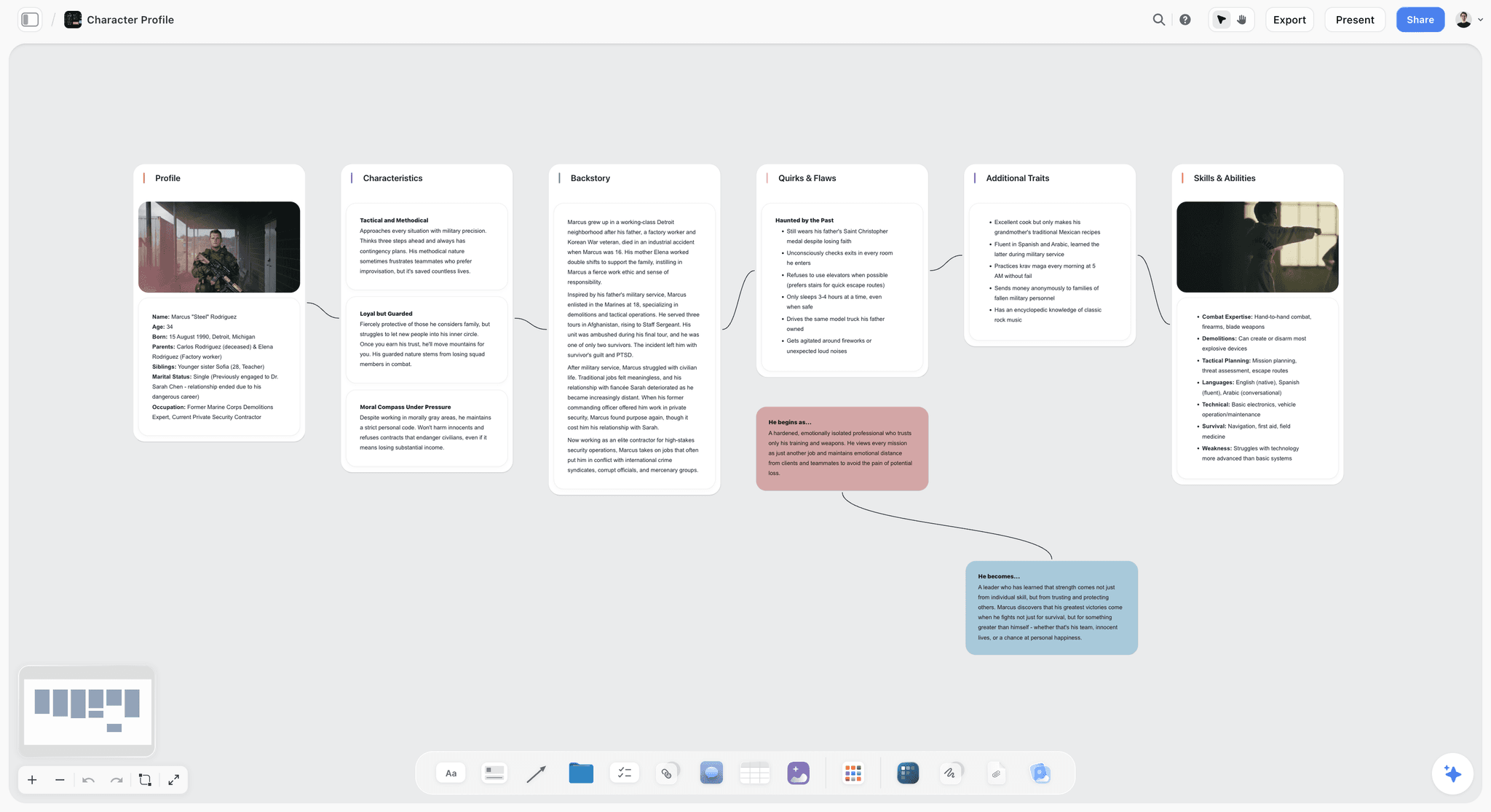
Storyflow is the Evernote alternative that finally treats your notes the way your head does. Instead of a flat scrolling list, your notes, images, and links live as cards on an infinite canvas you can see and arrange, and the AI reads the entire board at once. For anyone whose Evernote was really a pile of project material (research, references, half-formed plans), this is the upgrade, not just the replacement.
Best for: Evernote refugees who want to think visually. People whose notes are project-shaped: research, references, plans, and ideas that belong next to each other, not buried in separate notebooks.
Verdict: The #2 pick, and the strongest choice for Evernote refugees who want to think visually and have AI read their whole canvas instead of one flat note at a time. Notion still edges it out as the most direct clone for a pure linear text archive, but if your notes are project-shaped, Storyflow does something no notebook app can: it shows you everything at once and lets the AI work across all of it. Storyflow is paid-only during early access (Plus at $7.99/month annual), with a Free plan (no note cap) launching before the end of 2026 that will make it an easy first move off Evernote.
Key features
- An infinite canvas where notes, images, and links sit as cards you arrange spatially, so a whole project is visible at a glance.
- Context-aware AI that reads your full active canvas board, plus up to 1 Tactic and up to 3 @-mentioned Documents, so it reasons across your material instead of one note at a time.
- A 200+ Story Blueprints library on Plus and above, with unlimited shared boards and unlimited collaboration on every plan, including the free one.
Pricing
Paid-only during early access: Plus is $7.99 per month annual or $9.99 monthly and adds the Story Blueprints library, and unlimited uploads. Pro is $14 per month annual or $19 monthly and adds AI image generation and 20x more AI than Plus. Max is $39 per month annual or $49 monthly and adds 40x more AI plus a team workspace with permissions and roles. The Free plan (unlimited notes, images, and links, unlimited shared boards, basic AI usage, 20 file uploads, and unlimited collaboration, without the 200+ Story Blueprints library) launches before the end of 2026.
Pros
- The Free plan, launching before the end of 2026, will be genuinely generous: no note cap, unlimited images and links, unlimited shared boards, and unlimited collaboration. Evernote's free tier caps you at 50 notes.
- The AI reads your whole board, so it works with everything you have at once, not a single note in isolation.
- The canvas turns a pile of project notes into something you can see and arrange, which is exactly the structure Evernote never gave you.
- Affordable paid tiers: Plus at $9.99 per month unlocks 200+ Story Blueprints and unlimited file uploads for a fraction of Evernote's roughly $99-per-year Starter plan.
Cons
- Storyflow is canvas-shaped by design, so if you only want quick plain-text notes, pair it with a lightweight text app for those.
Take your most active project's notes and references, drop them onto a Storyflow canvas, and arrange them for a week. Start a Storyflow workspace to see your notes think with you.
2. Notion
Notion is the all-around Evernote replacement most former users land on: notes, databases, and wikis in one app.
Best for: The Archivist and Project exits. Former Evernote users who want more structure than a flat note list.
Verdict: The strongest single replacement for the average Evernote user. Loses to Obsidian on data ownership and to OneNote on free-tier generosity.
Key features
- A flexible block editor that handles notes, tables, and wikis on one surface.
- Notion AI bundled into the Business tier, plus a generous free plan and Evernote importer.
Pricing
Free for individuals. Plus is $10 per user per month annual or $12 monthly. Business is $20 per user per month annual or $24 monthly. As of early 2026, full Notion AI lives in the Business tier. Verify current pricing on Notion's site.
Pros
- The free plan is genuinely usable, the opposite of Evernote's 50-note cap.
- Databases turn a note archive into something queryable, with a mature ecosystem.
Cons
- Cloud-only with no local-first option for privacy-aware users.
- The block model is slower for quick capture, and pricing scales per user.
3. Obsidian
Obsidian is the local-first answer to the Privacy exit. Notes are plain Markdown files on your own disk, so no company can change the rules under you.
Best for: The Privacy and Archivist exits. Note-takers who want permanence and control.
Verdict: The strongest pick for anyone whose reason for leaving Evernote was trust. Steeper setup than a polished cloud app.
Key features
- Local Markdown files you fully own and can read without the app.
- Bidirectional links, a graph view, and over a thousand community plugins.
Pricing
Free for personal use, including the full app. Sync is $4 per month annual or $5 monthly. Publish is $8 per month annual or $10 monthly. A Commercial license applies to business use.
Pros
- True data ownership; the files outlive the company, with no subscription required.
- Endlessly extensible through plugins.
Cons
- Setup and plugin tuning is real work, not a one-click migration.
- Sync is a paid add-on, and web clipping is weaker than Evernote's.
4. Microsoft OneNote
OneNote is the strongest genuinely free Evernote replacement: a freeform notebook with no note cap.
Best for: The Free-Tier exit. Cross-platform note-takers, students, stylus and tablet users.
Verdict: The best free replacement for most people. The freeform page can feel cluttered for pure text archives.
Key features
- A freeform page where you type, draw, and place content anywhere.
- A notebook hierarchy that mirrors Evernote, plus strong handwriting and Microsoft 365 support.
Pricing
Free with a Microsoft account. Storage counts against OneDrive's free 5 GB tier; a Microsoft 365 subscription expands it.
Pros
- Genuinely free with no note limit, unlike Evernote's free plan.
- Excellent for handwritten note-taking, with a familiar notebook structure.
Cons
- The freeform page can become messy for long text archives.
- Best experience assumes you are already in the Microsoft ecosystem.
5. Apple Notes
Apple Notes is the quiet default that has become a serious Evernote alternative, free for anyone fully inside the Apple ecosystem.
Best for: The Free-Tier exit. Apple-ecosystem users who want zero setup and zero cost.
Verdict: Surprisingly capable and completely free. Useless the moment you need Windows or Android.
Key features
- Preinstalled and synced across iPhone, iPad, and Mac.
- Folders, tags, and smart folders, plus quick capture, scanning, and full-text search.
Pricing
Free. Notes count against the Apple ID's 5 GB free iCloud tier; iCloud+ expands storage.
Pros
- No cost, no subscription, no setup.
- Instant capture from anywhere in iOS and macOS.
Cons
- No real Windows or Android app, so cross-platform users are stuck.
- No web clipper, and organization tools are basic for a large archive.
6. Capacities
Capacities is a networked notes app built around objects rather than pages, for the Project exit when you want structure that stays list-shaped.
Best for: The Project and Archivist exits. Note-takers who want typed objects and connections.
Verdict: A thoughtful modern take on networked notes. Smaller and younger than Notion or Obsidian.
Key features
- Object-based structure where notes, people, and ideas are typed entities.
- A daily note and timeline for capture, with backlinks, a graph, and Pro-plan AI.
Pricing
The free plan covers unlimited objects with basic features. Pro is around $10 per month and adds AI, advanced properties, and API access. Verify current pricing on the Capacities site.
Pros
- The object model is genuinely useful for structured knowledge.
- The free plan is real, with unlimited objects.
Cons
- Smaller ecosystem than the big players, and cloud-only.
- The object model has a learning curve coming from flat notebooks.
7. Bear
Bear is a Markdown notes app with the cleanest tag system in this list, for Apple-device users who want a polished editor.
Best for: The Free-Tier and Archivist exits. Writers and note-takers who want a calm, focused app.
Verdict: One of the most pleasant note apps to use daily. Apple-only is its hard ceiling.
Key features
- Markdown editing with an elegant interface and a nested tag system.
- The core editor available free with no note cap, plus per-note encryption.
Pricing
Free tier with the core editor and no note limit. Bear Pro is $2.99 per month or $29.99 per year, which adds sync, themes, and export options.
Pros
- A clean, distraction-free writing environment, and the cheapest paid tier here.
- The tag system scales well for a large archive.
Cons
- Apple-only, with no Windows or Android app, and sync requires the paid tier.
- Lighter on databases and project structure than Notion.
8. Joplin
Joplin is the open-source, self-hostable answer to the Privacy exit, with full data control at no cost.
Best for: The Privacy exit. Technical users, self-hosters, privacy-first note-takers.
Verdict: The strongest free local-first option. Less polished than Obsidian, and that is the trade.
Key features
- Open-source app for desktop, mobile, and terminal, with a solid ENEX importer.
- End-to-end encryption on synced notes; self-hostable or synced through Joplin Cloud.
Pricing
The app is free. Joplin Cloud Basic is $3 per month or $30 per year for 1 GB. Pro is $6 per month or $60 per year for 10 GB. Self-hosting is free.
Pros
- Genuinely free and open-source with no lock-in.
- End-to-end encryption is standard, and the Evernote importer is solid.
Cons
- The interface is functional rather than polished.
- Self-hosting sync requires technical comfort.
9. Upnote
Upnote does the Evernote job without the Evernote price, for anyone who wants a paid app but refuses a subscription.
Best for: The Free-Tier exit. Budget-conscious cross-platform note-takers.
Verdict: Excellent value, especially the lifetime license. Less ambitious than the big networked-notes apps.
Key features
- Notebooks, nested notes, and a clean editor with templates.
- Cross-platform across Windows, Mac, iOS, and Android, with a lifetime license option.
Pricing
A free version with a 50-note cap. Premium is $1.99 per month, or a one-time $39.99 lifetime license that removes the cap.
Pros
- The lifetime license avoids subscription fatigue entirely.
- True cross-platform support, unlike Bear or Apple Notes.
Cons
- The free tier has the same 50-note cap that pushed people off Evernote.
- Lighter on databases, linking, and AI than larger tools.
10. NotebookLM
NotebookLM is Google's AI research notebook. Not a note app in the Evernote sense, but the strongest tool here for asking questions of documents you already have.
Best for: The Archivist exit, narrowly. Researchers and students who want answers from their own sources.
Verdict: Excellent at AI research grounded in your material. Not a daily capture or organization tool.
Key features
- Upload PDFs, Google Docs, and websites as grounded sources.
- An AI that answers only from your material with citations, plus Audio Overviews and Mind Maps.
Pricing
The Standard tier is free with usable limits. Higher limits come through Google AI subscriptions: Google AI Plus at $9.99 per month and Google AI Pro at $19.99 per month raise notebook, source, and chat caps. NotebookLM cannot be bought standalone.
Pros
- The AI is grounded in your sources, so answers stay citable.
- The free tier is genuinely useful, with strong Audio Overviews and Mind Maps.
Cons
- It is a research layer, not a capture or organization tool.
- No notebook or tag system for daily note-taking.
11. Amplenote
Amplenote is the pick for the former Evernote user who leaned on tasks and reminders, pairing rich notes with a real task engine.
Best for: Note-takers who want notes and task management in one tool.
Verdict: The closest thing to Evernote's old notes-plus-reminders combination, done better. Younger and smaller than the giants.
Key features
- Rich notes with a strong bidirectional linking system.
- A task engine with task scoring and a calendar view, plus a direct ENEX importer.
Pricing
A forever-free Personal plan with core features. Pro is $7 per month, Unlimited is $12 per month, and Founder is $25 per month. Verify current pricing on Amplenote's site.
Pros
- The task system is genuinely good, not a bolt-on.
- The ENEX importer is one of the cleanest here, and the free plan is permanent.
Cons
- The interface has a learning curve coming from simple notes.
- Smaller ecosystem than Notion, and cloud-only.
12. Google Keep
Google Keep is the fastest quick-capture tool here. Not a full Evernote replacement, but for sticky-note thoughts, lists, and reminders it is free and instant.
Best for: Quick capture, reminders, and lists. A companion tool, not a primary archive.
Verdict: Great at one job. Underpowered as a complete Evernote replacement.
Key features
- Instant note, list, and reminder capture with color-coded cards.
- Voice notes and image capture with text recognition, tied to the Google account.
Pricing
Free with a Google account. Storage counts against Google Drive.
Pros
- The fastest capture experience on this list, completely free with no note cap.
- Works everywhere through the web and mobile apps.
Cons
- Google has barely updated Keep in years; investment shifted to NotebookLM.
- No notebooks or rich organization, and weak search compared with Evernote.
7) Recommendations by Note-Taker Type
13. Solo Creator / Blogger
Top picks: Storyflow + NotebookLM
Storyflow holds your ideas, drafts, references, and content plan on one visual canvas where the AI reads the whole board, which beats scrolling a flat archive for creative work. NotebookLM handles research from uploaded sources. Storyflow covers this at Plus, $7.99/month annual, with a Free plan launching before the end of 2026.
14. SEO / Content Team
Top picks: Notion + Storyflow
Notion for the shared content database and wikis. Storyflow for the visual campaign and content planning canvas where the AI reads the whole board.
15. PhD Student / Academic Researcher
Top picks: Obsidian + NotebookLM
Obsidian for a permanent local archive and a literature system. NotebookLM for AI questions across uploaded papers. See AI Second Brain for PhD Students for the full workflow.
16. Documentary Filmmaker / Video Creator
Top picks: Storyflow + Obsidian
Storyflow for the visual research canvas where interviews, references, and story structure live together. Obsidian for the permanent local archive. This is the workflow I run for my own documentary projects.
17. Privacy-Conscious Professional
Top picks: Obsidian + Joplin
Obsidian for a polished local-first app. Joplin for open-source, end-to-end-encrypted, self-hostable notes. Neither can change the rules under you the way a cloud app can.
18. Small Business Owner / Consultant
Top picks: Storyflow + Amplenote
Storyflow for client work, plans, and references on shared boards where the AI reads the whole canvas, with unlimited collaboration on every plan including the free one. Amplenote for the notes-plus-tasks system that keeps follow-ups from slipping.
8) Honorable Mentions
A few tools that came close but did not make the main twelve:
- Logseq: Open-source outliner with local Markdown files; strong for the Privacy exit but rougher than Obsidian.
- Anytype: Local-first, object-based, peer-to-peer synced; promising but younger than Capacities.
- Reflect: Networked notes with a clean design and AI; pricier than most of this list.
- Tana: Powerful structured-notes tool; steep learning curve and higher cost.
- Microsoft Loop: Component-based collaboration tool; better for teams than personal archives.
- Mem: AI-first notes; pricing and direction have shifted, so verify before committing.
Their audience is narrower than the main list, or they overlap heavily with a tool already ranked.
9) Where Each Tool Loses
Honest accounting matters on a list like this, because no single tool wins for every kind of Evernote user.
Where Notion loses. No local-first storage, and quick capture is slower than Evernote's. The Privacy exit should look elsewhere.
Where Obsidian loses. Setup is real work, and cross-device sync is a paid add-on. It is not a five-minute migration.
Where OneNote and Apple Notes lose. OneNote's freeform page gets cluttered for large text archives, and Apple Notes is useless off Apple hardware.
Where NotebookLM loses. It is a research layer, not a note app, with no capture, notebooks, or tags for daily use.
The honest summary: there is no single Evernote clone that wins for everyone, because Evernote served four different kinds of user under one app. Match your exit to your tool.
11) The Bottom Line
The best Evernote alternative in 2026 depends on which kind of Evernote user you were. Notion is the strongest all-around replacement for a pure linear text archive. Storyflow is the #2 pick and the standout for everyone else: Evernote refugees who want to think visually, see a whole project at once, and have AI read their entire canvas instead of one flat note at a time. Obsidian and Joplin are the answer for anyone leaving over privacy and data ownership. Microsoft OneNote and Apple Notes are solid fully free options for a classic notebook layout. Amplenote is the pick for the notes-plus-tasks crowd.
There is no universal answer because Evernote was never one app to one kind of user. Pick your exit first, then pick your tool.
If your Evernote was a pile of project material, ideas, and references, Storyflow is the move. It is paid-only during early access, with Plus at $7.99/month annual and a Free plan (no note cap) launching before the end of 2026: take one active project, rebuild it on a Storyflow canvas for a week, and watch the AI work across the whole board. Start a Storyflow workspace and give your notes a place to think with you.
10) FAQ: Evernote Alternatives in 2026
What is the best Evernote alternative in 2026?
For most former Evernote users, Notion is the best all-around replacement: a generous free plan, strong databases, and a real Evernote importer. For privacy-focused users, Obsidian is better because notes are local Markdown files you own. For a genuinely free option, OneNote has no note cap.
Why are so many people leaving Evernote?
Two reasons dominate. The free plan was cut to 50 notes, one notebook, and single-device sync, which locks users out of their own notes once they pass the cap. And paid prices rose sharply after the Bending Spoons acquisition, with Starter near $99 per year and Advanced near $250 per year.
What is the best free Evernote alternative?
Microsoft OneNote is the strongest fully free option if you want a classic notebook layout, with no note limit. Apple Notes is free if all your devices are Apple. Obsidian and Joplin are free for the core apps. Storyflow is paid-only during early access, with Plus at $7.99/month annual; its Free plan (no note cap, unlimited images and links, unlimited shared boards, basic AI, and unlimited collaboration) launches before the end of 2026.
How do I move my notes out of Evernote?
Evernote can export notebooks as ENEX files. Joplin and Amplenote have direct ENEX importers that preserve tags, notebooks, and formatting well. Notion and Obsidian also import Evernote data, though formatting fidelity varies. Export your notebooks first, then test the import on one notebook before moving everything.
Is Notion or Obsidian better as an Evernote replacement?
Notion is better if you want a polished cloud app with databases and a generous free plan. Obsidian is better if your reason for leaving Evernote was trust, because your notes are local Markdown files no company controls. The deciding factor is whether local-first storage matters to you.
What is the best Evernote alternative for tasks and reminders?
Amplenote is the closest match for users who relied on Evernote's task and reminder features. It pairs rich notes with a real task engine, including task scoring and calendar integration, and has a direct ENEX importer. It also has a forever-free Personal plan to test the migration.
Is Storyflow a good Evernote replacement?
Yes, and it is our #2 pick overall. Storyflow is the strongest choice for Evernote refugees who want to think visually: notes, images, and links live as cards on an infinite canvas, and the AI reads your whole board instead of one note at a time. Storyflow is paid-only during early access (Plus at $7.99/month annual), with a Free plan (no note cap) launching before the end of 2026 that will make it an easy first move off Evernote. If you only want quick plain-text notes, pair it with a lightweight text app for those.
Which Evernote alternative is best for privacy?
Obsidian and Joplin are the best for privacy. Obsidian stores notes as local Markdown files on your own disk. Joplin is open-source, self-hostable, and end-to-end encrypted by default. Both keep your data under your control, so a company cannot change the terms under you.
Is OneNote really free?
Yes. Microsoft OneNote is free with a Microsoft account, with no note cap, unlike Evernote's free plan. Storage counts against OneDrive's free 5 GB tier; a Microsoft 365 subscription expands it. For most former free-tier Evernote users, OneNote is the most direct no-cost replacement.
What is the cheapest Evernote alternative?
Upnote offers a one-time $39.99 lifetime license that removes its 50-note cap, avoiding subscriptions entirely. Bear is $2.99 per month for a clean Markdown app. OneNote, Apple Notes, and the core apps of Obsidian and Joplin are free. Several alternatives cost far less than Evernote's roughly $99-per-year Starter plan.
Can AI tools like NotebookLM replace Evernote?
Not directly. NotebookLM is a research layer that answers questions from documents you upload; it has no capture, notebooks, or tags for daily note-taking. It works well alongside a real note app. If you want AI inside your notes, Notion, Capacities, and Storyflow build it into the note experience itself.
What should I do before I cancel my Evernote subscription?
Export every notebook as an ENEX file first, so you have a clean copy of your data. Test the import into your chosen alternative on one notebook before moving everything, because formatting fidelity varies by tool. Keep the export file, and only cancel once you have confirmed your notes, tags, and attachments survived the move.
Table of Contents
- Quick Answer: The Best Evernote Alternatives in 2026
- Comparison Table: 12 Evernote Alternatives Compared
- Why People Are Leaving Evernote in 2026
- How We Evaluated These Tools
- Quick Picks by Exit Type
- Detailed Reviews: 12 Evernote Alternatives in 2026
- Recommendations by Note-Taker Type
- Honorable Mentions
- Where Each Tool Loses
- FAQ: Evernote Alternatives in 2026
- The Bottom Line
- Author
- Related Reading
Templates to check out for this topic


Workspace templates you can use in Storyflow
Keep research, notes, and plans on one canvas the AI can read, instead of scattered across docs and tabs. Open a template and make it your second brain.


See Storyflow in Action
A visual AI workspace where every feature lives inside one canvas. No tab-switching, no context lost.
Build your entire board from a single message
Type what you need in the AI chat at the bottom of your canvas. The AI adds cards, headings, and structure directly onto your board.
Use expert frameworks as AI context
Type @ in the AI chat and choose any Tactic. The AI tailors every response to that framework instead of giving generic advice.
Turn your board into a mind map in seconds
Ask the AI to restructure your canvas as a mindmap. It connects your ideas into a visual hierarchy so you can see how everything relates.
Why Storyflow Exists
Storyflow actually began as a personal tool while working on creative and research projects.
We kept running into the same problem: ideas were scattered everywhere: notes, documents, and whiteboards.
Nothing helped us see how everything connected.
So we started building a workspace designed around how ideas actually grow.
→ Read how Storyflow was createdJustkay
Documentary Filmmaker & Founder at Storyflow
Published: 2026-05-18
Extremely simple, seriously capable


See how easy it is to get started
Watch a real project come together, from a blank board to a finished plan, clicked through step by step.
Start creating with AI and become more productive
Transform your creative workflow with AI-powered tools. Generate ideas, create content, and boost your productivity in minutes instead of hours.