
Category
AI Tools
Author

Justkay
Documentary Filmmaker & Founder at Storyflow
Topics
2026-05-18
•
Updated May 18, 2026
•
15 min read
•
AI Tools- best AI tools for startups 2026
- AI tools for startups
- AI for startup founders
- AI tools for founders
- AI for pitch deck
- AI for startup strategy
What are the best AI tools for startups in 2026?
The best AI tools for startups in 2026 are Claude (best for reasoning and decision support), Cursor (best for shipping product code), Storyflow (best for strategy, positioning, and pitch narrative on a canvas), and Perplexity (best for sourced market research). No single tool runs a startup. A startup builds, sells, operates, and thinks at once, so most founders run three or four tools picked by function rather than by brand.

All 12 AI Tools for Startups, Ranked
- Claude: best for reasoning, drafting, and decision support
- Cursor: best for shipping product code fast
- Storyflow: best for strategy and positioning on a canvas
- Perplexity: best for sourced market and competitor research
- ChatGPT: best for general ideation and quick drafts
- Linear: best for issue tracking and product planning
- v0 by Vercel: best for UI generation and front-end prototypes
- Lovable: best for full-app prototyping without code
- Gamma: best for pitch decks and investor presentations
- Granola: best for AI meeting notes for founders
- Notion AI: best for docs, wiki, and team knowledge
- HubSpot Breeze: best for AI inside a startup CRM
Full disclosure: Storyflow is our own product, and we rank it #3 here for one job: strategy, positioning, and pitch narrative on a canvas where the AI reads your whole board. For reasoning and decision support Claude is stronger, and for shipping actual product code Cursor is in a different class. Storyflow does not write production code or run your CRM, so it sits on the thinking-and-planning side of a startup, not delivery. We link to every tool so you can judge the fit.
Quick Comparison: Best AI Tools for Startups
These four cover the jobs founders switch between: reasoning and decision support, shipping product code, strategy and positioning, and sourced market research.
| Tool | Best For | AI Features | Price |
|---|---|---|---|
| Claude | Reasoning and decision support | Claude chat with large context | Free / $20 mo |
| Cursor | Shipping product code fast | AI code editor and agents | Free / $20 mo |
| Storyflow | Strategy and positioning on a canvas | Canvas AI reads your full board | $7.99 mo annual (free plan late 2026) |
| Perplexity | Sourced market research | Live web search plus citations | Free / $20 mo |
1) Quick Answer: The Best AI Tools for Startups in 2026
The best AI tools for startups in 2026 are Claude (best for reasoning, drafting, and decision support), Cursor (best for shipping code fast), Storyflow (best for strategy, positioning, and pitch narrative on a canvas), and Perplexity (best for sourced market research). The honest truth is that no single tool runs a startup. A startup builds, sells, operates, and thinks at the same time, and those four functions need different AI shapes. Most founders in 2026 run three or four tools at once, picked by function rather than by brand.
The short version: if you write code, Cursor or v0 or Lovable. If you need to think through strategy and positioning, Storyflow. If you need sourced research, Perplexity. If you need a strong general reasoning partner, Claude or ChatGPT. The startup AI stack is a stack, not a single app.
For the strategy half specifically, see How to Build a Brand Strategy With AI in 2026 and The Best Pitch Deck Tools in 2026.
2) Comparison Table: 12 AI Tools for Startups Compared
Rating criteria: Tested while running a real startup, not on synthetic prompts. Tools were rated on whether they moved a startup forward (a shipped feature, a closed customer, a clearer strategy), not on benchmark scores.
3) Why Startups Need a Different AI Stack
A startup is not a small enterprise. It is a different kind of organization with a different relationship to time, headcount, and uncertainty. That difference shapes which AI tools earn a slot.
A startup runs four functions with almost no people. Here is the original frame this article is built on. Every startup, regardless of stage, runs four jobs at the same time: build (the product gets made), sell (customers get found and closed), operate (the company runs day to day), and think (the strategy, positioning, and direction get decided). Call it the startup function stack. A 200-person company has a department for each. A five-person startup has the same four functions and almost no one to run them. AI is the multiplier that lets four people cover the work of forty, but only if the stack is chosen one function at a time.
Startups have no margin for the wrong tool. A 2024 survey by Techstars found that 74% of entrepreneurs now have AI as a component or enabler of their startup, and Kruze Consulting found that almost 80% of early-stage SaaS startups use AI tools inside their tech stacks. When everyone uses AI, the edge is not whether you use it. The edge is whether you picked the right tool for the right function. A founder who runs the coding job through a chat tool and the strategy job through a code editor has the stack inverted.
Startups change shape every quarter. The product pivots, the GTM motion changes, the team doubles. Tools that lock you into one rigid workflow break the moment the startup changes. Tools that stay flexible (a canvas, a general reasoning model, a fast code editor) survive the pivots. Pick AI by the function it serves, not by the logo on the landing page.
The familiar approach is to open ChatGPT and ask it to help with everything. It works for the first month, when the startup is small enough to fit in one chat thread. It fails by month three, when the build job, the sell job, and the think job each have their own context, and a single chat tab cannot hold all three. The founder approach is to map the four functions first, then assign one strong tool to each. The stack is small (three or four tools), but each tool is the right shape for its job.
For the architectural argument behind why one chat tool cannot do everything, see The Best AI Tools for Solopreneurs in 2026.
4) How We Evaluated These Tools (As an Operating Startup)
Every tool on this list was used inside a real, operating startup between 2024 and 2026, not tested in a sandbox. Storyflow itself is a startup, so this list is written from the founder's chair. Five criteria, weighted in this order:
- Function fit. Which of the four startup functions (build, sell, operate, think) does the tool actually serve, and does it serve that function better than the alternatives?
- Time to value. A startup measures tools in days, not quarters. Did the tool produce a real result (a shipped feature, a clearer deck, a closed deal) in the first week, or did it need a month of setup first?
- Cost discipline at startup scale. What does the tool cost when the team is three to ten people and the runway is finite? Per-seat pricing that scales steeply gets penalized here.
- Survives the pivot. Startups change. Does the tool stay useful when the product, the GTM motion, or the team changes shape?
- Honest output quality. Did the AI produce work a founder would actually ship, or work that took longer to fix than to write from scratch?
Tested workflows included: shipping a product feature from spec to deploy, writing a seed pitch narrative, planning a go-to-market launch, running founder-led sales calls, and rebuilding the company's positioning after a pivot.
5) Quick Picks by Startup Function
If you want the short list, organize by the four functions of the startup function stack.
Best for Build (making the product): Cursor for shipping production code fast. v0 by Vercel for UI generation and front-end prototypes. Lovable for full-app prototypes when the founder does not code.
Best for Sell (finding and closing customers): HubSpot Breeze if your CRM is HubSpot. Gamma for the pitch deck. Claude for sales copy, outreach, and follow-ups.
Best for Operate (running the company day to day): Linear for product and issue tracking. Granola for AI meeting notes. Notion AI for the team wiki and shared docs.
Best for Think (strategy, positioning, direction): Storyflow for the strategy and positioning canvas with expert frameworks. Perplexity for sourced market and competitor research. Claude for working through hard decisions in prose.
Best general-purpose reasoning partner: Claude or ChatGPT. Both are strong for one-off thinking; pick by output style and ecosystem.
Storyflow's blueprint library gives you expert-designed frameworks (the Product Strategy and AIDA blueprints are real examples) so you can structure a positioning or GTM problem and apply the framework at the same time, rather than studying the theory first and applying it later.
6) Detailed Reviews: 12 AI Tools for Startups in 2026
1. Storyflow
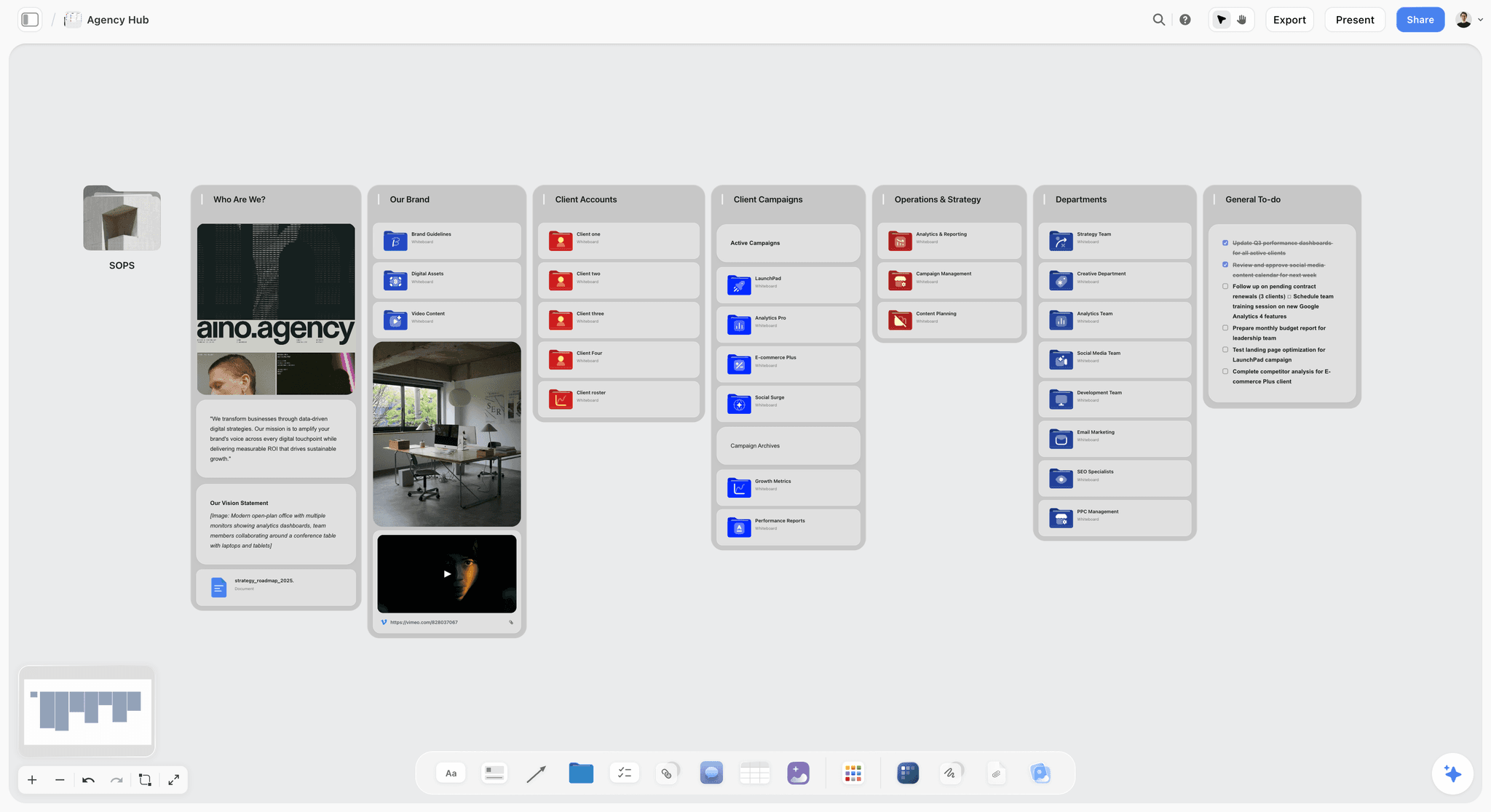
Storyflow is a visual workspace where the AI reads your full active canvas and expert frameworks scaffold the work. For a startup, it is the tool for the think function: positioning, GTM planning, pitch narrative, and brand. It is the alternative to pick when chat-only AI keeps producing generic strategy that ignores your specific company.
Best for: Founders working through positioning, go-to-market plans, pitch narrative, and brand strategy. The strategy canvas, not the codebase.
Verdict: The strongest AI tool for the strategy and positioning half of a startup. It is honestly not a coding tool and not a CRM, and it does not pretend to be.
Key features
- Canvas-aware AI by default. The AI reads the full active canvas board (your positioning notes, audience research, GTM plan, competitor map). You can add up to 1 blueprint and up to 3 @-mentioned documents for extra grounding.
- 200+ Story Blueprints on Plus and above. Expert-designed frameworks (real examples include the Product Strategy and AIDA blueprints) that structure a strategy problem while you work it.
- Infinite canvas with structured cards. Positioning, audience clusters, GTM timeline, and pitch narrative all live on one board instead of scattered docs.
- Unlimited shared boards and unlimited collaboration on every plan. The Max plan adds a team workspace with permissions and roles.
Pricing
Paid-only during early access; the Free plan (unlimited notes, images, and links, unlimited shared boards, unlimited collaboration, basic AI usage, and 20 file uploads) launches before the end of 2026, and anyone a paid member invites to a board joins free now. It will not include the 200+ Story Blueprints library. Plus: $7.99/mo annual or $9.99/mo monthly (full 200+ blueprint library, unlimited file uploads). Pro: $14/mo annual or $19/mo monthly (adds AI image generation and 20x more AI than Plus). Max: $39/mo annual or $49/mo monthly (adds 40x more AI plus a team workspace with permissions and roles).
Pros
- The AI reads the full strategy canvas, so positioning and GTM work stays specific to your company instead of generic.
- Story Blueprints ground the work in expert frameworks, so a first-time founder can apply a structure they have not used before.
- The paid entry tier is $9.99/mo, cheaper than most tools on this list, and anyone a paid member invites to a board joins free.
Cons
- Storyflow is not a coding or development tool. For the build function, use Cursor, Lovable, or v0.
- Storyflow is not a CRM. For pipeline and contact management, use HubSpot.
- Storyflow is not an issue tracker. For sprints and tickets, use Linear.
- Cloud-only, and a newer platform than incumbents like Notion.
2. Claude
Claude is the strongest general reasoning model for founders in 2026. It is the pick when the job is to think clearly: a hard hiring call, a pricing decision, a long-form draft, a spec that has to be right.
Best for: Founder decision support, long-form drafting, spec writing, anything where reasoning quality matters more than ecosystem breadth.
Verdict: The strongest pure-chat AI for the thinking parts of a startup. It is a reasoning partner, not a workspace.
Key features
- Strong reasoning and long-context handling for dense founder material.
- Projects feature for persistent context across sessions.
- Careful, low-hype tone that suits investor and customer communication.
Pricing
Claude Pro: $20/mo, or $17/mo billed annually. Claude Max at $100/mo or $200/mo for heavy users. Free tier with daily message limits.
Pros
- Frequently rated the best model for careful writing and reasoning.
- Tone is calibrated and professional, which matters for founder communication.
- Projects reduce some of the context-pasting overhead.
Cons
- It is a chat tool, so it loses the thread on multi-week projects with structure.
- No native canvas; visual strategy work has to happen elsewhere.
- Smaller plugin ecosystem than ChatGPT.
3. Cursor
Cursor is the AI code editor that startup engineering teams actually ship with in 2026. It is the pick for the build function when the startup has developers.
Best for: Technical founders and startup engineering teams shipping production code.
Verdict: The strongest AI tool for the build function. If your startup writes code, this is the editor.
Key features
- AI-native code editor built on VS Code, with full-codebase context.
- Agent mode for multi-file changes and larger tasks.
- Auto model routing that picks the right model per task.
Pricing
Hobby: $0. Pro: $20/mo with $20 of monthly model usage included. Pro+: $60/mo. Ultra: $200/mo. Teams: $40/user/mo. Annual billing saves 20%.
Pros
- The strongest AI coding experience for real production codebases.
- Full-codebase context means the AI understands the actual project, not a snippet.
- Pro tier is affordable for a small engineering team.
Cons
- Usage beyond the included pool can add real cost on heavy weeks.
- Useless for a non-technical founder; this is a developer tool.
- Not a planning or strategy tool; pair with Linear and Storyflow.
4. Perplexity
Perplexity is the answer engine that ships with sources by default. For a startup, it is the research layer: market sizing, competitor moves, category trends.
Best for: Market research, competitor analysis, due diligence prep, any research a founder needs to verify before acting on it.
Verdict: The strongest research-grade AI for founders. Citations are the reason it earns a slot.
Key features
- Every answer ships with citations you can check.
- Pro Search runs deeper multi-source synthesis.
- Spaces for grouping research threads by topic.
Pricing
Perplexity Pro: $20/mo or $200/year. Perplexity Max at $200/mo for power users. Free tier with limited Pro searches.
Pros
- Citations matter when a founder is making a real decision off the research.
- Strong on "what is the latest on X" queries where chat models go stale.
- Pro Search is genuinely good for first-pass competitive analysis.
Cons
- Not built for generation; use Claude or ChatGPT for drafting.
- Spaces are lighter than a canvas for sustained strategy work.
- The free tier limits Pro Search heavily.
5. ChatGPT
ChatGPT is still the broadest AI tool a founder reaches for in 2026. It is the default for quick drafts, ideation, and the long tail of one-off tasks.
Best for: Quick drafts, brainstorming, exploratory research, custom GPTs for repeated startup workflows.
Verdict: The most versatile general AI. Genuinely good, just the wrong shape for any one structured function on its own.
Key features
- Image generation alongside text in the same product.
- Custom GPTs and the GPT Store for repeatable workflows.
- Voice mode and multimodal input.
Pricing
ChatGPT Go: $8/mo. ChatGPT Plus: $20/mo. Higher Pro tiers at $100/mo and $200/mo. Free tier available.
Pros
- The broadest AI ecosystem, useful for the long tail of founder tasks.
- Image generation in the same product is convenient.
- Custom GPTs let a small team encode repeatable workflows.
Cons
- Loses context on multi-week structured work; the chat substrate is the limit.
- No native framework awareness; strategy output is generic until heavily prompted.
- For a startup, it is best as a utility, not the spine of any one function.
6. Linear
Linear is the issue tracker and product planning tool that startup teams standardize on in 2026. It is the operate function for anything product-shaped.
Best for: Startup product and engineering teams running sprints, issues, and roadmaps.
Verdict: The strongest issue tracker for startups. Fast, opinionated, and built for small product teams.
Key features
- Fast, keyboard-first issue tracking and sprint planning.
- Roadmaps and project views for the product team.
- AI features for triage, summaries, and issue drafting.
Pricing
Free for small teams. Standard: $8/user/mo. Plus: $14/user/mo. Annual billing saves 20%.
Pros
- The fastest issue tracker in the category; teams genuinely enjoy using it.
- Built for startups, so the defaults fit a small product team.
- Affordable per-seat pricing at startup scale.
Cons
- Product-focused; it is not a general project tool for non-engineering work.
- Not a strategy or positioning tool; pair with Storyflow for the think function.
- The AI layer is helpful but secondary to the core tracking experience.
7. v0 by Vercel
v0 by Vercel generates UI and front-end code from prompts. For a startup, it is the fast path from idea to a real, deployable interface.
Best for: Front-end prototyping, landing pages, UI components, founders who want a working interface fast.
Verdict: The strongest UI generation tool in 2026. Best as a front-end accelerator inside a real codebase.
Key features
- Generates React and Tailwind UI from natural language prompts.
- Tight integration with the Vercel deploy pipeline.
- Iterative refinement of generated components.
Pricing
Free tier with limited usage. Paid plans from $20/mo with usage credits, scaling with consumption.
Pros
- Genuinely fast from prompt to deployable UI.
- Output is real React code, not a closed black box.
- Deep Vercel integration makes shipping the front end easy.
Cons
- Front-end focused; it does not build the backend.
- Usage-based pricing can climb on heavy weeks.
- Best paired with Cursor for full-stack work, not used alone.
8. Lovable
Lovable builds full app prototypes from prompts, with no code required. For a non-technical founder, it is the fastest way to a working MVP.
Best for: Non-technical founders, rapid MVP prototypes, validating an idea before hiring engineers.
Verdict: The strongest no-code AI app builder for early validation. A prototyping tool, not a production engineering platform.
Key features
- Generates full-stack app prototypes from natural language.
- Credit-based generation; simple changes cost little.
- Built-in hosting and database for prototypes.
Pricing
Free: $0 with 5 daily credits. Pro: $25/mo with 100 monthly credits. Business: $50/mo with SSO and team features. Enterprise: custom.
Pros
- A non-technical founder can produce a working prototype in a day.
- Good for validating an idea before spending on engineering.
- The credit model keeps light use affordable.
Cons
- Prototype-grade; serious products outgrow it and need a real codebase.
- Credit costs can climb fast on complex apps.
- Not a substitute for Cursor once the startup has engineers.
9. Gamma
Gamma generates presentations and pitch decks from prompts. For a fundraising startup, it is the fast path from a narrative to a designed deck.
Best for: Seed and Series A pitch decks, investor updates, sales presentations.
Verdict: The strongest AI deck tool for startups. Best for design speed once the narrative is decided.
Key features
- Generates designed decks from a prompt or outline.
- Brand controls for consistent investor and sales material.
- Web-based decks that work as pages, not just slides.
Pricing
Free plan with credit limits. Plus: around $8/mo annual or $10/mo monthly. Pro: around $15/mo annual or $20/mo monthly. Ultra: $100/mo. Verify current pricing at gamma.app.
Pros
- Fast from outline to a designed, presentable deck.
- Brand controls keep investor material consistent.
- Cheaper than hiring a designer for early decks.
Cons
- It designs the deck; it does not build the narrative or the strategy.
- Generated layouts can feel templated without manual polish.
- For the pitch narrative itself, do the thinking first (in Storyflow or Claude), then bring it to Gamma.
10. Granola
Granola is the AI meeting notes tool with a bot-free architecture. For a founder in back-to-back calls, it is the operate function for meetings.
Best for: Founders running customer calls, investor meetings, and team syncs who need reliable notes.
Verdict: The strongest AI meeting notes tool for founders. Quiet, accurate, and out of the way.
Key features
- AI-enhanced notes without a meeting bot joining the call.
- Transcription plus structured summaries.
- Works across the meeting tools a founder already uses.
Pricing
Basic: free with limited note history. Business: $14/user/mo. Enterprise: $35/user/mo.
Pros
- No bot in the call is a real advantage for customer and investor meetings.
- Notes are accurate enough to act on without rewatching the call.
- The free plan is enough to evaluate it properly.
Cons
- Notes are only as useful as the follow-up; it does not run the action items.
- The free plan caps note history.
- A meeting tool, not a strategy or planning surface.
11. Notion AI
Notion AI is the AI inside Notion's docs and databases. For a startup, it is the operate function for the team wiki and shared knowledge.
Best for: Startup teams whose docs, runbooks, and wiki already live in Notion.
Verdict: Solid if the startup already runs on Notion. Less compelling if it does not.
Key features
- AI inside Notion pages, databases, and the team wiki.
- Connects to Slack, Drive, and other knowledge sources for search.
- Notion Agent and AI meeting notes in the higher tiers.
Pricing
Free with limited trial AI usage. Plus: $10/user/mo annual. Notion AI is bundled into Business at $20/user/mo annual. Enterprise: custom.
Pros
- Best AI experience for teams already deep in Notion.
- Cross-source search is genuinely useful for a growing knowledge base.
- One tool for docs, wiki, and light project tracking.
Cons
- Doc-shaped, not canvas-shaped, so visual strategy work is awkward.
- The AI works on the page, not on a project-level canvas.
- Per-seat pricing on Business scales as the team grows.
12. HubSpot Breeze
HubSpot Breeze is the AI woven into HubSpot's CRM and marketing tools. For a startup whose sales motion runs on HubSpot, it is the sell function's AI layer.
Best for: Startups already running their sales and marketing on HubSpot.
Verdict: The strongest CRM-integrated AI if your stack is HubSpot. Not interesting outside it.
Key features
- AI Agents for prospecting and customer support inside HubSpot.
- Breeze Copilot for assistance across the CRM suite.
- Native access to contact and pipeline data so the AI has real context.
Pricing
Bundled with HubSpot Pro and Enterprise tiers. Breeze AI agents moved to outcome-based pricing in April 2026 (for example, around $0.50 per resolved support conversation and $1 per qualified lead). Verify current pricing at hubspot.com.
Pros
- Deep CRM integration gives the AI real customer context.
- AI Agents handle workflow automation, not just text generation.
- For a HubSpot-native startup, it removes a separate AI bill.
Cons
- Outside HubSpot the value collapses entirely.
- HubSpot's own pricing scales steeply as the contact list grows.
- Outcome-based AI pricing makes costs harder to predict month to month.
7) Startup-Type Recommendations
Different kinds of startup run the four-function stack differently. Here is the picked stack for nine common startup types.
13. Technical Founder, Pre-Seed
Top picks: Cursor + Storyflow
Cursor for the build function, where most of the early work is. Storyflow for the think function, so the positioning and GTM plan get structured before the first pitch. Add Claude for decisions.
14. Non-Technical Founder, Pre-Seed
Top picks: Lovable + Storyflow
Lovable to prototype the product and validate the idea without engineers. Storyflow for the positioning, pitch narrative, and GTM plan. Add Perplexity for market research.
15. Two-Person Founding Team, Seed
Top picks: Cursor + Storyflow + Linear
Cursor for shipping, Storyflow for strategy, Linear to keep the product work organized once there is more than one person touching it. Add Gamma for the seed deck.
16. SaaS Startup, Series A
Top picks: Cursor + Linear + HubSpot Breeze
Cursor and Linear for the build and operate functions at a growing team. HubSpot Breeze for the sell function once there is a real sales motion. Storyflow Max for the strategy canvas the whole team shares.
17. Solo Founder Doing Everything
Top picks: Storyflow + Claude + Lovable
Storyflow for strategy, Claude as the general reasoning partner, Lovable to prototype without hiring. The minimum viable AI stack for one person. See The Best AI Tools for Solopreneurs in 2026 for the deeper solo stack.
18. Fundraising Startup (Actively Raising)
Top picks: Storyflow + Gamma + Perplexity
Storyflow to build the pitch narrative and positioning. Gamma to turn the decided narrative into a designed deck. Perplexity for the market and competitor research investors will ask about.
19. Product-Led Growth Startup
Top picks: Cursor + Linear + Storyflow
Cursor and Linear for the fast build-and-ship loop PLG depends on. Storyflow for the positioning and onboarding strategy that turns signups into activated users.
20. Agency or Services Startup
Top picks: Storyflow Max + Claude + Granola
Storyflow Max for the team workspace where client strategy lives. Claude for proposals and client drafting. Granola for the client call notes.
21. Hardware or Deep-Tech Startup
Top picks: Storyflow + Perplexity + Notion AI
Storyflow for the strategy, roadmap, and investor narrative. Perplexity for the technical and market research. Notion AI for the documentation-heavy knowledge base deep-tech teams accumulate.
8) Honorable Mentions
A few tools that came close but did not make the main twelve:
- Replit: AI-assisted coding environment; a Cursor and Lovable overlap, strong for browser-based building.
- Bolt: Full-app prototyping; a Lovable alternative with similar strengths.
- Attio: AI-native CRM; a HubSpot alternative worth watching for startups that want a lighter CRM.
- Fireflies: AI meeting notes; a Granola alternative with a more traditional bot-based model.
- Gemini: Google's general AI; strong and worth a slot for teams deep in Google Workspace.
- NotebookLM: Synthesizes uploaded documents and research; useful for due diligence and research synthesis.
- Pitch: Presentation tool with AI features; a Gamma alternative for decks.
- Cline: Open-source AI coding agent; a Cursor alternative for developers who want it in their own editor.
These are not weak tools. Their function overlaps with a tool already on the main list, so they did not earn a separate slot.
9) Where AI Does Not Help Startups Yet
Honest accounting matters more for startups than for anyone, because a startup has no time to waste on the wrong use of AI. There are startup jobs where AI is still bad, and pretending otherwise burns runway.
- The actual decision to pivot. AI can lay out the options and the trade-offs. The decision to bet the company on a new direction is founder judgment, grounded in signals AI cannot see.
- Real customer development. AI summarizes call transcripts well. It does not replace the founder doing twenty customer interviews and feeling the pattern firsthand.
- Hiring the first ten people. AI can screen and draft. Whether a person is right for an early team is a judgment call about culture and trust that no model makes for you.
- Original positioning. AI helps you structure and pressure-test positioning. The insight about why your startup is different in a way customers care about comes from the founder and the market, not the model.
- Fundraising relationships. AI drafts the email and preps the deck. The investor relationship is human, and investors can tell when an update was written entirely by a model.
- Reading the room in a crisis. A churn spike, a co-founder conflict, a key hire leaving. Time-sensitive, high-stakes judgment is founder work, not AI work.
If your AI use is concentrated in these areas, the stack is pointed at the wrong jobs. The right use of AI in a startup is upstream (research, drafting, structuring, prototyping, coding) and downstream-supporting (notes, summaries, automation). The core founder decisions in the middle are still yours.
11) The Bottom Line
The best AI tools for startups in 2026 are not one tool. They are a stack, chosen one function at a time. Pick AI by the function it serves, not by the logo on the landing page. A startup runs build, sell, operate, and think at the same time, and each function has a different best tool. Cursor is the strongest for build. Claude is the strongest general reasoning partner. Storyflow is the strongest for the think function: positioning, GTM planning, pitch narrative, and brand. Perplexity is the strongest for sourced research. Linear is the strongest for product operations.
Most founders in 2026 run three or four of these at once: one for code, one for strategy, one for research, one general model. The total cost of a lean stack is small compared to one wrong hire or one quarter spent building the wrong thing. The judgment calls that decide whether the startup works, the pivots, the hires, the positioning, are still founder work. AI just clears the slow, repetitive work out of the way so the founder can spend their hours on the decisions that matter.
To test the architecture, take the one strategic question that is unclear right now and rebuild it on a Storyflow canvas instead of asking it in a chat tab. Start a Storyflow workspace to run that test.
10) FAQ: AI Tools for Startups in 2026
What is the best AI tool for startups in 2026?
There is no single best tool, because a startup runs four functions at once (build, sell, operate, think) and each needs a different AI shape. For building, Cursor. For thinking through strategy, Storyflow. For research, Perplexity. For general reasoning, Claude. Most founders run three or four tools, picked by function.
What is the best free AI tool for a startup?
Storyflow's Free plan, which launches before the end of 2026, will be the strongest free tier for the strategy and planning function: unlimited boards, unlimited cards, unlimited collaboration, basic AI usage, and 20 file uploads. Claude, ChatGPT, and Perplexity all have free tiers with daily limits that are usable for one-off work. Cursor's Hobby tier is free for light coding.
How much should a startup spend on AI tools?
A lean early-stage stack runs roughly $40 to $80 per month for one founder: a general model (Claude or ChatGPT at $20/mo), a strategy canvas (Storyflow Plus at $9.99/mo), and one function-specific tool. As the team grows, per-seat tools (Cursor, Linear, Notion) scale with headcount. Map the four functions first, then pay only for the tools that serve a function you actually run.
Which AI tool is best for a non-technical founder?
Lovable for prototyping a product without engineers, and Storyflow for the positioning, pitch narrative, and GTM plan. A non-technical founder can validate an idea and build the strategy without writing code. Add Perplexity for market research before committing.
Is Storyflow good for startups?
Storyflow is strong for the think function of a startup: positioning, go-to-market planning, pitch narrative, and brand strategy. The AI reads your full strategy canvas and expert blueprints (the Product Strategy and AIDA blueprints are real examples) scaffold the work. It is honestly not a coding tool and not a CRM, so it is one tool in a startup stack, not the whole stack.
Which AI tool is best for building a startup product?
Cursor for technical founders and engineering teams shipping production code. v0 by Vercel for front-end and UI generation. Lovable for non-technical founders prototyping a full app. Most product-building startups use Cursor as the spine and v0 as a front-end accelerator.
Will AI replace startup founders?
No. AI replaces specific startup tasks (boilerplate code, first drafts, research synthesis, meeting notes) and amplifies others (strategy structuring, prototyping speed, research depth). The founder jobs that decide whether a startup lives, the pivot calls, the hires, the positioning insight, the investor relationships, remain human. Founders who win in 2026 use AI as the multiplier, not the operator.
What AI tools do funded startups actually use?
Funded startups in 2026 typically standardize on a small stack: a code editor (Cursor), an issue tracker (Linear), a general model (Claude or ChatGPT), a strategy surface (Storyflow), and a CRM with AI (HubSpot Breeze). Kruze Consulting found almost 80% of early-stage SaaS startups use AI tools inside their tech stacks, and 74% of entrepreneurs treat AI as a core component per a 2024 Techstars survey.
Is ChatGPT enough to run a startup?
For the long tail of one-off tasks, yes. For any one structured function, no. A startup's build, sell, operate, and think functions each accumulate their own context, and a single chat thread cannot hold all four. Use ChatGPT as a general utility, and add a function-specific tool (Cursor for build, Storyflow for think, Linear for operate) for the work that needs structure.
What is the best AI tool for a startup pitch deck?
Gamma for turning a decided narrative into a designed deck fast. But the narrative itself, the story of why this startup matters, should be built first. Use Storyflow or Claude to think through the pitch narrative and positioning, then bring the finished narrative to Gamma for design. See The Best Pitch Deck Tools in 2026.
Do early-stage startups need a CRM with AI?
Not always at pre-seed, when founder-led sales fits in a spreadsheet. Once there is a repeatable sales motion and more than one person selling, a CRM with AI (HubSpot Breeze) pays off. Before that point, the spend is better placed on the build and think functions.
What is the smallest AI experiment a startup can run this week?
Take the one strategic question that is currently unclear, your positioning, your GTM motion, or your pitch narrative, and instead of asking it in a chat tab, build it on a Storyflow canvas. Put the context on the board, apply a relevant blueprint, and work the question there. Most founders see the difference between scattered chat and a structured canvas within an hour. Try Storyflow to run that test.
Table of Contents
- Quick Answer: The Best AI Tools for Startups in 2026
- Comparison Table: 12 AI Tools for Startups Compared
- Why Startups Need a Different AI Stack
- How We Evaluated These Tools (As an Operating Startup)
- Quick Picks by Startup Function
- Detailed Reviews: 12 AI Tools for Startups in 2026
- Startup-Type Recommendations
- Honorable Mentions
- Where AI Does Not Help Startups Yet
- FAQ: AI Tools for Startups in 2026
- The Bottom Line
- Author
- Related Reading
Templates to check out for this topic


Templates you can use in Storyflow
Every Storyflow board starts from real structure and an AI that reads the whole canvas. Open one of these templates and make it yours.


See Storyflow in Action
A visual AI workspace where every feature lives inside one canvas. No tab-switching, no context lost.
Build your entire board from a single message
Type what you need in the AI chat at the bottom of your canvas. The AI adds cards, headings, and structure directly onto your board.
Use expert frameworks as AI context
Type @ in the AI chat and choose any Tactic. The AI tailors every response to that framework instead of giving generic advice.
Turn your board into a mind map in seconds
Ask the AI to restructure your canvas as a mindmap. It connects your ideas into a visual hierarchy so you can see how everything relates.
Why Storyflow Exists
Storyflow actually began as a personal tool while working on creative and research projects.
We kept running into the same problem: ideas were scattered everywhere: notes, documents, and whiteboards.
Nothing helped us see how everything connected.
So we started building a workspace designed around how ideas actually grow.
→ Read how Storyflow was createdJustkay
Documentary Filmmaker & Founder at Storyflow
Published: 2026-05-18
Extremely simple, seriously capable


See how easy it is to get started
Watch a real project come together, from a blank board to a finished plan, clicked through step by step.
Start creating with AI and become more productive
Transform your creative workflow with AI-powered tools. Generate ideas, create content, and boost your productivity in minutes instead of hours.