The 12 Best AI Tools for Coaches and Consultants in 2026 (We Tested Them All)
The 12 best AI tools for coaches and consultants in 2026, tested on real client engagements. Discovery, deliverables, scheduling, and CRM tools compared honestly.

Category
AI Workflows
Author

Justkay
Documentary Filmmaker & Founder at Storyflow
Topics
2026-05-14
•
14 min read
•
AI Workflows- best AI tools for coaches 2026
- AI for consultants
- AI coaching tools
- consultant AI workflow
What are the best AI tools for coaches and consultants in 2026?
The best AI tools for coaches and consultants in 2026 are Storyflow for the engagement workspace, Granola or Otter.ai for session notes, Perplexity Spaces or NotebookLM for client research, Claude for deliverable drafting, and Calendly or Cal.com for scheduling. No single tool covers the whole engagement, so the strongest practices run a coordinated stack of three to five, one tool per phase of client work. I tested twelve AI tools this spring across three real practices: an executive coaching practice with 14 active clients, a brand strategy consultancy with three live engagements, and a leadership development consultancy running cohort programs. The rankings below sort the tools by the phase of the engagement they actually improve, not by how loud their marketing is. Most "best AI tools for consultants" lists rank tools as if they compete with each other. A note tool does not compete with a scheduler. A research tool does not compete with a CRM. They occupy different phases of the same engagement, and the real question is never "which single tool wins" but "which tool wins each phase, and do they hand off cleanly." That framing is the whole article.

Full disclosure: Storyflow is our own product, and this guide ranks it first for the workspace spine, the Client Memory and Deliverables phases where its AI reads the whole engagement board plus the Documents and Blueprints you @-mention. That ranking is honest about scope, not a claim to run the whole practice. Storyflow has no scheduling, no invoicing, and no client portal, and real AI volume starts at Pro rather than Plus, so you pair it with Calendly and a billing tool. Granola still owns session notes and Perplexity Spaces owns sourced research better than a canvas does. We link to every tool so you can judge the fit.
Quick Comparison
These four cover the phases coaches and consultants lean on most: the engagement workspace, session notes, deliverable drafting, and client research.
| Tool | Best For | AI Features | Price |
|---|---|---|---|
| Storyflow | Engagement workspace (memory + deliverables) | Canvas AI reads the whole engagement | $7.99 mo annual (free plan late 2026) |
| Granola | AI session notes | Cross-meeting summaries | $18/month |
| Claude | Deliverable drafting | Deep reasoning, project memory | $20/month |
| Perplexity Spaces | Client discovery research | Cited live-web answers | $20/month |
All 12 AI Tools for Coaches and Consultants, Ranked
- Storyflow: best engagement workspace holding client memory and deliverables on one canvas
- Granola: best AI-first session notes with cross-meeting context
- Claude: best long-form deliverable drafting with strong reasoning
- Perplexity Spaces: best source-grounded client discovery research with citations
- Notion: best database-shaped client memory and tracking
- Otter.ai: best established transcription with raw searchable transcripts
- Folk: best personal CRM with a light sales pipeline
- Calendly: best established scheduling with broad integrations
- ChatGPT: best flexible general AI for brainstorming and light drafting
- NotebookLM: best source-locked research for a finite corpus
- Cal.com: best open-source, self-hostable scheduling
- ChatGPT Free: best free general AI for light needs
The Five-Phase Engagement Stack
Every coaching or consulting engagement moves through the same five phases, and every AI tool on the market slots into exactly one of them. Name the phase first, then pick the tool. Buy tools per phase, not per hype.
- Discovery. Client research, industry context, competitive scans, intake synthesis. AI-first research tools replaced manual desk research here.
- Notes. Discovery calls, coaching sessions, working sessions. AI-first meeting tools replaced manual note-taking.
- Deliverables. Strategy memos, session recaps, frameworks, client-facing docs. AI drafting tools added context-aware writing.
- Client Ops. Scheduling, booking, reminders, and the light admin that eats a solo practitioner's week. Automation tools handle this.
- Client Memory. Who your clients are, where each engagement stands, what you promised, what is next. CRM and workspace tools hold this.
The stack fails in two ways. Too few tools and a phase goes uncovered, so you carry it in your head or a spreadsheet. Too many tools and the same client information lives in six places that never sync, so you spend the time you saved re-entering context. The practices in my test that reported the least admin drag ran three to five tools total, one clear owner per phase, with the workspace phase acting as the spine that the others feed into. That is the target shape. The rest of this article ranks the tools inside it.
Quick Picks: Best AI Tools for Coaches and Consultants 2026 by Use Case
Best All-in-One AI Workspace (Client Memory + Deliverables): Storyflow Storyflow is the project canvas where each client engagement holds its own board. Discovery notes, strategy frameworks via Story Blueprints (Brand Pyramid, AIDA, StoryBrand), session notes, working deliverable Documents, and research source cards all live on one canvas per client. The AI reads the full active board plus the Documents and Blueprint you @-mention. Plus from $7.99/month billed annually. The friction: no scheduling, no invoicing, no built-in client portal.
Best for Session Notes and Transcription: Granola or Otter.ai Granola is the AI-first meeting notes tool with strong cross-meeting context. Otter.ai is the established transcription tool with mature integrations. Granola from $18/month. Otter.ai Pro from $10/month. The pick depends on whether you want AI summaries (Granola) or raw transcript depth (Otter).
Best for Discovery and Research: Perplexity Spaces or NotebookLM For client discovery and competitive research, Perplexity Spaces grounds answers in your sources plus the live web. NotebookLM grounds in your uploaded sources only. Perplexity Pro from $20/month. NotebookLM free during preview.
Best AI for Deliverable Drafting: Claude or Storyflow Documents Claude handles long-form deliverable drafts with strong reasoning and project memory. Storyflow's Documents handle drafts with the canvas context the rest of the engagement already lives in. Claude Pro from $20/month. Storyflow Plus from $9.99/month.
Best for Scheduling: Calendly or Cal.com Calendly is the established scheduling tool. Cal.com is the open-source alternative. Calendly from $10/seat/month. Cal.com free or self-hosted. Both handle coach and consultant booking cleanly.
Best for Client Memory and Tracking: Folk or Storyflow Folk is the founder and agency-shaped personal CRM. Storyflow holds client cards on the project canvas next to the actual work. Folk from $20/seat/month. The pick depends on whether you want a focused pipeline CRM (Folk) or a work-adjacent canvas (Storyflow).
Best for Coaching and Strategy Frameworks: Storyflow Story Blueprints Storyflow's 200+ Story Blueprints library includes strategy frameworks (Brand Pyramid, AIDA, StoryBrand, Five-Act Structure) that surface on the canvas with AI awareness. The library lives on Plus and above; the Free plan launching before the end of 2026 will ship three starter framework tactics. The limitation: the library is broad but not deep in every coaching niche.
Best Free AI Tool for Coaches: ChatGPT Free ChatGPT free handles general questions and brainstorming for canvas-based engagements. Storyflow is paid-only during early access (Plus from $7.99/month annual), though anyone a paid member invites to a board joins free; a Free plan with unlimited shared boards, unlimited collaboration, and a trial of Storyflow AI (up to 10 generations per period) launches before the end of 2026.
The honest split: most coaches and consultants use three to five AI tools. A workspace for engagements (Storyflow or Notion), a note tool (Granola or Otter), a research tool (Perplexity or NotebookLM), and a chat AI (Claude or ChatGPT) cover most needs. Try Storyflow for the engagement workspace.
Comparison Table: Best AI Tools for Coaches and Consultants 2026
| Tool | Engagement Phase | Starting Price | Free Plan | Workflow Fit (★/5) | Rating (/10) |
|---|---|---|---|---|---|
Storyflow | Client Memory + Deliverables | $7.99/month annual | Coming late 2026 (invited collaborators join free now) | ★★★★★ | 9.0/10 |
Granola | Notes | $18/month | 14-day trial | ★★★★★ | 8.8/10 |
Claude | Deliverables | $20/month | Yes (chat) | ★★★★☆ | 8.6/10 |
Perplexity Spaces | Discovery | $20/month | Yes (limited) | ★★★★☆ | 8.5/10 |
Notion | Client Memory | $10/seat/month | Yes (individuals) | ★★★★☆ | 8.3/10 |
Otter.ai | Notes | $10/month | Yes (limited) | ★★★★☆ | 8.1/10 |
Folk | Client Memory | $20/seat/month | 14-day trial | ★★★★☆ | 8.0/10 |
Calendly | Client Ops | $10/seat/month | Yes (limited) | ★★★★★ | 7.9/10 |
ChatGPT | Deliverables | $20/month | Yes (limited) | ★★★☆☆ | 7.7/10 |
NotebookLM | Discovery | Free during preview | Yes | ★★★★☆ | 7.5/10 |
Cal.com | Client Ops | Free or self-host | Yes | ★★★★☆ | 7.3/10 |
ChatGPT Free | Deliverables (light) | Free | Yes | ★★★☆☆ | 7.0/10 |
Rating criteria: Workflow fit (25%), AI depth (25%), pricing and value (20%), integration depth (15%), portability (15%). Prices reflect published rates at time of testing. Verify current pricing before you buy, since per-seat tools in particular move often.

Storyflow canvas as an engagement workspace with coaching framework Tactic Blueprints, session notes, and deliverable Documents
How We Evaluated the Best AI Tools for Coaches and Consultants 2026
Five criteria determined the rankings, and every tool was tested with real client work over three weeks in each of the three practices.
Workflow fit. How cleanly the tool slots into one of the five engagement phases without forcing the others to change. A tool that fit executive coaching but broke on cohort programs got a split score.
AI depth. Context awareness (does the AI see the client's actual materials, or a blank prompt), framework awareness, and deliverable quality. A tool that generates from nothing scored lower than one that reasons over your uploaded context.
Pricing and value. Real annual cost for a solo practitioner, plus the reality of the free tier. Per-seat tools were scored on what a one-person practice actually pays, not the marketing-page headline.
Integration depth. How well the tool handed off to the rest of the stack, since the failure mode of a five-tool stack is context that never syncs.
Portability. Data export and client ownership. Coaching and consulting data is confidential and belongs to the client relationship, so a tool you cannot cleanly export from is a liability.
A note on numbers: where a competitor's pricing or limit could not be verified at time of writing, I have framed it cautiously or left it out rather than invent a figure. Treat every price as a starting point to confirm, not a quote.
Detailed Reviews: Best AI Tools for Coaches and Consultants 2026
1. Storyflow (Best Engagement Workspace, Phases: Client Memory + Deliverables)
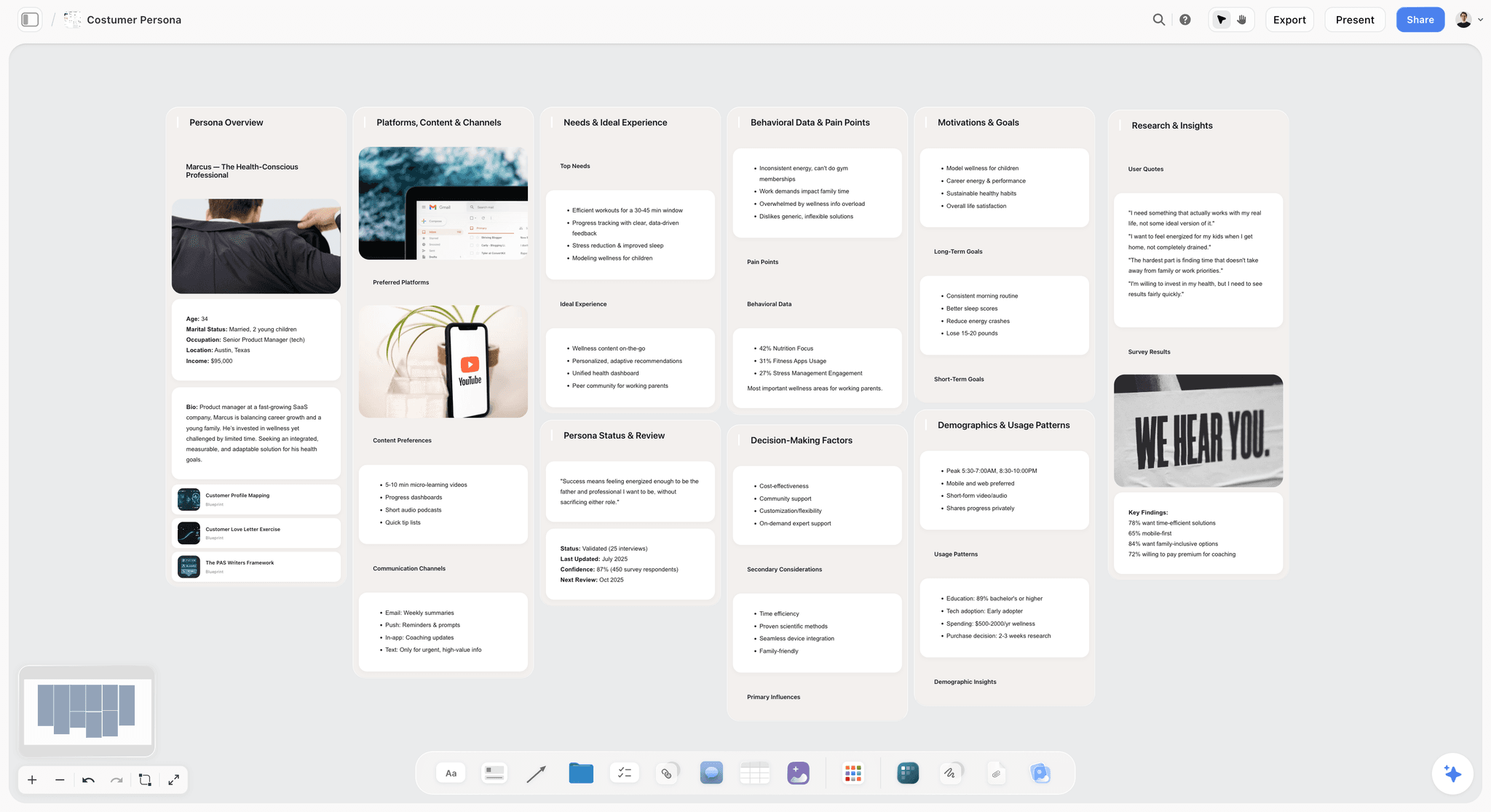
The familiar approach to running multiple engagements is a folder tree: one folder per client, docs inside, notes inside, and a separate spreadsheet tracking where each one stands. The friction is that the folder tree is a filing system, not a thinking surface, and the AI you bolt onto it sees one document at a time with no idea what the engagement is.
Storyflow inverts that. The unit of organisation is the engagement, not the file. A coaching engagement is one board that holds the client persona Document, the relevant framework as a Story Blueprint, the session notes, the goals tracker, and the development plan, all visible at once. When you ask Storyflow AI a question, it reads the full active canvas board plus up to 3 @-mentioned Documents and 1 Blueprint, so the answer arrives grounded in this specific client's situation instead of generic advice. For consultants, the same board holds the strategy frameworks (Brand Pyramid, AIDA), the client research cards, the working deliverable Documents, and the meeting notes side by side.
Best for: Coaches and consultants whose engagements have real structural work (frameworks, plans, deliverables) beyond meeting notes, and who want the AI to see the whole engagement.
Pricing: Paid-only early access today; the Free plan ($0, no credit card) launches before the end of 2026, and anyone a paid member invites to a board joins free now. Plus $7.99/month annual ($9.99 monthly): the full 200+ Story Blueprints library and unlimited file uploads. Pro $14/month annual ($19 monthly): AI image generation and 20x more AI than the trial. Max $39/month annual ($49 monthly): 40x more AI plus a team workspace with roles and permissions.
Pros:
- The canvas paradigm matches engagement-driven work, so one board equals one client instead of a folder of scattered files.
- The AI reads the full active board plus @-mentioned context, so answers are grounded in the specific engagement.
- 200+ Story Blueprints include strategy frameworks (Brand Pyramid, AIDA, StoryBrand) that surface on the canvas.
- The Free plan launching before the end of 2026 looks genuinely usable: unlimited boards, unlimited collaboration, no seat fee, no expiry.
Cons:
- Not a scheduling tool, no built-in invoicing, no client portal. You pair it with Calendly and a billing tool.
- Cloud-first, so there is no fully offline local-file mode for privacy-conscious solo work.
- Real "more AI" starts at Pro, not Plus. Plus buys the Blueprint library and unlimited uploads, not a bigger AI allowance, which surprises people who expect the first paid tier to raise the AI ceiling.
- Newer platform than Notion or Otter, so the integration marketplace is smaller.
Verdict: Storyflow is the right pick for the workspace spine of a coach or consultant stack, the place the engagement lives and the deliverables get drafted. It does not replace your scheduler or your invoicing, and it is honest about that. Read How to Build a Brand Strategy with AI in 2026 for the framework workflow in practice.
2. Granola (Best Session Notes, Phase: Notes)
The familiar approach to session notes is typing during the call and missing half of what the client said, or recording and never re-listening. Granola sits quietly on the call, transcribes, and produces a structured summary you can edit, so you stay present in the session instead of stenographing it.
Best for: Coaches and consultants who run several discovery or session calls a week and want AI-first summaries rather than raw transcripts.
Pricing: Free with limits. Individual from $18/month.
Pros:
- The cleanest AI-first notes interface in the test, with summaries that hold up as session recaps.
- Strong context carries across meetings, so a returning client's history is available.
- Mature integrations with the common video-call platforms.
Cons:
- AI summaries occasionally flatten nuance a coach cares about, so you still review before sending.
- Smaller community and integration ecosystem than Otter.ai.
- No canvas or workspace, so the notes still need a home in your Client Memory tool.
Verdict: Granola is the right pick for AI-first session notes. Feed its summaries into your workspace board so the AI there can reason over them.
3. Claude (Best Long-Form Deliverable Drafting, Phase: Deliverables)
The familiar approach to a strategy memo is a blank document and a deadline. Claude's reasoning quality and long context make it the strongest partner for drafting the memo, the report, or the proposal, especially when you paste in the raw material and ask it to structure the argument.
Best for: Consultants drafting long-form deliverables where reasoning quality matters more than a visual surface.
Pricing: Free for basic chat. Pro from $20/month. Team plans available per seat.
Pros:
- Reasoning quality is among the strongest available for structured argument.
- Large context window handles a full engagement's source material in one prompt.
- Project memory persists relevant context across a series of drafts.
Cons:
- No canvas surface, so visual planning happens somewhere else.
- No built-in framework awareness, so you supply the structure.
- The conversational interface is a chat, not a workspace, so the deliverable does not live next to the rest of the engagement.
Verdict: Claude is the right pick for long-form deliverable drafting. Draft in Claude, then move the finished artifact into the client's board so it is not stranded in a chat log.
4. Perplexity Spaces (Best Source-Grounded Research, Phase: Discovery)
The familiar approach to client discovery is 20 open tabs and a doc of pasted quotes. Perplexity Spaces grounds answers in your uploaded sources plus the live web and cites every claim, so discovery becomes a directed question instead of a tab-hoarding session.
Best for: Consultants researching client industries, competitive landscapes, and topic deep dives who need citations they can defend.
Pricing: Free with limits. Pro from $20/month.
Pros:
- Strongest source-grounded research surface in the test, with citations on every claim.
- Live web integration means the research is current, not frozen at a training cutoff.
- Spaces keep a client's research corpus separate and reusable.
Cons:
- No canvas surface; the workspace feels like a smarter search, not a thinking space.
- Depth of any single answer depends on source quality, so garbage in still applies.
Verdict: Perplexity Spaces is the right pick for source-grounded client research. See The 12 Best NotebookLM Alternatives in 2026 for the wider research-tool field.
5. Notion (Best Database Client Memory, Phase: Client Memory)
The familiar approach to tracking engagements is a spreadsheet that nobody updates. Notion turns that into linked databases (clients, projects, deliverables) with multiple views, and Notion AI reasons over the pages inside them.
Best for: Notion-native consultants who want database-shaped tracking and already live in the tool.
Pricing: Free for individuals. Plus from $10/seat/month. Business from $15/seat/month, which is the tier that bundles Notion AI.
Pros:
- Mature database paradigm with multiple views (table, board, calendar).
- Notion AI is bundled at the Business tier rather than sold separately.
- Deep template ecosystem for consulting operations.
Cons:
- The database paradigm carries real setup overhead before it earns its keep.
- Not a visual thinking surface, so frameworks and canvases live elsewhere.
- Notion AI reasons over pages, not over a visual engagement board.
Verdict: Notion is the right pick for Notion-native consultants who want structured tracking. If you think visually rather than in databases, a canvas workspace fits better.
6. Otter.ai (Best Established Transcription, Phase: Notes)
The familiar approach when you need the exact words a client said is scrubbing a recording. Otter.ai is the established transcription tool with mature integrations across the major video platforms, and it gives you the searchable transcript Granola abstracts away.
Best for: Coaches and consultants who need raw transcript depth over AI-summary polish.
Pricing: Free with limits. Pro from $10/month. Business from $20/seat/month.
Pros:
- Mature platform with a large user base and strong meeting integrations.
- Full searchable transcript, which matters for compliance-sensitive coaching.
- Reliable capture across Zoom, Teams, and Google Meet.
Cons:
- AI summaries are lighter than Granola's, so the raw transcript does more of the work.
- The interface is transcription-shaped, not workspace-shaped.
Verdict: Otter.ai is the right pick when raw transcript depth beats AI summary polish.
7. Folk (Best Personal CRM, Phase: Client Memory)
The familiar approach to remembering who your clients are is your inbox and your memory. Folk is the founder and agency-shaped personal CRM that adds a light sales pipeline on top of relationship tracking, so leads and active clients live in one clean view.
Best for: Consultants who want relationship tracking plus a light sales pipeline for inbound leads.
Pricing: From $20/seat/month. 14-day trial.
Pros:
- Founder and agency-shaped, with a light pipeline that fits solo consulting sales.
- Clean interface that stays out of the way.
- Contact enrichment reduces manual data entry.
Cons:
- Per-seat pricing scales up if the practice grows past one person.
- The sales-adjacent paradigm can feel heavy for coaches who do not run a pipeline.
- Lives separately from your deliverables, so client work and client memory are two tools.
Verdict: Folk is the right pick for relationship-plus-pipeline tracking. See The 12 Best Personal CRM Tools in 2026 for the full CRM field.
8. Calendly (Best Established Scheduling, Phase: Client Ops)
The familiar approach to booking a session is a five-email back-and-forth about time zones. Calendly is the established scheduler with mature integrations and round-robin routing for consulting teams, so a booking link replaces the thread.
Best for: Coaches and consultants who need reliable scheduling with broad integrations.
Pricing: Free with limits. Standard from $10/seat/month. Teams from $16/seat/month.
Pros:
- Mature platform with the widest integration coverage.
- Reliable booking flow that clients already recognise.
- Round-robin and routing for practices with more than one coach.
Cons:
- Per-seat pricing scales for teams.
- Does not touch the actual client work, so it is purely the Ops layer.
Verdict: Calendly is the right pick for established scheduling with broad integrations.
9. ChatGPT (Best General AI Conversation, Phase: Deliverables, light)
The familiar approach to a quick brainstorm is a blank page. ChatGPT is the most flexible general AI with the broadest ecosystem, and its custom GPTs let you save a reusable coaching or consulting prompt.
Best for: General brainstorming and quick drafting across diverse tasks.
Pricing: Free with limits. Plus from $20/month. Team and Enterprise available.
Pros:
- Broadest ecosystem and the most third-party familiarity.
- Custom GPTs let you save reusable coaching and consulting prompts.
- Easy for a non-technical practice to adopt.
Cons:
- Hallucination risk on facts means client-facing claims need checking.
- No canvas surface and lighter project memory than Claude for long deliverables.
Verdict: ChatGPT is the right pick for flexible general conversation. For rigorous deliverables, Claude's reasoning is stronger.
10. NotebookLM (Best Source-Grounded Corpus Research, Phase: Discovery)
The familiar approach to a finite research corpus (a client's existing materials, a specific report set) is reading all of it yourself. NotebookLM grounds answers in exactly the sources you upload and cites them, with an audio-overview feature that is genuinely novel.
Best for: Finite-corpus research where you want the AI locked to your uploaded sources.
Pricing: Free during preview. Verify current pricing, since the preview terms may change.
Pros:
- Excellent source grounding, locked to your uploads with no web drift.
- The audio-overview feature turns a corpus into a listenable briefing.
Cons:
- The per-notebook source cap is restrictive for large research projects.
- No canvas surface, and no live web, so it is corpus-only by design.
Verdict: NotebookLM is the right pick for small-corpus, source-locked client research.
11. Cal.com (Best Open-Source Scheduling, Phase: Client Ops)
The familiar approach for a data-sovereignty-minded consultant is distrusting a closed scheduler with client contact data. Cal.com is the open-source, self-hostable alternative to Calendly, so you can own the booking layer end to end.
Best for: Consultants who want open-source scheduling or self-hosting for data control.
Pricing: Free for individuals. Teams from $12/seat/month, or self-host for free.
Pros:
- Open-source and self-hostable, so you can own the data.
- Modern interface with active development.
- A free tier that covers solo scheduling without a paywall.
Cons:
- Smaller user base than Calendly, so clients may recognise it less.
- Integration coverage is still catching up to the incumbent.
Verdict: Cal.com is the right pick for open-source or self-hosted scheduling.
12. ChatGPT Free (Best Free General AI, Phase: Deliverables, light)
The familiar approach when the budget is zero is doing without AI entirely. ChatGPT's free tier handles general tasks for practitioners with light needs, at no cost.
Best for: Budget-conscious coaches and consultants with light AI needs.
Pricing: Free with limits.
Pros:
- Free, mature, and backed by a large knowledge base.
- Enough for occasional brainstorming and light drafting.
Cons:
- Rate limits on heavy use and older models on the free tier.
- No project memory, so context resets every session.
Verdict: ChatGPT Free is the right pick for light, occasional AI needs.
Honorable Mentions and Tools to Approach Carefully
Fireflies.ai is a capable Notes-phase alternative to Granola and Otter with strong CRM syncing, worth a look if your Client Memory tool is a mainstream CRM it integrates with. Dex is a lightweight personal CRM in the Folk category, leaner and cheaper, better for relationship tracking without a sales pipeline.
Approach carefully: any tool that markets itself as the single all-in-one coaching platform that does discovery, notes, deliverables, scheduling, and billing. In testing, the all-in-ones were mediocre at every phase rather than strong at one, and their AI was usually a thin wrapper over a blank prompt. The stack of specialists beat the all-in-one on every practice we ran. And be wary of any AI tool whose export is locked or lossy: coaching and consulting data is confidential and portable ownership is not optional.
How to Choose the Right AI Toolkit for Your Practice
Walk the Five-Phase Engagement Stack in order and pick one owner per phase. Buy tools per phase, not per hype.
Discovery. Perplexity Spaces if you need the live web with citations, NotebookLM if you want the AI locked to a finite uploaded corpus.
Notes. Granola if you want AI-first summaries, Otter.ai if you need raw searchable transcripts.
Deliverables. Claude for reasoning-heavy long-form drafts, Storyflow Documents if you want the draft to live inside the engagement board, ChatGPT for lighter drafting.
Client Ops. Calendly for the broadest integrations, Cal.com for open-source and self-hosting.
Client Memory. Storyflow if you think on a canvas and want work and memory in one place, Notion if you think in databases, Folk if you need a light sales pipeline.
The workspace phase (Client Memory) is the spine. Pick it first, because it is where the other phases hand off their output. For the broader solo toolkit beyond coaching, see The 12 Best AI Tools for Solopreneurs in 2026.
The Bottom Line
The best AI toolkit for coaches and consultants is a coordinated three-to-five-tool stack, one owner per phase of the Five-Phase Engagement Stack. Buy tools per phase, not per hype.
For Client Memory and the workspace spine, Storyflow (canvas) or Notion (database). For Notes, Granola or Otter.ai. For Discovery, Perplexity Spaces or NotebookLM. For Deliverables, Claude or Storyflow Documents. For Client Ops, Calendly or Cal.com.
If you are not sure where to start, pick the workspace phase first, because it is the spine every other phase feeds into. Then add a tool only when a specific phase has friction the existing stack cannot solve. The wrong move is adding tools because they exist; the right move is adding a tool because it removes a named friction in a named phase. Take your next real engagement, put it on Storyflow as a single board, and ask the AI a question that needs the whole engagement to answer. That one test tells you whether a grounded workspace changes how you run client work.
FAQ: Best AI Tools for Coaches and Consultants 2026
What are the best AI tools for coaches in 2026?
For coaches, the strongest stack is Storyflow (engagement workspace), Granola (AI session notes), Claude or ChatGPT (general AI), Calendly (scheduling), and Folk (client tracking). That covers the five engagement phases with one owner each. The specific picks depend on practice size and coaching style, but the shape (one tool per phase) holds across practices.
What are the best AI tools for consultants in 2026?
For consultants, the strongest stack is Storyflow (engagement workspace with frameworks), Perplexity Spaces (client research), Claude (deliverable drafting), Granola (meeting notes), and Folk or Notion (client memory). Consultants lean harder on the Discovery and Deliverables phases than coaches do, so those two tools earn their keep fastest.
How many AI tools do coaches and consultants typically use?
Most independent coaches and consultants use three to five AI tools. The practices with the least admin drag in our test coordinated the stack around one owner per engagement phase rather than adding tools ad hoc. The common mistake is adding a new tool without removing an old one, which leaves the same client context living in two places that never sync.
Is there a free AI tool for coaches?
Yes. ChatGPT Free handles general AI. Storyflow is paid-only during early access, though anyone a paid member invites to a board joins free, and its Free plan (unlimited boards, unlimited collaboration, a trial of Storyflow AI up to 10 generations per period) for canvas-based engagements launches before the end of 2026. NotebookLM is free during preview. Cal.com has a free tier for scheduling. The right free pick depends on which engagement phase you want to cover at no cost.
What AI tool helps with coaching session notes?
Granola is the leading AI-first session-notes tool, producing structured summaries so you stay present in the session. Otter.ai is the established alternative for raw searchable transcripts. For canvas-based work, Storyflow holds the notes on the client's board so the AI can reason over them alongside the framework and plan.
What AI tool helps with consulting deliverables?
Claude is the leading AI for long-form deliverable drafting thanks to reasoning quality and a large context window. Storyflow Documents handle drafts with the canvas context the rest of the engagement lives in. ChatGPT works for lighter deliverables. The pick depends on whether you want chat-shaped drafting (Claude) or a draft that lives next to the engagement (Storyflow).
What AI tool helps with client research?
Perplexity Spaces grounds research in your sources plus the live web with citations, which is best for current competitive and industry scans. NotebookLM grounds only in your uploaded sources, which is best for a finite corpus you want the AI locked to. For the broader field, see The 12 Best AI Research Tools in 2026.
Does any AI tool combine all coaching and consulting workflows?
No single AI tool covers discovery, notes, research, drafting, scheduling, and client tracking equally well, and the all-in-ones that claim to were mediocre at each phase in testing. The strongest workflows pair specialists, one per engagement phase. Storyflow comes closest to a single workspace for the Client Memory and Deliverables phases, but it pairs with a scheduler and a billing tool rather than replacing them.
What AI tool helps with coaching frameworks?
Storyflow's Story Blueprints library (200+ templates on Plus and above) includes strategy frameworks like the Brand Pyramid, AIDA, and StoryBrand that surface on the canvas with AI awareness. The Free plan launching before the end of 2026 will ship three starter framework tactics. For coaches who structure sessions around frameworks, having the framework on the board where the AI can read it is the most integrated option.
Does Storyflow give more AI on the Plus plan?
No. The Plus plan ($7.99/month annual) adds the full 200+ Story Blueprints library and unlimited file uploads, not a larger AI allowance; Plus and the upcoming Free plan share the same AI trial (up to 10 generations per period). More AI starts at Pro (20x the trial, plus AI image generation) and Max (40x). Buy Plus for the Blueprint library and uploads, and step up to Pro when you need real AI volume.
Can I export client data from these AI tools?
Most tools here support data export (Granola, Otter.ai, Notion, Storyflow, Claude, ChatGPT), though the depth and format vary. Because coaching and consulting data is confidential and belongs to the client relationship, plan to export periodically regardless of the tool, and avoid any tool whose export is locked or lossy.
Table of Contents
- All 12 AI Tools for Coaches and Consultants, Ranked
- The Five-Phase Engagement Stack
- Quick Picks: Best AI Tools for Coaches and Consultants 2026 by Use Case
- Comparison Table: Best AI Tools for Coaches and Consultants 2026
- How We Evaluated the Best AI Tools for Coaches and Consultants 2026
- Detailed Reviews: Best AI Tools for Coaches and Consultants 2026
- Honorable Mentions and Tools to Approach Carefully
- How to Choose the Right AI Toolkit for Your Practice
- The Bottom Line
- Author
- FAQ: Best AI Tools for Coaches and Consultants 2026
- Related Reading
Templates to check out for this topic


Templates you can use in Storyflow
Every Storyflow board starts from real structure and an AI that reads the whole canvas. Open one of these templates and make it yours.


See Storyflow in Action
A visual AI workspace where every feature lives inside one canvas. No tab-switching, no context lost.
Build your entire board from a single message
Type what you need in the AI chat at the bottom of your canvas. The AI adds cards, headings, and structure directly onto your board.
Use expert frameworks as AI context
Type @ in the AI chat and choose any Tactic. The AI tailors every response to that framework instead of giving generic advice.
Turn your board into a mind map in seconds
Ask the AI to restructure your canvas as a mindmap. It connects your ideas into a visual hierarchy so you can see how everything relates.
Why Storyflow Exists
Storyflow actually began as a personal tool while working on creative and research projects.
We kept running into the same problem: ideas were scattered everywhere: notes, documents, and whiteboards.
Nothing helped us see how everything connected.
So we started building a workspace designed around how ideas actually grow.
→ Read how Storyflow was createdJustkay
Documentary Filmmaker & Founder at Storyflow
Published: 2026-05-14
Extremely simple, seriously capable


See how easy it is to get started
Watch a real project come together, from a blank board to a finished plan, clicked through step by step.
Start creating with AI and become more productive
Transform your creative workflow with AI-powered tools. Generate ideas, create content, and boost your productivity in minutes instead of hours.