The 12 Best Personal CRM Tools in 2026 (We Tested Them All)
The 12 best personal CRM tools in 2026, tested by a solo founder. Apps for managing your network, relationships, and follow-ups compared honestly.

Category
Productivity
Author

Justkay
Documentary Filmmaker & Founder at Storyflow
Topics
2026-05-14
•
14 min read
•
Productivity- best personal CRM 2026
- personal CRM app
- Dex vs Folk
- personal relationship manager
What are the best personal CRM tools in 2026?
The best personal CRM in 2026 is Dex if you want a dedicated, auto-syncing relationship tracker, Clay if you want AI-native contact enrichment, Monica HQ if you want open-source privacy, and Storyflow if your relationships live inside specific projects and you want them on a canvas next to the work. A personal CRM is not a sales CRM. Sales CRMs (Salesforce, HubSpot, Pipedrive) optimise for closing deals. Personal CRMs optimise for remembering people: birthdays, the last conversation, who introduced you, how you met, what they care about. For solo founders, consultants, agency owners, and anyone whose business runs on relationships, the right personal CRM is a leverage tool. The wrong one is a list of contacts you stop opening. I tested twelve tools this spring across three real workloads: a solo founder managing 600 contacts, a consultant tracking client relationships across 18 active engagements, and a journalist building a source database. The rankings below sort the tools by paradigm, not by hype.

Full disclosure: Storyflow is our own product, and we rank it below Dex here because it is not a traditional personal CRM. Dex leads this list: it auto-syncs from Gmail and LinkedIn and has a mature follow-up reminder engine, which is exactly what most solo founders need. Storyflow earns its spot only for relationship-driven work where each contact maps to a specific project, since its canvas holds the person next to the work and its AI reads the whole board. It has no email or LinkedIn auto-sync and no reminder engine, so for pure contact management Dex or Cloze is the better pick. We link to every tool so you can judge the fit.
Quick Comparison
These four cover what relationship-driven solo workers actually choose between: a dedicated auto-sync tracker, a project canvas, an AI-native enrichment tool, and a founder-shaped pipeline.
| Tool | Best For | AI Features | Price |
|---|---|---|---|
| Dex | Dedicated auto-sync personal CRM | No deep AI as of early 2026 | From $12 mo |
| Storyflow | Canvas-based relationship tracking | Canvas AI reads the whole board | $7.99 mo annual (free plan late 2026) |
| Clay | AI-native personal CRM | Contact enrichment and conversation context | From $20 mo |
| Folk | Founder and agency CRM | AI enrichment plus a light pipeline | From $20 user mo |
The Three Camps: How Personal CRMs Actually Differ
Before the rankings, one framework does most of the work. Every personal CRM in 2026 sits in one of three camps, and picking the right camp matters more than picking the right tool inside it.
Camp One: Auto-Sync CRMs. Dex, Clay, Cloze, Folk, Attio, Streak. These pull contact context automatically from email, calendar, and LinkedIn. You do not log interactions by hand. The machine watches your inbox and builds the record for you. The win is retention: a tool that fills itself in is a tool you keep opening. The cost is intrusiveness and permissions, plus a record that reflects who you email rather than who matters.
Camp Two: Manual-Structured CRMs. Monica HQ, Notion, Airtable, Google Contacts. You enter the data yourself, on purpose. Nothing is auto-pulled, which means nothing is auto-forgotten and nothing is auto-guessed. The win is intentionality and privacy. The cost is discipline: these tools reward the person who actually maintains them and quietly punish everyone else.
Camp Three: Workspace-Native CRMs. Storyflow, and to a lesser extent Notion and Airtable. Here the contact is not the unit of organisation. The project is. A contact card lives on the same canvas as the deliverables, notes, and plan it connects to. The win is context: you see the person next to the work. The cost is that this is not a contact list, so it will never feel like Dex.
Keep these three camps in mind as you read. A personal CRM is only useful if you actually open it in month six, and which camp keeps you opening it depends entirely on how you work. Auto-sync keeps the forgetful honest. Manual-structured keeps the disciplined precise. Workspace-native keeps the project-driven grounded.
Quick Picks: Best Personal CRM Tools 2026 by Use Case
Best Dedicated Personal CRM: Dex. The cleanest auto-sync personal CRM in 2026. LinkedIn and Gmail sync, follow-up reminders, contact notes, a purpose-built interface. From $12/month. The limitation: no deep AI as of early 2026.
Best AI-Native Personal CRM: Clay. Clay the personal CRM (not the sales-enrichment tool of the same name) is the AI-native option with contact enrichment and conversation context. From $20/month. The limitation: a smaller community than Dex.
Best for Canvas-Based Relationship Tracking: Storyflow. A project canvas where contact cards live alongside the projects they connect to, with an AI that reads the whole active board plus @-mentioned Documents. For relationship-driven solo work where each contact maps to specific projects (clients, sources, partners), the canvas paradigm fits the structure better than a flat list. Paid-only during early access, Plus from $7.99/month annual, with a Free plan launching before the end of 2026. The friction: no email or LinkedIn auto-sync, and no follow-up reminder engine.
Best Notion-Based Personal CRM: Notion. Handles personal CRM with databases for people already living in Notion. Plus from $10/user/month, free for individuals. The limitation: you build the CRM schema yourself and there is no auto-sync.
Best for Privacy-Conscious Users: Monica HQ. The open-source, self-hostable personal CRM. Free self-hosted, hosted from $9/month. The limitation: self-hosting takes technical capacity.
Best for Life-Event Tracking: Monica HQ or Cloze. Monica tracks life events explicitly (gifts, reminders, how you met). Cloze auto-pulls signals from email and calendar. Cloze from $19.99/month. The limitation: Cloze's auto-pull can feel intrusive.
Best Free Personal CRM: Monica HQ Self-Hosted or Notion. Monica is free self-hosted, Notion is free for individuals, and Google Contacts with labels is free with Workspace. Storyflow's Free plan, which covers canvas-based relationships, launches before the end of 2026. The right pick today depends on whether you want a plain list (Google) or structured relationship tracking (Monica, Notion).
Best for Sales-Adjacent Relationships: Folk or Attio. Both sit between personal CRM and sales CRM. Folk from $20/user/month, Attio from $34/user/month. For founders who need a light pipeline alongside personal relationships.
The honest split, one more time: the right personal CRM is the one you will still open in month six. Pick your camp first (auto-sync, manual-structured, or workspace-native), then pick the tool. Try Storyflow for relationship-driven solo work.
Comparison Table: Best Personal CRM Tools 2026
| Tool | Camp | Best For | Starting Price | Free Plan | Auto-Sync (★/5) | Rating (/10) |
|---|---|---|---|---|---|---|
Storyflow | Workspace-Native | Canvas-based relationship tracking | $7.99/month annual | Coming late 2026 (invited collaborators join free now) | ★★☆☆☆ (different shape) | 8.5/10 |
Dex | Auto-Sync | Dedicated personal CRM | $12/month | 14-day trial | ★★★★☆ | 8.9/10 |
Clay | Auto-Sync | AI-native personal CRM | $20/month | 14-day trial | ★★★★☆ | 8.4/10 |
Folk | Auto-Sync | Founder/agency CRM | $20/user/month | 14-day trial | ★★★★☆ | 8.3/10 |
Notion | Workspace-Native | Database-based personal CRM | $10/user/month | Yes (individuals) | ★★☆☆☆ | 8.1/10 |
Monica HQ | Manual-Structured | Open-source self-hostable | Free (self-host) | Yes | ★★★☆☆ | 7.9/10 |
Attio | Auto-Sync | Sales-adjacent personal CRM | $34/user/month | 14-day trial | ★★★★★ | 7.8/10 |
Cloze | Auto-Sync | Auto-pull email and calendar | $19.99/month | 14-day trial | ★★★★★ | 7.7/10 |
HubSpot Free | Auto-Sync | Free sales CRM repurposed | Free | Yes | ★★★★☆ | 7.5/10 |
Airtable | Manual-Structured | Database CRM | $10/user/month | Yes (limited) | ★★★☆☆ | 7.3/10 |
Google Contacts | Manual-Structured | Free plain contact list | Free with Workspace | Yes | ★★★☆☆ | 7.0/10 |
Streak | Auto-Sync | Gmail-based CRM | $19/user/month | Yes (limited) | ★★★★☆ | 6.8/10 |
Rating criteria: auto-sync depth (25%), follow-up workflow (25%), pricing and value (20%), AI depth (15%), portability (15%). Auto-sync and follow-up carry the most weight because a personal CRM is only useful if it gets used, and use depends on low-friction capture and timely reminders. Verify current pricing before you buy: personal CRM tiers change often, and per-user tools scale faster than the sticker price suggests.

Storyflow canvas holding contact cards alongside the projects they connect to with AI that reads the whole board
Best Personal CRM Tools 2026: Market Context
The 2026 personal CRM market splits along the three camps above, plus one more axis worth naming.
The first axis is auto-sync versus manual tracking. Dex, Clay, Cloze, Folk, Attio, and Streak auto-pull from email and LinkedIn. Notion, Monica HQ, Airtable, and Storyflow require manual or semi-manual entry. Auto-sync wins on use. Manual wins on intentionality.
The second axis is dedicated CRM versus adapted workspace. Dex, Clay, Cloze, Folk, and Monica HQ are purpose-built for relationships. Notion, Airtable, Storyflow, and Google Contacts are general workspaces you shape into a CRM.
The third axis is personal versus sales-adjacent. Pure personal CRMs (Dex, Monica HQ, Cloze) focus on remembering. Sales-adjacent tools (Folk, Attio, Streak, HubSpot) bolt on pipeline features for founders and agencies.
There is a reason auto-sync tools tend to survive on a solo founder's home screen while manual ones get abandoned: nobody has the discipline to hand-log every interaction across 200-plus contacts. If a tool does not fill itself in, it slowly empties out. That is not a knock on manual tools. It is a reason to be honest with yourself about which camp you will actually maintain. The right personal CRM is the one you will still open in month six, which for most people means either auto-sync or a workspace they were already living in. If you already work inside a project canvas or a Notion workspace all day, a workspace-native CRM inherits that habit instead of asking you to build a new one.
How We Evaluated the Best Personal CRM Tools 2026
Five criteria determined the rankings. Every tool was tested with real relationship work over three weeks across the three workloads described up top.
Auto-sync depth. Email integration, LinkedIn sync, calendar context. Does the record fill itself in, or do you fill it in?
Follow-up workflow. Reminders, timing intelligence, suggested next touches. A CRM that never nudges you is a database, not a relationship tool.
Pricing and value. Annual cost at the tier a solo user actually needs, and whether the free tier is real or a disguised trial. Per-user pricing was flagged because it punishes anyone who adds a collaborator.
AI depth. Conversation summarisation, suggested follow-ups, relationship context, and whether the AI reads anything meaningful or just autocompletes a note field.
Portability. Data export, ownership, and lock-in. Your relationships are your asset. A tool that traps them loses points.
Detailed Reviews: Best Personal CRM Tools 2026
1. Storyflow (Best Canvas-Based Relationship Tracking)
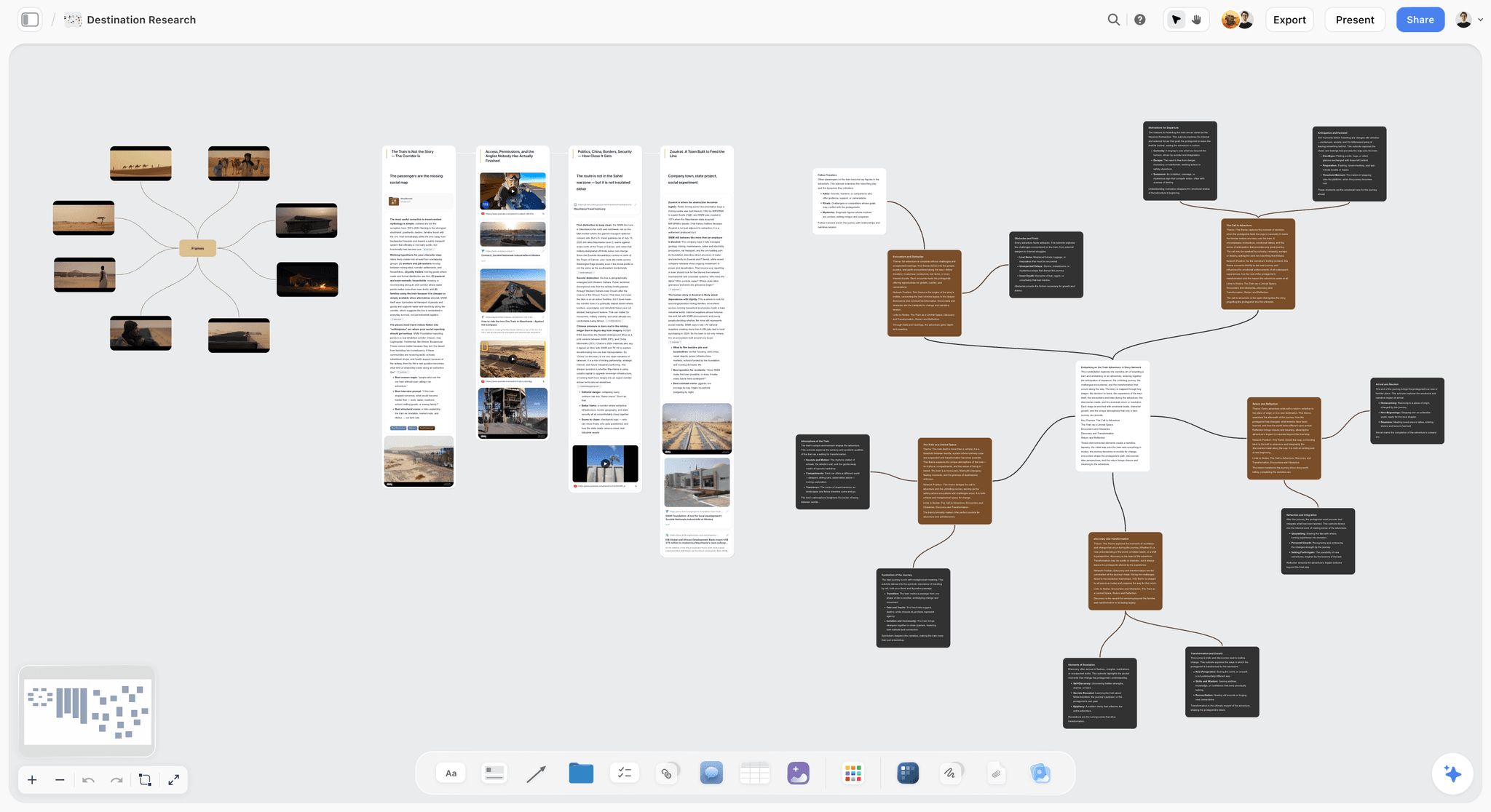
Camp: Workspace-Native. Name the friction first: Storyflow is not a traditional personal CRM. There is no LinkedIn auto-sync, no follow-up reminder engine, and no contact-list interface. If your need is auto-synced contact management, Dex or Cloze are the right tools and you should stop reading here.
Now the strength. For relationship-driven solo work where each contact connects to specific projects (a consultant managing client engagements, a journalist managing sources, a founder tracking investors and partners), Storyflow holds contacts on the same infinite canvas as the work they connect to. A consulting board contains the client card, the project's Story Blueprint, the meeting-notes Documents, and the deliverable cards, all visible at once. The AI reads the full active board plus up to 3 @-mentioned Documents and 1 Story Blueprint before it responds, so asking "what did I promise this client and what is still open" pulls from the actual project, not a generic prompt. The unit of organisation is the project, not the contact, which fits project-connected relationships better than a flat list ever will.
Best for: Solo workers whose relationships map onto specific projects (consultants, journalists, founders managing strategic partners) and anyone who already lives inside a project canvas all day.
Pricing: Paid-only early access today; the Free plan ($0, no credit card) launches before the end of 2026, and anyone a paid member invites to a board joins free now. Plus at $7.99/month billed annually ($9.99 monthly) adds the 200-plus Story Blueprints library and unlimited file uploads. Pro at $14/month annual ($19 monthly) adds AI image generation and roughly 20x more AI. Max at $39/month annual ($49 monthly) adds roughly 40x more AI plus a team workspace with roles and permissions. Pricing is flat per account, never per user.
Pros: The canvas holds contacts next to the projects they belong to, the AI reads the whole active board plus @-mentioned context, invited collaborators join free, and there is no per-seat fee.
Cons: Not an auto-sync CRM (no email or LinkedIn pull), no follow-up reminder engine, cloud-only with no offline or local-file mode, contacts are canvas cards rather than a searchable contact table, and it is a newer platform than the incumbents. The real AI (image generation, higher limits) starts at Pro, not Plus. For pure contact management, pair Storyflow with Dex or Cloze.
Verdict: Storyflow is the right pick for the Workspace-Native camp: project-driven relationship work where seeing the person next to the project matters more than an auto-filled contact list.
2. Dex (Best Dedicated Personal CRM)
Camp: Auto-Sync. Dex is the cleanest dedicated personal CRM in 2026. LinkedIn and Gmail sync pull contact context automatically, the follow-up reminder engine is mature and well-timed, and the interface is built for relationship work rather than sales pipelines. In testing, Dex was the tool the solo-founder workload stayed on longest without being forced, which is the highest compliment a personal CRM can earn.
Best for: Solo founders, consultants, and agency owners who want a focused, auto-syncing relationship tracker. Not for: users who want canvas-based project context or fully manual, private tracking.
Pricing: Free 14-day trial. Premium from $12/month or $99/year. Verify current pricing.
Pros: Best dedicated personal CRM interface, strong LinkedIn and Gmail integration, mature and well-timed follow-up reminders, clean mobile app, low daily friction.
Cons: No deep AI as of early 2026, the pricing scales for power users, and the LinkedIn integration depends on LinkedIn's API staying stable, which has bitten similar tools before.
Verdict: Dex is the right pick for the Auto-Sync camp and the default recommendation for most solo founders.
3. Clay (Best AI-Native Personal CRM)
Camp: Auto-Sync. Clay the personal CRM is the AI-native option, with contact enrichment, conversation context, and suggested follow-ups. The AI reads your email and calendar to surface who you have not spoken to and why that might matter. In testing it was the tool most likely to resurface a dormant contact at a useful moment.
Best for: Users who want AI-native relationship intelligence with automatic enrichment. Not for: users who want maximum manual control or minimal data-access permissions.
Pricing: Personal from $20/month, team pricing available. Verify current pricing.
Pros: Strong AI integration, useful contact enrichment, conversation context, modern interface, good at surfacing dormant relationships.
Cons: Smaller community than Dex, AI quality depends on the data-access permissions you grant, and the enrichment can occasionally surface stale or wrong details.
Verdict: Clay is the right pick for AI-native users who want the machine doing the remembering.
4. Folk (Best Founder/Agency CRM)
Camp: Auto-Sync (sales-adjacent). Folk sits between personal CRM and sales CRM. For founders and agencies tracking both personal relationships and a light pipeline, Folk is the integrated tool, with clean pipeline views layered over contact management.
Best for: Founders and agency owners who need a light sales-like pipeline alongside personal relationships. Not for: users who want a focused personal CRM with no pipeline overhead.
Pricing: From $20/user/month, 14-day trial. Verify current pricing.
Pros: Best founder/agency-shaped CRM, light pipeline features, clean modern interface, good email integration.
Cons: Per-user pricing scales for teams, and the sales-adjacent paradigm can feel heavy if all you want is to remember people.
Verdict: Folk is the right pick for founders and agencies with a relationship-plus-pipeline need.
5. Notion (Best Database-Based Personal CRM)
Camp: Workspace-Native / Manual-Structured. Notion handles personal CRM with databases. For people already living in Notion, a CRM as one more database in the workspace fits cleanly and inherits the habit you already have.
Best for: Notion-native users who want CRM alongside their other databases. Not for: users who want auto-sync or dedicated CRM ergonomics out of the box.
Pricing: Free for individuals. Plus from $10/user/month. Verify current pricing.
Pros: Flexible database paradigm, integrates with the broader Notion workspace, free for individuals, fully customisable schema.
Cons: You build the CRM schema yourself, there is no auto-sync from email or LinkedIn, and there is no follow-up reminder engine without add-ons.
Verdict: Notion is the right pick for Notion-native users who want to keep everything in one workspace.
6. Monica HQ (Best Open-Source Self-Hostable)
Camp: Manual-Structured. Monica HQ is the open-source, self-hostable personal CRM. For privacy-conscious users or open-source loyalists, it is the leading option, with genuinely rich relationship tracking: life events, gifts, how you met, conversation logs.
Best for: Privacy-conscious or open-source-committed users who want full data ownership. Not for: users without the capacity to self-host.
Pricing: Free self-hosted. Hosted from $9/month. Verify current pricing.
Pros: Free and open-source, full data ownership, rich manual relationship tracking, active community.
Cons: Self-hosting takes technical capacity, no auto-sync from email or LinkedIn, and the interface is functional rather than polished.
Verdict: Monica HQ is the right pick for privacy-first, manually maintained relationship tracking.
7. Attio (Best Sales-Adjacent Personal CRM)
Camp: Auto-Sync (sales-adjacent). Attio brings sales-CRM-quality data enrichment and a modern interface to personal-CRM scale. For founders who want enterprise-grade enrichment without enterprise-grade complexity, Attio is the leading pick.
Best for: Founders who want sales-CRM enrichment and API power at personal scale. Not for: solo users who want a lean, focused personal CRM.
Pricing: Free with limits. Plus from $34/user/month. Verify current pricing.
Pros: Best-in-class data enrichment, modern interface, strong API and automation.
Cons: Per-user pricing is high for individuals, and the sales-CRM heritage shows in features you may never use.
Verdict: Attio is the right pick for sales-adjacent power users who want enrichment depth.
8. Cloze (Best Auto-Pull Email and Calendar)
Camp: Auto-Sync. Cloze automatically pulls relationship signals from email and calendar with no manual logging at all. For users who want zero-friction tracking, it is the most-automated tool on this list.
Best for: Users who want fully automatic, zero-friction relationship capture. Not for: users who prefer deliberate, intentional tracking.
Pricing: From $19.99/month, 14-day trial. Verify current pricing.
Pros: Best auto-pull from email and calendar, near-zero logging friction, strong AI prioritisation of who to contact next.
Cons: Auto-pull can feel intrusive, the prioritisation sometimes surfaces low-value contacts, and the community is smaller than Dex's.
Verdict: Cloze is the right pick for people who will never hand-log an interaction.
9. HubSpot Free (Best Free Sales CRM Repurposed)
Camp: Auto-Sync (sales-adjacent). HubSpot's free CRM tier offers mature sales-CRM features at no cost. For users who want a free CRM with real email integration and are willing to work around a sales-shaped interface, it is the most-mature free option.
Best for: Budget-conscious users who can tolerate a sales-CRM shape. Not for: users who want focused personal-CRM ergonomics.
Pricing: Free with limits. Paid tiers scale up. Verify current pricing.
Pros: Genuinely free, mature and reliable platform, email integration, huge ecosystem.
Cons: Sales-CRM-shaped throughout, the interface assumes a pipeline you may not have, and the useful scaling features are paid.
Verdict: HubSpot Free is the right pick for budget-conscious sales-adjacent use.
10. Airtable (Best Database CRM)
Camp: Manual-Structured. Airtable handles personal CRM with relational tables (contacts, companies, interactions). For users who want a spreadsheet-shaped CRM with multiple views, it is the flexible tool.
Best for: Database-oriented users who want a relational CRM with custom views. Not for: users who want auto-sync or dedicated CRM features out of the box.
Pricing: Free with limits. Team from $10/user/month. Verify current pricing.
Pros: Flexible relational schema, multiple views (grid, kanban, calendar), strong integrations.
Cons: You build the CRM schema yourself, there is no auto-sync, and pricing is per user.
Verdict: Airtable is the right pick for database-minded users who want to design their own CRM.
11. Google Contacts with Tags (Best Free Plain Contact List)
Camp: Manual-Structured. Google Contacts with custom labels and notes handles light personal CRM at no cost. For users who want a free, low-overhead contact list that syncs everywhere, it is the default.
Best for: Budget-conscious users who want a plain, ubiquitous contact list. Not for: users who want relationship intelligence or reminders.
Pricing: Free with a Google account or Workspace.
Pros: Free, syncs across every Google service, ubiquitous access, zero setup.
Cons: No relationship intelligence, no follow-up reminders, no AI, and labels are a weak substitute for structured tracking.
Verdict: Google Contacts is the right pick when you want a free list and nothing more.
12. Streak (Best Gmail-Based CRM)
Camp: Auto-Sync. Streak embeds CRM features directly inside Gmail. For users whose entire workflow is already in Gmail, it adds CRM without a context switch.
Best for: Gmail-native users who want CRM inside the inbox. Not for: users who want a standalone tool or who work outside Gmail.
Pricing: Free with limits. Solo from $19/user/month. Verify current pricing.
Pros: Native Gmail integration, no context switch, mature pipeline features.
Cons: Locked to Gmail, the pipeline focus feels heavy for pure personal use, and the interface is sales-shaped.
Verdict: Streak is the right pick for Gmail-native users who never want to leave the inbox.
Honorable Mentions and Tools to Approach with Care
A few tools show up on other lists that did not earn a full slot here, for honest reasons.
Salesforce, HubSpot Sales Hub, Pipedrive (full versions). These are sales CRMs. Repurposing them as a personal CRM works, but you fight the pipeline framing the whole way. Use them only if you already run one for revenue.
Spreadsheet-only setups. A Google Sheet is free and portable, and it is where most personal CRMs go to die. No reminders, no auto-sync, no nudge. It works for exactly as long as your discipline holds, which for most people is about three weeks.
"Free" tools that are trials in disguise. Several well-known contact managers advertise a free tier that is really a 14-day trial requiring a card up front. If a tool revokes access when you stop paying, it is not a free plan, it is a discounted intro. Read the small print before you import 600 contacts into it.
How to Choose the Right Personal CRM for Your Work
Pick your camp first, then the tool. Five decision rules:
If you want auto-sync and will not hand-log anything, use Dex or Cloze. Dex for the cleanest dedicated experience, Cloze for maximum automation. This is the right default for most forgetful solo founders.
If your relationships connect to specific projects, use Storyflow. The workspace-native canvas holds each contact next to the project it belongs to, and the AI reads the whole board.
If you are a founder with sales-adjacent needs, use Folk or Attio. Personal CRM with a light pipeline layered on.
If you want privacy and open-source, use Monica HQ. Manual-structured, self-hostable, full data ownership.
If you already live in a workspace, inherit the habit. Notion for Notion natives, Airtable for database minds, Streak for Gmail natives. The CRM you already have open beats the perfect one you never launch.
For broader productivity tooling, see The 12 Best AI Tools for Solopreneurs in 2026.
The Bottom Line
The best personal CRM depends on your camp, not on a scoreboard.
For auto-sync that fills itself in, Dex is the default and Cloze the most automated. For project-connected relationships on a canvas, Storyflow. For founder and agency pipelines, Folk or Attio. For privacy and open-source, Monica HQ. For a workspace you already live in, Notion, Airtable, or Streak.
If you are unsure, ask one question: are your relationships organised by person (use Dex or Clay), by project (use Storyflow), or by sales pipeline (use Folk or Attio)? The most common mistake is switching tools repeatedly when the real problem is that you do not consistently use any of them. The right personal CRM is the one you will still open in month six, so pick the camp that matches how you actually work and commit to it for a full quarter before you judge.
FAQ: Best Personal CRM Tools 2026
What is the best personal CRM in 2026?
Dex is the best dedicated auto-sync personal CRM in 2026. Clay leads for AI-native enrichment, Folk for founder and agency use, Notion for database-native workflows, Monica HQ for privacy, and Storyflow for project-connected relationships on a canvas. The right pick depends on your camp: auto-sync (Dex, Cloze), manual-structured (Monica, Notion), or workspace-native (Storyflow).
Is there a genuinely free personal CRM?
Not during early access. Monica HQ is free self-hosted with full data ownership, Notion is free for individuals, Storyflow's Free plan, which launches before the end of 2026, will cover canvas-based relationships with unlimited boards, and Google Contacts is free with a Google account. HubSpot's free CRM tier also exists but is sales-shaped. Watch for tools that call a 14-day trial "free": if access is revoked when you stop paying, it is a trial, not a free plan.
What is the best personal CRM for solo founders?
For solo founders, Dex (dedicated auto-sync), Folk (founder-shaped with a light pipeline), Storyflow (project-connected on a canvas), or Clay (AI-native) are the leading options. Choose Dex or Cloze if you will never hand-log an interaction, Storyflow if your relationships map onto specific projects, and Folk if you also need a pipeline.
What is the best personal CRM with LinkedIn integration?
Dex has the strongest LinkedIn integration in 2026, pulling contact context automatically. Clay and Folk also integrate with LinkedIn. Depth matters here because most professional relationships live on LinkedIn, and a shallow integration leaves you re-entering data by hand.
Is Notion a good personal CRM?
For Notion-native users who want CRM as one database among many, Notion is a good fit and inherits a habit you already have. For users who want auto-sync, follow-up reminders, or dedicated CRM ergonomics out of the box, a purpose-built tool like Dex, Folk, or Clay is better, because Notion asks you to build the CRM yourself.
What is the best personal CRM with AI?
Clay is the leading AI-native personal CRM in 2026, with enrichment and conversation context. Folk has strong AI features too. Storyflow has the deepest project-context AI (it reads the full active board plus @-mentioned Documents) but is workspace-native rather than a traditional contact-list CRM. Choose CRM-shaped AI (Clay, Folk) if you want the machine managing contacts, and project-context AI (Storyflow) if you want it reasoning over a whole board.
What is the best personal CRM for consultants?
For consultants tracking client relationships across multiple engagements, Storyflow (project canvas), Folk (founder-shaped), or Dex (dedicated auto-sync) lead. Many consultants pair Storyflow for project context with Dex or Folk for relationship management, since the canvas holds the engagement while the auto-sync tool keeps the contact record filled in.
Does any personal CRM auto-sync without heavy permissions?
Every auto-sync CRM needs some data access. Cloze auto-pulls with full email and calendar permissions. Dex requires LinkedIn and Gmail permissions. Clay requires email and calendar permissions. If you cannot or will not grant that access, a manual-structured tool (Monica HQ, Notion) or a workspace-native one (Storyflow) is the honest choice, because it does not pretend to auto-sync.
What is the best personal CRM for privacy?
Monica HQ is the leading privacy-conscious personal CRM in 2026, with self-hosting and full data ownership. Fully local-only personal CRMs are rare because most of the value comes from sync, but self-hosted Monica gets you the closest. Storyflow keeps your data on its own servers without auto-pulling from your inbox, so it exposes less than an email-scraping auto-sync tool, though it is still cloud-hosted.
Can I export my personal CRM data?
Dex, Clay, Folk, Notion, Airtable, Monica HQ, and HubSpot all support CSV export. Cloze and Streak have more limited export. Storyflow lets you keep and share your boards but is canvas-shaped rather than a tidy contact table, so plan how you would extract structured contact data before committing. Whatever tool you pick, export periodically for backup: your relationships are your asset, not the vendor's.
What is the difference between a personal CRM and a sales CRM?
A sales CRM (Salesforce, HubSpot, Pipedrive) optimises for closing deals, with pipelines, stages, and revenue forecasting. A personal CRM optimises for remembering people, with notes on how you met, last contact, birthdays, and follow-ups. Using a sales CRM for personal relationships works but forces you to fight the pipeline framing, which is why dedicated personal CRMs like Dex exist.
Do I really need a personal CRM, or is a spreadsheet enough?
A spreadsheet is enough only if you have the discipline to maintain it, which most people do not past the first few weeks. A personal CRM earns its keep through auto-sync (it fills itself in) or reminders (it nudges you). If your honest answer is that you will not hand-update a sheet, pick an auto-sync tool like Dex or a workspace-native one like Storyflow that inherits a habit you already have.
Table of Contents
- The Three Camps: How Personal CRMs Actually Differ
- Quick Picks: Best Personal CRM Tools 2026 by Use Case
- Comparison Table: Best Personal CRM Tools 2026
- Best Personal CRM Tools 2026: Market Context
- How We Evaluated the Best Personal CRM Tools 2026
- Detailed Reviews: Best Personal CRM Tools 2026
- Honorable Mentions and Tools to Approach with Care
- How to Choose the Right Personal CRM for Your Work
- The Bottom Line
- Author
- FAQ: Best Personal CRM Tools 2026
- Related Reading
Templates to check out for this topic


Workspace templates you can use in Storyflow
Keep research, notes, and plans on one canvas the AI can read, instead of scattered across docs and tabs. Open a template and make it your second brain.


See Storyflow in Action
A visual AI workspace where every feature lives inside one canvas. No tab-switching, no context lost.
Build your entire board from a single message
Type what you need in the AI chat at the bottom of your canvas. The AI adds cards, headings, and structure directly onto your board.
Use expert frameworks as AI context
Type @ in the AI chat and choose any Tactic. The AI tailors every response to that framework instead of giving generic advice.
Turn your board into a mind map in seconds
Ask the AI to restructure your canvas as a mindmap. It connects your ideas into a visual hierarchy so you can see how everything relates.
Why Storyflow Exists
Storyflow actually began as a personal tool while working on creative and research projects.
We kept running into the same problem: ideas were scattered everywhere: notes, documents, and whiteboards.
Nothing helped us see how everything connected.
So we started building a workspace designed around how ideas actually grow.
→ Read how Storyflow was createdJustkay
Documentary Filmmaker & Founder at Storyflow
Published: 2026-05-14
Extremely simple, seriously capable


See how easy it is to get started
Watch a real project come together, from a blank board to a finished plan, clicked through step by step.
Start creating with AI and become more productive
Transform your creative workflow with AI-powered tools. Generate ideas, create content, and boost your productivity in minutes instead of hours.