
Category
Visual Thinking
Author

Justkay
Documentary Filmmaker & Founder at Storyflow
Topics
2026-07-01
•
Updated July 1, 2026
•
12 min read
•
Visual Thinking- storyflow vs google docs
- google docs alternative
- google docs for creative projects
- visual planning tool
- google docs vs canvas
- ai visual workspace
Is Storyflow or Google Docs better for creative projects in 2026?
Google Docs is the better tool for writing and finalizing the actual prose: it is unbeatable for linear text, has best-in-class real-time co-editing, comments and suggestions, works offline, is free, and exports everywhere. Storyflow is the better tool for the planning, structuring, and connecting you do before the document exists: an infinite canvas where research, references, and beats live in space, with an AI that reads the whole board. For most creative projects the honest answer is not one or the other. You plan and structure in Storyflow, then draft and finalize the writing in Google Docs.
When the doc fights you before the writing starts.
Google Docs is the best place to write the words. Storyflow is the canvas where you plan, structure, and connect a creative project first, with an AI that reads the whole board, so you find the shape before you open the doc.

1) Quick Answer: Storyflow vs Google Docs
If you plan a creative project by opening a blank Google Doc, you have felt the document fight you. You start typing an idea at the top, then a better idea belongs above it, then a whole section needs to move, and you are dragging paragraphs up and down a page trying to force a shape onto material that does not have one yet. That fight is not your fault. It is the shape of the tool. A document makes you commit to an order before you have one. A canvas lets the order emerge from the material.
Here is the direct answer. Google Docs is the better tool for writing and finishing the actual prose: it is unbeatable for linear text, has best-in-class real-time co-editing, comments and suggestions, works offline, is free, and exports everywhere. Storyflow is the better tool for the planning, structuring, and connecting you do before the document exists: an infinite canvas where research, references, beats, and scenes live in space, with an AI that reads the whole board. For most creative projects the honest answer is not one or the other. You plan and structure in Storyflow, then draft and finalize the writing in Google Docs.
I have run documentary projects through both shapes for years, and the pattern never changed: the document was where the writing got finished, and it was the worst possible place to figure out what the writing should be. This piece is the honest split between the canvas that finds the structure and the document that captures the final words.
For the wider field, see The Best Google Docs Alternatives in 2026 and The Best Visual Thinking Tools in 2026.
2) Comparison Table: Storyflow vs Google Docs at a Glance
The load-bearing rows are "core shape" and "order." Everything else in this comparison follows from those two lines. One tool is a page. The other is a space.
3) The Document vs The Canvas
There are two shapes a creative project can live in, and almost every argument about Google Docs versus a visual tool is really an argument about which shape fits the stage you are in.
The Document. A document is linear by design. It has a top and a bottom, and everything between them sits in a single decided order. That is exactly what you want for the final artifact: a script reads top to bottom, an essay argues in sequence, a treatment is delivered as ordered prose. When the words are the deliverable, the document is the right and best shape. Google Docs is the finest expression of the document in 2026.
The Canvas. A canvas is spatial. Ideas sit in two dimensions, in clusters and columns and connected groups, with no forced sequence until you choose one. That is exactly what you want for the messy front half of a project: research you have not sorted, twelve scene ideas with no act structure yet, three possible openings you are weighing side by side. When the shape is still forming, the canvas is the right shape. Storyflow is built for this stage.
The distinction that decides your tool is not quality. Both are excellent. It is timing. A document makes you commit to an order before you have one. A canvas lets the order emerge from the material. Early in a project you do not have an order yet, so the document makes you invent one prematurely and then fight it as the real structure reveals itself. On a canvas you move the material around until the order shows up, then you write it down.
The cost of getting the shape wrong is the fight you already know. Open a doc too early and you spend the first hours not writing but reordering: cutting a paragraph, scrolling up, pasting, scrolling down, losing the thread. That friction is the document doing its job on material that is not ready for it. It is not a small annoyance. It is the central reason planning a creative project in a document feels like the tool is working against you. That is what it means to commit to an order before you have one. Get the stage right and both tools feel effortless, because each is doing the job it was built for.
4) How We Compared Them
This is not a feature-count race. Google Docs and Storyflow are shaped for different stages of the same project, so comparing them on raw feature parity would miss the point. We compared them on the six things that actually decide which tool a creative project should be in at a given moment.
- Shape fit. Does the tool match the stage of the work: forming structure, or finalizing prose? This is the criterion the whole comparison turns on.
- Structure discovery. How well does the tool let you find an order you do not have yet, rather than forcing one up front?
- Writing and finalizing. How good is it at the actual production of clean, linear, deliverable text?
- AI scope. What can the AI see when it helps you: the current page, or the whole project surface?
- Collaboration. Real-time co-editing, comments, suggestions, and how mature and frictionless they are.
- Ubiquity and portability. Cost, offline access, and how easily the output travels to everyone else.
We ran real creative work through both: a documentary from research through outline, a video project from idea to script, a campaign from concept to brief. Neither tool was tested on synthetic checklists. The findings below reflect what each felt like to actually use at each stage of a project, which is the only test that matters here.
5) Where Google Docs Wins
An honest accounting of what Google Docs does better. These are decisive, category-leading wins, not throat-clearing.
Unbeatable for linear prose and final documents. When the deliverable is written text in a settled order, nothing beats a document, and Google Docs is the best document. A finished script, a treatment you are sending out, an essay, a contract: these are linear artifacts, and Google Docs produces them cleanly with headings, styles, pagination, and a focused writing surface. For the writing itself, Google Docs wins, and it is not close.
Best-in-class real-time co-editing. Google Docs effectively defined modern real-time collaboration. Multiple cursors, instant sync, presence, no merge conflicts, no version anxiety. If your core need is many people writing in the same text at the same time, Google Docs is the category standard other tools are measured against.
Comments and suggestions are deeply mature. Suggestion mode (tracked edits), threaded comments, resolve and reopen, assigned action items, version history you can name and restore. For an editorial back-and-forth on prose, notes from a producer, a pass from an editor, Google Docs has years of refinement no newer tool matches.
Free and ubiquitous. Google Docs is free with any Google account, and nearly everyone already has one. There is no adoption friction. You share a link and your collaborator is in, no new signup, no learning curve, no cost.
Offline. Google Docs edits fully offline in the browser and syncs when you reconnect. On a plane, in a dead zone, on a laptop with no signal, you keep writing. This is a real advantage for writers who work anywhere.
Exports everywhere. Google Docs exports to Word, PDF, plain text, EPUB, Markdown, and more, and pastes cleanly into email, a CMS, or a screenwriting app. When the final words have to leave and land somewhere else, Google Docs is the most portable option there is.
6) Where Storyflow Wins

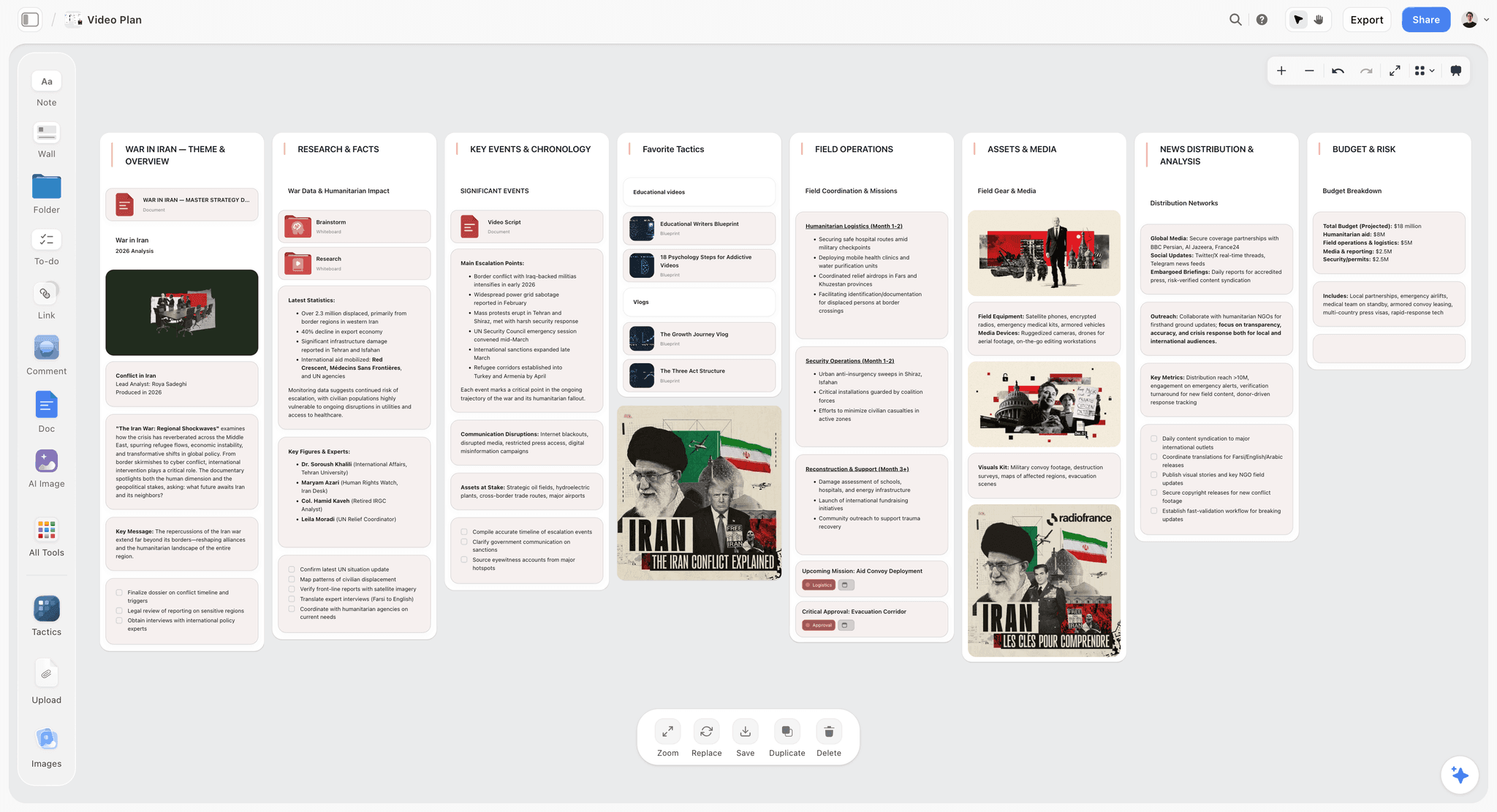
Where Storyflow pulls ahead is the entire stage that happens before there is a document to write: planning, structuring, and connecting the project while the shape is still forming, with an AI that reads the whole board.
Structure emerges instead of being forced. In Storyflow every idea is a card on an infinite canvas. You drop twelve scene ideas down with no order, cluster the ones that belong together, drag a group to become act two, pull a weak beat aside. You are not reordering paragraphs in a page. You are arranging material in space until the structure shows itself. A document makes you commit to an order before you have one. A canvas lets the order emerge from the material. That is the whole reason the front half of a project belongs here and not in a doc.
Everything the project needs lives on one canvas. Research clippings, reference images, a mood board, a beat sheet, a shot list, notes to yourself, and draft fragments all sit on the same board, in view at once. You are not tab-switching between a doc, a folder of images, and a spreadsheet. The plan and the material it came from share one surface, so connections are visible instead of remembered.
Full-board AI context. Storyflow's AI reads your entire active canvas board by default, plus up to 1 Tactic and up to 3 Documents you @-mention in the chat. So you can ask it to propose an act structure from your scattered scene cards, find the gap in your research, or draft an outline from a cluster, and it answers with the whole board as context. This is the specific thing a document AI cannot do: Gemini in Google Docs is smart, but it reads the current document, not the whole shape of your project laid out in space.
200+ Story Blueprints. On the Plus, Pro, and Max tiers, Storyflow's Story Blueprints library gives you 200+ ready-made boards, from beat sheets to campaign plans to mood boards, so you start structuring from a real framework instead of a blank canvas. The blank page is the enemy of the planning stage, and a blueprint removes it.
Unlimited real-time collaboration on Free. Storyflow's Free plan, which launches before the end of 2026, will include unlimited collaboration on shared boards, so a co-writer, a producer, or an editor can be on the same canvas with you at no cost, moving cards and leaving comments while the structure forms. Planning stops being a solo act and becomes a shared surface.
To be clear about the trade, Storyflow is not a word processor. When it is time to write and finalize the actual prose, you should draft and polish in Google Docs, not on the canvas: cards are made for structure, not for a 3,000-word linear final draft. Storyflow is cloud-only with no offline mode, so on a plane with no signal Google Docs is the better tool. And for a linear final document or a contract, a document is simply the right shape and Storyflow is the wrong one. Storyflow is where the project takes shape. Google Docs is where the writing gets finished.
7) Feature-by-Feature Comparison
Read the table by your stage. If most rows are about producing and sharing finished, ordered text, Google Docs wins them. If most rows are about finding the shape of a project before it becomes text, Storyflow wins them.
8) Pricing Comparison
Storyflow (verified at storyflow.so/pricing, as of July 2026):
- Storyflow is paid-only during early access. Plus: $7.99/mo annual ($9.99 monthly). 200+ Story Blueprints, unlimited file uploads.
- Pro: $14/mo annual ($19 monthly). AI image generation, 20x more AI usage.
- Max: $39/mo annual ($49 monthly). 40x more AI and a team workspace with permissions and roles.
- Free: free from late 2026, launching before the end of 2026. Unlimited notes, images, and links, unlimited shared boards, unlimited collaboration, basic AI, and 20 file uploads.
Google Docs: free with any Google account, as part of Google Workspace. Paid Workspace plans (Business Starter and up, billed per user) add admin controls, more Drive storage, and business email, but the document editor itself is free for individuals.
The honest read: on pure cost, Google Docs is free and Storyflow is paid-only during early access, with Plus starting at $7.99/month, so price does favor Google Docs today. They buy different things. Google Docs buys the best place to write and finish prose with the most mature collaboration in the category. Storyflow buys an AI canvas where the project takes shape before it becomes prose. Once Storyflow's Free plan launches before the end of 2026, both will have a free tier and the choice will come down to the right shape for the stage rather than price.
9) When to Pick Google Docs
Pick Google Docs when your work matches the Document shape.
- You are writing or finalizing the actual prose: a script, an essay, a treatment, an article, a contract.
- Many people need to co-edit the same text in real time with mature comments and suggestions.
- You need offline editing on a plane or in a dead zone.
- You need the output to export cleanly to Word, PDF, or a CMS and land anywhere.
- The deliverable is linear text in a settled order, and the shape is already clear.
For where Google Docs sits against the broader field, The Best Google Docs Alternatives in 2026 covers where each rival is stronger, and The Best Microsoft Word Alternatives in 2026 covers the classic word-processor lane.
The fairer framing is not "pick one." It is "pick the right one for the stage." Plan and structure the project in Storyflow while the shape is still forming, then move to Google Docs to write and finalize the words. The moment the structure is clear is the moment to leave the canvas and open the doc.
11) The Bottom Line
Google Docs and Storyflow are both excellent, and they are excellent at different stages of the same project. Google Docs is the Document: the best place to write and finalize linear prose, with the most mature real-time collaboration, comments, and suggestions in the category, free and offline and portable. Storyflow is the Canvas: an AI workspace where you plan, structure, and connect a project before it becomes text, with an AI that reads the whole board.
Choose by the stage you are in, because that is the question this whole comparison turns on. A document makes you commit to an order before you have one. A canvas lets the order emerge from the material. If you are still finding the shape of a creative project, plan it on the canvas. If the shape is clear and it is time to write, finish it in the doc. The two are not rivals. They are the two halves of the work.
If you keep opening a blank Google Doc and feeling it fight you before the writing even starts, plan your next creative project on Storyflow's canvas first, then take the finished structure to Docs to write.
10) FAQ: Storyflow vs Google Docs
Is Storyflow or Google Docs better for creative projects?
It depends on the stage. For planning, structuring, and connecting a project before it becomes text, Storyflow is better because its canvas lets the order emerge from the material. For writing and finalizing the actual prose, Google Docs is better because it is the best linear document with the most mature collaboration. Most creative projects want both: structure in Storyflow, write in Docs.
Can Storyflow replace Google Docs?
Not for writing. Storyflow is a visual canvas, not a word processor, so drafting and polishing a long linear document is a job for Google Docs. Storyflow replaces the messy planning stage you used to force into a blank doc: research, structure, and connecting ideas. Think of Storyflow as the tool before the doc, not a substitute for it.
Does Google Docs have AI?
Yes. Google Docs includes Gemini, which can draft, rewrite, summarize, and answer questions inside the current document. It is genuinely useful for prose. The difference is scope: Gemini reads the document you are in, while Storyflow's AI reads your entire active canvas board plus up to 1 Tactic and 3 Documents you @-mention, so it can reason over the whole shape of a project, not just one page.
Why does planning a project in Google Docs feel so hard?
Because a document forces a linear order before you have one. Early in a project the structure is still forming, so you end up dragging paragraphs up and down a page trying to impose a shape on material that has not settled. A canvas removes that fight by letting you move ideas around in space until the order appears, then you write it in a doc.
Is Storyflow free?
Not during early access. Storyflow is paid-only right now, with Plus starting at $7.99/mo (annual), which adds 200+ Story Blueprints and unlimited file uploads. A Free plan with unlimited notes, images, and links, unlimited shared boards, unlimited collaboration, and basic AI launches before the end of 2026. Google Docs is free today, so cost currently favors it if budget is the deciding factor.
Does Storyflow work offline?
No. Storyflow is cloud-based and needs an internet connection. Google Docs edits fully offline in the browser and syncs when you reconnect. If you regularly work on a plane or in a dead zone, Google Docs has a real advantage there, and it is one of the honest cases where the document is the better tool.
Which is better for real-time collaboration?
Google Docs, for co-writing text. Its real-time co-editing, comments, and suggestions are the category standard and years ahead of anything newer. Storyflow includes unlimited real-time collaboration on shared boards on its paid plans today, and its upcoming Free plan will include it too, which is excellent for planning together, but for many people editing the same prose with tracked suggestions, Google Docs wins.
Can I use Storyflow and Google Docs together?
Yes, and that is the recommended workflow. Plan and structure the project on Storyflow's canvas while the shape is forming, moving research, references, and beats around until the order is clear. Then move to Google Docs to write and finalize the actual prose. You can also @-mention Documents in Storyflow's AI chat to bring written context into the planning.
What can Storyflow do that Google Docs cannot?
Let structure emerge in space. On an infinite canvas you arrange scattered ideas, research, and references into clusters and connections with no forced order, and an AI reads the whole board to help. Google Docs can only present ideas in a single linear sequence you decide up front. For the forming stage of a project, that spatial freedom is the difference.
Is Google Docs good for outlining a script or story?
It is fine for a linear outline once you know the order. It is a poor tool for finding the order, because reordering means cutting and pasting paragraphs up and down a page. If your beats already have a settled sequence, a doc outline works. If you are still discovering the structure, a canvas like Storyflow is the better place, then you move the finished outline into a doc.
Which should I use for a contract or a final written document?
Google Docs, without question. A contract or any final linear document is exactly the Document shape: ordered text meant to be read top to bottom and exported cleanly. Storyflow is the wrong tool for that job. Storyflow is for the planning and structuring stage, not for producing a formal written document.
What is the main difference in one sentence?
Google Docs is the best place to write the words; Storyflow is the best place to figure out what the words should be.
Table of Contents
- Quick Answer: Storyflow vs Google Docs
- Comparison Table: Storyflow vs Google Docs at a Glance
- The Document vs The Canvas
- How We Compared Them
- Where Google Docs Wins
- Where Storyflow Wins
- Feature-by-Feature Comparison
- Pricing Comparison
- When to Pick Google Docs
- FAQ: Storyflow vs Google Docs
- The Bottom Line
- Author
- Related Reading
Templates to check out for this topic


Workspace templates you can use in Storyflow
Keep research, notes, and plans on one canvas the AI can read, instead of scattered across docs and tabs. Open a template and make it your second brain.


See Storyflow in Action
A visual AI workspace where every feature lives inside one canvas. No tab-switching, no context lost.
Build your entire board from a single message
Type what you need in the AI chat at the bottom of your canvas. The AI adds cards, headings, and structure directly onto your board.
Use expert frameworks as AI context
Type @ in the AI chat and choose any Tactic. The AI tailors every response to that framework instead of giving generic advice.
Turn your board into a mind map in seconds
Ask the AI to restructure your canvas as a mindmap. It connects your ideas into a visual hierarchy so you can see how everything relates.
Why Storyflow Exists
Storyflow actually began as a personal tool while working on creative and research projects.
We kept running into the same problem: ideas were scattered everywhere: notes, documents, and whiteboards.
Nothing helped us see how everything connected.
So we started building a workspace designed around how ideas actually grow.
→ Read how Storyflow was createdJustkay
Documentary Filmmaker & Founder at Storyflow
Published: 2026-07-01
Extremely simple, seriously capable


See how easy it is to get started
Watch a real project come together, from a blank board to a finished plan, clicked through step by step.
Start creating with AI and become more productive
Transform your creative workflow with AI-powered tools. Generate ideas, create content, and boost your productivity in minutes instead of hours.