
Category
Writing Tools
Author

Justkay
Documentary Filmmaker & Founder at Storyflow
Topics
2026-05-18
•
Updated May 18, 2026
•
15 min read
•
Writing Tools- best Microsoft Word alternatives 2026
- alternatives to Microsoft Word
- free Word alternative
- Word alternative for writers
- Google Docs vs Word
- offline Word alternative
What is the best Microsoft Word alternative in 2026?
The best Microsoft Word alternatives in 2026 are Google Docs (best free browser-based replacement), Storyflow (best for writers and teams who want documents connected to research and visual planning on one AI-aware canvas), and LibreOffice Writer (best free offline open-source option). Most people leave Word for cost, file lock-in, or because their writing was never document-shaped. Pick the alternative that matches your reason for leaving.

All 12 Microsoft Word Alternatives, Ranked
- Google Docs: best free browser-based writing and collaboration
- Storyflow: best for documents connected to research and visual planning
- LibreOffice Writer: best free offline open-source word processor
- Apple Pages: best for page-precise layout on Mac and iPad
- Notion: best for doc-and-database knowledge work
- ONLYOFFICE: best for high .docx fidelity, self-hostable
- WPS Office: best for the closest clone of the Word interface
- Coda: best for docs that behave like apps
- Dropbox Paper: best for lightweight collaborative docs
- Zoho Writer: best free full-featured cloud word processor
- Scrivener: best for long-form manuscripts and books
- Craft: best for beautiful documents on Apple devices
Full disclosure: Storyflow is our own product, so here is the honest ranking. For most people leaving Word, Google Docs is the stronger all-round free replacement and we rank it #1. We rank Storyflow #2 for a narrower job: project-shaped writing where the document lives on a canvas next to research and planning with AI that reads all of it. Storyflow is not a drop-in .docx editor and is cloud-only, so for print-exact layout or offline work a traditional word processor like LibreOffice Writer fits better. We link to every tool so you can judge the fit.
How the Microsoft Word alternatives compare on trust, innovation, ratings and pricing
Which Word alternatives are the most trusted?
Google Docs is the most trusted Word alternative, with the largest installed base and a collaboration model most organisations already run on. LibreOffice Writer is the most trusted where the document must stay on your own machine and cost nothing, and it is the reference implementation for open document formats. Apple Pages is trusted inside Apple environments. Storyflow is not a word processor and does not belong in this comparison as a Word replacement; it plans the project a document comes out of.
Which Word alternatives are the most innovative?
Notion and Craft are the most innovative on what a document can be, treating a page as a database entry or a structured object rather than a sheet of paper. Google Docs innovated the category permanently by making real-time collaboration the default. LibreOffice innovates least and preserves most, which is the correct priority for an archive format. The honest observation is that word processing itself is a solved problem, and the interesting work has moved to what surrounds the document.
Which Word alternatives are the most highly rated?
Google Docs carries the highest ratings by volume, above 4.5 out of 5 on very large review counts. Notion and Craft rate highest on writing experience among people who left Word by choice rather than by cost. LibreOffice rates high on capability and low on interface. Ratings reward compatibility, and every one of these is judged first on whether it opens a .docx someone else sent.
Which Word alternatives have fair and transparent pricing?
LibreOffice is free and open source with nothing withheld, the fairest in the category by a distance. Google Docs is free for individuals and priced clearly inside Workspace. Apple Pages is free on Apple hardware. WPS Office is the least transparent, with an aggressive upgrade path and advertising on the free tier. Microsoft 365 itself is the subscription most people are trying to leave, which is the reason this comparison exists.
Which Word alternative brands have performed consistently over the years?
LibreOffice traces to OpenOffice in 2000 and still opens documents from that era, the longest record here. Google Docs has run since 2006 and Apple Pages since 2005, neither breaking older files. Notion has been stable since 2016 but stores documents in its own service rather than as files, which is the trade to weigh if the archive has to outlive the company.
Quick Comparison: Best Microsoft Word Alternatives
These four cover the reasons people leave Word: free browser writing, offline open-source ownership, Apple-native layout, and writing that is project-shaped rather than document-shaped.
| Tool | Best For | AI Features | Price |
|---|---|---|---|
| Google Docs | Free browser-based writing and collaboration | Gemini drafting and rewriting in the doc | Free / $7 user mo |
| Storyflow | Documents connected to research and planning | Reads full board plus @-docs and Tactics | $7.99 mo annual (free plan late 2026) |
| LibreOffice Writer | Free offline open-source writing | No built-in AI | Free |
| Apple Pages | Page-precise layout on Apple devices | No built-in AI | Free |
1) Quick Answer: The Best Microsoft Word Alternatives in 2026
The best Microsoft Word alternatives in 2026 are Google Docs (best free browser-based replacement), Storyflow (best for writers and teams who want documents connected to research, planning, and visual thinking), and LibreOffice Writer (best free offline open-source option). Most people who leave Word do not leave because Word is bad at words. They leave because of cost, file lock-in, or because their writing involves research and structure that a single document was never shaped to hold.
The short version: if you want a free Word clone in a browser, Google Docs. If you want full offline power with no subscription, LibreOffice Writer. If your writing is project-shaped (a book, a script, a report that starts as scattered research), Storyflow connects the document to the thinking around it. If you live on Apple devices, Pages. Most writers in 2026 do not need one tool. They need the one that fits the actual job.
For deeper cluster reading, see 12 Best Notion Alternatives in 2026 and Best Book Writing Software in 2026.
2) Comparison Table: 12 Microsoft Word Alternatives Compared
Rating criteria: tested on real documents (reports, a book manuscript, scripts, meeting notes, collaborative drafts) over multiple weeks. Tools were rated on how well they fit the actual writing job, not on feature parity with Word on paper.
3) Why People Leave Microsoft Word
Microsoft Word is not bad software. It has been the default word processor for three decades for a reason. The typography is solid, the page layout is precise, track changes is mature, and almost every employer and publisher expects a `.docx`. Microsoft 365 holds roughly 30% of the global office-suite market in 2026 (Statista, office productivity software global market share), and Word is the writing tool inside that suite. When you need a print-exact document that someone else will mark up, Word still does the job.
But the reasons people leave fall into a pattern. I have watched writers leave Word for three distinct reasons, and naming them is the fastest way to pick the right alternative. Call it The Three Word Exits.
Exit One: the cost exit. Microsoft 365 Personal is $99.99 per year and Family is $129.99 per year (Microsoft 365 pricing, 2026). For a student, a freelancer, or anyone who writes occasionally, paying a recurring fee for a word processor feels wrong when free options are this good. The cost-exit writer wants a Word replacement that costs nothing and still handles `.docx`.
Exit Two: the lock-in exit. Word ties you to a file format, a subscription, and an ecosystem. The lock-in-exit writer wants to own their software outright, keep their files in an open format, or self-host. Subscription fatigue is real, and a one-time purchase or an open-source license is the appeal.
Exit Three: the shape exit. This is the one most lists miss. The shape-exit writer is not leaving Word because of price or lock-in. They are leaving because their writing was never document-shaped to begin with. A book starts as scattered research, character notes, and a loose outline. A documentary script starts as interview transcripts and a structure that has not settled yet. A strategy report starts as a wall of inputs that need to be arranged before a single paragraph makes sense. A document forces you to commit to a linear order before you have one. For that work, the answer is not a better word processor. It is a different shape entirely.
The cost exit and the lock-in exit point you toward Google Docs, LibreOffice, ONLYOFFICE, or WPS Office. The shape exit points you somewhere else. Knowing your exit before you pick a tool saves you from switching twice.
4) How We Evaluated These Tools
Every tool on this list was tested on real writing work between 2024 and 2026: a long-form report, a book-length manuscript, two documentary scripts, recurring meeting notes, and a collaborative draft passed between three people. No synthetic prompts. Six criteria, weighted in this order:
- Writing fit. Does the tool match the actual shape of the writing, or does it force the work into a document when the work is not document-shaped yet?
- .docx fidelity. When you open or export a Word file, does the formatting survive? This is the single biggest source of switching pain.
- Cost and ownership. What does it cost over a year, and do you own the software or rent it? A one-time purchase and an open-source license both beat a subscription for the lock-in-exit writer.
- Offline capability. Can you write on a plane with no connection? Browser-only tools fail this test.
- Collaboration. Real-time co-editing, comments, and version history for writers who pass drafts around.
- Research and structure support. Can the tool hold the material around the writing (notes, sources, an outline), or is it a blank page and nothing else?
Tools were not tested in isolation on feature checklists. They were tested on whether the writing actually got done faster and with less friction than it did in Word.
5) Quick Picks by Type of Writer
If you want the short list, organize by what you are writing.
Best free Word replacement: Google Docs. Full word processor, real-time collaboration, handles `.docx`, costs nothing.
Best free offline option: LibreOffice Writer. Open-source, no subscription, works with no connection, strong format support.
Best for project-shaped writing (books, scripts, reports): Storyflow. The document lives on a canvas next to your research, outline, and notes, with AI that reads all of it.
Best for Apple users: Pages for page-precise layout, Craft for beautiful structured documents. Both free or low-cost on Mac and iPad.
Best for high .docx fidelity: ONLYOFFICE. The closest match to Word's rendering of complex documents, and self-hostable.
Best Word-interface clone: WPS Office. If you want the ribbon and the muscle memory without the Microsoft bill.
Best for long-form manuscripts: Scrivener. The corkboard, the binder, and the compile feature are built for books.
Best for docs that behave like apps: Coda. When your document needs tables, buttons, and logic, not just paragraphs.
6) Detailed Reviews: 12 Microsoft Word Alternatives in 2026
1. Storyflow
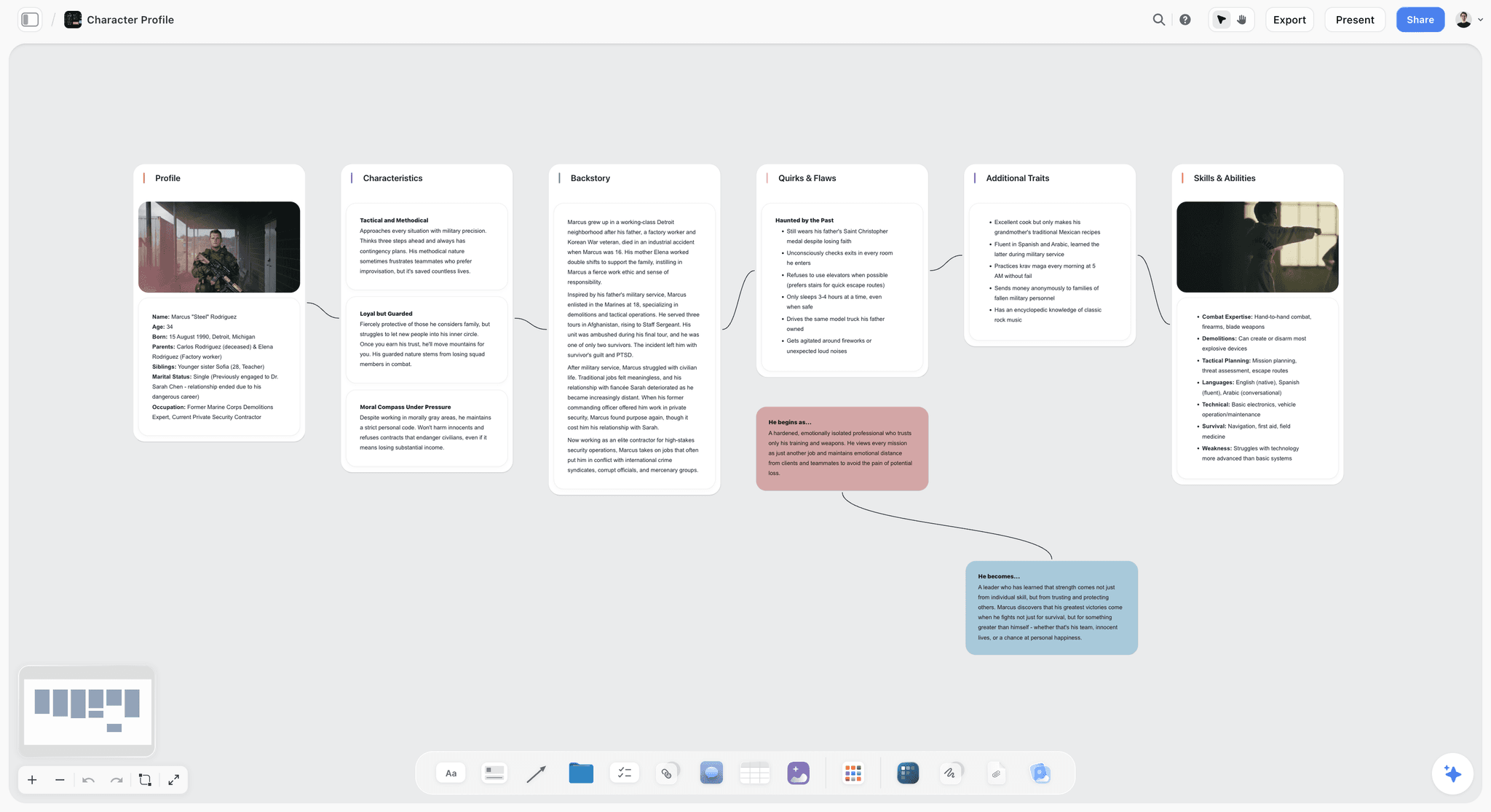
Storyflow is an AI-powered visual creative workspace: an infinite canvas where documents, structured cards, research, and a context-aware AI all live together. It has real documents, the same way Word does. The difference is what surrounds the document. In Word, the page is the whole world. In Storyflow, the page is one card on a canvas that also holds your sources, your outline, your character notes, and your mood board.
This is the tool for the shape-exit writer. If your writing is project-shaped (a book, a documentary script, a strategy report that begins as scattered inputs), the friction in Word is not the word processor. It is that the thinking around the document has nowhere to live. A traditional word processor gives you a blank page. Storyflow gives you the blank page and the room around it.
The AI is the part that makes this concrete. Storyflow's AI reads your full active canvas board (every card, note, and document on it) plus up to five documents and three boards you attach in the chat. When you ask it to draft a section, it is not working from a single prompt. It is working from your research, your outline, and your draft, all at once. That is the difference between AI that writes generic prose and AI that writes your document.
Storyflow also ships an expert framework template library covering structures writers actually use, which turns a blank canvas into a starting shape so you are arranging your material inside a proven structure instead of building one from nothing.
Best for: Authors, screenwriters, documentary filmmakers, content strategists, and teams whose writing starts as research and structure, not as a finished outline.
Verdict: The strongest pick when the writing is project-shaped and the document needs the thinking around it on the same surface. For print-exact page layout and the exact Word feature set, a traditional word processor is still the specialist tool.
Key features
- Documents on a canvas. Real documents live as cards on an infinite canvas next to research, notes, outlines, and images, so the writing and the thinking share one surface.
- Context-aware AI. The AI reads your full active board plus up to five documents and three boards you attach, so drafts come back grounded in your actual material.
- Unlimited collaboration on every plan. Unlimited shared boards and unlimited collaborators, with a team workspace plus permissions and roles on the Max tier.
Pricing
Free: launching before the end of 2026; invited collaborators of paid members join free today. Unlimited notes, images, and links, unlimited shared boards, basic AI usage, 20 file uploads, and unlimited collaboration. Plus: $7.99/mo annual or $9.99/mo monthly (unlimited uploads). Pro: $14/mo annual or $19/mo monthly (adds AI image generation and 20x more AI than Plus). Max: $39/mo annual or $49/mo monthly (adds 40x more AI and a team workspace with permissions and roles).
Pros
- The document and the research around it live on one canvas, so project-shaped writing stops being scattered across tabs.
- The AI reads your full board, so drafts are grounded in your material instead of a single prompt.
- The free plan is genuinely usable forever, and the entry paid tier is $9.99/mo, cheaper than a Microsoft 365 subscription.
Cons
- For print-precise page layout and the exact Word feature set (advanced track changes, mail merge, complex page setup), a traditional word processor is the right tool.
- Cloud-only; there is no local-first or offline mode for writers in regulated industries.
- Storyflow is a creative workspace, not a drop-in `.docx` editor, so it fits the start of a project better than the final formatting pass.
If your writing is project-shaped and currently scattered across a document, a notes app, and a folder of research, take your most active writing project and rebuild it on a Storyflow canvas for one week. Start a Storyflow workspace and see whether the document was the problem or the shape was.
2. Google Docs
Google Docs is the default Word alternative for most people in 2026, and for good reason. It is a genuine word processor that lives in a browser, costs nothing for personal use, and made real-time collaboration the baseline expectation rather than a premium feature.
Best for: Anyone who wants a free, capable Word replacement with collaboration built in.
Verdict: The strongest all-round free Word alternative. The right default for the cost-exit writer.
Key features
- Full word processing in a browser, no install required.
- Real-time co-editing, comments, and suggestion mode that rivals Word's track changes.
- Opens and exports `.docx`, `.pdf`, and other formats.
- Unlimited version history so you can roll back any draft.
- Gemini-powered AI assistance for drafting and rewriting inside the document.
Pricing
Free for personal use with a Google account. Business use comes through Google Workspace, which starts around $7 per user per month and adds more storage and admin controls.
Pros
- Genuinely free for individual writers, forever.
- Collaboration is the best in the category for everyday document work.
- Nothing to install or maintain.
Cons
- Offline mode is limited and depends on browser setup; not a true offline tool.
- `.docx` fidelity is good but not perfect on complex layouts and advanced formatting.
- Your documents live in Google's cloud, which is a privacy consideration for some writers.
3. LibreOffice Writer
LibreOffice Writer is the strongest free offline word processor in 2026. It is open-source, costs nothing, installs on Windows, Mac, and Linux, and works with no internet connection at all.
Best for: The lock-in-exit and cost-exit writer who wants full offline power with zero subscription.
Verdict: The best free desktop Word alternative. The right pick if you want to own your software.
Key features
- Full-featured desktop word processor with no feature paywall.
- Opens and saves `.docx` and uses the open ODF format natively.
- Works completely offline, on any major operating system.
- Mature feature set: styles, references, mail merge, master documents.
Pricing
Free and open-source under an open license. No subscription, no account required.
Pros
- Genuinely free with no premium tier holding features back.
- True offline use with no cloud dependency.
- Open format means your files are never locked to a vendor.
Cons
- The interface feels dated next to Google Docs and modern tools.
- `.docx` fidelity is good but complex Word layouts can still shift.
- Real-time collaboration is weak; this is a single-writer tool by default.
4. Apple Pages
Apple Pages is free on every Mac, iPad, and iPhone, and in 2026 it is a genuine hybrid of word processor and page-layout tool. For Apple users it is the most natural Word alternative there is.
Best for: Mac and iPad writers who want page-precise layout without paying for it.
Verdict: The best free Word alternative inside the Apple ecosystem.
Key features
- Free on all Apple devices, deeply integrated with iCloud and Continuity.
- Strong page-layout mode alongside standard word processing.
- Real-time collaboration through iCloud.
- Opens and exports `.docx` and `.pdf`.
Pricing
Free for anyone with an Apple ID. No subscription.
Pros
- Free, polished, and well-designed for visual documents.
- The layout tools are stronger than most word processors.
- Tight integration across Mac, iPad, and iPhone.
Cons
- Apple-only; there is no Windows or Android app, just a web version.
- `.docx` round-tripping can shift formatting on complex documents.
- Less suited to long, structured manuscripts than dedicated writing tools.
5. Notion
Notion is a doc-and-database workspace that millions of people use to run work and personal projects. Its documents are flexible blocks, and its databases turn pages into structured, queryable collections.
Best for: Writers who want their documents inside a connected knowledge base, not as isolated files.
Verdict: A strong Word alternative for knowledge work. Less suited to print-shaped documents.
Key features
- Block-based documents that mix text, tables, embeds, and databases.
- Linked databases connect documents into a knowledge system.
- AI assistance bundled into the Business tier in 2026.
- Strong templates and a large community library.
Pricing
Free for individuals with limits. Plus is $10 per user per month annual ($12 monthly). As of early 2026, Notion AI is bundled into the Business tier at $15 per user per month annual ($18 monthly), so Plus users who want AI must upgrade.
Pros
- Excellent for connected docs, wikis, and lightweight project management.
- The block model is flexible for many kinds of writing.
- Mature collaboration and a deep template ecosystem.
Cons
- Document-and-list shaped, so visual or canvas-style thinking is awkward.
- The 2026 AI repricing pushed AI behind the $18 monthly Business tier.
- Not built for print-precise page layout or `.docx`-heavy workflows.
For the deeper comparison, see 12 Best Notion Alternatives in 2026.
6. ONLYOFFICE
ONLYOFFICE is an open-source office suite whose standout trait is `.docx` fidelity. If the formatting of Word files surviving the round trip matters most, ONLYOFFICE is the strongest free pick.
Best for: Writers who exchange complex Word files and need formatting to survive.
Verdict: The best Word alternative for high `.docx` fidelity, and self-hostable.
Key features
- Free open-source desktop editors for Windows, Mac, and Linux.
- Strong rendering of complex `.docx`, `.xlsx`, and `.pptx` files.
- Self-hosting through the open-source server for full data control.
- Cloud option through ONLYOFFICE DocSpace, with a free Startup plan.
Pricing
The desktop editors and mobile apps are free and open-source. DocSpace cloud has a free Startup plan; the paid Business tier is $20 per admin per month.
Pros
- The closest free match to Word's rendering of complex documents.
- Self-hosting is a real option for privacy-conscious teams.
- Genuine open-source desktop apps with no feature paywall.
Cons
- The cloud collaboration product is more business-focused than writer-focused.
- The interface, while clean, is built for office work, not creative writing.
- Self-hosting requires technical setup most individuals will skip.
7. WPS Office
WPS Office is the closest visual clone of the Microsoft Office interface. If your hesitation about leaving Word is muscle memory, WPS keeps the ribbon and the layout almost exactly where Word puts them.
Best for: Writers who want the Word interface and habits without the Microsoft subscription.
Verdict: The most familiar-feeling Word alternative. Watch the ads and the privacy caveats.
Key features
- Interface closely mirrors the Microsoft Word ribbon.
- Strong `.docx` compatibility.
- Cross-platform: Windows, Mac, Linux, Android, iOS.
- Free tier covers core word processing.
Pricing
The free tier is ad-supported. WPS Premium starts at roughly $2.49 per month; verify current pricing on the WPS site as it runs frequent promotions.
Pros
- Almost zero learning curve coming from Word.
- Good `.docx` compatibility for everyday documents.
- Works on every major platform.
Cons
- The free version is ad-supported, which interrupts writing.
- WPS has faced privacy and data-handling scrutiny; review the policy before trusting sensitive work to it.
- The premium upsells are persistent in the free tier.
8. Coda
Coda is a document that behaves like an app. A Coda doc can hold paragraphs, but it can also hold tables, buttons, and automations, so the line between a document and a tool blurs.
Best for: Writers whose documents need logic, data, and interactivity, not just prose.
Verdict: A strong Word alternative when the document is really a lightweight app.
Key features
- Documents that combine text, tables, and interactive controls.
- Building blocks (Packs) connect docs to outside services.
- Automations and buttons turn static docs into workflows.
- Strong for team docs that double as trackers.
Pricing
Free tier with limits. Paid plans start around $12 per Doc Maker per month annual; only people who create docs are billed.
Pros
- Uniquely powerful when a document needs to do something, not just say something.
- The free tier is generous for readers and editors.
- Strong fit for team process docs.
Cons
- Overkill for plain prose; a writer who just wants to write a report will find it heavy.
- The learning curve is real compared to a plain word processor.
- Not built for print layout or `.docx` exchange.
For the deeper comparison, see 12 Best Coda Alternatives in 2026.
9. Dropbox Paper
Dropbox Paper is a lightweight collaborative document tool included with any Dropbox account. It strips the document down to clean text, embeds, and comments.
Best for: Teams already on Dropbox who want simple shared docs.
Verdict: A capable free collaborative doc tool, limited outside the Dropbox ecosystem.
Key features
- Minimal, distraction-free document editor.
- Real-time collaboration and inline comments.
- Embeds for media, links, and Dropbox files.
- Included free with any Dropbox account.
Pricing
Free with a Dropbox account. There is no separate Paper subscription.
Pros
- Clean, fast, and genuinely distraction-free for drafting.
- Collaboration works well for simple shared notes.
- No extra cost if you already use Dropbox.
Cons
- Light on formatting; not a full word processor.
- Tied to having a Dropbox account.
- Dropbox has signaled limited investment in Paper, so its long-term roadmap is uncertain.
10. Zoho Writer
Zoho Writer is a full-featured cloud word processor that is free for individuals. It is one of the most underrated Word alternatives because it asks for nothing and delivers a complete writing tool.
Best for: Individual writers who want a free, capable cloud word processor with no catch.
Verdict: The most underrated free Word alternative in the category.
Key features
- Complete word processing with a clean, focused interface.
- Real-time collaboration and a writing-focused review workflow.
- Strong `.docx` import and export.
- Document automation for writers who merge data into templates (paid credits).
Pricing
Free for individual users with unrestricted access to the core features. Team plans start around $3 per user per month. Document automation uses separate paid credits.
Pros
- Genuinely free for individuals with no feature paywall on writing.
- Clean interface that gets out of the way.
- Good `.docx` support for everyday documents.
Cons
- Lives inside the wider Zoho ecosystem, which is heavier than a standalone app.
- Offline use is limited.
- Less name recognition, so collaborators may not already have it.
11. Scrivener
Scrivener is the long-form writing tool built for books and manuscripts. Where Word treats a 90,000-word novel as one enormous file, Scrivener breaks it into a binder of scenes and chapters you can rearrange.
Best for: Novelists, non-fiction authors, and screenwriters working on book-length projects.
Verdict: The best Word alternative for long-form manuscripts. A one-time purchase, not a subscription.
Key features
- Binder structure that splits a manuscript into rearrangeable documents.
- Corkboard view for outlining scenes and chapters visually.
- Compile feature that exports to manuscript, ebook, and `.docx` formats.
- Research folder to keep notes and references inside the project.
Pricing
A one-time purchase: $59.99 for Windows or Mac, with a separate iOS app. There is no subscription, and a 30-day trial is available.
Pros
- Built specifically for the structure of long-form writing.
- A one-time purchase appeals directly to the lock-in-exit writer.
- The corkboard and binder make restructuring a manuscript painless.
Cons
- The interface is dense and has a real learning curve.
- Collaboration is weak; it is a single-author tool.
- Overkill for short documents and everyday writing.
For the deeper comparison, see 12 Best Scrivener Alternatives in 2026.
12. Craft
Craft is a document app built around beautiful design and structured blocks. On Apple devices in particular, it produces documents that look polished with almost no effort.
Best for: Apple users who want documents that look designed, not just typed.
Verdict: The best-looking document tool for Apple users. Less suited to heavy `.docx` work.
Key features
- Block-based documents with a strong focus on visual design.
- Native, fast apps across Apple platforms.
- Daily notes and document linking for lightweight knowledge work.
- AI assistance on paid plans.
Pricing
Free plan with limits (a capped number of documents, with a few added weekly). Paid plans start around $5 per month for unlimited documents, the AI assistant, and longer version history.
Pros
- Documents look polished with very little effort.
- Native apps are fast and pleasant on Apple devices.
- Linking and daily notes make it light knowledge-management.
Cons
- Strongest on Apple; weaker beyond that ecosystem.
- The free plan caps document count.
- Not built for `.docx`-heavy or print-precise work.
7) Recommendations by Writer Type
13. Student on a Budget
Top picks: Google Docs + LibreOffice Writer
Google Docs for collaborative group work and writing anywhere. LibreOffice Writer for offline essay writing with no subscription. Between them, a student never needs to pay for a word processor.
14. Author / Novelist
Top picks: Scrivener + Storyflow
Scrivener for the manuscript itself, with the binder and compile feature. Storyflow for the stage before the manuscript: character notes, world-building, and the loose structure on a canvas before the chapters settle. See Best Book Writing Software in 2026 for the full author stack.
15. Documentary Filmmaker / Screenwriter
Top picks: Storyflow + Google Docs
Storyflow for the research, the interview transcripts, and the script structure on one canvas where the AI reads all of it. Google Docs for the shareable script draft once the structure is set.
16. Freelancer / Consultant
Top picks: Google Docs + Zoho Writer
Google Docs for client-facing collaborative documents. Zoho Writer as a free, capable backup that handles `.docx` and asks for nothing.
17. Privacy-Conscious Writer
Top picks: LibreOffice Writer + ONLYOFFICE
LibreOffice Writer for fully offline open-source writing. ONLYOFFICE when you need higher `.docx` fidelity and want the option to self-host.
18. Apple-Only Writer
Top picks: Pages + Craft
Pages for page-precise documents and layout. Craft for beautiful structured notes and lighter documents. Both free or low-cost across Mac and iPad.
19. Team or Agency
Top picks: Storyflow + Google Docs
Storyflow Max for the team workspace where project-shaped writing, research, and planning live together with roles and permissions. Google Docs for fast collaborative document editing on individual files.
20. Knowledge Worker / Researcher
Top picks: Notion + Storyflow
Notion for the connected wiki and database side of the work. Storyflow when the research needs a visual canvas and AI that reads across all of it before drafting.
8) Honorable Mentions
A few tools that came close but did not make the main twelve:
- Microsoft 365 web (free Word online): the free browser version of Word itself. Worth knowing about, but it is still Word, not an alternative.
- FocusWriter: a free distraction-free writing app for drafting; minimal by design.
- iA Writer: a paid, beautifully minimal markdown writing app for focused drafting.
- Obsidian: markdown-based knowledge management; powerful, but a notes tool more than a word processor.
- Quip: Salesforce-owned collaborative docs; strong inside that ecosystem, narrow outside it.
- AbiWord: a lightweight open-source word processor; capable but largely superseded by LibreOffice.
These are not weak tools. Their audience or use case is narrower than the main list.
9) Where Microsoft Word Still Wins
Honest accounting matters. There are jobs where Word is still the right answer, and pretending otherwise wastes a reader's time.
- Print-precise page layout. When the document has to print exactly, with controlled page breaks, headers, and pagination, Word's layout engine is still the most reliable.
- Track changes with publishers and editors. Most publishing and legal workflows expect Word's specific track-changes format. Other tools approximate it; Word is the native.
- Mail merge and advanced document automation. Word's mail merge, fields, and macros remain mature and widely supported.
- Employer and institutional requirements. Many workplaces, courts, and universities require a `.docx` produced and reviewed in Word. Compatibility is good elsewhere, but not always perfect.
- Complex references and academic formatting. Long academic documents with citations, cross-references, and a table of contents still behave most predictably in Word.
If your writing is genuinely document-shaped, print-bound, and exchanged with people who use Word, the honest answer is that you may not need to leave at all. The alternatives in this list win when the writing is free-shaped, collaborative, budget-sensitive, or project-shaped. They do not win on Word's home turf of print-exact, publisher-facing documents. Pick by the job, not by the trend.
11) The Bottom Line
The best Microsoft Word alternative in 2026 depends on why you are leaving. Google Docs is the strongest all-round free replacement and the right default for the cost exit. Storyflow is the strongest pick for the shape exit, when your writing is project-shaped and the document needs research, planning, and visual thinking on the same AI-aware canvas. LibreOffice Writer is the best free offline option for the lock-in exit. ONLYOFFICE wins on `.docx` fidelity, Scrivener on long-form manuscripts, Pages for Apple users.
Most people who leave Word do not leave because Word is bad at words. They leave because of cost, lock-in, or because their writing was never document-shaped to begin with. A traditional word processor gives you a blank page. Storyflow gives you the blank page and the room around it. Name your exit first, then pick the tool that matches it, and you will not switch twice.
If your writing is project-shaped and currently scattered across a document, a notes app, and a research folder, the move is to take one active project and rebuild it on a Storyflow canvas for a week. Start a Storyflow workspace and find out whether the document was the problem or the shape was.
10) FAQ: Microsoft Word Alternatives in 2026
What is the best Microsoft Word alternative in 2026?
For most people, Google Docs is the best Word alternative: a free, capable word processor with the best collaboration in the category. For project-shaped writing such as books, scripts, and research-heavy reports, Storyflow is the strongest pick because the document lives on a canvas next to the research and an AI that reads all of it. For free offline use, LibreOffice Writer wins. The best alternative depends on which of the Three Word Exits you are taking.
Is there a free alternative to Microsoft Word?
Yes, several. Google Docs, LibreOffice Writer, Apple Pages, Zoho Writer, and the ONLYOFFICE desktop editors are all genuinely free. Google Docs is the best free option for browser-based collaboration, LibreOffice Writer for offline desktop writing, and Pages for Apple users. Storyflow also has a free plan that is free forever, which fits writers whose work is project-shaped.
Can free Word alternatives open .docx files?
Yes. Google Docs, LibreOffice Writer, Apple Pages, Zoho Writer, ONLYOFFICE, and WPS Office all open and export `.docx`. Fidelity varies: ONLYOFFICE is the strongest at preserving complex Word formatting, while simpler documents round-trip cleanly almost everywhere. Very complex layouts can still shift, which is the main reason some writers keep Word for final formatting.
What is the best Microsoft Word alternative for writing a book?
Scrivener is the most established choice, built specifically for long-form manuscripts with its binder and compile features as a one-time $59.99 purchase. Storyflow fits the stage before the manuscript: character notes, world-building, and a loose structure on a canvas where the AI reads everything before you draft. Many authors use both. See Best Book Writing Software in 2026 for the full breakdown.
What is the best Word alternative for Mac users?
Apple Pages is the most natural choice on Mac and iPad. It is free, deeply integrated with iCloud, and combines word processing with strong page layout. Craft is the best option if you want beautifully designed structured documents. Google Docs also works fully on Mac through the browser, and Storyflow runs on Mac for project-shaped writing.
Is Google Docs better than Microsoft Word?
For collaboration and cost, yes. Google Docs made real-time co-editing the baseline and is free for personal use. For print-precise layout, advanced track changes, and `.docx`-heavy publisher workflows, Word still has the edge. Most writers in 2026 use Google Docs as the daily driver and keep Word access for the documents that genuinely require it.
What is the best Word alternative that works offline?
LibreOffice Writer is the strongest offline Word alternative: a full open-source word processor that needs no internet at all. Apple Pages and the ONLYOFFICE desktop editors also work fully offline. Scrivener works offline too. Browser-first tools such as Google Docs and Dropbox Paper are weak offline, so the offline writer should choose a desktop-native tool.
How is Storyflow different from a word processor?
A word processor gives you a blank page and nothing else. Storyflow gives you the page and the canvas around it: research, notes, an outline, and structured cards, with an AI that reads the full board plus up to five documents and three boards you attach. It is the pick for writers whose work starts as scattered material that needs arranging before a single paragraph makes sense. For print-exact layout and the full Word feature set, a traditional word processor is still the specialist tool.
Are there alternatives to Microsoft Word with no subscription?
Yes. LibreOffice Writer and the ONLYOFFICE desktop editors are free and open-source with no subscription ever. Scrivener is a one-time $59.99 purchase. Apple Pages and Google Docs are free for personal use. Storyflow has a free-forever plan, and its paid Plus tier at $7.99/mo annual is cheaper than a Microsoft 365 subscription.
Which Word alternative is best for teams?
For fast collaborative editing on individual documents, Google Docs is the strongest. For teams whose writing is project-shaped (campaigns, scripts, reports built from research), Storyflow Max provides a team workspace with permissions and roles where the documents and the thinking around them stay together. Notion suits teams that want a connected wiki. Most teams use two: one for documents, one for the project layer.
Does Microsoft Word have AI in 2026?
Yes. Word includes Microsoft 365 Copilot, the AI assistant licensed by over 2 million organizations as of early 2026 (Microsoft 365 statistics, 2026). Most alternatives now include AI too: Google Docs has Gemini, Notion has Notion AI on Business, and Storyflow's AI reads the full canvas board rather than just the current document, which is the meaningful difference for research-heavy writing.
What is the smallest test I can run before switching?
Take your most active writing project. If it is a plain document, open it in Google Docs or LibreOffice Writer for a week and see whether you miss anything. If it is project-shaped (a book, a script, a report built from research scattered across tabs), rebuild it on a Storyflow canvas instead and see whether the document was ever the problem. Try a Storyflow workspace to run that test.
Table of Contents
- Quick Answer: The Best Microsoft Word Alternatives in 2026
- Comparison Table: 12 Microsoft Word Alternatives Compared
- Why People Leave Microsoft Word
- How We Evaluated These Tools
- Quick Picks by Type of Writer
- Detailed Reviews: 12 Microsoft Word Alternatives in 2026
- Recommendations by Writer Type
- Honorable Mentions
- Where Microsoft Word Still Wins
- FAQ: Microsoft Word Alternatives in 2026
- The Bottom Line
- Author
- Related Reading
Templates to check out for this topic


Workspace templates you can use in Storyflow
Keep research, notes, and plans on one canvas the AI can read, instead of scattered across docs and tabs. Open a template and make it your second brain.


See Storyflow in Action
A visual AI workspace where every feature lives inside one canvas. No tab-switching, no context lost.
Build your entire board from a single message
Type what you need in the AI chat at the bottom of your canvas. The AI adds cards, headings, and structure directly onto your board.
Use expert frameworks as AI context
Type @ in the AI chat and choose any Tactic. The AI tailors every response to that framework instead of giving generic advice.
Turn your board into a mind map in seconds
Ask the AI to restructure your canvas as a mindmap. It connects your ideas into a visual hierarchy so you can see how everything relates.
Why Storyflow Exists
Storyflow actually began as a personal tool while working on creative and research projects.
We kept running into the same problem: ideas were scattered everywhere: notes, documents, and whiteboards.
Nothing helped us see how everything connected.
So we started building a workspace designed around how ideas actually grow.
→ Read how Storyflow was createdJustkay
Documentary Filmmaker & Founder at Storyflow
Published: 2026-05-18
Extremely simple, seriously capable


See how easy it is to get started
Watch a real project come together, from a blank board to a finished plan, clicked through step by step.
Start creating with AI and become more productive
Transform your creative workflow with AI-powered tools. Generate ideas, create content, and boost your productivity in minutes instead of hours.