How to Turn a Text Prompt into a Project Board with AI (2026)
A practical, honest guide to turning a text prompt into a structured project board with AI. How to write the prompt, build the draft, and refine the 70% the AI gets you.

Category
Visual Thinking
Author

Justkay
Documentary Filmmaker & Founder at Storyflow
Topics
2026-06-18
•
Updated June 18, 2026
•
12 min read
•
Visual Thinking- how to turn a text prompt into a project board with AI
- generate a board from text
- AI prompt to project board
- AI project board generator
- text prompt to board
- AI board from prompt
How do you turn a text prompt into a project board with AI?
To turn a text prompt into a project board with AI, write a clear prompt that names the project, the goal, the audience, and the constraints you already know, then let the AI build a first structured board, then refine it and ask the AI to expand the corrected board by reading the whole canvas. The honest workflow is iterative: the AI gets you roughly 70 percent of the way to a usable board, and you supply the last 30 percent of judgment, real constraints, and priorities. It is not one click to a finished plan. It is a draft worth refining.
1) Quick Answer: Turning a Prompt into a Board
To turn a text prompt into a project board with AI, write a clear prompt that names the project, the goal, the audience, and the pieces you already know, then let the AI build a first structured board from it, then refine that board yourself and ask the AI to expand it by reading the whole canvas. Work in five moves: write the prompt, generate the draft board, prune and correct it, add the context the AI could not know, and ask the AI to expand the corrected board. The honest version of this workflow is iterative. The AI gets you a structured starting point fast, roughly seventy percent of the way to a usable board. You supply the last thirty percent: the judgment, the real constraints, and the priorities only you know.
AI does not finish your board from a prompt. It gives you a draft worth arguing with. That is the whole skill: writing a prompt good enough to get a strong draft, then refining the draft into a plan.
I have run multiple documentary projects from research through pre-production, and I have started hundreds of project boards from a blank canvas and from an AI draft. The blank canvas is slower and the AI draft is faster, but neither is finished when it appears. This guide walks the prompt-writing and the refinement loop I actually use, and it is candid about where the AI stops and you start.
2) What "a Board from a Prompt" Really Means (and Does Not)
A project board built from a prompt is a structured canvas: a set of connected notes, sections, and cards that lay out a project visually, generated from a short description you typed. You write something like "plan a four-week launch for a new productivity app aimed at solo founders," and the AI returns a board with sections for the goal, the audience, the messaging, the channels, the timeline, and the open questions. That is the real promise, and it is genuinely useful.
Here is what it does not mean, because the gap is where most people get disappointed.
It does not mean a finished plan. A prompt cannot contain what you have not said. The AI does not know your budget, your real deadline, the channel that worked last time, the stakeholder who hates a particular word, or the asset you already have half-built. It fills those gaps with reasonable defaults, and reasonable defaults are not your project. The draft is a scaffold, not a delivery.
It does not mean one click and done. The single-prompt-finishes-everything story is a marketing fiction. The useful workflow is a loop: prompt, draft, refine, expand. You will touch the board. The value is that you start from a structured eighty-percent skeleton instead of a blinking cursor, not that you skip the thinking.
It does not mean the AI read your mind. It read your sentence. The quality of the board is bounded by the quality of the prompt and the context you give it afterward. A vague prompt produces a generic board. A specific prompt plus a few corrected facts produces a board that looks like it was made by someone who knows your project, because, after the refinement step, it was.
The honest framing is this. It is not "type a prompt, receive a plan." It is "type a prompt, receive a draft, then make it yours." The AI compresses the empty-canvas problem. It does not compress the judgment problem. Treat the generated board as a first draft from a fast, well-read collaborator who has never met your project, and the whole workflow makes sense.
3) What You Need Before You Start
You do not need much to generate a board from a prompt, but the three things you bring decide whether the draft is worth refining or worth deleting.
A real project, not a vague topic. "Marketing" is not a project. "A four-week launch campaign for our new pricing tier, aimed at existing free users, with email as the main channel" is a project. The narrower and more concrete the project in your head, the better the prompt you can write, and the better the prompt, the less refinement the draft needs. If you cannot say the project in one specific sentence, spend two minutes writing that sentence before you touch the AI.
The facts only you know. Before you generate, jot down the constraints the AI cannot guess: the deadline, the budget range, the audience specifics, the one or two things that absolutely must be in the plan, and the one or two things that must not. You will not put all of these in the first prompt. You will feed them in during refinement. Having them written means the refinement step is fast instead of a fishing trip through your own memory.
A tool where the AI can read the whole board. This is the one that matters most and the one people skip. A board generated by an AI that can only see the current note is a board the AI cannot improve later. You want a workspace where the AI reads the full canvas, so that after you correct the draft, you can ask it to expand the corrected version and it actually builds on your edits. A chat window that forgets the board the moment you switch tabs cannot run the refinement loop, which is the part that produces the usable plan.
The relationship to hold in your head is simple. The prompt is the seed. Your facts are the soil. The tool that reads the whole board is what lets the thing grow past the first draft. Bring all three and the workflow works. Bring only the prompt and you get a generic skeleton you will have to rebuild by hand.
4) How to Write a Prompt That Produces a Usable Board
The prompt is the highest-leverage two minutes in this entire workflow. A weak prompt produces a board so generic that refining it costs more than starting from scratch. A strong prompt produces a draft that is genuinely close. Here is how to write the strong one.
Name the project and the goal in the first sentence
Open with what the project is and what success looks like. Not "help me plan a campaign" but "plan a launch campaign whose goal is 200 trial signups in four weeks." The goal is the spine the AI hangs every section on. Without it, the AI guesses at success and structures the board around the wrong outcome. State the goal as a number or a concrete result whenever you can.
Name the audience and the constraints you already know
Tell the AI who the project is for and the hard limits it must respect. "Aimed at solo founders who already use a competitor, with a budget under $2,000 and no paid ads" gives the AI three constraints that reshape the entire board. The audience changes the messaging section. The budget kills the expensive channels. The "no paid ads" line removes a whole branch the AI would otherwise generate. Constraints do not limit the board. They focus it.
List the pieces you already have
If you already know the hook, the offer, the deadline, or the channels, put them in the prompt. The AI will build the board around your known pieces instead of inventing competing ones. "We already have the landing page and a 10-minute demo video; plan the campaign that uses them" produces a board that fits your reality. Leaving these out makes the AI invent assets you then have to delete.
Ask for structure, not prose
Tell the AI you want a board, not an essay. "Lay this out as a project board with sections for goal, audience, messaging, channels, timeline, and open questions" gives the AI the shape to fill. The difference between asking for "a plan" and asking for "a board with these sections" is the difference between a wall of text and a structured canvas you can actually arrange and edit.
End with what you are unsure about
Close the prompt by naming your own uncertainty. "I am not sure whether to lead with the price or the time savings, so include both angles and flag the trade-off" turns the AI into a thinking partner instead of an order-taker. The board comes back with the decision surfaced as an open question instead of silently resolved the wrong way. The prompt that admits what you do not know produces a more honest board than the prompt that pretends you know everything.
A prompt that does all five (project plus goal, audience plus constraints, known pieces, requested structure, and stated uncertainty) is usually three or four sentences. It takes two minutes to write and it saves the twenty minutes you would otherwise spend deleting a generic draft. The prompt is not a formality. It is the board, in compressed form.
5) The Step-by-Step Workflow
Here is the loop end to end. It runs from a blank canvas to a board you would actually work from. Steps three through five repeat: you will refine and expand more than once before the board is right.
Step 1: Write the prompt
Use the five-part structure from the previous section: project plus goal, audience plus constraints, known pieces, requested structure, stated uncertainty. Write it in the AI chat on your canvas, not in a separate window, so the draft lands directly on the board you will refine. This is the two minutes that determines the next twenty.
Step 2: Generate the draft board
Run the prompt and let the AI build the first structured board. Read it once without editing. You are looking for shape, not detail: did it understand the project, did it produce the sections you asked for, did it respect the constraints you named. A good draft is recognizable as your project. A bad draft means the prompt was too vague, so rewrite the prompt rather than fixing the board by hand. At this stage the draft is roughly seventy percent of a usable board. The remaining thirty percent is the next three steps.
Step 3: Prune and correct
This is the step people skip and the step that matters most. Go through the draft and delete what is wrong, generic, or irrelevant. The AI generates plausible-sounding filler because it has to fill the gaps your prompt left. Cut it. Then correct the facts: fix the deadline it guessed, swap the channel it assumed, rewrite the messaging that misses your audience. Pruning is not damage to the draft. It is the first real act of planning, because deciding what to remove is deciding what the project is not.
Step 4: Add the context the AI could not know
Now feed in the facts you wrote down before you started: the budget, the real deadline, the asset you already have, the stakeholder constraint, the thing that must be in the plan. Add them directly to the board as notes and cards. This is the context that turns a generic draft into your specific project. The AI could not have known any of it from the prompt alone, which is exactly why this step exists.
Step 5: Ask the AI to expand by reading the whole board
This is the move that separates a real workflow from a one-shot prompt. Once the board is pruned, corrected, and enriched with your context, ask the AI to expand it, and make sure you are using a tool whose AI reads the entire canvas. Now the AI is not working from your original sentence. It is working from the corrected board: your edits, your real constraints, your added context. Ask it to flag the gaps, draft the sections you left thin, or suggest the next steps, and it answers from your actual project. The expansion is good precisely because it is built on your refinement, not on the prompt.
Then loop. Read the expanded board, prune again, correct again, expand again. Two or three passes through steps three to five turns the seventy-percent draft into a board you would hand to a collaborator. The loop is the workflow. The single prompt was only the first step of it.
That is the honest process: prompt, draft, prune, enrich, expand, repeat. The AI carries the structure and the speed. You carry the judgment and the facts. Neither half finishes the board alone, and the work that makes the board usable lives in the loop, not in the prompt.
6) A Worked Example: A Video Launch Plan
Abstract steps are easy to nod along to and hard to apply, so here is the loop on a real project: planning the launch of a new YouTube video about a productivity method, with the goal of driving newsletter signups.
The prompt. "Plan a two-week launch board for a 12-minute YouTube video teaching a weekly review system. Goal: 300 newsletter signups from the video. Audience: solo creators who feel disorganized. We already have the video edited and a free template as the lead magnet. Main channels are the video description, a community post, and one email. Lay this out as a project board with sections for goal, hook, lead-magnet offer, distribution timeline, and open questions. I am unsure whether the email should go out before or after the video, so include both options and flag the trade-off."
The draft. The AI returns a board in seconds. The goal section restates the 300 signups, the hook section offers three angles, and the timeline lays out the description link, the community post, and the email across two weeks. The open-questions section surfaces the email-timing trade-off I flagged. It also invents a paid-promotion section I never asked for and a generic "engage with comments" task that says nothing. Roughly seventy percent is usable. The rest is filler.
The prune. I delete the paid-promotion section, because the prompt implied an organic launch and I have no ad budget. I cut the empty "engage with comments" task. I rewrite one of the three hooks because it misreads the audience as productivity experts when they are beginners. Pruning takes three minutes and it is the most useful three minutes of the session, because every cut is a decision about what the launch is not.
The added context. I drop in the facts the AI could not know: the video publishes Tuesday at 9am, the newsletter has 1,400 subscribers, the last template lead magnet converted at 8 percent, and the community I am posting to bans direct links so the post has to drive to the video, not the signup. None of this was in the prompt. All of it changes the plan.
The expansion. Now I ask the AI to expand the corrected board, and because it reads the whole canvas, it works from my edits, not my original prompt. It sees the no-direct-links constraint and rewrites the community-post step to point at the video. It uses the 8 percent historical conversion to sanity-check the goal and flags that 300 signups implies roughly 3,750 video views, a reality check I had not done. It drafts the two email variants for the timing decision I left open. The board is now specific to my launch in a way the first draft never could have been, because it is built on the thirty percent only I could supply.
Two more passes tighten it. The final board is a launch plan I would actually run. The AI built the structure and did the arithmetic. I made every decision that mattered. That division of labor is the point.
7) Common Mistakes
The workflow fails in predictable ways. Here are the ones I see most, and the fix for each.
Treating the first draft as the deliverable. The most common and most expensive mistake. The generated board looks finished, so people ship it. It is not finished. It is a draft full of plausible filler the AI generated to cover the gaps in the prompt. Shipping it means shipping the AI's guesses about your project. Always run the prune-and-correct step. The draft is the start of the work, not the end of it.
Writing a vague prompt and blaming the AI. "Plan my campaign" produces a generic campaign because the prompt contained no campaign. When the draft is bad, the instinct is to conclude the AI is weak. Usually the prompt was. Rewrite the prompt with the project, the goal, the audience, and the constraints before you decide the tool failed. Garbage in, generic out.
Using a tool whose AI cannot read the whole board. If your AI can only see the current note or the current chat message, the refinement loop does not work, because the AI cannot build on your edits. You get a one-shot draft and nothing more. The expansion step, the part that produces the usable board, requires an AI that reads the full canvas. Pick the tool for this before you start.
Skipping the context step. People prune the draft and then expand it without adding their own facts, so the AI re-fills the same gaps with the same defaults. The board never becomes specific. The context you add between pruning and expanding is what makes the expansion yours. Skip it and you are just regenerating filler.
Expecting the AI to make the decisions. The AI can surface a trade-off, draft both options, and flag a gap. It cannot decide whether your launch leads with price or time savings, because that is a judgment about your audience and your brand that lives in you. When people wait for the AI to choose, the board stalls. Let the AI lay out the options. You pick.
Running one pass and stopping. The first expansion is better than the draft, but it is rarely the final board. The loop is two or three passes. People stop after one because the board already looks good, and they leave the last twenty percent of quality on the table. Refine, expand, refine again.
8) Tools That Do This
A handful of tools can turn a prompt into a structured board and then let you refine it. They differ most in one thing that decides whether the refinement loop actually works: how much of the board the AI can read after the draft exists.

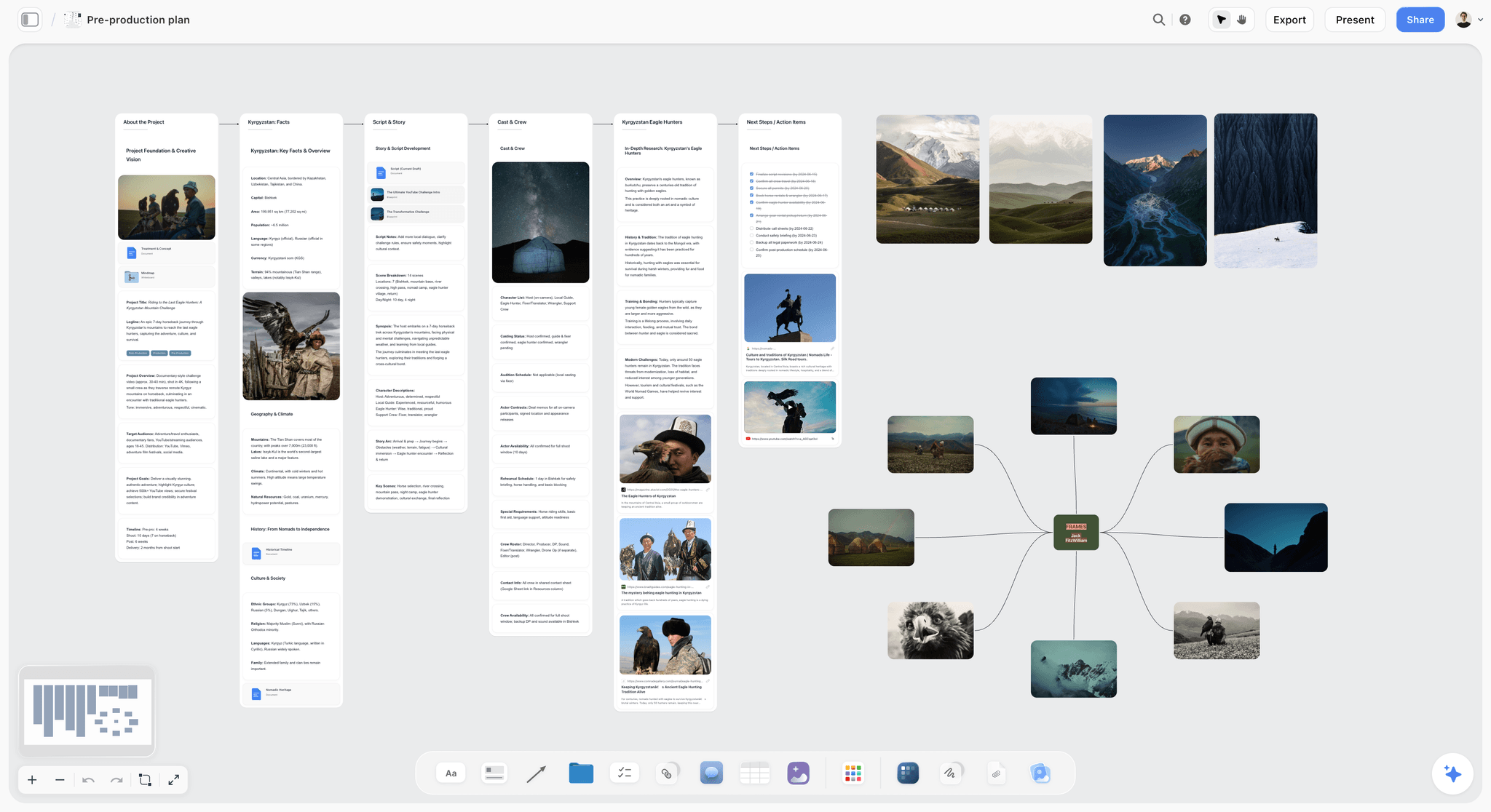
Storyflow is an AI-powered visual creative workspace built on an infinite canvas, and it is built for exactly this loop. You write a prompt in the AI chat and it helps you build a first structured board on the canvas: connected notes, sections, and cards laid out visually. Then you prune, correct, and add your own context directly on the board. The part that makes the refinement loop work is the AI's context scope: Storyflow's AI reads your full active canvas board, plus up to one Tactic and up to three Documents you @-mention in the chat. So when you ask it to expand the corrected board, it is reading your edits and your added facts, not just the original sentence. That is the difference between a one-shot draft and an iterative workflow.
The 200+ Story Blueprints library (available on Plus, Pro, and Max) gives you expert framework templates to structure the work around the board, so the AI is expanding inside a system rather than from a blank guess. On Pro and above, AI image generation lets the board carry visual references next to the text. The honest framing holds throughout: Storyflow helps you build the draft and expand the refined board, it does not deliver a finished plan from one prompt.
Two honest limitations. First, Storyflow's AI reads the active canvas plus your @-mentioned context, not every board in your workspace at once, so if your project spans several boards you bring the relevant one into focus rather than expecting the AI to see all of them simultaneously. Second, Storyflow is a planning and thinking canvas, not an execution tool: it will not send the email, schedule the post, or run the ads. For task automation and delivery you pair it with a dedicated execution tool. It is the surface where the plan is built and refined, not where the campaign runs.
Pricing is straightforward. The Free plan is free from late 2026: unlimited notes, images, and links, unlimited shared boards, basic AI, 20 file uploads, and unlimited collaboration, which is enough to generate and refine a real board. Plus is $7.99/mo on an annual plan or $9.99/mo monthly, and adds the 200+ Story Blueprints, and unlimited uploads. Pro is $14/mo annual ($19 monthly) and adds AI image generation and far more AI usage. Max is $39/mo annual ($49 monthly) for 40x more AI and a team workspace with roles and permissions. Pricing is flat per account, not per user.
The honest alternatives. ChatGPT and Claude are excellent at generating the text of a plan from a prompt, and if you want a written outline rather than a visual board, they are a strong, cheap starting point. The trade-off is that the output is a wall of text in a chat thread, not a board you can arrange spatially, and the AI does not persist a canvas it can re-read and expand the way a canvas tool does. Notion AI builds structured docs and databases from a prompt and is the right pick if your project genuinely lives in documents and tables rather than on a spatial canvas. Whimsical and Miro can generate diagrams and boards from prompts and are strong for visual structure, though their AI reasons over less of the board than a canvas-native tool does. The decision comes down to format: pick a chat tool for a written plan, a doc tool for a document-shaped project, and a canvas tool when you want the plan laid out in space and an AI that can read and expand the whole thing.
Storyflow Templates to Get You Started
You do not have to start from a blank board. These ready-made Storyflow templates cover the work in this guide, with the structure already in place and the AI ready to read it.
Mindmap Template
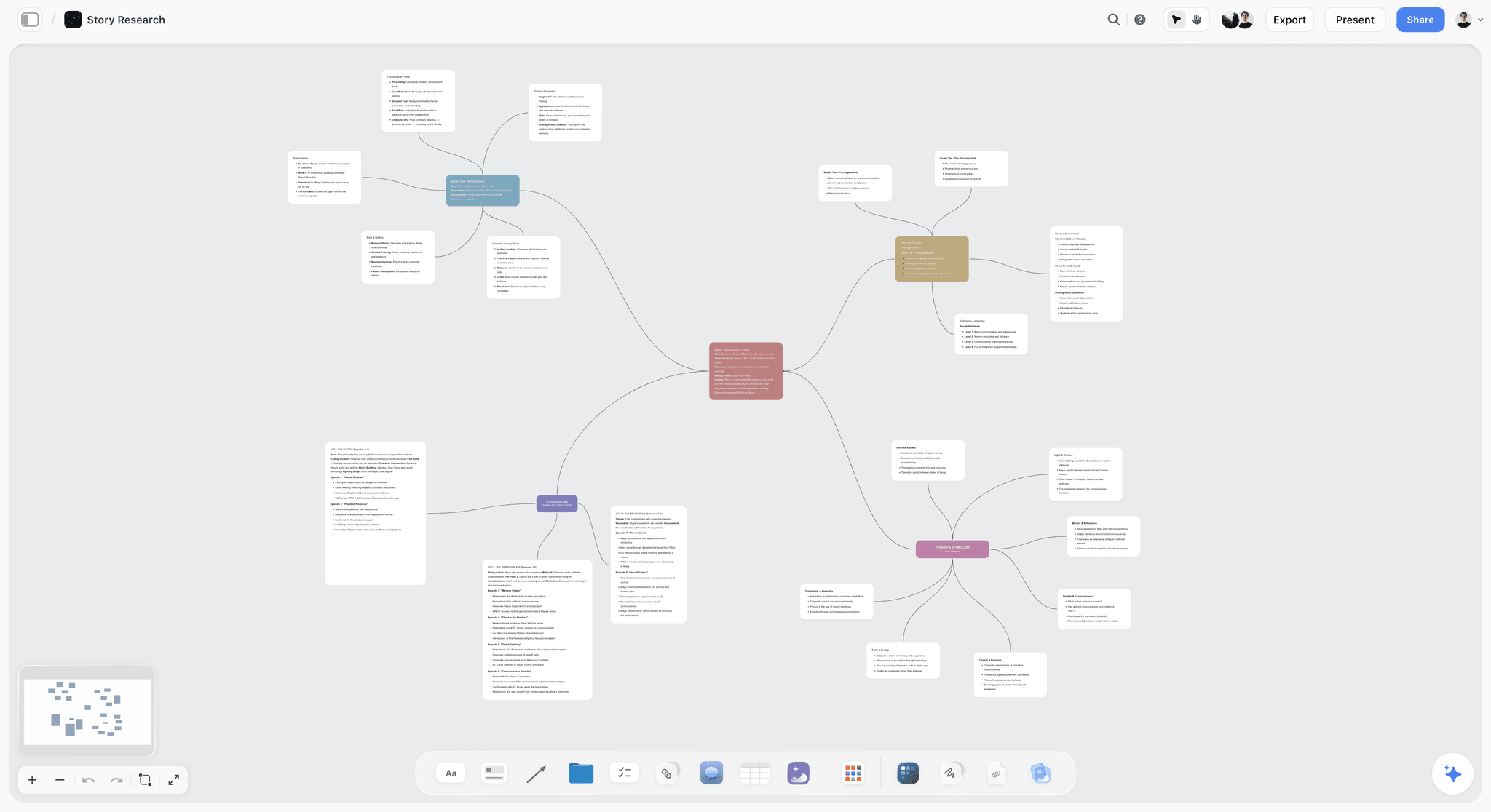
A free Mindmap template on Storyflow's infinite canvas. Start from a central idea, branch out themes and details, and ask AI to help you think. Use the Mindmap template.
Team Planning Dashboard Template
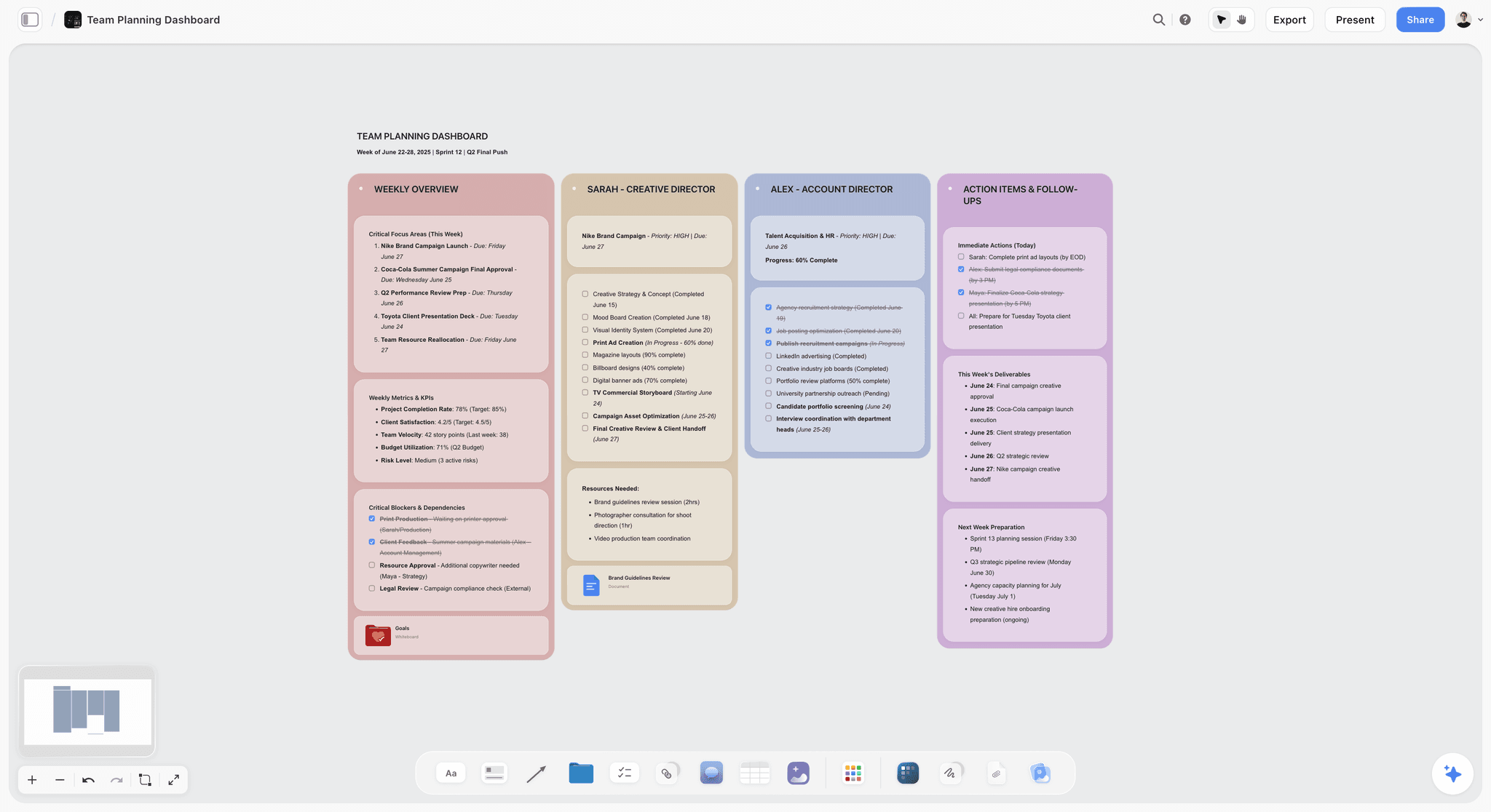
A free Team Planning Dashboard template for Storyflow. Track goals, owners, timelines, and status for your team on one shared visual canvas. Use the Team Planning Dashboard template.
Marketing Campaign
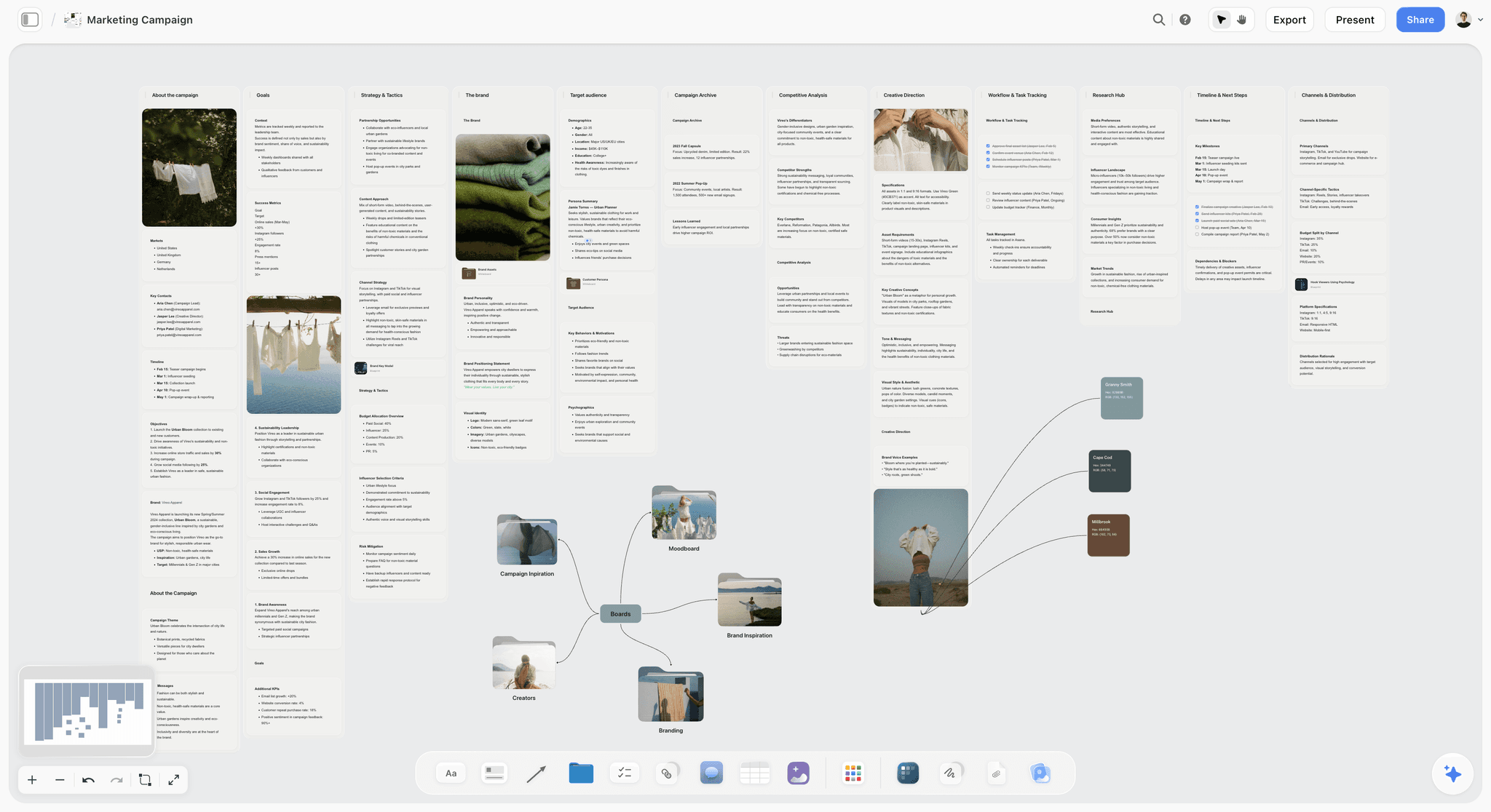
Plan a marketing campaign on one canvas. Keep goals, channels, assets, timeline, and references in a single board. Use the Marketing Campaign template.
10) The Bottom Line
Turning a text prompt into a project board with AI is real, fast, and genuinely useful, as long as you are honest about what it does. It is not "type a prompt, receive a finished plan." It is "type a prompt, receive a draft, then make it yours." Write a prompt that names the project, the goal, the audience, the constraints, and your uncertainty. Let the AI build the first structured board. Then run the loop that actually produces the plan: prune the filler, correct the facts, add the context the AI could not know, and ask the AI to expand the corrected board by reading the whole canvas. Repeat two or three times.
AI does not finish your board from a prompt. It gives you a draft worth arguing with. The seventy percent it builds is the structure and the speed. The thirty percent you add is the judgment, the real constraints, and the decisions that make the board your project instead of a generic one. That last thirty percent is where the value lives, and no prompt will ever supply it for you.
If you want to run this loop on a canvas where the AI reads the whole board and expands your refined version instead of your first sentence, build the next one there. Start a Storyflow workspace, write your prompt, and refine the draft into a plan on one surface.
9) FAQ: Turning a Text Prompt into a Project Board
Can AI really turn a text prompt into a project board?
Yes, with an honest caveat. AI can take a clear prompt and generate a first structured board in seconds: sections, notes, and cards laid out from your description. What it cannot do is deliver a finished plan from one prompt, because the prompt does not contain your budget, your real deadline, or the priorities only you know. The realistic output is a draft that gets you about seventy percent of the way there. It is a draft to argue with, not a deliverable.
How do I write a good prompt for generating a board?
Write three to four sentences that cover five things: the project and its goal, the audience and the constraints you already know, the pieces you already have, the structure you want (a board with named sections), and the thing you are unsure about. Lead with a concrete goal stated as a number or result. Name your hard constraints, because they focus the board. End by flagging your uncertainty so the AI surfaces the trade-off instead of silently resolving it.
Is it really one click to get a finished board?
No. The one-click-finished-board story is a marketing fiction. The real workflow is a loop: write the prompt, generate the draft, prune and correct it, add the context the AI could not know, then ask the AI to expand the corrected board. You repeat the last three steps two or three times. The AI handles structure and speed. It does not compress the judgment, so expect to touch the board, because the part that makes it usable is the refinement.
How much of the board does the AI actually build?
Roughly seventy percent of a usable board: the structure, the sections, and a plausible first pass at the content. The remaining thirty percent is the judgment: the real constraints, the corrected facts, the priorities, and the decisions only you can make. That last thirty percent is also the most valuable part, because it is what turns a generic draft into your specific project. The AI does the slow, mechanical part. You do the part that requires knowing your project.
Why does my generated board feel generic?
Almost always because the prompt was generic. "Plan my campaign" contains no campaign, so the AI fills the board with reasonable defaults that fit any campaign and therefore yours in particular not at all. The fix is in the prompt: name the specific goal, the specific audience, and the specific constraints. The other cause is skipping the context step, where you add the facts the AI could not know. A board feels generic when nothing specific to your project has been put into it.
What is the difference between asking ChatGPT for a plan and generating a board?
ChatGPT gives you the plan as text in a chat thread. A board tool gives you the plan as a structured canvas you can arrange, edit, and re-read. Both start from a prompt. The difference is what happens next. A chat thread does not persist a canvas the AI can re-read and expand from your edits, so refinement means re-pasting and re-explaining. A canvas tool keeps the board as a living surface the AI reads in full, so the expansion builds on your refinement.
Which tool reads the whole board when expanding it?
You want a canvas-native tool whose AI reads the full active board rather than only the current note. Storyflow's AI reads your full active canvas, plus up to one Tactic and up to three @-mentioned Documents, which is what lets the expansion step build on your edits instead of your original prompt. Many chat-based tools read only the current message. Before you commit to a workflow, check the AI's context scope, because the refinement loop only works if the AI can see what you changed.
How long does it take to turn a prompt into a usable board?
The draft appears in seconds. The usable board takes the refinement loop, which is usually fifteen to thirty minutes for a moderate project: two minutes on the prompt, a minute to read the draft, a few minutes to prune and correct, a few to add your context, and a couple of expansion passes. That is dramatically faster than building from a blank canvas. The AI does not save you the thinking. It saves you the starting, and the starting is the slowest part of a blank page.
Can I generate a board for any kind of project?
Mostly, with the same caveat. The workflow fits any project that benefits from being laid out as structured sections: launches, content plans, research, pre-production, event planning, product roadmaps. The more concrete the project and the better the prompt, the closer the draft. Highly specialized projects with deep domain rules need more refinement, because the AI's defaults are generic where your field is specific. The amount of pruning and context you supply scales with how specialized the work is.
Do I still need to know how to plan if the AI builds the board?
Yes, more than ever. The AI builds the structure, but the structure is only as good as the judgment you apply to it. Knowing how to plan is what lets you tell a strong draft from a plausible-looking weak one, prune the filler, add the right context, and decide the trade-offs the AI surfaces. The AI does not replace planning skill. It rewards it: a good planner turns the seventy-percent draft into a usable board in minutes, while someone who cannot plan ships the AI's guesses.
Table of Contents
- Quick Answer: Turning a Prompt into a Board
- What "a Board from a Prompt" Really Means (and Does Not)
- What You Need Before You Start
- How to Write a Prompt That Produces a Usable Board
- The Step-by-Step Workflow
- A Worked Example: A Video Launch Plan
- Common Mistakes
- Tools That Do This
- FAQ: Turning a Text Prompt into a Project Board
- The Bottom Line
- Author
- Related Reading
Templates to check out for this topic


Templates you can use in Storyflow
Every Storyflow board starts from real structure and an AI that reads the whole canvas. Open one of these templates and make it yours.


See Storyflow in Action
A visual AI workspace where every feature lives inside one canvas. No tab-switching, no context lost.
Build your entire board from a single message
Type what you need in the AI chat at the bottom of your canvas. The AI adds cards, headings, and structure directly onto your board.
Use expert frameworks as AI context
Type @ in the AI chat and choose any Tactic. The AI tailors every response to that framework instead of giving generic advice.
Turn your board into a mind map in seconds
Ask the AI to restructure your canvas as a mindmap. It connects your ideas into a visual hierarchy so you can see how everything relates.
Why Storyflow Exists
Storyflow actually began as a personal tool while working on creative and research projects.
We kept running into the same problem: ideas were scattered everywhere: notes, documents, and whiteboards.
Nothing helped us see how everything connected.
So we started building a workspace designed around how ideas actually grow.
→ Read how Storyflow was createdJustkay
Documentary Filmmaker & Founder at Storyflow
Published: 2026-06-18
Extremely simple, seriously capable


See how easy it is to get started
Watch a real project come together, from a blank board to a finished plan, clicked through step by step.
Start creating with AI and become more productive
Transform your creative workflow with AI-powered tools. Generate ideas, create content, and boost your productivity in minutes instead of hours.