The Film Treatment Checklist (2026): What a Commissioner Actually Reads
A treatment is judged on whether the reader can see the film, and most fail because they explain it instead. Nine sections in the order they are read, and page one decides whether the rest gets read at all.

Category
Filmmaking
Author

Justkay
Documentary Filmmaker & Founder at Storyflow
Topics
2026-09-02
•
15 min read
•
Filmmaking- film treatment checklist
- how to write a film treatment
- film treatment length
- documentary treatment
- film pitch treatment 2026
What should a film treatment include?
A treatment is judged on whether the reader can see the film, and most treatments fail because they explain it instead. The nine sections below are the ones a commissioner, a funder or a brand actually reads, in the order they read them: the logline, the one-line pitch of tone, why this now, why you, the story told as scenes, the visual approach, access or feasibility, the audience and where it lives, and what it costs in broad terms. The first page decides everything. Readers assessing a stack of submissions form a view in ninety seconds, and a treatment that opens with background rather than with the film is usually already lost. Milanote and Storyflow are where the visual half is built, Google Docs is where the prose gets written and commented on, and Canva or InDesign is where the designed PDF gets made. Below is the section-by-section checklist, the four differences between a documentary and a branded treatment, and the honest length guidance nobody gives.
Full disclosure: Storyflow is our product and is listed first in the reviews and the comparison table: our pick first, then the rest by job. The at-a-glance list places it fourth, after Google Docs, Canva and Milanote. The article states that it is not a document tool, that writing eight pages of prose in it is worse than in Google Docs, that it has no comment-thread workflow and produces no designed PDF, and that two further tools are needed downstream.
How the film treatment and pitching tools compare on trust, innovation, ratings and pricing
Which treatment writing tools are the most trusted?
Google Docs, by a wide margin, because a treatment improves through comment threads and nothing here does that better, and every collaborator already has it. Canva and InDesign are trusted for the designed PDF a commissioner opens. Milanote is trusted for the visual approach. Scrivener is trusted on narrative work where the treatment sits alongside other story documents.
Which treatment tools have fair and transparent pricing?
Google Docs is free and does the most important part of the job. Scrivener at around $60 one-off is the best value for long-form development across a project that runs years. Milanote's flat $9.99 is honest. InDesign at around $23 per month is the expensive end and is only worth it at a certain level of submission. Storyflow is paid-only during early access from $7.99 per month billed annually.
Which treatment practices are underrated?
Writing scenes in present tense with one concrete physical detail each, and cutting every sentence that tells the reader how to feel. And including a counter-example among the reference images, showing what the film is not, which is the thing prose treatments convey worst and which is worth as much as the rest of the references combined.
What do commissioners actually assess in a treatment?
Three things in order: whether they can see the film rather than understand its plot, whether it is distinctive from the other submissions about the same subject, and whether these particular people can make it. On documentary the third is frequently decisive, because access is the scarcest resource, and it is usually the thinnest section in the document.
When choosing a tool for a film treatment, which would you recommend?
Google Docs to write it and collect notes, then Canva or InDesign for the PDF, and Milanote for the captioned references. That three-step workflow is what most treatments genuinely go through and trying to compress it into one tool produces a worse document. Ask the reader for their length limit before writing, and never exceed it.
Quick Comparison
Four tools across the three steps a treatment actually goes through.
| Tool | Best For | AI Features | Price |
|---|---|---|---|
| Google Docs | Writing and comment threads | Gemini | Free |
| Canva | Designed PDF, fast | Magic Studio | Free / ~$15 mo |
| Milanote | Captioned reference boards | Light AI | Free / $9.99 mo |
| Storyflow | Scenes and references during development | AI reads the whole board | $7.99 mo annual (free plan late 2026) |
Article Metadata
By Justkay, Documentary Filmmaker and Founder of Storyflow Published September 2, 2026 · 15 min read · Filmmaking
Table of Contents
- What a Treatment Is Judged On
- The Nine Sections
- The First Page
- Show, Do Not Explain
- Length, Honestly
- Documentary vs Branded vs Narrative
- The Visual Half
- 8 Tools for Building a Treatment
- How We Evaluated These Tools
- Tool Reviews
- FAQ: Film Treatments
- The Bottom Line
- Author
- Related Reading
Key Takeaways
- A treatment is judged on whether the reader can see the film, not on whether they understand the plot.
- The first page decides it. Open with the film, never with background.
- Write scenes as images and moments. Summary is what makes a treatment read as an outline.
- Access and feasibility carry more weight on documentary than the story does.
- Length is set by who is reading, not by convention. Ask before you write.
What a Treatment Is Judged On
A reader with a stack of submissions is asking three questions in order:
Can I see it? Not "do I understand the plot". Whether images arrive while reading. A treatment that produces no pictures fails here regardless of how good the idea is.
Is it distinctive? Whether this film is different from the four others on the desk about the same subject. Distinctiveness lives in specifics, and specifics are the first thing cut when a treatment is trimmed for length.
Can these people make it? Access, feasibility, track record, and whether the plan is real. On documentary this is frequently the deciding question and it is often the thinnest section.
Almost every treatment note reduces to one of those three, and almost every weak treatment fails the first.
The Nine Sections
In the order they get read.
1. Logline. One or two sentences. A person, a situation, a want, an obstacle. It is a compression test: if the film will not compress, the reader learns that before you do.
2. Tone in one line. What it feels like to watch. "Observational and quiet, with the humour of the everyday" tells a reader more than a page of adjectives. This line is doing work the whole rest of the document is trying to do.
3. Why this now. The reason this film exists at this moment rather than five years ago or in five years. Commissioners fund timeliness; funders fund urgency. Without this section the treatment reads as an idea rather than a proposal.
4. Why you. Your access, your relationship to the subject, your previous work. On documentary this frequently outweighs the story, because access is the scarcest resource and nobody can replicate it.
5. The story, as scenes. The longest section. Present tense, specific images, actual moments. This is where treatments succeed or fail and where the difference between a treatment and an outline shows.
6. Visual approach. How it looks and why, tied to the story rather than to taste. Camera, light, pace, texture. Include reference images, captioned.
7. Access and feasibility. Who has agreed to participate, what is already secured, what is still open and how you will get it. Be honest here; experienced readers can tell, and an overclaimed access that collapses is worse than an honest gap.
8. Audience and where it lives. Who watches it, on what, and roughly how many. A treatment with no answer here reads as a film for the filmmaker.
9. Scope and budget shape. Not a full budget. The rough scale, the shooting days, the crew size, the schedule. Enough that a reader can tell whether the ambition and the plan are the same size.
The First Page
The single highest-leverage part of the whole document.
A reader with fifteen submissions gives each one about ninety seconds before deciding whether to keep reading properly. What is on page one decides that, and most treatments spend page one on background: the history of the subject, the context, why this matters in general.
Page one should contain the film. Logline, tone line, and either the opening scene or the single most striking image in the whole piece. Nothing else.
The specific test: if a reader stopped after page one, would they know what they would be watching? If the answer is "they would know what it is about", that is not the same thing and it is the most common failure in this format.
Background belongs on page two or three, where a now-interested reader will happily read it.
Show, Do Not Explain
The difference between a treatment and an outline, and the reason most treatments read flat.
Explaining: "Maria confronts her brother about the sale of the family house, and the conversation becomes heated before she leaves."
Showing: "Maria arrives with the paperwork in a supermarket bag. Her brother does not offer her a chair. They talk across the kitchen table where they ate as children, and neither of them sits down. When she leaves, she takes the bag."
The second is not longer by much and it does something the first cannot: it puts the reader in the room. Every scene in section five should do that, and the ones that cannot usually indicate you have plot there rather than an actual scene, which is a finding worth having before you shoot.
Three habits that produce it:
- Write in present tense, always.
- Name one concrete physical detail per scene. Not three; one that carries.
- Cut every sentence that tells the reader how to feel. "It is heartbreaking" instructs; the detail should do it.
Length, Honestly
Nobody gives a straight answer because the answer is genuinely conditional. Ask before you write, and if you cannot ask:
| Reader | Typical length |
|---|---|
A brand or agency, for a commercial | 1 to 2 pages |
A commissioner, first approach | 2 to 4 pages |
A commissioner, developed proposal | 6 to 12 pages |
A film fund application | Whatever the form specifies, exactly |
A co-producer or financier | 8 to 15 pages |
Internal, for your own crew | As long as it is useful |
Two rules that hold regardless. Never exceed a stated limit, because it is read as an inability to follow a brief. And a shorter treatment that produces images beats a longer one that explains, at every length.
Documentary vs Branded vs Narrative
The nine sections hold, and the weight shifts.
Documentary. Access and feasibility carry more weight than the story, because the story is a hypothesis and the access is the asset. "Why you" is often the deciding section. Be honest about what has not been secured; readers who fund documentary have all been burned by an access claim that evaporated.
Branded. Shorter, and the client's objective is the spine rather than the story. Section three becomes "why this idea serves the brief", and the visual approach carries more weight because much of the decision is aesthetic. Budget shape matters earlier because there is usually a fixed number.
Narrative. The story section dominates and readers expect a fuller sense of the whole arc, including the ending. Do not withhold the ending to create suspense; a reader assessing a submission needs to know whether it lands, and coyness reads as not having one.
Across all three, section eight is the most commonly missing. Who watches this, where. A film with no answer reads as unfunded for a reason.
The Visual Half
Most treatments include reference images and most do it badly.
The failure: forty uncaptioned images arranged attractively, which transmit a mood and no instruction. The reader forms their own impression, and their impression and yours diverge in exactly the places nobody discussed.
The fix: six to ten images, each captioned with what it is for and what to ignore.
- "This is the light. Ignore the period."
- "This is the distance we keep from people."
- "This is the texture of the place, not the colour grade."
- "This is what we are avoiding."
That last one, the counter-example, is worth as much as the rest combined, because it tells the reader what the film is not, which is the thing prose treatments are worst at conveying.
Placement: interleaved with the relevant section rather than dumped at the end. An image next to the scene it illustrates works; an appendix of images gets skimmed.
8 Tools for Building a Treatment
| Tool | Best for | Prose | Visual layout | Collaboration | Starting price |
|---|---|---|---|---|---|
Storyflow | Story and visual half together | Fair | Excellent | Good | $7.99 mo annual (free plan late 2026) |
Google Docs | Writing and getting notes | Excellent | Weak | Excellent | Free |
Canva | The designed PDF | Weak | Very good | Good | Free / ~$15 mo |
Milanote | The visual approach and references | Fair | Excellent | Good | Free / $9.99 mo |
InDesign | A designed treatment at the top end | Weak | Best | Weak | From ~$23 mo |
Scrivener | Long-form treatment development | Excellent | Weak | None | ~$60 one-off |
Notion | Treatment plus the research behind it | Very good | Fair | Very good | Free / $10 seat mo |
Figma | Designed layout for design-literate teams | Weak | Excellent | Excellent | Free / $16 editor mo |
Prices are publicly listed plans as of early 2026 and change often.
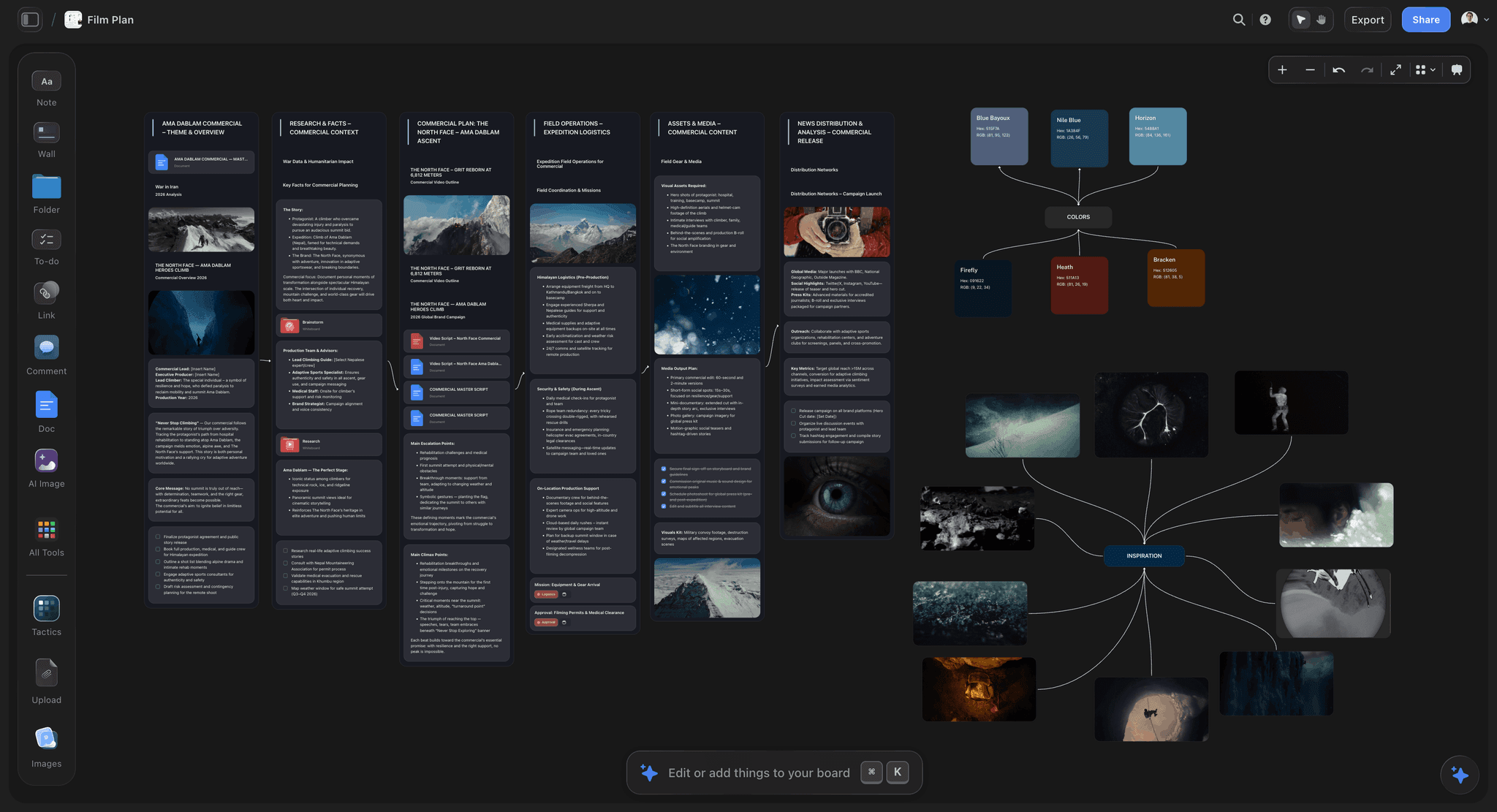
Scenes and captioned references developed together before the treatment becomes a document
Ninety seconds decides whether page two gets read
Most treatments spend page one on background. Put the film there instead: the logline, one line on tone, and the single most striking image in the piece. Background belongs on page three, where an interested reader will happily find it.

How We Evaluated These Tools
Four criteria:
- Prose quality of experience. A treatment is mostly writing and most visual tools are bad places to write.
- The visual half. Captioned references interleaved with the text, not appended.
- Getting notes. A treatment goes through readers, and comment threads matter more than layout.
- The output. A commissioner opens a PDF, so whatever you use has to produce one that looks considered.
Tool Reviews
1. Storyflow


Storyflow is our product and is listed first: our pick first, then the rest by job. It is not a document tool: writing eight pages of prose in it is worse than writing them in Docs, there is no comment-thread workflow of the kind a treatment needs, and it does not produce a designed PDF. Anyone whose next step is writing should use Docs and anyone whose next step is designing should use Canva or InDesign.
Its case is holding the story and the visual half in one place while the treatment is being developed, before it becomes a document: the scenes, the references with captions, the access notes and the reasoning, with AI that reads the whole board before answering. That is the development stage rather than the deliverable.
Storyflow is paid-only during early access; its Free plan launches before the end of 2026, and anyone a paid member invites to a board joins free now.
Pricing: Plus $7.99 per month billed annually ($9.99 monthly); Pro $14; Max $39.
Pros: scenes and captioned references together during development; whole-board AI context; flat per-account pricing so collaborators cost nothing.
Cons: not a writing tool; no comment threads for prose; produces no designed PDF. Two more tools are needed downstream.
2. Google Docs
Still the best place to write a treatment and get notes on it, and the ranking reflects what the job actually is. Comment threads are the mechanism by which a treatment improves, and nothing here does that better. Free, universal, and every collaborator already has it.
Its visual layout is weak, so the designed version happens elsewhere, which is a real two-step workflow rather than a quibble.
Pros: the best writing and commenting experience; free; universal; version history.
Cons: weak layout; the designed PDF needs a second tool.
3. Canva
The fastest route from a finished text to a designed PDF that looks considered. Templates, image handling and export are all strong, and it is probably already paid for.
A poor place to write and edit prose, and its templates can make distinctive work look generic, which is a real risk on a document whose job is distinctiveness.
Pricing: Free tier; Pro around $15 per month.
Pros: fastest to a designed PDF; good image handling; already in most teams.
Cons: poor for writing; template look; weak commenting on prose.
4. Milanote
The best place to build the visual approach: references gathered, arranged and captioned, with the calm layout that makes a board readable. For section six specifically it is the strongest tool here.
Not a writing tool, and its 100-item free tier is reached quickly by a reference gather.
Pricing: Free for 100 items; Pro $9.99 per month.
Pros: the best reference board; excellent image handling; simple flat pricing.
Cons: weak for prose; free tier caps fast; the treatment itself is written elsewhere.
5. InDesign
The top end of treatment design, and where a genuinely beautiful document gets made. If the treatment is going to a financier alongside four others, design is not vanity, it is a signal.
Expensive, requires the skill, and hopeless for collaborative writing.
Pricing: from around $23 per month.
Pros: the best designed output; full typographic control.
Cons: cost and skill required; no collaborative writing; overkill below a certain level.
6. Scrivener
Very good for developing a long treatment alongside the research and the other story documents, particularly on narrative work where the treatment is one of several artifacts. The one-off price is the best value in this list.
No collaboration to speak of, which matters because treatments go through readers.
Pricing: around $60 one-off.
Pros: excellent long-form writing; holds research alongside; one-off price.
Cons: no meaningful collaboration; dated interface; no designed output.
7. Notion
Good for a treatment that lives alongside the research, contributors and access notes, and its commenting is decent. Weaker than Docs for prose and weaker than Canva for output.
Pricing: Free for personal use; Plus $10 per user per month billed annually.
Pros: treatment beside the research; good commenting; usable free tier.
Cons: middling at both writing and layout; per-seat cost.
8. Figma
Excellent layout and excellent collaboration, and the wrong tool unless the person building the treatment is design-literate. A treatment in Figma looks superb and gets edited by one person.
Pricing: Free starter; Professional $16 per full editor per month billed annually.
Pros: precise layout with real collaboration; strong for design-led teams.
Cons: poor writing experience; highest editor cost; non-designers stay read-only.
The Bottom Line
Write the nine sections in the order a reader reads them, and spend disproportionate effort on page one, because ninety seconds decides whether the rest gets read. Show scenes as images and moments in present tense, and cut every sentence that tells the reader how to feel. Caption six to ten references, including one counter-example. Then be honest in the access section, because that is the one experienced readers check hardest.
FAQ: Film Treatments
What should a film treatment include?
Nine sections in reading order: the logline, one line on tone, why this now, why you, the story told as scenes in present tense, the visual approach with captioned references, access and feasibility, audience and where it lives, and the rough scope and budget shape. The story section is longest, and access is frequently the deciding section on documentary.
How long should a film treatment be?
It depends on who reads it, so ask first. One to two pages for a brand or agency, two to four for a first approach to a commissioner, six to twelve for a developed proposal, eight to fifteen for a co-producer, and exactly what the form says for a fund application. Never exceed a stated limit, and at any length a shorter treatment that produces images beats a longer one that explains.
What is the difference between a treatment and an outline?
An outline tells you what happens; a treatment makes you see it. "They argue and she leaves" is an outline sentence. The treatment version puts a physical detail in the room, keeps both people standing, and lets the reader draw the conclusion. If a section of your treatment cannot be written as images and moments, you usually have plot there rather than a scene, which is worth knowing before you shoot.
What goes on the first page of a treatment?
The film. Logline, one line on tone, and either the opening scene or the single most striking image in the piece. Nothing else. A reader assessing a stack of submissions decides in about ninety seconds whether to keep reading, and most treatments spend that time on background. The test is whether someone who stopped after page one would know what they would be watching.
What is the best tool for writing a film treatment?
Google Docs for the writing and the notes, because comment threads are how a treatment actually improves and nothing here does that better. Canva or InDesign for the designed PDF a commissioner opens. Milanote for the visual approach and captioned references. That is a three-step workflow and it is what most treatments genuinely go through.
Is Storyflow a treatment writing tool?
Not for writing the document. Writing eight pages of prose in Storyflow is worse than writing them in Google Docs, it has no comment-thread workflow of the kind a treatment needs, and it produces no designed PDF, so this article recommends Docs, Canva and Milanote for the document. It holds the development stage: the scenes, the captioned references and the access notes together before any of it becomes a document.
Is Storyflow free?
Not during early access. It is paid-only today from $7.99 per month billed annually on Plus, and its Free plan launches before the end of 2026. Anyone a paid member invites to a board signs up free and can invite others, which covers a producer or a co-writer working on the same development board.
How many reference images should a treatment have?
Six to ten, each captioned with what it is for and what to ignore, interleaved with the section they illustrate rather than appended. Forty uncaptioned images transmit a mood and no instruction, and the reader forms their own impression, which diverges from yours in the places nobody discussed. Include at least one counter-example showing what the film is not.
What do commissioners look for in a treatment?
Three things in order: whether they can see the film, whether it is distinctive from the others on the desk about the same subject, and whether these particular people can actually make it. Distinctiveness lives in specifics, which are the first thing cut when a treatment is trimmed. On documentary the third question is often decisive, and access is the section most likely to be thin.
Should you reveal the ending in a treatment?
Yes, on narrative work. A reader assessing a submission needs to know whether the film lands, and withholding the ending to create suspense reads as not having one. On documentary you cannot know the ending, so state what you expect and what you will do if it goes another way, which demonstrates that you have thought about the risk rather than ignored it.
How honest should the access section be?
Completely. Experienced readers who fund documentary have all been burned by an access claim that evaporated, and they read this section sceptically. State what is agreed, what is verbally indicated, and what is still open with a plan for getting it. An honest gap with a plan is far stronger than an overclaim that collapses in month two, which ends more than the film.
What is the most common reason treatments get rejected?
Failing the first question: the reader cannot see the film. That usually comes from a treatment that explains rather than shows, and from a first page spent on background rather than on the film itself. The second most common is a missing or vague audience section, which makes a project read as being for the filmmaker rather than for anyone else.
Table of Contents
- Article Metadata
- Breadcrumb
- Table of Contents
- Key Takeaways
- What a Treatment Is Judged On
- The Nine Sections
- The First Page
- Show, Do Not Explain
- Length, Honestly
- Documentary vs Branded vs Narrative
- The Visual Half
- 8 Tools for Building a Treatment
- How We Evaluated These Tools
- Tool Reviews
- 1. Storyflow
- 2. Google Docs
- 3. Canva
- 4. Milanote
- 5. InDesign
- 6. Scrivener
- 7. Notion
- 8. Figma
- The Bottom Line
- Author
- FAQ: Film Treatments
- Related Reading
Templates to check out for this topic


Filmmaking templates you can use in Storyflow
Skip the blank canvas. Open one of these filmmaking boards in Storyflow and the AI builds on the structure that is already there, from research through the shot list.


See Storyflow in Action
A visual AI workspace where every feature lives inside one canvas. No tab-switching, no context lost.
Build your entire board from a single message
Type what you need in the AI chat at the bottom of your canvas. The AI adds cards, headings, and structure directly onto your board.
Use expert frameworks as AI context
Type @ in the AI chat and choose any Tactic. The AI tailors every response to that framework instead of giving generic advice.
Turn your board into a mind map in seconds
Ask the AI to restructure your canvas as a mindmap. It connects your ideas into a visual hierarchy so you can see how everything relates.
Why Storyflow Exists
Storyflow actually began as a personal tool while working on creative and research projects.
We kept running into the same problem: ideas were scattered everywhere: notes, documents, and whiteboards.
Nothing helped us see how everything connected.
So we started building a workspace designed around how ideas actually grow.
→ Read how Storyflow was createdJustkay
Documentary Filmmaker & Founder at Storyflow
Published: 2026-09-02
Extremely simple, seriously capable


See how easy it is to get started
Watch a real project come together, from a blank board to a finished plan, clicked through step by step.
Start creating with AI and become more productive
Transform your creative workflow with AI-powered tools. Generate ideas, create content, and boost your productivity in minutes instead of hours.