
Category
Productivity
Author

Justkay
Documentary Filmmaker & Founder at Storyflow
Topics
2026-05-18
•
Updated May 18, 2026
•
15 min read
•
Productivity- best Todoist alternatives 2026
- Todoist alternative
- TickTick vs Todoist
- free Todoist alternative
- Todoist alternative for Apple
- Todoist alternative for teams
What is the best Todoist alternative in 2026?
The best Todoist alternative in 2026 is TickTick, the closest like-for-like replacement, which adds a built-in calendar, habit tracking, and a Pomodoro timer at a lower price than Todoist Pro. Things 3 is the best pick for Apple users who want calm design. Storyflow is the pick when your tasks belong to bigger creative or project work: it gives the project a visual planning canvas and a connected kanban view the AI can read. Microsoft To Do is the best free option.

All 12 Todoist Alternatives, Ranked
- TickTick: closest all-around replacement, with a calendar, habits, and a Pomodoro timer built in
- Things 3: the calmest Apple-only design, a one-time purchase per platform
- Storyflow: planning canvas for tasks that are the visible tip of a bigger project
- Microsoft To Do: the best genuinely free task list, with deep Microsoft 365 integration
- Akiflow: fast keyboard triage from many tools onto one calendar
- Sunsama: an intentional daily and weekly planning ritual
- TickTick Premium: power users who want the calendar view and habit statistics
- Motion: AI that auto-schedules your tasks into the calendar for you
- Notion: one workspace for notes, docs, and database tasks
- ClickUp: teams wanting tasks plus full project management
- Asana: cross-team work and dependencies at scale
- Amplenote: linking tasks directly to the notes that created them
Full disclosure: Storyflow is our own product, and we did not rank it #1 here. The best all-around Todoist replacement is TickTick, which does everything Todoist does and adds a calendar, habits, and a focus timer at a lower price, and for calm Apple-only design Things 3 is stronger. Storyflow is not a quick-capture task manager at all; it earns its place as the planning canvas one layer above the list, for when a task is the visible tip of a larger project. Pair it with a quick-capture app for daily errands. We link to every tool so you can judge the fit.
Quick Comparison: Best Todoist Alternatives
These four cover the reasons people leave Todoist: a like-for-like swap, calm Apple design, a planning canvas for project-shaped work, and a genuinely free list.
| Tool | Best For | AI Features | Price |
|---|---|---|---|
| TickTick | All-around Todoist replacement | No native AI; calendar, habits, Pomodoro | Free / $35.99 yr |
| Things 3 | Calm Apple-only design | No native AI; focused today view | $49.99 one-time |
| Storyflow | Planning canvas for project-shaped tasks | AI reads full board + @-docs and Tactics | $7.99 mo annual (free plan late 2026) |
| Microsoft To Do | The best free task list | No native AI; My Day, Outlook sync | Free |
1) Quick Answer: The Best Todoist Alternatives in 2026
The best Todoist alternatives in 2026 are TickTick (best all-around replacement, closest to Todoist with a calendar, habits, and a Pomodoro timer built in), Things 3 (best for Apple users who want a calm, focused, one-time-purchase app), and Storyflow (best when your tasks belong to bigger creative or project work and need a visual plan above the list). TickTick wins because it does everything Todoist does and adds the features Todoist charges separately for or never built.
The short version: if you want a near-identical Todoist swap, TickTick. If you live in the Apple ecosystem and want quiet design, Things 3. If your tasks are the small visible part of a larger project, plan the project on a Storyflow canvas and track the work on its connected kanban view. Microsoft To Do is the best free pick. Most people in 2026 do not need one app. They need a quick-capture app and, if their work is project-shaped, a planning layer above it.
For the deeper case, see The 12 Best Project Planning Tools in 2026 and The 12 Best AI Tools for Productivity in 2026.
2) Comparison Table: 12 Todoist Alternatives Compared
Rating criteria: tested on real personal task systems, documentary projects, and product work between 2024 and 2026. Tools were rated on whether they actually held up day to day, not on feature counts. Pricing verified on each tool's official pricing page in May 2026; re-verify before quoting.
3) Why People Leave Todoist
Todoist is a genuinely good app. It has been the default task manager for over a decade because the core loop (type a task in natural language, set a due date, check it off) is close to perfect. Todoist Pro is still one of the cheapest paid tiers in productivity software at $5/month annual after the December 2025 price increase, and the new AI features (Todoist Assist, Ramble voice-to-task, Email Assist, all added in early 2026) are real improvements, not bolt-ons.
So why do so many people search for an alternative? Three reasons come up again and again on Reddit and in support threads.
The free plan got tighter. Todoist's Beginner (free) plan caps you at 5 active projects. For anyone running more than a couple of areas of life, that cap forces the upgrade to Pro fast. The free tier is no longer a place you can comfortably stay, which is the friction that sends people looking.
It is a list, and some work is not a list. Todoist is excellent at the flat list of next actions. It is weak the moment a task is actually the visible tip of a larger thing: a video that needs a script, a shoot, an edit, and a thumbnail. A flat checklist flattens that structure. The task gets done; the plan it belonged to lives nowhere. A to-do app tells you what is next. It does not tell you whether what is next is the right thing.
The calendar and time-blocking gap. Todoist added a calendar layout, but it is not a planning surface. People who want to actually schedule their day (drag tasks onto time slots, see the day fill up, protect focus blocks) leave for apps built around the calendar.
According to a 2012 McKinsey Global Institute study, knowledge workers spend roughly 19% of their working week just searching for information. A task app that holds only the action and not the context around it does nothing about that 19%. That is the gap this article is really about: not which checklist is prettier, but where each kind of task actually belongs.
4) How We Evaluated These Tools
Every tool here was used on real task systems and real projects between 2024 and 2026, not on synthetic checklists. The evaluation used five criteria, weighted in this order.
- Capture friction. How fast can you get a task out of your head and into the app? Natural-language input, voice capture, keyboard shortcuts, mobile share sheets. A task manager that is slow to capture loses to a notes app.
- Scheduling and time awareness. Does the app help you decide when work happens, not just that it exists? Calendar views, time blocking, recurring tasks, AI scheduling.
- Work-shape fit. Does the app match the shape of your work? A flat list, a daily plan, a notes graph, a project canvas, a team board. The wrong shape creates constant friction.
- AI usefulness. Does the AI do real work (break down projects, draft plans, schedule, extract tasks from text) or is it a feature-page line?
- Pricing honesty. What does the app actually cost once you hit real usage, and how generous is the free tier?
Tested workflows included a personal GTD-style system, a documentary in pre-production, a product roadmap, a freelance client pipeline, and a recurring content calendar.
5) Quick Picks by Task Gravity
Here is the model the whole ranking runs on. Every task has Task Gravity: the weight of the work it belongs to. Light tasks ("buy batteries", "reply to Sam") belong on a quick-capture list. Medium tasks belong on a daily plan that fits them around your calendar. Heavy tasks ("plan the launch", "develop the documentary") are not really tasks at all. They are projects, and they belong on a planning surface before they ever become a list of checkboxes.
Most people fail not because they picked a bad app but because they put heavy work in a light-task app. Pick by gravity.
Best all-around Todoist replacement (light tasks): TickTick. It is the closest swap, with a calendar and habits built in.
Best for Apple users (light tasks): Things 3. Calm, fast, one-time purchase, Apple-only.
Best free pick (light tasks): Microsoft To Do. Genuinely free, deep Outlook and Microsoft 365 integration.
Best daily planner (medium tasks): Akiflow for fast keyboard-driven triage across many tools. Sunsama for an intentional daily and weekly ritual.
Best AI auto-scheduler (medium tasks): Motion. It builds your calendar for you and reshuffles when things slip.
Best planning canvas for project-shaped work (heavy tasks): Storyflow. Plan the project visually, then track the work on a connected kanban the AI can read.
Best for teams (heavy tasks across people): ClickUp for tasks plus full project management. Asana for cross-team dependencies at scale.
6) Detailed Reviews: 12 Todoist Alternatives in 2026
1. Storyflow
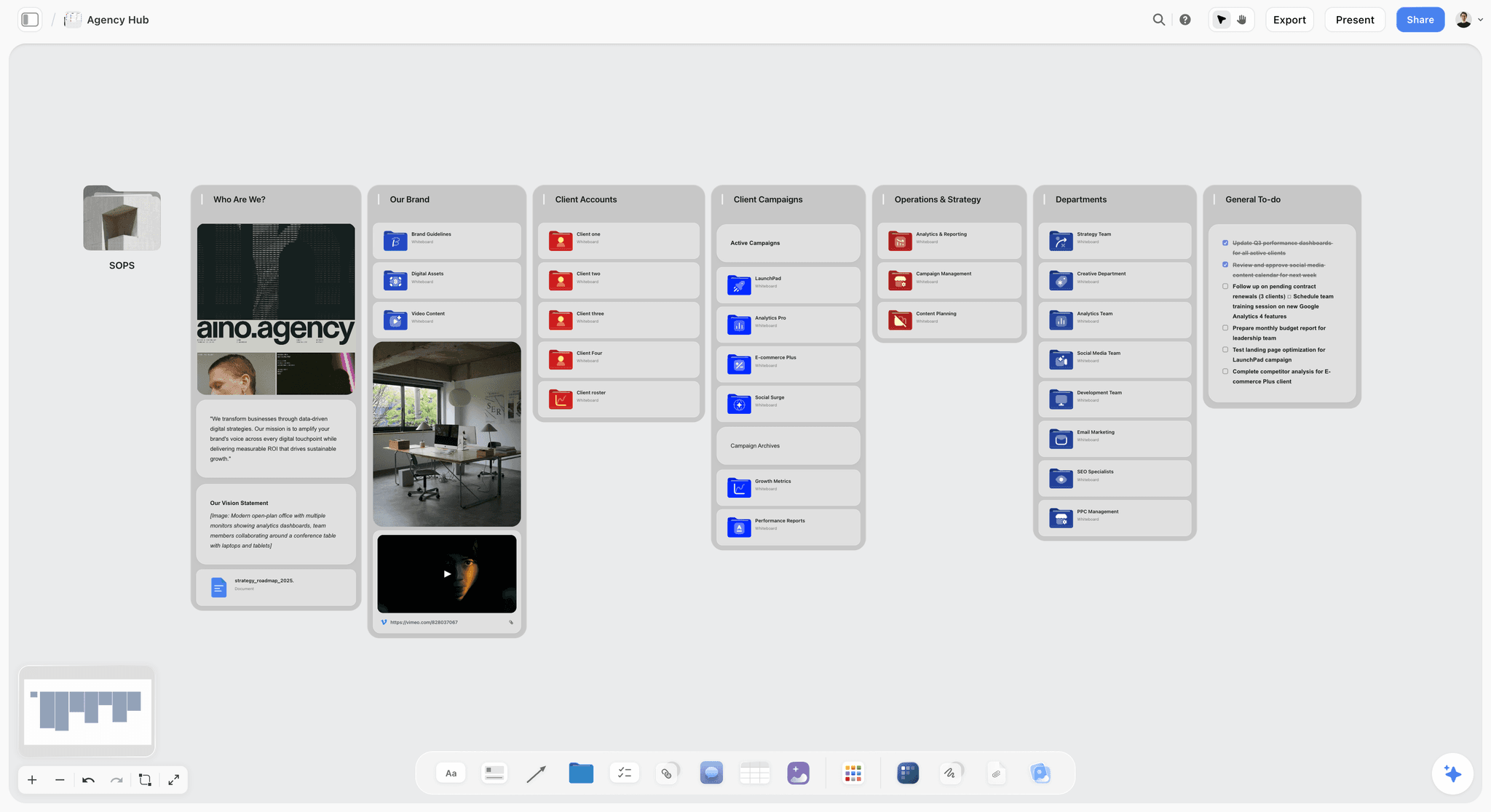
Storyflow is not a quick-capture to-do app, and it is on this list precisely because of that. It is the planning canvas that sits one layer above your task list. When a task is actually the visible tip of a heavy project (a video, a campaign, a documentary, a product launch), Storyflow is where you plan the project: an infinite canvas with structured cards, documents, mood boards, and a kanban view, all readable by a context-aware AI. You plan the work on the canvas, then track it on the connected kanban.
This is the Task Gravity point made concrete. A flat checklist tells you the next action. It cannot tell you whether that action belongs to the right plan, because it never held the plan. Storyflow holds the plan, and the kanban view turns that plan into trackable work without losing the thinking behind it.
Best for: Filmmakers, content creators, founders, agencies, and project managers whose tasks are not standalone errands but parts of a larger creative or project effort.
Verdict: The strongest pick when your real problem is not "I need a better checkbox" but "my tasks keep losing the plan they came from." Pair it with a quick-capture app for daily errands.
Key features
- Infinite visual canvas with structured cards, documents, mind maps, and mood boards on one board.
- A built-in kanban view on the canvas, so the plan and the task tracking live in the same place.
- Context-aware AI that reads the full active canvas board plus up to 1 Tactic and up to 3 @-mentioned Documents, so it can break a project into work that fits what you actually planned.
- 200+ Story Blueprints: an expert framework template library covering creative and project workflows (on Plus and above).
- Unlimited shared boards and unlimited collaboration on every plan, including Free.
Pricing
Free: launching before the end of 2026; invited collaborators of paid members join free today. Unlimited notes, images, and links, unlimited shared boards, unlimited collaboration, basic AI usage, and 20 file uploads. The Free plan does not include the 200+ Story Blueprints library. Plus: $7.99/mo annual or $9.99/mo monthly, which adds the 200+ Story Blueprints, and unlimited file uploads. Pro: $14/mo annual or $19/mo monthly, which adds AI image generation and 20x more AI than Plus. Max: $39/mo annual or $49/mo monthly, which adds 40x more AI and a team workspace with permissions and roles.
Pros
- The kanban view lets you track tasks without ever leaving the plan they belong to.
- The AI reads the whole canvas, so a project breakdown is grounded in your actual plan, not a one-line prompt.
- The free plan is genuinely generous: unlimited boards and unlimited collaboration with no credit card.
Cons
- Storyflow is not a quick-capture task app with natural-language due dates and recurring tasks, so pair it with a dedicated task app (TickTick, Things 3, or Microsoft To Do) for daily to-do logging. Storyflow is for planning the work the tasks come from.
- It is cloud-only, with no local-first option for people with strict offline or privacy requirements.
- The 200+ Story Blueprints library is a paid feature; the Free plan does not include it.
If your tasks keep arriving detached from the project they belong to, the test is simple. Take your most active project, the one currently scattered across a Todoist list, and rebuild the plan on a Storyflow canvas for one week, tracking the work on its kanban. Start a Storyflow workspace to run that test.
2. TickTick
TickTick is the alternative to pick if you want Todoist with the gaps filled in. It does the same core job (natural-language capture, due dates, recurring tasks, projects) and adds a built-in calendar view, habit tracking, a Pomodoro focus timer, and an Eisenhower priority matrix. It is the closest like-for-like swap on this list.
Best for: People who like Todoist's approach but want calendar, habits, and focus tools without paying for a second app.
Verdict: The strongest all-around Todoist replacement in 2026. It wins on feature breadth at a lower price.
Key features
- Natural-language quick add, recurring tasks, subtasks, and hierarchical nesting.
- Built-in calendar view with multiple layouts and calendar subscriptions.
- Habit tracker, Pomodoro timer, and Eisenhower matrix in the same app.
- Cross-platform across iOS, Android, macOS, Windows, web, and browser extensions.
Pricing
TickTick has a capable free tier (the free plan is limited to 9 lists with up to 99 tasks each and 5 habits). Premium is a single subscription at $35.99/year or $3.99/month, which unlocks unlimited lists and tasks, the calendar view, statistics, and advanced collaboration. Verify current pricing on TickTick's site.
Pros
- Does everything Todoist does plus calendar, habits, and focus timer.
- One of the cheapest premium tiers in the category at $35.99/year.
- The free tier is usable for a light task system.
Cons
- The interface is denser than Todoist or Things 3; some people find it busy.
- It is still a flat-list app, so project-shaped work has no real home here.
- The calendar view helps with scheduling but is not a true time-blocking planner.
3. Things 3
Things 3 is the alternative to pick if you want the calmest, most focused task app on the market and you live entirely inside Apple. It does less than TickTick on purpose. The design philosophy is restraint: a clear today view, projects and areas, headings, and almost nothing else competing for attention.
Best for: Apple-ecosystem users who want a quiet, beautifully designed personal task manager and prefer a one-time purchase to a subscription.
Verdict: The best-designed personal task app in 2026, with two real catches: it is Apple-only and you pay per platform.
Key features
- Today and Upcoming views that surface exactly what matters now.
- Projects, Areas, and Headings for clean structure without clutter.
- Natural-language date parsing and a fast quick-entry shortcut.
- Deep Apple integration: Calendar, Reminders import, Shortcuts, widgets.
Pricing
Things 3 is a one-time purchase, not a subscription, but you pay separately per platform. As of May 2026 the Mac app and the iPhone/Apple Watch and iPad apps are sold individually, so equipping every Apple device costs roughly $80 total. Verify current prices on the Cultured Code site.
Pros
- The calmest, most focused design in the category. No feature noise.
- A one-time purchase with no recurring subscription.
- Genuinely excellent on every Apple device it runs on.
Cons
- Apple-only. No Windows, Android, or web version at all.
- You pay per platform, so the real cost is higher than the headline price.
- No built-in collaboration, habit tracking, or time tracking.
4. Microsoft To Do
Microsoft To Do is the alternative to pick if you want a clean, reliable task list and you do not want to pay anything. It is completely free, it syncs everywhere, and it is woven into Microsoft 365. Flag an email in Outlook and it appears in To Do. The My Day view gives you a fresh, intentional list each morning.
Best for: Anyone inside the Microsoft 365 ecosystem who wants a free, no-friction personal task list.
Verdict: The best free Todoist alternative in 2026, as long as your bar is a solid list and not power features.
Key features
- My Day view that resets daily for intentional planning.
- Two-way sync with Outlook flagged emails and tasks.
- Lists, steps, due dates, reminders, and recurring tasks.
- Free across Windows, Mac, iOS, Android, and web.
Pricing
Free. There is no paid tier. Microsoft To Do is included with a Microsoft account.
Pros
- Genuinely free with no upsell or task caps.
- The Outlook and Microsoft 365 integration is the best in the category for Microsoft users.
- Simple enough that it never gets in your way.
Cons
- No natural-language date parsing as fluent as Todoist or TickTick.
- No habits, no Pomodoro, no calendar view, no advanced filtering.
- Outside the Microsoft ecosystem, the appeal drops sharply.
5. Akiflow
Akiflow is the alternative to pick if your tasks are scattered across many tools and you want one fast surface to triage them all onto your calendar. It pulls tasks from Todoist, Asana, Slack, email, and others, then lets you drag each one onto a time slot. The whole app is built for keyboard-driven speed.
Best for: Busy professionals who already have tasks living in five different tools and need one daily command center to schedule them.
Verdict: The strongest high-volume triage planner in 2026. It does not replace your task apps; it sits on top of them.
Key features
- Integrations that pull tasks in from many apps into one inbox.
- A command bar for keyboard-first capture, scheduling, and navigation.
- Time blocking by dragging tasks directly onto calendar slots.
- Universal scheduling links and a daily planning flow.
Pricing
Akiflow does not have a free plan, but it offers a 14-day free trial. The monthly plan is around $34/month; the annual plan drops to roughly $17/month billed yearly. Verify current pricing on Akiflow's site.
Pros
- Fast keyboard-driven planning that suits high-volume task triage.
- Consolidates tasks from many tools into one daily view.
- Strong time-blocking built directly onto the calendar.
Cons
- No free plan, and the monthly price is steep.
- It is a planning layer, not a task store, so you still need your underlying apps.
- The feature density has a learning curve.
6. Sunsama
Sunsama is the alternative to pick if your problem is not capturing tasks but choosing which ones to actually do today. It walks you through a guided daily planning ritual every morning and a shutdown ritual every evening, pulling tasks from Todoist and other tools so you build a realistic, time-boxed plan instead of an infinite list.
Best for: People who over-plan, feel constantly behind, and want a calmer, more intentional relationship with their daily workload.
Verdict: The best daily-ritual planner in 2026. It changes how you work more than what you track.
Key features
- Guided morning planning and evening shutdown rituals.
- Task import from Todoist, Asana, Trello, Jira, and others.
- Time estimates per task with a daily capacity check.
- Calendar integration and a focus mode.
Pricing
Sunsama has no free plan but offers a 14-day free trial with no credit card required. Pricing is $25/month monthly or $20/month billed annually. Verify current pricing on Sunsama's site.
Pros
- The daily ritual genuinely reduces overcommitment and end-of-day guilt.
- Pulls tasks from the tools you already use.
- Capacity-aware planning stops you from overloading the day.
Cons
- No free plan, and it is among the pricier picks here.
- It is a planning layer on top of your task apps, not a replacement for them.
- The ritual is the value, so it underdelivers if you skip the daily flow.
7. TickTick Premium
TickTick Premium is the same app reviewed at number one, listed separately because the paid tier changes the recommendation for power users. The free TickTick is good. Premium is what makes TickTick a genuine Todoist Pro competitor: it removes the list and task caps and unlocks the calendar view, custom smart lists, statistics, and advanced collaboration.
Best for: People sure they want TickTick long term and who need the calendar view, unlimited lists, and habit statistics.
Verdict: The best-value premium task subscription in 2026. It costs less than Todoist Pro and offers more in the box.
Key features
- Unlimited lists, tasks, and subtasks with no caps.
- Full calendar view with multiple layouts and external calendar subscriptions.
- Custom smart lists and advanced filtering.
- Habit statistics, more reminders per task, and richer collaboration.
Pricing
TickTick Premium is $35.99/year or $3.99/month, a single tier with no per-user team pricing. Verify current pricing on TickTick's site.
Pros
- Cheaper than Todoist Pro for a wider feature set.
- The calendar view alone justifies the upgrade for most people.
- A single flat price, no confusing tiers.
Cons
- Still a flat-list app, so heavy project work has no real home.
- The interface remains denser than Things 3 or Todoist.
- Collaboration is functional but not built for full team project management.
8. Motion
Motion is the alternative to pick if you want the app to decide when you do each task. You add tasks with a deadline and a duration, and Motion's AI auto-schedules them into your calendar, then reshuffles automatically when meetings appear or work slips. It is a calendar-first AI scheduler, not a manual checklist.
Best for: People with packed calendars who want an AI to time-block their day so they do not have to.
Verdict: The strongest AI auto-scheduler in 2026, but you have to be comfortable handing the calendar to an algorithm.
Key features
- AI auto-scheduling that places tasks into open calendar slots.
- Automatic rescheduling when priorities or meetings change.
- Combined task manager, calendar, and meeting scheduler.
- Project management features layered on top of the scheduler.
Pricing
Motion does not have a free plan but offers a trial. The individual plan is around $29/month billed annually (roughly $49/month monthly). Verify current pricing on Motion's site.
Pros
- The auto-scheduling genuinely removes the daily chore of time blocking.
- One app for tasks, calendar, and meeting scheduling.
- Rescheduling on the fly handles the reality of a changing day.
Cons
- It is one of the more expensive picks, with no free plan.
- Giving up manual control of your calendar does not suit everyone.
- The AI scheduling can feel opaque when it moves things you did not expect.
9. Notion
Notion is the alternative to pick if you want your tasks to live in the same place as your notes, docs, and wikis. A Notion task list is just a database, which means you can give it any view (table, board, calendar, timeline) and link tasks to whatever else lives in your workspace.
Best for: People who already run notes and documentation in Notion and want tasks in the same workspace rather than a separate app.
Verdict: A strong Todoist alternative if you already live in Notion. A heavy choice if you only need a task list.
Key features
- Database-backed tasks with table, board, calendar, and timeline views.
- Tasks linked directly to notes, docs, and project pages.
- Notion AI for drafting, summarizing, and querying across the workspace.
- Templates and a large community ecosystem.
Pricing
Notion has a free Personal plan. Plus is $10/user/month annual ($12 monthly). Business is $20/user/month annual ($24 monthly) and now bundles full Notion AI. Verify current pricing on Notion's site.
Pros
- Tasks, notes, and docs in one connected workspace.
- Database views make the same tasks reshape into whatever you need.
- Notion AI is genuinely useful for workspace-wide queries.
Cons
- Capture is slower than a dedicated task app; there is no fluid quick-add.
- It is document-and-database shaped, not a fast checklist or a visual canvas.
- For visual project planning, see The 12 Best Notion Alternatives in 2026.
10. ClickUp
ClickUp is the alternative to pick when a personal task list is not enough and you need full project management for a team. It does tasks, but it also does docs, goals, time tracking, dashboards, and dozens of views. It is the maximalist option: everything in one tool.
Best for: Teams that want task management plus workload visibility, custom workflows, and reporting in a single platform.
Verdict: The most capable all-in-one in 2026, with the most features and the steepest learning curve.
Key features
- Tasks, subtasks, and custom statuses with many views (list, board, Gantt, calendar).
- Docs, goals, whiteboards, and time tracking in one platform.
- Dashboards and reporting for team workload.
- ClickUp Brain AI as a paid add-on across the suite.
Pricing
ClickUp has a Free Forever plan. Unlimited is $7/user/month and Business is $12/user/month (annual billing). ClickUp Brain AI is a separate add-on at roughly $9/user/month. Verify current pricing on ClickUp's site.
Pros
- Genuinely covers tasks, docs, and project management in one place.
- The free tier is usable for small teams.
- Highly customizable to nearly any workflow.
Cons
- The feature density is overwhelming for a simple personal task list.
- AI is a paid add-on on top of the plan price.
- For lighter alternatives, see The 12 Best ClickUp Alternatives in 2026.
11. Asana
Asana is the alternative to pick when work crosses teams and dependencies matter. It is built for the case where one person's task blocks another's, where timelines need to hold, and where leadership wants a portfolio view across many projects.
Best for: Mid-size and larger teams coordinating cross-functional work with real dependencies and reporting needs.
Verdict: A strong choice for team coordination at scale, and overkill for a personal to-do list.
Key features
- Tasks with dependencies, timelines, and portfolio views.
- Workflow Builder for automations and intake.
- Asana AI for summaries, status updates, and smart fields.
- Goals and reporting for leadership visibility.
Pricing
Asana has a free Personal plan for up to 10 users. Starter is $10.99/user/month and Advanced is $24.99/user/month (annual billing). Verify current pricing on Asana's site.
Pros
- Dependency and timeline management is mature and reliable.
- Portfolio views give leadership a real cross-project picture.
- The free tier covers small teams surprisingly well.
Cons
- Far too heavy for personal task management.
- Per-user pricing scales steeply for larger teams.
- The breadth means onboarding a team takes real effort.
12. Amplenote
Amplenote is the alternative to pick if you believe tasks should never be separated from the notes that created them. It is a notes app with a first-class task engine: any line in a note can become a task, and tasks carry a priority score that feeds an automatically prioritized agenda.
Best for: Knowledge workers and writers who think in notes and want their tasks to grow directly out of that thinking.
Verdict: A thoughtful niche pick for the notes-first crowd. Less suited to people who want a pure, fast task list.
Key features
- Tasks created inline from any note, linked to their source context.
- A task-scoring system that auto-prioritizes the agenda.
- Calendar integration and a daily agenda view.
- Bidirectional note links and a knowledge graph.
Pricing
Amplenote has a free Personal plan. Paid plans start at Pro around $5.84/month billed annually, with Unlimited at $10/month and Founder at $20/month. Verify current pricing on Amplenote's site.
Pros
- Tasks stay attached to the note and context that produced them.
- The auto-prioritized agenda removes manual triage.
- A genuinely capable notes app underneath the task layer.
Cons
- The notes-first model is a real adjustment if you want a plain task list.
- The interface and concepts have a learning curve.
- A smaller ecosystem and community than the bigger names here.
7) Recommendations by Persona
13. Solo Creator / Blogger
Top picks: TickTick + Storyflow
TickTick for the daily list of errands, deadlines, and recurring tasks. Storyflow for planning the heavier work (a video series, a content calendar, a launch) on a canvas, then tracking it on the kanban view. Light tasks on the list, heavy projects on the canvas.
14. Apple-Ecosystem Power User
Top picks: Things 3 + Storyflow
Things 3 for the calm, beautiful daily task list across every Apple device. Storyflow for the project-shaped work Things 3 deliberately does not handle. The pairing covers both task gravities cleanly.
15. Documentary Filmmaker / Video Creator
Top picks: Storyflow + TickTick
Storyflow for the project itself: research, treatment, shot planning, and the kanban that tracks the shoot and edit. TickTick for the small standalone errands that are not part of any single project. This is the workflow Storyflow was built for.
16. Busy Manager Drowning in Tools
Top picks: Akiflow + Sunsama
Akiflow if your problem is volume and you need fast triage from many tools onto a calendar. Sunsama if your problem is overcommitment and you need a daily ritual that forces a realistic plan.
17. Microsoft 365 Team Member
Top picks: Microsoft To Do + ClickUp
Microsoft To Do for the free personal list tied to Outlook. ClickUp when the work becomes a team project that needs shared boards, dashboards, and reporting.
18. Startup Founder / Operator
Top picks: Storyflow + Motion
Storyflow for planning the strategic, project-shaped work (the launch, the fundraise, the roadmap) and tracking it on a kanban. Motion for auto-scheduling the packed operational calendar so the founder does not time-block by hand.
19. Notes-First Knowledge Worker
Top picks: Amplenote + Storyflow
Amplenote for tasks that grow directly out of notes and research. Storyflow when those notes feed a larger project that needs a visual plan and a kanban above the note graph.
20. Project Manager / Agency Lead
Top picks: Storyflow Max + Asana
Storyflow Max for the team workspace where creative projects are planned visually, with permissions and roles. Asana for cross-team coordination, dependencies, and portfolio reporting at scale.
8) Honorable Mentions
A few tools that came close but did not make the main twelve.
- Any.do: A clean task and calendar app with a strong My Day feature. It narrowly lost to TickTick on feature depth.
- Super Productivity: Free and open source, with built-in time tracking and Jira, GitHub, and GitLab integration. A great pick for developers who want a local-first option.
- Morgen: A capable calendar and daily planner in the Akiflow and Sunsama space.
- Trello: A simple kanban tool. For the comparison, see The 12 Best Trello Alternatives in 2026.
- Apple Reminders: Much improved in recent years and free on Apple devices. Fine as a basic list, short of the apps above on depth.
- Obsidian with task plugins: A local-first notes app that becomes a task manager with community plugins. A power-user route, not an out-of-the-box one.
These are not weak tools. Their audience or use case is simply narrower than the main list.
9) Where a To-Do App Is Not the Answer
Honest accounting matters. Sometimes the reason a task system keeps failing is not the app. It is that the problem was never a to-do problem.
If you keep rewriting the same project across three different list apps, the issue is not capture. It is that the project has no plan, so every list is a guess at what the plan might be. No checklist app fixes that, because a checklist holds actions, not plans. This is the Task Gravity failure: heavy work forced into a light-task tool.
If you feel behind even when your list is empty, the issue is not the app either. It is capacity. Sunsama and other ritual planners address this directly by making you confront how many hours the day actually has.
And sometimes the honest answer is paper. A single sheet for today's three priorities beats every app on this list for raw focus. A to-do app is a tool for managing tasks, not a tool for deciding which tasks are worth managing. That decision is yours.
The right setup for most people in 2026 is two layers, not one. A fast quick-capture app for light tasks (TickTick, Things 3, or Microsoft To Do), and, when the work is project-shaped, a planning surface above it where the project is actually thought through before it becomes a list. That is the gap Storyflow fills, and it is why a planning canvas earns a place on a list of task apps.
11) The Bottom Line
The best Todoist alternative in 2026 depends on the gravity of your tasks. TickTick is the strongest all-around replacement: it does everything Todoist does and adds a calendar, habits, and a focus timer at a lower price. Things 3 is the best pick for Apple users who want calm, focused design and a one-time purchase. Storyflow is the pick when your tasks are the visible tip of bigger creative or project work, because it gives that work a visual plan and a connected kanban the AI can read. Microsoft To Do is the best free option, Akiflow and Sunsama are the best daily planners, and ClickUp and Asana are the picks once the work belongs to a team.
The mistake most people make is assuming they need one app. They do not. They need a fast quick-capture app for light tasks and, if their work is project-shaped, a planning surface above it. A to-do app tells you what is next. A planning canvas tells you whether what is next is the right thing. Get both layers right and the task system finally holds.
If your tasks keep losing the plan they came from, take your most active project and rebuild it on a Storyflow canvas for one week, tracking the work on its kanban view. Generate a project board with AI to lay out the columns and first cards, then start a Storyflow workspace to run that test. The decision will be obvious by the end.
10) FAQ: Todoist Alternatives in 2026
What is the best Todoist alternative in 2026?
The best Todoist alternative in 2026 is TickTick for most people. It does everything Todoist does (natural-language capture, due dates, recurring tasks, projects) and adds a built-in calendar, habit tracking, and a Pomodoro timer, all at a lower price than Todoist Pro. If you are an Apple user who wants calmer design, Things 3 is the better pick. If your tasks belong to bigger creative or project work, Storyflow is the planning canvas to pair with whichever list app you choose.
Is there a free Todoist alternative?
Yes. Microsoft To Do is completely free with no task caps and integrates with Outlook and Microsoft 365. TickTick has a capable free tier (limited to 9 lists with 99 tasks each). Storyflow has a free plan with unlimited boards and unlimited collaboration for planning project-shaped work. Todoist's own free Beginner plan caps you at 5 active projects, which is the limit that sends many people looking elsewhere.
What is the closest app to Todoist?
TickTick is the closest app to Todoist in look and feel. It uses the same core model of lists, projects, natural-language dates, and recurring tasks, so the switch costs almost no relearning. The difference is that TickTick adds a calendar view, habits, and a focus timer that Todoist either charges separately for or never built.
Why do people switch away from Todoist?
People switch away from Todoist for three main reasons: the free plan now caps active projects at 5, the app is a flat list that does not hold the structure of project-shaped work, and the calendar layout is not a true time-blocking planner. Todoist is still an excellent app for light, list-shaped tasks. The switch usually happens when someone's work outgrows that shape.
Is TickTick better than Todoist?
For most people, TickTick is the better value in 2026. It matches Todoist's core task management and adds a calendar view, habit tracking, and a Pomodoro timer in the same app, at $35.99/year versus Todoist Pro's $60/year annual. Todoist still has a slight edge in polish and natural-language parsing, so the choice comes down to whether you want more features or a cleaner, simpler app.
What is the best Todoist alternative for Apple users?
Things 3 is the best Todoist alternative for Apple users. It is designed exclusively for macOS, iOS, iPadOS, watchOS, and visionOS, and its calm, focused design is the best in the category. The catch is that it is a one-time purchase sold separately per platform, so equipping every Apple device costs roughly $80, and there is no Windows, Android, or web version.
Can Storyflow replace Todoist?
Not as a direct swap, and that is by design. Storyflow is not a quick-capture to-do app with natural-language due dates and recurring tasks. It is the planning canvas above the task list, where you plan a project visually and track the work on a connected kanban the AI can read. The right setup is to pair Storyflow with a dedicated task app like TickTick or Things 3: the list app handles daily errands, Storyflow handles the projects those errands belong to.
What is the best Todoist alternative for teams?
ClickUp is the best Todoist alternative for teams that want task management plus full project management, with docs, dashboards, and reporting in one platform. Asana is the stronger pick when work crosses teams and dependencies matter. For creative and project-shaped team work that needs visual planning, Storyflow Max adds a team workspace with permissions and roles on top of the planning canvas.
Which Todoist alternative has the best AI?
It depends on the job. Motion has the best AI for auto-scheduling: it builds and reshuffles your calendar for you. Todoist's own Assist and Ramble features are strong for AI capture and task breakdown. Storyflow has the best AI for project planning, because its AI reads the full canvas board plus up to 1 Tactic and 3 Documents, so it breaks a project into work grounded in your actual plan rather than a single prompt.
Is a daily planner like Akiflow or Sunsama a replacement for Todoist?
No. Akiflow and Sunsama are planning layers that sit on top of your task apps, not replacements for them. They pull tasks in from Todoist and other tools, then help you schedule those tasks onto your calendar (Akiflow) or build an intentional daily plan (Sunsama). You still need an underlying task store. They solve the "when do I do this" problem, not the "where does this task live" problem.
How much does Todoist cost in 2026?
As of early 2026, Todoist has a free Beginner plan limited to 5 active projects, Todoist Pro at $5/month billed annually ($60/year) or $7/month monthly, and Todoist Business at $8/user/month billed annually. Pro rose from $4 to $5/month in the December 2025 price increase. It is still one of the cheaper paid tiers in the category. Verify current pricing on Todoist's site before quoting.
What is the best Todoist alternative for project-shaped work?
Storyflow is the best pick when your tasks are not standalone errands but parts of a larger project. A flat list flattens that structure: the task gets done, but the plan it belonged to lives nowhere. Storyflow holds the plan on a visual canvas and tracks the work on a connected kanban view, so the project and its tasks stay in one place. Pair it with a quick-capture task app for the light, list-shaped tasks that do not belong to any project. Try a Storyflow workspace to see the difference.
Table of Contents
- Quick Answer: The Best Todoist Alternatives in 2026
- Comparison Table: 12 Todoist Alternatives Compared
- Why People Leave Todoist
- How We Evaluated These Tools
- Quick Picks by Task Gravity
- Detailed Reviews: 12 Todoist Alternatives in 2026
- Recommendations by Persona
- Honorable Mentions
- Where a To-Do App Is Not the Answer
- FAQ: Todoist Alternatives in 2026
- The Bottom Line
- Author
- Related Reading
Templates to check out for this topic


Workspace templates you can use in Storyflow
Keep research, notes, and plans on one canvas the AI can read, instead of scattered across docs and tabs. Open a template and make it your second brain.


See Storyflow in Action
A visual AI workspace where every feature lives inside one canvas. No tab-switching, no context lost.
Build your entire board from a single message
Type what you need in the AI chat at the bottom of your canvas. The AI adds cards, headings, and structure directly onto your board.
Use expert frameworks as AI context
Type @ in the AI chat and choose any Tactic. The AI tailors every response to that framework instead of giving generic advice.
Turn your board into a mind map in seconds
Ask the AI to restructure your canvas as a mindmap. It connects your ideas into a visual hierarchy so you can see how everything relates.
Why Storyflow Exists
Storyflow actually began as a personal tool while working on creative and research projects.
We kept running into the same problem: ideas were scattered everywhere: notes, documents, and whiteboards.
Nothing helped us see how everything connected.
So we started building a workspace designed around how ideas actually grow.
→ Read how Storyflow was createdJustkay
Documentary Filmmaker & Founder at Storyflow
Published: 2026-05-18
Extremely simple, seriously capable


See how easy it is to get started
Watch a real project come together, from a blank board to a finished plan, clicked through step by step.
Start creating with AI and become more productive
Transform your creative workflow with AI-powered tools. Generate ideas, create content, and boost your productivity in minutes instead of hours.