Best AI Tools for Productivity in 2026: The Definitive Guide
AI productivity tools have split into three categories: text generators, task managers, and thinking environments. This guide explains which category solves which problem, and why tools that augment how you think are outperforming tools that just write faster.

Category
Productivity & Tools
Author

Sara de Klein
Head of Product at Storyflow
Topics
January 25, 2026
•
26 min read
•
Productivity & Tools- AI productivity tools
- best AI tools 2026
- ChatGPT alternatives
- Storyflow
- productivity apps
What are the best AI tools for productivity in 2026?
AI productivity tools in 2026 split into three categories: text generators (ChatGPT, Claude), AI task managers (Notion AI, ClickUp), and thinking environments (Storyflow). For complex creative and strategic work, Storyflow leads with visual structure, persistent context, and one-prompt kanbans and mindmaps.

All 8 AI Productivity Tools, Ranked
- Storyflow: best for complex creative and strategic work, a thinking environment with visual structure and persistent context
- ChatGPT: best for quick text tasks, research, and code help
- Claude: best for long documents and nuanced analysis
- Notion AI: best for documentation, wikis, and team knowledge bases
- Perplexity: best for sourced research and fact-checking
- ClickUp Brain: best for task management and team coordination
- Jasper: best for templated marketing copy
- Miro AI: best for team brainstorming on a shared whiteboard
The AI Productivity Paradox of 2026
Here's something that should bother anyone paying attention to AI productivity tools: we have more AI assistance than ever, and knowledge workers report feeling less productive on complex projects. Not more. Less.
The data is clear on simple tasks. ChatGPT has dramatically accelerated email writing, research summaries, and quick content generation. For anything that fits in a single prompt and requires a single output, AI productivity gains are real and measurable.
But complex work, marketing campaigns, product strategies, content calendars, creative projects, tells a different story. Here, AI tools have often made things worse. Not because the AI is bad, but because the tools are solving the wrong problem.
The bottleneck in complex knowledge work isn't writing speed. It's thinking structure. It's knowing which framework to apply, how phases connect, what you're missing that you don't know you're missing. AI that generates text faster doesn't help with this. It just produces more unstructured output, faster.
The productivity paradox of 2026: AI tools optimized for text generation have hit a ceiling on complex work. The next frontier isn't faster output, it's better thinking. Tools that augment how you structure problems are outperforming tools that just write more words.
This guide maps the AI productivity landscape as it actually exists in 2026, not the marketing promises, but the real capabilities and limitations. We'll cover three distinct categories of tools, explain which problems each category actually solves, and go deep on why visual thinking environments with embedded methodology are producing the best outcomes for complex creative work.
Three Categories of AI Productivity Tools
The term "AI productivity tool" has become meaningless. It covers everything from ChatGPT to calendar apps with ML scheduling. To make useful decisions, you need to understand that these tools fall into fundamentally different categories with different strengths.
Category 1
Text Generators
ChatGPT, Claude, Gemini, Perplexity
Conversational AI that generates text in response to prompts. Excellent for quick tasks. Limited for complex projects.
Category 2
AI-Enhanced Task Managers
Notion AI, ClickUp Brain, Asana Intelligence
Existing productivity tools with AI features added. Automate within established workflows. Don't change how you think.
Category 3
Thinking Environments
Storyflow, specialized visual AI tools
AI-native workspaces designed to augment how you structure problems, not just generate text. Visual + methodology + context.
The mistake most people make is using Category 1 tools for Category 3 problems. They ask ChatGPT to help plan a marketing campaign, get walls of text, copy it somewhere, lose context, return to ChatGPT, re-explain everything, get more text... The tool is capable, but it's the wrong architecture for the problem.
Category 1: Text Generators (ChatGPT, Claude, Gemini)
Let's be honest about what ChatGPT and its competitors do extraordinarily well, and where they fundamentally break down.
Where text generators genuinely excel:
- Single-prompt tasks: "Summarize this article." "Write an email declining this meeting." "Explain quantum computing to a 10-year-old." If it fits in one prompt and needs one output, ChatGPT is often the fastest path.
- Research acceleration: Initial exploration of topics, getting up to speed on unfamiliar domains, finding angles you hadn't considered.
- Editing and refinement: "Make this more concise." "Adjust the tone to be more professional." "Find problems with this argument."
- Code assistance: Writing functions, debugging, explaining code, genuinely transformative for developers.
- Conversational problem-solving: Talking through ideas, getting quick feedback, exploring "what if" scenarios.
Where text generators fundamentally struggle:
- Context persistence: Every conversation starts fresh. ChatGPT doesn't remember your project, your brand voice, your previous decisions. You re-explain context constantly.
- Structural coherence: Outputs are walls of text. For projects with multiple components, phases, or dependencies, the linear text format obscures relationships.
- Methodology guidance: ChatGPT knows about frameworks but doesn't guide you through them. It'll describe Customer Journey Mapping; it won't walk you through applying it to your specific project.
- Project organization: Where does the output go? How does it connect to other outputs? Text generators produce; they don't organize.
- Knowing what to ask: The quality of ChatGPT's output depends entirely on your prompt quality. If you don't know the right questions, you get confident-sounding but structurally incomplete answers.
The ChatGPT Loop on Complex Projects
"Help me plan a marketing campaign" → Get 800 words of text → Copy to Google Doc → Realize you need more detail on audience → Return to ChatGPT → Re-explain your product, goals, context → Get 600 more words → Copy, paste → Realize the funnel stages don't connect → New conversation → Re-explain everything again → Text wall #3 → Two hours later: scattered documents, no visual structure, methodology buried in paragraphs, context re-explained five times
Right fit: Quick tasks, research, editing, code help, conversational exploration. ChatGPT is genuinely excellent for work that fits in a single session and produces discrete outputs.
Wrong fit: Multi-phase projects, strategy development, content planning, anything requiring persistent context and visual organization. The tool architecture works against you.
Category 2: AI-Enhanced Task Managers (Notion AI, ClickUp)
The second category is established productivity tools that have added AI features. Notion AI can write and summarize within your workspace. ClickUp Brain can answer questions about your projects. Asana Intelligence predicts risks.
These tools solve a real problem: they bring AI capabilities into your existing workflow rather than requiring you to context-switch to ChatGPT. The AI operates on your actual data, not hypothetical prompts.
Where AI-enhanced task managers work well:
- Writing assistance within existing documents (Notion AI)
- Summarizing project status from actual task data (ClickUp Brain)
- Automating repetitive workflows
- Answering questions about your projects based on real content
- Risk prediction from historical patterns (Asana)
The fundamental limitation: These tools add AI to existing paradigms rather than rethinking the paradigm. Notion is still pages and databases. ClickUp is still tasks and lists. The AI makes existing operations faster, but doesn't change how you structure thinking.
Notion AI can write text in a Notion page. It can't guide you through Customer Journey Mapping. ClickUp Brain can tell you what tasks are overdue. It can't teach you a framework you don't know. The AI operates within the tool's existing constraints, and those constraints were designed for documentation and task tracking, not strategic thinking.
Right fit: Teams already using these tools who want AI assistance within existing workflows. Documentation-heavy work. Task coordination.
Wrong fit: Creative strategy, complex planning, work that requires methodology guidance. The AI enhances the tool; the tool is still designed for a different problem.
Category 3: Thinking Environments (Storyflow)
The third category represents a fundamentally different approach: tools designed from the ground up to augment how you think about complex problems, not just generate text or track tasks.
This category is newer and smaller. Storyflow is the leader here, though the space is evolving. The defining characteristics:
- Visual-first architecture: You see your entire project spatially, not buried in text or lists. Relationships, gaps, and dependencies become visible.
- Embedded methodology: Expert frameworks (Tactics) are built into the workspace, teaching you professional approaches while you build actual projects.
- Instant structure from language: Describe your project in words, get an organized workspace with relevant frameworks. No setup, no configuration.
- Persistent project context: The AI understands your entire project, not just the current prompt. Return after weeks; context is maintained.
- Framework-aware AI: The AI knows which methodology you're using and provides suggestions specific to that framework, not generic text generation.
The fundamental insight: for complex creative work, the constraint isn't writing speed, it's thinking structure. Tools that help you structure problems better produce better outcomes than tools that generate more text faster.
Right fit: Marketing strategy, content planning, video production, product roadmaps, creative direction, business planning, any work where methodology and structure matter more than raw text output.

Why Storyflow Outperforms for Complex Work
Let me go deep on what actually makes Storyflow different, not marketing language, but the architectural decisions that produce different outcomes for complex creative work.
Visual Organization vs. Text Walls
When ChatGPT helps you plan a marketing campaign, it outputs paragraphs. You read linearly. The connections between elements are described in text, not shown spatially. If you ask about funnel stages, the answer appears below your previous conversation, not organized on a canvas where you can see how stages relate.
This matters more than it seems. Cognitive science has a name for it: Paivio's dual-coding theory (1986) showed that the brain processes verbal and visual information through separate channels, and comprehension and recall improve when both are engaged. And working memory is small: Cowan's 2001 research put its capacity at roughly four chunks of information, which a four-paragraph text wall exhausts immediately. Text walls hide structure; visual organization reveals it.
ChatGPT Output
"Your marketing campaign should include an awareness phase focusing on... [paragraph]. The consideration phase should address... [paragraph]. For the decision phase, you'll want to... [paragraph]. Finally, retention requires... [paragraph]."
Four paragraphs of text. Relationships described, not shown. What's missing? Hard to see.
Storyflow Visual Workspace
Four columns on your canvas: Awareness | Consideration | Decision | Retention. Cards under each showing specific content, connected by visual lines indicating flow. Empty spaces visible where you haven't filled in content.
Same information, visual structure. Gaps obvious. Relationships shown, not described.
The visual difference produces a practical difference: people catch gaps they would have missed in text. They see connections they wouldn't have noticed reading paragraphs. The workspace becomes a thinking tool, not just a storage location.
Tactics: Embedded Methodology That Actually Transfers
This is Storyflow's core innovation, and it's worth understanding in detail.
The problem Tactics solve: You've read about Customer Journey Mapping. You understand it conceptually. But when you sit down to plan a campaign, that knowledge doesn't transfer. You remember "there are stages" but not the specific considerations for each stage. You remember "it maps the customer path" but not how to apply it to your specific product. The learning and the doing are disconnected.
Tactics embed expert methodology directly into your workspace. When you select the Customer Journey Mapping Tactic, you don't get a description of what it is, you get an interactive framework that guides you through applying it:
- Cards appear for each stage: Awareness, Consideration, Decision, Retention, each as a visual card on your canvas.
- Each card contains embedded knowledge: Click any card and a side panel reveals theory (why this stage matters psychologically), examples (how other campaigns have handled this), and guidance (specific prompts for your situation).
- You fill in your actual content: Not exercises, your real campaign, your real product, your real audience.
- The AI understands the framework: When you ask for help, the AI knows you're working on Consideration stage content and gives suggestions specific to that methodology.
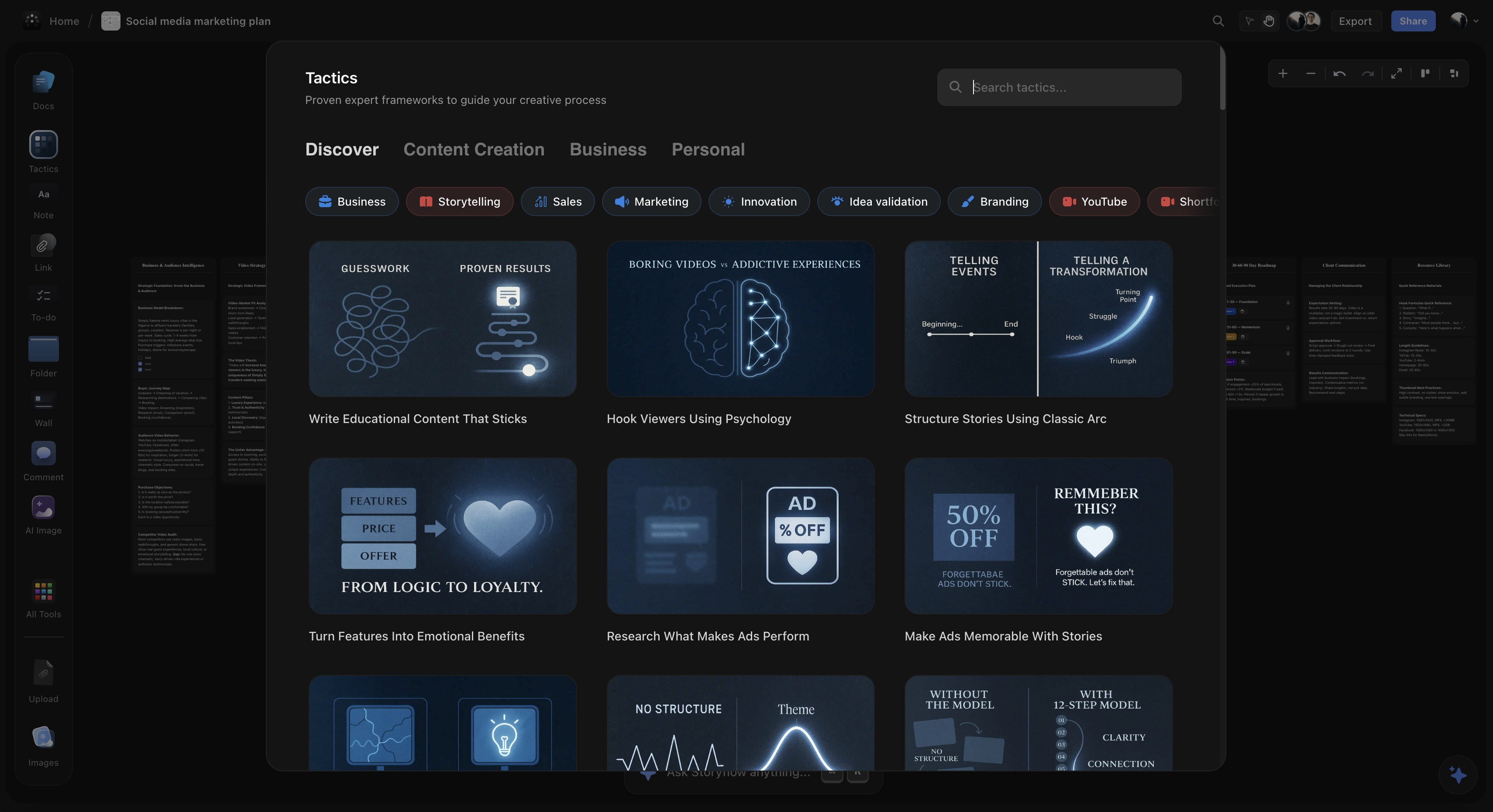
The result: You finish with two things: a completed campaign plan AND internalized knowledge of Customer Journey Mapping. The methodology becomes procedural knowledge, embedded in how you think, not just stored as facts you once read.
Available Tactics cover professional methodologies across domains:
Marketing & Sales
- Customer Journey Mapping
- AIDA Copywriting Framework
- MEDDIC Sales Framework
- Define Your Buyer Persona
- Turn Features Into Benefits
- Marketing Campaign Framework
Content & Storytelling
- The Hero's Journey
- Maximize YouTube Retention
- Hook Viewers Using Psychology
- Structure Stories in Three Acts
- Build Dynamic Conflict Narratives
- Content Strategy Framework
Strategy & Planning
- OKR Planning
- Product Strategy Framework
- Vision-to-Execution
- Go-to-Market Planning
- Competitive Analysis
- Business Model Canvas
Brand & Creative
- Find Your Brand Archetype
- Build Unforgettable Personal Brand
- Define Your Brand Voice
- Film Transformation Journeys
- Documentary Planning
- Creative Brief Framework
Tactics solve the knowledge-action gap: instead of learning frameworks in one context and applying them in another, you learn by applying. The methodology becomes permanent skill, not temporary information.
Zero Setup: Language In, Structure Out
Here's a pattern that wastes enormous amounts of creative energy: you have a project to plan. Before you can think about the project, you need to set up a system to hold your thinking. Database schema. Template structure. View configuration. Properties. Formulas.
This is the setup tax, the unpaid labor tools demand before delivering value. And it's worse than just lost time: the cognitive energy spent configuring depletes the cognitive energy available for actual thinking.
Storyflow eliminates this entirely. The interaction model:
Describe → Get Structure → Start Working
You: "I need to plan the launch strategy for our new analytics feature targeting enterprise customers"
Storyflow: Generates a visual workspace with relevant sections (market positioning, messaging, channels, timeline), suggests applicable Tactics (Go-to-Market Planning, Customer Journey Mapping), creates initial card structure you can immediately start filling in.
Time from intention to working: ~30 seconds.
Compare this to the Notion setup process: create a database, define properties, build templates, configure views, establish page structure... you can spend two hours preparing to think before you think.
The zero-setup approach produces a practical benefit beyond time savings: it removes a common procrastination pattern. "I'll start once my system is set up" becomes impossible when there's no system to set up. The gap between intention and action collapses.
If you would rather start from a ready board than a description, the Weekly Planner template opens with the recurring-week structure in place, and the Second Brain template gives your captured notes a home the AI can read on every later prompt.

Persistent Context vs. Conversation Amnesia
One of ChatGPT's most significant limitations for ongoing projects: every conversation starts fresh. The AI has no memory of your project, your brand voice, your previous decisions. You re-explain context constantly.
The practical cost is substantial. If you're developing a marketing campaign over two weeks, you might interact with the project fifteen times. With ChatGPT, that's fifteen re-explanations of your product, audience, goals, and constraints. The friction adds up.
Storyflow maintains persistent project context. Your entire workspace, all the cards, frameworks, content, and decisions, stays intact between sessions. When you return after a week, the AI understands your project completely because your project is visible in the workspace.
ChatGPT: Session 5 of Campaign Planning
"I'm planning a marketing campaign for [re-explains product]. Our target audience is [re-explains audience]. So far we've decided on [re-explains previous decisions]. Now I need help with the email sequence..."
Context re-established every session. Previous nuance often lost.
Storyflow: Session 5 of Campaign Planning
Open workspace → All previous work visible → Click on Email Sequence card → "Help me draft the nurture sequence that connects to the consideration stage content we developed"
Full context maintained. AI sees entire project. Builds on previous work.
The persistent context also enables something ChatGPT fundamentally can't do: noticing gaps and inconsistencies across your project. When the AI can see all your cards, it can identify where your messaging doesn't align with your audience definition, or where your funnel has missing stages.
One Prompt to Kanban, Tasks, and Mindmaps
Here's a capability that fundamentally changes how fast you can move from thinking to doing: Storyflow's AI can transform any text, your notes, a brainstorm session, a document you uploaded, or even just a description of what you're working on, into structured visual tools in a single prompt.
The AI workflow options:
Turn into Kanban
Describe a project or paste existing notes. AI analyzes the content and generates a kanban board with columns (To Do, In Progress, Done, or custom stages it identifies from your content) and cards distributed appropriately. What would take 30 minutes of manual setup happens in seconds.
Turn into Tasks
AI extracts actionable items from any text, meeting notes, project descriptions, brainstorms, and generates a structured task list. Each task gets appropriate priority, and related tasks are grouped. You get clarity on next actions without manual extraction.
Turn into Mindmap
Input any topic, paste a document, or describe a concept. AI generates a complete visual mindmap with the central node, main branches, and sub-branches, showing relationships and hierarchies you might not have seen in linear text. Especially effective for understanding complex documents quickly.
Turn into Planner
Describe what you're trying to accomplish. AI generates a timeline-based planner with phases, milestones, deadlines, and dependencies. Particularly useful for project kickoffs, you go from "I need to launch this feature" to a structured execution plan in one interaction.
Why this matters for productivity: The traditional workflow is: think about your project → decide how to organize it → create the organizational structure → move your thinking into that structure. Storyflow collapses this: describe your project → structure appears with your content already organized.
Example: From meeting notes to action
You have messy notes from a product planning meeting. In ChatGPT, you'd ask it to summarize, get text back, then manually create a task list, manually create a timeline, manually organize into a kanban.
In Storyflow: Paste the notes → "Turn into kanban" → Visual board appears with decisions, action items, and questions already categorized. Then "Turn this section into tasks" → Task list with priorities. Then "Turn the roadmap discussion into a planner" → Timeline with phases and milestones. Three clicks, three visual tools, zero manual organization.
The AI also works with your existing whiteboard content. If you've been brainstorming on the canvas and have cards scattered around, you can select them and ask AI to "Turn this into a mindmap" or "Organize this into a kanban." The AI reads your actual content and creates structure that fits what you've already developed.
One prompt gets you a structured board. Any text becomes a planner, kanban, mindmap, or task list in one prompt. This isn't AI generating more text for you to organize, it's AI generating organized structure from whatever input you provide.

Storyflow transforms any project brief into structured visual workspaces, kanbans, planners, and task boards in one prompt
Storyflow vs. ChatGPT: When to Use Each
This isn't about which tool is "better", they solve different problems. Understanding when to use each will make you more productive than committing to one for everything.
| Task Type | Use ChatGPT | Use Storyflow |
|---|---|---|
| Quick text generation | ✓ Fast, conversational | Overkill for simple tasks |
| Email editing | ✓ "Make this more concise" | Not designed for this |
| Research exploration | ✓ Conversational deep dives | Better for synthesis |
| Code help | ✓ Functions, debugging | Not the use case |
| Marketing campaign | Limited, text walls, no structure | ✓ Visual + Tactics + context |
| Content strategy | Can advise, can't organize | ✓ See entire strategy spatially |
| Product roadmap | No visual, no persistence | ✓ OKR Tactics, visual planning |
| Video planning | Can outline, can't structure | ✓ Retention Tactics, story frameworks |
| Learning frameworks | Can explain, doesn't guide application | ✓ Tactics teach through doing |
| Notes → Kanban/Tasks | Generates text list, you organize manually | ✓ One prompt creates visual board |
| Document → Mindmap | Can summarize, can't visualize | ✓ Instant visual mindmap from any text |
The principle: ChatGPT for single-prompt tasks with discrete outputs. Storyflow for multi-component projects requiring visual structure, methodology, and persistent context. Using either for the other's strength is working against the tool architecture.
Stop re-explaining your project to a chat window
Describe the project once and get a visual plan with phases, tasks, and milestones on a board the AI keeps reading, so week two starts where week one ended.

Storyflow vs. Notion AI: Different Problems Entirely
Notion and Storyflow are often compared, but they're solving fundamentally different problems. Understanding this prevents the frustration of using either for the wrong purpose.
Notion is a documentation and database tool. Its core strength is organizing information: wikis, databases, team knowledge bases, project documentation. Notion AI adds writing assistance within this paradigm, summarize a page, draft content, answer questions about your workspace.
Storyflow is a thinking and creation tool. Its core strength is structuring complex creative work: strategy development, campaign planning, content ideation. The AI doesn't just write within your structure, it generates structure, guides methodology, and reads your full active canvas board (plus up to 1 Tactic and 3 Documents you @-mention in the chat) so its suggestions reflect the project in front of you, not a blank prompt.
Where Storyflow loses: that canvas-first design is the wrong shape for documentation. If your real job is a structured wiki, a relational database, or a team knowledge base you query for months, Notion wins outright, and Storyflow's AI reads the active board rather than your entire workspace at once. For deep archives and records, reach for Notion, not Storyflow.
Notion AI Strengths
- Writing assistance in existing docs
- Summarizing pages and databases
- Q&A across your workspace
- Translation and editing
- Works within your existing Notion setup
Storyflow Strengths
- Visual project organization
- Expert Tactics that guide methodology
- Zero-setup workspace generation
- Framework-aware AI suggestions
- Built for creative planning, not documentation
Many productive people use both: Storyflow for active planning and creative development, Notion for documentation and knowledge management. The work flows one direction: ideas and strategies developed in Storyflow, documented and archived in Notion.
The setup difference matters: Notion requires you to build your system (databases, templates, views) before it's useful. Storyflow generates structure from a description. For quick creative sessions, Storyflow's zero-setup model means you're working immediately. For long-term knowledge management, Notion's database architecture is more appropriate.
Complete AI Productivity Tool Comparison (2026)
| Tool | Category | Best For | Limitations |
|---|---|---|---|
| Storyflow | Thinking Environment | Complex creative work, strategy, campaigns; one-prompt kanbans/mindmaps/tasks | Pairs with a doc tool for quick text edits |
| ChatGPT | Text Generator | Quick tasks, research, editing, code help | No persistence, no structure, no methodology |
| Claude | Text Generator | Long documents, analysis, nuanced tasks | Same structural limitations as ChatGPT |
| Notion AI | AI-Enhanced Docs | Documentation, wikis, team knowledge bases | Requires setup, not for visual planning |
| Perplexity | AI Research | Research with sources, fact-checking | Research only, not for creation |
| ClickUp Brain | AI-Enhanced PM | Task management, team coordination | Task-focused, not strategy-focused |
| Jasper | Marketing AI | Marketing copy generation | Template-based, doesn't teach methodology |
| Miro AI | Whiteboard AI | Team brainstorming, sticky notes | No Tactics, basic AI features |
How to Choose the Right Tool for Your Work
The question isn't "which is the best AI productivity tool?" It's "what's the actual constraint in my work?"
If your constraint is writing speed...
Use ChatGPT or Claude. They'll generate text faster than you can type. Great for emails, summaries, first drafts, editing assistance.
If your constraint is documentation...
Use Notion AI. It'll help you write within your knowledge base, summarize documents, maintain team wikis with AI assistance.
If your constraint is task coordination...
Use ClickUp or Asana with AI features. They'll predict risks, automate status updates, help teams stay aligned on who's doing what.
If your constraint is strategic thinking...
Use Storyflow. It'll help you structure complex problems, apply professional frameworks, maintain context across sessions, and see your entire project visually.
Most knowledge workers have multiple constraints at different times. The productive approach: keep several tools for different purposes rather than forcing one tool to do everything.
A productive 2026 setup might look like: Storyflow for planning and strategy → ChatGPT for quick text tasks → Notion for documentation → Your calendar's AI for scheduling. Each tool used for its actual strength, not stretched beyond its architecture.
For teams, the Team Planning Dashboard template is the fastest way to see the thinking-environment model in practice: strategy, tasks, and timelines on one canvas the whole team and the AI can read.
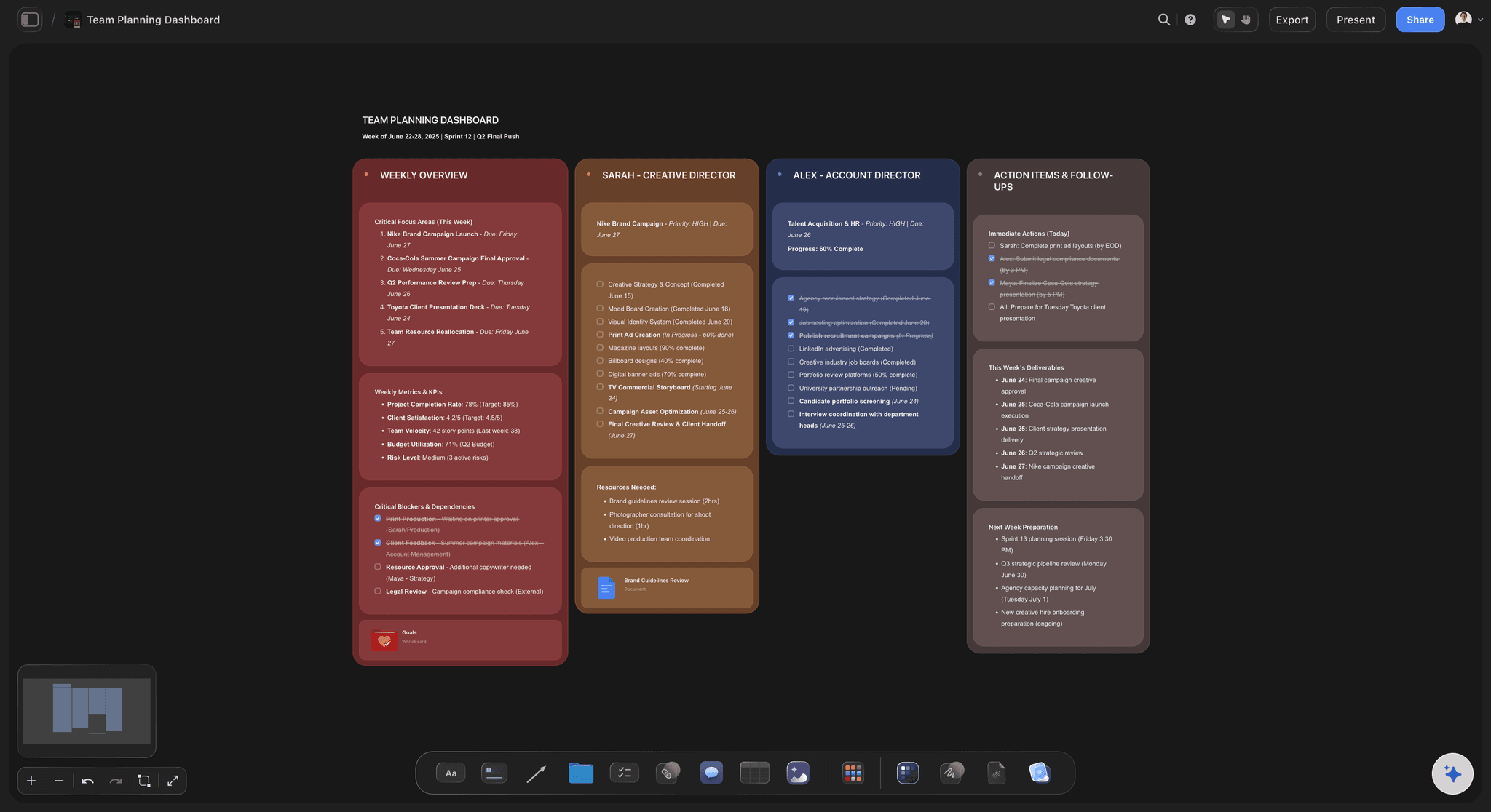
A Storyflow team planning dashboard keeps strategy, tasks, and timelines visible on one canvas instead of scattered across documents
FAQ
Frequently Asked Questions
What is the best AI tool for productivity in 2026?
The best AI productivity tool depends on your work type. ChatGPT is strongest at quick text tasks and research. Notion AI works well for documentation. For complex creative and strategic work, Storyflow provides visual organization with expert Tactics that teach professional frameworks while you work, producing better outcomes for projects that require structured thinking rather than just text generation.
What makes Storyflow different from ChatGPT for productivity?
ChatGPT generates text in response to prompts but loses context between sessions, outputs walls of text without structure, and requires you to know what to ask. Storyflow provides visual organization where you see your entire project spatially, maintains persistent context across sessions, and includes expert Tactics, professional frameworks like Customer Journey Mapping, AIDA, and OKR Planning, that guide your thinking and teach methodology while you work.
What are AI Tactics and how do they improve productivity?
AI Tactics are expert-designed frameworks embedded directly into Storyflow's workspace. Unlike templates (empty structures), Tactics include theory, examples, and guidance within each card. When you use the Customer Journey Mapping Tactic, you learn why each stage matters while building your actual campaign. This merges education with execution, you finish with both completed work and internalized methodology.
Is ChatGPT or Storyflow better for creative work?
ChatGPT is better for quick text generation, editing, and research assistance. Storyflow is better for complex creative projects requiring structure, content strategies, marketing campaigns, video planning, product roadmaps. The key difference: ChatGPT generates outputs; Storyflow guides process. For work where methodology matters more than word count, Storyflow produces consistently better results.
Do I need both ChatGPT and Storyflow?
Many productive knowledge workers use both. ChatGPT for quick tasks: 'Summarize this article,' 'Edit this email,' 'Explain this concept.' Storyflow for complex projects: 'Plan this marketing campaign,' 'Structure this content strategy,' 'Develop this product roadmap.' They solve different problems. Using ChatGPT for strategic planning or Storyflow for quick text edits wastes each tool's strengths.
How long does it take to set up Storyflow?
Storyflow requires zero setup. You describe your project in plain language, 'I need to plan a product launch', and it generates a visual workspace with relevant structure, mind maps, task breakdowns, and framework cards in seconds. Unlike Notion, which requires building databases and templates before you start, Storyflow eliminates the gap between intention and action.
What types of work is Storyflow best for?
Storyflow is strongest at complex creative and strategic work: marketing campaigns, content strategies, YouTube video planning, product roadmaps, business planning, brand development, research synthesis, and any project where methodology and structure matter more than raw text output. It's not designed for simple text editing or quick Q&A, use ChatGPT for those.
Can Storyflow replace Notion for productivity?
They serve different purposes. Notion is strongest at documentation, databases, wikis, and team knowledge management. Storyflow is strongest at thinking, planning, and creating with visual organization and expert Tactics. Some users keep Notion for documentation and archives while using Storyflow for active planning and creative work. The tools complement rather than replace each other.
How does Storyflow's AI generate kanbans, tasks, and mindmaps?
Storyflow's AI can transform any text into structured visual tools in one prompt. Type a description, paste notes, or upload a document, then select 'Turn into kanban,' 'Turn into mindmap,' 'Turn into tasks,' or 'Turn into planner.' The AI analyzes your content and generates the appropriate visual structure with your information already organized. You can also select existing content on your whiteboard and transform it. This eliminates the manual work of creating organizational structures before you can think.
The Shift That's Actually Happening
The AI productivity conversation in 2026 is still dominated by text generation. ChatGPT gets the headlines. The assumption persists that AI productivity means AI writing things for you.
But the real productivity gains for complex knowledge work aren't coming from faster text generation. They're coming from better thinking structure. Tools that help you organize problems, apply frameworks, maintain context, and see your work spatially are producing outcomes that text generators fundamentally can't match.
This is the difference between AI that generates output and AI that augments process. Between tools that write more words and tools that help you think better. Between productivity as "more stuff done" and productivity as "better outcomes achieved."
For simple tasks, ChatGPT changed everything. For complex creative work, the transformation is just beginning, and it looks less like text generation and more like methodology transfer, visual organization, and persistent context.
The question for any knowledge worker: what's actually constraining your most important work? If it's writing speed, the current tools are already transformative. If it's strategic clarity, methodology application, or project organization, the interesting developments are in thinking environments, not text generators.
If complex creative work is your constraint, marketing campaigns, content strategies, product planning, video production, here is the test that settles it: take the project you have re-explained to ChatGPT the most times this month and rebuild it in Storyflow for one week. Describe it once, let the AI generate the visual structure, apply the matching Tactic, and never paste your context again. By the end of the week you will know whether your bottleneck was writing speed or thinking structure.
Related Reading
The AI PM market has split into task automation vs. strategic augmentation. Learn which category solves which problem.
Compare when to use conversational AI versus visual workspaces for idea organization and creative projects.
Why creative work needs visual structure, not just text generation, and what tools provide it.
The ranked productivity app comparison across notes, tasks, and project planning.
The AI tools worth using that cost nothing, ranked by what they actually deliver.
The AI stack agencies use for client work, from brief to delivery.
Table of Contents
- The AI Productivity Paradox of 2026
- Three Categories of AI Productivity Tools
- Category 1: Text Generators (ChatGPT, Claude)
- Category 2: AI-Enhanced Task Managers
- Category 3: Thinking Environments
- Why Storyflow Outperforms for Complex Work
- Visual Organization vs. Text Walls
- Tactics: Embedded Methodology That Transfers
- Zero Setup: Language In, Structure Out
- Persistent Context vs. Conversation Amnesia
- One Prompt to Kanban, Tasks, and Mindmaps
- Storyflow vs. ChatGPT: When to Use Each
- Storyflow vs. Notion AI: Different Problems
- Complete AI Productivity Tool Comparison
- How to Choose the Right Tool for Your Work
- FAQ
Templates to check out for this topic


Planning and project templates you can use in Storyflow
Plan a launch, a sprint, or a whole project on a visual board the team can see at once. Open one of these templates and start from real structure.


See Storyflow in Action
A visual AI workspace where every feature lives inside one canvas. No tab-switching, no context lost.
Build your entire board from a single message
Type what you need in the AI chat at the bottom of your canvas. The AI adds cards, headings, and structure directly onto your board.
Use expert frameworks as AI context
Type @ in the AI chat and choose any Tactic. The AI tailors every response to that framework instead of giving generic advice.
Turn your board into a mind map in seconds
Ask the AI to restructure your canvas as a mindmap. It connects your ideas into a visual hierarchy so you can see how everything relates.
Why Storyflow Exists
Storyflow actually began as a personal tool while working on creative and research projects.
We kept running into the same problem: ideas were scattered everywhere: notes, documents, and whiteboards.
Nothing helped us see how everything connected.
So we started building a workspace designed around how ideas actually grow.
→ Read how Storyflow was createdSara de Klein
Head of Product at Storyflow
Published: January 25, 2026
Extremely simple, seriously capable


See how easy it is to get started
Watch a real project come together, from a blank board to a finished plan, clicked through step by step.
Start creating with AI and become more productive
Transform your creative workflow with AI-powered tools. Generate ideas, create content, and boost your productivity in minutes instead of hours.