
Category
Productivity
Author

Justkay
Documentary Filmmaker & Founder at Storyflow
Topics
2026-05-18
•
Updated July 2, 2026
•
15 min read
•
Productivity- best productivity apps 2026
- best productivity app
- productivity apps
- Notion alternative
- AI productivity app
- best task manager 2026
What is the best productivity app in 2026?
For broad all-in-one knowledge work, Notion is the best productivity app in 2026. Storyflow is the strongest pick for thinking-shaped and project-shaped work (its AI reads your whole canvas, not one page). Todoist is the best pure task manager, Motion the best AI calendar. Most people run a small stack, not one app.

Full disclosure: Storyflow is our own product, and we rank it #2 here, not #1. Productivity is a broad category, and Notion genuinely leads it for all-in-one knowledge work, while Todoist owns pure task management and Motion owns AI calendar scheduling. Storyflow earns the #2 slot for thinking- shaped and project-shaped work, where its AI reads the whole canvas instead of one page. Most people run a small stack, not one app. We link out to every tool so you can judge for yourself.
Quick Comparison: Best Productivity Apps
These four cover the main productivity jobs most people are deciding between: all-in-one knowledge work, project-shaped thinking, pure task management, and AI scheduling.
| Tool | Best For | AI Features | Price |
|---|---|---|---|
| Notion | Broad all-in-one knowledge work | Notion AI (page and database) | Free / $12 user mo |
| Storyflow | Thinking- and project-shaped work | Canvas-aware AI (reads the whole board) | $7.99 mo annual (free plan late 2026) |
| Todoist | Pure task capture and management | Light AI assist | Free / $4 mo |
| Motion | AI auto-scheduling onto a calendar | AI calendar auto-scheduling | $19 mo |
1) Quick Answer: The Best Productivity Apps in 2026
The best productivity app in 2026 is Notion for broad all-in-one knowledge work, with Storyflow the strongest pick when your work is thinking-shaped and project-shaped, where the AI reads your whole canvas instead of one page. Todoist is the best pure task manager, Things 3 the best for Apple-only minimalists, and Motion the best for AI calendar scheduling. Most working people in 2026 do not run one app. They run a task app, a calendar app, and a workspace, and the question is which workspace fits the shape of the work.
The short version: if your work is documents and databases, Notion. If your work is thinking, planning, and project structure where the AI needs the whole picture, Storyflow. If you just need tasks to get out of your head, Todoist or Things 3. If your week is a calendar fight, Motion or Sunsama. The honest answer is that the category has stopped being one app and started being a stack.
All 12 Productivity Apps, Ranked
- Notion: best all-in-one knowledge workspace
- Storyflow: best for thinking-shaped and project-shaped work, with AI that reads the whole canvas
- Todoist: best pure task manager
- Things 3: best Apple-only task manager, one-time purchase
- ClickUp: best heavy team project management
- Obsidian: best local-first knowledge base
- Sunsama: best calm daily planning and shutdown ritual
- Motion: best AI calendar auto-scheduling
- TickTick: best budget all-rounder
- Akiflow: best command-bar time-blocking
- Reclaim: best focus-time defense on a shared calendar
- Raycast: best keyboard launcher
Best Productivity App by Job
The overall ranking is not the answer to every question. Match the tool to the job you actually have:
- Best all-in-one knowledge workspace: Notion. The default for most people, and rightly so.
- Best app for thinking-shaped and project-shaped work: Storyflow. When the problem is deciding rather than tracking, a canvas the AI can read beats a task list.
- Best pure task manager: Todoist.
- Best Apple-only task manager: Things 3.
For the deeper case, see The 12 Best AI Productivity Tools in 2026 and The Best Project Planning Tools in 2026.
I have run multiple documentary projects through every shape of productivity tool there is: paper, task managers, Notion databases, calendar blockers, and the canvas Storyflow eventually became. The list below reflects living inside these apps on real work between 2024 and 2026, not a demo afternoon.
2) Comparison Table: 12 Productivity Apps Compared
Rating criteria: Tested on real project work, content schedules, and daily planning. Apps were rated on whether they fit a genuine shape of work and held up over weeks, not on feature counts.
3) What Makes a Productivity App Worth Using
Most people pick a productivity app the way they pick a New Year resolution. They read a list, install the highest-rated one, use it hard for two weeks, and quietly stop. The app was not bad. It was the wrong shape.
That is the framing this whole list runs on. A productivity app is not good or bad in the abstract. It is good or bad for a shape of work. There are five shapes, and almost every app on this list is built around one of them.
Task-shaped work is a list of discrete things that need doing. Email the client. Buy the cable. File the form. The work has no internal structure beyond done or not done. Todoist, Things 3, and TickTick are built for this shape.
Calendar-shaped work is work where the bottleneck is time, not memory. You know what to do. You do not know when it fits. Motion, Sunsama, Akiflow, and Reclaim are built for this shape.
Document-shaped work is work that lives as pages, wikis, and databases: notes, specs, records, knowledge that needs to be written down and found again. Notion and Obsidian are built for this shape.
Thinking-shaped work is work that does not have an order yet. You are figuring out what the project even is. The pieces need to be arranged in space before they can be arranged in a list. This is the shape a document actively fights, because a document forces a linear order before you have one.
Project-shaped work is a real undertaking with parts: a research phase, a plan, deliverables, a sequence, a deadline. It is bigger than a task and messier than a document.
Here is the structural problem. Most productivity apps are built for one shape and pretend they cover all five. Notion is a document app that bolts on a board view. Motion is a calendar app that bolts on a task list. The bolt-on always shows. The familiar move is to fight your app into a shape it was not built for. The better move is to name the shape of your work first, then pick the app that was actually built for it.
This is also why the app-switching tax is so high. The average digital worker toggles between applications nearly 1,200 times per day and spends almost four hours per week reorienting after switching, according to research published by Harvard Business Review in 2022. Research from the University of California, Irvine puts the cost of a single interruption at an average of 23 minutes to fully refocus. Every shape of work that does not fit your main app becomes a tab you switch to. That tax adds up.
4) How We Evaluated These Apps (On Real Work)
Every app on this list was used on actual work between 2024 and 2026: documentary research projects, a content calendar, a product roadmap, and ordinary daily planning. No synthetic tasks. Six criteria, weighted in this order.
- Shape fit. Does the app fit a genuine shape of work cleanly, or does it try to be everything and feel bolted together?
- Capture friction. How fast does material get into the app, across text, images, links, and voice? An app you have to fight at capture loses by default.
- Holds up over weeks. Does the app survive the messy reality of a multi-week project, or does it produce one good week and then drift into abandonment?
- AI usefulness. Does the AI do real work grounded in your actual context, or is it a chat box bolted to the corner that does not know what you are working on?
- Pricing honesty. What does the app cost when usage is real, when the team grows past three people, and when the AI features are switched on?
- Cross-app fit. No one runs one app. Does this app play well in a stack, or does it demand to be the only thing you use?
Apps were not scored on feature lists. A long feature list is not the same as fitting your work. The rankings reflect what each app felt like to actually live inside.
5) Quick Picks by Shape of Work
If you want the short list, pick by the shape of your work.
Best all-in-one knowledge workspace: Notion. The broadest app on the list. Pages, databases, wikis, light project tracking, all in one place.
Best for thinking-shaped and project-shaped work: Storyflow. An infinite canvas where the AI reads the whole board, so planning, research, and structure live in one space the AI can actually see.
Best pure task manager: Todoist. Fast capture, natural language input, the cleanest task model in the category.
Best for Apple-only minimalists: Things 3. The most beautiful task app on Apple devices, one-time purchase, no subscription.
Best for heavy team project management: ClickUp. Deep, configurable, built for teams that need every view.
Best local-first knowledge base: Obsidian. Plain-text Markdown files you own forever, on your machine.
Best calm daily planner: Sunsama. A guided morning ritual and evening shutdown that paces your day instead of overloading it.
Best AI calendar scheduling: Motion. Auto-schedules your tasks onto your calendar and reshuffles when the day moves.
Best budget all-rounder: TickTick. Tasks, habits, calendar, and a Pomodoro timer for about three dollars a month.
Best command-bar time-blocker: Akiflow. Pulls tasks from every tool into one keyboard-driven inbox you drag onto your calendar.
Best focus-time defender: Reclaim. Quietly carves and protects focus blocks on a shared work calendar.
Best keyboard launcher: Raycast. Opens apps, runs actions, and triggers workflows without your hands leaving the keyboard.
Put your next project on a canvas the AI can actually read
Describe the project once and Storyflow lays the plan out as cards on an infinite board, with AI that works from everything on it. Free plan arriving before the end of 2026.

6) Detailed Reviews: 12 Productivity Apps in 2026
1. Storyflow
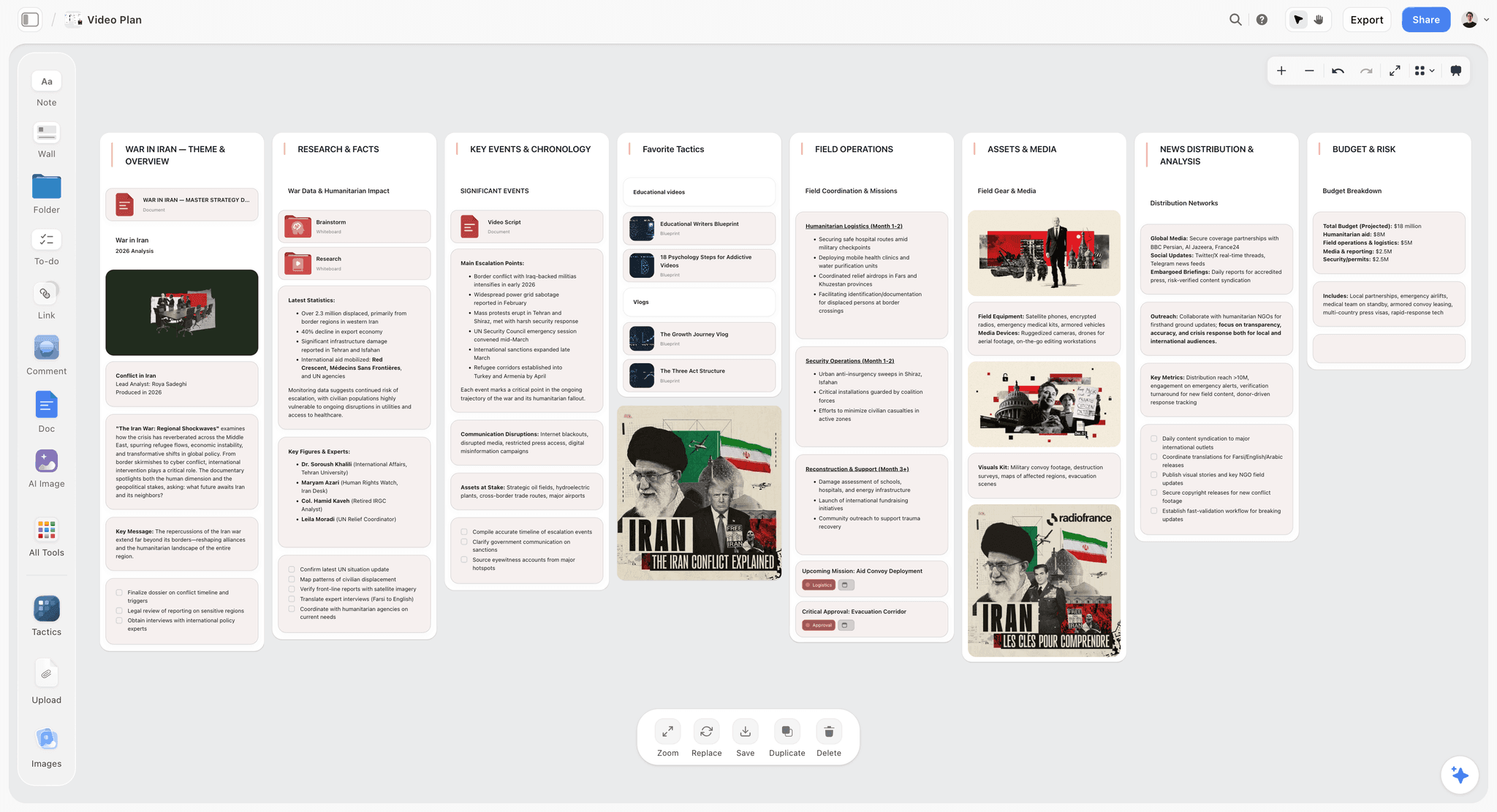
Storyflow is an infinite canvas workspace where structured cards, documents, and a kanban view live in one space, and the AI reads the whole active board instead of one page. It is here because it is the productivity app for the two shapes of work the rest of this list handles worst: thinking-shaped work that has no order yet, and project-shaped work with research, structure, and deliverables that need to be seen all at once.
Best for: Founders, project managers, filmmakers, writers, researchers, and visual thinkers running real projects, not just lists.
Verdict: The strongest pick when your work is a project you are still figuring out. Notion wins on raw breadth; Storyflow wins on the shape of work where a document fights you.
Key features
- Canvas-wide AI by default. The AI reads your full active canvas board, all the cards, documents, and structure on it. You can pull in up to 1 Tactic and up to 3 Documents by @-mention for extra grounding. It is not a chat box that ignores your project; it sees the project.
- Structured cards, documents, and kanban view. Notes, images, links, full documents, and a kanban view all live on one infinite canvas, so thinking-shaped work and task-shaped work share a surface.
- 200+ Story Blueprints. A library of expert frameworks (Plus tier and above) that scaffold a plan instead of starting from a blank canvas.
- Unlimited shared boards and unlimited collaboration on every paid plan, and anyone a paid member invites to a board joins free. The Max plan adds a team workspace with permissions and roles.
Pricing
Storyflow is paid-only during early access. Plus: $7.99/mo annual or $9.99/mo monthly (200+ Story Blueprints, unlimited file uploads). Pro: $14/mo annual or $19/mo monthly (adds AI image generation and 20x more AI than Plus). Max: $39/mo annual or $49/mo monthly (adds 40x more AI and a team workspace with permissions and roles). The Free plan (unlimited notes, images, and links, unlimited shared boards, unlimited collaboration, basic AI usage, and 20 file uploads) launches before the end of 2026.
Pros
- The AI reads the whole canvas, so it answers from the actual project, not a pasted fragment.
- The canvas fits thinking-shaped work that a document forces into a premature order.
- Collaborators invited by a paid member join free, with no seat limit.
Cons
- For pure calendar time-blocking and quick one-line task capture, a dedicated scheduling app like Motion or a task app like Todoist is lighter.
- Cloud-only. There is no local-first option for users in regulated industries.
- Newer platform than Notion, so the third-party template and integration ecosystem is smaller.
If your work is a project you are still figuring out, the test is simple. Take your most active project, rebuild it on a Storyflow canvas for one week, and ask the AI questions you would normally type into a chat tab. Start a Storyflow workspace and run that test. To skip the blank canvas, start from the Second Brain template for a knowledge hub or the Weekly Planner template for the daily-planning side, so the board opens with structure the AI can read.
2. Notion
Notion is the broadest productivity app in 2026 and the default recommendation for all-in-one knowledge work. It is a single tool that holds notes, wikis, databases, docs, and light project tracking, which is why it ranks first as the general-purpose pick.
Best for: Knowledge workers, small teams, and anyone who wants notes, docs, and databases in one place.
Verdict: The strongest all-rounder in the category. It earns the top slot on breadth, not depth, and the database model is the reason.
Key features
- Blocks and databases. Everything is a block, and any collection of blocks can become a database with table, board, calendar, gallery, and timeline views.
- Wikis and docs. Team knowledge bases, meeting notes, specs, and personal pages, all linkable and searchable.
- Notion AI. Q&A across your workspace, writing help, and database autofill, now folded into the Business tier.
- Huge template ecosystem. A deep library of community and official templates for almost any use case.
Pricing
Free plan with generous personal-use limits. Plus: $10/user/mo annual or $12/user/mo monthly. Business: $20/user/mo annual (this is where full Notion AI now lives, as of May 2026; verify current pricing on Notion's site). Enterprise: custom.
Pros
- The widest coverage of any single app on this list.
- The database model is genuinely powerful once it clicks.
- The template ecosystem means most setups are a few clicks away.
Cons
- Everything becomes a document. Visual, spatial, thinking-shaped work is awkward in a page-and-database model.
- Notion AI reads pages and databases, not a spatial picture of a project.
- Pricing scales per user, and full AI now sits behind the $20 Business tier.
3. Todoist
Todoist is the cleanest pure task manager in 2026. It does one shape of work, task capture and management, and does it with less friction than anything else on this list.
Best for: Anyone who wants tasks out of their head and into a fast, reliable list.
Verdict: The best pure to-do app in the category. It does not try to be a workspace, and that focus is the feature.
Key features
- Natural language quick add. Type "Email Sara every Monday at 9am" and Todoist parses the date, recurrence, and time.
- Projects, sections, labels, and filters. A clean hierarchy that scales from a grocery list to a full work system.
- Calendar layout and Task Assist AI. A calendar view and AI task help on the Pro plan.
- Cross-platform everywhere. Mac, Windows, web, iOS, Android, browser extensions, and a watch app.
Pricing
Free: 5 projects, basic features. Pro: $5/mo annual or $7/mo monthly (300 projects, calendar layout, full Task Assist AI). Business: $8/user/mo annual or $10/user/mo monthly. Todoist raised prices in December 2025; verify current pricing.
Pros
- The fastest, most reliable task capture in the category.
- Cross-platform coverage is complete and consistent.
- The free tier is usable, though the 5-project cap pushes serious users to Pro.
Cons
- It is a task app, not a workspace. Documents, research, and project structure live elsewhere.
- The free plan caps projects at 5, which is tight for anyone with real work.
- AI features are light compared to the AI-native apps on this list.
4. Things 3
Things 3 is the most refined task manager on Apple devices. It is the pick for minimalists inside the Apple ecosystem who want a beautiful, calm, one-time-purchase app.
Best for: Apple-only users who want an elegant task manager and dislike subscriptions.
Verdict: The best-designed task app on the list. The Apple-only limitation and per-device pricing are the only real knocks.
Key features
- Areas, projects, and headings. A calm structure built around the Getting Things Done method without forcing it on you.
- Today and Upcoming views. A clear separation between what is due now and what is coming.
- Quick Entry and natural language dates. Fast capture with a system-wide shortcut.
- Things Cloud sync. Free sync across your Apple devices.
Pricing
One-time purchase, no subscription: Mac $49.99, iPhone (with Apple Watch) $9.99, iPad $19.99. Roughly $80 for the full Apple suite. 15-day free trial on Mac only.
Pros
- The interaction design is the best in the category, full stop.
- One-time purchase. No recurring subscription.
- Things Cloud sync is included free.
Cons
- Apple-only. No Windows, Android, or web version exists.
- Per-device pricing means the full suite costs around $80 up front.
- No collaboration. Things 3 is strictly a personal app.
5. ClickUp
ClickUp is the deep, configurable project management app for teams. It is the pick when a team needs every view, every field, and every automation in one place.
Best for: Teams running structured project management who want maximum configurability.
Verdict: The most feature-dense app on the list. That density is its strength for teams and its weakness for solo users.
Key features
- Every view. List, board, Gantt, calendar, timeline, mind map, and whiteboard views on the same data.
- Custom fields and automations. Deep configurability with up to 10,000 automation actions per month on Business.
- Docs, goals, and dashboards. Project documentation, goal tracking, and reporting in the same workspace.
- ClickUp Brain AI. An AI layer, though it is a separate add-on rather than bundled.
Pricing
Free Forever plan. Unlimited: $7/user/mo annual or $10/mo monthly. Business: $12/user/mo annual or $19/mo monthly. ClickUp Brain AI is an add-on at $9/user/mo annual, not included in Free, Unlimited, or Business.
Pros
- The deepest project management feature set on the list.
- One workspace can replace several team tools.
- The Free Forever plan is genuinely capable for small teams.
Cons
- The feature density is overwhelming for solo users and small projects.
- Setup and configuration take real time before the team is productive.
- AI is a paid add-on on top of the per-user price.
6. Obsidian
Obsidian is the local-first knowledge base for people who want to own their notes as plain files. It is the pick when privacy, longevity, and offline control matter more than collaboration.
Best for: Researchers, writers, and developers who want a private, plain-text knowledge base they control.
Verdict: The strongest local-first note app in 2026. The plugin ecosystem is the moat; the learning curve is the cost.
Key features
- Plain-text Markdown files. Your notes are files on your disk, readable in any text editor, yours forever.
- Backlinks and graph view. Bidirectional links and a visual map of how your notes connect.
- 2,000+ community plugins. A large ecosystem that extends Obsidian into a task manager, kanban board, or canvas.
- Canvas core plugin. An infinite canvas for arranging notes spatially.
Pricing
The core app is free for personal use. Sync: $4/mo annual. Publish: $10/mo. Catalyst: one-time donation from $25. Commercial license: $50/user/yr.
Pros
- Local-first and plain-text. You own your data with no lock-in.
- The plugin ecosystem makes it as deep as you want.
- The free core app is fully functional for solo knowledge work.
Cons
- The learning curve is real, especially building a plugin-based setup.
- Collaboration is weak; Obsidian is built for one person.
- The AI story depends on third-party plugins, not a native, context-aware assistant.
7. Sunsama
Sunsama is the calm daily planner. It is the pick when your problem is not a missing task list but an overloaded day, and you want a tool that paces you.
Best for: Knowledge workers who feel buried and want a structured daily planning and shutdown ritual.
Verdict: The best daily-planning ritual on the list. It is a way of working as much as a tool, and the price reflects that positioning.
Key features
- Guided morning planning. Pull tasks from your other tools, estimate time, and drag each onto your calendar.
- Evening shutdown ritual. A guided reflection that carries incomplete work forward and helps you disconnect.
- 20+ integrations. Asana, ClickUp, Jira, Linear, Notion, Todoist, Trello, Gmail, Slack, and Google Calendar feed into Sunsama.
- Realistic daily planning. Sunsama nudges you to plan a day you can actually finish.
Pricing
One paid plan: $20/mo annual or $25/mo monthly. No permanent free tier; 14-day free trial with no credit card required. Sunsama raised its price in 2026 for the first time in five years.
Pros
- The morning and evening rituals genuinely change how a day feels.
- It sits on top of your existing tools rather than replacing them.
- The pacing nudges fight the habit of overloading a day.
Cons
- It is expensive for what is, mechanically, a daily planner.
- No free tier, so there is no long-term free option.
- It assumes you already have tasks elsewhere; it is not a primary task system.
8. Motion
Motion is the AI calendar that schedules your work for you. It is the pick when you have the tasks but cannot figure out when they fit.
Best for: Busy professionals whose bottleneck is fitting tasks into a packed calendar.
Verdict: The strongest AI auto-scheduler on the list. The automation is real; the price and the loss of manual control are the trade-offs.
Key features
- AI auto-scheduling. Motion places your tasks onto open calendar slots based on priority and deadline.
- Automatic rescheduling. When the day moves, Motion reshuffles the rest of your tasks around it.
- Projects and tasks. Task management built around the scheduling engine.
- AI chat and docs. An AI assistant and document features layered on top.
Pricing
Pro AI: $12.73/seat/mo annual (billed $152.76 yearly) or $19/seat/mo monthly. Business AI is higher and adds more AI credits. 7-day free trial; no free plan. Verify current pricing on Motion's site.
Pros
- The auto-scheduling genuinely removes the daily "when do I do this" decision.
- Automatic rescheduling handles a moving day without manual cleanup.
- Tasks and calendar live in one engine, not two apps.
Cons
- It is one of the most expensive apps on the list.
- Handing scheduling to an algorithm means giving up manual control of your day.
- It is calendar-and-task shaped; documents and project thinking live elsewhere.
9. TickTick
TickTick is the budget all-rounder. It is the pick when you want tasks, habits, a calendar, and a focus timer in one app without paying workspace prices.
Best for: Individuals who want a capable task-and-habit app at a low price.
Verdict: The best value on the list. It does several jobs competently for about three dollars a month.
Key features
- Tasks plus calendar view. A built-in calendar overlays tasks with Google Calendar sync.
- Habit tracker. Native habit tracking, which most task apps leave out.
- Pomodoro focus timer. A built-in focus timer for time-boxed work.
- Natural language input. Fast capture with parsed dates and recurrence.
Pricing
Free: 9 lists, calendar view, natural language input. Premium: $35.99/yr (about $3/mo). Verify current pricing.
Pros
- Tasks, habits, calendar, and a timer in one inexpensive app.
- The free tier is unusually generous.
- Cross-platform with consistent apps everywhere.
Cons
- It does several jobs well but none with the polish of a focused specialist.
- Collaboration features are basic.
- It is a personal productivity app, not a project workspace.
10. Akiflow
Akiflow is the command-bar time-blocker. It is the pick when your tasks are scattered across many tools and you want one keyboard-driven place to consolidate and time-block them.
Best for: Power users who live across many tools and want one inbox to time-block from.
Verdict: A strong consolidation layer for the time-blocking habit. The price is high for what it does, and there is no free tier.
Key features
- Universal inbox. Pull tasks from Todoist, Asana, Notion, Gmail, Slack, and more into one list.
- Command bar. A keyboard-first interface for capturing and scheduling without the mouse.
- Time-blocking. Drag tasks straight onto your calendar to commit time.
- Rituals. Guided daily planning and review, similar in spirit to Sunsama.
Pricing
One plan: $19/mo annual or $34/mo monthly. No free plan; 7-day trial with a card required.
Pros
- The universal inbox genuinely consolidates a scattered task setup.
- The command bar is fast for keyboard-driven users.
- Time-blocking is built in, not bolted on.
Cons
- The price is high for a consolidation-and-scheduling layer.
- No free tier, and the trial requires payment details.
- It depends on your other tools; it is not a standalone system.
11. Reclaim
Reclaim is the focus-time defender. It is the pick when meetings keep eating your calendar and you want AI to carve and protect time for actual work.
Best for: People on shared work calendars whose focus time keeps getting overwritten by meetings.
Verdict: The best calendar-defense tool on the list. It is narrow by design and pairs with, rather than replaces, a task app.
Key features
- Smart habits. Recurring routines that Reclaim auto-schedules into open time.
- Task auto-scheduling. Tasks from connected tools get placed and defended on your calendar.
- Smart meetings. Finds the best meeting time across attendees.
- Calendar defense. Focus blocks flex and move as your week changes but stay protected.
Pricing
Free Lite plan with limited smart meetings and habits. Starter: $8/user/mo annual. Business: higher, adds team analytics and admin controls. Verify current pricing.
Pros
- It quietly protects focus time without daily manual effort.
- The free Lite tier is enough to evaluate the core idea.
- It works alongside your existing task app rather than replacing it.
Cons
- It is narrow: calendar defense, not a full productivity system.
- It needs a connected task source to be useful.
- It is most valuable inside a meeting-heavy work culture.
12. Raycast
Raycast is the keyboard launcher that has grown into a productivity layer. It is the pick when you want to open apps, run actions, and trigger workflows without ever touching the mouse.
Best for: Mac power users who want keyboard-speed access to everything.
Verdict: The fastest interaction layer on the list. It is a launcher, not a workspace, and it is best as the connective tissue of a stack.
Key features
- Launcher and command bar. Open apps, search files, and run actions from one keystroke.
- Extensions. A large store of extensions that connect Raycast to other tools.
- Clipboard history and snippets. Quick access to past clipboard items and reusable text.
- AI commands. Built-in AI chat and quick AI actions on the Pro plan.
Pricing
Free core app. Pro: $8/user/mo annual or $10/mo monthly. Advanced AI: +$8/user/mo on top of Pro. Teams: $12/user/mo.
Pros
- It removes friction from dozens of small daily actions.
- The free core app is genuinely powerful.
- The extension ecosystem connects it to the rest of your stack.
Cons
- It is a launcher, not a place where work lives.
- It is Mac-first; the Windows version is newer and less complete.
- Full AI features sit behind Pro and the Advanced AI add-on.
7) Recommendations by Persona
13. Solo Founder / Operator
Top picks: Storyflow + Todoist
Storyflow for the project canvas where strategy, research, and plans live and the AI sees all of it. Todoist for the fast task list that catches everything else. This is the minimum viable productivity stack for one person running real projects.
14. Project Manager
Top picks: Storyflow + ClickUp
Storyflow for thinking-shaped work: scoping a project, arranging the parts, planning before there is an order. The Team Planning Dashboard template is a ready-made starting board for exactly that phase. ClickUp for the structured execution phase once the project is defined and the team needs every view and field.
15. Knowledge Worker / Generalist
Top picks: Notion + Sunsama
Notion as the all-in-one workspace for notes, docs, and databases. Sunsama on top as the daily planning ritual that turns a sprawling Notion workspace into a finishable day.
16. Apple-Only Minimalist
Top picks: Things 3 + Reclaim
Things 3 as the elegant personal task manager. Reclaim to defend focus time on the calendar. A calm, low-noise setup for someone who dislikes subscriptions and clutter.
17. Researcher / Writer
Top picks: Obsidian + Storyflow
Obsidian for the long-term, local-first knowledge base of notes and sources. Storyflow for the project itself: arranging research visually, structuring the piece, and asking the AI questions across the whole board.
18. Busy Executive / Calendar-Bound
Top picks: Motion + Raycast
Motion to auto-schedule tasks into a packed calendar and reshuffle as the day moves. Raycast for keyboard-speed access to everything else. A stack built for someone whose scarce resource is time, not ideas.
19. Budget-Conscious Individual
Top picks: TickTick + Storyflow
TickTick for tasks, habits, and a calendar at about three dollars a month. Storyflow's Plus tier for project canvases, unlimited boards, and basic AI at $7.99 a month billed annually. A capable setup for well under twelve dollars a month.
8) Honorable Mentions
A few apps that came close but did not make the main twelve.
- Asana: Strong team project management; narrower than ClickUp on views and pricier per seat.
- Trello: The simplest kanban board there is; great for light use, thin for complex projects. See The Best Trello Alternatives in 2026.
- Apple Reminders: Genuinely good and free on Apple devices; just lighter than Things 3 or Todoist.
- Google Calendar: The default calendar most stacks are built around; not a productivity app on its own.
- Amie: A polished calendar-and-task hybrid; newer and less proven than Sunsama or Motion.
- Microsoft To Do: Solid and free inside the Microsoft ecosystem; limited outside it.
- Capacities: An object-based note app with a loyal following; narrower than Notion or Obsidian.
These are not weak apps. Their shape of work or audience is narrower than the main list.
9) Where These Apps Fail (An Honest Accounting)
Honest accounting matters. A list of twelve apps implies one of them will fix your productivity. None of them will, and pretending otherwise wastes your money.
A productivity app cannot decide what matters. It can hold a thousand tasks. It cannot tell you which three actually move your work forward. That judgment is yours, and no app, AI included, replaces it.
App-switching is a real cost these tools create. Every app you add is another place to check, another sync to trust, another tab to switch to. The research is blunt here: digital workers lose almost four hours a week to reorienting after switches, per Harvard Business Review. A stack of six apps can be less productive than a focused stack of two.
Most apps fail at the abandonment test. The hard part is not week one. It is week six, when the novelty is gone and the system has to survive a bad week. Most setups quietly collapse there. The fix is rarely a new app; it is a simpler system you will actually keep.
AI does not understand your work unless it can see it. A chat box bolted to the corner of an app, with no access to your project, produces generic output. This is the specific gap Storyflow is built to close: the AI reads the whole canvas, so it answers from your actual project. But even canvas-wide AI does not set your priorities. It drafts, structures, and surfaces. It does not decide.
No app fixes overcommitment. If you say yes to too much, a better task manager just gives you a tidier list of things you cannot finish. The tool is downstream of the decision.
If your productivity problem is really a priorities problem, no app on this list solves it. The right use of these tools is to remove friction from work you have already decided to do, not to decide for you.
11) The Bottom Line
The best productivity app in 2026 depends on the shape of your work, not on a star rating. Notion is the best all-in-one workspace for document-shaped and database-shaped knowledge work. Storyflow is the strongest pick when your work is thinking-shaped or project-shaped, because the AI reads your whole canvas, the full board of cards, documents, and structure, instead of one page. Todoist and Things 3 are the best pure task managers. Motion and Sunsama are the best for calendar-shaped work.
Most people in 2026 do not run one app. They run a small stack: a workspace for projects, a task app for capture, and a calendar tool if time is the bottleneck. The mistake is adding apps until the stack itself becomes the work. Name the shapes of your work, pick the app built for each shape, and stop there.
If your work is a project you are still figuring out, the move is to take one active project and rebuild it on a Storyflow canvas for two weeks, with the AI reading the whole board. Start a Storyflow workspace to run that test.
10) FAQ: Productivity Apps in 2026
What are the best productivity apps?
The best productivity apps in 2026 span a few shapes of work: Notion for all-in-one docs and databases, Todoist for pure task management, Motion for AI calendar scheduling, and Storyflow for thinking-shaped and project-shaped work where an AI reads your whole canvas. Notion is the best all-round pick for most people, while Todoist and Things 3 win for tasks and Motion wins for automatic scheduling. There is no single best app for everyone, so build the smallest stack that covers the shapes of work you actually do.
What is the best productivity app in 2026?
For broad all-in-one knowledge work, Notion is the best productivity app in 2026. For thinking-shaped and project-shaped work, where you need an AI that reads your whole project instead of one page, Storyflow is the strongest pick. For pure task management, Todoist. There is no single best app for everyone; the right pick depends on the shape of your work.
What is the best free productivity app?
Notion's free plan is excellent for personal knowledge work. Todoist Free covers 5 projects, Obsidian's core app is free for personal use, and TickTick's free tier is generous for tasks and habits. Storyflow is paid-only during early access; its Free plan (unlimited boards, unlimited notes, images, and links, unlimited collaboration, basic AI) launches before the end of 2026, and anyone a paid member invites to a board joins free now.
Do I need more than one productivity app?
Usually, yes. Most people in 2026 run a small stack: a task app, a calendar, and a workspace. The work splits into shapes (task-shaped, calendar-shaped, project-shaped) and no single app handles all of them well. The goal is the smallest stack that covers your shapes, not the most apps.
Is Notion or Storyflow better?
They fit different shapes of work. Notion is better for document-shaped and database-shaped work: notes, wikis, records, structured pages. Storyflow is better for thinking-shaped and project-shaped work: arranging ideas in space before they have an order, with an AI that reads the whole canvas. Many people use Notion for their knowledge base and Storyflow for active projects.
What is the best productivity app for task management?
Todoist is the best pure task manager in 2026 for cross-platform users, with the fastest capture and the cleanest task model. Things 3 is the best for Apple-only users who want elegant design and a one-time purchase. TickTick is the best budget option, adding habits and a calendar.
What is the best productivity app for AI scheduling?
Motion is the best AI calendar-scheduling app in 2026. It auto-places your tasks onto open calendar slots by priority and deadline, then reshuffles when your day moves. Reclaim is a strong alternative focused on defending recurring focus time, and Sunsama offers a calmer, manual daily planning ritual instead of full automation.
Are one-time-purchase productivity apps better than subscriptions?
It depends on the app. Things 3 (one-time purchase) and Obsidian (free core) avoid recurring fees and suit people who dislike subscriptions. But subscription apps fund continuous development and AI features that one-time apps rarely match. For an app you rely on daily, the question is total cost over years, not the model alone.
What is the best productivity app for a small team?
ClickUp is the most capable for structured team project management, with every view and deep configurability. Notion is better for teams whose work is mostly docs and knowledge. Storyflow's Max plan adds a team workspace with permissions and roles for teams running visual, project-shaped work together.
How much should I spend on productivity apps?
Less than you think. A focused stack of two apps often beats six. A capable setup runs from free (Notion Free plus a task app's free tier) to around $15 to $25 a month for a paid workspace like Storyflow Plus ($7.99/month billed annually) plus a paid task app. The expensive AI scheduling apps (Motion, Akiflow, Sunsama) are worth it only if calendar time is genuinely your bottleneck.
Do productivity apps actually make you more productive?
They remove friction from work you have already decided to do. They do not decide what matters or fix overcommitment. App-switching itself carries a real cost: research published by Harvard Business Review found digital workers lose almost four hours a week reorienting after switching apps. The productive move is the smallest stack that fits your work, used consistently.
What is the smallest test I can run?
Pick your most active current project and rebuild it in one app for one week. If the project is mostly a list, test Todoist. If it is mostly documents, test Notion. If it is thinking-shaped or project-shaped (research, structure, no order yet), put it on a Storyflow canvas and ask the AI questions across the whole board. Try a Storyflow workspace to run that test.
Table of Contents
- Quick Answer: The Best Productivity Apps in 2026
- Comparison Table: 12 Productivity Apps Compared
- What Makes a Productivity App Worth Using
- How We Evaluated These Apps (On Real Work)
- Quick Picks by Shape of Work
- Detailed Reviews: 12 Productivity Apps in 2026
- Recommendations by Persona
- Honorable Mentions
- Where These Apps Fail (An Honest Accounting)
- FAQ: Productivity Apps in 2026
- The Bottom Line
- Author
- Related Reading
Templates to check out for this topic


Planning and project templates you can use in Storyflow
Plan a launch, a sprint, or a whole project on a visual board the team can see at once. Open one of these templates and start from real structure.


See Storyflow in Action
A visual AI workspace where every feature lives inside one canvas. No tab-switching, no context lost.
Build your entire board from a single message
Type what you need in the AI chat at the bottom of your canvas. The AI adds cards, headings, and structure directly onto your board.
Use expert frameworks as AI context
Type @ in the AI chat and choose any Tactic. The AI tailors every response to that framework instead of giving generic advice.
Turn your board into a mind map in seconds
Ask the AI to restructure your canvas as a mindmap. It connects your ideas into a visual hierarchy so you can see how everything relates.
Why Storyflow Exists
Storyflow actually began as a personal tool while working on creative and research projects.
We kept running into the same problem: ideas were scattered everywhere: notes, documents, and whiteboards.
Nothing helped us see how everything connected.
So we started building a workspace designed around how ideas actually grow.
→ Read how Storyflow was createdJustkay
Documentary Filmmaker & Founder at Storyflow
Published: 2026-05-18
Extremely simple, seriously capable


See how easy it is to get started
Watch a real project come together, from a blank board to a finished plan, clicked through step by step.
Start creating with AI and become more productive
Transform your creative workflow with AI-powered tools. Generate ideas, create content, and boost your productivity in minutes instead of hours.