
Category
Visual Thinking
Author

Justkay
Documentary Filmmaker & Founder at Storyflow
Topics
2026-05-19
•
Updated May 19, 2026
•
15 min read
•
Visual Thinking- best Padlet alternatives 2026
- Padlet alternative
- alternatives to Padlet
- Padlet vs Miro
- free Padlet alternative
- online collaboration wall
What is the best Padlet alternative in 2026?
The best Padlet alternative in 2026 is Storyflow if you are a team or a creator who needs collected posts to become real work, because its AI reads the whole canvas and turns a wall of contributions into a structured project. If you want a heavy team whiteboard, Miro is the strongest pick, and FigJam is the best fit for design teams. For classroom use, Padlet itself or FigJam's free education tier may still be best; this ranking is aimed at teams and creators rather than K-12 use.

All 12 Padlet Alternatives, Ranked
- Storyflow: best for turning collected posts into a structured project
- Miro: best for team whiteboarding at scale
- FigJam: best for design teams and classrooms
- Mural: best for facilitated workshops
- Notion: best for document-and-database collaboration
- Excalidraw: best for fast, free visual sketching
- Trello: best for simple visual task management
- Canva Whiteboards: best for visual, design-leaning teams
- Conceptboard: best for enterprise review and feedback
- Microsoft Whiteboard: best for Microsoft 365 teams
- xTiles: best for flexible notes and light projects
- Lino: best for the simplest sticky-note wall
Full disclosure: Storyflow is our own product, and we rank it #1 for one job: turning a wall of collected posts into a structured project, where the AI reads your whole board. For heavy team whiteboarding Miro is stronger, and for facilitated live workshops Mural is stronger. Storyflow is not built for frictionless no-account classroom collecting, so for pure K-12 use Padlet itself or FigJam's education tier is the better pick. We link to every tool so you can judge the fit.
How the Padlet alternatives compare on trust, innovation, ratings and pricing
Which Padlet alternatives are the most trusted?
Canva is the most trusted alternative for classrooms and teams that want something everyone can already open, and its education tier is widely deployed. Miro is the most trusted alternative once the board is for work rather than for a class. Wakelet is the most trusted direct replacement in education specifically, and is the closest match to what Padlet does. Storyflow is early access and is the alternative for creative project boards rather than for classroom walls.
Which Padlet alternatives are the most innovative?
Storyflow is the most innovative on AI, because the board can be generated from a brief and the assistant reads the whole board rather than one card. Miro is the most innovative on scale, holding up with far more contributors than Padlet was built for. Wakelet is the most innovative on curation, built around collecting links and media rather than sticky notes. Canva innovates on making the result presentable.
Which Padlet alternatives are the most highly rated?
Canva and Miro carry the highest ratings by volume in this set, both above 4.5 out of 5. Wakelet holds the highest satisfaction among teachers specifically. Ratings here reward how easily a contributor can add something without an account, which is the exact thing Padlet is loved for and the bar every alternative is judged against.
Which Padlet alternatives have fair and transparent pricing?
Canva and Wakelet both keep genuinely free education tiers, the fairest in the set. Miro caps the free plan at three editable boards, which is tight for a class. Most people looking for a Padlet alternative are doing so because Padlet moved features behind its paid tier, so the honest comparison is what each free tier actually allows rather than the paid sticker price. Storyflow is paid-only during early access, from 7.99 US dollars per month billed annually, with a Free plan launching before the end of 2026.
Which Padlet alternatives have performed consistently over the years?
Miro has shipped since 2011 and Canva since 2013, both without losing older boards. Wakelet has been stable since 2016. The cautionary case is Google Jamboard, which many schools standardised on and which Google shut down in 2024, and that is the strongest argument here for choosing a vendor whose whole business is the board. Storyflow is early access and cannot claim that history yet.
Quick Comparison: Best Padlet Alternatives
These four cover the jobs people leave Padlet for: turning a wall of posts into a project, team whiteboarding at scale, design-team collaboration, and facilitated workshops.
| Tool | Best For | AI Features | Price |
|---|---|---|---|
| Storyflow | Turning collected posts into a project | Canvas-aware AI reads the full board | $7.99 mo annual (free plan late 2026) |
| Miro | Team whiteboarding at scale | AI Sidekicks for diagrams and summaries | Free / $8 user mo |
| FigJam | Design teams and classrooms | Built-in AI for brainstorms and flows | Free / $5 user mo |
| Mural | Facilitated workshops | AI clustering and summarizing notes | Free / $9.99 user mo |
When the wall of posts needs to become real work.
Padlet collects contributions, then leaves you to make sense of them. Move the wall onto a canvas where AI reads every post at once and turns the pile into a structured project you can act on.

1) Quick Answer: The Best Padlet Alternative in 2026
The best Padlet alternative in 2026 is Storyflow if you are a team or a creator and you need the posts to become real work, because its AI reads the whole canvas and turns a wall of contributions into a structured project. If you want a heavy team whiteboard, Miro is the strongest pick, and FigJam is the best fit for design teams. If you are a classroom teacher, be honest with yourself: Padlet itself, or FigJam's free education tier, is probably still your best option, and this list is aimed at teams and creators rather than K-12 use.
The short version: Padlet is a wall. Everyone posts to it, it fills up with notes, images, and links, and it is genuinely good at that. You only need an alternative when you notice the wall just sits there. The posts are collected and nothing has been built from them. A wall collects. A workspace builds. The right alternative is the one that turns the collection into something.
For the wider category, see The 12 Best Visual Collaboration Tools in 2026 and The Best Online Whiteboard Tools in 2026.
2) Comparison Table: 12 Padlet Alternatives Compared
Rating criteria: tested on real collaboration, planning, and multi-week project work between 2024 and 2026. Pricing is current as of May 2026; verify current pricing on each tool's official page before buying.
3) Why People Look for a Padlet Alternative
Padlet is genuinely good at one thing. It is a digital wall: a shared space where anyone with a link can post a note, an image, a link, or a file, with almost no learning curve and no account required to contribute. Teachers use it with classrooms, teams use it to gather ideas, and event organizers use it to collect submissions. It is fast, friendly, and frictionless. People do not leave Padlet because it is hard. They leave because of what happens after the wall fills up.
The wall fills, and then it just sits there. A few days into a real project, the Padlet board is full of posts and nothing has been built from them. Everyone contributed, the wall looks busy, and the actual work, the plan, the structure, the decision, has not happened. This is not a Padlet failure. It is what Padlet is for. It collects; it does not build.
The structure is flat. Padlet posts sit in a grid, a shelf, or a stream. There is no concept of a card you open into a document, a project with phases, or a structured plan. As contributions pile up, the flat wall gets harder to act on, not easier.
There is no AI doing the work. Padlet has no deep AI that reads the wall, clusters the posts, and turns them into a plan. Everything past the collecting stage, you do by hand.
The Wall and the Workspace
Here is the framework this article is built on. Padlet is a wall. A wall is genuinely useful: it is the easiest possible way to get many people to contribute to one shared surface. Anyone can post, nothing is intimidating, and a wall fills up fast. For collecting, a wall is hard to beat.
But a wall has one defining limit. A wall is where contributions land. It is not where they get turned into anything. The posts arrive, they stick, and there they stay. The wall does not cluster them, structure them, or build a plan from them. It just holds them.
Most people who outgrow Padlet outgrow exactly this. For the collecting stage, a wall is perfect. Then the work changes. The contributions have to become a decision, a structure, a plan, an output, and a wall cannot do any of that. A wall collects. A workspace builds. The right Padlet alternative is not a nicer wall. It is a workspace that takes the collected posts and turns them into work.
4) How We Evaluated These Tools
Every tool here was tested on real work between 2024 and 2026: team brainstorms, content planning, documentary pre-production, and recurring collaborative sessions. No synthetic benchmarks. Six criteria, weighted in this order.
- Does it build, or only collect? Can the tool turn contributions into a structured plan and an output, or does it stop at the wall?
- AI depth. Is there an AI that reads the board, clusters the posts, and does real lifting?
- Structure. Can posts become cards, documents, and a real project, or does everything stay a flat tile?
- Collaboration and access. How easy is it for many people to contribute, and how well does real-time co-editing work?
- Ease of contribution. How close does it get to Padlet's genuinely frictionless, no-account posting? This is what Padlet users miss most.
- Price and free tier. What does it cost at real usage, and is the free plan genuinely usable?
Tools were tested on real workflows over weeks, not in a 30-second demo. The rankings reflect how each tool felt to actually use once the wall of posts needed to become real work.
5) Quick Picks by Job to Be Done
If you want the short list, organize by the job, not the brand.
Best for turning collected posts into a project: Storyflow. The AI reads the whole board and turns contributions into a structured plan.
Best for team whiteboarding at scale: Miro. The deepest collaboration and template set.
Best for facilitated workshops: Mural. Timers, voting, and structured sessions.
Best for design teams and classrooms: FigJam. Collaborative, and free for verified educators.
Best for document-shaped collaboration: Notion. Pages and databases instead of a wall.
Best for simple task tracking: Trello. Posts that move through columns.
Best for the simplest possible sticky-note wall: Lino. The closest to Padlet's basic experience.
Best for Microsoft 365 teams: Microsoft Whiteboard. Native in Teams.
6) Detailed Reviews: 12 Padlet Alternatives in 2026
1. Storyflow
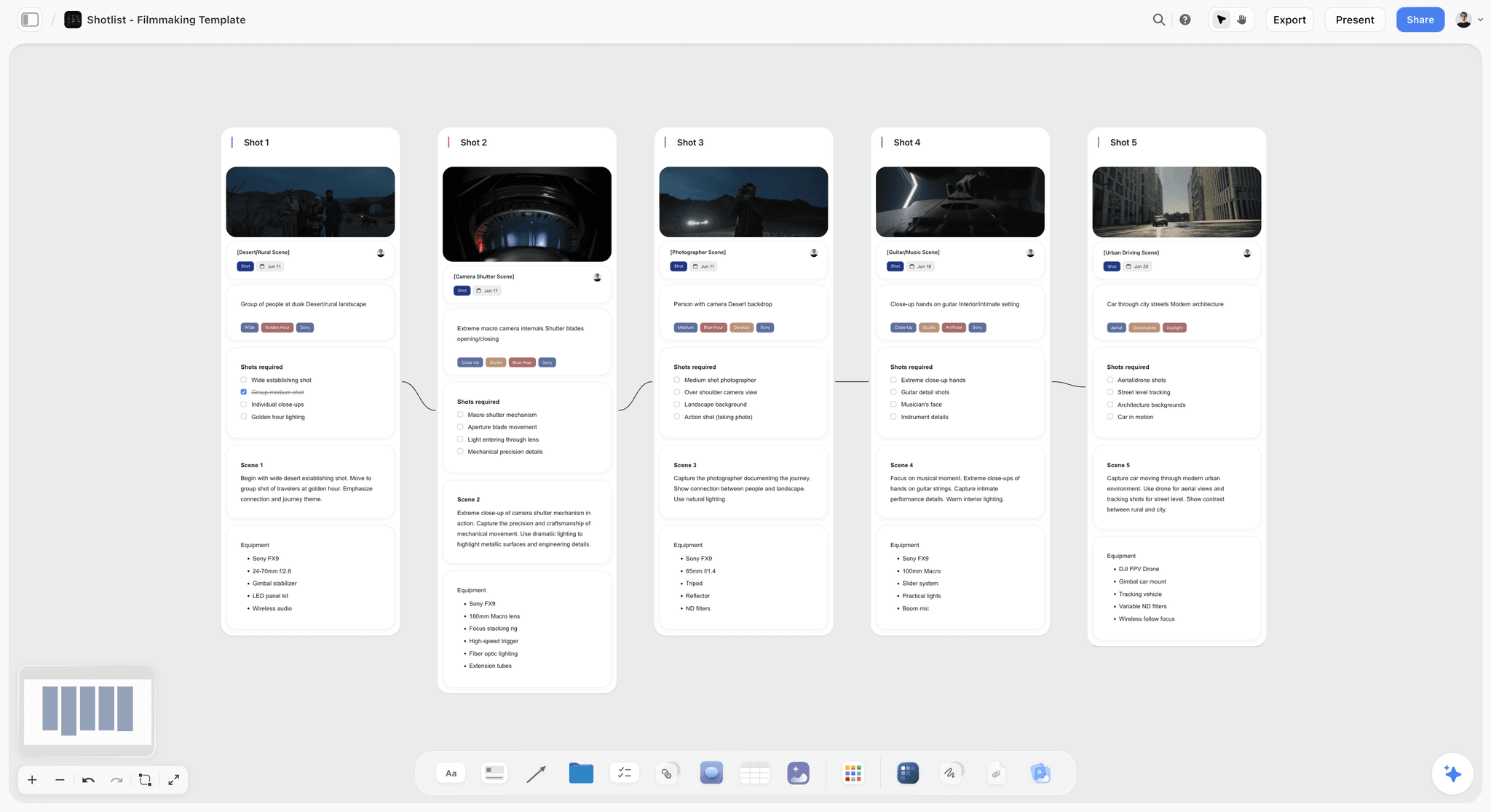
Storyflow is the alternative to pick when the problem is not Padlet's wall but what happens after it fills up. It is an AI-powered visual creative workspace: an infinite canvas of structured cards and documents where the AI reads the whole board. It keeps the thing Padlet does well, a shared visual surface that many people can contribute to, and adds the thing Padlet has no interest in doing: turning the collection into a built project.
The difference shows up once the wall is full. In Padlet, you have a busy board and a project that has not started. In Storyflow, you ask the AI to read the canvas, cluster the contributions, draft the plan, and structure the next steps, and it does, because the AI reads every card, note, image, and link on the board. The collected ideas and the finished plan live in the same place. A wall collects. A workspace builds. Storyflow is built for the building.
Best for: Teams, creators, founders, and project leads whose Padlet boards fill with contributions that never become a structured project.
Verdict: The strongest Padlet alternative for teams and creators who need the posts to become work. For the lightest no-account collecting, Padlet itself is still simpler. Storyflow earns its place the moment the wall has to become a project.
Key features
- Canvas-aware AI by default. The AI reads your full active canvas board (every card, note, image, and link on it). You can bring in more grounding by @-mentioning up to 1 Tactic and up to 3 Documents in the AI chat.
- Structured cards and documents. Contributions become movable cards and full documents on an infinite canvas, not flat tiles on a wall.
- 200+ Story Blueprints. An expert-built template library covering creative and strategic frameworks, included on the Plus tier and above.
- Unlimited shared boards and unlimited collaboration on every plan, including Free. The Max plan adds a team workspace with permissions and roles.
Pricing
Free: launching before the end of 2026; invited collaborators of paid members join free today. Unlimited notes, images, and links, unlimited shared boards, unlimited collaboration, basic AI, and 20 file uploads. The Free plan does not include the 200+ Story Blueprints library. Plus: $7.99 per month annual or $9.99 per month monthly (adds the 200+ Story Blueprints, unlimited uploads). Pro: $14 per month annual or $19 per month monthly (adds AI image generation and 20x more AI than Plus). Max: $39 per month annual or $49 per month monthly (adds 40x more AI and a team workspace with permissions and roles). Pricing current as of May 2026.
Pros
- The AI reads the whole board and turns collected posts into a structured project.
- The board holds the contributions and the finished plan in one place.
- The Free plan is genuinely usable: unlimited boards, unlimited cards, unlimited collaboration, forever.
Cons
- For the lightest no-account collecting from many casual contributors, Padlet is still simpler.
- It is built for teams and creators, not for K-12 classroom management; teachers may be better served by Padlet or FigJam's education tier.
- Cloud-only; there is no local-first or offline-only mode.
If your Padlet wall keeps filling without anything getting built, rebuild your project on a Storyflow board for a week. Start a Storyflow workspace and ask the AI to turn the contributions into a plan. The difference is usually obvious within an hour.
2. Miro
Miro is the most widely adopted visual collaboration platform in 2026, with more than 90 million users, and it is the strongest Padlet alternative when you need real team whiteboarding. Where Padlet is a wall of posts, Miro is a full canvas for teams to think, plan, and build together.
Best for: Teams running workshops, planning, and brainstorming at scale.
Verdict: The default team upgrade from Padlet. Far more capable, with a steeper learning curve.
Key features
- Infinite canvas with a vast template library and an apps marketplace.
- AI Sidekicks that generate diagrams, summaries, and next steps.
- Real-time co-editing, comments, voting, and timers.
- Deep integrations with Jira, Asana, and Slack.
Pricing
Free tier with limited boards. Paid plans start around $8 per user per month billed annually. Pricing current as of May 2026.
Pros
- The deepest collaboration feature set of any tool here.
- Huge template and integration ecosystem.
- AI Sidekicks add real on-canvas assistance.
Cons
- More complex than Padlet's simple wall.
- Per-user pricing adds up for larger groups.
- Casual contributors face more friction than posting to a Padlet.
3. Mural
Mural is the Padlet alternative built for facilitated workshops. Where Padlet collects posts, Mural runs a structured session, with timers, voting, and a facilitator's controls.
Best for: Facilitators and teams running structured workshops and sprints.
Verdict: The best Padlet alternative for run-a-workshop work. Overkill for simple collecting.
Key features
- Facilitation tooling: timers, voting, private mode, and session controls.
- Large library of workshop and sprint templates.
- Real-time collaboration built for groups.
- AI features for clustering and summarizing notes.
Pricing
Free tier. Paid plans start around $9.99 per user per month. Pricing current as of May 2026.
Pros
- The strongest facilitation toolset of any tool here.
- Excellent templates for structured sessions.
- Built for groups working together live.
Cons
- Heavy for simple post-collecting.
- Per-user pricing scales up for larger groups.
- The output still tends to stay flat after the session.
4. FigJam
FigJam is Figma's whiteboard, and it is a strong Padlet alternative for design teams and, notably, for classrooms: FigJam is free for verified teachers and students. It is collaborative, fast, and connects to Figma design files.
Best for: Design teams and educators who want a free, collaborative whiteboard.
Verdict: The best Padlet alternative for design teams, and a genuine option for classrooms.
Key features
- Native integration with Figma design files.
- Templates for brainstorming, flows, and workshops.
- Real-time collaboration with stickies and cursor chat.
- Free for verified educators and students.
Pricing
Free tier, free for verified education users; a FigJam seat otherwise starts around $5 per user per month. Pricing current as of May 2026.
Pros
- Genuinely fun and fast for group sessions.
- Free for verified teachers and students.
- The smoothest whiteboard-to-design workflow here.
Cons
- A whiteboard, not a structured project workspace.
- The full value depends on using Figma.
- No persistent project structure across boards.
5. Notion
Notion is the Padlet alternative for collaboration that is really document-and-database shaped. If your contributions are better held as pages, databases, and trackers than as tiles on a wall, Notion fits better.
Best for: Teams whose collaborative work lives in documents and databases.
Verdict: The best Padlet alternative for document-shaped collaboration. Not a visual wall.
Key features
- Flexible pages, databases, and wikis.
- Notion AI for writing, summarizing, and Q&A.
- A large template ecosystem.
- Strong sharing and team collaboration.
Pricing
Free tier. Paid plans start around $10 per user per month. Pricing current as of May 2026.
Pros
- Unmatched flexibility for document-and-database work.
- Notion AI handles writing and summarizing well.
- Huge community and template library.
Cons
- Document-and-list shaped, not a visual wall or canvas.
- More setup friction than posting to a Padlet.
- Casual contribution is less frictionless.
6. Trello
Trello is the Padlet alternative for people who want their posts to move. It is a clean Kanban board where contributions become cards that travel through columns from idea to done.
Best for: Individuals and small teams who want simple visual task tracking.
Verdict: The best Padlet alternative for turning posts into tracked tasks. Not a free-form wall.
Key features
- Clean Kanban boards with cards, lists, and labels.
- Power-Ups for added functionality.
- Simple automation through Butler.
- Easy, low-friction setup.
Pricing
Free tier. Paid plans start around $5 per user per month. Pricing current as of May 2026.
Pros
- Dead simple and fast to learn.
- Genuinely good for moving tasks through stages.
- A generous free tier.
Cons
- A task board, not a visual wall or thinking canvas.
- Limited for early-stage collecting and brainstorming.
- No AI doing real lifting.
7. Canva Whiteboards
Canva Whiteboards is the Padlet alternative for visual, design-leaning teams. It puts an infinite whiteboard inside Canva, so a collected board can flow into a polished, designed deliverable.
Best for: Marketing and content teams who want a whiteboard connected to design.
Verdict: The best Padlet alternative when the collected work has to become polished design.
Key features
- Infinite whiteboard inside the Canva editor.
- Direct path from whiteboard to designed graphics and decks.
- Large template and stock asset library.
- AI features through Canva's Magic tools.
Pricing
Free tier. Canva Pro starts around $15 per month. Pricing current as of May 2026.
Pros
- Smooth handoff from rough board to finished design.
- Strong template and asset library.
- Familiar to anyone who uses Canva.
Cons
- Design-first, so it is less of a pure collaboration wall.
- The whiteboard is one feature inside a larger app.
- Not built to hold a structured, multi-part project.
8. xTiles
xTiles is the Padlet alternative for flexible notes and light projects. It arranges content into customizable tiles and pages, sitting somewhere between a note app and a visual board.
Best for: Individuals who want a flexible, visual home for notes and light projects.
Verdict: A flexible, friendly Padlet alternative. Lighter on team collaboration.
Key features
- Customizable tiles and pages for visual organization.
- A blend of documents, boards, and notes.
- Templates for planning and organizing.
- Cross-platform access.
Pricing
Free tier. Paid plans run on a subscription. Pricing current as of May 2026.
Pros
- A pleasant, flexible take on visual organization.
- Easier to structure than a flat Padlet wall.
- Friendly to individual users.
Cons
- Lighter on real-time team collaboration.
- A smaller product with a thinner ecosystem.
- Not built for large-scale contribution.
9. Lino
Lino is the Padlet alternative for people who only ever used Padlet for its basic sticky-note wall. It is a simple, free corkboard where you pin notes, photos, and files.
Best for: Anyone who wants the simplest possible shared sticky-note wall.
Verdict: The closest simple clone of Padlet's basic experience. Minimal by design.
Key features
- Simple corkboard for sticky notes, photos, and files.
- Free to use.
- Light sharing for collaboration.
- No learning curve.
Pricing
Free. Pricing current as of May 2026.
Pros
- Genuinely simple and free.
- Mimics Padlet's basic wall without the cost.
- No setup or learning curve.
Cons
- Minimal; it does little beyond a basic wall.
- No AI, no structure, no project features.
- Dated interface.
10. Conceptboard
Conceptboard is the Padlet alternative built around structured review and feedback. It is an enterprise-friendly canvas where teams mark up assets and run formal review cycles.
Best for: Enterprise teams running visual review and feedback workflows.
Verdict: A strong Padlet alternative for review-heavy work. Narrower as a general wall.
Key features
- Infinite canvas with strong markup and annotation tools.
- Threaded comments and structured review workflows.
- Enterprise security and compliance features.
- Real-time and asynchronous collaboration.
Pricing
Free tier. Paid plans start around $7.50 per user per month. Pricing current as of May 2026.
Pros
- Excellent for structured review and feedback.
- Solid enterprise security posture.
- Clean annotation tooling.
Cons
- Less playful and simple than a Padlet wall.
- AI features are limited.
- More a review surface than a project workspace.
11. Microsoft Whiteboard
Microsoft Whiteboard is the Padlet alternative for teams that run on Microsoft 365. It is the freeform canvas built into Teams, included in Microsoft 365 subscriptions.
Best for: Microsoft 365 organizations that want a whiteboard inside Teams.
Verdict: The natural pick if you live in Microsoft 365. Thin outside that ecosystem.
Key features
- Native integration with Microsoft Teams and Microsoft 365.
- Infinite canvas with templates, sticky notes, and inking.
- Real-time collaboration tied to your Microsoft account.
- Included with Microsoft 365 subscriptions.
Pricing
Free with a Microsoft account; included in Microsoft 365 plans. Pricing current as of May 2026.
Pros
- No extra cost for Microsoft 365 organizations.
- Solid for quick collaborative sessions in Teams.
- Good inking support for touch and pen devices.
Cons
- The value drops sharply outside Microsoft 365.
- Lighter on templates and AI than Miro.
- A whiteboard, not a structured project workspace.
12. Excalidraw
Excalidraw is the Padlet alternative for fast, free visual sketching. It runs instantly in the browser with no account and is excellent for quick collaborative sketches and diagrams.
Best for: Small teams who want a free, frictionless canvas for quick sketches.
Verdict: The best free, lightweight visual tool here. A sketchpad, not a contribution wall.
Key features
- Free, open-source, runs in any browser with no account.
- Hand-drawn aesthetic for rough ideas.
- Live collaboration on shared sketches.
- Works offline and stores drawings locally.
Pricing
Free and open-source. A paid hosted Plus tier adds accounts and cloud storage. Pricing current as of May 2026.
Pros
- Genuinely free and frictionless.
- Excellent for fast collaborative sketches.
- Open-source and offline-capable.
Cons
- A sketchpad, not a contribution wall or project workspace.
- No AI and no persistent structure.
- Less suited to many casual contributors posting at once.
7) Which Padlet Alternative Fits Which Person?
1. Creative-Team Lead (Agency or Studio)
Top picks: Storyflow + Miro
Storyflow to turn collected ideas into a structured project the AI moves forward. Miro for the big live brainstorm when the whole team is on the call.
2. Marketer / Content Team
Top picks: Storyflow + Canva Whiteboards
Storyflow to turn a wall of campaign ideas into a structured plan and calendar. Canva Whiteboards for the polished, designed output.
3. Documentary Filmmaker / Video Creator
Top picks: Storyflow + Miro
Storyflow holds the whole production on one canvas: interviews, timeline, structure, and budget, with the AI reading all of it. Miro for the occasional big planning session.
4. Workshop Facilitator / Consultant
Top picks: Mural + Storyflow
Mural for the structured live session. Storyflow to turn the session output into a project that moves afterward.
5. Microsoft 365 Team
Top picks: Microsoft Whiteboard + Miro
Microsoft Whiteboard for quick sessions inside Teams. Miro when the team needs deeper templates, integrations, and AI.
6. Classroom Teacher / Educator
Top picks: FigJam + Padlet
FigJam is free for verified educators and is excellent for classrooms. Padlet itself remains genuinely strong for K-12 collecting. This list is aimed at teams and creators; for pure classroom use, you may not need to leave Padlet at all.
7. Solo Founder / Operator
Top picks: Storyflow + Trello
Storyflow to turn collected ideas into a structured launch the AI keeps in context. Trello for simple task tracking once the plan exists.
8. Enterprise Team With Review Cycles
Top picks: Conceptboard + Storyflow
Conceptboard for structured visual review and feedback. Storyflow when the reviewed work has to become a project with a plan.
8) Honorable Mentions
A few tools that came close but did not make the main twelve.
- Stormboard: A structured sticky-note tool that exports sessions into reports; a genuine attempt at the wall-to-work problem.
- Webex Suite whiteboard: A capable collaboration canvas for teams already on Webex.
- Google Slides: Sometimes used as a makeshift collaborative board; flexible, but not built for it.
- Lucidspark: A strong brainstorming canvas from Lucid; sits close to Miro and Mural.
- Nearpod: A genuine education-focused alternative for interactive lessons; aimed at classrooms, not teams.
- Slido: Strong for live audience interaction and polls; a meeting tool more than a board.
These are not weak tools. Their audience or use case is simply narrower than the main list.
9) Where Padlet Still Wins (An Honest Accounting)
A list of Padlet alternatives that pretended Padlet was beaten would not be worth reading. Here is the honest accounting of where Padlet is still the right tool.
Padlet wins on frictionless contribution. Anyone with a link can post to a Padlet with no account and no learning curve. For getting many casual contributors, including students or event attendees, to add something to a shared surface, almost nothing is easier.
Padlet wins in the classroom. Padlet was built with education in mind, and for K-12 teachers collecting student work, running quick activities, or sharing resources, it remains genuinely strong. This article is aimed at teams and creators; if you are a classroom teacher, Padlet may still be your best option.
Padlet wins on simplicity. It does not try to be a project workspace, a diagramming tool, and a design suite at once. For the simple job of collecting posts on a wall, that focus is a feature.
The point of this article is not that Padlet is bad. For frictionless collecting, and especially for classroom use, it is genuinely good. The point is the Wall and the Workspace: a wall collects, and a workspace builds. When the job is collecting, a wall is the right tool. When the collected posts have to become a structured project, that is the gap an AI workspace like Storyflow is built to close, by reading the board and turning the contributions into work.
11) The Bottom Line
The best Padlet alternative in 2026 depends on what your wall of posts has to become. For team whiteboarding at scale, Miro is the strongest pick, Mural wins for facilitated workshops, FigJam for design teams and classrooms, Notion for document-shaped collaboration, Trello for simple task tracking, and Lino for the simplest free wall.
But the most common reason teams and creators leave Padlet is not that they want a different wall. It is the Wall and the Workspace: the posts are collected, the board is busy, and nothing has been built. A wall collects. A workspace builds. That is why Storyflow ranks first on this list. It keeps the shared visual surface that many people can contribute to and adds an AI that reads the whole board and turns the contributions into a structured project.
If your Padlet wall keeps filling without anything getting built, take one project and rebuild it on a canvas for a week. Start a Storyflow workspace and ask the AI to turn the contributions into a plan.
10) FAQ: Padlet Alternatives in 2026
What is the best Padlet alternative in 2026?
For teams and creators who need collected posts to become real work, Storyflow is the best Padlet alternative, because its AI reads the whole canvas and turns a wall of contributions into a structured project. For team whiteboarding at scale, Miro is the strongest pick, and for design teams, FigJam is the best fit. For classroom use specifically, Padlet itself or FigJam's free education tier may still be best.
Is there a free Padlet alternative?
Yes. Lino and Excalidraw are free, FigJam is free for verified educators, Microsoft Whiteboard is free with a Microsoft account, and Miro, Mural, Notion, Trello, and Canva all have free tiers. Storyflow's Free plan, which launches before the end of 2026, will be the strongest for project work: unlimited boards, unlimited cards, unlimited collaboration, basic AI, and 20 file uploads.
Why would I switch from Padlet?
Most people switch when they notice the wall fills up and nothing gets built. Padlet is excellent at frictionless collecting, but collecting is all it does. There is no deep AI, no project structure, and no path from a wall of posts to a finished plan. If your contributions need to become a decision, a structure, or an output, you have outgrown a wall and need a workspace.
Is there a Padlet alternative for teachers?
For classroom use, Padlet itself remains genuinely strong, and FigJam is free for verified teachers and students, which makes it an excellent education option. This article is aimed at teams and creators rather than K-12 classrooms. If you are a teacher collecting student work and running activities, you may not need to leave Padlet at all.
What is the best Padlet alternative for teams?
Miro for deep team whiteboarding at scale, Mural for facilitated workshops, and Storyflow when the team needs the collected ideas to become a structured project. Storyflow includes unlimited collaboration on every plan, including Free, and adds a team workspace with roles on the Max plan, so a team can both contribute and build the project together.
Does Padlet have AI?
Padlet has added some AI features, but it has no deep AI that reads your whole board, clusters the posts, and turns them into a structured plan. If you want an AI that does real lifting, Storyflow's AI reads your full active canvas by default, and Miro, FigJam, Mural, and Notion all include more substantial AI features than Padlet.
How is Storyflow different from Padlet?
Padlet is a wall: a shared surface where many people post notes, images, and links, and the posts stay where they land. Storyflow is a workspace: its AI reads the whole board and turns the contributions into a structured plan and a finished output. Both let people contribute to a shared visual space; the difference is whether the space only collects the posts or actually helps you build something from them.
Which Padlet alternative is simplest to use?
Lino is the closest to Padlet's basic simplicity: a free corkboard for sticky notes with no learning curve. FigJam is also approachable, and Trello is very easy for task tracking. Storyflow is simple to start but is built for more than collecting; it is the right pick when you want the posts to become a project, not just when you want a simple wall.
Can a Padlet alternative replace project management software?
Partly. Padlet was never project management software, and neither are most walls. An AI workspace like Storyflow covers the thinking and planning side and produces a structured plan, which closes much of the gap, but for detailed task tracking, deadlines, and reporting, teams often still pair it with dedicated project management software or a tool like Trello.
Do I need to replace Padlet completely?
Not always. Some teams keep Padlet for the frictionless collecting stage and add a workspace for the building stage. The common pairing is Padlet to gather contributions plus Storyflow to turn them into a structured project the AI helps move. The wall and the workspace do different jobs, and using one tool for each works well.
What is the smallest test I can run before switching?
Take a Padlet board that filled up and then stalled, busy with posts, with nothing built from it. Rebuild it on a Storyflow canvas and ask the AI to cluster the contributions and draft a plan. Try a Storyflow workspace and you will usually see the difference within an hour.
Table of Contents
- Quick Answer: The Best Padlet Alternative in 2026
- Comparison Table: 12 Padlet Alternatives Compared
- Why People Look for a Padlet Alternative
- How We Evaluated These Tools
- Quick Picks by Job to Be Done
- Detailed Reviews: 12 Padlet Alternatives in 2026
- Which Padlet Alternative Fits Which Person?
- Honorable Mentions
- Where Padlet Still Wins (An Honest Accounting)
- FAQ: Padlet Alternatives in 2026
- The Bottom Line
- Author
- Related Reading
Templates to check out for this topic


Templates you can use in Storyflow
Every Storyflow board starts from real structure and an AI that reads the whole canvas. Open one of these templates and make it yours.


See Storyflow in Action
A visual AI workspace where every feature lives inside one canvas. No tab-switching, no context lost.
Build your entire board from a single message
Type what you need in the AI chat at the bottom of your canvas. The AI adds cards, headings, and structure directly onto your board.
Use expert frameworks as AI context
Type @ in the AI chat and choose any Tactic. The AI tailors every response to that framework instead of giving generic advice.
Turn your board into a mind map in seconds
Ask the AI to restructure your canvas as a mindmap. It connects your ideas into a visual hierarchy so you can see how everything relates.
Why Storyflow Exists
Storyflow actually began as a personal tool while working on creative and research projects.
We kept running into the same problem: ideas were scattered everywhere: notes, documents, and whiteboards.
Nothing helped us see how everything connected.
So we started building a workspace designed around how ideas actually grow.
→ Read how Storyflow was createdJustkay
Documentary Filmmaker & Founder at Storyflow
Published: 2026-05-19
Extremely simple, seriously capable


See how easy it is to get started
Watch a real project come together, from a blank board to a finished plan, clicked through step by step.
Start creating with AI and become more productive
Transform your creative workflow with AI-powered tools. Generate ideas, create content, and boost your productivity in minutes instead of hours.