
Category
AI Tools
Author

Justkay
Documentary Filmmaker & Founder at Storyflow
Topics
2026-05-19
•
Updated May 19, 2026
•
15 min read
•
AI Tools- best Perplexity alternatives 2026
- Perplexity AI alternatives
- Perplexity competitors
- ChatGPT with Search
- AI research tools
- AI answer engine
What is the best Perplexity alternative in 2026?
The best Perplexity alternatives in 2026 are ChatGPT with Search (best overall answer engine, with sourced web results inside a full AI assistant), Google Gemini in AI Mode (best for freshness and the largest context window), and Storyflow (best for the step after the answer, when research has to become a structured plan on a visual canvas an AI can read in full). NotebookLM wins for uploaded-source synthesis and Consensus wins for academic evidence. Most researchers use one answer engine plus one workspace.

All 12 Perplexity Alternatives, Ranked
- ChatGPT (with Search): best overall answer engine, sourced web results in a full assistant
- Google Gemini (AI Mode): best for freshness and the largest context window
- Storyflow: best for turning research into a structured plan on a canvas
- Claude: best for reasoning over fetched and pasted sources
- NotebookLM: best for synthesizing your own uploaded sources
- Genspark: best for agentic multi-step research tasks
- Exa: best for semantic and primary-source web search
- Consensus: best for academic and scientific evidence
- Felo: best for multilingual and cross-language search
- You.com: best for customizable, privacy-aware AI search
- Komo: best for fast, ad-free, distraction-light search
- Andi: best for free, no-account conversational search
Full disclosure: Storyflow is our own product, and we did not rank it #1 here, because Perplexity's job is answering a question and Storyflow is not a search engine. For the best overall answer engine, ChatGPT with Search is #1, and Google Gemini is stronger on freshness and context size. Storyflow earns its #3 spot only for the step after the answer, when the research has to become a structured plan on a canvas the AI reads in full. We link to every tool so you can judge the fit.
Quick Comparison: Best Perplexity Alternatives
These four cover what people leave Perplexity for: the best overall answer engine, the freshest results, project-aware research on a canvas, and the deepest reasoning over sources.
| Tool | Best For | AI Features | Price |
|---|---|---|---|
| ChatGPT (with Search) | Best overall answer engine | Web search inside a full AI assistant | Free / $20 mo |
| Google Gemini | Freshness and largest context | Live Google results, huge context window | Free / $19.99 mo |
| Storyflow | Turning research into a structured plan | Reads full research canvas + @-docs | $7.99 mo annual (free plan late 2026) |
| Claude | Reasoning over fetched sources | Deep reasoning over pasted sources | Free / $20 mo |
1) Quick Answer: The Best Perplexity Alternatives in 2026
The best Perplexity alternatives in 2026 are ChatGPT with Search (best overall answer engine, with web results inside the broadest AI ecosystem), Google Gemini in AI Mode (best for real-time freshness and the largest context window), and Storyflow (best for the step after the answer, when research has to become a structured plan on a visual canvas an AI can read in full). For uploaded-source synthesis, NotebookLM wins. For academic and scientific evidence, Consensus wins.
The short version: if you want a sourced answer to a question, ChatGPT with Search or Gemini AI Mode beat Perplexity on ecosystem and freshness. If your bottleneck is not getting the answer but turning twenty answers into one coherent plan, Storyflow is the pick. Most serious researchers in 2026 use one answer engine and one workspace, not one tool for both.
For the broader picture, see The 12 Best AI Research Tools in 2026 and The 12 Best ChatGPT Alternatives in 2026.
2) Comparison Table: 12 Perplexity Alternatives Compared
Pricing is current as of May 2026 and changes often. Verify each tool's official pricing page before committing. Ratings reflect testing on real research projects, not synthetic benchmarks.
3) Why People Look for a Perplexity Alternative
Perplexity built its reputation on one move: it answers a question and shows you the sources. As of January 2026, ChatGPT leads AI search with roughly 60.7% of the AI search market, Google Gemini holds about 15.0%, and Perplexity sits near 5.8% (Stackmatix AI Search Market Share, 2026). Perplexity is good. It is also no longer the only tool that does what it does, and for a large share of people it stopped being the best one. Three reasons drive the search for an alternative.
The answer engine is now a commodity feature. In 2024, "an AI that answers with citations" was a product. In 2026 it is a checkbox. ChatGPT ships Search, Gemini ships AI Mode, Claude fetches and cites web pages, and a dozen smaller engines do the same. When the differentiator becomes table stakes, the question shifts from "which tool has citations" to "which tool fits the rest of my work."
The free-tier and pricing math changed. Perplexity Pro is $20/month and Perplexity Max is $200/month as of May 2026. ChatGPT Plus and Claude Pro are also $20/month but bundle a full assistant, not only search. Several genuine answer engines (Andi, Komo, You.com) run usable free tiers. Paying $20 purely for sourced answers is a harder sell when the answer engine is bundled into a tool you already pay for.
The answer is not the finish line. This is the reason most people underweight. Perplexity ends the moment the answer appears. Real research begins right after it. You ask twelve questions across a project, get twelve cited answers, and then face the actual work: holding all twelve in view, spotting where they contradict each other, and shaping them into a plan you can act on. An answer engine hands you a paragraph and a tab. It was never built to hold the project.
The familiar approach is to run a Perplexity query, copy the answer into a doc, run another query, copy again, and repeat. By the tenth query the doc is a transcript of disconnected answers with no structure and no through-line. The workspace approach is to keep every answer as a card on one canvas, arrange them by theme, and let an AI read the whole board at once. The first approach scales to three questions. The second scales to a real project.
That gap between "I have the answers" and "I have a plan" is the single most useful lens for choosing a Perplexity alternative. We call it the Answer-to-Action Gap, and this list is organized around which side of it each tool serves.
4) How We Evaluated These Tools
Every tool here was tested on real research projects between 2024 and 2026: documentary pre-production research, a competitive market scan, an academic literature review, and a product-strategy investigation. No synthetic prompts. Six criteria, weighted in this order.
- Answer quality and sourcing. Does it return accurate answers with real, checkable citations, or does it hallucinate links and misattribute claims?
- Freshness. How current is the index? Does it surface results from this week, or is it weeks stale on fast-moving topics?
- The Answer-to-Action Gap. Once you have the answers, what does the tool do to help you structure them? Does it stop at a paragraph, or does it hold the project?
- Research workflow fit. Spaces, notebooks, collections, canvases: does the tool help you organize a multi-question investigation, or only handle one query at a time?
- Pricing transparency. What does it cost when usage is real, and is the free tier genuinely usable or a teaser?
- Specialization. Does it do one job (academic evidence, multilingual search, agentic tasks) better than a generalist could?
A tool that wins on criterion 1 and 2 is a strong answer engine. A tool that wins on criterion 3 and 4 is a research workspace. Almost no tool wins both, which is why most researchers in 2026 run a pair.
5) Quick Picks by Research Job
If you want the short list, organize by the job, not the tool.
Best overall answer engine: ChatGPT with Search. Sourced web answers inside the broadest AI ecosystem, bundled into a tool most people already pay for.
Best for freshness and real-time queries: Google Gemini in AI Mode. Tied to Google's live index, with the largest context window of any consumer AI.
Best for turning research into a plan: Storyflow. The canvas where every answer becomes a card, and the AI reads the full board to help you structure it.
Best for reasoning over sources you provide: Claude. Paste or attach the material and Claude reasons across it with low hallucination rates.
Best for synthesizing your own documents: NotebookLM. Upload PDFs, transcripts, and notes; every answer is grounded only in those sources.
Best for agentic multi-step research: Genspark. Hand it a research task and it runs the steps autonomously.
Best for academic and scientific evidence: Consensus. Answers built from peer-reviewed papers, not the open web.
Best free answer engine: Andi or Komo. Both run usable free tiers with no ads and no tracking.
6) Detailed Reviews: 12 Perplexity Alternatives in 2026
1. Storyflow
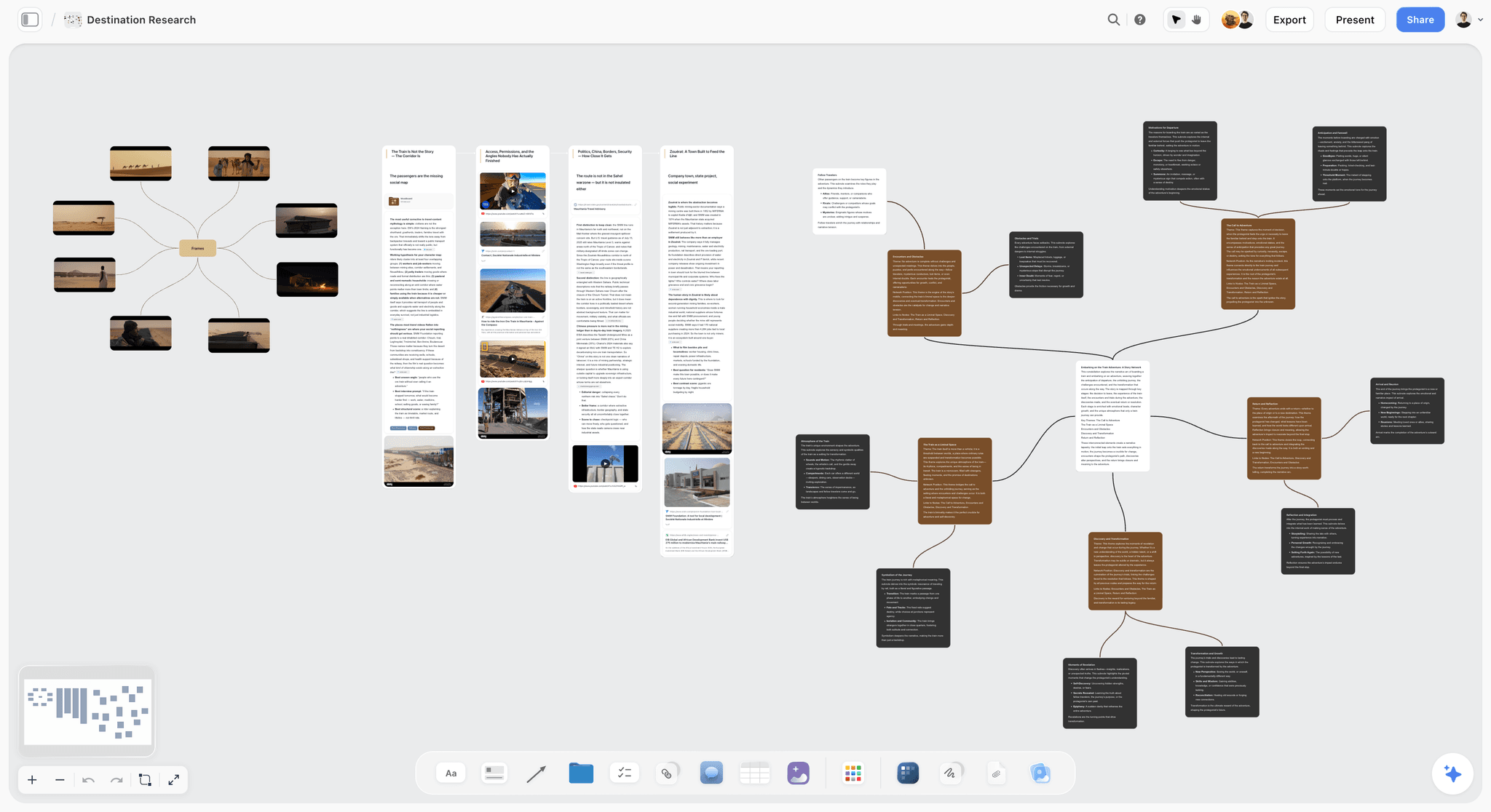
Storyflow is not an answer engine, and that is the point. It is a visual creative workspace: an infinite canvas of structured cards and documents where context-aware AI reads the whole board. It is the alternative to pick for the part of research Perplexity was never built to do: the step where twenty sourced answers have to become one structured, actionable plan.
Here is the honest framing. Perplexity answers a question and shows the sources. Storyflow is what you open right after. Perplexity gets you the answer. Storyflow is where the answer becomes a plan you can act on. If you only need a cited paragraph, use an answer engine and close the tab. If your research is a project (a documentary, a market entry, a thesis chapter, a launch) the answers are raw material, and raw material needs a surface that holds it.
I built Storyflow after running documentary research through chat tools and a Perplexity tab for years. The pattern was always the same: the answers were fine, and the doc they landed in was a graveyard. Disconnected paragraphs, no structure, no way for the AI to see the project as a whole. The canvas exists to fix exactly that.
Best for: Researchers, filmmakers, founders, students, and strategists whose research feeds a real project and needs structure, not just answers.
Verdict: The strongest pick for the Answer-to-Action Gap. Pair it with an answer engine: one finds the answers, the other turns them into a plan.
Key features
- Infinite canvas of structured cards. Paste every Perplexity, ChatGPT, or Gemini answer onto the board as a card, arrange findings by theme, and watch the structure of the project emerge instead of being forced.
- Context-aware AI that reads the full board. Storyflow's AI reads your entire active canvas, plus up to 1 Tactic and up to 3 @-mentioned Documents. It can compare twenty findings at once, which a linear chat cannot.
- 200+ Story Blueprints. An expert-framework template library on Plus and above: research plans, project briefs, and structured-thinking templates so the canvas is not a blank page.
- Unlimited shared boards and unlimited collaboration on every plan. Anyone a paid member invites to a board joins free. The Max plan adds a team workspace with permissions and roles.
Pricing
Paid-only during early access, with a Free plan launching before the end of 2026 (unlimited notes, images, and links, unlimited shared boards, unlimited collaboration, basic AI, and 20 file uploads, no 200+ Story Blueprints library). Plus: $7.99/month annual or $9.99/month monthly (200+ Story Blueprints, unlimited uploads). Pro: $14/month annual or $19/month monthly (adds AI image generation and 20x more AI than Plus). Max: $39/month annual or $49/month monthly (adds 40x more AI and a team workspace with permissions and roles). Pricing as of May 2026.
Pros
- It is the only tool here built for the step after the answer: structuring findings into a plan an AI can read in full.
- The AI reads the whole canvas at once, so it can reason across an entire project, not one query at a time.
- The entry paid tier ($7.99/month annual) is cheaper than every $20 answer engine, and collaborators invited by a paid member join free.
Cons
- Storyflow is not a web-search answer engine and does not return cited live-web answers. For sourced search results, use an answer engine. Storyflow is where the research becomes a structured plan.
- It is a workspace, so there is more setup than typing a question into a search box.
- Cloud-only, with no local-first option for researchers in regulated or air-gapped environments.
If your research feeds a real project, take your most active investigation, paste every answer you have collected onto a Storyflow canvas, and arrange them by theme for one week. The gap between a transcript of answers and a structured plan becomes obvious fast. Start a Storyflow workspace to run that test.
2. ChatGPT (with Search)
ChatGPT with Search is the strongest direct Perplexity alternative in 2026: it returns sourced web answers and lives inside the most capable, most integrated AI assistant on the market. The pick when you want Perplexity's core feature without paying for a single-purpose tool.
Best for: Anyone who wants sourced answers plus a full assistant for writing, analysis, and code in one subscription.
Verdict: The default answer engine for most people in 2026. It does what Perplexity does and then keeps going.
Key features
- Built-in web search that returns answers with inline citations, on the free and paid tiers.
- Runs on GPT-5.5 (released April 2026; verify current model version), with deep research and agent modes for longer investigations.
- Custom GPTs, file analysis, image generation, and voice in the same product.
- The broadest integration and connector ecosystem of any AI tool.
Pricing
Free tier with web search and daily limits. ChatGPT Plus: $20/month. ChatGPT Pro: $200/month. Pricing as of May 2026; verify current pricing.
Pros
- Sourced answers plus a full assistant in one tool, which makes the $20 easier to justify than a search-only subscription.
- Deep research mode handles multi-source investigations that a single query cannot.
- The ecosystem breadth means you rarely need a second tool for generation.
Cons
- Loses the thread on long, multi-question research projects, the failure mode covered in Why ChatGPT Loses the Plot.
- Sourcing is good but Perplexity and Exa still feel more research-native on pure citation depth.
- No canvas: answers stack in a linear chat, so structuring twenty findings is still manual.
3. Google Gemini (AI Mode)
Google Gemini in AI Mode is the freshest answer engine in 2026, wired directly into Google's live search index. The pick when the query is time-sensitive and a stale index would give you the wrong answer.
Best for: Real-time research, breaking topics, and document-heavy analysis that needs a very large context window.
Verdict: The strongest Perplexity alternative for freshness. If "what happened this week" is the question, this is the answer engine.
Key features
- AI Mode answers grounded in Google Search, so the index is as current as Google's own.
- A context window of up to one million tokens, the largest of any consumer AI as of May 2026.
- Native multimodal handling of text, images, video, and audio.
- Deep integration with Google Workspace (Docs, Drive, Gmail).
Pricing
Free tier with AI Mode. Google AI Pro: $19.99/month. Google AI Ultra: $249.99/month. Pricing as of May 2026; verify current pricing.
Pros
- Freshness is genuinely best-in-class because it rides Google's live index.
- The million-token context window handles long documents Perplexity would truncate.
- If your work lives in Google Workspace, the integration removes friction.
Cons
- Conversational reasoning on open-ended questions feels less nuanced than Claude or ChatGPT.
- AI Mode answers can feel like a polished search result rather than a research partner.
- Like every answer engine here, it hands you a paragraph and stops; structuring is on you.
4. Claude
Claude is the strongest AI for reasoning carefully over sources you provide. The pick when you have the material already (papers, transcripts, fetched pages) and the hard part is thinking across it without errors.
Best for: Analysts and writers who need careful synthesis over long documents and low hallucination rates.
Verdict: The best reasoning layer for research. Less of a pure answer engine, more of a thinking partner over sources.
Key features
- Runs on Claude Opus 4.6 (as of May 2026; verify current version), with a 200,000-token context window.
- Web fetch and citation of pages, plus the Projects feature for persistent context.
- Among the lowest hallucination rates of frontier models, which matters for research.
- Strong at holding a long document accurately rather than summarizing it loosely.
Pricing
Free tier with daily limits. Claude Pro: $20/month. Claude Max: from $100/month. Pricing as of May 2026; verify current pricing.
Pros
- Frequently rated the most reliable model for careful, long-context reasoning.
- Fewer hallucinated facts and citations than most competitors.
- Projects reduces the constant re-pasting of context.
Cons
- Web search is less central than in Perplexity, ChatGPT Search, or Gemini.
- Like all chat tools, it stacks answers linearly with no canvas to structure them.
- Smaller integration ecosystem than ChatGPT.
5. NotebookLM
NotebookLM is Google's source-grounded notebook: you upload your own documents and every answer is built only from those sources. The pick when the research is not on the open web but in the PDFs, transcripts, and reports already on your drive.
Best for: Researchers, students, and analysts synthesizing a defined set of their own documents.
Verdict: The strongest Perplexity alternative when the corpus is yours, not the web. For uploaded-source synthesis, nothing beats it.
Key features
- Grounds every answer strictly in the sources you upload, with inline citations to the exact passage.
- Handles PDFs, Google Docs, web links, YouTube videos, and pasted text.
- Audio Overview generates a podcast-style discussion of your sources.
- Notebook structure keeps each research project separate.
Pricing
Free tier. NotebookLM Plus via Google AI Plus: $9.99/month. Pro via Google AI Pro: $19.99/month. Pricing as of May 2026; verify current pricing.
Pros
- Source-grounding means answers are traceable to your exact documents, which Perplexity's open-web answers are not.
- Excellent for literature reviews, case files, and interview-transcript synthesis.
- The free tier is genuinely useful for a single project.
Cons
- It does not search the open web, so it is a complement to an answer engine, not a replacement.
- It is a notebook, not a canvas: answers are text, not spatial cards you can arrange.
- For the full comparison, see The 10 Best NotebookLM Alternatives in 2026.
6. Genspark
Genspark is an agentic research tool: instead of answering one query, it runs a multi-step research task autonomously. The pick when the job is "investigate this thoroughly" rather than "answer this question."
Best for: Users who want a research task delegated end to end rather than run query by query.
Verdict: A strong Perplexity alternative for agentic, multi-step research. The agent does the legwork a Perplexity user would do manually.
Key features
- Agentic engine that breaks a research task into steps and executes them.
- Generates structured outputs (Sparkpages) rather than only a paragraph.
- Credit-based usage model across Free, Plus, and Pro tiers.
- Handles broad investigative prompts a single search query cannot.
Pricing
Free plan with 100 daily credits and 1 GB storage, no credit card. Plus: about $19.99/month billed annually. Pro: higher tier for heavy use. Pricing as of May 2026.
Pros
- Genuinely autonomous on multi-step tasks, which saves the manual query-chaining Perplexity requires.
- Sparkpages are more structured than a raw answer.
- The free tier's daily credits are enough to evaluate it properly.
Cons
- The credit model makes heavy research usage harder to predict than a flat subscription.
- Agentic output still needs human review; it is a draft, not a finished plan.
- Less mature than the major answer engines on raw answer quality.
7. Exa
Exa treats the web as a living graph and is built for semantic, primary-source search. The pick when you need original research, papers, code repositories, and deep-web content that keyword engines miss.
Best for: Analysts, researchers, and engineers who need primary sources, not summarized SEO pages.
Verdict: The most research-native search engine on this list. Where Perplexity summarizes, Exa surfaces the source itself.
Key features
- Semantic search that finds documents by meaning, not keyword match.
- Strong at retrieving primary sources: papers, datasets, code repos, deep-web pages.
- Available as a search product and as an API for developers building research tools.
- Built for analysts and engineers who care about source provenance.
Pricing
Free tier with limits. Usage-based pricing for heavier use and API access. Pricing as of May 2026; verify current pricing.
Pros
- Surfaces primary sources other engines bury under SEO content.
- The semantic model finds material a keyword query would never reach.
- The API makes it a building block for custom research pipelines.
Cons
- It is closer to a search engine than a conversational answer engine; expect to read sources yourself.
- Less polished for casual question-answering than Perplexity or ChatGPT.
- Usage-based pricing needs monitoring for heavy users.
8. Consensus
Consensus answers questions using peer-reviewed scientific papers rather than the open web. The pick when the answer has to stand up to academic scrutiny.
Best for: Academics, students, healthcare and policy researchers who need evidence-grade answers.
Verdict: The strongest Perplexity alternative for academic and scientific research. The citations are papers, not blog posts.
Key features
- Answers built from a large corpus of peer-reviewed research.
- Consensus Meter shows how strongly the literature agrees on a claim.
- Study-level citations with key findings surfaced.
- Filters for study type, sample size, and journal quality.
Pricing
Free tier with limited searches. Paid tiers for heavier and professional use. Verify current pricing on the Consensus site.
Pros
- Evidence-grade sourcing that Perplexity's open-web answers cannot match for academic work.
- The Consensus Meter is a genuine aid for gauging scientific agreement.
- Saves hours of database searching for literature reviews.
Cons
- Scope is academic literature only; useless for general or current-events queries.
- Not a generalist answer engine, so it complements rather than replaces Perplexity.
- Free tier search limits are tight for serious literature work.
9. Felo
Felo is an answer engine built for multilingual and cross-language search. The pick when your research crosses languages and you need sources in more than one.
Best for: Researchers, journalists, and analysts working across languages.
Verdict: The strongest Perplexity alternative for cross-language research. It searches and translates across languages other engines treat as separate.
Key features
- Simultaneous multi-language search across sources in different languages.
- Real-time translation of results into your working language.
- Surfaces sources other engines miss because of language barriers.
- Generates visual summaries and mind-map-style outputs.
Pricing
Free plan for basic access. Pro plan for power users, with no mid-tier and no credit system. Verify current pricing on the Felo site.
Pros
- Genuinely strong cross-language search that Perplexity does not match.
- Simple two-tier pricing with no confusing credit system.
- Useful for international market research and global news.
Cons
- For single-language English research, the major engines are stronger.
- A smaller product with a thinner ecosystem than ChatGPT or Gemini.
- Visual outputs are summaries, not a workspace for structuring a project.
10. You.com
You.com is a customizable, privacy-aware AI search engine. The pick when you want control over your sources and an engine that does not track you.
Best for: Privacy-conscious users who want to tune their search experience.
Verdict: A solid Perplexity alternative for users who value control and privacy over ecosystem breadth.
Key features
- Customizable search with control over sources and result preferences.
- Privacy-focused: it does not track user behavior.
- Multiple modes for chat-style answers and traditional results.
- Access to multiple underlying AI models.
Pricing
Free tier. Paid tiers for advanced features and model access. Verify current pricing on the You.com site.
Pros
- Genuine privacy stance for users who do not want to be tracked.
- Customization is deeper than Perplexity's fixed experience.
- The free tier is usable for everyday search.
Cons
- Answer quality is good but not class-leading against ChatGPT or Gemini.
- The product has pivoted positioning several times, which makes its roadmap harder to predict.
- No workspace layer for structuring multi-question research.
11. Komo
Komo is a fast, ad-free AI search engine built for speed and clarity. The pick when you want quick sourced answers without clutter or distraction.
Best for: Users who want fast, clean, ad-free search for everyday questions.
Verdict: A capable lightweight Perplexity alternative. Less depth, more speed and calm.
Key features
- Three modes: Explore for visual topic discovery, Chat for follow-ups, Search for link results with AI summaries.
- Ad-free and distraction-light by design.
- Access to multiple AI models.
- Fast response times for quick lookups.
Pricing
Free tier with basic features. Basic plan from about $8/month, with higher tiers for more research queries and models. Pricing as of May 2026; verify current pricing.
Pros
- Fast and clean, with no ads, which is a real contrast to cluttered search.
- Cheaper entry point than the $20 answer engines.
- The three modes cover casual and slightly deeper use.
Cons
- Less depth on complex research than Perplexity, ChatGPT, or Gemini.
- A smaller product with a thinner ecosystem and roadmap.
- No structuring layer once you have collected answers.
12. Andi
Andi is a free, conversational AI search engine that needs no account. The pick when you want a no-friction, no-tracking answer engine for free.
Best for: Casual researchers and privacy-minded users who want free sourced answers with zero setup.
Verdict: The best zero-friction free Perplexity alternative. No account, no ads, no tracking.
Key features
- Conversational, chat-style answers instead of a list of links.
- No account required to start using it.
- No ads, no tracking, no user profiling.
- A free core product with an optional premium tier.
Pricing
Free to use with no account. Premium from about $8/month. Pricing as of May 2026; verify current pricing.
Pros
- Genuinely free and usable with zero setup or sign-up.
- A clear privacy stance with no tracking or profiling.
- A fast, clean answer experience for everyday questions.
Cons
- Answer depth trails the major engines on complex research.
- A small product with limited resources behind it.
- No workspace for organizing a multi-question project.
7) Which Perplexity Alternative Fits You?
13. Documentary Filmmaker / Investigative Researcher
Top picks: ChatGPT with Search + Storyflow
ChatGPT with Search for the sourced answers during research. Storyflow for the canvas where interview leads, archival sources, and themes become a structured pre-production plan. The answer engine finds the material; the canvas turns it into a film you can actually shoot.
14. Academic / PhD Researcher
Top picks: Consensus + NotebookLM
Consensus for evidence-grade answers from peer-reviewed papers. NotebookLM to synthesize the PDFs you have collected with citations to exact passages. Add Storyflow if the thesis structure itself needs a canvas.
15. Founder / Market Researcher
Top picks: Gemini AI Mode + Storyflow
Gemini AI Mode for fresh competitive and market intelligence from Google's live index. Storyflow for the canvas where competitor findings, customer signals, and positioning notes become a go-to-market plan.
16. Journalist / Analyst
Top picks: ChatGPT with Search + Felo
ChatGPT with Search for sourced reporting leads. Felo when the story crosses languages and you need international sources. Claude for careful synthesis of the documents you gather.
17. Student / Self-Directed Learner
Top picks: Gemini (free tier) + NotebookLM
Gemini's free AI Mode for sourced answers while studying. NotebookLM to turn lecture notes, readings, and slides into a study companion. Both have usable free tiers, so the cost is zero.
18. Developer / Technical Researcher
Top picks: Exa + Claude
Exa for semantic search that surfaces primary sources, papers, and code repositories. Claude for reasoning over technical documentation with low error rates. Genspark when a research task should run autonomously.
8) Honorable Mentions
A few tools that came close but did not make the main twelve.
- Microsoft Copilot: A free, capable answer engine wired into Bing and Microsoft 365. Strong for Microsoft-stack users; less research-native than the picks above.
- Phind: A developer-focused answer engine for technical and coding questions. Narrower than this list, excellent for its niche.
- Kagi: A paid, privacy-first search engine with strong AI features. The subscription model deters casual users but the quality is real.
- Brave Search: Independent index with an AI answer layer and a genuine privacy stance.
- Phind and Andi overlap for technical users who want a free option.
- Storyflow's answer-engine pairing: worth repeating that Storyflow is not on this list as an answer engine. It is the workspace you pair with one.
These are not weak tools. Their audience or scope is narrower than the main list.
9) Where Each Tool Genuinely Loses
Honest accounting matters more than a clean ranking. Here is where each category fails.
Answer engines (ChatGPT, Gemini, Perplexity, Felo, You.com, Komo, Andi) all share one failure. They answer a question and stop. They have no surface to hold a project. Ask twenty questions and you get twenty paragraphs in a scroll, with no structure and no way for the AI to reason across all of them. This is the Answer-to-Action Gap, and no answer engine closes it.
Storyflow has the opposite limitation. It is a workspace, not a search engine. It does not crawl the live web and does not return cited search results. If your only need is a sourced answer to a question, Storyflow is the wrong tool: open an answer engine and close the tab. Storyflow earns its place only when research is a project and the answers need structure.
NotebookLM and Consensus are scoped by design. NotebookLM only knows the documents you upload. Consensus only knows academic papers. Both are excellent inside their scope and useless outside it. Neither replaces a general answer engine.
Exa is a search engine, not an answer engine. It surfaces sources better than anything here, but it expects you to read them. If you want a synthesized paragraph, Exa is not it.
The honest conclusion: there is no single Perplexity replacement. The answer engine and the research workspace are two different tools, and serious research in 2026 uses one of each.
11) The Bottom Line
The best Perplexity alternative in 2026 depends on which half of research is your bottleneck. ChatGPT with Search is the best overall answer engine: sourced answers inside a full assistant for the same $20. Google Gemini in AI Mode is the best for freshness, riding Google's live index with the largest context window of any consumer AI. Storyflow is the best for the step after the answer, the canvas where twenty findings become one structured plan a context-aware AI can read in full. NotebookLM wins for uploaded-source synthesis, Consensus for academic evidence, Exa for primary-source search.
The real lesson is not which single tool replaces Perplexity. It is that Perplexity gets you the answer, and something else has to be where the answer becomes a plan. An answer engine ends the moment the citation appears. Research keeps going. Most serious researchers in 2026 run one answer engine for sourced answers and one workspace for structure, because no single tool does both well.
If your research feeds a real project, the move is to take one active investigation, paste every answer you have collected onto a Storyflow canvas, and structure it for a week. Start a Storyflow workspace to run that test.
10) FAQ: Perplexity Alternatives in 2026
What is the best Perplexity alternative in 2026?
ChatGPT with Search is the best overall answer engine alternative: it returns sourced web answers inside a full AI assistant, so the $20/month covers more than search alone. Google Gemini in AI Mode is the best pick for freshness. Storyflow is the best pick for the step after the answer, when research has to become a structured plan on a canvas an AI can read in full. Most researchers use one answer engine plus one workspace.
Is there a free Perplexity alternative?
Yes. ChatGPT and Google Gemini both have free tiers with web search. Andi is fully free with no account required, and Komo and You.com run usable free tiers. Storyflow is paid-only during early access, with a Free plan launching before the end of 2026 covering unlimited boards and unlimited collaboration, though it is a research workspace, not an answer engine. For free sourced answers, start with Gemini's AI Mode or Andi.
Is ChatGPT better than Perplexity for research?
For most users, yes. As of January 2026, ChatGPT holds roughly 60.7% of AI search market share against Perplexity's 5.8% (Stackmatix, 2026). ChatGPT with Search returns sourced answers and adds deep research mode, file analysis, and a full assistant. Perplexity still feels slightly more citation-native, but ChatGPT's breadth makes it the stronger overall pick.
What is the difference between Perplexity and Storyflow?
Perplexity is an answer engine: you ask a question, it returns a cited answer. Storyflow is a visual research workspace: an infinite canvas where every answer becomes a structured card and a context-aware AI reads the whole board. Perplexity gets you the answer. Storyflow is where the answer becomes a plan you can act on. They solve different halves of research and work best together.
Is Perplexity worth $20 a month in 2026?
It depends. Perplexity Pro is $20/month and Perplexity Max is $200/month as of May 2026. If sourced answers are all you need, free answer engines (Gemini AI Mode, Andi) or a bundled one (ChatGPT Plus, also $20/month) usually deliver more value, because they include a full assistant. Perplexity is worth it mainly for users who want its specific research-native interface.
Which Perplexity alternative is best for academic research?
Consensus is the strongest for academic work because its answers are built from peer-reviewed papers, not the open web, and the Consensus Meter shows how strongly the literature agrees. Pair it with NotebookLM to synthesize the PDFs you collect, with citations to the exact passage. For general queries you still need a standard answer engine alongside them.
Which tool is best for real-time and breaking-news research?
Google Gemini in AI Mode, because it is grounded in Google's live search index, so its freshness matches Google's own crawl. ChatGPT with Search is also current. Tools that synthesize uploaded sources (NotebookLM) or academic papers (Consensus) are not built for breaking news and will lag on time-sensitive queries.
Can an AI read all my research at once?
A chat-based answer engine cannot: it processes one query at a time and stacks answers in a linear scroll. Storyflow's AI reads your full active canvas board at once, plus up to 1 Tactic and up to 3 @-mentioned Documents. That is why a workspace can reason across an entire project while an answer engine can only reason across one question.
What is the best free answer engine without ads?
Andi is fully free, needs no account, and runs no ads or tracking. Komo is ad-free with a free tier and paid plans from about $8/month. You.com is privacy-aware with a free tier. Google Gemini's free AI Mode is also ad-free. All four beat a cluttered traditional search results page for clean, sourced answers.
Do I need to replace Perplexity, or add a tool alongside it?
Most researchers should add, not replace. The answer engine and the research workspace are two different jobs. Keep one answer engine (Perplexity, ChatGPT, or Gemini) for sourced answers, and add a workspace like Storyflow for the step where answers become a structured plan. Running one of each closes the Answer-to-Action Gap.
Which Perplexity alternative is best for teams?
Storyflow, because its research canvas is collaborative on every plan, with unlimited shared boards and unlimited collaboration, and anyone a paid member invites joins free. The Max plan adds a team workspace with permissions and roles. Answer engines are mostly single-user tools; a shared canvas is where a team's research actually comes together.
What is the smallest test I can run?
Take your most active research project, currently scattered across Perplexity answers and a doc. Paste every answer onto a Storyflow canvas as a card, arrange the cards by theme, and ask the AI to read the whole board. Most researchers see the difference between a transcript of answers and a structured plan within an hour. Try a Storyflow workspace to run that test.
Table of Contents
- Quick Answer: The Best Perplexity Alternatives in 2026
- Comparison Table: 12 Perplexity Alternatives Compared
- Why People Look for a Perplexity Alternative
- How We Evaluated These Tools
- Quick Picks by Research Job
- Detailed Reviews: 12 Perplexity Alternatives in 2026
- Which Perplexity Alternative Fits You?
- Honorable Mentions
- Where Each Tool Genuinely Loses
- FAQ: Perplexity Alternatives in 2026
- The Bottom Line
- Author
- Related Reading
Templates to check out for this topic


Templates you can use in Storyflow
Every Storyflow board starts from real structure and an AI that reads the whole canvas. Open one of these templates and make it yours.


See Storyflow in Action
A visual AI workspace where every feature lives inside one canvas. No tab-switching, no context lost.
Build your entire board from a single message
Type what you need in the AI chat at the bottom of your canvas. The AI adds cards, headings, and structure directly onto your board.
Use expert frameworks as AI context
Type @ in the AI chat and choose any Tactic. The AI tailors every response to that framework instead of giving generic advice.
Turn your board into a mind map in seconds
Ask the AI to restructure your canvas as a mindmap. It connects your ideas into a visual hierarchy so you can see how everything relates.
Why Storyflow Exists
Storyflow actually began as a personal tool while working on creative and research projects.
We kept running into the same problem: ideas were scattered everywhere: notes, documents, and whiteboards.
Nothing helped us see how everything connected.
So we started building a workspace designed around how ideas actually grow.
→ Read how Storyflow was createdJustkay
Documentary Filmmaker & Founder at Storyflow
Published: 2026-05-19
Extremely simple, seriously capable


See how easy it is to get started
Watch a real project come together, from a blank board to a finished plan, clicked through step by step.
Start creating with AI and become more productive
Transform your creative workflow with AI-powered tools. Generate ideas, create content, and boost your productivity in minutes instead of hours.