
Category
Knowledge Management
Author

Justkay
Documentary Filmmaker & Founder at Storyflow
Topics
2026-05-18
•
Updated May 18, 2026
•
15 min read
•
Knowledge Management- best Apple Notes alternatives 2026
- Apple Notes alternative
- Apple Notes replacement
- free Apple Notes alternative
- Apple Notes alternative for Windows
- note-taking apps 2026
What is the best Apple Notes alternative in 2026?
The best Apple Notes alternatives in 2026 are Notion (best for databases and structured docs), Storyflow (best for a visual canvas where AI reads your notes, images, and links together), Obsidian (best for local-first plain-text control), and Bear (best if you love the Apple Notes feel but want it un-walled). Apple Notes is excellent at quick capture, but once your notes become a project the flat list hits a wall. The right alternative is the one that removes the specific wall that pushed you out.

All 12 Apple Notes Alternatives, Ranked
- Notion: best for databases and structured docs
- Storyflow: best for a visual canvas where AI reads your notes, images, and links at once
- Obsidian: best for local-first, plain-text control you own forever
- Bear: best if you love the Apple Notes feel but want it un-walled
- Microsoft OneNote: best free cross-platform escape with strong handwriting
- Capacities: best object-based personal knowledge without heavy setup
- Craft: best for beautiful documents on Apple devices
- NotebookLM: best for AI research grounded in sources you upload
- Upnote: best cheap, clean notes with a one-time lifetime license
- Amplenote: best for notes fused with task scheduling
- Evernote: best for a heavy archive and web clipping
- Google Keep: best for free sticky-note quick capture
Full disclosure: Storyflow is our own product, and we did not rank it #1 here. For databases and structured docs Notion is stronger, and for local-first, plain-text files you own outright Obsidian wins. We rank Storyflow #2 for one specific job: the intelligence wall, a visual canvas where the AI reads your notes, images, and links together. For a single one-line note captured in five seconds, a lightweight notes app is still faster. We link to every tool so you can judge the fit.
Quick Comparison: Best Apple Notes Alternatives
Apple Notes has four walls people escape: platform, structure, format, and intelligence. These four alternatives each remove a different one: structured databases, a visual AI canvas, plain-text ownership, and the Apple Notes feel un-walled.
| Tool | Best For | AI Features | Price |
|---|---|---|---|
| Notion | Databases and structured docs | Ask Notion + AI Agents (Business tier) | Free / $10 user mo |
| Storyflow | Visual canvas the AI reads in full | Reads full canvas board + @-docs and Tactics | $7.99 mo annual (free plan late 2026) |
| Obsidian | Local-first, plain-text control | No native AI (community plugins) | Free / Sync $4 mo |
| Bear | The Apple Notes feel, un-walled | No AI; nested tags and export | Free / $2.50 mo |
1) Quick Answer: The Best Apple Notes Alternatives in 2026
The best Apple Notes alternatives in 2026 are Notion (best for databases and structured docs), Storyflow (best for a visual canvas where AI reads your notes, images, and links together), Obsidian (best for local-first, plain-text control), and Bear (best if you love the Apple Notes feel but want it better). Apple Notes is genuinely good at one job: catching a quick thought fast. The moment your notes become a project (research, a launch, a script, a knowledge base) the flat list stops being a feature and starts being a wall.
The short version: if you think in databases, Notion. If you think in space and want AI that reads everything at once, Storyflow. If you want plain-text files you own forever, Obsidian. If you want Apple Notes but un-walled, Bear. Most people who leave Apple Notes do not need one replacement. They need the one that matches why they left.
For the wider category view, see The 12 Best Note-Taking Apps in 2026 and The 12 Best AI Second Brain Apps in 2026.
2) Comparison Table: 12 Apple Notes Alternatives Compared
Rating criteria: Tested on real note workflows (research projects, a documentary archive, a product roadmap, a personal knowledge base) between 2024 and 2026. Rated on whether the tool solved a real Apple Notes limitation, not on feature counts. Pricing verified on each tool's official site in May 2026.
3) Why People Leave Apple Notes (The Four Walls)
Apple Notes is brilliant software for what it is. It opens instantly. It syncs across your iPhone, iPad, and Mac without a thought. Quick capture is genuinely best-in-class. For catching a phone number, a grocery list, or a half-formed idea, nothing is faster.
But Apple Notes is a room with four walls. You do not notice them while your notes are small. You notice them the day your notes become a project. Here are the four walls, and they map almost exactly onto why every person on this list eventually switches.
Wall one: the platform wall. Apple Notes runs on iPhone, iPad, and Mac. That is the entire list. There is no Android app, no native Windows app, and no real web app. The iCloud web view exists but it is a hassle, not a workspace. The moment you own a Windows laptop, share a project with an Android user, or want to open a note on a browser at work, the wall is in front of you. According to a 2026 MacRumors survey, iPhone loyalty sits at 96.4%, which is exactly why this wall stays invisible to so many people for so long. Then they get one non-Apple device and the wall appears overnight.
Wall two: the structure wall. Apple Notes gives you folders and a flat list inside each folder. There are no tags, no databases, no backlinks, no properties. For 30 notes that is fine. For 300 notes it is a junk drawer. You remember writing the note. You cannot find it.
Wall three: the format wall. Getting your work out of Apple Notes is hard. There is no clean export to Word, no PDF export worth the name, no Markdown. Your notes are not really files you own. They are entries in a box, and the box does not open easily. A note you cannot export is a note you are renting, not owning.
Wall four: the intelligence wall. Apple Notes does not understand what is inside it. It cannot answer a question across your notes. It cannot connect the idea you wrote in January to the one you wrote in April. In 2026, when every other category of software has context-aware AI, a notes app that cannot read its own contents feels like a wall you keep walking into.
The familiar approach is to live inside Apple Notes until one wall becomes unbearable, then panic-search for a replacement. The better approach is to name which wall pushed you out, because the right alternative is different for each one. A platform-wall escape (you bought a Windows laptop) wants a different tool than an intelligence-wall escape (you want AI that reads your research).
For the deeper argument on visual versus document thinking, see The 12 Best Notion Alternatives in 2026.
4) How We Evaluated These Tools
Every tool on this list was tested on real note work between 2024 and 2026: a documentary research archive, a product roadmap, a personal knowledge base, and the everyday quick-capture habit Apple Notes is built for. No synthetic checklists. Six criteria, weighted in this order.
- Cross-platform reach. Does it run everywhere you actually work, including Windows, Android, and the web, or does it trade one walled garden for another?
- Structure beyond the flat list. Tags, links, databases, properties, spatial layout. Anything that lets 500 notes stay findable.
- AI context scope. Does the AI read your full workspace or canvas, only the current page, or nothing at all? This is the criterion that separates a 2026 tool from a 2019 one.
- Export and ownership. Can you get your work out cleanly in Markdown, PDF, or plain text? Do you own your data or rent it?
- Capture speed. Apple Notes wins on raw quick capture. How close does the alternative get for the one-line thought?
- Pricing honesty. What does the tool actually cost at the tier a real user needs, billed the way most people bill?
Tools were rated on whether they removed a real Apple Notes wall, not on how many features the marketing page lists.
5) Quick Picks by Escape Route
If you want the short list, pick by the wall that pushed you out.
Escaped the platform wall (bought a Windows or Android device): Notion, Obsidian, or OneNote. All three run everywhere. OneNote is free and the easiest landing for an Apple Notes user.
Escaped the structure wall (your notes became a junk drawer): Notion for databases, Capacities for object-based knowledge, Obsidian for backlinks.
Escaped the format wall (you need to own and export your work): Obsidian for plain-text Markdown files on your disk. Bear for clean Markdown export inside the Apple ecosystem.
Escaped the intelligence wall (you want AI that understands your notes): Storyflow for a canvas the AI reads in full. NotebookLM for AI research grounded only in sources you upload.
Want Apple Notes, just better: Bear. It keeps the speed and the feel and adds tags, themes, and real export.
Want the cheapest clean upgrade: Upnote. A lifetime license for $39.99 and a genuinely calm writing surface.
6) Detailed Reviews: 12 Apple Notes Alternatives in 2026
1. Storyflow
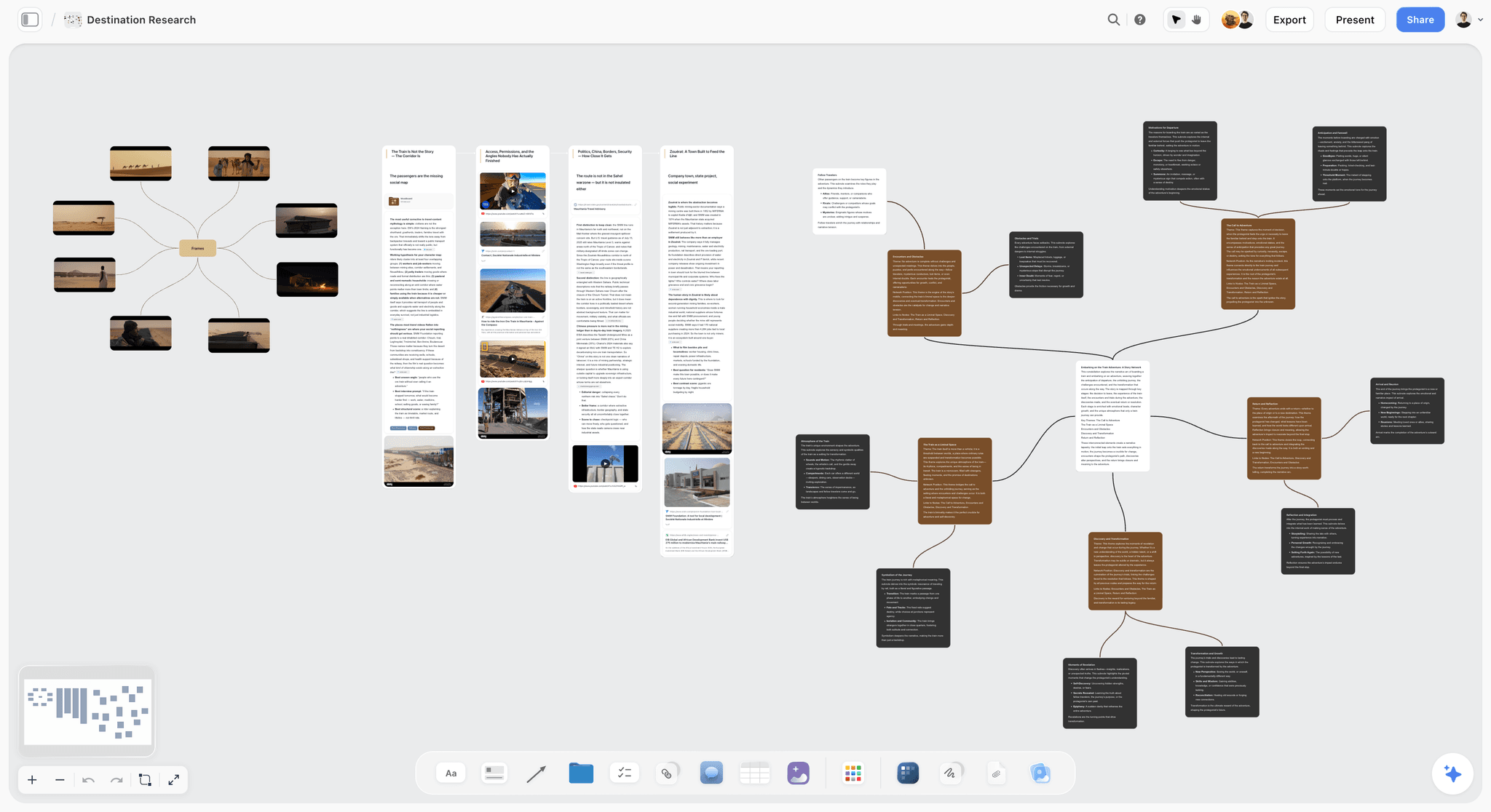
Storyflow is a visual creative workspace: an infinite canvas where notes, images, links, and documents sit as connected cards instead of a vertical list, and the AI reads the whole board. It is the alternative for the Apple Notes user who hit the intelligence wall. The day you wished Apple Notes could answer a question across everything you wrote, Storyflow is the tool built for that wish.
Best for: Apple Notes users who have outgrown a flat list and want a visual, AI-aware workspace where notes, images, links, and documents connect on a canvas the AI can actually read. Researchers, writers, filmmakers, founders, and anyone whose notes have become a project.
Verdict: The strongest pick on this list for the intelligence-wall escape. Apple Notes catches a thought. Storyflow develops it. The one honest caveat: for instantly capturing a single one-line text note, a lightweight notes app is still faster.
Key features
- Infinite visual canvas. Notes, images, links, and documents live as cards on a board and connect spatially, the way ideas actually relate. The flat list is gone.
- Context-aware AI. The AI reads your full active canvas board, plus up to 1 Tactic and up to 3 @-mentioned Documents. Ask it a question and it answers from everything on the board, not from a blank prompt.
- 200+ Story Blueprints. A library of expert framework templates on the Plus tier and above. The Free plan does not include the Blueprints library.
- Truly cross-platform. Storyflow runs in the browser and across devices. It is not Apple-only, so the platform wall never reappears.
Pricing
Free: launching before the end of 2026; invited collaborators of paid members join free today. Unlimited notes, images, and links, unlimited shared boards, unlimited collaboration, basic AI usage, and 20 file uploads. Plus: $7.99/mo annual or $9.99/mo monthly, which adds the 200+ Story Blueprints library, and unlimited uploads. Pro: $14/mo annual or $19/mo monthly, adding AI image generation and 20x more AI than Plus. Max: $39/mo annual or $49/mo monthly, adding 40x more AI and a team workspace with permissions and roles.
Pros
- The AI reads the whole board, so it connects notes Apple Notes would have left isolated. This is the intelligence wall, gone.
- The visual canvas turns a junk-drawer of notes into a map you can see. The structure wall, gone.
- Cross-platform and browser-based, so a Windows laptop or a shared project does not break it. The platform wall, gone.
- The Free plan is genuinely usable, with unlimited notes, images, links, and collaboration.
Cons
- For pure one-line quick capture, a lightweight notes app opens faster. Storyflow is built for notes that become projects, not for a five-second grocery list.
- The 200+ Story Blueprints library is a paid feature, not on the Free plan.
- It is a newer platform than Notion or Evernote, so the third-party template ecosystem is smaller.
If your notes have stopped being a list and started being a project, take your most active set of notes and rebuild them on a Storyflow canvas for one week. Ask the AI the questions you always wished Apple Notes could answer. Start a Storyflow workspace and run that test.
2. Notion
Notion is the alternative for the Apple Notes user who hit the structure wall hardest. It replaces the flat list with databases, properties, relations, and nested pages. The pick when your notes need to behave like a system, not a pile.
Best for: People building a personal wiki, a project tracker, or a structured knowledge base across all platforms.
Verdict: The most capable structured-docs tool on this list. The cost is setup time and a learning curve Apple Notes never asked of you.
Key features
- Databases with properties, filters, views, and relations.
- Nested pages with no real depth limit.
- AI is now bundled into the Business tier (Ask Notion and AI Agents) rather than a separate add-on, a change Notion made in 2025.
- Runs on iPhone, iPad, Mac, Windows, Android, and the web.
Pricing
Free plan with unlimited pages for personal use. Plus: $10/user/mo annual or $12/user/mo monthly. Business: $18/user/mo annual or $20/user/mo monthly, which is now where full AI lives. Verify current pricing at notion.com.
Pros
- The strongest structure of any tool here. Databases solve the junk-drawer problem completely.
- Genuinely cross-platform, including a real web app.
- Huge template ecosystem for any use case.
Cons
- It is document-and-database shaped, so visual or spatial thinking feels awkward.
- Full AI sits behind the $20 Business tier, which is steep for one person.
- The blank-page setup burden is real. Apple Notes never made you architect anything.
3. Obsidian
Obsidian is the alternative for the Apple Notes user who hit the format wall and the ownership question. Every note is a plain-text Markdown file on your own disk. The pick when you want to own your notes outright, forever, with no company in the middle.
Best for: Local-first users, privacy-conscious people, and anyone building a long-term knowledge base they want to control.
Verdict: The strongest ownership story on this list. The trade-off is that it is a power tool, not a calm notebook.
Key features
- Notes are plain-text Markdown files stored locally. You own the folder.
- Bidirectional links and a graph view connect ideas across the vault.
- 2,690+ community plugins, plus a built-in Canvas mode and the Bases feature for table-like views.
- As of February 2026, Obsidian is free for commercial use, with the old commercial-license requirement removed.
Pricing
The core app is free, with no feature restrictions. Optional add-ons: Sync at $4/mo billed annually ($5 monthly), Publish at $8/mo billed annually ($10 monthly). Students and nonprofits get 40% off the add-ons. Verify current pricing at obsidian.md.
Pros
- Total data ownership. Plain-text files outlive any company.
- No subscription required for the core app.
- The plugin ecosystem can shape Obsidian into almost anything.
Cons
- No native AI context across your vault without configuring third-party plugins.
- There is no web app, so a borrowed computer locks you out.
- It rewards tinkering. An Apple Notes user wanting calm simplicity will feel the setup cost.
For the focused comparison, see The 12 Best Obsidian Alternatives in 2026.
4. Bear
Bear is the alternative for the Apple Notes user who loves Apple Notes and just wants it to stop being limited. It keeps the instant-open speed and the clean feel, then adds the tags, themes, and export Apple Notes refuses to.
Best for: Apple-only users who want the Apple Notes experience without the structure and format walls.
Verdict: The most natural upgrade if you are staying inside the Apple ecosystem. The platform wall stays, by design.
Key features
- A nested tag system replaces the flat folder list.
- Markdown writing with a genuinely calm, focused interface.
- Export to PDF, DOCX, Markdown, and more on the Pro tier.
- Note encryption with Face ID or Touch ID, plus OCR search inside images and PDFs.
Pricing
Free version with the full tag system and core editor on a single device. Bear Pro: $2.99/mo or $29.99/yr (about $2.50/mo), which adds cross-device sync, encryption, advanced export, OCR, and 20+ themes. Verify current pricing at bear.app.
Pros
- Closest to the Apple Notes feel of anything here, so the switch is nearly frictionless.
- Real export options finally solve the format wall.
- One of the cheapest paid tiers on this list.
Cons
- Apple only. No Windows, no Android, no web. The platform wall is untouched.
- No databases or AI. It is a better notebook, not a knowledge system.
- Sync requires Pro, so the free version is effectively single-device.
5. Microsoft OneNote
OneNote is the alternative for the Apple Notes user who hit the platform wall and wants a free landing pad. It is a free-form digital binder that runs on every platform, including a real web app.
Best for: Students, handwriting and stylus users, and anyone who wants cross-platform notes at no cost.
Verdict: The best free cross-platform escape. The trade-off is an interface that can feel cluttered next to Apple Notes.
Key features
- Free-form pages where you place text, images, and ink anywhere.
- Notebook, section, and page hierarchy for organization.
- Strong handwriting and stylus support, excellent on tablets.
- Runs on iPhone, iPad, Mac, Windows, Android, and the web, fully free.
Pricing
Free with a Microsoft account. Larger storage comes bundled with a Microsoft 365 subscription. Verify current details at onenote.com.
Pros
- Genuinely free and genuinely cross-platform. The platform wall, gone, at no cost.
- Handwriting and ink support is among the best in the category.
- Free-form page layout is more flexible than the Apple Notes list.
Cons
- The interface is busier and less calm than Apple Notes.
- No real AI context across notebooks for personal users.
- Search and organization can feel inconsistent across a large notebook collection.
6. Capacities
Capacities is the alternative for the Apple Notes user who hit the structure wall but found Notion too heavy. Instead of pages, you create typed objects (a person, a book, a meeting, an idea) and the app links them automatically.
Best for: People who want structured personal knowledge management without architecting databases by hand.
Verdict: A thoughtful middle ground between a flat list and a full database system.
Key features
- Object-based notes: every note has a type, and types connect to each other.
- A daily note as a capture surface, plus calendar and timeline views.
- An AI assistant on the Pro tier.
- Runs on all platforms with a web app.
Pricing
Free plan with unlimited notes and objects and 5 GB of media storage. Pro: $9.99/mo billed annually ($11.99 monthly), adding the AI assistant and unlimited media. Believer: $12.49/mo annually ($14.99 monthly). Verify current pricing at capacities.io.
Pros
- Object types give structure without the Notion setup burden.
- The daily note keeps quick capture close to Apple Notes speed.
- A calm, well-designed interface.
Cons
- The object model takes a mental shift to learn.
- Smaller ecosystem and community than Notion or Obsidian.
- AI sits behind the Pro tier.
7. Craft
Craft is the alternative for the Apple Notes user who wants their notes to look beautiful and stay native to Apple devices. It is built for polished documents, not raw capture.
Best for: Apple-first users who write documents that other people will read.
Verdict: The most visually refined notes app here, with a design sense Apple users will recognize.
Key features
- Block-based documents with a strong sense of typography and layout.
- Cards, subpages, and a clean nested structure.
- An AI assistant and 30-day version history on paid tiers.
- Apple-first, with a web app and a Windows app available.
Pricing
Free to start with limited documents. Personal: $4.79/mo. Friends and Family: $8.99/mo. Verify current pricing at craft.do.
Pros
- The output looks genuinely polished, better than almost anything here.
- Apple-native feel that an Apple Notes user will adjust to instantly.
- A web and Windows app soften the platform wall somewhat.
Cons
- It is built for documents, not for a large searchable knowledge base.
- No deep database structure.
- The free tier is limited enough that most users will need to pay.
8. NotebookLM
NotebookLM is the alternative for the Apple Notes user who hit the intelligence wall specifically around research. It is a Google AI tool that answers questions grounded only in the sources you upload, with citations.
Best for: Researchers, students, and anyone synthesizing a defined set of documents.
Verdict: The strongest source-grounded research AI here. It is a research companion, not a daily notebook.
Key features
- Upload PDFs, docs, and links, then ask questions answered only from those sources.
- Citations on every answer, so you can trace claims back.
- Audio Overviews and Video Overviews that summarize your sources.
- The free Standard tier allows up to 100 notebooks with 50 sources each.
Pricing
Free Standard tier with no time limit. Plus is $9.99/mo via Google AI Plus, Pro is $19.99/mo via Google AI Pro. Verify current pricing at notebooklm.google.com.
Pros
- AI answers are grounded in your sources, which makes hallucination far less likely.
- Citations make it trustworthy for serious research.
- The free tier is genuinely generous.
Cons
- It is not a note-taking app. You cannot write and organize freely the way Apple Notes lets you.
- Web-only, tied to a Google account.
- It works on uploaded sources, not on a living personal canvas of your own ideas.
9. Upnote
Upnote is the alternative for the Apple Notes user who wants a clean, calm, cheap upgrade with no subscription anxiety. It is a no-frills cross-platform notebook with a one-time price.
Best for: Budget-conscious writers who want simple, distraction-free notes everywhere.
Verdict: The best value on this list. A lifetime license removes the subscription question entirely.
Key features
- Clean, distraction-free writing with Markdown support.
- Notebooks, tags, and a focused editor.
- Cross-platform: iPhone, iPad, Mac, Windows, and Android.
- A lifetime license option instead of a recurring subscription.
Pricing
Free with a 50-note limit. Premium: $1.99/mo or a one-time $39.99 lifetime license. Verify current pricing at getupnote.com.
Pros
- The lifetime license is the best long-term value here.
- Genuinely cross-platform, so the platform wall is gone.
- A calm interface close to the Apple Notes simplicity people miss.
Cons
- No AI and no database structure.
- The free tier's 50-note cap is restrictive.
- A smaller company and ecosystem than the bigger names.
10. Amplenote
Amplenote is the alternative for the Apple Notes user whose notes are really half-finished to-do items. It fuses note-taking with task scheduling so an idea can become a scheduled action without leaving the app.
Best for: People who think in notes and tasks at the same time.
Verdict: A strong pick for the notes-plus-tasks workflow. Niche, but excellent at its niche.
Key features
- Notes and tasks in one tool, with tasks that carry priority and schedule.
- Backlinks and a "jots" daily capture stream.
- Calendar integration on paid tiers.
- Cross-platform with a web app.
Pricing
Free Personal plan with basic notes and tasks. Pro: $5.84/mo billed annually ($7/mo monthly). Unlimited: $12/mo. Verify current pricing at amplenote.com.
Pros
- The notes-to-tasks pipeline is genuinely smooth.
- Backlinks add structure the Apple Notes list never had.
- Reasonable entry pricing.
Cons
- The interface has a learning curve and feels dense at first.
- It is not visual. Spatial thinkers will not feel at home.
- Less polished than Bear or Craft.
11. Evernote
Evernote is the original Apple Notes alternative, and it still has the strongest web clipper in the category. But its pricing has climbed and its individual plans were restructured again in 2026.
Best for: People with a large existing Evernote archive, or heavy web clippers.
Verdict: Capable, but harder to recommend at current prices when free options exist.
Key features
- A best-in-class web clipper for saving articles and pages.
- Notebooks, tags, and powerful search including text inside images.
- Tasks and calendar integration on paid tiers.
- Cross-platform with a web app.
Pricing
A limited free tier. The Personal and Professional plans were retired in 2026 and replaced by Starter at $8.25/mo and Advanced at $14.17/mo. Verify current pricing at evernote.com.
Pros
- The web clipper is still the best in the category.
- Mature search across a huge archive.
- Genuinely cross-platform.
Cons
- Pricing has climbed and the free tier is heavily limited.
- Repeated plan restructuring has frustrated long-time users.
- It can feel heavy and dated next to newer tools.
For the focused comparison, see The 12 Best Evernote Alternatives in 2026.
12. Google Keep
Google Keep is the closest spiritual match to Apple Notes: a fast, free, sticky-note app for quick capture. It is the right choice if all you want is cross-platform quick capture.
Best for: Quick capture on any device, especially Android and Google Workspace users.
Verdict: A fine Apple Notes clone for capture. It hits the same walls Apple Notes does.
Key features
- Color-coded sticky notes, lists, and reminders.
- Fast capture with voice, image, and drawing input.
- Tight Google Workspace integration.
- Free and on every platform with a web app.
Pricing
Free with a Google account.
Pros
- Free, fast, and genuinely cross-platform.
- The closest feel to Apple Notes quick capture.
- Reminders and labels are simple and effective.
Cons
- No structure beyond labels. It is a sticky-note board, not a knowledge system.
- No real AI context across notes.
- It solves only the platform wall. The structure, format, and intelligence walls all remain.
7) Recommendations by Person
13. Solo Creator / Blogger
Top picks: Storyflow and Bear
Storyflow for the canvas where research, references, and drafts connect and the AI reads it all. Bear for fast daily capture if you stay on Apple devices. The pair covers both the project work and the quick note.
14. Researcher / Academic
Top picks: Storyflow and NotebookLM
Storyflow for the visual research board where sources, notes, and questions live together on a canvas the AI reads. NotebookLM for source-grounded answers with citations when the work is synthesizing a fixed set of documents.
15. Documentary Filmmaker / Video Creator
Top picks: Storyflow and Obsidian
Storyflow for the visual canvas where interviews, footage notes, images, and structure connect, with AI that can answer questions across the board. Obsidian if you want a plain-text archive of transcripts you own outright.
16. Product Manager / Founder
Top picks: Notion and Storyflow
Notion for the structured roadmap, database, and team wiki. Storyflow for the visual thinking and AI-aware idea development behind each decision. The two cover structure and exploration.
17. Student
Top picks: OneNote and NotebookLM
OneNote because it is free, cross-platform, and excellent with a stylus for class notes. NotebookLM for turning lecture slides and readings into a study companion that answers questions with citations.
18. Privacy-Conscious / Local-First User
Top picks: Obsidian and Bear
Obsidian for plain-text Markdown files you own on your own disk, with no company in the middle. Bear for encrypted, calm notes if you are happy staying inside the Apple ecosystem.
8) Honorable Mentions
A few tools that came close but did not make the main twelve.
- Apple Notes itself. If you only ever do quick capture on Apple devices, the incumbent is still excellent. The walls only matter once your notes become a project.
- Logseq. An outliner-style, local-first knowledge tool. Powerful, but the outliner format is a bigger jump from Apple Notes than most people want.
- Reflect. A clean, fast notes app with AI. Strong, but pricier than its closest rivals.
- Tana. A supertag-based knowledge tool with real depth. The learning curve is steep enough that it belongs on a power-user list, not a general one.
- Simplenote. Free, plain, cross-platform, and genuinely simple. It is so minimal it solves only the platform wall.
- Joplin. Open-source and local-first. A capable Evernote-style alternative for the technically comfortable.
These are not weak tools. Their fit is narrower than the main twelve for the average person leaving Apple Notes.
9) When You Should Just Keep Apple Notes
Honest accounting matters. There are people who should not switch at all.
If your notes are genuinely quick capture (phone numbers, grocery lists, a half-sentence idea you will act on within the day) Apple Notes is excellent and switching is a waste of effort. If you live entirely inside the Apple ecosystem, never share notes with an Android or Windows user, and never need a web view, the platform wall does not exist for you. If your total note count sits in the dozens and search finds everything in seconds, the structure wall does not exist for you either.
Switch tools when your notes become a project, not before. The day a set of notes turns into a research archive, a launch plan, a script, or a knowledge base, the walls appear and the right alternative pays for itself. Until then, the fastest notes app you already have is the best one. Do not switch out of fashion. Switch out of friction.
11) The Bottom Line
Apple Notes is not a bad app. It is a brilliant quick-capture tool with four walls you do not see until your notes become a project. The best Apple Notes alternative in 2026 is the one that removes the specific wall that pushed you out.
Notion is the strongest pick for the structure wall: databases, properties, and a real cross-platform system. Obsidian is the strongest pick for the format wall: plain-text files you own forever. Bear is the strongest pick if you love Apple Notes and just want it un-walled. And Storyflow is the strongest pick for the intelligence wall: a visual canvas where notes, images, links, and documents connect, and the AI reads all of it at once. It is cross-platform, so the platform wall never reappears, and the Free plan gives you unlimited notes, images, links, and collaboration to start. The one honest caveat stands: for a single one-line note captured in five seconds, a lightweight notes app is still faster.
Apple Notes catches a thought. The right alternative develops it. If your notes have stopped being a list and started being a project, take your most active set of notes and rebuild them on a visual canvas for one week. Ask the questions you always wished Apple Notes could answer. Start a Storyflow workspace and see which wall it removes.
10) FAQ: Apple Notes Alternatives in 2026
What is the best Apple Notes alternative in 2026?
It depends on which Apple Notes limitation pushed you out. For databases and structure, Notion. For a visual canvas where AI reads your notes, images, and links together, Storyflow. For local-first plain-text ownership, Obsidian. For the Apple Notes feel without the limits, Bear. Most people who leave Apple Notes pick the tool that matches their specific reason for leaving, not a single universal answer.
Is there a free Apple Notes alternative?
Yes, several. Microsoft OneNote is fully free and cross-platform. Google Keep is free and the closest match to Apple Notes quick capture. Obsidian's core app is free. Storyflow has a free plan with unlimited notes, images, links, shared boards, and collaboration. NotebookLM's Standard tier is free. You do not need to pay to leave Apple Notes.
What is the best Apple Notes alternative for Windows?
Notion, Obsidian, OneNote, and Storyflow all run on Windows. OneNote is the easiest free landing for an Apple Notes user. Storyflow runs in the browser, so it works on Windows with no install. The key is that any of these removes the platform wall that Apple Notes never will.
Does Apple Notes have AI?
Apple Notes has some Apple Intelligence writing features, but it cannot answer questions across all your notes or connect ideas the way a context-aware AI tool can. If AI that reads your notes is what you want, Storyflow's AI reads your full canvas board, and NotebookLM answers questions grounded in sources you upload.
Can I export my notes out of Apple Notes?
Apple Notes export is limited. There is no clean Word, PDF, or Markdown export of the kind power users expect. This is the format wall. Tools like Obsidian (plain-text Markdown files) and Bear (PDF, DOCX, and Markdown export on Pro) are built to give you full ownership of your notes.
Is Notion a good replacement for Apple Notes?
Notion is a strong replacement if your notes need structure: databases, properties, and relations. It is cross-platform and has a real web app. The trade-off is a learning curve and setup time Apple Notes never asked of you. If you think in documents and databases, it fits. If you think visually or in space, Storyflow fits better.
What is the best Apple Notes alternative that feels like Apple Notes?
Bear. It keeps the instant-open speed and clean, calm interface of Apple Notes, then adds nested tags, themes, and real export. The one thing it does not fix is the platform wall, since Bear is Apple-only. For an Apple user staying on Apple devices, it is the most natural upgrade.
Which Apple Notes alternative is best for research?
Storyflow for a visual research canvas where sources, notes, and questions connect and the AI reads the whole board. NotebookLM for AI answers grounded strictly in documents you upload, with citations on every claim. Many researchers use both: NotebookLM to interrogate sources, Storyflow to develop the thinking.
Is Obsidian better than Apple Notes?
For ownership and long-term knowledge work, yes. Obsidian stores notes as plain-text Markdown files you own, with backlinks and a graph view Apple Notes lacks. For raw quick capture on an iPhone, Apple Notes is faster and simpler. Obsidian rewards people who want control and are willing to set the tool up.
How much do Apple Notes alternatives cost?
They range from free to about $20 a month. OneNote, Google Keep, and the core Obsidian app are free. Storyflow's paid plan starts at $7.99/mo annual. Bear is about $2.50/mo annual. Upnote offers a one-time $39.99 lifetime license. Notion's structured tiers run $10 to $20 per user per month. Free options are genuinely viable, so cost is rarely the deciding factor.
What is the best Apple Notes alternative for visual thinkers?
Storyflow. Instead of a vertical list, it gives you an infinite canvas where notes, images, links, and documents sit as connected cards you can arrange in space. For people who think by seeing how ideas relate rather than scrolling a list, the canvas removes the structure wall completely.
Should I switch from Apple Notes at all?
Only if you have hit a wall. If your notes are quick capture and you live on Apple devices, Apple Notes is excellent and switching wastes effort. Switch when your notes become a project: a research archive, a launch plan, a knowledge base. At that point the platform, structure, format, or intelligence wall appears, and the right alternative earns its place.
Table of Contents
- Quick Answer: The Best Apple Notes Alternatives in 2026
- Comparison Table: 12 Apple Notes Alternatives Compared
- Why People Leave Apple Notes (The Four Walls)
- How We Evaluated These Tools
- Quick Picks by Escape Route
- Detailed Reviews: 12 Apple Notes Alternatives in 2026
- Recommendations by Person
- Honorable Mentions
- When You Should Just Keep Apple Notes
- FAQ: Apple Notes Alternatives in 2026
- The Bottom Line
- Author
- Related Reading
Templates to check out for this topic


Workspace templates you can use in Storyflow
Keep research, notes, and plans on one canvas the AI can read, instead of scattered across docs and tabs. Open a template and make it your second brain.


See Storyflow in Action
A visual AI workspace where every feature lives inside one canvas. No tab-switching, no context lost.
Build your entire board from a single message
Type what you need in the AI chat at the bottom of your canvas. The AI adds cards, headings, and structure directly onto your board.
Use expert frameworks as AI context
Type @ in the AI chat and choose any Tactic. The AI tailors every response to that framework instead of giving generic advice.
Turn your board into a mind map in seconds
Ask the AI to restructure your canvas as a mindmap. It connects your ideas into a visual hierarchy so you can see how everything relates.
Why Storyflow Exists
Storyflow actually began as a personal tool while working on creative and research projects.
We kept running into the same problem: ideas were scattered everywhere: notes, documents, and whiteboards.
Nothing helped us see how everything connected.
So we started building a workspace designed around how ideas actually grow.
→ Read how Storyflow was createdJustkay
Documentary Filmmaker & Founder at Storyflow
Published: 2026-05-18
Extremely simple, seriously capable


See how easy it is to get started
Watch a real project come together, from a blank board to a finished plan, clicked through step by step.
Start creating with AI and become more productive
Transform your creative workflow with AI-powered tools. Generate ideas, create content, and boost your productivity in minutes instead of hours.