The 12 Best AI Tools to Map Out Story Ideas in 2026 (Tested)
The best AI tools to map out story ideas in 2026, tested on real projects. Where loose ideas become a structure the AI can read, develop, and hold in one place.

Category
Storytelling
Author

Justkay
Documentary Filmmaker & Founder at Storyflow
Topics
2026-06-18
•
Updated July 3, 2026
•
15 min read
•
Storytelling- AI tools to map out story ideas
- best AI software to map out creative story ideas
- AI app for mapping story ideas
- story mapping tool
- AI story development tool
- visual story planning
What is the best AI tool to map out story ideas?
The best AI tool to map out story ideas in 2026 is Storyflow (paid-only during early access, $7.99/mo Plus annual), because its AI reads the whole canvas of fragments, character notes, and themes and helps develop them into a structure. Milanote wins visual inspiration collecting; Obsidian wins linked-note idea webs; Plottr wins plot timelines.

All 12 Story-Mapping Tools, Ranked
- Storyflow: best overall, an AI canvas that maps loose ideas into story structure
- Milanote: best for collecting and arranging visual inspiration
- Notion: best for story ideas as docs and databases
- Obsidian: best local-first linked-note idea webs
- Miro: best for live story brainstorming with a team
- Whimsical: best fast flowcharts and idea maps
- Xmind: best polished mind maps for outlining
- Scapple: best freeform idea splatter, one-time purchase
- World Anvil: best worldbuilding wikis and timelines
- Plottr: best plot timelines and beat-by-beat structure
- Heptabase: best visual research-to-structure for nonfiction
- Scrivener: best for drafting and managing the manuscript
Full disclosure: Storyflow, which we rank #1, is our own product. We rank it #1 for turning loose story ideas into structure on an AI canvas, and we say plainly where the specialists win: Milanote is the better pure visual-inspiration board, Plottr owns beat-by-beat plot timelines, and Scrivener owns the actual drafting once the shape is set. We link out to every tool so you can judge for yourself.
Quick Comparison: Best AI Tools to Map Story Ideas
These four cover the choice most writers are making: an AI canvas that maps ideas into structure versus a place to collect or draft them.
| Tool | Best For | AI Features | Price |
|---|---|---|---|
| Storyflow | Mapping loose ideas into story structure | Canvas-aware AI (reads the whole board) | $7.99 mo annual (free plan late 2026) |
| Milanote | Collecting and arranging inspiration | No built-in AI | Free / $9.99 mo |
| Notion | Story ideas as docs and databases | Notion AI (page-scoped) | Free / $12 user mo |
| Obsidian | Local-first linked idea webs | No native AI (plugins) | Free / $4 mo sync |
1) Quick Answer: The Best AI Tool to Map Out Story Ideas
The best AI tool to map out story ideas in 2026 is Storyflow, because its AI reads your whole canvas (the loose fragments, the character notes, the scene cards, the theme you keep circling) and helps you develop them into a structure, not just store them. The Free plan launches before the end of 2026, and the Plus plan at $7.99 per month billed annually adds the 200+ Story Blueprints library (including the Hero's Journey). If you want a beautiful visual board for collecting inspiration first, Milanote is the strongest pick. If your ideas live in linked notes, Obsidian is the best fit. If you are mapping a plot timeline scene by scene, Plottr is purpose-built for exactly that.
The short version: mapping a story idea is not the same as storing it. A note app remembers what you wrote. A mind map shows how the pieces connect. But the moment that matters is when scattered fragments become a shape, a sequence, an arc, a structure you can actually build a story on. A great tool does not just hold your ideas. It helps the shape of the story emerge from them. The tools below are ranked by how well they take loose story ideas and help you map them into something you can develop, and how much of that work the AI can genuinely help with once the ideas are on the board.
2) Comparison Table: 12 Story-Mapping Tools Compared
Pricing is current as of June 2026 and is rounded; verify the live price on each tool's pricing page before buying, because creative-tool pricing changes often. Storyflow's prices are exact: Free at $0, Plus at $7.99 per month annual, Pro at $14 per month annual.
3) Why Mapping Story Ideas Visually Beats a Linear Doc
A story does not arrive in order. It arrives as a character you cannot stop thinking about, a single scene you can already see, a line of dialogue, a feeling, a question. These fragments show up out of sequence and out of proportion, and the first real job of any storyteller is to find the shape that connects them.
A document forces you to commit to an order before you have one. You open a blank page, and the page asks: what comes first? But you do not know what comes first yet. You know you have nine fragments and no spine. The problem is not that your idea is weak. It is that the page wants linearity before the story has a shape. A document captures the output of thinking. A canvas captures the thinking itself. This is why the idea stage feels stuck so often. The tool is asking for linearity at the exact moment the work is still spatial.
Mapping ideas visually fixes this in three specific ways.
- Order emerges instead of being imposed. On a canvas you drop each fragment as a card, then move the cards until a sequence appears. You are not inventing the structure from nothing. You are letting it surface from material you already have.
- Connections become visible. When the theme card sits next to the ending card and you can see a line between them, you notice that your ending does not actually pay off your theme. In a linear doc, that gap hides between page four and page eleven.
- Premature closure is prevented. The reason mind maps and canvases work for ideation is not the visuals. It is that an open spatial layout keeps you from collapsing into the first plot you think of. Branching delays the moment you commit, which is exactly what early story development needs.
Here is where AI changes the game. For years, mapping was a solo, manual act: you moved the cards, you spotted the gaps, you did all the connecting. An AI that can read the whole map does the connecting with you. It can look at your nine fragments and suggest the arc that links them, name the theme you keep circling without realizing it, or flag that you have a brilliant inciting incident and no climax. That is the difference between a static idea board and a board that helps you think. The tools below are ranked on exactly that: not just whether you can map ideas, but whether the AI can help you map them.
4) How We Evaluated These Tools
I have mapped story ideas as a documentary filmmaker developing real projects from a wall of research, as a founder shaping product narratives, and alongside writers and creators working through their own material. The tools below were judged on how they hold up across the whole arc of developing a story idea, from the first messy fragment to a structure you can build on. Six criteria, weighted toward how well each tool helps the shape emerge.
- AI context scope. Does the AI read your whole idea map, or only the one note you are typing in? An AI that reads every fragment, every character card, and the theme together can develop the story with you. An AI that only sees the current line is doing autocomplete.
- Mapping freedom. Can you arrange ideas freely in space, with branches, clusters, and loose cards, or are you forced into a list or a rigid outline before the idea is ready for one?
- Idea-to-structure path. It is easy to collect ideas. The hard part is turning the collection into a shape: an arc, a sequence, a three-act spine. How well does the tool support that move?
- Development depth. Can you go past collecting and into developing (testing the structure, finding the gaps, building character and theme), or does the tool stop at storage?
- Pricing and access. What does it cost to actually use, and how good is the free tier for a real project?
- Collaboration. Story work is often shared (a co-writer, a director, a story editor). Can other people see and build on the map?
Tools were tested on real story development, not synthetic checklists. The rankings reflect how each one felt to map an actual idea from fragment to structure.
5) Quick Picks by Job to Be Done
- Map ideas into structure on one AI canvas: Storyflow ($7.99/mo annual, or free).
- Collect and arrange visual inspiration: Milanote (around $13/mo, or free).
- Build a story idea web from linked notes: Obsidian (free, local-first).
- Map a plot timeline scene by scene: Plottr (around $25/mo or one-time).
- Brainstorm a story live with a team: Miro (around $8/user/mo, or free).
- Outline fast as a clean mind map: Xmind (around $5/mo, or free).
Map the fragments into an arc
Drop the nine ideas you cannot stop thinking about onto a free board and ask the AI to suggest the arc that connects them. It reads every card before it answers, so the structure comes from your material, not a generic template.

6) Detailed Reviews: 12 Tools to Map Story Ideas
1. Storyflow
Storyflow is a visual workspace where your story ideas live on one infinite canvas, and an AI reads all of it before it answers. The loose fragments, the character notes, the scene cards, the theme you keep circling, and the moodboard sit on the same board, and the AI's context is that board, by default, plus up to one Tactic and up to three Documents you @-mention in the chat. That is the difference that matters for mapping story ideas. When you ask "what is the arc that connects these?", the AI is looking at your actual fragments, not a generic template.
The familiar approach is to dump ideas in a doc, lose half of them, and stare at the rest hoping a structure appears. The Storyflow approach is to put every fragment on one board and let the AI help develop it: cluster the related ideas, suggest the sequence that turns them into an arc, name the theme running underneath, and flag the beat that is missing. It can also pull from the Story Blueprints library (200+ creative templates, including the Hero's Journey) so a proven structure is one click away when you need a frame to map your ideas onto. To be precise about what the AI does: it is not a ghostwriter, it is a mapping partner. It helps you develop and structure the story; it does not write the finished story for you. The judgment is yours. The mapping help is the AI's.
Best for: writers, filmmakers, and creators who want to map loose ideas into a real structure with an AI that has full context on the board. Pricing: Early access: every plan is paid for now. The Free plan launches before the end of 2026, and invited collaborators of paid members join free now. Plus at $7.99/mo annual adds the 200+ Story Blueprints and unlimited file uploads. Pro at $14/mo annual adds AI image generation and 20x more AI usage. Flat per account, not per user.
Strengths:
- The AI reads the whole canvas, so it can suggest structure across all your fragments, not just the note you are in.
- Loose ideas, character cards, scene beats, and moodboards share one surface, so the map and the development happen in the same place.
- The Story Blueprints library gives you proven frames (the Hero's Journey and more) to map ideas onto instead of starting from a blank page.
- Free plan is genuinely usable for a real project, with unlimited collaboration and no object limit.
Limitations:
- It is not a prose drafting tool. Storyflow helps you map and develop the story; it does not replace Scrivener for writing and managing a full manuscript.
- It is not local-first. The canvas is cloud-based, so writers with strict offline or local-only privacy needs should use Obsidian or Scapple.
- It is not a dedicated plot-timeline app. For beat-by-beat scene timelines with genre templates, Plottr goes deeper.
- AI image generation is on the Pro plan and above, not on Free or Plus.
Try it: open the Storymap template, take the nine fragments of the idea you cannot stop thinking about, drop each one as a card, and ask the AI to suggest the arc that connects them. The structure it surfaces in the first ten minutes is usually the spine you were missing.
2. Milanote
Milanote is the most beautiful place on this list to collect and arrange story inspiration. Images, notes, links, and snippets sit on a clean visual board, and arranging them by hand is genuinely pleasant, which matters more than it sounds at the idea stage. For the early, inspiration-gathering phase of a story, Milanote is excellent.
Where it stops is development. Milanote is a superb collection-and-arrangement surface, but its AI is light, so the board does not help you find the arc or test the structure. It maps the inspiration; it does not reason over it. You arrange the cards yourself and do all the connecting by hand.
Best for: writers and filmmakers who want a gorgeous board to collect and arrange story inspiration. Pricing: free plan with a card limit; paid around $13/mo. Verify current pricing. Strengths: beautiful visual boards, great for inspiration, intuitive arranging. Limitations: light AI; collects and arranges but does not help develop the structure.
3. Notion
Notion is the best fit when your story ideas are genuinely document-and-database shaped. A story wiki, a character database, scene pages, and a theme tracker can all live in one workspace, and Notion AI can draft and summarize across them. For writers who already run their life in Notion, keeping the story idea there is the path of least resistance.
The trade-off is that Notion is text-and-table first. It is not a spatial canvas, so the early, visual stage of mapping a story (the loose cards, the messy clusters, the moving of fragments until a shape appears) does not have a natural home. You map in lists and databases, which is fine for some brains and wrong for others.
Best for: writers who already live in Notion and think in docs and databases. Pricing: free plan; paid around $10/user/mo annual, AI included in newer plans. Verify current pricing. Strengths: flexible, strong databases, good AI writing, huge template ecosystem. Limitations: not a spatial canvas; per-user pricing adds up; mapping happens in lists, not space.
4. Obsidian
Obsidian is the best tool here for building a story idea as a web of linked notes, and it is local-first, so everything lives on your machine. You write a note per character, per theme, per scene, and link them, and the graph view shows the connections as they grow. For writers who think in interconnected fragments and want full ownership of their files, nothing else feels like this.
The catch is that the AI is not native. Obsidian connects to language models through community plugins, which is powerful but means the "AI reads my whole map" experience is something you assemble, not something built in. The graph view also shows connections without helping you turn them into a linear story structure. It maps relationships beautifully; it does not hand you an arc.
Best for: writers who want a local-first, linked-note idea web they fully own. Pricing: free for personal use; Sync and Publish are paid add-ons. Verify current pricing. Strengths: local-first, powerful linking, graph view, huge plugin ecosystem. Limitations: AI is plugin-dependent, not native; graph shows links but not story structure.
5. Miro
Miro is the team whiteboard most writing rooms and creative groups reach for when they want to brainstorm a story together. For a live session (sticky notes, character webs, plot mind maps), it is excellent, and AI Sidekicks add some generation. As a collaborative idea-mapping surface, it is hard to beat.
The catch is that Miro is a whiteboard, not a story system. The board from the session is a great artifact, but its AI is helper-level rather than story-aware, so it will not read your whole map and suggest the arc. It is built for general visual collaboration, so story-specific development (theme, character, structure) is something you bring to it, not something it knows about.
Best for: writing rooms and teams running live story brainstorms. Pricing: free plan; paid around $8/user/mo annual. Verify current pricing. Strengths: best-in-class whiteboard, real-time collaboration, big template library. Limitations: AI is generic, not story-aware; general tool, not built for narrative development.
6. Whimsical
Whimsical is a fast, clean tool for turning story ideas into flowcharts and mind maps. If you think in branches (this plot path leads here, that one leads there), Whimsical's flowchart and mind-map modes make those structures quick to build and easy to read. It is one of the snappiest mapping tools on this list.
It is built for diagrams more than narrative depth. Whimsical maps the branches and the connections cleanly, but it does not hold the surrounding story material (the research, the moodboard, the character notes) on the same surface, and its AI is not reading your whole story. It is great for the structure sketch, less so for the full development.
Best for: writers who think in branches and want fast flowcharts and mind maps. Pricing: free tier; paid around $10/mo. Verify current pricing. Strengths: fast, clean, excellent flowcharts and mind maps. Limitations: diagram-focused; does not hold the full story context; AI is light.
7. Xmind
Xmind is a polished, dedicated mind-mapping tool, and for outlining a story as a clean branching map, it is one of the best. The structures are tidy, the export options are strong, and it is affordable. If your story-mapping job is essentially outlining (main idea in the center, branches out to acts, scenes, and characters), Xmind does it cleanly.
The limitation is that a mind map is a single shape. Xmind makes gorgeous trees, but a story idea is rarely just a hierarchy, and Xmind does not give you a free canvas to scatter loose cards or hold the surrounding material. Its AI features are present but light, so it maps the outline rather than developing the story.
Best for: writers who want a clean, affordable mind map to outline a story. Pricing: free tier; paid around $5/mo or an annual plan. Verify current pricing. Strengths: polished mind maps, great export, affordable. Limitations: hierarchical only; not a free canvas; light AI.
8. Scapple
Scapple, from the makers of Scrivener, is the purest freeform idea-splatter tool on this list. You click anywhere and type, drag notes around, and connect them with lines, with no rules and no hierarchy. For the rawest stage of mapping a story (just getting every fragment out of your head and onto a surface), it is liberating in its simplicity.
That simplicity is also the ceiling. Scapple has no AI, no collaboration, and no path from your splatter into a developed structure. It is a brilliant brainstorming surface and nothing more, by design. You map the fragments here, then take them somewhere else to build the story.
Best for: writers who want a no-rules surface to splatter raw story fragments. Pricing: one-time purchase around $20. Verify current pricing. Strengths: pure freeform mapping, cheap one-time price, zero friction. Limitations: no AI, no collaboration, no path to structure.
9. World Anvil
World Anvil is built for the storyteller whose ideas are a whole world. If your story-mapping job is really worldbuilding (characters, locations, histories, magic systems, timelines), World Anvil's interlinked wiki and timeline tools are purpose-built, and the community templates are deep. For fantasy, sci-fi, and TTRPG worlds, it is one of the strongest dedicated tools.
It is specialized for the encyclopedia, not the arc. World Anvil maps the world brilliantly, but the loose, early ideation of a single story (moving cards to find a sequence) is not its strength, and its AI is limited. It holds the lore; it does not develop the plot.
Best for: worldbuilders mapping characters, places, and histories for a deep world. Pricing: free tier; paid around $7/mo and up. Verify current pricing. Strengths: deep worldbuilding wiki, timelines, strong community. Limitations: built for lore, not single-story arcs; limited AI.
10. Plottr
Plottr is the dedicated plot-timeline tool, and for mapping a story scene by scene, it is purpose-built. You lay out beats across a visual timeline, track multiple plotlines and characters in parallel, and use built-in genre templates (including the Hero's Journey) to structure the arc. For novelists who think in beats and timelines, Plottr maps a plot more cleanly than any general tool.
It is narrow by design. Plottr owns the plot timeline, but it is not where you do the open-ended, pre-structure ideation, and it does not hold your research, moodboards, or loose fragments on the same canvas. Its AI is present but light. It is the best tool for mapping the plot once you roughly know the story, less so for finding the story in the first place.
Best for: novelists mapping a plot timeline and tracking beats across plotlines. Pricing: subscription around $25/mo or a one-time license. Verify current pricing. Strengths: purpose-built plot timelines, genre templates, multi-plotline tracking. Limitations: narrow scope; not for early ideation; light AI.
11. Heptabase
Heptabase is a visual research-and-thinking tool that shines when your story grows out of nonfiction or research. You drop notes as cards on a whiteboard, link them, and build structure visually from the material, which suits documentary, journalism, and research-heavy fiction. For mapping a story idea out of a pile of research, it is one of the most thoughtful tools here.
It is built for sense-making more than narrative development. Heptabase maps research into structure beautifully, but it is not a story-specific tool, so it has no narrative blueprints and its AI is general rather than story-aware. It helps you understand your material; the story arc is something you derive yourself.
Best for: documentary makers and nonfiction writers mapping a story out of research. Pricing: trial available; paid around $9/mo. Verify current pricing. Strengths: excellent research-to-structure mapping, visual whiteboard, strong linking. Limitations: general sense-making tool; no narrative blueprints; AI not story-aware.
12. Scrivener
Scrivener is the industry-standard tool for writing and managing a long manuscript, and its corkboard view does let you map a story as index cards before you draft. For organizing scenes, chapters, and research in one project as you write, nothing beats it. It earns its place because the corkboard is a genuine idea-mapping surface, and the binder keeps the whole book in one place.
The honest caveat is that Scrivener is a drafting tool first. The corkboard maps your structure, but Scrivener has no AI to help you develop the idea, and its mapping is linear-leaning (cards in a sequence) rather than a free spatial canvas. It is where you write the manuscript, not where you discover the story.
Best for: novelists and screenwriters managing and drafting a full manuscript. Pricing: one-time purchase around $24. Verify current pricing. Strengths: best-in-class for drafting, corkboard mapping, manuscript management. Limitations: no AI; linear corkboard rather than free canvas; built for drafting, not ideation.
7) Which Tool Fits Which Storyteller?
Novelist
Top picks: Storyflow and Scrivener
You need to map the story idea into a structure, then draft the book. Storyflow ($7.99/mo annual, or free) is where the fragments become an arc with an AI that reads the whole canvas, including the Hero's Journey from the Story Blueprints library. Scrivener is where you write and manage the manuscript once the structure holds. Map and develop in Storyflow, draft in Scrivener.
Screenwriter
Top picks: Storyflow and Plottr
Screen stories live in beats. Storyflow maps the loose ideas into a spine and lets the AI pressure-test the structure across the whole board. Plottr (around $25/mo or one-time) is the dedicated plot-timeline tool when you want every beat tracked across plotlines. Use Storyflow to find the story, Plottr to chart the beats. For the screenplay itself, pair with a dedicated screenwriting app.
Documentary Filmmaker
Top picks: Storyflow and Heptabase
Documentary stories are mapped out of research, not invented. Storyflow holds the research, the interview notes, and the emerging arc on one canvas, and the AI can surface which fragments connect to the central question. Heptabase (around $9/mo) is the strongest pure research-to-structure surface if your project is research-heavy. This is the workflow I use on my own films.
Game Writer / Worldbuilder
Top picks: Storyflow and World Anvil
Game and world stories split into two jobs. World Anvil (around $7/mo) is the encyclopedia for the lore, the maps, and the histories. Storyflow is where you map the actual narrative arc and quest structure, with an AI that reads the whole board so the story stays coherent across a sprawling world; the World Building template holds the lore, factions, and geography on one canvas. Build the world in World Anvil, map the story in Storyflow.
Content Creator
Top picks: Storyflow and Milanote
You are turning a stream of ideas into stories fast, often for video or social. Storyflow maps the loose ideas into a structure and the Story Blueprints (including Retention Hooks) help shape it for an audience, with the AI reading the whole board. Milanote (around $13/mo, or free) is the prettier surface for collecting visual inspiration upstream. Collect in Milanote, develop in Storyflow.
TTRPG Game Master / Worldbuilder
Top picks: Storyflow and World Anvil
Tabletop campaigns are stories that branch with the players. World Anvil holds the world and the campaign wiki; Storyflow is where you map the session arcs and the branching story beats on a free canvas, with the AI helping you keep the threads coherent. The free tiers of both are enough to start a campaign before you pay anything.
8) Honorable Mentions
- MindMeister. A solid, mature mind-mapping tool that maps a story outline cleanly. It did not make the main list because, like Xmind, it is hierarchical rather than a free canvas, and its AI is light for story development.
- Mural. A strong facilitated-workshop whiteboard, close to Miro. Left off for the same reason: the workshop produces a board, but the AI is generic and the story development happens elsewhere.
- Google Docs. Where most story ideas actually start, and where most of them stall, because a blank linear page asks for an order you do not have yet. It is free and universal, which is exactly why it is the problem this list is trying to solve, not a solution to it.
- Campfire. A worldbuilding-and-writing suite with a modular approach. It is genuinely good for worldbuilders but spreads across many small modules, so the single-canvas mapping experience is more fragmented than the tools above.
9) Where the Specialists Still Win
Honesty is the point of a ranking like this, so here is where Storyflow is the wrong choice and a specialist wins.
If your job is writing and managing a full manuscript (chapters, scenes, compile-to-export, the whole book in one project), you do not need a mapping canvas. You need Scrivener, and Storyflow does not compete on drafting and manuscript management.
If you have strict local-first or offline privacy requirements (you want every file on your own machine and nothing in the cloud), Storyflow is the wrong choice. Use Obsidian or Scapple.
If your only job is charting a plot timeline beat by beat with genre templates and multiple plotlines tracked in parallel, Plottr will do it more cleanly than a general canvas, Storyflow included.
If your story is really a deep world (characters, locations, histories, and a campaign wiki), World Anvil's encyclopedia goes deeper than any single canvas.
Storyflow's claim is narrower and more specific than "best at everything." It is the best place to map a story idea into a structure, because it is the only tool here where every fragment lives on one canvas an AI can read and develop with you. Once the story is mapped, the specialists above are often the right place to write it, chart it, or store the lore. The smart stack is Storyflow for finding the shape and one specialist for building it out.
Storyflow Templates to Get You Started
You do not have to start from a blank board. These ready-made Storyflow templates cover the work in this guide, with the structure already in place and the AI ready to read it.
Storymap
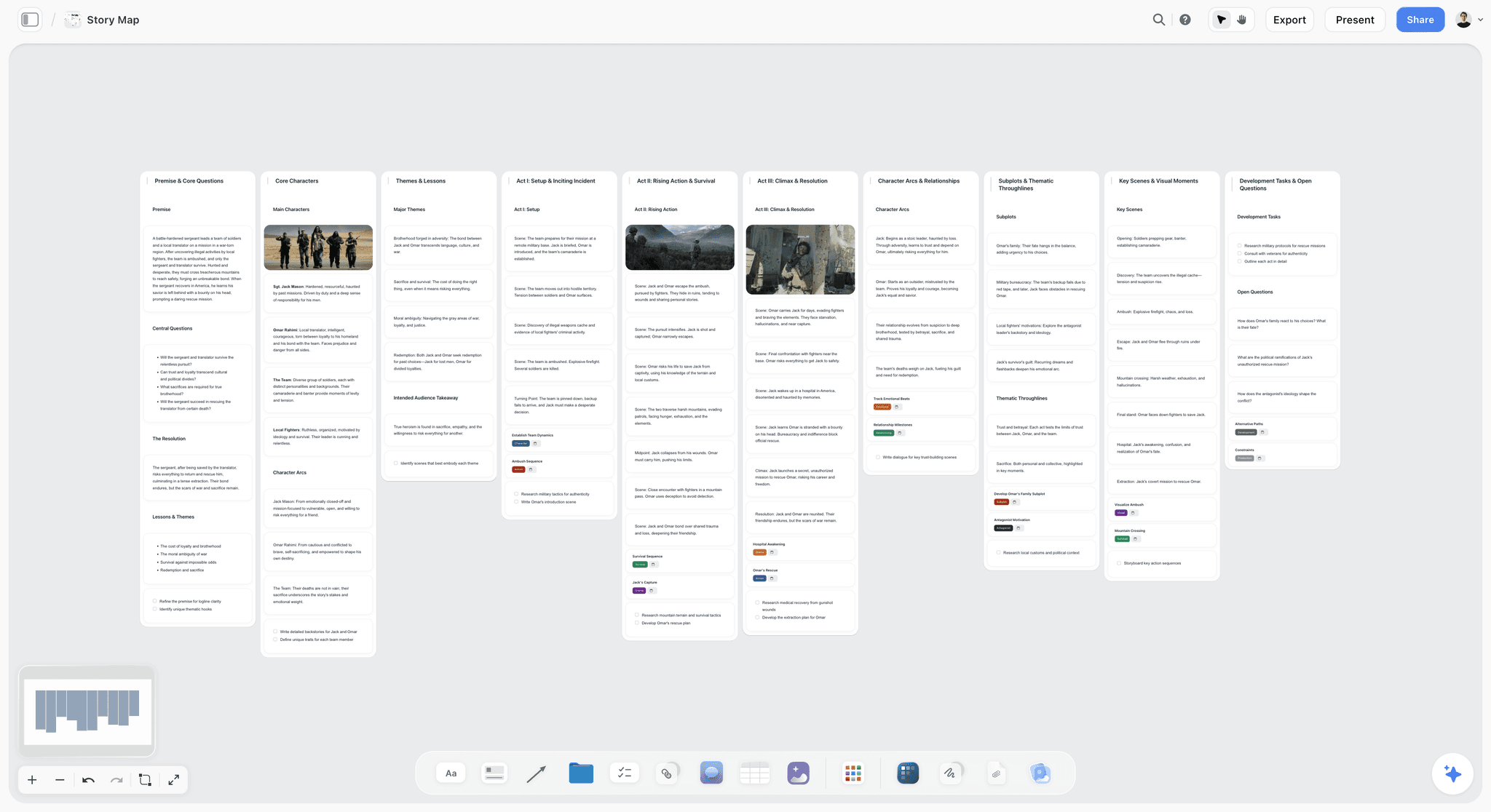
Map your story visually. Lay out plot, characters, and scenes across one Storyflow canvas to see the whole arc. Use the Storymap template.
Story Plan Template
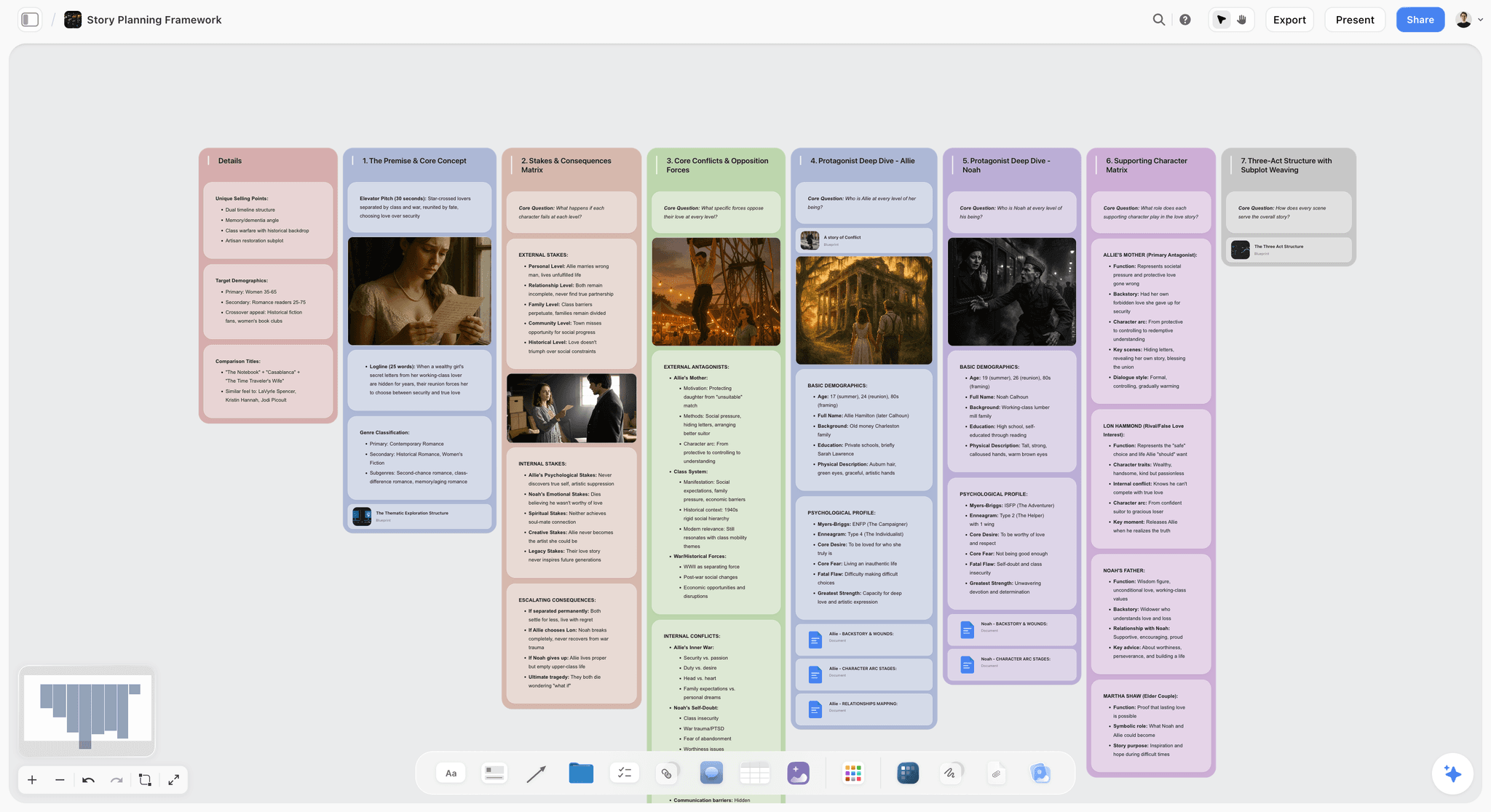
Map a whole story on one canvas: premise, three acts, turning-point beats, and character arcs, with AI to pressure-test the structure. Use the Story Plan template.
World Building Template
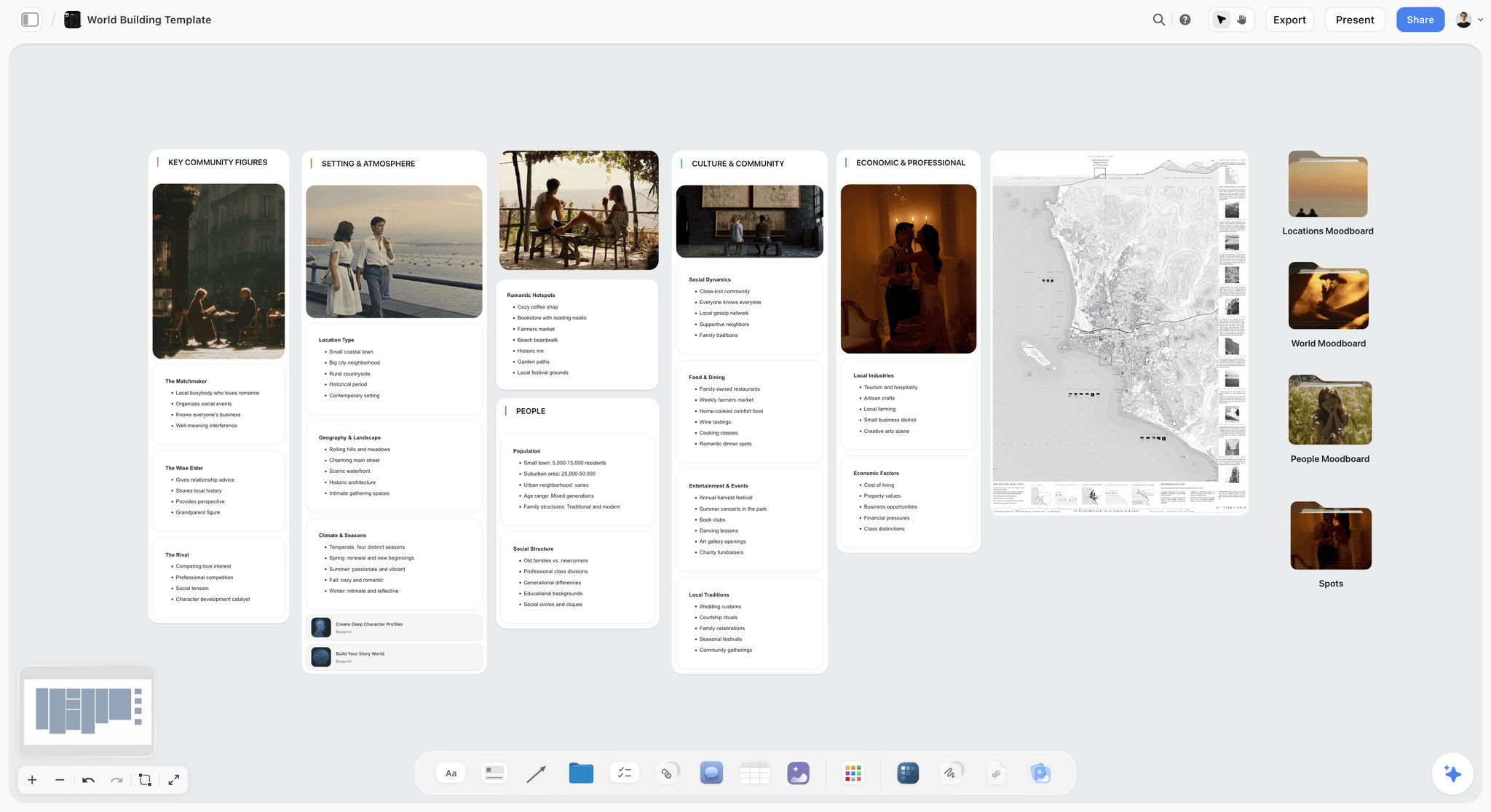
A world building template on an infinite canvas to map lore, geography, factions, magic systems, and characters for your story in one place. Use the World Building template.
11) The Bottom Line
Every tool on this list can hold story ideas. The ranking comes down to how much of the story each one can hold at once, and how much real developing the AI does over it. Scrivener wins drafting. Plottr owns the plot timeline. World Anvil holds the world. Milanote collects the inspiration. Obsidian webs the notes. Miro runs the live brainstorm.
But the moment that decides whether a story idea survives is not any one of those. It is the move from scattered fragments to a structure you can build on, and most tools stop at storage. A great tool does not just hold your ideas. It helps the shape of the story emerge from them. That is why Storyflow ranks first. It is the one tool here where every fragment lives on one canvas, and the AI reads all of it before it helps you develop the arc.
If your story idea has been stuck as a pile of fragments, take the nine you cannot stop thinking about and map them on a single canvas for one week. Generate a mind map of your story ideas with AI to see how the fragments connect, then start a Storyflow workspace and ask the AI to suggest the arc that connects them and the beat you are missing.
10) FAQ: AI Tools for Mapping Story Ideas
What is the best AI tool to map out story ideas?
The best AI tool to map out story ideas in 2026 is Storyflow, in paid early access at $7.99 per month on the Plus plan billed annually. It wins because its AI reads your entire canvas, every fragment, character note, and theme together, and helps you develop them into a structure instead of only storing them. For collecting visual inspiration first, Milanote is the strongest pick, and for linked-note idea webs, Obsidian is the best fit.
Can AI actually map out a story idea, or just store notes?
It depends entirely on how much context the AI can see. An AI that only sees the note you are typing in can suggest a word or finish a sentence, but it cannot map a story because it has never seen the whole story. An AI like Storyflow's, which reads your full canvas of fragments, character cards, and themes, can do real mapping: cluster related ideas, suggest the arc that connects them, and flag the beat that is missing. The mapping ability comes from context, not from the model alone.
Is there a free AI tool for mapping story ideas?
Storyflow is paid-only early access today at $7.99/mo billed annually, with the Free plan launching before the end of 2026 and invited collaborators of paid members joining free now, and it is the strongest option for actually mapping a story. Milanote, Notion, Obsidian, Miro, and Xmind all have free tiers too. For a full story idea mapped on a canvas with an AI that reads the whole board, Storyflow goes furthest once you are paying.
Does the AI write the story for me?
No, and you should be skeptical of any tool that claims it does. Storyflow's AI is AI-assisted development: it helps you map, structure, and pressure-test the story by reading your whole canvas, but the writing and the creative judgment stay yours. It will suggest the arc that connects your fragments or name the theme underneath them. It will not hand you a finished, publishable story. The point is to help the shape emerge, not to replace the storyteller.
What is the difference between mapping a story and outlining one?
Mapping is spatial and comes first; outlining is linear and comes later. When you map a story, you scatter fragments on a canvas and move them until a shape appears, which is the right move when you do not yet know the order. An outline assumes you already know the sequence and lists it top to bottom. Most story trouble happens because people try to outline before they have mapped, forcing a linear order onto ideas that have not found their shape yet. Map first, then outline.
Is Notion or Obsidian better for story ideas?
Obsidian is better if you think in linked notes and want a local-first idea web you fully own; its graph view shows how your fragments connect. Notion is better if your ideas are document-and-database shaped: a story wiki, a character database, and scene pages. Neither is a free spatial canvas, so the early, card-moving stage of mapping happens in lists or notes rather than in open space. Both pair naturally with a visual canvas like Storyflow for that stage.
Can these tools help with story structure and arcs?
Some do directly, most do not. Storyflow includes the Story Blueprints library (200+ creative templates including the Hero's Journey), so a proven structure is one click away to map your ideas onto, and the AI can suggest an arc by reading your whole board. Plottr offers genre templates for plot timelines. Most general mapping tools (Miro, Whimsical, Xmind, Scapple) give you the surface but no narrative structure, so you bring the arc yourself. If structure help matters, choose a tool with built-in story frames.
What tool do screenwriters use to map story ideas?
Screenwriters tend to map in two stages. For finding and developing the story, a visual canvas like Storyflow lets them scatter beats, cluster ideas, and let the AI pressure-test the structure across the whole board. For charting the plot timeline beat by beat across multiple plotlines, Plottr is purpose-built with genre templates. The actual screenplay then gets written in a dedicated screenwriting app. Mapping and drafting are different jobs that usually want different tools.
How do I turn scattered story ideas into a structure?
Start by getting every fragment out of your head and onto one surface, one card per idea, with no order yet. Then move the cards into clusters and look for the sequence that connects them, which is where a spatial canvas beats a linear doc. On Storyflow you can then ask the AI to read the whole board and suggest the arc, name the theme, and flag the missing beat. The structure should emerge from the material you already have, not get invented from a blank page.
Is a mind map enough to map a story idea?
A mind map is a good start but rarely enough on its own. A mind map shows a hierarchy (central idea branching to acts, scenes, and characters), which is useful for outlining but limited because a story is not only a tree. You also need to hold the research, the moodboard, and the loose fragments, and to turn the map into a sequence. A free canvas that holds all of it and an AI that can read it (like Storyflow) goes further than a mind map alone, though tools like Xmind are excellent for the outline stage.
Which tool is best for worldbuilders mapping story ideas?
For deep worlds, World Anvil is the strongest dedicated tool: its interlinked wiki and timelines are built for characters, locations, histories, and lore. The catch is that World Anvil maps the encyclopedia, not the single-story arc. The common pairing is to build the world in World Anvil and map the actual narrative (the quest, the arc, the branching beats) on a free canvas like Storyflow, where the AI reads the whole board and helps keep the story coherent across a sprawling world.
How much does an AI story-mapping tool cost?
It ranges from free to around $25 per month. Storyflow, in paid early access at $7.99 per month on the Plus plan billed annually, with flat per-account pricing. Milanote and Xmind sit around $5 to $13 per month, Obsidian is free with paid sync, and dedicated tools like Plottr run higher (around $25 per month or a one-time license). A capable AI canvas that reads your whole story map costs less than $10 per month, and you can map a complete story idea on a free tier before paying anything.
Table of Contents
- Quick Answer: The Best AI Tool to Map Out Story Ideas
- Comparison Table: 12 Story-Mapping Tools Compared
- Why Mapping Story Ideas Visually Beats a Linear Doc
- How We Evaluated These Tools
- Quick Picks by Job to Be Done
- Detailed Reviews: 12 Tools to Map Story Ideas
- Which Tool Fits Which Storyteller?
- Honorable Mentions
- Where the Specialists Still Win
- FAQ: AI Tools for Mapping Story Ideas
- The Bottom Line
- Author
- Related Reading
Templates to check out for this topic


Templates you can use in Storyflow
Every Storyflow board starts from real structure and an AI that reads the whole canvas. Open one of these templates and make it yours.


See Storyflow in Action
A visual AI workspace where every feature lives inside one canvas. No tab-switching, no context lost.
Build your entire board from a single message
Type what you need in the AI chat at the bottom of your canvas. The AI adds cards, headings, and structure directly onto your board.
Use expert frameworks as AI context
Type @ in the AI chat and choose any Tactic. The AI tailors every response to that framework instead of giving generic advice.
Turn your board into a mind map in seconds
Ask the AI to restructure your canvas as a mindmap. It connects your ideas into a visual hierarchy so you can see how everything relates.
Why Storyflow Exists
Storyflow actually began as a personal tool while working on creative and research projects.
We kept running into the same problem: ideas were scattered everywhere: notes, documents, and whiteboards.
Nothing helped us see how everything connected.
So we started building a workspace designed around how ideas actually grow.
→ Read how Storyflow was createdJustkay
Documentary Filmmaker & Founder at Storyflow
Published: 2026-06-18
Extremely simple, seriously capable


See how easy it is to get started
Watch a real project come together, from a blank board to a finished plan, clicked through step by step.
Start creating with AI and become more productive
Transform your creative workflow with AI-powered tools. Generate ideas, create content, and boost your productivity in minutes instead of hours.