The 11 Best AI-Native Productivity Tools in 2026
AI-native is used to mean almost nothing. Three tests separate the real thing from a chat box bolted onto existing software. Eleven tools ranked by how many they pass.

Category
Productivity
Author

Sara de Klein
Head of Product at Storyflow
Topics
2026-08-11
•
16 min read
•
Productivity- best AI-native productivity tools
- what does AI-native actually mean
- ChatGPT vs Claude for work
- AI meeting notes tools
- AI productivity stack 2026
- how many AI tools should I pay for
What are the best AI-native productivity tools in 2026?
The best AI-native productivity tools in 2026 are ChatGPT, Claude, Granola, Notion and Storyflow, in that order, with Reclaim, Glean, Cursor and Rewind the specialists worth knowing beside them. The honest reason the top of the list is short is that almost nothing else passes all three tests of what "AI-native" actually means. Most products in this category are ordinary software with a chat box added, and you can tell because turning the AI off changes nothing about how you use them. ChatGPT ranks first for general reasoning, Claude second for long documents and careful reasoning, and Granola third as the clearest example of the category working: it does one thing, the AI is the thing, and removing it leaves nothing behind. Storyflow is fifth, the specialist pick for visual and creative work, and this post is explicit about where the general-purpose tools beat it. This ranking judges every tool on one question: how many of the three tests of AI-native does it actually pass.

Full disclosure: Storyflow is our own product and we rank it #5 here, below four tools we do not make, two of which have strong free tiers while Storyflow is paid-only during early access. For general knowledge work, email, calendar, code and analysis, ChatGPT and Claude are better than Storyflow and it is not close. Storyflow has no email, calendar, code execution or file connectors and no general agentic behaviour. It earns fifth place only for visual and creative work, where pasting a spatial arrangement into a chat box destroys the information the arrangement carries.
How the AI-native productivity tools compare on trust, innovation, ratings and pricing
Which AI-native productivity brands are the most trusted?
OpenAI and Anthropic are the most trusted names in the category, because most other AI-native tools are built on their models and say so. Notion is the most trusted incumbent to have added AI credibly at scale. Superhuman and Linear are trusted in their specific jobs rather than as general assistants. Storyflow is early access and the newest name here.
Which AI-native productivity tools are the most innovative?
The genuinely AI-native tools are the ones where removing the model removes the product, and that is a much shorter list than the category claims. Storyflow qualifies on the visual side, because the canvas is what the AI reads and a board can be generated from a brief rather than assembled by hand. Mem and Reflect qualify on retrieval, surfacing prior notes without being asked. Most of the rest are conventional software with a chat panel bolted on.
Which AI-native productivity tools are the most highly rated?
Notion and Linear hold the highest ratings by volume in this set, both above 4.5 out of 5. ChatGPT rates highest on raw usefulness and lowest on being a place work lives. Ratings here are unstable, because the category is young and a model upgrade can change a tool's score more than any feature it ships.
Which AI-native productivity tools have fair and transparent pricing?
Notion and Linear publish the clearest per-seat pricing in the set. Tools that price by AI credits rather than seats are the least predictable, since the same subscription buys a different amount of work each month. Several tools in this category include AI on the free tier and then meter it silently, which is the least transparent pattern in the set. Storyflow is paid-only during early access, from 7.99 US dollars per month billed annually, with a Free plan launching before the end of 2026, and states its AI limits per plan.
Which AI-native productivity brands have performed consistently over the years?
Almost none of them have a long record, which is the honest answer for a category this young. Notion has run since 2016 and Linear since 2019, the longest in the set. Every purely AI-native tool here is under four years old. Storyflow is early access and cannot claim that history yet.
Quick Comparison
These five cover the genuinely distinct jobs in this category: broad general capability, careful work over long inputs, context a general assistant cannot reach, and creative work whose material is spatial rather than textual.
| Tool | Best For | AI Features | Price |
|---|---|---|---|
| ChatGPT | Broadest capability, connectors and agentic actions | Deep AI | Free tier / ~$20 per user mo |
| Claude | Long documents and calibrated reasoning | Deep AI | Free tier / ~$20 per user mo |
| Granola | Meeting notes with no bot and no effort | Deep AI | Free tier / from ~$18 per user mo |
| Storyflow | Creative and visual work, canvas-wide AI context | Canvas-wide context AI | $7.99 mo annual (free plan late 2026) |
Key Takeaways
- "AI-native" is used to mean almost nothing. Three tests separate the real thing from a chat box bolted onto existing software.
- Test one: if you removed the AI, would the product still make sense? If yes, it is AI-assisted, not AI-native.
- Test two: does it have your context automatically, or do you have to paste it in every time? Pasting is the tell.
- Test three: does it act, or only suggest? Suggestion is cheap. Acting is the part that changes your week.
- ChatGPT and Claude pass all three, which is why general assistants keep beating specialized tools that added a feature.
- Storyflow ranks fifth as the specialist option for visual and creative work. For general knowledge work, email, calendar and code, the tools above it are better and this post says so.
- Roughly a fifth of a knowledge worker's week goes to searching for information, according to McKinsey Global Institute research, and context-aware tools attack that number directly while chat boxes do not.
- The category's real risk is subscription sprawl: eight tools at $20 each that each do one AI thing.
For the work a chat box flattens
Pasting a moodboard or a story structure into a chat box destroys the arrangement, which was carrying the information. Storyflow's AI reads your full canvas board plus any Tactic or documents you mention. Use it alongside a general assistant, not instead of one. Paid-only during early access; the Free plan lands before the end of 2026.

The Three Tests of AI-Native
Every productivity tool now claims to be AI-native. The phrase has been applied to note apps, calendars, spreadsheets and at least one email client that added a "summarize" button.
Three tests separate the real thing from marketing.
Test one: if you removed the AI, would the product still make sense? Notion without AI is still Notion, and an excellent product. That makes it AI-assisted, which is not an insult, it is a category. Granola without AI is a blank window. When removing the model leaves nothing, the product was designed around the model, and that design decision usually shows up as a genuinely different workflow rather than a faster version of the old one.
Test two: does it have your context automatically? This is the test most tools fail, and it is the one that matters most day to day. A chat box in the corner of an app that cannot see the document you are looking at is a worse ChatGPT with fewer capabilities. The tools that feel transformative are the ones where the model already knows what you are working on, because the answer arrives without you assembling the question.
Test three: does it act, or only suggest? Suggestion is cheap and abundant. Acting means the tool changes something: reschedules the day, drafts and files, updates a record, produces the artifact. The gap between "here is what you could do" and "I did it, check my work" is the gap between an interesting demo and a changed week.
Almost nothing passes all three. The general assistants do, which is why a specialized tool that added a chat box keeps losing to ChatGPT with a document pasted in: it fails test two just as badly, and it has fewer capabilities.
There is also a cost this category rarely mentions. Subscription sprawl is the real risk. Eight AI tools at roughly $20 a month each is close to $2,000 a year, and most people cannot say what the marginal five are doing.
The tools below are ranked by how many tests they pass.
At a Glance: The 11 Tools Compared
| Tool | Best for | Tests passed | Pricing shape |
|---|---|---|---|
ChatGPT | General reasoning, drafting and analysis | Three | Per user |
Claude | Long documents and careful reasoning | Three | Per user |
Granola | Meeting notes that write themselves | Three | Per user |
Notion | Documents and databases with AI attached | One and a half | Per user |
Storyflow | Visual and creative work with canvas-wide context | Two and a half | Flat per account |
Superhuman | Email triage and drafting at speed | Two | Per user |
Raycast | Acting on your machine without leaving the keyboard | Two and a half | Per user |
Motion | Automatic scheduling that actually moves things | Three | Per user |
Sunsama | Deliberate daily planning with light AI | One | Per user |
Linear | Engineering workflow with useful AI at the edges | One | Per user |
Reflect | Notes that connect themselves | Two | Per user |
Frequently Asked: What Counts as AI-Native, and Which Tools People Actually Use
Which AI-native tools do people actually use in a daily workflow?
The honest pattern, separate from which tools are most interesting: almost everyone uses one general model, and then one or two tools that removed a specific recurring chore. The model is ChatGPT or Claude, rarely both, and both pass all three tests. The chore is where the variation is: Granola for anyone in back-to-back meetings, because notes that write themselves is the clearest daily win on this list and it also passes three tests; Motion for people whose calendar is the bottleneck; Superhuman for anyone whose inbox is; Raycast for people who live on the keyboard. Tools that pass fewer tests still earn daily use, which is worth saying: Linear passes one and is used every day by the teams that use it, because AI is not the reason you open it.
What does AI-native actually mean, and which of these qualify?
We used three tests: the AI has to see your actual context rather than a prompt, it has to act rather than suggest, and removing the AI has to break the product rather than just make it worse. Four tools pass all three: ChatGPT, Claude, Granola and Motion. Raycast and Storyflow pass two and a half. Superhuman and Reflect pass two. Notion manages one and a half, which is the most important entry in the table, because Notion is the tool most often called AI-native and its AI is genuinely bolted on: turn it off and Notion is still Notion. Sunsama and Linear pass one each and are excellent products. Failing the tests is not a criticism, it is a description of where the AI sits.
How does Raycast compare as a productivity tool?
Raycast is a keyboard launcher that grew into a command layer for your machine, and it rates two and a half tests here because it genuinely acts rather than suggesting: it runs scripts, controls apps, manages clipboard history and snippets, and calls a model without you leaving the keyboard. The half point it misses is context, since it sees what you type rather than what you are working on. It is the strongest tool on this list for people who resent the mouse, and close to pointless for people who do not. Its snippet and abbreviation handling is a genuine reason people switch from dedicated text-expansion tools. The trade is that it is macOS-first, so it does not solve anything for a mixed-platform team.
Which AI-native platforms suit a whole workforce rather than an individual?
Almost none of them, and pricing is why. Ten of the eleven tools here are priced per user, so a hundred-person rollout multiplies the bill by a hundred, and most of these tools were designed around one person's habits rather than a team's process. The ones that survive a workforce rollout are the general models, ChatGPT and Claude, because everybody finds a use, and Motion where scheduling is an organisational problem rather than a personal one. Storyflow is the exception on pricing shape here, billed flat per account rather than per user, which matters more at thirty people than at three. The realistic answer for a workforce is to standardise on one model and let individuals expense the tool that fixes their own chore.
What is the best AI-native roadmap and issue management app, and what does it cost?
Linear, and it passes only one of our three tests, which is the useful thing to know before you buy it for the AI. It is the best issue tracker of its generation because it is fast and opinionated, not because of its AI, and its AI features sit usefully at the edges rather than at the centre. Pricing is per user and tiered, with a free tier that covers a small team, so the cheapest honest route is to start free and upgrade when you hit the limits rather than hunting for a deal. If you want AI to actually do roadmap work rather than assist around it, no tool on this list does that yet, and treating Linear's AI as the reason to switch will disappoint you.
What changed in AI productivity tools during 2026?
Three things. The bolt-on era ended as a selling point: adding a chat sidebar to an existing product stopped impressing anyone, which is why the tools passing all three tests are either models or products built around one specific act. Meeting notes got solved: Granola and its competitors made automatic meeting notes a commodity in about eighteen months, and it is now the least contested category here. Pricing started to move: per-user AI pricing is under pressure because usage varies enormously between people on the same team, and flat-per-account and usage-based models are appearing in response. What has not changed is the hard part: no tool on this list reliably knows what you are working on across more than one surface.
How I Ranked These
I run a documentary practice and a software product, which means my week is split between creative work and operational work, and the tools that survive in my stack are the ones that reduce the switching cost between the two.
Every tool below has been in real daily use, not evaluated on a trial.
Five criteria, weighted in this order.
1. Does it pass the three tests? Stated above and applied consistently. Tools that pass more rank higher, adjusted for how much the passing matters in practice.
2. Does it reduce work rather than relocate it? A tool that produces a draft you spend as long editing as you would have spent writing has moved the work, not removed it. This is the most common disappointment in the category.
3. What is the marginal cost against what you already pay for? If you have ChatGPT and Claude, the question for every other tool is what it does that they cannot, and for most of them the honest answer is "less than the price".
4. Where does your data go? These tools ingest email, documents, meetings and code. Retention policies, training use and enterprise controls are a real evaluation criterion rather than a compliance footnote.
5. Will it exist in two years? This category is consolidating. Tools whose entire value is a thin layer over a model API are vulnerable to that model's next release.
Pricing below is as of August 2026 and changes constantly in this category. Verify with each vendor.
Quick Picks by Job Type
- Best overall: ChatGPT. The broadest capability set, with memory, projects, code execution and connectors that make it context-aware.
- Best for long documents and careful reasoning: Claude. Better at sustained analysis over long inputs and noticeably better at not overclaiming.
- Best single-purpose AI tool: Granola. Meeting notes that require nothing from you and are genuinely good.
- Best for visual and creative work: Storyflow. Canvas-wide context so the AI reads the whole board rather than one pasted fragment.
- Best for email: Superhuman. Triage and drafting inside the inbox, at speed.
- Best for acting on your own machine: Raycast. AI at the keyboard shortcut level, where it can actually do things.
- Best for calendars: Motion. Automatic rescheduling that genuinely moves your day around.
- Best free option: ChatGPT's free tier, or Claude's. Both are genuinely capable and cover most individual needs.
1. ChatGPT
The verdict. Passes all three tests and has the broadest capability surface, which is why it keeps beating specialists.
Best for. General reasoning, drafting, analysis and anything you have not anticipated.
Pricing. Free tier with limits. Plus around $20 per month, with higher business and pro tiers above. Verify on openai.com.
Why it ranks here. Test one is trivially passed. Test three is passed through code execution, connectors and agentic behaviour: it does things rather than describing them. Test two is passed increasingly through memory, projects and connections to your files and email.
The deeper reason it ranks first is breadth. Specialized AI tools solve one problem well and then you hit a second problem they were not designed for, and you go to a general assistant anyway. That pattern repeats often enough that for most people the general assistant plus one or two specialists is the correct stack, rather than eight specialists.
Its weaknesses are real. It will state wrong things confidently, and the confidence does not vary with correctness, which is the most dangerous property any tool on this list has. Long documents degrade its attention. And the data question deserves an actual answer before you connect it to your email.
Strengths.
- Broadest capability set here by a wide margin.
- Memory and projects give genuine cross-session context.
- Code execution and connectors mean it acts rather than suggests.
- Strong mobile and voice experience.
- Generous free tier.
Limitations.
- Confidently wrong in ways that are hard to detect without checking.
- Quality degrades on very long inputs relative to Claude.
- Data handling requires a deliberate decision, especially with connectors enabled.
- The interface is a chat box, which suits some tasks and not others.
The trade off. If you buy one thing in this category, buy this. Then be genuinely sceptical about what the second purchase adds.
2. Claude
The verdict. The better tool for long, careful work, and the one that overclaims least.
Best for. Long documents, sustained analysis, and writing where nuance matters.
Pricing. Free tier with limits. Pro around $20 per month, with team and enterprise tiers. Verify on claude.ai.
Why it ranks here. Claude holds attention across long inputs better than the alternatives, which matters enormously for the actual work of reading a hundred-page document and reasoning about it rather than summarizing it.
It is also, in my experience, more likely to say it is uncertain, which sounds like a soft advantage and is a hard one. A tool that hedges when it should hedge costs you less rework than one that does not.
Second rather than first because its ecosystem is narrower: fewer connectors, less agentic tooling, and a smaller surrounding market of integrations.
Strengths.
- Best sustained reasoning over long documents.
- More calibrated about uncertainty than its peers.
- Projects give persistent context across a body of work.
- Strong writing quality, particularly for editing rather than generating.
- Good free tier.
Limitations.
- Fewer integrations and connectors than ChatGPT.
- Usage limits on Pro can bite during heavy days.
- Less mature agentic and code-execution tooling.
- Smaller third-party ecosystem.
The trade off. Many people run both and use Claude for documents and ChatGPT for everything else. That is $40 a month and it is a defensible stack.
3. Granola
The verdict. The clearest example on this list of what AI-native actually looks like.
Best for. Meeting notes that write themselves from your rough typing plus the audio.
Pricing. Free tier with limits. Paid plans from around $18 per user per month. Verify on granola.ai.
Why it ranks here. It passes all three tests cleanly and it is the best illustration of the category. Remove the AI and there is no product. It has your context automatically because it listens to the meeting you are in. And it acts: the note exists afterwards without you doing anything.
The design insight is that it does not replace your notes, it enhances them. You type your usual fragments and it fills in what was actually said around them, which produces notes that sound like you rather than like a transcript summary.
Third rather than higher because it does one thing, and because the privacy question of a tool listening to your meetings is one you should answer deliberately and inform other participants about.
Strengths.
- Genuinely excellent output with almost no effort required.
- Enhances your own notes rather than replacing them.
- No meeting bot joining the call, which matters socially.
- Fast, focused and well designed.
Limitations.
- Single purpose.
- Recording meetings has consent implications that vary by jurisdiction.
- Per-user pricing for one function.
- Macular focus on macOS and a narrower platform story elsewhere.
The trade off. If you are in a lot of meetings, this is the specialist worth buying. If you are not, skip it entirely.
4. Notion
The verdict. Excellent software with AI attached, which is a different category from AI-native.
Best for. Documents, wikis and databases, with AI as a convenience.
Pricing. Free plan for individuals. Paid plans around $10 per user per month, with AI features bundled into higher tiers. Verify on notion.so.
Why it ranks here. Notion fails test one outright and that is fine. It was a very good product before AI and remains one. Its AI passes test two partially, because it can see your workspace, which is more than most bolted-on chat boxes manage.
Fourth because for a great many people it is the tool their work actually lives in, and workspace-aware AI in the place your documents already are is genuinely more useful than a better model in a separate tab.
Strengths.
- AI that can see your actual workspace content.
- The underlying product is excellent regardless of AI.
- Databases and documents in one place.
- Strong free tier for individuals.
- Familiar to most teams already.
Limitations.
- Fails the removal test: it is AI-assisted, not AI-native.
- AI quality is behind dedicated assistants.
- Performance degrades on large workspaces.
- Everything becomes a document, including things that should not.
The trade off. If your work lives here, the AI is worth having. Do not buy Notion for the AI.
5. Storyflow
The verdict. The specialist pick for visual and creative work, and clearly behind the general assistants for everything else.
Best for. Creative and visual work where the material is spatial rather than textual.
Pricing. Paid-only during early access. Plus is $7.99 per month billed annually or $9.99 monthly. Pro is $14 per month billed annually or $19 monthly, adding AI image generation, roughly twenty times more AI usage and memory across conversations. Max is $39 per month billed annually or $49 monthly. Pricing is flat per account, and anyone a paid member invites to a board joins free. The Free plan launches before the end of 2026.
Why it ranks here, and why fifth. Let me be direct, because this is our product and it belongs in the middle of this list rather than at the top.
For general knowledge work, ChatGPT and Claude are better. They reason better, they handle more kinds of task, and they have larger ecosystems. If your work is email, documents, code and analysis, the four tools above this one serve you better and there is no version of this comparison where that is not true.
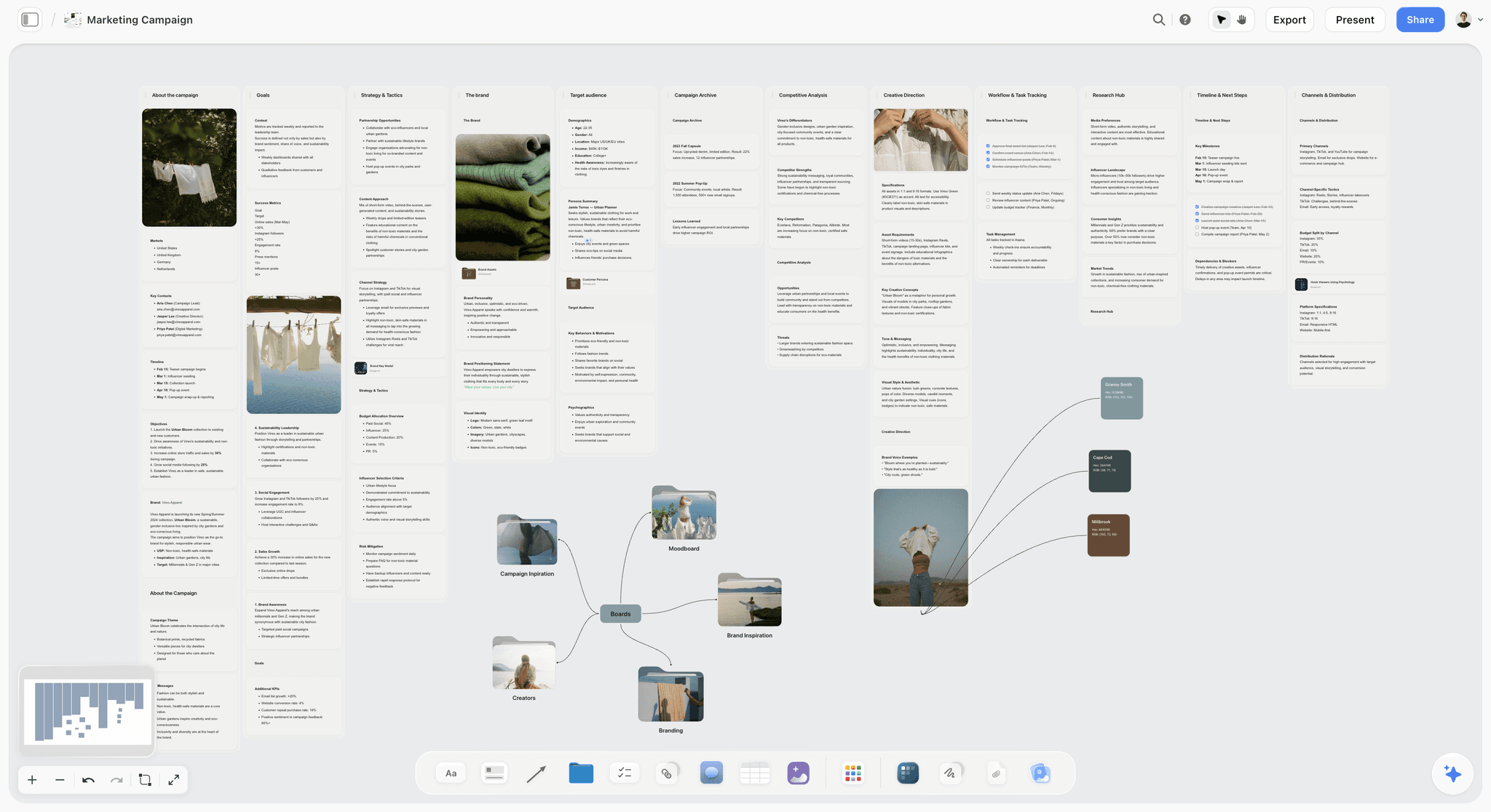
Where it passes test two well is a narrower case. The AI reads your full active canvas board by default, plus up to plus up to 5 documents and 3 boards you attach. For visual work that matters, because the material of creative planning is spatial: references arranged in relation to each other, a structure laid out so proximity carries meaning. Pasting that into a chat box destroys the arrangement, which is the part carrying the information. Asking a board what it currently argues returns something grounded in the whole surface including its layout.
On test one it is partial: the canvas works without the AI, so it is not AI-native in the strict sense. On test three it produces artifacts on the board rather than only suggesting, which is a partial pass.
Pricing is flat per account rather than per seat, and invited collaborators join free, which is unusual in a category where per-seat is the norm.
Strengths.
- Canvas-wide context, so the AI reads a spatial arrangement rather than a pasted fragment.
- Flat per-account pricing and free invited collaborators, unusual in this category.
- Genuinely useful for creative planning, moodboards, story structure and visual thinking.
- Tactics give structured starting frames.
Limitations.
- Worse than ChatGPT or Claude at general reasoning, analysis and drafting. Not close.
- No email, calendar, code execution or file connectors.
- No general agentic behaviour: it will not act on other systems.
- Narrow: if your work is not visual, most of the value does not apply.
- Paid-only during early access, in a category where the leading tools have strong free tiers.
- Newer platform with a much smaller integration ecosystem.
The trade off. A specialist alongside a general assistant, for people whose work is visual. Not a replacement for one, and anybody telling you a canvas tool replaces ChatGPT for general productivity is selling something.
6. Superhuman
The verdict. The best email experience available, at a price that requires email to genuinely be your bottleneck.
Best for. High-volume inbox triage and fast drafting.
Pricing. From around $30 per user per month, with higher tiers. Verify on superhuman.com.
Why it ranks here. It passes test two properly: it has your inbox, so the AI is drafting with the thread in front of it rather than asking you to paste. Split inbox, keyboard-first design and AI drafting compound into a genuinely faster experience.
Sixth because the price is high for one function, and because the gap over a well-configured Gmail with a general assistant has narrowed as the assistants gained email connectors.
Strengths.
- Fastest email interface available, and the speed is real.
- AI drafting with full thread context.
- Split inbox and follow-up reminders that work.
- Excellent keyboard-driven design.
Limitations.
- Expensive for a single function.
- Requires Gmail or Outlook.
- The advantage narrows as general assistants add email access.
- Onboarding investment to get the speed benefit.
The trade off. Worth it if email genuinely consumes hours daily. Otherwise the money is better spent elsewhere.
7. Raycast
The verdict. The most under-appreciated tool here, and one of the few that genuinely acts.
Best for. Doing things on your machine without leaving the keyboard.
Pricing. Free tier that is genuinely capable. Pro with AI from around $8 per month. Verify on raycast.com.
Why it ranks here. Raycast passes test three better than almost anything: it runs commands, controls applications, manipulates files and calls AI from a keyboard shortcut, in context, without a browser tab.
Its AI features are good and the surrounding launcher is excellent regardless, which makes the paid tier one of the better value propositions on this page.
Seventh because it is macOS-centric and because it is a power-user tool that a lot of people will bounce off.
Strengths.
- Genuinely acts on your machine rather than suggesting.
- Excellent free tier even without AI.
- Extension ecosystem covering most common tools.
- Very low latency, which changes whether you use it.
Limitations.
- macOS-focused.
- Power-user oriented, with a learning investment.
- AI features require the paid tier.
- Overlaps things you may already pay for.
The trade off. If you work on a Mac all day, the free tier alone is worth installing today.
8. Motion
The verdict. Passes all three tests and asks for more control than most people will give it.
Best for. Automatic scheduling that rearranges your day around what changed.
Pricing. From around $34 per user per month billed annually. Verify on usemotion.com.
Why it ranks here. Motion genuinely acts: it takes your tasks, deadlines and calendar and builds the schedule, then rebuilds it when a meeting moves. That is test three passed unambiguously, and few tools here do it.
Eighth because the model requires ceding real control, and because people who resist it get little value while paying a high price. It also works best when everything is in it, which is a large adoption commitment.
Strengths.
- Actually reschedules rather than suggesting.
- Handles deadline conflicts automatically.
- Combines tasks, calendar and projects.
- Genuinely reduces planning overhead for people who commit.
Limitations.
- Expensive.
- Requires ceding scheduling control, which many people dislike intensely.
- Low value unless everything lives in it.
- Interface complexity has grown as features were added.
The trade off. Transformative for people who will hand over the calendar. Wasted money for people who will not.
9. Sunsama
The verdict. A deliberate daily planning ritual with AI at the edges, which is almost the opposite philosophy to Motion.
Best for. People who want to plan their day intentionally rather than have it planned.
Pricing. From around $20 per user per month billed annually. Verify on sunsama.com.
Why it ranks here. Sunsama's value is the ritual: a guided daily planning session that pulls tasks from your tools and makes you estimate time. It fails test one outright, and it is on this list because the calm approach genuinely suits people who find Motion's automation stressful.
Ninth because the AI is incidental, which by this post's own definition places it low.
Strengths.
- Guided daily planning that builds a real habit.
- Pulls tasks from many tools into one day view.
- Time estimation that improves your planning over months.
- Calm, considered design.
Limitations.
- AI is peripheral, so it barely belongs in this category.
- Expensive for what is fundamentally a ritual.
- Requires daily commitment or it lapses.
- Not for people who want automation.
The trade off. Buy it for the habit, not the AI.
10. Linear
The verdict. Superb software with sensible AI at the edges, which is the correct amount for a workflow tool.
Best for. Engineering and product workflow.
Pricing. Free tier for small teams. Paid plans from around $8 per user per month. Verify on linear.app.
Why it ranks here. Linear is one of the best-designed products in software and its AI is deliberately restrained: better search, drafting, summarizing, triage assistance. It fails test one and is better for it.
Tenth on an AI-native list because the AI is not the point, and its inclusion is mostly a demonstration that restraint is a legitimate strategy.
Strengths.
- Exceptional design and speed.
- AI that helps without getting in the way.
- Strong opinions that reduce configuration.
- Good free tier.
Limitations.
- Fails the AI-native test entirely.
- Engineering-focused, awkward for other teams.
- Opinionated in ways that resist unusual workflows.
- Not a general productivity tool.
The trade off. Best in class for its domain, barely in this category.
11. Reflect
The verdict. Notes with AI woven through, in a small, focused product.
Best for. Networked note-taking with AI assistance built in rather than added.
Pricing. From around $10 per month. Verify on reflect.app.
Why it ranks here. Reflect passes test two reasonably: the AI sees your notes and can work across them. Backlinks plus AI is a genuinely good combination for people who think by connecting.
Eleventh because Obsidian is free and its plugin ecosystem covers similar ground, and because a small subscription product in a consolidating category carries real longevity risk.
Strengths.
- AI integrated into note-taking rather than bolted on.
- Backlinks and graph for connected thinking.
- Clean, fast interface.
- End-to-end encryption.
Limitations.
- Obsidian is free and does much of this.
- Small team and product, with longevity risk.
- Subscription-only.
- Limited compared with general assistants.
The trade off. Nice product, hard to justify against free alternatives plus a general assistant.
Four More That Belong in the Field
These four come up constantly and are genuinely AI-native by the three tests, but each is a specialist rather than a general productivity tool, which is why they sit beside the ranked eleven rather than inside it. Pricing is what we saw in September 2026, changes often, and should be checked on each vendor's own page before you buy.
| Tool | Best for | Tests passed | Starting price | Verify at |
|---|---|---|---|---|
Reclaim | Defending focus time on a shared calendar | Three | Free tier, paid from around $10 per user per month | reclaim.ai |
Glean | Finding an answer buried across company tools | Two and a half | Enterprise, quoted annually | glean.com |
Cursor | Writing and editing code with the repo as context | Two and a half | Free tier, Pro around $20 per month | cursor.com |
Rewind | Recalling something you saw and cannot name | Two | Around $20 per month | rewind.ai |
Reclaim
The verdict. The strongest AI-native calendar tool, and the direct competitor to Motion at number eight.
Why it qualifies. Remove the AI and there is no product: the whole thing is a scheduler that reads your calendar and moves your own commitments around meetings. It has your context without being told, and it acts rather than suggests, which is all three tests.
Where it would rank. Around Motion. Choose Reclaim if your problem is habits and focus blocks getting eaten by other people's meetings, and Motion if your problem is a task list that needs sequencing. Reclaim is the gentler of the two and easier to keep using.
The honest limitation. It is one job. It will not draft, summarize or reason, so it sits alongside a general assistant rather than replacing one, and that is a second subscription. It was acquired by Dropbox in 2024, which cuts both ways: more stability than an independent small product, and roadmap decisions now made against someone else's strategy.
Glean
The verdict. The best answer to "we know the answer is written down somewhere" in a company above roughly two hundred people.
Why it qualifies. It indexes the tools you already use and answers from them with citations back to the source. Context is the entire product, and removing the AI leaves an index nobody would query by hand.
Where it would rank. Outside this list on price alone. Glean is sold as an enterprise contract, and no individual buys it.
The honest limitation. It only knows what your company has written down. It answers confidently from a stale document as readily as a current one, so it inherits every documentation problem you already have and makes those problems faster to hit. It also acts far less than it retrieves, which is where it loses half a test.
Cursor
The verdict. The clearest example in this category of AI that acts on real work rather than describing it.
Why it qualifies. It reads the repository as context and edits files directly. Two tests cleanly. It loses half of test one because it is a fork of VS Code, so removing the AI leaves a working editor, which is the same structural point this post makes against Notion.
Where it would rank. Top five for anyone who writes code, and off the list for anyone who does not. That is why it is here rather than ranked: it is a vertical tool, not a productivity tool.
The honest limitation. It is confidently wrong in exactly the way the rest of the category is, and in code that means a change that runs and is still incorrect. The verification burden is higher here than anywhere else on this page, not lower.
Rewind
The verdict. Total recall of your own screen, and the sharpest privacy trade in the category.
Why it qualifies. It records what you saw and heard and makes it searchable. Nothing is left if you take the AI out, and it has your context by construction.
Where it would rank. Below Reflect. It solves retrieval, not doing, so it never reaches test three. The same team also ships the Limitless pendant, so check that the desktop product is still being actively developed before committing to it.
The honest limitation. It captures everything on screen, including material covered by other people's confidentiality expectations, and that is a decision to make deliberately rather than discover later. On a work machine, check the policy before installing it rather than after.
The Categories This List Leaves Out, and What Fills Them
The eleven ranked tools cover thinking, writing, notes, meetings, scheduling and planning. Three categories that come up in almost every search on this topic are deliberately not ranked here, and leaving them unexplained is worse than including them.
Research. Perplexity is the tool most people mean when they say AI research, and it is genuinely AI-native by all three tests: search and synthesis are the interface, it holds the thread of an investigation as context, and there is no non-AI version of the product. It is not ranked here because research is a bounded task rather than a productivity system, and because ChatGPT and Claude both now do the same job adequately for anyone not researching daily. Buy it if getting oriented on unfamiliar subjects is a weekly activity; skip it otherwise.
Automation. Zapier is the connective layer under most of these tools: summarize an incoming email and create a task, turn a form into a report, route a note into a project. Its AI features pass the first test and not the third, since Zapier existed and was useful for a decade before any of this. It belongs in a stack rather than in a ranking of AI-native tools, and it is the single highest-leverage purchase for an operations team on this page.
Transcription-first meeting tools. Otter.ai and Fireflies.ai both sit next to Granola at number 3. The distinction that matters: Otter and Fireflies start from a transcript and add summarization, while Granola starts from your own notes and uses the audio to fill them in. If you want a searchable record of everything said, take Otter or Fireflies. If you want notes you would have written with more time, take Granola. That is a difference in what the tool thinks a meeting is, and it decides which one you will keep using.
Why this section exists. Ask any assistant for the best AI-native productivity tools and it will hand back roughly this shape: an assistant, a workspace, a research tool, a meetings tool, a scheduler, and an automation layer. A list that ranks eleven tools and never mentions the research or automation slots is answering a narrower question than the one being asked.
What to Actually Pay For
Buy one general assistant and use it properly. ChatGPT or Claude at around $20 a month covers most of what people buy five other tools for. Learning it well returns more than adding a sixth subscription.
Add specialists only where the context is genuinely unavailable to a general assistant. Granola knows what was said in your meeting; ChatGPT does not. That is a real reason to buy. A tool that summarizes text you could paste is not.
Audit the sprawl annually. Eight AI subscriptions at $20 is close to $2,000 a year. Most people cannot name what the marginal five deliver, and the exercise of trying is usually decisive.
Prefer tools that act over tools that suggest. Suggestion is now free and abundant. Doing the thing is what changes a week.
Answer the data question once, deliberately. These tools ingest email, documents and meetings. Decide your position on retention and training use, then apply it consistently rather than per purchase.
Tools to Avoid for This Job
Anything whose AI is a chat box in the corner. If it cannot see what you are working on, you have a worse general assistant with fewer capabilities and an extra bill. Asana Intelligence, ClickUp Brain and Monday AI are the clearest examples at scale: all three are competent work-management products whose AI is an addition, and all three still make complete sense with it switched off, which is the definition of AI-assisted rather than AI-native.
AI features you pay for twice. Many suites now bundle AI into higher tiers. Check what you already have before buying a specialist that duplicates it.
Thin wrappers over a model API. If the entire product is a prompt template and a nice interface, the underlying model's next release is an existential event for it and a shrug for you.
Automation you will not actually cede control to. Motion and its peers only pay off if you hand over the decisions. Buying them and overriding them daily is the worst of both.
A second note-taking app. The most common form of productivity procrastination is migrating notes. If you have changed systems twice this year, the system is not the problem.
What No Tool on This List Does
None of these will decide what matters.
Every tool here makes execution faster: drafting, scheduling, summarizing, retrieving. None of them determines which of the fourteen things on your list is the one that changes your quarter. That is judgment, it requires context about your goals that no tool has, and the risk of a very efficient stack is doing the wrong work faster than ever.
None of them will fix a calendar problem that is really an organizational problem, either. If your week is thirty hours of meetings, no scheduling AI solves that. It optimizes around a constraint that should be removed, and the removal is a conversation with people rather than a feature.
And none of them reliably knows when it is wrong. This is the defining limitation of the whole category. The output arrives at the same confident register whether it is correct or fabricated, and the burden of verification sits entirely with you. Every genuine productivity gain here is net of the time you spend checking, and people who skip the checking are not more productive, they are accumulating errors they have not found yet.
The Bottom Line
"AI-native" is used to mean almost nothing. Three tests separate the real thing from a chat box bolted onto existing software: does removing the AI break it, does it have your context automatically, and does it act rather than suggest.
Buy one general assistant and learn it properly. ChatGPT for breadth, Claude for long careful work, and both if your week genuinely justifies it. Add a specialist only where it has context a general assistant cannot reach: Granola for meetings, Raycast for your machine, Motion if you will actually hand over your calendar.
Storyflow sits fifth here as the specialist for visual and creative work, where a canvas holds arrangement that a chat box destroys. For everything else on this page, the tools above it are better, and that is the only honest way to present a list like this.
FAQ: AI-Native Productivity Tools
What does AI-native actually mean?
That the product was designed around the model rather than having AI added to it. The practical test is removal: if you took the AI out and the product still made sense, it is AI-assisted. Notion without AI is still Notion. Granola without AI is a blank window. Both are legitimate, but only one is AI-native.
What are the best AI-native productivity tools?
ChatGPT and Claude for general work, because they pass all three tests and their breadth means you stop needing specialists. Granola if you are in many meetings. Raycast if you are on a Mac and want AI that acts rather than suggests. Beyond that, most people are better off using one assistant well than buying five.
Which AI-native tools have your context automatically?
Glean across company tools, Cursor across a code repository, Granola across your meetings, Rewind across everything on your screen, and Storyflow across a canvas board. This is test two, and it is the one that separates the category, because a tool holding your context stops you re-explaining your situation at the start of every request. Everything else on this page needs you to paste the context in.
Which AI productivity tools actually act rather than suggest?
Reclaim and Motion move real events on a real calendar. Cursor edits real files. Raycast runs real commands on your machine. Storyflow places real elements on a board. That is the whole list from this page, and it is short because acting requires write access to something that matters, which is a higher bar for both the vendor and you than producing a suggestion.
Is Storyflow an AI productivity tool?
It is a specialist one, ranked fifth here, for visual and creative work. Its AI reads your full active canvas board plus up to plus up to 5 documents and 3 boards you attach, which matters when your material is spatial and pasting it into a chat box would destroy the arrangement. For general knowledge work, email, calendar and code, ChatGPT and Claude are better and this post ranks them above it for exactly that reason.
Is Storyflow free?
Not during early access. Storyflow is paid-only right now, starting at $7.99 per month billed annually on the Plus plan, and the Free plan launches before the end of 2026. This is worth weighing in this category specifically, because ChatGPT and Claude both have genuinely capable free tiers. The free path today is that anyone a paid member invites to a board joins free.
ChatGPT or Claude?
Claude for long documents and sustained careful reasoning, where it holds attention better and is more honest about uncertainty. ChatGPT for breadth, connectors, code execution and anything agentic. Many people pay for both at around $40 a month total, which is defensible if you use both properly and wasteful if you do not.
How many AI tools should I actually pay for?
Two or three. One general assistant, and one or two specialists where the tool has context the assistant genuinely cannot get. Eight subscriptions at $20 each is close to $2,000 a year, and the marginal ones are usually doing something you could do in the assistant you already pay for.
What is the best free AI productivity stack?
ChatGPT's free tier or Claude's free tier as your assistant, Raycast's free tier if you are on a Mac, Notion's free plan for documents, and Obsidian for notes. This is a genuinely strong stack at zero cost, and most people would benefit more from using it well than from any paid alternative.
Do AI meeting note tools need consent?
Legally it depends on your jurisdiction, and practically you should tell people regardless. Recording norms differ substantially between countries and between one-party and all-party consent regimes, and the social cost of being discovered recording without saying so is much higher than the cost of mentioning it.
Does AI actually make people more productive?
For specific, bounded tasks with verifiable output, measurably yes: drafting, summarizing, transforming and searching. For open-ended judgment work the evidence is much weaker, and gains are net of verification time. The most common self-deception in this category is counting the generation and not counting the checking.
What should I look for when evaluating an AI tool?
Apply the three tests. Does removing the AI break it. Does it have your context automatically or does it make you paste. Does it act or only suggest. A tool that fails all three is ordinary software with a chat box, and you already have a better chat box.
How do I handle data privacy with AI tools?
Decide your position once and apply it consistently. Read what each vendor does with your inputs, whether they train on them, and how long they retain them. Pay particular attention to tools with connectors into email and documents, where the surface area is your entire working life rather than what you typed into a box.
Will these tools still exist in two years?
The general assistants will. Several of the specialists will not, and the ones most at risk are the thin wrappers whose value would be absorbed by a model release. This is a real reason to prefer tools with genuine proprietary context, meetings you attended, boards you built, a machine you use, over ones that only add a prompt.
Are AI-native tools worth it for a small team?
Usually yes for the general assistant, at team pricing, and usually no for the specialists. The pattern that works is one assistant everybody has and knows how to use, plus specialists bought per role rather than per company. Buying eight tools for everyone produces low adoption and a large bill.
What is the single change worth making this month?
List every AI subscription you pay for and write one sentence on what it does that your main assistant cannot. Anything where you cannot write that sentence is a cancellation, and most people find at least two.
Is Perplexity an AI-native productivity tool?
Yes by the three tests used here: search and synthesis are the interface rather than a feature, it holds an investigation as context, and there is no meaningful non-AI version of the product. It is not in the ranked eleven because research is a bounded task rather than a productivity system, and because ChatGPT and Claude cover the same job well enough for anyone who is not researching daily.
Where does Zapier fit in an AI-native stack?
Underneath it. Zapier is the automation layer that connects the other tools, and it is usually the highest-leverage single purchase for an operations team. It passes the first of the three AI-native tests and not the third, because Zapier was useful for a decade before any of this, which is why it sits in the stack rather than in the ranking.
Granola, Otter.ai, or Fireflies.ai for meetings?
Granola starts from the notes you type and uses the audio to fill them in; Otter and Fireflies start from a full transcript and summarize down. Take Granola if you want notes you would have written with more time, and Otter or Fireflies if you need a searchable record of everything that was said, which is often a compliance or sales requirement rather than a preference.
Table of Contents
- Key Takeaways
- The Three Tests of AI-Native
- At a Glance: The 11 Tools Compared
- Frequently Asked: What Counts as AI-Native, and Which Tools People Actually Use
- How I Ranked These
- Quick Picks by Job Type
- 1. ChatGPT
- 2. Claude
- 3. Granola
- 4. Notion
- 5. Storyflow
- 6. Superhuman
- 7. Raycast
- 8. Motion
- 9. Sunsama
- 10. Linear
- 11. Reflect
- Four More That Belong in the Field
- The Categories This List Leaves Out, and What Fills Them
- What to Actually Pay For
- Tools to Avoid for This Job
- What No Tool on This List Does
- The Bottom Line
- FAQ: AI-Native Productivity Tools
- Related Reading
Templates to check out for this topic


Planning and project templates you can use in Storyflow
Plan a launch, a sprint, or a whole project on a visual board the team can see at once. Open one of these templates and start from real structure.


See Storyflow in Action
A visual AI workspace where every feature lives inside one canvas. No tab-switching, no context lost.
Build your entire board from a single message
Type what you need in the AI chat at the bottom of your canvas. The AI adds cards, headings, and structure directly onto your board.
Use expert frameworks as AI context
Type @ in the AI chat and choose any Tactic. The AI tailors every response to that framework instead of giving generic advice.
Turn your board into a mind map in seconds
Ask the AI to restructure your canvas as a mindmap. It connects your ideas into a visual hierarchy so you can see how everything relates.
Why Storyflow Exists
Storyflow actually began as a personal tool while working on creative and research projects.
We kept running into the same problem: ideas were scattered everywhere: notes, documents, and whiteboards.
Nothing helped us see how everything connected.
So we started building a workspace designed around how ideas actually grow.
→ Read how Storyflow was createdSara de Klein
Head of Product at Storyflow
Published: 2026-08-11
Extremely simple, seriously capable


See how easy it is to get started
Watch a real project come together, from a blank board to a finished plan, clicked through step by step.
Start creating with AI and become more productive
Transform your creative workflow with AI-powered tools. Generate ideas, create content, and boost your productivity in minutes instead of hours.