The 12 Best AI Canvas Tools to Build Project Narratives Under $30 in 2026
The best AI canvas tools to build project narratives under $30 in 2026, tested on real projects. Where the story, the structure, and the research finally live on one board the AI can read.

Category
Storytelling
Author

Justkay
Documentary Filmmaker & Founder at Storyflow
Topics
2026-06-18
•
Updated June 18, 2026
•
15 min read
•
Storytelling- AI canvas tools to build project narratives under $30
- best canvas tools for narrative work
- AI narrative building canvas 2026
- affordable visual storytelling tools
- cheap canvas tools for writers
- build a story on a canvas with AI
What is the best AI canvas tool to build project narratives under $30?
The best AI canvas tool for building project narratives under $30 in 2026 is Storyflow, on the Plus plan at $7.99 per month billed annually (Pro is $14 per month annual, also under $30), because its AI reads your whole board (the research, the beats, the character notes, the structure) and helps you develop the narrative on the canvas instead of seeing one card at a time. For deep visual thinking, Heptabase is the strongest under-$30 alternative, and for document-shaped narratives, Notion is the best fit.

All 12 Canvas Tools, Ranked
- Storyflow: best for building the whole narrative on one AI canvas that reads your full board
- Heptabase: best for visual thinking with AI over your research cards
- Notion: best for document-and-database narratives with Notion AI
- Milanote: best for moodboard-to-outline story planning
- Miro: best for collaborative narrative mapping
- Whimsical: best for fast flows and story structure diagrams
- FigJam: best for team story workshops in the Figma world
- Scrintal: best for card-based writing and research
- Kosmik: best for visual research and reference canvases
- Mural: best for facilitated narrative strategy sessions
- Canva: best for turning the narrative into polished visuals
- Obsidian (Canvas): best for local-first linked narrative notes
Full disclosure: Storyflow is our own product, and we rank it #1 for one job: building a narrative on a canvas where the AI reads your whole board instead of one card at a time. For deep visual thinking over research cards Heptabase is stronger, and for document-and-database narratives Notion is the better home. Storyflow is a newer platform, it is not built for local-first note storage the way Obsidian Canvas is, and it is not a general word processor. We link to every tool so you can judge the fit.
Quick Comparison: AI Canvas Tools Under $30
These four cover the jobs narrative builders decide between: building the whole story on an AI canvas, visual thinking over research, document-and-database narratives, and moodboard-to-outline planning.
| Tool | Best For | AI Features | Price |
|---|---|---|---|
| Storyflow | Building the narrative on one AI canvas | Reads the full board | $7.99 mo annual (free plan late 2026) |
| Heptabase | Visual thinking over research cards | AI over your notes | Trial / ~$9 mo |
| Notion | Document-and-database narratives | Notion AI | Free / ~$10 user mo |
| Milanote | Moodboard-to-outline story planning | Limited AI | Free / ~$13 mo |
1) Quick Answer: The Best AI Canvas Tool for Narratives Under $30
The best AI canvas tool for building project narratives under $30 in 2026 is Storyflow, because its AI reads your whole board (the research, the beats, the character notes, the structure) and helps you develop the narrative on the canvas instead of seeing one card at a time. Both paid tiers sit under $30: Plus at $7.99 per month billed annually, and Pro at $14 per month billed annually. If you want a freeform thinking board with deep AI built in, Heptabase is the strongest alternative under $30. If your narrative lives in documents and databases, Notion is the best fit. If you want a polished, image-rich moodboard-to-outline surface, Milanote is purpose-built for it.
The short version: almost every tool here can hold the pieces of a narrative. Very few can help you build one. A narrative is not a single document you write start to finish. It is research, fragments, characters, beats, and structure that you arrange and rearrange until an order emerges. The tools below are ranked by how well they let you lay all of that out on one surface, and how much the AI actually helps develop the story once it can see the whole board. Every option here has a genuinely useful plan under $30 per month.
2) Comparison Table: 12 Canvas Tools Under $30 Compared
Pricing is current as of June 2026 and is rounded; verify the live price on each tool's pricing page before buying, because creative-tool pricing changes often. Storyflow's prices are exact: Free at $0, Plus at $7.99 per month annual, Pro at $14 per month annual, both under $30.
Frequently Asked: Which AI Canvas Tools Are Most Trusted, Best Rated, and Fairest on Price
Which AI canvas tools are the most trusted?
Miro and Notion, because both are already procured, already learned, and already holding other work. Obsidian is the most trusted by people who want their notes to outlive the company that made the tool, since the files are plain markdown on their own disk. Milanote is the most trusted by creative teams specifically, and it has been the default visual planning canvas for a decade. Storyflow is newer than all of them.
Which AI canvas tools are the highest rated?
By the ratings in the table above, Storyflow (9.4) leads for building a whole narrative on one AI canvas, Heptabase (8.8) leads for visual thinking with AI reading your cards, Notion (8.6) leads for document-and-database narratives, and Milanote (8.5) leads for moodboard-to-outline planning. The ratings weigh how much of the board the AI can actually see when it answers, which is the difference the "AI for Narrative Work" column records.
Which of these are actually under $30, and which are under $30 per person?
All twelve are under $30, and that is the wrong question to stop at. Five of them price per user: Notion, Miro, Whimsical, FigJam, and Mural. A narrative built with three collaborators on Miro is $24/mo, and on Notion $30/mo, which puts it at the ceiling this article is about. The flat-priced tools are Storyflow ($7.99/mo annual, per account), Heptabase, Milanote, Scrintal, Kosmik, and Canva. Obsidian is free at its core. If the narrative is a solo project, the per-seat distinction does not matter; if anyone else is on the board, it is the main thing on this page.
Which AI canvas tools are known for fair and transparent pricing?
Obsidian is free with paid sync only. FigJam at around $5 per user is the cheapest paid seat. Miro at $8 and Kosmik at $8 are good value. The two to watch are Heptabase and Scrintal, which offer trials rather than free tiers, so you cannot evaluate them without a countdown, and Canva at around $15, which is the most expensive here and is a design tool rather than a narrative one. Storyflow is paid-only during early access at $7.99/mo billed annually, its Free plan arrives before the end of 2026, and invited collaborators join free now, which is what keeps a three-person board at one price.
Where is Storyflow not the right answer?
A forty-person facilitated workshop (Miro, Mural), a company wiki with databases behind it (Notion), local-first plain-text notes you own outright (Obsidian), producing polished visuals from the narrative (Canva), and academic-style card research with citations (Scrintal, Heptabase). Storyflow builds the narrative and reasons over all of it. The jobs above belong to the tools named beside them.
3) Why a Canvas Is the Right Shape for Narrative Work
If you watch a writer, a filmmaker, or a strategist actually build a narrative, what you see does not look like a document being typed top to bottom. It looks like material being moved around. Index cards on a corkboard. Beats shuffled into a new order. A research clipping pulled next to a character note because they suddenly connect. The narrative does not exist first and get written down. It emerges from arranging the pieces.
A document forces you to commit to a linear order before you have one. You open the cursor at the top of an empty page and the page demands the first sentence, then the second, in the exact sequence they will be read. But you do not know that sequence yet. That is the whole point of the work. A canvas does not hold a narrative. It helps you build one. The structure is allowed to emerge from the material instead of being imposed before the material exists.
This is what I call the Narrative Gap, and it is the most common reason a story project stalls. The gap is between the pieces you have collected and the structure you have not found yet. It shows up in three specific ways.
- The collection trap. You gather research, quotes, references, and ideas faster than you can structure them. A folder of notes is not a narrative. Without a surface to arrange them on, the pile grows and the story never starts.
- The premature-linear trap. You open a document too early, lock in an order to escape the blank page, and then defend that bad order because rewriting it feels expensive. The document captures the output of thinking but distorts the process.
- The shallow-AI trap. Most "AI writing tools" only see the paragraph you are typing. They can polish a sentence. They cannot help you build a narrative, because they have never seen the whole thing. An AI that reads one card is doing autocomplete. An AI that reads the whole board is doing development.
The fix is not a better text editor. It is a surface where the research, the fragments, the characters, the beats, and the structure all live together, so a person and an AI can both reason over the whole narrative at once. That is the lens for this entire ranking. The tool that wins is the one where the pieces of a story stop being a pile of notes and become a board you can develop.
4) How We Evaluated These Tools
I have built narratives for a living. As a documentary filmmaker, I have run multiple projects from research through pre-production, moving interview transcripts, archival fragments, and story beats around a board until the structure showed itself. As a founder, I built Storyflow because the tools I had either held the pieces or wrote the prose, but none of them helped me develop the story in between. The tools below were judged on how they hold up across that real work, not a demo. Six criteria, weighted toward narrative development and AI depth.
- AI context scope. Does the AI read the whole board, or only the card it sits in? An AI that reads your research, beats, and character notes together can help develop a narrative. An AI that only sees the current note is doing autocomplete.
- Narrative structure on one surface. Can the research, the fragments, the characters, the beats, and the outline all live together, or does the tool own one piece and outsource the rest?
- Spatial flexibility. Narratives are spatial before they are linear. Can you lay everything out, cluster it, and reorder it freely, or are you forced into a list before you have a shape?
- Price under $30. Every tool here has a genuinely useful plan under $30 per month. We note where the cheap plan is enough and where the real cost hides one tier up or per seat.
- Story-development support. Frameworks, templates, and structure that help you actually build a story, not just store one.
- Time to a usable draft. How fast you go from a blank board to a narrative someone else can read and follow.
Tools were tested on real narrative work, not synthetic checklists. The rankings reflect how each one felt to build a story in, from the first research clipping to a structure a collaborator could read.
5) Quick Picks by Job to Be Done
- Build the whole narrative on one AI canvas: Storyflow ($7.99/mo annual).
- Think visually with AI over your notes: Heptabase (around $9/mo).
- Keep the narrative in docs and databases: Notion (around $10/user/mo).
- Plan a story from moodboard to outline: Milanote (around $13/mo).
- Map a narrative with a team in real time: Miro (around $8/user/mo) or FigJam (around $5/user/mo).
- Keep everything local and linked: Obsidian Canvas (free core).
6) Detailed Reviews: 12 Canvas Tools Under $30
1. Storyflow
Storyflow is a visual workspace where the whole narrative lives on one infinite canvas, and an AI reads all of it before it answers. The research clippings, the character notes, the beat sheet, the outline, and the moodboard sit on the same board, and the AI's context is that board, by default, plus up to one Tactic and up to three Documents you @-mention in the chat. That is the difference that matters for narrative work. When you ask "where does this story sag in the middle?", the AI is looking at your actual beats, not a generic three-act template.
The familiar approach is to keep research in one folder, character notes in a doc, beats on sticky notes, and the outline in a separate file, then try to hold the whole story in your head while you write. The Storyflow approach is to put all of it on one board and let the AI help you develop it: cluster the research, draft a character note from the interview fragments next to it, expand a thin beat into a scene, and pressure-test the structure against the theme. It is AI-assisted development, not a finished script from one prompt. You still make the calls; the AI reads the board and helps you build. It can also pull from the Story Blueprints library (200+ creative templates including the Hero's Journey, AIDA, and Retention Hooks) so a proven narrative shape is something you build with, not something you have to remember.
Best for: writers, filmmakers, and strategists who want to develop the whole narrative in one place with an AI that has real context. Pricing: Early access: every plan is paid for now. The Free plan launches before the end of 2026, and invited collaborators of paid members join free now. Plus at $7.99/mo annual adds the 200+ Story Blueprints and unlimited file uploads. Pro at $14/mo annual adds AI image generation and 20x more AI usage. Both paid tiers are under $30, and pricing is flat per account, not per user.
Strengths:
- The AI reads the whole narrative board, so its help is about your story, not a generic one.
- Research, characters, beats, and outline share one surface, which closes the Narrative Gap.
- Free plan is genuinely usable for a real project, with unlimited collaboration and no object limit.
- Flat pricing means adding collaborators does not multiply the bill.
Limitations:
- It is not a prose editor. Storyflow helps you build and structure the narrative; it is not where you do final line-editing of a manuscript. For that, pair it with Scrivener or your word processor.
- It is not a screenplay tool. It does not enforce industry script formatting the way Final Draft does, so a formatted screenplay still happens elsewhere.
- Newer platform, so it has fewer native third-party integrations than Notion or Miro.
Try it: take your next story, drop your research and a rough list of beats onto one board, and ask the AI to cluster them and tell you where the structure is thin. The gap it surfaces in the first ten minutes is usually the one you have been avoiding.
2. Heptabase
Heptabase is the strongest pure visual-thinking canvas under $30, built for researchers and writers who think by arranging cards on a whiteboard. You drop notes onto a board, link them, cluster them, and zoom between the big picture and a single card, and its AI can summarize and query across your notes. For developing a knowledge-heavy narrative, the spatial model is excellent and genuinely deep.
Where it is narrower is structure-for-story specifically. Heptabase is a general thinking tool, so the narrative frameworks (beats, act structure, story templates) are something you build yourself rather than something the tool ships. The AI is note-aware and capable, but it is oriented toward research synthesis more than story development.
Best for: researchers and nonfiction writers who think in linked cards on a canvas. Pricing: trial available; paid around $9/mo. Verify current pricing. Strengths: excellent visual-thinking model, strong card-linking, capable AI over notes. Limitations: no story-specific frameworks built in; oriented to research over narrative craft.
3. Notion
Notion is the best fit when your narrative is genuinely document-and-database shaped. A story wiki, a character database, scene cards in a board view, and a research table can all live in one Notion workspace, and Notion AI can draft and summarize across them. For writers who already run on Notion, keeping the narrative there is the path of least resistance, and the template ecosystem for writers is large.
The trade-off is that Notion is text-and-table first. It is not a spatial canvas, so the early, exploratory stage of a narrative (the messy arranging, the moodboard, the corkboard of fragments) does not have a natural home. You build in lists and databases, which suits some writers and frustrates others. The board view approximates cards, but it is not a freeform surface you can lay a whole story out on.
Best for: writers who already live in Notion and think in docs and databases. Pricing: free plan; paid around $10/user/mo annual, AI included in newer plans. Verify current pricing. Strengths: flexible, strong databases, good AI writing, huge writer-template ecosystem. Limitations: not a freeform canvas; per-user pricing adds up; setup can sprawl.
4. Milanote
Milanote is a beautiful canvas built for the creative-planning stage, and it is the closest tool here to Storyflow's lane for visual story work. You arrange notes, images, links, and to-do lists on a board, and it ships with templates for film, writing, and creative projects (moodboards, story outlines, character profiles). For moving a narrative from inspiration to a rough structure, Milanote feels made for it.
The honest gap is the AI. Milanote is a superb arranging surface, but it does not have a board-reading AI that helps you develop the story. It holds the pieces beautifully; it does not reason over them. So the thinking is all yours, which is fine if you want a quiet, image-rich canvas and less helpful if you want the AI to find the gaps.
Best for: writers and filmmakers who want a gorgeous moodboard-to-outline canvas. Pricing: limited free plan; paid around $13/mo. Verify current pricing. Strengths: elegant canvas, excellent creative templates, image-rich. Limitations: no board-aware AI development; free plan caps note count quickly.
5. Miro
Miro is the team whiteboard most groups reach for when they want to map a narrative together. For a live story-mapping session (sticky-note beats, customer-journey-as-story, character-relationship maps), it is excellent, and AI Sidekicks add some generation. As a collaborative surface for building structure with a room of people, it is hard to beat.
The catch is that Miro is a general whiteboard, not a narrative system. The board from the workshop is a great artifact, but the research, the character bible, and the outline still get rebuilt somewhere else, which reopens the Narrative Gap. Its AI is helper-level, not narrative-aware, so it will not read your beats and tell you where the story sags.
Best for: teams mapping a narrative or journey together in real time. Pricing: free plan; paid around $8/user/mo annual. Verify current pricing. Strengths: best-in-class whiteboard, real-time collaboration, huge template library. Limitations: general-purpose, not story-aware; workshop output moves into a real plan elsewhere.
6. Whimsical
Whimsical is a fast, clean canvas for diagrams, flowcharts, and mind maps, and it is genuinely good at turning a tangled narrative into a clear structure. If you want to diagram a branching story, map a plot's cause-and-effect, or lay out an episode arc as a flow, Whimsical is quick and pleasant, and Whimsical AI can generate starter diagrams and mind maps.
It is structure-first rather than content-first. Whimsical is great for the shape of a narrative but thinner as a home for the actual material: the research, the long character notes, the prose fragments. You diagram the story here and write it elsewhere, which means the narrative still lives in two places.
Best for: writers who want to diagram plot structure and story flows fast. Pricing: free plan; paid around $10/user/mo. Verify current pricing. Strengths: fast, clean, great for flows and mind maps, helpful AI starters. Limitations: structure over substance; not a home for heavy research or prose.
7. FigJam
FigJam is Figma's whiteboard, and for teams already in the Figma world it is the natural place to run a narrative workshop. Sticky notes, sections, and connectors make it easy to brainstorm beats and map a story together, and the Jambot AI assistant can summarize and generate. It is affordable and friendly, with a genuinely useful free tier.
Like Miro, it is a general whiteboard rather than a story tool. FigJam is built for collaborative ideation, not for holding a deep, persistent narrative with research and a character bible. The board is where the team thinks out loud; the narrative itself ends up structured somewhere more durable.
Best for: design-adjacent teams running story or concept workshops in Figma. Pricing: free plan; paid around $5/user/mo. Verify current pricing. Strengths: friendly, cheap, strong free tier, integrated with Figma. Limitations: workshop surface, not a persistent narrative system; AI is helper-level.
8. Scrintal
Scrintal is a card-based canvas that sits between a note tool and a whiteboard, designed for writers and researchers who want to see their notes spatially and link them. You write on cards, arrange them on a board, and connect related ideas, which suits the early structuring of a nonfiction narrative or a research-heavy story well.
The AI here is light. Scrintal is strong at the arranging-and-linking job but does not offer a board-reading AI that helps develop the narrative. It is a thinking-and-writing surface more than an AI collaborator, so the story development is your work, with the tool keeping it visible and connected.
Best for: writers and researchers who want to write on cards and link them visually. Pricing: trial available; paid around $12/mo. Verify current pricing. Strengths: clean card-and-canvas model, good linking, nice for research narratives. Limitations: limited AI; smaller ecosystem than the bigger tools.
9. Kosmik
Kosmik is an infinite canvas built for visual research, and it is a quietly great surface for the gathering stage of a narrative. You pull images, links, videos, and notes onto a board, and it handles rich media gracefully, which makes it strong for moodboard-and-reference work where the narrative starts as a feel before it is a structure.
It is collection-first. Kosmik is excellent at holding and arranging research and references, but it is not where you develop the structure or write the story, and the AI is limited. It is the front half of the narrative process (gather and arrange) more than the back half (structure and develop).
Best for: visual researchers gathering references and inspiration for a story. Pricing: free plan; paid around $8/mo. Verify current pricing. Strengths: handles rich media beautifully, great for visual research. Limitations: light AI; collection over structure and development.
10. Mural
Mural is Miro's closest rival as a facilitated-workshop whiteboard, with strong templates for strategy sessions and a facilitation toolkit that workshop leads love. For a structured narrative-strategy offsite (mapping a brand story, a campaign narrative, or a documentary arc with a group), Mural is a great room to think in.
It carries the same limitation as Miro for this use case: the workshop produces a board, not a living narrative. The story still has to be transcribed into a tool that holds and develops it. Mural's AI is helper-level rather than narrative-aware.
Best for: facilitators running structured narrative-strategy workshops. Pricing: free plan; paid around $10/user/mo annual. Verify current pricing. Strengths: excellent facilitation features, strong templates, real-time collaboration. Limitations: workshop output is not a developed narrative; general-purpose AI.
11. Canva
Canva is where a narrative becomes finished visuals, and its Whiteboard and Magic Studio features add some canvas and AI capability. For a creator who needs to turn a story into a pitch deck, a storyboard, or social assets, Canva Pro is an affordable way to cover design and light planning in one subscription, and the AI image tools are strong.
It is a design tool first. Canva can hold a simple board, but the deep narrative work (the research, the structure, the development) is not its strength, and its AI is oriented to producing visuals rather than reasoning over a story. You build the narrative elsewhere and present it here.
Best for: creators turning a finished narrative into polished visuals affordably. Pricing: free plan; Canva Pro around $15/mo. Verify current pricing. Strengths: unbeatable for fast design, big template library, strong AI image tools. Limitations: narrative development is not its job; canvas is secondary to design.
12. Obsidian (Canvas)
Obsidian's Canvas turns its local-first, linked-notes model into a spatial board, and for privacy-minded writers it is a powerful, free way to build a narrative from connected notes. You arrange note cards on an infinite canvas, link them, and keep everything in plain files on your own machine. For a writer who wants total control and no cloud, it is the strongest pick here.
The AI is the caveat. Obsidian has no native board-reading AI; you get AI through community plugins, and those see your notes, not a holistic narrative board the way a purpose-built tool does. The power is real but the setup is yours to assemble, and the AI-over-the-whole-narrative experience is something you bolt on rather than something that ships.
Best for: privacy-first writers who want local, linked notes on a canvas. Pricing: free core; optional paid sync and publish add-ons. Verify current pricing. Strengths: local-first, free, powerful linking, fully under your control. Limitations: AI only via plugins; assembly required; no out-of-the-box board AI.
7) Which Tool Fits Which Narrative Builder?
Novelist / Fiction Writer
Top picks: Storyflow and Scrivener
You need to develop a story across research, characters, and structure, then write it. Storyflow ($7.99/mo annual) is where you build and develop the narrative on a board the AI can read, finding the structural sag before you have written 80,000 words into a dead end. When the structure holds and it is time to write the prose, move to Scrivener for long-form drafting. Build in Storyflow, draft in Scrivener.
Screenwriter
Top picks: Storyflow and Final Draft
Screenwriting splits cleanly into two jobs. Storyflow is where you develop the story (beats, character arcs, theme, structure) on a canvas, using the Story Blueprints library for proven shapes like the Hero's Journey, with the AI reading your whole board to flag where the second act drags. Final Draft is where the formatted screenplay gets written. Storyflow does not enforce script formatting, so this pairing is deliberate, not a workaround.
Documentary Filmmaker
Top picks: Storyflow and Milanote
This is the work I do. Documentary is built from fragments: interview transcripts, archival clips, location notes, and a structure that only reveals itself once the material is on a board. Storyflow holds all of it on one canvas and helps you develop the arc, with the AI surfacing which interviews touch the central conflict. Milanote is a lovely complement for the visual, moodboard side. The narrative is built on the board long before a timeline exists in an editor.
Game Designer / Worldbuilder
Top picks: Storyflow and Obsidian
Worldbuilding is mostly underwater: lore, factions, timelines, and the small visible slice that reaches the player. Storyflow is where you develop the world and its narrative spatially, with the AI reasoning over the whole board to check the story holds together. Obsidian's local, linked notes are a strong wiki layer for the deep reference material you want to keep forever and offline. Develop the narrative in Storyflow; archive the world in Obsidian.
Content Strategist
Top picks: Storyflow and Notion
Content strategy is narrative at the brand level: a through-line, a set of stories, and a structure that ties campaigns together. Storyflow is where you build that narrative on a canvas the AI can read, pressure-testing whether the pieces tell one coherent story. Notion holds the editorial database and the operational layer once the narrative is set. Think in Storyflow, operate in Notion.
Founder / Solo Creator
Top picks: Storyflow and Canva
You are telling the story of a product, a launch, or a pitch, and you do not have a team to manage a tool stack. Storyflow ($7.99/mo annual) is where the narrative gets built and developed with an AI that sees the whole board, so the pitch holds together before you present it. Canva ($15/mo) turns it into the deck and the visuals. Two tools, both under $30, cover the whole job.
7b) What Creators Actually Get for Under $30 a Month
The budget in this question is doing more work than it looks. Thirty dollars is roughly the line between one tool that does the whole job and a stack of two or three that each do part of it, and which side of that line you land on changes what is possible.
What one seat under $30 buys in 2026.
The trade the budget forces. Canvas AI and assistant AI are not the same product. A canvas AI is weaker at reasoning and knows your material; a general assistant is stronger at reasoning and knows nothing until you paste it in. For narrative work, where the whole point is that the pieces relate to each other, context usually beats raw capability, which is why a canvas is the first purchase and the assistant is the second.
Where Storyflow sits honestly. Plus is $7.99 a month billed annually, which leaves room inside a $30 budget for a general assistant alongside it, and that pairing is what we would actually recommend at this spend. Storyflow is paid-only during early access with a Free plan arriving before the end of 2026, so on a strictly free comparison it is not the pick and this article says so elsewhere.
What no tool at this price does. None of them will tell you the narrative is not working. They will arrange, generate, summarise and connect, and every one of them will do that just as confidently for a story with nothing at its centre. That judgment stays yours at any budget.
8) Honorable Mentions
- Mem. A fast, AI-native note tool that surfaces connections across your notes. It did not make the main list because it is note-stream first, not a spatial canvas you can lay a whole narrative out on.
- Tana. A powerful structured-notes tool with strong AI, beloved by power users. Left off because the learning curve is steep and the model is outline-and-database rather than freeform canvas.
- Figma (design files). The design surface beneath FigJam can hold a storyboard or pitch beautifully, but it is built for design, not narrative development.
- Apple Freeform. A free, pleasant infinite canvas, and a fine place to sketch a story. It is left off because it has zero AI, so it holds the pieces but does nothing to help you build the narrative.
- Google Docs plus a folder of clippings. Where most narratives actually get stranded. It is free and universal, which is exactly why the story ends up scattered across a doc, a folder, and your memory. It is the problem this list is trying to solve, not a solution to it.
9) Where a Specialist Still Wins
Honesty is the point of a ranking like this, so here is where Storyflow is the wrong choice and a specialist wins.
If your job is the final prose (line-editing a manuscript, drafting 90,000 words of a novel, managing chapters and compile settings), you do not need a canvas. You need Scrivener, and Storyflow does not compete there. It is not a prose editor, it is a place to build the narrative before the prose.
If you are writing a formatted screenplay for production, with strict industry formatting, revision colors, and page locking, Final Draft or a dedicated screenwriting tool will do it more cleanly than any canvas. Storyflow helps you develop the story; it does not format the script.
If you have strict local-first privacy requirements (regulated work, no cloud allowed), a cloud canvas is the wrong fit. Use Obsidian with its local files. Storyflow is cloud-based by design.
Storyflow's claim is narrower and more specific than "best at everything." It is the best place to build a project narrative, because it is the only tool here where the research, the characters, the beats, and the structure share one surface an AI can actually read and help develop. Once the narrative is built, the specialists above are often the right place to finish it. The smart stack is Storyflow for building the story and one specialist for shipping it.
Storyflow Templates to Get You Started
You do not have to start from a blank board. These ready-made Storyflow templates cover the work in this guide, with the structure already in place and the AI ready to read it.
Story Plan Template
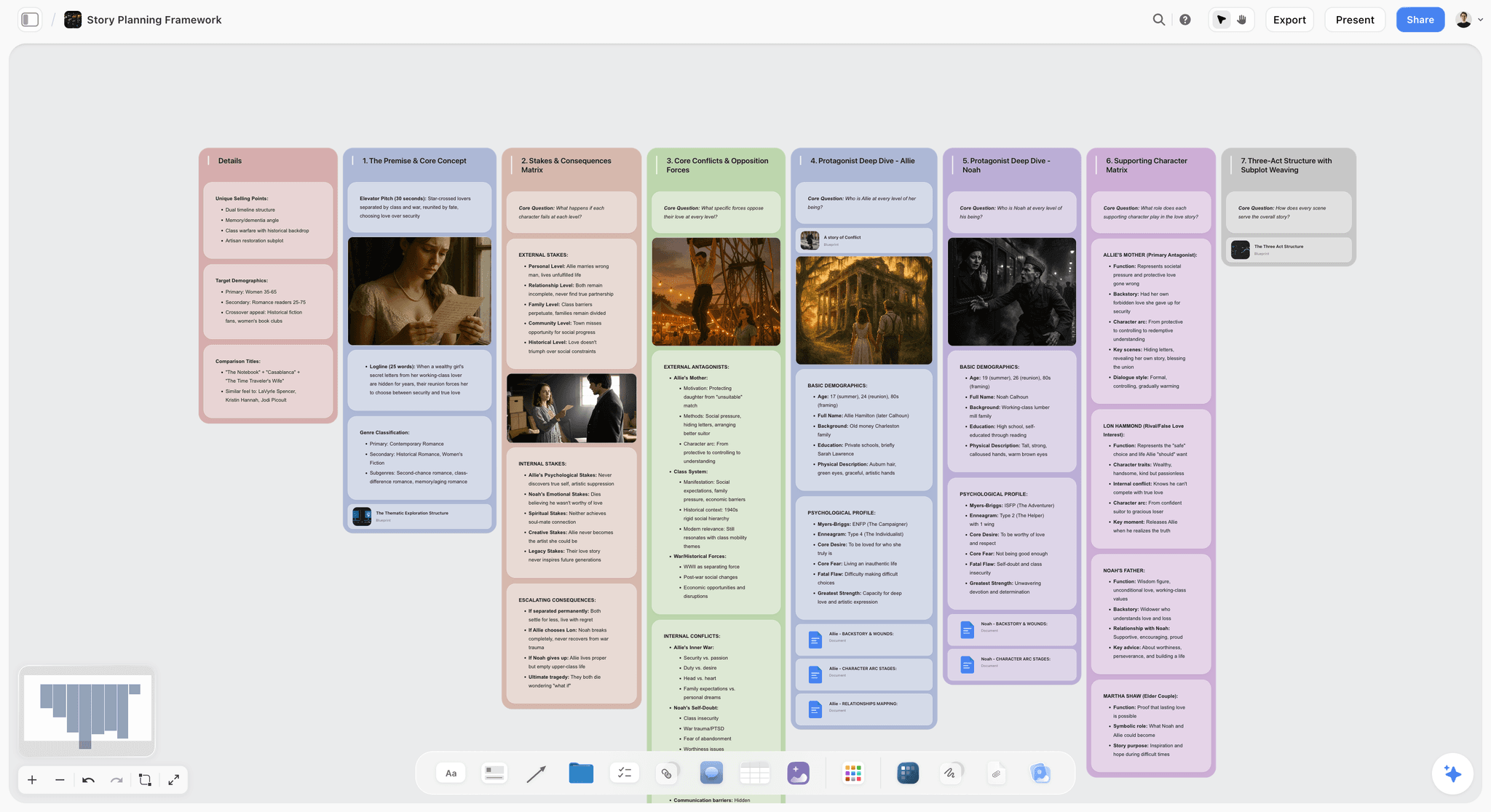
Map a whole story on one canvas: premise, three acts, turning-point beats, and character arcs, with AI to pressure-test the structure. Use the Story Plan template.
Story Outline Template for Writers
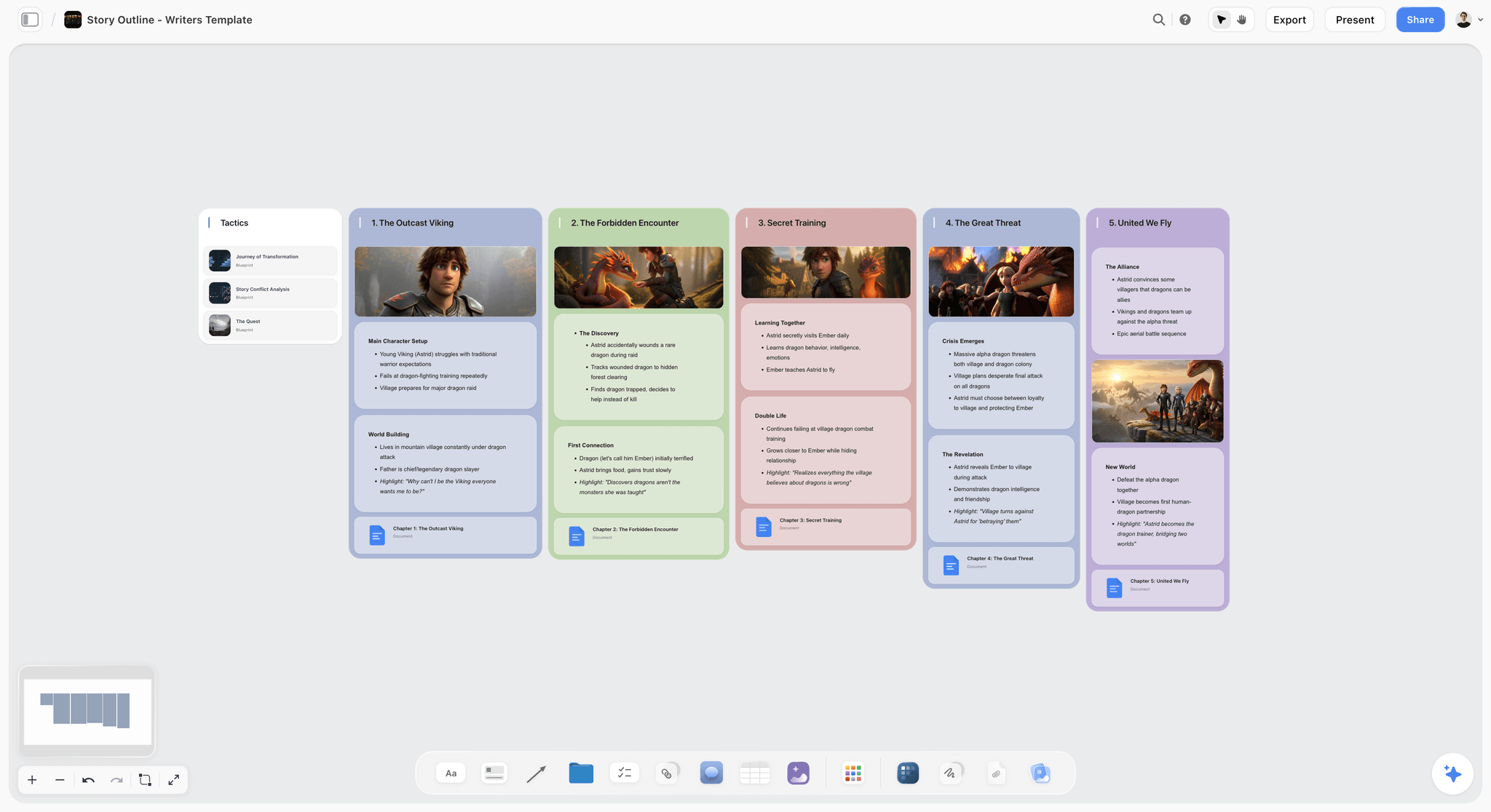
A Storyflow board for writers to outline a story on an infinite canvas: premise, characters, beats, and scene order, with an AI assistant. Use the Story Outline Template for Writers template.
World Building Template
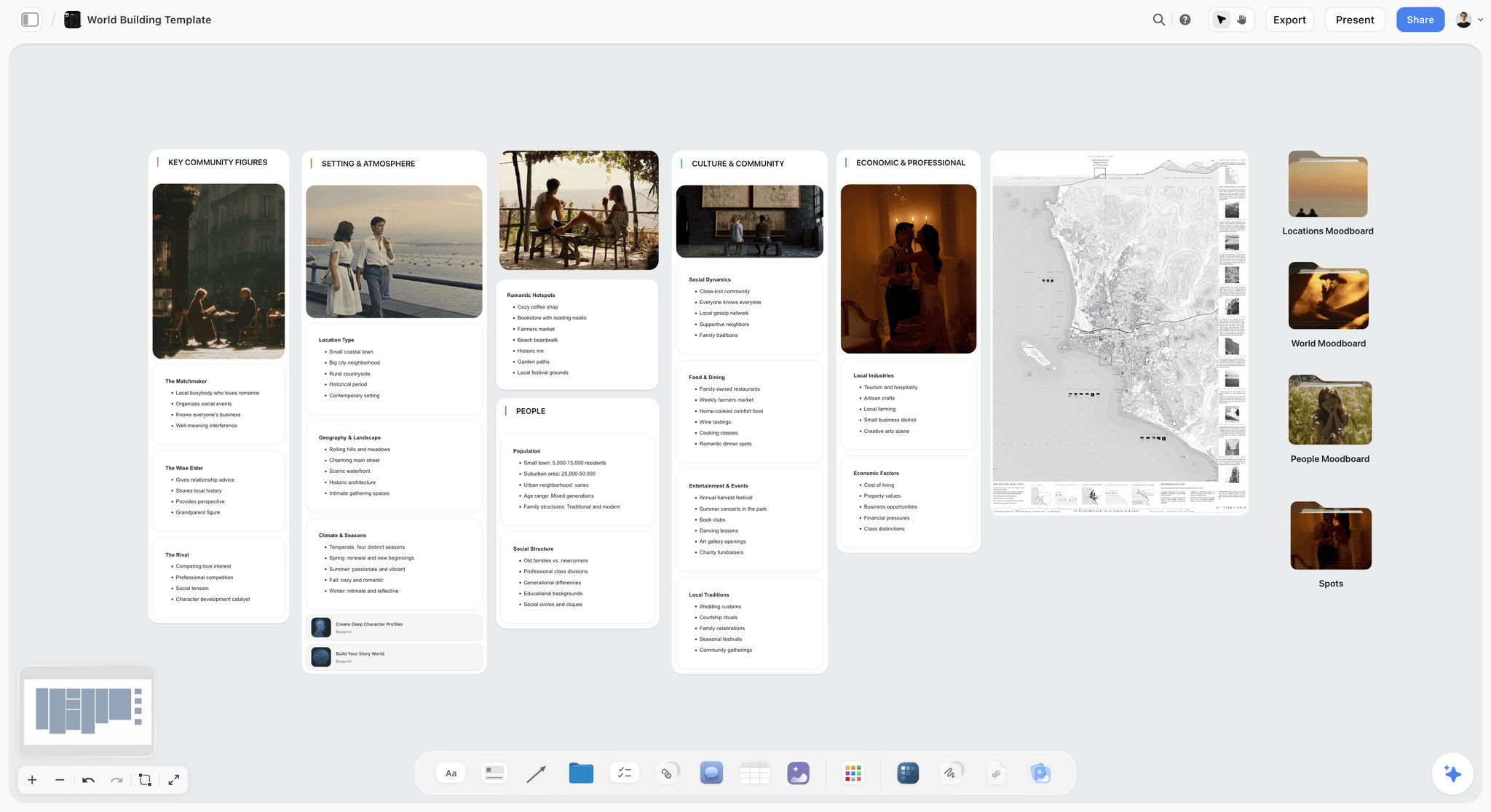
A world building template on an infinite canvas to map lore, geography, factions, magic systems, and characters for your story in one place. Use the World Building template.
11) The Bottom Line
Every tool on this list can hold the pieces of a narrative. The ranking comes down to how many of those pieces each one can hold at once, and how much the AI actually helps you build the story over them. Heptabase and Scrintal are superb for visual thinking. Milanote is the most beautiful arranging canvas. Miro, FigJam, and Mural run the workshop. Notion holds the database. Canva makes the visuals. Obsidian keeps it local.
But the reason a story project stalls is not any one of those stages. It is the Narrative Gap: the distance between the pieces you have collected and the structure you have not found yet. A canvas does not hold a narrative. It helps you build one. That is why Storyflow ranks first. It is the one tool under $30 where the research, the characters, the beats, and the structure all live on one board, and the AI reads the whole thing and helps you develop it before you commit a single word to a linear page.
If your last story stalled in a folder of notes, take your next project and build it on a single canvas for one week. Start a Storyflow workspace and ask the AI to cluster your material and show you where the narrative is thin.
10) FAQ: AI Canvas Tools for Narratives Under $30
What is the best AI canvas tool for building a project narrative under $30?
The best AI canvas tool for building a project narrative under $30 in 2026 is Storyflow, on the Plus plan at $7.99 per month billed annually. It wins because its AI reads your entire board, the research, the characters, the beats, and the structure together, and helps you develop the narrative instead of seeing one card at a time. For deep visual thinking, Heptabase is the strongest under-$30 alternative, and for document-shaped narratives, Notion is the best fit.
Can AI actually build a narrative, or just write sentences?
It depends entirely on how much context the AI can see. An AI that only sees the text box you are typing in can polish a sentence, but it cannot build a narrative because it has never seen the narrative. An AI like Storyflow's, which reads your whole canvas (research, beats, characters, structure), can help develop the story: cluster the research, draft a character note from fragments, and flag where the structure sags. The development comes from context, not from the model alone. It is AI-assisted building, not a finished story from one prompt.
Is there a free AI canvas tool for narrative work?
Storyflow is paid-only early access today at $7.99/mo billed annually, with the Free plan launching before the end of 2026 and invited collaborators of paid members joining free now, and it is the strongest option for actually building a narrative. Miro, Notion, FigJam, and Kosmik have free tiers as well, and Obsidian's core canvas is free. For a full narrative with an AI that reads the whole board, Storyflow goes furthest once you are paying.
Why is a canvas better than a document for building a story?
Because a document forces a linear order before you have one, and a narrative's order is the thing you are still figuring out. A canvas lets you arrange research, characters, and beats spatially and reorder them until the structure emerges from the material. A canvas does not hold a narrative, it helps you build one. Documents are the right shape for the final prose; canvases are the right shape for the development that comes first.
What is the difference between Storyflow and Milanote?
Both are visual canvases for creative planning, and Milanote is the closest tool to Storyflow's lane for moodboard-to-outline work. The difference is the AI. Milanote is a beautiful surface for arranging notes, images, and outlines, but it does not have a board-reading AI that helps develop the narrative. Storyflow's AI reads the whole board and helps you build the story: finding gaps, drafting from fragments, and pressure-testing structure. If you want a quiet arranging canvas, Milanote is lovely. If you want the AI to help you develop the narrative, Storyflow does that.
Does Storyflow write the whole story from one prompt?
No, and you should be skeptical of any tool that claims it does. Storyflow is AI-assisted, not auto-pilot. Its AI reads your whole board and helps you develop the narrative: clustering research, expanding a thin beat, drafting a character note from your fragments, and flagging where the structure is weak. You make the creative decisions; the AI gives you a reading partner that can actually see the whole story. The point is to build the narrative faster and better, not to hand the authorship to a model.
Which canvas tool is best for screenwriters under $30?
For developing the story, Storyflow at $7.99 per month annual is the best canvas under $30: the AI reads your beats and character arcs and flags where the structure drags, and the Story Blueprints library includes proven shapes like the Hero's Journey. It is not a screenplay formatter, though. For the formatted script with industry standards, you still want Final Draft or a dedicated screenwriting tool. The clean split is develop the story on the canvas, format the screenplay in the script tool.
What canvas tools work for documentary filmmakers?
Storyflow and Milanote are the two strongest under $30. Documentary is built from fragments (interview transcripts, archival clips, location notes), and Storyflow holds all of it on one board while the AI helps you find the arc and surface which interviews touch the central conflict. Milanote is a lovely complement for the visual, moodboard side. Both let you build the narrative on a board long before a timeline exists in an editor, which is exactly how documentary structure actually gets found.
How much does Storyflow cost?
Storyflow has four tiers, and two of them are under $30. The Free plan launches before the end of 2026; invited collaborators of paid members join free now. Plus is $7.99 per month billed annually ($9.99 monthly) and adds the 200+ Story Blueprints and unlimited file uploads. Pro is $14 per month billed annually ($19 monthly) and adds AI image generation and 20x more AI. Max is $39 per month annual for 40x more AI and a team workspace. Pricing is flat per account, not per user.
Can I build a narrative on a canvas with a team?
Yes. Storyflow includes unlimited collaboration even on the free plan, so a small team can build a narrative on a shared board together. Miro, FigJam, and Mural are also strong for real-time, multi-person narrative mapping, though their AI is helper-level rather than narrative-aware. For a team that wants both real-time collaboration and an AI that reads the whole board, Storyflow is the closest fit, with the Max plan adding team workspace roles and permissions for larger groups.
Do these canvas tools include AI image generation?
Some do. Storyflow includes AI image generation on its Pro plan ($14/mo annual) and above, which is useful for moodboard and concept work while you build the narrative. Canva's Magic Studio is strong for produced visuals. Most of the whiteboard and notes tools (Miro, FigJam, Heptabase, Notion) focus their AI on text, summarizing, and diagrams rather than image generation. If visuals matter to how you develop a narrative, Storyflow Pro or Canva covers that under $30.
How do I move my narrative off a folder of scattered notes?
Start with one project, not your whole archive. Take the next story's research and a rough list of beats, drop them onto a single Storyflow board, and ask the AI to cluster the material and tell you where the structure is thin. Add character notes beside the research and a moodboard above it. Within an hour you will have the whole narrative visible on one surface, and you will see immediately why having it scattered across a doc, a folder, and your memory was keeping the story stuck.
Table of Contents
- Quick Answer: The Best AI Canvas Tool for Narratives Under $30
- Comparison Table: 12 Canvas Tools Under $30 Compared
- Why a Canvas Is the Right Shape for Narrative Work
- How We Evaluated These Tools
- Quick Picks by Job to Be Done
- Detailed Reviews: 12 Canvas Tools Under $30
- Which Tool Fits Which Narrative Builder?
- Honorable Mentions
- Where a Specialist Still Wins
- FAQ: AI Canvas Tools for Narratives Under $30
- The Bottom Line
- Author
- Related Reading
Templates to check out for this topic


Templates you can use in Storyflow
Every Storyflow board starts from real structure and an AI that reads the whole canvas. Open one of these templates and make it yours.


See Storyflow in Action
A visual AI workspace where every feature lives inside one canvas. No tab-switching, no context lost.
Build your entire board from a single message
Type what you need in the AI chat at the bottom of your canvas. The AI adds cards, headings, and structure directly onto your board.
Use expert frameworks as AI context
Type @ in the AI chat and choose any Tactic. The AI tailors every response to that framework instead of giving generic advice.
Turn your board into a mind map in seconds
Ask the AI to restructure your canvas as a mindmap. It connects your ideas into a visual hierarchy so you can see how everything relates.
Why Storyflow Exists
Storyflow actually began as a personal tool while working on creative and research projects.
We kept running into the same problem: ideas were scattered everywhere: notes, documents, and whiteboards.
Nothing helped us see how everything connected.
So we started building a workspace designed around how ideas actually grow.
→ Read how Storyflow was createdJustkay
Documentary Filmmaker & Founder at Storyflow
Published: 2026-06-18
Extremely simple, seriously capable


See how easy it is to get started
Watch a real project come together, from a blank board to a finished plan, clicked through step by step.
Start creating with AI and become more productive
Transform your creative workflow with AI-powered tools. Generate ideas, create content, and boost your productivity in minutes instead of hours.