The AI Second Brain for Writers: A 2026 Guide
A 2026 guide to the AI second brain for writers. How a visual, AI-readable canvas surfaces the right note, clipping, or scene at the moment you are writing.

Category
Knowledge Management
Author

Justkay
Documentary Filmmaker & Founder at Storyflow
Topics
2026-07-01
•
Updated July 1, 2026
•
13 min read
•
Knowledge Management- ai second brain for writers
- second brain for novelists
- ai note taking for writers
- writer knowledge management
- storyflow for writers
- retrieval at the moment of writing
What is the best AI second brain for writers?
An AI second brain for writers captures your research, notes, clippings, and ideas, then uses AI to surface the right one at the moment your draft needs it. The best fit depends on what you write. For visual, research-heavy work where scenes, characters, and sources live side by side, Storyflow's canvas-first AI is the strongest option, because the AI reads the whole board and can pull a buried note into the scene you are writing. For long-form prose drafting in a distraction-free editor, Scrivener or Ulysses still win. For local-first privacy and a decade-proof plain-text archive, Obsidian remains the writer's gold standard. Most working writers run one primary capture-and-retrieval tool plus a dedicated drafting app.
The note was never missing. It just was not in front of you.
Storyflow keeps your research, notes, and scenes on one infinite canvas, and an AI reads the whole board to surface the right material into the scene you are drafting. That is retrieval at the moment of writing, not another folder to search.

1) Quick Answer: The AI Second Brain for Writers
An AI second brain for writers is a system that captures your research, notes, clippings, and half-formed ideas, then uses AI to surface the right one at the exact moment your draft needs it. The best fit depends on what you write. For visual, research-heavy work where scenes, characters, and sources live side by side, Storyflow's canvas-first AI is the strongest option, because the AI reads the whole board and can pull a buried note into the scene you are writing. For long-form prose drafting in a distraction-free editor, Scrivener or Ulysses still win. For local-first privacy and a decade-proof plain-text archive, Obsidian remains the writer's gold standard. Most working writers run one primary capture-and-retrieval tool plus a dedicated drafting app.
Here is the reframe the rest of this guide is built on. A writer's problem was never a shortage of ideas. It was retrieval at the moment of writing. You have the note. You wrote it down three months ago. The trouble is that it is not in front of you when the chapter needs it, so you either write around the gap or break flow to hunt for it. An AI second brain closes that gap by reading everything you have captured and putting the relevant piece where your eyes already are.
I have run multiple documentary projects from research through pre-production, and the pattern is identical for prose and screen. The interview quote that unlocks a scene is almost never missing. It is buried three folders deep, in a file I named badly, on a day I have forgotten. This guide is the honest account of how to stop losing to that. For the wider category, see the pillar What Is an AI Second Brain? and the roundup The Best AI Second Brain Apps in 2026.
2) The Writer's Real Problem, at a Glance
Most writing advice treats output as the hard part. For anyone who has finished a manuscript, the hard part is holding a growing web of material in a state where you can reach any piece of it while your hands are on the keyboard.
The load-bearing row is retrieval. Cowan's research (Behavioral and Brain Sciences, 2001) established that human working memory holds only about four chunks of information at once. A novel has thousands. That gap is what an AI second brain exists to fill.
3) Retrieval at the Moment of Writing
There are two theories of why writers lose good material, and almost every argument about note-taking apps is really an argument about which one you believe. The first says writers forget their ideas, so the fix is capture: write everything down and build a bigger vault. This is half right. Capture matters, but writers who capture obsessively still hit the wall, because a full vault you cannot search at the speed of writing is a graveyard, not a second brain.
The second theory is the one this guide argues. Writers do not lose ideas because they forget them. They lose them because the right note is not in front of them when the scene needs it. A writer's problem was never a shortage of ideas. It was retrieval at the moment of writing. The note exists and is captured. It is simply not where your attention is at the second you could use it, and the cost of hunting for it is a broken flow state you may not get back for an hour.
Name the framework plainly: Retrieval at the Moment of Writing. A second brain succeeds or fails on one question. When you are three paragraphs into a difficult scene and the perfect detail lives somewhere in your accumulated research, does the system put that detail in front of you, or does it make you go dig? A pile of notes fails this test. A folder tree mostly fails it. A search box passes only if you already remember the exact words you filed the note under, which defeats the purpose. What passes cleanly is a visual, AI-readable second brain that reads everything you have and surfaces the relevant piece on request. Which is why the writers who accumulate the most material have the most to gain from getting retrieval right, and the most to lose from getting it wrong.
4) The Five Functions, Mapped to a Writer's Workflow
A complete second brain performs five functions: capture, organize, retrieve, generate, and connect. Generic productivity writing lists these and stops; here each maps to what a writer actually does at the desk.
Capture: get the raw material in without friction
Capture is the intake: research quotes, article clippings, reference images, overheard dialogue, a plot idea from the shower, a detail you noticed on the train. The rule is simple. If capture has friction, you will not do it, and the idea is gone. The strongest capture surface accepts every modality in one place, text, image, link, and voice, without asking which folder it belongs in first. Filing later is fine; losing it now is not.
Organize: let structure emerge instead of imposing it
Organization is where most systems go wrong for writers. A document forces you to commit to an order before the story has one, and a folder tree forces a taxonomy before you know the categories. The better model for creative work is spatial: material sits on a canvas, you cluster what belongs together, and the structure of the book emerges from the arrangement. The feature that makes a canvas work for writers is not the visuals: it is that spatial arrangement lets order emerge from the material instead of being imposed on it.
Retrieve: surface the right piece at the moment of writing
Retrieval is the function this entire guide is built around, and the one most tools get wrong. Traditional retrieval is search: you type words and hope you remember how you filed the note. AI retrieval is different. You ask in plain language, or you simply keep writing, and the system reads everything you have captured to find the relevant material by meaning, not by keyword. That is retrieval at the moment of writing made real.
Generate: draft from your own material, not a blank model
Generation is where AI writes with you. The failure mode is a generic model that has never seen your research and produces bland, sourceless prose. The useful mode is an AI that drafts from your own captured material: it summarizes the three interviews that touch your theme, proposes a scene order from the beats you wrote, or expands an outline node using the specific details on your board. The judgment and the material stay yours; the AI handles the retrieval and the first pass.
Connect: find the links you did not see
Connection is what separates a second brain from a filing cabinet. A theme you planted in chapter two has an echo in chapter nine you never consciously placed; a source you saved for one subplot is actually the key to another. An AI that reads the whole board surfaces these links. The useful idea is often the unexpected connection between two things already in your head, and here both things are already on your canvas, so the AI is the one that notices.
5) Where Each Kind of Writer Wins
Writers are not one audience. A novelist, a nonfiction author, and a screenwriter accumulate different material and hit the retrieval wall in different places.
The novelist
Top need: character, plot, and world detail that stays consistent across a long draft.
The novelist's failure mode is drift. By chapter twenty, a character's eye color has changed, a timeline has bent, and a subplot planted early never pays off because it fell out of working memory. A canvas that holds character profiles, a timeline, and research clippings in one space, with an AI that can answer "where did I establish this character's fear of water," turns consistency from a memory feat into a lookup.
The nonfiction author
Top need: source-grounded argument with a large, retrievable research base.
The nonfiction author lives closest to the PhD student, and much of the AI Second Brain for PhD Students guide applies directly. The core job is holding hundreds of sources in a state where the right quote surfaces into the paragraph that needs support. The risk is a research base so large it becomes a graveyard, and AI retrieval keeps it alive: ask for the studies that touch a claim and get them back with the passage, instead of scrolling a reference manager.
The screenwriter
Top need: structure, beats, and scene-level detail that survive the rewrite.
The screenwriter's material is beats, character arcs, reference films, and dialogue fragments, and the failure mode is the rewrite that loses the good line from draft three. A visual board holding the beat sheet next to the research and the fragments, with an AI that reads all of it, means a note from an early draft is one query away when the current scene needs it. For the screenplay pages and industry-standard formatting, pair with a dedicated screenwriting app.
6) Storyflow as a Writer's Second Brain

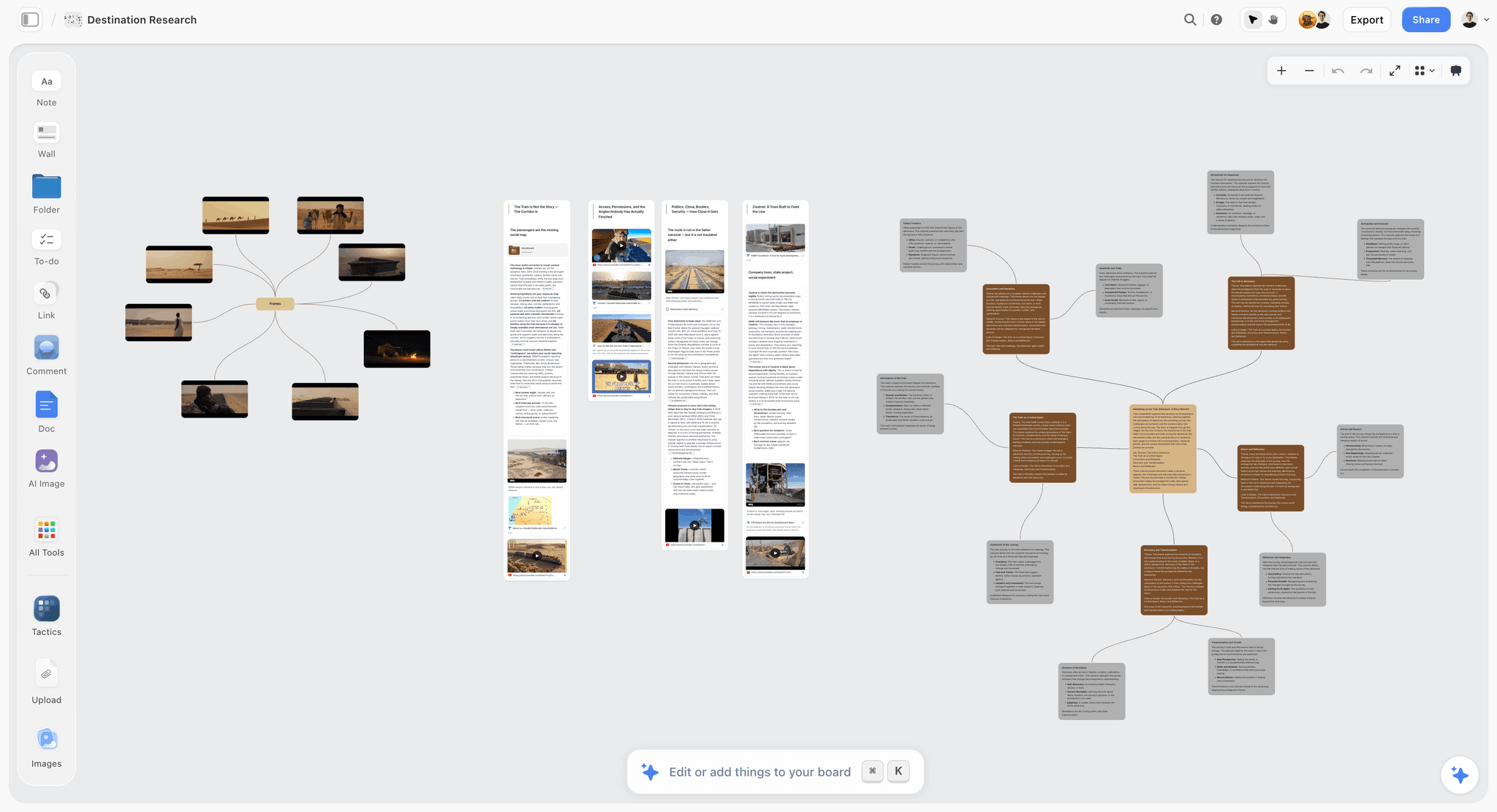
Storyflow is a visual workspace where your research, notes, images, and draft material live on one infinite canvas, and an AI reads the whole board before it answers. That last part is the point for writers. The familiar approach scatters research, outline, and clippings across separate apps and holds the connections in your head; Storyflow collapses that into one canvas so the material and the retrieval happen in the same place.
Here is the concrete version. You capture as you go: a character profile as one card, an interview quote as another, a reference image, a scene beat, a link to a source. They sit in clusters you arrange by hand, so the structure of the book emerges from how you place them. Then, writing a difficult scene, you ask the AI in plain language, "which of my notes touch on the protagonist's guilt," and it reads the board and surfaces the two cards that matter into your view. That is retrieval at the moment of writing working exactly as the framework describes: the note you captured in month one reaches the scene you are drafting in month four, without a folder hunt.
The scope of what the AI reads is specific, and specificity is what makes it trustworthy. Storyflow's AI reads your full active canvas board by default, and you can bring in more context by @-mentioning up to 1 Tactic and up to 3 Documents in the AI chat. It does not read every board in your workspace at once. For a writer, the active board is usually the book or the project, which is exactly the right scope: everything for this manuscript is on this canvas, and the AI reads all of it.
The generation function draws from that same material. Because the AI has read your board, it drafts from your research rather than from nothing: ask it to summarize the sources that touch a theme, propose a scene order from the beats you laid out, or expand an outline node using the details already on the canvas. The judgment stays yours. The retrieval and the first pass are the AI's.
For structure, Storyflow includes a library of 200+ Story Blueprints on the Plus, Pro, and Max plans, expert-built frameworks (the Hero's Journey and AIDA among them) you drop onto the canvas to scaffold a project. Storyflow is paid-only during early access; its Free plan, launching before the end of 2026, will give you unlimited notes, images, and links, unlimited shared boards, unlimited collaboration, basic AI, and 20 file uploads, enough to test the retrieval loop on a real project before paying for Plus.
7) Building the Writer's Second Brain, Step by Step
A second brain is a workflow, not an app. Here is the sequence that makes retrieval work, whichever tools you use.
- Set one capture inbox. Pick a single place every raw idea, quote, clipping, image, source link, and voice memo lands, with as little friction as possible, so capturing never requires a filing decision. If your system cannot hold all those modalities, you will lose the ones it excludes, and those are often the richest.
- Cluster, do not file. Once a week, drag related material into visual clusters: this character, this chapter, this theme, this source group. You are not building a permanent taxonomy; you are letting the shape of the project emerge from the arrangement.
- Write the connective tissue as notes, not memory. When you notice a source connects to a subplot, write that connection down as its own card. That is what lets the AI, and future you, retrieve the link later instead of relying on working memory to hold it.
- Draft with retrieval on. Keep the board reachable and ask the AI to surface material by meaning as you write. The test is whether the right note reaches the scene without you leaving the scene to hunt for it.
- Move to a drafting editor when the prose gets long. For a 90,000-word manuscript or a 110-page script, most writers export the structure and draft the long prose in a dedicated editor, then bring revisions back. This is a feature of an honest workflow, not a failure of any one tool.
The order matters. Capture without clustering is a graveyard, and clustering without retrieval is a pretty graveyard. The system pays off only when you draft with retrieval on and material captured months ago surfaces into today's scene.
8) When to Pair Storyflow With Another Tool
No single tool is the entire writing stack. The realistic setup for most writers is a primary capture-and-retrieval canvas plus a dedicated tool for the one job it does best.
- Pair with Scrivener or Ulysses for long-form drafting. Storyflow holds your research and structure and surfaces material at the moment of writing. When it is time to write 90,000 words of continuous prose, a distraction-free long-form editor is the better desk. Draft there, keep the second brain open beside it.
- Pair with a screenwriting app for produced pages. Final Draft and its peers own industry-standard formatting. Use Storyflow for beats, research, and retrieval; move to the screenwriting app for the pages themselves.
- Pair with a reference manager for formal citations. Nonfiction authors with a bibliography to format should keep Zotero or a similar tool for the citation layer, and use the canvas for the thinking and retrieval before and during drafting.
- Pair with Obsidian if you need a local-first archive. If a permanent, plain-text, offline archive matters more than AI retrieval, keep Obsidian as the vault of record. More in the next section and in Storyflow vs Obsidian as a Second Brain.
The pairing is not a compromise. It is the correct architecture: the second brain is where material lives and surfaces, and the drafting tool is where prose gets written. Asking one app to be both leaves you with a research tool that drafts badly or a drafting tool that retrieves nothing.
9) Where Storyflow Loses for Writers
Here are the honest cases where a writer should choose something else.
If you need local-first privacy, Obsidian wins. Storyflow is cloud-only. Your board lives on Storyflow's servers, not as plain-text files on your own disk. For writers with strict privacy requirements, sensitive source material, or a hard preference for owning their data as files, Obsidian is the right call. Its plain-text vault is offline, portable, and yours, which is why it remains the academic and privacy-conscious gold standard.
If your core job is long-form drafting, draft in Scrivener or Ulysses. Storyflow is a canvas built for capture, structure, and retrieval. It is not a distraction-free long-form writing editor, and it does not try to be. When the task is writing tens of thousands of words of continuous prose, a dedicated drafting app is the better surface. Storyflow is the room the material lives in, not the page you type the manuscript on.
It is newer, with a smaller plugin ecosystem than Obsidian. Obsidian has years of community plugins, themes, and integrations that extend it in every direction a power user could want. Storyflow is a younger platform with a smaller third-party ecosystem. If your workflow depends on a deep library of community extensions, that maturity gap is real and worth weighing.
Storyflow's material is also canvas-card-shaped rather than document-shaped, a strength for spatial thinking and a weakness if your mental model is strictly a nested outline. None of these are small, and naming them is what makes the rest of this guide trustworthy.
11) The Bottom Line
Writers do not fail for lack of ideas. They lose the ideas they already had because the right note is not in front of them when the scene needs it. A writer's problem was never a shortage of ideas. It was retrieval at the moment of writing. This guide points at that one gap and at the systems that close it.
The decision is simple once you know the shape of your work. If your writing is visual and research-heavy, and you want an AI that reads your whole board and surfaces buried material into the scene you are drafting, put your most active project on a Storyflow canvas for one week and ask it to find something you know is in there. If local-first privacy is non-negotiable, use Obsidian. Either way, keep a dedicated editor for the long prose.
Start the experiment at storyflow.so with your next chapter.
10) FAQ: The AI Second Brain for Writers
What is an AI second brain for writers?
An AI second brain for writers is a system that captures your research, notes, clippings, and ideas, then uses AI to surface the right material at the moment your draft needs it. It combines a capture surface, a way to organize material spatially, and an AI retrieval layer that reads what you have saved and finds relevant pieces by meaning rather than keyword. The goal is to close the gap between having a note and having it in front of you when the scene calls for it.
Do writers actually need an AI second brain, or is a notes app enough?
If you write short pieces from a small pool of material, a plain notes app is genuinely enough, and you should not overbuild. The case for an AI second brain grows with the volume of material. A novel, a nonfiction book, or a screenplay accumulates thousands of fragments across months. At that scale, the bottleneck is retrieval, not storage, and an AI layer that surfaces the right piece into your draft is what a static notes app cannot do.
What is the best AI second brain for novelists?
For novelists who work visually and hold character, plot, and world detail across a long draft, Storyflow's canvas-first AI is the strongest fit, because it keeps everything on one board and can answer questions like where a detail was established. For the actual long-form prose, pair it with Scrivener or Ulysses. If local-first privacy matters more than AI retrieval, Obsidian is the better vault. Most novelists run a capture-and-retrieval tool plus a dedicated drafting editor.
Can AI write my novel or script for me?
No, and you should be wary of any tool that implies it can. The useful role for AI in a writer's second brain is retrieval and a first pass: it surfaces your own material, summarizes sources, and drafts from the details you captured. The judgment, the voice, and the decisions stay yours. An AI drafting from your own research is an assistant. An AI drafting from nothing produces generic, sourceless prose that reads exactly like what it is.
What does Storyflow's AI actually read when I ask it something?
Storyflow's AI reads your full active canvas board by default. You can add context by @-mentioning up to 1 Tactic and up to 3 Documents in the AI chat. It does not read every board across your entire workspace at once. For a writer, the active board is usually the whole project, so in practice the AI reads everything for the current manuscript, which is the right scope for retrieval at the moment of writing.
How much does Storyflow cost for writers?
Storyflow is paid-only during early access: Plus is $7.99/mo annual ($9.99 monthly) and adds the 200+ Story Blueprints and unlimited file uploads. Pro is $14/mo annual ($19 monthly) with AI image generation and 20x more AI. Max is $39/mo annual ($49 monthly) with 40x more AI and a team workspace with roles. A Free plan launches before the end of 2026 with unlimited notes, images, and links, unlimited shared boards, unlimited collaboration, basic AI, and 20 file uploads, enough to test the retrieval loop on a real project.
Does an AI second brain replace Scrivener or Notion for writers?
No, it sits alongside them. An AI second brain owns capture and retrieval: holding your research and surfacing the right piece into your draft. Scrivener owns long-form drafting, and Notion owns structured databases and docs. If you draft in Scrivener, keep doing so and use the second brain as the research and retrieval layer beside it. Replacing your drafting tool is not the goal; closing the retrieval gap is.
Should I use Obsidian or Storyflow as a writer?
Choose Obsidian if local-first privacy, offline access, plain-text ownership, or a deep plugin ecosystem are your priorities, which is why it remains the gold standard for privacy-conscious writers. Choose Storyflow if you want a visual canvas where research and structure live together and an AI reads the whole board to surface material into your draft. A common setup keeps Obsidian as a permanent archive and uses a canvas for active retrieval. See the full comparison linked in Related Reading.
How do I start building a writer's second brain without a big migration?
Do not migrate everything at once. Take one active project, set a single capture inbox, and put every note, source, image, and scene for that project on one board. Cluster them by hand once a week and write your connections down as notes. Then, while drafting, ask the AI to surface material by meaning. If the right note reaches your scene without a folder hunt, the system works, and you can expand it to your next project.
Is a bigger note collection always better for writers?
No. A larger collection is only better if you can retrieve from it at the speed of writing. A vault of thousands of notes you cannot search by meaning is a graveyard, not a second brain. The win is not accumulation, it is retrieval: optimize for how fast the right material reaches your draft, not for how much you have hoarded.
Table of Contents
- Quick Answer: The AI Second Brain for Writers
- The Writer's Real Problem, at a Glance
- Retrieval at the Moment of Writing
- The Five Functions, Mapped to a Writer's Workflow
- Where Each Kind of Writer Wins
- Storyflow as a Writer's Second Brain
- Building the Writer's Second Brain, Step by Step
- When to Pair Storyflow With Another Tool
- Where Storyflow Loses for Writers
- FAQ: The AI Second Brain for Writers
- The Bottom Line
- Author
- Related Reading
Templates to check out for this topic


Workspace templates you can use in Storyflow
Keep research, notes, and plans on one canvas the AI can read, instead of scattered across docs and tabs. Open a template and make it your second brain.


See Storyflow in Action
A visual AI workspace where every feature lives inside one canvas. No tab-switching, no context lost.
Build your entire board from a single message
Type what you need in the AI chat at the bottom of your canvas. The AI adds cards, headings, and structure directly onto your board.
Use expert frameworks as AI context
Type @ in the AI chat and choose any Tactic. The AI tailors every response to that framework instead of giving generic advice.
Turn your board into a mind map in seconds
Ask the AI to restructure your canvas as a mindmap. It connects your ideas into a visual hierarchy so you can see how everything relates.
Why Storyflow Exists
Storyflow actually began as a personal tool while working on creative and research projects.
We kept running into the same problem: ideas were scattered everywhere: notes, documents, and whiteboards.
Nothing helped us see how everything connected.
So we started building a workspace designed around how ideas actually grow.
→ Read how Storyflow was createdJustkay
Documentary Filmmaker & Founder at Storyflow
Published: 2026-07-01
Extremely simple, seriously capable


See how easy it is to get started
Watch a real project come together, from a blank board to a finished plan, clicked through step by step.
Start creating with AI and become more productive
Transform your creative workflow with AI-powered tools. Generate ideas, create content, and boost your productivity in minutes instead of hours.