AI-Native vs AI-Powered Tools: What Actually Differs (2026)
Almost every tool claims AI now. The difference that matters is whether the AI can see your work without you pasting it in. Here is the test, and which tools pass it.

Category
AI Tools
Author

Justkay
Documentary Filmmaker & Founder at Storyflow
Topics
2026-07-26
•
26 min read
•
AI Tools- AI-native vs AI-powered
- what does AI-native mean
- best AI-native productivity tools
- AI context window tools
- AI-first software
- how to evaluate AI tools
What is the difference between AI-native and AI-powered tools?
An AI-powered tool is an existing product with AI added to it, usually as a chat panel or a menu command, where the AI cannot see what you are working on until you paste it in. An AI-native tool was built so the AI has access to your actual work as context, which means you can ask a question about the thing in front of you without describing it first. The distinction is not about how good the model is. It is about what the model can see. There is a thirty-second test that settles it for any product. If you have to explain your work to the AI, the AI is not in your workspace. It is next to it. Open the tool, open something real you are working on, and ask the assistant a question that requires knowing what is on the screen. If you find yourself copying your own content into the chat box, the AI is a guest in that product. I have watched a lot of teams adopt AI tools over the last two years, and the disappointment follows a consistent pattern. The model is fine. The frustration comes from the tax of re-explaining your project every session to something sitting inside the project.

Full disclosure: Storyflow is our own product, and this piece makes an argument that happens to favor the category it sits in, so weigh it accordingly. We deliberately rank Cursor first, because it is the clearest example of real context access in any category and it is not our product. Storyflow passes the test only for visual project work: its context boundary is the current board rather than every board you own, it is not a document or database tool, it has no project management features, and for code Cursor is a different discipline entirely.
Quick Comparison
Tools that pass the copy-paste test, meaning the AI can answer questions about your work without you pasting it in. Each wins in its own shape of work.
| Tool | Best For | AI Features | Price |
|---|---|---|---|
| Cursor | Codebase context | Reads your repo | Free / ~$20 mo |
| Notion AI | Document context | Reads page + workspace | From ~$10 user mo |
| Figma | Design file context | Reads layers | Free / ~$16 mo |
| Storyflow | Canvas structural context | Reads the whole board | From $7.99 mo annual (free plan late 2026) |
Key Takeaways
- The test is context access, not model quality. Most tools use similar underlying models, so the model is rarely the differentiator.
- Ask whether the AI can see your work without you pasting it. That single question separates the categories more reliably than any feature list.
- AI-powered is not an insult. A well-placed AI command in a mature tool is often more useful than a badly-designed AI-native one.
- Context has a shape, and the shape matters. Reading a page is different from reading a whole board, a codebase, or an inbox.
- Most "AI-powered" badges added in 2023 to 2025 are chat panels, which is why so much AI adoption stalled after the demo.
- AI-native does not mean AI-decided. The good implementations expand what you can ask; they do not remove the judgment.
- Watch for context limits nobody advertises: current file only, current page only, current board only. The limit is the product.
- Passing the test is necessary, not sufficient. A tool with great context and a bad product is still a bad product.
The Copy-Paste Test
Run this on any tool claiming AI.
- Open a real project in it, not a demo.
- Ask the AI something that requires knowing what is in front of you. Not "write me a paragraph about X," which any chatbot answers, but "which part of this is weakest?" or "what is missing here?"
- Watch what you have to do next.
If you have to paste your own content into a box, the AI is a chatbot embedded in a product. If it answers based on what is actually there, the AI is part of the product.
The reason the test works is that it cannot be satisfied by marketing. Context access is an architectural decision made early, and it is expensive to retrofit, which is why so few tools have retrofitted it. A chat panel is a two-month feature. Making the AI genuinely aware of your work usually means restructuring how the product stores and exposes what you make.
| AI-powered | AI-native | |
|---|---|---|
AI's relationship to your work | Sits beside it | Has access to it |
How context arrives | You paste or describe it | The product supplies it |
Typical surface | Chat panel, right-click command | Woven through the product |
What you can ask | Generic tasks, isolated text | Questions about this specific work |
Built | Retrofitted onto an existing product | Designed around context from the start |
Failure mode | Re-explaining yourself every session | Overreach: AI acting where judgment belongs |
How We Evaluated These Tools
Every tool named below was opened with real work in it, not a demo file, and asked a question that a general chatbot could not answer. Demo files are built so the AI looks omniscient: the sample project is small, tidy, and already summarized in its own title. Real projects are none of those things, which is why a tool that impresses in a demo so often disappoints in week two.
Each tool was scored on four things, in this order.
1. What the AI can actually see, stated as a boundary. Not "your workspace" but the specific unit: this selection, this file, this page, this board, this repository, this thread. Where a vendor would not state the boundary plainly, that vagueness was treated as an answer.
2. Whether the context arrives without user effort. A tool that can read your document only after you attach it to a chat message is doing the same work as copy-paste with fewer keystrokes. Automatic context is the property that changes behaviour, because it removes the decision to bother.
3. Whether the AI can write back into the work. Reading your context and acting in place are separate capabilities. Plenty of tools do the first and then hand you a block of text to paste back in yourself, which reintroduces the tax at the other end.
4. Whether the product is worth using with the AI switched off. This is the check that saves the most money. An AI advantage on top of a tool you would not otherwise choose is a reason to be disappointed twice.
Two deliberate exclusions. General assistants (ChatGPT, Claude, Gemini in their plain form) are not ranked here, because they are the baseline the test is measured against rather than entrants in it: they are excellent and they have no context by design. And no tool was included on the strength of a roadmap. Announced context is not context.
One disclosure that belongs at the top rather than buried: Storyflow is our product. It is ranked fourth, behind three tools we do not own, because on the specific property this piece measures they are clearer examples than we are.
What "Context" Actually Means
The word does a lot of hidden work, and the differences between kinds of context are where the real capability lives.
No context. A chat window. Powerful, general, and it knows nothing about you. ChatGPT and Claude in their plain form.
Selection context. The AI sees what you highlighted. Most "improve this writing" features. Useful, narrow.
Document context. The AI sees the current file or page. Notion AI reading the page you are on is a good example, and it is a genuine step up because the AI can answer questions about the whole thing.
Workspace context. The AI sees across many documents. This is where retrieval and search quality start to dominate, and where most tools quietly get vaguer about what is actually included.
Structural context. The AI sees not just content but how it is arranged: what is grouped with what, what connects to what, what sits next to what. On a canvas the spatial arrangement carries meaning that plain text extraction destroys.
Most tools marketed as AI-native are at document context. The jump from selection to document is real and worth paying for. The jump from document to structural is rarer, and it is what allows questions like "is this argument complete" rather than "summarize this."
The practical advice: find out the exact boundary before you buy. Vendors describe context generously and implement it narrowly. "Understands your workspace" frequently means "searches your workspace and includes a few snippets."
Quick Picks: The Best AI-Native Productivity Tools by Job
There is no single best AI-native productivity tool, because context is shaped like the work it reads. The right question is which shape of work you have. Each pick below names the tool that passes the copy-paste test most convincingly for that job.
Best for code: Cursor
Cursor indexes your repository, so you can ask which functions call this one, or why this test is failing, without pasting a line. It is the clearest example of real context access in any software category, and it is the tool every other product in this piece is implicitly measured against.
Best for written documents and team wikis: Notion AI
Notion AI reads the page you are on and searches the workspace around it. That is genuine document context plus retrieval, and Notion is unusually honest about where the boundary sits. Since May 2025 the AI is bundled into the Business tier rather than sold as a per-seat add-on.
Best for design files: Figma
Figma's AI acts on real layers, frames, and components rather than on a screenshot of them. It is the difference between a tool that can rename forty layers correctly and a tool that can describe what renaming layers means.
Best for visual project work and creative planning: Storyflow
Storyflow reads the whole canvas board you have open, plus up to one Tactic and three documents you @-mention, which means it can answer questions about arrangement rather than about text. If your brief, three concept directions, and a pile of research all sit on one board, you can ask which direction actually answers the brief. That is our product, and it earns the pick only for work that is genuinely board-shaped.
Best for engineering backlogs: Linear
Linear applies AI to the issues, projects, and cycles it already holds, so a suggestion references your real backlog instead of a hypothetical one. Basic is $10 per user per month and Business is $16.
Best for email: Superhuman
Mail clients get context for free, because the thread is the document. Reply drafting works here for a structural reason rather than a clever one: there was never anything to paste.
Best for meetings: Granola
Granola reads the transcript alongside the notes you typed yourself, then writes up the meeting in a way that reflects what you thought was important. Most meeting tools only have the transcript, which is why their summaries are accurate and useless.
Best free option: Figma Starter
Figma Starter gives you real context access on a limited number of files without a card. Storyflow is paid-only during early access, and its Free plan, which launches before the end of 2026, will include unlimited notes, images, links, and shared boards with basic AI usage. Anyone a paid member invites to a board joins free today. Free tiers are where you should run the copy-paste test anyway.
Which Tools Pass the Copy-Paste Test
| Tool | Context boundary | Writes back into the work | Starting price |
|---|---|---|---|
Cursor | The repository, indexed | Yes, edits files directly | Free tier, Pro about $20/mo |
Notion AI | Current page plus workspace search | Yes, into the page | Bundled with Business, $20/user/mo |
Figma | The file's layers and structure | Yes, acts on real objects | Free Starter, paid seats above |
Storyflow | The current board, plus 1 Tactic and 3 documents | Yes, creates cards on the canvas | Paid-only early access, Plus from $7.99/mo annual |
Linear | Your issues, projects, and cycles | Yes, updates issues | Basic $10/user/mo |
Superhuman | The email thread | Yes, drafts in the composer | Paid only, premium tier |
Granola | Meeting transcript plus your own notes | Notes only, not your other tools | Free tier, paid plan above |
Miro AI | The board you have open | Yes, generates on canvas | Free 3 boards, Starter $8/user/mo |
GitHub Copilot | Open files plus repository context | Yes, inline in the editor | Free tier, Pro about $10/mo |
Descript | The transcript and timeline together | Yes, edits the video | Free tier, paid plans above |
Raycast AI | Selection and window, not your files | Partially, pastes into the app | Free, AI on the paid tier |
Gamma | The deck you are building | Yes, restyles and rewrites slides | Free credits, paid plans above |
Prices are the published starting rates at the time of writing and move often. Verify the current number before you buy, and verify the context boundary in the same conversation.
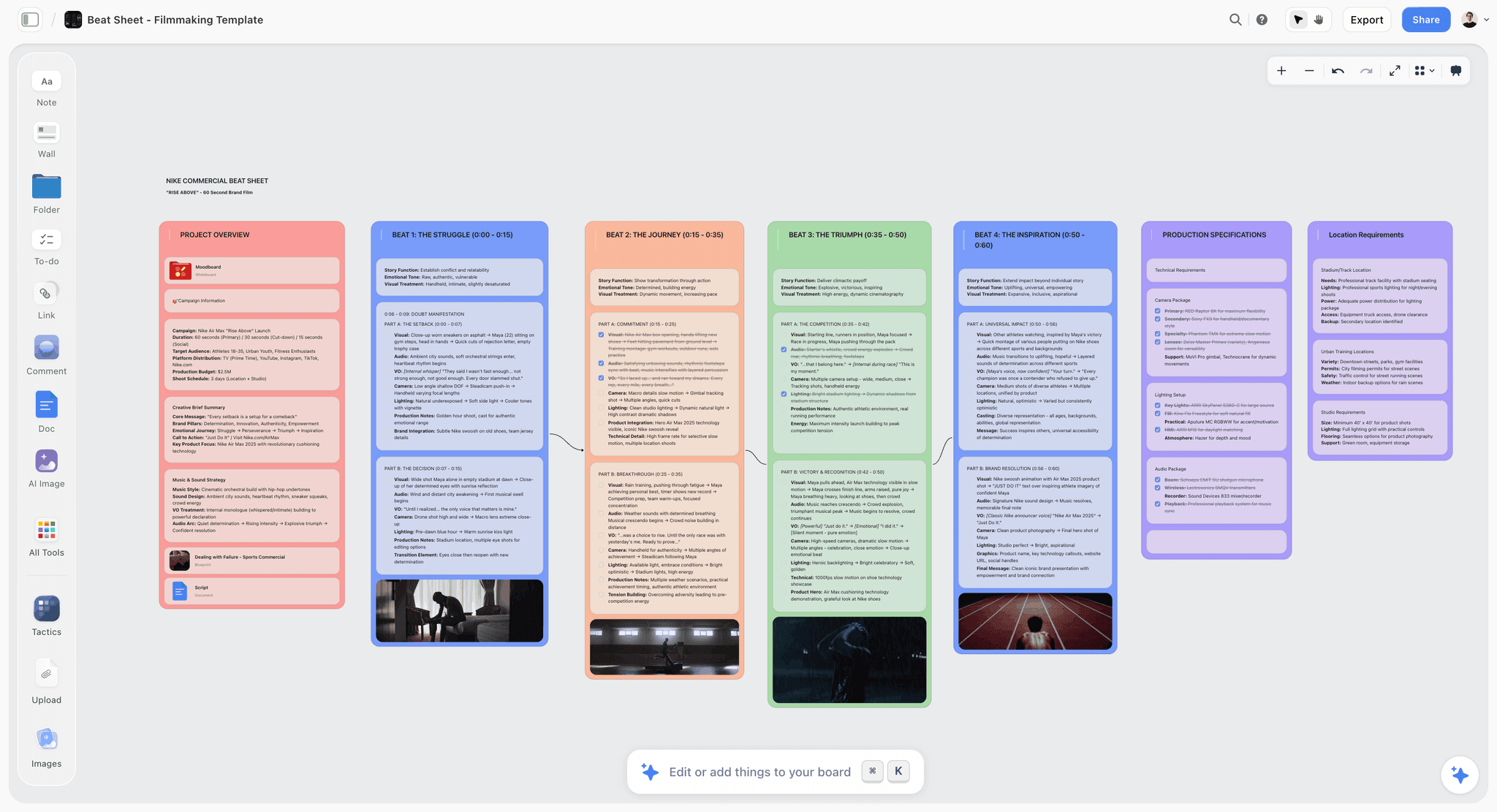
A Storyflow canvas where the AI is answering a question about the board it can already see, without anything being pasted into a chat box
Stop re-explaining your project to your AI
Put the work on one canvas and ask questions about what is actually there. The AI reads the whole board plus any Tactic or documents you mention, so the answer is about your project rather than about your description of it.

AI-Native Categories This Piece Does Not Rank
The twelve tools above are the ones we ran the Copy-Paste Test on. Four AI-native categories sit outside that scope, and leaving them unnamed would make this list look narrower than the field actually is. They are worth knowing, and the same test applies to each.
Scheduling: Motion and Reclaim. Both read your calendar and your task list and rewrite the day when something moves. The context boundary is your calendar, which is why they can genuinely reprioritise rather than just suggest.
Automation: Zapier AI and Lindy. The AI-native version of automation replaces "build a rule" with "describe the outcome". The boundary is the set of apps you have connected, so the useful question is whether the agent can see the data in those apps or only trigger on it.
Research: Perplexity. Search where the AI reads the sources and cites them inline. The boundary is the open web plus whatever you upload, which is a different shape from every tool above: it has no work product of yours to write back into.
General assistants: ChatGPT, Claude, and Gemini. These fail the Copy-Paste Test by design, because their context is the conversation. That is not a criticism, it is the category. They are the thing every tool in this piece is trying to save you from pasting into.
We have not tested these against the same workflow, so they are named here rather than ranked. Where the specialists win is that their context is your actual work.
The Best AI-Native Productivity Tools in 2026: Full Reviews
1. Cursor
Cursor is a code editor built on VS Code where the AI has an index of your repository. That single architectural choice is why it feels different from a chat panel bolted into an IDE. You can ask why a build is failing, what depends on a module you want to delete, or where a pattern is implemented inconsistently, and get an answer grounded in your actual files rather than in the general shape of code like yours.
What the AI can see: the repository, indexed, plus whatever you have open. You can narrow it explicitly when you want a tighter answer.
Where it wins: the questions that only context can answer. "What breaks if I change this signature" is not a question a chatbot can fake, and Cursor answers it by looking.
Where it loses: it is a code editor, so it is the wrong tool for everything that is not code. It also rewards people who already know what good code looks like, because the failure mode of a confident agent is confident wrong code that compiles.
Verdict: if you write software, this is the reference implementation of the whole category. If you do not, it tells you what to demand from tools in your own field.
2. Notion AI
Notion AI reads the page you are on and can search across the workspace, which puts it solidly at document context with real retrieval on top. It is the most useful AI in the note-and-wiki category mostly because Notion already holds so much of a team's written work, and context you already have beats context you have to import.
What the AI can see: the current page in full, plus workspace search results that it pulls in as needed. Retrieval means it can miss things, and it is worth knowing that going in.
Where it wins: long documents and team knowledge. Asking what a forty-page spec fails to specify is a genuinely useful question, and it needs the whole page to answer.
Where it loses: structure. Notion's model of your work is a tree of pages, so questions about how ideas relate spatially do not translate. It is also worth noting the pricing change: AI is bundled into Business at $20 per user per month rather than sold as a $10 add-on, which raised the real cost for small teams that only wanted the AI.
Verdict: the right answer if your work is document-shaped and already lives in Notion.
3. Figma
Figma has an advantage most tools cannot buy: its file format is already structured. Layers, frames, components, and constraints are objects, not pixels, so an AI acting on them is acting on the same things a designer manipulates.
What the AI can see: the file's layers and structure.
Where it wins: the mechanical work that eats design hours. Renaming, organizing, generating variants, and filling realistic content are tasks where structure is the whole job.
Where it loses: taste, which is not a criticism so much as the point. Figma's AI is at its best on the parts of design work that are legible to a machine, and design has a large part that is not.
Verdict: strong context, honest scope, and no pretense that it is doing the designing.
4. Storyflow
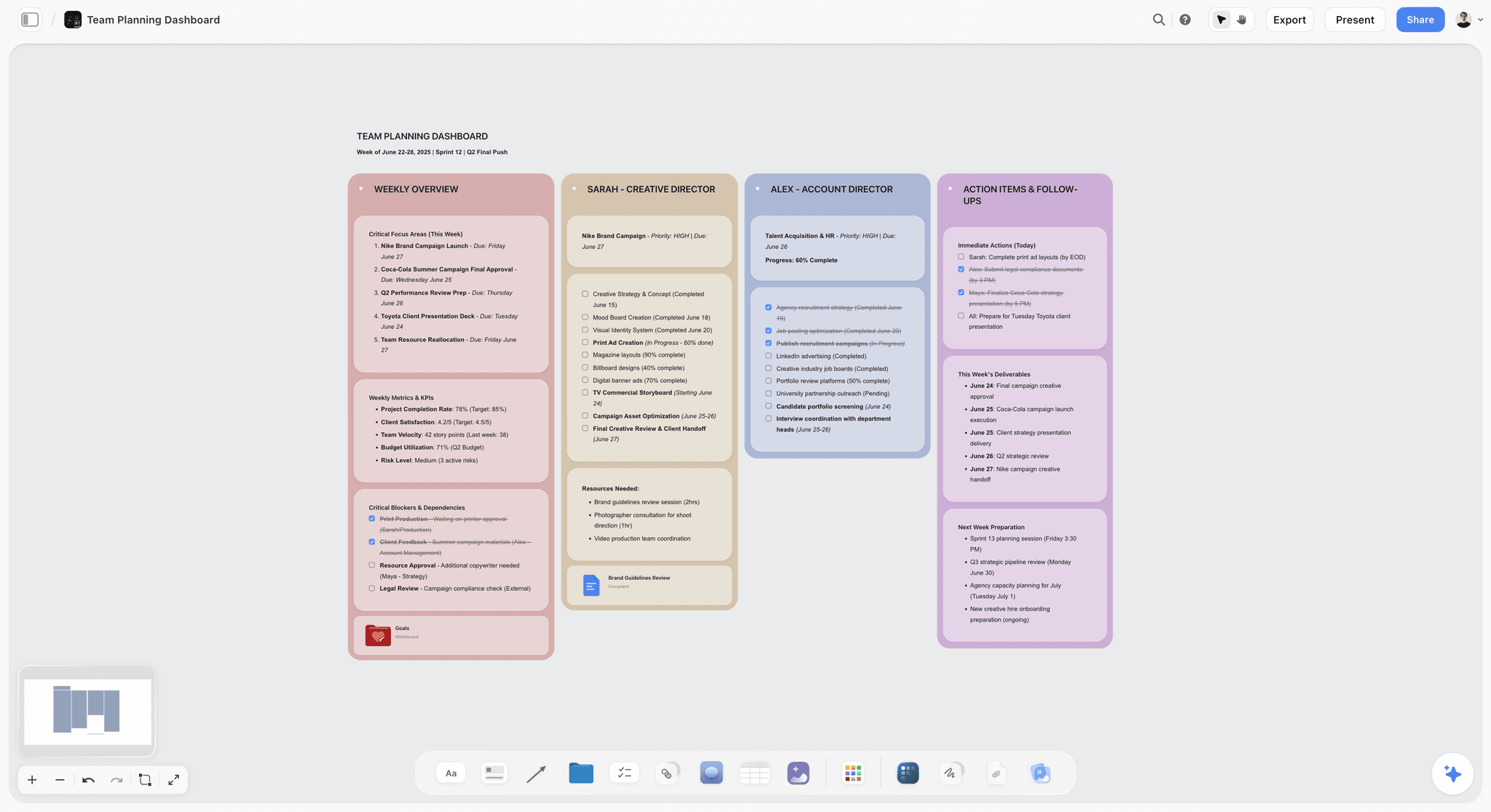
Storyflow is a visual canvas where the AI reads the whole board you have open, plus up to one Tactic and three documents you @-mention. Because a canvas encodes arrangement, the AI has access to something document tools do not have: what is grouped with what, what sits beside what, what has nothing under it.
What the AI can see: the current board in full, plus the Tactic and documents you mention. The boundary is the board, not every board you own, and that is a real limit rather than a detail.
Where it wins: the coherence questions near the end of a planning phase. With a brief, three directions, and research all on one board, "which of these actually answers the brief" is answerable, and it is not answerable from any single document on that board.
Where it loses: almost everything document-shaped or database-shaped. There is no Gantt view, no dependency logic, and no capacity planning, so it is not project management software. It is cloud-only. It is a newer platform with a smaller template library than Notion's ecosystem. And for code, Cursor is not better so much as a different discipline.
Pricing: Paid-only early access today; the Free plan (unlimited boards, basic AI usage, 20 file uploads) launches before the end of 2026, and anyone a paid member invites to a board joins free now. Plus is $7.99 per month billed annually or $9.99 monthly, and adds the 200-plus Story blueprints and increased AI usage. Pro is $14 annually or $19 monthly and adds AI image generation. Max is $39 annually or $49 monthly with a team workspace, roles, and permissions.
Verdict: the pick when your thinking is genuinely spatial and unfinished. Buy it for the shape of the work, not for the AI label.
5. Linear
Linear applies AI to issues, projects, and cycles it already stores, which makes its suggestions specific in a way that generic project management AI never is. It is a good demonstration that context does not have to be dramatic to be real: the AI knows your backlog because the backlog is the product.
What the AI can see: your issues, projects, and cycles.
Where it wins: triage and summarization across a real backlog, where the value comes from knowing what is already in flight.
Where it loses: anything upstream of a defined issue. By the time work is a Linear ticket, the thinking is finished, which is exactly why it is a clean tool and also why it cannot help you decide what to build.
Pricing: Basic is $10 per user per month and Business is $16.
6. Superhuman
Mail is the category where context was never a design problem, because the thread is the document and it is already open. Superhuman's drafting and summarization work well for that structural reason more than for any modelling advantage.
What the AI can see: the thread, and your prior correspondence with the sender.
Where it wins: replies, triage, and catching up on a long thread you were added to late.
Where it loses: it is expensive relative to mail clients that are merely good, and the advantage narrows every time a mainstream client ships the same feature.
7. Granola
Granola's insight is that a transcript alone produces summaries that are accurate and useless, because everything said in a meeting is not equally important and only a participant knows which parts were. It reads the notes you typed during the call alongside the transcript, and writes up the meeting around your emphasis.
What the AI can see: the transcript plus your own typed notes.
Where it wins: meetings where the useful output is a decision record rather than a record.
Where it loses: context stops at the meeting. It does not know what your project already decided last month unless you tell it.
8. Miro AI
Miro AI reads the board you have open, which makes it one of the genuine passes in the whiteboard category. Clustering a wall of sticky notes into themes is a real context task, and Miro does it on your actual notes.
What the AI can see: the current board.
Where it wins: facilitation. Miro remains the strongest tool in this piece for running a workshop with a room full of people, and its AI is aimed squarely at the artifacts that workshops produce.
Where it loses: the board is a surface rather than a project, so the AI helps you tidy the output of a session more than it helps you carry thinking forward across weeks.
Pricing: Free covers 3 boards with unlimited members, Starter is $8 per user per month, and Business is $20.
9. GitHub Copilot
Copilot has repository context inside your editor and is the default for a very large number of developers, which counts for something the feature list does not capture: it is already installed.
What the AI can see: open files plus repository context, with the depth varying by editor and plan.
Where it wins: inline completion, where the context requirement is modest and the ergonomics matter more.
Where it loses: whole-codebase reasoning, where Cursor's indexing is more thorough. The gap has narrowed and will keep narrowing.
10. Descript
Descript passes the test in an unusual way: it makes video editable as text, so the AI reading your transcript is reading your timeline. Deleting a sentence deletes the footage.
What the AI can see: the transcript and the timeline as one object.
Where it wins: talking-head and podcast editing, where the edit really is a text edit.
Where it loses: anything where the cut is driven by image rather than speech. A montage has no transcript to reason about.
11. Raycast AI
Raycast is included as an honest partial pass, because it is frequently described as AI-native and mostly is not. It is an excellent launcher with fast access to models, and its context is your selection and the window in front of you rather than your files.
What the AI can see: the current selection and window, not your documents.
Where it wins: speed. Getting to a model in a keystroke removes enough friction to change how often you ask.
Where it loses: the copy-paste test, mostly. Selection context is real but it is the shallowest rung on the ladder.
12. Gamma
Gamma builds presentations and reads the deck as it goes, so restyling and rewriting act on the real slides rather than on a description of them.
What the AI can see: the deck you are building.
Where it wins: getting from nothing to a presentable draft deck fast.
Where it loses: the deck is downstream of the thinking. Gamma will format an argument beautifully without noticing that the argument does not hold, because it can only see the slides.
The honest complication
Several tools sit in between, with deep context in one area and none in another. A project management tool may read your tasks (real context) while its writing assistant is a plain chatbot. A design tool may understand layers and understand nothing about the brief. Evaluate per feature, not per company, and treat any single "AI-native" badge on a company's homepage as a claim about their best feature rather than about their product.
The large remainder, the tools that added an AI badge between 2023 and 2025 across note-taking, project management, and design, are mostly chat panels with a product wrapped around them. The tell is a sidebar that greets you the same way regardless of what you have open. This is not fraud, and some of those features are genuinely useful, but it is a different product category from the ones above and it should not command the same price premium.
What Each Level of Context Lets You Ask
The clearest way to feel the difference is to take one question and watch what each level can do with it. The question: "Is this ready?"
No context (plain chatbot). It cannot answer. It will ask you to paste the thing, and once you do it will assess the text you pasted, which is not the same as assessing your work. Everything you left out of the paste is invisible, and what you leave out is usually the problem.
Selection context. It assesses the highlighted paragraph. Useful for line editing, useless for readiness, because readiness is a property of the whole.
Document context. Now it can say the piece has no conclusion, that section three repeats section one, or that a claim is unsupported. This is a genuine jump, and it is where most good AI writing tools sit.
Workspace context. It can notice you already wrote something on this topic last quarter and that the two disagree. This is valuable and also where reliability drops, because the tool is retrieving rather than reading, and retrieval quietly misses things.
Structural context. Now the question becomes answerable in a different way, because arrangement carries meaning. On a board where a campaign's brief sits beside three directions and a pile of research, "is this ready?" can be answered as: two of your three directions make the same argument, the third is the only one addressing the brief's stated audience, and there is no evidence under the pricing claim. None of that is in any single document. It is in how things sit relative to each other.
This is why the distinction is not academic. Each level does not just answer better, it answers a different question, and the question you most want answered near the end of a project ("is this whole thing coherent?") is only available at the higher levels.
The corollary is a fair warning: structural context is only an advantage if your work genuinely has structure worth reading. For a single long document, document context is the right level and a canvas adds nothing. Buy the level that matches the shape of your work, not the highest one available.
The Five Ways an AI Retrofit Fails
Retrofitted AI does not fail randomly. Across enough tools the same five failures repeat, and naming them makes a trial far more efficient, because you can go looking for each one in about a minute rather than waiting to be disappointed in week three.
1. The amnesiac panel. The AI greets you identically no matter what you have open. Every session starts from zero, so the first four messages of every conversation are you rebuilding context the product already has on screen. This is the most common failure and the easiest to spot: open two completely different projects and see whether the assistant's opening state differs at all.
2. The attachment tax. The AI can see your document, but only after you attach it. This looks like context and behaves like copy-paste, because the burden is still on you to decide what is relevant. The tell is a paperclip. Automatic context changes behaviour; optional context gets used on the days you remember.
3. The retrieval mirage. The vendor says the AI understands your workspace. What it does is search your workspace and include a few snippets. The difference matters most exactly when you need it most, on the question of what is missing, because retrieval finds what exists and is structurally incapable of noticing an absence. Test it by asking about something you know you never wrote down.
4. The read-only wall. The AI reads your work well and then hands you a block of text to paste back in. The tax moved from the front of the interaction to the back. Check whether output lands in the work or in a chat bubble.
5. Silent boundary drift. The AI sees the current file, or the current page, or the current board, and nothing tells you that. You form a mental model that it knows your project, and it quietly knows one document of it. The answers stay confident. This one costs the most because it is invisible: you only find the boundary when an answer is wrong in a way that would have been impossible if it had seen everything.
If a tool clears all five, the architecture is right. That still tells you nothing about whether the product is pleasant, and pleasant is what determines whether you open it in March.
Where Storyflow Genuinely Loses
Passing the copy-paste test is one property, not a verdict, and it is worth naming where this argument does not carry Storyflow.
It is a canvas, so if your work is genuinely document-shaped (long-form prose, structured databases, spreadsheets) Notion, Obsidian, and Google Docs are better homes, and their AI reading a document is exactly the right context for that work. It has no Gantt view, dependency logic, or capacity planning, so it is not a project management tool. Its context boundary is the current board, not every board you own, which is a real limit worth knowing before you buy rather than after. It is cloud-only, which rules it out where work must stay local. And for code, Cursor is not merely better, it is a different discipline.
The category argument here says the AI can see your canvas. It does not say a canvas is the right shape for your work. That is a separate question and it should be answered first.
Why This Distinction Became Confusing
Three things happened at once.
Everything got the badge. Once "AI" moved product pages, every tool added something and called it AI. The word stopped carrying information.
The models converged. Most products use similar frontier models, so the model is rarely the differentiator. What differs is what the product feeds the model, which is invisible from the outside and never appears on a pricing page.
"AI-native" got claimed by companies that were merely new. Being founded in 2024 does not make a tool AI-native. Plenty of recent products are chat panels with modern branding, and some genuinely AI-native features live inside decade-old software.
The useful correction is to stop treating this as a property of companies and start treating it as a property of features you can test in half a minute.
Free vs Paid: When Context Is Worth Paying For
Most tools in this piece have a free tier, and the free tier is where the copy-paste test belongs. Run it before you pay, because the property you are buying is testable in thirty seconds and no amount of trial time makes an absent boundary appear.
Stay free when the AI is a convenience. If what you want is drafting, summarizing, rewriting, or answering general questions, a free general assistant does that as well as any paid sidebar, and you already have one. Paying a tool a premium to relay your prompt to the same model is the single most common wasted AI spend.
Pay when the boundary is the feature. The moment your useful question is about your own work in aggregate, which of these is weakest, what is missing here, what did we already decide, the free general assistant cannot answer it at any price and the tool with context can. That is a real capability gap and it is worth money.
Watch the bundling. The clearest recent example is Notion, which retired the standalone $10 AI add-on in May 2025 and bundled AI into Business at $20 per user per month. For a team that wanted only the AI, the effective price doubled without a feature changing. Bundling moves faster than pricing pages suggest, so price the tier you will actually need rather than the tier the AI is advertised on.
Count seats, not licences. Context tools are priced per user in almost every case, and the value is often concentrated in two or three people who do the synthesis work. Buying the whole team a context tool that three people use is a common and expensive mistake. Buy for the people whose job is deciding.
A reasonable sequence. Start free on the tool whose shape fits your work. Run the copy-paste test in week one on a real project. If the answer to "what is missing here" is useful twice, pay. If it was useful once and you have not asked again by week three, the tool is not the problem and neither is the AI: the work was not the shape you thought it was.
How to Evaluate a Tool
Run the copy-paste test on your own real work, during the trial, not on the demo file. Demos are built so the AI looks omniscient.
Ask the vendor exactly what the AI can see. Current file, current page, current board, everything? Get a specific answer. Vagueness here is itself informative.
Test a question only your context can answer. "What is missing from this?" is a good probe because a chatbot cannot fake it.
Check whether the AI writes back into the work. Reading your context and being able to act in place are separate capabilities, and some tools do the first without the second.
Judge the product, not the property. AI-native is a means. A tool that reads everything and is unpleasant to use every day will lose to a well-made tool with a good AI command.
Do not pay a premium for a chat panel. If the AI is a sidebar that cannot see your work, you are paying for an interface to a model you can access anywhere, often for less.
The Bottom Line
The AI-native versus AI-powered argument is mostly noise because both terms are self-assigned. The underlying difference is real and easy to check: an AI-powered tool has AI beside your work, and an AI-native tool has AI with access to your work. The gap shows up as a tax you pay every session, re-explaining your project to software that is already inside it.
If you have to explain your work to the AI, the AI is not in your workspace. It is next to it. Run the test on your own project during a trial, ask exactly where the context boundary sits, and remember that passing tells you the architecture is right, not that the product is.
FAQ: AI-Native vs AI-Powered Tools
What does AI-native actually mean?
An AI-native tool is built so the AI has access to your actual work as context, rather than having a chat interface added alongside it. The practical test is whether you can ask a question about what you are working on without pasting or describing it first. It refers to how the product is architected, not to how recently the company was founded.
What is the difference between AI-native and AI-powered?
AI-powered generally means AI was added to an existing product, usually as a chat panel or menu command that cannot see your work until you supply it. AI-native means the product feeds your work to the AI automatically, so questions about the thing in front of you just work. Both often use the same underlying models, so the difference is context access rather than model quality.
What are the best AI-native productivity tools?
Cursor is the clearest example for code, since it reads your codebase directly. Notion AI has genuine document and workspace context for written work, Linear applies AI to your real backlog, and Figma's AI can act on actual design layers. For visual project work, Storyflow reads the whole canvas board plus up to one Tactic and three documents you mention. Choose by whether the tool's shape fits your work, then check its context boundary.
How can I tell if a tool is genuinely AI-native?
Open real work in it during the trial and ask something that requires knowing what is on screen, such as "what is missing here?" If you have to paste your own content into a chat box, the AI cannot see your work. Then ask the vendor for the exact context boundary, since "understands your workspace" often means it searches and includes a few snippets.
Is AI-powered worse than AI-native?
Not necessarily. A well-designed AI command inside a mature, pleasant tool often delivers more day-to-day value than a poorly designed AI-native product. The architecture determines what is possible to ask, not whether the product is good. Judge the tool overall and treat context access as one important property among several.
Why do so many AI features feel useless?
Most of them are chat panels that cannot see what you are doing, so every session starts with you re-explaining your project. That tax usually exceeds the benefit for anything beyond generic writing tasks. The features that stick tend to be the ones with real context, because they answer questions you could not have asked a general chatbot.
Does AI-native mean the AI makes decisions for me?
No, and the better implementations deliberately avoid it. Context access expands the range of questions you can usefully ask, such as which section is thin or which option fails the brief. Tools that move from informing decisions to making them tend to produce confident, average output, because judgment is exactly the part that depends on knowing things the tool cannot see.
What does context mean in AI tools?
Context is what the AI can see when it answers. It ranges from nothing (a plain chat window), to your selection, to the current document, to a searchable workspace, to structural context where the AI also sees how things are arranged and connected. Each step up enables different questions, and vendors are frequently vague about which one they actually implement.
Are AI-native tools more expensive?
Not reliably, and price is a poor proxy for context depth. Plenty of tools charge an AI premium for a chat sidebar you could replicate with any general assistant. The thing worth paying more for is context you cannot get elsewhere, so establish what the AI can actually see before accepting a higher tier.
Can an older tool become AI-native?
It can, but it is expensive, because context access is an architectural decision rather than a feature. Retrofitting usually means changing how the product stores and exposes what you make. Some established products have done it well in specific areas, which is why the label belongs to features rather than to whole companies.
Should I switch tools to get better AI?
Only if the AI addresses a problem you actually have, and only after checking that the tool's basic shape suits your work. Switching costs are real and the AI advantage is often narrower than the marketing suggests. A good sequence is to identify the repetitive thinking work you want help with, then test whether a candidate tool can genuinely see enough to help with it.
Which is better for creative work?
Creative work benefits more than most from structural context, because the questions that matter are about arrangement: whether an argument is complete, where the structure sags, which of several directions answers the brief. That favors tools that can see a whole board or project rather than a single document. The caveat is that taste is not delegable, so the useful AI is the one that finds gaps rather than the one that generates the work.
Table of Contents
- Key Takeaways
- The Copy-Paste Test
- How We Evaluated These Tools
- What "Context" Actually Means
- Quick Picks: The Best AI-Native Productivity Tools by Job
- Which Tools Pass the Copy-Paste Test
- AI-Native Categories This Piece Does Not Rank
- The Best AI-Native Productivity Tools in 2026: Full Reviews
- What Each Level of Context Lets You Ask
- The Five Ways an AI Retrofit Fails
- Where Storyflow Genuinely Loses
- Why This Distinction Became Confusing
- Free vs Paid: When Context Is Worth Paying For
- How to Evaluate a Tool
- The Bottom Line
- FAQ: AI-Native vs AI-Powered Tools
- Related Reading
Templates to check out for this topic


Templates you can use in Storyflow
Every Storyflow board starts from real structure and an AI that reads the whole canvas. Open one of these templates and make it yours.


See Storyflow in Action
A visual AI workspace where every feature lives inside one canvas. No tab-switching, no context lost.
Build your entire board from a single message
Type what you need in the AI chat at the bottom of your canvas. The AI adds cards, headings, and structure directly onto your board.
Use expert frameworks as AI context
Type @ in the AI chat and choose any Tactic. The AI tailors every response to that framework instead of giving generic advice.
Turn your board into a mind map in seconds
Ask the AI to restructure your canvas as a mindmap. It connects your ideas into a visual hierarchy so you can see how everything relates.
Why Storyflow Exists
Storyflow actually began as a personal tool while working on creative and research projects.
We kept running into the same problem: ideas were scattered everywhere: notes, documents, and whiteboards.
Nothing helped us see how everything connected.
So we started building a workspace designed around how ideas actually grow.
→ Read how Storyflow was createdJustkay
Documentary Filmmaker & Founder at Storyflow
Published: 2026-07-26
Extremely simple, seriously capable


See how easy it is to get started
Watch a real project come together, from a blank board to a finished plan, clicked through step by step.
Start creating with AI and become more productive
Transform your creative workflow with AI-powered tools. Generate ideas, create content, and boost your productivity in minutes instead of hours.