How to Write a Comic Script with AI (2026 Workflow for Comics and Webtoons)
A page-by-page workflow for writing a comic or webtoon script with AI, using Panel Logic to plan premise, character and world reference, and panel breakdowns on one canvas.

Category
Writing
Author

Justkay
Documentary Filmmaker & Founder at Storyflow
Topics
2026-07-01
•
Updated July 1, 2026
•
13 min read
•
Writing- how to write a comic script with ai
- comic script format
- webtoon script
- ai comic writing
- panel breakdown
- graphic novel script
How do you write a comic script with AI?
Plan the whole script first (premise, character and world reference, and a page-by-page panel breakdown) and then use AI to pressure-test structure, expand beats into panels, and tighten dialogue against everything you have built. The order that works is page, then panel, then beat, then description plus dialogue. You are not writing prose that an AI polishes; you are writing instructions an artist will draw from, so give the AI your premise, characters, and world so its suggestions land inside the story you are telling. A comic script is a blueprint an artist can build from, panel by panel, not prose with pictures.
A comic script is a blueprint, not prose with pictures.
Keep the premise, character and world reference, and your page-by-page panel breakdown on one canvas, with an AI that reads the whole board, so a beat becomes a buildable page without drafting blind.

1) Quick Answer: How to Write a Comic Script with AI
To write a comic script with AI, plan the whole script in one place first (premise, character and world reference, and a page-by-page panel breakdown), then use AI to pressure-test structure, expand beats into panels, and tighten dialogue against everything you built. The order that works is page, then panel, then beat, then description plus dialogue. You are not writing prose that an AI polishes; you are writing instructions an artist will draw from, so every panel needs a clear image and a clear purpose before you touch the words.
The reason most AI comic drafts fail is a category error. A comic script is not prose with pictures. It is a blueprint an artist can build from, panel by panel. A chatbot that only sees your last message will happily write "Panel 3: they fight" with no sense of who "they" are, what the room looks like, or why the beat exists. The fix is not a better prompt but a better context: give the AI your premise, character sheets, world notes, and the pages you already broke down, so its suggestions land inside the story you are telling.
I plan visual stories for a living as a documentary filmmaker, thinking in shots and sequences before a word goes in. Scripting a comic is the same muscle: the page is your sequence, the panel is your shot, and the description is your direction to the person holding the pen. This guide is the workflow I use to plan that on one canvas, with AI reading the whole thing, so the script stays buildable from the first page to the last.
For the tools behind this workflow, see The 12 Best Comic and Webtoon Planning Tools in 2026, and for the AI-for-authors landscape, The Best AI Tools for Authors in 2026.
2) Panel Logic: The Shape of a Comic Script
Every problem in a weak comic script traces back to the wrong shape. Prose flows in one direction, and the reader supplies the pictures. A comic script does the opposite: the picture is fixed on the page, and the words serve it. Write a comic like prose and you get a script no artist can draw, because it never decided what the reader sees.
Panel Logic is the shape that fixes this. A comic script descends through four levels, each answering a different question:
- Page: what is the unit of reading, and what is the reveal at the end of it?
- Panel: what single moment does the reader see in this frame?
- Beat: what has to change between this panel and the next?
- Description plus dialogue: what does the artist draw, and what do the characters say?
Read top to bottom, that is the whole craft. You plan the page as a unit (the last panel is a hook), break it into panels, make sure each carries a beat, and only then write the description and dialogue.
This is why a comic script is not prose with pictures. It is a blueprint an artist can build from, panel by panel. The blueprint has to be legible to someone who is not you. When you hand over a page, the artist should never have to ask "what am I drawing here?" The description names the setting, the characters in frame, the camera distance, the action, and the emotion; the dialogue is separated and attributed. Everything the artist needs is on the page, and nothing that lives only in your head is missing.
AI matters at this exact shape because of context. An AI that sees your premise, characters, world, and the pages you already broke down can expand a beat into panels that fit the story; one that sees only a single prompt cannot, because Panel Logic is a whole-project structure, not a sentence-level one. The AI is only useful when it can read the blueprint.
3) What AI Actually Helps With (and What It Does Not)
Be honest about the split, because it decides how you use the tool. AI is strong at some parts of comic scripting and weak or wrong for others.
Where AI genuinely helps:
- Pressure-testing structure. Paste a page breakdown and ask where the beat is unclear, where two panels do the same job, or where a page has no hook on its last panel.
- Expanding a beat into panels. Give it "the confrontation on the rooftop" plus the character sheets, and it proposes a three-to-five-panel breakdown you edit, not accept.
- Tightening dialogue. Comic dialogue has to be short because it competes with the art for space. AI is good at cutting a bloated line to a lettering-friendly length while keeping the voice, if it knows the voice.
- Continuity checks. When it reads your world and character notes, it can flag that a character's eye color, a location's layout, or a power's rule contradicts what you established.
- Alt-take generation. It can give you five versions of a reveal so you feel which one lands, faster than staring at one.
Where AI does not help, and should not be trusted:
- Deciding what the story is. Premise, theme, and emotional spine are yours. An AI generates a competent, generic plot if you let it, and generic is death in comics.
- Panel counts and pacing feel. How many panels a page holds and where the reader's eye lands is a felt, visual judgment. AI guesses; you decide.
- The art. AI does not draw your comic in this workflow. This guide is about the script, the instructions the artist draws from.
- Voice, from cold. AI matches a voice it has seen and invents a flat one if it has not, which is why the reference has to exist before you draft.
The pattern underneath all of this: AI is an accelerant on a structure you own, not a replacement for it. Which is why the whole workflow builds the structure first, in a place the AI can read.
4) The Step-by-Step Workflow
Here is the full sequence. It works in any tool that can hold your premise, reference, and breakdown together, and best when an AI can read all three at once.
- Lock the premise and the pitch. Write one to three sentences: who the story is about, what they want, and what stands in the way. This is the spine every later decision hangs on. Ask the AI to poke holes in it (is the want active, is the obstacle real) first.
- Build the character reference. For each main character, capture appearance, voice, want, flaw, and a few visual signatures. This is not backstory for its own sake. It is the material the AI reads to keep characters consistent and the artist reads to draw them the same on page 40 as on page 4.
- Build the world reference. Locations, rules, tone, the look of the place. Even a slice-of-life webtoon has a world: the apartment, the cafe, the way light falls. Capture what recurs so the art stays coherent and the AI stops inventing details that contradict yours.
- Outline the story in beats. Before pages, get the arc down as a beat list: the major turns from opening image to climax to resolution. Keep it loose. This is where AI is a useful sparring partner, proposing where a reversal or a quiet beat might go, which you accept or reject.
- Break the beats into pages. Assign beats to pages, deciding roughly how much story each page carries and what the page-turn hook is. Panel Logic starts here: you think in units of reading, not paragraphs.
- Break each page into panels. Page by page, decide how many panels, what each shows, and the beat each carries. This is the heart of the script, covered in the next section.
- Write descriptions and dialogue. Only now do you write the panel descriptions (what the artist draws) and the dialogue (short, attributed, lettering-aware). With the reference in place, ask the AI to tighten lines and flag any that fight the art for space.
- Run a continuity and pacing pass. With the whole script visible, check that reference holds, that no page lacks a hook, and that the panel rhythm varies. An AI that reads the full board catches contradictions a human misses at page 50.
The order is the point. Steps 1 to 3 are context you build once and reuse on every page; steps 4 to 8 are the descent through Panel Logic. Skip the context and every AI suggestion arrives blind.
5) Writing a Single Page, Panel by Panel
The page is where the script lives or dies. Say the beat is "the hero finds the letter that changes everything." Here is how Panel Logic turns it into a buildable page.
First, decide the page's job and its hook. The job is the discovery; the hook, the last panel, is the hero's reaction, so the reader turns the page wanting to know what they will do. That decision shapes everything above it.
Next, decide the panels. A discovery page might be five: the hero enters, the letter on the table (a wide establishing beat), a hand picking it up, the words in close-up, the face reacting. Five moments, five beats: enter, notice, reach, read, react. A panel that changes nothing is a panel to cut.
Then write each panel like direction to the artist. For panel four you might write: "Extreme close-up on the letter, held in trembling hands. We read only the words that matter, the rest blurs. Cold morning light." An artist can draw that without a single question: it names the shot, the subject, the emotion, the focus, and the light. Compare "Panel 4: he reads the letter," which decides nothing and hands the artist a blank.
Finally, write the captions and dialogue short. A caption might be one line of the hero's thought; dialogue is a few words, because the panel is mostly image. This is where AI earns its place: give it the description and the character's voice and ask for a caption in ten words or fewer. It gets you a line to sharpen instead of a blank to fill.
The payoff: an artist reading this page never stalls. Every panel tells them what to draw, why it exists, and what it should feel like. A comic script is not prose with pictures. It is a blueprint an artist can build from, panel by panel, and a page written this way is one the artist can start the moment they open it.
6) The Workflow in Storyflow

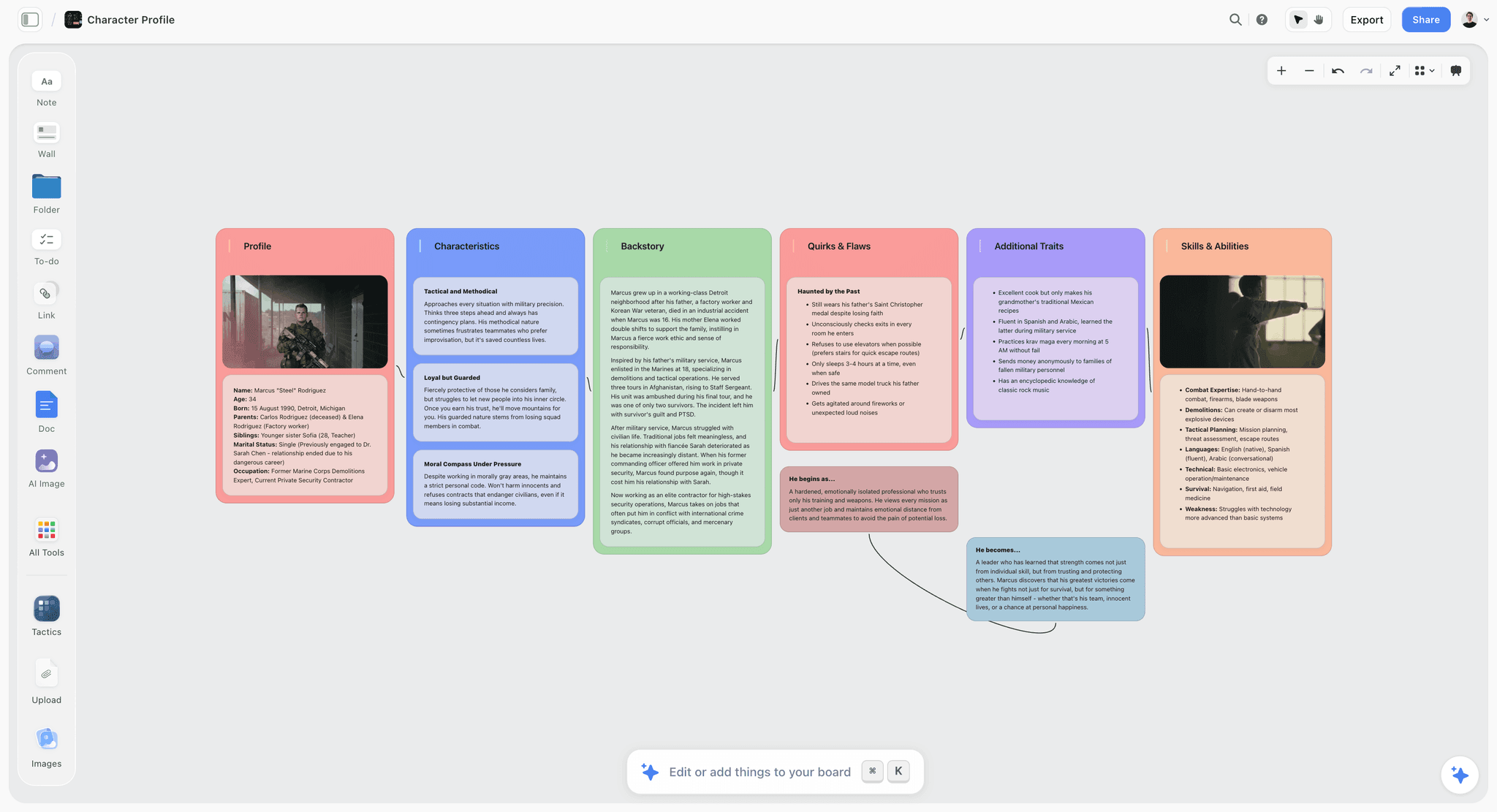
The workflow above needs one place where the premise, the character and world reference, and the page-by-page breakdown all live together and the AI can read the whole thing. That is what Storyflow is: an infinite visual canvas where every part of the script sits on one board, side by side, instead of scattered across a doc, a notes app, and a chat window. Here is how the steps map onto it.
- Premise and beats as notes. Drop your one-line pitch and beat list at the top of the board. They stay visible while you work the pages below, so the spine never leaves your sight.
- Character and world boards. Build a character profile board and a world board on the same canvas: appearance, voice, want, flaw, locations, rules, tone. This is the reference the artist draws from and the context the AI reads to stay consistent. The character profile board pictured above is the exact artifact this step produces.
- Page-by-page panel breakdown. Lay the script out across the canvas, each page a cluster, each panel a card with its description and dialogue. You see the whole comic's rhythm at a glance, impossible in a linear doc.
- AI that reads the board. Storyflow's AI reads your entire active canvas board by default, plus up to 1 Tactic and up to 3 Documents you @-mention in the chat. So when you ask it to expand a beat into panels, tighten a line, or flag a continuity slip, it answers with your premise, characters, and world in context, not blind.
- Story Blueprints to start faster. On the Plus, Pro, and Max tiers, Storyflow's Story Blueprints library gives you 200+ ready-made boards (character sheets, world building, beat structures) so your reference and breakdown start with structure, not a blank canvas.
The payoff is what Panel Logic is built around: the breakdown, the character sheets, and the world notes are all in one place, and the AI can act on all of them at once. Ask "does page 12 contradict the rule on the world board," and the AI can actually answer, because it sees both.
Now the honest part, because no tool is right for the whole job. Storyflow is where you plan and write the script, not where you draw or letter it:
- It is not a lettering, art, or layout tool. You do not draw panels or place speech balloons in Storyflow. You plan the script here, then draw and letter in Clip Studio Paint, Procreate, Photoshop, or your artist's tool of choice.
- It is cloud-only, with no offline mode. If you script on planes or in dead zones, or need local-first file ownership, that is a real constraint, and you will want an offline tool alongside it.
- It is not a dedicated screenplay-format app. Storyflow does not auto-format to a rigid comic-script template with locked panel-number styling the way a purpose-built scriptwriting app does. Its strength is the visual plan and whole-board AI, not enforcing one format.
Read plainly: Storyflow wins the planning and writing of the script, then hands off to a drawing tool for the art and a formatter if you need strict script styling. That handoff is the honest shape of the workflow.
7) Formatting: Full Script vs Thumbnail Script
There are two accepted ways to script a comic, and the AI workflow serves both. The full script (the "Alan Moore" style) writes out every panel in detail, page by page: panel number, full description, and dialogue. The artist receives a complete verbal blueprint that leaves nothing to guess. If you script for an artist you do not sit beside, write the full script.
The thumbnail or "Marvel method" script is looser: the writer gives a page-by-page plot summary, the artist breaks it into panels and draws, and the writer adds dialogue afterward to the finished art. It works when the artist is a strong visual storyteller and the collaboration is tight, and it puts more panel decisions in the artist's hands.
Default to the full script when you script for an artist, because Panel Logic is a full-script discipline: you decide the page, the panel, and the beat, and a full script gives the AI a complete structure to pressure-test. If you use the thumbnail method, the same context (premise, reference, beats) still powers the AI; you just stop at the page-summary layer and let the artist own the panels. Either way, separate description from dialogue clearly, number your panels, and keep dialogue short so the artist can scan a page and instantly see what is drawn versus spoken.
8) Webtoon and Vertical Scroll: What Changes
Webtoons are comics, but the vertical infinite scroll changes Panel Logic in three ways, and the workflow adapts cleanly.
The page becomes the scroll. A webtoon episode is a continuous vertical strip, so the reveal happens through scroll timing, not a page-turn. Your "page" layer becomes the episode layer, and your hook is the last image before the reader taps for the next episode. Empty vertical space between panels becomes a pacing tool: a long gap before a reveal is a held breath, a beat decision you note in your breakdown. Panels also stack full-width rather than sitting in a grid, which raises the stakes on transitions, because each hands directly to the one below it.
The AI workflow does not change shape, only labels. You still lock premise, build reference, outline beats, and break beats into panels; you just think in episodes and scroll. An AI that reads the whole board can still expand a beat into a scroll sequence and flag a continuity slip.
9) Common Mistakes That Break a Comic Script
The failures repeat across drafts. Each traces back to abandoning Panel Logic or asking the AI to work blind.
- Writing prose, not panels. A script that reads like a short story never decides what the reader sees. If a page has no panel breakdown, the artist has no blueprint. Break every page into panels with a clear image each.
- Panels that carry no beat. Three panels showing the same thing from slightly different angles is three wasted panels. Every panel must change something. If it does not advance the beat, cut or merge it.
- Dialogue written for a novel. Long, literary lines fill half the panel with a balloon. Comic dialogue is short because it shares space with art. Write for lettering, and use the AI to cut lines down.
- No hook on the page. A page that ends flat gives the reader no reason to turn or scroll. Decide the last panel's hook before you write the page.
- Reference that lives only in your head. If the character's look, the location's layout, and the world's rules are not written down, the artist guesses and the AI invents. Build the reference before you draft.
- Asking a blind AI to "write my comic." A chatbot with no premise, characters, or world hands you a generic scene that fits no story. The fix is context, not a cleverer prompt. Give the AI the board.
- Letting the AI decide the story. The premise, theme, and emotional spine are yours. Use the AI to expand and tighten what you decided, never to decide it. Generic is the price of outsourcing the spine.
Fix these and the script becomes buildable. Every one is a symptom of the same thing: the blueprint was incomplete, or the AI could not see it. A complete blueprint the AI can read is what this whole workflow produces.
11) The Bottom Line
Writing a comic script with AI is not about a magic prompt that spits out a finished issue. It is about building the structure a comic needs (premise, character and world reference, and a page-by-page panel breakdown) and then letting an AI that can read all of it accelerate the drafting. Descend through Panel Logic, page to panel to beat to description plus dialogue, and the script stays buildable at every step. A comic script is not prose with pictures. It is a blueprint an artist can build from, panel by panel.
The tool decision follows from that. You want one place where the premise, reference, and breakdown live together and the AI reads the whole board, and you want a clean hand-off to a drawing tool for the art. If that is the workflow you want, plan your next comic script on Storyflow's free canvas and keep the premise, characters, world, and panel breakdown in one place the AI can read from the first page.
10) FAQ: Writing a Comic Script with AI
How do I write a comic script with AI?
Build your context first, then draft with the AI reading it. Lock a one-line premise, build character and world reference, and outline the story in beats. Then descend through Panel Logic: break beats into pages, pages into panels, and only then write descriptions and dialogue. Use the AI to pressure-test structure, expand beats into panels, and tighten lines. The AI is an accelerant on a structure you own, not a replacement for it.
What is the correct format for a comic script?
Most writers use a full script: page number, then each panel numbered with a full description of what the artist draws, followed by short, attributed dialogue. Description and dialogue are visually separated so the artist can scan what is drawn versus spoken. The alternative is the thumbnail method, where you write a page-by-page plot summary and the artist breaks it into panels. Use the full script when you script for an artist you do not sit beside.
Can AI write a comic script for me?
AI can expand beats into panels, tighten dialogue, and check continuity, but it cannot decide what your story is. Ask a blind chatbot to write a comic and you get a generic scene that fits no particular story. The useful pattern is to own the premise, characters, and beats yourself, then let an AI that can read all of them accelerate the drafting. The spine is yours; the speed is the AI's.
What is Panel Logic?
Panel Logic is the shape of a comic script: it descends from page to panel to beat to description plus dialogue. You plan the page as a unit of reading with a hook, break it into panels that each show one moment, make sure each panel carries a beat (a change), then write what the artist draws and the characters say. It is written for the artist, not the reader, which is why it is a blueprint rather than prose.
How is a comic script different from a screenplay?
A screenplay describes continuous motion for actors and camera over time; a comic script describes fixed, chosen moments frozen in panels. A comic script decides exactly what the reader sees in each frame and how many frames a page holds, which a screenplay never does. Comic dialogue is also shorter, because it competes with the art for physical space. The unit of a comic script is the panel; the unit of a screenplay is the scene.
How much dialogue should a comic panel have?
Keep it short. A panel shares space with the art, so a balloon should hold a handful of words, not a paragraph. A common guide is to keep a single balloon to roughly twenty words or fewer and avoid stacking many balloons in one panel. If a line runs long, split it across panels or cut it. AI is genuinely useful here for trimming a bloated line to a lettering-friendly length while keeping the voice.
Do I need to draw to write a comic script?
No. A comic script is instructions for an artist, so you write in words: panel descriptions and dialogue. You do need to think visually, deciding what each panel shows and how the eye moves, but you never draw. That is why the writing workflow and the drawing tools are separate. You plan and write the script in a text-and-canvas tool, then hand it to an artist who draws and letters.
How do I write a webtoon script?
Write it like a comic script but think in vertical scroll instead of pages. The episode replaces the page as the unit, the hook is the last image before the reader taps for the next episode, and the vertical gaps between panels become a pacing tool you note in your breakdown. Panels stack full-width rather than sitting in a grid. The AI workflow is identical: lock premise, build reference, outline beats, and break beats into scrolling panels.
What should a character reference for a comic include?
Capture what the artist needs to draw the character consistently and what the writer needs to keep them in voice: appearance, a few visual signatures, speech pattern, their want, and their flaw. Keep it to what recurs and matters, not exhaustive backstory. This reference is also the context an AI reads to keep the character consistent across the script, which is why writing it down before you draft pays off on every later page.
How long should a comic script be?
It depends on the format and the page count, not a fixed word count. A single-issue full script for a twenty-two-page comic runs many pages because each panel is described in full; a short webtoon episode is shorter. The useful metric is not length but completeness: every page broken into panels, every panel with a clear image and beat, and dialogue that fits the art. A script is done when the artist can draw it without asking what a panel means.
Which AI tool is best for writing a comic script?
The best tool is one that can hold your premise, character and world reference, and page-by-page breakdown together and let the AI read all of it, so its suggestions fit your story instead of guessing. A plain chatbot only sees your last message, which is why blind AI comic drafts come out generic. A canvas that keeps the whole script in view and gives the AI full-board context is the better fit for Panel Logic. For the full field, see the planning tools guide linked below.
Table of Contents
- Quick Answer: How to Write a Comic Script with AI
- Panel Logic: The Shape of a Comic Script
- What AI Actually Helps With (and What It Does Not)
- The Step-by-Step Workflow
- Writing a Single Page, Panel by Panel
- The Workflow in Storyflow
- Formatting: Full Script vs Thumbnail Script
- Webtoon and Vertical Scroll: What Changes
- Common Mistakes That Break a Comic Script
- FAQ: Writing a Comic Script with AI
- The Bottom Line
- Author
- Related Reading
Templates to check out for this topic


Templates you can use in Storyflow
Every Storyflow board starts from real structure and an AI that reads the whole canvas. Open one of these templates and make it yours.


See Storyflow in Action
A visual AI workspace where every feature lives inside one canvas. No tab-switching, no context lost.
Build your entire board from a single message
Type what you need in the AI chat at the bottom of your canvas. The AI adds cards, headings, and structure directly onto your board.
Use expert frameworks as AI context
Type @ in the AI chat and choose any Tactic. The AI tailors every response to that framework instead of giving generic advice.
Turn your board into a mind map in seconds
Ask the AI to restructure your canvas as a mindmap. It connects your ideas into a visual hierarchy so you can see how everything relates.
Why Storyflow Exists
Storyflow actually began as a personal tool while working on creative and research projects.
We kept running into the same problem: ideas were scattered everywhere: notes, documents, and whiteboards.
Nothing helped us see how everything connected.
So we started building a workspace designed around how ideas actually grow.
→ Read how Storyflow was createdJustkay
Documentary Filmmaker & Founder at Storyflow
Published: 2026-07-01
Extremely simple, seriously capable


See how easy it is to get started
Watch a real project come together, from a blank board to a finished plan, clicked through step by step.
Start creating with AI and become more productive
Transform your creative workflow with AI-powered tools. Generate ideas, create content, and boost your productivity in minutes instead of hours.