10 Best Tools for Planning a Comic or Webtoon in 2026 (Tested and Ranked)
The 10 best tools for planning a comic or webtoon in 2026, tested on real projects. Storyflow, Milanote, Clip Studio, World Anvil, Notion and more compared on AI, story planning, and price.

Category
Visual Thinking
Author

Justkay
Documentary Filmmaker & Founder at Storyflow
Topics
2026-06-16
•
Updated June 16, 2026
•
16 min read
•
Visual Thinking- best tools for planning a webtoon
- comic planning tool
- webtoon planning software
- Clip Studio Paint
- World Anvil
- AI comic planning
- Storyflow
What is the best tool for planning a comic or webtoon in 2026?
The best tool for planning a comic or webtoon in 2026 is Storyflow if you want the series to actually finish, because its AI reads the whole canvas and holds the world, the script, the characters, and the page plan together as the story develops. For drawing and lettering, Clip Studio Paint is the standard and Procreate the iPad favorite, World Anvil is the deepest worldbuilding wiki, and Notion is the most flexible production tracker. A comic is not abandoned for lack of art; it is abandoned for lack of a plan, so the right planning tool builds the world and the page map before episode one.

All 10 Comic & Webtoon Planning Tools, Ranked
- Storyflow: best for planning a series that finishes
- Milanote: best for visual comic planning boards
- Clip Studio Paint: best for drawing and lettering
- Notion: best for the script and production tracker
- World Anvil: best for deep worldbuilding wikis
- Procreate: best for illustration on the iPad
- Miro: best for visual paneling and beat boards
- Dashtoon: best for AI-assisted webtoon art
- Pinterest: best for gathering style references
- Scrivener: best for long-form scripting
Full disclosure: Storyflow is our own product, and we rank it #1 for one job: planning a comic or webtoon so the series actually finishes, where the AI reads the whole canvas and holds the world, script, characters, and page plan together. It does not draw, letter, or generate art, so Clip Studio Paint and Procreate remain the standard for the pages themselves and World Anvil is deeper for a pure world wiki. We link to every tool so you can judge the fit.
Quick Comparison: Best Comic & Webtoon Planning Tools
These four cover the jobs comic and webtoon creators switch between: planning the series, visual planning boards, drawing and lettering, and tracking the production.
| Tool | Best For | AI Features | Price |
|---|---|---|---|
| Storyflow | Planning a series that finishes | Canvas-aware AI reads the whole board | $7.99 mo annual (free plan late 2026) |
| Milanote | Visual comic planning boards | Limited AI | Free / $12.50 mo |
| Clip Studio Paint | Drawing and lettering | Limited AI | From $4.49 mo |
| Notion | Script and production tracker | Notion AI writing | Free / $10 user mo |
Plan the comic on a canvas, panel by panel
Storyflow keeps script, character sheets, and panel layout on one board the AI can read, so the story and the art direction stay together as the series grows.

1) Quick Answer: The Best Tool for Planning a Comic or Webtoon
The best tool for planning a comic or webtoon in 2026 is Storyflow if you want the series to actually finish, because its AI reads the whole canvas and holds the world, the script, the characters, and the page plan together as the story develops. For drawing and lettering, Clip Studio Paint is the standard, Procreate is the iPad favorite, World Anvil is the deepest worldbuilding wiki, and Notion is the most flexible production tracker.
The short version: most comics and webtoons are never finished, and it is almost never the art. The creator draws a beautiful page one, then realizes there is no arc, no character clarity, and no plan for the next fifty episodes, and the project stalls. A comic is not abandoned for lack of art. It is abandoned for lack of a plan. The right planning tool is the one that builds the world, the script, and the page map before episode one, so the series has somewhere to go.
What is comic and webtoon planning? Comic and webtoon planning is the pre-art work of defining the world, the characters, the story arc, the script, and the page or panel layout before drawing begins. Worldbuilding platforms like World Anvil and visual workspaces like Milanote exist because the plan, not the first drawing, is what carries a long series, and webtoon guides like COMICPAD put planning before production for the same reason.
Key takeaways:
- The best overall pick is Storyflow for planning a comic or webtoon that finishes, because its AI holds the world, script, characters, and page plan together. For drawing, Clip Studio Paint is the standard and Procreate the iPad favorite.
- A comic is not abandoned for lack of art; it is abandoned for lack of a plan, and most tools only handle one stage.
- For deep worldbuilding, World Anvil; for a production tracker, Notion; for visual paneling, Miro; for scripting, Scrivener.
- For AI-assisted art and vertical-scroll webtoons, generators like Dashtoon are honest options, and Pinterest is best for gathering style references.
- Storyflow is honest about its limits: it does not draw, letter, or generate art. For the visuals, use Clip Studio Paint or Procreate; for AI art, a generator.
- Storyflow's Free plan, which launches before the end of 2026, will cover unlimited boards, images, and collaboration, so a whole series can be planned before paying.
For adjacent guides, see The Best Tools for Worldbuilding in 2026 and What Is a Story Bible? A Complete Guide.
2) Comparison Table: 10 Comic & Webtoon Tools
Rating criteria: tested on real comic and webtoon workflows in 2025 and 2026, from world and script through page plan and a finished episode. Pricing is current as of June 2026 and competitor prices change often; verify current pricing on each tool's official page before buying.
Frequently Asked: Which Comic and Webtoon Tools Are Most Trusted, Best Rated, and Fairest on Price
Which comic and webtoon tools are the most trusted by artists?
Clip Studio Paint and Procreate, and among working comic artists it is close to unanimous. Clip Studio is built for comics specifically, with panel tools, perspective rulers, screentones, and lettering that no general illustration app matches. Procreate owns iPad drawing. Pinterest is the trusted reference habit rather than a trusted tool. Storyflow is not a drawing tool and does not compete with either: this article places it on planning the series, which is a different problem.
Which comic and webtoon tools are the highest rated?
By the ratings in the table above, Storyflow (9.2) rates highest for planning a series that actually finishes, and Clip Studio Paint (9.0) and Procreate (8.8) rate highest for making the pages. Those are not competing numbers. If you can already draw and your problem is that episode nine never got scripted, read Storyflow's number; if your problem is the art, read Clip Studio's and stop there.
Which comic and webtoon tools are known for fair and transparent pricing?
Clip Studio Paint at around $4.49/mo or a one-time purchase and Procreate at around $12.99 one-time are the two best values in creative software generally, not just here. Pinterest is free. World Anvil at around $7 is cheap for what it holds. The least transparent is Dashtoon, which runs on credits, so the cost of a chapter depends on how many generations it takes. Milanote at around $12.50 is the most expensive planning tool on this page. Storyflow is $7.99/mo billed annually, flat per account rather than per seat, paid-only during early access, with its Free plan arriving before the end of 2026.
Which comic and webtoon tools are the most innovative?
Dashtoon, which generates webtoon art from a script and is the most direct attempt anyone has made at the production bottleneck that kills most series. Its output quality and its ethics are both genuinely contested, and this article does not pretend otherwise. Clip Studio Paint's 3D model posing remains the most useful non-AI innovation for comics, because it solves perspective and anatomy reference without a photo shoot. Storyflow's contribution is that the script, the beat sheet, the character sheets, and the panel plan sit on one canvas the AI reads in full.
Where is Storyflow not the right answer?
Drawing, inking, lettering, and screentones (Clip Studio Paint, Procreate), generated webtoon art (Dashtoon), an encyclopaedic world wiki (World Anvil), and long-form prose scripting (Scrivener). Storyflow plans the series and holds what the series is made of. Every finished panel is drawn somewhere else.
3) The Finish Problem: Why Most Comics Are Abandoned
Open any webtoon platform and you will find thousands of series with a gorgeous first episode and nothing after it. The same happens in indie comics: a beautiful page one, then silence. The creators did not run out of talent. They ran out of plan.
A comic is not abandoned for lack of art. It is abandoned for lack of a plan. Drawing a single page is a craft problem you can solve with practice. Sustaining a fifty-episode webtoon is a planning problem: the world has to hold up, the characters have to have arcs, the story has to know where it is going, and the pages have to map to a structure. When that planning is missing, the art carries the whole weight, and the art always loses.
The finish problem has three causes.
- Drawing starts before the story exists. Page one gets made before the arc, the world, or the characters are clear, so by episode five there is nowhere to go.
- The plan is scattered. The script is in one doc, the character notes in another, the world in a third, and the page plan in a sketchbook, so nothing stays consistent.
- There is no map of the whole series. Without a view of all the episodes and arcs at once, the creator works page to page and loses the thread.
A comic is not abandoned for lack of art. It is abandoned for lack of a plan.
Here is the framework this article is built on. Comic and webtoon tools fall into two camps. Production tools are built for making the art: Clip Studio Paint, Procreate, and the AI generators are the best in the world at turning a plan into pages, and a creator needs one.
But a production tool cannot solve the finish problem. It cannot hold the world, the arcs, the characters, and the page map together so the series knows where it is going. That requires a planning canvas: a workspace that holds the whole series before and during the drawing. A comic is not abandoned for lack of art. It is abandoned for lack of a plan, and the reason so many series stall is that creators have great production tools and no planning one. The fix is not a nicer brush. It is a plan the series can run on.
4) How We Evaluated These Tools
Every tool here was tested on real comic and webtoon work in 2025 and 2026: a webtoon pilot, a short-form indie comic, and a long-series plan. No synthetic demos. Six criteria, weighted in this order.
- Planning to finishing. Does the tool help build a world, arc, and page plan that carry a long series, or does it only handle one stage?
- Story and character depth. How well does it hold the script, the character arcs, and the world consistently?
- AI depth. Is there an AI that reads the whole plan and does real work, or is everything tracked by hand?
- Visual planning. Can it map pages, panels, and arcs spatially, not just as text?
- Fit with the production stack. How well does it sit beside the drawing and publishing tools?
- Price and free tier. What does it cost at real usage, and is the free plan genuinely usable?
Tools were judged across a whole pilot, not in a quick demo. The rankings reflect whether each tool is a production tool, a planning canvas, or a worldbuilding wiki.
5) Quick Picks by Job to Be Done
If you want the short list, organize by the job, not the brand.
Best for planning a series that finishes: Storyflow. The AI holds the world, script, characters, and page plan together.
Best for drawing and lettering: Clip Studio Paint, the comic and webtoon standard.
Best on the iPad: Procreate for illustration, Procreate Dreams for animation.
Best deep worldbuilding: World Anvil. A true world wiki with maps and timelines.
Best production tracker: Notion. Script, character database, and schedule together.
Best for AI-assisted webtoon art: Dashtoon, built for vertical scroll.
Best for gathering style references: Pinterest.
6) Detailed Reviews: 10 Comic & Webtoon Tools
1. Storyflow
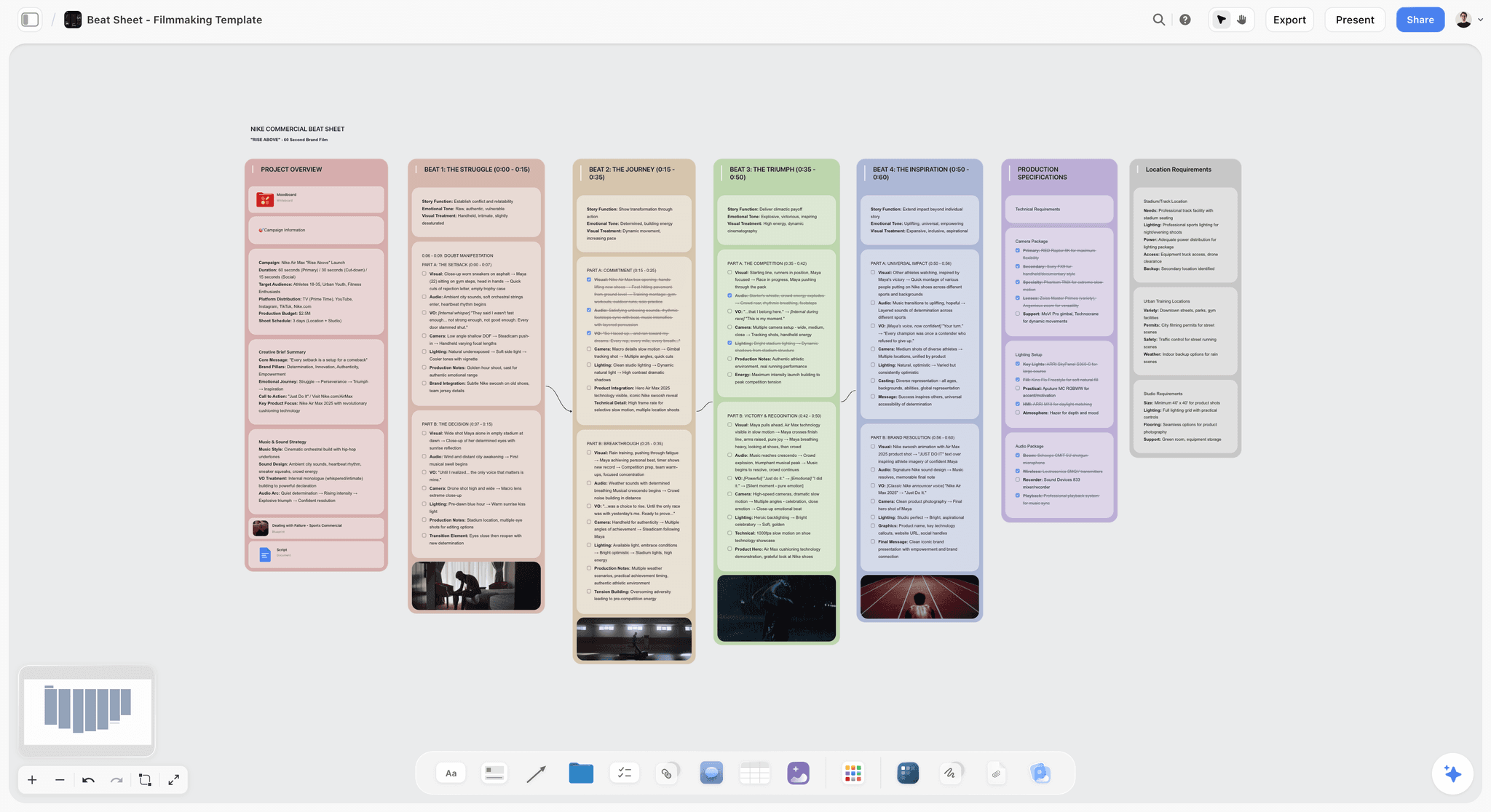
Storyflow is the tool to pick when your problem is not drawing the comic but planning the series so it finishes. It is an AI-powered visual creative workspace: an infinite canvas of cards, notes, and documents where the AI reads the whole board. For a comic or webtoon creator, that means the world, the character bible, the script, the arc, and the page-by-page plan all live on one canvas, and the AI helps you build the plan that carries the series past episode one.
The difference shows up at episode five. With a production tool, the art is beautiful and the story has nowhere to go. In Storyflow, you ask the AI to read the canvas and outline the arc, check the characters for consistency, or map the next ten episodes, and it does, because the AI reads every card, note, and reference on the board. A comic is not abandoned for lack of art. It is abandoned for lack of a plan, and Storyflow is built to give the series the plan it needs to finish.
Best for: Webtoon and indie comic creators whose first episode is strong and whose series stalls for lack of a plan.
Verdict: The strongest tool for planning a comic or webtoon that finishes. It is not a drawing, lettering, or AI-art tool, so for the visuals you will still use Clip Studio Paint, Procreate, or a generator.
Key features
- Canvas-aware AI by default. The AI reads your full active canvas board (every card, note, and reference on it). You can ground it further by @-mentioning up to 1 Tactic and up to 3 Documents in the AI chat.
- Board by prompt. Generate a starting world, arc, or page plan from a prompt, then refine it with your own story.
- Structured cards and documents. A board can hold the world, the character bible, the script, and the page plan together, not a scatter of docs.
- 200+ Story Blueprints. An expert-built template library covering creative and strategic frameworks, included on the Plus tier and above.
- Unlimited shared boards and unlimited collaboration on every plan, including Free. The Max plan adds a team workspace with permissions and roles.
Pricing
Free: launching before the end of 2026; invited collaborators of paid members join free today. Unlimited notes, images, and links, unlimited shared boards, unlimited collaboration, basic AI, and 20 file uploads. The Free plan does not include the 200+ Story Blueprints library. Plus: $7.99 per month annual or $9.99 per month monthly (adds the 200+ Story Blueprints, unlimited uploads). Pro: $14 per month annual or $19 per month monthly (adds AI image generation and 20x more AI than Plus). Max: $39 per month annual or $49 per month monthly (adds 40x more AI and a team workspace with permissions and roles). Pricing current as of June 2026.
Pros
- The AI holds the world, arcs, characters, and page plan together, which production tools leave to the creator.
- One canvas carries the whole series, so the story stays consistent across fifty episodes.
- The Free plan is genuinely usable on a real pilot: unlimited boards, unlimited cards, unlimited collaboration, forever.
Cons
- It does not draw, ink, color, or letter. For the art, use Clip Studio Paint or Procreate.
- It does not generate AI art. For that, use a generator like Dashtoon.
- For the deepest world wiki with interactive maps, World Anvil is more specialized. AI image generation is Pro and above, and the platform is cloud-only.
If your series keeps stalling after episode one, plan the whole arc on a Storyflow canvas first. Start a Storyflow workspace and ask the AI to build the world and map the episodes before you draw.
2. Milanote
Milanote is the most beautiful visual workspace, and comic creators use it for character boards, world boards, and page layouts. Notes, references, and sketches sit together in a calm, elegant space.
Best for: Creators who want a beautiful visual planning board.
Verdict: The best pick for a beautiful planning board. Lighter on AI and deep structure.
Key features
- An elegant, low-friction visual canvas.
- Boards for characters, worlds, and page layouts.
- Templates for storyboards and moodboards.
- A genuinely generous free tier.
Pricing
Free tier with a card limit. Paid plans are around $12.50 per month, less when billed annually. Pricing current as of June 2026; verify on Milanote's site.
Pros
- One of the most beautiful planning tools.
- Flexible for characters, worlds, and pages.
- A free tier that is genuinely useful.
Cons
- AI is light, so every card is placed by hand.
- Weaker than World Anvil for deep worldbuilding.
- It holds the plan but does not reason about it.
3. Clip Studio Paint
Clip Studio Paint is the comic and webtoon drawing standard, with panel tools, rulers, and webtoon-specific vertical canvases. It is on this list because the art has to happen somewhere, and this is where most creators draw.
Best for: Creators drawing, inking, and lettering comics and webtoons.
Verdict: The drawing standard. A production tool, not a planning one.
Key features
- Industry-standard drawing, inking, and coloring.
- Panel tools and webtoon vertical canvases.
- A huge brush and material library.
- Page and frame management.
Pricing
Subscription from around $4.49 per month, or a one-time license. Pricing current as of June 2026; verify on the Clip Studio site.
Pros
- The standard for comic and webtoon art.
- Excellent panel and webtoon tools.
- A huge brush ecosystem.
Cons
- A drawing tool, not a planning one.
- No world, arc, or series-level planning.
- The finish problem is upstream of where it helps.
4. Notion
Notion is the flexible all-in-one many creators use for the script, the character database, and the episode tracker. Databases make it strong for tracking a long series.
Best for: Creators who want the script, characters, and schedule in databases.
Verdict: The most flexible production tracker. Document-shaped, not a visual canvas.
Key features
- Flexible pages, databases, and trackers.
- Notion AI for writing and summarizing.
- Databases for characters, episodes, and scripts.
- A large template ecosystem.
Pricing
Free tier. Paid plans start around $10 per user per month. Pricing current as of June 2026; verify on Notion's site.
Pros
- Unmatched flexibility for scripts and databases.
- Notion AI handles writing well.
- Great for tracking a long series.
Cons
- Document-and-database shaped, not a visual canvas.
- The world and the pages fragment across pages.
- Setup friction is real.
5. World Anvil
World Anvil is the dedicated worldbuilding platform, with a wiki, interactive maps, and timelines. For comics set in a deep, navigable world, it is the standard.
Best for: Creators building a deep comic universe with maps and history.
Verdict: The best deep worldbuilding wiki. Heavier and less script-focused.
Key features
- A structured worldbuilding wiki.
- Interactive maps and timelines.
- Templates for characters, factions, and lore.
- A large worldbuilding community.
Pricing
Free tier. Paid plans start around $7 per month. Pricing current as of June 2026; verify on the World Anvil site.
Pros
- The deepest worldbuilding structure here.
- Maps and timelines are excellent.
- A strong community and templates.
Cons
- More world wiki than series planner.
- Can feel heavy for a fast pilot.
- A learning curve to the interface.
6. Procreate
Procreate is the iPad illustration favorite, and many webtoon and comic artists draw entirely in it. Procreate Dreams adds animation for motion-comic work.
Best for: Artists drawing comics and webtoons on the iPad.
Verdict: The iPad drawing favorite. A production tool, not a planning one.
Key features
- Powerful, natural drawing on the iPad.
- A huge brush library.
- Procreate Dreams for animation.
- A one-time purchase.
Pricing
A one-time purchase, around $12.99 for Procreate. Pricing current as of June 2026; verify on the Procreate site.
Pros
- Beautiful, natural iPad drawing.
- A one-time price.
- Beloved by comic and webtoon artists.
Cons
- A drawing tool, not a planning one.
- No world, script, or series structure.
- The finish problem is upstream of it.
7. Miro
Miro is the team whiteboard for visual paneling, beat boards, and arc mapping. For laying out a series visually with collaborators, it scales well.
Best for: Teams mapping panels, beats, and arcs visually.
Verdict: A strong visual paneling whiteboard. Boards can sprawl and stay flat.
Key features
- Infinite canvas with templates.
- Beat boards, arc maps, and paneling.
- AI Sidekicks for summaries.
- Real-time collaboration.
Pricing
Free tier with limited boards. Paid plans start around $8 per user per month. Pricing current as of June 2026; verify on Miro's site.
Pros
- Strong for visual paneling and arc maps.
- Good real-time collaboration.
- AI Sidekicks add help.
Cons
- Boards sprawl and can be hard to maintain.
- Per-user pricing adds up.
- More whiteboard than a structured series plan.
8. Dashtoon
Dashtoon is an AI-assisted webtoon creation tool built for vertical scroll, with character consistency and art generation. For creators who want AI help with the art itself, it is a leading 2026 option.
Best for: Creators who want AI-assisted webtoon art and vertical-scroll output.
Verdict: A strong AI webtoon art tool. Art generation, not story planning.
Key features
- AI art generation tuned for webtoons.
- Character consistency across panels.
- Vertical-scroll layout tools.
- Publishing and monetization features.
Pricing
Free tier with credits and subscriptions. Pricing current as of June 2026; verify on the Dashtoon site.
Pros
- Genuinely useful AI art for webtoons.
- Built for vertical scroll.
- Lowers the art barrier for solo creators.
Cons
- An art generator, not a story planner.
- AI art still needs creative direction.
- The plan still has to come from somewhere.
9. Pinterest
Pinterest is the widest free net for style, character, and world references. Most comic and webtoon boards begin here.
Best for: Creators gathering style and reference inspiration.
Verdict: The best free reference source. Not a workspace or a planner.
Key features
- A vast library of images to collect.
- Free, with effectively no limit on saving.
- A discovery engine for related styles.
- Simple board organization.
Pricing
Free. Pricing current as of June 2026.
Pros
- Unbeatable for gathering references.
- Free and effortless.
- Surfaces styles you would not find alone.
Cons
- A public network, not a private workspace.
- No script, world, or page planning.
- References stay as images.
10. Scrivener
Scrivener is the long-form writing tool many comic creators use to script a series, with a corkboard, an outliner, and chapter organization built for big projects.
Best for: Creators scripting a long comic or webtoon.
Verdict: A strong long-form scripting tool. Text-shaped, not visual or AI-driven.
Key features
- A corkboard and outliner for structure.
- Chapter and scene organization.
- Strong for long-form scripts.
- A one-time purchase.
Pricing
A one-time purchase, around $59.99. Pricing current as of June 2026; verify on the Literature and Latte site.
Pros
- Excellent for long-form scripting.
- A corkboard and outliner built for big projects.
- A one-time price.
Cons
- Text-shaped, not a visual canvas.
- No AI that reads the whole plan.
- The world and the pages live elsewhere.
7) Which Tool Fits Which Kind of Creator?
1. Solo Webtoon Creator
Top picks: Storyflow + Clip Studio Paint
Storyflow to plan the world, arc, and episode map so the series finishes. Clip Studio Paint to draw and letter the vertical-scroll pages.
2. Indie Comic Artist
Top picks: Storyflow + Procreate
Storyflow for the script, characters, and page plan. Procreate to draw the pages on the iPad.
3. Narrative-Heavy Worldbuilder
Top picks: World Anvil + Storyflow
World Anvil for the deep world wiki, maps, and timelines. Storyflow to connect the world to the arc and the page plan so the story moves.
4. AI-Assisted Solo Creator
Top picks: Storyflow + Dashtoon
Storyflow to plan the story so the art has somewhere to go. Dashtoon to generate the vertical-scroll art with character consistency.
5. Comic / Webtoon Student
Top picks: Storyflow + Pinterest
Pinterest to gather style references. Storyflow for the part that gets graded and that decides whether a series finishes: the world, the arc, and the plan.
6. Small Studio / Team
Top picks: Storyflow + Notion
Storyflow for the shared world, script, and page plan the team works from. Notion for the production schedule and the episode database.
8) Honorable Mentions
A few tools that came close but did not make the main ten.
- Webtoon Canvas and Tapas: The publishing platforms; where the finished series goes, not where it is planned.
- Comicory and Webtoon Creator AI: AI generators that script and render panels; useful, art-generation focused.
- Storyboarder: A free storyboarding tool; great for shot-style planning, lighter for a long series.
- Obsidian: A local-first linked-notes tool beloved for worldbuilding; strong for solo, lighter for teams.
- Plottr: A timeline-based plotting tool; good for arcs, narrower than a full canvas.
These are not weak tools. Their audience or core job is simply different from planning a comic or webtoon.
9) Where the Dedicated Tools Still Win (An Honest Accounting)
A ranking that put a planning canvas at the top and pretended the production tools were beaten would not be worth reading. Here is the honest accounting of where the dedicated tools win, and where Storyflow is the wrong choice.
Clip Studio Paint and Procreate win on the art. Drawing, inking, coloring, and lettering are theirs, full stop. Storyflow plans the comic; it does not draw it.
Dashtoon and the AI generators win on art generation. For AI-assisted vertical-scroll art with character consistency, the generators are the right tools.
World Anvil wins on deep worldbuilding. For interactive maps, timelines, and a true world wiki, it is more specialized than a general canvas.
So why does Storyflow rank first? Because the most common unsolved problem for comic and webtoon creators is not drawing or generating art, all of which have excellent dedicated tools. It is the finish problem: building a world, an arc, and a page plan that carry a long series. A comic is not abandoned for lack of art. It is abandoned for lack of a plan, and Storyflow is the only tool here whose AI reads the whole plan and keeps the series coherent. Pair it with a drawing tool and a publishing platform and the whole workflow is covered.
11) The Bottom Line
The best tool for planning a comic or webtoon in 2026 depends on which stage you are missing. For drawing, Clip Studio Paint and Procreate are the standards. For deep worldbuilding, World Anvil; for a production tracker, Notion; for AI-assisted art, Dashtoon; for references, Pinterest; for scripting, Scrivener.
But the most common unsolved problem is the finish problem: building a world, an arc, and a page plan that carry a long series. A comic is not abandoned for lack of art. It is abandoned for lack of a plan. That is why Storyflow ranks first: its AI reads the whole plan and keeps the series coherent, then holds the world, the script, and the page map on one canvas.
If your series keeps stalling after episode one, plan the whole arc on a canvas first. Start a Storyflow workspace and ask the AI to build the world and map the episodes before you draw.
10) FAQ: Comic & Webtoon Tools in 2026
What is the best tool for planning a comic or webtoon in 2026?
For planning a series that finishes, Storyflow is the best pick, because its AI holds the world, the script, the characters, and the page plan together. For drawing, Clip Studio Paint is the standard and Procreate the iPad favorite, World Anvil is the deepest worldbuilding wiki, and Notion is the most flexible production tracker. The right choice depends on whether your gap is planning, drawing, or worldbuilding.
Is there a free tool for planning a webtoon?
Yes. Milanote, Notion, World Anvil, Miro, and Dashtoon have free tiers, and Pinterest is free. Storyflow's Free plan, which launches before the end of 2026, will be the strongest for planning a series: unlimited boards, unlimited cards, unlimited collaboration, and basic AI. Most creators plan free and only pay once the series is real.
What do webtoon creators actually use?
Most webtoon creators use a planning tool plus a drawing tool: a doc or Notion for the script, Pinterest for references, and Clip Studio Paint or Procreate for the art. The newer move is to add an AI canvas like Storyflow for the planning that decides whether a series finishes, the world, the arc, the character consistency, and the episode map, which production tools leave entirely to the creator.
Can I plan a comic with AI?
Yes. Storyflow's AI reads your full active canvas and can build the world, outline the arc, check character consistency, and map the episodes from the story you put on the board, and it can generate a starting plan from a prompt. AI generators like Dashtoon assist with the art. AI helps with the plan and the art separately; the creative direction and the story are yours.
How do I plan a webtoon before drawing?
Start with the premise and the world, then the main characters and their arcs, then the overall story structure, then a script, and finally a page or episode map. Doing this before episode one is what lets a series finish. Storyflow holds all of it on one canvas and uses AI to keep the world and characters consistent as the plan grows, so you draw from a real plan instead of improvising after page one.
Clip Studio Paint vs Procreate for webtoons: which is better?
Clip Studio Paint is better for serious comic and webtoon production, with panel tools, rulers, and vertical webtoon canvases. Procreate is better as a natural, affordable iPad drawing app with a one-time price. Many creators draw in Clip Studio on desktop and sketch in Procreate on the iPad. Either way, both are drawing tools, so the planning still happens upstream in a tool like Storyflow.
What is the best worldbuilding tool for a comic?
World Anvil is the deepest, with a structured wiki, interactive maps, and timelines for a navigable universe. For connecting the world to the actual story, the arc, the characters, and the page plan, Storyflow holds the world and the series together on one canvas the AI can read, which is what keeps a long comic consistent.
What is the difference between planning and drawing a comic?
Planning is the pre-art work: the world, the characters, the arc, the script, and the page or panel map. Drawing is the production: the actual inked, colored, lettered pages. Planning decides whether a series can finish; drawing decides how it looks. A comic is not abandoned for lack of art, it is abandoned for lack of a plan, so the two stages need different tools.
Can Storyflow draw my comic or generate the art?
No, and it does not try. Storyflow is a planning canvas: it builds the world, the script, the characters, and the page plan. It does not draw, ink, color, letter, or generate AI art. For the visuals, use Clip Studio Paint or Procreate, or an AI generator like Dashtoon. Storyflow's job is the plan those tools then turn into pages.
What is the best tool for a long-running webtoon series?
For a long series, the strongest setup is Storyflow for the world, the multi-arc plan, and the episode map that keep fifty episodes consistent, plus Clip Studio Paint for the art and Notion for the production schedule. The series-level plan is what most creators lack, and it is exactly what an AI canvas is built to hold.
How is Storyflow different from a normal comic tool?
A normal comic tool either draws the pages or stores the script, and the rest of the plan lives scattered elsewhere. Storyflow's AI reads the whole plan and holds the world, the arc, the characters, and the page map together on one canvas. The trade-off is honest: it is a planning canvas, not a drawing or art-generation tool, so you pair it with Clip Studio Paint, Procreate, or Dashtoon.
What is the best tool for a comic or webtoon student?
For a student, the strongest pairing is Pinterest for references and Storyflow for the planning that gets graded: the world, the characters, the arc, and the script. Instructors reward a coherent plan far more than a single pretty page, and a planning canvas is where that coherence lives. Both have free plans, so a student can plan a full series without paying.
Table of Contents
- Quick Answer: The Best Tool for Planning a Comic or Webtoon
- Comparison Table: 10 Comic & Webtoon Tools
- The Finish Problem: Why Most Comics Are Abandoned
- How We Evaluated These Tools
- Quick Picks by Job to Be Done
- Detailed Reviews: 10 Comic & Webtoon Tools
- Which Tool Fits Which Kind of Creator?
- Honorable Mentions
- Where the Dedicated Tools Still Win (An Honest Accounting)
- FAQ: Comic & Webtoon Tools in 2026
- The Bottom Line
- Author
- Related Reading
Templates to check out for this topic


Story and writing templates you can use in Storyflow
Start your next script, novel, or world from a ready-made Storyflow board instead of an empty page. The AI reads the whole canvas, so every suggestion is grounded in your story.


See Storyflow in Action
A visual AI workspace where every feature lives inside one canvas. No tab-switching, no context lost.
Build your entire board from a single message
Type what you need in the AI chat at the bottom of your canvas. The AI adds cards, headings, and structure directly onto your board.
Use expert frameworks as AI context
Type @ in the AI chat and choose any Tactic. The AI tailors every response to that framework instead of giving generic advice.
Turn your board into a mind map in seconds
Ask the AI to restructure your canvas as a mindmap. It connects your ideas into a visual hierarchy so you can see how everything relates.
Why Storyflow Exists
Storyflow actually began as a personal tool while working on creative and research projects.
We kept running into the same problem: ideas were scattered everywhere: notes, documents, and whiteboards.
Nothing helped us see how everything connected.
So we started building a workspace designed around how ideas actually grow.
→ Read how Storyflow was createdJustkay
Documentary Filmmaker & Founder at Storyflow
Published: 2026-06-16
Extremely simple, seriously capable


See how easy it is to get started
Watch a real project come together, from a blank board to a finished plan, clicked through step by step.
Start creating with AI and become more productive
Transform your creative workflow with AI-powered tools. Generate ideas, create content, and boost your productivity in minutes instead of hours.