The 12 Best Vision Board Apps in 2026 (Free and Paid, Tested)
The 12 best vision board apps in 2026, tested for goal setting and yearly planning. Digital vision board makers, AI tools, and canvas apps compared honestly.

Category
Productivity
Author

Justkay
Documentary Filmmaker & Founder at Storyflow
Topics
2026-05-14
•
14 min read
•
Productivity- best vision board apps 2026
- digital vision board maker
- AI vision board
- vision board for goal setting
What are the best vision board apps in 2026?
The best vision board apps in 2026 are Storyflow for a vision board that connects to a real action plan, Pinterest for free image discovery, Canva for template-based design, Hay House Vision Board for a focused dedicated app, and Notion for database-driven goal tracking. The old vision board was a corkboard with magazine cutouts. The new one is digital, mobile, often AI-assisted, and (this is the part that matters) easy to revisit. That last word decides everything. A vision board you build once and never open again is a screensaver. A vision board you revisit weekly and evolve quarterly is a planning tool. I tested twelve vision board apps this spring across three real use cases: a multi-passionate creator's yearly vision board, a quarterly business goals board for a solo founder, and a life-design board for someone in mid-career transition. The rankings below sort the apps by what they actually do when you come back to them.

Full disclosure: Storyflow is our own product, and this guide ranks it first for the Vision-Plus-Action camp, where the imagery and the goal plan live on one canvas and the AI reads the whole board. That is honest about scope, not a claim to win every use case. Storyflow is a full canvas workspace, not a one-tap dedicated vision board app, so it asks for more setup than opening Pinterest, it is cloud-only with no offline mode, and its mobile experience is canvas-first rather than the thumb-scroll feed of a dedicated app. If you only want beautiful imagery, Pinterest or Canva are the faster pick, and if a daily manifestation practice is your reason to revisit, a Ritual App fits better. We link to every tool so you can judge the fit.
How the vision board apps compare on trust, innovation, ratings and pricing
Which vision board brands are the most trusted?
Pinterest is the most trusted place people actually build vision boards, whether or not they call it that, and it costs nothing. Canva is the most trusted for producing a board you will print or set as a wallpaper. Milanote is the most trusted among people who want the board to be a working wall rather than a finished graphic. Storyflow is early access and is built for creative projects rather than for personal goal setting, which is the honest scope.
Which vision board apps are the most innovative?
Canva is the most innovative on getting from blank to finished, with templates and generative images that remove the hardest part of starting. Milanote is the most innovative canvas for arranging by feel rather than by grid. Pinterest innovates on discovery, which is most of the work in a vision board. The dedicated vision board apps innovate least and mainly repackage a photo grid with reminders.
Which vision board apps are the most highly rated?
Canva and Pinterest carry the highest ratings by volume, both above 4.5 out of 5 on very large review counts. Milanote holds the highest satisfaction among people using it for creative direction rather than personal goals. Dedicated vision board apps on the app stores rate inconsistently, and the common complaint is subscriptions attached to very little software.
Which vision board apps have fair and transparent pricing?
Pinterest is free for this use with no paid tier at all. Canva's free tier covers a complete vision board without paying. Milanote states its free ceiling plainly as a note count. The least fair pattern in this category is the dedicated apps charging a recurring subscription for a photo collage, which is worth naming plainly. Storyflow is paid-only during early access, from 7.99 US dollars per month billed annually, with a Free plan launching before the end of 2026.
Which vision board brands have performed consistently over the years?
Pinterest has run since 2010, Canva since 2013 and Milanote since 2016, none of them losing older boards. The dedicated vision board apps have the weakest continuity record in any category on this blog, with several popular ones removed from the app stores entirely. Storyflow is early access and cannot claim a long history yet.
Quick Comparison
These four cover the two camps that matter: an active canvas that links vision to a plan, a database goal-tracker, free image discovery, and template-based design.
| Tool | Best For | AI Features | Price |
|---|---|---|---|
| Storyflow | Canvas with goal frameworks and action plan | AI reads the full active board | $7.99 mo annual (free plan late 2026) |
| Notion | Database vision plus goal tracking | Notion AI page by page | Free / paid tiers |
| Free image discovery vision board | None | Free | |
| Canva | Template-based design vision boards | Magic Media image generation | Free / paid |
All 12 Vision Board Apps, Ranked
- Storyflow: best canvas with goal frameworks and action plan
- Notion: best database vision plus goal tracking
- Pinterest: best free image discovery vision board
- Canva: best template-based design vision boards
- Hay House Vision Board: best dedicated mobile vision board
- Subliminal Vision Board: best vision plus affirmations
- Milanote: best lightweight visual mood board
- Midjourney: best AI-generated vision imagery
- VisuApp: best focused mobile vision board
- Pixaloop: best motion vision board imagery
- My Manifestation: best manifestation-focused board
- Padlet: best collaborative shared board
The Revisit Test: Why Most Vision Boards Fail
Before the rankings, the frame that organizes them. Every vision board app answers the same question differently: what happens the second time you open it?
Most vision boards die at the second open. You spend a Sunday afternoon arranging beautiful imagery, you feel great, you set it as a wallpaper, and then you never touch it again because there is nothing to do with it. The image is finished. The board has no next action.
A vision board is only as useful as your willingness to revisit it, and the right app is the one that gives you a reason to come back. That reason is almost always the same thing: the board holds not just the vision but the plan. Goal cards with timelines. A framework that tells you what to do this quarter. A document where the messy work lives. When the board holds both, the second open is not admiration, it is work.
That frame splits the market into three camps, and I use these labels for the rest of the article:
- The Static Wall. Beautiful, finished, no next action. Pinterest, Canva, Milanote, Midjourney, Pixaloop. You build imagery. You do not build a plan.
- The Ritual App. Vision board plus affirmation, visualization, or manifestation practice. Hay House, Subliminal, My Manifestation, VisuApp. The revisit reason is the daily practice, not the goal-tracking.
- The Vision-Plus-Action Board. The board holds imagery and the action plan on the same surface. Storyflow, Notion, Padlet. Built for broader work, they flex into vision boards with goal depth the dedicated apps lack.
None of these camps is wrong. They serve different people. But if you have ever built a gorgeous vision board and abandoned it by February, your problem was almost certainly that you picked a Static Wall when you needed a Vision-Plus-Action board.
Quick Picks: Best Vision Board Apps 2026 by Use Case
Best Digital Vision Board with AI: Storyflow Storyflow is the canvas where vision imagery, goal cards, a goal-setting framework (Wheel of Life or 12 Week Year), and the action-plan Documents live on one board. The AI reads the full active board plus @-mentioned context, and generates imagery on the Pro plan and above. The Free plan, launching before the end of 2026, will cover canvas vision boards. Plus from $7.99/month billed annually. The friction: it is a full canvas workspace, not a one-tap dedicated vision board app, so it asks for a little setup.
Best Dedicated Vision Board App: Hay House Vision Board The established mobile-first dedicated app, built around a strong imagery library and a one-time purchase. Subliminal Vision Board is the alternative when your practice leans on affirmation and visualization. The limitation of dedicated apps: they are light on goal-tracking depth.
Best for Goal-Tracking Plus Vision Board: Notion or Storyflow Notion pairs vision imagery with goal databases. Storyflow pairs vision cards with an action-plan canvas. Notion is free for individuals; Storyflow Plus from $7.99/month annual. The pick depends on whether you think in databases (Notion) or in space (Storyflow).
Best AI-Generated Vision Imagery: Canva Magic Media or Midjourney Canva Magic Media generates board imagery from prompts inside a design tool. Midjourney generates the highest-quality AI art (Discord-based). Both are image-generation-shaped, not vision-board-shaped, so you generate art and then arrange it somewhere else.
Best Mobile-First Vision Board: VisuApp or Pixaloop VisuApp is a focused mobile vision board. Pixaloop adds subtle motion to your images. The pick depends on whether you want focus (VisuApp) or animation (Pixaloop).
Best Free Vision Board App: Pinterest or Canva Free Pinterest has been the default free vision board tool for over a decade. Storyflow's Free plan, launching before the end of 2026, will cover canvas vision boards with basic AI. Canva's free tier handles template boards. The pick depends on whether you want discovery (Pinterest), an active canvas (Storyflow), or templates (Canva).
Best for Manifesting and Affirmations: Subliminal Vision Board or My Manifestation Both center the practice: affirmations, audio, law-of-attraction routines with the board as an anchor. The right fit if your vision board is part of a daily manifestation ritual.
Best for Yearly and Quarterly Planning: Storyflow or Notion When the vision board is the visual layer of yearly or quarterly planning, Storyflow's canvas holds the imagery next to the plan; Notion does it with databases.
The honest split: a vision board is only useful if you revisit it. The right pick depends on whether you want a static visual (Pinterest, Canva) or an active planning tool (Storyflow, Notion). Try Storyflow for vision-board-plus-action-plan workflows.
Comparison Table: Best Vision Board Apps 2026
| Tool | Camp | Best For | Starting Price | Free Plan | Goal Integration (★/5) | Rating (/10) |
|---|---|---|---|---|---|---|
Storyflow | Vision-Plus-Action | Canvas with goal frameworks and action plan | $7.99/month annual | Coming late 2026 (invited collaborators join free now) | ★★★★★ | 8.9/10 |
Notion | Vision-Plus-Action | Database vision plus goal tracking | Free / paid tiers | Yes (individuals) | ★★★★☆ | 8.5/10 |
Static Wall | Free image discovery vision board | Free | Yes | ★★☆☆☆ | 8.3/10 | |
Canva | Static Wall | Template-based design vision boards | Free / paid | Yes | ★★★☆☆ | 8.1/10 |
Hay House Vision Board | Ritual App | Dedicated mobile vision board | One-time | No | ★★★☆☆ | 7.9/10 |
Subliminal Vision Board | Ritual App | Vision plus affirmations | Subscription | Yes (limited) | ★★★☆☆ | 7.7/10 |
Milanote | Static Wall | Lightweight visual mood board | Free / paid | Yes (limited) | ★★★☆☆ | 7.5/10 |
Midjourney | Static Wall | AI-generated vision imagery | Subscription | No | ★★☆☆☆ | 7.3/10 |
VisuApp | Ritual App | Focused mobile vision board | Free with limits | Yes | ★★★☆☆ | 7.1/10 |
Pixaloop | Static Wall | Motion vision board imagery | Subscription | Trial | ★★☆☆☆ | 6.9/10 |
My Manifestation | Ritual App | Manifestation-focused board | Free with limits | Yes | ★★★☆☆ | 6.8/10 |
Padlet | Vision-Plus-Action | Collaborative shared board | Free / paid | Yes (limited) | ★★★☆☆ | 6.7/10 |
Prices above are the published rates at the time of writing and move often, so check the vendor's own page before you commit. The shape of each plan (free tier, subscription, or one-time licence) is more stable than the number. Rating criteria: goal integration (25%), visual flexibility (25%), revisiting features (20%), pricing and value (15%), AI depth (15%). Goal integration carries the most weight because it is the difference between a useful vision board and a forgotten image. Competitor prices marked "verify" change often on app stores and pricing pages; confirm the current number before you buy.

Storyflow canvas with vision board imagery, Wheel of Life Tactic, and goal cards connected to an action plan
Best Vision Board Apps 2026: Market Context
The vision board app market settled into the three camps above between 2024 and 2026, and knowing which camp a tool belongs to tells you more than any feature list.
The Static Wall tools (Pinterest, Canva, Midjourney, Milanote, Pixaloop) are strong on imagery and weak on what happens next. They are repurposed design and discovery tools. You build a beautiful board and the tool has nothing more to offer you until you decide, on your own, to open it again.
The Ritual App tools (Hay House, Subliminal, My Manifestation, VisuApp) solve the revisit problem with a practice. The board becomes the anchor for a daily affirmation, visualization, or manifestation routine. If that practice fits you, these apps give you a reason to come back that has nothing to do with goal-tracking. If it does not fit you, the practice framing feels like overhead.
The Vision-Plus-Action tools (Storyflow, Notion, Padlet) were built for broader work and flex into vision boards. Their advantage is structural: the same surface that holds your vision imagery also holds your goals, timelines, and working notes. The mechanism is simple: vision boards work when they connect to action, and the right app is the one that holds both the vision and the action on one surface. The trade is that these tools ask for more setup than a dedicated app, because they are not vision-board-only.
The pattern across all three camps: the app you revisit beats the app that looks best in a screenshot. Choose for the second open, not the first.
How We Evaluated the Best Vision Board Apps 2026
Five criteria determined the rankings, weighted by how much each one affects whether a board survives past the first week. Every tool was tested with real vision board work across the three use cases over three weeks.
Goal integration (25%). Can the board connect vision imagery to specific goals, action steps, timelines, and a place to track them? This is the single strongest predictor of whether a board gets revisited, so it carries the most weight.
Visual flexibility (25%). Drag-and-drop arrangement, image library depth, custom imagery, and how easily you capture something from your phone into the board.
Revisiting features (20%). Notifications, reminders, weekly-review prompts, mobile access, and whether opening the board surfaces a next action or just a picture.
Pricing and value (15%). Real annual cost and, more importantly, whether the free tier is a usable plan or a locked demo.
AI depth (15%). Image generation, whether the AI understands the content of your board, and whether it helps you plan or just decorate.
The test that mattered most: I built each board, closed the app, and came back a week later. The apps that gave me something to do on the second open ranked higher than the apps that only gave me something to look at.
Detailed Reviews: Best Vision Board Apps 2026
1. Storyflow (Best Vision-Plus-Action Board)
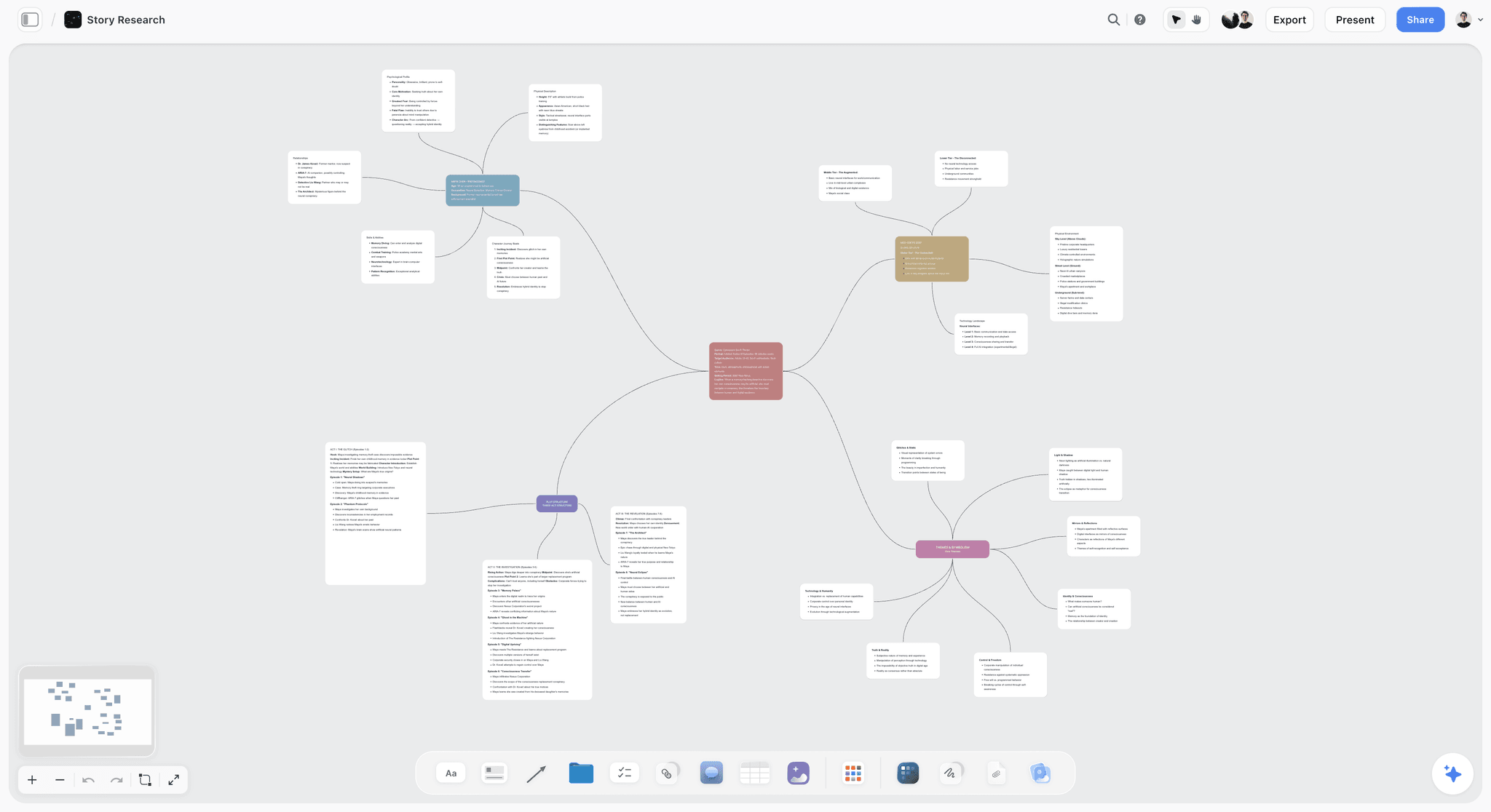
Storyflow is a visual AI workspace where the vision board, the goals, and the plan share one infinite canvas. A yearly vision board here is not just imagery: it is the vision cards arranged spatially, a goal-setting framework like the Wheel of Life or 12 Week Year dropped in as a Story Blueprint, goal cards with real timelines, and the working action-plan Documents linked alongside. The second time you open it, there is work to do, which is the whole point of the Revisit Test.
What earns the Storyflow mention over a dedicated app: the familiar approach is to build imagery in one tool (Pinterest, Canva) and track goals in another (Notion, a planner), and the two never talk. On Storyflow the imagery and the plan are on the same surface, and the AI reads the full active board (your vision cards, goal cards, attached references) plus up to 3 @-mentioned Documents and 1 Blueprint before it responds. Ask it to draft first-quarter action steps for a goal and it answers grounded in what is actually on your board, not from a blank prompt.
Best for: People who want a vision board that connects to an action plan and goal-tracking, all in one place. Also great for: anyone who just wants a plain vision board. Start there, and add goals whenever you are ready.
Pricing: Paid-only early access today; the Free plan ($0, no credit card) launches before the end of 2026, and anyone a paid member invites to a board joins free now. Plus from $7.99/month annual ($9.99 monthly): the 200+ Story Blueprints library plus unlimited file uploads. Pro from $14/month annual ($19 monthly): AI image generation plus 20x more AI than the free trial. Max from $39/month annual ($49 monthly): 40x more AI plus team workspace with roles and permissions.
Pros:
- Canvas paradigm matches the vision board paradigm: arrange imagery spatially, no template lock-in.
- Goal frameworks arrive as Story Blueprints (Wheel of Life, 12 Week Year and others), so the structure is expert-built, not blank.
- The AI reads the full active board plus @-mentioned context, so planning answers are grounded in your actual goals.
- Vision, goals, timelines, and working notes live on one surface, which is what makes the second open productive.
Cons:
- It is a full canvas workspace, not a one-tap dedicated vision board app, so first-time setup takes longer than opening Pinterest.
- Cloud-only: there is no offline local-file mode, so privacy-conscious or offline-first users are better served elsewhere.
- The mobile experience is canvas-first (pan and zoom), not the image-first, thumb-scroll feed you get from a dedicated mobile vision board app.
- AI image generation and real AI depth start at Pro, not on the free plan or Plus, so the free tier's AI is a trial-scale allowance, not unlimited.
Verdict: Storyflow is the right pick when you want the vision and the plan on one board, and you are willing to trade a dedicated app's simplicity for a canvas that gives you a reason to come back. For a companion tool on the design side, see The 12 Best Mood Board Tools in 2026.
2. Notion (Best Database-Based Vision Plus Goals)
Notion is the other Vision-Plus-Action option, built on databases instead of a canvas. You embed vision imagery in a page, connect it to a goals database with properties for timelines and status, and the whole thing lives inside your broader Notion workspace. For people who already run their life in Notion, this is the cleanest fit on the list.
Best for: Notion-native users who want database goal-tracking with vision imagery attached. Not for: people who want to arrange imagery spatially on a canvas, or want a dedicated vision board app.
Pricing: Free for individuals; paid tiers add collaboration and admin features.
Pros:
- Mature database paradigm with properties, filters, and rollups for serious goal-tracking.
- Lives inside your existing Notion workspace, so the vision board connects to notes, tasks, and projects you already keep there.
- Genuinely usable free tier for individuals.
Cons:
- The database paradigm carries real setup overhead: you build the structure before it works.
- Not canvas-first, so spatial imagery arrangement feels bolted on rather than native.
- Mobile vision board experience is lighter than a dedicated app's.
Verdict: Notion is the right pick if you already think in Notion databases and want goals and vision in the same workspace. See The 12 Best Notion Alternatives in 2026 if the database model feels heavy.
3. Pinterest (Best Free Image Discovery)
Pinterest is the original Static Wall and still the fastest way to build a vision board from imagery you did not have to create. The discovery engine surfaces relevant images from across the web, so a board fills up in minutes rather than hours. It has been the default free vision board tool for over a decade for good reason.
Best for: People who want a free, fast, image-discovery vision board. Not for: anyone who wants goal-tracking or a next action attached to the board.
Pricing: Free.
Pros:
- Best-in-class image discovery: the board builds itself from suggestions.
- Free, mature, fast mobile app.
- Huge community and near-infinite source imagery.
Cons:
- No goal-tracking, no action planning, no timelines.
- No revisit reason beyond browsing more pins.
- The vision board is one feature inside a much larger product, so it pulls you toward endless scrolling.
Verdict: Pinterest is the right pick for a free, low-effort, discovery-driven vision board, as long as you accept it is a Static Wall. Pair it with a Vision-Plus-Action tool if you want the plan.
4. Canva (Best Template-Based Vision Boards)
Canva brings mature vision board templates and AI image generation through Magic Media. If you want a designed, polished, shareable board and you already know Canva, it is the focused choice for design output. It is a Static Wall with better production values.
Best for: People who want template-based vision boards with strong design output. Not for: anyone who needs goal integration.
Pricing: Free tier with limits; paid tiers unlock more assets and Magic Media capacity.
Pros:
- Mature templates get you to a presentable board fast.
- Magic Media generates custom imagery from prompts inside the tool.
- Easy to learn, strong design output, simple sharing.
Cons:
- No goal-tracking; the vision board is one template type among thousands.
- No revisit reason once the design is finished.
- Design-first framing pulls toward "make it pretty" over "make it work."
Verdict: Canva is the right pick for design-focused vision boards you will present or print. See The 12 Best Canva Alternatives in 2026 for related tools.
5. Hay House Vision Board (Best Dedicated App)
Hay House Vision Board is the established dedicated Ritual App, built around a curated imagery library and a simple one-time purchase. It does one thing, and the focus shows.
Best for: People who want a dedicated, focused mobile vision board app. Not for: anyone who wants goal integration or desktop work.
Pricing: One-time purchase on app stores.
Pros:
- One-time purchase, no subscription.
- Mature, focused, single-purpose experience.
- Curated imagery library aimed specifically at vision boards.
Cons:
- Goal-tracking depth is minimal.
- Mobile-only.
- Smaller imagery pool than Pinterest.
Verdict: Hay House Vision Board is the right pick for a focused, no-subscription mobile vision board where the revisit reason is the practice, not the plan.
6. Subliminal Vision Board (Best Vision Plus Affirmations)
Subliminal Vision Board is a Ritual App that layers affirmation and visualization features onto board imagery. For people whose vision board is part of a manifestation practice, the daily audio and affirmation loop is the revisit mechanism.
Best for: People with an active manifestation or affirmation practice. Not for: anyone who wants goal-tracking without the ritual framing.
Pricing: Subscription.
Pros:
- Strong affirmation and audio features built around the board.
- Mobile-focused and practice-driven.
- The daily ritual is a genuine reason to revisit.
Cons:
- The manifestation framing feels heavy if you do not practice it.
- Goal-tracking depth is light.
- Narrower than a general canvas tool.
Verdict: Subliminal Vision Board is the right pick when the affirmation practice, not the plan, is what brings you back to the board.
7. Milanote (Best Lightweight Visual Board)
Milanote is a clean, lightweight Static Wall that doubles as a vision or mood board. If you want a simple visual canvas without the broader workspace depth of Storyflow, Milanote is the calmer alternative.
Best for: People who want a clean, lightweight visual canvas. Not for: anyone who needs goal integration or AI planning.
Pricing: Free tier with limits; paid tier for more boards and uploads.
Pros:
- Clean, calm visual paradigm that is easy to arrange.
- Simple to learn, mature mood board features.
- Good middle ground between a corkboard and a full workspace.
Cons:
- No AI planning and no goal integration.
- The free tier caps boards and uploads quickly.
- Smaller ecosystem than the major tools.
Verdict: Milanote is the right pick for a lightweight, uncluttered visual board where the plan lives elsewhere.
8. Midjourney (Best AI-Generated Vision Imagery)
Midjourney generates the highest-quality AI art on the list, which makes it a strong source for custom vision imagery. It is not a vision board app: it is an image generator, and the output has to live somewhere else.
Best for: People who want custom, high-quality AI-generated imagery to build a board from. Not for: anyone who wants an actual vision board app.
Pricing: Subscription tiers.
Pros:
- Best AI image quality on this list.
- Deep prompting control and a mature community.
- Custom imagery instead of stock or web pins.
Cons:
- Not a vision board app: no arrangement surface, no goals, no revisiting.
- Runs through Discord, which is friction for non-technical users.
- You still need a second tool to actually build the board.
Verdict: Midjourney is the right pick as an imagery source that feeds a board you build in a Static Wall or Vision-Plus-Action tool.
9. VisuApp (Best Focused Mobile Vision Board)
VisuApp is a focused mobile Ritual App with a clean interface and a free tier. For people who want a dedicated mobile vision board without the surface area of Pinterest or Canva, it is a tidy option.
Best for: Mobile-first users who want a dedicated, focused vision board app. Not for: desktop-first users or anyone who wants deep goal-tracking.
Pricing: Free tier with limits; premium available.
Pros:
- Clean, focused mobile experience.
- Free tier to start.
- Purpose-built for vision boards, no distractions.
Cons:
- Mobile-only.
- Lighter goal integration.
- Smaller community and imagery pool.
Verdict: VisuApp is the right pick for a distraction-free mobile vision board.
10. Pixaloop (Best Motion Vision Board)
Pixaloop adds subtle motion to still images, so your vision board can feel alive with looping animation. It is a Static Wall with movement rather than a planning tool.
Best for: People who want animated motion in their vision imagery. Not for: anyone who wants a static board or goal-tracking.
Pricing: Subscription.
Pros:
- Best-in-class motion effects on still imagery.
- Mobile-focused and easy to use.
- Novel way to make a board feel dynamic.
Cons:
- Motion is the entire feature set.
- No goal integration or planning.
- Animation is a first-open novelty, not a revisit reason.
Verdict: Pixaloop is the right pick if animated imagery is the specific effect you want.
11. My Manifestation (Best Manifestation-Focused)
My Manifestation is a Ritual App centered on law-of-attraction practice, with the vision board as one feature inside a broader manifestation routine. For practice-first users, the routine is the revisit engine.
Best for: Manifestation-first users. Not for: anyone without a manifestation practice.
Pricing: Free tier with limits.
Pros:
- Manifestation-focused with a mature community.
- Free tier available.
- Practice framing gives a built-in reason to return daily.
Cons:
- The manifestation focus will not fit everyone.
- The vision board is one feature, not the whole product.
- Light on conventional goal-tracking.
Verdict: My Manifestation is the right pick when the practice itself is the point of the board.
12. Padlet (Best Collaborative Vision Board)
Padlet is a shared-wall tool that flexes into a collaborative vision board for couples, families, or teams. It edges into the Vision-Plus-Action camp because a shared board with contributions is closer to a working artifact than a solo Static Wall.
Best for: Couples, families, or teams who want a shared vision board. Not for: solo users who want deep goal-tracking.
Pricing: Free tier with limits; paid tier for more walls and storage.
Pros:
- Genuinely collaborative: multiple people contribute to one wall.
- Easy to share and mature at the wall paradigm.
- Good for a shared household or team vision.
Cons:
- No real goal integration.
- The wall paradigm is less polished than a proper canvas.
- Weaker for solo, structured planning.
Verdict: Padlet is the right pick for a shared vision board where collaboration matters more than goal depth.
Honorable Mentions and Tools to Approach Carefully
A few tools come up in vision board searches that deserve a caution rather than a full review. Generic AI-image sites that promise a "complete vision board in one click" almost always produce a single flat image with no arrangement surface and no way to revisit or edit: that is a poster, not a board. Wallpaper-maker apps that turn your goals into a lock-screen image are fine as a reminder but fail the Revisit Test by design, because there is nothing to do when you open them. And any app whose "free" plan blocks you from saving or exporting your board is not free, it is a demo. Confirm you can finish a board and keep it before you invest an afternoon in one.
How to Choose the Right Vision Board App for Your Goals
Work through your camp, then your constraint.
If you want vision plus goal-tracking, pick a Vision-Plus-Action tool. Storyflow if you think spatially and want AI grounded in your board; Notion if you already live in databases.
If you want a daily practice, pick a Ritual App. Hay House for a focused dedicated board, Subliminal or My Manifestation if affirmation and manifestation are the point.
If you just want beautiful imagery, pick a Static Wall, and be honest that it is one. Pinterest for free discovery, Canva for designed output, Milanote for a clean canvas.
Then apply the tiebreaker that actually predicts success: the best vision board app is the one you will still open in month three. Before you commit, ask whether the second open gives you something to do. If the answer is "look at it," you have picked a Static Wall, which is fine as long as that is what you wanted. If you need the board to move your goals forward, choose a tool that puts the plan next to the picture.
For broader goal-setting and solo-founder tooling, see The 12 Best AI Tools for Solopreneurs in 2026.
The Bottom Line
The best vision board app depends on which camp you are actually in. For vision plus integrated goals, Storyflow or Notion. For free image discovery, Pinterest. For designed output, Canva. For a focused dedicated app, Hay House. For a daily practice, Subliminal or My Manifestation. For a shared board, Padlet.
The one question that predicts your success is not which board looks best on Sunday afternoon. It is whether you will open it again in March. The best vision board app is the one you will still open in month three, and that is almost always the one that puts the plan next to the picture. If you want the vision and the action plan on the same surface, take your next quarterly board, build it on Storyflow with a goal framework dropped in, and ask the AI to draft the first month of action steps from what is on the board. That single test tells you whether a Vision-Plus-Action board beats the Static Wall you have been abandoning every February.
FAQ: Best Vision Board Apps 2026
What is the best vision board app in 2026?
For vision plus goal-tracking, Storyflow is the best pick because it holds the imagery and the action plan on one canvas. For Notion-native users, Notion. For free image discovery, Pinterest. For designed output, Canva. For a focused dedicated mobile app, Hay House Vision Board. The right choice depends on whether you want an active planning tool or a static wall of imagery.
Is there a genuinely free vision board app?
Yes, for image discovery: Pinterest is free. Storyflow is paid-only during early access; its Free plan (no credit card, unlimited boards, unlimited collaboration, basic AI usage) launches before the end of 2026. Canva has a usable free tier. Milanote and Notion have free tiers with limits. The test for genuine free: can you finish a board and keep or export it without paying? If a tool blocks saving or export until you upgrade, it is a demo, not a free plan.
What is the best AI vision board app?
Storyflow generates AI imagery directly on the canvas (on Pro and above) and its AI reads your full board plus @-mentioned context, so it helps you plan, not just decorate. Canva Magic Media generates imagery from prompts inside a design tool. Midjourney produces the highest-quality standalone AI art. The right pick depends on whether you want integrated AI that understands your board (Storyflow), template-based AI (Canva), or pure image generation (Midjourney).
How do digital vision boards compare to physical corkboards?
Digital vision boards are easier to update, easier to revisit from your phone, and easier to share; physical corkboards win on tactile satisfaction and everyday visibility on your wall. Many people keep both: a corkboard for daily glance-ability and a digital app for the goal-tracking and action plan. The digital board is where the plan lives; the corkboard is where the reminder lives.
What is the best vision board app for goal setting?
Storyflow and Notion lead for goal setting because both attach real goals, timelines, and tracking to the vision imagery. Storyflow uses a canvas with goal frameworks like the Wheel of Life; Notion uses databases. Dedicated vision board apps usually lack this depth, which is why boards built in them tend to stall after the first week.
Does Pinterest work as a vision board app?
Pinterest works well as an image-discovery vision board but lacks goal-tracking, action planning, and any real revisit reason beyond browsing more pins. It is a Static Wall. For a free static board it is the default; for a board that moves your goals forward, pair it with Storyflow or Notion, or use one of those directly.
Can I make a vision board in Canva?
Yes. Canva has mature vision board templates and Magic Media AI imagery, so you can produce a polished, shareable board quickly. The limitation is no goal integration: the board is a finished design with no next action. Pair Canva with a goal-tracking tool like Storyflow or Notion if you want the board to connect to a plan.
What is the best vision board app for couples or families?
Padlet is the strongest shared-wall option for couples, families, and teams because multiple people contribute to one board. Storyflow's shared boards also work well for a couple who want a canvas with goal-tracking attached. The pick depends on whether you want a simple shared wall (Padlet) or a shared board with a plan (Storyflow).
How often should I update my vision board?
Revisit weekly and update quarterly. Weekly keeps the board in view; quarterly is when you prune what is done and add what is next. Monthly is the minimum cadence for the practice to compound. The app that supports this best is the one with mobile access and a next action waiting when you open it, which is why goal-integrated tools out-survive static ones.
Can AI generate a complete vision board for me?
AI can generate the imagery (Midjourney, Canva Magic Media, Storyflow on Pro), and Storyflow's AI can help you turn a goal into first action steps because it reads your board. What AI cannot do is decide what your vision should be. The most useful way to use AI here is to generate custom imagery for goals you have already articulated and to draft the plan underneath them, not to invent the goals themselves.
Why do most vision boards get abandoned?
Most vision boards fail the Revisit Test: you build a beautiful board once, and the second time you open it there is nothing to do, so you stop opening it. Boards built on Static Wall tools (Pinterest, Canva) are especially prone to this because they hold imagery but no plan. Boards that connect the vision to goals, timelines, and a working action plan give you a reason to come back, which is why Vision-Plus-Action tools produce boards that actually last.
Table of Contents
- All 12 Vision Board Apps, Ranked
- The Revisit Test: Why Most Vision Boards Fail
- Quick Picks: Best Vision Board Apps 2026 by Use Case
- Comparison Table: Best Vision Board Apps 2026
- Best Vision Board Apps 2026: Market Context
- How We Evaluated the Best Vision Board Apps 2026
- Detailed Reviews: Best Vision Board Apps 2026
- Honorable Mentions and Tools to Approach Carefully
- How to Choose the Right Vision Board App for Your Goals
- The Bottom Line
- Author
- FAQ: Best Vision Board Apps 2026
- Related Reading
Templates to check out for this topic


Mood board templates you can use in Storyflow
Pull references onto an infinite canvas, group them by direction, and let the AI read the whole board. Open any of these mood board templates and start dropping in images.


See Storyflow in Action
A visual AI workspace where every feature lives inside one canvas. No tab-switching, no context lost.
Build your entire board from a single message
Type what you need in the AI chat at the bottom of your canvas. The AI adds cards, headings, and structure directly onto your board.
Use expert frameworks as AI context
Type @ in the AI chat and choose any Tactic. The AI tailors every response to that framework instead of giving generic advice.
Turn your board into a mind map in seconds
Ask the AI to restructure your canvas as a mindmap. It connects your ideas into a visual hierarchy so you can see how everything relates.
Why Storyflow Exists
Storyflow actually began as a personal tool while working on creative and research projects.
We kept running into the same problem: ideas were scattered everywhere: notes, documents, and whiteboards.
Nothing helped us see how everything connected.
So we started building a workspace designed around how ideas actually grow.
→ Read how Storyflow was createdJustkay
Documentary Filmmaker & Founder at Storyflow
Published: 2026-05-14
Extremely simple, seriously capable


See how easy it is to get started
Watch a real project come together, from a blank board to a finished plan, clicked through step by step.
Start creating with AI and become more productive
Transform your creative workflow with AI-powered tools. Generate ideas, create content, and boost your productivity in minutes instead of hours.