
Category
Writing Tools
Author

Justkay
Documentary Filmmaker & Founder at Storyflow
Topics
2026-05-19
•
Updated May 19, 2026
•
15 min read
•
Writing Tools- best Jenni AI alternatives 2026
- Jenni AI alternatives
- Jenni AI competitors
- AI academic writing tools
- Paperpal
- AI essay writing assistant
What is the best Jenni AI alternative in 2026?
The best Jenni AI alternative in 2026 is Paperpal for pure academic writing, because it pairs autocomplete and citations with a sentence-level AI detector that flags which lines a checker like Turnitin will catch. The strongest workspace alternative is Storyflow, where the research, outline, sources, and draft live on one AI-aware canvas, so the writing is structured before a single paragraph is drafted. Most students and researchers use two tools: one to structure, one to draft.

All 12 Jenni AI Alternatives, Ranked
- Paperpal: best for academic writing with safe AI detection
- Storyflow: best for structuring research, outline, and draft on one canvas
- Claude: best for nuanced long-form drafting
- Grammarly: best for grammar, clarity, and final polish
- ChatGPT: best for flexible drafting and research help
- QuillBot: best for paraphrasing and rewriting
- Writefull: best for academic language correction for researchers
- Yomu AI: best for an all-in-one academic editor for students
- Sudowrite: best for fiction and novel drafting
- Notion AI: best for AI inside an existing notes-and-docs workspace
- Scrivener: best for long manuscript organization with no AI
- Textero: best for quick AI essay drafting
Full disclosure: Storyflow is our own product, and we rank it #2 here, behind Paperpal. For pure academic writing with sentence-level AI detection Paperpal is stronger, and for raw drafting quality Claude is stronger. Storyflow has no built-in citation manager and is not a sentence-by-sentence autocomplete tool, so if your only job is finishing the next line inside a document, Paperpal or Claude is the closer swap. Where Storyflow wins is structure: the research, sources, and outline on one AI-aware canvas before you draft. We link to every tool so you can judge the fit.
Quick Comparison: Best Jenni AI Alternatives
These four cover the jobs writers leave Jenni AI for: safe academic detection, structure before drafting, raw drafting quality, and final polish.
| Tool | Best For | AI Features | Price |
|---|---|---|---|
| Paperpal | Academic writing with safe AI detection | Sentence-level AI detector + academic autocomplete | Free / $25 mo |
| Storyflow | Structuring research, outline, and draft on one canvas | Reads full board + @-docs and Tactics | $7.99 mo annual (free plan late 2026) |
| Claude | Nuanced long-form drafting | Long-context chat drafting | Free / $20 mo |
| Grammarly | Grammar, clarity, and final polish | Grammar and clarity AI + separate detector | Free / $12 mo |
1) Quick Answer: The Best Jenni AI Alternatives in 2026
The best Jenni AI alternative in 2026 is Paperpal for pure academic writing, because it pairs autocomplete and citations with a sentence-level AI detector that flags exactly which lines a tool like Turnitin will catch. The strongest workspace alternative is Storyflow, where the research, outline, sources, and draft live on one AI-aware canvas, so the writing is structured before a single paragraph is drafted. Other strong picks: Claude for nuanced long-form drafting, Grammarly for polish, and QuillBot for paraphrasing.
The short version: Jenni AI autocompletes sentences inside an essay editor. If you want a better essay editor with safer AI detection, Paperpal. If your problem is structure (a draft with no spine, sources scattered across tabs), Storyflow. If you want the best raw writing, Claude. Most students and researchers in 2026 use two tools: one to structure, one to draft.
For deeper context, see The 12 Best AI Writing Tools for Creators in 2026 and The 12 Best AI Tools for Students in 2026.
2) Comparison Table: 12 Jenni AI Alternatives Compared
Rating criteria: Tested on real essays, research papers, and long-form drafts between 2024 and 2026. Pricing is as of May 2026; verify current pricing on each tool's site before subscribing.
3) Why People Look for a Jenni AI Alternative
Jenni AI is a genuinely good tool. It is trusted by over 2 million academics and universities, and its autocomplete inside an essay editor is fast and fluent. Millions of students use it to get unstuck on a paragraph. For the narrow job of finishing a sentence, nothing about Jenni is broken.
But some writing problems are not sentence problems.
Three reasons push people to look for an alternative.
Reason 1: AI detection got serious, and autocomplete is exposed. Turnitin reported that between October 2025 and February 2026, an average of 14.8% of English-language submissions had 80% or more AI-generated writing, up from roughly 3% when the detector launched in April 2023. Across US universities in 2026, an AI score of 80 to 100% very likely triggers formal misconduct proceedings. A tool that autocompletes whole sentences with no warning about detection is a tool that can quietly walk a student into trouble. A Jenni-style autocomplete does not tell you when it has written the paragraph that gets you flagged.
Reason 2: Autocomplete fixes the sentence, not the structure. Most weak essays do not fail at the sentence level. They fail because the argument has no spine, the sources were never organized, and the outline was three bullet points typed at midnight. Finishing each sentence faster does not fix a draft that was structurally wrong before the first sentence. The fluent paragraph on a broken outline is still a broken paper.
Reason 3: The research lives somewhere else. A real piece of academic writing has a research phase: PDFs, quotes, notes, an argument taking shape. In a Jenni-style editor, that phase happens in other tabs. The sources sit in a folder, the notes sit in a doc, the outline sits in your head. The editor only sees the paragraph in front of it. The AI cannot help with structure it never sees.
The familiar approach is to open an essay editor, type a heading, and let autocomplete carry you sentence by sentence. It works until the draft needs an argument, until the sources need to be organized, until a detector reads the result. The structured approach is to build the research, the sources, and the outline first, then draft on top of a spine that already holds. That is the difference between the tools below: some make the sentence faster, and some make the writing structured before you draft.
4) How We Evaluated These Tools
Every tool here was tested on real writing between 2024 and 2026: undergraduate essays, a literature review, long-form blog drafts, a documentary treatment, and a book chapter. No synthetic prompts. Six criteria, weighted in this order:
- Drafting quality. Does the AI produce text that needs light editing, or text that needs a full rewrite? Fluent but generic still counts as a fail.
- Structure support. Does the tool help organize research and build an outline, or does it only operate on the paragraph in front of it?
- Citation handling. Can it generate and format citations (APA, MLA, Chicago), and how reliable are the references it produces?
- AI-detection awareness. Does the tool help you understand and manage detection risk, or does it leave you exposed to Turnitin with no warning?
- Workflow fit. Does the tool fit how the writing actually happens (research, then structure, then draft, then polish), or does it force everything through one editor box?
- Pricing transparency. What does the tool cost at the tier a real student or writer would actually use, billed monthly and annually?
The taxonomy that organizes this whole list is what we call the Writing Stack: research, structure, draft, polish. Every weak writing process has a weak layer. Jenni AI is strong at draft and thin everywhere else. The best alternative for you depends on which layer of your Writing Stack is actually failing.
5) Quick Picks by Writing Job
If you want the short list, organize by the layer of the Writing Stack you need help with.
Best for academic writing with detection safety: Paperpal. Autocomplete plus a sentence-level AI detector that flags AI-written lines with 99% claimed accuracy before Turnitin sees them.
Best for structure (research, sources, outline before drafting): Storyflow. The research, the sources, and the outline live on one AI-aware canvas, so the draft is built on a spine that already holds.
Best for nuanced long-form drafting: Claude. The strongest raw writing of any tool here, especially for arguments that need careful reasoning.
Best for final polish: Grammarly. Grammar, clarity, and tone correction across everything you write, with a free tier that is genuinely usable.
Best for paraphrasing and rewriting: QuillBot. The most mature paraphraser, useful for tightening clunky sentences and varying phrasing.
Best for researchers writing in English: Writefull. Academic language correction trained on peer-reviewed papers, with a built-in GPT detector.
Best for fiction and novels: Sudowrite. Built for story drafting, not essays, with story-aware AI tools authors actually use.
Best free option: Claude, ChatGPT, QuillBot, and Grammarly all have usable free tiers today. Storyflow is paid-only during early access, from $7.99/mo annual, with its Free plan for the structure layer launching before the end of 2026.
6) Detailed Reviews: 12 Jenni AI Alternatives in 2026
1. Storyflow
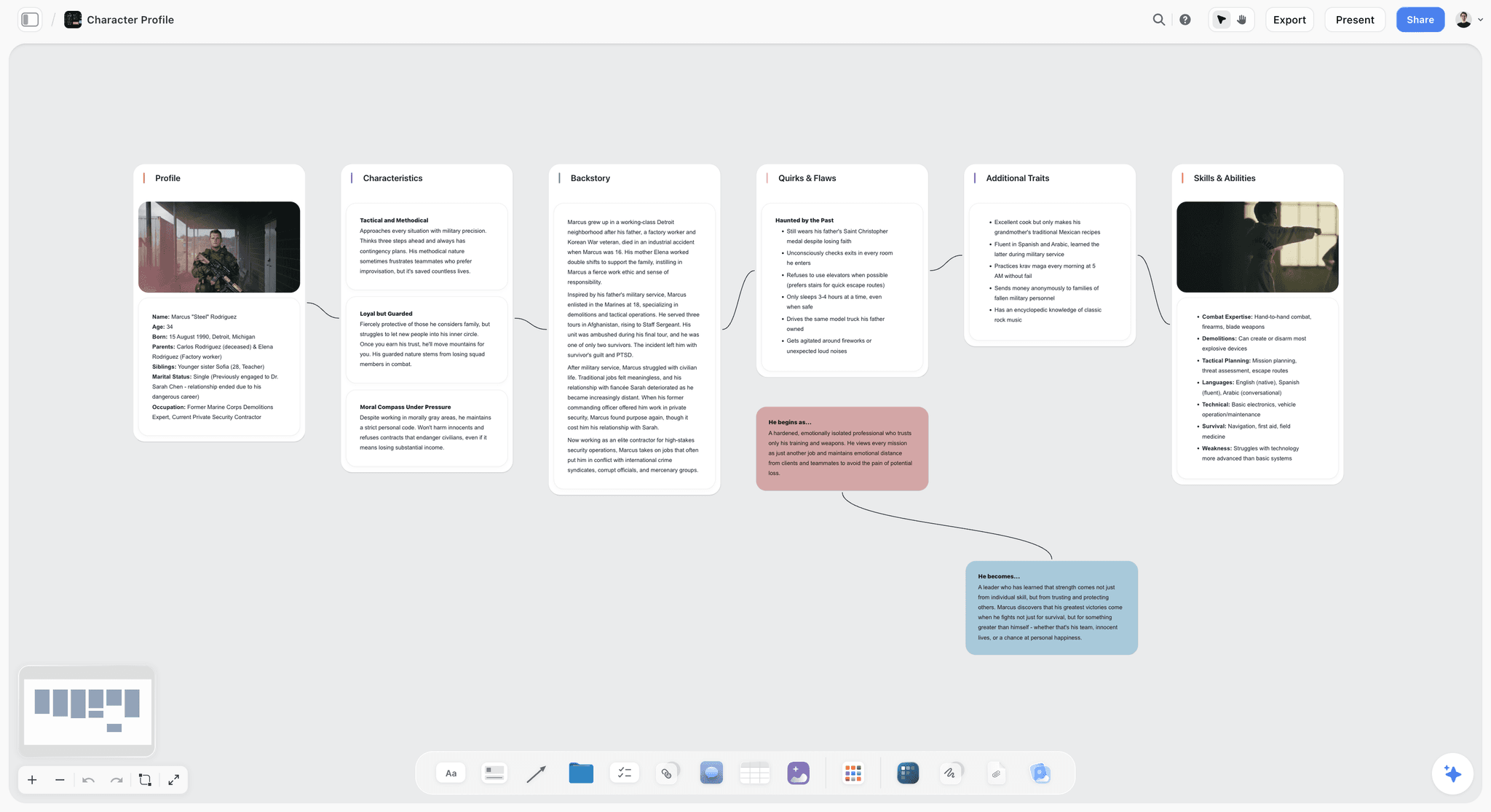
Storyflow is not an essay editor. It is the writing workspace where the research, the outline, the sources, and the draft live on one infinite canvas, and the AI reads all of it. Jenni AI autocompletes a sentence inside a document. Storyflow structures the writing before the document exists.
This is the difference that decides whether the draft holds. Jenni AI makes the sentence faster. Storyflow makes the writing structured before you draft a single paragraph. A fluent paragraph on a broken outline is still a broken paper, and autocomplete cannot fix a spine it never saw.
Best for: Students, researchers, writers, and content creators whose real problem is structure: scattered sources, a thin outline, an argument with no spine.
Verdict: The strongest alternative when the failing layer of your Writing Stack is structure, not sentences. For pure sentence-by-sentence autocomplete, Paperpal or Claude is the closer like-for-like swap.
Key features
- One canvas for the whole Writing Stack. Research notes, source cards, quotes, images, the outline, and the draft all live on one infinite canvas instead of scattered across tabs, folders, and documents.
- AI that reads the full board. Storyflow's AI reads your entire active canvas by default, plus up to 1 Tactic and up to 3 Documents you @-mention in the chat. It can see the sources and the outline, not just the paragraph in front of it, so it helps with structure, not only with finishing a line.
- 200+ Story Blueprints. The Story Blueprints library is a set of 200+ expert framework templates that give a draft a spine before you write. Free includes basic AI; the 200+ Story Blueprints library starts on the Plus plan.
- Visual structure, then draft. Build the argument as connected cards, see the gaps, then write into a structure that already holds. The outline is spatial, not three bullets in your head.
Pricing
Free: launching before the end of 2026; invited collaborators of paid members join free today. Unlimited notes, images, and links, unlimited shared boards, basic AI, 20 file uploads, and unlimited collaboration. The free plan does not include the 200+ Story Blueprints library. Plus: $7.99/month annual or $9.99/month monthly (200+ Story Blueprints, unlimited uploads). Pro: $14/month annual or $19/month monthly (adds AI image generation and 20x more AI than Plus). Max: $39/month annual or $49/month monthly (adds 40x more AI plus a team workspace with permissions and roles). Pricing is as of May 2026.
Pros
- The AI sees the research, the sources, and the outline, so it helps with the structural problem that autocomplete cannot touch.
- 200+ Story Blueprints give a draft a spine before the first sentence, which is where most weak essays actually break.
- The free plan is genuinely free forever, with unlimited boards and unlimited collaboration, so the structure layer costs nothing to test.
- Cheaper at the entry tier ($7.99/month annual) than Paperpal, Jenni Unlimited, or most academic editors.
Cons
- Storyflow does not have a built-in citation manager or in-line academic reference generator. For heavy citation formatting (APA, MLA, Chicago at scale), pair it with a dedicated reference tool like Paperpal or Zotero.
- It is not a sentence-by-sentence autocomplete tool. If your only need is finishing the next line inside a document, Paperpal or Claude is the closer swap.
- Cloud-only; there is no local-first, offline-first mode.
If your draft keeps collapsing because the structure was never built, take your next essay or paper and put the research, the sources, and the outline on a Storyflow canvas before you draft. Start a Storyflow workspace and structure the writing first.
2. Paperpal
Paperpal is the strongest pure-writing-assistant alternative to Jenni AI in 2026. It does what Jenni does (autocomplete, citations, an academic editor) and adds the one thing Jenni does not: a sentence-level AI detector that tells you which lines a checker will flag before you submit.
Best for: Students, researchers, and academics who want a Jenni-style editor with detection safety built in.
Verdict: The closest like-for-like Jenni replacement, and better at the part that matters most in 2026.
Key features
- Sentence-level AI detector. Paperpal categorizes each sentence as human-written, an AI-human blend, or AI-written, trained to identify text from ChatGPT, Claude, and Gemini with 99% claimed accuracy. The free detector allows 5 daily scans up to 1,200 words each.
- Academic autocomplete and rewrite. Real-time suggestions tuned for academic register, plus paraphrase and language-correction tools.
- Citations and plagiarism checking. Generate and format references, plus a plagiarism checker in paid tiers.
- Submission-readiness checks. Pre-submission language and consistency checks for journal and thesis work.
Pricing
Paperpal has a free plan with limited daily features. Paid pricing is $25/month, $55/quarter, or $139/year as of May 2026 (the annual plan is the value tier). Verify current pricing on Paperpal's site.
Pros
- The only tool here that flags AI-written sentences at the sentence level, which is the single most important feature for a student in 2026.
- Built specifically for academic register, so the autocomplete sounds like a paper, not a blog post.
- Citation and plagiarism tooling is mature and reliable.
Cons
- The monthly price ($25) is high; the annual plan is far better value.
- It is an editor, not a workspace. The research and structure layers still happen elsewhere.
- An AI detector is a guide, not a guarantee. No detector is perfect, and editing AI text to pass a checker is not the same as doing original work.
3. Claude (Anthropic)
Claude is the strongest raw writer of any tool on this list. Where Jenni autocompletes one fluent sentence at a time, Claude can draft a full section with an argument that actually holds together.
Best for: Long-form drafting, thesis chapters, essays with arguments that need careful reasoning rather than just fluent prose.
Verdict: The best pure-drafting alternative. Same caveat as any chat tool: it does not manage your sources or structure for you.
Key features
- Long context window, so it can hold a full chapter or a stack of notes you paste in.
- Projects feature for persistent context across writing sessions.
- Strong tone-matching when given examples of your own writing.
Pricing
Claude Pro: $20/month. Claude Max: from $100/month. Free tier with daily message limits. Pricing is as of May 2026.
Pros
- Frequently rated the best AI for real-world writing quality.
- Careful, calibrated prose that needs less rewriting than most tools.
- The free tier is usable for occasional drafting.
Cons
- It is a chat box. Your sources, outline, and research stay in other tabs unless you paste them in every time.
- No built-in citation generation or academic formatting.
- AI-written text from Claude is exactly what detectors are trained to catch; use it for drafting help, not for submitting unedited.
4. Grammarly
Grammarly is the polish layer of the Writing Stack. It does not draft or structure; it makes whatever you wrote cleaner, clearer, and correct.
Best for: Final polish on any kind of writing: grammar, clarity, tone, and word choice.
Verdict: Not a Jenni replacement for drafting, but the best tool for the polish layer that every writing process needs.
Key features
- Grammar, spelling, and punctuation correction everywhere you write.
- Clarity and conciseness suggestions.
- Tone detection and a generative AI assistant in paid tiers.
- A separate AI detection feature for checking your own writing.
Pricing
Free plan with core grammar checking. Grammarly Pro is $12/month billed annually ($144 upfront), $20/month quarterly, or $30/month monthly. Enterprise is custom-priced. Pricing is as of May 2026.
Pros
- The free tier is genuinely useful, not a crippled trial.
- Works across email, docs, and browsers, so polish happens everywhere.
- The clarity suggestions catch real problems, not just typos.
Cons
- It polishes; it does not draft or structure. It is a complement to the tools above, not a replacement.
- The generative AI is weaker than Claude or ChatGPT for actual drafting.
- Tone suggestions can flatten a distinctive voice if you accept them uncritically.
5. ChatGPT
ChatGPT is the flexible generalist. For writing, it does what Jenni does and more, but inside a chat window rather than a structured editor.
Best for: Drafting, brainstorming, research help, and reworking text when you want one tool that does a bit of everything.
Verdict: A capable Jenni alternative for drafting, with the same chat-window limitation: it forgets your structure between sessions.
Key features
- Strong drafting across essays, summaries, and outlines.
- Custom GPTs for repeated writing workflows.
- Web search and file upload for research-assisted drafting.
- Voice and multimodal input.
Pricing
ChatGPT Plus: $20/month. ChatGPT Pro: $200/month. Free tier with daily limits. Pricing is as of May 2026.
Pros
- The most flexible tool here; it handles drafting, research, and editing.
- The free tier is enough for occasional essay help.
- Custom GPTs let you build a repeatable writing assistant.
Cons
- It loses the thread on long writing projects; the structure does not persist the way it does on a canvas.
- No native citation formatting or academic-register tuning.
- ChatGPT output is the primary thing AI detectors are trained on, so unedited submission is high-risk.
6. QuillBot
QuillBot is the paraphrasing specialist. It does not draft from scratch; it rewrites and tightens text you already have.
Best for: Paraphrasing clunky sentences, varying phrasing, and tightening drafts.
Verdict: A strong tool for one layer of the Writing Stack (polish and rewrite), not a full Jenni replacement.
Key features
- Multiple paraphrasing modes (standard, fluency, formal, and more).
- Grammar checker, summarizer, and citation generator.
- A separate AI content detector.
- Browser extensions for rewriting anywhere.
Pricing
Free plan with usable paraphrasing and grammar checking. Premium is roughly $19.95/month, about $13.32/month quarterly, or about $8.33/month on the annual plan. Pricing is as of May 2026.
Pros
- The most mature paraphraser available, with genuinely useful modes.
- The free tier handles light rewriting well.
- The summarizer is handy for condensing sources during research.
Cons
- It rewrites; it does not draft or structure original work.
- Using a paraphraser to disguise AI text is an academic-integrity risk, not a fix.
- The citation generator is basic compared with Paperpal or Zotero.
7. Writefull
Writefull is an academic language tool built for researchers. Its AI is trained on peer-reviewed open-access papers, so its corrections are tuned for scientific writing specifically.
Best for: Researchers and graduate students writing scientific papers in English, especially non-native English speakers.
Verdict: A focused academic alternative to Jenni for the language layer, with a built-in GPT detector as a useful extra.
Key features
- Academic language correction trained on published research.
- An academizer and a sentence palette for academic phrasing.
- A built-in GPT detector for a preliminary AI check.
- Integrations with Word and Overleaf.
Pricing
Free plan with a daily quota of all features. Paid plans are roughly $7.21/month, $16.62/quarter, or $30.75/year as of May 2026. Verify current pricing on Writefull's site.
Pros
- The academic-paper training makes corrections genuinely discipline-appropriate.
- Strong for non-native English researchers who need register help.
- The Overleaf integration fits how scientists actually write.
Cons
- Narrow: it is built for scientific papers, not general essays or creative writing.
- It corrects more than it drafts; it is not a full Jenni-style autocomplete.
- The GPT detector is a preliminary check, not a substitute for a serious detector.
8. Yomu AI
Yomu AI is an all-in-one academic editor that bundles drafting, editing, citations, and formatting into one tool. It is the closest in shape to Jenni AI among the smaller tools.
Best for: Students who want one academic editor that drafts, cites, and formats without juggling tools.
Verdict: A solid Jenni-style alternative for students, with a cheaper entry point.
Key features
- AI drafting and autocomplete inside an academic editor.
- In-text citations and reference management.
- Document formatting and editing tools.
- Tiered access to different AI models.
Pricing
Free version with limited features. Starter is $9/month, Pro is $11/month, and Ultra is $18/month for unlimited use of the best models. Pricing is as of May 2026.
Pros
- An integrated editor that covers drafting, citations, and formatting in one place.
- Cheaper entry tier than Jenni Unlimited or Paperpal.
- The interface is simple and student-friendly.
Cons
- A smaller tool with a lighter feature set than Paperpal.
- No built-in AI detection, which matters in 2026.
- Like all autocomplete editors, it operates on the document, not on the research and structure behind it.
9. Sudowrite
Sudowrite is built for fiction, not essays. If your writing is a novel or a short story rather than a research paper, it is the alternative that actually fits the work.
Best for: Novelists, short-story writers, and fiction authors.
Verdict: The wrong tool for academic writing, the right tool for fiction. A Jenni alternative only if your writing is creative.
Key features
- Story-aware drafting tools (Write, Describe, Brainstorm, Rewrite).
- Story Bible for tracking characters, plot, and world.
- Canvas and Muse model tuned for prose fiction.
- Credit-based usage across all plans.
Pricing
Hobby and Student: $10/month annual or $19/month monthly (225,000 credits). Professional: $22/month annual or $29/month monthly (1,000,000 credits). Max: $44/month annual or $59/month monthly (2,000,000 rollover credits). Pricing is as of May 2026.
Pros
- Genuinely built for fiction; the tools understand story, not just sentences.
- The Story Bible keeps long manuscripts coherent.
- All plans get every feature; the tiers differ only on credits.
Cons
- Useless for academic writing; it has no citation or research tooling.
- Credit-based pricing can run out faster than expected on heavy drafting.
- For pure structure work, a canvas tool still beats it.
10. Notion AI
Notion AI is the AI inside Notion's docs and databases. If your notes and research already live in Notion, the AI is right there with them.
Best for: Writers whose research, notes, and drafts already live in a Notion workspace.
Verdict: A reasonable alternative if you are already a Notion user; not worth switching to Notion just for the AI.
Key features
- AI writing and editing inside Notion pages.
- AI search across your connected workspace.
- AI meeting notes and a Notion Agent in higher tiers.
- Templates for outlines and research docs.
Pricing
Free plan with limited AI. The full 2026 AI suite is bundled into Business at $20/user/month ($24 monthly) and Enterprise. The standalone $10 AI add-on was retired. Pricing is as of May 2026.
Pros
- The best AI writing experience for people already deep in Notion.
- The AI can read across your connected docs, not just one page.
- The doc-and-database structure suits some research workflows.
Cons
- It is doc-shaped, not canvas-shaped, so visual structuring of an argument is awkward.
- No academic citation tooling or AI detection.
- The full AI now requires the $20/user Business tier, which is a steep jump.
11. Scrivener
Scrivener is the long-manuscript organizer that writers have used for two decades. It has no AI at all, which in 2026 is either a flaw or the entire point.
Best for: Novelists, thesis writers, and anyone organizing a long manuscript who wants no AI in the loop.
Verdict: Not an AI alternative to Jenni; an alternative for writers who want structure tooling without any AI involved.
Key features
- The Binder for organizing chapters, scenes, and research in one project.
- Corkboard and outliner views for structuring a long manuscript.
- A research folder that holds PDFs, images, and notes inside the project.
- Compile tools for exporting to manuscript formats.
Pricing
A one-time purchase: $59.99 for macOS or Windows, $50.99 with an educational license, $95.98 for the bundle, and $23.99 for the iOS app. No subscription. Pricing is as of May 2026.
Pros
- A one-time price with no subscription, which is rare in 2026.
- The Binder and Corkboard are excellent for organizing long manuscripts.
- No AI means no AI-detection risk and no integrity questions.
Cons
- No AI assistance at all, so drafting help is entirely on you.
- The interface is dense and has a real learning curve.
- It organizes; it does not help generate or structure ideas the way an AI canvas does.
12. Textero
Textero is a lightweight AI essay writer aimed at students who want a quick draft fast. It is the most basic tool on this list.
Best for: Students who want a fast first draft and a generous free tier.
Verdict: A budget Jenni alternative for quick drafting, but the lightest tool here and the one to use with the most caution.
Key features
- AI essay generation and drafting.
- Research and citation assistance.
- A free tier with a daily word allowance.
Pricing
Free tier with 550 AI words per day and 2-page essays. Paid tiers exist; verify current pricing on Textero's site as it was not clearly published as of May 2026.
Pros
- A genuinely generous free tier for quick drafting.
- Simple and fast for getting an initial draft down.
- Low barrier to entry for students on a tight budget.
Cons
- The lightest feature set of any tool here.
- No AI detection and no structure tooling, so it leaves a student exposed on both fronts.
- A tool that generates whole essays on demand is the highest academic-integrity risk on this list. Use it for ideas, not for submission.
7) Writer-Type Recommendations
13. Undergraduate Student Writing Essays
Top picks: Storyflow + Paperpal
Storyflow to put the research and outline on a canvas so the essay has a spine. Paperpal to draft inside an academic editor and run the sentence-level AI detector before submitting. This pair covers structure and detection, the two things that actually decide an essay's grade.
14. Graduate Student / Thesis Writer
Top picks: Storyflow + Writefull
Storyflow for the chapter-level structure and the research canvas where sources and arguments connect. Writefull for academic language correction tuned to published research. Add a reference manager for citations.
15. PhD Researcher Writing Papers
Top picks: Paperpal + Writefull
Paperpal for the academic editor, plagiarism checking, and submission-readiness. Writefull for discipline-specific language correction. Both are built for the scientific-paper register Jenni handles only generically.
16. Non-Native English Academic Writer
Top picks: Writefull + Grammarly
Writefull for academic register trained on real papers. Grammarly for everyday clarity and grammar across all your writing. This pair fixes the language layer without flattening your argument.
17. Content Writer / Blogger
Top picks: Storyflow + Claude
Storyflow for the content structure, research, and outline on one canvas. Claude for the actual drafting. Polish with Grammarly. This is the strongest non-academic writing stack here.
18. Novelist / Fiction Writer
Top picks: Sudowrite + Scrivener
Sudowrite for story-aware AI drafting. Scrivener for organizing the manuscript. Storyflow works well for the worldbuilding and structure phase before drafting begins.
19. Student on a Strict Budget
Top picks: Storyflow Plus + QuillBot Free
Storyflow Plus ($7.99/mo annual) for the structure layer. QuillBot's free tier for paraphrasing and tightening. The lowest-cost pair that covers structure and polish.
20. Writer Who Wants No AI Involved
Top picks: Scrivener + Grammarly Free
Scrivener for manuscript organization with zero AI. Grammarly's free tier for grammar only. The integrity-safe option when AI in the draft is a line you do not want to cross.
8) Honorable Mentions
A few tools that came close but did not make the main twelve:
- Wordtune: Strong rewriting and tone tool, narrower than QuillBot for academic use.
- SciSpace: Good for literature search and understanding papers, lighter as a writing editor.
- Zotero: The reference manager to pair with any tool here; it does citations, not drafting.
- Mapify: Turns papers and videos into mind maps, useful for the understanding stage before writing.
- Gemini: Google's AI is a capable drafting alternative; it sits close to ChatGPT in this list.
- PaperGen: A budget AI essay and research-paper assistant; carries the same integrity caution as Textero.
These are not weak tools. Their use case is narrower than the main list, or they cover one layer of the Writing Stack rather than the whole job.
9) Where AI Writing Tools Still Fall Short
Honest accounting matters. There are parts of writing where AI is still bad, and pretending otherwise wastes your time and risks your degree.
- Original argument. AI can draft a paragraph that sounds like an argument. It cannot decide what you actually think. The thesis is yours; the AI only helps you express it.
- Reading the sources. AI can summarize a PDF, but a summary is not the same as having read the paper. The understanding that lets you argue well comes from the reading, not the summary.
- Academic integrity. No AI tool removes your responsibility for what you submit. An AI detector helps you see risk; it does not make submitting AI-written work honest. AI detectors also misclassify non-native English writing at higher rates, so a clean score is not proof and a flagged score is not a verdict.
- Voice. AI flattens toward an average. The sentence that sounds like you, the turn of phrase a reader remembers, still comes from a human writer.
- Judgment about when to use it at all. For a short reflective essay or a personal statement, the right amount of AI is often none. The tool does not make that call for you.
The right use of every tool here is upstream and supporting: structuring research, organizing sources, drafting passages you then rewrite in your own words, polishing grammar. The middle (the actual thinking, the actual argument, the actual reading) is still yours. A writing tool should make your thinking faster to express, not replace the fact that you have to think.
11) The Bottom Line
The best Jenni AI alternative in 2026 depends on which layer of your Writing Stack is failing. Paperpal is the strongest pure-writing-assistant alternative, because it does what Jenni does and adds the sentence-level AI detector that a Turnitin-equipped institution makes essential. Storyflow is the strongest workspace alternative, because the research, sources, outline, and draft live on one AI-aware canvas, so the writing is structured before a single paragraph is drafted. Claude is the best raw drafter, Grammarly the best polish, QuillBot the best paraphraser, and Writefull the best for academic researchers.
Here is the honest framing. Jenni AI autocompletes the sentence. That is genuinely useful, and for plenty of writers it is enough. But most weak drafts do not fail at the sentence. They fail because the structure was never built, the sources were never organized, and the argument had no spine before the first paragraph. Jenni AI makes the sentence faster. Storyflow makes the writing structured before you draft. If your essays keep collapsing under their own weight, the tool you need is not a faster autocomplete. It is a place to build the structure first.
For writers who want to test that, take your next piece of writing and put the research, the sources, and the outline on a canvas before you draft a word. Start a Storyflow workspace and structure the writing first.
10) FAQ: Jenni AI Alternatives in 2026
What is the best Jenni AI alternative in 2026?
For pure academic writing, Paperpal is the best Jenni AI alternative because it adds a sentence-level AI detector that Jenni lacks. For the structure problem (scattered sources, a thin outline), Storyflow is the strongest pick because the research, outline, and draft live on one AI-aware canvas. Most writers use both: one to structure, one to draft.
Is Jenni AI worth it in 2026?
Jenni AI is a capable autocomplete tool, trusted by over 2 million academics, and its Unlimited plan is reasonably priced at $12/month. It is worth it if your only problem is finishing sentences faster. It is not worth it if your problem is structure, or if you need detection awareness before submitting to a Turnitin-equipped institution.
What is the best free Jenni AI alternative?
Storyflow's Free plan, which launches before the end of 2026, will be the strongest free option for the structure layer: unlimited boards, unlimited collaboration, basic AI, and 20 file uploads. For drafting and polish, Claude, ChatGPT, QuillBot, and Grammarly all have usable free tiers. Paperpal and Writefull also offer limited free plans.
Will Jenni AI or its alternatives get me flagged by Turnitin?
Any tool that generates or autocompletes text produces writing that AI detectors are trained to catch. Turnitin reported that 14.8% of submissions between October 2025 and February 2026 were 80% or more AI-generated. Paperpal's sentence-level detector helps you see and revise flagged lines, but no detector is a guarantee, and editing AI text to pass is not the same as original work.
What is the difference between Jenni AI and Storyflow?
Jenni AI autocompletes sentences inside an essay editor. Storyflow is a visual workspace where the research, sources, outline, and draft live on one infinite canvas, and the AI reads all of it. Jenni makes the next sentence faster; Storyflow makes the writing structured before you draft. They solve different layers of the Writing Stack.
Which Jenni AI alternative is best for students?
For most students, Storyflow plus Paperpal is the strongest pair: Storyflow to structure the research and outline, Paperpal to draft and check AI detection. Budget-conscious students can use Storyflow Plus ($7.99/mo annual) and QuillBot Free. See The 12 Best AI Tools for Students in 2026 for the full student stack.
Which Jenni AI alternative is best for researchers?
Paperpal and Writefull are the strongest research picks. Paperpal handles the academic editor, plagiarism checking, and submission readiness. Writefull adds academic language correction trained on peer-reviewed papers, which is especially valuable for non-native English speakers writing scientific work.
Is there a Jenni AI alternative for fiction or novels?
Yes. Sudowrite is built specifically for fiction, with story-aware drafting tools and a Story Bible for tracking characters and plot. Scrivener organizes long manuscripts without any AI. Storyflow works well for the worldbuilding and structure phase before drafting. See The 9 Best Book Writing Software in 2026.
How much do Jenni AI alternatives cost in 2026?
As of May 2026: Storyflow starts at $7.99/month annual (paid-only during early access; Free plan launches before the end of 2026), Grammarly Pro at $12/month annual, QuillBot at about $8.33/month annual, Writefull at about $7.21/month, Yomu AI at $9/month, Claude and ChatGPT at $20/month, Paperpal at $25/month or $139/year, and Scrivener at $59.99 one-time. Verify current pricing on each tool's site.
Can I use a Jenni AI alternative without risking academic integrity?
Yes, if you use it for the right layer. Using a canvas tool like Storyflow to organize research, or Grammarly to fix grammar, carries no integrity risk. Using any tool to generate whole paragraphs you submit as your own is the risk. The safe use is structuring and polishing your own thinking, not outsourcing it.
Does Storyflow have AI autocomplete like Jenni AI?
Storyflow has AI, but it is not a sentence-by-sentence autocomplete inside a document. Its AI reads your full canvas (research, sources, outline) and helps you structure and develop the writing. For pure inline autocomplete, Paperpal or Claude is the closer match. Storyflow solves the structure layer that autocomplete cannot reach.
What is the smallest test I can run to see if I need a structure tool?
Take your next essay or paper. Before drafting, put the research notes, source quotes, and outline on a Storyflow canvas (Plus at $7.99/mo annual is enough). Ask the AI to find the gaps in your argument. Then draft. Most writers see whether structure was their real problem within an hour. Try a Storyflow workspace to run that test.
Table of Contents
- Quick Answer: The Best Jenni AI Alternatives in 2026
- Comparison Table: 12 Jenni AI Alternatives Compared
- Why People Look for a Jenni AI Alternative
- How We Evaluated These Tools
- Quick Picks by Writing Job
- Detailed Reviews: 12 Jenni AI Alternatives in 2026
- Writer-Type Recommendations
- Honorable Mentions
- Where AI Writing Tools Still Fall Short
- FAQ: Jenni AI Alternatives in 2026
- The Bottom Line
- Author
- Related Reading
Templates to check out for this topic


Templates you can use in Storyflow
Every Storyflow board starts from real structure and an AI that reads the whole canvas. Open one of these templates and make it yours.


See Storyflow in Action
A visual AI workspace where every feature lives inside one canvas. No tab-switching, no context lost.
Build your entire board from a single message
Type what you need in the AI chat at the bottom of your canvas. The AI adds cards, headings, and structure directly onto your board.
Use expert frameworks as AI context
Type @ in the AI chat and choose any Tactic. The AI tailors every response to that framework instead of giving generic advice.
Turn your board into a mind map in seconds
Ask the AI to restructure your canvas as a mindmap. It connects your ideas into a visual hierarchy so you can see how everything relates.
Why Storyflow Exists
Storyflow actually began as a personal tool while working on creative and research projects.
We kept running into the same problem: ideas were scattered everywhere: notes, documents, and whiteboards.
Nothing helped us see how everything connected.
So we started building a workspace designed around how ideas actually grow.
→ Read how Storyflow was createdJustkay
Documentary Filmmaker & Founder at Storyflow
Published: 2026-05-19
Extremely simple, seriously capable


See how easy it is to get started
Watch a real project come together, from a blank board to a finished plan, clicked through step by step.
Start creating with AI and become more productive
Transform your creative workflow with AI-powered tools. Generate ideas, create content, and boost your productivity in minutes instead of hours.