The 11 Best Literature Review Tools in 2026
A reference manager knows what you have read. It has no idea what you think about it. Eleven literature review tools ranked by which of the two problems they actually solve.

Category
Tools & Software
Author

Sara de Klein
Head of Product at Storyflow
Topics
2026-08-13
•
21 min read
•
Tools & SoftwareTable of Contents
- Key Takeaways
- The Collecting Problem and the Synthesis Problem
- At a Glance: The 11 Tools Compared
- How I Ranked These
- Quick Picks by Job Type
- 1. Zotero
- 2. Elicit
- 3. Litmaps
- 4. Semantic Scholar
- 5. Connected Papers
- 6. Research Rabbit
- 7. Covidence
- 8. Rayyan
- 9. NotebookLM
- 10. Obsidian
- 11. Storyflow
- What to Actually Pay For
- Tools to Avoid for This Job
- What No Tool on This List Does
- The Bottom Line
- FAQ: Literature Review Tools
- Related Reading
Templates to check out for this topic


- literature review tools
- reference manager
- Zotero
- Elicit
- systematic review software
- PRISMA screening
- citation graph
- BibTeX export
- thesis research tools
- dissertation literature review
What are the best literature review tools in 2026?
A literature review has two problems and almost every tool on the market solves only one of them. Zotero ranks first because it solves the collecting problem completely, it is free and open source, and nothing else here is defensible without it underneath. Elicit is the strongest tool for pulling structured data out of a pile of papers. Litmaps, Connected Papers and Research Rabbit are the fastest way to find the paper you missed. Covidence and Rayyan are the only serious answers for a systematic review with PRISMA reporting. Storyflow, which we make, ranks last on purpose: it is a synthesis canvas for after the reading, and it manages no citations at all.

Full disclosure: Storyflow is our product and we ranked it eleventh out of eleven, which is where it honestly belongs on this page. A literature review is a collecting problem and a synthesis problem, and Storyflow does not touch the collecting problem at all: no DOI capture, no metadata retrieval, no BibTeX or RIS export, no citation styles, no Word or LaTeX plugin, no PDF reader and no PDF annotation, no Zotero integration, and no systematic review features (no deduplication, no dual blind screening, no PRISMA counts). Nothing on a Storyflow board reaches your manuscript's reference list. It is also paid only during early access, so unlike Zotero, Research Rabbit, Semantic Scholar and NotebookLM there is no free entry point today. The narrow ground it wins on is the stage after the reading: laying out themes as spatial regions, placing two contradictory findings next to each other, and asking whole board questions about the shape of the argument. Even there, Obsidian does the same job in text for free with cite keys that carry through to your manuscript, and for most researchers that is the better answer. The reference manager is non-negotiable, and it is not us.
Quick Comparison
Eleven tools, ranked by which of the two problems they solve. Collecting was solved decades ago and Zotero solves it free. Synthesis has never been solved, and the AI tools attacking it need every claim checked against the source PDF.
| Tool | Best For | AI Features | Price |
|---|---|---|---|
| Zotero | The entire collecting problem, as the base layer under everything else | None. Metadata retrieval and DOI capture are rule based, not AI | Free and open source (storage from roughly $20 a year) |
| Elicit | Structured data extraction across dozens of empirical papers | AI extraction into custom columns, with each cell linked to its source passage | Free tier, paid from roughly $12 a month |
| Covidence | Systematic reviews that must report PRISMA counts and survive peer review | None meaningful. Deduplication and screening logic are deterministic | Free trial, then several hundred dollars a year for an individual |
| Storyflow | Spatial synthesis after the reading, with zero citation management | AI reads your full active canvas board, plus 1 Tactic and 3 Documents you @-mention | $7.99 mo annual, paid only (free plan late 2026) |
Key Takeaways
- Collecting was solved decades ago. BibTeX dates to 1985 and Zotero has been free and open source since 2006. Synthesis has never been solved by anything.
- A reference manager knows what you have read. It has no idea what you think about it, which is why a researcher can own Zotero and still write the review in a document with 200 tabs open.
- The reference manager is non-negotiable. Pick Zotero unless your lab mandates otherwise, install the browser connector, and never type a citation by hand again.
- AI extraction tools misattribute claims and occasionally fabricate citations. Every quoted claim, page number and statistic must be checked against the source PDF.
- Systematic reviews are a different product category. Covidence and Rayyan handle deduplication, dual blind screening and PRISMA counts. A spreadsheet will not survive methodological appraisal.
- Citation graph tools find papers keyword search cannot, because relevance in a literature is expressed by who cites whom, not by shared vocabulary.
- Storyflow manages no citations, exports no BibTeX or RIS, captures no DOIs and has no PDF annotation. It is the last ten percent of the workflow, not the spine of it.
Your library is full. The argument is still not written.
Keep Zotero as the spine of your reading: it captures the papers, holds the annotations and produces the bibliography, and nothing here replaces it. Storyflow picks up at the stage no reference manager touches, where 140 read papers have to become clusters, contradictions and a defensible gap you can point at. Themes become regions, papers become cards you can move, and the AI reads your full active board so you can ask which clusters are thin and which two groups of notes disagree. Paid-only during early access; the Free plan lands before the end of 2026.

The Collecting Problem and the Synthesis Problem
Every complaint researchers have about literature review tooling comes from confusing two problems that happen to involve the same papers.
The collecting problem is: find the relevant work, get the PDFs, keep the metadata clean, track what you have read, and produce a correctly formatted bibliography in whatever style the journal demands. This is completely solved. BibTeX shipped in 1985. EndNote arrived in the late 1980s. Zotero has been free, open source and genuinely excellent since 2006. If your bibliography is a mess in 2026, that is a workflow failure, not a software gap.
The synthesis problem is: work out what the literature actually says. Which studies agree and which contradict each other. Whether a contradiction is real or an artifact of different samples, instruments or time windows. Where the consensus is thin. What nobody has looked at. How your contribution sits inside the argument. Nothing has ever solved this, and it is the entire reason a literature review takes six months.
Reference managers solved the first problem and never touched the second. They were not designed to. A reference manager knows what you have read. It has no idea what you think about it.
Collecting builds a shelf. Synthesis builds an argument. Buying a better shelf does not build the argument, which is why the characteristic scene of a literature review in 2026 is a researcher with a perfectly organized 400 item library, three paragraphs of draft, and thirty browser tabs open because none of the thinking fits anywhere.
Three things sit between the two problems.
Discovery is collecting with a search problem attached. Keyword search returns papers that share your vocabulary, not the study that changed the field under different terminology. Citation graph tools treat the citation network as the relevance signal, which is a genuinely different query.
Screening is collecting at industrial scale. A systematic review starts with 4,000 records from five databases, deduplicates to 2,900, screens down to 31 full texts, and reports every one of those numbers in a PRISMA flow diagram with reasons for exclusion. That is an auditable two reviewer process, not a reference manager job.
Extraction is the first real attack on synthesis, and it is unreliable. AI tools that return a table of sample sizes, methods and effect directions across a set of papers do useful work. They also get things wrong, attribute claims to the wrong paper, and sometimes produce citations that do not exist. Treat every extracted cell as a lead, not a fact.
The 11 tools below are ranked by which of the two problems they solve, and how completely.
At a Glance: The 11 Tools Compared
| Tool | Which problem | Citation output | Price |
|---|---|---|---|
Zotero | Collecting, completely | BibTeX, RIS, thousands of CSL styles | Free and open source |
Elicit | Extraction across many papers | RIS and BibTeX export of results | Free tier, paid from roughly $12 mo |
Litmaps | Discovery via citation graph | BibTeX and RIS, Zotero sync | Free tier, Pro roughly $10 mo |
Semantic Scholar | Discovery via semantic search | BibTeX per paper, free API | Free |
Connected Papers | Discovery via similarity graph | BibTeX per graph | Free tier, paid roughly $6 mo |
Research Rabbit | Discovery and monitoring | BibTeX, two way Zotero sync | Free |
Covidence | Screening for systematic reviews | RIS in and out, PRISMA counts | Trial, then hundreds per year |
Rayyan | Screening, cheaper and lighter | RIS in and out | Free tier, Pro roughly $10 mo |
NotebookLM | Question answering over your PDFs | None | Free with a Google account |
Obsidian | Synthesis in linked notes | Via Zotero plugins only | Free for personal use |
Storyflow | Synthesis on a spatial canvas | None at all | $7.99 mo annual, paid only today |
How I Ranked These
I am a documentary filmmaker, not an academic. I have never written a dissertation or submitted to a journal, so I have no standing on citation style or PRISMA compliance and will not pretend otherwise. What documentary research shares with a literature review is the synthesis problem in near pure form: a long project accumulates several hundred sources, interview transcripts and archive documents, and the hard part is never storing them. It is working out what they collectively mean, where two credible sources disagree, and which version of events the film can defend. What it does not share is the citation format problem, because nobody has ever asked me for a Vancouver style bibliography. So the collecting half of this ranking rests on the tools' capabilities, and the synthesis half on work I have done for years.
Five criteria, in order.
1. Does it solve the collecting problem end to end? The test: capture a paper with one click, get clean metadata and the PDF, then export a correctly formatted bibliography without touching it by hand.
2. Does it find papers you would not have found? The test: seed it with three papers you know are central and see whether it surfaces something you missed. Keyword search fails this constantly.
3. Does it survive audit? The test: can it produce the numbers a PRISMA flow diagram requires, with exclusion reasons at full text stage and a record of who screened what.
4. Is its output checkable? The test: when the tool says a paper reports something, can you reach the exact passage in one click. An AI tool that cannot show the source sentence is generating text you must verify from scratch.
5. Does it help you write the argument? The test: after the reading, does it show which papers cluster, where they conflict, and where the gap sits. Almost nothing does, which is why the last two entries exist.
Pricing is as of August 2026 and changes frequently. Verify with each vendor.
Quick Picks by Job Type
- Best overall and non-negotiable: Zotero. Free, open source, handles the entire collecting problem.
- Best AI extraction: Elicit. Structured tables across many papers, with source links to check.
- Best for finding what you missed: Litmaps. Seed maps plus monitoring for new work.
- Best free discovery graph: Research Rabbit. No paywall and two way Zotero sync.
- Best free semantic search: Semantic Scholar. Hundreds of millions of records and a free API.
- Best systematic review screening: Covidence. Dual blind screening and PRISMA counts that hold up.
- Best cheap screening: Rayyan. Most of Covidence's screening for a fraction of the price.
- Best question answering over your own PDFs: NotebookLM. Grounded in your uploads with inline sources.
- Best synthesis in text: Obsidian. Linked notes with cite keys, local and free.
- Best synthesis on a canvas: Storyflow. Spatial thinking after the reading, with zero citation management.
1. Zotero
The verdict. The collecting problem is solved and this is what solved it: free, open source, with no plan to charge you for the core product.
Best for. Every researcher, every project, as the base layer under whatever else you use.
Pricing. Free and open source. Storage is the only paid element: 300 MB free, then roughly $20 per year for 2 GB, $60 for 6 GB and $120 for unlimited, as of August 2026. You can point Zotero at your own WebDAV storage and pay nothing.
Why it ranks here. Everything else on this page assumes a library exists. Zotero is how the library exists. The browser connector captures a paper from a journal page, a preprint server, a database results list or a PDF with an embedded DOI, and retrieves the metadata rather than making you type it. That single behaviour is the collecting problem in miniature.
The export side makes it non-negotiable. Zotero ships thousands of Citation Style Language styles, so the journal that wants Vancouver and the supervisor who wants APA 7 are a dropdown, not a rewrite. Plugins for Word, LibreOffice and Google Docs insert live citations that update when you change style, and Better BibTeX adds stable cite keys and a .bib file that auto updates on disk, which is what makes Zotero work with LaTeX and Obsidian.
The built in PDF reader is the only bridge between collecting and synthesis any reference manager built: highlights live inside Zotero, sync across devices, and every annotation can be pulled into a note in one action. Beyond that it does nothing for synthesis, and its tag system is a flat list most researchers abandon by month four. Against the alternatives, Mendeley is owned by Elsevier and has shed features, EndNote costs real money and its advantage is institutional inertia, and Paperpile is pleasant but it is a subscription for a job Zotero does free.
Strengths.
- One click capture with clean metadata and DOI retrieval.
- Thousands of CSL styles, so changing citation style is a dropdown.
- Better BibTeX gives stable keys and an auto updating .bib for LaTeX and Obsidian.
- Built in PDF reader with syncing annotations you can extract into notes.
- Free, open source, local files you own and can leave with.
Limitations.
- No synthesis features beyond storing notes and annotations.
- Free storage is 300 MB, which a PDF heavy project exhausts in weeks.
- Tag management is manual and most people give up on it.
- The plugin ecosystem is powerful and unpolished. Better BibTeX takes a setup session.
The trade off. It solves half the problem completely and the other half not at all, which is why it is first and why you still need something else.
2. Elicit
The verdict. The most useful attack on synthesis so far, provided you treat every cell in the table as a claim to verify rather than a fact.
Best for. Extracting comparable structured data from papers you have already decided are relevant.
Pricing. Free tier with limited credits. Paid from roughly $12 per month, with a higher tier around $49 per month for heavier extraction volume, as of August 2026.
Why it ranks here. Elicit does the thing you would otherwise do by hand over three weeks: read a set of papers and fill a table where each row is a study and each column is something you care about. Sample size. Population. Intervention. Outcome measure. Effect direction. Stated limitations. It builds that table across dozens of papers and links each cell to the passage it came from.
That last part is why it ranks second. A tool that summarizes without showing you the source produces text you must verify from scratch, which saves nothing. Source linking makes verification a click and a read rather than a search.
Now the part that matters more than any feature. AI extraction tools misattribute claims and can fabricate citations. This is not a criticism of Elicit specifically. It is a property of language models operating over documents and it applies to every AI tool on this page. A number can be pulled from the wrong table. A finding can be attributed to the control condition. A reference can be a plausible sounding composite that does not exist. There is no version of this workflow where you quote an extracted claim without opening the PDF and reading the sentence yourself. If you do not have time to verify, you do not have time to use the tool.
Strengths.
- Extracts comparable structured data across dozens of papers into one sortable table.
- Every cell links to its source passage, making verification fast.
- Custom columns match the exact variables your review cares about.
- Exports to RIS and BibTeX, so results land back in Zotero cleanly.
Limitations.
- Misattribution and fabricated references are a live risk on every output.
- Strongest on empirical work, weakest on theory, history and qualitative research.
- Corpus is largely open access, so paywalled and older literature is patchy.
- Credit based pricing means heavy extraction sessions cost real money.
The trade off. It saves the tabulation weeks and adds a verification pass, which is still a large net win if you actually do the verification pass.
3. Litmaps
The verdict. The best citation graph tool because it does not stop at the map: it keeps watching the literature for you.
Best for. Finding papers keyword search missed, and being told when new work lands in your area.
Pricing. Free tier with limits on map size and count. Pro at roughly $10 per month billed annually, with student and institutional pricing, as of August 2026.
Why it ranks here. Relevance in an academic literature is expressed through citation, not vocabulary. Two papers on the same problem can share almost no keywords because their subfields named the thing differently, and no Boolean search connects them. A citation graph will, because both are cited by the same review or both cite the same 2011 method paper.
Litmaps starts from seed papers you trust and maps what they cite, what cites them, and what clusters around them. The visual is arranged by date and citation count, which is the useful arrangement: you see the foundational cluster, the recent burst, and the gap where a subfield went quiet.
Monitoring separates it from Connected Papers. A review written over eighteen months goes stale while you write it, and the standard failure is submitting a chapter that misses a paper published four months earlier in your exact area. Litmaps emails you when new work enters your map's neighbourhood. It also integrates with Zotero, feeding the collecting layer rather than replacing it.
Strengths.
- Seed based maps surface work that shares no keywords with your search.
- Date and citation axes make the shape of a subfield legible at a glance.
- Monitoring alerts catch new papers during the months you are writing.
- Zotero integration means discoveries land in your library, not in a screenshot.
Limitations.
- Coverage inherits its metadata sources, so new preprints and non indexed venues are thin.
- Highly cited papers dominate the visual, which biases you toward the canon.
- The free tier limits map size enough that serious use means paying.
- It finds papers. It does not tell you what they say.
The trade off. The best money on this page after Zotero storage, and it solves discovery rather than synthesis.
4. Semantic Scholar
The verdict. The free infrastructure layer that several paid tools on this page are quietly built on top of.
Best for. Semantic search across a very large corpus, plus a free API if you want to build something.
Pricing. Free, including the API with reasonable rate limits, as of August 2026.
Why it ranks here. Semantic Scholar indexes hundreds of millions of records and searches them by meaning rather than exact term matching, which is the difference between finding papers that use your words and finding papers about your problem. Early in a review, before you know a field's preferred terminology, that is the most valuable property a search tool can have.
Two features earn mention. Auto generated one sentence summaries let you triage a results page in minutes rather than opening twenty abstracts. And citation context, which shows the sentence in which one paper cites another, answers a question no other free tool answers: not just that A cites B, but whether A cites B approvingly, as a method source, or to disagree.
That distinction is synthesis material, and getting it free is remarkable. It ranks fourth because it is a search engine rather than a workflow: the library features are basic, so you will find papers here and manage them elsewhere.
Strengths.
- Semantic search finds work that does not share your vocabulary.
- Hundreds of millions of records, free, with no account needed to search.
- Citation context shows how a paper is cited, not just that it is.
- Free API with no licensing negotiation.
Limitations.
- Library and organization features are minimal. It is not a reference manager.
- Auto summaries are model output and occasionally misrepresent the paper.
- Metadata quality varies by venue and some fields are indexed far better than others.
The trade off. Free, foundational, and deliberately not trying to be your workflow.
5. Connected Papers
The verdict. The fastest way to understand the shape of an unfamiliar subfield in ten minutes, and it does almost nothing else.
Best for. Orienting yourself at the start of a review, or checking whether you missed a cluster.
Pricing. Free tier with a small number of graphs per month. Paid from roughly $6 per month, with academic pricing, as of August 2026.
Why it ranks here. Give it one paper and it returns a force directed graph of the most similar work, where similarity comes from co-citation and bibliographic coupling rather than from text. Papers that cite the same sources cluster together even when they never cite each other, which is the relationship that reveals parallel lines of work.
The job it is best at is the ten minute orientation. Drop in the one important paper you know and the graph shows the foundational nodes (large, old, heavily cited), the current frontier (small, recent, peripheral), and the clusters representing distinct approaches to the same question. That reading would take a week of database searching to assemble by hand.
The Prior Works view is underused: it surfaces the papers most cited by your graph, which is the reliable way to find the foundational literature everyone assumes you have read. It ranks fifth because it is a single purpose instrument with no persistence, no monitoring and thin library features. Litmaps does the same job with workflow around it.
Strengths.
- Co-citation similarity finds parallel work that shares no citations with your seed.
- The graph makes a field's structure legible in minutes.
- Prior Works reliably surfaces the foundational reading.
- Free tier is usable for occasional orientation.
Limitations.
- No monitoring, so it goes stale the moment you close it.
- Graphs are per seed paper, so a broad review means many separate graphs.
- Recent preprints are underrepresented because co-citation needs time to accumulate.
The trade off. Ten excellent minutes per subfield, and then you need a different tool.
6. Research Rabbit
The verdict. Free, with two way Zotero sync, which makes it the discovery tool with the lowest barrier to trying.
Best for. Building and monitoring collections of papers without paying for anything.
Pricing. Free, as of August 2026. The company has said it intends to keep the core product free for researchers.
Why it ranks here. Research Rabbit occupies the same territory as Litmaps and Connected Papers and costs nothing, which is a strong argument on a student budget. You build collections, it recommends similar work, it visualizes citation and author networks, and it alerts you when new papers appear near a collection.
The Zotero integration is the strongest of the three because it runs both ways: collections import, and papers you add flow back, so the discovery and collecting layers stay aligned without the manual export step everybody skips.
The author network view is underrated. Literatures are shaped by research groups as much as by ideas, and noticing that four of your key papers come out of the same lab is information about how independent your evidence base actually is. That is a synthesis question surfaced by a discovery tool. It ranks sixth because the interface is denser than Litmaps and recommendations are good rather than exceptional, both easy compromises on a free product.
Strengths.
- Free with no meaningful feature paywall.
- Two way Zotero sync keeps discovery and library aligned automatically.
- Author network view exposes how concentrated your evidence base is.
- Collection based alerts for new work.
Limitations.
- Interface is cluttered compared to Connected Papers.
- Recommendation quality is solid rather than best in class.
- Free product with an unclear long term business model, which is a real dependency risk.
The trade off. Costs nothing and syncs with Zotero properly, in exchange for a busier interface.
7. Covidence
The verdict. If you are doing a real systematic review, this is the tool the process was built around, and the price is the price.
Best for. Systematic reviews and meta-analyses that must report PRISMA numbers and survive peer review.
Pricing. A free trial covering a single small review. Individual plans run to several hundred dollars per year, and institutional licences are quoted, so check whether your university already holds one, as of August 2026.
Why it ranks here. A systematic review is not a big literature review. It is an auditable process: a protocol registered in advance, a documented multi database search, deduplication, two reviewers screening blind to each other, conflict resolution, full text screening with a recorded reason for every exclusion, structured extraction and risk of bias assessment, ending in a PRISMA flow diagram with exact counts at every stage.
Covidence does all of that natively. Import RIS exports from your searches, it deduplicates, two reviewers screen independently, disagreements surface as conflicts for a third reviewer, exclusion reasons are recorded at full text stage, extraction templates are shared, and the flow numbers come out ready to report.
It ranks seventh on scope, not quality. Most people searching for literature review tools are writing a thesis chapter and do not need dual blind screening or a risk of bias table, so Covidence is expensive overhead for them. For the reader who does need it nothing else here substitutes, and running a systematic review out of a spreadsheet is how reviews fail methodological appraisal.
Strengths.
- Native PRISMA workflow with flow counts ready to report.
- Genuine dual blind screening with structured conflict resolution.
- Automatic deduplication across multi database imports.
- Shared extraction templates and risk of bias assessment built in.
Limitations.
- Expensive for an individual without an institutional licence.
- Overkill for a narrative review or a thesis chapter.
- Rigid by design, which is a feature for audit and a friction for exploration.
- No discovery features at all. It starts after you have searched.
The trade off. Non-negotiable for a formal systematic review, and the wrong purchase for anything else.
8. Rayyan
The verdict. Most of Covidence's screening at a fraction of the cost, with a free tier that has carried a lot of reviews.
Best for. Title and abstract screening on a budget, especially for solo researchers and small teams.
Pricing. Free tier covering a limited number of active reviews. Professional at roughly $10 per month, with team and institutional pricing above that, as of August 2026.
Why it ranks here. Rayyan handles the highest volume, most tedious stage of a systematic review well: import RIS, deduplicate, blind two reviewer screening on titles and abstracts, label with inclusion and exclusion reasons, resolve conflicts.
Its machine learning suggestions learn from your decisions and reorder remaining records so probable includes surface earlier, which meaningfully shortens a 3,000 record screen. The mobile app is a real consideration and a slightly absurd one: screening is thousands of small binary decisions, and doing a few hundred on a phone during a commute is how many reviews actually get screened.
It ranks below Covidence because the downstream workflow is thinner. Full text screening with structured exclusion reasons, extraction templates and risk of bias assessment are weaker or absent, so a full systematic review in Rayyan alone means finishing elsewhere. For a small team without institutional money that trade is usually worth it.
Strengths.
- Free tier is genuinely usable for a real screening job.
- Machine learning ranking surfaces likely includes earlier and shortens screening.
- Blind dual screening with conflict resolution at a low price.
- Mobile app makes the tedious stage portable.
Limitations.
- Full text stage and extraction are much thinner than Covidence.
- Risk of bias assessment is not a first class feature.
- PRISMA reporting requires more manual assembly.
The trade off. The right screening tool when you cannot justify Covidence, and it will not carry the review to the end.
9. NotebookLM
The verdict. Question answering grounded in your own uploaded PDFs, which is a narrower and more trustworthy job than open ended AI research.
Best for. Interrogating a set of 20 to 50 papers you have already collected.
Pricing. Free with a Google account. Higher upload and query limits come with Google's paid AI plans, around $20 per month, as of August 2026.
Why it ranks here. The critical design decision is that NotebookLM answers only from the sources you upload. It is not searching the web and not drawing on general training knowledge to fill gaps, which removes the most common way AI research tools go wrong. Answers carry inline citations back to the specific passage, so verification is a click.
The useful query is cross document and comparative: which of these papers used a longitudinal design, where do these three authors define the construct differently, what do the limitations sections collectively worry about. Those questions would take a day of rereading and are answered in seconds against sources you chose.
The constraint is that it knows nothing you have not given it, so it cannot tell you about the paper you missed, which is precisely the failure a literature review is most vulnerable to. It ranks ninth because it manages no citations, exports no bibliography and holds no library. Grounding cuts fabrication risk without eliminating it, so quoted material still gets checked.
Strengths.
- Answers are grounded in your uploads only, which cuts the main hallucination pathway.
- Inline citations to the exact passage make verification immediate.
- Cross document comparison questions that would take a day of rereading.
- Free with a Google account.
Limitations.
- Knows nothing outside your uploads, so it cannot find the paper you missed.
- No citation management, no bibliography export, no library.
- Upload limits constrain very large corpora on the free tier.
- Summarization still compresses and can distort. Check quotes against the PDF.
The trade off. Excellent on the corpus you built, useless for building it.
10. Obsidian
The verdict. The most credible synthesis environment on this page for people who think in text, and it is free.
Best for. Turning annotations into an argument through linked notes, with cite keys throughout.
Pricing. Free for personal use. Sync is roughly $5 per month, Publish roughly $10 per month, and a commercial licence runs about $50 per user per year, as of August 2026.
Why it ranks here. Obsidian is a local markdown editor with backlinks, and with the Zotero Integration plugin it becomes the standard answer to the synthesis problem in text. The pattern most people converge on: one note per paper, generated from a template that pulls Zotero metadata and your annotations, with a stable cite key. Then one note per claim or theme, linking to the paper notes that support and contradict it.
That second layer is where the review gets written. When a theme note has links to nine paper notes and two of them disagree, the disagreement is visible as structure rather than as something you remember at 2am. It also solves the last mile: cite keys plus a Better BibTeX .bib file mean citations are already correct when you export via Pandoc, and nothing else in the synthesis half of this page touches the bibliography at all.
It ranks tenth despite being the best synthesis tool here because of two costs. It is a construction project: templates, plugins and note conventions take days to set up and discipline to maintain, and most researchers who start abandon it. And it is fundamentally linear, so if the way you see a problem is spatial, a file tree is the wrong shape for it.
Strengths.
- Local plain text markdown you own permanently, with no lock-in.
- Zotero Integration pulls metadata and annotations into templated paper notes.
- Backlinks make the relationship between papers and claims navigable.
- Cite keys carry through to Pandoc export, so the bibliography stays correct.
Limitations.
- Real setup cost in templates and plugins before it does anything useful.
- No native citation management. It depends on Zotero underneath.
- Notes are linear documents, so spatial relationships are hard to express.
- Maintenance discipline required or it becomes a second unread pile.
The trade off. The strongest synthesis environment here, in exchange for a week of setup and a permanent tidying habit.
11. Storyflow
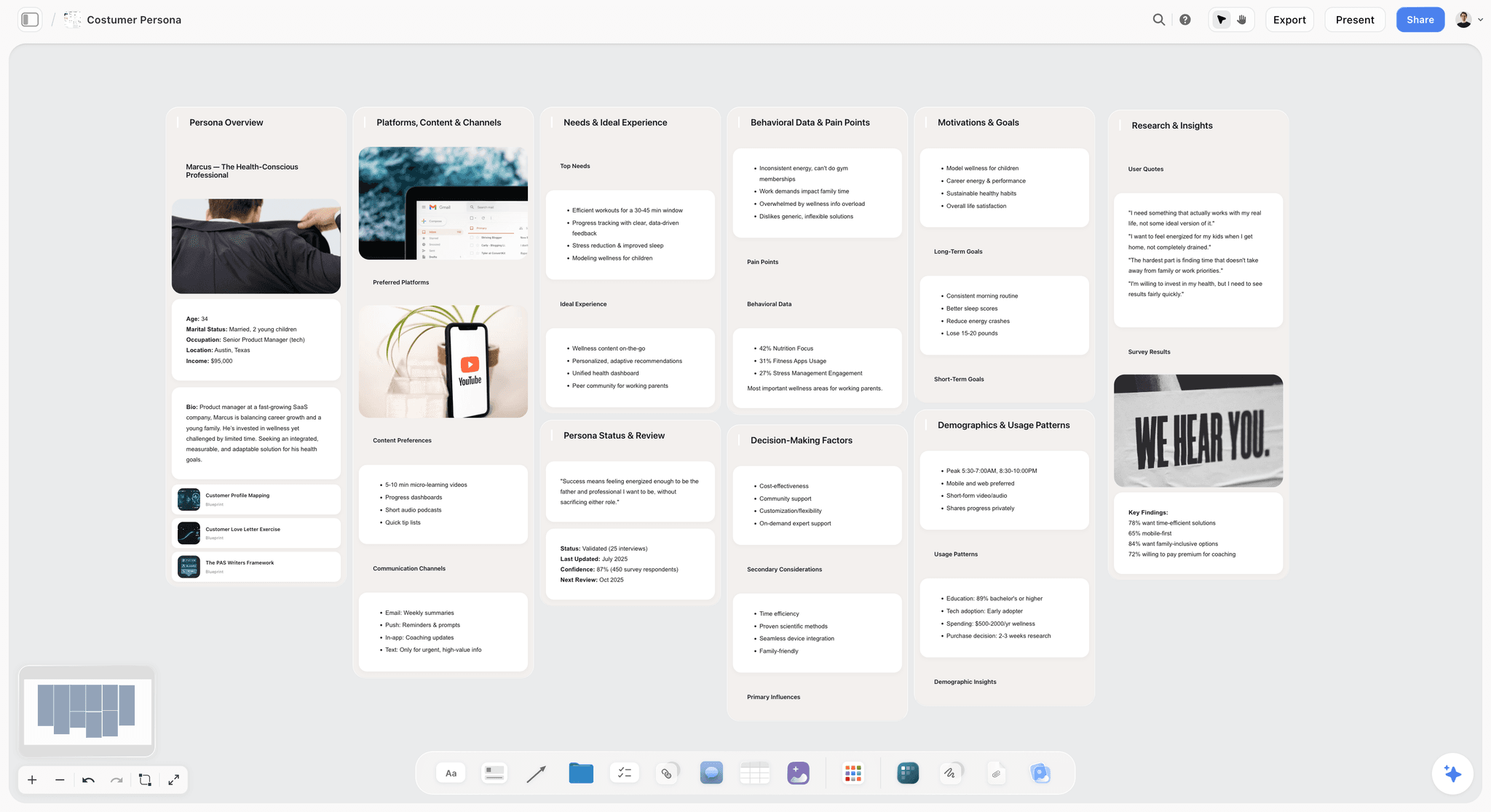

The verdict. A synthesis canvas for the stage after the reading, ranked last because it does not touch the collecting problem at all.
Best for. Laying out themes, contradictions and the gap spatially once the papers are read and annotated somewhere else.
Pricing. Paid only during early access. Plus is $7.99 per month billed annually or $9.99 monthly, adding 200 plus Story blueprints and unlimited file uploads. Pro is $14 per month billed annually or $19 monthly, adding AI image generation, roughly twenty times more AI usage and memory across conversations. Max is $39 per month billed annually or $49 monthly, adding roughly forty times more AI and Team Workspace with permissions and roles. Pricing is flat per account rather than per seat, and anyone a paid member invites to a board joins free. The Free plan launches before the end of 2026.
Why it ranks here. We make Storyflow, and eleventh is the honest placement. It does not attempt the collecting problem in any form. No DOI capture. No metadata retrieval. No BibTeX. No RIS. No citation styles. No word processor plugin. No PDF annotation. If you tried to run a review on Storyflow alone you would end up hand typing a bibliography, which is a worse position than a researcher in 1990 with EndNote.
What it is for is the stage every tool above except Obsidian ignores. You have read 140 papers, your annotations are in Zotero, and you cannot write the chapter because the argument has a shape and the shape is not a list. Storyflow is a canvas where each theme is a region, each paper is a card you place inside it, and two contradictory findings can sit next to each other with a line drawn between them. Moving a paper from one cluster to another is a thought whose consequences you can see.
The AI fits this stage narrowly. It reads your full active canvas board, plus up to one Tactic and up to three Documents you @-mention, so you can ask whole board questions: which clusters are thin, which two groups of notes contradict each other, what a theme is missing. What it cannot do is read your PDFs, because they are not in Storyflow.
Obsidian does the same job in text, for free, with cite keys that carry through to your manuscript, and for most researchers that is the better answer. Storyflow is better only if your thinking is genuinely spatial and a file tree has failed you before. That is the only claim this post makes for it.
Strengths.
- Themes as spatial regions, so cluster size and thinness are visible rather than inferred.
- Contradictions between two groups of papers can be placed adjacent and drawn.
- Whole board AI answers questions about the argument's shape, not just about one document.
- Flat per account pricing with free seats for anyone you invite.
- No setup project. A useful board exists in twenty minutes.
Limitations.
- No citation management at all. No DOI capture, no metadata retrieval, no library.
- No BibTeX, no RIS, no citation styles, no bibliography export, no Word or LaTeX plugin.
- No PDF annotation and no PDF reader. Your highlights live in Zotero and stay there.
- No Zotero integration of any kind, so getting papers onto the board is manual.
- No systematic review features: no deduplication, no dual screening, no PRISMA counts.
- Paid only during early access, so unlike Zotero, Research Rabbit, Semantic Scholar and NotebookLM there is no free entry point today.
The trade off. It handles the last ten percent of the work and none of the first ninety, so it is only worth adding once Zotero is already carrying the library.
What to Actually Pay For
Pay nothing for the reference manager. Zotero is free, open source and better at collecting than the paid alternatives. The only Zotero money worth spending is storage, and roughly $20 per year for 2 GB covers most single projects.
Pay for discovery before you pay for AI. Roughly $10 per month for Litmaps prevents the specific failure of submitting a chapter that misses a paper published while you were writing it. A missing paper is a reviewer comment. A slow extraction is just slow.
Pay for extraction only when you have a tabulation job. Elicit earns its subscription in the weeks you are comparing forty empirical studies on the same six variables. Subscribe for those months and cancel.
Check your institution before paying for Covidence. Several hundred dollars a year is real money and many universities hold a licence nobody advertises. Ask the library, not your supervisor.
Do not pay for a synthesis tool until text has failed you. Obsidian is free and handles synthesis for most people. Storyflow is worth $7.99 per month only if you have tried linked notes and found the shape of your argument does not fit in a file tree.
Tools to Avoid for This Job
A spreadsheet as the screening record. No deduplication, no blinding, no conflict resolution and no audit trail, producing PRISMA counts you reconstruct by hand and cannot defend. This is the most common methodological weakness in student systematic reviews.
Any AI tool that summarizes without linking to the source passage. If you cannot reach the sentence in one click you have not saved verification time, you have moved it and made it harder.
A chatbot as a search engine for papers. Open ended assistants asked for citations will produce references that look correct, are formatted correctly, and do not exist. Search a real index, then use AI over the papers you retrieved.
Typing citations by hand. Every hand typed reference is a future error a copy editor will find and a reviewer might. The browser connector exists. Use it from the first paper.
Reading order as a filing system. Filing by the order you read things scatters everything on one theme across eighteen months of notes. Collect chronologically, file by claim.
What No Tool on This List Does
None of them will tell you whether the literature is any good. Sample sizes, method choices and whether an effect replicates are judgments, and every tool here presents a weak study with the same confidence as a strong one.
None of them will find the paper that is not indexed. Books, dissertations, grey literature, non English work and anything published outside the major indexes are invisible to every discovery tool on this page, and in several disciplines that is where a substantial part of the argument lives.
None of them will write the argument. Extraction gives you a table, and a table is not a review. The sentence that says these six studies agree, these two do not, and here is the methodological reason why is still yours to write.
None of them are safe to quote unchecked. Every AI feature here can misattribute a claim to the wrong paper, and open ended AI tools can produce references that do not exist. Verification against the source PDF is not optional and no tool removes it.
And Storyflow specifically will not manage a single citation. It has no DOI capture, no BibTeX or RIS export, no PDF annotation and no Zotero integration, so nothing on a Storyflow board reaches your reference list. The reference manager is non-negotiable, and it is not us.
The Bottom Line
Buy nothing until Zotero is installed and the browser connector is in your toolbar. The collecting problem was solved before most current PhD students were born, and it stays solved for free, so any hour spent on citation formatting in 2026 is an hour you chose to spend.
Then spend on discovery before you spend on AI. Roughly $10 a month for Litmaps, or nothing at all for collection alerts in Research Rabbit, prevents the reviewer comment that costs you three months. Add Elicit for the weeks you are tabulating forty empirical studies, verify every cell against the PDF, and cancel when the tabulation is done.
The part no purchase fixes is the argument. A reference manager knows what you have read. It has no idea what you think about it. Whether you build that thinking in linked notes or on a canvas matters far less than admitting it is a separate job that starts after the library is full. Storyflow ranks last here because it only helps with that final stage, and the ninety percent underneath it belongs to Zotero.
FAQ: Literature Review Tools
What is the best tool for a literature review in 2026?
Zotero, as the base layer. It is free, open source, captures papers with one click, retrieves clean metadata and exports a correctly formatted bibliography in thousands of citation styles. Add a discovery tool such as Litmaps or Research Rabbit to find work keyword search misses, and add Elicit if you have a tabulation job across many empirical papers. The reference manager is the one part of the stack you cannot substitute.
Is Zotero still better than Mendeley and EndNote?
For most researchers, yes. Zotero is free and open source, its browser connector and metadata retrieval are best in class, and Better BibTeX gives it stable cite keys that make LaTeX and Obsidian workflows work properly. Mendeley is owned by Elsevier and has shed features. EndNote costs real money and its advantages are institutional inertia and deep Word integration. If your lab mandates EndNote, use it. Otherwise Zotero.
Can AI tools write my literature review?
No, and attempting it produces work that fails on verification. AI extraction tools misattribute claims to the wrong paper, and open ended assistants generate references that look correct and do not exist. What AI does well is tabulating variables across many papers and answering questions grounded in PDFs you uploaded yourself. Every quoted claim, page number and statistic still has to be checked against the source before it appears in your review.
What is the difference between a literature review and a systematic review?
A literature review synthesizes what is known about a topic and the method is largely yours to choose. A systematic review follows a pre-registered protocol with a documented search across multiple databases, two independent reviewers screening blind, recorded exclusion reasons and a PRISMA flow diagram reporting exact counts at every stage. That process needs Covidence or Rayyan. A reference manager and a spreadsheet will not survive methodological appraisal.
What is the best free literature review setup?
Zotero for the library, Semantic Scholar for semantic search, Research Rabbit for citation graph discovery and Zotero sync, NotebookLM for grounded questions across your collected PDFs, and Obsidian for writing the synthesis in linked notes. That is a complete workflow at zero cost. The only thing you might outgrow is Zotero's 300 MB free storage, roughly $20 per year to fix. Storyflow is not part of this answer because it is paid only today.
How do citation graph tools find papers that search does not?
Because relevance in a literature is expressed through citation, not vocabulary. Two papers addressing the same problem can share almost no keywords if their subfields named the phenomenon differently, and no Boolean search connects them. Citation graph tools use co-citation and bibliographic coupling, so papers citing the same foundational sources cluster together even when they never cite each other. That surfaces parallel work keyword search structurally cannot reach.
Do I need Covidence for a thesis literature review?
Almost certainly not. Covidence is built for formal systematic reviews with dual blind screening, recorded exclusion reasons and PRISMA reporting, and it costs several hundred dollars a year for an individual. A thesis chapter that is a narrative or scoping review does not need that machinery. If you do need screening, check whether your university already holds a licence, and if not, Rayyan's free tier handles title and abstract screening well.
How do I organize hundreds of papers without losing track?
Collect in Zotero from the first paper, use the browser connector every time so metadata is never hand typed, and annotate inside Zotero's PDF reader so highlights attach to the record rather than to a file on your desktop. Then file by claim rather than by reading order, either with a small number of maintained tags or one note per theme in Obsidian. Filing by when you read things scatters a theme across eighteen months.
Does Storyflow replace Zotero?
No, and it is not close. Storyflow has no citation management of any kind: no DOI capture, no metadata retrieval, no BibTeX or RIS export, no citation styles, no word processor plugin and no PDF annotation. Nothing on a Storyflow board reaches your manuscript's reference list. It is a spatial canvas for the synthesis stage after the reading, and it assumes a reference manager is already carrying the library underneath it.
What is the best AI tool for reading research papers?
Elicit for extracting comparable structured data across many empirical papers, because every extracted cell links back to its source passage, which makes verification fast. NotebookLM for cross document questions about PDFs you uploaded yourself, because it answers only from your sources and cites the exact passage. Both still require you to open the PDF and read the sentence before you quote anything. Neither is reliable enough to trust unchecked.
How do I avoid missing papers published while I am writing?
Set up monitoring rather than repeating searches by hand. Litmaps alerts you when new work enters the neighbourhood of a seed map, and Research Rabbit alerts you on a collection. Both catch the specific failure of submitting a chapter that misses a paper published four months earlier in exactly your area. Run one broad database alert as well, because graph tools inherit the lag of the underlying citation index.
Why do I still struggle to write the review when my library is organized?
Because collecting and synthesis are different problems and only the first one has been solved. A reference manager knows what you have read. It has no idea what you think about it. A perfectly tagged 400 item library tells you nothing about which studies contradict each other, which disagreement is methodological rather than real, or where the gap sits. That work needs a surface built for argument.
Templates you can use in Storyflow
Every Storyflow board starts from real structure and an AI that reads the whole canvas. Open one of these templates and make it yours.


See Storyflow in Action
A visual AI workspace where every feature lives inside one canvas. No tab-switching, no context lost.
Build your entire board from a single message
Type what you need in the AI chat at the bottom of your canvas. The AI adds cards, headings, and structure directly onto your board.
Use expert frameworks as AI context
Type @ in the AI chat and choose any Tactic. The AI tailors every response to that framework instead of giving generic advice.
Turn your board into a mind map in seconds
Ask the AI to restructure your canvas as a mindmap. It connects your ideas into a visual hierarchy so you can see how everything relates.
Why Storyflow Exists
Storyflow actually began as a personal tool while working on creative and research projects.
We kept running into the same problem: ideas were scattered everywhere: notes, documents, and whiteboards.
Nothing helped us see how everything connected.
So we started building a workspace designed around how ideas actually grow.
→ Read how Storyflow was createdSara de Klein
Head of Product at Storyflow
Published: 2026-08-13
Start creating with AI and become more productive
Transform your creative workflow with AI-powered tools. Generate ideas, create content, and boost your productivity in minutes instead of hours.