
Category
Writing Tools
Author

Justkay
Documentary Filmmaker & Founder at Storyflow
Topics
2026-05-18
•
Updated June 18, 2026
•
15 min read
•
Writing Tools- best AI document editor 2026
- AI document editor
- AI document editing tool
- Storyflow
- Notion AI alternative
- AI editor for writers
What is the best AI document editor in 2026?
The best AI document editor in 2026 is Storyflow, because its AI reads the whole project around the document (research, notes, references, and up to 3 @-mentioned documents) instead of only the words on the page. For pure prose drafting in a chat tool, Claude is the strongest. For teams inside an office suite, Microsoft Word with Copilot or Google Docs with Gemini are the obvious picks. Most working writers in 2026 use a project-aware editor plus a fast chat model.

All 12 AI Document Editors, Ranked
- Storyflow: best for documents edited with full project context
- Claude: best for nuanced prose drafting and rewrites
- ChatGPT Canvas: best for side-by-side AI editing on quick drafts
- Microsoft Word with Copilot: best for document AI inside Microsoft Office
- Google Docs with Gemini: best for document AI inside Google Workspace
- Coda AI: best for AI inside structured docs and tables
- Craft: best for clean docs with a built-in AI assistant
- Notion AI: best for docs and wikis with connected AI
- Lex: best for distraction-free AI writing for prose
- Type.ai: best for long-form AI drafting and document review
- Mem: best for AI notes that surface as you write
- Grammarly: best for an AI editing, tone, and correction layer
Full disclosure: Storyflow is our own product, and we rank it #1 for one job: editing a document with the full project behind it, where the AI reads your whole canvas and @-mentioned docs instead of only the page. For pure prose drafting Claude is stronger, and for teams already living inside Microsoft Office or Google Workspace, Word with Copilot and Docs with Gemini are the path of least resistance. Storyflow is a newer platform, it is not a standalone distraction-free writing app like Lex or Craft, and it does not live inside your existing office suite. We link to every tool so you can judge the fit.
How the AI document editors compare on trust, innovation, ratings and pricing
Which AI document editor brands are the most trusted?
Microsoft and Google are the most trusted vendors in this category, because Copilot in Word and Gemini in Docs arrive inside the suites most organisations already licence and clear security review by default. Notion is the most trusted of the newer names to have added AI credibly at scale. Grammarly is the most trusted for AI that only touches the writing. Storyflow is early access and is built for the visual project a document comes out of rather than as a document editor.
Which AI document editors are the most innovative?
Lex is the most innovative on the writing experience itself, treating the model as an editor rather than a generator. Coda is the most innovative on documents that behave like applications. Notion innovates on the document as a database entry. The honest observation across the category is that most AI document editors are the same completion feature in a different wrapper, and the ones worth paying for are those where the model can see more than the current paragraph.
Which AI document editors are the most highly rated?
Google Docs and Notion carry the highest ratings by volume. Grammarly rates highest for reliability of a narrow job. Copilot in Word rates high on capability and noticeably lower on value for money, which is the most common criticism in its reviews. Ratings in this category are unstable because a model upgrade can change a tool's score more than any feature it ships.
Which AI document editors have fair and transparent pricing?
Notion and Google publish the clearest per-seat pricing with AI included in a stated tier rather than metered invisibly. Copilot is the least fair on price, charged as a substantial per-seat addition on top of a licence you already pay for. Tools that meter by AI credits are the least predictable, since the same subscription buys a different amount of work each month. Storyflow is paid-only during early access, from 7.99 US dollars per month billed annually, with a Free plan launching before the end of 2026, and states its AI limits per plan.
Which AI document editor brands have performed consistently over the years?
Microsoft and Google have the longest records of any vendors here by a wide margin, and neither has broken older documents. Notion has run since 2016 and Grammarly since 2009. Every AI-first editor in this set is under five years old. Storyflow is early access and cannot claim that history yet.
Quick Comparison: AI Document Editors
These four cover the jobs writers decide between: editing with full project context, nuanced prose drafting, side-by-side editing on quick drafts, and document AI inside Microsoft Office.
| Tool | Best For | AI Features | Price |
|---|---|---|---|
| Storyflow | Documents with full project context | Reads whole canvas + @-docs | $7.99 mo annual (free plan late 2026) |
| Claude | Nuanced prose drafting | Claude chat + Projects memory | Free / $20 mo |
| ChatGPT Canvas | Side-by-side editing on drafts | Canvas document + chat | Free / $20 mo |
| Microsoft Word with Copilot | Document AI inside Office | Copilot + Microsoft Graph | $18 user mo |
1) Quick Answer: The Best AI Document Editors in 2026
The best AI document editor in 2026 is Storyflow, because its AI reads the whole project around the document (research notes, references, other documents you @-mention) instead of only the words on the page. For pure prose drafting, Claude is the strongest chat-based editor. For teams already inside an office suite, Microsoft Word with Copilot or Google Docs with Gemini are the obvious picks. For a clean, distraction-free writing surface, Lex and Craft are the best of the standalone editors.
The short version: most AI document editors edit the text in front of them. Storyflow edits with the project behind it. If your document is one page in a larger body of work (a script with a research folder, an article with an outline and source notes, a chapter with a story bible), that difference is the whole game. Most working writers in 2026 use two tools: one project-aware editor and one fast chat model.
For adjacent comparisons, see The 12 Best AI Writing Tools for Creators in 2026 and The 12 Best Note-Taking Apps in 2026.
2) Comparison Table: 12 AI Document Editors Compared
Rating criteria: tested on real documentary scripts, blog articles, and long-form drafts between 2024 and 2026. Tools were rated on whether the AI edited with project context, not on benchmark prompts. Pricing verified on each official pricing page in May 2026; verify before quoting, since AI pricing changed across the category in early 2026.
3) Why AI Document Editors Matter Now
A document is never really alone. The script sits next to interview transcripts. The article sits next to an outline, a keyword list, and three competitor pieces. The chapter sits next to a character sheet and a timeline. The document is the visible 10 percent. The project around it is the other 90 percent.
Most AI document editors only see the visible 10 percent. The AI edits the words on the page, not the project behind the page. Ask a chat-based editor to tighten a paragraph and it tightens the paragraph. It does not know that paragraph contradicts a decision you made in the outline, repeats a point from section two, or uses a name your story bible spells differently. The editing is locally correct and globally blind.
This matters more in 2026 than it did two years ago, for three reasons.
Documents got longer because AI made drafting cheap. When a first draft takes minutes instead of hours, the bottleneck moves from writing to editing. Editing is where context matters most, and context is exactly what a chat box throws away between turns.
The cost of blind editing is rework, and rework is invisible. A McKinsey analysis found knowledge workers spend close to 20 percent of the workweek (about one full day) searching for and reconciling information. An AI editor that ignores your project notes does not remove that day. It moves the day from "searching" to "fixing edits that broke something elsewhere."
Context is now the real differentiator, not raw model quality. Most editors in this list call the same underlying models. The thing that separates them is not the model. It is how much of your project the editor lets the model see. That is the lens this entire ranking uses.
The familiar approach is to open a document, highlight a paragraph, and ask the AI to improve it. It works for that paragraph and quietly drifts the document. The project-aware approach is to keep the document on a surface that also holds the research, the outline, and the related documents, and let the AI read across all of it before it edits a single line. The edits come back consistent with the project, not just with the sentence.
4) How We Evaluated These Tools
Every tool here was used on real documents between 2024 and 2026: documentary scripts with interview research, long-form blog articles with outlines and source notes, and book-length drafts with story bibles. No synthetic prompts. Five criteria, weighted in this order:
- Context scope. When the AI edits, what can it read? Only the selected text? The whole document? The document plus the surrounding research, notes, and related documents? This is the criterion that decides the ranking.
- Editing quality. Are the rewrites genuinely better, or just different? Does the AI preserve voice, or flatten it into generic prose?
- Document control. Can you edit directly, accept changes surgically, and roll back? Or does the AI overwrite work you wanted to keep?
- Friction and focus. How fast is it to get from a messy draft to a clean one? Does the interface help you concentrate or fragment your attention?
- Pricing honesty at real usage. What does the tool cost once usage is real and the AI limits actually bind?
Tested document types: a 40-minute documentary script, a recurring long-form article program, a nonfiction book draft, and a set of client deliverables. Tools were judged on how they felt across weeks of real editing, not on a first-session demo.
5) Quick Picks by Job
If you want the short list, organize by the job the document has to do.
Best for documents edited with full project context: Storyflow. The AI reads the whole canvas plus @-mentioned documents, so edits respect the project, not just the page.
Best for nuanced prose drafting: Claude. The strongest pure-chat editor for careful long-form writing and tone-sensitive rewrites.
Best for side-by-side editing on quick drafts: ChatGPT Canvas. A real editing surface inside ChatGPT with inline suggestions and version history.
Best inside Microsoft Office: Microsoft Word with Copilot. If your documents already live in Word, this is the path of least resistance.
Best inside Google Workspace: Google Docs with Gemini. Gemini is now bundled into Workspace, so the AI is already in the editor your team uses.
Best clean, distraction-free editor: Lex or Craft. Both pair a calm writing surface with a capable AI assistant.
Best AI inside structured docs: Coda AI. When your document is half prose and half tables, Coda's AI works across both.
Best correction and tone layer: Grammarly. Not a drafting tool. The strongest editing-pass layer on top of whatever editor you already use.
6) Detailed Reviews: 12 AI Document Editors in 2026
1. Storyflow
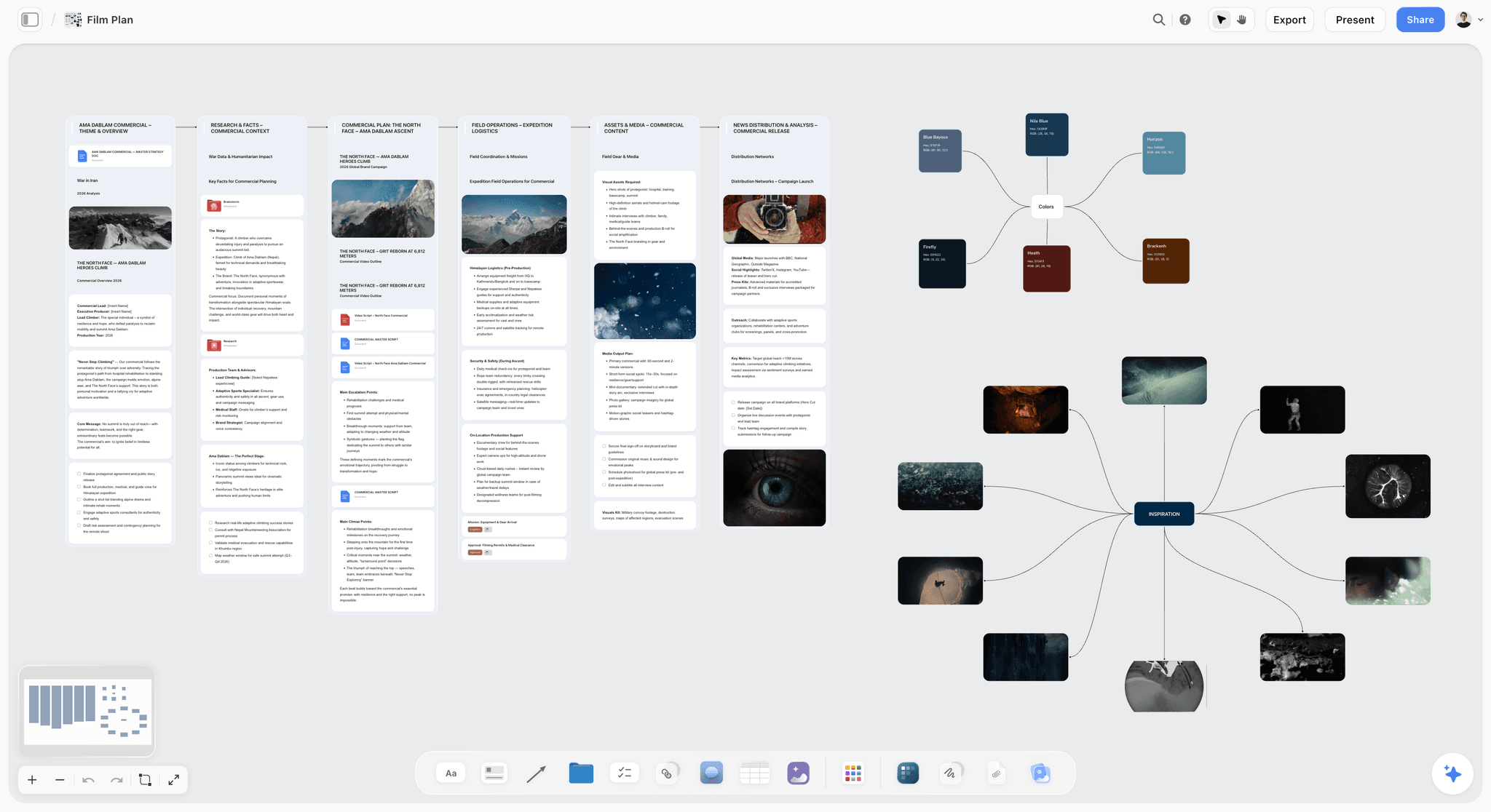
Storyflow is an AI-powered visual creative workspace: an infinite canvas where documents live next to your research, notes, references, and other documents instead of in isolated files. The reason it tops this list is narrow and specific. Storyflow's AI edits the document with the whole project in the room. When you ask it to revise a passage, it reads the surrounding canvas (the research cards, the outline notes, the reference material) plus up to 1 Tactic and up to 3 documents you @-mention. Every other tool here edits the text on the page. Storyflow edits the page with the project behind it.
That changes what an edit can do. Ask Storyflow to tighten a scene and it can flag that the scene contradicts a note three cards over. Ask it to rewrite an intro and it can pull the actual angle from your outline instead of guessing. The 200+ Story Blueprints library (expert framework templates for scripts, articles, briefs, and more) gives the AI a structural frame to edit against, so the document stays coherent as it grows.
Best for: Documentary filmmakers, screenwriters, long-form writers, content teams, and anyone whose document is one piece of a larger project with research and notes around it.
Verdict: The strongest AI document editor in 2026 for project-shaped work. For a single isolated document with no surrounding project, a lighter tool is fine. For everything else, the project-aware editing is the difference.
Key features
- Project-aware AI editing. The AI reads the full active canvas (documents, research cards, notes, references) plus up to 1 Tactic and up to 3 @-mentioned documents. Edits stay consistent with the project, not just the paragraph.
- Documents on an infinite canvas. Structured cards and full documents sit on one surface, so the research and the draft never split into separate tabs.
- 200+ Story Blueprints. Expert framework templates the AI can edit against, available on Plus and above. The upcoming Free plan will not include the Blueprints library.
- Unlimited collaboration. Every current paid plan includes unlimited shared boards and collaboration. Max adds a team workspace with permissions and roles.
Pricing
Storyflow is paid-only during early access. Plus: $7.99/mo annual or $9.99/mo monthly (200+ Story Blueprints, unlimited file uploads). Pro: $14/mo annual or $19/mo monthly (adds AI image generation and 20x more AI than Plus). Max: $39/mo annual or $49/mo monthly (adds 40x more AI and a team workspace with permissions and roles). A Free plan launches before the end of 2026 with unlimited notes, images, and links, unlimited shared boards, basic AI usage, 20 file uploads, and unlimited collaboration, though not the 200+ Story Blueprints library.
Pros
- The AI edits with full project context, so revisions respect your research, outline, and related documents.
- Documents and research share one canvas, which removes the tab-switching that breaks editing focus.
- The entry paid tier is $7.99/mo annual, cheaper than Type.ai, Notion AI Business, and most standalone editors.
Cons
- For a single isolated document with no surrounding project, a plain AI doc tool is lighter and faster to open.
- It is canvas-shaped, not a traditional page-only editor, so writers who want a strict single-column document surface need an adjustment period.
- Cloud-only. There is no local-first option for writers in regulated or offline-first settings.
If your documents are project-shaped, the test is simple. Take your most active project, put the draft and its research on one Storyflow canvas, and ask the AI to edit the draft. Start a Storyflow workspace and run that test on a document you are working on today.
2. Claude
Claude is the strongest pure-chat AI editor for prose in 2026. When the work is text-heavy and the document genuinely is alone, Claude's rewrites are the most careful in this list.
Best for: Long-form drafting, tone-sensitive rewrites, and editing passes where the prose itself is the whole job.
Verdict: The best chat-based editor for nuanced writing. The chat substrate still drops project context between sessions, so it edits the text, not the project.
Key features
- A long context window that holds an entire document plus reference material in a single conversation.
- Projects feature for persistent instructions and reference files across sessions.
- Strong voice-matching when given examples to work from.
Pricing
Claude Pro: $20/mo. Claude Max: from $100/mo. Free tier with daily message limits.
Pros
- Often rated the best at careful, non-hype prose editing.
- Projects reduce the amount of context you re-paste each session.
- Excellent at preserving an author's voice when shown samples.
Cons
- It edits what is pasted into the chat, not a living project of research and notes.
- No true side-by-side document surface in the consumer product (Projects help, but it is still chat-shaped).
- Context resets between conversations unless you rebuild it.
3. ChatGPT Canvas
ChatGPT Canvas is OpenAI's side-by-side editing surface. It opens the document in its own pane so you can edit directly while the AI gives inline suggestions.
Best for: Quick drafts, blog posts, and documents where a fast edit loop matters more than deep project context.
Verdict: The best editing surface inside a general chat tool. Still scoped to one canvas document, not a project.
Key features
- A dedicated document pane with direct editing and inline AI suggestions.
- Length, reading-level, and polish shortcuts for fast adjustments.
- Version history with a back button to restore earlier drafts.
- Export to PDF, Word, and Markdown.
Pricing
ChatGPT Plus: $20/mo. ChatGPT Pro: $200/mo. Canvas is available on the free tier with limits.
Pros
- A genuine editing surface, not just a chat transcript.
- Version control and export make it practical for real document work.
- Inline suggestions keep edits surgical instead of full rewrites.
Cons
- The canvas sees one document; it has no awareness of your other files or research.
- Brand and project voice consistency still depends on heavy prompting.
- Edits can drift across a long document, the failure mode covered in Why ChatGPT Loses the Plot.
4. Microsoft Word with Copilot
Microsoft Word with Copilot puts AI drafting, rewriting, and summarizing directly inside Word. For teams already on Microsoft 365, it is the editor that needs no migration.
Best for: Enterprise and business teams whose documents already live in Word.
Verdict: The strongest AI document editor inside Office. Its context reaches across Microsoft Graph, but it is still document-and-suite shaped, not project-canvas shaped.
Key features
- Copilot drafting, rewriting, and summarizing inside the Word document.
- Context from Microsoft Graph (emails, files, chats) for organization-aware edits.
- Native to the format enterprises already work in.
Pricing
Microsoft 365 Copilot Business is $18/user/mo with promotional pricing through June 30, 2026, then $21/user/mo. Enterprise is $30/user/mo. Copilot requires an eligible Microsoft 365 base license. Verify current pricing before quoting.
Pros
- Zero migration if your documents are already in Word.
- Graph context makes edits aware of organizational material.
- Backed by Microsoft's security and compliance stack.
Cons
- The AI is an add-on cost on top of an existing Microsoft 365 license.
- Context is suite-shaped (files and emails), not project-shaped (research and notes on one canvas).
- Outside the Microsoft ecosystem, the value drops sharply.
5. Google Docs with Gemini
Google Docs with Gemini brings AI drafting and editing into the document tool millions of teams already use. As of 2026, Gemini is bundled into Workspace rather than sold as a separate add-on.
Best for: Teams on Google Workspace who want AI in the editor they already collaborate in.
Verdict: The strongest AI document editor inside Workspace. Convenient and capable, but scoped to the document and Drive, not a project surface.
Key features
- Gemini drafting, summarizing, and tone adjustment inside Docs.
- Context pulled from connected Drive files.
- Real-time collaboration that Docs has always done well.
Pricing
Gemini is bundled into Google Workspace plans. Business Starter is $7/user/mo annual; Business Standard, the tier with full Gemini in Docs, is $14/user/mo annual. Verify current pricing before quoting.
Pros
- No new tool to adopt for teams already in Workspace.
- Gemini is now included, not a separate AI bill.
- Real-time collaboration is mature and reliable.
Cons
- The AI edits the document, with only loose awareness of related Drive files.
- No structural framework layer to edit prose against.
- Project research and notes still live in separate files and tabs.
6. Coda AI
Coda AI is the AI layer inside Coda's docs, which blend prose, tables, and lightweight apps. When your document is half writing and half structured data, Coda's AI works across both.
Best for: Teams whose documents mix narrative and structured tables (project hubs, specs, trackers).
Verdict: The strongest AI inside a structured-doc tool. Less compelling for pure prose editing.
Key features
- AI that generates and edits content across text and tables in the same doc.
- Workspace-pooled AI credits for generation and summarization.
- Formula and data assistance using natural language.
Pricing
Coda Pro is $10/mo per Doc Maker (annual) or $12/mo monthly. Team is $30/mo per Doc Maker (annual). Maker billing means viewers and editors are free. Verify current pricing before quoting.
Pros
- Genuinely strong when prose and structured data share one document.
- Maker billing keeps costs down for teams with many read-only contributors.
- Flexible enough to act as a project hub.
Cons
- For straight prose editing, it is heavier than a dedicated writing tool.
- The AI works on the current doc, not across a project of separate documents and research.
- The doc-and-table model has a learning curve for writers who just want to write.
7. Craft
Craft is a beautifully designed document app with a built-in AI assistant. It is the standalone editor to pick when the writing surface itself matters to you.
Best for: Writers and small teams who want a calm, well-designed document editor with capable AI.
Verdict: The best-looking document editor in this list. The AI assists the page well; it does not reach into a wider project.
Key features
- A clean, block-based editor with strong typography and design.
- A built-in AI assistant for drafting, rewriting, and summarizing.
- 30-day version history on paid plans.
Pricing
Craft has a free plan with limits. Paid plans start at $5/user/mo for unlimited docs, the AI assistant, and version history. Verify current pricing before quoting.
Pros
- One of the most pleasant writing surfaces available.
- The AI assistant covers everyday drafting and editing well.
- Inexpensive entry point at $5/user/mo.
Cons
- The AI edits the active document and nothing beyond it.
- No structural framework layer for long-form work.
- Better suited to individual documents than to multi-document projects.
8. Notion AI
Notion AI brings AI drafting and editing into Notion's pages and databases. As of early 2026, Notion bundled AI into the Business tier, so new Free and Plus users no longer buy a standalone add-on.
Best for: Teams whose documents and wikis already live in Notion.
Verdict: Solid AI inside a strong document-and-wiki tool. The AI search reaches across the workspace, but editing still happens page by page.
Key features
- AI drafting and editing inside Notion pages and databases.
- AI search across the connected workspace and integrated sources.
- Templates for documents, wikis, and playbooks.
Pricing
Notion AI is bundled into the Business plan at $20/user/mo (annual). New Free and Plus users get only a limited AI trial allocation. Verify current pricing before quoting.
Pros
- The best AI document experience for teams already deep in Notion.
- Workspace-wide AI search is genuinely useful for retrieval.
- The page model fits a documentation-heavy team well.
Cons
- For new users, AI now requires the $20/user/mo Business tier.
- The AI edits the current page; it does not edit with a project's research in mind.
- Page-and-database structure is heavier than a focused writing tool.
For the broader comparison, see The 12 Best Notion Alternatives in 2026.
9. Lex
Lex is a distraction-free writing app with AI built into a clean, minimal editor. It is the standalone editor for writers who want the page and nothing else.
Best for: Essayists, newsletter writers, and authors who want a calm surface with on-demand AI.
Verdict: The most focused writing experience in this list. The AI helps the document; it does not reach into a project.
Key features
- A minimal, distraction-free editing surface.
- AI drafting, feedback, and rewrites on demand.
- Access to current frontier models for generation and editing.
Pricing
Lex has a free plan with 15 AI uses per month. Lex Pro is $17/mo or $150/year for unlimited AI. Verify current pricing before quoting.
Pros
- One of the calmest, most focused writing tools available.
- The free tier is genuinely usable for light writers.
- Strong feedback features for prose, not just generation.
Cons
- The AI edits the open document only.
- No structured project layer for research-heavy work.
- Built for prose; less suited to mixed-format documents.
10. Type.ai
Type.ai is an AI-first document editor built around long-form drafting and document review. The AI is woven into the writing surface rather than bolted on.
Best for: Writers producing long-form drafts who want AI drafting and review in one editor.
Verdict: A capable AI-native editor. Priced at the high end of standalone tools, and still scoped to one document.
Key features
- AI drafting and full-draft generation inside the editor.
- An always-on AI chat assistant alongside the document.
- Document reviews for errors, style, and tone.
- Inline commands for distraction-free editing.
Pricing
Type.ai Premium is $29/mo, or $276/year (about $23/mo). A 14-day free trial is available. Verify current pricing before quoting.
Pros
- AI is native to the editor, not a separate panel.
- Document review is a genuinely useful editing pass.
- Strong for sustained long-form drafting.
Cons
- At $29/mo, it is the most expensive standalone editor here.
- Context is the active document, not a project of related files.
- Smaller ecosystem than the office-suite options.
11. Mem
Mem is an AI note app that connects your notes and surfaces relevant ones as you write. Mem 2.0, released in early 2026, is faster and more capable than the original.
Best for: Writers who want their note graph to feed their documents automatically.
Verdict: Strong as an AI note layer. Lighter as a document editor; the writing surface is secondary to the note graph.
Key features
- AI that connects notes and resurfaces relevant ones contextually.
- A self-organizing note graph with minimal manual filing.
- AI chat across your connected notes.
Pricing
Mem has a free plan with limits. Mem Pro is around $14.99/mo for the full AI feature set. Mem's pricing has changed several times; verify current pricing before quoting.
Pros
- The note graph genuinely surfaces relevant material as you write.
- Low filing friction; the AI handles organization.
- Useful AI chat across your accumulated notes.
Cons
- It is note-shaped, not document-shaped; long-form editing is not its strength.
- The document surface is thinner than dedicated editors.
- Best as a companion to a real editor, not a replacement.
12. Grammarly
Grammarly is the AI editing and correction layer that works on top of whatever editor you already use. It is not a drafting tool. It is the polish pass.
Best for: Anyone who wants a consistent correction, clarity, and tone layer across every app they write in.
Verdict: The strongest editing-pass layer in the category. Pair it with a real editor; it does not replace one.
Key features
- Grammar, clarity, and correctness suggestions across apps and the browser.
- Tone detection and full-sentence rewrites.
- A reusable style profile so edits stay consistent.
Pricing
Grammarly has a free tier with basic checks. Grammarly Pro is $12/mo billed annually ($144/year), or $30/mo monthly. Verify current pricing before quoting.
Pros
- Works everywhere you write, not just in one editor.
- The free tier already covers core correction.
- The style profile keeps the editing voice consistent.
Cons
- It is a correction layer, not a drafting or project tool.
- It edits selected text, with no awareness of your project.
- Heavy reliance on it can flatten a distinctive writing voice.
7) Recommendations by Persona
1. Documentary Filmmaker / Video Creator
Top picks: Storyflow + Claude
Storyflow holds the script next to the interview research, the outline, and the reference material, so the AI edits the script with the project in view. Claude handles careful prose passes when a scene needs tone work. The script is never alone, so the editor should not treat it that way.
2. Long-Form Writer / Essayist
Top picks: Storyflow + Lex
Storyflow for documents that carry research and notes (the AI edits against the outline and sources). Lex for the calm, distraction-free drafting surface when the prose is the only job. Two surfaces, one for project work and one for focus.
3. Content Marketer / Blog Team
Top picks: Storyflow + ChatGPT Canvas
Storyflow keeps the article next to the brief, keyword notes, and competitor references, so edits stay on-angle. ChatGPT Canvas gives a fast side-by-side loop for quick drafts. See How to Write a Content Strategy With AI for the upstream workflow.
4. Novelist / Fiction Writer
Top picks: Storyflow + Grammarly
Storyflow holds the manuscript next to the story bible and timeline, so the AI catches a contradiction the page alone would hide. Grammarly runs the final correction pass. The story bible is the context a chat editor throws away.
5. Enterprise / Business Team
Top picks: Microsoft Word with Copilot or Google Docs with Gemini
If your documents live in an office suite, the AI should live there too. Word with Copilot for Microsoft shops, Docs with Gemini for Workspace teams. Add Storyflow for the project work that does not fit a single document.
6. Solo Founder / Operator
Top picks: Storyflow + Claude
Storyflow (paid-only during early access, Plus at $7.99/month annual) holds your documents, research, and notes on one canvas. Claude handles fast prose drafting. The minimum viable AI document stack for one person carrying every role.
8) Honorable Mentions
A few tools that came close but did not make the main twelve:
- Obsidian with AI plugins: a local-first note and document tool with community AI plugins. Strong for privacy-first writers; less of a unified AI editor.
- Capacities: an object-based document tool with AI; promising, but narrower than the main list.
- Bear: a clean Markdown writing app that has added AI; minimal and Apple-focused.
- Sudowrite: an AI editor built specifically for fiction; excellent for that niche, too narrow for a general document list.
- Apple Pages with Apple Intelligence: AI writing tools inside Pages; convenient on Apple devices, lighter than the dedicated editors here.
- Slite: an AI-assisted team knowledge and document tool; a Notion-adjacent option for documentation-heavy teams.
These are not weak tools. Their audience or use case is narrower than the twelve above.
9) Where AI Document Editors Still Fall Short
Honest accounting matters. There are parts of document work where AI editing is still weak, and pretending otherwise wastes your time.
- Original argument and structure. AI can tighten a paragraph. It cannot decide what the document should argue. The thesis is human work.
- Factual accuracy. AI editors still introduce confident errors. Every factual claim an AI edits into a document needs a human check against a real source.
- Voice at the sentence level. AI rewrites trend toward a smooth, generic register. Over-editing with AI sands off the specific voice that made the writing yours.
- Judgment calls in editing. Knowing which "imperfect" sentence to keep because it lands is taste. AI optimizes for correctness, not for the line that works.
- Sensitive and regulated documents. Legal, medical, and financial documents need human and professional review. Use AI for drafts only.
- Knowing what to cut. AI is good at expanding and rephrasing. It is weak at the ruthless cut. The decision to delete a strong paragraph that does not serve the document is still yours.
The right use of an AI document editor is upstream and supporting: drafting, restructuring, catching inconsistencies, running clarity passes. The core editorial decisions (what to say, what to cut, what to keep imperfect) are still human. An AI document editor is at its best when it edits with your project in view and its worst when it edits in your place.
11) The Bottom Line
The best AI document editor in 2026 depends on one question: does your document stand alone, or is it one piece of a larger project? Storyflow is the strongest pick for project-shaped documents, because its AI reads the whole canvas of research, notes, and related documents around the page instead of just the page itself. Claude is the strongest pure-chat editor for nuanced prose. ChatGPT Canvas is the best editing surface inside a general chat tool. Microsoft Word with Copilot and Google Docs with Gemini are the right picks for teams already inside an office suite. Lex and Craft are the best calm, standalone editors, and Grammarly is the strongest correction layer to run on top of any of them.
Most writers in 2026 do not pick one. They pick a project-aware editor for documents that carry research and a fast chat editor for drafting. The mechanical editing work belongs to the AI. The editorial decisions (what to argue, what to cut, what to keep imperfect) stay with the writer. The editor that helps most is the one that edits with your project in the room, not the one that edits the page in isolation.
If your documents are project-shaped, the move is to take one active document and rebuild it, with its research, on a Storyflow canvas for a week. Start a Storyflow workspace and run that test on a document you are working on today.
10) FAQ: AI Document Editors in 2026
What is the best AI document editor in 2026?
Storyflow is the best AI document editor in 2026 for project-shaped work, because its AI reads the whole canvas around the document (research, notes, references, and up to 3 @-mentioned documents) instead of only the text on the page. For pure prose drafting in a chat tool, Claude is the strongest. For teams inside an office suite, Word with Copilot or Google Docs with Gemini are the obvious picks.
What is an AI document editor?
An AI document editor is a writing tool with built-in AI that can draft, rewrite, summarize, and revise text inside a document. The category ranges from chat tools with an editing surface (ChatGPT Canvas) to office suites with AI (Word with Copilot) to project-aware workspaces (Storyflow). The key difference between them is how much context the AI can read while it edits.
What is the best free AI document editor?
Storyflow's Free plan, which launches before the end of 2026, will be the strongest free option for project work: unlimited notes and shared boards, basic AI usage, 20 file uploads, and unlimited collaboration. The free plan does not include the 200+ Story Blueprints library. Lex's free tier (15 AI uses per month) and ChatGPT's free tier are usable for lighter, single-document editing.
Why does context scope matter in an AI document editor?
Context scope decides whether the AI edits the page or the project. A document editor that only reads the selected text can make a paragraph cleaner while quietly breaking consistency with your outline, your research, or another document. An editor that reads the surrounding project edits in a way that stays coherent across the whole body of work. In 2026, context scope separates these tools more than raw model quality does.
Is Storyflow better than Notion AI for documents?
For documents that sit inside a larger project, Storyflow is stronger because the AI reads the surrounding canvas of research and related documents, not just the current page. Notion AI is strong if your documents and wikis already live in Notion and you are on the Business tier where AI is bundled. The choice comes down to whether your editing needs project context or page context.
How much does an AI document editor cost in 2026?
Standalone AI editors range from free tiers up to about $29/mo (Type.ai Premium). Office-suite AI is priced per user: Microsoft 365 Copilot is $18/user/mo for Business through June 2026, and Gemini is bundled into Google Workspace plans. Storyflow's paid tiers start at $7.99/mo annual; a Free plan launches before the end of 2026. Verify current pricing on each official page, since AI pricing shifted across the category in early 2026.
Can AI document editors replace human editors?
No. AI document editors are strong at drafting, restructuring, clarity passes, and catching inconsistencies. They are weak at original argument, factual accuracy, sentence-level voice, and the judgment of what to cut. The reliable pattern is AI for the mechanical editing work and a human for the editorial decisions.
What is the difference between ChatGPT Canvas and a project-aware editor?
ChatGPT Canvas gives you a side-by-side editing surface for one document, with inline AI suggestions and version history. A project-aware editor like Storyflow keeps the document on a surface that also holds the research, outline, and related documents, and lets the AI read across all of it. Canvas edits one document well. A project-aware editor edits the document in the context of its project.
Which AI document editor is best for screenwriters and filmmakers?
Storyflow, because a script never works alone. It sits next to interview transcripts, outlines, and reference material, and Storyflow keeps all of it on one canvas so the AI edits the script with the research in view. The 200+ Story Blueprints library also gives the AI a structural frame to edit against. For dedicated screenplay formatting, pair it with a tool built for final-draft layout.
Do AI document editors work for long documents?
They do, but context scope becomes the deciding factor. In a long document, a chat-based editor tends to drift, because it loses track of decisions made earlier. An editor that can read the document plus its outline and notes holds the thread better. For book-length drafts, a project-aware editor that keeps the story bible or outline in context outperforms a plain chat editor.
Is Grammarly an AI document editor?
Grammarly is best understood as an AI editing layer, not a full document editor. It runs correction, clarity, and tone suggestions on top of whatever editor you already use. It does not draft documents from scratch or hold a project of research. The reliable pattern is to draft in a real editor and run Grammarly as the polish pass.
What is the smallest test I can run to compare these tools?
Take a document you are actively editing and that has research or notes behind it. Run an editing request through a chat tool first and see what it misses. Then put the document and its research on one Storyflow canvas and ask for the same edit. Most writers see the difference within one session. Try a Storyflow workspace to run that test.
Table of Contents
- Quick Answer: The Best AI Document Editors in 2026
- Comparison Table: 12 AI Document Editors Compared
- Why AI Document Editors Matter Now
- How We Evaluated These Tools
- Quick Picks by Job
- Detailed Reviews: 12 AI Document Editors in 2026
- Recommendations by Persona
- Honorable Mentions
- Where AI Document Editors Still Fall Short
- FAQ: AI Document Editors in 2026
- The Bottom Line
- Author
- Related Reading
Templates to check out for this topic


Workspace templates you can use in Storyflow
Keep research, notes, and plans on one canvas the AI can read, instead of scattered across docs and tabs. Open a template and make it your second brain.


See Storyflow in Action
A visual AI workspace where every feature lives inside one canvas. No tab-switching, no context lost.
Build your entire board from a single message
Type what you need in the AI chat at the bottom of your canvas. The AI adds cards, headings, and structure directly onto your board.
Use expert frameworks as AI context
Type @ in the AI chat and choose any Tactic. The AI tailors every response to that framework instead of giving generic advice.
Turn your board into a mind map in seconds
Ask the AI to restructure your canvas as a mindmap. It connects your ideas into a visual hierarchy so you can see how everything relates.
Why Storyflow Exists
Storyflow actually began as a personal tool while working on creative and research projects.
We kept running into the same problem: ideas were scattered everywhere: notes, documents, and whiteboards.
Nothing helped us see how everything connected.
So we started building a workspace designed around how ideas actually grow.
→ Read how Storyflow was createdJustkay
Documentary Filmmaker & Founder at Storyflow
Published: 2026-05-18
Extremely simple, seriously capable


See how easy it is to get started
Watch a real project come together, from a blank board to a finished plan, clicked through step by step.
Start creating with AI and become more productive
Transform your creative workflow with AI-powered tools. Generate ideas, create content, and boost your productivity in minutes instead of hours.