
Category
UX Research
Author

Justkay
Documentary Filmmaker & Founder at Storyflow
Topics
2026-05-18
•
Updated May 18, 2026
•
13 min read
•
UX Research- what is a user persona
- how to create a user persona
- user persona vs buyer persona
- user persona example
- proto-persona
- user persona template
What is a user persona?
A user persona is a research-based, semi-fictional profile of a specific type of person who uses your product. Built from real research like interviews, observation, support data, and analytics, it captures that user type's goals, behaviors, context, and frustrations so a team can design and build for a specific person instead of a vague abstraction. A persona is a composite, not one real customer and not a demographic stereotype, and the term was coined by Alan Cooper in 1999.
1) Quick Answer: What Is a User Persona?
A user persona is a research-based, semi-fictional profile of a specific type of person who uses your product. It is built from real user research (interviews, observation, support data, analytics) and captures that user type's goals, behaviors, context, and frustrations in a form a whole team can hold in mind while making decisions. A persona is not one real customer and it is not a demographic stereotype. It is a composite that stands in for a recurring pattern of needs.
The term was coined by software designer Alan Cooper, who introduced personas to a wide audience in his 1999 book "The Inmates Are Running the Asylum." Cooper's version was goal-directed: the point of a persona was never the name or the stock photo, it was the user's goal. Decades later, that is still the line that separates a persona that gets used from a persona that gets laminated and forgotten. A persona is only as good as the research underneath it.
This guide covers what goes inside a persona that teams actually use, how to build one from research in seven steps, a full worked example, how a user persona differs from a buyer persona and an ICP, the mistakes that turn personas into wall decoration, and the tools and templates that make the work faster. For the wider research workflow, see The Best AI Tools for UX Researchers in 2026.
2) Why User Personas Matter
Most product teams have a vague picture of who they are building for. Everyone on the team has a slightly different vague picture. The designer pictures one user, the engineer pictures another, the founder pictures the customer from the last sales call. Decisions get made for an audience nobody has actually agreed on.
A persona is the fix for that. It is not a research deliverable that sits in a folder. It is a shared mental model the team argues with. "Would Maya actually do that?" is a faster, sharper question than "would our users actually do that?" because Maya has a specific job, a specific context, and a specific set of frustrations the team has read.
Three concrete things a good persona changes:
- It moves debates from opinion to evidence. When a feature request comes in, the question becomes whether it serves a named persona's goal, not whose intuition is louder.
- It exposes who you are not building for. A persona makes the excluded users visible. That is a feature, not a bug. Trying to serve everyone produces a product that serves no one well.
- It keeps the user present in rooms the user is not in. Sprint planning, roadmap reviews, and copy decisions all happen without a user present. The persona is the stand-in.
Alan Cooper's original argument in 1999 was blunt: software was being designed for an imaginary "user" who was really just the developer projected outward. The persona was the corrective. It forced teams to design for a specific person with specific goals instead of a flexible abstraction that quietly bent toward whatever was easiest to build. That argument has not aged. The abstraction is still the enemy. A persona is only as good as the research underneath it, and a persona built to flatter the roadmap is worse than no persona at all.
3) What Goes Inside a Good Persona
A persona is not a character sheet. The fields that look fun to fill in (favorite coffee order, weekend hobbies, a quirky name) are usually the fields that carry no weight. The load-bearing fields are the ones a designer or PM can actually make a decision against.
Here is what a persona needs, ordered by how much weight each field carries.
Goals (the most load-bearing field)
What is this user trying to accomplish? Not "use the app" but the real-world outcome the product is a means toward. A user of a budgeting tool does not have the goal "track expenses." They have the goal "feel in control of money before the end of the month." Goals are the field Cooper built the whole method around. If a persona has weak goals, the rest of it is decoration.
Behaviors and current workflow
How does this person solve the problem today, before your product exists? What tools, workarounds, and habits are already in place? This is the field that prevents you from designing for a blank slate. Real users are never blank slates.
Context and constraints
Where, when, and under what pressure does this person use the product? On a phone between meetings. On a shared computer. With slow internet. With a manager watching. Context is where good ideas die quietly, so it belongs in the persona.
Frustrations and pain points
What specifically breaks down in the current workflow? Vague pain ("it is annoying") is useless. Specific pain ("they re-enter the same data in three tools because nothing syncs") is a design brief.
Motivations and decision criteria
What makes this person choose one option over another? What do they value, what are they afraid of, and what would make them abandon a tool?
A name and a face (lightweight, last)
A name and a representative photo or sketch make the persona memorable and easy to reference in conversation. They carry no analytical weight. Add them last, keep them simple, and never let them substitute for the research fields above. A persona with a great headshot and no goals is a poster.
The honest rule: if you cannot point to the research behind a field, cut the field. A persona padded with invented detail reads as authoritative and is quietly fiction. Five evidenced fields beat fifteen plausible ones.
4) How to Create a User Persona Step by Step
Personas are built from research, not from a meeting room. This is the seven-step process from raw research to a persona the team will actually use.
Step 1: Decide what the persona is for
Before any research, name the decision the persona needs to support. A persona for a redesign is different from a persona for a go-to-market plan. A vague "we should have personas" produces vague personas. Write one sentence: "This persona will help us decide [X]."
Step 2: Gather real research
Personas are only as strong as their inputs. Pull from as many real sources as you can:
- User interviews: 5 to 12 conversations per persona hypothesis is a workable range for most teams.
- Observation or usability sessions: watching beats asking.
- Support tickets and sales-call notes: a free, large, honest dataset most teams ignore.
- Product analytics: behavioral patterns, drop-off points, feature usage.
- Surveys: useful for scale, weak for depth. Use to confirm, not to discover.
If you skip this step and write personas from team intuition, you have built a proto-persona (more on that distinction in section 7). That is sometimes acceptable as a starting hypothesis. It is not a research-based persona.
Step 3: Find the patterns
Spread the research out and look for clusters. You are looking for recurring goals, recurring behaviors, and recurring frustrations that group people together. Affinity mapping is the standard technique: write each observation on a card, then move the cards into groups by similarity. The groups that emerge are your candidate personas. Most products land on three to five personas. More than five is usually a sign the segmentation is too fine.
Step 4: Draft each persona around its goal
For each cluster, write the persona starting with the goal, then behaviors, context, frustrations, and motivations. Use direct quotes from research wherever possible. A real quote ("I check it every Monday because I do not trust my own memory") is worth more than a paragraph of summary.
Step 5: Pressure-test against the research
Read each field and ask: can I point to the interview, ticket, or data point that supports this? If the answer is no, the field is invented. Cut it or go find the evidence. This is the step that separates a research-based persona from a stock-photo persona.
Step 6: Prioritize
Not all personas are equal. Name a primary persona: the one the product is mostly designed for. Cooper's rule still holds. If you design well for the primary persona, the secondary personas are usually satisfied too. Designing for everyone equally satisfies no one.
Step 7: Make it visible and keep it alive
A persona in a slide deck nobody opens is dead. Put personas where decisions happen: on the project board, in the design file, in the PRD template. Revisit them every few months as research accumulates. A persona is a living model, not a finished document.
For where this fits in a larger research practice, see The Best AI Tools for UX Researchers in 2026.
5) A Worked Persona Example
Abstract advice about personas is easy to nod along to and hard to apply. Here is a complete persona for a fictional product (a freelance invoicing tool), built the way section 4 describes.
Primary persona: "Solo-Operator Sara"
Role: Freelance graphic designer, four years independent, no employees.
Primary goal: Get paid on time without spending evenings on admin. Sara does not want to "manage invoices." She wants the money in her account and the mental load gone.
Current workflow: Sara invoices from a duplicated spreadsheet template, emails the PDF manually, and tracks who has paid in a notes app. She follows up on late payments only when she notices her bank balance is low.
Context and constraints: Sara works from a laptop and does most admin in a single dreaded two-hour block on Friday afternoons. She is not an accountant and does not want to become one. Tax season is a recurring panic.
Frustrations: She loses track of which invoices are unpaid. Late-payment follow-ups feel confrontational, so she delays them. At tax time she reconstructs a year of income from scattered files.
Motivations and decision criteria: Sara will adopt a tool only if it is faster than her spreadsheet within the first session. She distrusts software that looks built for accountants. Price sensitivity is real but secondary to time saved.
Real quote from research: "I know I should chase the late ones sooner. I just hate the email, so I wait until I am annoyed enough to send it."
That last quote is the whole persona in one line. It points straight at a feature: automated, friendly payment reminders that remove the confrontation Sara avoids. A demographic persona ("Sara, 34, lives in a city, likes design") would never have produced that insight. The goal and the frustration did. That is the difference between a persona that drives the roadmap and one that decorates a wall.
A secondary persona for the same product might be "Agency-Owner Marcus," who invoices on behalf of a small team and cares about permissions and consolidated reporting. The product gets designed primarily for Sara, with Marcus's needs satisfied where they do not conflict.
6) User Persona vs Buyer Persona vs ICP vs Segment
These four terms get used interchangeably and they should not be. They operate at different levels and answer different questions. Mixing them produces documents that try to be everything and decide nothing.
The clean way to hold the distinction: the ICP and the segment are about where to show up and which accounts to prioritize. The buyer persona is about what to say to close the deal. The user persona is about what to build once the person is inside the product. In B2B, the buyer and the user are often different people, which is exactly why the terms must stay separate. The person who signs the contract may never open the software.
A practical sequence: ICP narrows the market to the right companies, segments group the audience, buyer personas shape the sales message, and user personas shape the product itself. They are complementary, not competing. They just answer different questions, and a document that blurs them answers none of them well.
7) Common Persona Mistakes
Personas have a bad reputation in some teams, and the reputation is earned. Not by the method, but by how the method is usually executed. Here are the failure modes worth naming.
The stock-photo persona
The most common failure. A team picks a name, a smiling stock photo, an age, a city, and a list of hobbies, and calls it a persona. There is no research behind it. It looks professional, gets printed, and is never consulted again because it cannot answer a single design question. A persona is only as good as the research underneath it. A demographic profile with a face is not a persona. It is a poster.
Confusing proto-personas with research-based personas
A proto-persona is a persona drafted from team assumptions before research exists. It is a hypothesis, and it has a legitimate use: it is a fast, cheap way to surface and align on what the team currently believes so the belief can be tested. The mistake is forgetting to test it. A proto-persona that never gets validated against research is just a guess in a nice template. Draft proto-personas freely. Just label them as hypotheses and schedule their replacement.
Too many personas
A team that produces nine personas has usually segmented on noise. Nine personas cannot all be primary, the team cannot hold nine people in mind, and the set stops being a decision tool. Three to five is the workable range. If you have more, your clusters are too fine.
Padding personas with irrelevant detail
Favorite TV shows, coffee orders, and zodiac signs feel like they make a persona "real." They make it longer. Every field that does not support a decision is dead weight, and dead weight makes the load-bearing fields harder to find. Cut anything you cannot tie to research or to a decision.
Treating personas as finished
Personas built once and never revisited go stale as the product and market move. A persona is a model of a living thing, so it has to be revisited as new research lands. A two-year-old persona that nobody has updated is describing a user who may no longer exist.
When jobs-to-be-done is the better tool
It is worth being honest that some teams find personas unhelpful and reach for jobs-to-be-done (JTBD) instead. JTBD focuses on the job a user is trying to get done ("help me feel confident I will not miss a late payment") rather than on a profile of who the user is. JTBD critics of personas argue that demographic detail distracts from the goal, and that the goal is what actually predicts behavior. The honest synthesis: a goal-directed persona built Cooper's way and a JTBD job statement are close cousins. If your personas are drifting toward demographics, JTBD is a useful corrective. If your team thinks better with a named person than an abstract job, a tightly goal-focused persona does the same work. They are not enemies. Demographic personas are the thing JTBD is rightly reacting against.
8) Tools and Templates for Building Personas
A persona is mostly a synthesis problem. You have a pile of interviews, tickets, and notes, and you need to find the patterns inside it and shape them into three to five profiles. The tool matters less than the research, but the right surface makes the synthesis faster.
There are three broad categories of tooling:
- Dedicated UX research repositories (Dovetail, Condens, Marvin). These are built for tagging interview transcripts, coding qualitative data, and pulling evidence into personas. If your team runs continuous research at volume, this is the category to look at.
- Persona-specific template tools and generators. Plenty of free persona templates exist (Hubspot's Make My Persona, Xtensio, figma community files). Useful for the final formatting, weak at the synthesis that comes before it.
- Visual canvases for synthesis. Where you spread research out, cluster it, and build the personas from the clusters.
The recommended tool: building personas on a Storyflow canvas

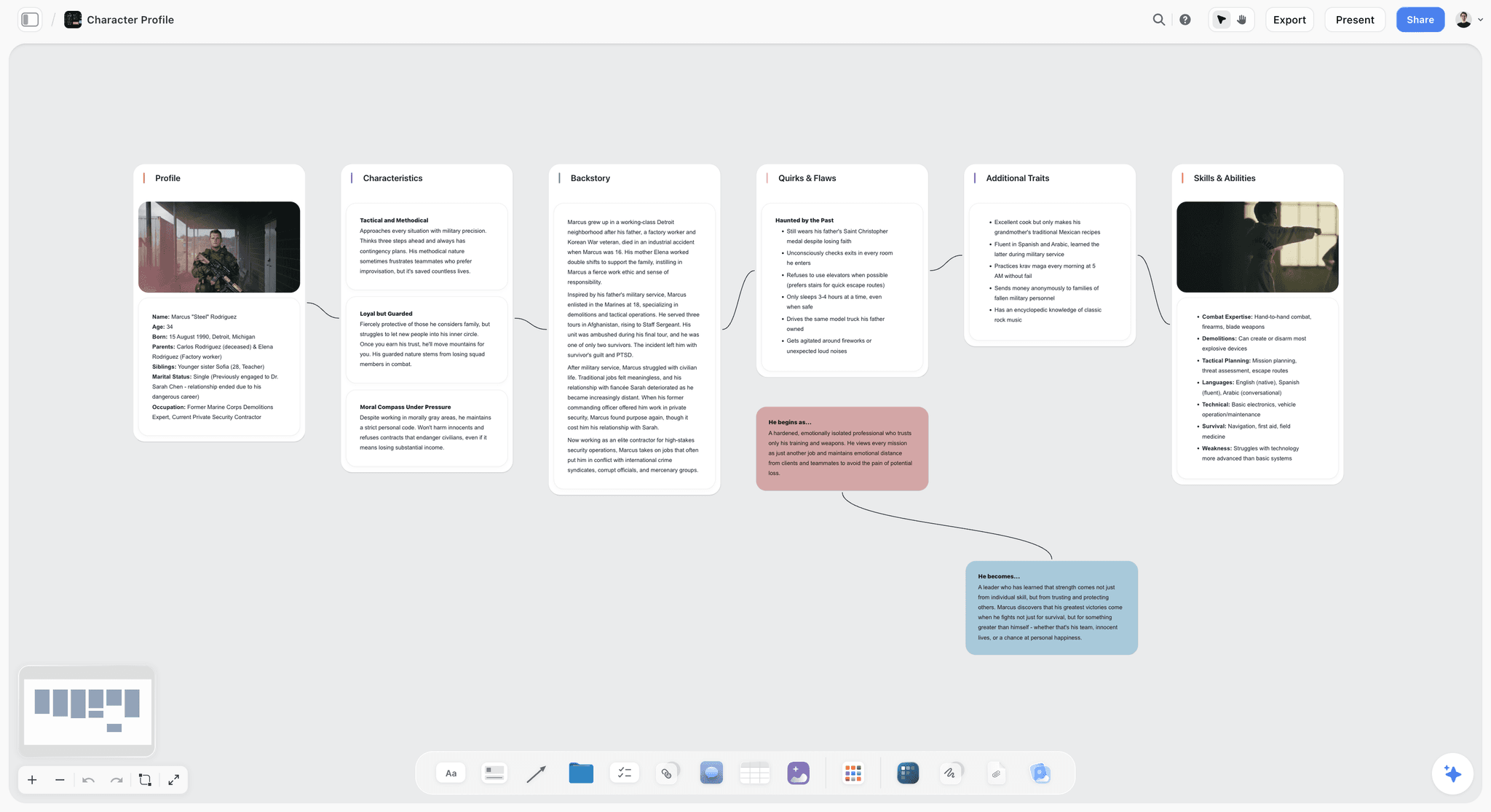
For solo practitioners and small product or UX teams, Storyflow is the tool we recommend for turning research into personas. Persona synthesis is a visual problem, and Storyflow is an AI-aware visual canvas built for exactly this kind of work. The affinity-mapping step in section 4 (spread the research out, cluster the cards, let the personas emerge from the groups) maps directly onto an infinite canvas. You drop interview quotes, support-ticket screenshots, survey data, and analytics notes onto a board as cards, group them into clusters, and build a persona card next to each cluster so every persona stays attached to the evidence behind it.
This is where the AI earns its place. Storyflow's AI reads the full active board, so you can ask it to cluster the recurring goals and frustrations across a pile of research cards and help draft a research-based persona from those patterns. That is the difference between a persona grounded in what users actually said and a made-up demographic profile assembled in a meeting room. The Story Blueprints library (200-plus expert templates) includes profile and research-style layouts so you can start a persona from a proven structure instead of a blank board.
The free plan (free from late 2026) covers unlimited notes, images, and links, unlimited shared boards, basic AI usage, 20 file uploads, and unlimited collaboration, which is enough to build a full persona set with a small team. The Plus plan ($7.99/month annual) adds the 200-plus Story Blueprints library, and unlimited uploads.
One soft caveat: for tagging and coding large volumes of raw interview transcripts, pair Storyflow with a dedicated research repository and use Storyflow as the synthesis-and-planning canvas where the persona itself gets built. That is where it is strongest.
Recommendation: start a Storyflow workspace at storyflow.so and build your first persona set next to the research it came from.
Whatever tool you choose, the rule from section 3 holds: the tool does not make the persona good. The research does.
10) The Bottom Line
A user persona is a research-based profile of a real type of user, built to keep a specific person present in every decision a team makes without them. Done well, it moves debates from opinion to evidence and makes the people you are not building for visible. Done badly, it is a stock photo with a name that gets printed once and never consulted again.
The whole thing turns on one rule: a persona is only as good as the research underneath it. Start from the goal, the way Alan Cooper intended in 1999. Build from interviews, observation, support data, and analytics, not from a meeting room. Cut every field you cannot tie to evidence. Keep the set to three to five and name a primary. Revisit it as the product moves.
If you want to build personas where the profile stays attached to the research that produced it, Storyflow is the canvas we recommend for the job. Drop your interview quotes, survey data, and support notes onto a board, let the AI help cluster them into research-based personas, and keep every profile next to the evidence it came from. Generate a first persona with AI, then start a Storyflow workspace at storyflow.so and build your full persona set next to the research it came from.
9) FAQ: User Personas
What is a user persona in simple terms?
A user persona is a research-based, semi-fictional profile of a specific type of person who uses your product. It captures that user type's goals, behaviors, context, and frustrations so a team can design and build for a specific person instead of a vague abstraction. It is a composite drawn from real research, not a single real customer and not a demographic stereotype.
Who invented the user persona?
Software designer Alan Cooper is credited with introducing personas to a wide audience. He described the technique in his 1999 book "The Inmates Are Running the Asylum." Cooper's version was goal-directed: the persona existed to capture a user's goals so software could be designed for a specific person rather than for an imaginary, infinitely flexible "user."
How many user personas should a product have?
Most products land on three to five personas. One of them should be named the primary persona, the one the product is mostly designed for. More than five usually means the segmentation has been cut too fine and the set has stopped being a usable decision tool. Fewer can be fine for a focused product.
What is the difference between a user persona and a buyer persona?
A user persona describes the person who uses the product and answers how to design and build for them. A buyer persona describes the person who decides to purchase and answers what to say to win the sale. In B2B they are often different people, which is why the terms should not be used interchangeably.
What is the difference between a user persona and an ICP?
An ICP (Ideal Customer Profile) describes the best-fit company or account, built from firmographics like company size, industry, and revenue. A user persona describes an individual person who uses the product, built from behavioral and qualitative research. The ICP answers which accounts to pursue. The persona answers what to build for the people inside them.
How do I create a user persona from research?
Decide what the persona is for, gather real research (interviews, observation, support tickets, analytics), find patterns through affinity mapping, draft each persona starting with its goal, pressure-test every field against the evidence, prioritize a primary persona, and put the persona where decisions happen. The order matters: research first, persona second.
What goes inside a user persona?
The load-bearing fields are goals, current behaviors and workflow, context and constraints, frustrations, and motivations or decision criteria. A name and a representative photo make the persona memorable but carry no analytical weight. Cut any field you cannot tie to research.
What is a proto-persona?
A proto-persona is a persona drafted from team assumptions before any research exists. It is a hypothesis, useful for surfacing and aligning on what a team currently believes. The mistake is treating it as finished. A proto-persona should be labeled as a hypothesis and replaced with a research-based persona once research is done.
Why do user personas fail?
The most common failure is the stock-photo persona: a name, a face, and demographic detail with no research behind it. Other failures include having too many personas, padding personas with irrelevant detail, never validating proto-personas, and treating personas as finished documents that never get updated as the product and market change.
Is jobs-to-be-done better than user personas?
They solve overlapping problems differently. Jobs-to-be-done focuses on the job a user is trying to get done rather than on a profile of who the user is. JTBD is a useful corrective when personas drift toward demographics. A goal-directed persona built Cooper's way and a JTBD job statement are close cousins. The thing JTBD rightly reacts against is the demographic persona, not the goal-focused one.
How often should user personas be updated?
Treat a persona as a living model. Revisit personas every few months as new research accumulates, and after any major shift in the product or market. A persona that has not been touched in two years may be describing a user who no longer exists.
What tools can I use to build user personas?
Three categories help: dedicated UX research repositories (Dovetail, Condens) for tagging and coding interview data at volume, persona template tools and generators (Hubspot's Make My Persona, Xtensio) for the final formatting, and visual canvases like Storyflow for the affinity-mapping and synthesis step where research becomes a persona. The tool matters less than the quality of the research underneath it.
Table of Contents
- Quick Answer: What Is a User Persona?
- Why User Personas Matter
- What Goes Inside a Good Persona
- How to Create a User Persona Step by Step
- A Worked Persona Example
- User Persona vs Buyer Persona vs ICP vs Segment
- Common Persona Mistakes
- Tools and Templates for Building Personas
- FAQ: User Personas
- The Bottom Line
- Author
- Related Reading
Templates to check out for this topic


Research templates you can use in Storyflow
Gather sources, personas, and findings on one canvas, then let the AI read across all of it. Open any of these research boards to start.


See Storyflow in Action
A visual AI workspace where every feature lives inside one canvas. No tab-switching, no context lost.
Build your entire board from a single message
Type what you need in the AI chat at the bottom of your canvas. The AI adds cards, headings, and structure directly onto your board.
Use expert frameworks as AI context
Type @ in the AI chat and choose any Tactic. The AI tailors every response to that framework instead of giving generic advice.
Turn your board into a mind map in seconds
Ask the AI to restructure your canvas as a mindmap. It connects your ideas into a visual hierarchy so you can see how everything relates.
Why Storyflow Exists
Storyflow actually began as a personal tool while working on creative and research projects.
We kept running into the same problem: ideas were scattered everywhere: notes, documents, and whiteboards.
Nothing helped us see how everything connected.
So we started building a workspace designed around how ideas actually grow.
→ Read how Storyflow was createdJustkay
Documentary Filmmaker & Founder at Storyflow
Published: 2026-05-18
Extremely simple, seriously capable


See how easy it is to get started
Watch a real project come together, from a blank board to a finished plan, clicked through step by step.
Start creating with AI and become more productive
Transform your creative workflow with AI-powered tools. Generate ideas, create content, and boost your productivity in minutes instead of hours.