Storyflow vs Coda: Which Is Better in 2026?
Storyflow and Coda solve opposite problems. Coda is the better doc-database and no-code workflow tool; Storyflow is the better visual, canvas-aware AI tool for creative and story thinking. A practitioner's honest, use-case-by-use-case breakdown for 2026.

Category
Comparison
Author

Sara de Klein
Head of Product at Storyflow
Topics
2026-07-15
•
11 min read
•
Comparison- storyflow vs coda
- coda vs storyflow
- storyflow vs coda 2026
- coda alternative
Is Storyflow or Coda better in 2026?
Storyflow and Coda solve opposite problems, so "better" depends entirely on the shape of your work. Coda is the stronger tool for structured docs, databases, and no-code team workflows: if your project fits into tables, buttons, and automations, Coda wins. Storyflow is the stronger tool for visual, spatial creative thinking: an infinite canvas of cards and images with an AI that reads your entire board, so it wins for story, marketing, and idea work that has not hardened into a schema yet. The deciding question is short. If you can name the columns before you start, you want Coda. If you cannot, you want a canvas.

Full disclosure: Storyflow is our own product, so here is the honest split. For structured docs, databases, and no-code team workflows or apps, Coda genuinely wins: Storyflow has no tables, formulas, or automations, and we would send you to Coda without hesitation. Storyflow leads only for visual, spatial, AI-assisted creative and story thinking, which is a different job than the one Coda was built for. We rank Storyflow first here because this comparison is read mostly by people doing that visual, still-forming work, and we link to Coda and every alternative so you can judge the fit yourself.
Quick Comparison
These four cover the split this comparison forces: a visual AI canvas, a doc-database platform, a doc-database all-rounder, and a pure creative board.
| Tool | Best For | AI Features | Price |
|---|---|---|---|
| Storyflow | Visual, spatial creative and story thinking | Canvas-aware AI reads full board plus @-mentions | $7.99 mo annual (free plan late 2026) |
| Coda | Structured docs, databases, no-code team apps | Coda AI / Coda Brain in docs and tables | Free / ~$10 per maker mo |
| Notion | Docs, databases, and team wiki all-rounder | Notion AI (bundled) | Free / ~$10 user mo |
| Milanote | Pure visual mood and creative boards | None | Free / ~$10 mo |
Key Takeaways
- The Schema Test settles almost every choice: if you can name the columns (Status, Owner, Due Date) before you start, you want Coda; if you cannot, you want a canvas.
- The core difference is the primitive: Coda is a document that behaves like a database (tables, formulas, buttons); Storyflow is a canvas that behaves like a mind (cards, notes, images in space).
- Choose Coda for structured, repeatable systems: team wikis, project trackers, OKR systems, CRMs, roadmaps, and any internal no-code app.
- Choose Storyflow for emergent creative work: documentary research, story development, campaign shaping, video planning, and mood boards that have not hardened into a schema.
- The AI works on different surfaces: Storyflow's reads your full active board plus 1 blueprint and 3 @-mentioned documents, while Coda AI and Coda Brain reason over docs, tables, and connected apps.
- Where Coda wins outright: Storyflow is not a database, has no formulas, and cannot automate a workflow, so for that entire category the answer is Coda.
- Pricing follows the model: Coda charges per Doc Maker for teams building shared systems, while Storyflow is flat per account (Plus $7.99/mo annual, $9.99 monthly) priced for thinking without counting seats.
Two Tools That Look Alike and Are Not
Coda and Storyflow both market themselves as flexible workspaces, and both let you pull a scattered project into one place instead of ten. That is where the resemblance ends.
Coda is a document that behaves like a database. You build tables, wire buttons to them, write formulas, connect Packs to Slack or Jira, and automate the whole thing into a working system: a CRM, an OKR tracker, a launch hub, a lightweight internal app. Storyflow is a canvas that behaves like a mind. You drop cards, images, links, and notes onto an infinite board, arrange them in space, and let a canvas-aware AI reason over the whole layout while you think.
I build Storyflow, and I came to it as a documentary filmmaker, not a database engineer. That background matters here, because it is exactly the line this comparison runs along. For years I tried to run film research, treatments, and marketing plans inside doc-and-table tools, and the structure always arrived before the thinking was ready. The material did not want to be a table yet. It wanted to be spread out, moved around, and connected. That friction is the reason Storyflow exists, and it is also the reason Coda is genuinely better than Storyflow for a large class of work I will name plainly below.
So this is not a hit piece on Coda. Coda is excellent software. The point is that the two tools are shaped for different moments in a project, and picking by brand instead of by shape is how people end up fighting the grain.
The Schema Test: The One Question That Settles It
Here is the single diagnostic that decides almost every Storyflow-versus-Coda choice. Call it the Schema Test.
Before you open either tool, try to name the columns. Not the content, the columns. The fields. Status, Owner, Due Date, Priority, Stage. If you can list them cleanly, your work is already structured, and a structured tool will serve it best. That is Coda's home turf: define the schema, then pour the content in, then automate the parts that repeat.
Now run the same test on a documentary you are still developing, a brand campaign you are still shaping, or a video essay whose argument you have not found yet. You cannot name the columns, because the columns do not exist. The pieces are half-formed. You have a quote, an image, a half-argument, a reference, and a hunch that two of them are connected. Force that into a table and you flatten it before you understand it.
If you can name the columns before you start, you want Coda. If you cannot, you want a canvas. The Schema Test is not about which tool is more powerful. It is about which end of the thinking you are standing on. Coda is built for the end where structure is known. Storyflow is built for the end where structure is still emerging.
Cowan's research on working memory (Behavioral and Brain Sciences, 2001) found that people hold roughly four chunks of information in mind at once. When the pieces of a project outnumber four and have not been organized yet, you have to externalize them somewhere spatial before you can see the pattern. That is the cognitive job a canvas does and a table does not.
Where Coda Wins
Coda wins the moment your work has a repeatable structure, and it wins decisively. Storyflow does not compete here, and pretending otherwise would fail the Schema Test on the first question.
Coda's tables are real databases: relational links between tables, formulas across rows, filtered views, and grouping. Its buttons and automations turn a doc into software that does things, such as advancing a status, sending a Slack ping, or generating this week's report on a schedule. Its Packs connect to hundreds of external tools so your doc pulls live data from Jira, GitHub, Google Calendar, or your CRM. Coda AI works inside that structure, writing and summarizing across your tables, and with Coda Brain it reaches across connected enterprise apps. Grammarly acquired Coda in December 2024 to build exactly this: an AI-native productivity platform where company knowledge and agents live inside the doc.
The list of jobs where Coda beats Storyflow outright is long and honest: team wikis, project trackers, OKR systems, product roadmaps, CRMs, applicant pipelines, inventory sheets, any internal no-code app, and any workflow where the same structure repeats every week. Storyflow is not a database, has no formulas, and cannot automate a workflow, so for this entire category the answer is Coda.
If that is your work, stop reading comparisons and go build it in Coda. This post cannot honestly send you anywhere else.
Where Storyflow Wins
The friction Storyflow was built to remove is the one the Schema Test exposes: the moment structure arrives before your thinking is ready for it. When your material is still a loose pile of ideas, sources, images, and fragments, a table forces premature order and a canvas lets order emerge.
Storyflow is an infinite canvas where cards, notes, images, links, and walls sit in space, plus structured documents when you need prose. What makes it more than a pretty whiteboard is the AI. Storyflow's AI reads your full active canvas board by default, every card and note and image on it, plus up to one Story Blueprint and up to three Documents you @-mention in the chat. So when you ask "which of these fifteen research cards actually support the film's central conflict," it reasons over the real board in front of you, not a pasted summary. Coda's AI is powerful, but it reasons over your doc and tables. Storyflow's reasons over a spatial layout of half-formed ideas, which is a different job.
The Story Blueprints library (200+ creative frameworks on the Plus, Pro, and Max plans, including Hero's Journey, AIDA, and Retention Hooks) drops proven structure onto the canvas when you want it, without forcing a schema when you do not. It is not that Storyflow thinks better than Coda. It is that Storyflow thinks in the shape creative work actually arrives in.
For documentary research, story development, campaign shaping, video planning, mood boards, and any thinking that lives in space before it lives in a table, Storyflow wins. That is a narrower lane than Coda's, and it is a lane Coda does not really enter.
Storyflow vs Coda: Head-to-Head
Read this dimension by dimension as "which shape fits your work," not "which tool has more features," because feature count is not the question. Shape is.
| Dimension | Storyflow | Coda |
|---|---|---|
Core shape | Infinite visual canvas plus documents | Document and database hybrid |
Best for | Visual, spatial creative and story thinking | Structured docs, databases, no-code apps |
Data model | Cards, notes, images, links, walls | Tables, rows, formulas, relations |
AI scope | Canvas-aware: full board plus 1 blueprint and 3 docs @-mentioned | Doc and table-aware: Coda AI and Coda Brain across docs and connected apps |
Automation | None | Buttons, automations, Packs (hundreds of integrations) |
Templates | 200+ Story Blueprints (Plus and up) | Large doc and app template gallery |
Real-time collaboration | Unlimited shared boards on Free | Free editors and viewers; Doc Makers paid |
Offline / local-first | No (cloud-only) | Limited |
Pricing model | Flat per account | Per Doc Maker (per creator seat) |
Starting price | Free / $7.99 mo (Plus, annual) | Free / about $10 per Doc Maker mo (annual) |
Pricing is as of 2026; verify current numbers on each site before you buy.
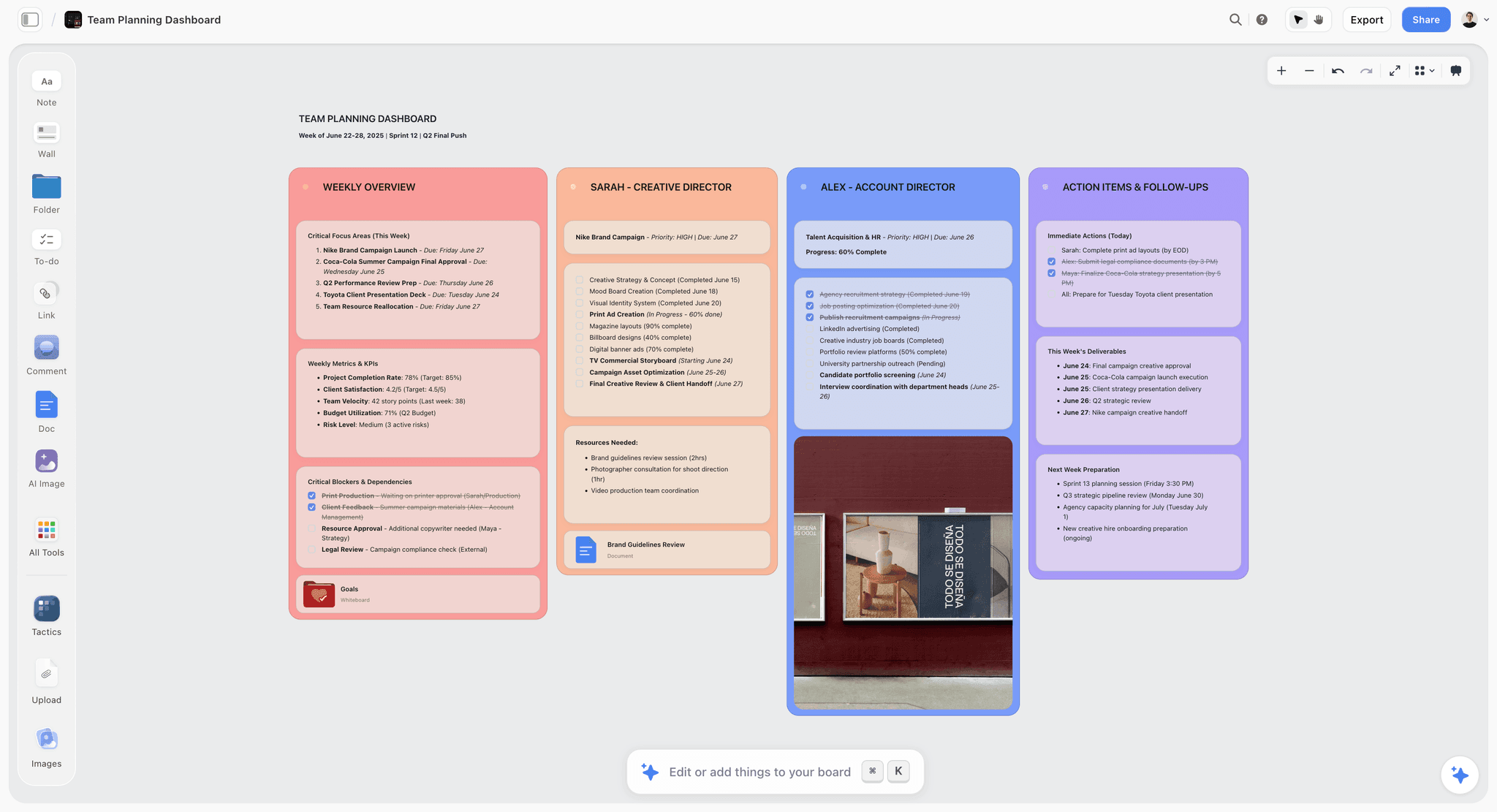
A Storyflow visual canvas of cards and images contrasted with a Coda-style doc-and-table workspace
Pricing: Per Doc Maker vs Flat Per Account
The pricing models are as different as the products, and the difference matters more than the headline numbers.
Coda charges per Doc Maker. Anyone who only edits or views docs is free, but every person who creates and manages docs is a paid seat. As of 2026, Coda's Pro plan is about $10 per Doc Maker per month billed annually (around $12 monthly) and the Team plan is about $30 per Doc Maker per month annually (around $36 monthly), with a free tier that caps shared docs and an Enterprise tier on custom pricing. Verify the current figures on coda.io, because plan structures change. For a team of makers the per-seat model adds up, which is the trade-off for the depth Coda gives you.
Storyflow charges flat per account, never per user. Free is $0 with unlimited notes, images, links, unlimited shared boards, and basic AI. Plus is $7.99 per month billed annually ($9.99 monthly) and unlocks the 200+ Story Blueprints and increased AI usage. Pro is $14 per month annually ($19 monthly) and adds AI image generation and far more AI usage. Max is $39 per month annually ($49 monthly) and adds a team workspace with roles and permissions. There are no per-seat charges and no volume discounts, because the price does not scale with headcount.
So the pricing question echoes the Schema Test. Coda's per-maker model is priced for teams building shared systems. Storyflow's flat model is priced for thinking, solo or shared, without counting seats.
Where Storyflow Falls Short
Three honest limitations, because a comparison that only lists a product's strengths is marketing, not analysis.
First, Storyflow is not a database. There are no relational tables, no formulas, no filtered row-and-column views. If your work is fundamentally structured data, Storyflow cannot hold it and Coda is the correct tool, full stop.
Second, Storyflow does not automate. There are no buttons, no triggered actions, no scheduled workflows, and no Packs-style integration layer pulling live data from Jira or your CRM. Storyflow is where you think a project through, not where you run its recurring operations.
Third, Storyflow is cloud-only. There is no offline or local-first mode, so for privacy-regulated work with strict local-storage requirements it is the wrong fit. It is also younger than Coda and Notion, its documents are canvas-card-shaped rather than built for long structured reports, and its template depth outside creative frameworks is thinner. If your output is a formal database-backed doc, those gaps are real.
None of these are secrets, and none of them are things a canvas is supposed to do. They are the cost of being shaped for emergent thinking instead of structured systems.
Which Should You Use?
Run the Schema Test, then use these rules.
If your work fits tables, needs formulas or automations, or is a shared system a team runs every week, use Coda. Project trackers, wikis, CRMs, roadmaps, and internal no-code apps all belong there.
If your work is visual, still forming, and lives in space before it lives in a schema, use Storyflow. Documentary and story research, campaign development, video and content planning, mood boards, and early strategy all belong there.
If you need a doc-and-database all-rounder that is friendlier than Coda's app-builder depth, look at Notion (see the comparison and alternatives links below). If you want visual creative boards but not Storyflow's AI, Milanote is the closest pure-canvas option, though it has no canvas-aware AI.
And if your project has both halves, which is common, the honest answer is to use both: think it out on a Storyflow canvas, then build the repeatable system in Coda once the structure is finally clear. Using one tool for the wrong half is the actual mistake, not choosing the wrong brand.
The Bottom Line
Storyflow versus Coda is not a fight between a better and a worse tool. It is a choice between two shapes. Coda is where you build the system. Storyflow is where you figure out what the system should be.
Coda wins structured docs, databases, and no-code team workflows, and it wins them clearly. Storyflow wins visual, spatial, AI-assisted creative thinking, and it wins that clearly too. If you can name the columns before you start, you want Coda. If you cannot, you want a canvas.
If your work is project-shaped and visual and you have been forcing it into tables, take your most active project and rebuild its thinking on a Storyflow canvas for one week. By the end, the shape of your work will have told you which tool it wanted all along. Start on a Storyflow canvas.
FAQ: Storyflow vs Coda
Is Storyflow or Coda better in 2026?
It depends on the shape of your work. Coda is better for structured docs, databases, and no-code team workflows. Storyflow is better for visual, spatial creative and story thinking with a canvas-aware AI. If you can name the columns before you start, choose Coda; if you cannot, choose Storyflow.
What is the main difference between Storyflow and Coda?
Coda is a document-database hybrid built to assemble structured systems from tables, buttons, and automations. Storyflow is an infinite visual canvas built to think through creative work in space, with an AI that reads your whole board. One builds systems; the other develops ideas before they have a system.
Can Storyflow replace Coda?
Not for structured work. Storyflow has no tables, formulas, or automations, so it cannot replace Coda for CRMs, trackers, wikis, or internal apps. It replaces Coda only for the earlier, visual, still-forming stage of a project, which Coda was never designed for.
Can Coda do what Storyflow does?
Partly, but not in the same shape. Coda can hold notes and embed content, but it is a document-and-table surface, not an infinite spatial canvas, and its AI reasons over docs and tables rather than over a board of loosely arranged ideas. For visual, emergent thinking, Storyflow is the better fit.
Is Coda's AI the same as Storyflow's AI?
No. Coda AI and Coda Brain work inside your documents and tables and can reach across connected enterprise apps. Storyflow's AI is canvas-aware: it reads your full active board plus up to one blueprint and three documents you @-mention. They are AIs built for different surfaces.
How much does Coda cost in 2026?
As of 2026, Coda has a free tier, a Pro plan at about $10 per Doc Maker per month billed annually (around $12 monthly), and a Team plan at about $30 per Doc Maker annually (around $36 monthly), plus custom Enterprise pricing. Only Doc Makers pay; editors and viewers are free. Verify current pricing on coda.io.
How much does Storyflow cost?
Storyflow is free at $0, with Plus at $7.99 per month billed annually ($9.99 monthly), Pro at $14 per month annually ($19 monthly), and Max at $39 per month annually ($49 monthly). Pricing is flat per account, not per user, with no volume discounts.
Is Storyflow good for teams?
Yes, for creative teams thinking together. Free includes unlimited shared boards and unlimited collaboration, and the Max plan adds a team workspace with roles and permissions. For teams running structured operational systems with per-role databases and automations, Coda is the stronger team tool.
Does Coda or Storyflow have better templates?
They have different templates. Coda offers a large gallery of doc and app templates for structured systems. Storyflow offers 200+ Story Blueprints (on Plus and up) built for creative frameworks like Hero's Journey, AIDA, and Retention Hooks. Match the template type to your work.
Should I use Storyflow and Coda together?
Often, yes. Most projects have an emergent half and a structured half. Develop the thinking visually on a Storyflow canvas, then build the repeatable system in Coda once the structure is clear. Using the right tool for each half beats forcing one tool to do both.
Table of Contents
- Key Takeaways
- Two Tools That Look Alike and Are Not
- The Schema Test: The One Question That Settles It
- Where Coda Wins
- Where Storyflow Wins
- Storyflow vs Coda: Head-to-Head
- Pricing: Per Doc Maker vs Flat Per Account
- Where Storyflow Falls Short
- Which Should You Use?
- The Bottom Line
- FAQ: Storyflow vs Coda
- Related Reading
Templates to check out for this topic


Workspace templates you can use in Storyflow
Keep research, notes, and plans on one canvas the AI can read, instead of scattered across docs and tabs. Open a template and make it your second brain.


See Storyflow in Action
A visual AI workspace where every feature lives inside one canvas. No tab-switching, no context lost.
Build your entire board from a single message
Type what you need in the AI chat at the bottom of your canvas. The AI adds cards, headings, and structure directly onto your board.
Use expert frameworks as AI context
Type @ in the AI chat and choose any Tactic. The AI tailors every response to that framework instead of giving generic advice.
Turn your board into a mind map in seconds
Ask the AI to restructure your canvas as a mindmap. It connects your ideas into a visual hierarchy so you can see how everything relates.
Why Storyflow Exists
Storyflow actually began as a personal tool while working on creative and research projects.
We kept running into the same problem: ideas were scattered everywhere: notes, documents, and whiteboards.
Nothing helped us see how everything connected.
So we started building a workspace designed around how ideas actually grow.
→ Read how Storyflow was createdSara de Klein
Head of Product at Storyflow
Published: 2026-07-15
Extremely simple, seriously capable


See how easy it is to get started
Watch a real project come together, from a blank board to a finished plan, clicked through step by step.
Start creating with AI and become more productive
Transform your creative workflow with AI-powered tools. Generate ideas, create content, and boost your productivity in minutes instead of hours.