The 11 Best Visual Planning and Whiteboard Apps for Android in 2026
Freeform is one app doing three jobs. Android gives you three apps doing one job each. Work out which door you actually wanted and the app stops being a hard question.

Category
Tools & Software
Author

Sara de Klein
Head of Product at Storyflow
Topics
2026-08-13
•
19 min read
•
Tools & SoftwareTable of Contents
- Key Takeaways
- The Freeform-Shaped Hole, and the Three Doors Behind It
- At a Glance: The 11 Tools Compared
- How I Ranked These
- Quick Picks by Job Type
- 1. Miro
- 2. Milanote
- 3. Xmind
- 4. Samsung Notes
- 5. Canva Whiteboards
- 6. Storyflow
- 7. Concepts
- 8. Obsidian Canvas
- 9. SimpleMind
- 10. Excalidraw
- 11. Pinterest
- What to Actually Pay For
- Tools to Avoid for This Job
- What No Tool on This List Does
- The Bottom Line
- FAQ: Visual Planning and Whiteboard Apps for Android
- Related Reading
Templates to check out for this topic


- freeform android alternative
- apps like freeform for android
- best free mind map app for android
- android whiteboard app
- mood board app android and iphone
- infinite canvas android
- s pen whiteboard app
- offline mind mapping android
What are the best visual planning and whiteboard apps for Android in 2026?
Android has no Apple Freeform, and most people searching for one want one of three different apps. Miro ranks first: it is the only tool here with a maintained native Android app that opens all three doors. Milanote wins if you wanted a mood board you can add to from a phone. Xmind and SimpleMind win mind mapping outright, offline and free. Samsung Notes is the honest pick for S Pen owners, and Canva Whiteboards is the best free canvas most Android users already have installed.

Full disclosure: Storyflow is our product, so here is the honest placement. It ranks sixth of eleven, not first. It wins on one narrow ground: it is the strongest board on this list for planning something complicated and then questioning the whole plan, because the AI reads your full active canvas plus up to one Tactic and three Documents you @-mention. On Android it genuinely loses. There is no Storyflow app in the Play Store, so it is a browser tab on every Android device. There is no offline mode at all, so airplane mode gives you a connection error rather than a board. There is no S Pen support: no pressure, no tilt, no tuned palm rejection. There is no phone specific layout, so on a 6 inch screen you pinch around a canvas built for a desktop. It is also paid only during early access, so there is no free path unless a paid member invites you. Miro, Milanote, Xmind, Samsung Notes and Canva all beat it on the Android questions this post is about.
Quick Comparison
Eleven Android options ranked by which of the three doors they open (sketch, collect or think), whether they ship a real Play Store app, and what happens when you lose signal.
| Tool | Best For | AI Features | Price |
|---|---|---|---|
| Miro | All three doors, shallowly, in a real Android app | AI clustering and summaries on paid tiers | Free plan (3 boards), Starter about $8 per user mo annual |
| Milanote | The collect door: mood boards on Android and iPhone | None meaningful | Free up to 100 items, Pro about $10 to $13 mo |
| Xmind | The think door: mind maps fully offline on a phone | Limited AI outlining | Free tier, Pro about $60 per year |
| Storyflow | Think and collect on one canvas, browser only on Android | AI reads the full active board plus 1 Tactic and 3 Documents | $7.99 mo annual (free plan late 2026) |
Key Takeaways
- Android has no first party Freeform equivalent, and no single third party app replaces all of it.
- Freeform bundles three jobs: sketching, collecting references, thinking in a structured map. Buying the wrong one is the real failure.
- Only five tools here ship a real Play Store app that works on a phone. The rest are websites in a tab.
- S Pen changes the answer. Samsung Notes and Concepts beat every collaboration whiteboard on pressure, tilt and palm rejection.
- Miro's Android app is the best all rounder, but on a phone it is a viewer, not a build surface.
- Storyflow ranks sixth: browser only, no Play Store app, no offline mode, no stylus support.
- Free is not the constraint. Six tools here have genuinely usable free tiers.
Plan on the big screen, check on the small one
Storyflow is a browser based infinite canvas where notes, images, references and structure live on one board, and the AI reads the whole thing so you can question the plan rather than one node. There is no Android app yet, so use it on a laptop or an Android tablet in landscape. Paid-only during early access; the Free plan lands before the end of 2026.

The Freeform-Shaped Hole, and the Three Doors Behind It
Apple Freeform is not a whiteboard app. It is three apps wearing one icon, free on every iPhone, which is why its absence on Android reads as a hole rather than a missing feature.
Freeform is one app doing three jobs. Android gives you three apps doing one job each.
Door one: sketch. An infinite canvas you draw on. Diagrams, arrows, wireframes, a plan scribbled during a call. This door is about input: stylus, pressure, latency.
Door two: collect. Somewhere to drop images, links and swatches until a direction emerges. Mood boards, renovations, a film's look. This door is about capture and arrangement.
Door three: think. A branching structure you type into. Mind maps, outlines, project breakdowns. This door is about text and hierarchy, and it is what most people mean by "brainstorm".
Freeform does all three passably and none brilliantly. Its trick is that it costs nothing, is preinstalled, and syncs without configuration. That is what Android lacks, not the drawing engine.
So the question is which door you wanted, and whether you will open a second app for the other two.
At a Glance: The 11 Tools Compared
| Tool | Door it opens | Play Store app | Offline on a phone | S Pen support |
|---|---|---|---|---|
Miro | All three, shallowly | Yes | Cached only | Basic |
Milanote | Collect | Yes | Read only | None |
Xmind | Think | Yes | Full | Not needed |
Samsung Notes | Sketch | Preinstalled | Full | Best here |
Canva Whiteboards | Collect, sketch | Yes | Very limited | Basic |
Storyflow | Think, collect | No, browser only | None | None |
Concepts | Sketch | Yes | Full | Pressure, tilt |
Obsidian Canvas | Think | Yes | Full | None |
SimpleMind | Think | Yes | Full | Not needed |
Excalidraw | Sketch | No, browser only | Partial, PWA | Basic |
Collect | Yes | Cached feed | None |
How I Ranked These
I come from documentary, where the plan lives on whatever screen is in your hand. I ran real project boards on a Galaxy S24 and a Galaxy Tab S9 to see which of these survive that.
Five criteria, in order.
1. Which door does it open? The test: hand it to someone who wanted a mood board and watch them try to make one. Mind mappers fail instantly.
2. Real app or website in a tab? The test: turn on airplane mode. A browser tab shows a connection error. A real app shows your board.
3. Does the phone layout work? On 6 inches, do you get a phone shaped interface, or a board built for a 27 inch monitor.
4. Does it respect the S Pen? Pressure, tilt and palm rejection either work or they do not. Most whiteboards treat the pen as a thin finger.
5. What does it cost to be useful? Free tiers on Android are unusually good, so anything paid has to beat a real free option.
Pricing is as of August 2026 and changes frequently. Verify with each vendor.
Quick Picks by Job Type
- Best overall Android whiteboard: Miro. The only real app opening all three doors.
- Best mood board on Android and iPhone: Milanote. The collect door done properly.
- Best free mind map app for Android: Xmind. Real app, real offline, real free tier.
- Best for S Pen: Samsung Notes. Preinstalled, and the best pen handling on Android.
- Best free canvas you already have: Canva Whiteboards.
- Best offline sketching: Concepts. Vector canvas with pressure and tilt.
- Best if you distrust the cloud: Obsidian Canvas. Local files, free, works offline.
- Best zero cost collector: Pinterest. One door, opened perfectly.
1. Miro
The verdict. The closest Android has to one app that opens all three doors.
Best for. Team boards you read and edit lightly from a phone or Android tablet.
Pricing. Free plan with three editable boards. Starter roughly $8 per user per month annually, Business roughly $16, as of August 2026.
Why it ranks here. Miro treats Android as a real client: the app is maintained and opens large boards without falling over.
On the door test it scores partial marks three times. Sketching is basic, collecting is clumsier than Milanote, dedicated mappers type faster.
The phone layout is a viewer with editing bolted on. On a Galaxy Tab it becomes a real working surface.
Strengths.
- Maintained native Android app, not a wrapped website.
- Handles large boards on a tablet without degradation.
- Three editable boards free is enough for one person.
- Identical boards across Android, iPhone, web and desktop.
Limitations.
- Phone layout is a viewer, not a build environment.
- Offline is cache based and unreliable as a plan.
- Drawing is weak against Concepts or Samsung Notes.
The trade off. The widest door on Android, and none of the three it opens is best in class.
2. Milanote
The verdict. The collect door done properly, and the best mood board that runs on Android and iPhone alike.
Best for. Mood boards and reference collections that are mostly images.
Pricing. Free plan capped at 100 notes, images and links. Pro runs roughly $10 to $13 per month depending on billing, as of August 2026.
Why it ranks here. Milanote treats an image as content rather than a pasted rectangle, so forty references still read as a composition.
The collect door is the most searched of the three, and nothing opens it as cleanly from a phone. Capture on the phone, arrange on a bigger screen.
The 100 item cap fills fast, because links and notes count too. There is no real sketching and no stylus story.
Strengths.
- Best image handling of anything on this list.
- The free tier is a real free tier, not a trial.
- Identical app on Android and iPhone.
- Boards survive being sent to a client unexplained.
Limitations.
- The cap counts notes and links, not just images.
- Essentially no drawing and no stylus support.
- Offline is read oriented, so building without signal fails.
The trade off. If your Freeform use was dropping pictures onto a board, install this and stop reading.
3. Xmind
The verdict. The best free mind map app for Android, and one of the few here that works completely offline.
Best for. Structured thinking, outlines and project breakdowns you want in your pocket.
Pricing. Free tier with the core mapping engine. Xmind Pro runs roughly $60 per year, as of August 2026.
Why it ranks here. The think door is where Android is strongest, because a map collapses and a phone shaped column of branches is a legitimate way to work.
The app is real. Files sit locally, maps open with no connection, and typing branches is fast.
The free tier is a working product, not a demo. It sits below Miro and Milanote only because it opens one door.
Strengths.
- Full offline editing on a phone with local files.
- Free tier is usable indefinitely, not a trial.
- Phone layout designed for a phone, not shrunk from a tablet.
- Exports to formats other tools can open.
Limitations.
- One door only. No image board, no real sketching.
- Real time collaboration is weak next to Miro.
- Some exports and themes sit behind Pro.
The trade off. The most reliable app on this list doing the narrowest job on this list.
4. Samsung Notes
The verdict. If you own an S Pen, this is the sketch door, and it is already installed and free.
Best for. Handwriting and diagramming on a Galaxy phone or tablet with the pen.
Pricing. Free, preinstalled on Galaxy devices, as of August 2026.
Why it ranks here. Other apps treat the S Pen as a thin finger. This treats it as a pen: pressure, tilt and palm rejection all work, and ink lands under the nib.
For scribbling a rough plan by hand while thinking, nothing on Android comes closer. It is fully offline and syncs across Samsung devices with no setup.
It is not higher because it is page based, not an infinite canvas. There is no board to arrange things across, which is fatal for spatial planning.
Strengths.
- Best pen handling on Android by a wide margin.
- Free, preinstalled, no account setup.
- Fully offline with automatic sync across Samsung devices.
- Lock screen pen shortcut for fast capture.
Limitations.
- Page based rather than infinite, so no spatial board.
- Samsung devices only, no iPhone or web client.
- Almost no collaboration, and no mind map structure.
The trade off. The best input experience on the platform, on the least board like structure here.
5. Canva Whiteboards
The verdict. The best free infinite canvas that most Android users already have installed and never open.
Best for. Visual planning where the output also has to look presentable.
Pricing. Free tier includes whiteboards. Canva Pro is roughly $15 per month, as of August 2026.
Why it ranks here. Canva's Android app is excellent, and the whiteboard inside it is a real infinite canvas with sticky notes, shapes, connectors and images.
The advantage nothing else has is what happens next: a board converts into a presentation without leaving the app.
It ranks fifth because the whiteboard is a feature inside a design product. Large boards slow on a phone and almost everything streams.
Strengths.
- Real infinite canvas in a free tier with no board limit.
- Excellent Android app on both phone and tablet.
- Boards convert into presentable output in the same app.
- Enormous element library for the collect door.
Limitations.
- Barely functional offline, since assets and interface stream.
- Large boards slow noticeably on a phone.
- Mind mapping is a layout style, not a real structure.
The trade off. Free, capable and everywhere, as long as you have signal.
6. Storyflow
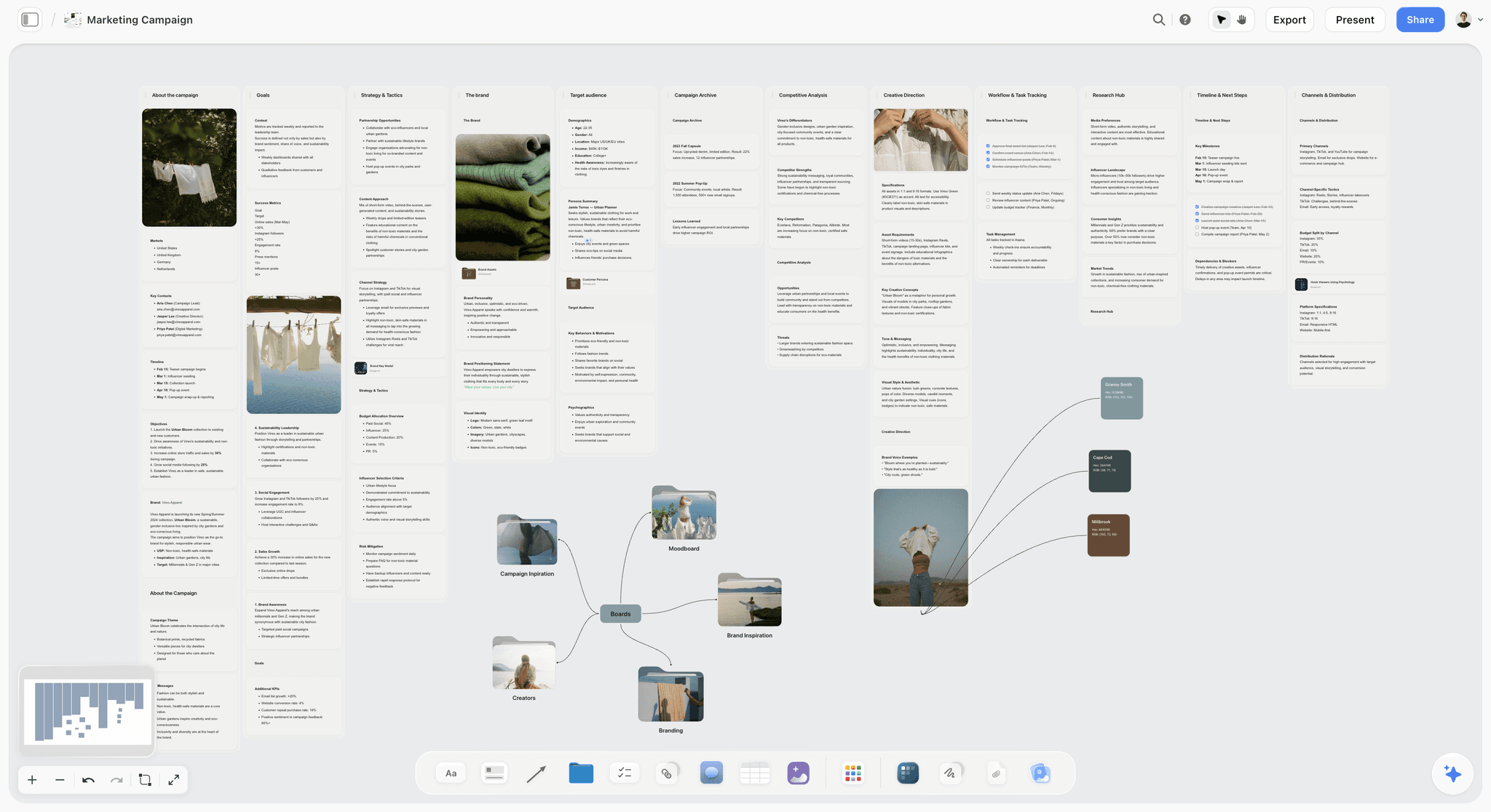

The verdict. The strongest thinking canvas here and the weakest Android story here, which is why it sits in the middle.
Best for. Project and story planning with AI that has read the whole board, on a laptop or an Android tablet in a browser.
Pricing. Paid only during early access. Plus is $7.99 per month billed annually or $9.99 monthly, adding 200 plus Story blueprints and unlimited file uploads. Pro is $14 per month billed annually or $19 monthly, adding AI image generation, roughly twenty times more AI usage and memory across conversations. Max is $39 per month billed annually or $49 monthly, adding 40 times more AI and Team Workspace with permissions and roles. Pricing is flat per account rather than per seat, and anyone a paid member invites joins free. The Free plan launches before the end of 2026. Prices as of August 2026.
Why it ranks here. Storyflow opens the think door and much of the collect door on one canvas, and the AI reads your full active board plus up to one Tactic and three Documents you @-mention. You question the plan as a whole, not the node in front of you.
None of that changes the Android facts. There is no Storyflow app in the Play Store. It is a website in Chrome, so it fails criterion two outright and criterion four before you pick up a pen.
It ranks sixth rather than lower because on a tablet it is real work, and nothing above it competes at interrogating a complicated plan. It ranks sixth rather than higher because five tools above it open on a phone with no signal.
Strengths.
- AI reads the full active board, so you question the plan, not one node.
- Notes, images, references and structure coexist on one canvas.
- Flat per account pricing, and invited collaborators join free.
- 200 plus Story blueprints give a board its starting structure on Plus.
- Works in the browser on Android tablets in landscape.
Limitations.
- No Android app. Nothing in the Play Store, so it is a browser tab on every Android device.
- No offline mode at all. Lose signal and you lose the board until you reconnect.
- No S Pen optimisation: no pressure, no tilt, no tuned palm rejection.
- No phone specific layout, so on 6 inches you pinch around a desktop canvas.
- Paid only during early access, so there is no free path unless a paid member invites you.
The trade off. The best board here to think in, on the worst platform story here for Android.
7. Concepts
The verdict. The sketch door done properly: a real infinite vector canvas with full offline support.
Best for. Drawing and visual note taking with a stylus on an Android tablet.
Pricing. Free base app. The full feature subscription runs roughly $30 per year, with one time unlock options, as of August 2026.
Why it ranks here. Concepts means infinite canvas literally. Ink is vector, so you can zoom in without pixelation and strokes stay editable.
It supports S Pen pressure and tilt properly and works entirely offline. For a floor plan or a shot diagram by hand, it beats every whiteboard here.
It ranks seventh because it is a drawing tool, not a planning tool: no collaboration, no text structure, no reference collecting.
Strengths.
- True infinite vector canvas with editable strokes.
- Full offline operation with local files.
- Proper S Pen pressure and tilt handling.
- The free base app is usable before you pay.
Limitations.
- No collaboration and no shared boards.
- No mind mapping or structured text.
- The precision tools have a real learning curve.
The trade off. The best ink on Android, with none of the organising features a planner needs.
8. Obsidian Canvas
The verdict. The offline answer for people who want their plan to be files on their own device.
Best for. Linked thinking and project mapping with total local control.
Pricing. Free for personal use. Optional Sync is roughly $4 to $5 per month, as of August 2026.
Why it ranks here. The Android app is real, fast and fully offline, and the Canvas plugin gives you an infinite board where cards are notes, images, files or links.
It opens the think door with a twist: the board and your notes are the same material. A card is a note you can open and link from elsewhere.
It ranks eighth because canvas on a phone is cramped and reaching a usable setup takes real effort. Vaults, plugins and sync are on you.
Strengths.
- Fully offline with files stored on your device.
- Free for personal use with no capability cap.
- Canvas cards are real notes, so board and writing are one system.
- No lock in: Markdown and JSON on disk.
Limitations.
- Canvas on a phone screen is genuinely uncomfortable.
- Setup is a project, not an install.
- No stylus story and no real time collaboration.
The trade off. Total ownership and total offline reliability, paid for in setup time.
9. SimpleMind
The verdict. A mind mapper that has done one job well on Android for over a decade, with a one time price.
Best for. Fast mind maps on a phone with no subscription and no account.
Pricing. Free version available. The Pro unlock is a one time purchase of roughly $30 on Android, as of August 2026.
Why it ranks here. SimpleMind is for people who want the think door open and are tired of renting software. Buy once, use offline, keep the files.
The app behaves like something built for a phone, with editing gestures that work under a thumb.
It ranks ninth only because Xmind covers the same door with a stronger free tier.
Strengths.
- One time purchase rather than a subscription.
- Full offline editing with local files.
- Long running, stable, phone first Android app.
- Free version is enough to evaluate properly.
Limitations.
- Interface looks dated next to Xmind and Miro.
- One door only, with no image board or sketching.
- Cross platform sync sits behind the Pro unlock.
The trade off. Buy once, own it, and accept that it does exactly one thing.
10. Excalidraw
The verdict. The fastest free sketch canvas on the web, with no Android app and no pretence of one.
Best for. Quick hand drawn diagrams you need in thirty seconds and may not keep.
Pricing. Free and open source. Excalidraw Plus is roughly $7 per user per month, as of August 2026.
Why it ranks here. It opens in a browser with no account and no onboarding, and the rough style signals that a diagram is a draft rather than a decision.
Installed as a progressive web app it caches and opens without a connection, which is better offline behaviour than several native apps here.
It ranks tenth because there is no Play Store app, touch is cramped, and there is no collecting model and no thinking structure.
Strengths.
- Free, open source, no account required.
- Installable as a PWA with usable offline behaviour.
- The rough aesthetic keeps early diagrams reading as drafts.
- Instant start with zero setup friction.
Limitations.
- No native Android app.
- Cramped on a phone and awkward with touch.
- Clearing browser data loses local drawings.
The trade off. The lowest friction tool here and the least likely to hold anything long term.
11. Pinterest
The verdict. Not a planning app, and still the correct answer for a surprising number of people who searched for one.
Best for. Collecting visual references on Android and iPhone with zero cost and zero setup.
Pricing. Free, as of August 2026.
Why it ranks here. Most people asking for a mood board app on Android and iPhone want to save images, group them and show someone. Pinterest does that better than any dedicated tool.
It is on the list because pretending otherwise is dishonest. If your Freeform boards were image collections, you already have the answer installed.
It ranks last because it opens one door and refuses to open it your way: grids rather than compositions, no free arrangement.
Strengths.
- Best in class Android app, identical on iPhone.
- Genuinely free with no meaningful cap.
- Saving from anywhere on the web is one tap.
- Sharing a board needs no account from the recipient.
Limitations.
- Grid layout only, so no spatial arrangement.
- No drawing, no notes, no structure.
- Your references live inside an advertising product.
The trade off. One door, opened perfectly, on someone else's terms.
What to Actually Pay For
Pay nothing until a free tier fails you. Xmind, SimpleMind, Excalidraw, Samsung Notes, Canva and Pinterest all give you a working product for free.
Pay for Milanote when the 100 item cap bites. It is the clearest paid trigger here, because the cap is a real number and you will know the day you hit it.
Pay for Miro only when a second person is in the board. Solo, three free boards is enough.
Do not pay for a door you are not using. The expensive mistake is subscribing to a collaboration whiteboard when you wanted a free mind mapper.
Tools to Avoid for This Job
Wrapped websites sold as Android apps. Several Play Store listings here are a browser view around the vendor's site. The tell is that airplane mode produces a connection error. If a tool is browser only, use the browser and say so, as this post does about Storyflow.
Notes apps pressed into service as canvases. Keep, Notion and Docs have no spatial model. Arranging things next to each other is the whole point of this category.
Generic drawing apps for planning. Illustration apps have no concept of a note, a link or a structure. Ink is not a plan.
Anything last updated years ago. Android has moved through several rendering and permissions changes recently, and a stale app here usually means broken pen input.
What No Tool on This List Does
None of them reproduces what actually made Freeform work: free, preinstalled, synced without a decision. Every option here asks you to choose, install, sign up and configure. The hole on Android is distribution, not software.
None of them opens all three doors well. Miro opens all three shallowly and everything else opens one properly. Accepting two apps instead of one is the real answer for most people.
Storyflow specifically does not run as an Android app at all: no Play Store listing, no offline mode, no S Pen handling, no phone layout. If you wanted a canvas that works on the underground, five tools above it do that. Freeform is one app doing three jobs. Android gives you three apps doing one job each. Storyflow is one of the three, not the one.
The Bottom Line
Android does not have a Freeform and is not getting one, and the reason that stings is distribution rather than capability. Apple bundled three jobs into one free preinstalled icon. Android makes you choose the job and install something for it.
So choose. Miro for the widest single app. Milanote if the board is really a pile of images. Xmind or SimpleMind if you think in structures and want it offline for nothing. Samsung Notes if you have an S Pen. Canva if you want a free canvas that turns into a presentation.
Storyflow sits sixth here on purpose: the strongest board on this list for thinking through something complicated, and a browser tab on Android with no app, no offline mode and no pen support. Freeform is one app doing three jobs. Android gives you three apps doing one job each. Pick the job first and the app stops being a hard question.
FAQ: Visual Planning and Whiteboard Apps for Android
Is there an Apple Freeform for Android?
No. Apple has not released Freeform for Android and no third party app reproduces all of it. The closest single app is Miro, which opens the same three doors of sketching, collecting and thinking, each less deeply, with a phone layout better suited to viewing than building. For most people the answer is two apps: one for the job you do most, one for the rest.
What are apps like Freeform for Android?
Miro is the closest all rounder with a real Play Store app. Milanote covers reference and mood board work. Xmind and SimpleMind cover mind mapping, offline and free. Samsung Notes covers handwriting on Galaxy devices with an S Pen. Canva Whiteboards gives you a free infinite canvas inside an app you probably already have. Which one fits depends on the job you did in Freeform.
What is the best free mind map app for Android?
Xmind, for most people. The free tier is a working product rather than a trial, the app edits fully offline with local files, and the phone layout is designed for a phone rather than shrunk from a tablet. SimpleMind is the alternative if you would rather buy once than rent, with a one time Pro unlock of roughly $30. Neither does mood boards.
Is there a free mood board app that works on Android and iPhone?
Yes, two good ones. Milanote's free plan gives you 100 notes, images and links across an identical app on both platforms, and it is better for arranging a board as a composition. Pinterest is free with no meaningful cap and the best mobile app in the category, but it locks you into a grid with no annotation and no free arrangement. Choose Milanote if layout matters.
Which Android whiteboard apps work offline?
Xmind, SimpleMind, Samsung Notes, Concepts and Obsidian Canvas all edit fully offline with files on your device. Excalidraw installed as a progressive web app caches and works without a connection. Miro caches recently opened boards and queues edits but should not be relied on. Canva, Milanote and Storyflow all need a connection for real work, and Storyflow has no offline mode at all.
Does any Android whiteboard support the S Pen properly?
Samsung Notes handles the S Pen best here, with pressure, tilt, real palm rejection and the lock screen pen shortcut. Concepts is the strongest third party option, supporting pressure and tilt on a true infinite vector canvas. Every collaboration whiteboard on this list, Miro included, treats the pen as a precise finger rather than a stylus carrying pressure data.
Does Storyflow have an Android app?
No. Storyflow is browser only on Android, with no Play Store listing, no offline mode and no S Pen optimisation. On an Android tablet in landscape the browser experience is genuine working space, and on a phone you are pinching around a canvas built for a desktop. If you want an app that opens without a connection, Xmind, Samsung Notes or Obsidian are the honest recommendations instead.
Is Miro good on an Android phone?
It is good as a viewer and light editor and weak as a building surface. On a phone you can read a board, move a sticky, comment and drop in a photo, which covers most of what you need while someone else runs a session. Arranging thirty elements is painful on 6 inches. On a tablet in landscape it becomes a real editing environment.
What is the difference between an infinite canvas and a mind map app?
An infinite canvas is a spatial surface with no fixed structure, so you arrange things by placing them and meaning comes from position. A mind map imposes a hierarchy, so every node has a parent and the structure is the meaning. Canvases are better when you do not yet know how things relate. Maps are faster once you do, and much faster to type into on a phone.
Are there free alternatives to Miro on Android?
Yes. Canva Whiteboards gives you a free infinite canvas with a strong Android app and no board limit. Excalidraw is free, open source and works offline as a progressive web app, though there is no native Android version. Xmind and SimpleMind cover structured thinking for free. Miro's own free plan of three editable boards is also enough for one person, which is worth trying first.
Do Android tablets change the answer?
Substantially. Almost every tool here becomes a different product on an 11 or 12 inch screen in landscape, because infinite canvases need area to be useful. Miro, Canva, Concepts and Storyflow in the browser all move from awkward to genuinely workable. Mind mapping tools change least, because a hierarchy of text works fine in a phone shaped column. That is why they are the safest phone pick.
What should I use if I switched from iPhone to Android?
Work out which door you were using in Freeform, then pick one tool for it rather than hunting for a replacement that does everything. If you were drawing, use Samsung Notes on a Galaxy or Concepts anywhere. If you were collecting references, use Milanote, which also runs on iPhone. If you were thinking in structures, use Xmind. Expecting one app to cover all three is what makes the switch feel worse than it is.
Templates you can use in Storyflow
Every Storyflow board starts from real structure and an AI that reads the whole canvas. Open one of these templates and make it yours.


See Storyflow in Action
A visual AI workspace where every feature lives inside one canvas. No tab-switching, no context lost.
Build your entire board from a single message
Type what you need in the AI chat at the bottom of your canvas. The AI adds cards, headings, and structure directly onto your board.
Use expert frameworks as AI context
Type @ in the AI chat and choose any Tactic. The AI tailors every response to that framework instead of giving generic advice.
Turn your board into a mind map in seconds
Ask the AI to restructure your canvas as a mindmap. It connects your ideas into a visual hierarchy so you can see how everything relates.
Why Storyflow Exists
Storyflow actually began as a personal tool while working on creative and research projects.
We kept running into the same problem: ideas were scattered everywhere: notes, documents, and whiteboards.
Nothing helped us see how everything connected.
So we started building a workspace designed around how ideas actually grow.
→ Read how Storyflow was createdSara de Klein
Head of Product at Storyflow
Published: 2026-08-13
Start creating with AI and become more productive
Transform your creative workflow with AI-powered tools. Generate ideas, create content, and boost your productivity in minutes instead of hours.