Storyflow vs Craft: Which Is Better in 2026?
Storyflow vs Craft, compared honestly. Craft is the better document and note-taking app, beautifully designed and Apple-first. Storyflow is the better AI visual workspace for thinking on an infinite canvas. Here is which to use.

Category
Comparison
Author

Sara de Klein
Head of Product at Storyflow
Topics
2026-07-15
•
11 min read
•
Comparison- storyflow vs craft
- craft vs storyflow
- craft app alternative
- visual workspace vs document app
Is Storyflow or Craft better in 2026?
Storyflow and Craft look like rivals, but they solve different problems, so the honest answer is: it depends on the shape of your work. Craft is a document and note-taking app: block-based, beautifully designed, Apple-first, and hard to beat for polished writing, structured notes, and elegant sharing. Storyflow is an AI visual workspace: an infinite canvas of notes, cards, images, and links, with AI that reads your whole board plus a library of 200+ Story Blueprints. Use Craft when the deliverable is a finished document. Use Storyflow when the work is visual, spatial, and still being figured out. Craft is where writing goes to look finished. Storyflow is where thinking goes to get done.

Full disclosure: Storyflow is our own product, so read this as a partial source. We rank Storyflow first for one specific job: visual, spatial thinking on a canvas with AI that reads the whole board. For polished document writing, structured notes, and elegant sharing, Craft is genuinely better than Storyflow, and it is one of the best-designed apps on Apple platforms. If your deliverable is a beautiful document, use Craft. We link to it and to the alternatives so you can judge the fit yourself.
Quick Comparison
These four bracket the choice: a visual canvas, a document app, an all-in-one, and a local-first notebook.
| Tool | Best For | AI Features | Price |
|---|---|---|---|
| Storyflow | Visual thinking and project planning | Reads your full active board + @-mentioned Tactics and Documents | $7.99 mo annual (free plan late 2026) |
| Craft | Polished docs and notes | Credit-metered writing assistant | Free / ~$5 mo |
| Notion | Docs plus databases for teams | Notion AI (add-on) | Free / ~$10 mo |
| Obsidian | Local-first markdown notes | Via community plugins | Free / ~$5 mo (Sync) |
Key Takeaways
- The page versus the plane is the whole decision: Craft is where writing goes to look finished, Storyflow is where thinking goes to get done.
- Choose Craft when the deliverable is the document: its block editor, focus mode, and typography make a finished, shareable page better than any canvas.
- Choose Storyflow when the work is a pile of related material: notes, cards, images, and links on an infinite board that has to be seen and connected before it means anything.
- The AI answers different questions: Craft's credit-metered assistant answers about the paragraph, while Storyflow's reads the full board plus 1 Tactic and 3 @-mentioned Documents to answer about the project.
- Where Craft wins outright: it is Apple-native with genuine offline, local-first storage, and its lower-priced Plus tier is cheaper than Storyflow's, which a cloud-only, web-first workspace cannot match.
- Storyflow adds what a document app has no answer for: canvas-aware AI plus a 200+ Story Blueprints library (Hero's Journey, AIDA, Retention Hooks).
- Pricing and the honest verdict: Storyflow is flat per account (Plus $7.99/mo annual, $9.99 monthly), and for work with both shapes the move is to think on the plane in Storyflow, then publish the finished page in Craft.
Storyflow vs Craft: The Page and the Plane
I built Storyflow, and I have written plenty inside Craft. As a documentary filmmaker, I have run real projects through both: treatments and notes that had to read cleanly, and research that had to be spread out and connected before it made any sense at all. The two tools taught me the same lesson from opposite ends. Most knowledge work happens in one of two shapes, and picking the wrong shape is the real reason a tool starts to feel like it is fighting you.
Call the two shapes the page and the plane.
The page is a document. It runs top to bottom, one block after another, and it is built to be read. Craft is the finest example of the page I know. You write a block, press return, write the next one, and the result is a clean linear artifact you can hand to someone. Everything in Craft serves that page: the typography, the focus mode, the daily notes, the export.
The plane is a canvas. It is open in every direction, ideas sit next to each other in space, and it is built to be worked rather than read. Storyflow is the plane. Notes, cards, images, and links live on one infinite board, connections between them are visible, and the AI reads the whole surface instead of the paragraph under your cursor.
The mistake is not choosing Craft or choosing Storyflow. The mistake is doing page-shaped work on a plane, or plane-shaped work on a page. A page forces you to commit to an order before you have one. A plane lets the order emerge from the material. Craft is where writing goes to look finished. Storyflow is where thinking goes to get done.
Where Craft Is the Better Tool
Let me be direct, because pretending otherwise would cost you trust: for a large class of work, Craft beats Storyflow, and it is not close.
If your output is a document someone will actually read, Craft makes it beautiful and gets it there. The block-based editor is one of the best writing surfaces on any platform. Focus mode strips the interface down to the sentence. The typography and styling options are tasteful by default, so a Craft doc looks designed without any effort from you. Daily notes give you a frictionless place to think in prose. And Craft has earned an Apple Design Award and a devoted following for exactly this polish.
Craft is also Apple-first in a way Storyflow is not. Native apps on Mac, iPad, and iPhone (with Windows and web as well) mean it feels like part of the operating system: widgets, share-sheet capture, Apple Pencil, and genuine offline support. You can write on a plane with no signal and sync later. For a class of privacy-aware and travel-heavy users, that offline-first behavior is not a nice-to-have, it is the whole reason to pick a tool.
Then there is sharing. Craft lets you share a document as a clean link or publish it as a simple web page, which makes it a quiet favorite for handouts, briefs, and lightweight docs sites. It is not that Storyflow cannot hold text. It is that Craft treats the document as the product, and that focus shows in every detail. If the artifact you are producing is the page itself, start with Craft.
Where Storyflow Is the Better Tool
Now the other side, because it is just as lopsided in the other direction.
The moment your work stops being one document and becomes a pile of related material, the page starts hiding things from you. A documentary needs forty research clippings, six interview summaries, a rough structure, and a working thesis all visible at once. In Craft, that lives in a stack of docs and a sidebar, and everything but the current screen is out of sight. Cowan's research (Behavioral and Brain Sciences, 2001) found human working memory holds roughly four chunks at a time, which is exactly why a surface that shows everything at once beats a surface that shows one screen: the canvas holds the context your head cannot.
Storyflow is built for that plane-shaped work. You drop cards, images, links, and notes anywhere on an infinite board, arrange them until clusters form, and draw the connections a linear document cannot represent. On top of that sit two things Craft has no equivalent for. First, canvas-aware AI: Storyflow's AI reads your full active board by default, plus up to 1 Tactic (a Story Blueprint) and up to 3 Documents you @-mention in the chat. When I ask it "which of these interview clippings touch the central conflict," it reasons over the actual cards I can see, not a summary I pasted somewhere else. Second, Story Blueprints: a library of 200+ creative frameworks (Hero's Journey, AIDA, Retention Hooks, and more) that scaffold the thinking instead of leaving you with a blank page.
It is not that Craft has no AI. It is that Craft's AI helps you write the paragraph in front of you, while Storyflow's AI reasons about the whole project around you. For visual, spatial, still-being-figured-out work, the plane wins.
Storyflow vs Craft: Head-to-Head
The split is cleaner when you put it dimension by dimension. This is the table to screenshot.
| Dimension | Storyflow | Craft |
|---|---|---|
Core shape | Infinite canvas (cards in space) | Document (blocks, top to bottom) |
Primary job | Visual thinking and project planning | Polished writing, notes, and docs |
AI scope | Reads full active board + 1 Tactic + 3 @-mentioned Documents | Credit-metered writing assistant inside a doc |
Long-form writing | Structured Documents, canvas-card-shaped | Best-in-class document editor |
Templates | 200+ Story Blueprints (Hero's Journey, AIDA, Retention Hooks) | Document templates and styles |
Offline / local | Cloud-only | Strong offline, local-first feel |
Best platform | Web plus desktop app, any device | Apple-first (Mac, iPad, iPhone), also Windows and web |
Sharing | Shared boards and view links | Link-sharing and publish-to-web |
Collaboration | Unlimited shared boards on Free; team workspace with roles on Max | Shared Spaces via Family and Team plans |
Pricing | Free / $7.99 mo (Plus, annual) | Free / about $5 mo (Plus, annual) |
Read the top row and the rest follows. One tool is shaped like a page, the other like a plane, and almost every difference below is a consequence of that one fact.
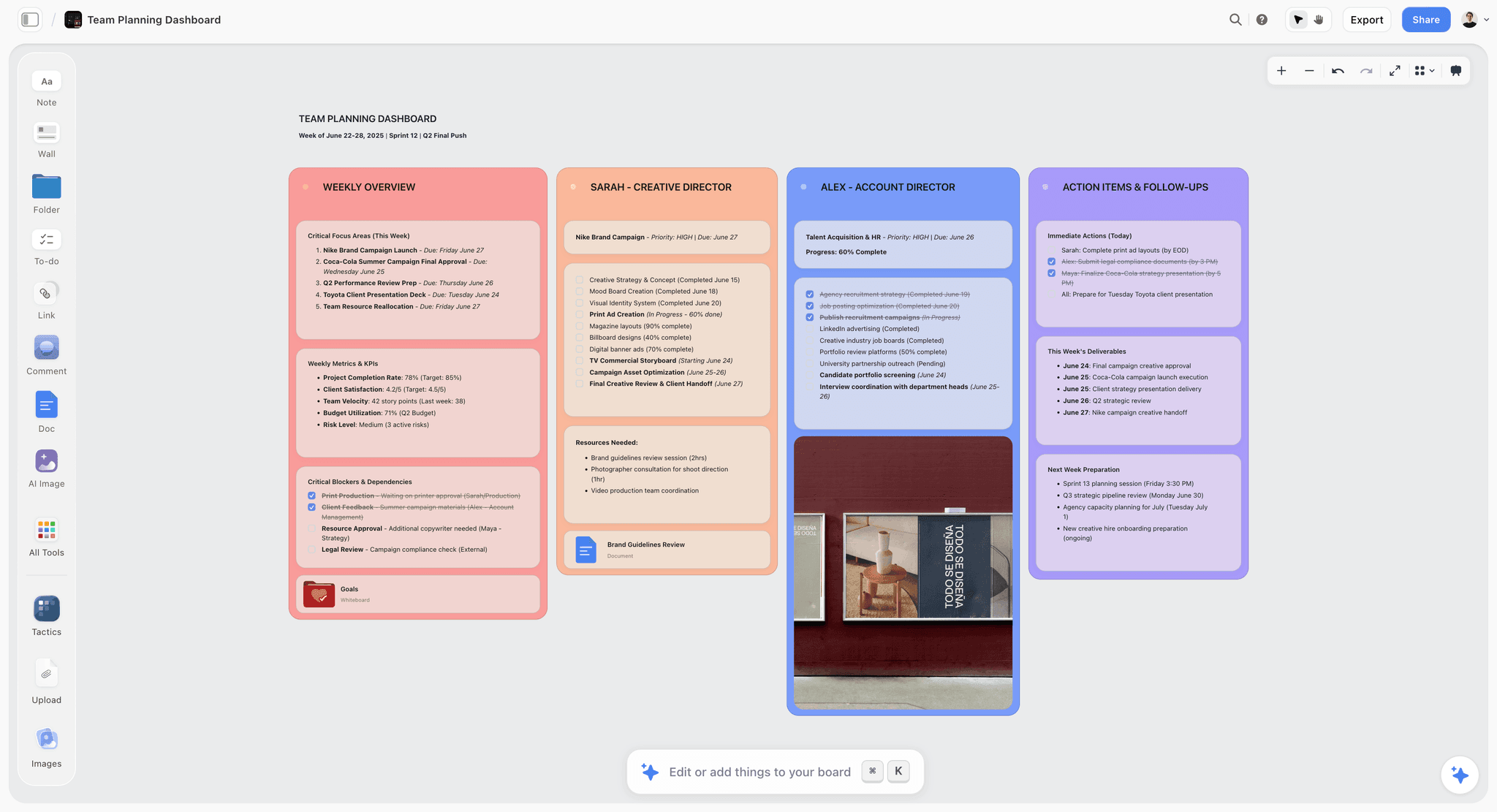
A Storyflow visual canvas of cards and connections contrasted with a polished linear document in a notes app
The AI Difference: An Assistant vs a Board-Reader
If you are comparing these two tools in 2026, the AI is probably why, so it deserves its own section. Both have AI. They are not doing the same job.
Craft's AI is a writing assistant that lives inside the document. It summarizes, rewrites, changes tone, and generates text where your cursor is, drawing on a set of models (Craft names Core, Fast, and Max tiers). It is metered in credits: the free plan includes a handful (around 15) and Plus raises that to roughly 50 a month, as of 2026. It is genuinely useful, and it is scoped to the page: the AI answers about the paragraph.
Storyflow's AI is scoped to the plane. It reads the full active canvas by default, so its context is every card, note, image, and link you can see, plus up to 1 Tactic and up to 3 Documents you @-mention. That changes the kind of question you can ask. In Craft you ask "tidy up this paragraph." In Storyflow you ask "what connects these three research clusters" or "what is missing from this structure," and the answer reasons over the board. McKinsey Global Institute (2012) estimated knowledge workers spend about 19% of the work week just searching for information; an AI that already sees the whole board is aimed straight at that tax.
Craft's AI answers about the paragraph. Storyflow's AI answers about the project. Neither is better in the abstract. They are better at different questions.
Pricing: Storyflow vs Craft (As of 2026)
Both tools have real free plans, and both are affordable if you upgrade. Here is the shape of it, with the caution that competitor pricing changes: verify Craft's current plans on craft.do before you buy.
| Tier | Storyflow | Craft |
|---|---|---|
Free | Unlimited notes, cards, images, and links, unlimited shared boards, basic AI usage, 20 file uploads | Up to 1,500 blocks, 1 GB storage, 7-day history, about 15 AI credits |
Entry paid | Plus $7.99/mo annual ($9.99 monthly): 200+ Story Blueprints, unlimited uploads, same AI as Free | Plus about $5/mo annual (about $8 monthly): unlimited content, about 50 AI credits, cross-device sync |
Higher tiers | Pro $14/mo annual ($19 monthly); Max $39/mo annual ($49 monthly) adds team workspace with roles | Family and Team plans for shared Spaces (2 to 10 accounts) |
Two things worth naming. Storyflow pricing is flat per account, never per user, so a shared board does not multiply your bill. And Craft's entry price is lower than Storyflow's, which is fair: a focused document app should cost less than a full visual workspace with board-reading AI. If price is the only axis you care about, Craft's Plus is the cheaper monthly line item.
Three Places Storyflow Loses to Craft
A comparison written by the company that makes one of the tools is worth nothing if it will not name where its own product falls short. Here are three, plainly.
Storyflow is cloud-only. There is no true offline or local-first mode. Craft works on a plane with no signal and stores your notes locally, which matters for travel, spotty connectivity, and privacy-sensitive work. If offline is non-negotiable, Storyflow is the wrong pick.
Storyflow is not document-shaped. Its Documents are structured and useful, but the workspace is canvas-card-shaped by design. For a long-form essay, a tidy wiki, or a beautifully typeset report that is itself the deliverable, Craft's editor is simply better. If your output is the document, use Craft.
Storyflow is not Apple-native, and it is newer. There are no system-wide widgets, no Apple Pencil handwriting, and none of the OS-level polish Craft has spent years earning on Mac, iPad, and iPhone. Storyflow is a web-first workspace on a younger platform. For someone who lives inside the Apple ecosystem and wants a notes app that feels native, Craft wins that comfort outright.
None of these are small. They are the reason this article does not tell everyone to switch.
Which Should You Use?
Match the tool to the shape of the work, not to a feature list.
- You write documents, notes, and wikis people will read. Use Craft. The page is its home turf, and nothing here beats it for a finished, shareable doc.
- You think visually and plan projects on a canvas. Use Storyflow. Research, structure, and connections that need to be seen all at once belong on the plane.
- You live on Apple devices and need offline. Use Craft. Native apps and local-first storage are the deciding factor.
- You want AI that reads your whole board, not just your cursor. Use Storyflow. Canvas-aware AI plus Story Blueprints is the differentiator Craft has no answer for.
- You do both kinds of work (the common case). Use both. Think on the plane in Storyflow, then move the finished piece to the page in Craft to publish it. Craft is where writing goes to look finished. Storyflow is where thinking goes to get done.
The Bottom Line
Stop asking which tool is better and ask which shape your work is. If the thing you are making is a document that someone will read, Craft is the better tool, and its design, offline support, and Apple-native polish are worth paying for. If the work is visual and spatial, if it is a pile of related material that has to be seen and connected before it means anything, Storyflow is the better tool, and its canvas-aware AI and Story Blueprints have no equivalent in a document app. Craft is where writing goes to look finished. Storyflow is where thinking goes to get done.
If your work has both shapes, and most creative work does, do not force one tool to be the other. The honest test takes a week: take your most active project, rebuild it on a Storyflow canvas, put the research, the structure, and the working thesis on one board, and let the AI reason across all of it. Then move the finished piece into Craft to publish it. By the end you will know exactly which shape your work is. Start a project on a Storyflow canvas.
FAQ: Storyflow vs Craft
Is Storyflow or Craft better in 2026?
Neither is better outright, because they are different shapes of tool. Craft is better for polished document writing, structured notes, and elegant sharing, especially on Apple devices. Storyflow is better for visual, spatial thinking on an infinite canvas with AI that reads your whole board. Pick by the shape of your work, not by a scoreboard.
What is the main difference between Storyflow and Craft?
Storyflow is a canvas and Craft is a document. Storyflow spreads notes, cards, images, and links across an infinite board you arrange in space. Craft stacks blocks top to bottom into a clean linear page. That one structural difference (the plane versus the page) drives almost every other difference between them.
Is Craft a canvas or whiteboard tool?
No. Craft is a document and note-taking app built around a block editor, not an infinite canvas. It is excellent at pages you read top to bottom. If you specifically want a spatial canvas where ideas sit next to each other and connect visually, that is Storyflow's shape, not Craft's.
Does Craft have an infinite canvas like Storyflow?
No. Craft organizes work into documents, folders, and Spaces, not a free-form spatial board. You can embed images and cards inside a doc, but the layout is still page-shaped. Storyflow is the tool built around an infinite canvas.
Which has better AI, Storyflow or Craft?
They do different AI jobs. Craft's AI is a credit-metered writing assistant that summarizes and rewrites text inside a document. Storyflow's AI reads your full active board plus up to 1 Tactic and 3 @-mentioned Documents, so it reasons about the whole project. Craft's AI answers about the paragraph; Storyflow's answers about the board.
How much does Craft cost in 2026?
Craft has a free plan (roughly 1,500 blocks, 1 GB storage, and about 15 AI credits) and a Plus plan at about $5/month billed annually (about $8 monthly) that unlocks unlimited content and around 50 AI credits, as of 2026. Family and Team plans cover shared Spaces. Verify current pricing on craft.do.
How much does Storyflow cost?
Storyflow has a free plan, then Plus at $7.99/month billed annually ($9.99 monthly), Pro at $14/month annual ($19 monthly), and Max at $39/month annual ($49 monthly). Pricing is flat per account, not per user. The 200+ Story Blueprints unlock on Plus and above.
Can Storyflow replace Craft for writing?
Partly. Storyflow has structured Documents and is a strong place to draft alongside your research. But for a long-form, beautifully formatted document that is the final deliverable, Craft's editor is better. A common workflow is to think and structure in Storyflow, then finish the polished document in Craft.
Is Craft better for Apple users?
Yes, if you want a native, offline-capable notes app. Craft's Mac, iPad, and iPhone apps feel like part of the operating system, with widgets, Apple Pencil, and local-first storage. Storyflow is web-first and cloud-only, so it is more platform-agnostic but less Apple-native.
Does Storyflow work offline?
No. Storyflow is cloud-only and needs a connection, which is a genuine limitation compared with Craft's offline support. If you regularly work with no signal or have strict local-first requirements, Craft (or a local-first tool like Obsidian) is the safer choice.
Table of Contents
- Key Takeaways
- Storyflow vs Craft: The Page and the Plane
- Where Craft Is the Better Tool
- Where Storyflow Is the Better Tool
- Storyflow vs Craft: Head-to-Head
- The AI Difference: An Assistant vs a Board-Reader
- Pricing: Storyflow vs Craft (As of 2026)
- Three Places Storyflow Loses to Craft
- Which Should You Use?
- The Bottom Line
- Author
- FAQ: Storyflow vs Craft
- Related Reading
Templates to check out for this topic


Templates you can use in Storyflow
Every Storyflow board starts from real structure and an AI that reads the whole canvas. Open one of these templates and make it yours.


See Storyflow in Action
A visual AI workspace where every feature lives inside one canvas. No tab-switching, no context lost.
Build your entire board from a single message
Type what you need in the AI chat at the bottom of your canvas. The AI adds cards, headings, and structure directly onto your board.
Use expert frameworks as AI context
Type @ in the AI chat and choose any Tactic. The AI tailors every response to that framework instead of giving generic advice.
Turn your board into a mind map in seconds
Ask the AI to restructure your canvas as a mindmap. It connects your ideas into a visual hierarchy so you can see how everything relates.
Why Storyflow Exists
Storyflow actually began as a personal tool while working on creative and research projects.
We kept running into the same problem: ideas were scattered everywhere: notes, documents, and whiteboards.
Nothing helped us see how everything connected.
So we started building a workspace designed around how ideas actually grow.
→ Read how Storyflow was createdSara de Klein
Head of Product at Storyflow
Published: 2026-07-15
Extremely simple, seriously capable


See how easy it is to get started
Watch a real project come together, from a blank board to a finished plan, clicked through step by step.
Start creating with AI and become more productive
Transform your creative workflow with AI-powered tools. Generate ideas, create content, and boost your productivity in minutes instead of hours.