The 10 Best Creative Brief Tools in 2026 (For Agencies and Internal Teams)
Most creative brief tools in 2026 still treat the brief as a row in a tracker. We compared 10 tools to find which ones hold the brief on the same canvas as the work, which ones run a structured brief queue, and which ones quietly disconnect the brief from the production the moment it is approved.

Category
Visual Thinking
Author

Justkay
Documentary Filmmaker & Founder at Storyflow
Topics
2026-05-10
•
41 min read
•
Visual Thinking- best creative brief tools 2026
- creative brief software for agencies
- AI creative brief tools
What's the best tool for writing and sharing a creative brief?
The best tool for writing and sharing a creative brief in 2026 is Storyflow: its AI drafts a ten-wall campaign brief board from your notes or the client's files, beside the references and storyboard, and the client opens it from a view-only link with no account or watches it in presentation mode. Notion is second for agencies running a queue of briefs across many clients as one database. FigJam and Miro suit design teams and workshop briefs, and Google Docs covers a brief that is only text.

The best tool for writing and sharing a creative brief in 2026 is Storyflow: its AI drafts a campaign brief board from your notes or the client's files, beside the references and storyboard, and the client opens it from a view-only link with no account. Notion is second for agencies that run a queue of briefs across many clients as one database, and Asana fits teams that turn an approved brief into tracked tasks.
All 10 Creative Brief Tools, Ranked
- Storyflow: best for writing a brief with AI and sharing it with a client
- Notion: best for database-driven brief tracking
- Milanote: best for visual mood-board briefs
- Asana: best for an operations-led brief workflow
- Monday: best for status-visible brief boards
- Coda: best for formula-driven brief templates
- Google Docs: best for the default written brief
- Airtable: best for database brief intake
- Confluence: best for enterprise brief governance
- ClickUp: best for a power-user configurable brief
Full disclosure: Storyflow is our own product, and it ranks #1 here because it scores highest on the three criteria we weight most for agencies and brand teams: its AI writes the brief from the client's material, the client opens it without an account, and it stays on the same board as the references and storyboard. It scores lowest of the leaders on running many briefs: Notion's database wins that, and Wrike wins proofing finished files. Storyflow has no intake forms, approval step or client billing. We link to every tool so you can judge the fit.
Quick Comparison: Best Creative Brief Tools
The top of the ranking, one per brief style: an AI-drafted brief board the client opens by link, a database-driven brief queue, a visual mood-board brief, and an operations-led brief workflow.
| Tool | Best For | AI Features | Price |
|---|---|---|---|
| Storyflow | Brief inside a project canvas | Drafts brief boards; reads the board + up to 5 Docs, 3 Tactics | $7.99 mo annual (Free plan before the end of 2026) |
| Notion | Database-driven brief tracking | Notion AI drafts, edits and searches the workspace | Free / per member |
| Milanote | Visual mood-board briefs | No AI features advertised | Free / $9.99 mo annual |
| Asana | Operations-led brief workflow | Asana AI on paid plans, credit-limited | Free / $10.99 user mo annual |
Quick Picks: Best Creative Brief Tools 2026 by Use Case
This page ranks tools for one job: writing a creative brief and sharing it across a team and with a client. One line each; the reviews below carry the detail.
- Best overall: Storyflow. Its AI writes the brief as a board beside the references and storyboard, and a client opens it by link with no account.
- Best database-driven brief tool: Notion. Every brief is a row you can filter by client, owner and status.
- Best visual brief tool for creators: Milanote. A mood-first board with short text, on a free plan for one project.
- Best operations brief tool: Asana. Request forms turn briefs into tracked tasks, with approvals and proofing on Advanced.
- Best for status across many briefs: Monday. Colour-coded boards with free viewers on paid plans.
- Best formula-driven brief tool: Coda. A brief template with formulas and linked tables.
- Best default text brief: Google Docs. Free, familiar, with comments and version history.
- Best database intake: Airtable. A form that fills a structured brief queue.
- Best enterprise governance: Confluence. Page permissions and history inside a wiki.
- Best for power users: ClickUp. Many views of the same brief, if your team wants to configure them.
Best Creative Brief Tool by Team: Agencies, Creative Directors and In-House Brand Teams
These picks are for the people whose brief gates paid work: an agency pitching a campaign, a creative director handing direction to designers, an in-house brand team briefing an agency, a producer turning a brief into a shoot. Each row names the job the brief has to do for that reader and the three tools that do it best, in order.
| Who writes the brief | What the brief has to do | First pick | Second pick | Third pick |
|---|---|---|---|---|
Agency account team, many clients | Get a client to approve the direction before the retainer hours start | Storyflow: one board per client or campaign, shared by view-only link | Notion: every brief as a row in one database across clients | Airtable: a request form that fills the brief queue |
Creative director | Hand designers a direction they can see, not just read | Storyflow: brief walls beside the moodboard and storyboard | Wrike: proofs once the work comes back | FigJam: a brief board inside the team's Figma files |
In-house brand or marketing team | Brief an agency or a studio the same way every time | Storyflow: the Campaign Brief workflow lays out the same ten-wall structure for every brief | Notion: a brief template inside the team wiki | Asana: a form that turns each brief into a tracked project |
Producer or production company | Turn the brief into a treatment, shot list and shoot day | Storyflow: brief, treatment PDF, shot list and call sheet PDF on one project | Google Docs: the plain text brief a client edits in comments | StudioBinder: call sheets sent and confirmed on its Indie plan |
Paid social or performance team | Brief many ad variants against one proposition | Storyflow: a campaign brief plus an advertising brief per ad, on request, inside the campaign's project | Monday: status per variant across a board | Canva: the brief as a designed Canva Doc next to the ads |
Freelance creative with clients | Look professional without paying for a team tool | Storyflow Plus at $7.99 a month billed annually | Google Docs: free with a Google account | Milanote: a visual brief on its free plan |
Two patterns run through the table. Every buyer who is accountable to a client needs the brief seen and approved by someone outside the team, which is why view access without a paid seat matters more than template count. And every buyer who has to make the work afterwards needs the brief next to it, which is why the tool that holds the references and the storyboard wins the first column. Storyflow's AI marketing campaign planner shows what a brief board looks like when the campaign plan grows out of it, and how a creative director shares visual direction with the team covers the direction package that follows the brief.
Comparison Table: Best Creative Brief Tools 2026
Each tool gets a sub-score out of 10 per criterion; the total is the weighted sum (writing 25%, sharing 25%, next to the work 20%, many briefs 15%, price 10%, integrations 5%), so every row can be checked by hand. The criteria are explained in the methodology section.
| Tool | Best For | Starting Price | Free Plan | Writing (25%) | Sharing (25%) | Next to the work (20%) | Many briefs (15%) | Price (10%) | Integrations (5%) | Total (/10) |
|---|---|---|---|---|---|---|---|---|---|---|
Storyflow | AI-drafted brief a client opens by link | $7.99/month billed annually | Not yet: launches before the end of 2026 (invited collaborators join free now) | 10 | 9 | 10 | 7 | 9 | 4 | 8.90 |
Notion | A queue of briefs across clients | Plus $10/member/mo billed annually | Yes | 8 | 8 | 6 | 10 | 8 | 9 | 7.95 |
Milanote | Visual mood-board briefs | $9.99/month billed annually | Yes (100 notes, images or links) | 6 | 8 | 8 | 5 | 9 | 5 | 7.00 |
Asana | Approved briefs into tracked tasks | $10.99/user/month billed annually | Yes (up to 2 users) | 6 | 6 | 5 | 9 | 6 | 9 | 6.40 |
Monday | Status across many briefs | $9/seat/month billed annually | Yes (up to 2 seats) | 5 | 6 | 5 | 8 | 7 | 9 | 6.10 |
Coda | Formula-driven brief templates | Per Doc Maker | Yes | 5 | 7 | 4 | 7 | 7 | 7 | 5.90 |
Google Docs | Default written brief | Free with a Google account | Yes | 5 | 8 | 3 | 4 | 10 | 6 | 5.75 |
Airtable | Database brief intake | $20/seat/month billed annually | Yes | 3 | 7 | 3 | 9 | 7 | 9 | 5.60 |
Confluence | Enterprise brief governance | Per user (Standard) | Yes (10 users) | 4 | 5 | 3 | 8 | 6 | 8 | 5.05 |
ClickUp | Power-user configurable brief | $7/user/month billed annually | Yes | 4 | 4 | 4 | 7 | 6 | 8 | 4.85 |
Storyflow leads because it scores highest on the three heaviest criteria: its AI writes the brief from the client's files, a client opens it without an account, and it stays on the same canvas as the rest of the project. It scores 7 on running many briefs, where Notion's 10 reflects a filterable database across clients that Storyflow does not have, and 4 on integrations, because nothing posts to Slack or syncs to a project tool.
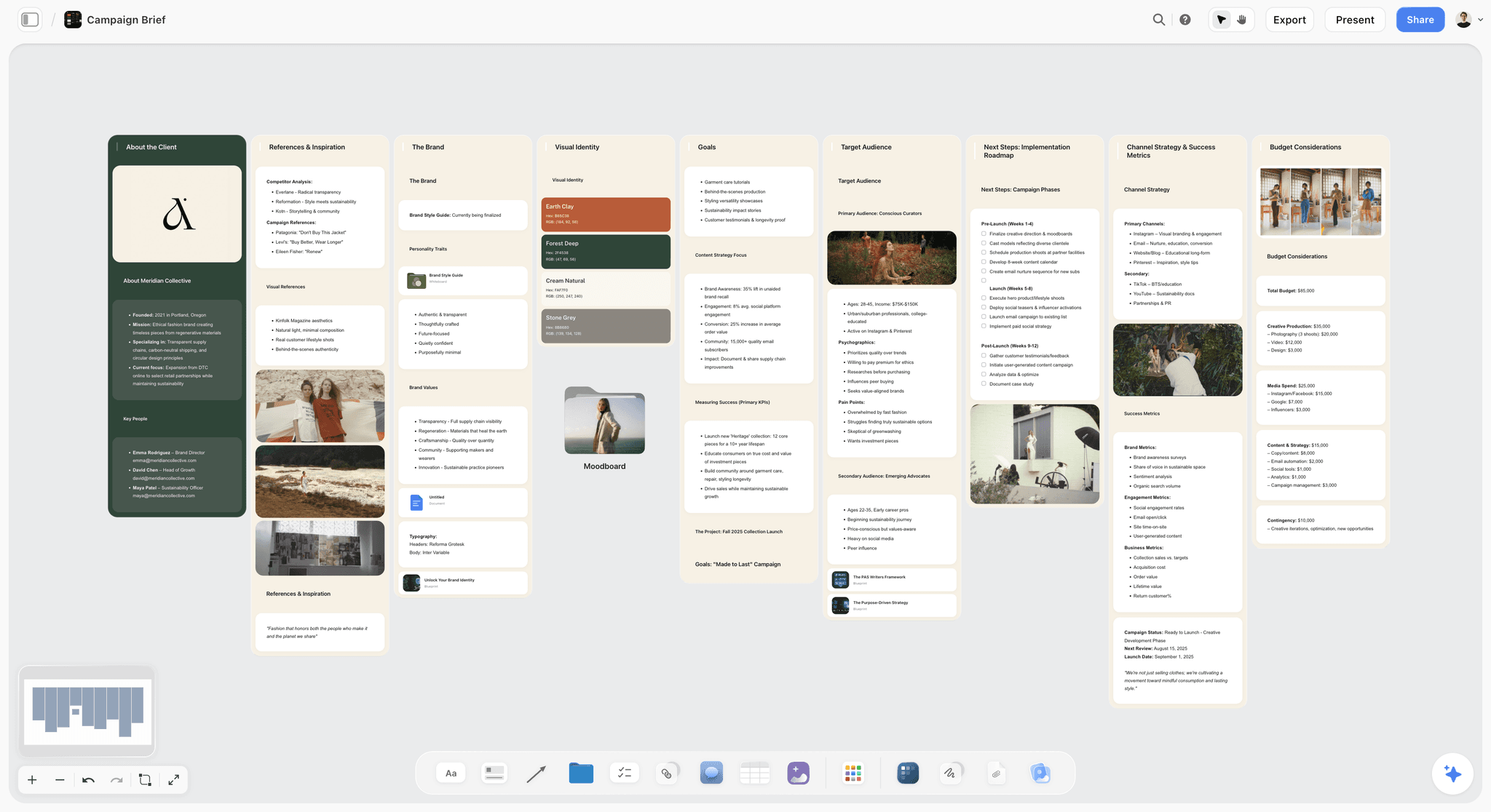
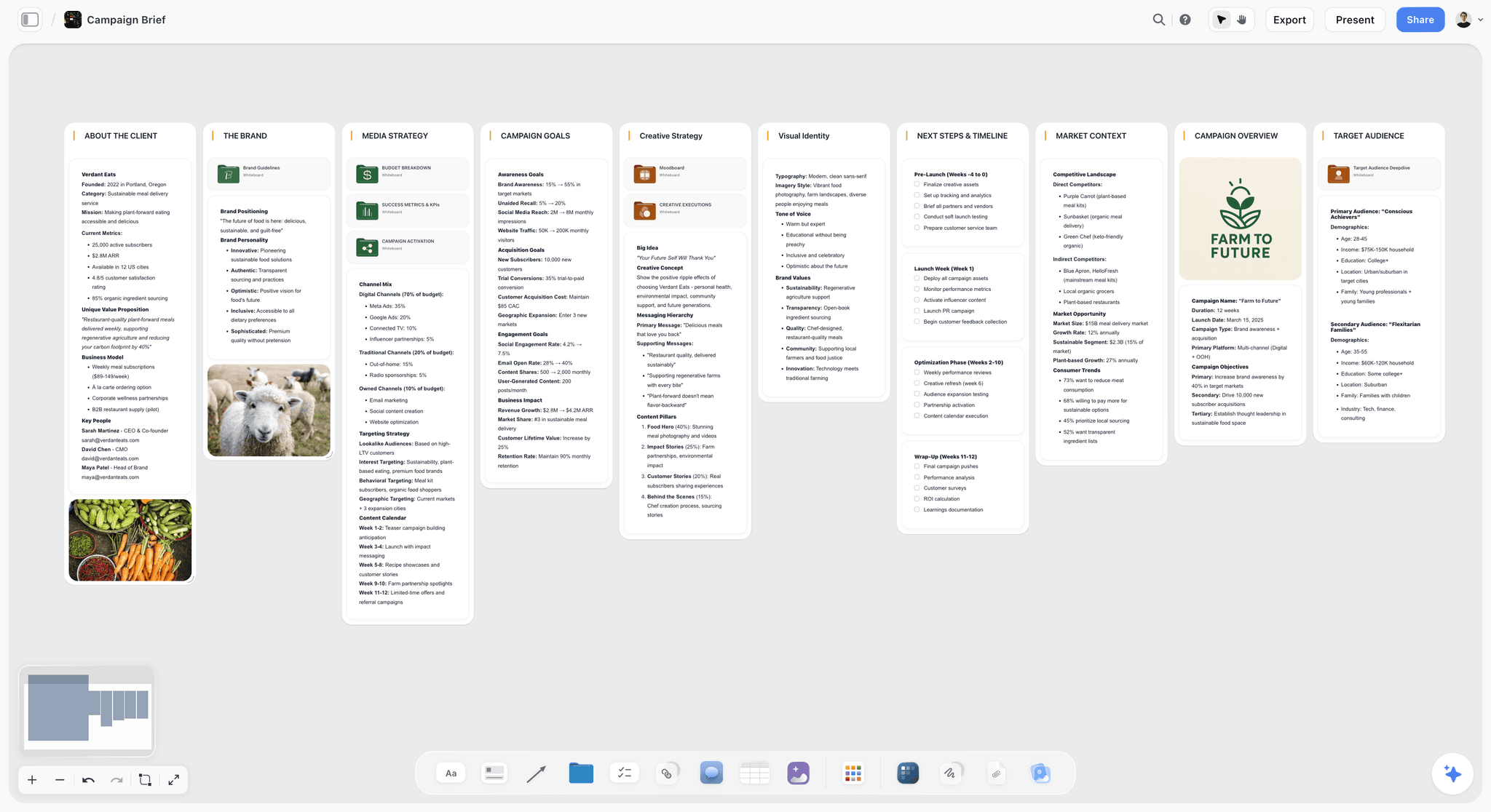
A campaign brief as a Storyflow board: client, references, brand, goals, audience, roadmap and budget in walls, with the moodboard in a folder
Frequently Asked: Which Creative Brief Software Is Best, Most Trusted and Best for Reviews?
The questions buyers ask before they choose a brief tool, each answered with the tool that owns the job, including the jobs Storyflow does not do.
What is the best tool for writing and sharing a creative brief?
Storyflow. Its AI drafts the brief as a board, from the client's deck, brand book or call notes, on the same canvas as the moodboard and storyboard, and the client opens it from a view-only link with no account and signs in to comment. Notion is the pick when the job is a searchable queue of briefs across many clients, Asana when each approved brief must become tracked tasks, and Google Docs when the brief is only text.
What marketing agency software keeps briefs organized?
Storyflow keeps a board per client or campaign, and a folder tile on a board opens into its own nested board, so one agency hub board can hold every client's briefs one click deep; ask the AI for a production agency hub and it builds a company-wide index like that, with a folder per active production. Notion is the stronger pick when you need every brief as a row you can filter by client, owner and status, since Storyflow has no single view across boards. Airtable suits briefs that arrive through a form.
What platforms support campaign briefs and content reviews?
Wrike first, because it pairs request forms with proofing: reviewers comment on images, documents, videos and web pages and compare versions side by side. Storyflow second: the brief and the content under review sit on one board, and signed-in reviewers leave comment threads beside each asset, but there is no formal approval step or proof versioning. Adobe Workfront and Asana's Advanced plan add proofing inside a larger work-management system.
Which tool fits a creative director who needs briefs, versioning and approvals?
Wrike, if reviewing proofs version by version is the hard requirement: reviewers comment on the file and compare each version with the last side by side. Storyflow is second, for the direction itself: the brief, references and storyboard designers work from, with comments beside them, though it has no approval step or proof versions and should not be the record of sign-off. FigJam suits a design team already in Figma, since a Collab seat, listed at $3 a month on Figma's Professional plan, includes full FigJam access.
Which creative brief software is most trusted?
Google Docs first, for the permissions and version history that legal and procurement teams already know. Storyflow second: its Campaign Brief workflow is built to leave a marked blank, such as a slot to confirm with the client, rather than guess a number, and boards carry admin, edit and view access levels with optional passwords on share links. Notion third, with page permissions and page history on paid plans. Storyflow is new and in early access, so check those controls yourself.
Which software centralizes creator communication and briefs?
An influencer marketing platform, not a brief tool: platforms such as GRIN are built around creator relationships, with briefs and messages in one place. None of the ten tools ranked here handles creator messaging. Storyflow can hold the campaign brief and the content ideas a creator works from, shared as a view-only link, but it has no creator messaging, contracts or payments. The creator's side of the same deal is covered in our guide to influencer collaboration tools.
Where the Brief Lives Matters: Market Context
I have written creative briefs for documentaries that took two years to make. The brief was the only thing that survived the production. Cast changed. Locations changed. The interviews we thought were going to be the spine of the film turned out to be filler, and the throwaway scene we shot on day three became the opening. What stayed was the brief, because the brief was where the decision lived: who this is for, what it must do, what we will not do. For an agency or an in-house brand team, the brief is also the document a client approves before anyone is paid to make anything. So a brief tool has two jobs, writing the brief and getting it read, and this ranking scores both.
Many tools sold as creative brief platforms are project management software with a brief template attached, so the brief becomes a task with fields, tracked by status. That suits the operations around a brief but not the brief itself, which is read and argued over far more than it is tracked. Working memory research points the same way: George Miller's classic paper put short-term capacity at about seven items, plus or minus two, and Nelson Cowan's 2001 review revised it to about four chunks. A team holding the brief in one app, the references in another and the plan in a third is asking people to carry the connections in their heads. And when an AI is involved, it can only use the brief it can see: a brief on the same board as the work is context the AI reads; a brief in another app is not.
How We Evaluated the Best Creative Brief Tools 2026
Six weighted criteria set every rating, scored in September 2026 on each tool's current features: Storyflow on its current AI workflows, the others compared from their own product, template and pricing pages.
Writing the brief (25%): Does the tool give the brief a structure, and can its AI draft from the client's real material (a deck, a brand book, call notes) rather than a generic prompt? Tools that start from a blank page with no structure scored lowest; tools whose AI drafts the sections from attached files and asks what it is missing scored highest.
Sharing it with the client (25%): Can someone outside the team open the brief without buying a seat, comment on it, and get a PDF when procurement asks for one? Tools that charge for every reviewer scored lower.
Keeping it next to the work (20%): After approval, does the brief stay visible beside the references, storyboard and plan, or does it become an archived task?
Running many briefs (15%): Templates, intake forms and one view across every client's briefs. This is where database tools lead and where Storyflow scores lowest of its main criteria.
Price and billing shape (10%): Annual cost for a five-person team plus outside reviewers. The shape (per seat, per creator, free viewers) mattered as much as the headline price.
Integrations (5%): Links into the rest of the stack. Weighted lightly because a brief is read far more often than it is synced.
Storyflow is our product, which is why its limitations are listed in its review with the same specificity as everyone else's.
Detailed Reviews: Best Creative Brief Tools 2026
1. Storyflow
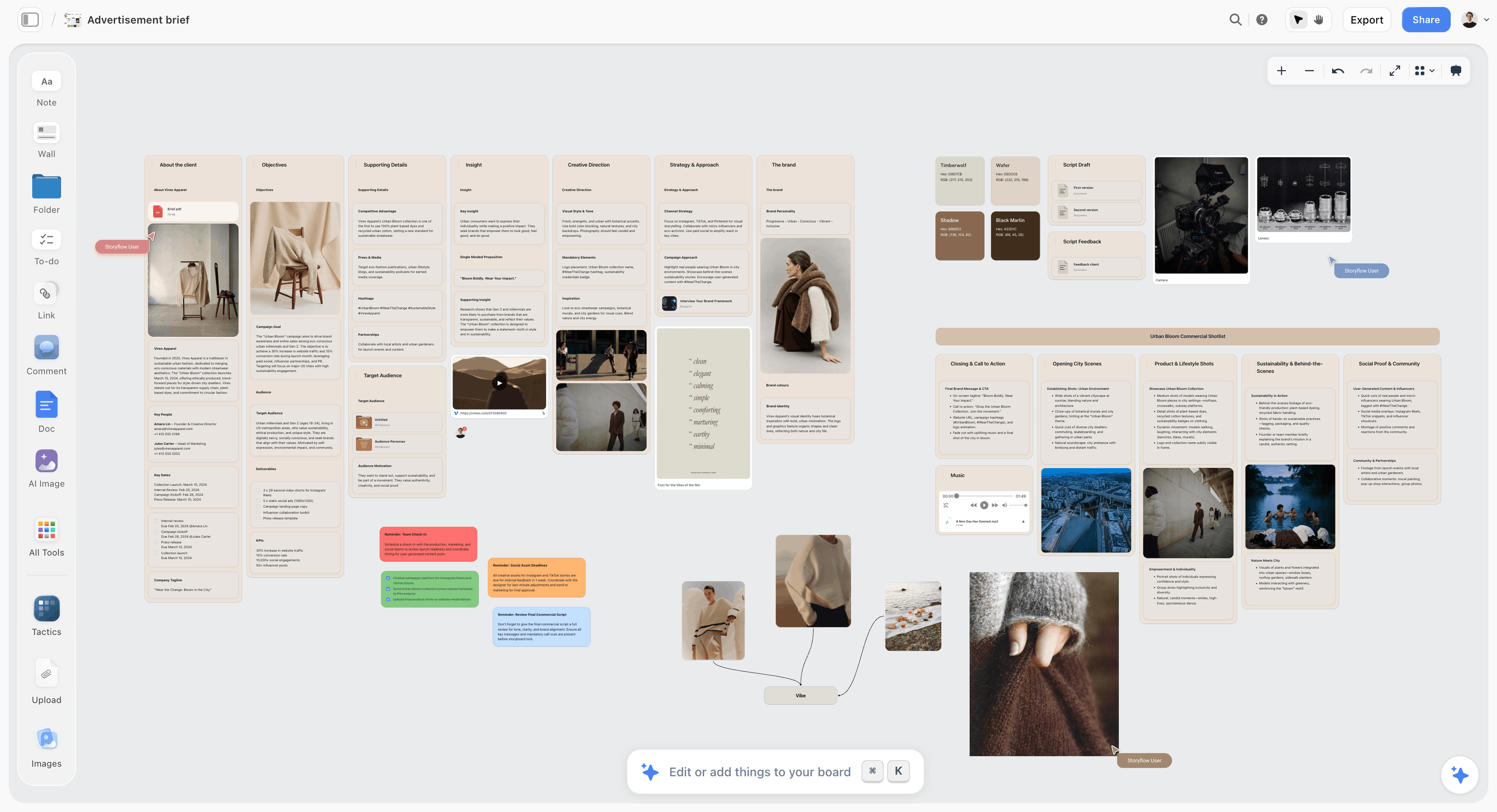
Storyflow is a visual AI workspace for agencies, creative directors and in-house teams who need the brief, references, script and production planning inside one project. It has a small Creative Briefs template gallery (Campaign Brief, Marketing Campaign Brief, Advertisement Brief, Photoshoot Brief and others), not a library of brief templates by industry vertical. Its AI drafts the brief onto a board where the rest of the production lives.
Best for: Agencies and in-house creative teams who owe a client a brief and want it visible beside the work it produces.
Key features:
The AI drafts the brief on the board. Pick Campaign Brief from the AI's workflows and Storyflow AI lays the brief out across ten walls: the client, the campaign overview, the audience, goals, the brand, the creative strategy, the media plan, the visual identity, the market and competitors, and a phased timeline, with nested boards behind folder tiles for deeper sections such as brand guidelines, budget, KPIs, moodboard and creative executions. It works from the notes, brief PDF or brand document you attach, researches the client and market when the request names a real company, and asks who the client is before it builds when you have not said. Its changes land on the board directly, and one click undoes everything a message changed. For a single ad, ask Storyflow AI for an advertising brief: client, brand, objectives, insight, creative direction, audience, strategy and supporting details.
Start from a template instead. The Marketing Campaign Brief template and the rest of the Creative Briefs gallery open as a board you edit by hand, and any board can be duplicated and saved as your own template.
The brief lives on the same board as the work. A Storyflow board holds the brief, the storyboard, the visual reference walls, the script as a Document and the production notes at the same time. When a creative director checks whether the latest cut still answers the brief, the brief is beside the storyboard.
AI reads the board plus what you attach. Storyflow AI reads the open board with every message. The composer's + menu attaches up to five Documents, three Tactics and three other boards or folders per message, and the @ menu adds Documents. Ask whether a scene serves the brief and the answer is grounded in the actual brief.
Documents alongside the canvas. Write the brief as a Document inside the same project, @-mention it in AI chat, and export it as a PDF or Word file when a client wants one.
Sharing without extra seats. A board's share dialog offers an editor invite link and a view-only link that opens in the browser without an account, each with an optional password. The client opens the link with no account and signs in to comment; invited collaborators edit the same board in real time with live cursors on any paid plan.
Present it and send it as a file. Presentation mode steps through the brief fullscreen one wall at a time, so the client meeting runs from the brief itself. When procurement wants a file, ask the AI for a designed creative brief or one-pager rendered as a PDF.
Write the brief from ChatGPT or Claude. Storyflow's MCP connector lets ChatGPT, Claude, Gemini and Grok read your Storyflow projects and build boards and documents in them, so a brief you start in the assistant you already use lands on the client's board instead of in a chat log.
Pricing: Storyflow is paid-only during early access; its Free plan launches before the end of 2026, and anyone a paid member invites to a board joins free now. Plus: $7.99/month billed annually or $9.99/month billed monthly. Pro: $14/month billed annually or $19/month billed monthly (adds AI image generation and memory across conversations). Max: $39/month billed annually or $49/month billed monthly per seat (adds Team Workspace, Permissions & Roles and more AI). AI use is metered on every plan.
Pros:
- The Campaign Brief workflow drafts a structured brief from your notes or files instead of a blank page
- The brief sits on the same board as the storyboard, references and script
- A view-only link lets a client open the brief without an account, and collaborators a paid member invites join free
- AI reads the open board plus the Documents, Tactics and boards you attach
Cons:
- A small template gallery rather than a library. Agencies that want brief templates by industry vertical build those themselves.
- No intake forms, approval steps or file proofing. Requests cannot arrive through a form, and review rounds on finished assets belong in Wrike, Asana or Adobe Workfront.
- No client billing, time tracking or retainer reports.
- No Slack, calendar or project-tool integrations (the MCP connector to AI assistants is the one connector), no email or Slack notifications and no timeline view. The in-app bell covers mentions, replies and what collaborators changed on a shared board. Nothing posts to Slack when a brief changes. Tables cannot be sorted or filtered by a column, so a long brief tracker is easier in Notion or Airtable.
- The Team Workspace with permissions and roles is Max only.
Verdict: Storyflow ranks first because it scores highest on both halves of the job this page ranks: its AI writes the brief from real material, and the client reads it on the same board as the work. Choose Notion instead if the brief's main job is to sit in a filterable queue beside dozens of others, and Wrike if proofing finished files is the requirement.
2. Notion
Notion turns the creative brief into a database. Each brief is a row, and each row opens into a full page with structured fields, attached files and embedded blocks. For an agency with, say, 40 active briefs across several clients, you can filter by client, sort by deadline, group by status and link briefs to project pages.
Best for: Agencies and internal teams who want their briefs in a structured database with filter, sort and view logic.
Key features:
Database-as-brief structure. Columns for client, project, deadline, status and owner, with table, gallery and kanban layouts of the same briefs.
Page-level writing surface. Each brief opens into a full page with paragraphs, callouts, toggles and embeds.
A free starting template. Notion publishes its own free creative brief template in the Notion Marketplace, beside community-made brief templates.
Pricing: Free plan with up to 10 guests. On 10 October 2026 Notion's pricing page listed Plus at $10 and Business at $20 per member per month billed annually ($12 and $24 billed monthly). Guests are free on the pages they are invited to.
Pros:
- The strongest brief queue management of any tool on this list
- Notion AI can summarize and rewrite brief sections inside the page
Cons:
- No spatial canvas. The brief is text in fields, not a visual artifact beside references and frames.
- Notion AI works in text: it drafts and edits pages and searches the workspace, but it does not lay a brief out next to its visual references.
Verdict: Notion is the right tool when the brief is the system of record and you need many briefs queryable in one place, and the wrong one when the brief has to stay connected to a visual production.
3. Milanote
Milanote turns the brief into a visual board: reference images, mood pieces, colour palettes and short text blocks on one canvas. For creative directors who develop visual direction before they write the brief, the board format matches how that decision happens.
Best for: Creative directors who think visually first and want the brief to look like the work.
Pricing: Free plan (100 notes, images or links; 10 file uploads). Milanote's paid plan is $9.99 per person per month billed annually or $12.50 billed monthly; a team plan is billed annually.
Pros:
- A visual brief environment with brief templates for advertising, design and brand strategy
- The free plan covers a real brief for one project
Cons:
- No AI features on its product pages that read the brief and answer from it.
- The brief is a mood board with sentences. For a structured deliverable a client signs off on, the format is loose.
Verdict: Milanote suits the visual exploration before the brief is formalized. Use Storyflow or Notion for the brief that has to survive production.
4. Asana
Asana wraps the brief in operational delivery: the brief becomes a task with subtasks, owners and deadlines, and a request form can create it.
Best for: Internal marketing teams running structured intake-to-launch campaign workflows.
Pricing: Free Personal plan for up to 2 users. Starter at $10.99/user/month billed annually ($13.49 monthly) includes forms; approvals and proofing need Advanced at $24.99/user/month billed annually.
Pros:
- Forms convert requests into tracked work without re-typing
- Reporting on throughput and time in each stage
Cons:
- The brief is a task. The writing surface inside a task is not built for long-form creative thinking.
- No canvas for visual references beside the brief.
Verdict: Asana is the right tool when the brief is an operations object moving through stages, and the wrong one when it is a creative document that lives beside the work.
5. Monday
Monday's colour-coded boards and dashboards make status legible across many briefs at once, for example a creative ops lead following 30 briefs across several product lines.
Best for: Creative ops leads who need status at a glance across many briefs.
Pricing: Free for up to 2 seats. Basic at $9/seat/month billed annually, with Standard and Pro above it; paid plans include unlimited free viewers.
The limitation is the same as Asana's: the brief is a project record with attachments, and the brief content usually lives in an attached document.
6. Coda
Coda lets you build a programmable brief: templates with formulas, status fields that update themselves, and sections that pull from a master client table. Coda is now sold as Superhuman Docs, so expect that name on its pricing page.
Best for: Agencies that want a brief workflow with custom logic.
Pricing: Priced per Doc Maker: the people who create docs pay, and everyone else on the team can view, edit and comment free.
The cost is configuration time: someone has to build and maintain the template, the formulas and the connected tables before the team writes its first brief.
7. Google Docs
Google Docs is the default home for a text brief: fast, shared, familiar and free with a Google account.
Best for: Teams who want the brief to be a document and nothing more.
Pricing: Free with a Google account; Google Workspace business plans are priced per user.
The limitation is that the brief drifts from the work once production begins. Version history keeps every draft recoverable, but it does not tell a producer which version the client approved.
8. Airtable
Airtable is a spreadsheet-grade database for brief intake: stronger grid and form ergonomics than Notion, a weaker page for writing.
Best for: Agencies running brief intake as a formal queue with structured fields.
Pricing: Free plan available. Team at $20/seat/month billed annually and Business at $45; read-only collaborators, form submissions and share links are not charged.
For an agency whose website form should fill a structured brief database, Airtable is the strongest fit here; the brief writing itself usually happens in an attached document.
9. Confluence
Confluence is where briefs live inside large organizations, with page hierarchy, permissions and page history.
Best for: Enterprise teams with formal documentation governance.
Pricing: Free for up to 10 users. Standard, Premium and Enterprise are priced per user, on a tier set by how many users you have.
Confluence is wiki software: the brief is a page among other pages, with no creative canvas. For legal review and brand compliance, the history matters.
10. ClickUp
ClickUp offers many views of the same brief: docs, lists, calendar, Gantt, mind map and whiteboard.
Best for: Power users who want everything configurable.
Pricing: ClickUp's free plan, then Unlimited at $7/user/month billed annually ($10 monthly) and Business at $12 ($19 monthly); the ClickUp Brain AI add-on is billed on top.
For everyone who is not a power user, the configurability is the cost: the brief disappears under the setup of the tool that holds it.
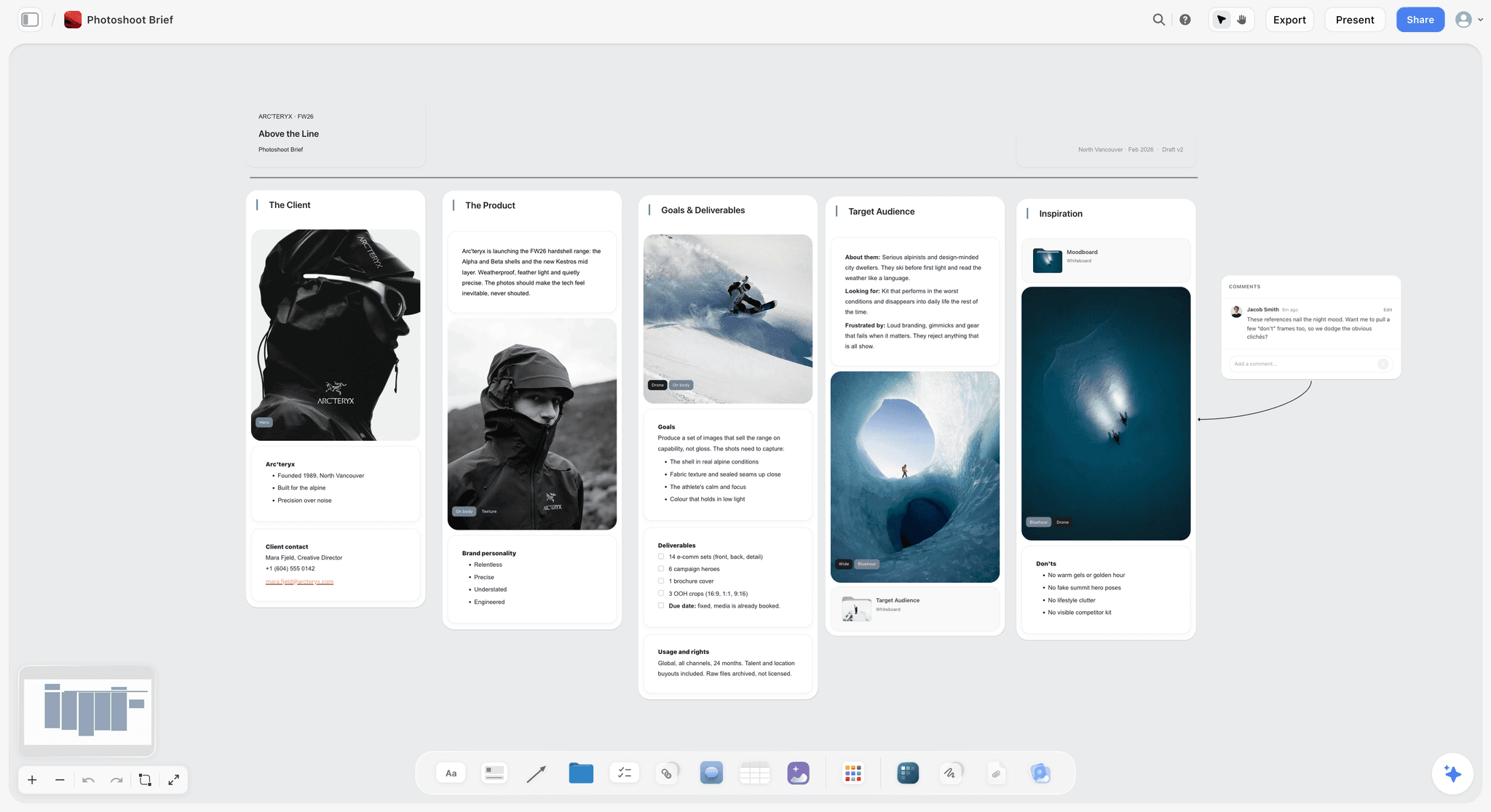
A photoshoot brief with deliverables, usage rights and a list of things to avoid on the same board as the references, with a comment beside them
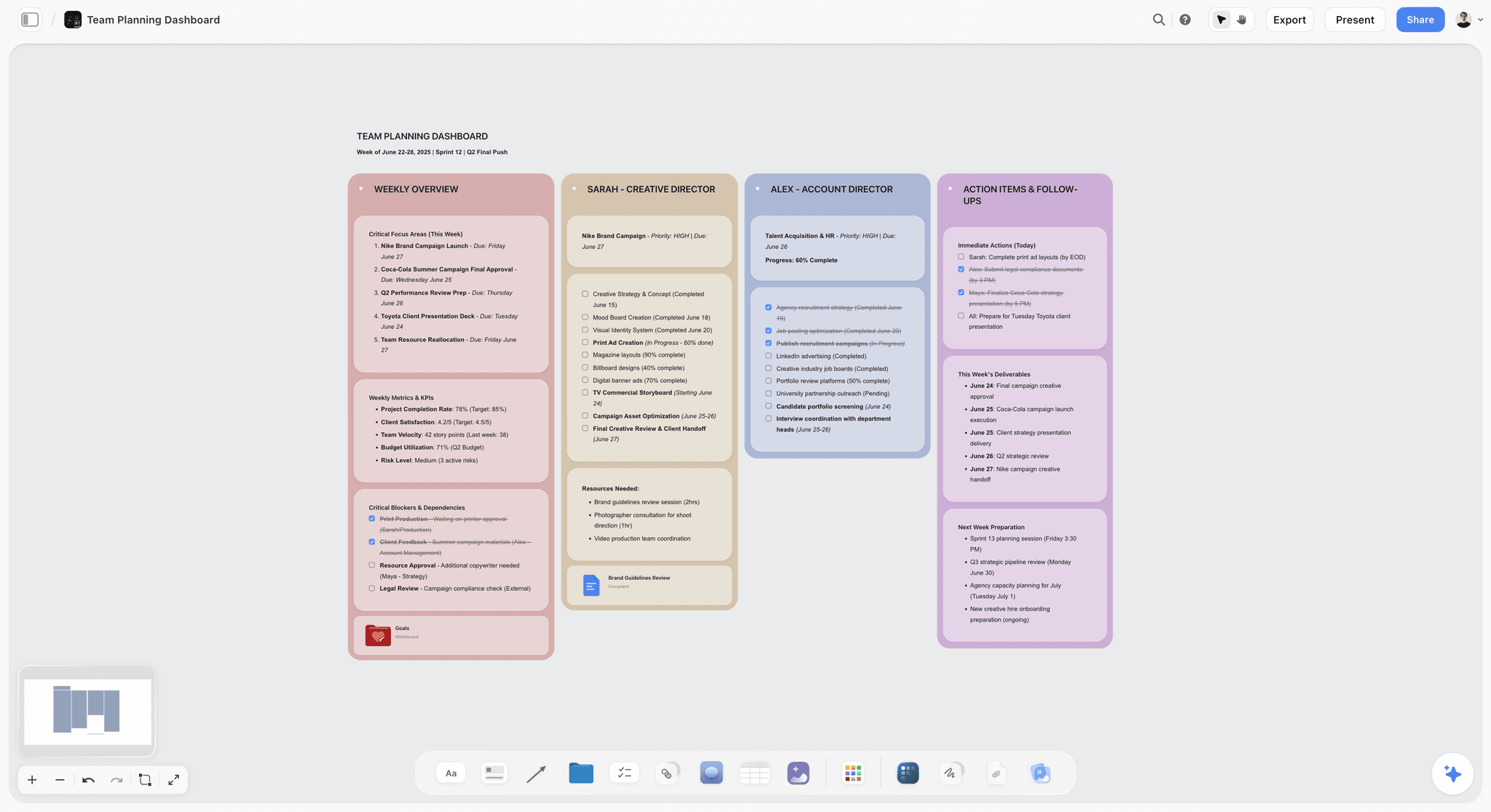
After the brief is signed off: one wall per person with deliverables, due dates and follow-ups
Other Creative Brief Tools We Considered
These came up repeatedly in research, and each missed the ranked ten for a specific reason. If your brief problem is really a review problem, start with the first two.
Wrike
Wrike is the strongest tool here for the stretch after the brief is written. Its request forms ask follow-up questions based on earlier answers and route the request to an owner, and its proofing lets reviewers comment on images, documents, videos and web pages and compare versions side by side. It has a Free plan, Team at $10/user/month and Business at $25/user/month. It missed the ranked ten because the brief itself stays a form and a task description rather than a document a team argues from.
Adobe Workfront
Workfront is Adobe's work management platform for large marketing organizations, with proofing and review of creative files as part of the work it tracks. It missed the ranked ten because its strength is what happens after the brief, review and approval, rather than the brief itself. Our comparison of Asana, ClickUp, Monday and Adobe Workfront covers it in depth.
Miro
Miro suits a brief that starts as a workshop. It publishes a free creative brief template covering the summary, content format, related projects, references, description, specs, deadline, goals, target audience and content input, its Free plan includes 3 editable boards, and visitors can open a board from a public link without an account. Starter is $8 per member per month billed yearly and Business $20. It missed the ranked ten because a workshop board records a conversation: once the brief is agreed, it still has to be written down somewhere it can be signed off.
FigJam
FigJam is the natural brief board for a design team already in Figma. Figma publishes a FigJam creative brief template that runs from the project overview and point of contact through vision, objectives, audience and main message to timeline and budget, and a Collab seat, listed at $3 a month on Figma's Professional plan, gives full FigJam access plus view and comment access to Figma Design files. Pros: the brief sits beside the design files, and the template is a good structure. Cons: no AI that drafts the brief from the client's files, and a non-designer client finds a Figma file harder to read than a board. It missed the ranked ten because it serves the design team better than the account team.
Canva
Canva suits a brief that has to look finished when it reaches the client. Canva Docs has creative brief and design brief templates, teammates edit and comment in real time, and a finished Doc can be shared as a link or turned into a presentation. Canva has a free plan, Pro for one person and Business billed per person; its pricing page blocked our check on 9 October 2026, so we do not quote figures. It missed the ranked ten because a Canva Doc is a designed document rather than a working surface, and Canva's AI writes inside the Doc rather than onto a board beside the references.
HolaBrief
HolaBrief is built for client discovery before the brief. Its pricing page lists a Free plan (one project, guest access for clients, public links, PDF export) and Pro at $18 per seat per month (unlimited projects, white-labelled PDF export, custom templates), and also says the platform will remain free and unlimited while customer support is limited and no new functionality is being developed. It missed the ranked ten because it stops where the brief is agreed.
ChatGPT, Claude and Other AI Chat Assistants
Assistants such as ChatGPT and Claude are quick at turning call notes into brief text. The limit is where the draft ends up: a chat log that someone has to paste into a document and format, with no client link, no references beside it and no record of what changed. They missed the ranked ten because they write but do not share. If you already draft in ChatGPT or Claude, connect Storyflow through its MCP connector and the brief is built on a Storyflow board the client can open.
Aha! Roadmaps and FunctionPoint
Both come up for enterprise and agency briefs. Aha! publishes a creative brief guide with a whiteboard template included in Aha! software; Function Point is management software for creative agencies whose project tools include project briefs and time tracking, beside project budgeting. They missed the ranked ten because both are operations systems first: the right choice when the brief must feed budgets and timesheets, heavy when the job is writing a brief a client will read.
What a Creative Brief Contains, and Who Owns Each Field
A brief with every section filled in still fails when nobody owns the objective or the proposition, so the table gives each of the ten standard fields an owner and the way it goes wrong.
| Field | The question it settles | Owner | Where it goes wrong |
|---|---|---|---|
Background | Why this work exists now | Account lead, with the client | A company history instead of the reason for this project |
Objective | What must change, by how much, by when | Marketing lead or client | "Raise awareness" with no number or date |
Audience | Who the work speaks to and what they believe today | Strategist or planner | Demographics with no belief or behaviour to change |
Single-minded proposition | The one thing the audience should take away | Strategist, with the creative director | Three messages that cancel each other out |
Reasons to believe | The proof behind the proposition | Brand or product manager | Claims nobody can substantiate |
Tone | How the work should feel, shown with examples | Creative director | Three adjectives and no references |
Deliverables | Every asset, format, size and length | Producer or project manager | "Social assets" with no placements or aspect ratios |
Mandatories | Logos, legal lines and claims rules | Brand manager or legal | Discovered after the first round of work |
Constraints | Budget, deadline, approvers and what is out of scope | Producer, with the client | Two approvers who each believe they sign off last |
Success measures | How the result will be judged, agreed before the work | Marketing lead or analyst | Metrics picked after launch |
Give each field a named owner before kickoff; in Storyflow that can be a ticket with an assignee beside the wall it covers. For definitions and examples, see what a creative brief is and the step-by-step guide to writing a creative brief; for a ready structure, start from the creative brief template.
Tools for Standardizing Creative Briefs Across Clients
Standardizing a brief means every request answers the same questions in the same order, so nobody discovers the missing budget line in round two. Three mechanisms do it, and the tools differ in which one they use. The fastest way to standardize brief creation is to pick one mechanism for the brief itself and, at most, put a short form in front of it.
| Mechanism | How it standardizes | Tools that do it well | What still varies |
|---|---|---|---|
A generated structure | The AI lays out the same sections every time and fills them from the source material | Storyflow (the Campaign Brief workflow, or an advertising brief on request), Notion AI inside a template page | The quality of the insight, which no structure fixes |
A template you duplicate | Someone copies the master brief and fills it in | Storyflow's Creative Briefs templates or a board saved as a template, Notion Marketplace templates, Miro and FigJam brief templates, Canva Docs templates, Google Docs | Whether people delete the fields they find awkward |
A form in front of the brief | The requester cannot submit until required fields are answered | Asana (Starter and up), Wrike, Airtable, HolaBrief for client discovery | The brief itself, which still has to be written after the form |
A form standardizes the inputs, a template the layout, and a generated structure both at the moment of writing. For an agency with a dozen clients, the combination that holds up is a short intake form for the non-negotiables (budget, deadline, approver, mandatories) and one brief structure the team writes into. Before any brief goes out, run the 12-check send test in the campaign brief guide.

An AI Creative Briefing Workflow for a Marketing Team
An AI creative briefing workflow works when the AI drafts and questions, and a named person decides.
- Collect the request in a fixed shape. Use a form in Asana, Wrike or Airtable, or write up the client call as notes. The objective, deadline, budget and approver belong in the request, not in the draft.
- Draft from the source material. In Storyflow, attach the request, brand guidelines and last campaign's results to the AI (up to five documents per message) and run the Campaign Brief workflow; in Notion, Notion AI drafts inside the brief page.
- Make the AI find the gaps. Storyflow's Campaign Brief workflow is built to leave a marked slot where a number is missing rather than invent a KPI, and those marked slots are the list a strategist checks first.
- Write the insight and the numbers yourself. The workflow researches the client and market when the request names a real company, but the insight and the targets are judgment calls. Put a name next to each.
- Approve once, then hand the brief to production. One approver signs off, the brief goes to the team as a view-only link or an exported PDF, and the tasks go into the project tool with a link back to the brief.
A team that lets the AI pick the objective gets a fluent brief for the wrong campaign. For a one-off draft, the AI creative brief generator starts a brief from one prompt, and teams planning several campaigns can start from Storyflow for marketing teams.
Writing and Sharing a Creative Brief in Storyflow
Run the Campaign Brief workflow on a board with the client's files attached, fill the marked slots it leaves, put the moodboard beside it, and send the client a view-only link; they open it with no account and sign in to comment. When the budget or dates change, ask the AI to redraft the affected walls, since documents do not update each other. The full walkthrough with a filled example is in how to write a campaign brief for a client, and review rounds are covered in how Storyflow handles design feedback.
From Brief to Delivery: Where Reviews and Approvals Should Live
No single tool runs a campaign from brief to delivery equally well at every stage: the brief and the concept need a place to write and argue, and the review rounds need proofing and recorded approvals. The setup that holds up is a brief tool for the thinking and a production tool for the rounds, joined by a link at one handoff.
| Stage | What it needs | Strongest tools | Storyflow's part |
|---|---|---|---|
Intake | A fixed set of questions every request answers | Wrike, Asana (Starter and up), Airtable | None: no intake forms |
Brief and concept | A place to write, argue and pin references | Storyflow, Notion, Google Docs, Miro | The brief board with references, storyboard and script |
Plan and tasks | Owners, dates and status for every deliverable | Asana, Monday, Wrike | Tickets with assignees and tables with status, person and date columns; no timeline or dependencies |
Review and proofing | Markup on files and versions side by side | Wrike, Adobe Workfront, Asana (Advanced) | Comments on the board; no file proofing |
Approval | A recorded sign-off at each stage | Asana (Advanced), Adobe Workfront | None: no approval step |
Delivery | Final files, specs and a record of handoff | Asana, Wrike, Monday | Board export as an image or PDF, and a view-only link for the client |
Put a link to the brief in every production task, and make the approver named in the brief the same person who signs off in the review tool. For the review tools themselves, see the best client feedback and approval tools for creative studios; for the step after approval, how to turn a client brief into a production plan. The full comparison is in the best workspace to run a campaign from brief to delivery, the sign-off sequence is in the five approval gates that stop campaign rework, and coordinating timelines across creative production is covered in the best creative project management tools.
Free vs Paid: Best Creative Brief Tools 2026
Prices are the vendors' listed prices, checked in September and October 2026. Where a price depends on region or team size, the table gives the billing shape instead, because the shape decides what a team with outside collaborators actually pays.
| Tool | Entry paid plan | Billing shape | Free plan today | Worth knowing for briefs |
|---|---|---|---|---|
Storyflow | Plus: $7.99/mo billed annually, $9.99 monthly | Per person; team billing per seat | Not yet: launches before the end of 2026 (invited collaborators join free now) | AI image generation and memory are on Pro ($14 annual) and Max ($39 annual); AI use is metered |
Notion | Plus: $10/member/mo billed annually | Per member | Yes (up to 10 guests) | Guests are free on the pages they are invited to |
Milanote | Paid plan: $9.99/mo billed annually, $12.50 monthly | Per person; team plan billed annually | Yes (100 notes, images or links; 10 file uploads) | No AI features advertised |
Asana | Starter: $10.99/user/mo billed annually, $13.49 monthly | Per user | Yes (up to 2 users) | Forms on Starter; approvals and proofing need Advanced ($24.99 annual) |
Monday | Basic: $9/seat/mo billed annually | Per seat | Yes (up to 2 seats) | Unlimited free viewers on paid plans |
Coda | Per Doc Maker | Per Doc Maker (now Superhuman Docs) | Yes | Editors and viewers are free |
Google Docs | Free with a Google account | Workspace business plans per user | Yes | Comments and version history included |
Airtable | Team: $20/seat/mo billed annually | Per seat | Yes | Read-only collaborators and form submissions are not charged on paid plans |
Confluence | Standard, per user | Per user, tiered by team size | Yes (up to 10 users) | Page permissions suit governed briefs |
ClickUp | Unlimited: $7/user/mo billed annually, $10 monthly | Per user | Yes | ClickUp Brain AI add-on billed on top |
A solo writer with one text brief at a time can stay on Google Docs or Milanote's free plan. Once outside reviewers are involved, the billing shape decides the cost: Coda charges only doc creators, Monday and Airtable let viewers in free, and Storyflow lets a paid member invite collaborators to a board free, with plans from $7.99 a month billed annually on the pricing page.
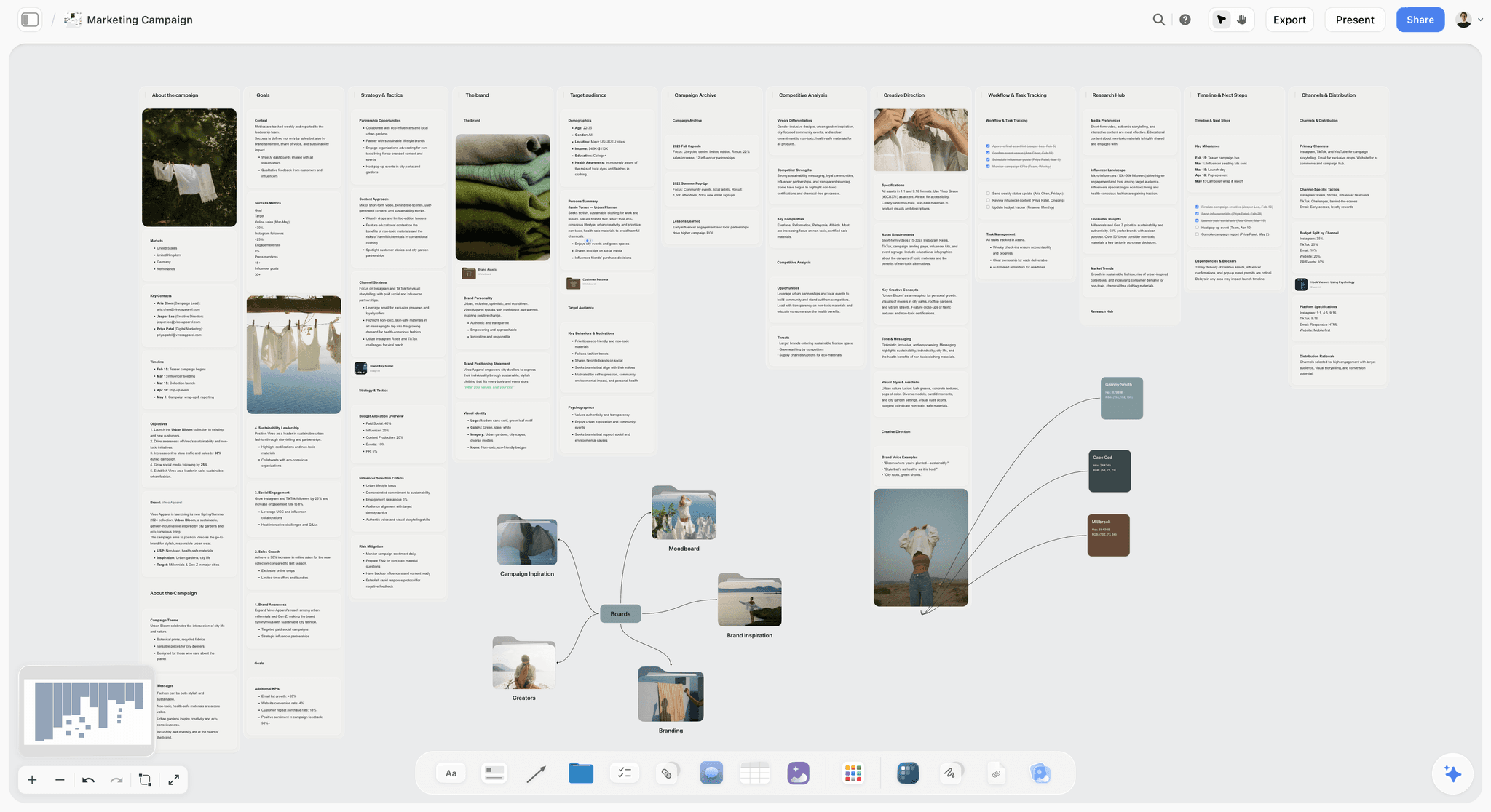
A whole campaign on one board: brief, strategy, creative direction, task tracking and channels, with inspiration and creators in folders
Final Verdict: Best Creative Brief Tools 2026
Storyflow is the best tool for writing and sharing a creative brief because its AI drafts the brief from the client's material onto the board where the work happens, and the client reads it there without an account. Notion is the better home when the brief's main job is to sit in a filterable queue across many clients, and Asana or Wrike when the problem is the review rounds after the brief. Take one live brief, draft it with the AI creative brief generator, and share it with the client from a Storyflow board before you decide.
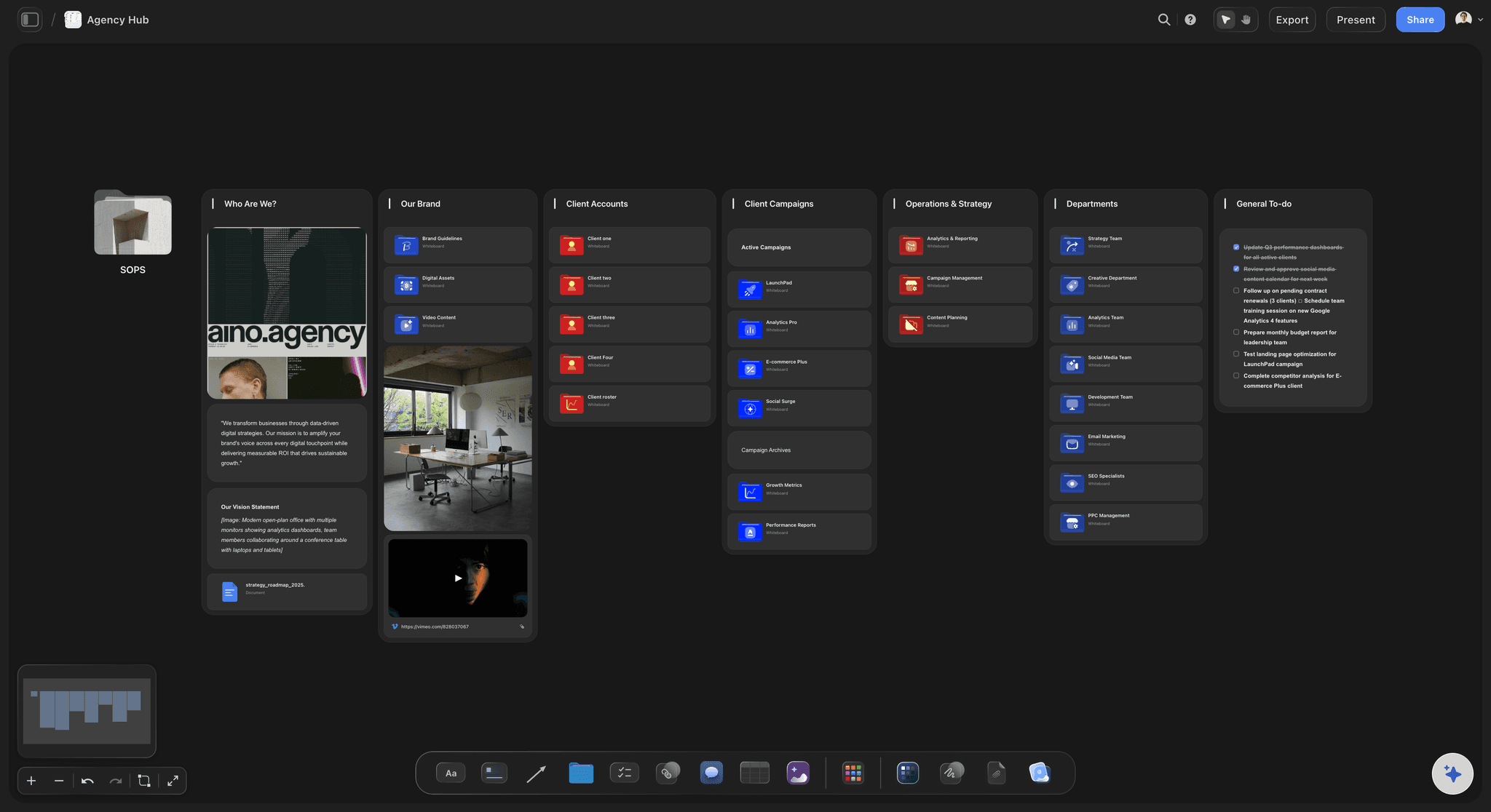
An Agency Hub board in Storyflow: each client account and campaign is a folder that opens its own board, beside the brand, departments and a shared to-do list
FAQ: Best Creative Brief Tools 2026
What is a brief board?
A brief board is a creative brief laid out on a visual canvas instead of a page: each section of the brief is a column or card, and the references, moodboard and early frames sit beside the words they explain. It suits briefs where tone and visual direction matter more than paragraphs. Storyflow builds one from a prompt with its Campaign Brief workflow; Milanote, Miro and FigJam publish brief templates you fill in by hand.
What software generates formatted briefs from templates?
Storyflow generates a formatted brief board from its Campaign Brief workflow or opens one from its Creative Briefs templates, and exports the brief document as PDF or Word. Canva Docs turns a brief template into a designed document you can share or present. HolaBrief exports white-labelled PDFs on its Pro plan. Notion and Google Docs give you the template but leave the formatting to whoever fills it in.
What should a Meta ad creative brief template include for a travel agency?
The destination and season, the offer with its exact terms and dates, one proposition per audience (families, couples, solo travellers), three to five hooks per audience, each placement's format checked against Meta's current ad specs, the booking call to action, mandatories such as price disclaimers and supplier logos, and a test plan that says which variable each round tests. The paid social table above gives the fixed and varied fields.
Can an AI turn form submissions into a creative brief?
Yes, in two steps, because no tool here connects a form directly to Storyflow. Collect the request with a form in Asana, Wrike, Airtable or HolaBrief, export or copy the answers into a document, and attach it to Storyflow AI with the Campaign Brief workflow. The form guarantees the inputs are complete; the AI drafts the brief from them and leaves marked slots for anything missing.
What is a living brief, and which tools keep one current?
A living brief is updated when the plan changes and stays the reference the team checks during production. Google Docs and Notion keep a version history of each change. In Storyflow the brief sits beside the work, but documents do not update each other: when the budget or dates change, ask the AI to redraft the affected walls and check them. Whatever the tool, record who approved each change.
How do you stop details getting lost between the brief and the build?
Copy the proposition and the mandatories word for word into every channel brief, link each channel brief back to the master, and name one approver for all of them. Loss happens when each channel team paraphrases the brief. On a Storyflow board, the channel briefs can sit as walls beside the master brief, so a reviewer sees both at once.
Which tools let editors hand briefs to writers with statuses?
Notion and Airtable, where each brief is a row with a status, an owner and a due date that a writer can filter to. Asana and Monday do the same as tasks. In Storyflow, a Kanban or tickets with assignees beside the brief show who holds it, but there is no view across every board, so a large writing team is easier to run in a database.
Are there free creative brief tools that are actually good?
Yes. Google Docs is free with a Google account and covers a text brief with comments and version history. Milanote's free plan covers 100 notes, images or links and 10 file uploads, enough for a visual brief on one project. Notion publishes a free creative brief template, Miro's free plan gives you 3 editable boards and a brief template, and Canva has a free plan with brief templates in Canva Docs.
Which is better for a creative brief, Miro or Notion?
Notion, if the brief is a document you file and track: one database row per brief, filterable by client and status. Miro, if the brief is agreed in a workshop: sticky notes, references and votes on one board, with visitors opening a public link without an account. Neither drafts the brief from a client's files onto a board beside the moodboard, which is the gap Storyflow fills for agencies that want the document and the direction in one place.
What is the difference between a creative brief tool and a project management tool?
A creative brief tool holds the brief as a creative artifact next to the work it produces. A project management tool holds it as an operational record with status, deadlines and owners. Storyflow, Milanote and Google Docs are creative-first surfaces; Asana, Monday and ClickUp are operations-first. Notion sits in between, because the database is operational but the page is creative.
Can Storyflow replace a brief tool like Notion or Asana?
For the brief itself, often; for the operations around it, no. It has no intake forms, approval steps or client billing, no single view across every brief, and its tables cannot be sorted or filtered by a column. Teams that need a queryable database of 100 historical briefs across 20 clients are better served by Notion, and teams that need intake-to-launch reporting by Asana. An agency can run Storyflow for the brief and direction, and one of those for the queue.
Is content brief software the same as a creative brief tool?
No. Content brief software builds briefs for writers from search data: the query to target, the headings and questions to cover, and how long competing pages run. A creative brief tool briefs a campaign, an ad or a production: objective, audience, proposition, tone and deliverables. For a writer-ready structure, start from the content brief template.
How do agencies collect client briefs online?
With a questionnaire or request form the client completes before the kickoff call. HolaBrief is built for that step and gives clients guest access; Wrike, Asana (from Starter) and Airtable do the same with request forms. Storyflow has no intake form, but its AI can turn the call notes or the client's brief PDF into a brief board the client then reviews through a view-only link.
What is a brief tracker?
A brief tracker is one table of every open brief with its client, owner, status, due date and a link to the brief. Notion databases and Airtable are common homes for one because they filter and sort across every client, and Notion vs Airtable for creative project tracking compares the two. In Storyflow, a Table with status, person, date and link columns can list briefs on a board, but it cannot be sorted by a column and there is no view across every board.
How do you turn an approved brief into production tasks?
Split the deliverables list, not the brief. Each asset in the brief's deliverables becomes one task with an owner, a due date and a link back to the brief, and the brief stays the reference nobody edits without the approver. In Asana, Wrike or Monday that is a project built from the approved request. In Storyflow, ask the AI to build a Tasks Planner or Kanban beside the brief on the same board, and use tickets with assignees for the work.
Where should timelines, briefs and creative production be coordinated?
In two places at most, joined by links. The brief, references and creative direction belong where the team argues about the work: Storyflow, or Notion for a text-first team. The dated schedule of deliverables belongs where status changes are tracked: Asana, Monday or Wrike. Coordinating everything in one tool tends to fail in one direction or the other, either a creative board with no deadlines or a task list with no brief.
How do you evaluate collaboration tools for creators, briefs and approvals?
Test each tool on one live brief, against three questions. Can someone outside the team open the brief without a paid seat? Does the brief stay beside the work after approval? Is sign-off recorded? Storyflow answers the first two and has no approval step; Asana Advanced and Adobe Workfront record approvals; an influencer platform handles creator messaging and contracts.
Which platform includes built-in creator briefs, brief templates and approvals?
No single tool ranked here has all three. Influencer marketing platforms such as GRIN hold creator briefs and messages together. Among the ten, Asana has brief forms on Starter and approvals on Advanced, and Storyflow has a Creative Briefs template gallery and an AI that drafts the brief, with comments instead of an approval step.
What are the top options for campaign briefs and approvals?
Split the two jobs. For the campaign brief, Storyflow: its Campaign Brief workflow drafts ten walls from the client's files and the client reads them by link. For approvals, Asana Advanced or Adobe Workfront, which record a sign-off, and Wrike for proofing versions side by side. Link the brief from every review task so both halves stay connected.
What features matter most for campaign brief creation and approval workflows?
Six, in order of use: an AI draft built from your own source files, one fixed structure for every brief, a share link an outside reviewer opens without a seat, comment threads beside the brief, a PDF export for procurement, and a recorded approval with file versions. Storyflow covers the first five; the sixth belongs in Asana Advanced, Wrike or Adobe Workfront.
What tool creates a living brief that AI agents can work from?
Storyflow, through its MCP connector: ChatGPT, Claude, Gemini and Grok can read the brief board in your Storyflow project and build boards and documents from it, so the brief is working context, not a file an assistant never sees. It stays current only if someone updates it: ask the AI to redraft the affected walls when the plan changes.
What is the best creative brief management app?
For managing many briefs at once, Notion: every brief is a database row you filter by client, owner and status. For the brief itself, written by AI and read by the client on a board, Storyflow, which has no single view across boards. An agency with a long queue may want both: Notion for the list, Storyflow for each brief.
What is the best content brief tool for a team?
It depends which content brief you mean. A search-led brief (target query, headings, competing pages) needs dedicated content brief software built on search data, which this page does not rank. A writer's brief (angle, audience, outline, sources, deadline) fits a Notion database row per article, or a Storyflow board when the piece needs references and visuals beside it.
What are the best platforms for developing a product brief?
A product brief is mostly text with a long review history, so a wiki or database suits it: Confluence for page permissions and history inside a large organization, Notion for a brief per row in one database. Use Storyflow when the product brief feeds a launch and needs the positioning, references and campaign plan on the same board.
Which AI tools help with brand positioning, messaging and creative briefs?
Storyflow covers all three on one board: ask its AI for a brand strategy and it lays out positioning, values and tone of voice, then run the Campaign Brief workflow so the brief draws on them. ChatGPT and Claude write positioning and brief text in a chat, and Notion AI drafts inside a page. In every case a strategist should own the proposition.
What tools use generative AI to write project briefs?
Storyflow's AI drafts a full campaign brief as a ten-wall board from your notes or the client's files and leaves marked blanks where a number is missing, instead of inventing it. Notion AI drafts inside a Notion page, Canva's AI writes inside a Canva Doc, and ChatGPT or Claude write brief text in a chat. Storyflow puts the draft on a board beside the references and shares it with a client by link; connect it to ChatGPT or Claude through its MCP connector and those assistants can build the brief board too.
How do you create and share marketing briefs on collaborative platforms?
Write the brief where the team can edit it together, then share one link instead of a file. In Storyflow, run the Campaign Brief workflow with the client's files attached, edit the walls with your team in real time, and send the client a view-only link that opens with no account. In Notion, duplicate the brief template and set page permissions to comment or read. In Google Docs, share with comment access and keep version history on.
What is the fastest way to standardize brief creation workflows?
Use one structure for every brief and make the tool produce it. Storyflow's Campaign Brief workflow lays out the same ten walls every time, so every brief has the same sections in the same order. Notion and Coda standardize with a template in a database, and Asana, Wrike and Airtable standardize the intake with a form. Pair a fixed intake form with a fixed brief structure and briefs stop varying by who wrote them.
Table of Contents
- Notion, FigJam, Miro, Google Docs or Storyflow: Which Tool Should You Use to Write and Share a Creative Brief?
- Quick Picks: Best Creative Brief Tools 2026 by Use Case
- Best Creative Brief Tool by Team: Agencies, Creative Directors and In-House Brand Teams
- Comparison Table: Best Creative Brief Tools 2026
- Frequently Asked: Which Creative Brief Software Is Best, Most Trusted and Best for Reviews?
- Where the Brief Lives Matters: Market Context
- How We Evaluated the Best Creative Brief Tools 2026
- Detailed Reviews: Best Creative Brief Tools 2026
- Other Creative Brief Tools We Considered
- What a Creative Brief Contains, and Who Owns Each Field
- Tools for Standardizing Creative Briefs Across Clients
- Creative Briefs for Paid Social Ads: What the Brief Must Hold
- An AI Creative Briefing Workflow for a Marketing Team
- Writing and Sharing a Creative Brief in Storyflow
- From Brief to Delivery: Where Reviews and Approvals Should Live
- Free vs Paid: Best Creative Brief Tools 2026
- Final Verdict: Best Creative Brief Tools 2026
- 1. Storyflow
- 2. Notion
- 3. Milanote
- 4. Asana
- 5. Monday
- 6. Coda
- 7. Google Docs
- 8. Airtable
- 9. Confluence
- 10. ClickUp
- FAQ: Best Creative Brief Tools 2026
- Related Reading
Templates to check out for this topic


Templates you can use in Storyflow
Every Storyflow board starts from real structure and an AI that reads the whole canvas. Open one of these templates and make it yours.


See Storyflow in Action
A visual AI workspace where every feature lives inside one canvas. No tab-switching, no context lost.
Build your entire board from a single message
Type what you need in the AI chat at the bottom of your canvas. The AI adds cards, headings, and structure directly onto your board.
Use expert frameworks as AI context
Type @ in the AI chat and choose any Tactic. The AI tailors every response to that framework instead of giving generic advice.
Turn your board into a mind map in seconds
Ask the AI to restructure your canvas as a mindmap. It connects your ideas into a visual hierarchy so you can see how everything relates.
Why Storyflow Exists
Storyflow actually began as a personal tool while working on creative and research projects.
We kept running into the same problem: ideas were scattered everywhere: notes, documents, and whiteboards.
Nothing helped us see how everything connected.
So we started building a workspace designed around how ideas actually grow.
→ Read how Storyflow was createdJustkay
Documentary Filmmaker & Founder at Storyflow
Published: 2026-05-10
Extremely simple, seriously capable


See how easy it is to get started
Watch a real project come together, from a blank board to a finished plan, clicked through step by step.
Start creating with AI and become more productive
Transform your creative workflow with AI-powered tools. Generate ideas, create content, and boost your productivity in minutes instead of hours.