Blueprint Tactics Tutorial: Turn Ideas into Action Plans (2025 Guide)
Complete guide to using Storyflow's Blueprint Tactics. Step-by-step tutorials for filmmakers, marketers, and content creators - from beginner basics to advanced techniques. Learn how to transform abstract concepts into structured, executable project plans with AI assistance.

Category
Tutorial
Author

Sara de Klein
Head of Product at Storyflow
Topics
December 16, 2025
•
25 min read
•
Tutorial- Blueprint Tactics
- project planning
- creative workflow
- AI frameworks
How do you turn abstract ideas into actionable blueprints?
To turn an abstract idea into an actionable blueprint, drop a Storyflow Tactic (an expert-designed framework from the Story blueprints library) onto a canvas board, then fill each card with the part of the plan you already know and use the canvas-aware AI for the parts you do not. Storyflow's AI reads your full active board, so its suggestions reference the rest of your plan instead of starting blank. The result is a structured, step-by-step plan that filmmakers, marketers, and content creators can execute, not just a blank template to fill in.

Every creative professional faces the same challenge: you have a brilliant idea, but no clear path from concept to execution. Whether you're a filmmaker developing a documentary, a marketer planning a product launch, or a content creator building your brand, the gap between "what if" and "here's how" is where projects die.
Blueprint Tactics in Storyflow solve this problem. They're pre-built expert frameworks - developed by industry professionals - that transform abstract concepts into structured, step-by-step action plans. Unlike rigid templates, Tactics adapt to your specific project while providing the guardrails that keep you moving forward.
This comprehensive tutorial covers everything from your first Tactic to advanced techniques used by professional filmmakers, marketers, and content creators. Whether you're a complete beginner or looking to optimize your workflow, you'll find actionable strategies for your specific niche.
By the end of this guide, you'll know exactly how to choose the right Tactic, customize it for your needs, leverage AI assistance, and build blueprints that turn your best ideas into finished projects.
What You'll Learn in This Tutorial
How to choose and apply Blueprint Tactics for any creative project
Step-by-step walkthroughs for filmmaking, marketing, and content creation
Beginner, intermediate, and advanced techniques for each niche
AI prompting strategies that accelerate blueprint development
How to customize Tactics for your unique workflow
Common mistakes to avoid and pro tips from industry experts
Answers to 20+ frequently asked questions about Tactics
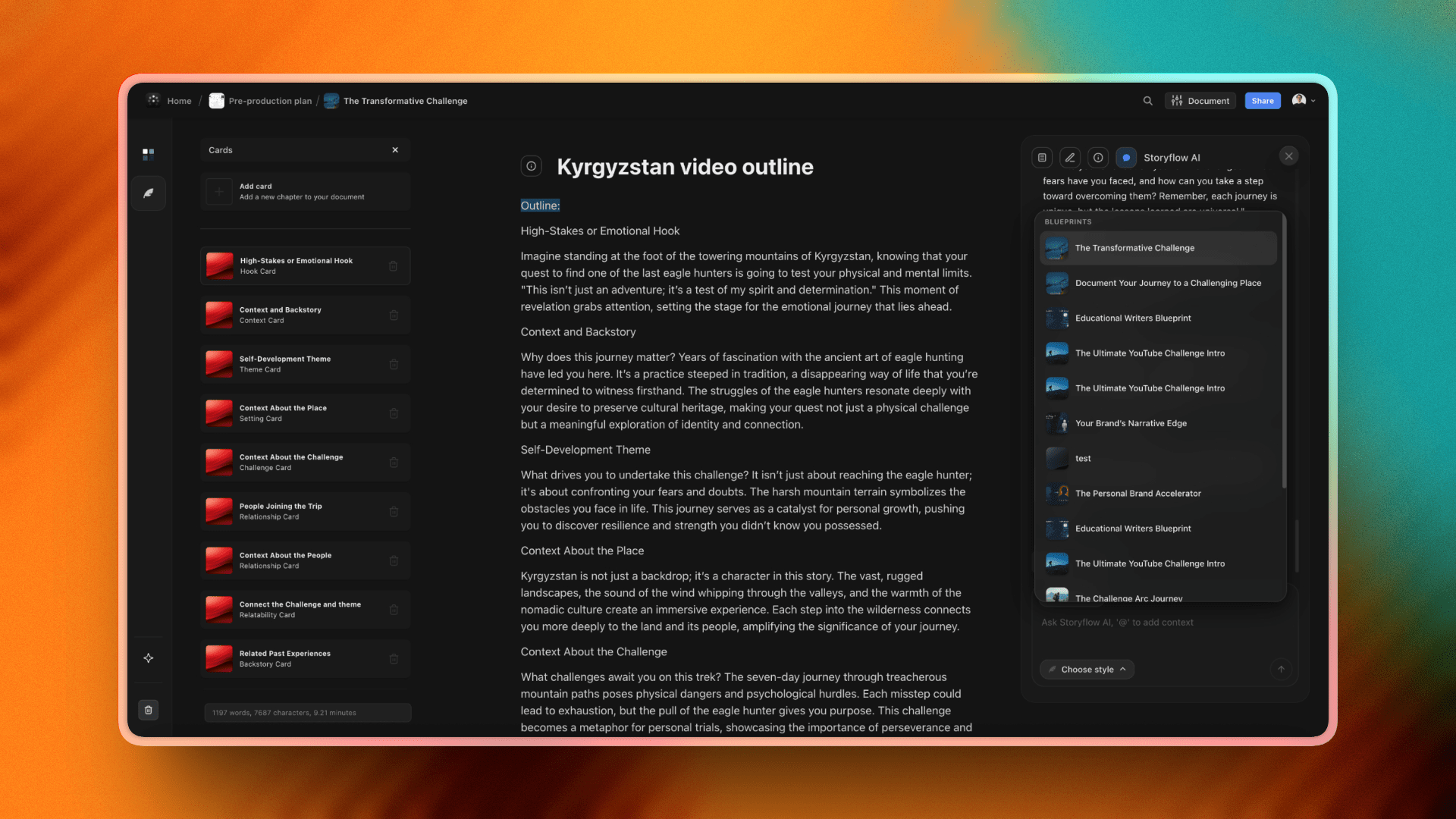
Storyflow Blueprint Tactics turn any abstract idea into a structured, step-by-step action plan
Table of Contents
1. What Are Blueprint Tactics?
2. Getting Started: Your First Blueprint
3. Filmmaking Tutorial: Beginner to Advanced
4. Marketing Tutorial: Beginner to Advanced
5. Content Creation Tutorial: Beginner to Advanced
6. Using AI to Build Better Blueprints
7. Advanced Customization Techniques
8. Pro Tips from Industry Experts
9. Frequently Asked Questions (20+ Answered)
What Are Blueprint Tactics?
Blueprint Tactics are pre-built frameworks designed by industry experts who have executed similar projects hundreds of times. Think of them as the collective wisdom of professionals distilled into a reusable structure - a documentary filmmaker's pre-production checklist, a product marketer's launch playbook, or a content creator's channel strategy.
Unlike templates that give you sample content to replace, Tactics provide structure without dictating specifics. They answer "what components do I need?" without telling you "what should those components say." This distinction matters because creative work requires flexibility - your documentary about climate change needs different specifics than one about street art, but both need a thesis, characters, and narrative arc.
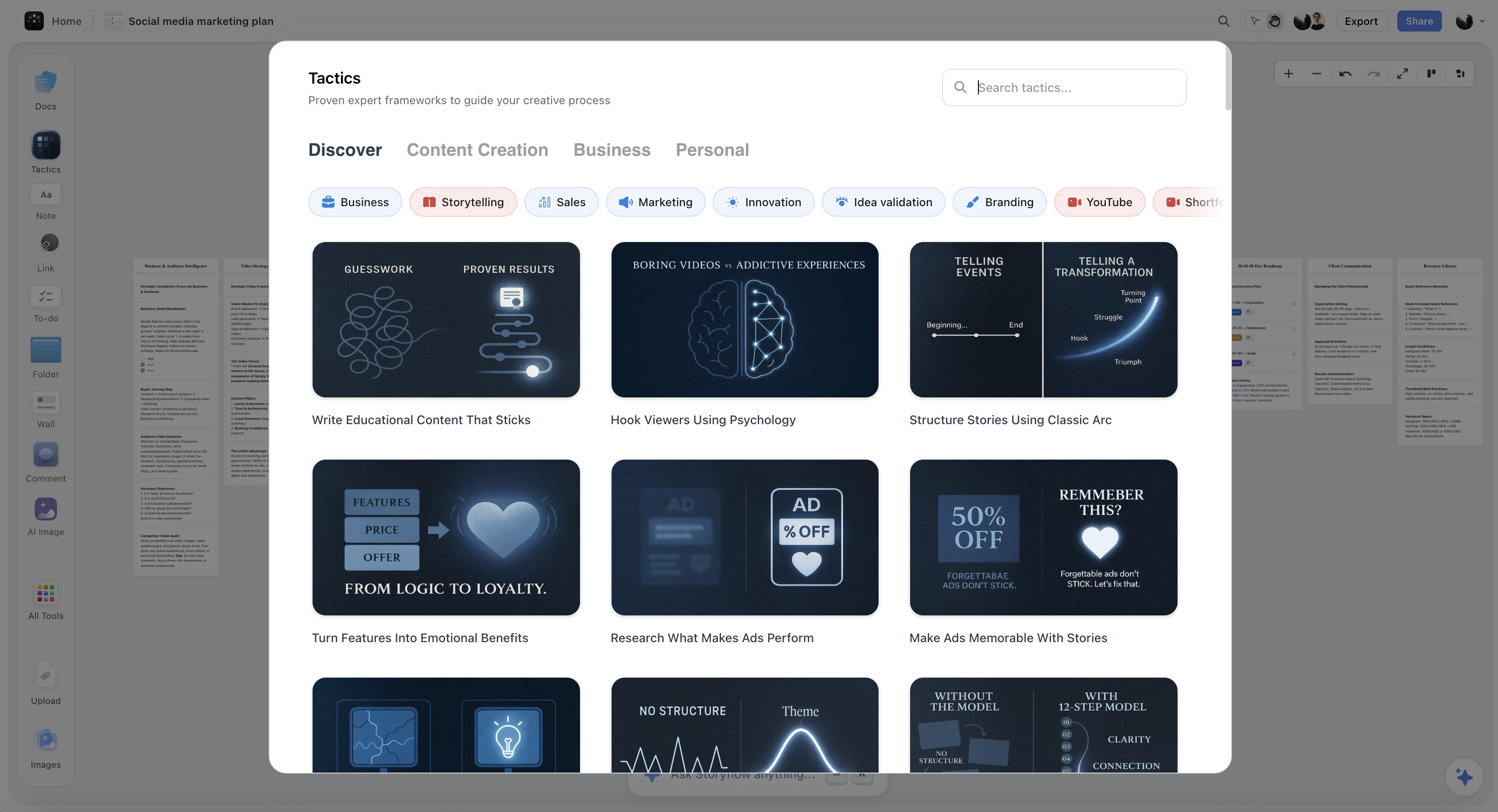
Key Features of Blueprint Tactics
Expert-designed structure - Each Tactic is built by professionals with deep experience in that domain. The Documentary Outline Tactic, for example, reflects how successful documentary filmmakers actually structure their pre-production.
Built-in AI assistance - Every card within a Tactic has an AI assistant that understands the card's purpose. Ask for help filling out your "Target Audience" card and get suggestions specifically tailored to audience definition.
Flexible customization - Add cards, remove cards, rearrange the structure, combine multiple Tactics. Your blueprint adapts to your project, not the other way around.
Contextual relationships - Cards understand how they relate to each other. The AI can reference your audience definition when helping you write messaging, or your budget when suggesting timeline adjustments.

Getting Started: Your First Blueprint
Before diving into niche-specific tutorials, let's walk through the universal process for creating any blueprint. This foundation applies whether you're planning a feature film or a social media campaign.
Step 1: Define Your Core Idea
Before opening Storyflow, write one sentence describing what you want to create. "A documentary about how AI is changing small-town jobs" or "A product launch campaign for our new fitness app targeting busy professionals." This clarity helps you choose the right Tactic and gives the AI context.
Step 2: Access the Tactics Panel
Click "Tactics" in the toolbar. You'll see categories: Content Creation, Business, Filmmaking, and Personal. Browse the category that matches your project, or use the search bar to find specific Tactics by name or keyword.
Step 3: Preview and Select
Click any Tactic to preview its structure before adding it. You'll see all the cards it contains and understand what components it covers. When you've found the right fit, click "Add to Canvas" to place it in your workspace.
Step 4: Expand and Explore
Click the Tactic on your canvas to expand it. Read through each card to understand the full structure. This overview often reveals considerations you hadn't thought about - a "Distribution Strategy" card might remind you to plan for promotion before you start production.
Step 5: Fill in What You Know
Start with the cards where you already have ideas. Don't force sequential order - jump to wherever your thinking is clearest. Building momentum matters more than perfect sequence. You can always return to fill gaps.
Step 6: Use AI for the Hard Parts
For cards where you're stuck, click the AI assistant. Each card's AI understands its specific purpose. Ask it to generate options, expand on your bullet points, or suggest alternatives. The AI can see your other cards, so its suggestions will be contextually relevant.
Filmmaking Tutorial: Beginner to Advanced
Whether you're planning your first short film or structuring a feature documentary, Blueprint Tactics help you organize pre-production like a professional. Here's a complete walkthrough from beginner basics to advanced techniques.
Beginner: Your First Film Blueprint
Start with Documentary Outline or Story Structure - These Tactics provide the essential components without overwhelming detail. They cover thesis/premise, characters, narrative arc, and production needs.
Focus on the "Why" first - Fill out the thesis/logline card before anything else. A clear central question or premise makes every other decision easier.
Don't skip character cards - Even for documentary, define your subjects. Who are they? Why do they matter to the story? What do they want?
Use AI for interview questions - If you're filming interviews, ask the card AI to generate question banks based on your thesis and character descriptions.
Intermediate: Building Production-Ready Blueprints
Combine multiple Tactics - Use Documentary Outline for narrative structure, then add Shot List Tactic for visual planning. The two work together - your narrative arc informs what shots you need.
Add custom cards for your needs - Create cards for location scouting, equipment lists, release forms, or anything else your specific production requires.
Use @mentions for AI context - When asking AI for help, reference other cards: "Based on @Characters and @Setting, suggest b-roll shot ideas that reveal character through environment."
Build your scene breakdown - Create a card for each major scene or sequence. Include: what happens, who's involved, where it takes place, what it reveals, and what coverage you need.
Advanced: Professional Workflow Techniques
Create reusable production templates - Once you've built a blueprint that works for your style, save it as a custom Tactic. Professional filmmakers often have different starting templates for documentary vs. narrative vs. commercial work.
Use the blueprint for funding applications - Your Tactic becomes a treatment document. Export cards to create professional pitch materials - the structure demonstrates you've thought through the full production.
Iterate during production - Your blueprint isn't static. As you shoot and discover new story threads, update the narrative arc. As locations change, update the shot list. The blueprint evolves with the project.
Share with collaborators - Invite your DP, producer, or editor to view the blueprint. Use Comments cards for async feedback. Everyone stays aligned without endless meetings.
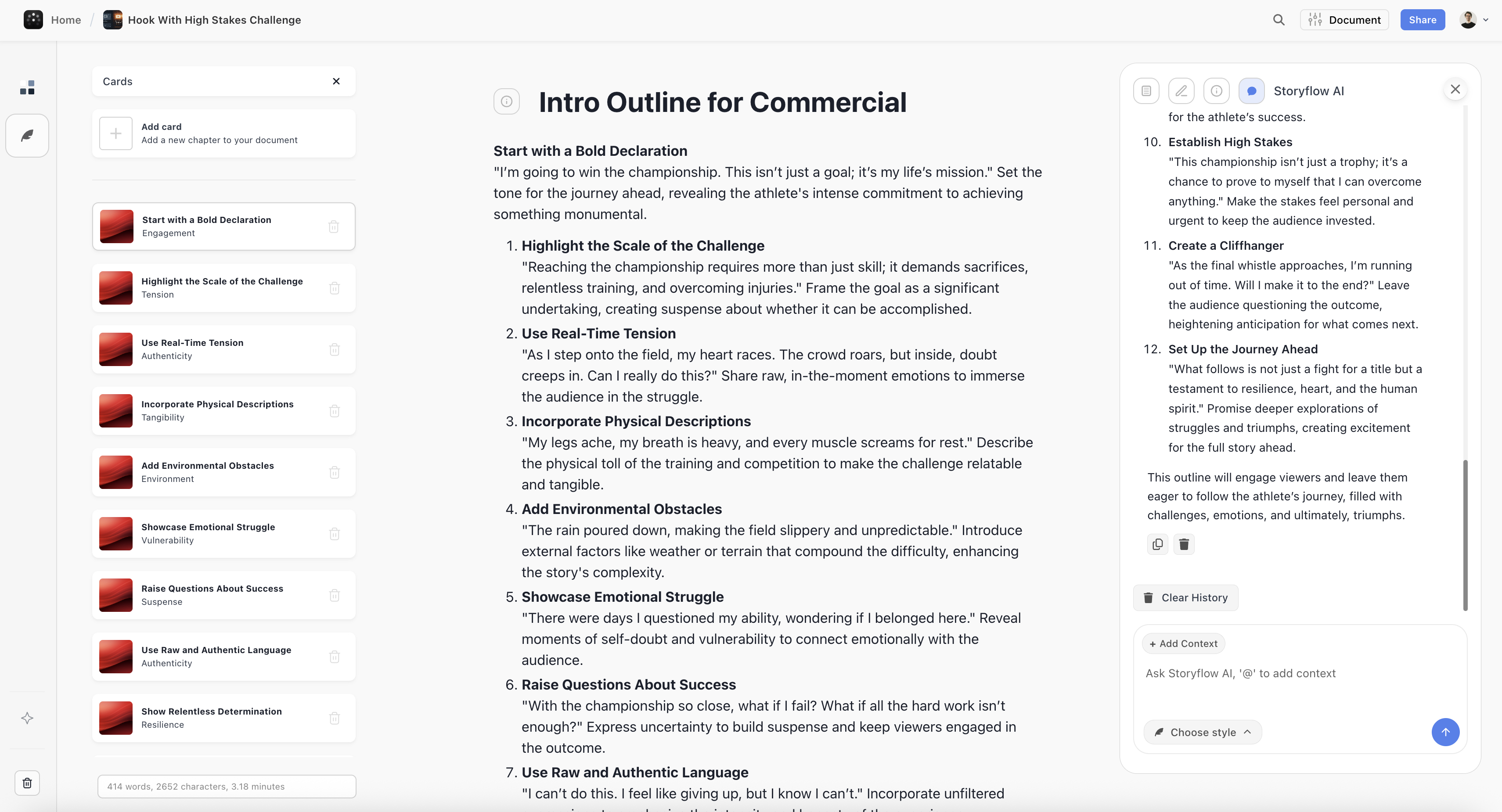
Marketing Tutorial: Beginner to Advanced
Marketing campaigns involve countless moving parts: audience research, messaging, creative assets, channels, timing, budgets, and measurement. Blueprint Tactics help you structure campaigns that don't fall apart mid-execution.
Beginner: Campaign Fundamentals
Start with Marketing Campaign Tactic - This covers the core components: objective, audience, messaging, channels, timeline, and success metrics. Even simple campaigns need these fundamentals.
Define one clear objective - "Increase brand awareness" is too vague. "Generate 500 email signups from our target audience in 30 days" is actionable. Fill this card first.
Get specific on audience - Don't just say "small business owners." Define: what size business? What industry? What's their biggest challenge? Use AI to expand your initial description into a detailed persona.
Start with one channel - Beginners often spread too thin. Pick the channel where your audience already spends time. Master that before expanding.
Intermediate: Multi-Channel Campaigns
Add Product Launch or Sales Funnel Tactics - Combine these with your campaign structure for launches that cover awareness through conversion.
Build messaging hierarchies - Create cards for: primary message (one sentence), supporting messages (three key points), and proof points (evidence for each). This hierarchy keeps all creative aligned.
Use AI for copy variations - Once you have core messaging, ask AI to generate variations for different channels: "Adapt @Primary_Message for Twitter, LinkedIn, and email subject lines."
Create a content calendar card - Map out what content goes where, when. Visualize the full campaign timeline to spot gaps or overlaps.
Advanced: Strategic Campaign Architecture
Build campaign blueprints by stage - Create separate Tactic structures for awareness, consideration, and conversion stages. Link them so each stage feeds the next.
Use competitive analysis cards - Document what competitors are doing, where they're weak, and how you'll differentiate. Reference these when developing messaging.
Build testing frameworks - Add cards for A/B test hypotheses, variables to test, and success criteria. Plan your optimization strategy before launch.
Create stakeholder presentations from blueprints - Your Tactic structure becomes your presentation outline. Export relevant cards to build pitch decks that show strategic thinking.
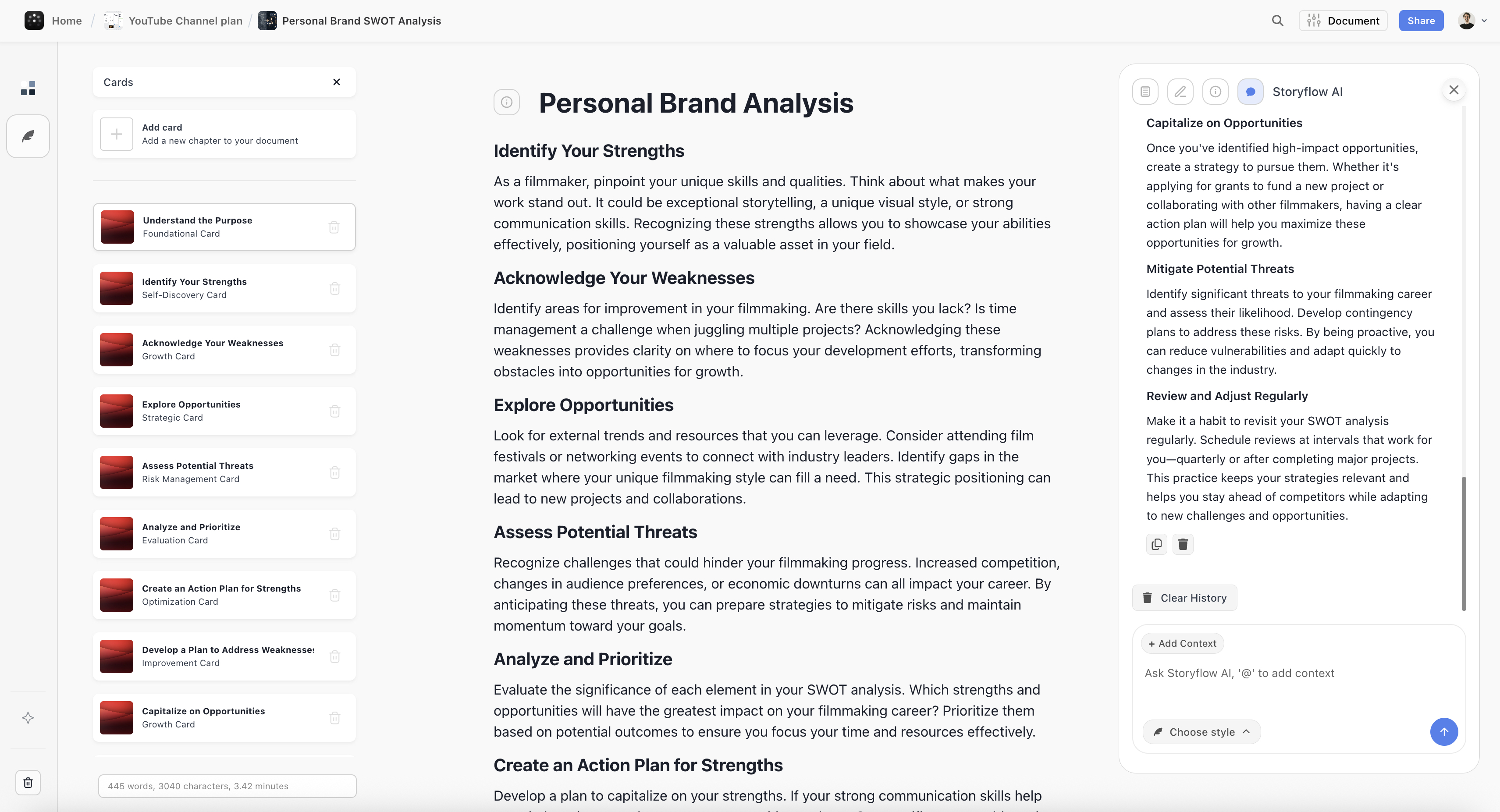

Content Creation Tutorial: Beginner to Advanced
Content creators juggle strategy, production, and promotion simultaneously. Blueprint Tactics help you develop sustainable systems instead of reinventing your process for every video, post, or article.
Beginner: Building Your Content Foundation
Start with YouTube Video Strategy or Blog Post Framework - These cover the core structure for individual pieces of content. Master single-piece planning before tackling channel strategy.
Define your content pillars first - Before planning individual videos, define 3-5 topics you'll consistently cover. This becomes the foundation for all content decisions.
Use hook formulas - The AI can generate multiple hook options based on your topic. Test different approaches until you find what resonates with your audience.
Build a thumbnail/title card - Plan your click-worthy elements before production. If you can't write a compelling title, the content idea might need refinement.
Intermediate: Systematic Content Production
Add Content Calendar Tactic - Plan content in batches. Map out 4-8 weeks of content at once, then batch your production for efficiency.
Create content series structures - Don't plan videos individually. Create Tactics for recurring series that define format, length, and structure you can repeat.
Use AI for repurposing - "Take @Video_Script and create: 5 Twitter threads, 3 LinkedIn posts, and an email newsletter." One piece of content becomes many.
Build feedback loops - Add cards for tracking what performs and why. After each piece publishes, note what worked. Patterns emerge that inform future content.
Advanced: Building a Content Empire
Create channel-level strategy Tactics - Build blueprints that define your overall positioning, competitive differentiation, growth strategy, and monetization approach.
Build sponsorship/partnership frameworks - Create cards for brand requirements, pricing structure, and pitch materials. Be ready when opportunities come.
Develop team workflows - As you scale, blueprints become delegation tools. Define what editors, writers, or assistants need to know for each content type.
Use blueprints for product development - When you're ready to launch courses, communities, or products, the Content Creation Tactics feed directly into Product Launch Tactics.
Using AI to Build Better Blueprints
Storyflow's AI isn't a generic chatbot. It reads your full active canvas board by default, plus up to 1 Tactic and up to 3 Documents you @-mention in the chat. That means its suggestions reference the plan you have already built instead of starting from a blank slate. This section covers how to leverage that context at every stage of blueprint development.

Storyflow's AI planner reads your full active board to generate relevant, structured suggestions
Card-Level AI Prompting
Each card has its own AI assistant that understands the card's specific purpose:
"Generate 5 options for my target audience based on my product description"
"Expand these bullet points into full paragraphs"
"What am I missing in this section?"
"Suggest alternatives that are more specific/bold/conservative"
"Rewrite this in a more conversational tone"
Project-Level AI Prompting
The main AI assistant can see your entire blueprint. Use @ mentions to reference specific cards:
"Based on @Target_Audience and @Budget, suggest which marketing channels will give the best ROI"
"Review my entire blueprint and identify gaps or inconsistencies"
"Given @Timeline constraints, what should I cut or postpone?"
"Create a one-page summary of this blueprint I can share with stakeholders"
"Based on @Competitive_Analysis, how should I differentiate @Messaging?"
AI Response Styles
Default - Balanced, helpful responses for general questions
Creative - More exploratory, generates unexpected ideas and angles
Concise - Short, direct answers without extra explanation
Detailed - Thorough, comprehensive responses with examples
Advanced Customization Techniques
Tactics are starting points, not constraints. Here's how to customize them for your specific workflow:
Remove irrelevant cards - If a card doesn't apply to your project, delete it. A focused blueprint is more useful than a comprehensive one you'll ignore.
Add custom cards - Create cards for elements specific to your project. Need a "Legal Review" section? A "Stakeholder Approval" checkpoint? Add them.
Reorder the structure - Drag cards to match your actual workflow sequence. Some teams do audience research before objective setting; others reverse it.
Combine multiple Tactics - Large projects often need components from several frameworks. Pull in relevant cards from different Tactics.
Save as custom template - Once you've built a blueprint that works, save it. Your custom Tactics appear in "Your Templates" for future projects.
Pro Tips from Industry Experts
Start with the end in mind
Fill out your "Success Metrics" or "Desired Outcome" card first, even if it's rough. Knowing what success looks like helps you make better decisions throughout the blueprint.
Use constraints as creative fuel
Define your budget, timeline, and resource constraints early. Ask AI: "Given these constraints, what's the most impactful approach?" Limitations often spark more creative solutions.
Don't over-plan before you start
Fill in enough to know your next steps, then begin execution. You'll learn things that change the plan anyway. Update your blueprint as you go rather than waiting for perfection.
Make blueprints living documents
Add notes to cards as you learn what works. After project completion, review what you'd change. These insights make your next blueprint better.
Use blueprints for team alignment
Share your blueprint with collaborators before kicking off. Five minutes reviewing the structure together prevents hours of misalignment later.
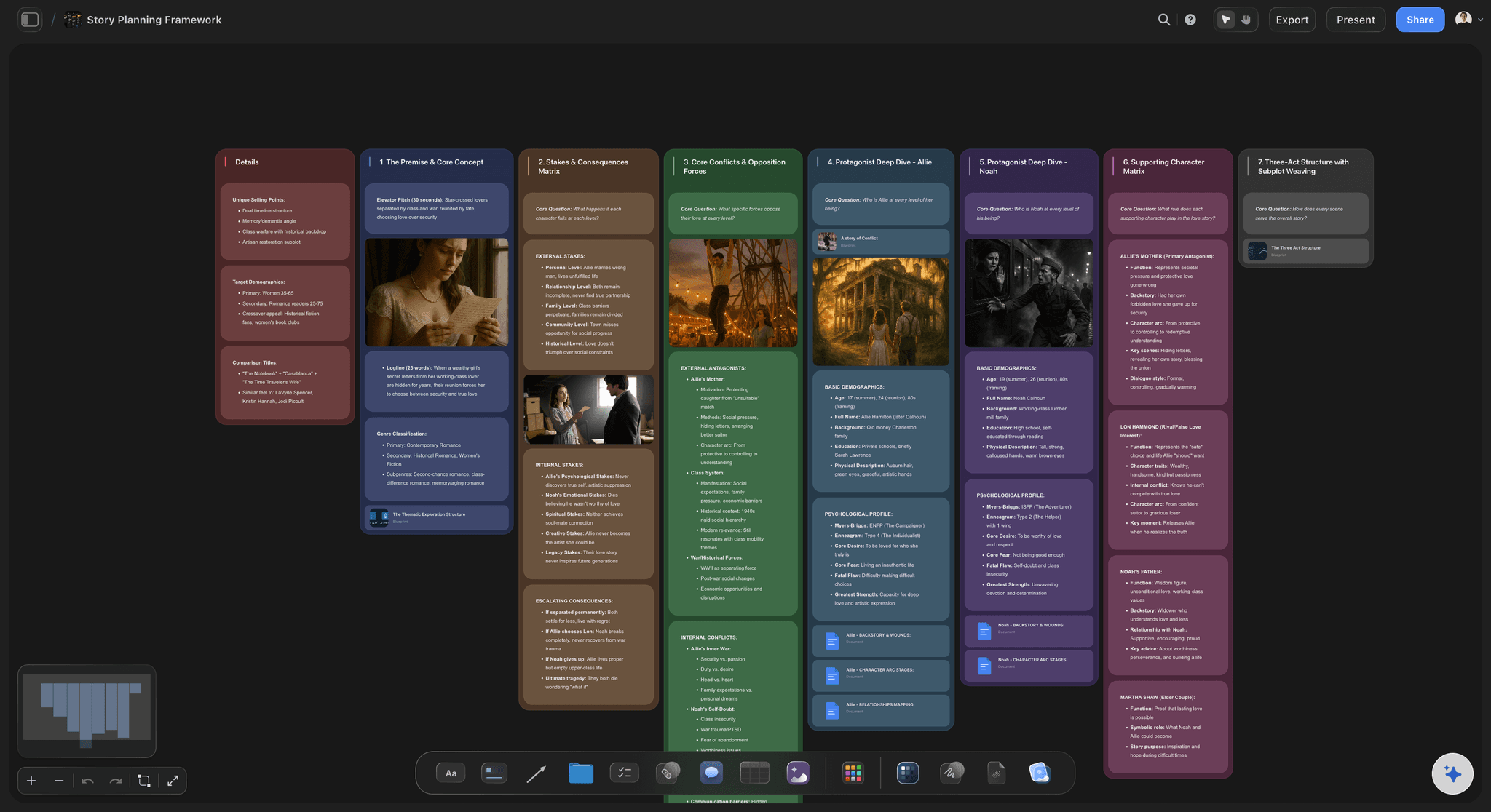
A Story Plan board on the Storyflow canvas: the abstract idea becomes a set of connected cards you can act on
Frequently Asked Questions
Answers to the most common questions about Blueprint Tactics, from getting started to advanced usage.
Getting Started
What's the difference between Tactics and templates?
Templates give you sample content to replace - they're static starting points. Tactics provide structure with built-in AI assistance - each card understands its purpose and can help you fill it out. Tactics are dynamic frameworks; templates are static documents.
How do I know which Tactic to choose?
Start by browsing the category that matches your project type (Filmmaking, Marketing, Content Creation, Personal). Preview several Tactics to see their structure. Choose the one that covers the most relevant components - you can always add or remove cards later.
What if no Tactic matches my project?
Choose the closest match and customize heavily, combine components from multiple Tactics, or start with a blank canvas and build your own structure. You can also create a custom Tactic from scratch and save it for future use.
Can I use multiple Tactics in one project?
Absolutely. Many projects benefit from combining Tactics. A product launch might use Marketing Campaign for strategy plus Content Calendar for execution. Add as many Tactics as you need and pull relevant cards together.
Customization & Workflow
How detailed should my blueprint be?
Detailed enough that you know your next steps, but not so detailed that updating becomes a burden. The sweet spot varies - simple campaigns might need 10 cards, complex film productions might need 50. Start lighter and add detail only where you need it.
Can I save my customized Tactic as a template?
Yes. Once you've built a blueprint structure that works for your workflow, save it as a custom Tactic. It will appear in "Your Templates" when adding new Tactics, ready to reuse on future projects.
Should I complete the blueprint before starting work?
Not necessarily. Fill in enough to understand your direction and next steps, then begin. You'll learn things during execution that change your plan. Update the blueprint as you go - it's a living document, not a contract.
How do I handle blueprint changes mid-project?
Update the blueprint to reflect new realities. If your timeline changes, update the timeline card. If you pivot strategy, update messaging. The blueprint should always represent current thinking - it's your source of truth.
AI Assistance
How does the AI understand my project context?
The AI reads your full active canvas board by default: every card, note, and connection on the board you are working in. You can pull in extra context by @-mentioning up to 1 Tactic and up to 3 Documents in the chat. It does not read every board in your account at once, so keep the work for one project on one board to get the most relevant suggestions.
What's the difference between card AI and project AI?
Card AI is accessed within a specific card and understands that card's purpose - it gives suggestions tailored to that section. Project AI (the main chat) sees your entire blueprint and can analyze relationships, identify gaps, and generate cross-card insights.
How do I get better AI suggestions?
Be specific in your prompts. Instead of "help me with this card," try "generate 5 target audience options for a B2B SaaS product targeting HR managers at companies with 50-200 employees." Include constraints, context, and desired output format.
Can AI fill out my entire blueprint automatically?
AI can generate suggestions for every card, but you shouldn't use it to auto-fill everything. The value comes from your thinking - AI accelerates and expands your ideas, not replaces them. Use AI to overcome blocks and explore options, then apply your judgment.
Collaboration & Sharing
Can I share blueprints with my team?
Yes. Share your project and team members can view, comment on, and edit the blueprint collaboratively. Everyone sees the same structure in real-time. Use Comments cards for async feedback and discussion.
Can I export blueprints for presentations?
Yes. Export individual cards, sections, or entire blueprints. Some users export to create pitch decks, treatment documents, or stakeholder presentations. The structured format translates well to professional deliverables.
How do I use blueprints for client work?
Create a blueprint during discovery to demonstrate your strategic approach. Share view-only access so clients see the structure without editing. Update the blueprint as the project evolves - it becomes a living record of decisions made.
Technical & Pricing
How long does it take to build a blueprint?
Initial structure takes 15-30 minutes. Filling in details depends on project complexity - simple campaigns might take an hour, complex productions might evolve over days. Most users find they save significant execution time by investing in upfront planning.
Is there a limit to how many Tactics I can use?
No limit. Add as many Tactics as your project needs. The canvas is infinite - organize them spatially in whatever way makes sense for your workflow.
How much does Storyflow cost?
Storyflow has a free tier with unlimited boards, cards, and basic AI usage. The Story blueprints library (200+ frameworks) starts on the Plus plan, the entry paid tier, which carries the same AI allowance as Free. Pro adds AI image generation and far more AI usage, and Max adds 40x more AI plus a team workspace with roles and permissions. Check the pricing page for current numbers.
Can I import existing project documents into a blueprint?
Yes. Upload documents, paste content into cards, or use the AI to summarize external documents and populate relevant cards. You can also embed links to reference materials directly in your blueprint.
Start Building Your Blueprint Today
The gap between abstract ideas and finished projects is where creative potential dies. But it doesn't have to be that way. With the right framework, any concept - from a documentary about climate change to a product launch targeting busy professionals - can become a structured, executable plan.
Blueprint Tactics give you that framework. Expert-designed structures capture proven approaches to filmmaking, marketing, content creation, and more. Combined with canvas-aware AI that reads your active board, you can build blueprints that are both comprehensive and adaptable.
Storyflow is not the right fit for every job. If your final deliverable is a formatted screenplay, Final Draft handles industry pagination Storyflow does not. If you live in spreadsheets and Gantt charts for resource-heavy production scheduling, a dedicated project-management tool will track dependencies better. Storyflow wins at the messy front half of the work: taking an abstract idea and shaping it into a structured plan on a visual canvas. It is weaker once that plan hardens into a specialized output format.
Your next great idea is waiting to become something real. Give it the structure it deserves.
Pick the one idea you keep meaning to start. Open a Story Plan board, drop in a Tactic, and spend 30 minutes filling the cards you already know. The gap between "what if" and "here's how" will be smaller than you think by the time you finish.
Related Articles
How to Organize Your Ideas Better with Storyflow: The Complete Guide
Why Storyflow is the Best Tool for Storytellers and Creatives
Why Creatives Are Using Storyflow to Brainstorm Smarter and Faster
Why Does ChatGPT Bury Important Information in Paragraphs?
Related Reading
Complete guide to idea organization
Why visual workspaces work for creatives
Science-backed brainstorming techniques
Compare 12 AI brainstorming tools
The workflow from raw ideas to a structured plan
A step-by-step AI-assisted product launch plan
Templates to check out for this topic


Templates you can use in Storyflow
Every Storyflow board starts from real structure and an AI that reads the whole canvas. Open one of these templates and make it yours.


See Storyflow in Action
A visual AI workspace where every feature lives inside one canvas. No tab-switching, no context lost.
Build your entire board from a single message
Type what you need in the AI chat at the bottom of your canvas. The AI adds cards, headings, and structure directly onto your board.
Use expert frameworks as AI context
Type @ in the AI chat and choose any Tactic. The AI tailors every response to that framework instead of giving generic advice.
Turn your board into a mind map in seconds
Ask the AI to restructure your canvas as a mindmap. It connects your ideas into a visual hierarchy so you can see how everything relates.
Why Storyflow Exists
Storyflow actually began as a personal tool while working on creative and research projects.
We kept running into the same problem: ideas were scattered everywhere: notes, documents, and whiteboards.
Nothing helped us see how everything connected.
So we started building a workspace designed around how ideas actually grow.
→ Read how Storyflow was createdSara de Klein
Head of Product at Storyflow
Published: December 16, 2025
Extremely simple, seriously capable


See how easy it is to get started
Watch a real project come together, from a blank board to a finished plan, clicked through step by step.
Start creating with AI and become more productive
Transform your creative workflow with AI-powered tools. Generate ideas, create content, and boost your productivity in minutes instead of hours.