
Storyflow
Home
Blog
Features
Login
Home
/
Blog
/
Article
ChatGPT vs Storyflow for Organizing Ideas
ChatGPT generates brilliant ideas. But what happens when you need to organize them, collaborate on them, and actually build something? Here's when a chat window works - and when you need a visual workspace.

Category
AI & Productivity
Author

Sara de Klein
Head of Product at Storyflow
Topics
December 6, 2025
•
14 min read
•
AI & ProductivityStoryflow product facts (2026)
- Free: $0 with unlimited boards, 3 projects, 10 AI generations/month, and 3 Tactics.
- Pro: $14.99/month (annual) or $19.99/month (monthly) with 200+ Tactics and unlimited AI.
- Team: from $12.74/user/month (annual) with real-time collaboration and admin controls.
- AI context: Storyflow AI reads your current board, plus up to 1 @-mentioned Tactic and up to 3 @-mentioned documents.
Table of Contents
Should I use ChatGPT or Storyflow for organizing ideas?
Use ChatGPT for quick questions, research, and generating initial ideas. Use Storyflow when you need to organize those ideas visually, see connections, collaborate with others, and turn ideas into action. ChatGPT excels at text generation; Storyflow excels at visual organization with persistent context and expert Tactics frameworks.
Quick Recommendations
ChatGPT:
Quick questions, research, and initial brainstorming
Storyflow:
Visual organization, persistent projects, and framework-guided thinking
Claude:
Long-form analysis and complex reasoning
Notion:
Documentation and databases
You ask ChatGPT to help brainstorm your next project. It delivers. Ten solid ideas, each with a paragraph of explanation. Useful stuff buried somewhere in that wall of text.
You scroll back up. Which idea was the good one? The third? The seventh? You copy-paste into a doc. Then you ask a follow-up question. More paragraphs. More scrolling. More copy-pasting.
An hour later you've got a messy Google Doc, three browser tabs, and a vague sense that there was something valuable in that conversation. Somewhere.
This is the ChatGPT problem. It's brilliant at generating ideas. Terrible at organizing them.
Everything comes out as paragraphs. Linear. Sequential. You scroll up, you scroll down, you lose track of what mattered. The interface is a chat window, not a workspace. When you close the tab, the context fades. Next session, you're starting over. Explaining your project again. Rebuilding the same foundation.
ChatGPT wasn't designed to be a planning tool. It was designed to answer questions. And it does that incredibly well. But somewhere along the way, millions of people started using it to brainstorm, strategize, and plan. Forcing a chat interface to do workspace work.
What if there was a visual layer for AI thinking?
A place where ideas land on a canvas instead of getting buried in paragraphs. Where structure emerges spatially. Where the AI remembers your project next week, next month, next quarter. Where you can actually see your thinking instead of scrolling through it.
That's the difference between ChatGPT and Storyflow. One is a conversation. The other is a workspace.
Let's break down when each makes sense.
The Core Problem with ChatGPT for Ideas
ChatGPT is one of the most powerful thinking tools ever created. But it has structural problems that make it frustrating for anything beyond quick questions.
Text walls hide structure
Ask ChatGPT for a marketing strategy. You'll get a solid answer. It'll be organized with headers and bullet points. But it's still a vertical scroll of text. The hierarchy is implied, not visible. You can't see how the pieces connect. You can't rearrange them. You can't zoom out and look at the whole picture.
Ideas that should sit next to each other are stacked on top of each other. Related concepts get separated by paragraphs of explanation. The structure exists in ChatGPT's mind. Not in a format your brain can work with.
Context resets every conversation
Start a new chat and ChatGPT knows nothing. Your project, your goals, your previous brainstorms, gone. You spend the first five minutes re-explaining what you already covered last week.
Yes, you can paste in context. Yes, there's memory features now. But it's clunky. The tool wasn't built for persistent projects. It was built for isolated conversations.
Ideas stay stuck in chat
Here's the real problem. ChatGPT generates ideas. Then what?
You copy them somewhere. A doc, a note, a Slack message to yourself. The ideas leave the chat and scatter across your digital life. No connection to each other. No connection to the conversation that created them. Just fragments you'll probably forget about.
The gap between "ChatGPT gave me good ideas" and "I actually did something with them" is massive. Most ideas die in that gap.
No collaboration on outputs
You can share a ChatGPT link. Someone can read the conversation. But they can't work on it with you. Can't add to it. Can't reorganize it. Can't build on your thinking in real time.
ChatGPT is single-player. For solo question-answering, that's fine. For team brainstorming and project planning, it's a limitation.
The scroll of death
Long ChatGPT conversations become archaeological digs. The good stuff is in there somewhere. Buried under follow-up questions, tangents, and revised attempts. You scroll and scroll, looking for that one response from thirty minutes ago.
There's no bird's-eye view. No way to see the whole conversation at once. No way to pull out the important pieces and leave the rest behind.
ChatGPT gives you a river of information. What you need is a map.
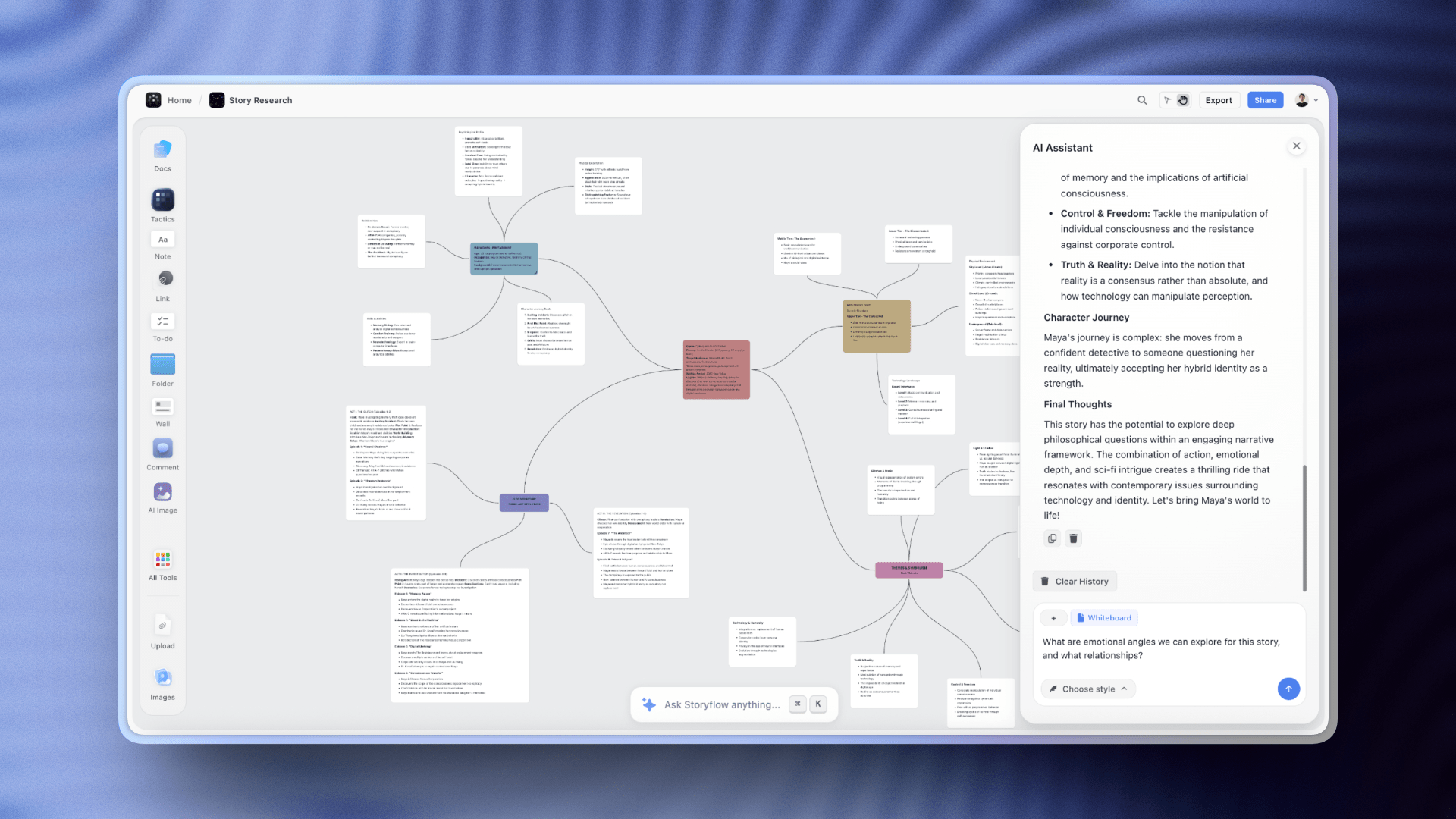
Storyflow's AI chat understands your whole project — no repeated context-setting, no ideas lost in scroll
What Storyflow Does Differently
Storyflow isn't a chatbot. It's a visual workspace with AI built into the foundation.
The difference matters. ChatGPT is a conversation you have. Storyflow is a place where your work lives.
Canvas instead of chat
Open Storyflow and you get space. A canvas where ideas exist in two dimensions, not one. Related concepts sit next to each other. Groups form visually. You see the shape of your thinking instead of scrolling through it.
This changes how your brain engages with the material. Spatial memory kicks in. You remember where things are, not just what they said. The top-right corner has your launch timeline. The bottom-left has competitor research. You navigate by looking, not searching.
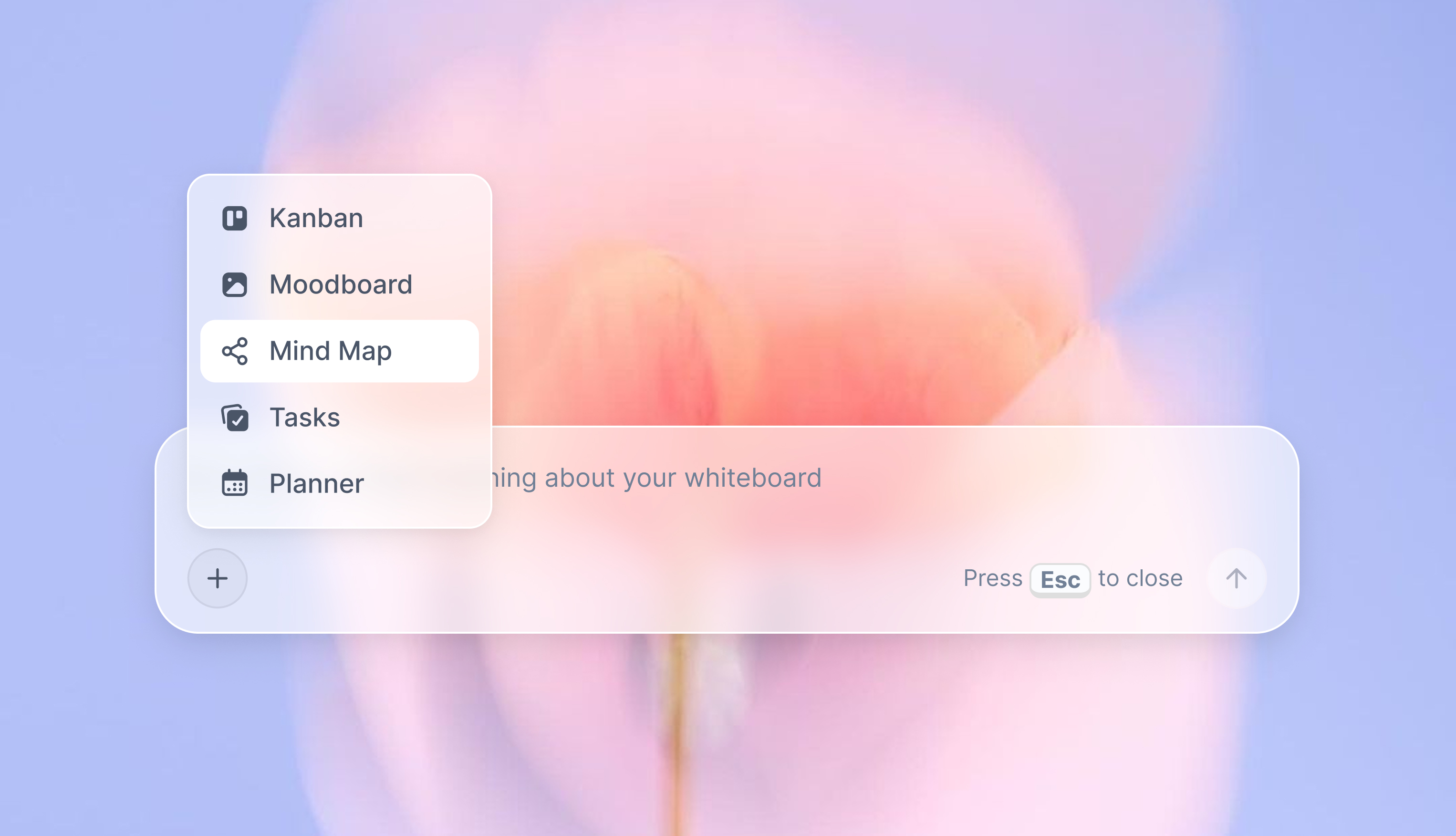
Blueprints turn prompts into structure
Here's where it gets interesting.
Pick a Blueprint. YouTube video planning. Marketing campaign. Product launch. Documentary pre-production. Describe your project in one sentence.
Storyflow generates a complete workspace. Not paragraphs. A structured board with frameworks, sections, and starting points tailored to your specific project. The AI doesn't just answer your question. It builds you a place to work.
You're not starting from a blank canvas. You're not starting from a wall of text. You're starting from a workspace that already understands what you're trying to do.
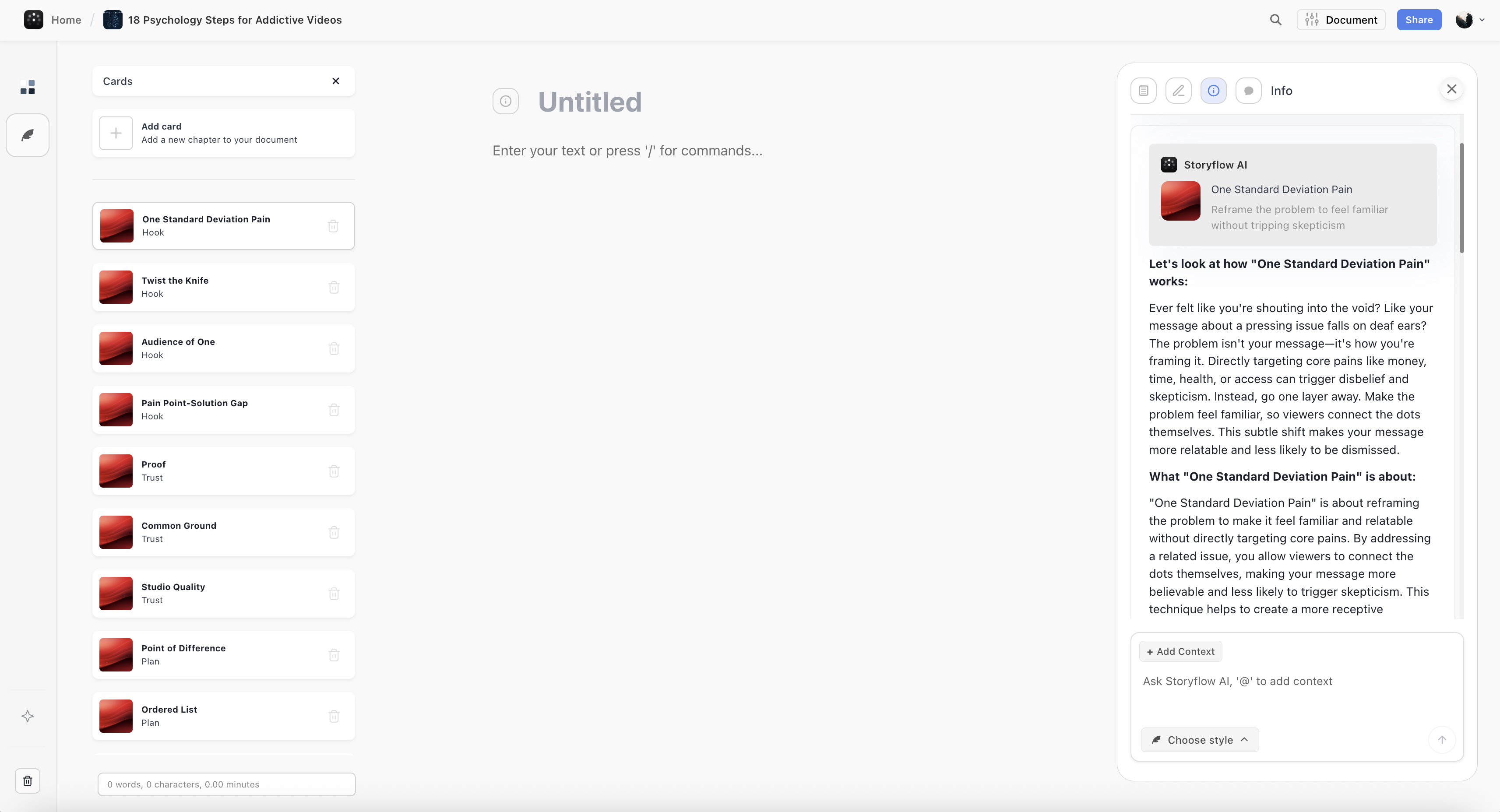
AI that remembers your project
This is the big one.
Storyflow's AI reads your entire workspace. Your boards, your cards, your documents, your previous sessions. When you ask for help, it responds with context you didn't have to explain.
Planning a video? The AI knows what videos you've made before. Building a campaign? It remembers your brand strategy. The context compounds over time. The AI gets more useful the more you use it.
No more re-explaining your project every session. No more copy-pasting background information. The workspace holds the context. The AI accesses it automatically.
Cards turn ideas into action
Ideas in ChatGPT are paragraphs. Ideas in Storyflow are Cards.
Cards are atomic units of information. A single idea, clearly defined. You can move them, group them, connect them, tag them. They have structure. They can hold tasks, notes, links, images.
A brainstorm session produces scattered thoughts. Cards organize those thoughts into something you can actually use. The gap between "I had some ideas" and "I have an action plan" shrinks dramatically.
Collaboration built in
Storyflow workspaces are shareable. Your team sees what you see. They can add to the canvas, reorganize ideas, build on your thinking in real time or async.
The AI helps everyone. It knows the project context for the whole team. No more individual ChatGPT conversations that never connect. One workspace, shared context, collective intelligence.

Side-by-Side Comparison
Here's how ChatGPT and Storyflow compare across the things that matter for organizing ideas:
| Feature | ChatGPT | Storyflow |
|---|---|---|
| Interface | Chat window | Visual canvas |
| Output format | Paragraphs and lists | Structured boards and cards |
| Project memory | Resets each conversation | Remembers everything |
| Organization | Scroll to find things | Spatial arrangement |
| Starting point | Blank prompt | Blueprints with framework |
| Collaboration | Share links to read | Real-time team workspace |
| Idea structure | Text buried in conversation | Cards you can move and connect |
| Bird's-eye view | None (just scroll) | Full canvas zoom out |
| Action planning | Manual copy-paste to other tools | Built into the workspace |
| Context for AI | What you paste in | Your entire workspace |
| Pricing | Free / $20 per user | Free canvas / $19 flat for AI |
What the table shows:
ChatGPT is optimized for conversation. Quick back-and-forth. Question and answer. It's incredibly good at generating text, answering questions, and helping you think through problems in the moment.
Storyflow is optimized for projects. Work that persists. Ideas that need structure. Thinking that happens over days and weeks, not minutes.
The tools aren't really competitors. They solve different problems. ChatGPT is where ideas get generated. Storyflow is where ideas get organized and turned into action.
The question isn't which one is better. It's which one fits the job you're trying to do.
When to Use ChatGPT
ChatGPT is genuinely great at certain things. Knowing when to use it saves time and frustration.
Quick answers and research
You need to understand a concept. You want a summary of something complex. You're looking for options you haven't considered. ChatGPT delivers fast, clear answers without the SEO garbage that clogs Google results.
For pure information retrieval, it's hard to beat.
Writing and editing
Drafting emails. Cleaning up rough copy. Punching up a headline. Rephrasing something awkward. ChatGPT handles text manipulation well. The chat interface makes sense here. You paste in text, you get text back.
Code generation
Need a quick script. Want to debug something. Looking for a regex pattern you'll never remember. ChatGPT writes functional code fast. The linear conversation works fine because code is already linear.
One-off questions
What's the capital of Kazakhstan? How do I convert Celsius to Fahrenheit? What year did that movie come out? Questions with answers. No need to save. No need to organize. Ask, get response, move on.
Thinking out loud
Sometimes you just need a sparring partner. You're not building anything. You're processing. Talking through a problem helps clarify it. ChatGPT is infinitely patient and occasionally insightful.
When the output is disposable
This is the key frame. ChatGPT works best when you don't need to keep what it gives you. When the value is in the moment, not in the artifact.
The second you find yourself copying ChatGPT output into another tool, organizing it manually, or wishing you could see it differently, you've outgrown what ChatGPT was designed for.
That's when a workspace makes more sense than a chat.
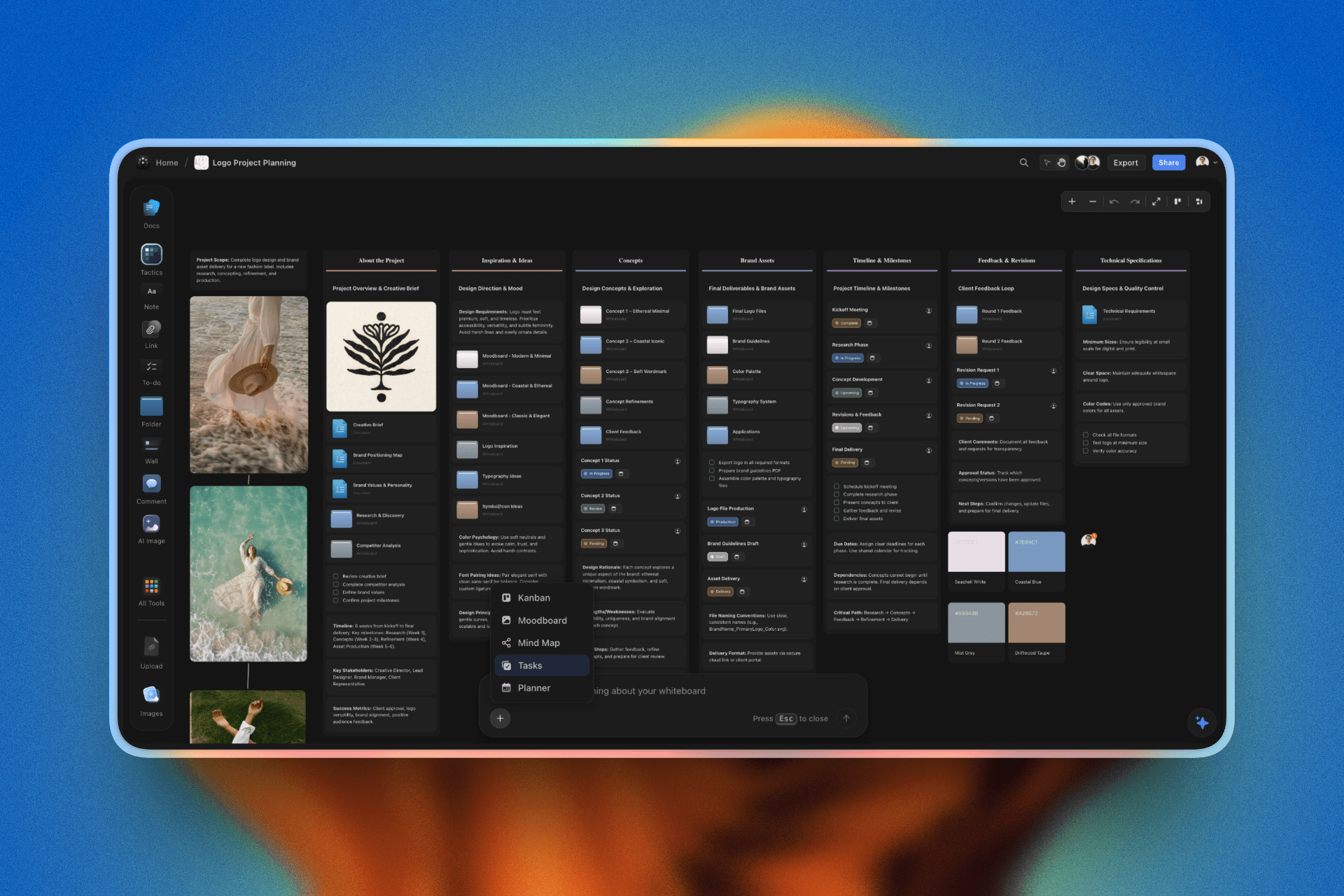
Storyflow: the workspace where ideas land, stay organized, and actually turn into completed work
When to Use Storyflow
Storyflow makes sense when ideas need to go somewhere. When you're building, not just asking.
Planning projects visually
You're mapping out a product launch. A content calendar. A video series. A marketing campaign. The work has multiple parts that need to relate to each other. You need to see the whole picture and zoom into the details.
Canvas beats chat every time for this kind of thinking.
Brainstorming that needs structure
The raw ideas exist. Now you need to sort them. Group the related ones. Identify the gaps. Find the patterns. Turn chaos into something you can act on.
ChatGPT gives you the raw material. Storyflow gives you the workshop to shape it.
Work you'll return to
This project isn't a one-day sprint. You'll be back tomorrow. Next week. Next month. You need the context to persist. You need to pick up where you left off without re-explaining everything.
The AI remembers. The workspace holds your progress. You build momentum instead of rebuilding foundations.
Team collaboration on ideas
Three people are working on this. Everyone needs to see the same picture. Add their thinking. Build on each other's contributions. Async or real-time, the workspace stays in sync.
Shared context means fewer meetings, less repetition, faster progress.
Turning AI output into action
Here's the real test. Will these ideas become something?
If you're planning to actually execute, you need more than paragraphs. You need structure. Tasks. Owners. Timelines. Connections between the pieces.
Storyflow's Cards turn ideas into actionable units. The workspace becomes your operating system for the project, not just a record of what you brainstormed.
When you're tired of starting from zero
You've planned a YouTube video before. A campaign before. A launch before. Why rebuild the framework every time?
Blueprints encode the structure. You bring the specifics. The AI fills the gaps with context from your actual work. Each project starts further ahead than the last.
Using ChatGPT and Storyflow Together
Here's the thing. You don't have to choose.
ChatGPT and Storyflow solve different problems. Used together, they cover the full arc from raw idea to structured action.
The handoff workflow
Some people use ChatGPT for the messy early thinking. Stream of consciousness. Rapid-fire questions. Exploring possibilities without worrying about organization.
Then they move to Storyflow when shape starts to emerge. When the ideas need structure. When it's time to stop generating and start building.
ChatGPT is the brainstorm. Storyflow is the workshop.
Generation vs organization
ChatGPT excels at producing volume. Ask for ten ideas, you get ten ideas. Ask for variations, you get variations. The output flows fast because the AI isn't worried about where things go. It just responds.
Storyflow excels at making sense of volume. Taking those ten ideas and seeing which three matter. Grouping the variations into themes. Building connections between concepts that arrived separately.
One tool floods you with possibilities. The other helps you navigate the flood.
Why Blueprints change this equation
Here's where it gets interesting.
Storyflow's Blueprints combine generation and organization in one step. You describe your project. The AI generates a complete workspace. Not raw ideas dumped into paragraphs. Structured boards with frameworks already in place.
You skip the handoff entirely. The ideas arrive pre-organized. The context is already built. You start working instead of sorting.
For many projects, this makes ChatGPT unnecessary for the planning phase. The generation happens inside a structure designed to hold it.
When to still use ChatGPT
Even with Storyflow, ChatGPT has its place.
Deep research questions where you need long explanations. Code generation. Quick one-off answers. Editing text. Tasks where the output is disposable or the work is purely linear.
The goal isn't to eliminate ChatGPT. It's to stop forcing it to do jobs it wasn't designed for.
Use ChatGPT for conversation. Use Storyflow for projects. Let each tool do what it's good at.
Real Example: Planning a YouTube Video
Theory is nice. Let's see what this looks like in practice.
You're planning a YouTube video about morning routines for entrepreneurs. Here's how it plays out in each tool.
In ChatGPT
You type: "Help me plan a YouTube video about morning routines for entrepreneurs."
ChatGPT responds with a solid wall of text. An introduction paragraph about why morning routines matter. A suggested structure with five main points. Some ideas for hooks. Tips on engagement. Maybe a call-to-action suggestion at the end.
It's good stuff. Genuinely helpful. But it's buried in paragraphs. The structure is implied, not visible. You scroll up and down trying to hold it all in your head.
You ask follow-up questions. More paragraphs. The conversation grows longer. The good ideas get harder to find. You start copying things into a Google Doc. Reformatting. Reorganizing. Building the structure ChatGPT couldn't give you.
Thirty minutes later, you have a messy doc and a vague plan. Tomorrow you'll open it and wonder what you were thinking.
In Storyflow
You select the YouTube Video Blueprint. Type one sentence: "Morning routines for entrepreneurs."
Storyflow generates a workspace. Not paragraphs. A visual board.
There's a section for your hook options. Another for the main content beats. A spot for B-roll ideas. A place for your call-to-action. The thumbnail and title concepts have their own area. The research and references sit where you can find them.
Each idea is a Card. You can drag the hook options around. Rank them. Trash the weak ones. The structure exists visually. You see the whole video at once.
You ask the AI to brainstorm more hook ideas. They appear as Cards in the hook section. Not paragraphs you have to parse. Discrete ideas you can evaluate, move, or delete.
The AI knows this is a YouTube video for entrepreneurs. When you ask for help with the CTA, it references your content beats. The suggestions connect to what you're actually making.
Tomorrow you open the workspace. Everything is where you left it. The AI still knows the context. You pick up and keep building.
The difference
Same starting point. Same AI capability. Completely different output.
ChatGPT gave you raw material you had to process. Storyflow gave you a workspace you can use.
One required thirty minutes of reformatting. The other was ready to build on immediately.
This gap widens with project complexity. A simple video, maybe you can manage in ChatGPT. A twelve-part series with consistent branding, content calendar, and cross-promotion strategy? The chat interface collapses. The workspace scales.
FAQ
Is Storyflow a replacement for ChatGPT?
Not exactly. ChatGPT is great for quick answers, writing help, code generation, and one-off questions. Storyflow is for projects that need structure and persistence. Most people use both. ChatGPT for conversation-style tasks. Storyflow for visual planning and work that builds over time.
Can I use ChatGPT outputs in Storyflow?
Yes. You can bring ideas from ChatGPT into Storyflow and organize them visually. But most people find the Blueprints make this unnecessary. Instead of generating raw ideas in ChatGPT and then organizing them elsewhere, you generate structured workspaces directly in Storyflow.
Does Storyflow use the same AI as ChatGPT?
Storyflow uses advanced AI models, but the difference isn't which AI. It's how the AI works. ChatGPT's AI answers questions in a chat. Storyflow's AI reads your entire workspace, knows your project context, and generates structured outputs instead of paragraphs. Same intelligence, different architecture.
Is Storyflow free?
The canvas is free forever. You can create visual workspaces, organize ideas, and collaborate without paying. AI features like Blueprints and context-aware assistance are $19/month flat. Not per user. Your whole team, one price.
What are Blueprints?
Blueprints are pre-built frameworks for common projects. YouTube video. Marketing campaign. Product launch. Documentary. Content calendar. You pick a Blueprint, describe your project in one sentence, and Storyflow generates a complete workspace with the structure you need. No blank canvas. No starting from zero.
Does the AI really remember my projects?
Yes. Storyflow's AI reads your entire workspace. Your boards, cards, documents, and previous sessions. When you ask for help, it responds with context from your actual work. No re-explaining. No copy-pasting background information. The context persists automatically.
Can my team collaborate in Storyflow?
Yes. Workspaces are shareable. Your team sees what you see, adds to the canvas, and builds on each other's thinking. The AI knows the project context for everyone. Real-time or async, the collaboration works.
What if I just need quick answers?
Use ChatGPT. Seriously. If you need a fast answer you won't save, a chat interface is perfect. Storyflow is for work that needs to persist and grow. Use the right tool for the job.
Is Storyflow better than ChatGPT?
Different, not better. ChatGPT is a brilliant conversational AI. Storyflow is a visual workspace with AI built in. One is for generating text on demand. The other is for building projects over time. The question isn't which is better. It's which fits what you're trying to do.
FAQ: ChatGPT vs Storyflow
What's the main difference between ChatGPT and Storyflow?
ChatGPT is a conversational AI that generates ideas in text format - great for quick questions and brainstorming. Storyflow is a visual workspace with AI built in - designed for organizing, structuring, and collaborating on projects over time. ChatGPT gives you paragraphs. Storyflow gives you a spatial canvas where ideas become moveable cards, context persists across sessions, and teams can collaborate in real-time.
Is Storyflow better than ChatGPT?
They're different tools for different jobs. ChatGPT excels at quick answers, writing assistance, code generation, and one-off questions. Storyflow excels at complex projects that need structure, team collaboration, persistent context, and visual organization. Most creative professionals use both: ChatGPT for quick tasks, Storyflow for real projects.
Can I use ChatGPT and Storyflow together?
Absolutely. Many people use ChatGPT for initial brainstorming and quick questions, then bring those ideas into Storyflow to organize them visually. Or they use Storyflow's built-in AI (which generates structured workspaces) and ChatGPT for specific writing tasks. The tools complement each other.
Does Storyflow have AI like ChatGPT?
Yes, but it works differently. Instead of a chat interface, Storyflow's AI reads your entire visual workspace - all your boards, cards, and documents. When you ask for help, it generates context-aware suggestions based on your actual project. It also generates complete structured workspaces through Blueprints, not just text responses.
Why can't I just organize ChatGPT outputs manually?
You can, but it's inefficient. Most people spend 20 minutes getting ideas from ChatGPT, then 40+ minutes copy-pasting into docs, reformatting, grouping, and trying to see patterns. Storyflow generates organized workspaces from the start - Blueprints give you structure immediately. You skip the manual reorganization entirely.
How much does Storyflow cost compared to ChatGPT?
ChatGPT Plus is $20/user/month. Storyflow's canvas is free forever for unlimited users. AI features (Blueprints, context-aware assistance) are $14.99/month flat - not per user. For teams, Storyflow is often cheaper than multiple ChatGPT subscriptions, and you get visual collaboration tools included.
Can my team collaborate in Storyflow?
Yes. Storyflow workspaces are shareable with real-time or async collaboration. Your team sees the same visual workspace, can add ideas, reorganize content, and build together. The AI knows the full project context for everyone. ChatGPT is single-player - you can share links but not collaborate on the actual brainstorm.
What are Blueprints in Storyflow?
Blueprints are pre-built frameworks for common creative projects: YouTube videos, marketing campaigns, product launches, story development, content calendars. You describe your project in one sentence, and Storyflow generates a complete structured workspace with sections, frameworks, and starting points. No blank canvas, no starting from zero.
When should I use ChatGPT instead of Storyflow?
Use ChatGPT for: quick answers to specific questions, writing/editing help, code generation and debugging, research and explanations, one-off tasks where you don't need to save the output. If the task is conversational and disposable, ChatGPT is perfect.
When should I use Storyflow instead of ChatGPT?
Use Storyflow for: projects spanning multiple sessions, complex ideas with interconnected parts, team collaboration on creative work, when you need visual organization not paragraphs, when context must persist across sessions, turning brainstorms into executable plans. If you're building something real, use Storyflow.
The Bottom Line
ChatGPT changed how we think. Storyflow changes where that thinking goes.
The problem was never the AI. The ideas ChatGPT generates are genuinely good. The problem is what happens next. Paragraphs you scroll through. Context that disappears. Ideas that stay stuck in chat instead of becoming action.
Storyflow fixes the gap between thinking and doing.
Ideas land on a canvas instead of getting buried in text. Blueprints give you structure from the first sentence. The AI remembers your project next week, next month, next year. Cards turn scattered thoughts into organized plans. Your team works from the same visual workspace instead of separate chat windows.
Use ChatGPT when:
- You need quick answers
- You're writing or editing text
- The output is disposable
- You're thinking out loud
Use Storyflow when:
- You're planning something visual
- The work needs to persist
- You want structure, not paragraphs
- Your team needs to collaborate
- Ideas need to become action
You don't have to choose one forever. Most people use both. The key is matching the tool to the task.
But if you've ever finished a ChatGPT session with great ideas and no idea what to do with them, if you've ever scrolled through a conversation looking for that one insight you know is in there somewhere, if you've ever wished AI could just give you a workspace instead of a wall of text, Storyflow is what you've been waiting for.
Related Reading
And what to do about it
Visual AI for creative work
Choosing the right tool
AI tools for creators
See Storyflow in Action
A visual AI workspace where every feature lives inside one canvas — no tab-switching, no context lost.
Build your entire board from a single message
Type what you need in the AI chat at the bottom of your canvas. The AI adds cards, headings, and structure directly onto your board.
Use expert frameworks as AI context
Type @ in the AI chat and choose any Tactic. The AI tailors every response to that framework instead of giving generic advice.
Turn your board into a mind map in seconds
Ask the AI to restructure your canvas as a mindmap. It connects your ideas into a visual hierarchy so you can see how everything relates.
Why Storyflow Exists
Storyflow actually began as a personal tool while working on creative and research projects.
We kept running into the same problem: ideas were scattered everywhere: notes, documents, and whiteboards.
Nothing helped us see how everything connected.
So we started building a workspace designed around how ideas actually grow.
→ Read how Storyflow was createdSara de Klein
Head of Product at Storyflow
Published: December 6, 2025
Start creating with AI and become more productive
Transform your creative workflow with AI-powered tools. Generate ideas, create content, and boost your productivity in minutes instead of hours.
Ask Storyflow to
Not sure where to start? Try frameworks used and created by experts: